QA
QA
XCUITest iOS Testing is Apple’s native approach to automating and validating iOS application user interfaces through XCTest and XCUIAutomation. It allows QA engineers and developers to reproduce real user interactions, inspect UI elements, verify application states, and validate critical workflows such as login, navigation, forms, checkout, and other end-to-end scenarios. Apple describes XCUIAutomation as a framework for controlling an app’s UI and inspecting its state, while XCTest provides the testing foundation for writing and running these tests.
If an iOS application works correctly only when its screens, buttons, navigation, forms, and user journeys work correctly together, unit tests alone are not enough. You also need to verify what a real user can see and do.
That is where XCUITest iOS Testing becomes important.
XCUITest is Apple’s native approach for automating user-interface testing in iOS applications. It works with XCTest and XCUIAutomation to launch an application, locate UI elements, perform interactions, and verify expected results. Apple describes XCUIAutomation as a way to replicate interaction sequences and confirm that an application’s user interface behaves as intended. (Apple Developer)
For QA engineers and SDETs, this makes XCUITest more than a collection of tap-and-assert commands. It provides a native testing layer for validating important user journeys inside Apple’s development ecosystem.
This guide explains XCUITest iOS Testing, how it works, its architecture, what it can automate, why it matters, its limitations, and where it fits into a modern iOS testing strategy.
1. What Is XCUITest iOS Testing?
XCUITest in Simple Terms
XCUITest is Apple’s UI testing technology for applications developed for Apple’s platforms. It is built around XCTest and XCUIAutomation.
A typical XCUITest can:
- Launch an iOS application
- Find buttons, text fields, labels, images, tables, and other UI elements
- Tap buttons
- Enter text
- Scroll through screens
- Perform gestures
- Validate UI state
- Wait for elements to appear
- Capture screenshots
- Interact with device-level functionality
- Verify complete user journeys
Apple’s XCTest framework supports unit, performance, and UI tests, while XCTest works with XCUIAutomation to interact with an application’s UI and validate user interactions. (Apple Developer)
The simplest mental model is:
XCTest provides the testing foundation.
XCUIAutomation provides UI interaction.
XCUITest is the practical combination used for iOS UI automation.
For example, imagine a banking application.
A unit test might verify:
func testTransferCalculation() {
    let result = transferFee(amount: 1000)
    XCTAssertEqual(result, 10)
}
That proves the calculation works.
But it does not prove that a user can:
- Open the application.
- Log in.
- Navigate to Transfers.
- Select a beneficiary.
- Enter an amount.
- Tap Transfer.
- Confirm the transaction.
- See a successful transfer message.
A UI test can validate that complete workflow.
XCTest vs XCUITest
These terms are often confused.
| Area | XCTest | XCUITest |
|---|---|---|
| Primary purpose | Testing framework | iOS UI automation approach |
| Unit testing | Yes | No |
| UI testing | Supports it | Yes |
| API assertions | Yes | Yes |
| UI interaction | Through XCUIAutomation | Core capability |
| User journeys | Limited alone | Excellent use case |
| UI elements | Not the primary abstraction | Core abstraction |
| iOS automation | Foundation | Practical UI automation layer |
Apple’s current documentation continues to position XCTest as the framework for UI testing, while XCUIAutomation supplies the mechanisms for controlling and inspecting the application’s UI. (Apple Developer)
There is also an important modern distinction: Xcode 16 and later includes Swift Testing for new unit-test development, but Apple continues to recommend XCTest for UI tests. (Apple Developer)
Why the Name Matters
Calling every XCTest a “XCUITest” is technically imprecise.
Consider these examples:
XCTAssertEqual(2 + 2, 4)This is an assertion inside XCTest.
Now consider:
let app = XCUIApplication()
app.launch()

app.buttons["Login"].tap()
This is UI automation using XCUIAutomation APIs.
Understanding this distinction becomes important as your automation framework grows.
2. How XCUITest Works
The Basic Architecture
A simplified XCUITest architecture looks like this:
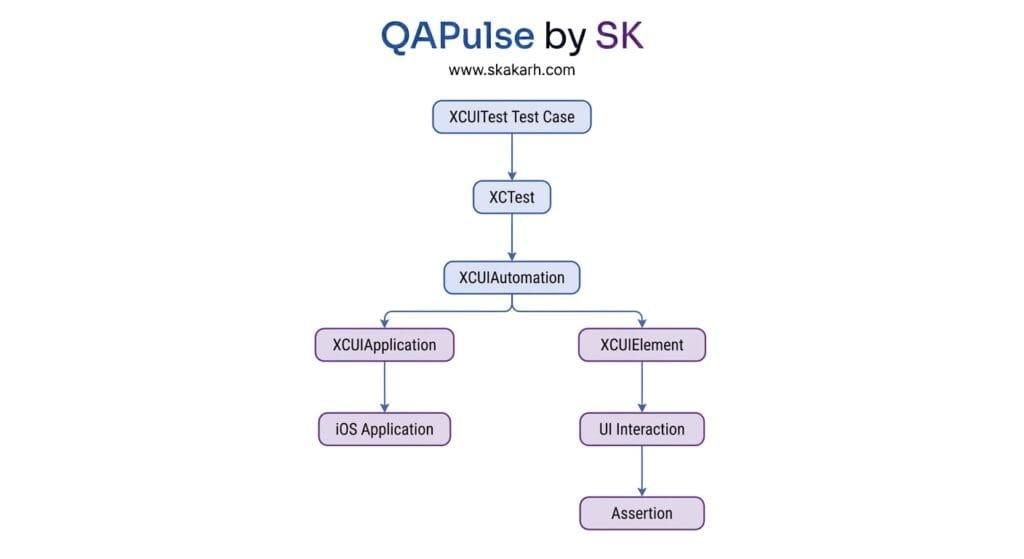
The test starts inside a test target.
XCTest manages the test lifecycle and assertions.
XCUIAutomation provides UI automation capabilities.
XCUIApplication represents the application under test. Apple describes it as a proxy that can launch, monitor, activate, and terminate a test application. (Apple Developer)
XCUIElement represents an individual UI element.
The test then performs an action and verifies the resulting state.
The Core Objects
Three concepts appear repeatedly in XCUITest code:
| Object | Purpose |
|---|---|
XCTestCase | Defines the test case |
XCUIApplication | Controls the application |
XCUIElement | Represents an element in the UI |
A basic test can look like this:
import XCTest

final class LoginTests: XCTestCase {

    func testSuccessfulLogin() {
        let app = XCUIApplication()
        app.launch()

        let username = app.textFields["usernameField"]
        let password = app.secureTextFields["passwordField"]
        let loginButton = app.buttons["loginButton"]

        username.tap()
        username.typeText("qa@example.com")

        password.tap()
        password.typeText("Password123")

        loginButton.tap()

        XCTAssertTrue(app.staticTexts["Home"].waitForExistence(timeout: 5))
    }
}
The workflow is straightforward:
Launch → Find → Interact → Wait → Assert
This simple pattern is the foundation of much larger XCUITest frameworks.
How XCUITest Finds UI Elements
XCUITest does not simply operate on screen coordinates by default.
It uses UI element queries.
For example:
app.buttons["loginButton"]or:
app.textFields["usernameField"]Apple’s XCUIAutomation framework provides XCUIElementQuery for defining search criteria used to identify elements. (Apple Developer)
This is important because coordinate-based automation can become fragile.
For example:
app.coordinate(withNormalizedOffset: CGVector(dx: 0.5, dy: 0.7)).tap()The test knows where to tap, but it does not necessarily know what it is tapping.
A semantic query is usually better:
app.buttons["loginButton"].tap()The second approach communicates intent.
3. XCUITest Architecture and UI Interaction
XCUIApplication
XCUIApplication is the entry point for interacting with the application under test.
A common setup is:
let app = XCUIApplication()
app.launch()
You can also provide launch arguments and environment variables.
For example:
let app = XCUIApplication()

app.launchArguments = [
    "-UITesting"
]

app.launchEnvironment = [
    "API_ENV": "staging"
]

app.launch()
This is useful for controlling test behavior.
A test environment might disable animations, point the application toward a test backend, or activate test-only configuration.
Apple also provides APIs for application state and lifecycle operations such as activation, termination, launching, and waiting for application state. (Apple Developer)
XCUIElement
XCUIElement represents a UI element that your test can inspect or interact with.
Examples include:
app.buttons["Login"]
app.textFields["Email"]
app.secureTextFields["Password"]
app.staticTexts["Welcome"]
app.images["Profile"]
app.cells["Product"]
For iOS, XCUIElement supports interactions such as tapping, swiping, pinching, and rotating. It also provides APIs such as waitForExistence(timeout:) for synchronization. (Apple Developer)
A good test should normally wait for meaningful UI state instead of inserting arbitrary delays.
Avoid:
sleep(5)Prefer:
XCTAssertTrue(
    app.buttons["Continue"].waitForExistence(timeout: 5)
)
Then interact:
app.buttons["Continue"].tap()This makes the test more responsive to actual application behavior.
Accessibility Identifiers
One of the most important practices in reliable XCUITest automation is giving important UI elements stable identifiers.
For example, an application might define:
loginButton.accessibilityIdentifier = "loginButton"The test can then use:
app.buttons["loginButton"].tap()Apple’s UIAccessibilityIdentification protocol provides accessibilityIdentifier specifically for uniquely identifying UI elements, and those identifiers can be used by UI automation. (Apple Developer)
This gives developers and QA engineers a shared contract.
Developer:
button.accessibilityIdentifier = "loginButton"QA automation:
app.buttons["loginButton"].tap()This is considerably more maintainable than relying on unstable indexes or screen coordinates.
4. What Can XCUITest Actually Test?
User Interactions
XCUITest is particularly useful for workflows that represent real user behavior.
Examples include:
- Login
- Registration
- Search
- Checkout
- Payment flows
- Shopping cart
- Profile updates
- Form submission
- Navigation
- Logout
- Settings
- Push-notification-related flows
- Permission-related flows
- Onboarding
For example:
func testSearchProduct() {
    let app = XCUIApplication()
    app.launch()

    let searchField = app.searchFields["searchField"]

    searchField.tap()
    searchField.typeText("iPhone")

    app.buttons["searchButton"].tap()

    XCTAssertTrue(
        app.staticTexts["iPhone"].waitForExistence(timeout: 5)
    )
}
This test validates behavior from the user’s perspective.
Forms and Validation
Forms are another strong use case.
func testInvalidEmailValidation() {
    let app = XCUIApplication()
    app.launch()

    let email = app.textFields["emailField"]
    let submit = app.buttons["submitButton"]

    email.tap()
    email.typeText("invalid-email")

    submit.tap()

    XCTAssertTrue(
        app.staticTexts["Invalid email address"]
            .waitForExistence(timeout: 3)
    )
}
This tests more than business logic.
It checks:
- The field exists.
- The user can enter data.
- The button is accessible.
- Validation is triggered.
- The validation message appears.
Gestures and Device Interaction
Modern mobile applications depend heavily on gestures.
XCUITest supports interactions such as:
app.swipeUp()and element-level gestures such as:
app.collectionViews.firstMatch.swipeUp()XCUITest can also work with device-level interactions through XCUIDevice. Apple documents capabilities including simulating device buttons, orientation changes, and Siri interaction. (Apple Developer)
This makes it possible to test workflows that extend beyond simple button clicks.
Screenshots and Evidence
Test failures are much easier to investigate when automation produces useful evidence.
XCUIAutomation includes screenshot-related APIs such as XCUIScreenshot, and XCUITest can capture screenshots of relevant UI states. (Apple Developer)
A failure report can therefore contain:
- Failed assertion
- Screenshot
- Test name
- Device configuration
- UI state
- Execution details
This is particularly valuable in CI/CD environments where the tester is not physically watching the test run.
5. Why XCUITest iOS Testing Matters
Native Apple Integration
The biggest advantage is simple:
XCUITest belongs to Apple’s testing ecosystem.
You do not need to introduce an external automation engine merely to automate an iOS application’s UI.
XCTest integrates with Xcode’s testing workflow, while XCUIAutomation provides the UI automation layer. (Apple Developer)
For teams already building applications in Swift and Xcode, this creates a natural development experience.
Real User-Flow Validation
Unit tests answer questions such as:
Does this function return the correct value?
XCUITest answers a different question:
Can a user actually complete this workflow?
That distinction is critical.
Consider a checkout feature.
Unit tests might verify:
calculateTotal()
applyDiscount()
calculateTax()
API tests might verify:
POST /checkout
POST /payment
GET /order
But XCUITest can verify:
Open app
→ Login
→ Add product
→ Open cart
→ Checkout
→ Enter payment information
→ Confirm
→ Verify order confirmation
Each testing layer catches a different category of failure.
Test Pyramid Position
XCUITest should not replace unit or integration testing.
Apple’s testing guidance recommends a balanced testing pyramid: many fast, isolated tests, fewer integration tests, and a smaller set of UI tests covering important user scenarios. Apple also notes that UI tests generally take longer to run and can have more variables that introduce failures. (Apple Developer)
A practical iOS strategy can look like this:
              UI / XCUITest
             ───────────────
             Critical journeys

          Integration Tests
         ────────────────────
          Component behavior

             Unit Tests
        ─────────────────────
        Business logic / models
The goal is not to automate everything through the UI.
The goal is to automate the right things at the right level.
Regression Protection
UI automation becomes particularly valuable as applications grow.
Imagine an application with:
- 50 screens
- 200 UI components
- 30 major workflows
- Multiple backend integrations
- Multiple device configurations
Manually repeating every critical workflow after every release becomes expensive.
A well-designed XCUITest suite can repeatedly validate critical paths.
For example:
| Feature | Example XCUITest |
|---|---|
| Authentication | Login successfully |
| Registration | Create account |
| Search | Search and display result |
| Cart | Add/remove product |
| Checkout | Complete purchase |
| Profile | Update user information |
| Navigation | Move between major screens |
| Logout | End authenticated session |
This gives the team a repeatable regression safety net.
6. XCUITest Limitations, Comparisons, and Best Practices
Where XCUITest Can Struggle
XCUITest is powerful, but it is not magic.
Common challenges include:
- Slow UI execution compared with unit tests
- Synchronization problems
- Poorly designed element locators
- Animations
- Network dependency
- Unstable test data
- Environment problems
- Permission dialogs
- OS/device differences
- Large UI test suites becoming expensive to maintain
Apple itself notes that UI tests take longer than lower-level tests and can be affected by different application variables. (Apple Developer)
This is why blindly increasing the number of UI tests is usually a poor automation strategy.
XCUITest vs Appium
XCUITest and Appium solve overlapping problems, but their positioning is different.
| Area | XCUITest | Appium |
|---|---|---|
| iOS native integration | Excellent | Good |
| Apple ecosystem | Native | External |
| Primary language | Swift / Objective-C ecosystem | Multiple client languages |
| Android support | No | Yes |
| Cross-platform strategy | Limited | Strong |
| iOS UI automation | Excellent | Excellent |
| Setup for native iOS team | Natural | Additional tooling |
| Device automation | Strong | Strong |
| Best fit | iOS-focused teams | Cross-platform automation |
If your organization needs one automation strategy covering both Android and iOS, Appium can be attractive.
If your organization is heavily invested in native iOS development, XCUITest provides a particularly natural fit.
Unit Testing vs XCUITest
| Testing Layer | Main Question | Typical Speed | Example |
|---|---|---|---|
| Unit | Does the logic work? | Fast | Calculate tax |
| Integration | Do components work together? | Medium | Repository + API |
| UI | Can the user complete the workflow? | Slower | Checkout flow |
| XCUITest | Does the iOS UI behave correctly? | Slower | Tap, type, navigate, assert |
The strongest strategy uses these layers together.
Best Practices for Reliable XCUITest
1. Use stable accessibility identifiers
Prefer:
app.buttons["loginButton"]over fragile selectors based on changing UI structure.
2. Avoid unnecessary sleeps
Bad:
sleep(5)Better:
XCTAssertTrue(
    app.staticTexts["Dashboard"].waitForExistence(timeout: 5)
)
3. Test business-critical journeys
Do not automate every possible UI interaction.
Prioritize:
- Authentication
- Payments
- Checkout
- Registration
- Critical navigation
- Core product workflows
4. Keep tests independent
A test should ideally establish its own required state.
Avoid:
Test A creates account
      ↓
Test B uses account
      ↓
Test C modifies account
Prefer:
Test A → independent
Test B → independent
Test C → independent
Independent tests are easier to retry, parallelize, and debug.
5. Control test data
Unstable data creates unstable tests.
Use predictable test accounts, controlled environments, and repeatable backend states where possible.
6. Reduce unnecessary UI coverage
If a calculation can be tested at the unit level, do not make a UI test for every calculation scenario.
Use XCUITest for what the UI layer uniquely proves.
7. Use recording as a starting point, not the final framework
Xcode can record UI interactions and generate element queries. Apple specifically recommends selecting meaningful queries rather than blindly keeping fragile selectors such as indexes when a more stable query is available. (Apple Developer)
Recording is useful for learning the API and discovering UI elements.
Production automation should still be deliberately designed.
A Practical XCUITest Strategy
A mature iOS automation suite might follow this model:
                 iOS Test Strategy
                        │
       ┌────────────────┼────────────────┐
       │                │                │
     Unit           Integration        UI
       │                │                │
   Fast tests       Component tests   XCUITest
       │                │                │
       └────────────────┼────────────────┘
                        │
                  Critical Flows
                        │
                    CI / CD
For example:
Pull Request
    ↓
Unit Tests
    ↓
Integration Tests
    ↓
Selected XCUITest Smoke Suite
    ↓
Build
    ↓
Broader Regression Suite
    ↓
Release
This approach keeps feedback fast while still protecting critical user journeys.
Final Thoughts
XCUITest iOS Testing matters because it validates the application from the user’s perspective.
Unit tests can tell you that your business logic is correct. API tests can tell you that your services communicate correctly. But neither automatically proves that a real user can successfully navigate the application and complete an important workflow.
XCUITest fills that gap.
It provides native iOS UI automation through XCTest and XCUIAutomation. It gives test engineers access to application proxies, UI elements, queries, gestures, assertions, screenshots, and device interactions. Apple’s documentation continues to position XCTest and XCUIAutomation as core technologies for UI testing in Xcode. (Apple Developer)
The key is not to build thousands of fragile UI tests.
Build a focused suite around the workflows that matter most.
A strong XCUITest strategy therefore looks like:
Fast unit tests + targeted integration tests + reliable XCUITest journeys + CI/CD execution.
That combination provides much better coverage than relying on any single testing layer.
And for QA engineers moving into iOS automation, learning XCUITest is an important step because it introduces a completely different perspective on automation: instead of only validating code or APIs, you validate how the application actually behaves when someone uses it.
The Takeaway
If you are starting iOS test automation, do not think of XCUITest as simply:
“A framework that clicks buttons.”
Think of it as:
“A native iOS testing layer that proves critical user journeys actually work.”
That mindset is the foundation for building reliable XCUITest iOS Testing frameworks—and it will become increasingly important as this series moves from fundamentals into real-world automation architecture, element strategies, synchronization, Page Object patterns, debugging, CI/CD, and advanced iOS testing.
Internal Blog Links
- 50 Playwright Commands Every QA Engineer Should Know
- What is QA Engineering? A Practical Guide to Modern Software Quality
- What is Playwright? A Powerful Guide to Modern Web Testing and QA Engineers
- QA Engineer vs SDET vs Quality Engineer: What’s the Difference?
- QA Engineer Portfolio: 7 Powerful Projects That Get Interviews in 2026
- Graph Engineering: The Powerful Layer After Loop Engineering
- Graph Testing: The Critical QA Layer After Loop-Based Test Automation
- Agentic Test Creation vs AI Test Generation: What’s the Real Difference?
- AI Test Automation With Humans in the Loop: Governance, Metrics, and the Practical Guide
Internal Series Links
- Learn MCP – Zero to Hero
- Learn AI Agents for QA – Zero to Hero
- Playwright Automation – Zero to Hero
- TencentDB Agent Memory: Complete Zero to Hero
- LangGraph: Complete Zero to Hero
- Learn Python – Zero to Hero
- OpenAI Codex: Complete Zero to Hero
- Cursor AI: Complete Zero to Hero
- Claude Code Tutorial: Complete Zero to Hero
- AutoGen: Complete Zero to Hero Guide
- Free QA Resources Built From Real Experience
- QA Glossary: Test Automation Terms Every Engineer Should Know
External Links
- Apple — XCTest Documentation — Official XCTest documentation covering unit, performance, and UI testing.
- Apple — XCUIAutomation Documentation — Official APIs for interacting with and inspecting iOS application UI.
- Apple — XCUIApplication Documentation — Application launch, activation, termination, and interaction capabilities.
- Apple — XCUIElement Documentation — Official documentation for interacting with UI elements in XCUITest.
- Apple — UIAccessibilityIdentification Documentation — Accessibility identifiers used to identify UI elements reliably during automation.
- Apple — XCUIDevice Documentation — Device-level interactions available through XCUITest.
- Apple — Testing Documentation — Apple’s broader guidance for building and maintaining an effective testing strategy.
- Apple — Recording UI Automation for Testing — Official guide to recording and creating UI automation tests.
AI Overview & Answer Engine Optimization
- What is XCUITest iOS Testing? → Apple’s native approach for automating and validating iOS application UI.
- How does XCUITest work? → XCTest manages the test while XCUIAutomation interacts with application UI elements.
- What can XCUITest test? → Taps, text input, navigation, gestures, UI states, screenshots, and critical user workflows.
- XCUITest vs Appium? → XCUITest is native to Apple’s ecosystem; Appium is designed for broader cross-platform automation.
- Does XCUITest replace unit testing? → No. XCUITest validates UI workflows while unit tests validate isolated application logic.
People Asked Questions
What is XCUITest iOS Testing?
XCUITest iOS Testing is Apple’s approach to automating and validating iOS application user interfaces using XCTest and XCUIAutomation.
Is XCUITest part of XCTest?
XCUITest is commonly used to describe iOS UI testing built with XCTest and XCUIAutomation. XCTest provides the testing framework, while XCUIAutomation provides APIs for interacting with and inspecting the UI. (Apple Developer)
What can XCUITest automate?
It can automate UI interactions such as tapping, typing, scrolling, gestures, navigation, UI-state verification, screenshots, and selected device interactions.
Is XCUITest better than Appium?
Neither is universally better. XCUITest is particularly strong for native iOS-focused automation, while Appium is attractive when cross-platform automation across iOS and Android is a major requirement.
Does XCUITest replace unit testing?
No. XCUITest and unit testing operate at different levels. A healthy iOS testing strategy uses both.
Why are accessibility identifiers important in XCUITest?
They provide stable, meaningful identifiers that allow automation to locate UI elements without depending on fragile screen positions or indexes. Apple’s accessibility APIs explicitly support identifiers for UI elements used by automation. (Apple Developer)
Should every iOS feature have an XCUITest?
No. UI tests are slower and more expensive to maintain than lower-level tests. Focus XCUITest coverage on critical user journeys and use unit or integration tests for lower-level behavior. (Apple Developer)
Can XCUITest run on real iPhones?
Yes. XCUITest is designed for iOS UI testing and can be executed in Apple’s supported testing environments, including simulators and physical devices depending on the project and execution setup.
Is XCUITest still relevant with Swift Testing?
Yes. Apple’s current documentation states that Swift Testing is available for new unit-test development, while XCTest continues to be used for UI tests. (Apple Developer)
Continue Learning
Explore more expert articles on Mobile Testing, Backend & API, AI & Agentic, AI Tools, n8n, LangChain, CrewAI, MCP Servers, AI Agents, LlamaIndex, Docker, FastAPI, Playwright, Cypress, Test Automation, DevOps, and Software Engineering at www.skakarh.com.
QAPulse by SK delivers expert release analysis, AI engineering insights, enterprise automation strategies, migration guidance, DevOps best practices, and practical testing knowledge to help software professionals build scalable, intelligent, and production-ready software systems.