QA
QA
XCUITest Project Structure is the foundation of a maintainable iOS UI automation framework. When an Xcode project starts with only a few tests, almost any organization can appear to work. As the suite grows, however, poorly separated test targets, duplicated selectors, mixed responsibilities, and unclear dependencies make automation harder to maintain.
For SDETs, the goal is not simply to create UI tests that pass. The goal is to design a structure where tests remain discoverable, isolated, scalable, debuggable, and CI/CD-ready.
Apple positions XCTest as the framework for unit, performance, and UI testing, with XCUIAutomation providing UI interaction and validation capabilities. Apple also recommends a balanced testing strategy with many fast unit tests, fewer integration tests, and a smaller set of UI tests for important user workflows. (Apple Developer)
What Is XCUITest Project Structure?
XCUITest Project Structure is the organization of an iOS UI automation project into test targets, test cases, screen or page abstractions, test data, utilities, configuration, and supporting resources.
A good structure separates test intent from UI implementation details.
A simple architecture can look like this:
iOS Application
│
├── App Target
│   ├── Views
│   ├── ViewModels
│   ├── Services
│   └── Application Code
│
├── Unit Test Target
│   └── Logic Tests
│
└── UI Test Target
    ├── Test Cases
    ├── Screens
    ├── Components
    ├── Test Data
    ├── Utilities
    └── Configuration
The important idea is that UI automation should have its own architectural boundary.
Key Points
- UI tests normally live in a dedicated test target.
XCTestCaseorganizes related test methods.XCUIApplicationrepresents the application under test.- XCUIAutomation provides UI interaction and element querying.
- Screen objects can isolate UI selectors.
- Test data should remain separate from test logic.
- Utilities should contain reusable infrastructure.
- Test targets should have clear responsibilities.
- UI tests should focus on important user workflows.
- The structure should support local execution and CI/CD.
Apple’s documentation states that test cases are groups of related test methods and that test cases are subclasses of XCTestCase. Test methods are automatically detected when they follow XCTest’s test-method conventions. (Apple Developer)
Why XCUITest Project Structure Matters
A UI test suite grows differently from application code.
Initially, you may have:
MyAppUITests.swiftAfter several months, it can become:
LoginTests.swift
CheckoutTests.swift
SearchTests.swift
ProfileTests.swift
SettingsTests.swift
NotificationsTests.swift
Each file may contain:
app.buttons["loginButton"]
app.textFields["emailField"]
app.buttons["checkoutButton"]
Repeated selectors quickly become an architectural problem.
When the application’s UI changes, dozens of tests may require updates.
A well-designed XCUITest Project Structure creates boundaries between:
Test Intent
    ↓
Screen Abstraction
    ↓
UI Locator
    ↓
Application
This makes the suite easier to evolve.
Test Target Architecture
A test target is one of the most important architectural boundaries in Xcode.
Apple’s testing documentation recommends adding test targets to an Xcode project for logic testing, integration testing, UI workflows, and performance testing. (Apple Developer)
A typical application can have:
MyApp
│
├── MyApp
│
├── MyAppTests
│
└── MyAppUITests
The responsibilities are different.
| Target | Primary Responsibility |
|---|---|
MyApp | Production application |
MyAppTests | Unit and lower-level tests |
MyAppUITests | UI automation |
| Test Plans | Test configuration and execution selection |
The exact naming can vary, but the architectural separation should remain clear.
Unit Test Target vs UI Test Target
A common mistake is treating every test as a UI test.
Consider a login calculation:
func isValidEmail(_ email: String) -> BoolThere is usually little value in launching the application and navigating through the login screen merely to test this function.
A unit test can validate the behavior much faster.
A UI test should instead validate something like:
User enters credentials
        ↓
Taps Sign In
        ↓
Application navigates
        ↓
Dashboard appears
Apple’s current testing guidance recommends a pyramid with a large number of fast unit tests, fewer integration tests, and UI tests focused on common user workflows. (Apple Developer)
This distinction should influence your XCUITest Project Structure from the beginning.
Recommended Folder Structure
For a growing automation suite, a practical structure is:
MyAppUITests/
│
├── Tests/
│   ├── Login/
│   │   └── LoginTests.swift
│   │
│   ├── Checkout/
│   │   └── CheckoutTests.swift
│   │
│   └── Search/
│       └── SearchTests.swift
│
├── Screens/
│   ├── LoginScreen.swift
│   ├── DashboardScreen.swift
│   └── CheckoutScreen.swift
│
├── Components/
│   ├── NavigationBar.swift
│   └── AlertComponent.swift
│
├── Data/
│   ├── UserData.swift
│   └── ProductData.swift
│
├── Utilities/
│   ├── WaitHelper.swift
│   └── ScreenshotHelper.swift
│
└── Configuration/
    └── TestConfiguration.swift
This is not an Apple-mandated folder structure.
It is an architectural pattern for keeping responsibilities separated.
The most important principle is separation of concerns, not the exact folder names.
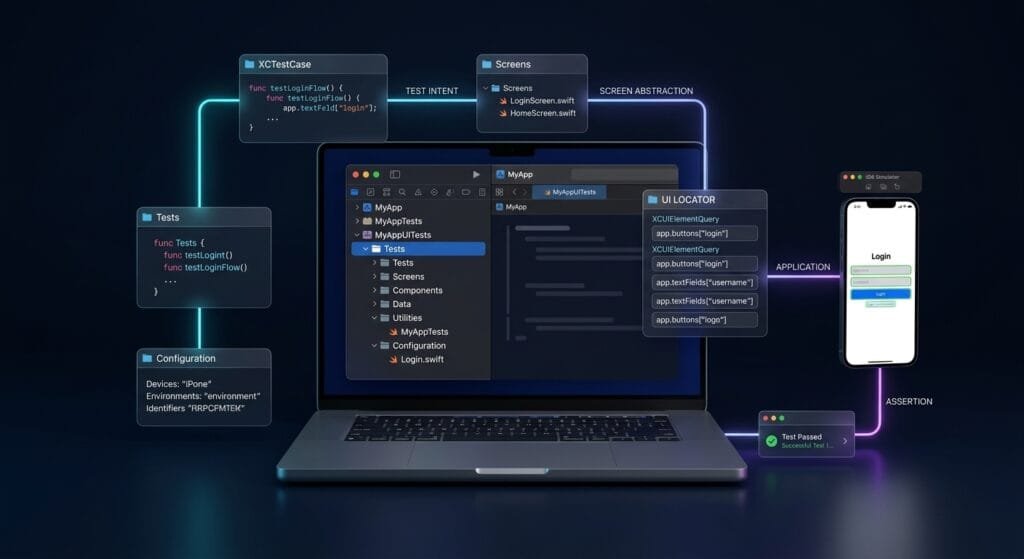
Screens and Page Objects
The Screens layer is where UI implementation details can be isolated.
For example:
import XCTest

final class LoginScreen {

    private let app: XCUIApplication

    init(app: XCUIApplication) {
        self.app = app
    }

    private var emailField: XCUIElement {
        app.textFields["emailField"]
    }

    private var passwordField: XCUIElement {
        app.secureTextFields["passwordField"]
    }

    private var loginButton: XCUIElement {
        app.buttons["loginButton"]
    }

    func enterEmail(_ email: String) {
        emailField.tap()
        emailField.typeText(email)
    }

    func enterPassword(_ password: String) {
        passwordField.tap()
        passwordField.typeText(password)
    }

    func tapLogin() {
        loginButton.tap()
    }
}
The test can then focus on behavior:
func testSuccessfulLogin() {
    let app = XCUIApplication()
    app.launch()

    let login = LoginScreen(app: app)

    login.enterEmail("qa@example.com")
    login.enterPassword("Password123")
    login.tapLogin()

    XCTAssertTrue(
        app.staticTexts["Dashboard"]
            .waitForExistence(timeout: 5)
    )
}
The test communicates intent without exposing every locator.
Apple describes XCUIElementQuery as the object that defines search criteria for identifying UI elements, while XCUIAutomation provides the mechanisms for controlling and inspecting the application’s interface. (Apple Developer)
Test Cases
The Tests layer should describe business workflows.
For example:
final class LoginTests: XCTestCase {

    private var app: XCUIApplication!

    override func setUpWithError() throws {
        continueAfterFailure = false

        app = XCUIApplication()
        app.launch()
    }

    func testSuccessfulLoginDisplaysDashboard() {
        let login = LoginScreen(app: app)

        login.enterEmail("qa@example.com")
        login.enterPassword("Password123")
        login.tapLogin()

        XCTAssertTrue(
            app.staticTexts["Dashboard"]
                .waitForExistence(timeout: 5)
        )
    }
}
The test should answer:
What user behavior are we validating?
It should not become a dumping ground for selectors, waits, test data, and infrastructure.
Apple recommends naming test cases and methods so that their purpose is clear. (Apple Developer)
Test Case Naming
Weak:
func testLogin()Better:
func testSuccessfulLoginDisplaysDashboard()Weak:
func testCheckout()Better:
func testCheckoutCompletesWithValidPayment()A strong name makes CI failures easier to understand.
Components Layer
Not every UI element belongs to an entire screen.
A navigation bar may appear on:
Home
Profile
Search
Settings
Instead of duplicating its selectors, create a reusable component.
final class NavigationBar {

    private let app: XCUIApplication

    init(app: XCUIApplication) {
        self.app = app
    }

    var profileButton: XCUIElement {
        app.buttons["profileButton"]
    }

    var searchButton: XCUIElement {
        app.buttons["searchButton"]
    }

    func openProfile() {
        profileButton.tap()
    }
}
This provides another level of abstraction:
Test
 ↓
Screen
 ↓
Component
 ↓
XCUIElement
It becomes particularly useful when the same UI component appears throughout the application.
Test Data Layer
Test data should not be scattered throughout test methods.
Avoid:
login.enterEmail("qa@example.com")
login.enterPassword("Password123")
repeated across dozens of tests.
Instead:
struct UserData {

    static let validUser = (
        email: "qa@example.com",
        password: "Password123"
    )
}
Then:
let user = UserData.validUser

login.enterEmail(user.email)
login.enterPassword(user.password)
For larger frameworks, test data can eventually move to external JSON, property lists, environment variables, fixtures, or service-backed data.
The important architectural principle is that test data should not control the structure of the test itself.
Utilities Layer
Utilities should contain reusable infrastructure.
Examples:
Utilities/
├── WaitHelper.swift
├── ScreenshotHelper.swift
├── LaunchHelper.swift
└── AccessibilityHelper.swift
A utility might provide:
func waitForElement(
    _ element: XCUIElement,
    timeout: TimeInterval = 5
) -> Bool {
    element.waitForExistence(timeout: timeout)
}
However, avoid creating a massive TestUtils.swift file containing unrelated functionality.
A utility should have one clear responsibility.
Setup and Teardown
XCTestCase supports setup and teardown around tests. Apple documents these mechanisms as the place to prepare initial state and clean up resources after tests complete. (Apple Developer)
A basic setup:
override func setUpWithError() throws {
    continueAfterFailure = false

    app = XCUIApplication()
    app.launch()
}
Teardown can be used when cleanup is required:
override func tearDownWithError() throws {
    app = nil
    try super.tearDownWithError()
}
Do not place every possible initialization operation in global setup.
Setup should be intentional.
The Dependency Direction
A clean architecture should generally flow in one direction:
Test Case
    ↓
Screen
    ↓
Component
    ↓
XCUIElement
    ↓
XCUIApplication
Test data can support the test layer:
Test Data
    ↓
Test Case
Configuration can support the execution environment:
Configuration
    ↓
Test Infrastructure
The test should not directly depend on implementation details everywhere.
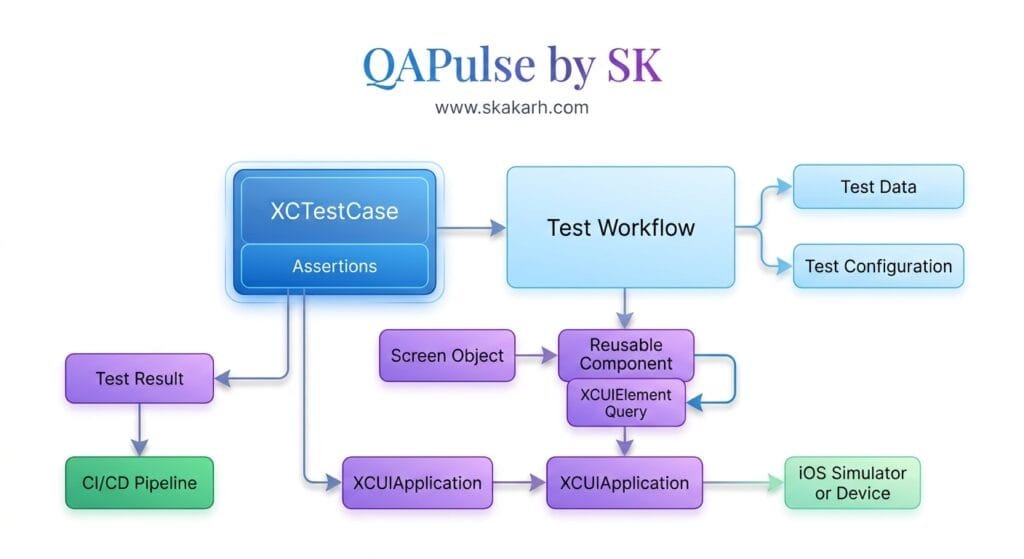
6 Core Pillars of XCUITest Project Structure
1. Target Separation
Keep application, unit-test, and UI-test responsibilities clearly separated.
2. Test Intent
Tests should describe user behavior rather than implementation details.
3. Screen Abstraction
Centralize screen-specific selectors and interactions.
4. Reusable Components
Extract repeated UI controls and workflows.
5. Data and Configuration
Keep test data and environment configuration outside test logic.
6. Execution Architecture
Design the suite for local execution, test plans, CI/CD, reporting, and debugging.
Key Architectural Takeaways for SDETs
Keep UI Tests Independent
A test should not depend on another test completing successfully.
Bad:
testLogin()
    ↓
testCheckout()
    ↓
testLogout()
Better:
testLogin()
    └── independent setup

testCheckout()
    └── independent setup

testLogout()
    └── independent setup
Centralize Selectors
If a selector changes, ideally one screen object should require modification rather than twenty tests.
Keep Business Intent in Tests
This:
login.login(
    email: user.email,
    password: user.password
)
is easier to understand than:
app.textFields["emailField"].tap()
app.textFields["emailField"].typeText(...)
app.secureTextFields["passwordField"].tap()
app.secureTextFields["passwordField"].typeText(...)
app.buttons["loginButton"].tap()
Avoid Over-Abstraction
Not every single line needs another wrapper.
An abstraction is useful when it:
- Removes duplication
- Improves readability
- Encapsulates change
- Represents a meaningful UI concept
Design for Failure Diagnosis
When a test fails in CI, the structure should make it obvious whether the failure came from:
Test Logic
UI Locator
Application State
Test Data
Environment
Synchronization
That is a major SDET concern.
Test Target Dependencies
A UI test target needs to know which application it should test.
Conceptually:
MyAppUITests
      │
      ▼
Target Application
      │
      ▼
MyApp
The test target should not become tightly coupled to internal application implementation unless the testing requirement explicitly needs it.
UI testing is intentionally focused on interacting with the application through its UI. Apple describes XCUIAutomation as a mechanism for replicating user interaction sequences and inspecting application UI state. (Apple Developer)
This separation is one reason UI tests can remain useful even as internal application implementation changes.
Test Plans
As the suite grows, test execution becomes another architectural concern.
You may have:
Smoke
Regression
Release
Localization
Accessibility
Rather than maintaining completely different test implementations, test plans can help control which tests execute in different contexts.
Apple documents test plans as a way to configure testing at different stages of the software engineering process. (Apple Developer)
A possible strategy:
| Test Plan | Purpose |
|---|---|
| Smoke | Critical workflows |
| PR | Fast validation |
| Regression | Broad functional coverage |
| Release | Release confidence |
| Localization | Language/region validation |
Test Attachments and Diagnostics
A mature XCUITest Project Structure should also consider failure evidence.
Useful artifacts include:
- Screenshots
- Activities
- Test logs
- Failure messages
- UI state information
XCTest supports activities and attachments so complex tests can be broken into meaningful substeps and output such as screenshots can be attached for later analysis. (Apple Developer)
For example:
let screenshot = XCUIScreen.main.screenshot()

let attachment = XCTAttachment(
    screenshot: screenshot
)

attachment.name = "Login Failure"
attachment.lifetime = .keepAlways

add(attachment)
This can significantly improve CI debugging.
CI/CD Architecture
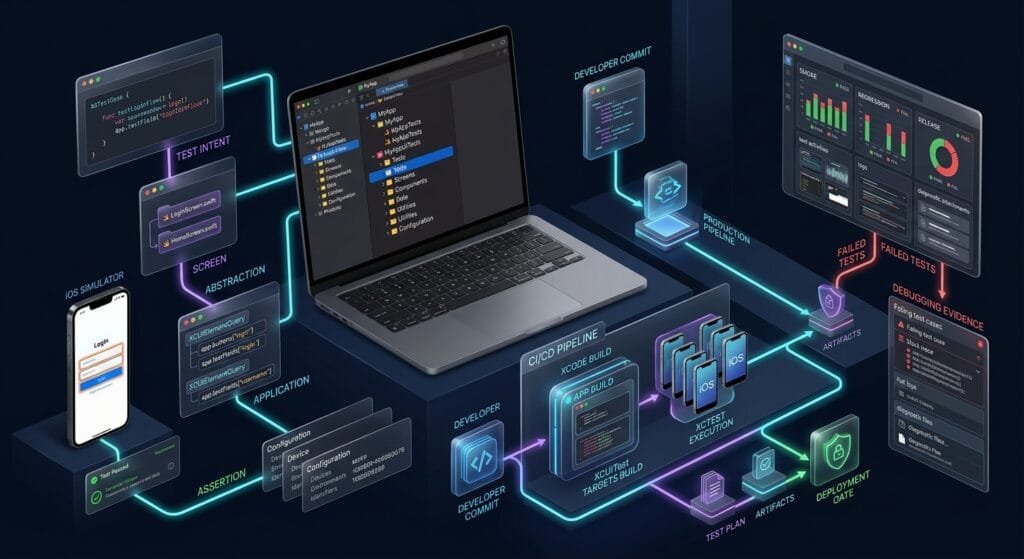
The architecture should eventually support automated execution.
A practical flow is:
Developer Commit
       ↓
Build
       ↓
Unit Tests
       ↓
UI Smoke Tests
       ↓
Regression Tests
       ↓
Artifacts
       ↓
Quality Gate
       ↓
Deployment
The important point is that UI tests should not become the only validation layer.
Apple’s current testing guidance explicitly emphasizes balancing different test types because UI tests provide high-fidelity validation but take longer and can have more failure variables. (Apple Developer)
A mature XCUITest Project Structure therefore supports multiple execution levels.
Recommended Enterprise Structure
For a larger SDET framework, the structure could evolve toward:
MyAppUITests/
│
├── Tests/
│   ├── Smoke/
│   ├── Regression/
│   ├── CriticalFlows/
│   └── Accessibility/
│
├── Screens/
│   ├── Login/
│   ├── Dashboard/
│   ├── Search/
│   └── Checkout/
│
├── Components/
│   ├── Navigation/
│   ├── Alerts/
│   └── Forms/
│
├── Data/
│   ├── Users/
│   ├── Products/
│   └── Fixtures/
│
├── Utilities/
│   ├── Waits/
│   ├── Screenshots/
│   └── Logging/
│
├── Configuration/
│   ├── Environment/
│   └── TestPlan/
│
└── Resources/
    └── TestFixtures/
This structure is particularly useful when multiple SDETs contribute to the same automation repository.
Common Structural Mistakes
One Giant UI Test File
MyAppUITests.swiftcontaining hundreds of tests.
Problem: Poor discoverability and maintenance.
Selectors Inside Every Test
Problem: UI changes create widespread modifications.
Test Data Hardcoded Everywhere
Problem: Difficult environment and scenario management.
One Global Utility File
Problem: Becomes a dumping ground.
Tests Depending on Other Tests
Problem: Parallel execution and debugging become unreliable.
Excessive UI Coverage
Problem: Slow feedback and increased maintenance.
No Target Separation
Problem: Unit, integration, and UI responsibilities become blurred.
A Practical SDET Decision Model
When deciding where something belongs, ask:
| Question | Place |
|---|---|
| Is this user behavior? | Test |
| Is this screen-specific? | Screen |
| Is this shared UI? | Component |
| Is this test input? | Data |
| Is this reusable infrastructure? | Utility |
| Is this environment-specific? | Configuration |
| Is this production behavior? | App target |
| Is this isolated business logic? | Unit test |
This simple model prevents many structural problems.
AI Overview & Answer Engine Optimization
XCUITest Project Structure is the architectural organization of an iOS UI automation suite into test targets, test cases, screen abstractions, reusable components, test data, utilities, configuration, and execution resources.
Key Points
- Keep UI automation in a dedicated UI test target.
- Organize tests by business workflow or functional area.
- Use
XCTestCasefor related test methods. - Keep selectors inside screen abstractions.
- Extract reusable UI components.
- Separate test data from test logic.
- Keep utilities focused.
- Use test plans for execution control.
- Design the structure for CI/CD and diagnostics.
What Is XCUITest Project Structure?
It is the organization of an XCUITest automation suite into logical layers such as test cases, screens, components, data, utilities, configuration, and test resources, usually inside a dedicated UI test target.
What Should an XCUITest Project Contain?
A scalable project commonly contains:
Tests
Screens
Components
Data
Utilities
Configuration
Resources
Should XCUITest Have a Separate Target?
Yes. A dedicated UI test target provides a clear boundary for UI automation and integrates with Xcode’s testing workflow.
What Is the Role of XCTestCase?
XCTestCase is the primary class for defining test cases and test methods. Related test methods are grouped into test cases. (Apple Developer)
Where Should XCUITest Selectors Be Stored?
For a maintainable framework, screen-specific selectors should generally be encapsulated in screen/page abstractions rather than duplicated across test methods.
AI Overview Summary
A scalable XCUITest architecture separates UI test targets from application code and organizes automation into test cases, screen objects, reusable components, test data, utilities, configuration, and resources. This separation improves maintainability, debugging, parallel development, and CI/CD execution.
People Asked Questions
What is the best XCUITest project structure?
A practical structure separates Tests, Screens, Components, Data, Utilities, Configuration, and Resources inside a dedicated UI test target.
Should XCUITest use Page Object Model?
A Screen Object or Page Object approach can improve maintainability by keeping UI selectors and interactions separate from test intent.
Should unit tests and XCUITests be in the same target?
They should generally have distinct responsibilities and are commonly placed in separate test targets. Xcode supports different test targets for different testing purposes. (Apple Developer)
What belongs in an XCUITest test class?
The test class should primarily contain user workflows, setup, assertions, and test-specific orchestration.
Where should UI selectors be stored?
Screen or component abstractions are appropriate places for selectors that are reused or tied to a particular UI area.
Should test data be inside the test file?
Small scenario-specific values can be local, but reusable or complex test data should be separated into a data layer or fixtures.
What is the difference between an XCUITest target and an XCTest target?
An XCTest target is a general testing target that can contain XCTest-based tests, while an XCUITest target is configured for UI automation against an application. XCTest can support UI tests through XCUIAutomation. (Apple Developer)
How should XCUITest be organized for CI/CD?
Separate smoke, regression, and release-oriented suites, keep tests independent, use test plans where appropriate, and retain useful failure artifacts.
Final Takeaways
A scalable XCUITest Project Structure is not about creating more folders.
It is about creating clear responsibilities:
Test
 ↓
Screen
 ↓
Component
 ↓
Locator
 ↓
Application
 ↓
Assertion
 ↓
Result- The UI test target should own automation.
- The test should own user intent.
- The screen should own selectors.
- The component should own reusable UI behavior.
- The data layer should own test inputs.
- The configuration layer should own environment behavior.
- The CI pipeline should own execution strategy.
That separation gives SDETs a foundation that can grow from a few local UI tests into a production-grade iOS automation framework.
Internal Blog Links
- XCUITest iOS Testing: What it is and Why it Matters
- XCTest vs XCUITest: Understanding Apple’s Testing Frameworks
- XCUITest Setup on macOS and Xcode: Complete Beginner’s Guide
- Your First XCUITest: Building a Basic iOS UI Test
Internal Series Links
- Learn MCP – Zero to Hero
- Learn AI Agents for QA – Zero to Hero
- Playwright Automation – Zero to Hero
- TencentDB Agent Memory: Complete Zero to Hero
- LangGraph: Complete Zero to Hero
- Learn Python – Zero to Hero
- OpenAI Codex: Complete Zero to Hero
- Cursor AI: Complete Zero to Hero
- Claude Code Tutorial: Complete Zero to Hero
- AutoGen: Complete Zero to Hero Guide
- Free QA Resources Built From Real Experience
- QA Glossary: Test Automation Terms Every Engineer Should Know
External Links
- Apple — XCTest Documentation — Official XCTest framework documentation covering test cases, assertions, UI testing, performance testing, and execution. Apple — XCTest Documentation
- Apple — Xcode Testing — Official testing guidance covering test targets, test plans, test execution, and Apple’s testing pyramid. Apple — Xcode Testing
- Apple — Defining Test Cases and Test Methods — Official guidance for structuring XCTestCase classes and test methods. Apple — Defining Test Cases and Test Methods
- Apple — XCTestCase — API reference for test cases, setup, teardown, execution, and test management. Apple — XCTestCase
- Apple — XCUIAutomation — Official UI automation APIs for controlling applications and inspecting UI state. Apple — XCUIAutomation
- Apple — XCUIElementQuery — Official API documentation for identifying UI elements through queries. Apple — XCUIElementQuery
- Apple — Activities and Attachments — Official guidance for organizing test activities and attaching screenshots or other diagnostic data. Apple — Activities and Attachments
Continue Learning
Explore more expert articles on Mobile Testing, Backend & API, AI & Agentic, AI Tools, n8n, LangChain, CrewAI, MCP Servers, AI Agents, LlamaIndex, Docker, FastAPI, Playwright, Cypress, Test Automation, DevOps, and Software Engineering at www.skakarh.com.
QAPulse by SK delivers expert release analysis, AI engineering insights, enterprise automation strategies, migration guidance, DevOps best practices, and practical testing knowledge to help software professionals build scalable, intelligent, and production-ready software systems.