QA
QA
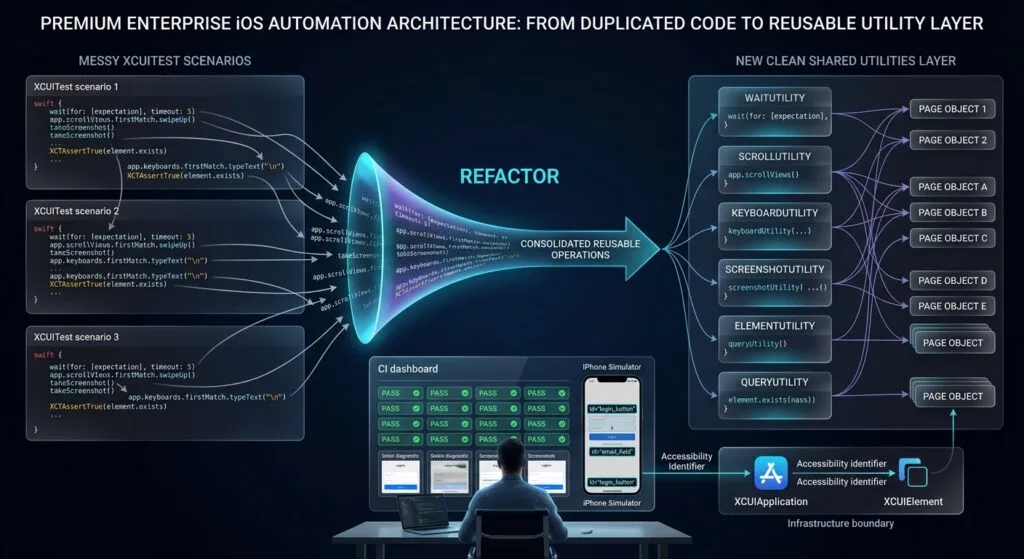
XCUITest test utilities provide the reusable infrastructure needed to keep iOS UI automation consistent, readable, and maintainable as a test suite grows. Instead of repeating waits, screenshots, scrolling, keyboard handling, application setup, element checks, and common gestures across dozens of tests, SDETs can centralize these operations into focused Swift utilities.
What are XCUITest Test Utilities?
XCUITest test utilities are reusable Swift helpers that encapsulate common automation operations used across multiple XCUITest cases, such as synchronization, screenshots, application lifecycle management, scrolling, keyboard control, element validation, and reusable gestures.
The goal is simple:
Repeated Automation Logic
        ↓
Reusable Utility
        ↓
Consistent Test Behavior
Apple’s XCUIAutomation framework provides APIs for controlling the application UI, querying elements, performing gestures, and inspecting UI state. XCUIElement also provides state checks and waiting capabilities such as exists, isHittable, and waitForExistence(timeout:). (Apple Developer)
Key Points
- Centralize repeated automation logic.
- Keep utilities focused on one responsibility.
- Avoid duplicating synchronization code.
- Reuse screenshot and diagnostic helpers.
- Create application lifecycle helpers.
- Build safe scrolling utilities.
- Encapsulate keyboard handling.
- Create reusable element validation methods.
- Prefer accessibility identifiers.
- Keep Page Objects focused on screen behavior.
- Keep test utilities independent from business scenarios.
- Avoid creating one giant utility class.
- Make helpers deterministic and configurable.
- Use utilities to reduce maintenance, not hide test intent.
Why Reusable Utilities Matter in XCUITest
A small test suite may contain code like:
app.buttons["login"].waitForExistence(
    timeout: 10
)

app.swipeUp()

XCTAssertTrue(
    app.staticTexts["Welcome"].exists
)
As the suite grows, the same operations appear everywhere.
You might eventually have:
50 tests
20 repeated waits
30 scrolling implementations
40 screenshot blocks
25 keyboard-handling blocks
The problem is not only duplicated code.
It is inconsistent behavior.
One test may wait five seconds.
Another may wait ten.
Another may use sleep().
Another may check exists.
Another may check isHittable.
Reusable utilities create a common automation vocabulary.
Utilities vs Page Objects
Utilities and Page Objects solve different problems.
| Layer | Responsibility |
|---|---|
| Test | Business scenario |
| Page Object | Screen-specific behavior |
| Component | Reusable UI component |
| Utility | Generic automation infrastructure |
| Application | Product behavior |
For example:
LoginTests
    ↓
LoginPage
    ↓
WaitUtility
    ↓
XCUIElement
The Page Object knows what screen behavior is required.
The utility knows how a generic operation should be performed.
Recommended Project Structure
A scalable XCUITest target can use:
UITests/
│
├── Tests/
│   ├── LoginTests.swift
│   ├── CheckoutTests.swift
│   └── SearchTests.swift
│
├── Pages/
│   ├── LoginPage.swift
│   ├── HomePage.swift
│   └── CheckoutPage.swift
│
├── Components/
│   ├── ProductCard.swift
│   └── NavigationBar.swift
│
├── Utilities/
│   ├── WaitUtility.swift
│   ├── ScreenshotUtility.swift
│   ├── ScrollUtility.swift
│   ├── KeyboardUtility.swift
│   └── ElementUtility.swift
│
└── Base/
    └── BaseUITest.swift
This structure prevents generic helpers from becoming mixed with screen-specific automation.
Utility Design Principle: One Responsibility
A good utility should have a narrow purpose.
Good:
WaitUtility
ScreenshotUtility
ScrollUtility
KeyboardUtility
ElementUtility
Avoid:
TestAutomationManagercontaining:
wait()
scroll()
login()
captureScreenshot()
callAPI()
createUser()
tapButton()
verifyCheckout()
That class eventually becomes a God Utility.
Building a Wait Utility
Synchronization is one of the most important areas for reusable automation infrastructure.
Apple provides waitForExistence(timeout:) for waiting until an element exists. (Apple Developer)
A simple helper:
enum WaitUtility {

    @discardableResult
    static func forExistence(
        _ element: XCUIElement,
        timeout: TimeInterval = 10
    ) -> Bool {

        element.waitForExistence(
            timeout: timeout
        )
    }
}
Usage:
let loginButton =
    app.buttons["login.button"]

XCTAssertTrue(
    WaitUtility.forExistence(
        loginButton
    )
)
This creates one consistent waiting mechanism.
Avoid Fixed Sleeps
Avoid:
sleep(5)Fixed delays do not represent application state.
If the application becomes ready after one second, four seconds are wasted.
If the application needs seven seconds, five seconds may be insufficient.
Prefer:
loginButton.waitForExistence(
    timeout: 10
)
This makes synchronization condition-based.
Waiting for Disappearance
Utilities can also support elements that should disappear.
enum WaitUtility {

    static func forDisappearance(
        _ element: XCUIElement,
        timeout: TimeInterval = 10
    ) -> Bool {

        element.waitForNonExistence(
            timeout: timeout
        )
    }
}
For example:
let spinner =
    app.activityIndicators[
        "loading.spinner"
    ]

XCTAssertTrue(
    WaitUtility.forDisappearance(
        spinner
    )
)
XCUIElement provides waitForNonExistence(timeout:) for this purpose. (Apple Developer)
Waiting for Hittability
Existence does not always mean that an element can be interacted with.
A helper can wait for both existence and hittability:
enum ElementUtility {

    static func waitForHittable(
        _ element: XCUIElement,
        timeout: TimeInterval = 10
    ) -> Bool {

        guard element.waitForExistence(
            timeout: timeout
        ) else {
            return false
        }

        let end =
            Date().addingTimeInterval(timeout)

        while Date() < end {

            if element.isHittable {
                return true
            }

            RunLoop.current.run(
                until: Date().addingTimeInterval(0.1)
            )
        }

        return false
    }
}
Now a test can explicitly wait for interaction readiness.
Creating a Safe Tap Utility
A reusable tap helper can combine synchronization and interaction:
enum ElementUtility {

    static func tap(
        _ element: XCUIElement,
        timeout: TimeInterval = 10
    ) {

        guard waitForHittable(
            element,
            timeout: timeout
        ) else {
            XCTFail(
                "Element was not hittable: \(element)"
            )
            return
        }

        element.tap()
    }

    static func waitForHittable(
        _ element: XCUIElement,
        timeout: TimeInterval
    ) -> Bool {
        // implementation
        true
    }
}
Usage:
ElementUtility.tap(
    app.buttons["login.button"]
)
This can be useful for highly repetitive framework operations.
However, don’t hide important business actions inside generic helpers.
A Page Object should still expose:
loginPage.submit()rather than forcing the test to understand every low-level interaction.
Screenshot Utility
Screenshots are valuable when diagnosing CI failures.
Instead of repeatedly writing:
let screenshot =
    XCUIScreen.main.screenshot()

let attachment =
    XCTAttachment(
        screenshot: screenshot
    )

attachment.lifetime =
    .keepAlways

add(attachment)
create:
enum ScreenshotUtility {

    static func capture(
        named name: String,
        in testCase: XCTestCase
    ) {

        let screenshot =
            XCUIScreen.main.screenshot()

        let attachment =
            XCTAttachment(
                screenshot: screenshot
            )

        attachment.name = name
        attachment.lifetime = .keepAlways

        testCase.add(
            attachment
        )
    }
}
Usage:
ScreenshotUtility.capture(
    named: "After Login",
    in: self
)
XCTest supports attachments as part of its test execution and diagnostics capabilities. (Apple Developer)

Scroll Utility
Scrolling is frequently duplicated in mobile tests.
A basic helper can encapsulate repeated scrolling:
enum ScrollUtility {

    static func untilVisible(
        _ element: XCUIElement,
        in container: XCUIElement,
        maxSwipes: Int = 10
    ) -> Bool {

        for _ in 0..<maxSwipes {

            if element.isHittable {
                return true
            }

            container.swipeUp()
        }

        return element.isHittable
    }
}
Usage:
let product =
    app.cells[
        "product.macbook"
    ]

let collection =
    app.collectionViews[
        "products.collection"
    ]

XCTAssertTrue(
    ScrollUtility.untilVisible(
        product,
        in: collection
    )
)
This is much cleaner than repeating the same scrolling loop in every test.
Why maxSwipes Matters
Never create infinite scrolling logic.
Bad:
while !element.isHittable {
    container.swipeUp()
}
If the element does not exist, the test can become stuck.
Prefer:
for _ in 0..<10 {
    // attempt to find element
}
Bounded operations are safer for CI.
Scroll Direction
A more flexible utility can support direction:
enum ScrollDirection {
    case up
    case down
    case left
    case right
}
Then:
enum ScrollUtility {

    static func swipe(
        _ container: XCUIElement,
        direction: ScrollDirection
    ) {

        switch direction {
        case .up:
            container.swipeUp()

        case .down:
            container.swipeDown()

        case .left:
            container.swipeLeft()

        case .right:
            container.swipeRight()
        }
    }
}
This keeps gesture implementation centralized.
Keyboard Utility
Keyboard handling is another common source of duplicated code.
A helper can dismiss the keyboard:
enum KeyboardUtility {

    static func dismiss(
        using app: XCUIApplication
    ) {

        let keyboard =
            app.keyboards.firstMatch

        guard keyboard.exists else {
            return
        }

        app.buttons[
            "Done"
        ].tap()
    }
}
The exact keyboard controls can vary depending on the application’s input configuration, so the helper should remain adaptable rather than assuming every screen uses the same button.
Clear Text Utility
A common operation is clearing a text field.
enum ElementUtility {

    static func clearText(
        _ field: XCUIElement
    ) {

        guard field.exists else {
            return
        }

        field.tap()

        let currentValue =
            field.value as? String ?? ""

        field.typeText(
            String(
                repeating: XCUIKeyboardKey.delete.rawValue,
                count: currentValue.count
            )
        )
    }
}
In production frameworks, test this carefully against the application’s text-field behavior and keyboard configuration.
Query Utilities
Apple’s XCUIElementQuery provides mechanisms for matching children, descendants, identifiers, predicates, and element types. (Apple Developer)
A utility can simplify common queries:
enum QueryUtility {

    static func buttons(
        in container: XCUIElement
    ) -> XCUIElementQuery {

        container.buttons
    }

    static func cells(
        in container: XCUIElement
    ) -> XCUIElementQuery {

        container.cells
    }
}
However, do not create wrappers merely to rename Apple’s APIs.
A utility should add real value.
Predicate-Based Queries
When dynamic content is involved, a helper can centralize predicate creation:
enum QueryUtility {

    static func element(
        containingText text: String,
        in container: XCUIElement
    ) -> XCUIElement {

        let predicate =
            NSPredicate(
                format: "label CONTAINS %@",
                text
            )

        return container.descendants(
            matching: .any
        )
        .matching(predicate)
        .firstMatch
    }
}
This can be useful when a particular query strategy appears repeatedly.
Apple documents matching(NSPredicate:), matching(identifier:), children(matching:), and descendants(matching:) as part of XCUIElementQuery. (Apple Developer)
Be Careful With Generic Query Helpers
Avoid creating:
findElement(
    type: .any,
    identifier: "something",
    predicate: ...
)
for every possible query.
This can make tests harder to read.
Compare:
QueryUtility.find(
    type: .button,
    identifier: "checkout"
)
with:
app.buttons[
    "checkout"
]
The second is already clear.
Abstraction is useful only when it reduces meaningful duplication or complexity.
Application Lifecycle Utility
Application setup can also be centralized.
final class AppLauncher {

    private let app:
        XCUIApplication

    init(
        app: XCUIApplication
    ) {
        self.app = app
    }

    func launch() {
        app.launch()
    }

    func terminate() {
        app.terminate()
    }
}
A base test can use it:
class BaseUITest:
    XCTestCase {

    let app =
        XCUIApplication()

    var launcher:
        AppLauncher!

    override func setUp() {

        super.setUp()

        continueAfterFailure =
            false

        launcher =
            AppLauncher(
                app: app
            )

        launcher.launch()
    }
}
XCUIApplication acts as a proxy for launching, monitoring, and terminating the test application. (Apple Developer)
Launch Arguments Utility
For test configuration, keep launch arguments centralized:
enum LaunchConfiguration {

    static func configure(
        app: XCUIApplication
    ) {

        app.launchArguments += [
            "-ui-testing",
            "-disable-animations"
        ]
    }
}
Then:
let app =
    XCUIApplication()

LaunchConfiguration.configure(
    app: app
)

app.launch()
This keeps environment-specific setup out of individual scenarios.
Test Data Utilities
Test data is different from UI utilities, but the same separation principle applies.
For example:
struct TestUser {

    let email: String
    let password: String
}
A factory can provide predictable data:
enum TestUserFactory {

    static func validUser()
        -> TestUser {

        TestUser(
            email:
                "qa@example.com",
            password:
                "Password123"
        )
    }
}
Then:
let user =
    TestUserFactory.validUser()

loginPage.login(
    email: user.email,
    password: user.password
)
The UI layer remains independent from data generation.
Utility Extensions
Swift extensions can make small helpers elegant.
For example:
extension XCUIElement {

    @discardableResult
    func waitForExistenceAndAssert(
        timeout: TimeInterval = 10
    ) -> Bool {

        waitForExistence(
            timeout: timeout
        )
    }
}
Usage:
XCTAssertTrue(
    app.buttons[
        "login"
    ]
    .waitForExistenceAndAssert()
)
Use extensions carefully.
If an extension grows into a large framework, move the behavior into a dedicated utility.
Utility Naming
Use names that describe intent:
WaitUtility
ScrollUtility
KeyboardUtility
ScreenshotUtility
QueryUtility
TestDataFactory
AppLauncher
Avoid:
CommonUtility
Helper
Utils
Manager
GlobalHelper
Specific names communicate responsibility.
Error Messages Matter
A utility should make failures easier to diagnose.
Instead of:
XCTFail("Failed")provide context:
XCTFail(
    """
    Element was not hittable.
    Identifier: login.button
    Timeout: 10 seconds
    """
)
This becomes especially valuable in CI.
Diagnostic Utility
A diagnostic helper can capture element information:
enum DiagnosticUtility {

    static func log(
        _ element: XCUIElement
    ) {

        print(
            """
            Element Diagnostics:
            exists: \(element.exists)
            hittable: \(element.isHittable)
            identifier: \(element.identifier)
            label: \(element.label)
            value: \(element.value ?? "nil")
            """
        )
    }
}
This can quickly reveal whether a failure comes from:
- Missing element
- Wrong identifier
- Visibility problem
- Incorrect UI state
- Timing issue
Utility Layer and Page Object Model
A strong architecture looks like this:
                    Test
                     │
                     ▼
                Page Object
                     │
              ┌──────┴──────┐
              ▼             ▼
          Components      Utilities
                              │
          ┌──────────┬────────┼──────────┐
          ▼          ▼        ▼          ▼
        Wait      Scroll   Keyboard   Screenshot
          │          │        │          │
          └──────────┴────────┼──────────┘
                              ▼
                        XCUIAutomation
                              │
                              ▼
                         iOS App
This separation prevents Page Objects from becoming overloaded.
When to Create a Utility
Create a utility when:
- The same logic appears repeatedly.
- The operation has a clear generic purpose.
- Centralization improves consistency.
- The abstraction makes failures easier to diagnose.
- The utility can be reused across screens.
Do not create one when:
- The code appears only once.
- The abstraction hides simple behavior.
- The method requires business-specific knowledge.
- The wrapper only renames an existing API.
- The abstraction increases debugging complexity.
Building a Production-Ready Utility Layer
A production automation framework should organize utilities around real recurring problems.
Synchronization
Centralize:
- Element existence
- Element disappearance
- Hittability
- State changes
Interaction
Centralize reusable:
- Taps
- Swipes
- Scrolling
- Keyboard operations
- Text handling
Diagnostics
Centralize:
- Screenshots
- Debug information
- Failure messages
- Test attachments
Environment
Centralize:
- Launch arguments
- Environment configuration
- Application startup
- Test mode configuration
Data
Centralize:
- Test users
- Product data
- Search data
- Test fixtures
The result is:
Tests
  ↓
Pages
  ↓
Components
  ↓
Utilities
  ↓
XCUIAutomation
6 Core Pillars of Reusable XCUITest Utilities
1. Single Responsibility
Each utility should solve one category of problem.
2. Reusability
The same helper should work across multiple screens and tests.
3. Deterministic Behavior
Avoid random delays and uncontrolled loops.
4. Clear Diagnostics
Failures should explain what happened.
5. Low Coupling
Utilities should not depend heavily on individual Page Objects.
6. Maintainability
Changing synchronization or diagnostic behavior should require minimal test changes.
Common Utility Anti-Patterns
Giant Utility Classes
One class contains every helper.
Hidden Business Logic
A generic utility silently performs application-specific workflows.
Over-Abstraction
Simple XCUITest APIs are wrapped unnecessarily.
Unbounded Loops
Scrolling or polling can continue forever.
Hard-Coded Timeouts
Every helper uses different arbitrary values.
Silent Failures
A helper returns false without enough diagnostic information.
Utility-Page Coupling
A supposedly generic helper knows about LoginPage, CheckoutPage, or a specific application screen.
Key Architectural Takeaways for SDETs
Reusable infrastructure should make tests simpler, not more abstract for the sake of abstraction.
Keep this boundary:
Test
→ What should happen?

Page Object
→ How does this screen perform it?

Component
→ How does this reusable UI section behave?

Utility
→ How do we perform this generic automation operation?

XCUIAutomation
→ How does Xcode interact with the application?
Apple describes XCTest as the framework used for unit, performance, and UI tests, while XCUIAutomation provides the UI automation layer used to interact with and inspect application interfaces. (Apple Developer)
The strongest architecture is therefore not the one with the largest utility library.
It is the one where every abstraction has a clear reason to exist.
flowchart TD
    A[Test Scenario] --> B[Page Object]
    B --> C[Reusable Component]
    B --> D[XCUITest Test Utilities]
    D --> E[Wait Utility]
    D --> F[Scroll Utility]
    D --> G[Keyboard Utility]
    D --> H[Screenshot Utility]
    D --> I[Element Utility]
    D --> J[Query Utility]
    E --> K[XCUIElement]
    F --> K
    G --> K
    I --> K
    J --> L[XCUIElementQuery]
    H --> M[XCTest Attachments]
    K --> N[XCUIAutomation]
    L --> N
    N --> O[iOS Application]
    O --> P[UI State]
    P --> Q[Assertions]
AI Overview & Answer Engine Optimization
XCUITest test utilities are reusable Swift helpers that centralize common iOS UI automation operations such as waiting, scrolling, keyboard handling, screenshots, element validation, application setup, and diagnostics.
Why Are XCUITest Test Utilities Important?
They reduce duplicated automation code, standardize synchronization and interactions, improve failure diagnostics, and make large XCUITest suites easier to maintain.
What Should an XCUITest Utility Contain?
A utility should contain generic reusable operations such as:
- Waiting
- Scrolling
- Keyboard handling
- Screenshots
- Element checks
- Query helpers
- Application configuration
- Diagnostics
What Should Utilities Not Contain?
Avoid application-specific business workflows, screen-specific behavior, API operations, and complex business rules.
Should Page Objects Use Utilities?
Yes. Page Objects can consume utilities for generic synchronization, scrolling, screenshots, or interaction infrastructure while keeping screen-specific behavior inside the Page Object.
Should Every Helper Become a Utility?
No. Create a utility when repeated logic has a clear reusable responsibility. Do not wrap simple one-line XCUITest APIs without adding meaningful value.
How Do XCUITest Utilities Reduce Flaky Tests?
They can standardize condition-based waits, bounded scrolling, element-state checks, and diagnostics. They do not automatically eliminate application-level timing problems, but they provide a consistent place to manage them.
What is the Best XCUITest Utility Architecture?
A practical architecture separates test scenarios, Page Objects, reusable components, utilities, and the underlying XCUIAutomation APIs.
AI Overview Summary
XCUITest test utilities improve scalable iOS UI automation by centralizing repeated infrastructure such as synchronization, scrolling, keyboard handling, screenshots, element validation, application configuration, and diagnostics. They should remain generic, focused, deterministic, and independent from business workflows, while Page Objects use them to implement screen-specific behavior.
People Asked Questions
What are XCUITest test utilities?
They are reusable Swift helpers for common XCUITest operations such as waiting, scrolling, screenshots, keyboard handling, element validation, and diagnostics.
Why should I create reusable utilities in XCUITest?
Reusable utilities reduce duplicated code and create consistent automation behavior across the test suite.
Should waits be placed in utilities?
Common synchronization patterns can be centralized in utilities, while screen-specific synchronization can remain inside Page Objects.
Should I use sleep() in XCUITest utilities?
Avoid fixed sleeps where possible. Condition-based synchronization such as waitForExistence(timeout:) is generally more reliable.
Can utilities handle scrolling?
Yes. A bounded scroll helper can repeatedly swipe until an element becomes visible or a maximum number of attempts is reached.
Can utilities capture screenshots?
Yes. A screenshot utility can standardize XCTest attachments and improve CI failure diagnostics.
Should utilities contain assertions?
Generic utilities can report infrastructure failures, but business-specific assertions should generally remain in test cases.
Should utilities know about Page Objects?
Generally no. Utilities should remain independent from specific screens so they can be reused across the framework.
What is the difference between a utility and a Page Object?
A Page Object models screen behavior; a utility provides generic automation infrastructure.
How many utilities should an XCUITest framework have?
There is no fixed number. Create utilities based on repeated, meaningful responsibilities rather than creating abstractions simply to increase framework structure.
Internal Blog Links
- XCUITest iOS Testing: What it is and Why it Matters
- XCTest vs XCUITest: Understanding Apple’s Testing Frameworks
- XCUITest Setup on macOS and Xcode: Complete Beginner’s Guide
- Your First XCUITest: Building a Basic iOS UI Test
- XCUITest Project Structure and Test Target Architecture
- XCUIApplication: Launching and Controlling iOS Apps
- XCUIElement: Finding and Interacting with UI Elements
- iOS Accessibility Identifiers: Build Reliable XCUITest Automation
- XCUITest Locators: IDs, Labels, Text and Element Queries
- XCUITest Actions: Tap, Type, Swipe, Scroll and Long Press
- XCUITest Assertions: Validating iOS App Behavior
- XCUITest Synchronization: Reliable Waiting for iOS UI Tests
- XCUITest Alerts: Handling Alerts, Sheets, Pop-Ups and System Dialogs
- XCUITest Form Testing: Automating Text Fields, Pickers and Keyboards
- XCUITest Collection Testing: Automating Tables, Lists and Dynamic Content
- XCUITest Page Object Model: Build Maintainable iOS UI Tests with Swift
Internal Series Links
- Learn MCP – Zero to Hero
- Learn AI Agents for QA – Zero to Hero
- Playwright Automation – Zero to Hero
- TencentDB Agent Memory: Complete Zero to Hero
- LangGraph: Complete Zero to Hero
- Learn Python – Zero to Hero
- OpenAI Codex: Complete Zero to Hero
- Cursor AI: Complete Zero to Hero
- Claude Code Tutorial: Complete Zero to Hero
- AutoGen: Complete Zero to Hero Guide
- Free QA Resources Built From Real Experience
- QA Glossary: Test Automation Terms Every Engineer Should Know
External Links
- Apple — XCUIAutomation — Official framework documentation for controlling an application’s UI and inspecting its state.
- Apple — XCUIElement — Official documentation covering element state, gestures, typing, waiting, and UI interaction.
- Apple — XCUIElementQuery — Official documentation for querying, matching, and accessing UI elements.
- Apple — XCTest — Official documentation for XCTest UI tests, assertions, attachments, and test execution.
- Apple — XCUIApplication and XCUIAutomation APIs — Application lifecycle and UI automation APIs for launching and controlling the application under test.
Continue Learning
Explore more expert articles on Mobile Testing, Backend & API, AI & Agentic, AI Tools, n8n, LangChain, CrewAI, MCP Servers, AI Agents, LlamaIndex, Docker, FastAPI, Playwright, Cypress, Test Automation, DevOps, and Software Engineering at www.skakarh.com.
QAPulse by SK delivers expert release analysis, AI engineering insights, enterprise automation strategies, migration guidance, DevOps best practices, and practical testing knowledge to help software professionals build scalable, intelligent, and production-ready software systems.