QA
QA
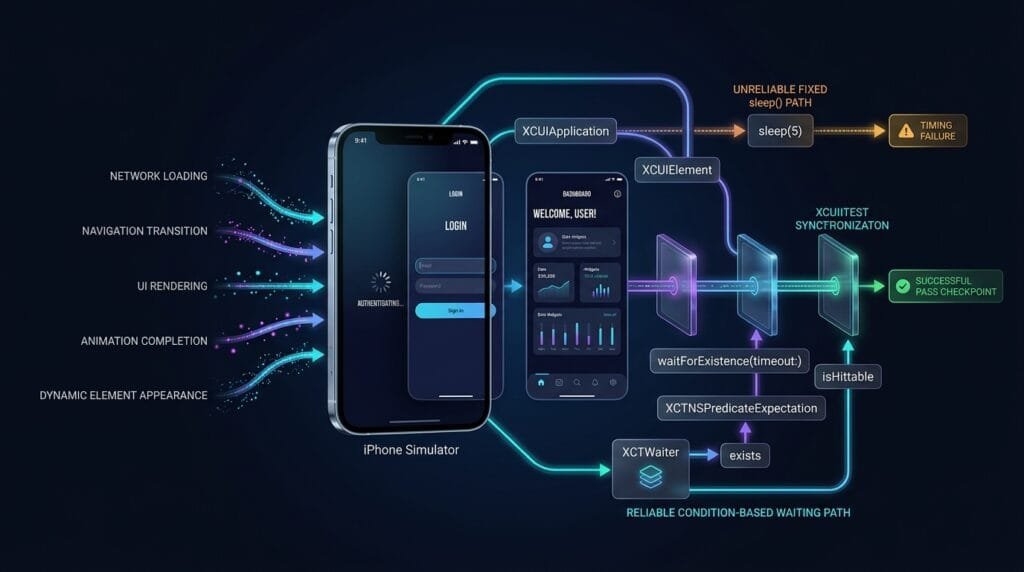
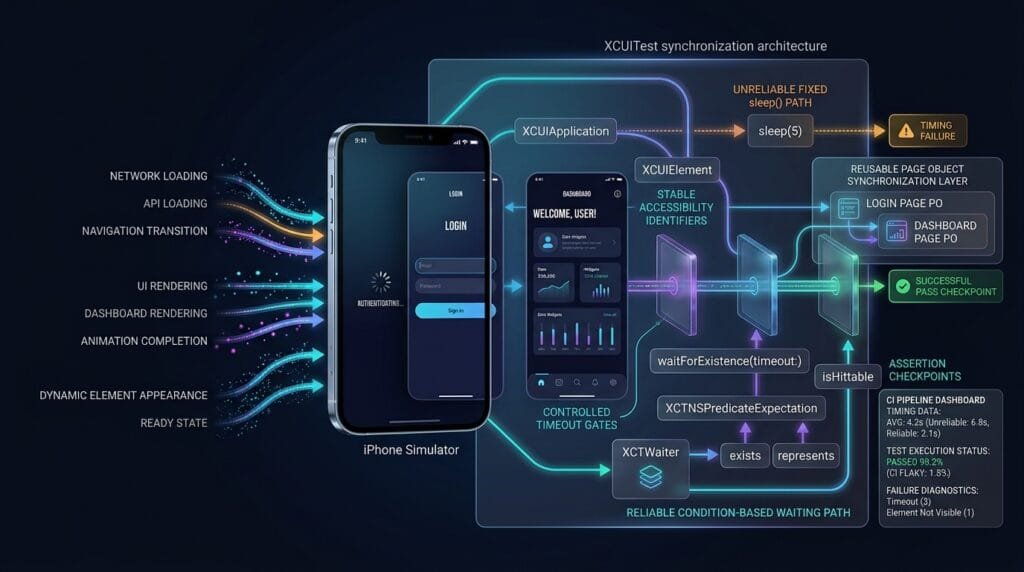
XCUITest Synchronization is the mechanism that keeps iOS UI tests aligned with the application’s actual state. Instead of guessing how long a screen, button, API response, animation, or navigation transition will take, reliable tests wait for observable conditions before interacting with or validating UI elements.
What is XCUITest Synchronization?
XCUITest synchronization means coordinating test execution with the asynchronous behavior of the iOS application under test.
A UI test may execute faster than the application can render its next state:
Test Action
     ↓
Application Processing
     ↓
UI Rendering
     ↓
Element Becomes Available
     ↓
Test Continues
Without synchronization, the test may try to interact with an element before that element is ready.
A reliable automation flow is:
Locate Element
     ↓
Wait for Expected State
     ↓
Validate Readiness
     ↓
Perform Action
     ↓
Wait for Result
     ↓
Assert
Definition
XCUITest synchronization is the practice of waiting for observable application conditions before performing UI interactions or assertions, reducing timing-related failures in iOS automation.
Key Points
- UI tests interact with asynchronous applications.
waitForExistence(timeout:)is useful for dynamic elements.XCTNSPredicateExpectationsupports condition-based waiting.XCTWaitermanages XCTest expectations.existschecks whether an element is present.isHittablehelps determine whether an element can receive interaction.- Fixed
sleep()calls should not be the primary synchronization strategy. - Waiting should be based on application state, not arbitrary time.
- Synchronization should happen before important interactions and validations.
- Long animations, network operations, transitions, and lazy-loaded UI can expose timing problems.
- Good synchronization reduces flaky tests without unnecessarily slowing the suite.
Why XCUITest Synchronization Matters
Consider this test:
let app = XCUIApplication()

app.buttons["login.submitButton"].tap()

XCTAssertTrue(
    app.staticTexts["Dashboard"].exists
)
The test assumes the dashboard is immediately available.
In reality:
Tap Login
   ↓
Request Processing
   ↓
Authentication
   ↓
Navigation
   ↓
Dashboard Rendering
The assertion can execute before the dashboard appears.
A synchronized version is:
let dashboard =
    app.staticTexts["Dashboard"]

XCTAssertTrue(
    dashboard.waitForExistence(timeout: 10)
)
The test now waits for a meaningful UI condition.
The Difference Between Waiting and Sleeping
This distinction is fundamental.
Fixed Sleep
sleep(5)The test waits five seconds regardless of application state.
If the application is ready after one second:
1 second → UI ready
4 seconds → unnecessary waiting
If the application needs seven seconds:
5 seconds → UI not ready
          ↓
       Test fails
Condition-Based Waiting
XCTAssertTrue(
    dashboard.waitForExistence(timeout: 10)
)
The test waits until the element exists or the timeout expires.
UI ready after 2 sec
       ↓
Test continues

UI ready after 8 sec
       ↓
Test continues

UI never appears
       ↓
Timeout
       ↓
Failure
This is why condition-based synchronization is generally preferable.
1. waitForExistence(timeout:)
For many UI scenarios, the simplest synchronization mechanism is:
let button =
    app.buttons["checkout.payButton"]

XCTAssertTrue(
    button.waitForExistence(timeout: 10)
)
It waits for the element to exist within the specified timeout.
You can then interact with it:
button.tap()A complete pattern:
let payButton =
    app.buttons["checkout.payButton"]

XCTAssertTrue(
    payButton.waitForExistence(timeout: 10)
)

XCTAssertTrue(
    payButton.isHittable
)

payButton.tap()
This combines:
- Existence
- Readiness
- Interaction
2. exists vs waitForExistence
These APIs answer different questions.
exists
XCTAssertTrue(
    element.exists
)
This asks:
Does the element currently exist?
waitForExistence
XCTAssertTrue(
    element.waitForExistence(timeout: 10)
)
This asks:
Does the element become available within the timeout?
For dynamically rendered UI, waitForExistence is generally more appropriate.
3. isHittable
An element can exist without being ready for interaction.
let button =
    app.buttons["checkout.payButton"]

XCTAssertTrue(
    button.exists
)

XCTAssertTrue(
    button.isHittable
)
A practical pattern is:
XCTAssertTrue(
    button.waitForExistence(timeout: 10)
)

XCTAssertTrue(
    button.isHittable
)

button.tap()
This is especially useful when elements may be:
- Behind another view
- Outside the visible area
- Disabled
- Covered by an overlay
- In a transition state
4. Synchronizing Navigation
Navigation is asynchronous from the test’s perspective.
Example:
let settingsButton =
    app.buttons["home.settingsButton"]

settingsButton.tap()

let settingsTitle =
    app.navigationBars["Settings"]

XCTAssertTrue(
    settingsTitle.waitForExistence(timeout: 10)
)
The test does not assume navigation completes instantly.
It waits for the expected destination.
5. Synchronizing Loading States
Loading indicators can provide useful observable states.
let loader =
    app.activityIndicators["loading.indicator"]

let result =
    app.staticTexts["results.title"]

XCTAssertTrue(
    result.waitForExistence(timeout: 15)
)
If the test needs to verify that loading eventually disappears:
XCTAssertTrue(
    result.waitForExistence(timeout: 15)
)

XCTAssertFalse(
    loader.exists
)
The important principle is to synchronize around meaningful application states rather than fixed delays.
6. Predicate-Based Synchronization
Some conditions cannot be represented simply by element existence.
XCTest provides predicates for condition-based expectations.
For example:
let predicate =
    NSPredicate(
        format: "label == %@",
        "Payment successful"
    )

let expectation = XCTNSPredicateExpectation(
    predicate: predicate,
    object: confirmationLabel
)

wait(
    for: [expectation],
    timeout: 10
)
This approach is useful when a specific property must reach an expected value.
For example:
Element Exists
       ↓
Label Changes
       ↓
Predicate Matches
       ↓
Expectation Succeeds
7. XCTNSPredicateExpectation
A predicate expectation allows a test to wait until a condition becomes true.
Example:
let predicate = NSPredicate(
    format: "exists == true"
)

let expectation =
    XCTNSPredicateExpectation(
        predicate: predicate,
        object: dashboard
    )

wait(
    for: [expectation],
    timeout: 10
)
This can be useful when building reusable synchronization utilities.
8. Using XCTWaiter
XCTWaiter provides control over waiting for XCTest expectations.
Example:
let expectation =
    XCTNSPredicateExpectation(
        predicate: NSPredicate(
            format: "exists == true"
        ),
        object: dashboard
    )

let result =
    XCTWaiter.wait(
        for: [expectation],
        timeout: 10
    )

XCTAssertEqual(
    result,
    .completed
)
This makes the synchronization result explicit.
9. Synchronizing Text and Dynamic Values
Sometimes the element exists immediately, but its value changes later.
For example:
let status =
    app.staticTexts["payment.status"]

let predicate =
    NSPredicate(
        format: "label == %@",
        "Payment successful"
    )

let expectation =
    XCTNSPredicateExpectation(
        predicate: predicate,
        object: status
    )

wait(
    for: [expectation],
    timeout: 15
)
This is more precise than:
sleep(5)

XCTAssertEqual(
    status.label,
    "Payment successful"
)
The second approach guesses when the value will change.
The predicate approach waits for the actual condition.
10. Synchronizing After Network Operations
UI tests should not synchronize with network timing directly when the application exposes a meaningful UI state.
For example:
API Request
   ↓
Loading
   ↓
Response
   ↓
UI Update
   ↓
Result Visible
Instead of:
sleep(8)wait for:
let result =
    app.staticTexts["search.results"]

XCTAssertTrue(
    result.waitForExistence(timeout: 15)
)
The UI becomes the synchronization boundary.
11. Synchronizing Scrolling
Scrolling can introduce another timing challenge.
A target element may exist but not be hittable.
let logoutButton =
    app.buttons["settings.logoutButton"]

let settings =
    app.tables["settings.table"]

for _ in 0..<6 {

    if logoutButton.exists &&
       logoutButton.isHittable {
        break
    }

    settings.swipeUp()
}

XCTAssertTrue(
    logoutButton.isHittable
)

logoutButton.tap()
This approach synchronizes scrolling with the target state.
It avoids blindly performing a fixed number of gestures.
12. Synchronizing Alerts
System and application alerts can appear asynchronously.
let alert =
    app.alerts["Delete Account"]

XCTAssertTrue(
    alert.waitForExistence(timeout: 10)
)

let deleteButton =
    alert.buttons["Delete"]

deleteButton.tap()
This is safer than assuming the alert appears immediately after the triggering action.
13. Synchronizing Sheets and Modals
For a modal screen:
let checkoutButton =
    app.buttons["cart.checkout"]

checkoutButton.tap()

let paymentSheet =
    app.otherElements["payment.sheet"]

XCTAssertTrue(
    paymentSheet.waitForExistence(timeout: 10)
)
The test waits for the actual modal state.
14. Synchronization With Accessibility Identifiers
Stable accessibility identifiers make synchronization more reliable.
For example:
let dashboard =
    app.otherElements[
        "dashboard.screen"
    ]

XCTAssertTrue(
    dashboard.waitForExistence(timeout: 10)
)
Compare this with a fragile query based on changing text:
let dashboard =
    app.staticTexts["Welcome, Shahnawaz"]
Dynamic content can change.
A stable identifier provides a stronger synchronization target.
Synchronization Strategy
A useful strategy is:
                  Application
                       │
        ┌──────────────┼──────────────┐
        ↓              ↓              ↓
   Navigation       Network       Animation
        │              │              │
        └──────────────┼──────────────┘
                       ↓
                Observable State
                       ↓
               Synchronization
                       ↓
                 User Action
                       ↓
                  Assertion
The test should wait for an observable condition that represents readiness.
Common Synchronization Anti-Patterns
Anti-Pattern 1: Fixed sleep()
sleep(5)
button.tap()
Problem:
- Arbitrary delay
- Slower tests
- Still vulnerable to slower environments
- Poor failure diagnostics
Anti-Pattern 2: Immediate Existence Check
button.tap()

XCTAssertTrue(
    dashboard.exists
)
Problem:
The dashboard may simply not have appeared yet.
Better:
XCTAssertTrue(
    dashboard.waitForExistence(timeout: 10)
)
Anti-Pattern 3: Excessive Timeout
dashboard.waitForExistence(
    timeout: 120
)
A huge timeout can hide genuine application failures and make failures painfully slow.
Choose timeouts based on the expected operation and test environment.
Anti-Pattern 4: Blind Scrolling
for _ in 0..<20 {
    list.swipeUp()
}
Problem:
The test performs gestures without checking whether the target has already become available.
Better:
for _ in 0..<8 {

    if target.isHittable {
        break
    }

    list.swipeUp()
}
Anti-Pattern 5: Synchronizing With Implementation Details
Avoid waiting for arbitrary internal details that do not represent user-visible readiness.
Prefer:
Expected Screen
Expected Button
Expected Result
Expected Message
Expected State
over:
Internal Animation
Private Timer
Implementation Variable
Building a Reusable Synchronization Layer
Large automation suites benefit from reusable helpers.
extension XCUIElement {

    @discardableResult
    func waitUntilExists(
        timeout: TimeInterval = 10
    ) -> Bool {

        waitForExistence(
            timeout: timeout
        )
    }
}
Usage:
let dashboard =
    app.otherElements["dashboard.screen"]

XCTAssertTrue(
    dashboard.waitUntilExists()
)
A reusable tap helper can combine synchronization and interaction:
extension XCUIElement {

    func tapWhenReady(
        timeout: TimeInterval = 10
    ) {

        XCTAssertTrue(
            waitForExistence(timeout: timeout)
        )

        XCTAssertTrue(
            isHittable
        )

        tap()
    }
}
Then:
app.buttons["checkout.payButton"]
    .tapWhenReady()
This centralizes synchronization behavior.
Page Object Synchronization
Synchronization should not make every test verbose.
A Page Object can encapsulate it:
final class LoginPage {

    private let app: XCUIApplication

    init(app: XCUIApplication) {
        self.app = app
    }

    private var emailField:
        XCUIElement {
        app.textFields[
            "login.emailField"
        ]
    }

    private var loginButton:
        XCUIElement {
        app.buttons[
            "login.submitButton"
        ]
    }

    func waitForPage() {

        XCTAssertTrue(
            emailField.waitForExistence(
                timeout: 10
            )
        )
    }

    func login(email: String) {

        emailField.tap()
        emailField.typeText(email)

        loginButton.tapWhenReady()
    }
}
The test becomes:
let login =
    LoginPage(app: app)

login.waitForPage()

login.login(
    email: "qa@example.com"
)
The test expresses intent rather than synchronization mechanics.
Synchronization and Flakiness
Flaky tests often have timing problems hidden inside them.
For example:
Test Passes Locally
        ↓
CI Runs on Slower Machine
        ↓
UI Loads Later
        ↓
Immediate Assertion
        ↓
Failure
Good synchronization changes the flow:
Test Starts
    ↓
Wait for Condition
    ↓
UI Ready
    ↓
Perform Action
    ↓
Wait for Result
    ↓
Assert
The objective is not simply to make tests wait longer.
The objective is to make them wait correctly.
6 Core Pillars of Reliable XCUITest Synchronization
1. Condition-Based Waiting
Wait for application state instead of arbitrary time.
2. Stable Synchronization Targets
Use reliable accessibility identifiers and semantic elements.
3. Readiness Validation
Check exists and, when appropriate, isHittable.
4. Controlled Timeouts
Use realistic timeout values based on the operation.
5. Reusable Synchronization Helpers
Centralize repeated waiting patterns.
6. State-Based Assertions
After synchronization, validate the expected application outcome.
flowchart TD
    A[Start XCUITest] --> B[Launch XCUIApplication]
    B --> C[Locate XCUIElement]
    C --> D{Expected State Available?}
    D -->|No| E[Wait for Condition]
    E --> F{Timeout Reached?}
    F -->|No| D
    F -->|Yes| G[Fail With Diagnostic]
    D -->|Yes| H{Element Hittable?}
    H -->|No| I[Wait / Scroll / State Transition]
    I --> D
    H -->|Yes| J[Perform Action]
    J --> K[Wait for Result State]
    K --> L{Expected Result?}
    L -->|Yes| M[Assert Success]
    L -->|No| N[Assert Failure]
Key Architectural Takeaways for SDETs
Synchronization Is Not Just Waiting
Good synchronization establishes a contract:
Ready State
    ↓
Action
    ↓
Expected Result
sleep() Is Not a Synchronization Strategy
A fixed delay knows nothing about application state.
Condition-based waiting does.
Synchronize Around User-Observable State
Prefer waiting for:
- Screen appearance
- Button availability
- Expected message
- Search result
- Alert
- Modal
- Navigation destination
Keep Synchronization Reusable
If every test contains its own waiting logic, maintenance becomes expensive.
Centralize common patterns in:
- Extensions
- Page Objects
- Screen Objects
- Action helpers
- Synchronization utilities
Timeouts Should Have Meaning
A timeout is a failure boundary, not an instruction to make the test slow.
Choose it based on the expected behavior and CI environment.
AI Overview & Answer Engine Optimization
XCUITest synchronization is the practice of waiting for observable iOS application conditions before performing interactions or assertions, helping prevent timing-related UI test failures.
Why is XCUITest Synchronization Important?
iOS applications perform asynchronous operations such as navigation, network requests, animations, rendering, and dynamic content loading. Tests must synchronize with the resulting application state.
What is the Best Way to Wait for an Element in XCUITest?
For an element that appears dynamically, use:
XCTAssertTrue(
    element.waitForExistence(timeout: 10)
)
This waits until the element exists or the timeout is reached.
Why Should You Avoid sleep() in XCUITest?
sleep() waits for a fixed amount of time regardless of application state. It can make tests unnecessarily slow while still failing when the application takes longer than expected.
What Is isHittable in XCUITest?
isHittable indicates whether an existing UI element is currently positioned so that it can receive user interaction.
What Is XCTNSPredicateExpectation?
XCTNSPredicateExpectation allows XCUITest to wait for a specific condition represented by an NSPredicate.
What Is XCTWaiter?
XCTWaiter manages XCTest expectations and allows tests to wait for asynchronous conditions with explicit results.
How Do You Reduce XCUITest Flakiness?
Use stable element identifiers, condition-based waiting, controlled timeouts, reusable synchronization helpers, and state-based assertions.
AI Overview Summary
XCUITest synchronization keeps iOS UI tests aligned with asynchronous application behavior. Reliable synchronization uses condition-based mechanisms such as waitForExistence(timeout:), predicate expectations, XCTWaiter, stable accessibility identifiers, and isHittable checks instead of arbitrary sleep() delays.
People Asked Questions
What is XCUITest synchronization?
It is the process of coordinating test execution with the application’s actual UI state before interactions and assertions.
What is waitForExistence(timeout:)?
It waits for an XCUIElement to exist within a specified timeout and returns whether the element became available.
Is sleep() recommended in XCUITest?
No. Fixed sleeps are generally a poor synchronization strategy because they do not respond to actual application state.
What is the difference between exists and waitForExistence()?
exists checks the current state immediately. waitForExistence() waits for the element to appear within a timeout.
Why use isHittable?
An element may exist but not currently be interactable. isHittable helps determine whether it can receive interaction.
When should I use XCTNSPredicateExpectation?
Use it when you need to wait for a specific condition or property to reach an expected state.
What is XCTWaiter used for?
It manages XCTest expectations and provides explicit results for asynchronous waits.
How does synchronization reduce flaky tests?
It prevents tests from making assumptions about timing and instead waits for observable application conditions.
Where should synchronization logic live in a large XCUITest framework?
Common synchronization patterns can be centralized in UI element extensions, Page Objects, Screen Objects, or dedicated action/synchronization helpers.
Should I use very large timeouts to prevent failures?
No. Excessively large timeouts can hide real application problems and make failures slow. Use realistic limits based on expected behavior.
Internal Blog Links
- XCUITest iOS Testing: What it is and Why it Matters
- XCTest vs XCUITest: Understanding Apple’s Testing Frameworks
- XCUITest Setup on macOS and Xcode: Complete Beginner’s Guide
- Your First XCUITest: Building a Basic iOS UI Test
- XCUITest Project Structure and Test Target Architecture
- XCUIApplication: Launching and Controlling iOS Apps
- XCUIElement: Finding and Interacting with UI Elements
- iOS Accessibility Identifiers: Build Reliable XCUITest Automation
- XCUITest Locators: IDs, Labels, Text and Element Queries
- XCUITest Actions: Tap, Type, Swipe, Scroll and Long Press
- XCUITest Assertions: Validating iOS App Behavior
Internal Series Links
- Learn MCP – Zero to Hero
- Learn AI Agents for QA – Zero to Hero
- Playwright Automation – Zero to Hero
- TencentDB Agent Memory: Complete Zero to Hero
- LangGraph: Complete Zero to Hero
- Learn Python – Zero to Hero
- OpenAI Codex: Complete Zero to Hero
- Cursor AI: Complete Zero to Hero
- Claude Code Tutorial: Complete Zero to Hero
- AutoGen: Complete Zero to Hero Guide
- Free QA Resources Built From Real Experience
- QA Glossary: Test Automation Terms Every Engineer Should Know
External Links
- Apple — XCUITest User Interface Tests — Official documentation for building and running UI tests with XCTest.
- Apple — XCUIElement — Official documentation for interacting with and querying UI elements.
- Apple — XCUIApplication — Official documentation for launching and controlling the application under test.
- Apple — XCTNSPredicateExpectation — Official documentation for predicate-based asynchronous expectations.
- Apple — XCTWaiter — Official documentation for waiting on XCTest expectations.
- Apple — XCTest — Official XCTest framework documentation covering expectations, assertions, and test execution.
Continue Learning
Explore more expert articles on Mobile Testing, Backend & API, AI & Agentic, AI Tools, n8n, LangChain, CrewAI, MCP Servers, AI Agents, LlamaIndex, Docker, FastAPI, Playwright, Cypress, Test Automation, DevOps, and Software Engineering at www.skakarh.com.
QAPulse by SK delivers expert release analysis, AI engineering insights, enterprise automation strategies, migration guidance, DevOps best practices, and practical testing knowledge to help software professionals build scalable, intelligent, and production-ready software systems.