QA
QA
XCUITest authentication testing validates how an iOS application handles login, authentication state, network failures, session management, protected screens, and logout workflows through the real user interface. For SDETs, authentication is one of the most important areas to automate because a failure in login or session handling can block large parts of an application’s functionality.
Authentication tests should therefore validate not only whether a user can enter credentials, but also how the application behaves when the network is slow, unavailable, credentials are invalid, sessions expire, or authenticated APIs return errors.
What is XCUITest Authentication Testing?
XCUITest authentication testing is the practice of automating iOS login and authentication workflows with XCUITest while validating UI behavior, application state, and network-dependent scenarios.
A typical authentication flow looks like this:
Launch Application
       ↓
Authentication State
       ↓
Login Screen
       ↓
Enter Credentials
       ↓
Submit Login
       ↓
Authentication API
       ↓
Server Response
       ↓
┌───────────────┬────────────────┐
│ Authentication│ Authentication │
│    Success    │     Failure    │
└───────┬───────┴────────┬───────┘
        ↓                ↓
 Home Screen       Error Message
The objective is to validate the complete user-facing behavior rather than only checking whether a button can be tapped.
Key Points
- Test valid authentication.
- Test invalid credentials.
- Test empty credentials.
- Test network failures.
- Test slow authentication responses.
- Test expired sessions.
- Test logout behavior.
- Test protected screens.
- Validate authentication error messages.
- Keep test accounts isolated.
- Avoid production credentials.
- Control network-dependent conditions.
- Reset authentication state between scenarios.
- Validate secure navigation.
- Capture diagnostics for failures.
Why Authentication Testing Matters
Authentication sits at the boundary between the mobile application and backend services.
A successful login may involve:
iOS UI
  ↓
Authentication Service
  ↓
API Request
  ↓
Identity Provider
  ↓
Token / Session
  ↓
Application State
A UI test that only checks:
loginButton.tap()does not prove that authentication works correctly.
The test should verify what happens after the interaction.
For example:
loginPage.login(
    email: "qa@example.com",
    password: "Password123"
)

XCTAssertTrue(
    homePage.isDisplayed
)
This validates the observable application behavior.
Designing an Authentication Test Strategy
A production authentication suite should cover multiple categories.
| Scenario | Expected Behavior |
|---|---|
| Valid credentials | User reaches authenticated area |
| Invalid password | Error displayed |
| Unknown account | Authentication rejected |
| Empty email | Validation displayed |
| Empty password | Validation displayed |
| Offline device | Network error displayed |
| Slow network | Loading state handled |
| Server error | Friendly error displayed |
| Expired session | User redirected to login |
| Logout | Session removed |
| Protected screen | Authentication required |
This approach gives broader coverage than a single happy-path login test.
Creating the Login Page Object
Keep authentication UI interaction inside a Page Object.
import XCTest

final class LoginPage {

    private let app: XCUIApplication

    init(app: XCUIApplication) {
        self.app = app
    }

    private var emailField: XCUIElement {
        app.textFields["login.email"]
    }

    private var passwordField: XCUIElement {
        app.secureTextFields["login.password"]
    }

    private var loginButton: XCUIElement {
        app.buttons["login.submit"]
    }

    private var errorMessage: XCUIElement {
        app.staticTexts["login.error"]
    }

    func enterEmail(_ email: String) {
        emailField.tap()
        emailField.typeText(email)
    }

    func enterPassword(_ password: String) {
        passwordField.tap()
        passwordField.typeText(password)
    }

    func tapLogin() {
        loginButton.tap()
    }

    func login(
        email: String,
        password: String
    ) {
        enterEmail(email)
        enterPassword(password)
        tapLogin()
    }
}
The test now focuses on the scenario rather than UI implementation details.
Testing a Successful Login
The basic positive scenario should verify that valid credentials result in the expected authenticated state.
func testSuccessfulLogin() {

    loginPage.login(
        email: "valid@example.com",
        password: "Password123"
    )

    XCTAssertTrue(
        homePage.title.waitForExistence(
            timeout: 10
        )
    )
}
A stronger test can also verify that the login screen is no longer accessible:
XCTAssertFalse(
    loginPage.loginButton.exists
)
The exact assertion depends on the application’s navigation behavior.
Testing Invalid Credentials
Invalid credentials are one of the most important negative scenarios.
func testInvalidPassword() {

    loginPage.login(
        email: "valid@example.com",
        password: "WrongPassword"
    )

    XCTAssertTrue(
        loginPage.errorMessage.waitForExistence(
            timeout: 10
        )
    )

    XCTAssertFalse(
        homePage.title.exists
    )
}
The test validates two outcomes:
- The error is visible.
- The user does not enter the authenticated area.
This prevents false-positive authentication tests.
Testing Empty Credentials
Client-side validation should also be tested.
func testLoginWithEmptyCredentials() {

    loginPage.tapLogin()

    XCTAssertTrue(
        app.staticTexts[
            "Email is required"
        ].exists
    )
}
You can separately test:
Empty Email
Empty Password
Both Empty
Invalid Email Format
Invalid Password Format
These scenarios should remain independent when the validation rules are important.
Testing Network Failure
Network conditions are particularly important in XCUITest authentication testing because login usually depends on a remote service.
Possible failures include:
No Internet
      ↓
DNS Failure
      ↓
Connection Timeout
      ↓
TLS / Connection Error
      ↓
Server Unavailable
      ↓
API Error
The UI should provide an understandable result instead of leaving the user indefinitely waiting.
For example:
func testLoginWhenNetworkUnavailable() {

    // Configure controlled offline state
    // before launching the application.

    loginPage.login(
        email: "valid@example.com",
        password: "Password123"
    )

    XCTAssertTrue(
        app.staticTexts[
            "Unable to connect"
        ].waitForExistence(
            timeout: 10
        )
    )
}
The mechanism used to create the network condition depends on your test infrastructure.
Avoid Making UI Tests Dependent on Real Production Services
A common mistake is allowing every UI test to communicate with live production authentication services.
This creates several problems:
- Slow execution.
- Unstable tests.
- Rate limiting.
- Data collisions.
- External service dependency.
- Security risks.
- Difficult failure diagnosis.
A better architecture is:
XCUITest
   ↓
Test Environment
   ↓
Controlled Authentication Service
   ↓
Predictable Response
Use a dedicated test environment whenever possible.
Testing Slow Authentication Responses
A login test should also handle delayed responses.
The application may display:
Submitting...
     ↓
Loading Indicator
     ↓
Authentication Response
The test should wait for the meaningful state rather than relying on arbitrary sleeps.
Avoid:
sleep(5)Prefer:
XCTAssertTrue(
    homePage.title.waitForExistence(
        timeout: 15
    )
)
This makes the test more resilient to normal execution differences.
Testing Loading States
A good authentication test can verify that the application provides feedback while authentication is running.
loginPage.tapLogin()

XCTAssertTrue(
    app.activityIndicators[
        "login.loading"
    ].waitForExistence(
        timeout: 2
    )
)
If the application disables the login button during the request, that can also be validated:
XCTAssertFalse(
    loginPage.loginButton.isEnabled
)
The exact behavior should match the product requirements.
Testing Server Errors
Authentication APIs can return errors even when the network is available.
Examples include:
400 → Invalid Request
401 → Unauthorized
403 → Forbidden
429 → Rate Limited
500 → Server Error
503 → Service Unavailable
The UI should map these responses to appropriate user-facing behavior.
For example:
func testAuthenticationServerError() {

    loginPage.login(
        email: "qa@example.com",
        password: "Password123"
    )

    XCTAssertTrue(
        app.staticTexts[
            "Something went wrong"
        ].waitForExistence(
            timeout: 10
        )
    )
}
Avoid asserting raw HTTP status codes in the UI layer. Validate the behavior the user actually sees.
Testing Authentication State
Authentication is not limited to the login screen.
An application may maintain state such as:
Unauthenticated
      ↓
Authenticating
      ↓
Authenticated
      ↓
Session Expired
      ↓
Unauthenticated
Your test suite should verify these transitions.
For example:
func testAuthenticatedUserCanAccessProfile() {

    loginPage.login(
        email: "qa@example.com",
        password: "Password123"
    )

    XCTAssertTrue(
        homePage.title.waitForExistence(
            timeout: 10
        )
    )

    homePage.openProfile()

    XCTAssertTrue(
        profilePage.title.exists
    )
}
This verifies that authentication actually unlocks protected functionality.
Testing Session Expiration
Session expiration is often overlooked.
A typical scenario is:
Authenticated User
       ↓
Session Expires
       ↓
Protected API Request
       ↓
Unauthorized Response
       ↓
Application Detects Expiration
       ↓
Login Screen
The UI test should verify that the application handles this state correctly.
func testExpiredSessionRedirectsToLogin() {

    // Configure expired authentication state.

    app.launch()

    XCTAssertTrue(
        loginPage.emailField
            .waitForExistence(timeout: 10)
    )
}
The exact setup depends on whether the application uses tokens, cookies, refresh tokens, or another session mechanism.
Testing Logout
Logout should invalidate the authenticated state.
func testLogout() {

    loginPage.login(
        email: "qa@example.com",
        password: "Password123"
    )

    homePage.openSettings()
    settingsPage.tapLogout()

    XCTAssertTrue(
        loginPage.emailField
            .waitForExistence(timeout: 10)
    )
}
A stronger test attempts to access a protected area after logout and confirms that authentication is required again.
Testing Protected Screens
Authentication boundaries should be tested explicitly.
For example:
Login
  ↓
Home
  ↓
Orders
  ↓
Account
  ↓
Payment
If a user is logged out, protected screens should not expose sensitive information.
The test can verify:
XCTAssertTrue(
    loginPage.emailField.exists
)

XCTAssertFalse(
    app.staticTexts["Account Balance"].exists
)
This helps validate the application’s visible security boundary.
Authentication Test Data
Keep credentials separate from test logic.
struct AuthenticationTestData {

    let email: String
    let password: String
    let expectedResult: AuthenticationResult
}

enum AuthenticationResult {
    case success
    case invalidCredentials
    case networkError
    case lockedAccount
}
Then define controlled scenarios:
let scenarios = [

    AuthenticationTestData(
        email: "valid@example.com",
        password: "Password123",
        expectedResult: .success
    ),

    AuthenticationTestData(
        email: "valid@example.com",
        password: "WrongPassword",
        expectedResult: .invalidCredentials
    )
]
This works particularly well with the data-driven architecture introduced earlier in the series.
Secure Test Credentials
Never commit production credentials into source control.
Avoid:
let password = "RealProductionPassword"Instead, use a dedicated test account or controlled environment configuration.
For example:
Test Environment
      ↓
Test Account
      ↓
XCUITest
Credentials should be handled according to your CI/CD and secret-management strategy.
Accessibility Identifiers for Authentication
Stable identifiers make authentication tests significantly more reliable.
For example:
login.email
login.password
login.submit
login.error
login.loading
The UI automation code becomes:
app.textFields["login.email"]
app.secureTextFields["login.password"]
app.buttons["login.submit"]
This is preferable to relying on fragile positional queries.
Authentication and Synchronization
Authentication requests are asynchronous.
A typical sequence is:
Tap Login
   ↓
API Request
   ↓
Loading
   ↓
Response
   ↓
State Update
   ↓
Navigation
Do not assume navigation happens immediately.
Use state-based synchronization:
XCTAssertTrue(
    homePage.title.waitForExistence(
        timeout: 15
    )
)
This is more robust than:
sleep(10)Testing Biometric Authentication
Some applications use Face ID or Touch ID as part of authentication.
A UI test may need to interact with the simulator’s biometric environment.
The important scenarios include:
Biometric Success
Biometric Failure
Biometric Cancellation
Fallback to Password
The exact automation strategy depends on the simulator configuration and authentication implementation.
The test should verify the resulting application state rather than treating biometric interaction itself as the only assertion.
Testing “Remember Me” Behavior
If an application provides persistent authentication, test both states.
Remember Me Enabled
       ↓
Login
       ↓
Terminate App
       ↓
Launch
       ↓
Authenticated
And:
Remember Me Disabled
       ↓
Login
       ↓
Logout / Terminate
       ↓
Launch
       ↓
Authentication Required
Do not assume that application termination automatically means logout.
Testing Authentication Across App Relaunches
Application relaunch behavior should be deterministic.
app.terminate()
app.launch()

XCTAssertTrue(
    homePage.title.waitForExistence(
        timeout: 10
    )
)
or:
XCTAssertTrue(
    loginPage.emailField.waitForExistence(
        timeout: 10
    )
)
depending on the intended session policy.

Testing Authentication State Transitions
Authentication should be treated as a state machine.
              ┌───────────────┐
              │ Unauthenticated│
              └───────┬───────┘
                      │ Login
                      ▼
              ┌───────────────┐
              │ Authenticating│
              └───────┬───────┘
                      │
             ┌────────┴────────┐
             ▼                 ▼
       Authentication      Authentication
          Success              Failure
             │                 │
             ▼                 ▼
      ┌─────────────┐    ┌─────────────┐
      │Authenticated│    │ Login Error │
      └──────┬──────┘    └─────────────┘
             │
       Session Expires
             │
             ▼
      ┌──────────────┐
      │Session Expired│
      └──────┬───────┘
             │
             ▼
      Unauthenticated
Testing these transitions helps uncover state-management defects that simple login tests can miss.
Testing Network Conditions
Network behavior deserves its own test matrix.
| Network Condition | Expected UI Behavior |
|---|---|
| Online | Login succeeds |
| Offline | Connection error |
| Slow | Loading state |
| Timeout | Retry/error state |
| 401 | Authentication failure |
| 403 | Access denied |
| 429 | Rate-limit handling |
| 500 | Server error |
| 503 | Service unavailable |
The goal is not to reproduce every possible network failure through the UI layer.
Instead, prioritize conditions that have meaningful product behavior.
Controlled Network Testing
For reliable XCUITest authentication testing, network behavior should ideally be deterministic.
Possible architecture:
XCUITest
   ↓
Test Environment
   ↓
Network Stub / Mock Layer
   ↓
Predictable API Response
   ↓
iOS Application
This allows tests to reproduce scenarios such as:
200 Success
401 Unauthorized
403 Forbidden
500 Server Error
Timeout
No Response
without depending on unpredictable external infrastructure.
Retry Behavior
If the application supports retry, test it.
func testLoginRetryAfterNetworkFailure() {

    loginPage.login(
        email: "qa@example.com",
        password: "Password123"
    )

    XCTAssertTrue(
        app.buttons["login.retry"]
            .waitForExistence(timeout: 10)
    )

    app.buttons["login.retry"].tap()

    XCTAssertTrue(
        homePage.title.waitForExistence(
            timeout: 10
        )
    )
}
The exact flow depends on the application’s retry design.
Common Authentication Testing Mistakes
1. Testing Only Successful Login
A happy-path test is not enough.
2. Using Production Credentials
Production credentials introduce security and stability risks.
3. Depending on Live Authentication Services
External dependencies make UI tests unpredictable.
4. Using sleep()
Fixed delays make tests slower and less reliable.
5. Ignoring Session State
Authentication state can leak between tests.
6. Testing HTTP Codes in the UI Layer
Validate user-visible behavior instead.
7. Hard-Coding Dynamic Tokens
Authentication tokens should be controlled by the test environment.
8. Ignoring Logout
Logout is part of the authentication lifecycle.
9. Forgetting Expired Sessions
Session expiration is a realistic production scenario.
10. Using Fragile Locators
Prefer stable accessibility identifiers.
Best Practices for XCUITest Authentication Testing
| Area | Best Practice |
|---|---|
| Credentials | Use dedicated test accounts |
| Environment | Prefer a controlled test environment |
| Network | Make important failures reproducible |
| Locators | Use accessibility identifiers |
| Synchronization | Wait for meaningful UI states |
| State | Isolate authentication state |
| Sessions | Test expiration and logout |
| Errors | Validate user-facing messages |
| Data | Keep test data separate |
| Security | Never expose production secrets |
| CI | Store credentials securely |
| Diagnostics | Capture screenshots and logs |
| Coverage | Include positive and negative scenarios |
6 Core Pillars of Authentication Automation
1. Credential Validation
Verify valid, invalid, empty, and malformed credentials.
2. Network Resilience
Validate offline, timeout, slow, and server-error scenarios.
3. Session Management
Test login, persistence, expiration, and logout.
4. Protected Access
Ensure authenticated areas require the correct application state.
5. Deterministic Test Environment
Control backend responses and test accounts where possible.
6. Secure Automation
Protect credentials, tokens, test data, and CI secrets.
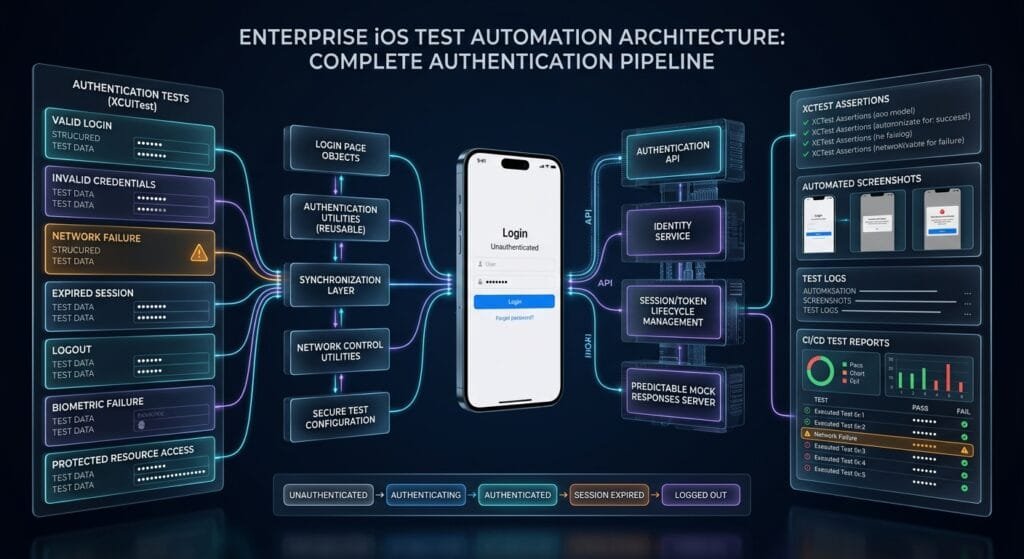
Production XCUITest Authentication Architecture
A scalable authentication framework can follow this structure:
UITests/
│
├── Tests/
│   └── AuthenticationTests.swift
│
├── Pages/
│   ├── LoginPage.swift
│   ├── HomePage.swift
│   └── SettingsPage.swift
│
├── Data/
│   └── AuthenticationTestData.swift
│
├── Utilities/
│   ├── WaitUtility.swift
│   ├── ScreenshotUtility.swift
│   └── NetworkUtility.swift
│
└── Configuration/
    └── UITestConfiguration.swift
The execution model becomes:
Test Scenario
      ↓
Authentication Data
      ↓
Login Page
      ↓
Network Condition
      ↓
iOS Application
      ↓
Authentication State
      ↓
Expected Result
      ↓
XCTest Assertion
This separation makes the suite easier to scale as authentication requirements grow.
Key Takeaways
XCUITest authentication testing should validate the complete authentication lifecycle rather than only checking whether a login button works.
A production-ready suite should cover:
- Successful login.
- Invalid credentials.
- Empty and malformed inputs.
- Network failures.
- Slow responses.
- Server errors.
- Session persistence.
- Session expiration.
- Logout.
- Protected screens.
- Biometric authentication where applicable.
- Retry behavior.
- Authentication state transitions.
The most reliable architecture separates:
Test Data
    ↓
Test Scenario
    ↓
Page Object
    ↓
Network Configuration
    ↓
Application
    ↓
Authentication State
    ↓
XCTest Assertion
When authentication scenarios are deterministic, isolated, and properly synchronized, XCUITest authentication testing becomes a reliable part of an iOS regression strategy rather than a fragile collection of login scripts.
flowchart TD
    A[Test Scenario] --> B[Authentication Test Data]
    B --> C[Login Page Object]
    C --> D[XCUIApplication]
    D --> E[Login UI]
    E --> F[Authentication Request]
    F --> G[Controlled Network / Test Environment]
    G --> H[Authentication Service]
    H --> I{Response}
    I -->|Success| J[Authenticated State]
    I -->|401 / Invalid| K[Login Error]
    I -->|Network Failure| L[Network Error]
    I -->|Server Error| M[Server Error]
    J --> N[Protected Screen]
    J --> O[Session State]
    O -->|Expired| P[Login Screen]
    O -->|Logout| P
    K --> Q[XCTest Assertions]
    L --> Q
    M --> Q
    N --> Q
    P --> Q
AI Overview & Answer Engine Optimization
XCUITest authentication testing is the automated validation of iOS login, network-dependent authentication, session management, logout, and protected application workflows using XCUITest.
What Does XCUITest Authentication Testing Cover?
It covers successful login, invalid credentials, validation errors, network failures, authentication server errors, session expiration, logout, biometric flows, and protected-screen access.
How Should Login Tests Handle Network Failures?
Use a controlled test environment or network simulation where possible. The test should validate the application’s user-facing response rather than depend on unpredictable live network behavior.
How Do You Test an Expired Authentication Session?
Start the application with a controlled expired authentication state or simulate an expired session response, then verify that the application redirects the user to authentication.
Should XCUITest Use Real Authentication Accounts?
Use dedicated test accounts in a controlled environment. Production accounts and production credentials should not be embedded into UI tests.
How Do You Test Invalid Login Credentials?
Enter controlled invalid credentials, submit the login form, and assert that an appropriate error is displayed while the authenticated screen remains inaccessible.
How Do You Test Logout in XCUITest?
Authenticate the user, navigate to the logout action, perform logout, and verify that protected content is no longer accessible without authentication.
How Do You Synchronize Login Tests?
Wait for meaningful UI states such as the home screen, loading indicator, error message, or login screen instead of using arbitrary fixed delays.
Why Are Accessibility Identifiers Important?
Stable accessibility identifiers provide reliable element queries for authentication controls such as email fields, password fields, login buttons, errors, and loading indicators.
AI Overview Summary
XCUITest authentication testing validates iOS authentication workflows across credentials, network conditions, sessions, logout, protected screens, and error states. A reliable implementation uses dedicated test accounts, controlled network conditions, accessibility identifiers, state-based synchronization, Page Objects, isolated sessions, and XCTest assertions.
People Asked Questions
What is XCUITest authentication testing?
It is the automated testing of iOS authentication workflows using XCUITest, including login, errors, sessions, logout, and protected resources.
What should a login UI test validate?
It should validate both the authentication result and the resulting application state.
Should network errors be tested?
Yes. Offline, timeout, slow-response, and server-error scenarios can expose important UI and state-management defects.
How do I test session expiration?
Use a controlled expired-session state or authentication response and verify that the application requires authentication again.
Should authentication tests use real APIs?
A controlled test environment is generally more reliable than depending on live production services.
Can XCUITest test biometric authentication?
Yes, supported simulator biometric capabilities can be incorporated into appropriate UI scenarios.
How should authentication credentials be stored?
Use dedicated test credentials and secure CI/environment configuration rather than committing sensitive credentials to source control.
Why are login tests flaky?
Common causes include unstable network dependencies, shared session state, fixed sleeps, dynamic UI elements, and poor synchronization.
Should logout be part of authentication testing?
Yes. Logout validates that the authenticated state is properly cleared and protected content requires authentication again.
Internal Blog Links
- XCUITest iOS Testing: What it is and Why it Matters
- XCTest vs XCUITest: Understanding Apple’s Testing Frameworks
- XCUITest Setup on macOS and Xcode: Complete Beginner’s Guide
- Your First XCUITest: Building a Basic iOS UI Test
- XCUITest Project Structure and Test Target Architecture
- XCUIApplication: Launching and Controlling iOS Apps
- XCUIElement: Finding and Interacting with UI Elements
- iOS Accessibility Identifiers: Build Reliable XCUITest Automation
- XCUITest Locators: IDs, Labels, Text and Element Queries
- XCUITest Actions: Tap, Type, Swipe, Scroll and Long Press
- XCUITest Assertions: Validating iOS App Behavior
- XCUITest Synchronization: Reliable Waiting for iOS UI Tests
- XCUITest Alerts: Handling Alerts, Sheets, Pop-Ups and System Dialogs
- XCUITest Form Testing: Automating Text Fields, Pickers and Keyboards
- XCUITest Collection Testing: Automating Tables, Lists and Dynamic Content
- XCUITest Page Object Model: Build Maintainable iOS UI Tests with Swift
- XCUITest Test Utilities: Build Reusable Helpers for Scalable iOS UI Automation
- XCUITest Data-Driven Testing: Build Scalable iOS UI Tests with Swift
Internal Series Links
- Learn MCP – Zero to Hero
- Learn AI Agents for QA – Zero to Hero
- Playwright Automation – Zero to Hero
- TencentDB Agent Memory: Complete Zero to Hero
- LangGraph: Complete Zero to Hero
- Learn Python – Zero to Hero
- OpenAI Codex: Complete Zero to Hero
- Cursor AI: Complete Zero to Hero
- Claude Code Tutorial: Complete Zero to Hero
- AutoGen: Complete Zero to Hero Guide
- Free QA Resources Built From Real Experience
- QA Glossary: Test Automation Terms Every Engineer Should Know
External Links
- Apple — XCTest Documentation — Official XCTest documentation covering test cases, assertions, attachments, and test execution.
- Apple — XCUIAutomation Documentation — Official documentation for UI automation APIs used in XCUITest.
- Apple — XCUIApplication Documentation — Official API documentation for launching and controlling the application under test.
- Apple — XCUIElement Documentation — Official documentation for interacting with iOS UI elements.
- Apple — XCUIScreen Documentation — Official documentation for screen-related UI automation capabilities.
- Apple — XCTest UI Testing Documentation — Apple’s guidance for building and running UI tests.
Continue Learning
Explore more expert articles on Mobile Testing, Backend & API, AI & Agentic, AI Tools, n8n, LangChain, CrewAI, MCP Servers, AI Agents, LlamaIndex, Docker, FastAPI, Playwright, Cypress, Test Automation, DevOps, and Software Engineering at www.skakarh.com.
QAPulse by SK delivers expert release analysis, AI engineering insights, enterprise automation strategies, migration guidance, DevOps best practices, and practical testing knowledge to help software professionals build scalable, intelligent, and production-ready software systems.