QA
QA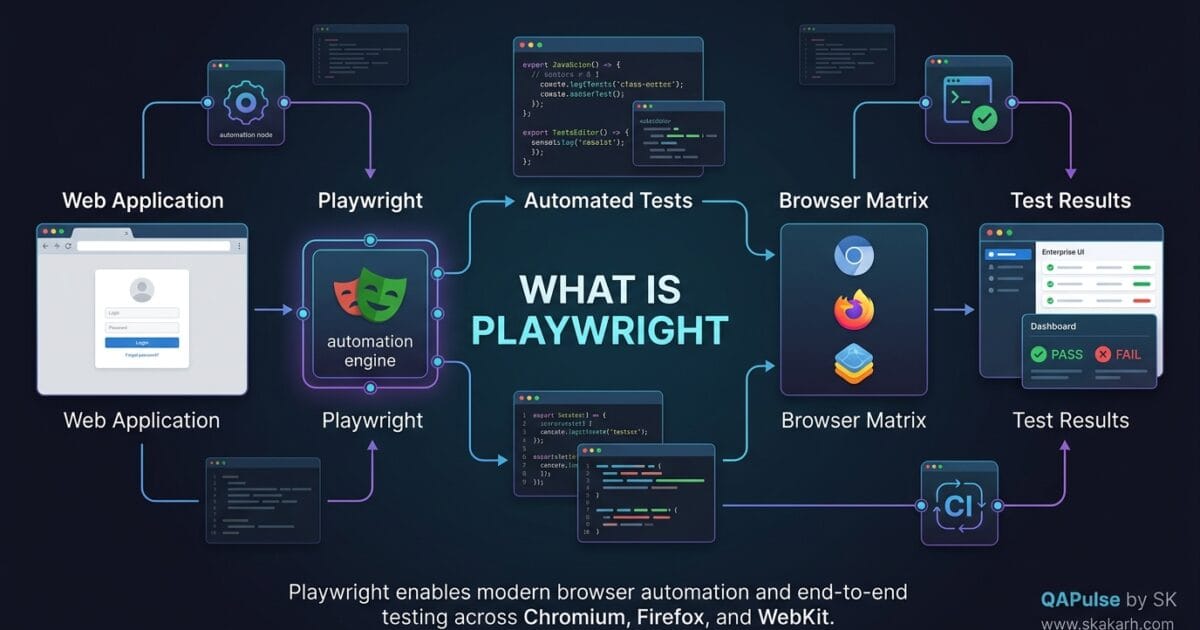
What is Playwright? Playwright is an open-source browser automation and end-to-end testing framework developed by Microsoft for testing modern web applications across Chromium, Firefox, and WebKit. It lets engineers automate browsers, interact with web pages, validate application behavior, capture traces, test multiple browser contexts, and build reliable end-to-end test suites.
If you are coming from Selenium, Cypress, or another browser automation tool, Playwright can initially look like just another test framework. It is not simply a replacement for an older tool. Its architecture is designed around modern web applications, browser automation, isolation, parallel execution, network control, and debugging.
That distinction matters because understanding what Playwright is should come before learning individual commands such as page.goto(), locator(), or expect().
The simplest mental model is:
Your Test
    ↓
Playwright API
    ↓
Browser Automation
    ↓
Chromium / Firefox / WebKit
    ↓
Web Application
This separation allows your test code to describe what the user should do while Playwright handles much of the browser interaction underneath.
What is Playwright in Simple Terms?
At its simplest, Playwright is a tool that allows software engineers and QA engineers to control real browser engines programmatically.
Instead of manually opening a browser, navigating to a website, entering credentials, clicking buttons, and checking the result, you can express those actions in code.
For example:
import { test, expect } from '@playwright/test';

test('user can log in successfully', async ({ page }) => {
  await page.goto('https://example.com/login');

  await page.getByLabel('Email').fill('user@example.com');
  await page.getByLabel('Password').fill('secret');

  await page.getByRole('button', { name: 'Login' }).click();

  await expect(page.getByText('Dashboard')).toBeVisible();
});
The test describes a real user journey:
- Open the application.
- Enter an email.
- Enter a password.
- Click Login.
- Verify that the Dashboard appears.
This is why Playwright is particularly useful for end-to-end testing: the test can validate a complete user-facing workflow rather than testing an isolated function.
Why Was Playwright Created?
Modern web applications are significantly more complicated than traditional websites.
A single page may contain:
- client-side routing
- asynchronous API requests
- dynamic components
- WebSockets
- iframes
- authentication flows
- popups
- multiple browser contexts
- file uploads
- downloads
- service workers
- responsive layouts
- complex JavaScript applications
Traditional browser automation approaches often require engineers to manually handle synchronization and browser-specific behavior.
Playwright was designed with modern browser automation in mind.
Instead of thinking:
“How do I wait two seconds before clicking this button?”
the better approach is:
“What condition must become true before this interaction is valid?”
That difference is fundamental to reliable automation.
What Can Playwright Do?
Playwright can support much more than simple UI clicking.
A modern Playwright test strategy can cover:
| Capability | Example |
|---|---|
| Browser automation | Chrome-like, Firefox, WebKit |
| UI testing | Forms, buttons, navigation |
| End-to-end testing | Complete business workflows |
| API testing | HTTP requests and responses |
| Network mocking | Intercept and modify requests |
| Authentication | Reuse authenticated browser state |
| Multi-page testing | Tabs and popups |
| Mobile emulation | Viewports and device characteristics |
| Parallel testing | Multiple workers |
| Trace debugging | DOM, screenshots, network, actions |
| Screenshots | Visual evidence |
| Video | Test execution recording |
| Accessibility support | Role-based locators and accessibility-oriented assertions |
This makes Playwright more useful as a broader test automation platform rather than merely a browser-driving library.
Playwright vs Selenium
One of the first questions engineers ask after discovering Playwright is:
“Is Playwright better than Selenium?”
There is no universal answer.
The more useful question is:
“Which architecture fits my testing requirements?”
| Area | Playwright | Selenium |
|---|---|---|
| Primary use | Modern web automation | Broad browser automation |
| Browser engines | Chromium, Firefox, WebKit | Broad ecosystem |
| Auto-waiting | Strong built-in approach | Requires more explicit synchronization in many cases |
| Test runner | Playwright Test | Usually external framework |
| Tracing | Built-in tooling | Often requires additional tooling |
| Network interception | Built-in capabilities | Available through ecosystem/browser capabilities |
| Parallel execution | Built into Playwright Test | Common through Selenium Grid/frameworks |
| Language support | JavaScript/TypeScript, Python, Java, .NET | Very broad language ecosystem |
| Mobile native apps | Not its primary purpose | Not its primary purpose |
| Ecosystem maturity | Newer | Very mature |
Selenium remains extremely relevant, particularly in organizations with established Selenium Grid infrastructure, large existing suites, or language-specific ecosystems.
Playwright becomes especially attractive when teams want modern browser automation, strong debugging capabilities, parallel execution, browser isolation, and a tightly integrated test runner.
The strategic lesson is important:
Do not migrate from Selenium simply because Playwright is newer. Migrate when its architecture solves problems your current automation architecture struggles with.
Playwright vs Cypress
Playwright and Cypress are also frequently compared.
Both are designed for modern web testing, but they make different architectural choices.
| Area | Playwright | Cypress |
|---|---|---|
| Browser automation model | External browser automation | Browser-centric architecture |
| Multi-tab workflows | Strong support | More constrained historically |
| Multiple browser engines | Chromium, Firefox, WebKit | Browser support differs by version |
| API testing | Supported | Supported |
| Multiple contexts | Strong capability | Different approach |
| Cross-browser testing | Strong | Strong |
| Network control | Built in | Built in |
| Language | JS/TS, Python, Java, .NET | JavaScript/TypeScript |
| Trace viewer | Built in | Different debugging experience |
| End-to-end workflows | Strong | Strong |
Neither tool automatically produces a good test suite.
A poorly designed Playwright project can become just as fragile as a poorly designed Cypress or Selenium project.
The framework is only one layer.
Reliable Automation
       =
Framework
+ Test Architecture
+ Locator Strategy
+ Data Strategy
+ Synchronization
+ Environment Management
+ Reporting
+ CI/CD
That is the mindset experienced SDETs should adopt.
How Does Playwright Work?
At a high level, your test communicates with Playwright’s automation APIs.
Consider:
await page.getByRole('button', { name: 'Submit' }).click();
You are not manually telling the browser:
wait 500 ms
find element
calculate coordinates
move mouse
click
Instead, you describe the intended interaction.
Playwright manages browser interaction and synchronization around that operation.
A simplified model looks like this:
Test Code
   ↓
Playwright Test API
   ↓
Locator / Browser Context
   ↓
Browser
   ↓
Web Application
   ↓
DOM / Network / Events
   ↓
Assertion
This abstraction is one reason modern automation frameworks can reduce the amount of low-level synchronization code engineers need to maintain.
Locators Are a Critical Part of Playwright
A major part of reliable Playwright automation is choosing good locators.
For example:
await page.locator('#login-button').click();
works, but it may not always communicate intent clearly.
A stronger approach can be:
await page.getByRole('button', { name: 'Login' }).click();
Or:
await page.getByLabel('Email').fill('qa@example.com');
The difference is not merely syntax.
A locator should ideally represent something meaningful about the user’s interaction with the application.
Compare:
page.locator('.btn-primary')
with:
page.getByRole('button', { name: 'Login' })
The second expresses intent.
If the development team changes CSS styling while preserving the accessible role and button name, the second locator is more likely to remain useful.
Why Auto-Waiting Matters
One of the biggest problems in UI automation is synchronization.
A fragile test often looks like:
await page.click('#submit');

await page.waitForTimeout(3000);

expect(await page.textContent('.message'))
  .toContain('Success');
The three-second wait does not actually prove that the application is ready.
It only proves that three seconds have passed.
A better approach is condition-oriented:
await page.getByRole('button', { name: 'Submit' }).click();

await expect(
  page.getByRole('alert')
).toHaveText('Success');
This creates a fundamentally better relationship:
Action
  ↓
Application changes state
  ↓
Expected condition
  ↓
Assertion
rather than:
Action
  ↓
Wait 3 seconds
  ↓
Hope application is ready
This distinction becomes increasingly important as test suites grow.
Playwright Browser Contexts
Another powerful concept is the browser context.
Instead of treating one browser session as one global environment, Playwright can create isolated contexts.
Conceptually:
Browser
 ├── Context A → User A
 ├── Context B → User B
 └── Context C → User C
Each context can have its own cookies, storage, authentication state, and session information.
This is particularly useful when testing scenarios involving multiple users.
For example:
const buyer = await browser.newContext();
const seller = await browser.newContext();

const buyerPage = await buyer.newPage();
const sellerPage = await seller.newPage();
Now you can model separate actors without forcing everything into a single browser session.
That can make complex workflows easier to represent.
Playwright for API Testing
Although Playwright is widely recognized for browser automation, its capabilities are not limited to UI testing.
You can also perform API requests.
import { test, expect } from '@playwright/test';

test('create user through API', async ({ request }) => {
  const response = await request.post('/api/users', {
    data: {
      name: 'Alice',
      role: 'tester'
    }
  });

  expect(response.ok()).toBeTruthy();

  const body = await response.json();

  expect(body.name).toBe('Alice');
});
This opens an important architectural possibility.
Instead of creating every test state through the UI, API calls can establish data quickly.
For example:
API
 ↓
Create Test Data
 ↓
UI
 ↓
Validate User Journey
This can dramatically improve test setup speed and reduce unnecessary UI interactions.
The best automation strategy is therefore not:
“Put everything through the UI.”
It is:
“Use the right testing layer for each responsibility.”
A Practical Test Pyramid with Playwright
A mature Playwright strategy can work alongside unit and API testing rather than replacing them.
          UI / E2E
       ─────────────
        API Tests
      ───────────────
      Component Tests
    ───────────────────
       Unit Tests
─────────────────────────
The higher you go, the more realistic the environment becomes—but generally the more expensive the tests become to execute and maintain.
A useful distribution might therefore be:
| Layer | Main Purpose | Typical Speed |
|---|---|---|
| Unit | Logic validation | Very fast |
| Component | Component behavior | Fast |
| API | Service contracts | Fast |
| UI/E2E | User workflows | Slower |
Playwright is strongest when used strategically at the UI and API layers rather than being forced to solve every testing problem.
Practical Exercise: Think Like an SDET
Imagine an e-commerce application with this workflow:
Login
  ↓
Search Product
  ↓
Open Product
  ↓
Add To Cart
  ↓
Checkout
  ↓
Payment
  ↓
Order Confirmation
Before writing a single Playwright test, ask:
- Which steps genuinely require browser validation?
- Which data can be created through an API?
- Which business rules should be tested at the API or unit level?
- Which UI elements represent stable user-facing behavior?
- Which failures require browser-level evidence?
- Which workflows are critical to revenue?
This is where test automation engineering becomes more than writing selectors.
The objective is not to automate the maximum number of clicks.
The objective is to create high-value, maintainable evidence that the software works.
A Simple Playwright Project
A basic Playwright project commonly contains files such as:
playwright-project/
├── tests/
│   ├── login.spec.ts
│   ├── checkout.spec.ts
│   └── search.spec.ts
├── playwright.config.ts
├── package.json
└── test-data/
A configuration might look like:
import { defineConfig } from '@playwright/test';

export default defineConfig({
  testDir: './tests',

  use: {
    baseURL: 'https://example.com',
    trace: 'on-first-retry'
  },

  retries: 2,

  reporter: 'html'
});
The important point is not the configuration itself.
The important point is that configuration should support your engineering strategy.
For example:
- retries should help diagnose transient failures, not hide real defects
- traces should provide evidence for failures
- parallelism should improve feedback time without overwhelming the environment
- base URLs should support environment portability
- reporting should help teams understand failure patterns
What Makes a Good Playwright Test?
A good Playwright test is not simply one that passes.
A stronger test should be:
Readable
Another engineer should understand what business behavior is being tested.
Stable
The test should avoid unnecessary timing assumptions and fragile selectors.
Independent
One failed test should not unnecessarily corrupt another test.
Observable
When it fails, the team should have enough evidence to understand what happened.
Maintainable
Application changes should not require rewriting hundreds of unrelated tests.
Purpose-driven
Every automated test should answer a meaningful quality question.
Consider the difference:
test('button works', async ({ page }) => {
  await page.locator('.btn-4').click();
});
versus:
test('customer can complete checkout with a valid card', async ({ page }) => {
  await page.getByRole('button', { name: 'Checkout' }).click();

  await expect(
    page.getByRole('heading', { name: 'Payment' })
  ).toBeVisible();
});
The second test communicates business intent.
That is the direction a professional automation architecture should take.
The Bigger Engineering Picture
What is Playwright? At the tool level, it is a browser automation and testing framework.
At the engineering level, however, it can become part of a broader quality architecture:
Requirements
     ↓
Risk Analysis
     ↓
Test Strategy
     ↓
Unit + API + UI
     ↓
Playwright Automation
     ↓
CI/CD
     ↓
Reports + Traces
     ↓
Quality Feedback
This is the distinction between using Playwright and engineering with Playwright.
A junior automation approach often starts with:
“How do I automate this page?”
A stronger SDET approach asks:
“What risk are we trying to detect, which layer should detect it, and what evidence should the automation produce?”
That shift is more important than memorizing Playwright commands.
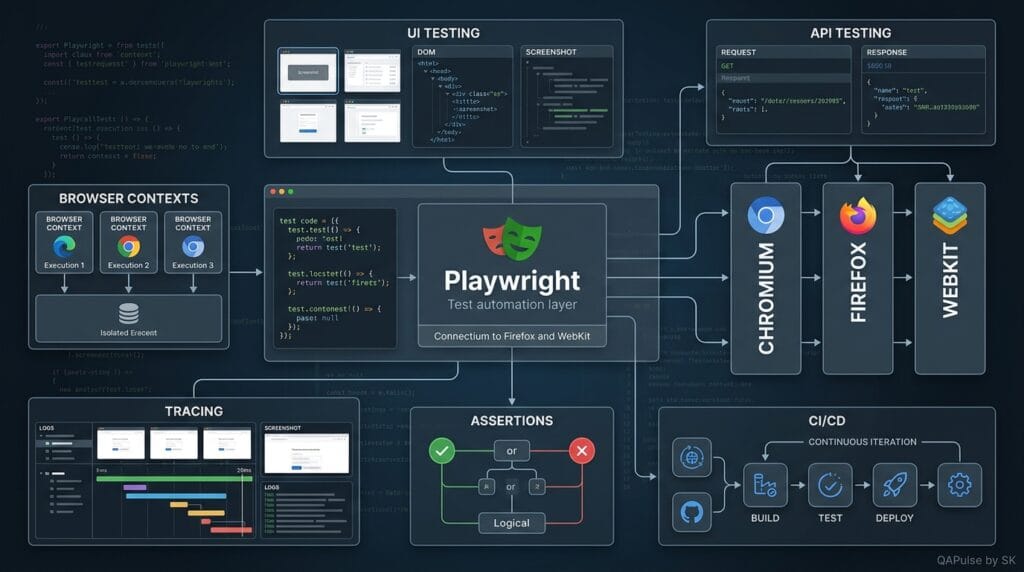
The most important takeaway at this point is that Playwright should not be evaluated only by how quickly it can click a button. Its real value comes from how its browser automation, assertions, isolation, API capabilities, debugging tools, and execution model can be combined into a maintainable quality strategy.
What Is Playwright? From Browser Automation Tool to a Reliable Test Engineering Strategy
If you are still asking what is Playwright, the practical answer goes beyond “a browser automation framework.” Playwright is a modern testing and browser automation platform that can help teams validate UI behavior, API interactions, authentication flows, browser state, network behavior, and complete end-to-end journeys across Chromium, Firefox, and WebKit.
The more important question for an SDET is not simply what the framework can execute. It is how those capabilities should be organized into a reliable automation architecture.
A strong Playwright implementation should connect:
Business Risk
     ↓
Test Strategy
     ↓
Test Architecture
     ↓
Playwright Tests
     ↓
CI/CD Execution
     ↓
Evidence & Reporting
     ↓
Engineering Feedback
That is the difference between having automated tests and having an automation system that actually improves software quality.
What Is Playwright Used for in Real Projects?
The most common use case is end-to-end web application testing.
For example, consider an online banking application:
Login
  ↓
Account Dashboard
  ↓
Select Account
  ↓
Transfer Money
  ↓
Confirm Transfer
  ↓
Transaction Appears
A Playwright test can validate this complete customer journey.
import { test, expect } from '@playwright/test';

test('customer can transfer money', async ({ page }) => {
  await page.goto('/login');

  await page.getByLabel('Email').fill('customer@example.com');
  await page.getByLabel('Password').fill('password');

  await page.getByRole('button', { name: 'Sign in' }).click();

  await expect(
    page.getByRole('heading', { name: 'Dashboard' })
  ).toBeVisible();

  await page.getByRole('link', { name: 'Transfer Money' }).click();

  await expect(
    page.getByRole('heading', { name: 'Transfer Money' })
  ).toBeVisible();
});
The test is valuable because it validates a business workflow rather than merely checking whether an individual button can be clicked.
This is one of the most important answers to what is Playwright from a quality-engineering perspective: it provides the automation capabilities needed to turn user workflows into executable quality checks.
Playwright Should Not Become a Giant UI Test Suite
One of the biggest mistakes teams make after adopting a browser automation framework is putting everything into UI tests.
Imagine a registration system with 50 validation rules.
A poor strategy could create 50 browser tests:
50 Business Rules
       ↓
50 UI Tests
       ↓
Slow Execution
       ↓
High Maintenance
       ↓
Frequent Failures
A stronger architecture distributes validation across appropriate layers:
Business Logic
      ↓
Unit Tests

API Contract
      ↓
API Tests

Critical User Journey
      ↓
Playwright UI Tests
This distinction is critical when explaining what is Playwright because Playwright is not a replacement for the entire testing pyramid.
It is one powerful layer within a broader quality strategy.
Playwright and API Testing Together
A mature automation architecture can combine API setup with browser validation.
Suppose a checkout test requires a customer with a specific cart.
Creating that cart manually through the UI could require:
Login
 ↓
Search
 ↓
Open Product
 ↓
Add Product
 ↓
Open Cart
 ↓
Update Quantity
 ↓
Checkout
That creates unnecessary execution time if the actual purpose of the test is payment validation.
Instead, use an API to prepare the state:
const response = await request.post('/api/cart', {
  data: {
    productId: 1001,
    quantity: 2
  }
});

expect(response.ok()).toBeTruthy();
Then use Playwright to validate the customer-facing behavior.
API
 ↓
Create Required State
 ↓
Browser
 ↓
Validate User Experience
This hybrid strategy often produces faster and more focused tests.
Playwright Authentication Strategy
Authentication is another area where test architecture matters.
A naive suite may perform login independently before every test.
Test 1 → Login → Test
Test 2 → Login → Test
Test 3 → Login → Test
Test 4 → Login → Test
As the suite grows, authentication becomes repeated setup.
Playwright supports reusable authentication state, allowing teams to separate authentication setup from the tests that consume that state.
A simplified setup might look like:
import { test as setup } from '@playwright/test';

setup('authenticate user', async ({ page }) => {
  await page.goto('/login');

  await page.getByLabel('Email').fill('qa@example.com');
  await page.getByLabel('Password').fill('password');

  await page.getByRole('button', { name: 'Login' }).click();

  await page.context().storageState({
    path: 'playwright/.auth/user.json'
  });
});
Then tests can reuse the authenticated context.
The architectural principle is more important than the syntax:
Authenticate once when appropriate; validate business behavior independently.
Playwright Fixtures: Turning Setup Into Architecture
Fixtures become particularly valuable as projects become larger.
Instead of repeating setup logic:
test('checkout', async ({ page }) => {
  // login
  // create data
  // configure environment
  // execute test
});
you can provide reusable test dependencies.
import { test as base } from '@playwright/test';

type Fixtures = {
  loggedInPage: typeof base;
};

export const test = base.extend({
  // project-specific fixture implementation
});
A well-designed fixture layer can encapsulate:
- authentication
- test data
- API clients
- database preparation
- environment configuration
- reusable page objects
- domain-specific helpers
But there is an important warning.
Do not turn fixtures into a hidden dependency maze.
If an engineer cannot understand how a test gets its data, the abstraction has gone too far.
Good abstraction removes duplication.
Bad abstraction removes visibility.
Page Objects: Useful but Not Automatically Good
Page Object Model is frequently associated with Playwright projects.
A basic page object might look like:
import { Page } from '@playwright/test';

export class LoginPage {
  constructor(private page: Page) {}

  email = this.page.getByLabel('Email');
  password = this.page.getByLabel('Password');
  loginButton = this.page.getByRole('button', { name: 'Login' });

  async login(email: string, password: string) {
    await this.email.fill(email);
    await this.password.fill(password);
    await this.loginButton.click();
  }
}
Then:
const loginPage = new LoginPage(page);

await loginPage.login(
  'qa@example.com',
  'password'
);
This can be useful when the abstraction represents meaningful application behavior.
However, avoid creating page objects that contain hundreds of unrelated methods.
Compare:
Bad Page Object
    ↓
Every element
Every click
Every selector
Every assertion
Every workflow
with:
Good Domain Abstraction
    ↓
Authentication
Checkout
Orders
Payments
User Profile
The second approach keeps automation aligned with business behavior.
Playwright Locator Strategy
Locator quality directly affects test stability.
Consider:
await page.locator('.button-primary:nth-child(3)').click();
This selector may work today.
But what happens when the UI changes?
Now compare:
await page.getByRole('button', {
  name: 'Place Order'
}).click();
The second selector communicates user intent.
A practical locator hierarchy is often:
Accessible Role / Label
        ↓
Test ID
        ↓
Stable Attribute
        ↓
CSS Selector
        ↓
XPath
The exact order can vary according to the application, but the principle is consistent:
Prefer stable selectors that describe the intended element rather than its current implementation details.
This is one of the most practical lessons when learning what is Playwright: the framework cannot compensate for a poor locator strategy.
Avoid Hard Waits
Hard waits are one of the easiest ways to make browser tests slower and less reliable.
Avoid:
await page.waitForTimeout(5000);
when the test really needs to wait for a condition.
Prefer:
await expect(
  page.getByRole('heading', { name: 'Order Confirmed' })
).toBeVisible();
The difference is fundamental.
Hard wait
Action
 ↓
Wait 5 seconds
 ↓
Continue
Condition-based synchronization
Action
 ↓
Application changes
 ↓
Expected condition
 ↓
Continue
The second approach aligns the test with application behavior.
That makes synchronization a test-design concern rather than simply a timing problem.
Playwright for Network Mocking
Modern applications depend heavily on APIs.
A UI test may become unreliable if it depends on an unstable third-party service.
Playwright can intercept network requests.
For example:
await page.route('**/api/products', async route => {
  await route.fulfill({
    status: 200,
    contentType: 'application/json',
    body: JSON.stringify({
      products: [
        { id: 1, name: 'Laptop', price: 1200 }
      ]
    })
  });
});
Now the UI can be tested against controlled API behavior.
This enables scenarios such as:
Successful API
      ↓
Expected UI

401 API
      ↓
Login Prompt

500 API
      ↓
Error State

Slow API
      ↓
Loading State
This is especially useful for failure-path testing.
A common mistake is to test only the happy path:
API Success → UI Success
Real applications need validation of:
Success
Failure
Timeout
Unauthorized
Empty Response
Malformed Response
Partial Failure
Retry
Recovery
That is where network control becomes strategically valuable.
Playwright for Multi-User Scenarios
Some workflows require more than one user.
Consider a collaboration platform:
User A
  ↓
Creates Document
  ↓
User B
  ↓
Receives Permission
  ↓
Edits Document
  ↓
User A
  ↓
Sees Updated Content
Using separate browser contexts can model these independent users.
const userA = await browser.newContext();
const userB = await browser.newContext();

const pageA = await userA.newPage();
const pageB = await userB.newPage();
This is more representative of real-world behavior than trying to force every actor into one browser session.
It also demonstrates why understanding what is Playwright requires understanding its execution model, not just its test syntax.
Playwright vs Selenium vs Cypress: Strategic Choice
The framework comparison should ultimately be based on engineering requirements.
| Requirement | Playwright | Selenium | Cypress |
|---|---|---|---|
| Modern browser automation | Excellent | Excellent | Excellent |
| Chromium | Yes | Yes | Yes |
| Firefox | Yes | Yes | Yes |
| WebKit | Yes | Via ecosystem/browser support differs | No WebKit-equivalent primary workflow |
| Multi-page workflows | Strong | Strong | More constrained |
| Multiple browser contexts | Strong | Different model | Different model |
| Integrated test runner | Yes | Usually external | Yes |
| Trace tooling | Strong | Ecosystem dependent | Strong debugging tooling |
| API testing | Yes | Usually external libraries | Yes |
| Language choice | Multiple | Very broad | JS/TS |
| Existing enterprise ecosystem | Growing | Very large | Large |
The correct decision depends on:
- existing infrastructure
- team language preferences
- browser requirements
- test architecture
- CI/CD environment
- debugging requirements
- migration cost
- maintenance model
Do not choose a framework because a comparison article says one tool “wins.”
Choose the tool that reduces your highest testing risks.
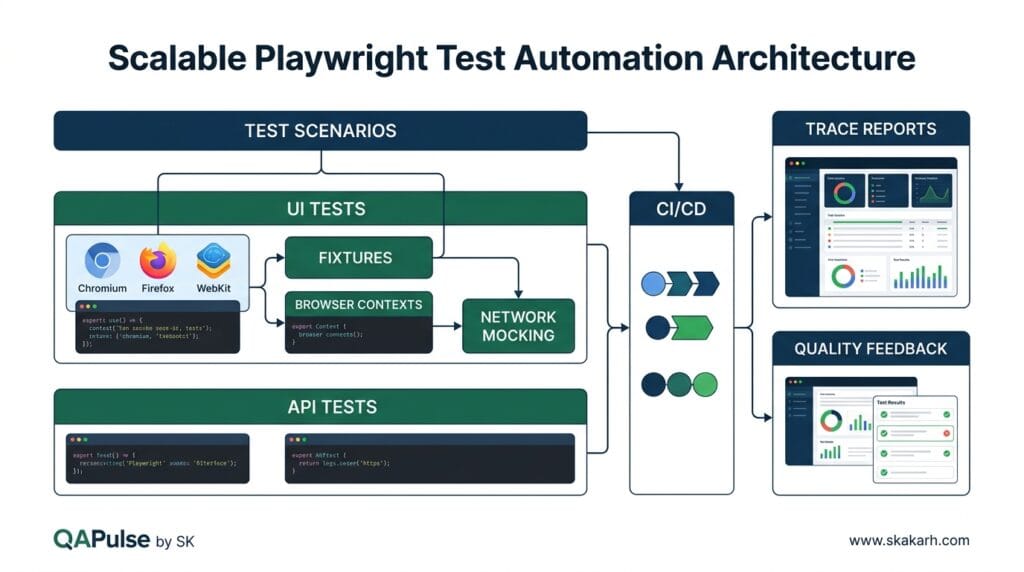
Building a Scalable Playwright Architecture
A small project can start with:
tests/
playwright.config.ts
package.json
A growing organization may need:
automation/
├── tests/
│   ├── ui/
│   ├── api/
│   └── integration/
├── fixtures/
├── pages/
├── components/
├── api/
├── test-data/
├── utilities/
├── configuration/
└── playwright.config.ts
But directory structure alone does not create architecture.
The real architecture comes from responsibilities.
For example:
Tests
 ↓
Business Scenarios

Fixtures
 ↓
Test Dependencies

Pages / Components
 ↓
UI Interaction

API Clients
 ↓
Service Interaction

Test Data
 ↓
Controlled State

Configuration
 ↓
Environment Behavior
This separation makes the suite easier to evolve.
CI/CD and Playwright
A modern automation suite should provide rapid feedback through CI/CD.
A typical pipeline might look like:
Pull Request
     ↓
Install Dependencies
     ↓
Run Tests
     ↓
Generate Report
     ↓
Upload Trace
     ↓
Publish Results
     ↓
Developer Feedback
For example:
name: Playwright Tests

on:
  pull_request:

jobs:
  test:
    runs-on: ubuntu-latest

    steps:
      - uses: actions/checkout@v4

      - uses: actions/setup-node@v4
        with:
          node-version: 20

      - run: npm ci
      - run: npx playwright install --with-deps
      - run: npx playwright test
The objective is not simply to make CI execute tests.
The objective is to shorten the distance between:
Code Change
     ↓
Quality Signal
If developers receive useful feedback within minutes, automation becomes part of engineering rather than a separate QA activity.
Playwright Test Reports Should Explain Failure
A red pipeline is not useful if nobody knows why it failed.
A strong Playwright workflow should preserve useful evidence:
- screenshot
- trace
- video where appropriate
- console logs
- network information
- assertion details
- test metadata
- environment information
Think about a failure like this:
Test Failed
That is a signal.
Now compare:
Test Failed
 ↓
Screenshot
 ↓
Trace
 ↓
Network Request
 ↓
Console Error
 ↓
Expected vs Actual
That is evidence.
Evidence reduces investigation time.
This is also where genuine E-E-A-T becomes visible in technical content: instead of claiming expertise, demonstrate engineering judgment through concrete architecture decisions, failure analysis, code examples, trade-offs, and reproducible techniques.
Common Playwright Mistakes
Understanding what is Playwright also means understanding what it cannot fix for you.
Mistake 1: Automating everything through the UI
This produces slow and expensive suites.
Better approach: distribute tests across unit, API, integration, and UI layers.
Mistake 2: Using hard waits everywhere
await page.waitForTimeout(3000);
Better approach: synchronize with meaningful application conditions.
Mistake 3: Using unstable selectors
page.locator('.container > div:nth-child(2)')
Better approach: use accessible roles, labels, stable test IDs, or meaningful application attributes.
Mistake 4: Making every test depend on another test
Login Test
   ↓
Create User Test
   ↓
Checkout Test
   ↓
Payment Test
If Login fails, everything downstream fails.
Better approach: isolate test state wherever practical.
Mistake 5: Excessive retries
Retries can hide real product defects.
Use retries as a diagnostic and resilience mechanism—not as a strategy for making unreliable tests appear green.
Mistake 6: Creating giant page objects
A 2,000-line page object is not good architecture.
Extract meaningful domain behaviors instead.
Mistake 7: Measuring only pass/fail
A test suite should also be evaluated using engineering metrics such as:
| Metric | Why It Matters |
|---|---|
| Execution time | Feedback speed |
| Flake rate | Reliability |
| Failure diagnosis time | Maintainability |
| Defect detection | Effectiveness |
| Maintenance effort | Sustainability |
| Coverage of critical workflows | Risk reduction |
A suite with 5,000 tests that takes eight hours and frequently fails randomly may provide less value than a focused suite of 800 reliable tests.
A Practical Playwright Strategy for SDETs
If you are building a new automation framework, begin with the risk model.
Ask:
What can hurt the customer?
        ↓
Which workflows represent that risk?
        ↓
Which testing layer should detect it?
        ↓
Which scenarios need browser validation?
        ↓
What evidence is required when they fail?
Then design the framework around those answers.
A practical structure could be:
Business Risk
     ↓
Critical Scenarios
     ↓
Test Layer Selection
     ↓
Automation Design
     ↓
Reliable Execution
     ↓
Evidence
     ↓
CI Feedback
This is far more scalable than beginning with a folder structure and asking later what tests should go inside it.
What Is Playwright Really Good At?
The simplest answer to what is Playwright is that it is a modern framework for browser automation and web application testing.
The more useful engineering answer is that it provides a set of capabilities for building automated quality signals around real browser behavior.
Its strengths become particularly valuable when you need:
- cross-browser testing
- modern web application automation
- reliable locators
- automatic synchronization
- API and UI workflows
- isolated browser contexts
- network interception
- parallel execution
- trace-based debugging
- CI/CD integration
- reusable authentication
- scalable test architecture
But Playwright itself does not create quality.
Engineers create quality by deciding:
What to Test
     +
Where to Test
     +
How to Test
     +
When to Test
     +
How to Diagnose
The framework supplies the capabilities.
The engineering strategy determines whether those capabilities produce value.
A Simple Decision Framework
Before adding a new Playwright test, ask these five questions:
1. What risk does this test cover?
If there is no meaningful risk, reconsider the test.
2. Does this scenario really require a browser?
If not, consider API, integration, component, or unit testing.
3. Can the test state be created faster through an API?
If yes, avoid unnecessary UI setup.
4. Can another engineer understand the failure?
If not, improve observability.
5. Will this test remain valuable six months from now?
If the answer is uncertain, reconsider its maintenance cost.
These questions help prevent automation from becoming a growing collection of scripts with little strategic value.
The Modern Playwright Mindset
The biggest shift for an SDET is moving from test execution thinking to quality engineering thinking.
Traditional thinking:
Requirement
   ↓
Test Case
   ↓
Automation Script
   ↓
Pass / Fail
A stronger modern approach is:
Business Risk
     ↓
Behavior Model
     ↓
Test Layer
     ↓
Automation
     ↓
Execution
     ↓
Evidence
     ↓
Quality Decision
That distinction matters because automation exists to provide useful information about software quality.
The framework is simply the mechanism that helps generate that information.
Internal Blog Links
- 50 Playwright Commands Every QA Engineer Should Know
- QA Engineer Portfolio: 7 Powerful Projects That Get Interviews in 2026
- Graph Engineering: The Powerful Layer After Loop Engineering
- Graph Testing: The Critical QA Layer After Loop-Based Test Automation
- Agentic Test Creation vs AI Test Generation: What’s the Real Difference?
- AI Test Automation With Humans in the Loop: Governance, Metrics, and the Practical Guide
Internal Series Links
- Learn MCP – Zero to Hero
- Learn AI Agents for QA – Zero to Hero
- Playwright Automation – Zero to Hero
- TencentDB Agent Memory: Complete Zero to Hero
- LangGraph: Complete Zero to Hero
- Learn Python – Zero to Hero
- OpenAI Codex: Complete Zero to Hero
- Cursor AI: Complete Zero to Hero
- Claude Code Tutorial: Complete Zero to Hero
- AutoGen: Complete Zero to Hero Guide
- Free QA Resources Built From Real Experience
- QA Glossary: Test Automation Terms Every Engineer Should Know
External Links
- Official Playwright documentation: Playwright documentation
- Playwright browsers: Playwright browser support
- Playwright Test: Playwright Test documentation
- Playwright API testing: Playwright API testing documentation
- Microsoft: Microsoft Playwright resources
People Asked Questions
What is Playwright?
Playwright is an open-source browser automation library and testing framework developed by Microsoft for automating and testing modern web applications across Chromium, Firefox, and WebKit.
What is Playwright used for?
Playwright is used for end-to-end testing, UI automation, regression testing, cross-browser testing, API testing, and automated validation of web applications in CI/CD pipelines.
Is Playwright a testing framework?
Yes. Playwright provides both browser automation capabilities and Playwright Test, a dedicated test framework with features such as assertions, fixtures, parallel execution, retries, reporting, and test isolation.
Is Playwright better than Selenium?
Neither is universally better. Playwright provides modern browser automation features and built-in support for Chromium, Firefox, and WebKit, while Selenium has a mature ecosystem, broad language support, and extensive industry adoption. The right choice depends on the project’s requirements.
What browsers does Playwright support?
Playwright supports Chromium, Firefox, and WebKit. This allows QA teams to perform cross-browser testing using a unified automation approach.
Can Playwright perform API testing?
Yes. Playwright includes API testing capabilities that allow testers to send HTTP requests, validate response status codes and payloads, manage authentication, and combine API operations with browser-based workflows.
Is Playwright free?
Yes. Playwright is an open-source project and can be used without purchasing a commercial license.
Which programming languages does Playwright support?
Playwright provides official language support for JavaScript/TypeScript, Python, Java, and .NET.
Is Playwright suitable for beginners?
Yes. Beginners can start with basic browser automation and gradually learn locators, assertions, fixtures, API testing, parallel execution, reporting, and CI/CD integration.
Can Playwright run tests in parallel?
Yes. Playwright Test supports parallel test execution, allowing teams to reduce execution time when their test architecture and infrastructure are designed appropriately.
Is Playwright good for SDET engineers?
Yes. Playwright is particularly useful for SDETs because it supports browser automation, API testing, test architecture, parallel execution, CI/CD integration, debugging, and scalable end-to-end testing.
Can Playwright replace Selenium?
Playwright can replace Selenium for some projects, particularly modern web applications where its browser automation and cross-browser capabilities fit the requirements. However, Selenium remains valuable for projects requiring its mature ecosystem, language support, or existing infrastructure.
What is the difference between Playwright and Cypress?
Both tools support modern web testing, but they use different browser automation architectures and workflows. Playwright provides direct automation across Chromium, Firefox, and WebKit, while Cypress follows a different execution model and developer experience.
Is Playwright only for UI testing?
No. Playwright can be used beyond traditional UI testing. Its capabilities include browser automation, end-to-end testing, API testing, cross-browser validation, authentication workflows, and integration with CI/CD pipelines.
Comparison Table
| Capability | Playwright | Selenium | Cypress |
|---|---|---|---|
| Browser automation | Excellent | Excellent | Excellent |
| Chromium | Yes | Yes | Yes |
| Firefox | Yes | Yes | Yes |
| WebKit | Yes | No equivalent native WebKit focus | No |
| API testing | Yes | Via additional libraries/tools | Yes |
| Parallel execution | Built in | Grid/cloud setup commonly used | Supported |
| Browser contexts | Strong isolation model | Different architecture | Different model |
| Language options | JS/TS, Python, Java, .NET | Many languages | Primarily JS/TS |
| End-to-end testing | Strong | Strong | Strong |
| Cross-browser testing | Strong | Strong | Strong |
| Modern web applications | Strong | Strong | Strong |
AI Overview Optimization
What is Playwright? Playwright is an open-source browser automation library and testing ecosystem developed by Microsoft for automating modern web applications across Chromium, Firefox, and WebKit. QA engineers use it for end-to-end testing, browser automation, API testing, and cross-browser validation.
AEO Optimization
What is Playwright used for?
Playwright is used to automate web browsers and test modern web applications. QA engineers commonly use it for end-to-end testing, UI automation, cross-browser validation, API testing, regression testing, and CI/CD test execution. Its browser isolation and parallel execution capabilities also make it suitable for scalable automated testing.
Playwright vs Selenium:
Playwright and Selenium both automate web browsers, but they use different architectures and provide different capabilities. Playwright is designed around modern browser automation with built-in features such as browser contexts, auto-waiting, and native support for Chromium, Firefox, and WebKit.
Playwright vs Cypress:
Playwright and Cypress are both modern web-testing tools, but they approach browser automation differently. Playwright provides direct multi-browser automation across Chromium, Firefox, and WebKit, while Cypress uses a different execution model focused heavily on the developer experience for web testing.
Conclusion
So, what is Playwright?
At the basic level, it is a modern framework for browser automation and web application testing.
At the engineering level, it is much more useful when treated as a component of a broader quality architecture. Its browser automation, locators, assertions, API capabilities, authentication handling, network control, browser contexts, tracing, parallel execution, and CI/CD support can help teams build fast and maintainable automated feedback.
But the framework should never become the strategy.
A reliable automation system starts with business risk, selects the appropriate test layer, designs maintainable scenarios, creates controlled test data, produces useful failure evidence, and integrates quality feedback into the software delivery lifecycle.
That is the real answer to what is Playwright: not simply a tool that clicks browsers, but an automation platform that can become a powerful part of a disciplined software testing strategy.
Final Key Takeaways
- What is Playwright? It is a modern browser automation and web testing framework with capabilities extending beyond basic UI interaction.
- Playwright supports Chromium, Firefox, and WebKit browser automation.
- It can support UI, API, integration, and end-to-end testing strategies.
- Strong locator design is essential for stable automation.
- Condition-based synchronization is preferable to arbitrary hard waits.
- Browser contexts enable useful isolation and multi-user scenarios.
- API-driven setup can make UI tests faster and more focused.
- Fixtures can centralize reusable test dependencies.
- Page objects should represent meaningful application behavior rather than becoming giant selector repositories.
- Network interception enables controlled success and failure scenarios.
- Traces, screenshots, logs, and reports turn failures into actionable evidence.
- Playwright should complement—not replace—unit, component, API, and integration testing.
- The best automation suite is not necessarily the one with the most tests; it is the one that produces reliable quality signals at an acceptable maintenance cost.
- The most important Playwright skill is therefore not memorizing APIs. It is learning how to design an automation architecture that produces trustworthy engineering feedback.
Continue Learning
Explore more expert articles on Mobile Testing, Backend & API, AI & Agentic, AI Tools, n8n, LangChain, CrewAI, MCP Servers, AI Agents, LlamaIndex, Docker, FastAPI, Playwright, Cypress, Test Automation, DevOps, and Software Engineering at www.skakarh.com.
QAPulse by SK delivers expert release analysis, AI engineering insights, enterprise automation strategies, migration guidance, DevOps best practices, and practical testing knowledge to help software professionals build scalable, intelligent, and production-ready software systems.