QA
QA
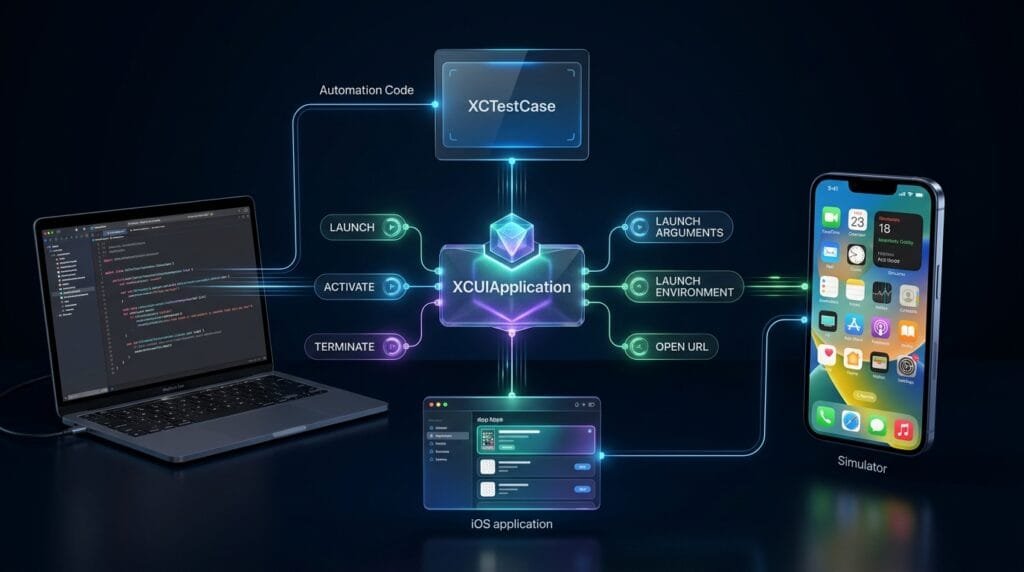
XCUIApplication is the central application proxy used by XCUITest to launch, activate, monitor, configure, and terminate an iOS application during UI automation. For SDETs, understanding XCUIApplication is essential because reliable UI tests begin with deterministic application lifecycle control rather than immediately interacting with buttons, text fields, or screens.
What is XCUIApplication?
XCUIApplication is an XCTest UI automation class that acts as a proxy for the application under test. It provides APIs for launching, activating, terminating, inspecting application state, passing launch arguments, setting launch environment variables, and opening URLs. (Apple Developer)
The basic pattern is:
import XCTest

final class LoginTests: XCTestCase {

    func testLoginScreen() {
        let app = XCUIApplication()

        app.launch()

        XCTAssertTrue(
            app.textFields["emailField"].exists
        )
    }
}
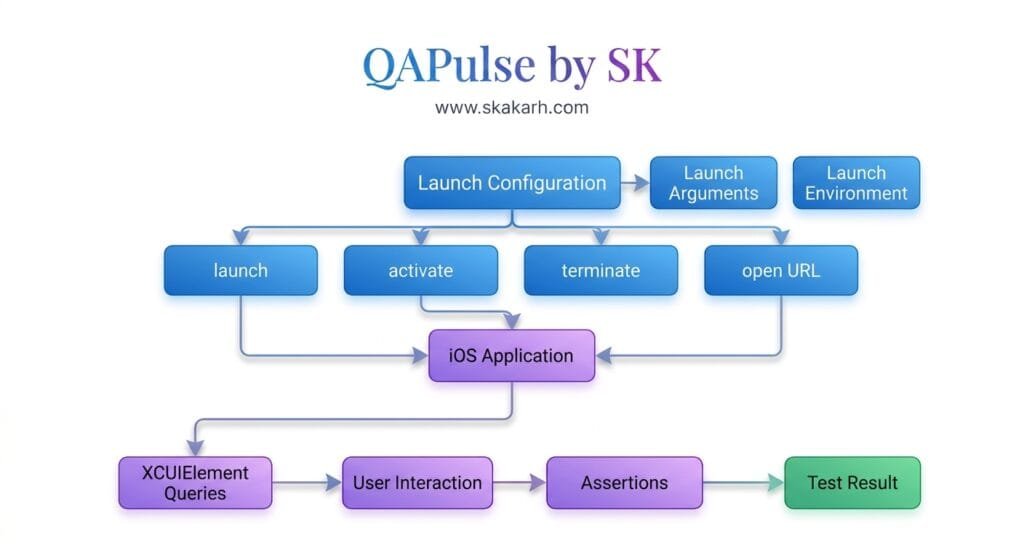
The important architecture is:
XCTestCase
    ↓
XCUIApplication
    ↓
iOS Application
    ↓
XCUIElement
    ↓
User Interaction
XCUIApplication controls the application lifecycle.
XCUIElement controls and inspects individual UI elements.
Key Points
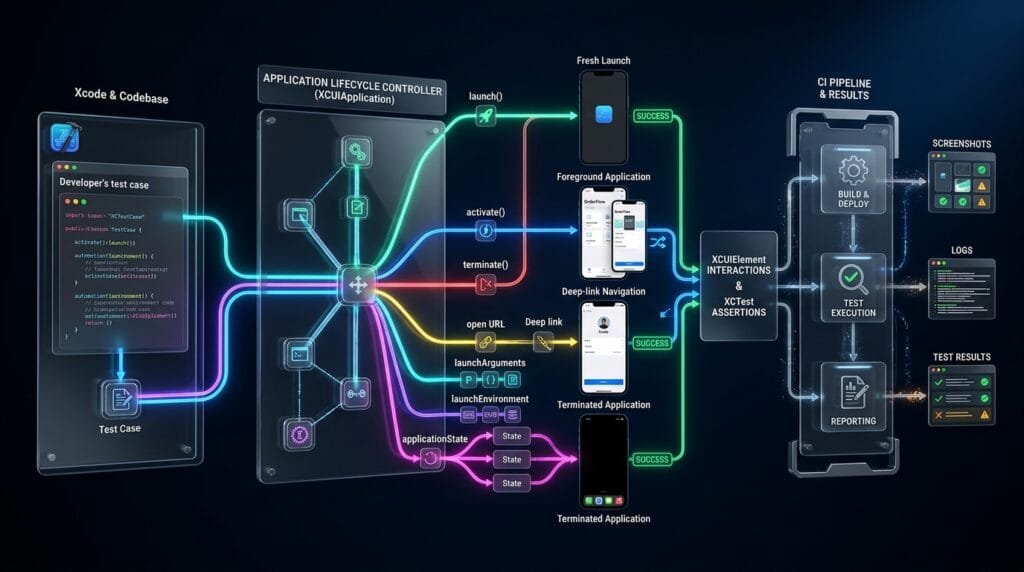
XCUIApplicationrepresents the application under test.app.launch()starts the application.app.activate()brings an application to the foreground.app.terminate()stops a running application.app.stateexposes the application’s latest known state.launchArgumentspasses command-line arguments.launchEnvironmentpasses environment variables.open(_:)launches the application using a URL.init(bundleIdentifier:)can create an application proxy using a bundle identifier.- Application lifecycle control should be centralized in scalable test frameworks.
Why XCUIApplication Matters to SDETs
A UI test is only reliable when its starting state is predictable.
Consider:
func testCheckout() {
    let app = XCUIApplication()

    app.buttons["checkout"].tap()
}
What if the application is:
- Not running?
- Already displaying another screen?
- Logged in from a previous session?
- Running with different configuration?
- Opened with stale state?
- Waiting for an external service?
The test becomes dependent on application state.
A better approach establishes the application lifecycle first:
let app = XCUIApplication()

app.launch()

// Test starts from a controlled launch.
This is one of the first architectural decisions an SDET should make when building an XCUITest framework.
Creating an XCUIApplication Instance
The simplest approach is:
let app = XCUIApplication()Apple documents the default initializer as creating a proxy for the application configured as the Target Application in Xcode’s target settings. (Apple Developer)
For example:
final class LoginTests: XCTestCase {

    let app = XCUIApplication()

    func testLoginScreen() {
        app.launch()

        XCTAssertTrue(
            app.staticTexts["Login"].exists
        )
    }
}
This is usually the best starting point for a standard Xcode UI test target.
Creating XCUIApplication With a Bundle Identifier
You can explicitly identify an application using its bundle identifier:
let app = XCUIApplication(
    bundleIdentifier: "com.example.MyApp"
)

app.launch()
Apple provides init(bundleIdentifier:) specifically for creating an application proxy for the supplied bundle identifier. (Apple Developer)
This can be useful when the automation framework needs explicit application identification.
For example:
private var app: XCUIApplication {
    XCUIApplication(
        bundleIdentifier: "com.example.MyApp"
    )
}
Then:
func testDashboard() {
    app.launch()

    XCTAssertTrue(
        app.staticTexts["Dashboard"].exists
    )
}
Launching the Application
The primary lifecycle operation is:
app.launch()Apple documents launch() as a synchronous operation. When it returns successfully, the application has launched and is ready to handle user events. If the application is already running, launch() terminates the existing instance before launching it again to establish a clean launch state. (Apple Developer)
A standard setup is:
override func setUpWithError() throws {
    continueAfterFailure = false

    app = XCUIApplication()
    app.launch()
}
Then every test begins from the application’s launch state:
func testLoginScreenIsDisplayed() {
    XCTAssertTrue(
        app.staticTexts["Login"].waitForExistence(
            timeout: 5
        )
    )
}
This creates a clear lifecycle boundary:
setUpWithError()
      ↓
Create XCUIApplication
      ↓
launch()
      ↓
Application Ready
      ↓
Execute Test
Launch is Synchronous
A common misunderstanding is assuming:
app.launch()means the application’s UI has already reached the exact screen needed by the test.
It does not.
launch() returning means the launch operation completed successfully and the application is ready to handle events. Your test may still need to wait for specific UI state.
For example:
app.launch()

let dashboard = app.staticTexts["Dashboard"]

XCTAssertTrue(
    dashboard.waitForExistence(timeout: 10)
)
This is better than blindly inserting:
sleep(5)The test should wait for observable application state, not an arbitrary amount of time.
Launch Arguments
launchArguments allows command-line arguments to be passed to the application when it launches. Apple documents that these arguments can be modified before a subsequent launch. (Apple Developer)
Example:
let app = XCUIApplication()

app.launchArguments = [
    "-uiTesting",
    "-resetState"
]

app.launch()
Your application can inspect these arguments:
let arguments = ProcessInfo.processInfo.arguments

if arguments.contains("-uiTesting") {
    // UI-test-specific configuration
}
This creates a useful automation boundary.
Instead of modifying production behavior permanently for testing, the application can recognize an explicit test-mode signal.
Why Launch Arguments Are Useful
Launch arguments are useful for scenarios such as:
Disable animations
Reset application state
Enable mock services
Select test environment
Enable debug features
Skip onboarding
Use deterministic data
For example:
app.launchArguments = [
    "-uiTesting",
    "-disableAnimations",
    "-resetState"
]

app.launch()
The exact arguments are application-specific.
The architectural principle is more important:
The test controls test configuration explicitly at launch time.
Launch Environment
launchEnvironment allows environment variables to be passed into the application when it launches. Apple exposes this as part of XCUIApplication‘s launch configuration. (Apple Developer)
Example:
let app = XCUIApplication()

app.launchEnvironment = [
    "UI_TESTING": "true",
    "API_ENVIRONMENT": "staging"
]

app.launch()
The application can read them using:
let environment = ProcessInfo.processInfo.environment

if environment["UI_TESTING"] == "true" {
    // Configure test behavior
}
This is especially useful when the same test suite needs different runtime configurations.
Launch Arguments vs Launch Environment
The distinction is simple:
| Feature | Purpose |
|---|---|
launchArguments | Pass command-line arguments |
launchEnvironment | Pass environment variables |
launch() | Start the application |
activate() | Bring application to foreground |
terminate() | Stop application |
state | Inspect application state |
Example:
app.launchArguments = [
    "-uiTesting"
]

app.launchEnvironment = [
    "API_ENVIRONMENT": "staging"
]

app.launch()
This gives the test framework explicit control over runtime configuration.
Activating the Application
activate() brings the application to the foreground.
app.activate()Apple documents an important difference between activate() and launch(): activate() does not terminate an already-running application. If the application is not running, activate() launches it automatically. (Apple Developer)
Therefore:
app.launch()and:
app.activate()are not interchangeable.
launch()
Use when you want a fresh launch.
app.launch()If an existing instance is running, Apple states that launch() terminates it before launching the new instance. (Apple Developer)
activate()
Use when you want the existing application brought to the foreground without intentionally resetting its current running instance.
app.activate()This distinction matters for tests involving:
- Background/foreground behavior
- Deep links
- Notifications
- Multi-application flows
- State restoration
Terminating the Application
Use:
app.terminate()Apple documents terminate() as terminating any running instance of the application. (Apple Developer)
Example:
func testApplicationCanBeTerminated() {
    let app = XCUIApplication()

    app.launch()

    XCTAssertEqual(
        app.state,
        .runningForeground
    )

    app.terminate()

    XCTAssertEqual(
        app.state,
        .notRunning
    )
}
This is useful when your test needs explicit lifecycle control.
Application State
XCUIApplication exposes:
app.stateApple describes state as the application’s most recent known state, updated asynchronously as the system monitors the application. After a successful launch() or activate(), the application state is reported as runningForeground; after successful termination, it is notRunning. (Apple Developer)
Example:
app.launch()

XCTAssertEqual(
    app.state,
    .runningForeground
)
You can use state checks when validating lifecycle behavior.
However, don’t use application state as a replacement for checking the actual UI condition your test cares about.
For example:
XCTAssertEqual(app.state, .runningForeground)does not prove:
Login Screen is visibleThose are different assertions.
Waiting for Application State
Apple provides:
app.wait(for: .runningForeground, timeout: 10)Depending on the API version available to your project, the exact state-waiting API should be verified against the current Xcode SDK documentation.
The architectural principle remains:
Lifecycle State
      ↓
Expected UI State
      ↓
Test Assertion
Do not confuse application lifecycle state with business state.
Opening an Application With a URL
XCUIApplication can also launch an application by URL:
app.open(URL(string: "myapp://profile")!)Apple documents open(_:) as launching the application by URL. (Apple Developer)
This is useful for testing:
- Deep links
- Universal-link flows
- URL-based navigation
- Authentication callbacks
- Specific application entry points
Example:
func testProfileDeepLink() {
    let app = XCUIApplication()

    app.launch()

    let url = URL(
        string: "myapp://profile"
    )!

    app.open(url)

    XCTAssertTrue(
        app.staticTexts["Profile"].waitForExistence(
            timeout: 5
        )
    )
}
This allows the test to validate a navigation path that would otherwise require several UI interactions.
XCUIApplication and XCUIElement
These two classes have different responsibilities.
XCUIApplication
      │
      ├── Launch
      ├── Activate
      ├── Terminate
      ├── State
      ├── Launch Arguments
      └── Launch Environment
              │
              ▼
        XCUIElement
              │
              ├── Button
              ├── TextField
              ├── StaticText
              ├── Image
              └── Other UI Elements
For example:
let app = XCUIApplication()

app.launch()

let emailField = app.textFields["emailField"]

emailField.tap()
emailField.typeText("qa@example.com")
Here:
appcontrols the application.emailFieldrepresents an element inside the application.
Keeping this distinction clear makes XCUITest architecture easier to understand.
Screen Object Architecture
In a production framework, avoid repeating lifecycle setup and selectors throughout every test.
A simple application object can centralize launch behavior:
final class TestApplication {

    let app: XCUIApplication

    init() {
        app = XCUIApplication()
    }

    func launch() {
        app.launch()
    }

    func launchForUITesting() {
        app.launchArguments = [
            "-uiTesting",
            "-resetState"
        ]

        app.launchEnvironment = [
            "UI_TESTING": "true"
        ]

        app.launch()
    }

    func terminate() {
        app.terminate()
    }
}
Then:
final class LoginTests: XCTestCase {

    private var application: TestApplication!

    override func setUpWithError() throws {
        continueAfterFailure = false

        application = TestApplication()
        application.launchForUITesting()
    }

    func testLoginScreen() {
        XCTAssertTrue(
            application.app
                .textFields["emailField"]
                .waitForExistence(timeout: 5)
        )
    }
}
This becomes valuable when launch configuration becomes more sophisticated.
6 Core Pillars of XCUIApplication
1. Application Proxy
XCUIApplication provides the automation proxy representing the application under test.
2. Deterministic Launch
Use launch() when the test needs a fresh application launch.
3. Runtime Configuration
Use launch arguments and environment variables to control test-specific behavior.
4. Lifecycle Control
Use launch(), activate(), and terminate() intentionally.
5. State Awareness
Use application state to validate lifecycle transitions, not as a substitute for UI assertions.
6. Test Architecture
Centralize application configuration so individual tests focus on user behavior.
Key Architectural Takeaways for SDETs
Treat XCUIApplication as Infrastructure
Tests should not repeatedly implement low-level application startup logic.
Instead:
Test
 ↓
Application Manager
 ↓
XCUIApplication
 ↓
iOS App
Keep Launch Configuration Centralized
Instead of:
app.launchArguments = ["-uiTesting"]appearing across 50 tests, centralize it.
Make Test Startup Deterministic
A strong test should control:
- Application launch
- Test environment
- Required launch arguments
- Required environment variables
- Initial application state
Don’t Use sleep() for Application Readiness
Avoid:
app.launch()

sleep(5)
Prefer waiting for a meaningful state or UI condition.
app.launch()

XCTAssertTrue(
    app.buttons["Login"].waitForExistence(timeout: 10)
)
Don’t Confuse Lifecycle With UI State
This:
app.state == .runningForegrounddoes not mean:
Dashboard is displayedValidate the actual condition required by the test.
Common XCUIApplication Mistakes
Mistake 1: Launching Inside Every Test Without Configuration
app.launch()is valid, but a large framework may need standardized configuration.
Centralize it when complexity increases.
Mistake 2: Using activate() When a Fresh Launch Is Required
app.activate()does not intentionally reset an already-running application.
Use:
app.launch()when the test requires a fresh launch.
Mistake 3: Using sleep()
sleep(10)creates fixed delays.
Prefer condition-based synchronization.
Mistake 4: Testing Only app.state
A running application does not necessarily mean the expected screen is available.
Mistake 5: Hardcoding Environment Configuration
Avoid spreading:
app.launchEnvironment = [...]throughout the test suite.
Centralize environment configuration.
Mistake 6: Ignoring Deep Links
If the application supports deep links, open(_:) provides a direct way to exercise URL-based entry points. (Apple Developer)
Production-Ready Application Manager
A simple scalable pattern is:
import XCTest

final class ApplicationManager {

    let app: XCUIApplication

    init(
        bundleIdentifier: String = "com.example.MyApp"
    ) {
        app = XCUIApplication(
            bundleIdentifier: bundleIdentifier
        )
    }

    func launch(
        arguments: [String] = [],
        environment: [String: String] = [:]
    ) {
        app.launchArguments = arguments
        app.launchEnvironment = environment
        app.launch()
    }

    func activate() {
        app.activate()
    }

    func terminate() {
        app.terminate()
    }
}
Usage:
final class LoginTests: XCTestCase {

    private var application: ApplicationManager!

    override func setUpWithError() throws {
        continueAfterFailure = false

        application = ApplicationManager()

        application.launch(
            arguments: [
                "-uiTesting",
                "-resetState"
            ],
            environment: [
                "API_ENVIRONMENT": "staging"
            ]
        )
    }

    func testLoginScreen() {
        XCTAssertTrue(
            application.app
                .textFields["emailField"]
                .waitForExistence(timeout: 10)
        )
    }
}
This architecture gives the test a clean boundary:
LoginTests
    ↓
ApplicationManager
    ↓
XCUIApplication
    ↓
iOS Application
The test expresses what to validate, while the application manager handles how the application starts.
CI/CD Considerations
XCUIApplication becomes especially important in CI because environment differences can expose weak lifecycle design.
A CI pipeline may execute:
Build
 ↓
Install
 ↓
Launch
 ↓
UI Test
 ↓
Capture Evidence
 ↓
Terminate
 ↓
Next Test
For reliable CI:
- Keep tests independent.
- Standardize launch arguments.
- Standardize environment variables.
- Avoid fixed sleeps.
- Use accessibility identifiers.
- Capture screenshots on failure.
- Separate smoke and regression execution.
- Keep application startup deterministic.
The objective is not merely:
“The test passes on my Mac.”
The objective is:
“The same test starts from a predictable state and produces diagnosable results in CI.”
AI Overview & Answer Engine Optimization
XCUIApplication is an XCUITest application proxy used to launch, activate, monitor, configure, and terminate the iOS application under test. (Apple Developer)
Key Points
XCUIApplication()creates the application proxy.launch()starts a fresh application instance.activate()brings the application to the foreground.terminate()stops the application.launchArgumentspasses command-line arguments.launchEnvironmentpasses environment variables.stateexposes the latest application state.open(_:)supports URL-based application launches.
How Do You Launch an iOS App in XCUITest?
let app = XCUIApplication()
app.launch()
Apple documents launch() as a synchronous operation that launches the application and makes it ready to handle user events. (Apple Developer)
What Is the Difference Between launch() and activate()?
launch() starts a fresh application instance and terminates an existing instance if necessary. activate() brings the application to the foreground without terminating an already-running instance. (Apple Developer)
How Do You Pass Configuration to an XCUITest App?
Use:
app.launchArguments = ["-uiTesting"]

app.launchEnvironment = [
    "API_ENVIRONMENT": "staging"
]

app.launch()
launchArguments and launchEnvironment are specifically provided for passing launch-time configuration to the application. (Apple Developer)
How Do You Terminate an App in XCUITest?
app.terminate()terminate() terminates a running instance of the application. (Apple Developer)
AI Overview Summary
XCUIApplication is the main XCUITest proxy for application lifecycle control. SDETs use it to launch applications, configure launch arguments and environment variables, activate or terminate applications, inspect application state, and test URL-based entry points before interacting with XCUIElement objects.
People Asked Questions
What is XCUIApplication in XCUITest?
XCUIApplication is an application proxy that lets XCUITest launch, control, monitor, configure, and terminate the application under test. (Apple Developer)
How do I launch an app using XCUIApplication?
let app = XCUIApplication()
app.launch()
What does XCUIApplication launch do?
launch() launches the application synchronously. If an instance is already running, it terminates that instance before launching again. (Apple Developer)
What is the difference between XCUIApplication and XCUIElement?
XCUIApplication represents and controls the application lifecycle, while XCUIElement represents UI elements inside the application.
Can XCUIApplication pass environment variables?
Yes. Use launchEnvironment before calling launch(). (Apple Developer)
Can XCUIApplication pass command-line arguments?
Yes. Use launchArguments before launching the application. (Apple Developer)
How do I terminate an application in XCUITest?
Use:
app.terminate()Can XCUIApplication test deep links?
Yes. The open(_:) API can launch the application using a URL. (Apple Developer)
Should XCUIApplication setup be centralized?
For small suites, direct use is fine. For larger SDET frameworks, centralizing launch configuration and lifecycle behavior improves maintainability and consistency.
Internal Blog Links
- XCUITest iOS Testing: What it is and Why it Matters
- XCTest vs XCUITest: Understanding Apple’s Testing Frameworks
- XCUITest Setup on macOS and Xcode: Complete Beginner’s Guide
- Your First XCUITest: Building a Basic iOS UI Test
- XCUITest Project Structure and Test Target Architecture
Internal Series Links
- Learn MCP – Zero to Hero
- Learn AI Agents for QA – Zero to Hero
- Playwright Automation – Zero to Hero
- TencentDB Agent Memory: Complete Zero to Hero
- LangGraph: Complete Zero to Hero
- Learn Python – Zero to Hero
- OpenAI Codex: Complete Zero to Hero
- Cursor AI: Complete Zero to Hero
- Claude Code Tutorial: Complete Zero to Hero
- AutoGen: Complete Zero to Hero Guide
- Free QA Resources Built From Real Experience
- QA Glossary: Test Automation Terms Every Engineer Should Know
External Links
- Apple — XCUIApplication — Official API documentation for launching, activating, monitoring, configuring, and terminating applications in UI tests. (Apple Developer)
- Apple — XCUIApplication
launch()— Official documentation for launching the application and understanding fresh-launch behavior. (Apple Developer) - Apple — XCUIApplication
launchArguments— Official documentation for passing launch-time command-line arguments. (Apple Developer) - Apple — XCUIApplication
activate()— Official documentation for bringing an application to the foreground. (Apple Developer) - Apple — XCUIApplication
terminate()— Official documentation for terminating a running application. (Apple Developer) - Apple — XCUIApplication
open(_:)— Official documentation for launching an application using a URL. (Apple Developer)
Continue Learning
Explore more expert articles on Mobile Testing, Backend & API, AI & Agentic, AI Tools, n8n, LangChain, CrewAI, MCP Servers, AI Agents, LlamaIndex, Docker, FastAPI, Playwright, Cypress, Test Automation, DevOps, and Software Engineering at www.skakarh.com.
QAPulse by SK delivers expert release analysis, AI engineering insights, enterprise automation strategies, migration guidance, DevOps best practices, and practical testing knowledge to help software professionals build scalable, intelligent, and production-ready software systems.