QA
QA
XCTest vs XCUITest is a common point of confusion for QA engineers, SDETs, and iOS developers because the two names are closely connected but do not represent exactly the same thing. XCTest is Apple’s testing framework for writing and running unit, performance, and UI tests, while XCUIAutomation provides the APIs used to interact with an application’s user interface. Apple specifically recommends continuing to use XCTest for UI testing, even as Swift Testing becomes the newer option for unit-test development. (Apple Developer)
If you are beginning iOS automation, understanding this distinction is important. Choosing the wrong testing layer can lead to slow test suites, unnecessary UI automation, difficult maintenance, or gaps in coverage. The better approach is to understand what each technology is designed to validate and then use the right layer for the right testing problem.
This guide explains the practical difference between XCTest and XCUITest, how they relate to XCUIAutomation, where each belongs in an iOS testing strategy, how the code differs, and how QA teams can combine them effectively.
1. XCTest vs XCUITest: What is the Actual Difference?
The easiest way to understand the relationship is to avoid treating XCTest and XCUITest as competing frameworks.
They operate at different levels.
XCTest is Apple’s testing framework. It provides the core infrastructure for defining test cases, assertions, asynchronous tests, performance tests, test execution, activities, attachments, and UI testing integration. Apple’s documentation describes XCTest as the framework used to create and run unit, performance, and UI tests in Xcode. (Apple Developer)
XCUITest, commonly used as shorthand for Apple’s iOS UI testing approach, uses XCTest together with XCUIAutomation to interact with an application’s interface.
A simplified relationship looks like this:
XCTest
   │
   ├── Unit Testing
   ├── Performance Testing
   ├── Assertions
   ├── Async Testing
   └── UI Testing
          │
          ▼
    XCUIAutomation
          │
          ├── XCUIApplication
          ├── XCUIElement
          ├── XCUIElementQuery
          └── UI interactions
So when someone asks, “Should I use XCTest or XCUITest?”, the better answer is:
Use XCTest as the testing foundation, and use XCUIAutomation-based UI tests when you need to validate the application’s interface.
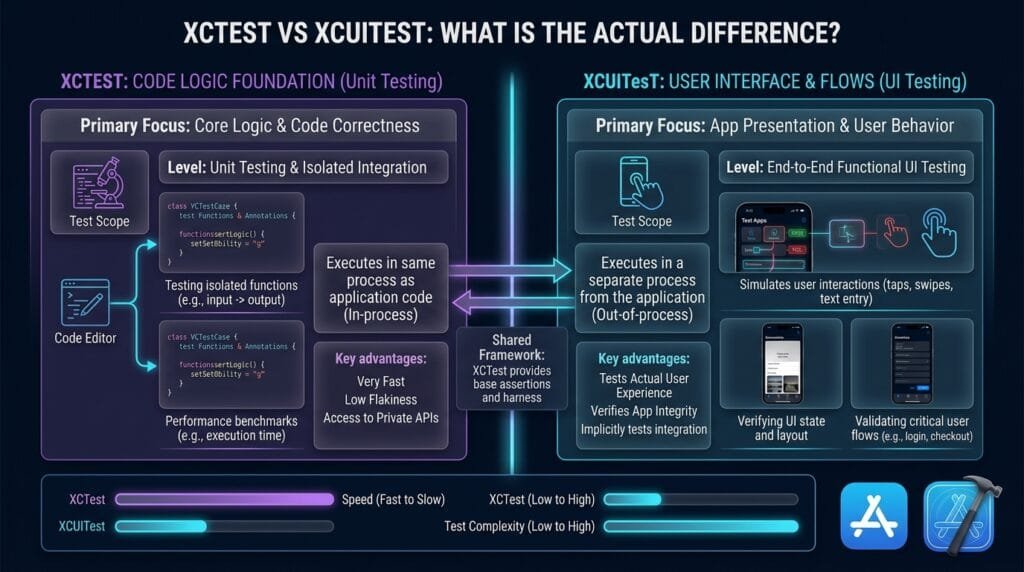
Apple’s documentation explicitly states that XCTest is used in combination with XCUIAutomation to interact with an application’s UI and validate user interaction flows. (Apple Developer)
XCTest
XCTest provides capabilities such as:
- Test cases
- Test methods
- Assertions
- Expected failures
- Test skipping
- Asynchronous expectations
- Performance measurements
- Activities
- Attachments
- Test execution
- UI testing integration
A simple unit test looks like this:
import XCTest

final class CalculatorTests: XCTestCase {

    func testAddition() {
        let result = 10 + 5

        XCTAssertEqual(result, 15)
    }
}
There is no application screen involved.
The test calls code and verifies the result.
XCUITest
A UI test interacts with the application as a user would:
import XCTest

final class LoginUITests: XCTestCase {

    func testLogin() {
        let app = XCUIApplication()
        app.launch()

        app.textFields["emailField"].tap()
        app.textFields["emailField"].typeText("qa@example.com")

        app.secureTextFields["passwordField"].tap()
        app.secureTextFields["passwordField"].typeText("Password123")

        app.buttons["loginButton"].tap()

        XCTAssertTrue(
            app.staticTexts["Dashboard"].waitForExistence(timeout: 5)
        )
    }
}
This test still uses XCTestCase and XCTest assertions.
The difference is that it also uses XCUIAutomation APIs to control the application’s UI.
Apple describes XCUIAutomation as the framework that allows tests to replicate interaction sequences, control an application’s UI, and inspect its state. (Apple Developer)
The Short Version
| Area | XCTest | XCUITest / XCUIAutomation |
|---|---|---|
| Primary role | Testing framework | UI automation approach |
| Unit tests | Yes | No |
| Assertions | Yes | Uses XCTest assertions |
| Performance tests | Yes | Not its primary purpose |
| UI interaction | Through XCUIAutomation | Core purpose |
| Application launch | Not normally required | XCUIApplication |
| UI elements | Not primary | XCUIElement |
| User journeys | Limited at unit level | Strong use case |
| iOS UI automation | Foundation | Main application |
| Test pyramid level | Multiple levels | UI layer |
The most important lesson is that these technologies are complementary rather than direct competitors.
2. How XCTest Works
XCTestCase is the Foundation
A typical XCTest test starts with an XCTestCase subclass.
import XCTest

final class UserTests: XCTestCase {

    func testUserName() {
        let name = "Shahnawaz"

        XCTAssertEqual(name, "Shahnawaz")
    }
}
Apple identifies XCTestCase as the primary class for defining test cases, test methods, and performance tests. A test case groups related test methods and can also provide setup and teardown behavior. (Apple Developer)
A test method normally begins with test.
For example:
func testUserCanCreateAccount() {
    // test implementation
}
Xcode automatically detects these test methods within the test target.
Assertions
Assertions are one of the most important parts of XCTest.
Examples include:
XCTAssertTrue(condition)
XCTAssertFalse(condition)
XCTAssertEqual(actual, expected)
XCTAssertNotEqual(actual, expected)
XCTAssertNil(value)
XCTAssertNotNil(value)
XCTAssertThrowsError(...)
XCTAssertNoThrow(...)
For example:
func testDiscountCalculation() {
    let price = 100.0
    let discount = 20.0

    let finalPrice = price - discount

    XCTAssertEqual(finalPrice, 80.0)
}
The test does not need to know anything about the application’s UI.
That makes it fast and focused.
Setup and Teardown
XCTest also provides lifecycle mechanisms.
override func setUp() {
    super.setUp()

    // Prepare test state
}

override func tearDown() {
    // Clean up test state

    super.tearDown()
}
This is useful when multiple tests require common preparation.
However, shared state should be handled carefully. Excessive coupling between tests can make failures difficult to reproduce.
Asynchronous Testing
Modern applications depend heavily on asynchronous behavior.
Network calls, database operations, concurrency, notifications, and background processing may not complete immediately.
XCTest provides expectations for testing asynchronous operations. Apple’s current documentation also notes that Swift concurrency can be used with XCTest through async and async throws test methods. (Apple Developer)
For example:
func testAsyncOperation() async throws {
    let result = try await service.fetchUser()

    XCTAssertEqual(result.name, "Alex")
}
This makes XCTest useful far beyond simple synchronous unit tests.
Performance Testing
Performance testing is another important capability.
func testSortingPerformance() {
    let values = Array(0..<10_000).shuffled()

    measure {
        _ = values.sorted()
    }
}
Performance tests can help detect regressions when an operation becomes slower over time.
Apple’s XCTest documentation includes performance testing as a core capability and describes collecting metrics against performance baselines. (Apple Developer)
This is one reason it is inaccurate to describe XCTest as simply a unit-testing framework.
It covers considerably more.
Activities and Attachments
Complex tests can also be divided into activities and supplemented with attachments such as screenshots or other diagnostic information.
This becomes particularly valuable when tests run in CI/CD and failures need to be investigated without reproducing them locally.
The testing framework therefore provides the infrastructure around the test—not just the assertion at the end.
3. How XCUITest and XCUIAutomation Work
The UI automation layer starts becoming important when the question changes from:
Does this function work?
to:
Can a user successfully complete this workflow?
Apple’s XCUIAutomation framework allows tests to control an application’s UI and inspect its state. UI tests can manipulate views and controls in ways that represent direct user interaction. (Apple Developer)
XCUIApplication
XCUIApplication represents the application that the test controls.
A typical test begins with:
let app = XCUIApplication()
app.launch()
Apple describes XCUIApplication as a proxy capable of launching, monitoring, and terminating the test application. (Apple Developer)
You can also configure launch arguments and environment variables:
let app = XCUIApplication()

app.launchArguments = [
    "-UITesting"
]

app.launchEnvironment = [
    "API_ENV": "test"
]

app.launch()
This can help create a controlled testing environment.
XCUIElement
An XCUIElement represents an element that the test can interact with.
Examples include:
app.buttons["loginButton"]
app.textFields["emailField"]
app.secureTextFields["passwordField"]
app.staticTexts["Dashboard"]
app.images["Profile"]
The test can then perform actions:
app.buttons["loginButton"].tap()or:
app.textFields["emailField"].typeText("qa@example.com")The important difference is that the test is now interacting with application UI instead of directly calling internal application functions.
XCUIElementQuery
UI automation needs a reliable way to find elements.
XCUIAutomation provides XCUIElementQuery for defining the search criteria used to identify UI elements. (Apple Developer)
For example:
let loginButton = app.buttons["loginButton"]or:
let cells = app.tables.cellsThe quality of these queries has a major impact on automation stability.
A good UI automation suite should favor stable, meaningful identifiers over fragile positional selectors.
Accessibility Identifiers
Accessibility identifiers are especially important.
For example, the application can define:
loginButton.accessibilityIdentifier = "loginButton"The automation can then locate it:
app.buttons["loginButton"].tap()Apple provides UIAccessibilityIdentification specifically for identifying UI elements through an accessibility identifier. This also provides a strong mechanism for UI automation to locate elements reliably. (Apple Developer)
This creates a useful collaboration model:
Developer
   │
   │ Adds stable identifier
   ▼
loginButton
   │
   │
   ▼
Automation Engineer
   │
   │ Locates element
   ▼
app.buttons["loginButton"]
Waiting for UI State
One common UI automation mistake is using arbitrary delays.
Avoid:
sleep(5)Prefer condition-based synchronization:
let dashboard = app.staticTexts["Dashboard"]

XCTAssertTrue(
    dashboard.waitForExistence(timeout: 5)
)
Apple’s UI automation APIs provide waiting mechanisms for application and element states, allowing tests to synchronize with actual UI conditions instead of relying entirely on fixed delays. (Apple Developer)
This difference becomes increasingly important as UI suites grow.
Recording UI Tests
Xcode also provides UI recording.
Recording can capture interaction sequences and generate element queries, which can help engineers learn the UI hierarchy and get an initial test implementation. Apple documents UI recording as a way to capture and replay interaction sequences for verifying application behavior. (Apple Developer)
However, recorded code should not automatically become the final automation architecture.
A production framework still needs:
- Stable selectors
- Reusable components
- Good test data
- Synchronization
- Independent tests
- Clear assertions
- Maintainable structure
4. XCTest vs XCUITest: Choosing the Right Testing Layer
The practical question is not which one wins.
The real question is:
What behavior are you trying to prove?
Use XCTest for Logic
Suppose an application calculates a discount.
func calculateDiscount(
    price: Double,
    percentage: Double
) -> Double {
    price * percentage / 100
}
A unit test can verify it directly:
func testDiscountCalculation() {
    let discount = calculateDiscount(
        price: 100,
        percentage: 20
    )

    XCTAssertEqual(discount, 20)
}
There is no reason to open an iPhone screen just to test arithmetic.
That would make the test slower without adding meaningful coverage.
Use UI Automation for User Journeys
Now imagine the user journey:
Open app
   ↓
Login
   ↓
Search product
   ↓
Open product
   ↓
Add to cart
   ↓
Checkout
   ↓
Verify confirmation
This is where UI automation provides unique value.
A unit test cannot prove that:
- The Login button is visible.
- The correct screen opens.
- Navigation works.
- The search field accepts input.
- The product screen renders.
- The checkout button is accessible.
- The confirmation screen appears.
A UI test can.
Apple’s testing guidance recommends a testing pyramid with many fast, isolated tests, fewer integration tests, and a smaller number of UI tests covering common user scenarios. Apple also notes that UI tests generally take longer and can have more variables that introduce failures. (Apple Developer)
The Testing Pyramid
A practical iOS testing strategy can look like this:
             UI Tests
        ┌────────────────┐
        │ Critical flows │
        └────────────────┘

       Integration Tests
    ┌────────────────────────┐
    │ Component interactions │
    └────────────────────────┘

          Unit Tests
 ┌──────────────────────────────┐
 │ Business logic / small units │
 └──────────────────────────────┘
The largest layer should generally be fast tests.
The UI layer should remain focused.
Comparison Matrix
| Capability | XCTest | XCUITest / UI Automation |
|---|---|---|
| Unit testing | Excellent | Not intended |
| Business logic | Excellent | Poor fit |
| Assertions | Excellent | Uses XCTest |
| Async code | Excellent | Supported |
| Performance testing | Excellent | Not primary |
| UI interaction | Through XCUIAutomation | Excellent |
| User journey | Limited | Excellent |
| Element discovery | Not primary | Core capability |
| Screen validation | Not primary | Excellent |
| Execution speed | Generally fast | Generally slower |
| Maintenance cost | Lower | Higher |
| Best purpose | Logic and framework-level testing | Critical UI workflows |
The distinction is not about replacing one with another.
It is about layering them correctly.
5. Modern Apple Testing: XCTest, XCUITest, and Swift Testing
Apple’s testing ecosystem has evolved.
This is especially important for teams starting new projects because Swift Testing is now part of the picture.
Swift Testing is Not XCUITest
Xcode 16 and later includes Swift Testing, Apple’s newer framework for writing unit tests with Swift-native capabilities. Apple recommends considering Swift Testing for new unit-test development while continuing to use XCTest for UI tests and performance tests. (Apple Developer)
This creates an important modern distinction:
Swift Testing
     │
     └── New unit-test development

XCTest
     │
     ├── Existing unit tests
     ├── UI tests
     └── Performance tests

XCUIAutomation
     │
     └── iOS UI interaction
So a modern project does not necessarily have to choose one framework for everything.
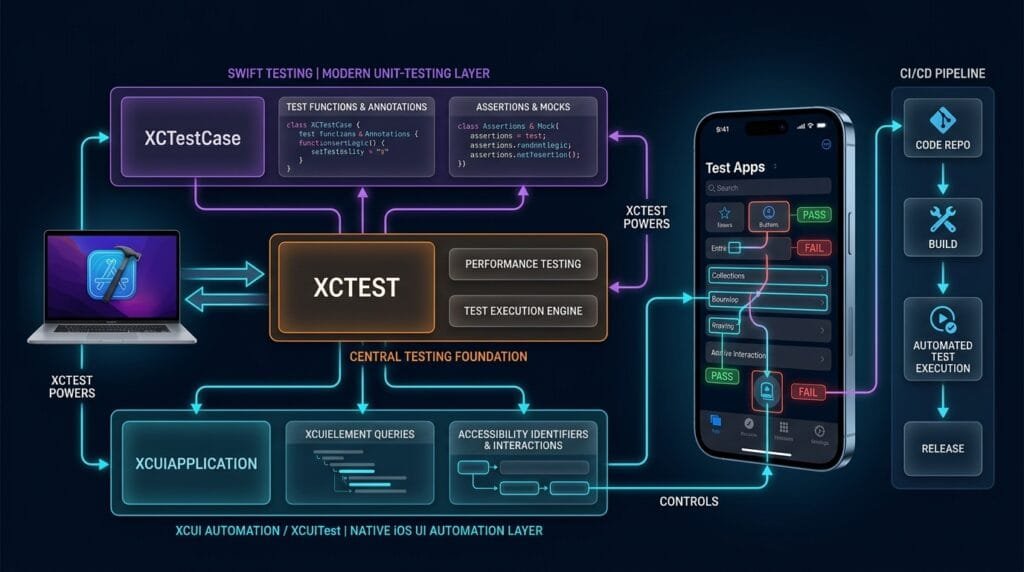
It can use the strongest tool for each layer.
Can Swift Testing and XCTest Coexist?
Yes.
Apple states that a test target can contain tests written using both Swift Testing and XCTest, allowing teams to migrate incrementally. (Apple Developer)
This means an existing project does not need a risky all-at-once migration.
For example:
Existing XCTest Unit Tests
          │
          ├── Continue running
          │
          ▼
New Swift Testing Tests
          │
          ├── Gradual migration
          │
          ▼
XCTest UI Tests
          │
          ▼
XCUIAutomation
This can be especially useful for mature applications with years of existing test coverage.
What Should QA Engineers Learn?
For an SDET working with iOS applications, learning the technologies in this order makes sense:
- XCTest fundamentals
- XCTest assertions
- XCTest lifecycle
- Async testing
- Performance testing concepts
- XCUIAutomation
XCUIApplicationXCUIElement- Element queries
- Accessibility identifiers
- UI synchronization
- Page Object or Screen Object architecture
- CI/CD execution
This sequence makes the relationship between the technologies easier to understand.
6. Best Practices for Building a Maintainable iOS Test Strategy
Understanding the distinction is only the beginning.
The real value comes from using the technologies correctly.
Keep Unit Tests Small
A unit test should normally test one focused behavior.
Good:
func testEmptyCartHasZeroItems() {
    let cart = Cart()

    XCTAssertEqual(cart.itemCount, 0)
}
Less desirable:
Launch application
→ Login
→ Navigate
→ Create product
→ Add product
→ Calculate discount
→ Checkout
→ Verify database
The second example is testing too many layers at once.
If it fails, diagnosis becomes harder.
Keep UI Tests Focused on UI Behavior
A UI test should validate behavior that actually needs the UI.
For example:
func testLoginNavigatesToDashboard() {
    let app = XCUIApplication()
    app.launch()

    app.textFields["emailField"].tap()
    app.textFields["emailField"].typeText("qa@example.com")

    app.secureTextFields["passwordField"].tap()
    app.secureTextFields["passwordField"].typeText("Password123")

    app.buttons["loginButton"].tap()

    XCTAssertTrue(
        app.staticTexts["Dashboard"]
            .waitForExistence(timeout: 5)
    )
}
This is a meaningful UI test because it verifies an actual user journey.
Avoid Testing the Same Thing at Every Layer
Suppose a discount calculation has 50 input combinations.
Do not create 50 UI tests.
Instead:
Unit Tests
→ 50 discount scenarios

Integration Tests
→ Important service interactions

UI Tests
→ 1–3 critical discount workflows
This produces stronger coverage with less maintenance.
Make Tests Deterministic
Flaky tests destroy confidence.
A test that passes five times and fails randomly on the sixth run is not providing reliable quality feedback.
Common sources include:
- Arbitrary waits
- Unstable network dependencies
- Shared test state
- Dynamic data
- Animations
- Weak element queries
- Uncontrolled backend state
- Environment differences
The solution is not simply retrying the test.
The better approach is to identify why it is nondeterministic.
Use Stable Element Identifiers
Prefer:
app.buttons["checkoutButton"]over:
app.buttons.element(boundBy: 3)The first identifies the intent.
The second depends on position.
If another button is inserted into the interface, an index-based test can suddenly target the wrong element.
Build a Screen Abstraction
As UI coverage grows, directly placing every selector inside every test becomes difficult to maintain.
Instead of:
app.textFields["emailField"].tap()
app.textFields["emailField"].typeText(email)

app.secureTextFields["passwordField"].tap()
app.secureTextFields["passwordField"].typeText(password)

app.buttons["loginButton"].tap()
you can create a screen abstraction:
final class LoginScreen {

    let app: XCUIApplication

    init(app: XCUIApplication) {
        self.app = app
    }

    var emailField: XCUIElement {
        app.textFields["emailField"]
    }

    var passwordField: XCUIElement {
        app.secureTextFields["passwordField"]
    }

    var loginButton: XCUIElement {
        app.buttons["loginButton"]
    }

    func login(email: String, password: String) {
        emailField.tap()
        emailField.typeText(email)

        passwordField.tap()
        passwordField.typeText(password)

        loginButton.tap()
    }
}
The test becomes:
func testSuccessfulLogin() {
    let app = XCUIApplication()
    app.launch()

    let login = LoginScreen(app: app)

    login.login(
        email: "qa@example.com",
        password: "Password123"
    )

    XCTAssertTrue(
        app.staticTexts["Dashboard"]
            .waitForExistence(timeout: 5)
    )
}
This structure becomes much more valuable as the test suite expands.
Use CI/CD Strategically
Not every UI test needs to execute on every developer commit.
A mature pipeline might use:
Pull Request
      ↓
Unit Tests
      ↓
Integration Tests
      ↓
Critical UI Smoke Tests
      ↓
Build Validation
      ↓
Extended UI Regression
      ↓
Release Candidate
This reduces feedback time while preserving broad regression coverage.
Apple’s Xcode testing guidance emphasizes balancing fast tests with higher-fidelity UI tests rather than relying on UI tests for everything. (Apple Developer)
Do Not Treat UI Tests as the Entire Strategy
This is perhaps the most important lesson.
If a team writes hundreds of UI tests but very few unit tests, the suite can become:
- Slow
- Expensive
- Difficult to debug
- Sensitive to UI changes
- Vulnerable to environment issues
A better strategy is layered.
Business Logic
      ↓
Unit Tests

Component Integration
      ↓
Integration Tests

User Experience
      ↓
XCUITest / UI Tests
Each layer answers a different question.
A Practical Decision Matrix
| Question | Recommended Layer |
|---|---|
| Does this function calculate correctly? | XCTest / Swift Testing |
| Does this model validate input? | XCTest / Swift Testing |
| Does this service integrate correctly? | Integration testing |
| Does the login screen accept credentials? | XCUITest |
| Does navigation work? | XCUITest |
| Does checkout complete? | XCUITest |
| Does an API return the correct response? | API/integration test |
| Does a performance-critical function regress? | XCTest performance test |
| Can the user complete the critical journey? | XCUITest |
The strongest automation engineers know when not to use UI automation.
Final Thoughts
The biggest mistake is treating XCTest vs XCUITest as a simple choice between two competing tools. XCTest is the broader testing foundation, while XCUITest generally refers to the iOS UI testing approach built around XCTest and XCUIAutomation. Apple explicitly documents XCTest for unit, performance, and UI testing, while XCUIAutomation provides the mechanisms for controlling the application UI and validating interaction flows. (Apple Developer)
For modern iOS projects, the picture is even more nuanced because Swift Testing is now available for new unit-test development. Apple recommends considering Swift Testing for new unit tests while continuing to use XCTest for UI and performance testing. (Apple Developer)
The practical strategy is therefore not:
XCTest OR XCUITest
It is:
Swift Testing / XCTest for focused logic + integration testing for component boundaries + XCUITest for critical user journeys.
That layered approach gives developers and SDETs faster feedback at the lower levels while retaining high-fidelity validation at the UI level.
If you are building an iOS automation framework, start with the testing problem rather than the tool name. Ask what needs to be proven, select the lowest practical testing layer, and reserve UI automation for behavior that genuinely requires the application’s interface.
That is how an iOS test suite becomes faster, more reliable, easier to maintain, and more valuable to the engineering team.
People Asked Questions
Is XCTest the same as XCUITest?
No. XCTest is Apple’s broader testing framework, while XCUITest commonly refers to iOS UI testing using XCTest together with XCUIAutomation. XCTest provides test cases and assertions, while XCUIAutomation provides UI interaction and inspection capabilities. (Apple Developer)
Is XCUITest built on XCTest?
Yes. UI tests are written using XCTest and use XCUIAutomation to interact with the application’s UI. Apple documents UI testing as part of the XCTest ecosystem. (Apple Developer)
Should I use XCTest or XCUITest for unit testing?
Use XCTest or Swift Testing for unit-level behavior. XCUITest is intended for UI workflows and should not replace fast, isolated unit tests.
Is XCUITest still recommended by Apple?
Yes. Apple’s current documentation continues to recommend XCTest for UI tests and identifies XCUIAutomation as the technology used to control application UI during those tests. (Apple Developer)
Is Swift Testing replacing XCUITest?
No. Swift Testing is primarily a newer framework for Swift test development, particularly unit tests. Apple continues to recommend XCTest for UI testing, so Swift Testing does not replace the XCUITest/XCUIAutomation approach. (Apple Developer)
Can XCTest and Swift Testing exist in the same project?
Yes. Apple states that a test target can contain tests using both frameworks, which supports incremental migration from existing XCTest tests to Swift Testing. (Apple Developer)
What is XCUIAutomation used for?
XCUIAutomation controls an application’s user interface and allows tests to inspect UI state and reproduce interaction sequences. It provides APIs such as XCUIApplication, XCUIElement, and UI element queries. (Apple Developer)
Is XCUITest suitable for every test?
No. UI tests are slower and generally more sensitive to application and environment variables than lower-level tests. Use them selectively for important user workflows and keep most logic coverage at faster testing layers. (Apple Developer)
Key Takeaway
XCTest is the testing foundation. XCUIAutomation provides native UI interaction. XCUITest is the practical iOS UI automation layer built around them.
Understanding that relationship removes one of the most common sources of confusion in iOS automation and provides a much stronger foundation for designing maintainable test suites.
AI Overview & Answer Engine Optimization
XCTest is Apple’s core testing framework for unit, performance, and UI testing, while XCUITest refers to UI automation using XCTest with XCUIAutomation to validate real user interactions and app workflows. (Apple Developer)
Key Points
- XCTest: Code-level, unit, performance, and test infrastructure.
- XCUITest: UI-level automation and user-flow validation.
- XCTestCase: Common base class for XCTest tests.
- XCUIApplication: Represents and controls the application under test.
- XCUIElement: Represents UI elements used during automation.
- XCUITest depends on XCTest infrastructure.
- Apple recommends continuing to use XCTest for UI automation even with Swift Testing available. (Apple Developer)
XCTest vs XCUITest — Direct Answer
| Question | XCTest | XCUITest |
|---|---|---|
| Primary purpose | Unit/performance/testing foundation | UI automation |
| Tests | Code and behavior | User interface and workflows |
| Typical scope | Functions, methods, logic | Screens, buttons, fields, gestures |
| UI interaction | Not the primary purpose | Yes |
| Main APIs | XCTestCase, XCTAssert... | XCUIApplication, XCUIElement |
| Best for | Fast code-level validation | End-to-end UI validation |
Which Should You Use?
Use XCTest when validating application logic, functions, data processing, and performance.
Use XCUITest when validating user-facing workflows such as login, checkout, navigation, form submission, and UI behavior.
For a complete iOS testing strategy, use both rather than treating them as competing frameworks. Apple describes XCTest as supporting UI tests through XCUIAutomation, while UI automation focuses on replicating interactions and validating the app’s interface. (Apple Developer)
AI Overview Summary
XCTest validates application code and provides Apple’s testing infrastructure, while XCUITest provides UI automation capabilities for testing user interactions and workflows. They are complementary rather than competing frameworks. Apple currently recommends XCTest for UI automation, while Swift Testing can be considered for newer non-UI test development. (Apple Developer)
Internal Blog Links
- XCUITest iOS Testing: What it is and Why it Matters
- 50 Playwright Commands Every QA Engineer Should Know
- What is Playwright? A Powerful Guide to Modern Web Testing and QA Engineers
- Graph Engineering: The Powerful Layer After Loop Engineering
- Graph Testing: The Critical QA Layer After Loop-Based Test Automation
- Agentic Test Creation vs AI Test Generation: What’s the Real Difference?
Internal Series Links
- Learn MCP – Zero to Hero
- Learn AI Agents for QA – Zero to Hero
- Playwright Automation – Zero to Hero
- TencentDB Agent Memory: Complete Zero to Hero
- LangGraph: Complete Zero to Hero
- Learn Python – Zero to Hero
- OpenAI Codex: Complete Zero to Hero
- Cursor AI: Complete Zero to Hero
- Claude Code Tutorial: Complete Zero to Hero
- AutoGen: Complete Zero to Hero Guide
- Free QA Resources Built From Real Experience
- QA Glossary: Test Automation Terms Every Engineer Should Know
External Links
- Apple — XCTest Documentation — Official documentation for unit, performance, asynchronous, assertion, and UI testing capabilities.
- Apple — XCUIAutomation Documentation — Official documentation for controlling application UI and validating interaction flows.
- Apple — Xcode Testing Documentation — Apple’s testing strategy, test pyramid, UI testing, and test execution guidance.
- Apple — XCTestCase Documentation — Test cases, lifecycle management, setup, teardown, and performance testing.
- Apple — XCUIApplication Documentation — Application launch, monitoring, termination, and state management.
- Apple — UI Automation Recording Guide — Official guide to recording and generating UI automation interactions.
- Apple — Swift Testing — Modern Swift testing framework for expressive unit-test development and incremental XCTest migration.
Continue Learning
Explore more expert articles on Mobile Testing, Backend & API, AI & Agentic, AI Tools, n8n, LangChain, CrewAI, MCP Servers, AI Agents, LlamaIndex, Docker, FastAPI, Playwright, Cypress, Test Automation, DevOps, and Software Engineering at www.skakarh.com.
QAPulse by SK delivers expert release analysis, AI engineering insights, enterprise automation strategies, migration guidance, DevOps best practices, and practical testing knowledge to help software professionals build scalable, intelligent, and production-ready software systems.