QA
QA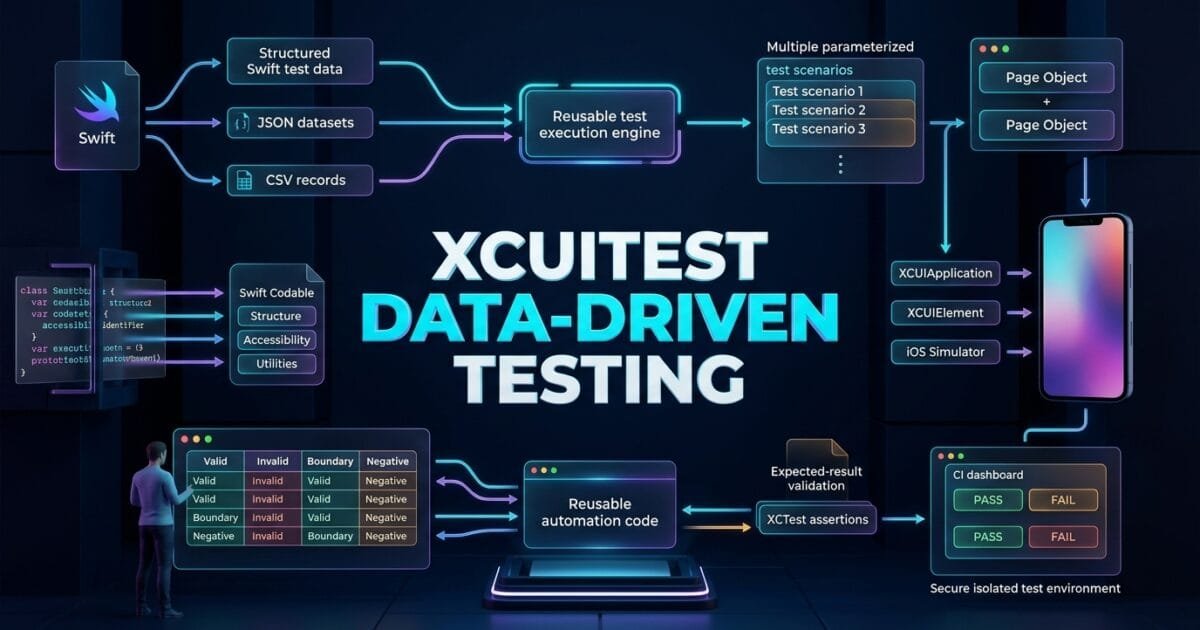
XCUITest data-driven testing allows SDETs to execute the same iOS UI test scenario against multiple datasets without duplicating the test logic. Instead of creating separate tests for every username, search value, product, form input, or validation scenario, test data can be separated from the automation workflow and supplied dynamically.
This approach becomes especially useful when an XCUITest suite grows from a few scenarios into hundreds of combinations that need consistent, maintainable coverage.
What is XCUITest Data-Driven Testing?
XCUITest data-driven testing is an automation technique where test logic remains reusable while input values and expected results are supplied from external or structured datasets.
The basic architecture is:
Test Data
   ↓
Test Scenario
   ↓
Page Object
   ↓
XCUIElement
   ↓
iOS Application
   ↓
Expected Result
For example, instead of writing:
func testLoginWithUser1() {
    // login automation
}

func testLoginWithUser2() {
    // same automation
}

func testLoginWithUser3() {
    // same automation
}
you can use:
let users = [
    TestUser(
        email: "valid@example.com",
        password: "Password123",
        expectedResult: .success
    ),
    TestUser(
        email: "invalid@example.com",
        password: "WrongPassword",
        expectedResult: .failure
    )
]
The automation flow stays the same while the data changes.
Key Points
- Separate test data from test logic.
- Reuse the same test workflow.
- Model datasets with Swift structures.
- Support positive and negative scenarios.
- Use deterministic test data.
- Keep datasets readable and maintainable.
- Avoid hard-coded values throughout tests.
- Combine data-driven testing with Page Objects.
- Validate expected results per dataset.
- Keep each dataset independently identifiable.
- Avoid overly large parameter combinations.
- Generate test reports with useful dataset names.
- Use external files when datasets become large.
- Keep test data isolated between test runs.
Why Data-Driven Testing Matters in XCUITest
Traditional UI automation often starts with hard-coded values:
emailField.tap()
emailField.typeText("qa@example.com")

passwordField.tap()
passwordField.typeText("Password123")
That works for a single scenario.
But consider a registration flow requiring:
- Valid email
- Invalid email
- Empty email
- Existing email
- Invalid password
- Weak password
- Maximum-length password
- Special characters
Creating a separate test for every combination can quickly produce duplicated code.
A better approach is:
                    Test Workflow
                         │
        ┌────────────────┼────────────────┐
        ▼                ▼                ▼
     Dataset 1        Dataset 2        Dataset 3
        │                │                │
        └────────────────┼────────────────┘
                         ▼
                    Same Test Logic
This is where XCUITest data-driven testing provides significant value.
Designing a Data Model in Swift
The first step is to create a model representing one test scenario.
struct LoginTestData {

    let email: String
    let password: String
    let expectedMessage: String
    let shouldSucceed: Bool
}
Now create datasets:
let loginData = [

    LoginTestData(
        email: "valid@example.com",
        password: "Password123",
        expectedMessage: "Welcome",
        shouldSucceed: true
    ),

    LoginTestData(
        email: "invalid@example.com",
        password: "WrongPassword",
        expectedMessage: "Invalid credentials",
        shouldSucceed: false
    ),

    LoginTestData(
        email: "",
        password: "Password123",
        expectedMessage: "Email is required",
        shouldSucceed: false
    )
]
The model keeps related values together.
Instead of managing multiple arrays:
let emails = [...]
let passwords = [...]
let messages = [...]
you have one strongly typed dataset.
Running Multiple Scenarios
A simple loop can execute the same workflow for every dataset.
func testLoginScenarios() {

    let scenarios = LoginTestDataProvider.all()

    for scenario in scenarios {

        loginPage.enterEmail(
            scenario.email
        )

        loginPage.enterPassword(
            scenario.password
        )

        loginPage.tapLogin()

        if scenario.shouldSucceed {

            XCTAssertTrue(
                homePage.welcomeMessage.exists
            )

        } else {

            XCTAssertTrue(
                loginPage.errorMessage(
                    scenario.expectedMessage
                ).exists
            )
        }
    }
}
This removes duplicated automation steps.
However, there is an important consideration.
If one iteration fails, subsequent iterations may inherit the application’s current state.
For independent scenarios, resetting the application between datasets is often safer.
Resetting Application State
A robust data-driven test should isolate scenarios.
One approach is to launch a fresh application state for each dataset:
for scenario in scenarios {

    app.terminate()
    app.launch()

    loginPage.enterEmail(
        scenario.email
    )

    loginPage.enterPassword(
        scenario.password
    )

    loginPage.tapLogin()

    // Validate result
}
The exact reset strategy depends on the application.
Possible approaches include:
Terminate + Launch
       ↓
Clear Test Data
       ↓
Reset Application State
       ↓
Launch with Test Arguments
The objective is to prevent one dataset from affecting another.
Creating a Test Data Provider
As datasets grow, move them out of the test class.
enum LoginTestDataProvider {

    static func all()
        -> [LoginTestData] {

        [
            LoginTestData(
                email: "valid@example.com",
                password: "Password123",
                expectedMessage: "Welcome",
                shouldSucceed: true
            ),

            LoginTestData(
                email: "invalid@example.com",
                password: "WrongPassword",
                expectedMessage:
                    "Invalid credentials",
                shouldSucceed: false
            )
        ]
    }
}
The test becomes cleaner:
let scenarios =
    LoginTestDataProvider.all()
This separation provides:
Test
 ↓
Data Provider
 ↓
Dataset
instead of:
Test
 ↓
Huge hard-coded dataset
 ↓
Automation logic
 ↓
Assertions
Data-Driven Testing with Page Objects
Data-driven testing works particularly well with the Page Object Model.
Consider:
final class LoginPage {

    private let app: XCUIApplication

    init(app: XCUIApplication) {
        self.app = app
    }

    private var emailField:
        XCUIElement {
        app.textFields[
            "email.field"
        ]
    }

    private var passwordField:
        XCUIElement {
        app.secureTextFields[
            "password.field"
        ]
    }

    private var loginButton:
        XCUIElement {
        app.buttons[
            "login.button"
        ]
    }

    func login(
        email: String,
        password: String
    ) {

        emailField.tap()
        emailField.typeText(email)

        passwordField.tap()
        passwordField.typeText(password)

        loginButton.tap()
    }
}
The test only handles the dataset:
for scenario in scenarios {

    loginPage.login(
        email: scenario.email,
        password: scenario.password
    )

    // Validate expected result
}
This creates a clean separation:
| Layer | Responsibility |
|---|---|
| Test Data | Input and expected results |
| Test | Scenario orchestration |
| Page Object | UI interaction |
| Utility | Generic automation operations |
| XCTest | Assertions and execution |
Naming Each Dataset
One common problem with loops is poor failure identification.
Consider:
for scenario in scenarios {
    // test
}
If the third dataset fails, the CI report may not clearly communicate which scenario caused the problem.
Add a name:
struct LoginTestData {

    let name: String
    let email: String
    let password: String
    let expectedMessage: String
    let shouldSucceed: Bool
}
Now:
LoginTestData(
    name: "Invalid password",
    email: "qa@example.com",
    password: "wrong",
    expectedMessage:
        "Invalid credentials",
    shouldSucceed: false
)
You can then log:
print(
    "Running scenario: \(scenario.name)"
)
This makes CI debugging easier.
Positive and Negative Datasets
A good dataset should represent meaningful business scenarios.
Positive
LoginTestData(
    name: "Valid credentials",
    email: "valid@example.com",
    password: "Password123",
    expectedMessage: "Welcome",
    shouldSucceed: true
)
Negative
LoginTestData(
    name: "Invalid password",
    email: "valid@example.com",
    password: "Wrong123",
    expectedMessage:
        "Invalid credentials",
    shouldSucceed: false
)
Boundary
LoginTestData(
    name: "Maximum email length",
    email: longEmail,
    password: "Password123",
    expectedMessage: "Welcome",
    shouldSucceed: true
)
This makes the dataset a representation of test coverage rather than simply a collection of random values.
Data-Driven Form Testing
Forms are an excellent use case.
Consider a registration form:
struct RegistrationTestData {

    let name: String
    let email: String
    let phone: String
    let password: String
    let expectedError: String?
}
Dataset:
let registrationData = [

    RegistrationTestData(
        name: "John Doe",
        email: "john@example.com",
        phone: "03001234567",
        password: "Password123",
        expectedError: nil
    ),

    RegistrationTestData(
        name: "",
        email: "john@example.com",
        phone: "03001234567",
        password: "Password123",
        expectedError: "Name is required"
    ),

    RegistrationTestData(
        name: "John Doe",
        email: "invalid",
        phone: "03001234567",
        password: "Password123",
        expectedError: "Invalid email"
    )
]
The same registration workflow can now validate multiple validation rules.
Data-Driven Search Testing
Search functionality is another practical example.
struct SearchTestData {

    let query: String
    let expectedResult: String
}
Example:
let searchData = [

    SearchTestData(
        query: "iPhone",
        expectedResult: "iPhone"
    ),

    SearchTestData(
        query: "MacBook",
        expectedResult: "MacBook"
    ),

    SearchTestData(
        query: "NonExistingProduct",
        expectedResult: "No results"
    )
]
The test logic remains identical:
for data in searchData {

    searchPage.search(
        data.query
    )

    XCTAssertTrue(
        searchPage.result(
            data.expectedResult
        ).exists
    )
}
External JSON Test Data
For small datasets, Swift structures are often sufficient.
For larger datasets, JSON can provide better separation.
Example:
[
  {
    "name": "Valid User",
    "email": "valid@example.com",
    "password": "Password123",
    "expectedMessage": "Welcome"
  },
  {
    "name": "Invalid Password",
    "email": "valid@example.com",
    "password": "WrongPassword",
    "expectedMessage": "Invalid credentials"
  }
]
A Swift model can decode the file:
struct LoginTestData:
    Codable {

    let name: String
    let email: String
    let password: String
    let expectedMessage: String
}
Then:
let decoder =
    JSONDecoder()

let data =
    try Data(contentsOf: fileURL)

let scenarios =
    try decoder.decode(
        [LoginTestData].self,
        from: data
    )
This is useful when datasets are maintained independently from test implementation.
CSV Test Data
CSV can also work for larger tabular datasets:
name,email,password,expected
Valid User,valid@example.com,Password123,Welcome
Invalid Password,valid@example.com,Wrong123,Invalid credentials
Empty Email,,Password123,Email is required
CSV can be useful when QA teams maintain test data in spreadsheet-style tools.
However, CSV parsing adds additional infrastructure.
Use it when the dataset actually benefits from tabular maintenance.
Avoid Sensitive Test Data
Do not place production credentials into test datasets.
Avoid:
real-production-user@example.com
real-production-password
real-payment-card
Use controlled test accounts or generated data.
A better model is:
struct TestUser {

    let email: String
    let password: String
}
and load values from a secure test environment.
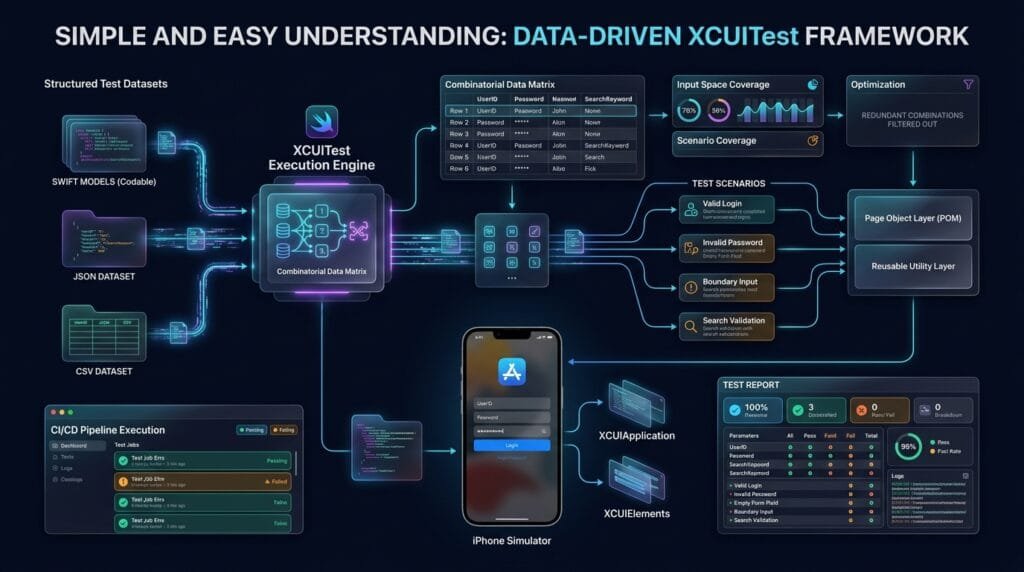
Parameter Combinations
Data-driven testing can become dangerous when every field is combined with every possible value.
Suppose you have:
5 usernames
4 passwords
3 languages
3 devices
2 account types
The theoretical combinations are:
5 × 4 × 3 × 3 × 2 = 360A UI test suite with 360 combinations may become slow and expensive.
Instead, select meaningful combinations.
Use data-driven testing to maximize coverage, not simply the number of executions.
Pairwise Thinking
For complex datasets, pairwise combinations can reduce unnecessary scenarios while still covering interactions between important variables.
For example:
Platform
Language
Account Type
Payment Method
Instead of testing every possible combination, select representative combinations that cover important variable pairs.
This is particularly useful when UI tests are expensive.
Managing Test Data Lifecycle
Test data should have a lifecycle.
Create
  ↓
Prepare
  ↓
Execute
  ↓
Validate
  ↓
Clean Up
For example, an e-commerce test may require:
Create Test User
      ↓
Create Product State
      ↓
Run UI Test
      ↓
Validate Order
      ↓
Delete / Reset State
If data persists between runs, later tests may behave differently.
Deterministic Test Data
Data should produce predictable results.
Avoid random values unless randomness is specifically part of the test.
Bad:
let email =
    "\(UUID())@example.com"
for every scenario when the expected state depends on a predefined account.
Better:
let email =
    "data-driven-user@example.com"
when the scenario requires a known account.
For generated data, record the generated value so failures remain reproducible.
Data-Driven Testing with Launch Arguments
Test data can also be influenced through launch arguments.
For example:
app.launchArguments = [
    "-ui-testing",
    "-test-user",
    "premium"
]
The application can then enter a predictable test configuration.
This approach is useful when the application supports dedicated UI-testing environments.
Data-Driven Testing and Environment Configuration
Separate:
Test Logic
Test Data
Environment Configuration
Secrets
For example:
UITests/
│
├── Tests/
├── Pages/
├── Utilities/
├── Data/
│   ├── LoginData.swift
│   ├── SearchData.swift
│   └── RegistrationData.swift
│
└── Configuration/
    └── UITestConfiguration.swift
This structure scales better than storing everything inside individual test classes.
Handling Assertions
Each dataset should define its expected outcome.
For example:
struct LoginTestData {

    let name: String
    let email: String
    let password: String
    let expectedOutcome:
        LoginOutcome
}

enum LoginOutcome {
    case success
    case invalidCredentials
    case requiredField
}
Then:
switch scenario.expectedOutcome {

case .success:

    XCTAssertTrue(
        homePage.isDisplayed
    )

case .invalidCredentials:

    XCTAssertTrue(
        loginPage.invalidCredentialsMessage
            .exists
    )

case .requiredField:

    XCTAssertTrue(
        loginPage.requiredFieldMessage
            .exists
    )
}
This is more expressive than storing arbitrary strings everywhere.
Strongly Typed Expected Results
Prefer:
enum LoginOutcome {
    case success
    case invalidCredentials
    case accountLocked
}
over:
let expected =
    "some random message"
Strong typing makes datasets easier to understand and reduces spelling errors.
Data-Driven Testing with Reusable Utilities
The architecture becomes even stronger when combined with reusable utilities:
                Test Dataset
                     │
                     ▼
              Test Scenario
                     │
                     ▼
               Page Object
                     │
          ┌──────────┴──────────┐
          ▼                     ▼
     Test Utilities         Components
          │
   ┌──────┼──────┬──────────┐
   ▼      ▼      ▼          ▼
 Wait   Scroll Keyboard Screenshot
          │
          ▼
      XCUIElement
          │
          ▼
      iOS Application
The dataset controls what should be tested.
The Page Object controls screen behavior.
Utilities control reusable automation mechanics.
Common XCUITest Data-Driven Testing Mistakes
1. Duplicating Test Logic
Creating one complete test method per dataset defeats the purpose.
2. Huge Monolithic Datasets
A single file containing thousands of unrelated scenarios becomes difficult to maintain.
3. Shared Mutable State
One dataset should not modify state required by another.
4. Poor Dataset Naming
Failures become difficult to identify.
5. Hard-Coded Expected Results
Keep expected outcomes close to their related dataset.
6. Testing Every Combination
More tests do not automatically mean better coverage.
7. Using Production Data
Use isolated test environments.
8. Ignoring Cleanup
Persistent state can create order-dependent failures.
9. Mixing Data and UI Logic
Keep test data separate from Page Objects and UI interaction code.
10. Overusing External Files
Do not introduce JSON or CSV infrastructure for five simple scenarios.
Best Practices for XCUITest Data-Driven Testing
| Practice | Recommendation |
|---|---|
| Data model | Use strongly typed Swift structs |
| Dataset naming | Give every scenario a descriptive name |
| Expected results | Store expected outcomes with the dataset |
| Isolation | Reset state between independent scenarios |
| Test data | Use controlled, deterministic values |
| Large datasets | Consider JSON or CSV |
| Secrets | Never hard-code production credentials |
| Page Objects | Keep UI interaction separate |
| Utilities | Centralize generic automation |
| Combinations | Prioritize meaningful coverage |
| CI | Log the active dataset |
| Failures | Capture screenshots and diagnostics |
| Maintenance | Keep datasets modular |
5 Core Pillars of Data-Driven iOS UI Automation
1. Data Separation
Keep test inputs independent from automation logic.
2. Reusable Workflows
Execute one automation workflow against multiple datasets.
3. Deterministic Scenarios
Every dataset should produce a predictable outcome.
4. Independent Execution
Avoid state leakage between datasets.
5. Meaningful Coverage
Choose datasets based on risk and business value rather than raw quantity.
Production Data-Driven XCUITest Architecture
A scalable framework can look like this:
UITests
│
├── Tests
│   ├── LoginTests
│   ├── SearchTests
│   └── RegistrationTests
│
├── Pages
│   ├── LoginPage
│   ├── SearchPage
│   └── RegistrationPage
│
├── Components
│   └── CommonComponents
│
├── Utilities
│   ├── WaitUtility
│   ├── ScrollUtility
│   ├── ScreenshotUtility
│   └── KeyboardUtility
│
├── Data
│   ├── LoginTestData
│   ├── SearchTestData
│   └── RegistrationTestData
│
└── Configuration
    └── UITestConfiguration
This creates a clean separation between:
WHAT
↓
Test Scenario

WITH WHAT DATA
↓
Data Provider

HOW
↓
Page Object + Utilities

EXPECTED RESULT
↓
Assertion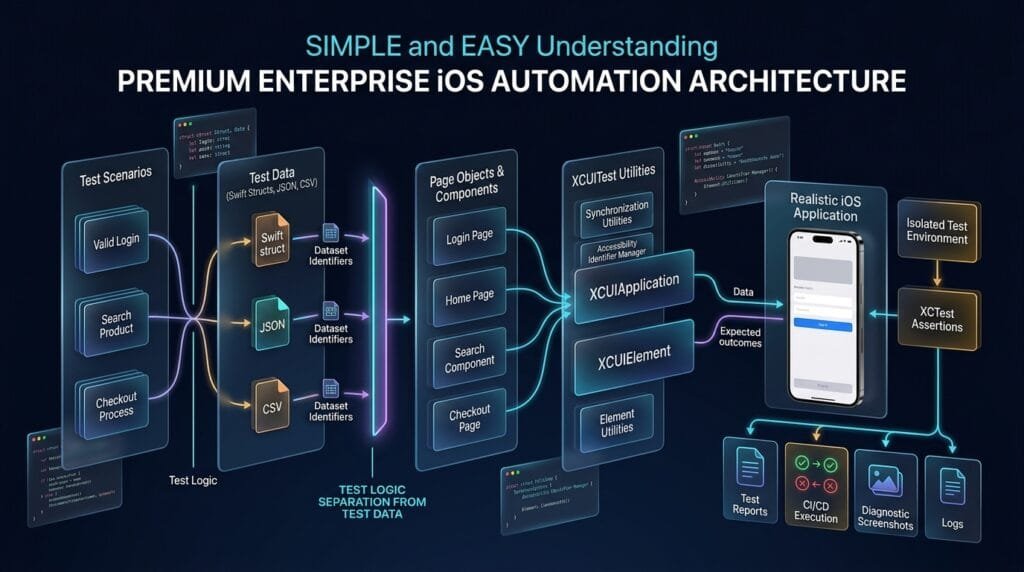
Key Takeaways
XCUITest data-driven testing is most valuable when multiple scenarios share the same UI workflow but require different inputs and expected outcomes.
A maintainable implementation should:
- Model data with Swift types.
- Separate datasets from test logic.
- Use Page Objects for UI behavior.
- Keep utilities focused on generic automation.
- Give every dataset a meaningful name.
- Define expected outcomes explicitly.
- Isolate test state.
- Keep data deterministic.
- Avoid unnecessary combinations.
- Use external datasets when scale requires them.
The ideal flow is:
Structured Data
      ↓
Reusable Test
      ↓
Page Object
      ↓
XCUITest Utilities
      ↓
XCUIElement
      ↓
iOS App
      ↓
Expected Result
      ↓
XCTest Assertion
When designed correctly, XCUITest data-driven testing turns repetitive UI scenarios into a structured automation system that is easier to extend, debug, and maintain.
flowchart TD
    A[Test Dataset] --> B[Data Model]
    B --> C[Test Scenario]
    C --> D[Page Object]
    D --> E[Reusable Components]
    D --> F[XCUITest Utilities]
    F --> G[Wait]
    F --> H[Scroll]
    F --> I[Keyboard]
    F --> J[Screenshot]
    E --> K[XCUIElement]
    G --> K
    H --> K
    I --> K
    K --> L[XCUIApplication]
    L --> M[iOS Application]
    M --> N[Observed Result]
    B --> O[Expected Result]
    N --> P[XCTest Assertion]
    O --> P
    P --> Q[Test Report]
AI Overview & Answer Engine Optimization
XCUITest data-driven testing is a technique for running reusable iOS UI automation against multiple datasets while keeping test logic separate from input values and expected outcomes.
How Does Data-Driven Testing Work in XCUITest?
A Swift data model stores inputs and expected results. The test iterates through the datasets and sends each scenario through the same Page Object and XCUITest workflow.
Why Use Data-Driven Testing?
It reduces duplicated test code, improves scenario coverage, simplifies maintenance, and makes it easier to test different inputs using the same automation workflow.
What Data Can Be Used?
Common examples include:
- Login credentials
- Registration values
- Search queries
- Form inputs
- Boundary values
- Invalid values
- Product information
- Expected validation messages
Can XCUITest Read JSON or CSV?
Yes. Swift can decode JSON using Codable, while CSV can be parsed using a suitable CSV parser or custom parsing logic. External files become useful when datasets are too large or frequently maintained separately from test code.
Should Every Data Combination Be Tested?
No. Testing every possible combination can make UI suites extremely slow. Select combinations based on risk, business requirements, boundaries, and meaningful interaction coverage.
How Should Test Data Be Structured?
Use strongly typed Swift models with descriptive scenario names and explicit expected outcomes.
Should Data-Driven Tests Use Page Objects?
Yes. Page Objects keep UI interaction separate from the dataset and make the same workflow reusable across multiple scenarios.
How Do You Prevent Data-Driven Test Failures From Affecting Other Cases?
Use independent application state, controlled test data, appropriate cleanup, and a predictable setup strategy for each scenario.
AI Overview Summary
XCUITest data-driven testing separates test data from UI automation logic so the same Swift-based iOS test workflow can validate multiple scenarios. Strongly typed datasets, Page Objects, reusable utilities, deterministic state, explicit expected outcomes, and meaningful dataset coverage create a scalable architecture for large XCUITest suites.
People Asked Questions
What is XCUITest data-driven testing?
It is a technique for executing the same XCUITest workflow against multiple input datasets and expected outcomes.
Can XCUITest tests use multiple datasets?
Yes. Swift collections, structs, JSON, CSV, and other data sources can provide datasets.
Is a loop enough for data-driven testing?
A loop can execute multiple scenarios, but production implementations should also consider isolation, dataset naming, expected results, diagnostics, and cleanup.
Should test data be inside the test class?
Small datasets can be defined locally, but larger datasets are easier to maintain in dedicated data providers or external files.
Can data-driven tests work with Page Object Model?
Yes. The dataset supplies values while the Page Object handles screen-specific interaction.
Should each dataset have an expected result?
Ideally, yes. Explicit expected outcomes make scenarios easier to understand and validate.
Is JSON better than Swift test data?
Not always. Swift structures are simpler for small datasets. JSON becomes attractive when datasets are larger or maintained separately.
How can I prevent data-driven tests from becoming slow?
Avoid unnecessary combinations, prioritize high-value scenarios, and use pairwise or risk-based selection when appropriate.
Can data-driven XCUITest scenarios run in CI?
Yes. They can execute through standard Xcode test workflows and CI pipelines, provided the test environment and datasets are configured correctly.
What is the biggest benefit of data-driven UI testing?
The main benefit is reusing the same automation workflow across multiple meaningful scenarios without duplicating the UI interaction code.
Internal Blog Links
- XCUITest iOS Testing: What it is and Why it Matters
- XCTest vs XCUITest: Understanding Apple’s Testing Frameworks
- XCUITest Setup on macOS and Xcode: Complete Beginner’s Guide
- Your First XCUITest: Building a Basic iOS UI Test
- XCUITest Project Structure and Test Target Architecture
- XCUIApplication: Launching and Controlling iOS Apps
- XCUIElement: Finding and Interacting with UI Elements
- iOS Accessibility Identifiers: Build Reliable XCUITest Automation
- XCUITest Locators: IDs, Labels, Text and Element Queries
- XCUITest Actions: Tap, Type, Swipe, Scroll and Long Press
- XCUITest Assertions: Validating iOS App Behavior
- XCUITest Synchronization: Reliable Waiting for iOS UI Tests
- XCUITest Alerts: Handling Alerts, Sheets, Pop-Ups and System Dialogs
- XCUITest Form Testing: Automating Text Fields, Pickers and Keyboards
- XCUITest Collection Testing: Automating Tables, Lists and Dynamic Content
- XCUITest Page Object Model: Build Maintainable iOS UI Tests with Swift
- XCUITest Test Utilities: Build Reusable Helpers for Scalable iOS UI Automation
Internal Series Links
- Learn MCP – Zero to Hero
- Learn AI Agents for QA – Zero to Hero
- Playwright Automation – Zero to Hero
- TencentDB Agent Memory: Complete Zero to Hero
- LangGraph: Complete Zero to Hero
- Learn Python – Zero to Hero
- OpenAI Codex: Complete Zero to Hero
- Cursor AI: Complete Zero to Hero
- Claude Code Tutorial: Complete Zero to Hero
- AutoGen: Complete Zero to Hero Guide
- Free QA Resources Built From Real Experience
- QA Glossary: Test Automation Terms Every Engineer Should Know
External Links
- Apple — XCTest Documentation — Official XCTest documentation covering test cases, assertions, attachments, and test execution.
- Apple — XCUIAutomation Documentation — Official documentation for UI automation APIs used to interact with iOS applications.
- Apple — XCUIApplication Documentation — Official API documentation for launching and controlling the application under test.
- Apple — XCUIElement Documentation — Official documentation for interacting with and inspecting UI elements.
- Apple — Swift Codable Documentation — Official Swift documentation for encoding and decoding structured test data.
Continue Learning
Explore more expert articles on Mobile Testing, Backend & API, AI & Agentic, AI Tools, n8n, LangChain, CrewAI, MCP Servers, AI Agents, LlamaIndex, Docker, FastAPI, Playwright, Cypress, Test Automation, DevOps, and Software Engineering at www.skakarh.com.
QAPulse by SK delivers expert release analysis, AI engineering insights, enterprise automation strategies, migration guidance, DevOps best practices, and practical testing knowledge to help software professionals build scalable, intelligent, and production-ready software systems.