QA
QA
XCUITest test stability is a core requirement for any production-grade iOS automation framework. A test suite that passes locally but randomly fails in CI creates noise, slows releases, and reduces confidence in automation. Stable XCUITests require deterministic test data, reliable synchronization, efficient locators, isolated state, controlled dependencies, and measurable execution performance.
For an SDET, the objective is not simply to make individual tests pass. The objective is to build a repeatable UI automation system that produces trustworthy results at scale.
Definition
XCUITest test stability is the ability of iOS UI tests to produce consistent and reproducible results across repeated executions, devices, simulators, environments, and CI pipelines without unnecessary failures caused by timing, state, data, or infrastructure.
A stable XCUITest should be:
- Deterministic
- Repeatable
- Independently executable
- Fast enough for CI
- Resistant to timing variations
- Independent from uncontrolled external state
- Easy to diagnose when it fails
Key Points
- Prefer condition-based synchronization.
- Avoid arbitrary
sleep()calls. - Use stable accessibility identifiers.
- Keep tests isolated.
- Control application state.
- Use deterministic test data.
- Minimize unnecessary UI interactions.
- Avoid excessive network dependencies.
- Measure important performance characteristics.
- Investigate flaky tests instead of rerunning them blindly.
- Keep screenshots and diagnostic evidence for failures.
- Run critical tests repeatedly before trusting stability.
Why XCUITest Stability Matters
Consider a CI pipeline with 500 UI tests.
If 2% of tests fail intermittently:
500 tests × 2% = 10 unreliable resultsThe team now has to determine which failures represent real defects.
This creates test-result noise.
A stable suite gives the team a much stronger signal:
Application Defect
       ↓
Reliable Test Failure
       ↓
Investigation
       ↓
Fix
       ↓
Regression
An unstable suite often looks like:
Test Failure
     ↓
Rerun
     ↓
PASS
     ↓
Ignore
     ↓
Potential Defect Lost
That is why stability is not merely a testing convenience. It is a quality engineering requirement.
What Makes an XCUITest Unstable?
Most instability can be traced to a small number of categories.
| Category | Typical Problem |
|---|---|
| Synchronization | Test acts before UI is ready |
| Locators | Dynamic or ambiguous element queries |
| State | Previous test changes application state |
| Data | Test data changes unexpectedly |
| Network | External API is slow or unavailable |
| Animation | UI is still transitioning |
| Environment | CI differs from local machine |
| Parallelism | Tests interfere with each other |
| Performance | Application becomes slow under load |
| Cleanup | Test leaves residual state |
Understanding the category is the first step toward fixing the problem.
6 Core Pillars of XCUITest Test Stability
1. Deterministic Test State
Every test should begin from a predictable state.
2. Reliable Synchronization
Wait for meaningful UI conditions rather than arbitrary time periods.
3. Stable Locators
Use accessibility identifiers and deterministic queries.
4. Test Isolation
One test should not depend on another test’s execution order or state.
5. Controlled Dependencies
Minimize uncontrolled network, backend, and external-service dependencies.
6. Performance Monitoring
Measure critical workflows and identify execution regressions.
XCUITest Stability Architecture
flowchart TD
    A[Test Suite] --> B[Test Isolation]
    A --> C[Stable Locators]
    A --> D[Synchronization]
    A --> E[Deterministic Data]
    A --> F[Controlled Network]
    A --> G[Performance Monitoring]

    B --> H[Predictable Application State]
    C --> H
    D --> H
    E --> H
    F --> H

    H --> I[Repeatable Test Execution]
    G --> I

    I --> J{Stable?}
    J -->|Yes| K[CI Confidence]
    J -->|No| L[Flakiness Investigation]

    L --> M[Root Cause]
    M --> D
    M --> E
    M --> F
    M --> B
    M --> G
Synchronization: The First Stability Layer
A large percentage of UI automation instability comes from timing assumptions.
Fragile:
app.buttons["Checkout"].tap()More reliable:
let checkoutButton = app.buttons["Checkout"]

XCTAssertTrue(
    checkoutButton.waitForExistence(timeout: 10)
)

checkoutButton.tap()
The test waits for the element to exist instead of assuming that it is immediately available.
Apple provides application-state waiting APIs and XCTest expectations for asynchronous conditions. (Apple Developer)
Avoid sleep() for Synchronization
This pattern is tempting:
sleep(5)
app.buttons["Checkout"].tap()
But the five seconds are arbitrary.
The application may be ready in one second or require longer under CI conditions.
Prefer:
let checkout = app.buttons["Checkout"]

XCTAssertTrue(
    checkout.waitForExistence(timeout: 10)
)

checkout.tap()
The synchronization condition is tied to the application state.
Wait for the Right Condition
Do not only wait for existence.
Depending on the workflow, the meaningful condition might be:
Element exists
Element is visible
Element becomes hittable
Loading indicator disappears
Expected screen appears
Alert appears
Application reaches running state
For example:
let dashboard = app.staticTexts["Dashboard"]

XCTAssertTrue(
    dashboard.waitForExistence(timeout: 10)
)
This is more meaningful than:
sleep(10)Application State Synchronization
XCUITest can also wait for an application’s state.
let app = XCUIApplication()

app.launch()

XCTAssertTrue(
    app.wait(
        for: .runningForeground,
        timeout: 10
    )
)
Apple documents XCUIApplication.wait(for:timeout:) for waiting until the application reaches a specified state or the timeout expires. (Apple Developer)
Stable Locators
A stable locator is essential to XCUITest test stability.
Prefer:
app.buttons["loginButton"]when the application exposes a stable accessibility identifier.
Avoid relying unnecessarily on dynamic text:
app.buttons["Login as Muhammad"]if the displayed text changes based on user data.
Stable identifiers separate automation from presentation.
Accessibility Identifiers
Application code should expose deterministic identifiers:
loginButton.accessibilityIdentifier = "loginButton"Then the test can use:
let loginButton = app.buttons["loginButton"]

XCTAssertTrue(
    loginButton.waitForExistence(timeout: 10)
)

loginButton.tap()
This approach reduces failures caused by localization, copy changes, or dynamic labels.
Query Efficiency
Broad queries can make tests harder to understand and maintain.
Instead of:
app.buttons.element(boundBy: 3)prefer a semantic query:
app.buttons["checkoutButton"]Index-based queries are especially fragile when the UI order changes.
Test Isolation
A stable test should not depend on another test.
Bad:
testCreateAccount
      ↓
testLogin
      ↓
testCheckout
where testLogin assumes that testCreateAccount has already executed.
Better:
testCreateAccount → Independent
testLogin         → Independent
testCheckout      → Independent
Each test should establish the state it requires.
Reset Application State
Tests can become unstable when previous execution leaves behind:
- Login sessions
- Cart items
- Preferences
- Database records
- Onboarding state
- Feature flags
- Cached network data
A test should have a clear state strategy.
For example:
override func setUpWithError() throws {
    continueAfterFailure = false

    let app = XCUIApplication()
    app.launchArguments = [
        "-UITestMode"
    ]

    app.launch()
}
The exact reset mechanism depends on the application’s architecture.
Launch Arguments for Test Configuration
Launch arguments can provide a deterministic test environment.
For example:
app.launchArguments = [
    "-UITestMode",
    "-ResetState"
]
The application can interpret these arguments to enable test-specific behavior.
This can help control:
- Mock services
- Test accounts
- Feature flags
- Database state
- Onboarding
- Network behavior
The important principle is to make test state intentional rather than accidental.
Deterministic Test Data
Dynamic data is a major source of instability.
Suppose a test expects:
XCTAssertTrue(
    app.staticTexts["Order #1001"].exists
)
If another process creates orders, the identifier may change.
Prefer controlled data:
Test Account
      ↓
Known Product
      ↓
Known Cart
      ↓
Known Order
      ↓
Known Expected Result
Test data should be reproducible.
Network Dependencies
External network dependencies can make UI tests slow and unreliable.
XCUITest
    ↓
iOS App
    ↓
Internet
    ↓
API Gateway
    ↓
Backend
    ↓
Database
Every additional dependency introduces another failure point.
Possible issues include:
- API timeout
- DNS failure
- Authentication expiration
- Backend outage
- Slow response
- Rate limiting
- Data inconsistency
Where appropriate, isolate UI tests from unstable external dependencies using a controlled test environment or suitable test doubles.
Network Strategy
A useful testing strategy separates concerns.
| Test Type | Network Strategy |
|---|---|
| UI Smoke | Controlled environment |
| UI Regression | Stable test backend |
| API Tests | Direct API validation |
| Integration | Real service dependencies |
| Performance | Dedicated controlled environment |
| End-to-End | Production-like environment |
Do not force every UI test to validate every backend dependency.
Animation and Transition Problems
Animations can introduce timing variability.
For example:
Tap
 ↓
Animation
 ↓
Navigation
 ↓
New Screen
If the test immediately searches for an element on the destination screen, it may race with the transition.
Instead, synchronize against the expected destination state:
let dashboard = app.staticTexts["Dashboard"]

XCTAssertTrue(
    dashboard.waitForExistence(timeout: 10)
)
Test Isolation and State Management
State leakage is one of the easiest ways to create flaky tests.
Consider:
Test A
  ↓
Login
  ↓
Add Product
  ↓
Test B
  ↓
Assumes Empty Cart
If Test A does not clean up correctly, Test B starts with unexpected data.
This produces order-dependent failures.
A better model is:
Test A → Setup → Execute → Cleanup

Test B → Setup → Execute → Cleanup

Test C → Setup → Execute → Cleanup
Parallel Execution
Parallel testing reduces execution time but increases the risk of shared-state conflicts.
Potential conflicts include:
- Same test account
- Same backend records
- Shared files
- Shared database entities
- Global application state
Instead of:
Test 1 ─┐
Test 2 ─┼── Same Account
Test 3 ─┘
use isolated resources:
Test 1 → Account A
Test 2 → Account B
Test 3 → Account C
Isolation is essential when scaling CI execution.
Minimize Unnecessary UI Actions
Every additional UI interaction introduces another opportunity for failure.
Instead of:
Launch
 ↓
Onboarding
 ↓
Welcome
 ↓
Settings
 ↓
Profile
 ↓
Login
 ↓
Home
 ↓
Checkout
if the test only validates checkout, use a controlled setup that starts closer to the required state.
The test should validate its intended behavior, not repeatedly exercise unrelated navigation.
Keep UI Tests Focused
A good UI test should have a clear purpose.
Bad:
testEverything()Better:
func testSuccessfulCheckout()or:
func testInvalidPaymentShowsError()Focused tests are easier to debug and generally produce more useful failures.
Measure XCUITest Performance
Stability is closely related to execution performance.
A test that sometimes takes:
8 secondsand sometimes:
90 secondshas a stability problem even if it eventually passes.
Apple’s XCTest performance-testing APIs support repeatable measurement and can report regressions against baseline values. Available metrics include CPU, memory, elapsed time, UI hitches, storage, and application launch performance. (Apple Developer)
Measuring Application Launch
Application launch is a common UI-test performance indicator.
func testApplicationLaunchPerformance() {

    let app = XCUIApplication()

    measure(metrics: [
        XCTApplicationLaunchMetric()
    ]) {
        app.launch()
    }
}
XCTApplicationLaunchMetric measures application launch duration, and Apple also provides an option to measure until the application becomes responsive. (Apple Developer)
Measuring Elapsed Time
For elapsed execution time:
func testCheckoutPerformance() {

    measure(
        metrics: [
            XCTClockMetric()
        ]
    ) {
        performCheckout()
    }
}
XCTClockMetric records elapsed time for the measured block. (Apple Developer)
Performance measurements should be interpreted as trends and baselines rather than treating one isolated run as definitive.
CPU and Memory Metrics
XCTest provides metrics such as:
XCTCPUMetric()
XCTMemoryMetric()
These can help identify regressions in resource consumption during performance tests. (Apple Developer)
For UI-heavy workflows, XCTHitchMetric can also measure UI hitches during performance testing. (Apple Developer)
Don’t Confuse Performance Testing with Stability Testing
These are related but different goals.
| Concern | Question |
|---|---|
| Stability | Does the test consistently pass? |
| Performance | How efficiently does the workflow execute? |
| Reliability | Does the system behave predictably? |
| Flakiness | Does the result change without a relevant product change? |
A test can be:
Fast + Flaky
Slow + Stable
Fast + Stable
Slow + Flaky
The ideal target is:
Fast + Stable + DeterministicDetecting Flaky Tests
A simple repeated execution strategy can expose instability.
For example:
20 Runs

PASS PASS PASS FAIL PASS
PASS PASS FAIL PASS PASS
PASS PASS PASS PASS PASS
PASS FAIL PASS PASS PASS
The test has a reliability problem even though most runs pass.
Track:
Pass Rate
Failure Rate
Average Duration
Maximum Duration
Failure Category
CI vs Local Results
Flakiness Classification
When a test fails intermittently, classify the cause.
| Failure Pattern | Likely Cause |
|---|---|
| Element not found | Synchronization / locator |
| Element not hittable | UI state / overlay |
| Random API error | Network / backend |
| Different expected data | Test data |
| CI only | Environment |
| Fails after another test | State leakage |
| Slow runs | Performance |
| Random timeout | Synchronization |
| Different parallel results | Shared resources |
This converts vague flakiness into an investigation process.
Screenshot Evidence for Stability Issues
When a test fails intermittently, screenshots can reveal the state that produced the failure.
let screenshot = app.screenshot()

let attachment = XCTAttachment(
    screenshot: screenshot
)

attachment.name = "Flaky Test Failure State"
attachment.lifetime = .keepAlways

add(attachment)
Combine this with:
- Assertion message
- Activity name
- Test data
- Execution duration
- CI environment
- Application logs
This gives the SDET enough context to investigate the failure.
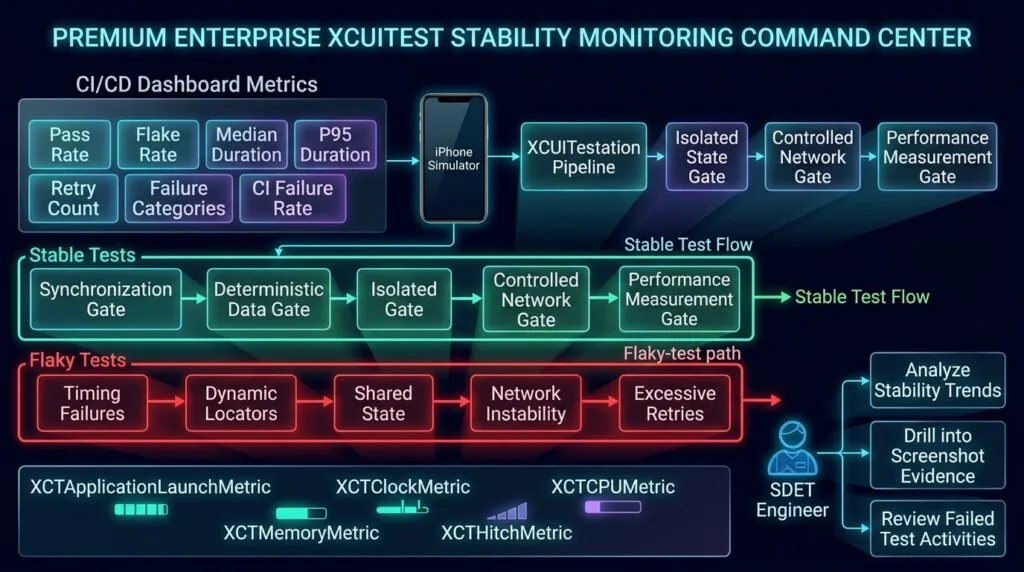
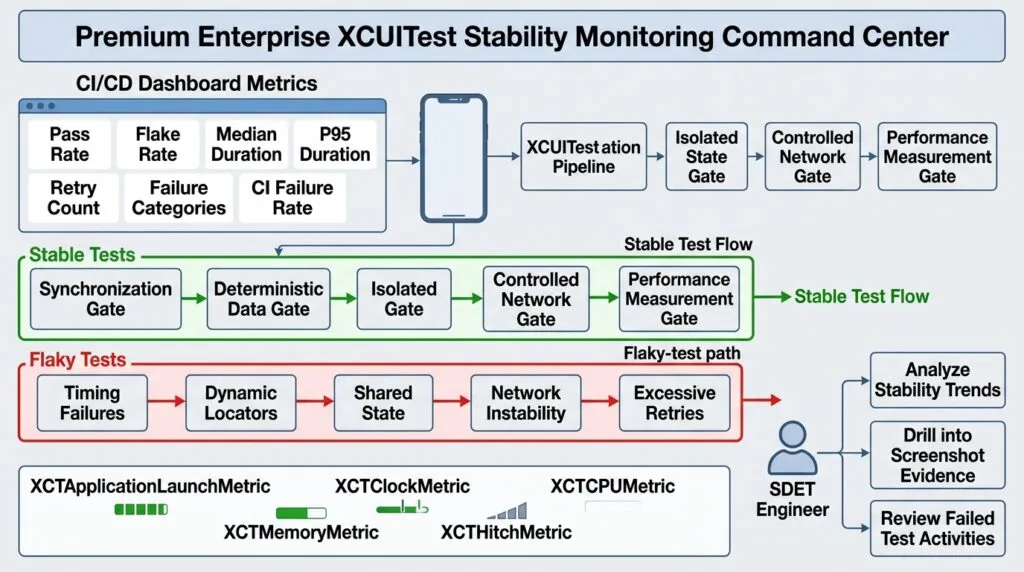
Stability Dashboard
A mature automation pipeline should monitor test health.
XCUITest Suite
      ↓
┌─────────────────────────┐
│ Pass Rate               │
│ Flake Rate              │
│ Execution Time          │
│ Failure Categories      │
│ Screenshot Evidence     │
│ Environment             │
└─────────────────────────┘
      ↓
Stability Trend
Useful metrics include:
| Metric | Purpose |
|---|---|
| Pass Rate | Overall reliability |
| Flake Rate | Detect intermittent failures |
| Median Duration | Typical execution speed |
| P95 Duration | Slow-tail detection |
| Failure Category | Root-cause analysis |
| Retry Count | Detect hidden instability |
| CI Failure Rate | Environment health |
Common XCUITest Stability Anti-Patterns
Arbitrary Sleeps
sleep(5)Replace with meaningful synchronization.
Index-Based Locators
app.buttons.element(boundBy: 3)Prefer semantic identifiers.
Shared Test Accounts
Multiple parallel tests modifying the same account can cause unpredictable results.
Tests Depending on Order
Every test should establish its required state.
Excessive UI Navigation
Do not repeatedly navigate through unrelated screens to reach the state required by a test.
Blind Retries
Retries can hide genuine instability.
Uncontrolled External Dependencies
A UI test should not fail because an unrelated third-party service is temporarily unavailable unless that dependency is explicitly part of the scenario.
Best Practices
| Area | Recommended Approach |
|---|---|
| Synchronization | Wait for meaningful conditions |
| Locators | Use stable identifiers |
| State | Reset or control application state |
| Data | Use deterministic fixtures |
| Network | Use stable test dependencies |
| Parallelism | Isolate resources |
| UI Actions | Keep workflows focused |
| Performance | Track critical metrics |
| Evidence | Capture useful failure artifacts |
| CI | Monitor trends |
| Flakiness | Investigate root causes |
| Retries | Use sparingly |
Production-Ready Stability Strategy
A production-grade XCUITest architecture can follow:
Stable Test Design
       ↓
Deterministic Setup
       ↓
Stable Locators
       ↓
Condition-Based Synchronization
       ↓
Controlled Dependencies
       ↓
Focused UI Workflow
       ↓
Assertions
       ↓
Evidence Collection
       ↓
Performance Measurement
       ↓
CI Execution
       ↓
Stability Metrics
       ↓
Flakiness Analysis
The most important principle is:
Do not make a flaky test quieter. Make the test deterministic.
Key Takeaways
XCUITest test stability comes from controlling the variables that influence UI automation.
Focus on:
- Deterministic test state
- Stable accessibility identifiers
- Condition-based synchronization
- Independent tests
- Controlled test data
- Stable network dependencies
- Parallel execution isolation
- Focused UI workflows
- Performance measurement
- Screenshot and failure evidence
- CI stability metrics
XCTest supports both UI testing through XCUIAutomation and dedicated performance testing, making it possible to treat test reliability and execution performance as measurable engineering concerns. (Apple Developer)
A strong SDET framework should therefore optimize for three properties:
Reliable
   +
Deterministic
   +
Fast
   =
Production-Grade XCUITest Suite
AI Overview & Answer Engine Optimization
XCUITest test stability is the ability of iOS UI tests to produce consistent, repeatable results across repeated runs, environments, devices, and CI pipelines without failures caused by timing, state, data, or infrastructure instability.
How Do You Improve XCUITest Stability?
Use stable accessibility identifiers, condition-based synchronization, deterministic test data, isolated application state, controlled network dependencies, focused UI workflows, and consistent CI environments.
Why Are XCUITests Flaky?
Common causes include timing issues, dynamic UI elements, asynchronous loading, animations, shared state, unstable test data, network dependencies, parallel execution, and differences between local and CI environments.
Should I Use sleep() in XCUITest?
Avoid arbitrary sleep() calls for UI synchronization. Wait for meaningful application conditions or elements instead.
How Can XCUITest Performance Be Measured?
XCTest provides performance metrics such as application launch time, elapsed time, CPU, memory, UI hitches, and storage usage. (Apple Developer)
How Do You Detect Flaky XCUITests?
Run important tests repeatedly, track pass/fail patterns and duration, classify failures, collect evidence, and investigate the underlying cause instead of relying on retries.
AI Overview Summary
To improve XCUITest test stability, use deterministic test state, stable accessibility identifiers, condition-based synchronization, isolated test data, controlled network dependencies, focused UI workflows, and performance monitoring. Track flake rates and CI failures, capture diagnostic evidence, and fix root causes instead of masking failures with retries or arbitrary delays.
People Asked Questions
What is XCUITest test stability?
It is the ability of XCUITest automation to produce consistent results across repeated executions and different execution environments.
What causes XCUITest flakiness?
Timing, synchronization, dynamic locators, animations, shared state, network dependencies, test data, CI differences, and parallel execution are common causes.
How can I make XCUITests more reliable?
Use stable accessibility identifiers, condition-based waits, deterministic data, isolated tests, controlled dependencies, and focused workflows.
Why should I avoid sleep() in XCUITest?
Fixed delays do not represent actual application state and can make tests unnecessarily slow while remaining unreliable.
How can I test XCUITest performance?
Use XCTest performance APIs such as measure(metrics:block:) and metrics including XCTClockMetric, XCTApplicationLaunchMetric, XCTCPUMetric, and XCTMemoryMetric. (Apple Developer)
What is a flaky XCUITest?
A flaky XCUITest produces different results across repeated executions without a corresponding change in the application or test logic.
Should flaky tests be retried?
Retries can be useful as a diagnostic signal, but they should not replace root-cause analysis.
How do I stabilize XCUITests running in parallel?
Give parallel tests isolated accounts, data, files, and backend resources so that one test cannot modify another test’s state.
What is the difference between stability and performance?
Stability asks whether the test consistently produces the correct result. Performance asks how efficiently the application or test workflow executes.
Internal Blog Links
- XCUITest iOS Testing: What it is and Why it Matters
- XCTest vs XCUITest: Understanding Apple’s Testing Frameworks
- XCUITest Setup on macOS and Xcode: Complete Beginner’s Guide
- Your First XCUITest: Building a Basic iOS UI Test
- XCUITest Project Structure and Test Target Architecture
- XCUIApplication: Launching and Controlling iOS Apps
- XCUIElement: Finding and Interacting with UI Elements
- iOS Accessibility Identifiers: Build Reliable XCUITest Automation
- XCUITest Locators: IDs, Labels, Text and Element Queries
- XCUITest Actions: Tap, Type, Swipe, Scroll and Long Press
- XCUITest Assertions: Validating iOS App Behavior
- XCUITest Synchronization: Reliable Waiting for iOS UI Tests
- XCUITest Alerts: Handling Alerts, Sheets, Pop-Ups and System Dialogs
- XCUITest Form Testing: Automating Text Fields, Pickers and Keyboards
- XCUITest Collection Testing: Automating Tables, Lists and Dynamic Content
- XCUITest Page Object Model: Build Maintainable iOS UI Tests with Swift
- XCUITest Test Utilities: Build Reusable Helpers for Scalable iOS UI Automation
- XCUITest Data-Driven Testing: Build Scalable iOS UI Tests with Swift
- XCUITest Authentication Testing: Network, Login, and Secure iOS UI Scenarios
- XCUITest Screenshots: Capturing, Attaching, and Managing iOS Test Evidence
- XCUITest Debugging: A SDET Guide to Diagnosing Failed iOS UI Tests
Internal Series Links
- Learn MCP – Zero to Hero
- Learn AI Agents for QA – Zero to Hero
- Playwright Automation – Zero to Hero
- TencentDB Agent Memory: Complete Zero to Hero
- LangGraph: Complete Zero to Hero
- Learn Python – Zero to Hero
- OpenAI Codex: Complete Zero to Hero
- Cursor AI: Complete Zero to Hero
- Claude Code Tutorial: Complete Zero to Hero
- AutoGen: Complete Zero to Hero Guide
- Free QA Resources Built From Real Experience
- QA Glossary: Test Automation Terms Every Engineer Should Know
External Links
- Apple — XCTest Documentation — Official documentation for XCTest UI testing, performance testing, assertions, activities, attachments, and test execution. (Apple Developer)
- Apple — Performance Tests — Official guidance for measuring performance and detecting regressions with XCTest metrics. (Apple Developer)
- Apple — XCTestCase — Official API reference for test execution, performance measurement, time allowances, and test configuration. (Apple Developer)
- Apple — XCUIApplication
wait(for:timeout:)— Official API documentation for waiting for an application to reach a specified state. (Apple Developer) - Apple — XCTClockMetric — Official documentation for measuring elapsed time during performance tests. (Apple Developer)
- Apple — XCTMetric — Official documentation for XCTest performance metrics including CPU, memory, hitches, storage, and launch metrics. (Apple Developer)
- Apple — Asynchronous Tests and Expectations — Official guidance for synchronizing asynchronous test operations with XCTest expectations. (Apple Developer)
Continue Learning
Explore more expert articles on Mobile Testing, Backend & API, AI & Agentic, AI Tools, n8n, LangChain, CrewAI, MCP Servers, AI Agents, LlamaIndex, Docker, FastAPI, Playwright, Cypress, Test Automation, DevOps, and Software Engineering at www.skakarh.com.
QAPulse by SK delivers expert release analysis, AI engineering insights, enterprise automation strategies, migration guidance, DevOps best practices, and practical testing knowledge to help software professionals build scalable, intelligent, and production-ready software systems.