QA
QA
XCUITest parallel testing allows teams to execute multiple iOS UI tests concurrently instead of running the entire suite sequentially. When designed correctly, parallel execution can significantly reduce CI feedback time and increase automation throughput. However, simply enabling parallel execution is not enough. Shared test data, application state, simulator resources, backend dependencies, and test ordering can introduce race conditions and flaky results.
For SDETs, the real challenge is to build a parallel test architecture that is fast, isolated, deterministic, and CI-friendly.
Definition
XCUITest parallel testing is the practice of running multiple XCUITest cases or test workers concurrently across available simulators, devices, or execution environments.
The objective is to reduce total execution time while preserving:
- Test isolation
- Deterministic results
- Resource independence
- Stable test data
- Reliable CI execution
- Reproducible failures
Key Points
- Parallel execution reduces overall test-suite duration.
- Tests must be independent before parallelization.
- Shared accounts can create race conditions.
- Shared backend data can cause false failures.
- Simulator isolation is important.
- Test ordering should not affect results.
- Parallel execution requires controlled resources.
- CI workers should have predictable environments.
- Flaky tests become more difficult to diagnose at scale.
- Parallelization should be measured against stability and execution time.
Why Parallel Testing Matters
Consider a suite containing 600 UI tests.
Sequential execution:
600 Tests
   ↓
Worker 1
   ↓
Long Execution Time
With parallel workers:
600 Tests
   ↓
┌──────────┬──────────┬──────────┬──────────┐
│ Worker 1 │ Worker 2 │ Worker 3 │ Worker 4 │
└──────────┴──────────┴──────────┴──────────┘
      ↓          ↓          ↓          ↓
   Test Set   Test Set   Test Set   Test Set
The total runtime can decrease substantially when enough independent resources are available.
However:
More Workers ≠ Automatically BetterIf four workers compete for the same account, database records, API limits, or simulator resources, execution can become less reliable.
Sequential vs Parallel Execution
| Area | Sequential | Parallel |
|---|---|---|
| Execution | One flow at a time | Multiple flows |
| Runtime | Higher | Lower |
| Infrastructure | Simpler | More complex |
| Data Isolation | Easier | Essential |
| Resource Usage | Lower | Higher |
| Debugging | Easier | More complex |
| CI Scalability | Limited | Strong |
| Race Conditions | Less likely | More likely |
| Test Independence | Helpful | Mandatory |
Parallelization is therefore an architecture decision, not simply a configuration switch.
6 Core Pillars of XCUITest Parallel Testing
1. Test Independence
Every test should be able to execute without relying on another test.
2. Resource Isolation
Simulators, accounts, files, and backend records should not unintentionally overlap.
3. Deterministic Test Data
Parallel workers need predictable and isolated data.
4. Controlled Application State
Each worker should start from a known application state.
5. CI-Oriented Execution
The parallel strategy should work consistently on CI infrastructure.
6. Stability Monitoring
Execution speed should be measured together with failure and flake rates.
Parallel Testing Architecture
flowchart TD
    A[XCUITest Suite] --> B[Test Scheduler]
    B --> C[Worker 1]
    B --> D[Worker 2]
    B --> E[Worker 3]
    B --> F[Worker 4]

    C --> G[Simulator 1]
    D --> H[Simulator 2]
    E --> I[Simulator 3]
    F --> J[Simulator 4]

    G --> K[Test Data A]
    H --> L[Test Data B]
    I --> M[Test Data C]
    J --> N[Test Data D]

    K --> O[Controlled Backend]
    L --> O
    M --> O
    N --> O

    O --> P[Results and Evidence]
    P --> Q[CI Stability Analysis]
How XCUITest Parallel Execution Works
Xcode can distribute tests across multiple test execution environments. The exact execution behavior depends on the selected test plan, scheme configuration, devices, destinations, and CI setup.
Conceptually:
Test Suite
    ↓
Test Distribution
    ↓
┌────────────┬────────────┬────────────┐
│ Simulator A│ Simulator B│ Simulator C│
├────────────┼────────────┼────────────┤
│ Tests 1–20 │ Tests 21–40│ Tests 41–60│
└────────────┴────────────┴────────────┘
Each worker executes its assigned tests independently.
The important engineering question is:
Can each test execute safely when another test is running at exactly the same time?
If the answer is no, the suite is not ready for aggressive parallelization.
Test Independence
Consider this dependency:
testCreateUser()
       ↓
testLogin()
       ↓
testCheckout()
This is unsuitable for parallel execution because each test depends on previous state.
A better design is:
testCreateUser()
    ↓
Own Setup
    ↓
Own Data

testLogin()
    ↓
Own Setup
    ↓
Own Data

testCheckout()
    ↓
Own Setup
    ↓
Own Data
Each test establishes the state it needs.
Why Shared State Causes Failures
Suppose two workers use the same account:
Worker 1 → user@example.com
Worker 2 → user@example.com
Worker 1 may change:
Password
Cart
Profile
Subscription
Session
while Worker 2 is using the same account.
The resulting failure may appear random:
Worker 1 → PASS
Worker 2 → FAIL
The application might be perfectly correct.
The actual problem is test resource contention.
Data Isolation Strategy
A scalable approach is to assign independent data.
Worker 1 → Account A → Dataset A
Worker 2 → Account B → Dataset B
Worker 3 → Account C → Dataset C
Worker 4 → Account D → Dataset D
This prevents workers from modifying the same records.
For backend-driven applications, the data layer should support predictable creation, cleanup, and ownership of test records.
Static vs Dynamic Test Data
Static test data is simple but can become problematic when multiple workers modify the same records.
Dynamic data can provide stronger isolation:
Worker
  ↓
Generate Unique Test Identifier
  ↓
Create Test Resource
  ↓
Execute Test
  ↓
Cleanup Resource
For example:
let uniqueEmail =
    "ui-test-\(UUID().uuidString)@example.com"
This can reduce collisions when the backend permits dynamically created test accounts.
Application State Isolation
Each worker should have predictable application state.
Potential state leakage includes:
- Authentication sessions
- Cookies
- Keychain entries
- User preferences
- Local database
- Cached responses
- Onboarding status
- Feature flags
A test that assumes a clean state can fail when another execution has modified the environment.
Launch Configuration
Launch arguments can help establish predictable UI-test behavior.
let app = XCUIApplication()

app.launchArguments = [
    "-UITestMode",
    "-ResetState"
]

app.launch()
The application can interpret these arguments to configure a controlled test environment.
For example:
-UITestMode
-ResetState
-MockNetwork
-SeedTestData
The actual arguments should match the application’s test architecture.
Simulator Isolation
Parallel workers should not unintentionally share simulator state.
Conceptually:
Worker 1 → Simulator A
Worker 2 → Simulator B
Worker 3 → Simulator C
Worker 4 → Simulator D
This reduces conflicts involving:
- Application installation
- User preferences
- Local storage
- Keychain
- Permissions
- Simulator state
- Background processes
The exact number of parallel destinations should match available infrastructure.
Resource Contention
Adding workers increases resource consumption.
Typical resources include:
CPU
Memory
Disk
Simulator Processes
Network
Backend Capacity
CI Agents
A machine capable of running two workers efficiently may become unstable with eight.
Therefore:
More Workers
     ↓
More Resource Consumption
     ↓
Potential Contention
     ↓
Longer Individual Tests
     ↓
Lower Overall Efficiency
Parallelism has an optimal range.
Finding the Right Worker Count
Suppose the suite is tested with different worker counts:
| Workers | Runtime | Flake Rate |
|---|---|---|
| 1 | 90 min | 0.5% |
| 2 | 49 min | 0.5% |
| 4 | 28 min | 0.8% |
| 6 | 23 min | 2.4% |
| 8 | 22 min | 5.1% |
Eight workers appear faster, but the increased failure rate makes the configuration less useful.
The optimal point may be four workers rather than eight.
The objective is:
Lowest Reliable Runtimenot:
Maximum Worker CountParallel Execution and Synchronization
Parallel execution makes synchronization problems more visible.
A fragile test might already contain:
sleep(5)When executed in parallel, system load can increase and make that assumption even less reliable.
Prefer:
let dashboard = app.staticTexts["Dashboard"]

XCTAssertTrue(
    dashboard.waitForExistence(timeout: 10)
)
The test waits for an application condition instead of assuming a fixed execution speed.
Avoid Arbitrary Waits
This:
sleep(10)does not guarantee that the application is ready.
A condition-based approach:
XCTAssertTrue(
    app.buttons["Checkout"]
        .waitForExistence(timeout: 10)
)
is tied to the actual UI state.
This becomes especially important when multiple workers compete for CPU and memory.
Stable Locators
Parallel execution does not fix weak locators.
Avoid:
app.buttons.element(boundBy: 2)when a stable identifier is available.
Prefer:
app.buttons["checkoutButton"]Stable accessibility identifiers reduce failures caused by:
- UI ordering
- Localization
- Dynamic text
- Layout changes
- Additional elements
Network Dependencies
Parallel UI tests can multiply backend traffic.
For example:
100 Tests × 4 Workers
       ↓
Potentially Higher API Load
If every test performs login and data creation, the backend may suddenly receive hundreds of requests.
Potential results:
Rate Limiting
API Timeouts
Slow Responses
Database Contention
Authentication Failures
The test infrastructure and backend must therefore be designed for the expected concurrency.
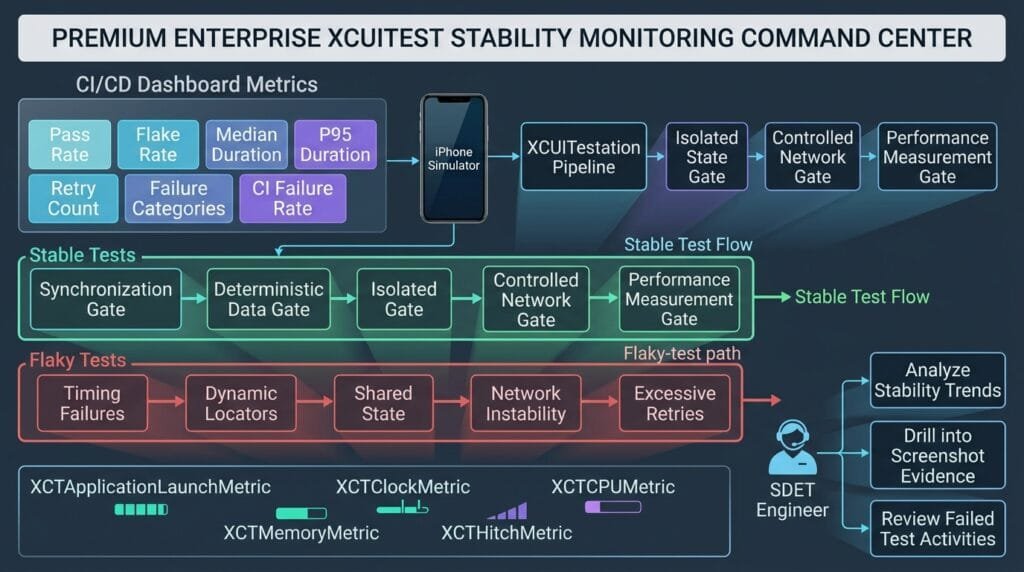
Parallel Test Data Isolation
A scalable data model might look like:
Test Scheduler
      ↓
┌──────────┬──────────┬──────────┐
│ Worker A │ Worker B │ Worker C │
└────┬─────┴────┬─────┴────┬─────┘
     ↓           ↓           ↓
 Dataset A    Dataset B    Dataset C
     ↓           ↓           ↓
          Backend
Each worker owns its test data.
This makes failures easier to reproduce because the relationship between the test and its data is explicit.
Backend Resource Locking
Some workflows cannot safely execute against the same resource.
For example:
Worker A → Edit Product 100
Worker B → Delete Product 100
This creates a race condition.
Possible solutions include:
- Unique resources
- Resource locking
- Test-specific environments
- Dynamic resource allocation
- Backend reset mechanisms
The correct strategy depends on the application’s architecture.
Authentication in Parallel Tests
Authentication is a common parallel-testing problem.
Consider:
Worker A → Login
Worker B → Login
Worker C → Login
Worker D → Login
If all workers use the same account, the backend may invalidate sessions or apply security controls.
Prefer:
Worker A → Account A
Worker B → Account B
Worker C → Account C
Worker D → Account D
For large suites, accounts can be provisioned dynamically.
Parallel Testing with Test Plans
Xcode test plans provide configuration capabilities for organizing test execution, configurations, destinations, and related testing behavior.
A practical strategy is to separate suites by purpose:
Smoke
Regression
Critical User Journeys
Feature Tests
Performance
Then apply parallel execution where it provides the most value.
For example:
Pull Request
   ↓
Smoke Tests
   ↓
Parallel Execution
and:
Nightly
   ↓
Full Regression
   ↓
Higher Parallelism
Test Suite Partitioning
Not every test should necessarily run in the same parallel group.
Partition tests by:
Duration
Risk
Feature
Dependency
Environment
Resource Requirements
For example:
| Group | Characteristics |
|---|---|
| Smoke | Short, critical |
| UI Regression | Broad coverage |
| Authentication | Shared security dependencies |
| Checkout | Payment-related resources |
| Performance | Resource intensive |
| Device-Specific | Hardware-dependent |
This can improve execution predictability.
Fast Tests vs Slow Tests
A common problem is uneven test distribution.
Suppose:
Worker 1 → 20 short tests
Worker 2 → 20 short tests
Worker 3 → 5 long tests
Worker 4 → 5 long tests
Workers 1 and 2 finish early while Workers 3 and 4 remain active.
The suite’s completion time is determined by the slowest worker.
Therefore, test duration should be monitored and balanced where possible.
Test Duration Analysis
Track:
Test Name
Duration
Worker
Failure Rate
Retry Count
Environment
Example:
| Test | Duration | Stability |
|---|---|---|
| Login | 8s | 99.9% |
| Search | 14s | 99.7% |
| Checkout | 42s | 98.8% |
| Profile | 11s | 99.9% |
Long and unstable tests deserve investigation before scaling the entire suite.
CI Parallel Execution
A scalable CI architecture can look like:
Git Push
   ↓
CI Pipeline
   ↓
Build Application
   ↓
Prepare Test Environment
   ↓
┌──────────┬──────────┬──────────┬──────────┐
│ Runner 1 │ Runner 2 │ Runner 3 │ Runner 4 │
└──────────┴──────────┴──────────┴──────────┘
       ↓         ↓         ↓         ↓
    Results   Results   Results   Results
       └─────────┬─────────┘
                 ↓
          Result Aggregation
                 ↓
          Test Report
The infrastructure should preserve:
- Worker identity
- Test results
- Screenshots
- Logs
- Failure artifacts
- Environment information
CI Resource Planning
Parallel workers need enough infrastructure.
| Resource | Why It Matters |
|---|---|
| CPU | Simulator execution |
| RAM | Multiple simulators |
| Disk | Builds and derived data |
| Network | API and dependency traffic |
| CI Agents | Worker capacity |
| Backend | Concurrent test requests |
| Storage | Screenshots and logs |
Increasing workers without increasing infrastructure can reduce performance.
Measuring Parallel Efficiency
Parallel execution should be measured.
A simple efficiency model is:
Parallel Efficiency =
Sequential Runtime
÷
(Parallel Runtime × Worker Count)
For example:
Sequential = 80 minutes
Parallel = 25 minutes
Workers = 4

Efficiency =
80 ÷ (25 × 4)
= 0.80
= 80%
Perfect theoretical efficiency is difficult because of:
- Scheduling overhead
- Build overhead
- Uneven test durations
- Resource contention
- Setup and teardown
- Infrastructure limitations
The metric is useful for identifying diminishing returns.
Parallel Execution Scaling
Imagine:
1 Worker  → 90 min
2 Workers → 50 min
4 Workers → 29 min
6 Workers → 24 min
8 Workers → 23 min
Going from four to eight workers only saves six minutes.
If instability increases significantly, eight workers may not be worth the additional infrastructure.
The goal is efficient scaling, not maximum concurrency.
Detecting Race Conditions
Parallel failures often expose hidden race conditions.
Example:
Worker A
   ↓
Creates Record X

Worker B
   ↓
Deletes Record X

Worker A
   ↓
Attempts Validation
   ↓
FAIL
The test may pass every time when executed sequentially.
This is a strong indication of shared state.
Debugging Parallel Failures
When a parallel test fails, collect:
- Worker ID
- Test name
- Simulator
- Device configuration
- Test data ID
- Timestamp
- Screenshot
- Logs
- Backend request information
- Application state
This helps answer:
Who failed?
Where?
When?
With which data?
On which worker?
Under what environment?
Parallel Test Evidence
A useful failure artifact structure is:
Artifacts/
├── Worker-01/
│   ├── screenshots/
│   ├── logs/
│   └── results/
├── Worker-02/
│   ├── screenshots/
│   ├── logs/
│   └── results/
└── Worker-03/
    ├── screenshots/
    ├── logs/
    └── results/
Worker-specific evidence makes concurrent failures much easier to diagnose.
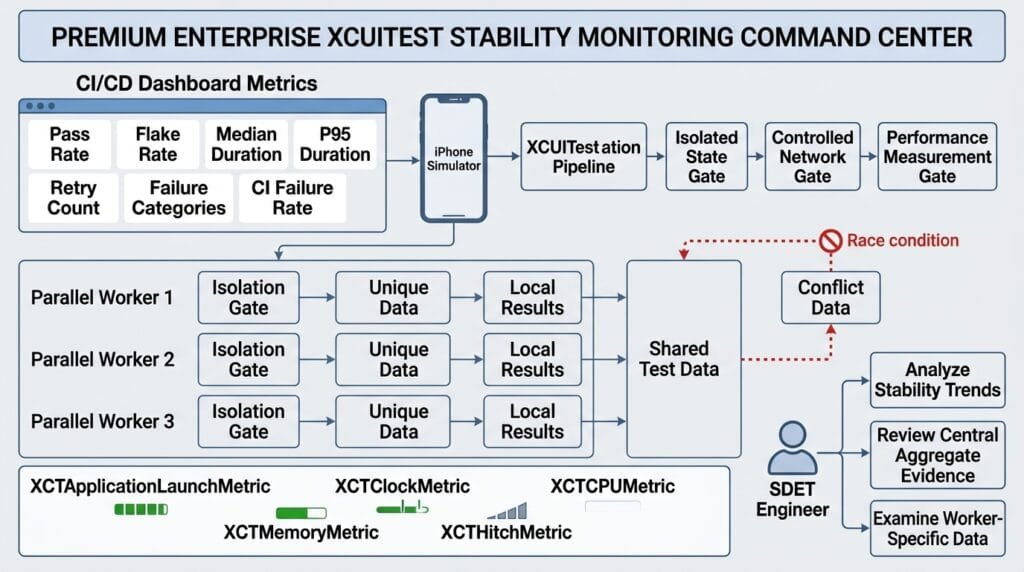
Common Parallel Testing Anti-Patterns
Sharing the Same Account
Multiple workers modifying the same account can produce unpredictable results.
Sharing the Same Test Records
Workers should not modify the same entities unless the scenario explicitly tests concurrency.
Depending on Test Order
Parallel execution removes assumptions about execution sequence.
Maximizing Worker Count
More workers can create resource contention and lower overall efficiency.
Ignoring Backend Capacity
Parallel UI tests can multiply API and database traffic.
Using Arbitrary Sleeps
Increased concurrency can make fixed timing assumptions even less reliable.
Ignoring Failure Evidence
Parallel failures need worker-specific diagnostics.
Retrying Without Investigation
Retries can hide race conditions and resource contention.
Best Practices
| Area | Best Practice |
|---|---|
| Test Design | Keep tests independent |
| Data | Use isolated datasets |
| Accounts | Assign unique accounts where required |
| State | Start from predictable state |
| Locators | Use stable identifiers |
| Synchronization | Use condition-based waits |
| Simulators | Isolate execution environments |
| Backend | Prepare for concurrent traffic |
| CI | Allocate sufficient resources |
| Scheduling | Balance test durations |
| Evidence | Preserve worker-specific artifacts |
| Metrics | Track runtime and flake rate |
| Scaling | Increase workers gradually |
When Should You Use Parallel Testing?
Parallel execution is especially useful when:
- The UI suite is large.
- CI feedback is too slow.
- Tests are independent.
- Infrastructure can support multiple workers.
- Test data can be isolated.
- Backend capacity supports concurrency.
It is less useful when:
- Tests depend heavily on shared state.
- The suite is very small.
- Infrastructure is limited.
- The backend cannot handle concurrent traffic.
- Tests are already highly unstable.
Stabilize the architecture before aggressively increasing concurrency.
Production Parallel Testing Strategy
A mature strategy can follow:
Stable Tests
    ↓
Independent State
    ↓
Isolated Data
    ↓
Controlled Dependencies
    ↓
Parallel Workers
    ↓
Worker-Specific Evidence
    ↓
Result Aggregation
    ↓
Runtime + Flake Analysis
    ↓
Optimize Worker Count
This approach turns parallel execution into an engineering capability rather than a simple CI setting.
Key Takeaways
XCUITest parallel testing can dramatically reduce iOS UI automation execution time, but scalability depends on isolation and infrastructure.
A reliable strategy should:
- Keep tests independent.
- Isolate accounts and backend data.
- Use dedicated or isolated simulators.
- Control application state.
- Use stable accessibility identifiers.
- Replace arbitrary sleeps with meaningful waits.
- Prepare backend systems for concurrent traffic.
- Balance test duration across workers.
- Preserve worker-specific evidence.
- Monitor flake rates.
- Measure parallel efficiency.
- Increase concurrency gradually.
The strongest parallel test suite is not the one with the most workers.
It is the one that achieves the best balance between execution speed, infrastructure cost, and test reliability.
AI Overview & Answer Engine Optimization
XCUITest parallel testing is the concurrent execution of iOS UI tests across multiple test workers, simulators, devices, or CI environments to reduce overall test-suite execution time.
How Does XCUITest Parallel Testing Work?
A test suite is distributed across multiple workers. Each worker executes its assigned tests using an isolated execution environment, while the CI system collects and aggregates the results.
What Is Required for Reliable Parallel Testing?
Reliable parallel execution requires independent tests, isolated test data, controlled application state, stable locators, sufficient simulator and CI resources, and backend capacity for concurrent requests.
Why Do Tests Fail Only During Parallel Execution?
Common causes include shared accounts, shared backend records, simulator state conflicts, race conditions, resource contention, and tests that incorrectly depend on execution order.
How Many XCUITest Workers Should I Use?
There is no universal number. Start with a small number of workers and measure execution time, resource usage, flake rate, and parallel efficiency before increasing concurrency.
Does Parallel Testing Make XCUITests Faster?
Yes, parallel execution can reduce total suite duration when tests are independent and infrastructure can support concurrent workers. Increasing workers beyond the infrastructure’s efficient capacity can produce diminishing returns.
How Do You Make XCUITest Parallel Testing Stable?
Use isolated accounts and data, independent tests, predictable application state, stable accessibility identifiers, condition-based synchronization, isolated simulators, controlled dependencies, and worker-specific test evidence.
AI Overview Summary
XCUITest parallel testing reduces iOS UI test execution time by distributing independent tests across multiple workers. For reliable scaling, isolate test data and application state, use dedicated execution environments, control backend dependencies, avoid execution-order assumptions, monitor resource usage, and optimize worker count based on runtime and flake rate.
People Asked Questions
What is XCUITest parallel testing?
It is the concurrent execution of multiple XCUITest tests across available workers, simulators, devices, or CI environments.
Why is test isolation important for parallel execution?
Without isolation, one test can modify data or application state used by another test, producing race conditions and false failures.
Can XCUITests use the same account in parallel?
They can, but it is risky when tests modify shared account state. Independent accounts are generally safer for parallel workflows.
Does parallel testing require multiple simulators?
Parallel execution requires sufficient independent execution capacity. Depending on the setup, this may involve multiple simulator destinations, devices, or CI workers.
Why do XCUITests become flaky in parallel?
Common causes include shared resources, timing assumptions, backend contention, simulator resource pressure, test-order dependencies, and race conditions.
How can I reduce parallel test failures?
Start by isolating accounts, data, application state, and execution environments. Then investigate synchronization and resource contention.
Should every XCUITest run in parallel?
No. Tests with unavoidable shared resources or special environment requirements may need controlled execution.
How do I choose the number of parallel workers?
Measure runtime, CPU, memory, backend load, flake rate, and efficiency at different worker counts. Choose the highest concurrency that remains reliable and efficient.
What should CI collect from parallel tests?
Collect worker ID, test name, simulator information, screenshots, logs, test results, timing data, and relevant test-data identifiers.
Internal Blog Links
- XCUITest iOS Testing: What it is and Why it Matters
- XCTest vs XCUITest: Understanding Apple’s Testing Frameworks
- XCUITest Setup on macOS and Xcode: Complete Beginner’s Guide
- Your First XCUITest: Building a Basic iOS UI Test
- XCUITest Project Structure and Test Target Architecture
- XCUIApplication: Launching and Controlling iOS Apps
- XCUIElement: Finding and Interacting with UI Elements
- iOS Accessibility Identifiers: Build Reliable XCUITest Automation
- XCUITest Locators: IDs, Labels, Text and Element Queries
- XCUITest Actions: Tap, Type, Swipe, Scroll and Long Press
- XCUITest Assertions: Validating iOS App Behavior
- XCUITest Synchronization: Reliable Waiting for iOS UI Tests
- XCUITest Alerts: Handling Alerts, Sheets, Pop-Ups and System Dialogs
- XCUITest Form Testing: Automating Text Fields, Pickers and Keyboards
- XCUITest Collection Testing: Automating Tables, Lists and Dynamic Content
- XCUITest Page Object Model: Build Maintainable iOS UI Tests with Swift
- XCUITest Test Utilities: Build Reusable Helpers for Scalable iOS UI Automation
- XCUITest Data-Driven Testing: Build Scalable iOS UI Tests with Swift
- XCUITest Authentication Testing: Network, Login, and Secure iOS UI Scenarios
- XCUITest Screenshots: Capturing, Attaching, and Managing iOS Test Evidence
- XCUITest Debugging: A SDET Guide to Diagnosing Failed iOS UI Tests
- XCUITest Test Stability: Building Fast, Reliable, and Flake-Free iOS UI Tests
Internal Series Links
- Learn MCP – Zero to Hero
- Learn AI Agents for QA – Zero to Hero
- Playwright Automation – Zero to Hero
- TencentDB Agent Memory: Complete Zero to Hero
- LangGraph: Complete Zero to Hero
- Learn Python – Zero to Hero
- OpenAI Codex: Complete Zero to Hero
- Cursor AI: Complete Zero to Hero
- Claude Code Tutorial: Complete Zero to Hero
- AutoGen: Complete Zero to Hero Guide
- Free QA Resources Built From Real Experience
- QA Glossary: Test Automation Terms Every Engineer Should Know
External Links
- Apple — XCTest Documentation — Official documentation for XCTest, test execution, assertions, activities, attachments, and performance testing.
- Apple — XCUITest / XCUIAutomation Documentation — Official documentation for iOS UI automation, applications, elements, queries, and interactions.
- Apple — Testing with Xcode — Official guidance for configuring and running tests with Xcode.
- Apple — Test Plans — Official documentation for organizing test configurations, environments, and execution strategies.
- Apple — XCUIApplication — Official API reference for launching and controlling an application during UI testing.
- Apple — XCUIElement — Official API reference for finding and interacting with UI elements.
- Apple — Performance Tests — Official guidance for measuring execution performance and identifying regressions.
Continue Learning
Explore more expert articles on Mobile Testing, Backend & API, AI & Agentic, AI Tools, n8n, LangChain, CrewAI, MCP Servers, AI Agents, LlamaIndex, Docker, FastAPI, Playwright, Cypress, Test Automation, DevOps, and Software Engineering at www.skakarh.com.
QAPulse by SK delivers expert release analysis, AI engineering insights, enterprise automation strategies, migration guidance, DevOps best practices, and practical testing knowledge to help software professionals build scalable, intelligent, and production-ready software systems.