QA
QA
Introduction
Large Language Models are excellent at understanding natural language, generating content, answering questions, and reasoning through complex problems. However, they have one important limitation—they cannot directly interact with the outside world.
A language model cannot send an email, query a live database, call a REST API, book a meeting, execute Python code, retrieve the latest stock price, or search enterprise documentation on its own. These actions require access to external systems.
This is where LangGraph Tool Calling Agents become essential.
A LangGraph Tool Calling Agent is an intelligent AI agent capable of deciding when an external tool is required, selecting the appropriate tool, executing it, processing the returned results, and incorporating those results into its final response.
Instead of relying only on pre-trained knowledge, the agent extends its capabilities by interacting with APIs, databases, search engines, calculators, code execution environments, file systems, cloud services, and enterprise applications.
This ability transforms an AI assistant from a conversational model into an intelligent software system capable of solving real-world business problems.
For example, consider the following user requests:
- Check today’s weather in London.
- Retrieve customer information from a CRM.
- Search the company knowledge base.
- Generate a PDF report.
- Query a SQL database.
- Send an approval email.
- Calculate quarterly revenue.
- Execute Python code.
- Create a Jira issue.
- Fetch data from GitHub.
A standard language model cannot perform these actions independently.
A LangGraph Tool Calling Agent determines which external tool should be used, invokes it, processes the returned information, and produces a context-aware response.
Because multiple decisions are involved, LangGraph provides an ideal framework for orchestrating these workflows using graph-based execution and shared state management.
In this lesson, you’ll learn what Tool Calling Agents are, how they work, why they are fundamental to enterprise AI systems, and how LangGraph enables developers to build intelligent workflows that seamlessly integrate AI reasoning with external tools and services.
What is a LangGraph Tool Calling Agent?
A LangGraph Tool Calling Agent is an AI workflow that combines language model reasoning with external tools to accomplish tasks beyond text generation.
Instead of attempting to answer every question directly, the agent first determines whether additional information or an external action is required.
If necessary, it invokes the appropriate tool before generating the final response.
A simplified workflow looks like this:
                 User Request
                      │
                      ▼
               Tool Calling Agent
                      │
             Decision Making
                      │
        ┌─────────────┼─────────────┐
        ▼             ▼             ▼
     Search API    Database      Calculator
        │             │             │
        └─────────────┼─────────────┘
                      ▼
             Process Results
                      │
                      ▼
               Final Response
Instead of relying solely on its internal knowledge, the agent dynamically expands its capabilities through external integrations.
Why Language Models Need Tools
Language models are trained on historical datasets.
Although they possess extensive knowledge, they cannot directly access:
- Live information
- Internal enterprise systems
- Private databases
- Company APIs
- Business applications
- Real-time calculations
- Cloud resources
Imagine asking the following question:
What is my latest GitHub pull request?
Without tool access, the model has no way of retrieving your repository data.
Similarly:
Create a Jira ticket for this bug.
A language model understands what a Jira ticket is, but it cannot create one without interacting with the Jira API.
Tool Calling Agents solve this limitation by allowing AI systems to communicate with external services whenever additional information or actions are required.
How Tool Calling Agents Work
Although implementations vary, most Tool Calling Agents follow a structured workflow.
User Request

      │

Understand Request

      │

Determine Required Tool

      │

Execute Tool

      │

Receive Results

      │

Generate Response

      │

Return Answer
Every stage contributes additional information before the final response is produced.
Because each responsibility is isolated within its own workflow node, the system remains modular and maintainable.
Common Types of AI Tools
Tool Calling Agents can integrate with virtually any external service.
Some of the most common categories include the following.
Search Tools
Search tools retrieve publicly available or enterprise-specific information.
Examples include:
- Web search
- Documentation search
- Knowledge bases
- Internal search systems
- Enterprise portals
These tools provide information that is unavailable within the language model itself.
Database Tools
Many enterprise applications require AI agents to retrieve structured information.
Examples include:
- Customer records
- Sales reports
- Inventory data
- Employee information
- Financial transactions
Instead of guessing, the agent queries the database directly.
API Integrations
Modern software platforms expose REST and GraphQL APIs.
Tool Calling Agents can integrate with services such as:
- GitHub
- Jira
- Slack
- Salesforce
- Stripe
- Azure
- AWS
- Google Cloud
This enables AI systems to perform real business operations.
Calculation Tools
Although language models perform basic arithmetic, dedicated calculation engines provide greater reliability for complex computations.
Examples include:
- Financial calculations
- Tax estimation
- Scientific formulas
- Engineering calculations
- Statistical analysis
The agent delegates mathematical operations to specialized tools before generating the response.
Code Execution
Many AI assistants execute Python or other programming languages to solve computational problems.
Examples include:
- Data analysis
- Machine learning
- Chart generation
- File processing
- Report creation
Rather than estimating results, the workflow executes real code.
Tool Selection Process
One of the most important responsibilities of a Tool Calling Agent is deciding whether a tool should be used.
Not every request requires external execution.
For example:
User request:
Explain what LangGraph is.
No external tool is necessary.
However:
User request:
Search the latest LangGraph documentation for supervisor updates.
Now the workflow requires external retrieval.
A simplified decision process looks like this:
User Request

      │

Tool Required?

      │

──────┼──────

│            │

No           Yes

│            │

▼            ▼

LLM      Execute Tool

│            │

──────┼──────

      ▼

Generate Answer
Making intelligent tool selection is one of the defining characteristics of modern AI agents.
Benefits of LangGraph Tool Calling Agents
Organizations increasingly rely on Tool Calling Agents because they extend AI beyond conversational capabilities.
Real-Time Information
Tool Calling Agents can retrieve live information whenever required.
This enables AI applications to work with continuously changing data.
Enterprise Integration
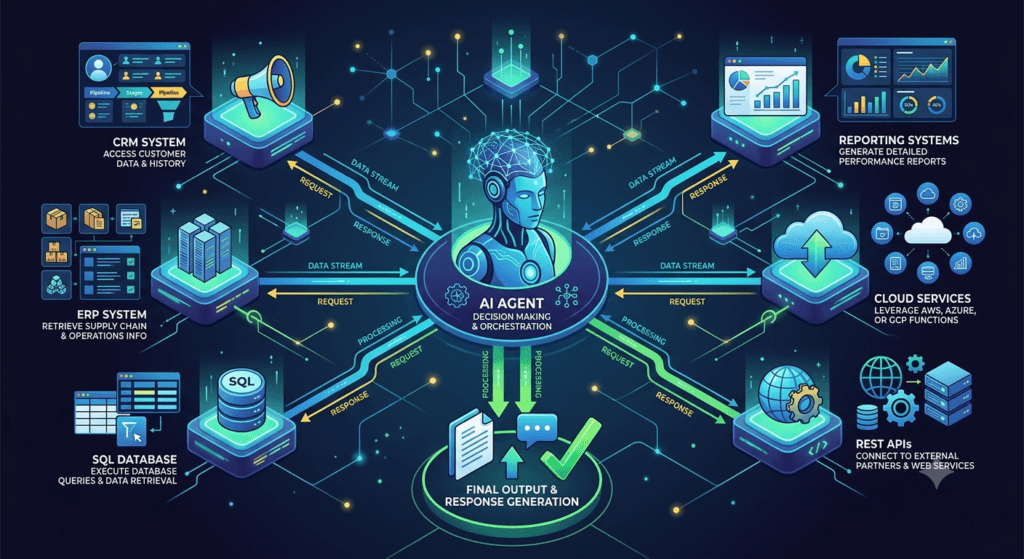
Organizations can connect AI workflows directly to existing business systems.
Examples include:
- ERP platforms
- CRM systems
- HR applications
- Customer support platforms
- Internal APIs
Increased Accuracy
Rather than generating estimated answers, the agent retrieves verified information directly from trusted systems.
Business Automation
Tool Calling Agents automate repetitive tasks such as:
- Creating support tickets
- Sending notifications
- Updating records
- Generating reports
- Scheduling workflows
Modular Architecture
Every tool becomes an independent workflow component.
Developers can add, replace, or update tools without redesigning the overall application.
Real-World Applications
Tool Calling Agents are transforming enterprise AI across numerous industries.
Software Development
AI agents can:
- Retrieve GitHub repositories.
- Create pull requests.
- Generate release notes.
- Open Jira issues.
- Execute automated tests.
Customer Support
Agents can:
- Search knowledge bases.
- Retrieve customer history.
- Update support tickets.
- Verify account information.
- Escalate complex cases.
Financial Services
AI workflows may:
- Query transaction databases.
- Calculate investment metrics.
- Retrieve exchange rates.
- Generate financial reports.
Healthcare
Healthcare assistants can retrieve:
- Patient records
- Appointment schedules
- Laboratory reports
- Clinical guidelines
Healthcare professionals remain responsible for diagnosis and treatment decisions.
Understanding the Architecture of LangGraph Tool Calling Agents
Building a Tool Calling Agent involves much more than connecting a Large Language Model to an external API. An enterprise AI system must determine whether a tool is required, identify the correct tool, prepare the necessary inputs, execute the tool, validate the returned results, and then use those results to generate a reliable response.
This process requires multiple coordinated steps.
Instead of placing all the logic inside one massive prompt, LangGraph Tool Calling Agents organize the workflow into modular graph nodes. Each node performs a specific responsibility while sharing information through a common workflow state.
A typical architecture looks like this:
                    User Request
                          │
                          ▼
                  Intent Analysis
                          │
                          ▼
                Tool Selection Node
                          │
          ┌───────────────┼───────────────┐
          ▼               ▼               ▼
      Search API      Database Tool    File System
          │               │               │
          └───────────────┼───────────────┘
                          ▼
                 Result Validation
                          │
                          ▼
                Response Generation
                          │
                          ▼
                    Final Answer
Each stage contributes additional context before passing control to the next node, creating a workflow that is modular, observable, and scalable.
Core Components of a Tool Calling Workflow
A production-ready Tool Calling Agent consists of several interconnected components.
User Request
Every workflow begins with a user request.
Examples include:
- Search the latest LangGraph documentation.
- Retrieve customer information.
- Generate a PDF report.
- Calculate monthly revenue.
- Query employee records.
- Create a Jira issue.
- Send a Slack notification.
Some requests require external tools, while others can be answered directly by the language model.
Determining the difference is the first responsibility of the workflow.
Intent Analysis
Before selecting a tool, the agent analyzes the user’s objective.
The intent analysis node identifies:
- User goal
- Required action
- Important entities
- Expected output
- Required external resources
For example:
User Request

Generate a sales report.

↓

Intent

Reporting

↓

Required Data

Sales Database

↓

Output

PDF Report
Understanding the request prevents unnecessary tool execution and improves workflow efficiency.
Tool Selection
Once the request is understood, the workflow decides whether a tool is required.
Some requests only require reasoning.
Others require external execution.
The decision process may look like this:
User Request

        │

Tool Needed?

────────┼────────

│               │

No              Yes

│               │

▼               ▼

LLM        Select Tool
If multiple tools are available, the workflow determines which one best satisfies the request.
For example:
Retrieve Customer

↓

CRM API

Search Documentation

↓

Knowledge Base

Calculate Revenue

↓

Calculator

Generate Report

↓

PDF Generator
Selecting the correct tool is essential for producing accurate results.
Tool Execution
After selecting the appropriate tool, the workflow prepares the required inputs and executes the operation.
Examples include:
- Calling an API
- Running a SQL query
- Searching a document repository
- Executing Python code
- Reading a file
- Sending an HTTP request
A simplified execution workflow looks like this:
Tool Selected

        │

Prepare Input

        │

Execute Tool

        │

Receive Output
The returned data becomes part of the shared workflow state.
Result Validation
External tools do not always return perfect results.
Responses may contain:
- Missing values
- Invalid formats
- Permission errors
- Empty responses
- Duplicate records
- Unexpected exceptions
Before generating the final answer, the workflow validates the returned information.
For example:
Tool Output

        │

Validate

        │

────────┼────────

│               │

Valid        Invalid

│               │

▼               ▼

Continue     Retry
Validation improves reliability and reduces the risk of propagating incorrect information.
Response Generation
After validation, the workflow combines reasoning with tool results.
Instead of generating responses solely from model knowledge, the language model now has access to verified external information.
The final response may include:
- Search results
- Database records
- Reports
- Calculations
- Recommendations
- Action confirmations
This combination of reasoning and external execution makes Tool Calling Agents significantly more powerful than traditional chatbots.
Shared Workflow State
LangGraph uses a shared state to store information throughout the execution process.
Each node updates the workflow after completing its task.
Initial state:
User Request

Search LangGraph tutorials.

Intent

Pending

Tool

Unknown

Result

Pending

Answer

Pending
After intent analysis:
Intent

Documentation Search

Tool Required

Yes
After tool selection:
Selected Tool

Knowledge Base Search
After execution:
Search Results

Retrieved

Validated
Final state:
Intent

Completed

Tool

Executed

Response

Generated
Each node contributes new information while preserving everything collected by previous stages.
Sequential and Parallel Tool Execution
Not every workflow uses a single tool.
Enterprise applications frequently execute multiple tools.
Sequential Execution
Some tasks depend on earlier results.
Retrieve Customer

↓

Validate Account

↓

Generate Invoice

↓

Send Email
Each step depends on the previous one.
Parallel Execution
Independent tools can execute simultaneously.
              User Request
                   │
      ┌────────────┼────────────┐
      ▼            ▼            ▼
 Database      Web Search    Calculator
      │            │            │
      └────────────┼────────────┘
                   ▼
          Response Generation
Parallel execution reduces response time and improves workflow efficiency.
Multi-Tool Collaboration
Many enterprise applications require multiple specialized tools working together.
Examples include:
| Tool | Responsibility |
|---|---|
| Search Tool | Retrieve documentation |
| Database Tool | Query structured data |
| Calculator | Perform calculations |
| PDF Generator | Create reports |
| Email Service | Send notifications |
| Logging Service | Record workflow events |
A collaborative workflow might look like this:
User Request

      │

Search Tool

      │

Database Tool

      │

Calculator

      │

Report Generator

      │

Email Service

      │

Final Response
Each tool contributes one part of the overall solution.
This modular approach simplifies maintenance and encourages reuse.
Benefits of Modular Tool Architectures
Organizations increasingly adopt modular Tool Calling Agents because they provide several advantages.
Easier Maintenance
Individual tools can be updated or replaced without affecting the overall workflow.
Better Scalability
New integrations can be added as business requirements evolve.
Higher Reliability
Validation nodes improve response quality before results reach users.
Improved Reusability
The same tool nodes can support multiple AI applications.
Better Debugging
Developers can identify whether issues occurred during tool selection, execution, validation, or response generation.
Preparing for Implementation
Understanding the architecture behind LangGraph Tool Calling Agents is essential before writing code. By separating intent analysis, tool selection, execution, validation, and response generation into independent graph nodes connected through shared state, developers can build AI systems that are modular, maintainable, and enterprise-ready.
Implementing LangGraph Tool Calling Agents Using Python
Now that you understand the architecture behind Tool Calling Agents, it’s time to explore how these intelligent workflows are implemented using LangGraph.
One of LangGraph’s greatest strengths is its ability to orchestrate decision-making and external tool execution through graph-based workflows. Instead of placing all business logic inside a single prompt, developers divide responsibilities into independent nodes that collaborate using a shared workflow state.
A typical Tool Calling Agent performs several responsibilities.
It must:
- Understand the user’s request.
- Decide whether a tool is required.
- Select the appropriate tool.
- Execute the tool.
- Validate the returned results.
- Generate the final response.
Each responsibility becomes an independent node within the graph.
A simplified implementation workflow looks like this:
User Request
      │
      ▼
Initialize Workflow State
      │
      ▼
Intent Analysis
      │
      ▼
Tool Selection
      │
      ▼
Tool Execution
      │
      ▼
Result Validation
      │
      ▼
Response Generation
      │
      ▼
Final Answer
This modular architecture makes Tool Calling Agents significantly easier to maintain than monolithic prompt-based systems.
Step 1: Define the Shared Workflow State
Every LangGraph workflow begins with a shared state.
The workflow state stores information collected throughout the execution process.
A Tool Calling Agent may maintain fields such as:
- User request
- Intent
- Selected tool
- Tool parameters
- Tool output
- Validation status
- Final response
- Execution history
A simplified state may look like this:
Workflow State

User Request:
Search the latest LangGraph documentation

Intent:
Pending

Selected Tool:
None

Result:
Pending

Response:
Pending
Each node updates the workflow after completing its responsibility.
Instead of repeatedly asking the language model for context, every node receives the latest version of the workflow state.
Step 2: Analyze User Intent
Before selecting a tool, the workflow determines what the user wants to accomplish.
Examples include:
- Retrieve information
- Perform calculations
- Execute code
- Create a report
- Query a database
- Send a notification
For example:
User Request

Generate today's sales report.

↓

Intent Analysis

↓

Reporting

↓

Required Resources

Sales Database

PDF Generator
Intent analysis ensures that the workflow chooses the correct tools before execution begins.
Step 3: Select the Appropriate Tool
Once the objective is understood, the Tool Selection node determines which external service should be used.
Examples include:
| User Request | Selected Tool |
|---|---|
| Search documentation | Knowledge Base |
| Retrieve customer | CRM API |
| Calculate revenue | Calculator |
| Create invoice | Billing Service |
| Execute code | Python Runtime |
| Send email | Email Service |
A simplified decision flow looks like this:
Intent

        │

Select Tool

        │

────────┼────────

│       │       │

▼       ▼       ▼

API   Database  Search
The selected tool is stored in the workflow state for downstream nodes.
Step 4: Execute the Tool
After selecting the tool, the workflow prepares the required input parameters.
Typical execution tasks include:
- Calling REST APIs
- Running SQL queries
- Searching documentation
- Executing Python scripts
- Reading files
- Writing reports
The execution workflow may look like this:
Selected Tool

        │

Prepare Request

        │

Execute

        │

Receive Results
The returned information becomes available to the remaining workflow nodes.
Step 5: Validate the Results
Enterprise AI systems should never assume that external tools always succeed.
Common execution problems include:
- Network failures
- Invalid parameters
- Authentication errors
- Missing records
- Empty responses
- Permission issues
Instead of immediately generating a response, the workflow validates the returned data.
Tool Output

        │

Validation

        │

────────┼────────

│               │

Success       Failure

│               │

▼               ▼

Continue     Retry
Validation improves reliability while preventing incorrect information from reaching end users.
Step 6: Generate the Final Response
After successful validation, the workflow combines language model reasoning with the tool output.
Unlike traditional chatbots, the response now includes verified information collected from external systems.
The generated response may contain:
- Search results
- Customer records
- Reports
- Database summaries
- API responses
- Calculated values
Because the language model reasons over real data rather than assumptions, responses become significantly more accurate.
Example: Searching Enterprise Documentation
Consider the following user request.
Find the latest deployment guide for LangGraph.
The workflow begins with intent analysis.
User Question

      │

Intent Analysis

↓

Documentation Search
The Tool Selection node identifies the appropriate search service.
Intent

↓

Knowledge Base Search
The search tool retrieves relevant documentation.
Search Results

↓

Validation

↓

Summarization

↓

Final Response
Rather than relying solely on model memory, the workflow retrieves the most relevant documentation before answering.
Executing Multiple Tools
Enterprise applications often require more than one external tool.
For example, generating a customer report might involve:
Customer Database

        │

Sales Database

        │

Analytics Engine

        │

PDF Generator

        │

Final Report
Each tool contributes a different piece of information before the final response is generated.
This modular approach makes workflows more flexible and reusable.
Handling Tool Failures
Production systems must anticipate execution failures.
Common issues include:
- API timeouts
- Invalid credentials
- Service outages
- Missing resources
- Rate limiting
- Unexpected exceptions
A resilient workflow includes recovery mechanisms.
For example:
Primary API Failed

        │

Retry

        │

Still Failed

        │

Fallback Service

        │

Generate Response
Rather than terminating immediately, the workflow attempts alternative strategies before reporting failure.
This improves both reliability and user experience.
Best Practices for Tool Calling Agents
Successful LangGraph Tool Calling workflows follow several architectural principles.
Keep Each Tool Independent
Every tool should perform one clearly defined responsibility.
Examples include:
- Search Tool
- Database Tool
- Email Tool
- Calculator
- Report Generator
Independent tools are easier to maintain and reuse.
Validate Every Tool Response
Never assume external systems always return valid information.
Validation improves overall workflow reliability.
Separate Decision-Making from Execution
Tool selection and tool execution should remain separate nodes.
This improves modularity and simplifies debugging.
Store Only Necessary Workflow Data
Keep the shared workflow state lightweight by storing only information required by downstream nodes.
A compact state improves performance and reduces complexity.
Design Reusable Tool Nodes
Well-designed tool nodes can participate in multiple enterprise workflows.
Examples include:
- Authentication Node
- API Execution Node
- Search Node
- Logging Node
- Notification Node
Reusable components reduce development effort while improving consistency across applications.
Building Enterprise-Ready Tool Calling Workflows
Tool Calling Agents represent a major step toward truly autonomous AI systems because they extend language models beyond text generation into real-world action. By separating intent analysis, tool selection, execution, validation, and response generation into independent LangGraph nodes, developers can create workflows that are scalable, maintainable, and reliable for enterprise environments.
Production Use Cases of LangGraph Tool Calling Agents
As AI systems continue to evolve, simply generating text is no longer sufficient for solving real business problems. Modern enterprise applications require AI agents that can retrieve information, execute business operations, interact with external systems, and automate complex workflows.
This is where LangGraph Tool Calling Agents provide exceptional value.
Instead of acting as conversational assistants, Tool Calling Agents become intelligent orchestrators capable of interacting with APIs, databases, cloud services, enterprise applications, and automation platforms. They combine language model reasoning with external tools to complete tasks that would otherwise require human intervention.
Let’s explore how organizations are using Tool Calling Agents in production environments.
Software Development Automation
Software engineering teams work with numerous development tools every day.
Examples include:
- GitHub
- GitLab
- Jira
- Azure DevOps
- Jenkins
- Docker
- Kubernetes
- SonarQube
A LangGraph Tool Calling Agent can coordinate multiple development tools within a single workflow.
For example:
            Developer Request
                    │
                    ▼
            Intent Analysis
                    │
                    ▼
             GitHub API Tool
                    │
                    ▼
             CI/CD Pipeline
                    │
                    ▼
             Testing Service
                    │
                    ▼
              Status Report
Instead of manually interacting with multiple platforms, developers receive a unified AI-powered workflow.
Enterprise Customer Support
Customer support teams often access multiple systems before resolving a request.
These may include:
- CRM platforms
- Knowledge bases
- Ticketing systems
- Billing applications
- Order management systems
- Customer databases
A Tool Calling Agent can coordinate these systems automatically.
For example:
Customer Question

        │

CRM Lookup

        │

Knowledge Base

        │

Billing System

        │

Support Ticket

        │

Final Response
The customer receives faster and more accurate assistance while support agents spend less time navigating multiple applications.
Financial Operations
Financial organizations frequently interact with external services.
Examples include:
- Banking APIs
- Tax systems
- Accounting platforms
- Payment gateways
- Market data providers
- Compliance services
A Tool Calling Agent can retrieve financial information, perform calculations, validate transactions, and generate reports within a single workflow.
Healthcare Administration
Healthcare organizations use numerous software systems every day.
Examples include:
- Electronic Health Records (EHR)
- Appointment systems
- Insurance platforms
- Laboratory services
- Pharmacy databases
Tool Calling Agents help retrieve and organize operational information while healthcare professionals remain responsible for medical decisions.
Enterprise Reporting
Many organizations generate recurring reports using data collected from multiple business systems.
A Tool Calling Agent can automate:
- Data collection
- Validation
- Calculations
- Report generation
- File creation
- Email distribution
A reporting workflow may look like this:
Database

      │

Analytics

      │

Charts

      │

PDF Generator

      │

Email Service

      │

Management Report
Instead of requiring manual effort, the workflow completes automatically.
Multi-Tool Enterprise Workflows
Real-world AI applications rarely depend on a single external tool.
Instead, they coordinate multiple independent services.
For example, an employee onboarding workflow might include:
| Tool | Responsibility |
|---|---|
| HR System | Create employee profile |
| Identity Service | Generate user account |
| Email Service | Send welcome email |
| IT Service Desk | Create equipment request |
| Project Management Tool | Assign onboarding tasks |
| Notification Service | Inform managers |
The complete workflow may look like this:
Employee Request

      │

HR System

      │

Identity Service

      │

IT Ticket

      │

Email Service

      │

Notification

      │

Onboarding Complete
Each tool performs one specialized responsibility before passing execution to the next stage.
Common Mistakes When Building Tool Calling Agents
Although Tool Calling Agents are powerful, beginners often make architectural mistakes that reduce reliability and increase maintenance complexity.
Understanding these issues helps developers design better production systems.
Using One Tool for Every Task
Some developers attempt to solve every problem with a single external service.
For example:
User Request

↓

Single API

↓

Response
This creates unnecessary dependencies and limits scalability.
A better approach is to use specialized tools.
User Request

↓

Search Tool

Database Tool

Calculator

↓

Combined Response
Each tool should perform one clearly defined responsibility.
Ignoring Tool Failures
External services occasionally fail.
Examples include:
- Network interruptions
- Authentication failures
- API rate limits
- Server outages
- Invalid requests
Production workflows should always include retry logic and fallback mechanisms.
Skipping Result Validation
Never assume that an external service always returns accurate information.
Tool responses should be validated before influencing the final answer.
Validation reduces errors and improves user trust.
Mixing Business Logic with Tool Execution
Some workflows combine decision-making, execution, validation, and response generation inside one node.
As applications grow, this approach becomes difficult to maintain.
Instead, separate responsibilities into dedicated graph nodes.
This makes workflows significantly easier to extend and debug.
Best Practices for Enterprise Tool Calling
Organizations building production Tool Calling Agents typically follow several architectural principles.
Keep Tools Independent
Every tool should solve one problem.
Examples include:
- Search Tool
- CRM Tool
- Database Tool
- Report Generator
- Email Service
- Authentication Service
Independent tools improve modularity.
Validate Before Responding
Always validate returned information before generating responses.
Reliable data produces reliable AI.
Implement Fallback Strategies
External systems occasionally become unavailable.
A resilient workflow should:
- Retry requests
- Switch to backup services
- Notify users appropriately
- Record failures for later analysis
This improves system reliability.
Monitor Tool Performance
Enterprise AI platforms should monitor:
- API response time
- Success rate
- Failure frequency
- Retry attempts
- Tool usage
- Execution history
Monitoring provides valuable operational insights and helps optimize workflow performance.
Secure External Integrations
Tool Calling Agents frequently interact with sensitive business systems.
Production environments should implement:
- Authentication
- Authorization
- Encryption
- Audit logging
- Access control
- Secret management
Security is essential when AI systems perform real-world business operations.
LangGraph Tool Calling Agents vs Traditional Automation
Traditional automation follows predefined workflows.
For example:
Receive Request

↓

Execute Script

↓

Generate Report

↓

Finish
Every request follows the same predefined path.
A LangGraph Tool Calling Agent behaves differently.
User Request

↓

Intent Analysis

↓

Select Tool

↓

Execute Tool

↓

Validate Results

↓

Reason Over Results

↓

Final Response
The workflow adapts dynamically based on the user’s request, selected tools, and returned information.
This flexibility enables AI systems to solve a much broader range of business problems.
The Future of Intelligent Tool Calling
Future AI systems will increasingly act as intelligent orchestrators rather than simple conversational assistants. Instead of answering questions alone, they will communicate with APIs, manage enterprise workflows, coordinate cloud services, interact with databases, execute business processes, and collaborate with other AI agents to achieve complex objectives.
Combined with LangGraph capabilities such as shared state management, conditional routing, persistence, interrupts, human-in-the-loop workflows, and multi-agent collaboration, Tool Calling Agents form the foundation of next-generation enterprise AI platforms.
Whether supporting software engineering, customer service, finance, healthcare, DevOps, IT operations, or business automation, Tool Calling Agents enable organizations to connect AI reasoning with real-world systems, creating intelligent applications capable of both understanding and taking action.
Key Takeaways
LangGraph Tool Calling Agents empower AI applications to interact with external tools, APIs, databases, cloud services, and enterprise platforms instead of relying solely on language model knowledge. By separating intent analysis, tool selection, execution, validation, and response generation into modular graph nodes connected through shared workflow state, developers can build scalable, maintainable, and production-ready AI systems.
This architecture allows AI agents to retrieve real-time information, automate business operations, execute workflows, and integrate seamlessly with enterprise software. As organizations continue adopting intelligent automation, Tool Calling Agents will play a central role in building AI solutions that not only understand user requests but also perform meaningful actions across real-world business environments.
Internal Links:
- Learn MCP – Zero to Hero
- Learn AI Agents for QA – Zero to Hero
- Playwright Automation – Zero to Hero
- LangGraph: Complete Zero to Hero
- Learn Python – Zero to Hero
- OpenAI Codex: Complete Zero to Hero
- Cursor AI: Complete Zero to Hero
- Claude Code Tutorial: Complete Zero to Hero
- Free QA Resources Built From Real Experience
- QA Glossary: Test Automation Terms Every Engineer Should Know
External Resources:
- LangGraph Official Documentation
- LangChain Documentation
- Python Official Documentation
- OpenAI Platform Documentation
- Anthropic Documentation
- Google AI Documentation
- LangGraph GitHub Repository
People Asked Questions (PAQ)
1. What are LangGraph Tool Calling Agents?
LangGraph Tool Calling Agents are AI workflows that intelligently select and execute external tools such as APIs, databases, search engines, calculators, and cloud services before generating a response.
2. Why are Tool Calling Agents important?
Tool Calling Agents extend the capabilities of Large Language Models by enabling them to interact with external systems, retrieve live information, perform calculations, execute business operations, and automate workflows.
3. How does LangGraph decide which tool to use?
A Tool Calling Agent first analyzes the user’s intent, determines whether an external tool is required, selects the most appropriate tool, executes it, validates the results, and then generates the final response.
4. What types of tools can LangGraph integrate with?
LangGraph can integrate with REST APIs, GraphQL APIs, databases, search engines, vector databases, CRM platforms, cloud services, Python runtimes, file systems, enterprise applications, and third-party automation tools.
5. Can a LangGraph agent execute multiple tools?
Yes. LangGraph supports sequential and parallel execution, allowing multiple tools to collaborate within the same workflow for more complex business processes.
6. What industries use Tool Calling Agents?
Tool Calling Agents are widely used in software engineering, DevOps, finance, healthcare, customer support, cybersecurity, HR automation, enterprise reporting, and IT operations.
7. Are Tool Calling Agents suitable for enterprise applications?
Absolutely. Their modular architecture, shared workflow state, conditional routing, persistence, and external integrations make them ideal for enterprise-grade AI systems.
8. What are the benefits of LangGraph Tool Calling Agents?
They enable real-time data retrieval, business automation, enterprise system integration, modular workflows, improved accuracy, reusable components, and intelligent decision-making across multiple external services.
Featured Snippet
What Are LangGraph Tool Calling Agents?
LangGraph Tool Calling Agents are intelligent AI workflows that analyze user requests, determine when external tools are required, execute APIs or other services, validate returned results, and generate context-aware responses. They enable AI systems to interact with real-world applications instead of relying solely on language model knowledge.
AI Overview Answer
LangGraph Tool Calling Agents help developers build intelligent AI applications capable of interacting with APIs, databases, cloud services, search engines, and enterprise software. By combining graph-based execution, shared workflow state, modular tool nodes, and intelligent decision-making, they enable AI systems to automate real-world business operations while remaining scalable, reliable, and production-ready.
Enjoyed this article? Explore more in-depth guides on AI engineering, automation testing, Model Context Protocol, Playwright, and intelligent software quality at www.skakarh.com. Follow QAPulse by SK for practical, production-focused tutorials designed for QA engineers, SDETs, and AI developers.