 QA
QA
Understanding Runtime Context in LangGraph
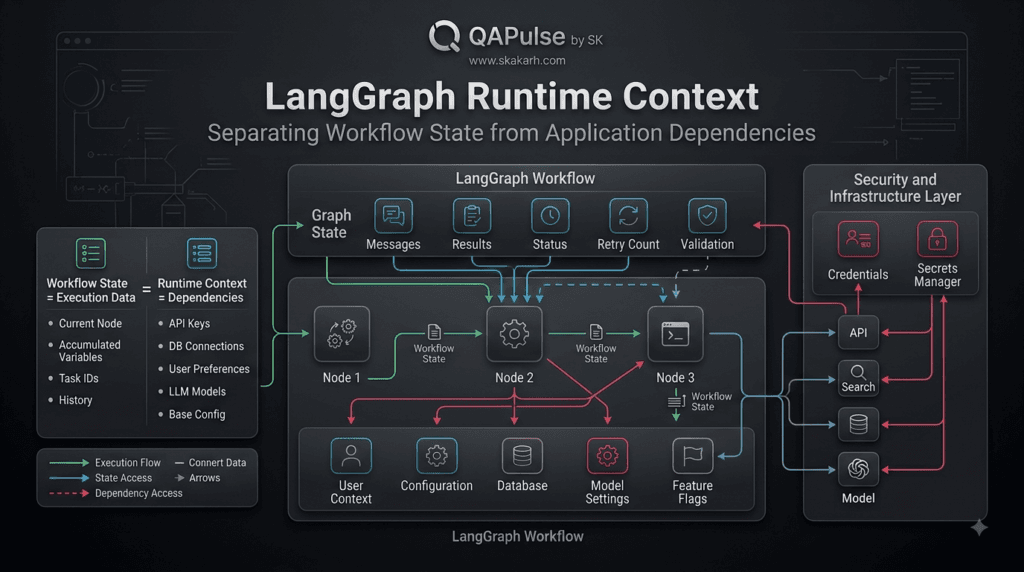
LangGraph Runtime Context provides a clean way to make application-level information available to workflow nodes without unnecessarily placing that information into the graph’s persistent state.
This distinction becomes increasingly important when building production AI applications.
Consider an AI workflow that needs information such as:
- The current user or tenant
- Application configuration
- Database connections
- Service clients
- Feature flags
- Authentication information
- Model configuration
- Environment-specific settings
Not all of this information represents the evolving state of the conversation or workflow.
For example, a user’s request might change during execution:
{
    "messages": [...],
    "task_status": "in_progress",
    "research_results": [...]
}
But an application service such as a database connection should not necessarily become part of that state.
A useful mental model is:
                 LangGraph Workflow
                        │
          ┌─────────────┴─────────────┐
          │                           │
          ▼                           ▼
     Graph State                 Runtime Context
          │                           │
          │                           ├── Configuration
          │                           ├── Services
          │                           ├── User Context
          │                           └── Dependencies
          │
          ├── Messages
          ├── Results
          ├── Status
          └── Workflow Data
The important idea is simple:
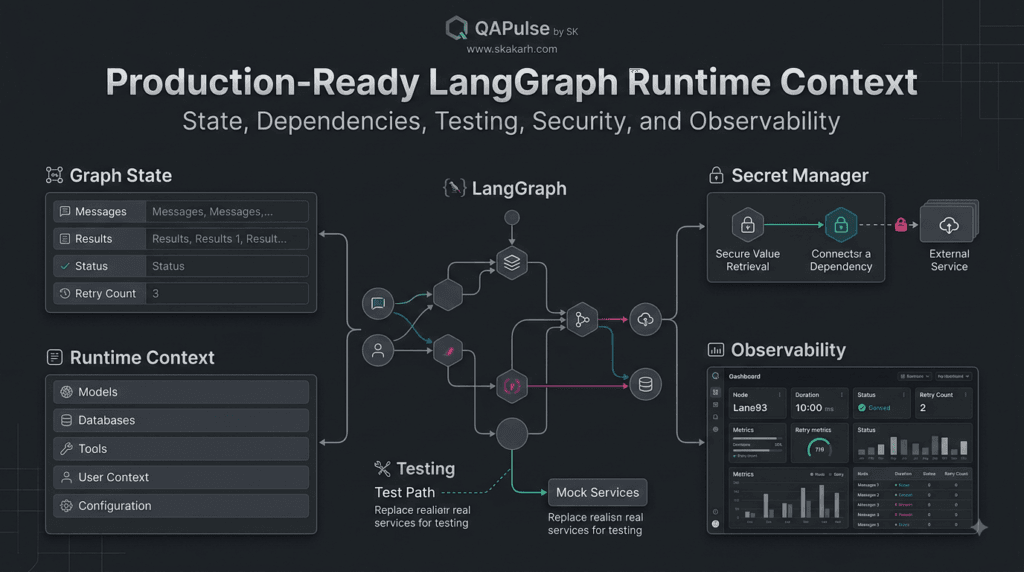
State represents information that changes as the workflow executes, while runtime context provides information the workflow needs to operate.
Why Runtime Context Matters
Without a clear separation between workflow state and application dependencies, developers can gradually create oversized state objects.
Imagine an application state containing:
{
    "messages": [...],
    "user_id": "...",
    "database": database_connection,
    "api_client": api_client,
    "model_config": {...},
    "feature_flags": {...},
    "research_results": [...],
    "retry_count": 2
}
This mixes several different categories of information.
Some values describe the workflow.
Others describe the environment in which the workflow is running.
That makes the architecture harder to reason about.
A cleaner design separates them:
Graph State
    │
    ├── Messages
    ├── Results
    ├── Status
    └── Retry Information

Runtime Context
    │
    ├── Database
    ├── Configuration
    ├── Services
    └── Application Dependencies
This separation becomes particularly valuable as applications move from demonstrations to production systems.
State vs Runtime Context
The easiest way to understand runtime context is to compare it with graph state.
| Concern | Graph State | Runtime Context |
|---|---|---|
| Changes during execution | Yes | Usually stable |
| Represents workflow progress | Yes | No |
| Contains generated results | Yes | No |
| Contains messages | Yes | No |
| Application configuration | Usually no | Yes |
| Service dependencies | Usually no | Yes |
| Database connection | No | Yes |
| Model configuration | Sometimes | Often |
| Workflow checkpointing | Relevant | Separate concern |
| Shared application dependencies | Not ideal | Appropriate |
The distinction is not merely about where variables are stored.
It is about what those variables mean.
If a value describes the workflow’s evolving execution, it generally belongs in state.
If a value provides the environment or dependencies required to execute that workflow, runtime context is often the better abstraction.
A Simple Runtime Context Example
A runtime context can define application dependencies explicitly.
For example:
from dataclasses import dataclass


@dataclass
class RuntimeContext:
    user_id: str
    environment: str
    model_name: str
The graph can then operate with that contextual information without treating it as conversational state.
This produces a cleaner architecture:
Application
    │
    ├── Runtime Context
    │      ├── user_id
    │      ├── environment
    │      └── model_name
    │
    └── Graph
           │
           ├── State
           ├── Nodes
           └── Edges
The graph remains responsible for workflow execution.
The runtime context describes the environment in which that execution occurs.
Strategy: Keep Workflow State Focused
A useful architectural rule is:
Do not put something into graph state merely because a node can access it.
Ask whether the information represents workflow progress.
For example:
class WorkflowState(TypedDict):
    request: str
    response: str
    status: str
This is workflow information.
Meanwhile:
@dataclass
class RuntimeContext:
    user_id: str
    environment: str
    service_url: str
contains contextual information required by the application.
This distinction prevents state from becoming an uncontrolled container for unrelated dependencies.
Interactive Exercise: Where Should This Data Go?
Consider these values:
User Question
Database Connection
Generated Answer
Retry Count
Model Name
Research Results
Feature Flag
Validation Result
Classify them.
A reasonable design would be:
Graph State
├── User Question
├── Generated Answer
├── Retry Count
├── Research Results
└── Validation Result

Runtime Context
├── Database Connection
├── Model Name
└── Feature Flag
The exercise reveals an important principle.
The question is not:
“Can the node access this value?”
The better question is:
“Is this value part of the workflow’s evolving state?”
That distinction leads to cleaner designs.
Designing Runtime Context for Real-World LangGraph Applications
LangGraph Runtime Context becomes especially useful when an AI workflow needs access to application dependencies without turning those dependencies into workflow state.
This is where architecture starts becoming important.
A small AI experiment may work perfectly with a few variables inside the graph. A production application, however, may need access to databases, external services, configuration, authentication information, model settings, feature flags, and other application-level resources.
Putting all of these values directly into state creates unnecessary coupling.
A better approach is to give the workflow a clearly defined runtime environment.
What Belongs in Runtime Context?
Think about an enterprise AI application that processes customer support requests.
The workflow might need:
from dataclasses import dataclass


@dataclass
class RuntimeContext:
    tenant_id: str
    environment: str
    model_name: str
    knowledge_base_url: str
These values help the workflow operate, but they do not represent the workflow’s conversational progress.
For example, tenant_id identifies the application context.
environment might indicate whether the application is running in development, staging, or production.
model_name determines which model configuration should be used.
knowledge_base_url identifies an external service.
None of these values represents the answer being generated or the current workflow step.
That makes them good candidates for runtime context.
Runtime Context and Dependency Injection
One useful way to think about runtime context is dependency injection for AI workflows.
Traditional applications often pass dependencies into functions instead of creating those dependencies inside every function.
The same architectural principle can be applied to graph-based AI applications.
Instead of a node creating its own database client:
def research_node(state):
    database = create_database_connection()

    # perform research
    ...
the dependency can be supplied by the surrounding application:
def research_node(state, runtime):
    database = runtime.context.database

    # perform research
    ...
This produces an important separation:
Application
     │
     ▼
Runtime Configuration
     │
     ├── Database
     ├── Services
     ├── Model Configuration
     └── Application Settings
              │
              ▼
        LangGraph Workflow
              │
        ┌─────┴─────┐
        ▼           ▼
      Node A      Node B
        │           │
        └─────┬─────┘
              ▼
          Final Result
The workflow does not need to construct every dependency itself.
It receives the environment it needs.
Why This Design Is Better
This separation provides several practical advantages.
Cleaner Nodes
Nodes can focus on their actual responsibility.
A research node should perform research rather than contain code responsible for constructing databases, reading environment variables, or configuring external services.
Easier Testing
Testing becomes simpler when dependencies can be replaced.
For example, a production database can be replaced with a lightweight test implementation.
@dataclass
class TestRuntimeContext:
    database: object
    model_name: str = "test-model"
The workflow can then be tested without connecting to production infrastructure.
Better Configuration Management
Different environments can provide different runtime configurations.
Development
    │
    ├── Local Database
    └── Development Model

Staging
    │
    ├── Staging Database
    └── Staging Model

Production
    │
    ├── Production Database
    └── Production Model
The graph logic does not necessarily need to change.
Only the runtime environment changes.
Understanding Context Through a Practical Example
Imagine a document-analysis workflow.
The workflow receives:
"Analyze this contract and identify potential risks."
The graph state might contain:
{
    "document": "...",
    "analysis": "...",
    "risk_findings": [],
    "status": "processing"
}
The runtime context could contain:
{
    "user_id": "...",
    "organization_id": "...",
    "model_name": "...",
    "document_service": "...",
    "environment": "production"
}
Notice the difference.
The state describes what the workflow is doing.
The runtime context describes the environment in which the workflow is operating.
That distinction is extremely useful when designing larger AI systems.
Comparison: State vs Context vs Configuration
These concepts can appear similar, but they solve different problems.
| Concept | Primary Purpose | Example |
|---|---|---|
| State | Track workflow execution | analysis, status |
| Runtime Context | Provide execution dependencies | database, user_id |
| Configuration | Define application behavior | model_name, limits |
| Persistence | Preserve information across execution | Checkpoints |
| Secrets | Protect sensitive credentials | API keys |
The categories can interact, but they should not automatically be merged.
For example, an API key should not casually become part of graph state simply because a node needs it.
Strategy: Separate Data by Responsibility
A useful design strategy is to ask five questions whenever you introduce a new value.
Question 1: Does this change during workflow execution?
If yes, it may belong in state.
Question 2: Does it describe workflow progress?
If yes, state is probably appropriate.
Question 3: Is it an external dependency?
If yes, runtime context may be more appropriate.
Question 4: Is it environment-specific configuration?
If yes, consider configuration or runtime context.
Question 5: Is it sensitive information?
If yes, treat it as a secret or protected dependency rather than ordinary workflow state.
This simple decision process prevents many architectural problems.
Interactive Challenge: Design the Context
Imagine you’re building a customer-support AI workflow.
The application requires:
Customer Message
Customer ID
Conversation History
Database Client
Model Name
Support Policy
Retry Count
Feature Flag
Generated Response
API Key
Try categorizing them before looking at the answer.
A sensible architecture might look like:
Graph State
├── Customer Message
├── Conversation History
├── Retry Count
└── Generated Response

Runtime Context
├── Customer ID
├── Database Client
├── Model Name
├── Support Policy
└── Feature Flag

Secret Management
└── API Key
The exact boundary can vary depending on the application, but the reasoning process is more important than memorizing a fixed classification.
A Production-Oriented Pattern
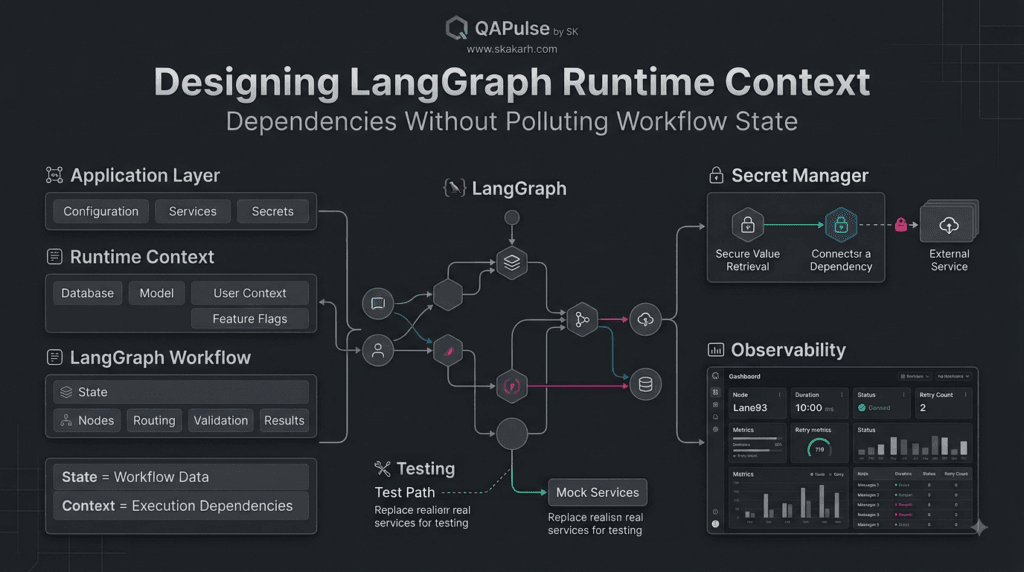
A useful architecture is to keep three layers distinct:
┌───────────────────────────────────────┐
│          Application Layer            │
│ Configuration • Secrets • Services    │
└───────────────────┬───────────────────┘
                    │
                    ▼
┌───────────────────────────────────────┐
│          Runtime Context              │
│ Dependencies • User Context • Config  │
└───────────────────┬───────────────────┘
                    │
                    ▼
┌───────────────────────────────────────┐
│          LangGraph Workflow           │
│                                       │
│   State → Nodes → Routing → State     │
└───────────────────────────────────────┘
This architecture keeps responsibilities understandable.
The application owns infrastructure.
Runtime context makes appropriate dependencies available.
The graph manages workflow execution.
Code Strategy: Keep Nodes Focused
A node should ideally contain workflow logic rather than infrastructure construction.
Instead of:
def analyze_node(state):
    client = create_client()
    config = load_configuration()
    database = connect_database()

    result = client.invoke(...)
    database.save(result)

    return {"analysis": result}
a cleaner design separates those concerns:
def analyze_node(state, runtime):
    client = runtime.context.model
    database = runtime.context.database

    result = client.invoke(state["document"])

    database.save(result)

    return {
        "analysis": result
    }
Now the node has a much clearer responsibility:
Take workflow information, use the supplied runtime dependencies, and produce the next state update.
That makes the workflow easier to test, reason about, and maintain.
When Runtime Context Should Not Be Used
Runtime context should not become another dumping ground.
If information genuinely represents workflow execution, putting it into runtime context simply to avoid state management creates a different problem.
For example:
{
    "current_step": "validation",
    "retry_count": 2,
    "validation_result": "failed"
}
These values describe execution.
They should generally remain part of the workflow state.
The goal is not to minimize state at all costs.
The goal is to give every piece of information the correct architectural home.
Making LangGraph Runtime Context Work Across Tools and Services
LangGraph Runtime Context becomes particularly valuable when a workflow interacts with external tools, databases, APIs, model providers, and organization-specific services.
A production AI application rarely operates in isolation.
A typical workflow might need to:
User Request
     │
     ▼
LangGraph Workflow
     │
     ├── LLM
     ├── Database
     ├── Search Service
     ├── Internal API
     ├── File Storage
     └── Monitoring Service
The challenge is deciding how these dependencies should reach the nodes that need them.
A good architecture avoids making every node responsible for discovering, constructing, or configuring its own dependencies.
Instead, runtime context can provide a controlled execution environment.
Passing Application Dependencies to Nodes
Suppose an AI research workflow needs access to a search service.
A simplistic implementation might create the service inside the node:
def research_node(state):
    search_client = SearchClient()
    results = search_client.search(state["query"])

    return {
        "research_results": results
    }
Although this may work, it creates unnecessary coupling.
The node now knows how to construct the service.
A cleaner design supplies the dependency through the runtime environment:
def research_node(state, runtime):
    search_client = runtime.context.search_client

    results = search_client.search(state["query"])

    return {
        "research_results": results
    }
The node focuses on its actual responsibility:
Take the current workflow information, perform research, and return a state update.
The application is responsible for providing the service.
Understanding Dependency Boundaries
This creates a useful architectural boundary:
Application
     │
     │ provides
     ▼
Runtime Context
     │
     ├── Search Client
     ├── Database
     ├── Model
     └── Configuration
     │
     ▼
LangGraph Nodes
     │
     ├── Research
     ├── Analysis
     ├── Validation
     └── Response
The graph should not need to understand how every external dependency is created.
That responsibility belongs outside the workflow logic.
This is particularly useful when the same workflow needs to run in multiple environments.
Development and Production Environments
Imagine an application that uses one database during development and another in production.
The workflow itself does not necessarily need separate implementations.
Instead:
Development
     │
     └── Runtime Context
            ├── Local Database
            └── Development Model

Production
     │
     └── Runtime Context
            ├── Production Database
            └── Production Model
The graph can remain largely unchanged.
This is one of the strongest architectural benefits of separating workflow logic from its runtime environment.
Code Example: Environment-Specific Dependencies
A simplified application might define:
from dataclasses import dataclass


@dataclass
class RuntimeContext:
    environment: str
    model: object
    database: object
The node can then use the supplied dependencies:
def answer_node(state, runtime):
    model = runtime.context.model

    response = model.invoke(
        state["messages"]
    )

    return {
        "response": response
    }
The workflow doesn’t need to contain environment-selection logic such as:
if environment == "production":
    ...
elif environment == "development":
    ...
That decision can happen when the application constructs the runtime environment.
Runtime Context and Tool Calling
Tools are another important use case.
Consider an agent that can:
- Search a knowledge base
- Query a database
- Retrieve customer information
- Call an internal API
- Generate a report
Instead of embedding service initialization into each tool or node, dependencies can be supplied through the runtime environment.
Conceptually:
                    Runtime Context
                           │
          ┌────────────────┼────────────────┐
          ▼                ▼                ▼
     Search Client     Database Client    API Client
          │                │                │
          └────────────────┼────────────────┘
                           ▼
                     Agent Workflow
                           │
                    Tool Selection
                           │
          ┌────────────────┼────────────────┐
          ▼                ▼                ▼
       Search           Database          API
This makes the dependency structure easier to understand.
Comparison: Embedded Dependencies vs Runtime Context
| Approach | Embedded in Node | Runtime Context |
|---|---|---|
| Dependency creation | Node | Application |
| Configuration | Often mixed into logic | Centrally supplied |
| Testing | More difficult | Easier |
| Environment switching | More code changes | Runtime configuration |
| Reusability | Lower | Higher |
| Separation of concerns | Weak | Strong |
| Production maintenance | More complex | Cleaner |
The difference becomes significant as the number of nodes and services increases.
A workflow with three nodes may tolerate tightly coupled dependencies.
A workflow with dozens of nodes and multiple external services will benefit considerably from explicit dependency boundaries.
Strategy: Treat Context as an Execution Contract
A useful strategy is to define runtime context deliberately instead of adding fields whenever a new requirement appears.
For example:
@dataclass
class RuntimeContext:
    user_id: str
    tenant_id: str
    model: object
    search_client: object
    database: object
This creates a visible contract.
A developer looking at the context definition can immediately understand what the workflow may depend on.
That is much easier to maintain than discovering dependencies scattered throughout individual nodes.
Avoid Creating a Giant Context Object
There is an important warning here.
Runtime context should not become another giant container.
This is not ideal:
@dataclass
class RuntimeContext:
    user_id: str
    database: object
    model: object
    search: object
    email: object
    payment: object
    analytics: object
    storage: object
    feature_flags: dict
    configuration: dict
    random_helper: object
    miscellaneous_service: object
Just because something can be placed into context does not mean it should be.
A better approach is to ask:
Does this workflow actually need this dependency?
If not, don’t provide it.
Minimal context improves clarity and reduces accidental coupling.
Interactive Exercise: Find the Unnecessary Dependency
Consider this context:
@dataclass
class RuntimeContext:
    user_id: str
    model: object
    database: object
    search_client: object
    email_client: object
    analytics_client: object
Now imagine the workflow only:
- Receives a question
- Searches documentation
- Generates an answer
- Validates the answer
Which dependencies are actually necessary?
A reasonable answer would be:
Required
├── user_id
├── model
└── search_client

Potentially Required
└── database

Not Required
├── email_client
└── analytics_client
The exact answer depends on implementation details, but the exercise demonstrates an important production principle:
Context should reflect actual workflow requirements, not every service available in the application.
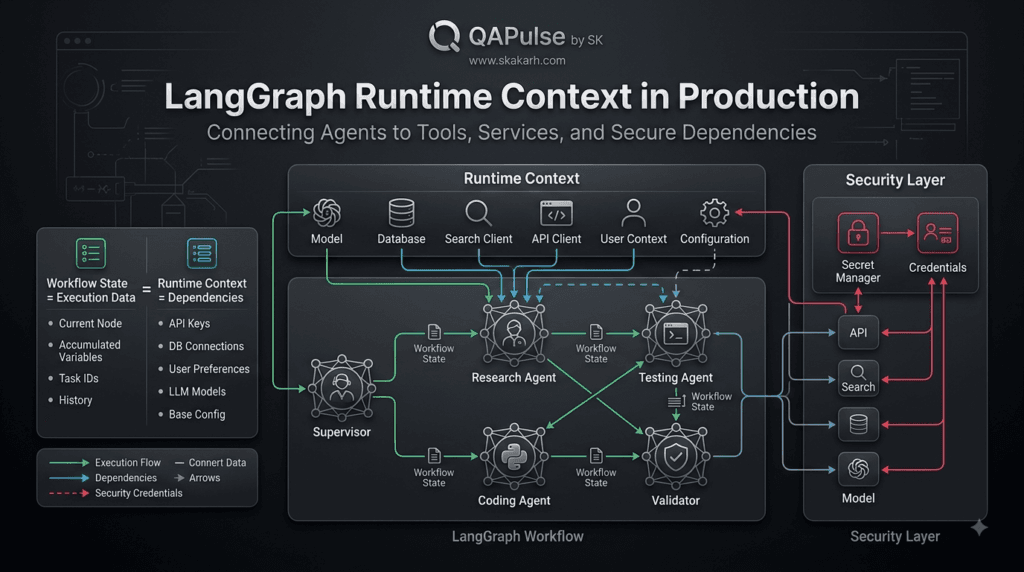
Runtime Context in Multi-Agent Systems
The same principle becomes even more useful in multi-agent workflows.
Imagine:
                  Supervisor
                      │
          ┌───────────┼───────────┐
          ▼           ▼           ▼
       Research     Coding      Testing
        Agent       Agent        Agent
All three agents may share certain application dependencies.
For example:
Runtime Context
│
├── Model Configuration
├── User Context
├── Search Service
├── Database
└── Application Settings
The agents can use the dependencies relevant to their responsibilities without placing those services into graph state.
Meanwhile, shared workflow state can contain:
{
    "request": "...",
    "research": "...",
    "code": "...",
    "test_results": "...",
    "status": "..."
}
This produces a clean separation between:
What the agents have produced
and
What the application provides to the agents.
Strategy: Design for Testability
Runtime context can also make testing more practical.
Suppose a production workflow uses a real search service.
Testing every execution against the live service may be slow, expensive, or unpredictable.
A test environment can provide a substitute:
@dataclass
class TestRuntimeContext:
    model: object
    search_client: object
The fake search client might return deterministic results:
class FakeSearchClient:

    def search(self, query):
        return [
            "Test document one",
            "Test document two"
        ]
The node can then be tested against predictable input.
This leads to a broader engineering principle:
AI workflow logic should be testable independently from production infrastructure whenever practical.
Runtime Context and Security
Security deserves special attention.
Runtime context can provide access to sensitive services, but developers should avoid treating it as a convenient place to expose secrets indiscriminately.
For example, an API credential should normally be managed through an appropriate secret-management mechanism rather than being copied into graph state.
A safer conceptual structure is:
Secret Manager
      │
      ▼
Application
      │
      ▼
Runtime Dependency
      │
      ▼
LangGraph Node
The node receives what it needs to perform its task without unnecessarily exposing secret material throughout workflow state.
This reduces the risk of sensitive information appearing in logs, checkpoints, debugging output, or persisted workflow data.
Comparison: Passing Credentials Through State vs Controlled Dependencies
| Design | Workflow State | Controlled Runtime Dependency |
|---|---|---|
| Secret exposure | Higher risk | Lower |
| Persistence concerns | Higher | Lower |
| Logging concerns | Higher | Lower |
| Separation of concerns | Weak | Strong |
| Security review | Harder | Easier |
The exact implementation depends on the infrastructure and security model, but the architectural principle is broadly useful:
Do not make sensitive infrastructure data part of workflow state unless there is a clear reason to do so.
A Practical Design Checklist
Before adding a dependency to runtime context, ask:
Does a node need it?
        │
        ├── No → Don't provide it
        │
        └── Yes
             │
             ▼
Is it workflow data?
             │
        ┌────┴────┐
        ▼         ▼
       Yes        No
        │          │
        ▼          ▼
   Graph State   Runtime Context
Then ask one more question:
Does the dependency contain sensitive information?
If yes, consider whether it should instead be accessed through a dedicated secret or credential-management mechanism.
Building a Production-Ready Runtime Context Strategy
LangGraph Runtime Context provides an important architectural boundary for AI applications that need to combine workflow execution with application-level dependencies.
The real value is not simply being able to pass additional information into a node.
The bigger advantage is being able to answer a fundamental architectural question:
What belongs to the workflow, and what belongs to the environment running the workflow?
Once that boundary is clear, larger AI applications become easier to design, test, secure, and maintain.
Understanding the Complete Architecture
A production-oriented workflow can be viewed as several cooperating layers:
┌─────────────────────────────────────────────┐
│              Application Layer              │
│                                             │
│ Configuration • Secrets • Infrastructure    │
└──────────────────────┬──────────────────────┘
                       │
                       ▼
┌─────────────────────────────────────────────┐
│              Runtime Context                │
│                                             │
│ User • Tenant • Model • Services • Tools    │
└──────────────────────┬──────────────────────┘
                       │
                       ▼
┌─────────────────────────────────────────────┐
│             LangGraph Workflow              │
│                                             │
│ State → Nodes → Routing → Validation        │
│           ↓                    │             │
│        Tools ← Runtime Context │             │
└──────────────────────┬─────────┘             │
                       ▼                       │
                 Final Result                 │
└─────────────────────────────────────────────┘
Each layer has a different responsibility.
The application layer manages infrastructure and configuration.
The runtime context provides the dependencies required during execution.
The graph manages workflow state and execution logic.
This separation creates a much cleaner mental model than placing everything inside one state object.
A Practical State and Context Design
Consider an AI customer-support workflow.
The workflow needs to process a customer question, retrieve relevant information, generate a response, validate it, and potentially retry if validation fails.
A state definition might look like:
from typing import TypedDict


class SupportState(TypedDict):
    question: str
    documents: list[str]
    response: str
    validation_result: str
    retry_count: int
The state describes information produced or modified during workflow execution.
The runtime context can describe the environment:
from dataclasses import dataclass


@dataclass
class RuntimeContext:
    user_id: str
    tenant_id: str
    model: object
    search_client: object
    policy_service: object
Now the architecture has a clear separation.
SupportState
    │
    ├── question
    ├── documents
    ├── response
    ├── validation_result
    └── retry_count

RuntimeContext
    │
    ├── user_id
    ├── tenant_id
    ├── model
    ├── search_client
    └── policy_service
The workflow state changes.
The runtime environment supplies capabilities.
Strategy: Design the State Contract First
One of the strongest strategies for building reliable AI workflows is to define the state contract before writing large amounts of node logic.
Start with the question:
What information must survive from one workflow step to another?
Those values are candidates for graph state.
For example:
class ResearchState(TypedDict):
    query: str
    search_results: list[str]
    summary: str
    confidence: float
    status: str
Then ask:
What services are required to execute those steps?
Those services can be considered for runtime context:
@dataclass
class RuntimeContext:
    search_client: object
    model: object
    database: object
This simple design exercise prevents the state schema from becoming a collection of unrelated dependencies.
Strategy: Keep Nodes Responsibility-Driven
A node should ideally have a clear purpose.
For example:
def research_node(state, runtime):
    results = runtime.context.search_client.search(
        state["query"]
    )

    return {
        "search_results": results,
        "status": "research_complete"
    }
The node does not need to know:
- How the search client was created
- Where its credentials came from
- Which environment is running the application
- How the service was configured
Those concerns belong outside the workflow logic.
This produces smaller and more understandable nodes.
Comparison: Tightly Coupled vs Context-Aware Architecture
| Area | Tightly Coupled Workflow | Context-Aware Workflow |
|---|---|---|
| Service creation | Inside nodes | Outside nodes |
| Configuration | Mixed with logic | Supplied separately |
| Testing | More infrastructure required | Dependencies can be replaced |
| Environment changes | More code changes | Runtime configuration |
| Node responsibility | Broad | Focused |
| Security boundaries | Less obvious | More explicit |
| Maintainability | Decreases as system grows | Easier to maintain |
For a tiny prototype, the first approach may appear convenient.
For a production application containing many nodes and services, the second approach is considerably easier to manage.
Interactive Architecture Challenge
Imagine you’re building an AI code-review workflow.
It needs:
Pull Request
Repository Files
Code Analysis
Review Comments
Retry Count
Model
Repository Client
Security Scanner
Git Credentials
Organization Policy
Before looking at the suggested design, decide where each item belongs.
A reasonable architecture is:
Graph State
├── Pull Request
├── Repository Files
├── Code Analysis
├── Review Comments
└── Retry Count

Runtime Context
├── Model
├── Repository Client
├── Security Scanner
└── Organization Policy

Secret Management
└── Git Credentials
The interesting part is that Organization Policy could potentially be represented differently depending on the application.
If the policy is immutable configuration supplied to every execution, runtime context may make sense.
If the workflow dynamically retrieves and modifies policy information during execution, parts of that information may belong in state.
Architecture decisions should follow the behavior of the data rather than a rigid checklist.
Strategy: Think About Lifetime
One of the most useful ways to classify information is by asking how long it needs to exist.
Consider:
Request Lifetime
      │
      ▼
Workflow State
      │
      ├── User Question
      ├── Intermediate Results
      └── Validation Results

Execution Environment
      │
      ▼
Runtime Context
      │
      ├── Services
      ├── Configuration
      └── Dependencies

Application Lifetime
      │
      ▼
Infrastructure
      │
      ├── Secret Manager
      ├── Databases
      └── Service Platforms
This lifetime-based thinking is often more useful than memorizing definitions.
If data represents an evolving execution, state is a natural candidate.
If something provides capabilities to that execution, runtime context is often appropriate.
If something manages infrastructure or secrets, it should remain at the application or infrastructure layer.
Runtime Context and Reusable Workflows
A well-designed workflow can become easier to reuse when dependencies are supplied externally.
Imagine the same document-analysis workflow being used by:
Internal Application
       │
       ▼
Document Workflow
       ▲
       │
External Platform
       │
       ▼
Document Workflow
The workflow logic can remain consistent while each application supplies different runtime dependencies.
For example:
production_context = RuntimeContext(
    user_id="user-123",
    tenant_id="company-a",
    model=production_model,
    search_client=production_search,
    policy_service=production_policy
)
A test environment can provide substitutes:
test_context = RuntimeContext(
    user_id="test-user",
    tenant_id="test-tenant",
    model=fake_model,
    search_client=fake_search,
    policy_service=fake_policy
)
The same workflow logic can then be exercised in different environments.
That is a powerful engineering property.
Testing Strategy
AI systems are difficult to test when workflow logic and infrastructure are tightly coupled.
Runtime context can help create cleaner test boundaries.
A node can receive predictable dependencies:
class FakeModel:

    def invoke(self, messages):
        return "Test response"
And a deterministic search service:
class FakeSearch:

    def search(self, query):
        return [
            "Document A",
            "Document B"
        ]
The workflow can then be tested without relying on unpredictable external services for every test.
A broader testing strategy can cover:
Node Tests
    ↓
Routing Tests
    ↓
State Tests
    ↓
Integration Tests
    ↓
End-to-End Workflow Tests
Runtime context makes it easier to control dependencies at each level.
Security Strategy
Runtime context also needs careful security boundaries.
A common mistake is assuming that because a dependency is available at runtime, it is safe to place its sensitive data into graph state.
Avoid patterns such as:
state["api_key"] = secret_key
when the key only exists to allow a service call.
Instead, the application can retrieve the credential through appropriate secret management and construct the required service.
Conceptually:
Secret Manager
      │
      ▼
Service Client
      │
      ▼
Runtime Context
      │
      ▼
LangGraph Node
The workflow receives the capability it needs without unnecessarily carrying raw credentials through workflow state.
This distinction becomes increasingly important when workflows use persistence, checkpointing, tracing, or debugging systems.
Observability Strategy
Production AI workflows need visibility into execution.
A useful observability model records workflow information such as:
Workflow ID
Node
Execution Time
Status
Retry Count
Validation Result
Error Category
But sensitive runtime dependencies should not automatically be serialized into logs or traces.
This gives another reason to maintain a clean separation between workflow state and runtime dependencies.
The state can provide useful execution information while runtime dependencies remain controlled by the application environment.
A Useful Design Rule
When designing a workflow, use this simple rule:
State tells the workflow what has happened. Runtime context gives the workflow what it needs to operate.
For example:
"What happened?"
        │
        ▼
Graph State

"What do I need to execute?"
        │
        ▼
Runtime Context
That single distinction can eliminate a surprising amount of architectural confusion.
Featured Snippet
What Is LangGraph Runtime Context?
LangGraph Runtime Context is an execution-time mechanism for providing application dependencies, configuration, user information, and services to graph nodes without unnecessarily placing those dependencies into workflow state. It helps separate changing workflow data from the environment required to execute the workflow.
AI Overview Answer
LangGraph Runtime Context helps developers separate workflow state from execution dependencies. State can track messages, results, status, and workflow progress, while runtime context can provide models, databases, tools, configuration, and other application services. This separation improves maintainability, testing, security, and scalability when building production AI workflows.
People Asked Questions
What is LangGraph Runtime Context?
LangGraph Runtime Context provides execution-time information and dependencies to graph nodes without requiring those dependencies to become part of the workflow’s persistent state.
What is the difference between LangGraph state and runtime context?
State represents information that changes as the workflow executes, such as messages, results, status, and retry counts. Runtime context provides dependencies and environmental information needed to execute the workflow.
Why use runtime context in LangGraph?
It helps separate workflow logic from infrastructure dependencies, making applications easier to test, maintain, configure, and deploy across different environments.
Can runtime context contain database clients?
Yes. A database client can be provided as an execution dependency when nodes need database access. Keeping the client outside ordinary workflow state can create a cleaner architectural boundary.
Can LangGraph runtime context improve testing?
Yes. Applications can provide mock or fake dependencies during testing, allowing nodes and workflows to be tested without relying on production services.
Should API keys be stored in runtime context?
Sensitive credentials should be managed through appropriate secret-management mechanisms. Applications should avoid placing raw credentials into workflow state where they could unnecessarily appear in checkpoints, logs, or traces.
Can runtime context be used with LangGraph tools?
Yes. Runtime dependencies can support tools and services used by workflow nodes and agents, allowing infrastructure concerns to remain separate from workflow state.
Is runtime context useful for multi-agent systems?
Yes. Multiple agents can use shared application dependencies while maintaining workflow-specific information in graph state. This can make larger agent architectures easier to organize.
Does runtime context replace LangGraph state?
No. They solve different problems. State tracks workflow execution, while runtime context provides information and dependencies required during execution.
How should runtime context be designed?
Keep it minimal and intentional. Include only the dependencies and contextual information the workflow actually needs, while keeping workflow results and execution progress in graph state.
Internal Links:
- Learn MCP – Zero to Hero
- Learn AI Agents for QA – Zero to Hero
- Playwright Automation – Zero to Hero
- TencentDB Agent Memory: Complete Zero to Hero
- LangGraph: Complete Zero to Hero
- Learn Python – Zero to Hero
- OpenAI Codex: Complete Zero to Hero
- Cursor AI: Complete Zero to Hero
- Claude Code Tutorial: Complete Zero to Hero
- AutoGen: Complete Zero to Hero Guide
- Free QA Resources Built From Real Experience
- QA Glossary: Test Automation Terms Every Engineer Should Know
External Resources:
- LangGraph Official Documentation
- LangChain Documentation
- Python Official Documentation
- OpenAI Platform Documentation
- Anthropic Documentation
- Google AI Documentation
- LangGraph GitHub Repository
Conclusion
A strong LangGraph Runtime Context design is ultimately about architectural discipline.
The goal is not to move every dependency into context or remove everything from graph state.
The goal is to give each piece of information the right responsibility.
Workflow state should describe execution.
Runtime context should provide the environment and capabilities required for execution.
Application infrastructure should manage services and configuration.
Secret management should protect sensitive credentials.
When these boundaries remain clear, AI workflows become easier to understand, test, reuse, secure, and operate in production.
The result is an architecture where the graph focuses on orchestration and workflow behavior, while the surrounding application controls the environment in which that workflow executes.
Final Key Takeaways
- LangGraph Runtime Context separates application dependencies from evolving workflow state.
- Graph state should primarily contain information that represents workflow execution and intermediate results.
- Runtime context can provide models, databases, tools, services, user context, and configuration.
- Nodes become cleaner when they consume dependencies instead of constructing infrastructure themselves.
- Runtime context can improve testability by allowing production services to be replaced with controlled test implementations.
- Sensitive credentials should be handled through appropriate secret-management mechanisms rather than casually placed into graph state.
- A minimal runtime context is better than creating a giant dependency container.
- State, runtime context, application configuration, persistence, and secrets should be treated as different architectural concerns.
- A useful rule is: state tells the workflow what has happened; context gives it what it needs to operate.
- Clear boundaries between state and runtime dependencies make complex AI applications easier to maintain and scale.
Continue Learning
Explore more expert articles on n8n, Autogen, Postman AI, LangChain, CrewAI, MCP Servers, AI Agents, LlamaIndex, Docker, FastAPI, Playwright, Cypress, Test Automation, DevOps, and Software Engineering at www.skakarh.com.
QAPulse by SK delivers expert release analysis, AI engineering insights, enterprise automation strategies, migration guidance, DevOps best practices, and practical testing knowledge to help software professionals build scalable, intelligent, and production-ready software systems.


