QA
QA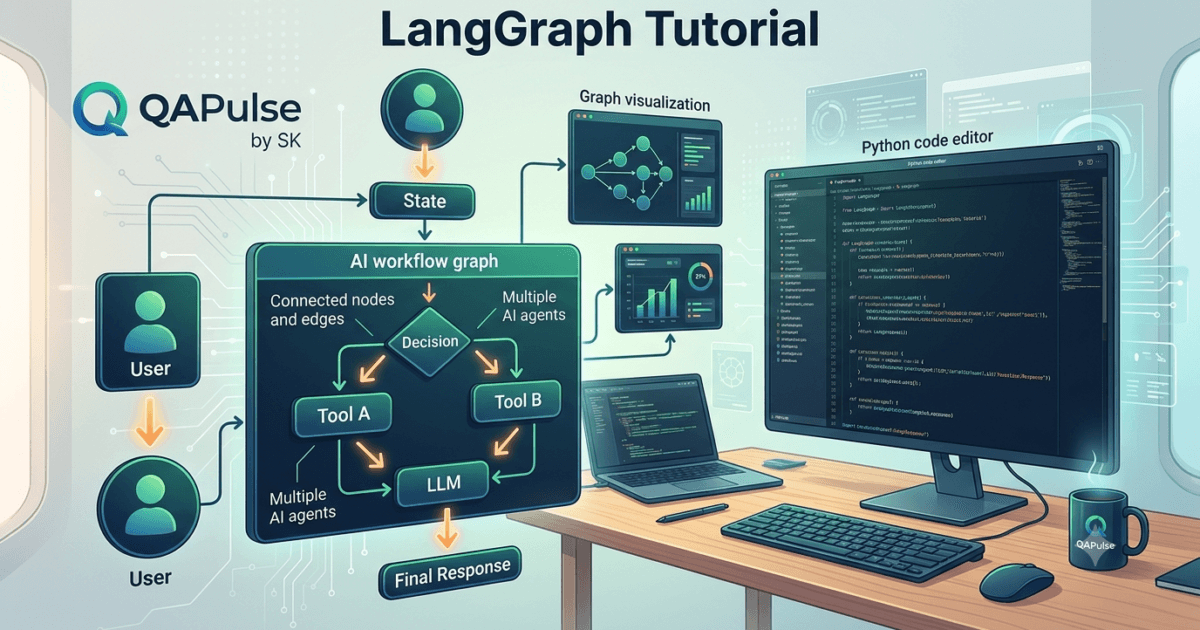
What is LangGraph?
As Large Language Models (LLMs) become increasingly capable, developers are moving beyond simple prompt-response applications toward intelligent AI agents that can reason, plan, remember previous interactions, use external tools, and make decisions over multiple steps. Traditional frameworks work well for linear workflows, but they often struggle when applications require branching logic, loops, retries, or long-running conversations.
LangGraph was created to solve this challenge.
LangGraph is an open-source framework for building stateful, multi-step AI agent workflows using a graph-based architecture. Instead of executing tasks sequentially, LangGraph allows developers to define nodes, edges, conditional paths, loops, and shared state, enabling AI applications to behave more like autonomous software systems.
Rather than viewing an AI application as a simple pipeline, LangGraph models it as a graph where each node performs a specific task and edges determine how execution flows between those tasks.
This approach makes LangGraph particularly suitable for building production-grade AI agents.
Why LangGraph Was Created
Many AI applications begin as straightforward pipelines.
For example:
User Prompt

↓

LLM

↓

Response
This workflow works well for simple chatbots but becomes limiting when applications need to:
- Remember previous actions
- Call multiple tools
- Retry failed operations
- Make decisions
- Collaborate between multiple AI agents
- Pause and resume execution
- Handle human approval steps
Traditional chains become increasingly difficult to manage as complexity grows.
LangGraph addresses these limitations by introducing graph-based orchestration.
The Evolution of AI Workflows
Modern AI development has evolved through several stages.
Single Prompt

↓

Prompt Chains

↓

Tool Calling

↓

RAG Applications

↓

AI Agents

↓

Multi-Agent Systems

↓

Graph-Based AI Workflows (LangGraph)
Each stage introduces greater flexibility, but also greater complexity.
LangGraph provides a structured way to manage that complexity.
What Does “Graph-Based” Mean?
A graph consists of two primary components:
Nodes
Nodes represent individual operations.
Examples include:
- Calling an LLM
- Searching a vector database
- Querying an API
- Running Python code
- Validating responses
- Executing custom business logic
Each node performs one well-defined responsibility.
Edges
Edges connect nodes together.
They determine:
- Execution order
- Conditional branching
- Looping
- Retry paths
- Parallel execution
Together, nodes and edges define the application’s behavior.
Understanding State
One of the defining features of LangGraph is shared state.
Instead of passing information manually between every function, LangGraph maintains a central state object that all nodes can read from and update.
The state may contain:
- User messages
- Conversation history
- Retrieved documents
- Tool outputs
- API responses
- Intermediate reasoning
- Variables
- Decision flags
Every node receives the current state, performs its task, and returns an updated version.
This makes complex workflows significantly easier to design.
How LangGraph Executes Workflows
A simplified execution flow looks like this.
User Request

↓

Input State

↓

Node A

↓

Node B

↓

Decision

↙          ↘

Node C    Node D

↘          ↙

Final Response
Instead of following a single straight line, execution can change dynamically depending on the current state.
Core Features of LangGraph
LangGraph introduces several capabilities designed for production AI systems.
Stateful Execution
Applications maintain context across multiple execution steps rather than treating each prompt independently.
Conditional Routing
Execution paths can change according to runtime decisions.
Loop Support
Nodes can repeat until a condition is satisfied.
Multi-Agent Coordination
Multiple specialized AI agents can collaborate within the same workflow.
Tool Integration
Nodes can invoke:
- APIs
- Databases
- Search engines
- Python functions
- External services
- MCP servers
- Vector databases
Human-in-the-Loop
Developers can pause execution for human review before continuing the workflow.
Where LangGraph Is Used
LangGraph is suitable for a wide variety of AI applications.
Examples include:
- AI coding assistants
- Customer support agents
- Enterprise chatbots
- Research assistants
- Document analysis systems
- RAG applications
- Workflow automation
- Financial assistants
- Healthcare support systems
- Test automation agents
Its flexible architecture makes it appropriate for both experimental prototypes and enterprise production systems.
Benefits of LangGraph
Organizations choose LangGraph because it provides:
- Better workflow organization
- Scalable AI architectures
- Clear execution paths
- Easier debugging
- Stateful memory
- Flexible branching logic
- Production-ready orchestration
- Support for long-running tasks
- Improved maintainability
- Better integration with modern AI ecosystems
These advantages become increasingly important as AI applications grow beyond simple chat interfaces.
LangGraph vs Traditional AI Chains
| Traditional Chains | LangGraph |
|---|---|
| Linear execution | Graph-based execution |
| Limited branching | Dynamic routing |
| Minimal state management | Shared state across workflow |
| Difficult loop handling | Native loop support |
| Simple automation | Complex agent orchestration |
| Best for straightforward tasks | Best for intelligent multi-step workflows |
The graph model provides significantly greater flexibility for applications that require reasoning, planning, and adaptive execution.
Who Should Learn LangGraph?
LangGraph is valuable for professionals working with modern AI systems, including:
- AI Engineers
- Machine Learning Engineers
- Python Developers
- Backend Developers
- Full-Stack Developers
- QA Automation Engineers
- SDETs
- DevOps Engineers
- Software Architects
- Technical Leads
As AI agents become a standard component of software engineering, understanding graph-based orchestration is becoming an increasingly valuable skill.
Real-World Importance
Modern AI systems rarely operate as isolated prompt-response applications. They retrieve information, interact with external services, coordinate multiple tools, maintain long-term context, and make decisions throughout complex workflows. LangGraph provides the architecture required to manage these behaviors in a structured and maintainable way.
By introducing stateful execution, graph-based routing, conditional logic, and multi-agent orchestration, LangGraph enables developers to build intelligent AI applications that are scalable, reliable, and suitable for real-world production environments.
LangGraph: Installing, Configuring, and Building Your First Graph Application
Installing LangGraph
After understanding the concepts behind LangGraph, the next step is setting up a development environment. LangGraph is a Python framework that integrates closely with the LangChain ecosystem, making Python the recommended language for getting started.
Before installing LangGraph, ensure your system has:
- Python 3.10 or later
- pip package manager
- Virtual environment support
- A code editor such as VS Code or Cursor
- Git (recommended)
- An API key for your preferred Large Language Model provider (OpenAI, Anthropic, Google Gemini, etc.)
Using a virtual environment is considered a best practice because it isolates project dependencies.
Creating a Project
Create a new project directory.
mkdir langgraph-demo
cd langgraph-demo
Create a virtual environment.
python -m venv .venv
Activate the environment.
Windows
.venv\Scripts\activate
macOS/Linux
source .venv/bin/activate
Once activated, all packages will be installed inside the project environment.
Installing LangGraph
Install LangGraph using pip.
pip install langgraph
In most projects, developers also install LangChain and other supporting packages.
Example:
pip install langgraph langchain langchain-core
If you are using OpenAI models:
pip install langchain-openai
If using Anthropic:
pip install langchain-anthropic
If using Google Gemini:
pip install langchain-google-genai
Install only the integrations required by your project.
Verifying the Installation
Verify that LangGraph has been installed successfully.
pip show langgraph
You should see information such as:
- Package name
- Installed version
- Installation path
- Dependencies
This confirms that the framework is available in the active virtual environment.
Project Structure
A simple LangGraph project may look like this.
langgraph-demo/

│── app.py
│── graph.py
│── state.py
│── nodes.py
│── requirements.txt
│── .env
│── README.md
│── .gitignore
As applications grow, developers often organize projects into additional folders for tools, prompts, utilities, APIs, and tests.
Understanding the Core Components
Before writing any code, it is important to understand the main building blocks used in LangGraph applications.
State
State is the shared data passed throughout the workflow.
It may contain:
- User input
- Messages
- Variables
- Tool outputs
- Retrieved documents
- Intermediate results
Every node reads from and updates this shared state.
Nodes
Nodes perform work.
Examples include:
- Calling an LLM
- Running Python functions
- Querying APIs
- Searching databases
- Processing documents
- Validating responses
Each node should have a single responsibility.
Edges
Edges determine how execution moves between nodes.
They may represent:
- Sequential execution
- Conditional routing
- Loops
- Parallel branches
- Exit conditions
Together, nodes and edges define the complete workflow.
Creating a Simple State
One common approach is defining a typed state.
Example:
from typing import TypedDict

class GraphState(TypedDict):
    message: str
This state will be shared throughout the workflow.
As applications become larger, the state typically includes many additional fields.
Creating Your First Node
A node is simply a Python function that accepts the current state and returns an updated state.
Example:
def greet(state):
    return {
        "message": f"Hello, {state['message']}!"
    }
Although this example is simple, production nodes often perform complex operations such as calling LLMs, retrieving documents, or executing business logic.
Building the Graph
A graph is constructed by connecting nodes.
Conceptually, the workflow looks like this.
Start

↓

Greeting Node

↓

End
Even this simple example demonstrates the graph-based execution model that distinguishes LangGraph from traditional linear pipelines.
Running the Workflow
When execution begins, LangGraph:
- Receives the initial state.
- Executes the first node.
- Updates the shared state.
- Moves to the next connected node.
- Continues until the workflow reaches its end.
Every node contributes to the final output by modifying the shared state.
Managing Configuration
Most AI applications require configuration values.
Typical configuration includes:
- API keys
- Model names
- Temperature settings
- Database URLs
- Vector database configuration
- Logging options
These values are commonly stored in environment variables rather than hardcoded into source code.
Example .env:
OPENAI_API_KEY=your_key_here
MODEL=gpt-5
Keeping sensitive information outside the codebase improves security and simplifies deployment.
Development Workflow
A typical LangGraph development process follows this sequence.
Create Project

↓

Install Dependencies

↓

Configure Environment

↓

Define State

↓

Create Nodes

↓

Connect Graph

↓

Run Workflow

↓

Debug

↓

Deploy
Following a structured workflow helps developers build scalable graph applications while keeping projects organized.
Common Setup Mistakes
Developers who are new to LangGraph often encounter a few avoidable issues.
Installing Packages Outside the Virtual Environment
Always activate the virtual environment before installing dependencies.
Mixing Package Versions
Ensure that LangGraph and related LangChain packages are compatible with one another.
Hardcoding Secrets
Never place API keys directly inside source code.
Use environment variables instead.
Creating Large Nodes
Each node should perform one specific task.
Breaking complex logic into smaller nodes makes workflows easier to understand and maintain.
Best Practices for Project Setup
When starting a new LangGraph project:
- Use virtual environments.
- Organize files logically.
- Keep nodes focused on one responsibility.
- Define state carefully.
- Store secrets securely.
- Use version control from the beginning.
- Document workflow architecture.
- Test nodes individually before combining them into larger graphs.
A well-structured project makes it significantly easier to expand workflows as AI applications become more sophisticated.
LangGraph: Nodes, Edges, State Management, and Building Intelligent AI Workflows
Understanding the Core Architecture of LangGraph
After installing LangGraph and creating a basic project, the next step is understanding how graph-based workflows are actually built. Every LangGraph application, whether it is a simple chatbot or a complex multi-agent platform, is composed of four fundamental components:
- State
- Nodes
- Edges
- Graph
These components work together to create intelligent workflows that can reason, make decisions, use tools, and maintain context throughout execution.
Unlike traditional AI pipelines that execute sequentially, LangGraph allows developers to build dynamic workflows where execution paths change according to the current state of the application.
State: The Heart of Every LangGraph Application
State is the central source of information shared across the entire workflow.
Every node receives the current state, performs its assigned task, and returns an updated version. This shared approach eliminates the need to manually pass variables between different parts of the application.
A typical state may include:
- User messages
- Conversation history
- Retrieved documents
- API responses
- Tool outputs
- Intermediate reasoning
- Workflow status
- Decision flags
- Error messages
- Session information
As applications become more sophisticated, the state evolves alongside them, carrying everything required for intelligent decision-making.
Example State Definition
from typing import TypedDict

class AgentState(TypedDict):
    user_input: str
    response: str
Real-world applications usually contain many more fields, but this example demonstrates the basic structure.
Nodes: The Building Blocks of Intelligence
Nodes perform the actual work inside a LangGraph workflow.
Each node should have one clearly defined responsibility.
Examples include:
- Calling an LLM
- Searching a vector database
- Executing Python code
- Calling REST APIs
- Running SQL queries
- Processing uploaded documents
- Validating outputs
- Performing calculations
- Executing business rules
- Formatting responses
Keeping nodes small and focused improves maintainability and makes workflows easier to debug.
Example Node
def generate_response(state):
    return {
        "response": f"Hello {state['user_input']}"
    }
The node reads the existing state and returns updated information for the next step in the workflow.
Edges: Connecting Workflow Logic
Edges determine how execution moves from one node to another.
Without edges, nodes remain isolated.
LangGraph supports multiple routing strategies.
Sequential Edges
The simplest workflow executes one node after another.
Start

↓

Input

↓

LLM

↓

Output

↓

End
This resembles a traditional processing pipeline.
Conditional Edges
More advanced workflows make decisions based on the current state.
Example:
User Question

↓

Decision

↙          ↘

Search     Answer Directly

↘          ↙

Final Response
Conditional routing allows applications to adapt dynamically to different situations.
Looping Edges
Sometimes a workflow must repeat until a condition is satisfied.
Example:
Generate Answer

↓

Validate

↓

Correct?

↙       ↘

No      Yes

↓        ↓

Retry   Finish
Looping is useful for:
- Error recovery
- Self-correction
- Multi-step reasoning
- Planning
- Agent reflection
Building the Complete Graph
Once nodes and edges have been defined, they are combined into a graph.
Conceptually, the architecture resembles the following.
User Input

↓

Planner

↓

Tool Decision

↙             ↘

Search       Calculator

↘             ↙

LLM

↓

Final Output
Each execution path is determined dynamically according to the current state.
State Updates During Execution
One of LangGraph’s greatest strengths is that the state changes continuously throughout execution.
Example progression:
Initial State

↓

User Question Added

↓

Documents Retrieved

↓

LLM Response Generated

↓

Validation Complete

↓

Final Response Returned
Instead of recreating information at every step, the workflow builds upon previously collected context.
Designing Effective Nodes
Well-designed nodes should:
- Perform one task only
- Be reusable
- Avoid unnecessary complexity
- Return predictable outputs
- Handle errors gracefully
- Update only relevant parts of the state
This modular approach makes large AI applications significantly easier to maintain.
Creating Intelligent Decision Logic
Decision nodes enable adaptive AI behavior.
Common routing decisions include:
- Should a tool be called?
- Is external knowledge required?
- Does the response need verification?
- Should another agent participate?
- Has the workflow completed?
- Is human approval required?
- Should execution retry after failure?
Decision nodes transform static workflows into intelligent systems capable of adapting to different inputs.
Combining Multiple Tools
LangGraph allows nodes to interact with many external systems.
Examples include:
- LLM providers
- Vector databases
- SQL databases
- REST APIs
- MCP servers
- Search engines
- Python functions
- File systems
- Cloud storage
- Business applications
Each tool becomes another building block inside the workflow graph.
Error Handling
Production AI applications must expect failures.
Typical strategies include:
- Retry failed requests
- Switch to backup services
- Log execution details
- Skip unavailable tools
- Return meaningful error messages
- Escalate to human review
By incorporating dedicated error-handling nodes, LangGraph workflows become significantly more resilient.
Scaling Large Applications
As projects grow, developers typically organize workflows into multiple specialized graphs.
Examples include:
- Authentication graph
- Planning graph
- Research graph
- Retrieval graph
- Tool execution graph
- Validation graph
- Reporting graph
This modular architecture simplifies development and allows teams to maintain large AI systems more effectively.
Best Practices for Workflow Design
When designing LangGraph applications:
- Keep state organized.
- Design small, reusable nodes.
- Use meaningful routing decisions.
- Separate business logic from AI interactions.
- Handle failures gracefully.
- Test nodes independently.
- Avoid unnecessary complexity.
- Document workflow behavior.
- Monitor execution performance.
- Continuously refine graph architecture.
These practices help developers build AI systems that remain understandable, maintainable, and scalable as new features are added.
Real-World Importance
The architecture of LangGraph enables developers to build AI applications that go far beyond simple chat interfaces. By combining shared state, modular nodes, intelligent routing, and graph-based execution, developers can create systems capable of planning, reasoning, collaborating with tools, recovering from failures, and managing long-running workflows. This flexible architecture is one of the primary reasons LangGraph has become a preferred framework for developing production-ready AI agents and complex agentic applications.
LangGraph: Multi-Agent Systems, Human-in-the-Loop, Production Deployment, and Best Practices
Moving from Simple AI Applications to Production-Ready Agent Systems
Understanding nodes, edges, and shared state provides the technical foundation for LangGraph, but modern AI applications require much more than a well-designed workflow. Enterprise systems often involve multiple AI agents, external tools, long-running processes, human approvals, monitoring, and continuous improvement.
LangGraph was designed to support these advanced scenarios by allowing developers to build intelligent systems that are modular, stateful, and capable of handling complex decision-making.
This flexibility makes LangGraph suitable for applications that go beyond traditional chatbots and evolve into autonomous AI systems.
Building Multi-Agent Systems
One of the most powerful capabilities of LangGraph is the ability to coordinate multiple AI agents within a single workflow.
Instead of assigning every responsibility to one large language model, developers can divide work among specialized agents.
Examples include:
- Planner Agent
- Research Agent
- Coding Agent
- Testing Agent
- Documentation Agent
- Review Agent
- Security Agent
- Reporting Agent
Each agent focuses on a specific responsibility while sharing information through the common workflow state.
Multi-Agent Workflow Example
A typical multi-agent architecture may look like this:
User Request

↓

Planner Agent

↓

Task Assignment

↙        ↓         ↘

Research  Coding   Documentation

↘        ↓         ↙

Review Agent

↓

Final Response
This modular design improves maintainability and allows individual agents to evolve independently.
Human-in-the-Loop Workflows
Not every decision should be made automatically.
Many enterprise applications require human approval before continuing execution.
Examples include:
- Financial transactions
- Medical recommendations
- Legal document generation
- Security policy changes
- Infrastructure deployment
- Customer support escalation
- Production database updates
LangGraph supports pausing execution until a human reviews the current workflow state and provides approval.
This capability helps organizations balance AI automation with human oversight.
Human Approval Workflow
Generate Recommendation

↓

Human Review

↓

Approved?

↙            ↘

No            Yes

↓              ↓

Revise       Continue

↓

Final Output
This pattern is widely used in enterprise AI systems where accuracy and compliance are critical.
Integrating External Tools
LangGraph is designed to work with a broad ecosystem of tools and services.
Common integrations include:
- Large Language Models
- REST APIs
- GraphQL APIs
- SQL databases
- NoSQL databases
- Vector databases
- MCP servers
- Cloud storage
- Python functions
- Web search services
- File systems
- Third-party business applications
Each integration becomes a node within the workflow, allowing the graph to orchestrate interactions across multiple systems.
Memory and Long-Running Conversations
Unlike simple prompt-response applications, many AI systems need to remember information across multiple interactions.
LangGraph supports workflows that maintain context over time.
Examples of remembered information include:
- User preferences
- Previous conversations
- Completed tasks
- Pending approvals
- Retrieved knowledge
- Tool execution history
- Workflow progress
- Agent decisions
Persistent state enables AI systems to deliver more consistent and context-aware experiences.
Production Deployment Considerations
Before deploying a LangGraph application, developers should evaluate several operational requirements.
Scalability
Ensure the workflow can support increasing numbers of users and requests without significant performance degradation.
Reliability
Design workflows to recover gracefully from service interruptions, network failures, and tool errors.
Monitoring
Track workflow execution to understand system performance and quickly identify operational issues.
Typical metrics include:
- Execution time
- Node latency
- Token consumption
- API failures
- Retry frequency
- Success rate
- Error rate
Monitoring enables proactive maintenance and continuous optimization.
Logging
Maintain detailed execution logs that include:
- Workflow identifiers
- Node execution history
- Tool invocations
- Decision paths
- Error details
- Completion status
Comprehensive logging simplifies debugging and supports auditing requirements.
Testing LangGraph Applications
Every workflow should be tested before deployment.
Recommended testing activities include:
- Unit testing individual nodes
- Integration testing connected workflows
- End-to-end testing
- Performance testing
- Failure recovery testing
- Security testing
- Load testing
- User acceptance testing
Testing ensures that complex workflows behave predictably under both normal and exceptional conditions.
Common Design Mistakes
Developers new to LangGraph often encounter several architectural challenges.
Creating Large Monolithic Nodes
Nodes should perform one clearly defined task.
Breaking complex logic into smaller reusable components improves readability and maintainability.
Poor State Design
Avoid storing unnecessary or duplicated information in the shared state.
A well-structured state object simplifies workflow management.
Ignoring Error Recovery
Production workflows should anticipate failures and define recovery strategies such as retries, fallback paths, or escalation to human reviewers.
Overcomplicating Graphs
Not every workflow requires dozens of nodes.
Design the simplest graph that satisfies the application’s requirements while leaving room for future expansion.
Best Practices
Successful LangGraph projects typically follow these principles:
- Keep workflows modular.
- Design reusable nodes.
- Maintain a clean and consistent state structure.
- Use meaningful conditional routing.
- Separate AI logic from business logic.
- Integrate external tools through dedicated nodes.
- Handle failures gracefully.
- Implement monitoring and logging.
- Test workflows continuously.
- Document graph architecture for future maintenance.
These practices make applications easier to scale, debug, and extend over time.
LangGraph in the Modern AI Ecosystem
LangGraph integrates naturally with many technologies used in today’s AI landscape.
Examples include:
- LangChain
- Model Context Protocol (MCP)
- Retrieval-Augmented Generation (RAG)
- Vector databases
- Agent frameworks
- Cloud AI services
- Enterprise APIs
- Observability platforms
Its graph-based orchestration allows developers to combine these technologies into cohesive, production-ready AI solutions.
Real-World Importance
As organizations move from experimental AI projects to enterprise-scale deployments, the need for reliable orchestration becomes increasingly important. LangGraph provides the structure required to coordinate multiple agents, integrate external tools, preserve long-term context, support human oversight, and manage complex execution paths. By following sound architectural principles, implementing robust testing, and adopting production best practices, developers can build intelligent AI systems that are scalable, maintainable, and capable of solving real-world business problems across a wide range of industries.
Internal Links:
- Learn MCP – Zero to Hero
- Learn AI Agents for QA – Zero to Hero
- Playwright Automation – Zero to Hero
- Learn Python – Zero to Hero
- OpenAI Codex: Complete Zero to Hero
- Cursor AI: Complete Zero to Hero
- Claude Code Tutorial: Complete Zero to Hero
- Free QA Resources Built From Real Experience
- QA Glossary: Test Automation Terms Every Engineer Should Know
External Resources:
- LangGraph Official Documentation
- LangChain Documentation
- Python Official Documentation
- OpenAI Platform Documentation
- Anthropic Documentation
- Google AI Documentation
- LangGraph GitHub Repository
People Also Ask
What is LangGraph?
LangGraph is an open-source framework for building stateful AI agents and graph-based workflows using Large Language Models. It enables developers to create intelligent applications with memory, conditional routing, loops, tool integration, and multi-agent orchestration.
Is LangGraph part of LangChain?
LangGraph is developed by the LangChain ecosystem and is designed to complement LangChain by providing graph-based orchestration for complex AI workflows.
Why should developers learn LangGraph?
LangGraph helps developers build production-ready AI agents with shared state, intelligent routing, external tool integration, and support for long-running workflows, making it one of the leading frameworks for modern Agentic AI development.
Does LangGraph support multi-agent systems?
Yes. LangGraph allows developers to coordinate multiple specialized AI agents that collaborate through a shared workflow state, making it suitable for complex enterprise AI applications.
Which programming language is used with LangGraph?
LangGraph primarily supports Python and integrates seamlessly with the broader Python AI ecosystem, including LangChain and popular LLM providers.
Featured Snippet
What Is LangGraph?
LangGraph is an open-source Python framework for building stateful AI agents using graph-based workflows. It enables developers to create intelligent applications with shared memory, conditional execution, loops, external tool integration, and multi-agent collaboration for production-ready AI systems.
AI Overview Answer
The LangGraph Tutorial teaches developers how to build stateful AI applications using graph-based orchestration instead of traditional linear pipelines. By combining nodes, edges, shared state, conditional routing, and multi-agent coordination, LangGraph enables scalable AI systems capable of reasoning, planning, using tools, and maintaining context across long-running workflows.
Enjoyed this article? Explore more in-depth guides on AI engineering, automation testing, Model Context Protocol, Playwright, and intelligent software quality at www.skakarh.com. Follow QAPulse by SK for practical, production-focused tutorials designed for QA engineers, SDETs, and AI developers.