QA
QA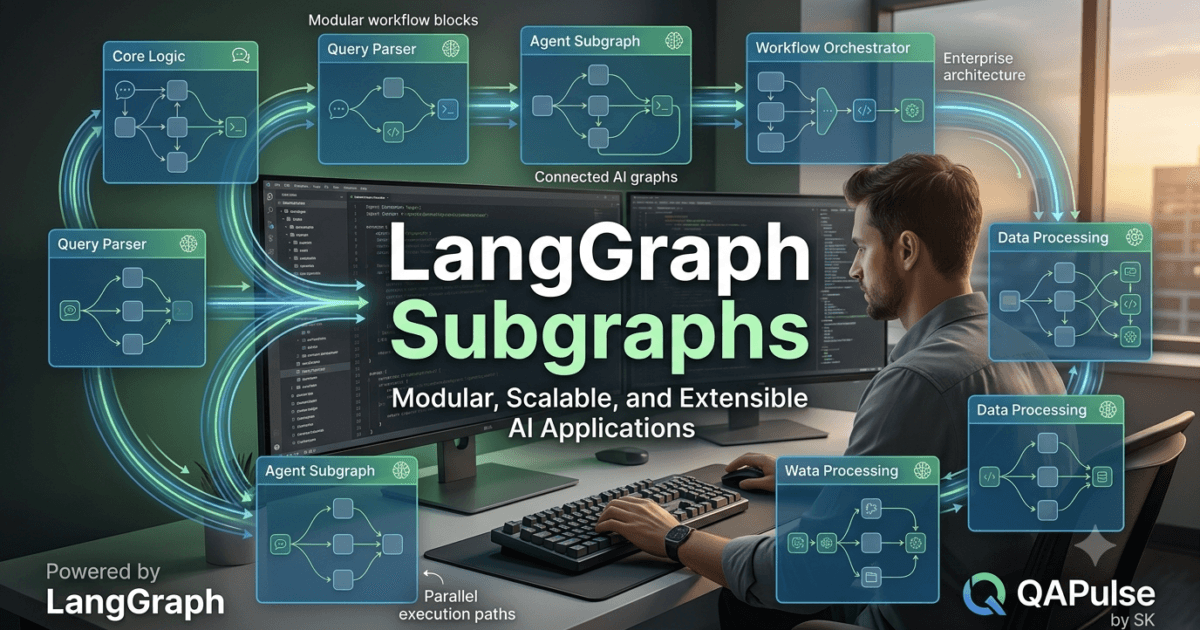
What are LangGraph Subgraphs?
As AI applications grow in size and complexity, developers quickly discover that placing every node inside a single graph becomes difficult to manage. Large workflows can contain dozens of nodes, multiple routing conditions, several AI agents, tool integrations, memory components, and error-handling mechanisms. Maintaining such a graph eventually becomes challenging.
This is where LangGraph Subgraphs become an essential architectural feature.
LangGraph Subgraphs allow developers to divide a large workflow into smaller, self-contained graphs that perform specific tasks. These smaller graphs can then be combined into a larger parent graph, creating modular, reusable, and maintainable AI applications.
Instead of building one enormous workflow, developers can design independent components that work together while remaining easy to understand, test, and extend.
Why Subgraphs Matter
Modern enterprise AI systems rarely consist of a single workflow.
Consider an intelligent customer service platform.
It may require separate workflows for:
- User authentication
- Intent detection
- Knowledge retrieval
- Tool execution
- Billing enquiries
- Technical support
- Response generation
- Human escalation
Placing every process into one graph would quickly become difficult to maintain.
Using LangGraph Subgraphs, each business function can be developed independently and later connected into a larger orchestration workflow.
Benefits include:
- Improved modularity
- Better code organisation
- Easier maintenance
- Reusable workflows
- Simplified testing
- Independent development
- Better scalability
- Reduced workflow complexity
Understanding the Subgraph Architecture
A parent graph coordinates several independent child graphs.
A simplified architecture looks like this.
User Request

↓

Main Graph

↓

Authentication Subgraph

↓

Intent Detection Subgraph

↓

Task Execution Subgraph

↓

Response Generation Subgraph

↓

Final Response
Each subgraph performs a specialised responsibility before returning control to the parent graph.
How LangGraph Subgraphs Work
A subgraph behaves much like an independent workflow.
It contains:
- Its own nodes
- Internal edges
- Conditional routing
- State updates
- Error handling
- Business logic
From the perspective of the parent graph, however, the entire subgraph appears as a single logical step.
This abstraction keeps high-level workflows clean and easy to understand.
Example: Authentication Subgraph
Many AI applications require authentication before processing requests.
Rather than repeating authentication logic throughout multiple graphs, developers can create a dedicated authentication subgraph.
Its workflow may include:
- Validate credentials.
- Verify user permissions.
- Load user profile.
- Update graph state.
- Return control.
This authentication module can then be reused across numerous AI applications.
Example: Document Processing Workflow
Suppose an AI assistant processes uploaded documents.
Instead of one enormous graph, the workflow can be divided into specialised subgraphs.
Upload Document

↓

Preprocessing Subgraph

↓

Information Extraction Subgraph

↓

Validation Subgraph

↓

Summary Subgraph

↓

Final Output
Each subgraph focuses on one stage of the document-processing pipeline.
Reusability Across Projects
One of the greatest strengths of LangGraph Subgraphs is reuse.
A single subgraph may support multiple applications.
Examples include:
- Authentication
- Search
- Tool execution
- Logging
- Error recovery
- Notification services
- Database access
- User profile management
Instead of rewriting these workflows repeatedly, developers simply integrate existing subgraphs into new projects.
Team Collaboration
Large software teams often work simultaneously.
Subgraphs allow different teams to own different workflow components.
For example:
AI Team
Maintains:
- LLM interaction
- Prompt management
- Reasoning workflows
Backend Team
Maintains:
- Database integration
- APIs
- Authentication
QA Team
Maintains:
- Testing workflows
- Validation
- Monitoring
DevOps Team
Maintains:
- Deployment
- Logging
- Infrastructure automation
Because responsibilities are separated, development becomes more efficient.
Simplifying Maintenance
Updating a large workflow becomes significantly easier when functionality is isolated.
For example, changing authentication logic only requires updating the authentication subgraph.
Other workflows remain unaffected.
This modular approach reduces maintenance costs and minimises unintended side effects.
Enterprise Applications
Many enterprise AI systems use subgraphs extensively.
Common applications include:
- Customer support automation
- Banking assistants
- Healthcare platforms
- Insurance processing
- Legal document analysis
- Software engineering assistants
- IT operations
- Human resources automation
- Financial reporting
- Knowledge management
Subgraphs make these large systems easier to manage as they continue to grow.
Advantages Over Monolithic Graphs
| Monolithic Workflow | Modular Subgraph Architecture |
|---|---|
| Difficult to maintain | Easier to understand |
| Large graph size | Smaller reusable components |
| Limited reuse | Highly reusable workflows |
| Complex testing | Independent testing |
| Harder collaboration | Team ownership of modules |
| Increased maintenance effort | Simplified updates |
As applications become more sophisticated, modular design becomes increasingly valuable.
Common Challenges
Developers should avoid several common mistakes.
Creating Oversized Subgraphs
A subgraph should perform one well-defined business function.
Avoid placing unrelated responsibilities into the same module.
Excessive Nesting
Although nesting is supported, deeply nested workflows may become difficult to debug.
Keep the architecture balanced.
Weak State Design
Subgraphs should exchange only the information necessary for downstream processing.
Avoid unnecessarily large shared states.
Ignoring Documentation
Reusable subgraphs should be documented clearly so that other developers understand their purpose and interfaces.
Best Practices
When designing LangGraph Subgraphs:
- Give every subgraph a single responsibility.
- Design reusable workflow modules.
- Keep interfaces simple.
- Share only essential state information.
- Test every subgraph independently.
- Document expected inputs and outputs.
- Monitor execution for debugging.
- Use meaningful names.
- Avoid unnecessary dependencies.
- Review opportunities for reuse before creating new workflows.
Following these practices results in scalable, maintainable AI systems.
Preparing for Advanced Graph Composition
Understanding LangGraph Subgraphs is a major milestone in building enterprise AI applications. Modular workflows improve maintainability and encourage code reuse, but some problems require multiple workflows to execute simultaneously. In the next lesson, you will explore parallel execution in LangGraph, learning how independent branches can run concurrently, synchronise their results, and significantly improve the performance of complex AI systems.
Summary
LangGraph Subgraphs enable developers to build modular AI workflows by dividing large graphs into smaller, reusable components that perform specialised responsibilities. Each subgraph manages its own nodes, routing, and business logic while appearing as a single step within the parent graph. This architectural pattern improves code organisation, team collaboration, testing, scalability, and long-term maintainability, making it an essential technique for developing enterprise-grade AI applications with LangGraph.
LangGraph Parallel Execution: Running AI Workflows Concurrently for Higher Performance
What Is LangGraph Parallel Execution?
As AI applications become more advanced, workflows often include multiple tasks that are completely independent of one another. Executing these tasks one after another may be simple to implement, but it can also waste valuable processing time and increase overall response latency.
This is where LangGraph Parallel Execution becomes a powerful optimisation technique.
LangGraph Parallel Execution enables developers to execute multiple independent branches of a graph simultaneously rather than sequentially. Instead of waiting for one node to finish before starting the next, LangGraph allows separate workflows to run concurrently whenever they do not depend on each other’s results.
By taking advantage of parallel execution, AI applications can process information faster, improve resource utilisation, and deliver quicker responses without sacrificing workflow organisation.
Why Parallel Execution Matters
Consider an AI software engineering assistant that receives a request to review an application before deployment.
Several tasks can occur independently:
- Security analysis
- Code review
- Performance evaluation
- Documentation validation
- Test execution
- Dependency inspection
Running these activities one by one increases completion time unnecessarily.
With LangGraph Parallel Execution, these independent tasks can execute at the same time before their results are combined into a final report.
Benefits include:
- Faster workflow completion
- Reduced response latency
- Better CPU utilisation
- Improved scalability
- Higher throughput
- More efficient resource management
- Better user experience
- Enterprise-ready performance
Understanding Parallel Graph Execution
Instead of following one continuous path, the workflow temporarily splits into multiple branches.
A simplified architecture looks like this.
User Request

↓

Task Planning

↓

Parallel Execution

↙       ↓        ↘

Research  Analysis  Validation

↘       ↓        ↙

Merge Results

↓

Final Response
Each branch performs its work independently before synchronising with the parent workflow.
When Parallel Execution Should Be Used
Parallel execution is most effective when tasks have no direct dependency on one another.
Typical examples include:
- Calling multiple APIs
- Searching different knowledge sources
- Running independent AI agents
- Executing automated test suites
- Performing document analysis
- Generating reports
- Collecting monitoring data
- Validating business rules
If one task requires the output of another, sequential execution remains the appropriate choice.
Parallel AI Agent Collaboration
Multi-agent systems often benefit from concurrent execution.
For example, an enterprise research assistant may delegate work to specialised agents.
Supervisor

↓

Parallel Agents

↙       ↓       ↘

Research  Coding  Testing

↘       ↓       ↙

Supervisor Review

↓

Response
Because each agent works independently, the overall workflow completes much more quickly than a sequential implementation.
Parallel Tool Calling
Many AI workflows rely on external tools.
Suppose an assistant must gather information from several independent systems.
Examples include:
- Weather service
- Database
- Search engine
- Internal API
- Knowledge base
Rather than waiting for each tool call to finish individually, LangGraph can execute them simultaneously.
User Query

↓

Parallel Tool Calls

↙      ↓       ↘

Database  Search  External API

↘      ↓       ↙

Combine Results

↓

Answer
This significantly reduces waiting time, especially when external services have variable response speeds.
Synchronising Parallel Branches
Although branches execute independently, they eventually need to converge.
The workflow typically follows these steps:
- Split execution into parallel branches.
- Execute each branch independently.
- Wait for all required branches to complete.
- Merge intermediate results.
- Continue execution.
This synchronisation point ensures that downstream nodes receive all the information they require.
State Management During Parallel Execution
Parallel branches commonly share the graph state.
However, developers should carefully manage state updates.
Good practices include:
- Updating separate state fields
- Avoiding conflicting modifications
- Merging outputs consistently
- Validating combined results
- Preserving execution history
Careful state design prevents race conditions and inconsistent workflow behaviour.
Enterprise Applications
Parallel execution is widely used in enterprise AI systems.
Representative examples include:
- Customer support automation
- Software engineering assistants
- Financial risk analysis
- Healthcare decision support
- Legal document review
- Cybersecurity investigations
- Data processing pipelines
- Intelligent search systems
- Business intelligence platforms
- Scientific research assistants
As workloads grow, concurrent execution becomes increasingly valuable for maintaining responsive systems.
Advantages Over Sequential Workflows
| Sequential Execution | LangGraph Parallel Execution |
|---|---|
| Tasks execute one at a time | Independent tasks execute simultaneously |
| Longer completion time | Faster overall execution |
| Lower hardware utilisation | Better resource efficiency |
| Increased response latency | Reduced waiting time |
| Limited scalability | Higher throughput |
| Less efficient enterprise workflows | Optimised large-scale processing |
Parallel execution enables AI applications to make better use of available computing resources while improving end-user experience.
Common Challenges
Developers should understand several common issues.
Executing Dependent Tasks in Parallel
Only independent tasks should execute concurrently.
Tasks that depend on previous outputs should remain sequential.
Conflicting State Updates
Multiple branches modifying the same state variable can produce inconsistent results.
Design the shared state carefully to minimise conflicts.
Ignoring Error Handling
If one branch fails, the workflow should define how recovery or fallback behaviour should occur before continuing.
Excessive Parallelism
Launching too many concurrent tasks can overload available system resources.
Balance concurrency with infrastructure capacity.
Best Practices
To implement effective LangGraph Parallel Execution:
- Identify independent workflow stages.
- Execute only non-dependent tasks concurrently.
- Design shared state carefully.
- Merge outputs consistently.
- Validate synchronisation points.
- Implement robust error recovery.
- Monitor execution performance.
- Log branch activity for debugging.
- Test concurrent workflows thoroughly.
- Optimise resource allocation continuously.
These practices help maintain both performance and reliability.
Preparing for Advanced Workflow Synchronisation
Mastering LangGraph Parallel Execution enables developers to build faster and more scalable AI systems by processing independent tasks simultaneously. However, enterprise workflows often require temporary pauses, user approvals, and external events before execution can continue. In the next lesson, you will explore LangGraph interrupt mechanisms, learning how workflows can pause safely, wait for additional input, and resume execution without losing state or context.
Summary
LangGraph Parallel Execution allows AI workflows to execute multiple independent branches simultaneously, reducing overall execution time and improving system efficiency. By combining concurrent processing with structured state management, synchronisation, and graph-based orchestration, developers can build responsive AI applications that scale effectively across enterprise workloads. Whether coordinating multiple AI agents, executing external tool calls, analysing documents, or processing complex business operations, parallel execution is a key technique for delivering high-performance, production-ready LangGraph applications.
LangGraph Interrupts: Pausing and Resuming AI Workflows Safely
What Are LangGraph Interrupts?
Many AI workflows require more than fully automated execution. In enterprise environments, workflows often need to pause while waiting for additional information, user approval, external events, or manual verification before continuing. Without a reliable mechanism for pausing execution, developers may struggle to build AI applications that integrate smoothly with real-world business processes.
This is where LangGraph Interrupts become an essential capability.
LangGraph Interrupts allow developers to temporarily pause graph execution at a specific point, preserve the complete workflow state, and resume execution later without restarting the entire process. Instead of forcing workflows to run continuously from start to finish, interrupts enable AI applications to wait for external input while maintaining full context.
This makes LangGraph particularly well suited for production systems that involve humans, external services, or long-running business operations.
Why Interrupts Matter
Imagine an AI-powered loan approval system.
The workflow may include:
- Customer information analysis
- Risk assessment
- Credit evaluation
- Fraud detection
- Manager approval
- Final decision
- Customer notification
After completing the automated analysis, the workflow should pause until a manager reviews the recommendation.
Without interrupts, developers would need to recreate the workflow manually after approval.
With LangGraph Interrupts, the graph pauses safely, stores its current state, and resumes from exactly the same point once approval is received.
Benefits include:
- Human-in-the-loop workflows
- Long-running process support
- Reliable state preservation
- Better user experience
- Reduced workflow complexity
- Easier business integration
- Improved fault tolerance
- Enterprise-ready automation
Understanding Workflow Interruptions
Instead of executing continuously, the workflow pauses temporarily.
A simplified example looks like this.
User Request

↓

AI Processing

↓

Interrupt

↓

Wait for Approval

↓

Resume Workflow

↓

Final Response
The graph does not restart after approval. It simply continues from the interruption point.
How LangGraph Interrupts Work
When an interrupt occurs, LangGraph typically performs several operations:
- Saves the current graph state
- Records the active node
- Preserves execution history
- Stores intermediate results
- Waits for external input
- Resumes execution later
Because the workflow context remains intact, developers avoid repeating completed work.
Human Approval Workflows
Many enterprise applications require human review before proceeding.
Examples include:
- Financial approvals
- Legal verification
- Medical recommendations
- Security authorisation
- Content moderation
- Software deployment approval
- Compliance validation
- High-risk business decisions
A typical approval workflow might appear as follows.
Automated Analysis

↓

Interrupt

↓

Human Review

↓

Approved?

↙          ↘

Yes         No

↓

Continue Workflow
This approach combines AI automation with responsible human oversight.
Waiting for External Systems
Interrupts are equally valuable when workflows depend on external systems.
Examples include:
- Payment confirmation
- API callback
- Database synchronisation
- File upload completion
- Email verification
- Identity validation
- IoT device response
- Background processing
Instead of repeatedly checking for updates, the workflow pauses until the required event occurs.
Preserving Workflow State
One of the most important features of LangGraph Interrupts is state preservation.
The stored state may include:
- User request
- Conversation history
- Tool outputs
- AI reasoning
- Intermediate calculations
- Workflow status
- Validation results
- Execution metadata
When execution resumes, every downstream node receives the same context that existed before the interruption.
Error Recovery
Interrupts can also improve workflow reliability.
Suppose an external API becomes temporarily unavailable.
Rather than terminating execution immediately, the graph can pause until the service becomes available again.
External API

↓

Available?

↙         ↘

No         Yes

↓

Interrupt

↓

Retry Later

↓

Resume Execution
This strategy reduces unnecessary failures and improves overall system resilience.
Enterprise Applications
Interrupt-based workflows are common across many industries.
Typical use cases include:
- Banking approvals
- Healthcare diagnosis review
- Insurance claim processing
- Government service requests
- Enterprise software deployment
- HR recruitment workflows
- Contract approval systems
- Cybersecurity investigations
- Customer onboarding
- Regulatory compliance processes
These environments often require a combination of automation and human judgement.
Advantages Over Continuous Execution
| Continuous Workflow | LangGraph Interrupts |
|---|---|
| Must finish in one session | Can pause and resume safely |
| Difficult human integration | Built for human approval workflows |
| Limited long-running support | Ideal for extended business processes |
| More complex recovery | Simple continuation from saved state |
| Less flexible | Supports asynchronous events |
| Harder enterprise integration | Production-ready workflow management |
Interrupts provide the flexibility needed for real-world AI systems.
Common Challenges
Developers should consider several implementation issues.
Forgetting to Preserve State
Incomplete state preservation can cause resumed workflows to behave incorrectly.
Always ensure essential context is saved before interruption.
Interrupting Too Frequently
Excessive interruptions increase workflow complexity and reduce overall efficiency.
Pause only when genuinely required.
Weak Approval Logic
Human approval processes should include clear validation rules and audit records.
Ignoring Timeouts
Some external events may never occur.
Implement timeout policies and fallback behaviour to prevent workflows from waiting indefinitely.
Best Practices
To build reliable interrupt-driven workflows:
- Interrupt only at meaningful workflow stages.
- Preserve complete execution state.
- Validate all resumed inputs.
- Maintain detailed audit logs.
- Define timeout strategies.
- Implement fallback routes.
- Protect sensitive state information.
- Test interruption and recovery thoroughly.
- Monitor long-running workflows continuously.
- Document every interruption point clearly.
These practices improve reliability, transparency, and maintainability.
Preparing for Persistent AI Workflows
Understanding LangGraph Interrupts allows developers to build AI systems that pause safely, collaborate with humans, and integrate with asynchronous business processes. However, pausing a workflow is only part of the solution. In the next lesson, you will explore LangGraph persistence, learning how workflows, execution history, and application state can be stored permanently to support durable, fault-tolerant, production-grade AI applications.
Summary
LangGraph Interrupts enable AI workflows to pause execution safely, preserve complete workflow state, and resume processing when external input becomes available. Whether waiting for human approval, payment confirmation, API responses, compliance verification, or other asynchronous events, interrupts allow developers to build reliable, long-running AI applications without restarting completed work. Combined with LangGraph’s graph-based execution model and state management capabilities, interrupts provide a robust foundation for enterprise-grade automation that seamlessly integrates AI reasoning with real-world business processes.
LangGraph Persistence: Building Durable and Fault-Tolerant AI Workflows
What Is LangGraph Persistence?
Many AI applications process requests that finish within a few seconds, but enterprise systems often execute workflows that may continue for minutes, hours, or even days. During this time, applications may experience server restarts, infrastructure failures, network interruptions, or user inactivity. Without a mechanism to preserve workflow progress, all completed work could be lost, forcing the system to start over.
This is where LangGraph Persistence becomes a critical feature.
LangGraph Persistence enables developers to permanently store the execution state of an AI workflow so that it can continue from the exact point where it previously stopped. Instead of treating every execution as temporary, persistence allows workflows to survive failures, application restarts, scheduled maintenance, and long waiting periods while maintaining complete context.
Persistence transforms AI workflows from short-lived processes into durable, production-ready systems capable of supporting enterprise-scale applications.
Why Persistence Matters
Consider an AI-powered insurance claims platform.
A single claim may require:
- Customer verification
- Document collection
- Fraud detection
- Medical assessment
- Human approval
- Payment authorisation
- Customer notification
These activities may occur over several days.
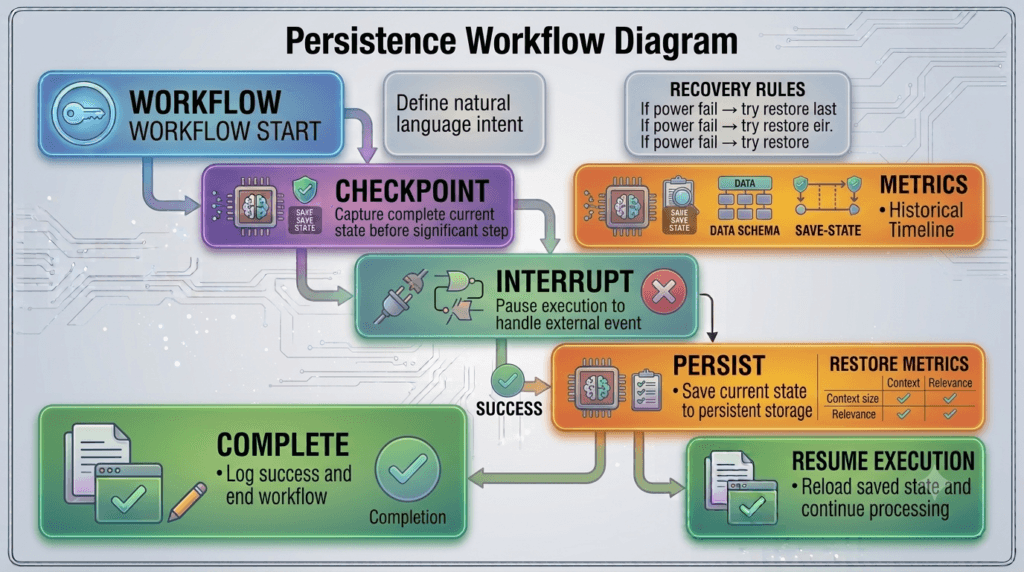
Without persistence, any interruption could require restarting the entire workflow.
With LangGraph Persistence, every completed step is safely stored, allowing execution to continue whenever processing resumes.
Benefits include:
- Durable workflow execution
- Fault tolerance
- Recovery after failures
- Long-running process support
- Improved reliability
- Better user experience
- Reduced duplicate processing
- Enterprise-grade scalability
Understanding Persistent Workflows
Instead of existing only in memory, workflow information is stored permanently.
A simplified architecture looks like this.
User Request

↓

Workflow Execution

↓

Persist State

↓

System Restart

↓

Load Stored State

↓

Resume Workflow

↓

Final Response
The workflow continues seamlessly even after unexpected interruptions.
What Information Is Persisted?
A persistent workflow typically stores much more than the current node.
Common information includes:
- User request
- Shared graph state
- Conversation history
- Active workflow step
- AI-generated outputs
- Tool responses
- Validation results
- Execution metadata
- Routing decisions
- Completion status
By preserving this information, LangGraph can recreate the exact execution context.
Persistence and Checkpointing
Persistence is closely related to checkpointing.
Instead of saving progress only at the end of execution, workflows create checkpoints throughout processing.
For example:
Start

↓

Checkpoint 1

↓

Reasoning

↓

Checkpoint 2

↓

Tool Calling

↓

Checkpoint 3

↓

Final Response
If an interruption occurs after Checkpoint 2, the workflow resumes from that point instead of beginning again.
Checkpointing significantly reduces unnecessary computation.
Supporting Long-Running Business Processes
Many enterprise operations naturally span extended periods.
Examples include:
- Mortgage approvals
- Insurance claims
- Employee onboarding
- Procurement workflows
- Legal document reviews
- Healthcare treatment plans
- Government applications
- Software release approvals
Persistent workflows allow these processes to continue reliably despite delays or temporary interruptions.
Combining Persistence with Human Approval
Persistence works especially well alongside interrupt-driven workflows.
A typical approval process may appear as follows.
AI Analysis

↓

Persist Workflow

↓

Human Approval

↓

Resume Execution

↓

Complete Process
The workflow can safely wait for hours or days without losing context.
Disaster Recovery
Persistence also protects workflows against unexpected failures.
Examples include:
- Application crashes
- Server restarts
- Cloud infrastructure failures
- Network interruptions
- Container redeployment
- Operating system updates
- Hardware maintenance
Because execution data has already been stored, recovery becomes straightforward.
Enterprise Applications
Persistent workflows are widely used across enterprise environments.
Representative use cases include:
- Banking platforms
- Healthcare systems
- Insurance automation
- Customer relationship management
- IT service management
- Cybersecurity operations
- Enterprise software engineering
- Human resources systems
- Supply chain automation
- Regulatory compliance
These applications require workflows that remain reliable over extended periods.
Persistence and Shared State
Persistence works hand in hand with LangGraph’s shared state management.
The stored state often includes:
- Workflow variables
- Agent outputs
- Conversation memory
- User preferences
- Intermediate calculations
- External API responses
- Business rules
- Execution history
When execution resumes, every participating node receives the latest available state.
This consistency ensures reliable decision-making throughout the workflow.
Advantages Over Temporary Workflows
| Temporary Workflow | LangGraph Persistence |
|---|---|
| Exists only during execution | Stored permanently |
| Lost after failures | Recoverable after interruptions |
| Limited long-running support | Designed for extended workflows |
| Higher recomputation cost | Resume from saved progress |
| Lower fault tolerance | Enterprise-grade reliability |
| Difficult disaster recovery | Simplified recovery process |
Persistence significantly improves workflow durability and operational resilience.
Common Challenges
Developers should be aware of several implementation considerations.
Persisting Too Frequently
Saving state after every small operation may introduce unnecessary storage overhead.
Choose checkpoint locations strategically.
Incomplete State Storage
Missing workflow information may prevent successful recovery.
Ensure every critical piece of execution context is persisted.
Poor Data Management
Persistent data should be organised, versioned, and cleaned appropriately to prevent unnecessary storage growth.
Security Risks
Persisted workflow data may contain sensitive information.
Apply encryption, access controls, auditing, and retention policies where appropriate.
Best Practices
To build reliable persistent workflows:
- Persist only meaningful workflow checkpoints.
- Store complete execution context.
- Design workflows for safe recovery.
- Encrypt sensitive persisted data.
- Maintain detailed execution logs.
- Validate restored workflow state.
- Monitor persistence performance.
- Test recovery scenarios regularly.
- Define retention and cleanup policies.
- Document persistence behaviour clearly.
These practices produce robust, maintainable enterprise AI systems.
Preparing for Production-Ready LangGraph Applications
Understanding LangGraph Persistence is a major milestone in building reliable AI systems capable of surviving failures and supporting long-running business processes. However, persistence alone is not enough for production deployments. In the next lesson, you will explore LangGraph checkpoint management in greater depth, learning how checkpoint stores, recovery strategies, execution history, and durable workflow management work together to create highly available, fault-tolerant AI applications for real-world enterprise environments.
Summary
LangGraph Persistence enables AI workflows to store their execution state permanently so they can recover seamlessly from interruptions, system failures, human approval delays, and long-running business operations. By preserving workflow context, shared state, execution history, routing decisions, and intermediate results, developers can create durable AI applications that continue processing without repeating completed work. Combined with checkpointing, interrupts, and LangGraph’s graph-based execution model, persistence provides the foundation for building scalable, resilient, and production-ready AI systems that meet the reliability requirements of modern enterprise software.
Internal Links:
- Learn MCP – Zero to Hero
- Learn AI Agents for QA – Zero to Hero
- Playwright Automation – Zero to Hero
- LangGraph: Complete Zero to Hero
- Learn Python – Zero to Hero
- OpenAI Codex: Complete Zero to Hero
- Cursor AI: Complete Zero to Hero
- Claude Code Tutorial: Complete Zero to Hero
- Free QA Resources Built From Real Experience
- QA Glossary: Test Automation Terms Every Engineer Should Know
External Resources:
- LangGraph Official Documentation
- LangChain Documentation
- Python Official Documentation
- OpenAI Platform Documentation
- Anthropic Documentation
- Google AI Documentation
- LangGraph GitHub Repository
People Also Ask
What are LangGraph Subgraphs?
LangGraph Subgraphs are reusable graph components that allow developers to divide large AI workflows into smaller, modular workflows that can be combined into larger applications.
Why should developers use LangGraph Subgraphs?
They improve maintainability, encourage code reuse, simplify testing, and make large AI applications easier to understand and scale.
Can LangGraph Subgraphs work with parallel execution?
Yes. LangGraph Subgraphs can execute independently and, where appropriate, be combined with parallel execution to improve workflow performance.
Do LangGraph Subgraphs support human-in-the-loop workflows?
Yes. They integrate seamlessly with LangGraph Interrupts, allowing workflows to pause for approvals or external events before resuming.
Are LangGraph Subgraphs suitable for enterprise AI applications?
Absolutely. Enterprise systems commonly use LangGraph Subgraphs to organise authentication, retrieval, tool execution, document processing, customer support, compliance, and many other reusable workflow modules.
Featured Snippet
What Are LangGraph Subgraphs?
LangGraph Subgraphs are modular workflow components that allow developers to organise complex AI applications into smaller, reusable graphs. Each subgraph performs a specialised responsibility while integrating seamlessly into a larger parent workflow, making AI systems easier to maintain, extend, and scale.
AI Overview Answer
LangGraph Subgraphs help developers build modular AI workflows by dividing large graphs into reusable components. When combined with parallel execution, interrupts, persistence, and shared state management, they provide a scalable architecture for developing reliable enterprise-grade AI applications.
Enjoyed this article? Explore more in-depth guides on AI engineering, automation testing, Model Context Protocol, Playwright, and intelligent software quality at www.skakarh.com. Follow QAPulse by SK for practical, production-focused tutorials designed for QA engineers, SDETs, and AI developers.