QA
QA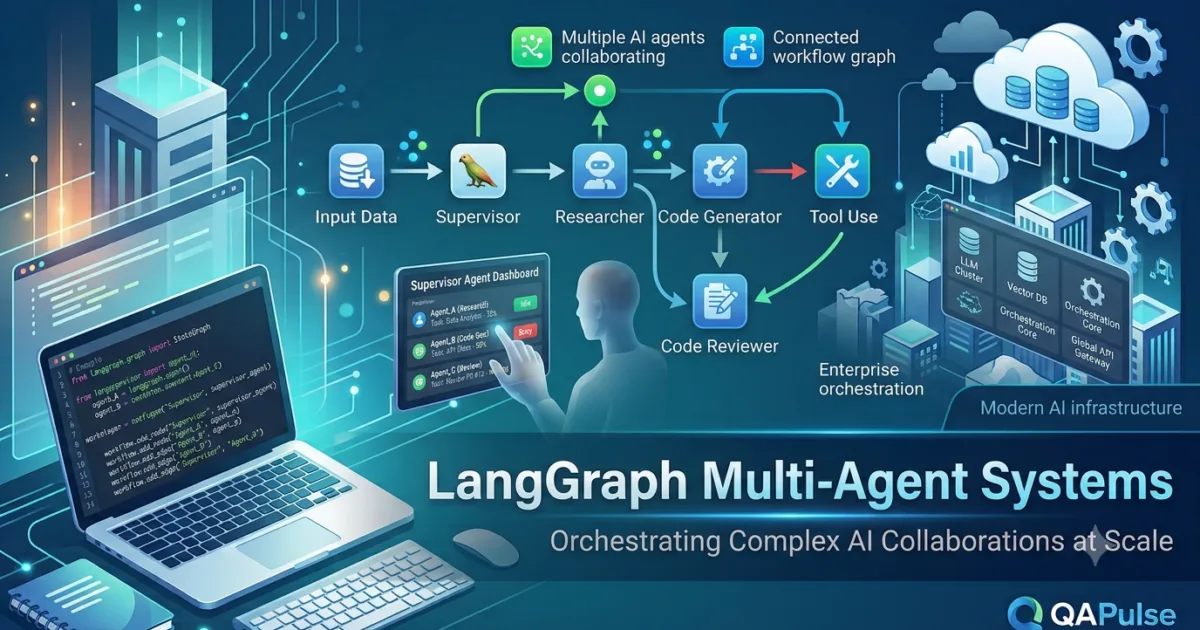
What Are Multi-Agent Systems?
Most introductory AI applications rely on a single Large Language Model (LLM) to analyse requests, make decisions, call tools, and generate responses. While this approach works well for simple tasks, it becomes increasingly inefficient as workflows grow more complex.
Enterprise AI applications often need to perform multiple specialised activities such as planning, researching, coding, testing, reviewing, retrieving documents, and validating results. Expecting one AI model to excel at every responsibility can lead to lower accuracy, slower execution, and workflows that are difficult to maintain.
This challenge is addressed through LangGraph Multi-Agent Systems.
LangGraph Multi-Agent Systems enable developers to build workflows where multiple specialised AI agents collaborate to achieve a common objective. Instead of one general-purpose agent handling everything, each agent focuses on a specific responsibility while communicating with other agents through shared workflow state and structured execution paths.
This architecture closely resembles how successful human teams operate—different specialists contribute their expertise while working towards the same goal.
Why Multi-Agent Systems Are Important
Imagine building an AI software engineering assistant capable of creating an entire application.
The workflow may require several specialised responsibilities:
- Understanding project requirements
- Planning the application architecture
- Writing source code
- Generating documentation
- Creating automated tests
- Reviewing code quality
- Deploying the application
Although one language model could attempt all these tasks, specialised agents generally produce more organised and reliable results.
By distributing work among multiple agents, developers gain:
- Better task specialisation
- Higher response quality
- Improved scalability
- Easier maintenance
- Greater workflow flexibility
- Better fault isolation
- Simplified debugging
- More modular AI architectures
These advantages become increasingly valuable in production AI systems.
How LangGraph Multi-Agent Systems Work
Each AI agent performs a dedicated role within the workflow.
A simplified architecture looks like this.
User Request

↓

Planner Agent

↓

Task Distribution

↙         ↓          ↘

Research   Coding   Documentation

↘         ↓          ↙

Testing Agent

↓

Reviewer Agent

↓

Final Response
Rather than processing every task sequentially inside one model, specialised agents collaborate throughout the workflow.
Characteristics of AI Agents
Each agent typically has:
- A clearly defined responsibility
- Access to workflow state
- Specific tools
- Decision-making capabilities
- Communication with other agents
- Independent execution logic
Well-defined responsibilities reduce overlap and improve maintainability.
Common Agent Roles
Different applications require different types of agents.
Planner Agent
The planner analyses the user’s request and determines how work should be distributed.
Responsibilities include:
- Understanding objectives
- Breaking work into tasks
- Selecting specialised agents
- Coordinating execution
The planner often serves as the entry point of the workflow.
Research Agent
This agent gathers information.
Typical responsibilities include:
- Searching documentation
- Querying databases
- Retrieving knowledge
- Analysing external resources
- Collecting evidence
Research agents provide context for later stages.
Coding Agent
The coding agent focuses on software development.
Responsibilities include:
- Writing source code
- Refactoring
- Explaining algorithms
- Generating examples
- Creating APIs
Specialised coding agents generally produce more consistent technical output.
Testing Agent
Testing agents improve software quality.
They may:
- Generate unit tests
- Perform validation
- Detect bugs
- Review edge cases
- Verify functionality
This separation encourages better software engineering practices.
Reviewer Agent
The reviewer evaluates work completed by other agents.
Responsibilities include:
- Quality assurance
- Error detection
- Compliance verification
- Final approval
- Recommendation generation
Reviewer agents act as an additional quality control layer.
Agent Communication
Effective collaboration depends on communication.
Agents exchange information through shared workflow state.
Example:
Planner

↓

Shared State

↓

Research

↓

Updated State

↓

Coding

↓

Updated State

↓

Testing

↓

Reviewer
Instead of communicating directly, agents contribute information to a shared workflow context.
This architecture simplifies coordination.
Sequential vs Parallel Execution
Multi-agent systems may execute sequentially or in parallel.
Sequential Collaboration
Each agent completes its work before the next agent begins.
Planner

↓

Research

↓

Coding

↓

Testing

↓

Reviewer
Sequential workflows are easier to understand and debug.
Parallel Collaboration
Independent tasks execute simultaneously.
Planner

↓

Task Assignment

↙         ↓         ↘

Research   Coding   Testing

↓

Merge Results

↓

Reviewer
Parallel execution improves performance for independent activities.
Multi-Agent Systems and Workflow State
Shared workflow state allows agents to collaborate efficiently.
Typical shared information includes:
- User requirements
- Planning decisions
- Research findings
- Tool outputs
- Generated code
- Testing results
- Reviewer comments
- Workflow metadata
Every agent contributes new knowledge while benefiting from previous work.
Multi-Agent Systems and Tool Calling
Each agent can access different tools depending on its responsibilities.
For example:
- Research Agent → Search APIs and documentation
- Coding Agent → Python execution tools
- Testing Agent → Automated testing frameworks
- Deployment Agent → Cloud infrastructure APIs
Restricting tools to specific agents improves security and simplifies workflow management.
Enterprise Applications
LangGraph Multi-Agent Systems are widely used across industries.
Examples include:
- Software engineering assistants
- Customer support platforms
- Financial analysis systems
- Healthcare assistants
- Research automation
- Legal document analysis
- Business intelligence
- Cybersecurity operations
These systems combine specialised reasoning with structured collaboration.
Common Mistakes
Developers often encounter similar challenges.
Creating Too Many Agents
Every additional agent increases workflow complexity.
Create specialised agents only when they provide measurable value.
Poor Responsibility Definition
Agents should have clear boundaries.
Avoid assigning overlapping responsibilities.
Weak Communication
Shared workflow state should contain sufficient information for downstream agents.
Incomplete state often leads to poor collaboration.
Ignoring Coordination
Multiple agents require orchestration.
Without proper coordination, workflows become difficult to debug and maintain.
Best Practices for LangGraph Multi-Agent Systems
When designing multi-agent workflows:
- Assign one primary responsibility to each agent.
- Keep communication structured.
- Share only relevant workflow state.
- Restrict tool access appropriately.
- Use reviewer agents for quality assurance.
- Monitor agent performance independently.
- Design modular workflows.
- Test collaboration scenarios thoroughly.
- Document agent responsibilities clearly.
Following these practices produces scalable, maintainable AI systems.
Preparing for Supervisor Architectures
While specialised agents collaborate effectively, they still require intelligent coordination. In the next lesson, you will explore the LangGraph Supervisor Pattern, where a dedicated supervisor agent plans execution, assigns work, monitors progress, resolves conflicts, and coordinates multiple specialised agents. This architecture enables developers to build enterprise-scale AI systems capable of handling highly complex workflows with greater reliability and control.
Real-World Importance
LangGraph Multi-Agent Systems enable developers to build AI applications that mirror the collaboration found in high-performing human teams. By dividing complex tasks among specialised agents responsible for planning, research, coding, testing, reviewing, and decision-making, organisations can create intelligent workflows that are more accurate, scalable, and maintainable than single-agent solutions. Whether developing enterprise copilots, autonomous research assistants, software engineering platforms, or business automation systems, multi-agent architectures provide the foundation for next-generation AI applications capable of solving sophisticated real-world problems efficiently.
LangGraph Supervisor Pattern: Orchestrating Intelligent AI Teams at Scale
What Is the LangGraph Supervisor Pattern?
As the number of AI agents in a workflow increases, coordination becomes more challenging. Each agent may have a specialised responsibility, but someone must decide which agent should work next, monitor progress, handle failures, merge results, and ensure the workflow achieves its objective efficiently.
This challenge is solved by the LangGraph Supervisor Pattern.
The LangGraph Supervisor Pattern introduces a dedicated supervisor agent responsible for orchestrating the entire workflow. Rather than performing every task itself, the supervisor analyses the user’s request, assigns work to specialised agents, collects their outputs, evaluates the quality of their results, and determines the next course of action.
This architecture is similar to a project manager leading a team of experts. Each specialist focuses on their own area of expertise, while the supervisor ensures everyone works together toward a common goal.
For large-scale AI applications, the Supervisor Pattern is one of the most effective orchestration strategies.
Why the Supervisor Pattern Is Important
Imagine developing an enterprise AI assistant capable of designing, building, testing, documenting, and deploying a software application.
Several specialised agents may participate:
- Planning Agent
- Research Agent
- Coding Agent
- Testing Agent
- Documentation Agent
- Security Agent
- Deployment Agent
Without central coordination, these agents may:
- Duplicate work
- Execute in the wrong order
- Miss important dependencies
- Produce inconsistent outputs
- Fail to communicate effectively
A supervisor prevents these problems by coordinating every stage of execution.
The Supervisor Pattern provides:
- Centralised workflow management
- Better task coordination
- Improved scalability
- Higher output quality
- Reduced duplication
- Easier debugging
- Better resource utilisation
- More reliable enterprise workflows
How the LangGraph Supervisor Pattern Works
The supervisor acts as the decision-making centre of the workflow.
A simplified execution model looks like this.
User Request

↓

Supervisor Agent

↓

Task Planning

↓

Assign Work

↙      ↓      ↘

Research  Coding  Testing

↓

Collect Results

↓

Quality Review

↓

Final Response
Instead of allowing agents to communicate freely with one another, the supervisor manages the workflow from start to finish.
Responsibilities of the Supervisor Agent
The supervisor performs several important functions.
Analysing User Requests
The supervisor determines:
- User objectives
- Workflow complexity
- Required specialist agents
- Execution strategy
Planning occurs before any specialised work begins.
Selecting the Right Agents
Different tasks require different expertise.
Examples include:
- Research Agent
- Coding Agent
- Testing Agent
- Documentation Agent
- Translation Agent
- Reviewer Agent
Only the required agents participate in each workflow.
Assigning Tasks
The supervisor distributes work based on:
- Agent capabilities
- Current workflow state
- Available tools
- Business priorities
Well-planned task allocation improves overall efficiency.
Monitoring Progress
Throughout execution, the supervisor tracks:
- Completed tasks
- Pending work
- Failed operations
- Workflow state
- Agent outputs
Continuous monitoring allows the workflow to adapt dynamically.
Combining Results
After specialised agents finish their work, the supervisor merges their outputs into a single coherent response.
This prevents fragmented or inconsistent answers.
Supervisor Workflow Example
Consider an AI software engineering assistant.
Developer Request

↓

Supervisor

↓

Architecture Planning

↓

Coding Agent

↓

Testing Agent

↓

Documentation Agent

↓

Supervisor Review

↓

Final Delivery
The supervisor coordinates every stage while maintaining overall workflow consistency.
Supervisor and Shared Workflow State
The supervisor relies heavily on shared workflow state.
Information commonly managed includes:
- User requirements
- Active tasks
- Agent assignments
- Progress updates
- Tool outputs
- Intermediate results
- Reviewer feedback
- Final deliverables
Because every agent contributes to the shared state, the supervisor always has a complete view of workflow progress.
Supervisor and Tool Calling
The supervisor generally does not execute every tool directly.
Instead, it delegates tool usage to specialised agents.
Example:
- Research Agent → Documentation search
- Coding Agent → Python execution
- Testing Agent → Automated test frameworks
- Deployment Agent → Cloud APIs
Delegation keeps workflows modular and easier to maintain.
Supervisor and Human-in-the-Loop
Some decisions require human approval.
The supervisor can:
- Pause execution.
- Request human review.
- Receive feedback.
- Update workflow state.
- Resume execution.
This integration allows enterprise workflows to combine AI automation with expert oversight.
Sequential vs Dynamic Supervision
Supervisor-driven workflows can operate in different ways.
Sequential Supervision
The supervisor follows a predefined execution order.
Supervisor

↓

Research

↓

Coding

↓

Testing

↓

Reviewer
This approach is predictable and easy to understand.
Dynamic Supervision
The supervisor adapts execution based on runtime conditions.
Supervisor

↓

Evaluate Progress

↓

Next Decision

↙        ↓        ↘

Research  Testing  Reviewer
Dynamic supervision provides greater flexibility for complex workflows.
Common Mistakes
Developers frequently encounter several design problems.
Making the Supervisor Do Everything
The supervisor should coordinate work rather than perform every task.
Specialists should remain responsible for specialised activities.
Poor Agent Selection
Choosing unnecessary agents increases execution time and complexity.
Select only the agents required for the current workflow.
Weak State Management
The supervisor depends on accurate workflow state.
Incomplete or inconsistent state reduces decision quality.
Ignoring Failure Recovery
Supervisors should anticipate:
- Tool failures
- Agent failures
- Timeouts
- Missing information
- Invalid outputs
Well-designed recovery strategies improve reliability.
Best Practices for the LangGraph Supervisor Pattern
When implementing supervisor workflows:
- Give the supervisor a clear orchestration role.
- Keep specialised agents independent.
- Maintain structured workflow state.
- Assign one responsibility per agent.
- Validate outputs before combining results.
- Monitor workflow performance continuously.
- Handle failures gracefully.
- Log important workflow decisions.
- Test coordination under realistic conditions.
These practices improve scalability and maintainability.
Enterprise Applications
The Supervisor Pattern is widely used across enterprise AI platforms.
Common examples include:
- Software engineering copilots
- Research assistants
- Financial analysis systems
- Customer support automation
- Healthcare decision support
- Legal document processing
- Business intelligence platforms
- Autonomous enterprise workflows
Centralised orchestration makes these applications more reliable and easier to expand.
Preparing for Agent Communication
Coordinating multiple AI agents is only one part of building sophisticated AI systems. In the next lesson, you will explore LangGraph Agent Communication, learning how specialised agents exchange information, share workflow state, coordinate decisions, and collaborate effectively while maintaining consistency across complex multi-agent applications.
Real-World Importance
The LangGraph Supervisor Pattern provides the orchestration layer that enables multiple AI agents to function as a coordinated team rather than independent components. By intelligently assigning tasks, monitoring execution, managing workflow state, handling failures, and integrating Human-in-the-Loop approvals, the supervisor ensures that enterprise AI systems remain scalable, reliable, and maintainable. Whether building autonomous software engineering platforms, research assistants, business automation systems, or enterprise copilots, the Supervisor Pattern forms the foundation for intelligent multi-agent orchestration in production environments.
LangGraph Agent Communication: Enabling AI Agents to Collaborate Effectively
What Is LangGraph Agent Communication?
Building multiple AI agents is only the first step toward creating intelligent workflows. The real power of a multi-agent system comes from how those agents exchange information, coordinate decisions, and work together to solve complex problems.
This collaboration is made possible through LangGraph Agent Communication.
LangGraph Agent Communication refers to the mechanisms that allow AI agents within a LangGraph workflow to share information, pass tasks, exchange results, and coordinate execution while working towards a common objective. Instead of operating independently, agents collaborate using shared workflow state, structured messaging, and controlled orchestration.
Effective communication ensures that every agent has the information it needs without duplicating work or creating inconsistencies.
For enterprise AI systems, communication is one of the most important aspects of multi-agent architecture.
Why Agent Communication Matters
Imagine an AI software engineering platform responsible for building an entire web application.
Several specialist agents participate:
- Requirements Analysis Agent
- Research Agent
- System Design Agent
- Coding Agent
- Testing Agent
- Security Agent
- Documentation Agent
Each agent produces valuable information.
If they cannot communicate effectively:
- Work is duplicated.
- Important details are lost.
- Decisions become inconsistent.
- Testing may ignore implementation changes.
- Documentation may become outdated.
Proper communication allows every agent to build upon the work completed by others.
The benefits include:
- Better collaboration
- Reduced duplication
- Consistent decision-making
- Improved workflow efficiency
- Faster execution
- Better scalability
- Higher output quality
- Easier maintenance
How LangGraph Agent Communication Works
Most LangGraph applications allow agents to communicate through a shared workflow state rather than sending messages directly to one another.
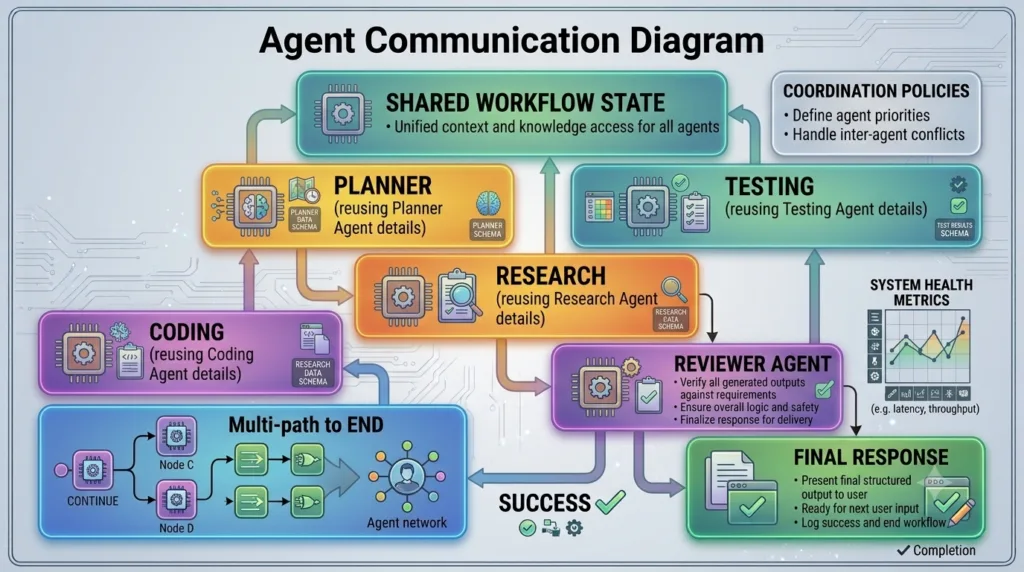
A simplified architecture appears as follows.
Planner Agent

↓

Shared Workflow State

↓

Research Agent

↓

Updated State

↓

Coding Agent

↓

Updated State

↓

Testing Agent

↓

Reviewer Agent

↓

Final Response
Every agent reads relevant information from the shared state, contributes new knowledge, and updates the workflow before the next agent continues.
Shared Workflow State as the Communication Hub
Shared state acts as a central communication channel.
Instead of each agent maintaining separate data, all important workflow information is stored in one location.
Typical information includes:
- User requests
- Planning decisions
- Research findings
- Generated code
- Tool outputs
- Testing reports
- Security analysis
- Reviewer comments
- Workflow metadata
Maintaining a single source of truth reduces inconsistencies across the workflow.
Types of Agent Communication
Different workflows require different communication strategies.
Sequential Communication
One agent completes its work before another begins.
Example:
Research

↓

Coding

↓

Testing

↓

Reviewer
Sequential communication is simple and highly predictable.
Parallel Communication
Independent agents execute simultaneously before their results are combined.
Planner

↓

Task Assignment

↙          ↓          ↘

Research   Security   Documentation

↓

Merge Results

↓

Reviewer
Parallel execution reduces overall workflow duration when tasks are independent.
Supervisor-Mediated Communication
A supervisor agent coordinates every interaction.
Supervisor

↓

Research

↓

Supervisor

↓

Coding

↓

Supervisor

↓

Testing

↓

Supervisor
The supervisor validates outputs and determines the next step.
This model improves governance for enterprise workflows.
Communication Through Tool Outputs
Agents frequently exchange information generated by external tools.
Examples include:
- Search results
- Database queries
- API responses
- Python execution results
- Vector search results
- Business reports
Rather than repeating tool calls, later agents reuse previously collected information.
This improves efficiency while reducing external API costs.
Communication in Human-in-the-Loop Workflows
Human reviewers also become participants in the communication process.
Example:
Planner

↓

Coding

↓

Human Review

↓

Testing

↓

Deployment
Reviewer feedback becomes part of the workflow state, allowing downstream agents to incorporate corrections automatically.
Communication and Memory
Persistent memory enhances communication across multiple workflow executions.
Agents can retrieve:
- Previous conversations
- Historical decisions
- User preferences
- Business policies
- Organisation knowledge
- Earlier workflow outcomes
This continuity allows agents to make better-informed decisions.
Communication Challenges
As workflows become larger, communication also becomes more complex.
Developers commonly encounter:
Information Overload
Passing every piece of data to every agent increases workflow complexity.
Agents should receive only information relevant to their responsibilities.
Duplicate Information
Repeated updates create confusion.
Maintain one authoritative version of important data whenever possible.
Inconsistent Updates
Multiple agents modifying the same information simultaneously may introduce conflicts.
Workflow coordination should define clear ownership of shared data.
Communication Delays
Long-running tools or external approvals may interrupt communication.
Checkpointing and interrupts help preserve workflow continuity.
Best Practices for LangGraph Agent Communication
When designing communication between agents:
- Maintain a structured shared workflow state.
- Share only relevant information.
- Clearly define agent responsibilities.
- Avoid duplicate updates.
- Validate important outputs.
- Keep communication predictable.
- Log significant workflow events.
- Protect confidential information.
- Test collaboration across multiple scenarios.
- Monitor communication performance in production.
Following these practices improves reliability as workflows become more sophisticated.
Enterprise Applications
Effective agent communication supports many production AI systems.
Examples include:
- Autonomous software engineering platforms
- Enterprise knowledge assistants
- Customer support automation
- Financial analysis systems
- Medical decision support
- Legal document review
- Cybersecurity operations
- Research automation platforms
In each case, communication enables specialised AI agents to operate as a coordinated team rather than isolated components.
Preparing for Advanced Agent Coordination
Communication enables AI agents to exchange information effectively, but large-scale enterprise systems also require intelligent mechanisms for assigning responsibilities, resolving conflicts, balancing workloads, and coordinating parallel execution. In the next lesson, you will explore advanced LangGraph Agent Coordination strategies that help developers manage increasingly complex multi-agent workflows while maintaining scalability, reliability, and high-quality outcomes.
Real-World Importance
LangGraph Agent Communication is the foundation of every successful multi-agent AI system. By enabling specialised agents to exchange information through shared workflow state, structured orchestration, persistent memory, and Human-in-the-Loop feedback, developers can build AI applications that collaborate efficiently while maintaining consistency and accuracy. Whether creating enterprise copilots, autonomous research platforms, software engineering assistants, or business automation solutions, effective communication ensures that every agent contributes its expertise toward a shared objective, resulting in scalable, maintainable, and production-ready AI workflows.
LangGraph Agent Coordination: Managing Complex AI Workflows with Intelligent Collaboration
What Is LangGraph Agent Coordination?
As AI systems evolve from simple assistants into sophisticated enterprise platforms, multiple specialised agents must work together to complete increasingly complex tasks. While communication allows agents to exchange information, successful collaboration also requires intelligent planning, task assignment, workload management, conflict resolution, and execution monitoring.
This orchestration process is known as LangGraph Agent Coordination.
LangGraph Agent Coordination is the mechanism that ensures multiple AI agents collaborate efficiently throughout a workflow. It determines which agent should perform a task, when execution should occur, how results should be combined, and how the workflow should adapt when conditions change.
Without effective coordination, even highly capable AI agents can duplicate work, create conflicting outputs, or execute tasks in the wrong order.
Why Agent Coordination Is Important
Imagine an AI platform responsible for developing an entire software product.
The workflow includes several specialised agents:
- Planning Agent
- Requirements Analysis Agent
- Research Agent
- System Design Agent
- Coding Agent
- Testing Agent
- Security Agent
- Documentation Agent
- Deployment Agent
Each agent performs a different responsibility.
However, several important questions must be answered throughout execution:
- Which agent should work first?
- Can multiple agents work simultaneously?
- Which results should be prioritised?
- How should failures be handled?
- When should human approval be requested?
- How should conflicting recommendations be resolved?
These decisions are handled through intelligent coordination.
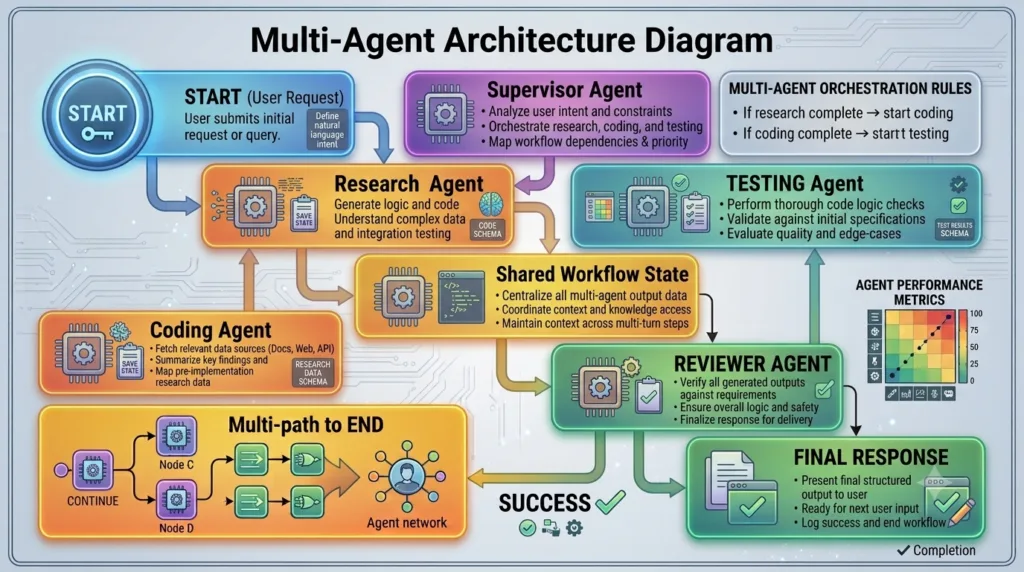
How LangGraph Agent Coordination Works
A coordinated workflow follows a structured execution process.
User Request

↓

Supervisor

↓

Task Planning

↓

Agent Assignment

↙        ↓         ↘

Research   Coding   Testing

↓

Merge Results

↓

Quality Review

↓

Final Response
The coordination layer ensures that every specialised agent contributes at the appropriate time.
Core Responsibilities of Agent Coordination
Effective coordination involves several important activities.
Task Assignment
The workflow identifies:
- Required agents
- Execution order
- Available resources
- Workflow priorities
Only the necessary agents participate in each workflow.
Dependency Management
Some tasks depend on earlier work.
Example:
Requirements

↓

Architecture

↓

Implementation

↓

Testing

↓

Deployment
Testing cannot begin before implementation exists.
Coordination guarantees that dependencies are respected.
Parallel Execution
Independent tasks may execute simultaneously.
Example:
Planning

↓

Parallel Execution

↙          ↓          ↘

Research   Security   Documentation

↓

Merge Results

↓

Reviewer
Parallel execution improves workflow performance while maintaining structured collaboration.
Conflict Resolution
Different agents may occasionally produce conflicting recommendations.
For example:
- Research Agent recommends Technology A.
- Security Agent recommends Technology B.
- Performance Agent recommends Technology C.
The coordination layer determines how these conflicts should be resolved.
Possible strategies include:
- Supervisor decision
- Human approval
- Weighted confidence scoring
- Business rules
- Additional verification
Coordination Through Shared Workflow State
Every coordinated workflow depends on shared state.
Typical information includes:
- User requirements
- Planning decisions
- Active tasks
- Completed work
- Tool outputs
- Agent recommendations
- Review comments
- Workflow metadata
Maintaining a single shared state ensures all agents work with consistent information.
Coordinating Tool Usage
Different agents often require different external tools.
Examples include:
| Agent | Typical Tools |
|---|---|
| Research Agent | Search APIs, documentation, vector databases |
| Coding Agent | Python execution, code generation tools |
| Testing Agent | Test automation frameworks |
| Deployment Agent | Cloud infrastructure APIs |
| Documentation Agent | Documentation generators |
Restricting tool access to appropriate agents improves both security and maintainability.
Human Coordination
Not every decision should be automated.
The coordination layer may involve humans when:
- Financial approval is required.
- Legal review is necessary.
- Medical decisions require expert validation.
- Security incidents need investigation.
- Software deployment requires manual approval.
Human-in-the-Loop workflows become another coordinated participant within the overall system.
Handling Agent Failures
Production AI systems must expect occasional failures.
Examples include:
- Tool execution errors
- API timeouts
- Invalid outputs
- Missing data
- Agent crashes
- Communication failures
A coordinated workflow should respond by:
- Retrying operations
- Selecting backup agents
- Escalating to human review
- Skipping non-essential tasks
- Logging diagnostic information
Graceful recovery increases workflow reliability.
Monitoring Workflow Progress
Coordination also involves continuous monitoring.
Useful metrics include:
- Active agents
- Completed tasks
- Workflow duration
- Tool execution time
- Error frequency
- Resource utilisation
- Pending approvals
- Overall progress
Monitoring enables supervisors to optimise future workflow execution.
Common Coordination Strategies
Enterprise LangGraph applications commonly use several coordination approaches.
Sequential Coordination
Agents execute one after another.
Advantages:
- Simple
- Predictable
- Easy to debug
Parallel Coordination
Independent agents execute simultaneously.
Advantages:
- Faster execution
- Better resource utilisation
- Improved scalability
Hierarchical Coordination
A supervisor manages multiple specialist agents.
Advantages:
- Better governance
- Easier orchestration
- Improved quality control
Hybrid Coordination
Many enterprise systems combine sequential, parallel, and hierarchical coordination within a single workflow.
This provides maximum flexibility.
Common Mistakes
Developers often encounter similar coordination challenges.
Over-Coordinating Simple Workflows
Not every application requires complex orchestration.
Small workflows often benefit from simpler designs.
Poor Dependency Planning
Ignoring task dependencies leads to execution failures and inconsistent outputs.
Dependencies should always be identified during workflow design.
Unclear Agent Responsibilities
Multiple agents performing similar work create duplication.
Each agent should have clearly defined responsibilities.
Weak Monitoring
Without workflow monitoring, diagnosing production issues becomes significantly more difficult.
Comprehensive logging and metrics should be included from the beginning.
Best Practices for LangGraph Agent Coordination
When designing coordinated workflows:
- Assign clear responsibilities to every agent.
- Respect workflow dependencies.
- Use parallel execution only where appropriate.
- Maintain structured shared state.
- Monitor workflow performance continuously.
- Design reliable recovery strategies.
- Restrict tool access appropriately.
- Integrate Human-in-the-Loop where necessary.
- Test coordination under realistic production conditions.
- Document orchestration logic thoroughly.
These practices help maintain scalability as workflows become more sophisticated.
Preparing for Enterprise Multi-Agent Architectures
Agent coordination completes the foundation of collaborative AI workflows. In the upcoming lessons, you will explore advanced enterprise architectures, including distributed multi-agent systems, scalable orchestration patterns, agent memory sharing, Retrieval-Augmented Generation (RAG) integration, and production deployment strategies. These topics demonstrate how LangGraph supports intelligent AI platforms capable of coordinating dozens of specialised agents across complex business environments while maintaining performance, reliability, and governance.
Real-World Importance
LangGraph Agent Coordination transforms independent AI agents into an organised, collaborative workforce capable of solving sophisticated real-world problems. By intelligently assigning responsibilities, managing dependencies, coordinating parallel execution, handling failures, integrating Human-in-the-Loop approvals, and monitoring workflow progress, developers can build enterprise-grade AI systems that remain reliable as complexity grows. Whether creating autonomous software engineering platforms, research assistants, financial analysis systems, healthcare applications, or enterprise automation solutions, effective agent coordination provides the operational framework required to deliver scalable, maintainable, and production-ready multi-agent applications.
Internal Links:
- Learn MCP – Zero to Hero
- Learn AI Agents for QA – Zero to Hero
- Playwright Automation – Zero to Hero
- LangGraph: Complete Zero to Hero
- Learn Python – Zero to Hero
- OpenAI Codex: Complete Zero to Hero
- Cursor AI: Complete Zero to Hero
- Claude Code Tutorial: Complete Zero to Hero
- Free QA Resources Built From Real Experience
- QA Glossary: Test Automation Terms Every Engineer Should Know
External Resources:
- LangGraph Official Documentation
- LangChain Documentation
- Python Official Documentation
- OpenAI Platform Documentation
- Anthropic Documentation
- Google AI Documentation
- LangGraph GitHub Repository
People Also Ask
What are LangGraph Multi-Agent Systems?
LangGraph Multi-Agent Systems allow multiple specialised AI agents to collaborate within a structured workflow, where each agent performs a dedicated responsibility such as planning, research, coding, testing, reviewing, or deployment.
Why use LangGraph Multi-Agent Systems?
LangGraph Multi-Agent Systems improve scalability, modularity, maintainability, and output quality by distributing complex tasks among specialised AI agents instead of relying on a single general-purpose model.
What is the LangGraph Supervisor Pattern?
The LangGraph Supervisor Pattern introduces a central orchestration agent that assigns tasks, monitors execution, manages workflow state, and coordinates communication between specialised agents.
How do agents communicate in LangGraph?
Agents primarily communicate through shared workflow state, allowing each agent to read relevant information, update execution progress, and contribute structured outputs without direct peer-to-peer messaging.
What is agent coordination?
Agent coordination manages task assignment, execution order, dependency handling, conflict resolution, parallel processing, and workflow monitoring to ensure multiple AI agents operate efficiently together.
Featured Snippet
What Are LangGraph Multi-Agent Systems?
LangGraph Multi-Agent Systems are collaborative AI architectures where multiple specialised agents work together under structured orchestration. Each agent performs a dedicated responsibility while sharing workflow state, enabling scalable, reliable, and production-ready AI applications capable of solving complex real-world problems.
AI Overview Answer
LangGraph Multi-Agent Systems enable developers to build enterprise AI applications using specialised agents that collaborate through supervisor patterns, shared workflow state, structured communication, and intelligent coordination. This architecture delivers greater scalability, modularity, fault tolerance, and maintainability than single-agent designs, making it ideal for advanced AI assistants, autonomous software engineering platforms, enterprise automation, and research systems.
Enjoyed this article? Explore more in-depth guides on AI engineering, automation testing, Model Context Protocol, Playwright, and intelligent software quality at www.skakarh.com. Follow QAPulse by SK for practical, production-focused tutorials designed for QA engineers, SDETs, and AI developers.