QA
QA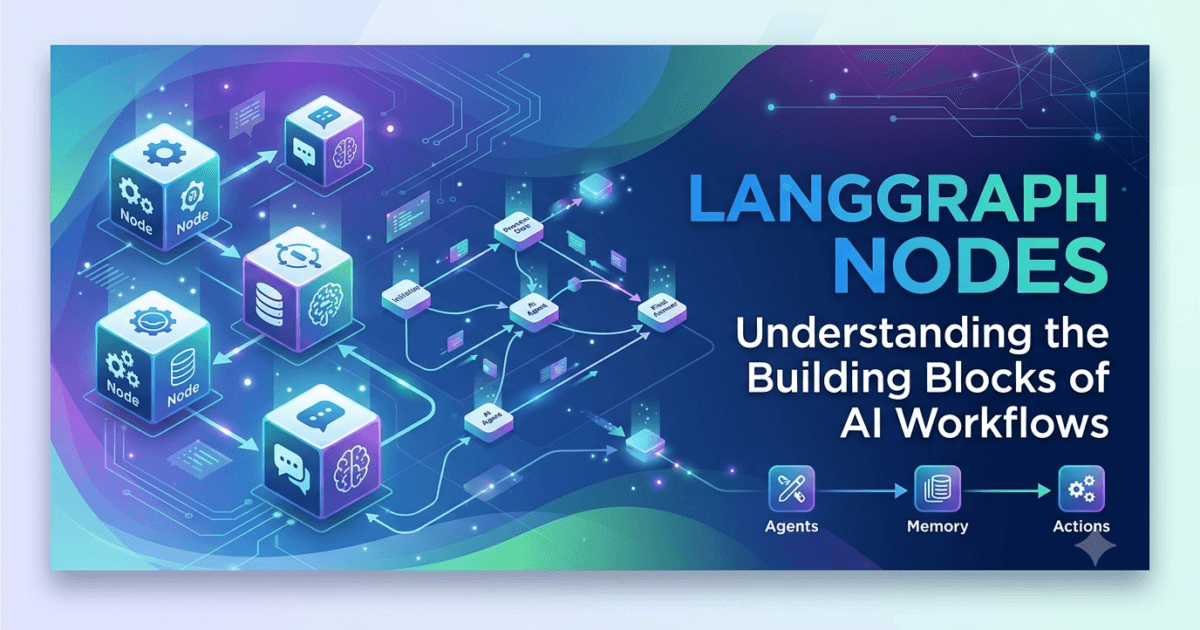
What Are Nodes in LangGraph?
LangGraph Nodes: Every LangGraph application is built from individual components called nodes. While the graph determines how a workflow is organized, nodes perform the actual work. Every action within a LangGraph workflow—whether generating text with a Large Language Model, calling an external API, retrieving documents from a vector database, or executing custom Python code—is performed by one or more nodes.
You can think of a node as a self-contained unit of execution. It accepts the current workflow state, processes information, performs a specific task, and returns an updated state for the next node in the graph.
Without nodes, a graph would simply be a collection of disconnected paths with no meaningful functionality.
Why LangGraph Nodes Are Important
Nodes provide the execution layer of a LangGraph workflow.
Instead of writing one large function responsible for every task, developers divide complex workflows into smaller, reusable nodes. Each node focuses on one responsibility, making applications easier to understand, maintain, and extend.
This modular architecture offers several advantages:
- Better code organization
- Easier debugging
- Improved reusability
- Independent testing
- Simplified maintenance
- Better scalability
These benefits become increasingly valuable as AI workflows grow more sophisticated.
How LangGraph Nodes Work
Every node follows the same general process.
Receive State

↓

Process Data

↓

Perform Task

↓

Update State

↓

Return State
The node never works in isolation. Instead, it continuously exchanges information with the shared workflow state.
The Relationship Between LangGraph Nodes and State
Nodes rely on the shared state introduced in previous lessons.
The workflow begins with an initial state.
Each node:
- Reads the current state.
- Performs its assigned operation.
- Adds or updates information.
- Returns the modified state.
The next node then continues execution using the updated information.
This shared communication model enables LangGraph to support complex workflows without manually passing variables between functions.
Common Types of LangGraph Nodes
Different applications require different types of nodes.
Some of the most common include:
LLM Nodes
These nodes interact with Large Language Models to generate text, answer questions, summarize information, or perform reasoning tasks.
Typical responsibilities include:
- Chat responses
- Content generation
- Code generation
- Translation
- Summarization
Tool Nodes
Tool nodes execute external functions or services.
Examples include:
- Web search
- REST API calls
- Database queries
- File operations
- Python functions
- MCP tools
These nodes extend AI capabilities beyond text generation.
Retrieval Nodes
Retrieval nodes collect external knowledge before an LLM generates a response.
Common data sources include:
- Vector databases
- Document repositories
- Knowledge bases
- Enterprise search systems
These nodes play a key role in Retrieval-Augmented Generation (RAG) applications.
Validation Nodes
Validation nodes verify whether previous workflow steps produced acceptable results.
Typical checks include:
- Response quality
- Data completeness
- Policy compliance
- Output formatting
- Confidence thresholds
Validation helps improve workflow reliability.
Decision Nodes
Decision nodes determine which execution path the graph should follow.
Routing decisions may depend on:
- User intent
- Available data
- Validation results
- Tool responses
- Business rules
Decision nodes enable adaptive AI behavior.
Building Modular Workflows
Instead of creating one large workflow component, developers typically divide work into multiple specialized nodes.
Example:
User Request

↓

Planner Node

↓

Retriever Node

↓

LLM Node

↓

Validator Node

↓

Response Node
Each node performs a single responsibility before passing control to the next stage.
Designing Effective LangGraph Nodes
A well-designed node should have one clearly defined purpose.
Effective nodes are:
- Small
- Reusable
- Predictable
- Easy to test
- Independent
- Well documented
Keeping responsibilities focused makes workflows easier to expand and maintain.
Node Inputs and Outputs
Every node operates using the same pattern.
Input:
- Current workflow state
Processing:
- Business logic
- AI reasoning
- Tool execution
- Data transformation
Output:
- Updated workflow state
This consistent execution model simplifies graph development regardless of workflow complexity.
Common Node Design Mistakes
Developers often make several mistakes when designing nodes.
Creating Large Nodes
Large nodes that perform multiple unrelated tasks become difficult to understand and maintain.
Divide responsibilities into smaller components whenever possible.
Mixing Business Logic and AI Logic
Business rules should remain separate from AI reasoning.
This separation improves testing and allows workflows to evolve more easily.
Modifying Unrelated State Fields
Nodes should update only the information relevant to their assigned responsibility.
Unnecessary changes increase workflow complexity.
Ignoring Error Handling
Nodes should anticipate failures from:
- APIs
- Databases
- External tools
- AI providers
Graceful error handling improves workflow stability.
Best Practices for Node Development
When creating LangGraph nodes:
- Give every node a single responsibility.
- Use descriptive names.
- Keep processing logic simple.
- Return consistent state updates.
- Handle errors appropriately.
- Write reusable code.
- Test nodes independently.
- Document node behavior.
- Avoid unnecessary dependencies.
- Monitor execution performance.
Following these practices results in workflows that remain scalable and maintainable as applications grow.
Real-World Importance
Nodes are the execution engine of every LangGraph application. Whether building an AI coding assistant, a customer support platform, a Retrieval-Augmented Generation system, or a multi-agent enterprise solution, every meaningful action is performed through specialized nodes. By designing modular, reusable, and well-structured nodes, developers can create AI workflows that are easier to debug, extend, and optimize, enabling production-ready applications capable of handling increasingly complex real-world scenarios.
LangGraph Edges: Connecting LangGraph Nodes and Controlling Workflow Execution
Understanding the Purpose of Edges
In the previous lesson, we explored how nodes perform the actual work inside a LangGraph application. However, nodes alone cannot create an intelligent workflow. They need a mechanism that determines what should happen next after a node finishes its task.
This is the responsibility of edges.
An edge is the connection between two nodes in a LangGraph workflow. It defines how execution moves from one node to another and allows developers to build workflows that can branch, loop, pause, or terminate based on the current state.
While nodes perform actions, edges control the flow of those actions.
Together, nodes and edges form the foundation of every graph-based AI application.
What is an Edge?
An edge is a directional connection between two nodes.
When a node completes its execution, the workflow follows the edge to determine which node should execute next.
A simple workflow looks like this:
Start

↓

Input Node

↓

LLM Node

↓

Output Node

↓

End
Each arrow represents an edge that connects one execution step to another.
Why Edges Are Important
Without edges, nodes would exist independently with no defined execution order.
Edges provide several important capabilities:
- Connect workflow components
- Define execution order
- Enable conditional routing
- Support looping
- Build complex AI pipelines
- Coordinate multiple AI agents
- Improve workflow organization
As workflows become larger, edge design becomes increasingly important.
How Workflow Execution Moves
LangGraph executes workflows by following connected edges.
The general process is:
Execute Node

↓

Follow Edge

↓

Execute Next Node

↓

Update State

↓

Repeat
Execution continues until the workflow reaches its designated end point.
Types of Edges in LangGraph
Different workflows require different routing strategies.
Sequential Edges
Sequential edges are the simplest type.
Execution always moves directly to the next node.
Example:
User Input

↓

Planner

↓

LLM

↓

Response
This approach works well for straightforward processing pipelines.
Conditional Edges
Many AI workflows need to make decisions during execution.
Conditional edges allow the graph to select different paths depending on the current workflow state.
Example:
User Request

↓

Decision

↙          ↘

Search     Generate Answer

↘          ↙

Response
Conditional routing enables applications to adapt dynamically rather than following a fixed sequence.
Multiple Destination Edges
A single node may connect to several possible destinations.
The selected path depends on workflow conditions such as:
- User intent
- Validation results
- Tool availability
- Confidence score
- Business rules
This flexibility allows developers to create intelligent decision-making systems.
Edge Execution and Shared State
Edges do not modify the workflow state directly.
Instead, they determine which node receives the updated state next.
The execution sequence typically follows this pattern:
Current State

↓

Node Execution

↓

Updated State

↓

Edge Selection

↓

Next Node
The state continues to evolve while edges determine the execution path.
Conditional Routing Examples
Conditional routing is one of LangGraph’s most powerful capabilities.
Examples include:
Tool Selection
The workflow determines whether an external tool should be called.
Knowledge Retrieval
If additional information is required, execution moves to a retrieval node.
Otherwise, the workflow proceeds directly to response generation.
Human Approval
Enterprise workflows may pause for manual review before continuing.
Error Recovery
If an operation fails, execution moves to a retry or recovery node.
Each scenario uses edges to adapt workflow behavior dynamically.
Designing Efficient Workflow Paths
Well-designed edges help create workflows that are easier to understand and maintain.
Recommended practices include:
- Keep routing logic simple.
- Use meaningful decision criteria.
- Avoid unnecessary branches.
- Minimize repeated execution.
- Design predictable execution paths.
Simple routing generally produces more reliable workflows than overly complex branching structures.
Common Edge Design Mistakes
Developers new to LangGraph often encounter similar routing problems.
Excessive Branching
Too many conditional paths can make workflows difficult to visualize and maintain.
Keep routing focused on genuine decision points.
Circular Workflows Without Exit Conditions
Loops should always include a condition that allows execution to finish.
Otherwise, workflows may never terminate.
Mixing Routing with Business Logic
Business rules belong inside nodes.
Edges should focus on determining where execution proceeds next.
Ignoring Error Paths
Every production workflow should define how execution continues when unexpected failures occur.
Including recovery routes improves reliability.
Best Practices for Edge Design
When designing LangGraph edges:
- Connect nodes with a clear purpose.
- Keep execution paths predictable.
- Use conditional routing only when necessary.
- Plan recovery paths for failures.
- Avoid unnecessary complexity.
- Review execution flow visually.
- Test every routing scenario.
- Document important decision points.
- Monitor workflow execution during production.
These practices help developers build AI systems that remain understandable as workflows become more advanced.
Preparing for Conditional Graphs
Basic edges establish the foundation for workflow execution, but many production AI systems require more advanced routing capabilities.
In the next lessons, you will learn how LangGraph uses conditional edges to support:
- Intelligent decision-making
- Dynamic workflow selection
- Retry mechanisms
- Loop execution
- Human-in-the-loop approval
- Multi-agent coordination
These advanced routing techniques transform static workflows into adaptive AI systems capable of responding intelligently to changing conditions.
Real-World Importance
Edges are the navigation system of every LangGraph application. They determine how information moves through a workflow, how decisions are made, and how AI agents coordinate complex tasks. By designing clear execution paths, implementing thoughtful routing strategies, and planning for both successful and exceptional scenarios, developers can create graph-based AI applications that are scalable, reliable, and capable of solving sophisticated real-world problems across a wide range of industries.
LangGraph Conditional Edges: Building Intelligent and Dynamic AI Workflows
What are Conditional Edges?
In the previous lesson, we learned that edges determine how execution moves from one node to another. While sequential edges always follow the same path, many real-world AI applications must make decisions while running. An AI assistant may need to decide whether to search a knowledge base, call an external API, ask the user for more information, or generate a response immediately.
Conditional edges allow LangGraph workflows to make these decisions dynamically.
Instead of following a fixed execution path, the workflow evaluates the current state and chooses the most appropriate next node. This ability transforms a static workflow into an adaptive AI system capable of responding intelligently to different situations.
Conditional routing is one of the defining features that makes LangGraph suitable for production-grade AI applications.
Why Conditional Routing Is Important
Real-world AI systems rarely follow a single execution path.
Different users ask different questions, external tools may succeed or fail, retrieved information may be sufficient or incomplete, and business rules often require different actions under different conditions.
Conditional edges allow workflows to adapt automatically.
They help developers build applications that can:
- Make intelligent decisions
- Select appropriate tools
- Recover from failures
- Skip unnecessary processing
- Optimize execution time
- Support complex business logic
Without conditional routing, developers would have to create multiple separate workflows for different scenarios.
How Conditional Edges Work
A conditional edge evaluates the current workflow state before determining the next destination.
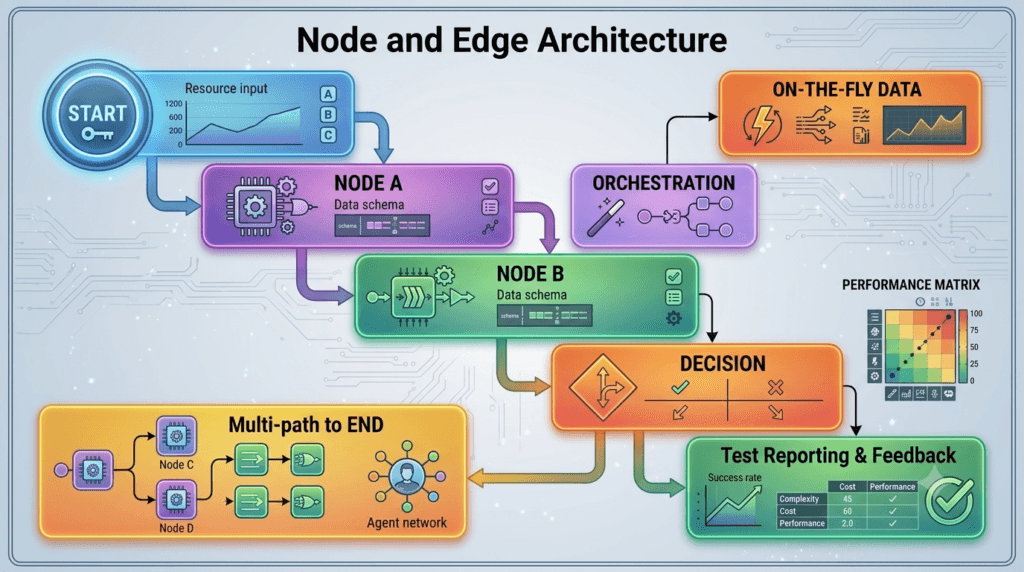
The process typically follows this sequence.
Current State

↓

Decision Node

↓

Evaluate Condition

↓

Select Next Node

↓

Continue Execution
Instead of always following the same route, the workflow adapts based on available information.
Simple Conditional Workflow
Consider an AI assistant answering user questions.
User Question

↓

Decision

↙              ↘

Search Docs    Generate Answer

↘              ↙

Final Response
If the question requires external knowledge, the workflow performs a search.
Otherwise, it generates a response directly.
Common Decision Scenarios
Conditional edges are useful in many situations.
Knowledge Retrieval
Determine whether information should be retrieved from a knowledge base before calling the language model.
Tool Selection
Choose between multiple available tools depending on the user’s request.
Examples include:
- Calculator
- Database
- Search engine
- Weather API
- Email service
Validation
If generated output passes validation, continue.
If validation fails, retry or correct the response.
Human Approval
Enterprise applications may require manual approval before continuing.
Error Recovery
If an API request fails, route execution to a fallback service or retry mechanism.
These decisions allow workflows to behave intelligently under changing conditions.
Conditional Routing with Shared State
Conditional edges rely on the workflow state.
The decision node examines one or more state values before selecting the next path.
For example, the state may contain:
- User intent
- Validation status
- Confidence score
- Retrieved documents
- Tool availability
- Retry count
- Error information
The richer the workflow state, the more informed the routing decisions become.
Building Adaptive AI Workflows
Conditional routing enables workflows that continuously adapt during execution.
Example:
User Input

↓

Intent Detection

↓

Decision

↙        ↓         ↘

Search   Calculator   Chat

↘        ↓         ↙

Response Generator

↓

Final Output
Rather than forcing every request through identical processing, the workflow selects only the components required for that specific task.
Multi-Agent Decision Making
Conditional edges also play a central role in multi-agent systems.
Example:
Planner Agent

↓

Task Analysis

↓

Decision

↙          ↓           ↘

Research   Coding   Documentation

↘          ↓           ↙

Reviewer

↓

Final Response
The planner determines which specialist agent should perform the next task.
This enables efficient collaboration while avoiding unnecessary work.
Designing Effective Conditions
Well-designed conditions should be:
- Simple
- Predictable
- Easy to understand
- Based on meaningful data
- Independent of unrelated logic
Complex routing rules become difficult to debug and maintain.
Whenever possible, each decision should evaluate one clearly defined condition.
Common Mistakes When Using Conditional Edges
Developers often encounter similar challenges.
Creating Too Many Decision Points
Every workflow does not require conditional routing.
Use decision nodes only where multiple execution paths genuinely exist.
Combining Multiple Decisions
Avoid evaluating many unrelated conditions inside a single routing decision.
Breaking complex decisions into smaller steps improves readability.
Ignoring Unexpected Values
Conditions should handle unexpected or missing state values gracefully.
Including default routes prevents workflow failures.
Forgetting Error Paths
Production applications should define fallback routes whenever external services fail.
Planning recovery paths improves workflow reliability.
Best Practices for Conditional Routing
When designing conditional edges:
- Base routing decisions on the workflow state.
- Keep conditions easy to understand.
- Minimize unnecessary branching.
- Define fallback routes.
- Handle unexpected values safely.
- Test every execution path.
- Document routing logic.
- Monitor routing decisions during production.
Following these practices creates workflows that remain reliable as applications grow.
Preparing for Loops and Advanced Execution
Conditional edges form the foundation for many advanced LangGraph capabilities.
Later lessons will build on this knowledge to implement:
- Workflow loops
- Retry mechanisms
- Reflection agents
- Human-in-the-loop approval
- Parallel execution
- Autonomous planning
- Multi-agent orchestration
Each of these advanced patterns depends on intelligent routing decisions.
Real-World Importance
Conditional edges enable LangGraph applications to move beyond fixed execution pipelines and become adaptive AI systems capable of making intelligent decisions during runtime. Whether selecting tools, coordinating multiple agents, retrieving external knowledge, validating responses, or recovering from failures, conditional routing allows workflows to respond dynamically to changing conditions. This flexibility is one of the primary reasons LangGraph is widely adopted for building scalable, production-ready AI applications that must operate reliably in complex real-world environments.
LangGraph Workflow Patterns: Sequential, Conditional, Parallel, and Loop-Based Execution
Understanding Workflow Patterns in LangGraph
After learning about nodes, edges, and conditional routing, the next step is understanding how these components work together to create complete AI workflows. Every LangGraph application follows one or more workflow patterns depending on the problem it is designed to solve.
A workflow pattern defines how execution moves through the graph. Some applications only require a simple sequence of steps, while others need conditional decisions, parallel processing, repeated execution, or combinations of multiple patterns.
Choosing the appropriate workflow pattern is an important architectural decision because it directly affects performance, maintainability, and scalability.
What Is a Workflow Pattern?
A workflow pattern is a reusable execution structure that defines how nodes are connected and how the workflow progresses from the starting point to the final response.
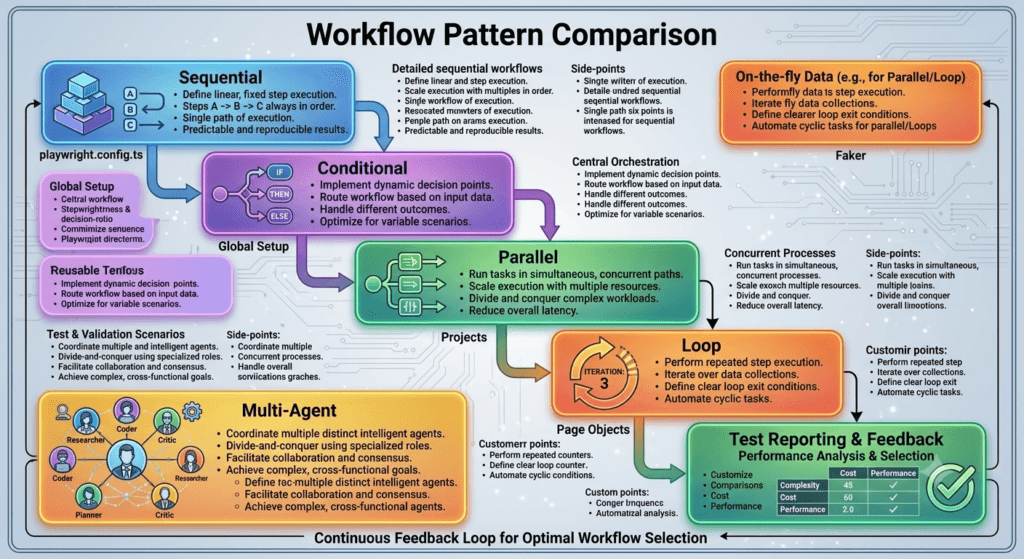
Instead of designing every graph from scratch, developers use established patterns to solve common problems efficiently.
Some patterns are simple enough for basic chatbots, while others are designed for enterprise AI systems with multiple agents and external integrations.
Sequential Workflow Pattern
The sequential pattern is the simplest execution model.
Each node executes one after another in a predefined order.
Start

↓

Input Node

↓

Retriever

↓

LLM

↓

Response

↓

End
This pattern is ideal when every request follows the same processing steps.
Typical use cases include:
- Text summarization
- Translation
- Content generation
- Simple question answering
- Data transformation
Although easy to implement, sequential workflows offer limited flexibility.
Conditional Workflow Pattern
Some applications must make decisions while executing.
Conditional workflows evaluate the shared state and choose different execution paths based on specific conditions.
User Input

↓

Intent Detection

↓

Decision

↙           ↘

Search      Generate

↘           ↙

Response
Conditional workflows are commonly used for:
- Tool selection
- Knowledge retrieval
- User intent classification
- Human approval
- Error handling
This pattern allows applications to adapt dynamically to different situations.
Parallel Workflow Pattern
Certain tasks can be executed simultaneously instead of sequentially.
Parallel workflows improve efficiency by allowing multiple independent operations to run at the same time.
User Request

↓

Parallel Tasks

↙        ↓        ↘

Search   API    Database

↘        ↓        ↙

Merge Results

↓

Final Response
Typical applications include:
- Multi-source data retrieval
- Concurrent API requests
- Document analysis
- Multi-agent collaboration
- Data aggregation
Parallel execution reduces overall processing time when tasks do not depend on one another.
Loop-Based Workflow Pattern
Some workflows require repeated execution until a condition is satisfied.
Loop-based workflows continue processing until the desired result is achieved.
Generate Answer

↓

Validate

↓

Successful?

↙           ↘

No           Yes

↓

Improve

↓

Retry
Looping is particularly useful for:
- Self-correction
- Response refinement
- Retry mechanisms
- Quality validation
- Planning agents
A properly designed loop always includes a clear exit condition to prevent infinite execution.
Multi-Agent Workflow Pattern
LangGraph also supports workflows where multiple specialized AI agents collaborate to solve complex tasks.
User Request

↓

Planner Agent

↓

Task Assignment

↙        ↓        ↘

Research  Coding  Documentation

↘        ↓        ↙

Reviewer

↓

Final Response
Each agent contributes specialized knowledge while sharing information through the workflow state.
This modular design improves scalability and maintainability.
Combining Multiple Workflow Patterns
Real-world LangGraph applications rarely rely on a single execution pattern.
A production workflow may combine several approaches.
Example:
Sequential Start

↓

Decision

↙          ↘

Parallel Tasks   Loop

↘          ↙

Merge Results

↓

Final Output
Combining patterns allows developers to build intelligent workflows capable of handling diverse business requirements.
Choosing the Right Workflow Pattern
The appropriate pattern depends on the application’s goals.
Sequential
Best for predictable, linear processing.
Conditional
Best for workflows requiring dynamic decisions.
Parallel
Best when multiple independent tasks can execute simultaneously.
Loop-Based
Best for iterative reasoning, validation, and retries.
Multi-Agent
Best for solving complex problems through collaboration between specialized AI agents.
Selecting the simplest pattern that satisfies the requirements usually produces the most maintainable solution.
Common Workflow Design Mistakes
Developers frequently encounter several architectural issues.
Using Complex Patterns Unnecessarily
Not every application needs conditional routing, parallel execution, or multiple agents.
Simple workflows are often easier to maintain.
Missing Exit Conditions
Loop-based workflows must always define clear termination criteria.
Otherwise, execution may continue indefinitely.
Poor Task Separation
Each node should have a single responsibility.
Combining unrelated operations reduces readability and reusability.
Ignoring Performance
Adding unnecessary nodes or workflow stages increases execution time without improving functionality.
Design workflows with efficiency in mind.
Best Practices for Workflow Design
When building LangGraph workflows:
- Select the simplest suitable workflow pattern.
- Keep nodes modular and reusable.
- Base routing decisions on the workflow state.
- Design meaningful execution paths.
- Test every workflow branch.
- Monitor execution performance.
- Handle failures gracefully.
- Document workflow architecture.
- Review and optimize workflows regularly.
These practices help developers create applications that remain scalable as business requirements evolve.
Preparing for Advanced LangGraph Development
The workflow patterns introduced in this lesson form the architectural foundation for advanced LangGraph features explored later in this series.
Upcoming topics include:
- Tool calling
- Checkpointing
- Memory persistence
- Human-in-the-loop workflows
- Multi-agent orchestration
- Streaming responses
- Production deployment
- Workflow debugging and monitoring
Each advanced capability builds upon the workflow patterns discussed here.
Real-World Importance
Workflow patterns are the architectural backbone of every LangGraph application. Whether building a simple AI assistant, a Retrieval-Augmented Generation platform, a coding agent, or a large-scale enterprise automation system, selecting the appropriate execution pattern determines how efficiently the application processes information, coordinates AI agents, integrates external tools, and adapts to changing conditions. By understanding sequential, conditional, parallel, loop-based, and multi-agent workflows, developers gain the knowledge needed to design intelligent, scalable, and production-ready AI systems capable of solving increasingly complex real-world challenges.
Internal Links:
- Learn MCP – Zero to Hero
- Learn AI Agents for QA – Zero to Hero
- Playwright Automation – Zero to Hero
- LangGraph: Complete Zero to Hero
- Learn Python – Zero to Hero
- OpenAI Codex: Complete Zero to Hero
- Cursor AI: Complete Zero to Hero
- Claude Code Tutorial: Complete Zero to Hero
- Free QA Resources Built From Real Experience
- QA Glossary: Test Automation Terms Every Engineer Should Know
External Resources:
- LangGraph Official Documentation
- LangChain Documentation
- Python Official Documentation
- OpenAI Platform Documentation
- Anthropic Documentation
- Google AI Documentation
- LangGraph GitHub Repository
People Also Ask
What are LangGraph Nodes?
LangGraph Nodes are the individual execution units within a LangGraph workflow. Each node performs a specific task, such as calling an LLM, retrieving information, executing a tool, validating results, or updating the workflow state.
What is the difference between nodes and edges?
Nodes perform work, while edges define how execution moves between nodes. Together they create graph-based AI workflows.
What are conditional edges?
Conditional edges evaluate the workflow state and dynamically determine which node should execute next, enabling intelligent and adaptive AI workflows.
Can LangGraph execute workflows in parallel?
Yes. LangGraph supports parallel execution, allowing multiple independent nodes or branches to run simultaneously before merging their results.
Why are workflow patterns important?
Workflow patterns help developers build scalable, maintainable, and reusable AI systems by organizing execution into proven architectural structures such as sequential, conditional, parallel, and loop-based workflows.
Featured Snippet
What Are LangGraph Nodes?
LangGraph Nodes are the core execution units of a LangGraph workflow. They receive the shared workflow state, perform a specific task such as reasoning, retrieval, validation, or tool execution, update the state, and pass execution to the next node through graph edges.
AI Overview Answer
LangGraph Nodes form the execution engine of graph-based AI applications. Combined with edges, conditional routing, and reusable workflow patterns, they enable developers to build intelligent AI systems that adapt dynamically, coordinate multiple components, and scale from simple assistants to enterprise-grade multi-agent applications.
Enjoyed this article? Explore more in-depth guides on AI engineering, automation testing, Model Context Protocol, Playwright, and intelligent software quality at www.skakarh.com. Follow QAPulse by SK for practical, production-focused tutorials designed for QA engineers, SDETs, and AI developers.