QA
QA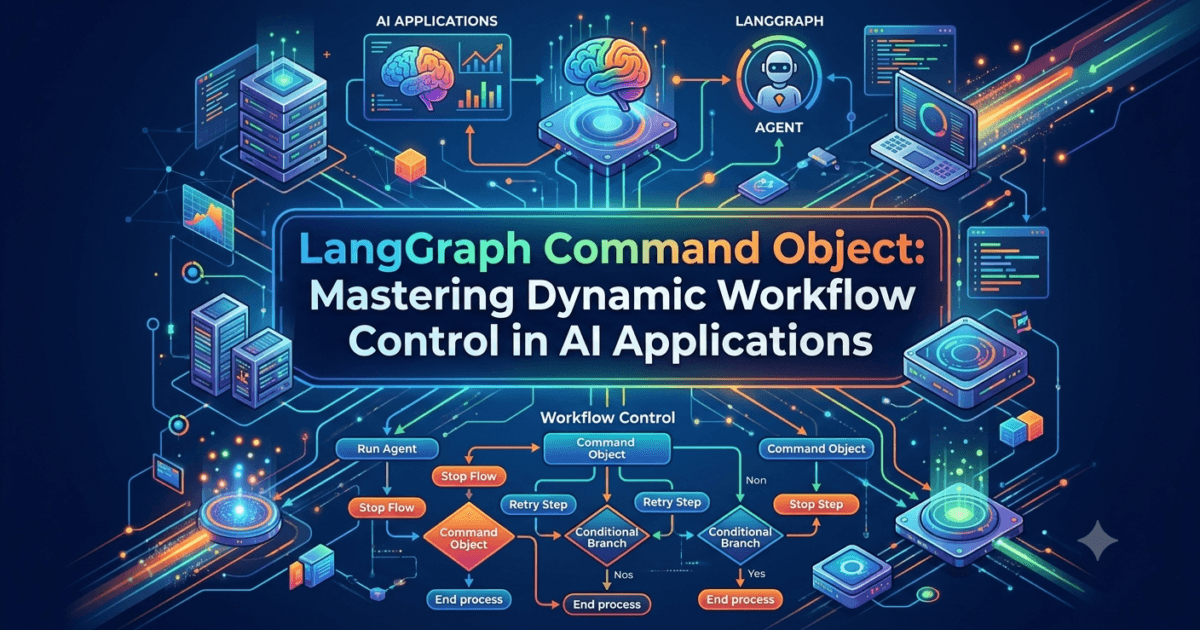
Introduction
As LangGraph applications become more sophisticated, developers often need workflows that can make intelligent decisions while simultaneously updating workflow state and controlling graph execution. Traditional graph execution models typically separate these responsibilities. One node updates the workflow state, while another node determines where execution should continue.
Although this approach works well for simple workflows, it quickly becomes difficult to manage as AI applications grow larger.
Imagine building an enterprise AI assistant capable of:
- Routing customer requests
- Delegating work to specialized agents
- Updating shared workflow state
- Triggering parallel execution
- Interrupting execution for approval
- Dynamically selecting the next workflow node
If every decision required separate routing logic and state updates, the workflow would become unnecessarily complex.
This challenge is solved by one of the most powerful features introduced in modern LangGraph development—the LangGraph Command Object.
The LangGraph Command Object allows a node to perform two responsibilities simultaneously:
- Update the shared workflow state.
- Control where graph execution continues next.
Instead of separating state updates from routing decisions, the LangGraph Command Object combines both operations into a single, structured return value.
This significantly simplifies workflow design while making AI applications more dynamic, modular, and maintainable.
The LangGraph Command Object is particularly valuable when building:
- Multi-agent systems
- Supervisor-based architectures
- Dynamic routing workflows
- Enterprise orchestration platforms
- Human approval systems
- Agent delegation pipelines
- Complex business automation
As workflows become increasingly intelligent, developers frequently need execution paths that depend on runtime decisions rather than predefined graph edges. The LangGraph Command Object provides exactly this capability.
In this lesson, you’ll learn what the LangGraph Command Object is, how it works, why it is becoming a fundamental part of modern LangGraph development, and how it enables developers to build highly flexible AI workflows that adapt dynamically during execution.
What Is the LangGraph Command Object?
The LangGraph Command Object is a special return type that allows a workflow node to both modify the graph’s shared state and determine the next node that should execute.
Instead of returning only updated state values, a node returns a structured command describing both:
- State updates
- Graph navigation
A simplified workflow looks like this:
                  User Request
                        │
                        ▼
                 Processing Node
                        │
                        ▼
            LangGraph Command Object
          ┌─────────────┴─────────────┐
          │                           │
          ▼                           ▼
   Update Workflow State      Select Next Node
          │                           │
          └─────────────┬─────────────┘
                        ▼
                Continue Execution
This dual responsibility makes the LangGraph Command Object far more expressive than traditional node return values.
Instead of relying entirely on predefined conditional edges, execution decisions can now be made directly inside workflow logic.
Why Was the LangGraph Command Object Introduced?
Earlier LangGraph workflows often separated two independent responsibilities.
First, a node produced updated workflow state.
Second, conditional edges examined that state and decided where execution should continue.
A traditional workflow looked like this:
User Request

      │

Processing Node

      │

Update State

      │

Conditional Edge

      │

Next Node
Although this architecture remains useful, it introduces additional routing logic that becomes increasingly difficult to maintain in large AI systems.
Imagine an AI supervisor coordinating ten specialized agents.
Every routing decision requires:
- Updating workflow state
- Setting routing variables
- Defining multiple conditional edges
- Maintaining branching logic
As applications grow, the graph itself becomes larger than the business logic.
The LangGraph Command Object simplifies this architecture by allowing routing decisions to occur naturally inside the processing node itself.
Instead of separating routing and execution, the workflow becomes significantly cleaner.
How the LangGraph Command Object Works
Every execution node receives the current workflow state.
The node analyzes that state before making two decisions:
- What information should be stored?
- Which node should execute next?
Rather than returning only updated data, the node returns a command.
Conceptually, the execution flow becomes:
Receive Workflow State

        │

Business Logic

        │

Create Command

        │

────────┼────────

│               │

State Update    Next Node

│               │

────────┼────────

        ▼

Continue Workflow
This architecture enables LangGraph Command Object workflows to behave dynamically while remaining easy to understand.
Problems Solved by the LangGraph Command Object
The LangGraph Command Object addresses several common challenges encountered when building enterprise AI workflows.
Simplified Routing Logic
Instead of scattering routing decisions across multiple conditional edges, developers keep business logic inside the node where the decision is made.
This reduces graph complexity considerably.
Cleaner Graphs
Large enterprise workflows often contain dozens of routing edges.
By moving execution decisions into the LangGraph Command Object, the visual graph becomes easier to read and maintain.
Better Maintainability
Business rules frequently change.
Updating one node is significantly easier than modifying multiple routing edges throughout a large graph.
Dynamic Execution
Unlike static workflow engines, the LangGraph Command Object allows execution paths to change at runtime based on the current workflow state.
This flexibility is particularly useful for intelligent AI applications.
Where the LangGraph Command Object Is Used
The LangGraph Command Object appears in many advanced LangGraph architectures.
Supervisor Pattern
A supervisor agent evaluates the current task and decides which specialized agent should execute next.
The supervisor returns a LangGraph Command Object containing:
- Updated workflow information
- Selected agent
Multi-Agent Collaboration
Different agents complete different responsibilities.
Depending on intermediate results, the workflow dynamically routes execution to:
- Research Agent
- Coding Agent
- Reviewer Agent
- Documentation Agent
- Testing Agent
The LangGraph Command Object controls this delegation without requiring dozens of conditional edges.
Enterprise Automation
Business workflows often require different processing paths.
Examples include:
- Customer onboarding
- Loan approval
- Insurance claims
- Purchase approvals
- IT service management
Each decision updates workflow state while determining the next business operation.
LangGraph Command Object vs Traditional Conditional Routing
Many developers initially compare the LangGraph Command Object with Conditional Edges.
Although they solve similar problems, they operate differently.
Traditional Conditional Edges determine the next node after examining workflow state.
The LangGraph Command Object allows the processing node itself to decide both the state update and the next execution step.
This creates a more cohesive architecture where decision-making remains close to business logic rather than being distributed across multiple graph components.
Benefits of Using the LangGraph Command Object
Organizations increasingly adopt the LangGraph Command Object because it offers several important advantages.
Reduced Workflow Complexity
Routing logic becomes significantly easier to understand.
Better Readability
Graph diagrams contain fewer routing branches.
Improved Flexibility
Execution adapts dynamically to changing workflow conditions.
Easier Debugging
Business decisions remain inside processing nodes instead of being distributed throughout the graph.
Enterprise Scalability
Large AI systems become easier to extend as additional routing rules are introduced.
Understanding the Architecture of the LangGraph Command Object
After understanding what the LangGraph Command Object is, the next step is to explore how it works internally within a LangGraph workflow.
One of the biggest differences between beginner-level LangGraph applications and enterprise-grade AI systems is how workflow execution is controlled. Small workflows often rely on predefined graph edges that connect one node to another in a fixed manner. While this approach works well for simple applications, it becomes increasingly difficult to maintain when workflows need to make intelligent decisions at runtime.
The LangGraph Command Object was designed to solve this problem.
Instead of separating workflow state updates from routing logic, the LangGraph Command Object allows both operations to occur together. A node can update the shared workflow state while simultaneously instructing LangGraph which node should execute next.
This design significantly simplifies workflow orchestration and makes AI applications far more adaptive.
A typical LangGraph Command Object architecture looks like this:
                  Current Workflow State
                           │
                           ▼
                  Processing Node
                           │
            Business Logic & Reasoning
                           │
                           ▼
               LangGraph Command Object
                ┌──────────┴──────────┐
                ▼                     ▼
        Update Shared State     Select Next Node
                │                     │
                └──────────┬──────────┘
                           ▼
                 Continue Graph Execution
Instead of treating state management and routing as separate concerns, the LangGraph Command Object unifies them into a single execution model.
The Two Responsibilities of the LangGraph Command Object
Every LangGraph Command Object performs two primary responsibilities.
Updating the Workflow State
Like every LangGraph node, the LangGraph Command Object can modify the shared workflow state.
This may include:
- User messages
- Agent responses
- Task status
- Retrieved documents
- API results
- Execution metadata
- Business variables
- Workflow history
For example, after processing a customer request, the workflow state might contain:
Customer Name:
John Smith

Priority:
High

Department:
Technical Support

Status:
Awaiting Assignment
The updated state immediately becomes available to all downstream nodes.
Controlling Graph Execution
The second responsibility is deciding where execution continues.
Instead of allowing predefined graph edges to determine the next node, the LangGraph Command Object explicitly specifies the destination.
For example:
Current Node

        │

Business Decision

        │

────────┼────────

│               │

Technical     Billing

│               │

▼               ▼

Support      Finance
The node itself decides the routing logic based on the current workflow state.
This makes the workflow significantly more dynamic than traditional graph execution.
Workflow Lifecycle of the LangGraph Command Object
A LangGraph Command Object follows a predictable execution sequence.
Receive Workflow State

        │

Analyze Current Data

        │

Execute Business Logic

        │

Update Workflow State

        │

Select Next Node

        │

Return Command

        │

Continue Execution
Every execution cycle follows the same pattern regardless of application complexity.
This consistency makes LangGraph Command Object workflows easier to debug and maintain.
Shared State and the LangGraph Command Object
One reason the LangGraph Command Object is so powerful is its close integration with LangGraph’s shared workflow state.
Every node receives the latest state.
Example:
Workflow State

User Request:
Generate API documentation

Current Agent:
Planner

Progress:
40%

Status:
Planning Complete
After processing, the LangGraph Command Object updates the workflow.
Workflow State

Current Agent:
Documentation

Progress:
60%

Status:
Documentation Started
At the same time, the workflow transitions directly to the Documentation Agent.
Both operations happen together.
Dynamic Decision-Making
Enterprise AI applications rarely follow one fixed execution path.
Instead, decisions depend on runtime information.
For example:
Customer Priority

        │

────────┼────────

│               │

Standard      Premium

│               │

▼               ▼

Queue A      Queue B
Rather than relying on multiple conditional edges, the LangGraph Command Object performs this routing internally.
This keeps decision-making close to the business logic that generated it.
LangGraph Command Object in Multi-Agent Systems
The LangGraph Command Object is particularly valuable in multi-agent architectures.
Imagine an AI platform containing:
- Planner Agent
- Research Agent
- Coding Agent
- Testing Agent
- Documentation Agent
- Reviewer Agent
A supervisor evaluates the current workflow state before deciding which specialist should execute next.
                 Supervisor Agent
                        │
        ┌───────────────┼───────────────┐
        ▼               ▼               ▼
 Research Agent   Coding Agent   Review Agent
Instead of relying on dozens of routing edges, the supervisor returns a LangGraph Command Object specifying both:
- Updated workflow state
- Selected specialist
This architecture scales much more effectively as additional agents are introduced.
LangGraph Command Object vs Conditional Edges
Many developers wonder whether the LangGraph Command Object replaces Conditional Edges.
The answer is no.
Both features support dynamic workflows, but they solve different architectural problems.
| Conditional Edges | LangGraph Command Object |
|---|---|
| Routing logic exists outside the node | Routing logic exists inside the node |
| State updated first, routing evaluated later | State update and routing occur together |
| Better for simple branching | Better for intelligent workflow orchestration |
| Separate routing functions | Unified execution model |
| Excellent for beginner workflows | Preferred for advanced enterprise workflows |
Both approaches remain valuable depending on workflow complexity.
LangGraph Command Object vs Send API
The LangGraph Command Object is also different from the Send API.
The LangGraph Command Object controls the next execution path.
The Send API enables dynamic parallel execution by creating multiple tasks simultaneously.
Comparison:
| LangGraph Command Object | Send API |
|---|---|
| Controls routing | Creates parallel execution |
| Single workflow continuation | Multiple workflow branches |
| Updates state and routing | Dispatches work to multiple nodes |
| Ideal for supervisors | Ideal for parallel processing |
Enterprise AI platforms often combine both techniques within the same application.
Advantages of the LangGraph Command Object
Organizations increasingly adopt the LangGraph Command Object because it simplifies complex workflow orchestration.
Cleaner Graphs
Large workflows contain fewer routing edges.
Better Maintainability
Business rules remain inside execution nodes rather than scattered across multiple routing functions.
Improved Readability
Developers can understand workflow behavior by reading node logic instead of tracing dozens of graph connections.
Dynamic Intelligence
The workflow adapts naturally to changing business conditions.
Enterprise Scalability
As workflows grow, the LangGraph Command Object continues to provide a clean and modular execution model without significantly increasing graph complexity.
Preparing to Implement the LangGraph Command Object
Understanding the architecture of the LangGraph Command Object provides the foundation for building intelligent, production-ready AI workflows. By combining workflow state updates with execution control, the LangGraph Command Object enables developers to create dynamic graphs that are easier to read, maintain, and extend than traditional routing architectures.
Implementing the LangGraph Command Object Using Python
Now that you understand the architecture of the LangGraph Command Object, it’s time to explore how developers use it when building intelligent LangGraph applications.
One of the biggest advantages of the LangGraph Command Object is that it simplifies workflow implementation. Instead of updating the workflow state in one node and determining the next execution path using separate Conditional Edges, developers can perform both operations together.
This makes LangGraph Command Object workflows cleaner, easier to debug, and significantly more maintainable.
In a production AI application, every node typically performs three responsibilities:
- Analyze the current workflow state.
- Apply business logic.
- Return a LangGraph Command Object that updates the state and controls the next node.
A simplified implementation workflow looks like this:
                 Workflow State
                       │
                       ▼
               Processing Node
                       │
          Analyze Business Logic
                       │
                       ▼
          Create Command Object
          ┌────────────┴────────────┐
          ▼                         ▼
    Update Workflow State     Select Next Node
          │                         │
          └────────────┬────────────┘
                       ▼
              Continue Graph Execution
This unified execution model is one of the reasons why the LangGraph Command Object has become a preferred solution for building dynamic AI workflows.
Step 1: Receive the Current Workflow State
Every LangGraph Command Object begins with the current shared workflow state.
The state may contain:
- User messages
- Previous AI responses
- Agent outputs
- Task status
- Execution history
- Retrieved documents
- Tool results
- Business metadata
For example:
Workflow State

Customer:
Alice

Request:
Generate Monthly Report

Department:
Finance

Status:
Pending
Instead of working with isolated variables, every node receives the complete workflow context.
This shared state enables intelligent routing decisions.
Step 2: Analyze the Business Logic
Before returning a LangGraph Command Object, the node evaluates the current situation.
Examples include:
- Which department should process the request?
- Which AI agent should execute next?
- Is additional research required?
- Should a human review the result?
- Does the workflow need external tools?
- Has the task already been completed?
A decision process might look like this:
Workflow State

        │

Evaluate Request

        │

Business Rules

        │

Decision
The node now has enough information to create a LangGraph Command Object.
Step 3: Update the Workflow State
The first responsibility of the LangGraph Command Object is updating shared state.
For example, suppose the Planner Agent finishes its work.
The workflow state changes from:
Current Agent:
Planner

Progress:
20%

Status:
Planning
to
Current Agent:
Research

Progress:
35%

Status:
Planning Complete
Every downstream node immediately receives these updated values.
Unlike traditional applications, no additional synchronization is required because LangGraph automatically manages the shared state.
Step 4: Select the Next Workflow Node
After updating the workflow state, the LangGraph Command Object determines where execution should continue.
Imagine an enterprise customer support application.
Customer Request

        │

Priority Analysis

        │

────────┼────────

│               │

Billing      Technical

│               │

▼               ▼

Finance     Support Team
Instead of creating multiple Conditional Edges, the processing node simply returns a LangGraph Command Object directing execution toward the appropriate specialist.
This makes the workflow easier to understand because routing decisions remain close to the business logic.
Building a Supervisor with the LangGraph Command Object
One of the most common uses of the LangGraph Command Object is inside Supervisor architectures.
Consider a supervisor responsible for coordinating several specialized agents.
                    Supervisor
                         │
      ┌──────────────────┼──────────────────┐
      ▼                  ▼                  ▼
Research Agent     Coding Agent     Review Agent
The Supervisor performs several tasks.
It:
- Reviews workflow progress.
- Evaluates remaining tasks.
- Selects the most appropriate agent.
- Updates workflow state.
- Returns a LangGraph Command Object.
Rather than relying on dozens of routing edges, the supervisor controls execution directly.
This architecture scales exceptionally well as additional agents are introduced.
Dynamic Business Workflows
The LangGraph Command Object is equally useful for enterprise automation.
Consider an insurance claims platform.
Claim Submitted

        │

Risk Assessment

        │

────────┼────────

│               │

Low Risk     High Risk

│               │

▼               ▼

Auto Review   Manual Review
The Risk Assessment node analyzes the claim and returns a LangGraph Command Object.
The command:
- Updates the workflow status.
- Assigns the claim priority.
- Selects the appropriate review process.
Everything happens in a single execution step.
Combining the LangGraph Command Object with Tool Calling
The LangGraph Command Object integrates naturally with Tool Calling Agents.
For example:
User Request

      │

Tool Selection

      │

Execute API

      │

Process Result

      │

Command Object

      │

Route Next Step
Suppose an AI assistant retrieves customer information from a CRM system.
If the customer has unresolved issues, the LangGraph Command Object routes execution to a Support Agent.
If the customer has billing concerns, execution continues to the Finance Agent.
Because the routing occurs after receiving live API data, workflows become far more intelligent than static graph structures.
Combining the LangGraph Command Object with Human Approval
Enterprise AI applications often require human approval before executing important actions.
The LangGraph Command Object works seamlessly with Human-in-the-Loop workflows.
For example:
AI Recommendation

        │

Manager Approval

        │

────────┼────────

│               │

Approved     Rejected

│               │

▼               ▼

Continue     Revise
After receiving the manager’s decision, the workflow resumes by returning a new LangGraph Command Object.
This enables AI systems to remain both intelligent and compliant.
Common Implementation Mistakes
Developers new to the LangGraph Command Object often make several architectural mistakes.
Mixing Multiple Responsibilities
Avoid placing unrelated business logic inside one processing node.
Each node should perform one clear responsibility before returning a LangGraph Command Object.
Updating Excessive State
Only store information that future nodes require.
Keeping workflow state lightweight improves performance.
Recreating Conditional Edge Logic
Some developers continue building large Conditional Edge functions while also using the LangGraph Command Object.
This defeats its purpose.
Whenever routing decisions naturally belong inside a processing node, prefer the LangGraph Command Object.
Ignoring Workflow Readability
Although the LangGraph Command Object reduces graph complexity, developers should still organize nodes according to clear business responsibilities.
Well-structured graphs remain easier to maintain as applications grow.
Best Practices for Using the LangGraph Command Object
Organizations building production AI applications typically follow several design principles.
Keep Routing Close to Business Logic
The node making the business decision should usually determine the next workflow step.
Update Only Relevant State
Avoid storing unnecessary data that downstream nodes never use.
Build Small Independent Nodes
Smaller nodes simplify debugging and improve reuse across multiple workflows.
Design for Future Growth
Enterprise applications evolve continuously.
The LangGraph Command Object makes adding new routing paths significantly easier than modifying large collections of Conditional Edges.
Combine with Other LangGraph Features
The LangGraph Command Object works exceptionally well alongside:
- Shared State
- Supervisor Pattern
- Tool Calling Agents
- Send API
- Multi-Agent Systems
- Human Approval
- Persistence
- Checkpointing
These features complement one another to create highly flexible AI applications.
Moving Toward Production-Ready Workflow Design
The LangGraph Command Object fundamentally changes how developers build intelligent workflows by combining workflow state updates and execution control into a single operation. Instead of separating routing logic from business logic, developers can create cleaner, more maintainable, and highly adaptive AI systems that respond dynamically to runtime conditions.
Internal Links:
- Learn MCP – Zero to Hero
- Learn AI Agents for QA – Zero to Hero
- Playwright Automation – Zero to Hero
- LangGraph: Complete Zero to Hero
- Learn Python – Zero to Hero
- OpenAI Codex: Complete Zero to Hero
- Cursor AI: Complete Zero to Hero
- Claude Code Tutorial: Complete Zero to Hero
- Free QA Resources Built From Real Experience
- QA Glossary: Test Automation Terms Every Engineer Should Know
External Resources:
- LangGraph Official Documentation
- LangChain Documentation
- Python Official Documentation
- OpenAI Platform Documentation
- Anthropic Documentation
- Google AI Documentation
- LangGraph GitHub Repository
Advanced Design Patterns with the LangGraph Command Object
As AI workflows evolve from simple prototypes into enterprise-grade applications, the LangGraph Command Object becomes increasingly valuable. While small workflows may only use it for basic routing, production AI systems rely on the LangGraph Command Object to orchestrate complex business processes involving multiple agents, external tools, human approvals, and dynamic execution paths.
The real strength of the LangGraph Command Object lies in its ability to make workflow execution intelligent rather than static.
Instead of forcing developers to design every possible execution path during graph construction, the LangGraph Command Object enables workflows to adapt based on runtime conditions, business rules, and AI-generated decisions.
This flexibility is one of the reasons why enterprise organizations increasingly choose LangGraph for building production AI applications.
Supervisor-Based Routing
One of the most common applications of the LangGraph Command Object is within Supervisor architectures.
Rather than connecting every specialized agent with dozens of Conditional Edges, a Supervisor Agent analyzes the current workflow state and decides which agent should execute next.
A typical architecture looks like this:
                     User Request
                           │
                           ▼
                    Supervisor Agent
                           │
      ┌────────────────────┼────────────────────┐
      ▼                    ▼                    ▼
 Research Agent      Coding Agent      Documentation Agent
      │                    │                    │
      └────────────────────┼────────────────────┘
                           ▼
                    Review Agent
                           │
                           ▼
                    Final Response
After evaluating the workflow state, the Supervisor returns a LangGraph Command Object that:
- Updates the current workflow status.
- Records which agent has been assigned.
- Selects the next execution node.
This keeps routing decisions centralized while allowing the graph itself to remain clean and maintainable.
Building Adaptive AI Workflows
Traditional workflow engines generally follow predetermined execution paths.
Enterprise AI applications rarely operate this way.
Consider an AI-powered loan processing system.
Different applications require different processing steps depending on:
- Loan amount
- Customer credit score
- Employment history
- Existing customer relationship
- Risk assessment
- Regulatory requirements
Instead of creating hundreds of Conditional Edges, a LangGraph Command Object evaluates the workflow state at runtime and dynamically determines the appropriate path.
                 Loan Application
                        │
                        ▼
                 Risk Assessment
                        │
        ┌───────────────┼───────────────┐
        ▼               ▼               ▼
   Low Risk        Medium Risk      High Risk
        │               │               │
        ▼               ▼               ▼
 Auto Approval   Manual Review   Senior Approval
This approach allows AI workflows to remain flexible while minimizing graph complexity.
Combining the LangGraph Command Object with Multi-Agent Systems
The LangGraph Command Object is particularly effective in multi-agent environments where different AI agents specialize in different responsibilities.
For example, imagine an enterprise software engineering assistant.
The workflow includes:
- Planner Agent
- Research Agent
- Coding Agent
- Testing Agent
- Security Review Agent
- Documentation Agent
- Deployment Agent
Instead of statically defining the execution sequence, each agent returns a LangGraph Command Object after completing its task.
The command determines:
- Updated workflow progress
- Current task status
- Selected next agent
This creates a highly adaptive workflow where execution changes according to the project’s requirements.
Integrating the LangGraph Command Object with Tool Calling
Modern AI applications frequently interact with external systems.
Examples include:
- CRM platforms
- ERP systems
- Payment gateways
- Cloud services
- Search APIs
- Internal enterprise databases
A typical workflow may follow this sequence:
            User Request
                  │
                  ▼
          Tool Calling Agent
                  │
                  ▼
        External API Response
                  │
                  ▼
      LangGraph Command Object
                  │
      ┌───────────┴───────────┐
      ▼                       ▼
Customer Support        Billing Team
After receiving data from an external API, the LangGraph Command Object updates the workflow state and routes execution to the most appropriate business process.
This enables intelligent decision-making based on real-time information.
Using the LangGraph Command Object with Parallel Workflows
Although the LangGraph Command Object primarily controls workflow routing, it also works effectively alongside LangGraph’s parallel execution capabilities.
Consider a document processing application.
The workflow may require:
- Document classification
- Sentiment analysis
- Entity extraction
- Compliance verification
After these parallel tasks finish, a processing node analyzes the combined results before returning a LangGraph Command Object that determines the next business action.
             Input Document
                    │
        ┌───────────┼───────────┐
        ▼           ▼           ▼
 Classification  Extraction  Validation
        │           │           │
        └───────────┼───────────┘
                    ▼
          Processing Decision
                    │
                    ▼
     LangGraph Command Object
This combination supports highly scalable enterprise AI systems.
Best Practices for the LangGraph Command Object
Organizations building production-ready LangGraph applications typically follow several best practices.
Keep Nodes Focused
Each node should perform one clearly defined responsibility before returning a LangGraph Command Object.
Smaller nodes are easier to:
- Test
- Debug
- Reuse
- Extend
Keep Routing Decisions Close to Business Logic
The node making the business decision should usually determine the next execution step.
This improves readability and reduces unnecessary routing functions.
Minimize Workflow State
Only update information that future nodes genuinely require.
Keeping the workflow state concise improves performance and simplifies debugging.
Use Meaningful Node Names
Clearly named workflow nodes make enterprise graphs easier to understand.
Examples include:
- PlannerAgent
- ResearchAgent
- ValidationAgent
- FinanceReview
- CustomerSupport
- DeploymentAgent
Meaningful naming becomes increasingly important as workflows expand.
Design for Extensibility
Enterprise workflows evolve continuously.
When using the LangGraph Command Object, developers should design workflows so that new routing paths can be added without redesigning the entire graph.
Common Mistakes to Avoid
While the LangGraph Command Object simplifies workflow orchestration, several common mistakes can reduce its effectiveness.
Overloading Individual Nodes
Trying to perform multiple unrelated business operations inside one node makes workflows difficult to maintain.
Excessive State Updates
Avoid storing temporary values that are never reused.
Unnecessary state increases memory usage and complicates debugging.
Replacing Every Conditional Edge
Not every routing decision requires a LangGraph Command Object.
Simple workflows with straightforward branching often remain easier to implement using Conditional Edges.
Developers should choose the approach that best matches the workflow complexity.
Ignoring Workflow Documentation
Enterprise AI systems often involve multiple developers.
Documenting routing decisions, state variables, and node responsibilities improves long-term maintainability.
Enterprise Benefits of the LangGraph Command Object
Organizations adopting the LangGraph Command Object often experience several long-term advantages.
These include:
- Cleaner workflow architecture
- Reduced routing complexity
- Easier debugging
- Better code organization
- Improved scalability
- Faster feature development
- Simplified maintenance
- More intelligent workflow orchestration
- Better integration with multi-agent systems
- Greater flexibility for enterprise automation
These benefits become increasingly valuable as AI applications expand beyond prototypes into large-scale production environments.
Conclusion
The LangGraph Command Object represents a significant advancement in graph-based AI workflow orchestration. Instead of separating state updates from routing decisions, it enables developers to combine both responsibilities into a single, structured operation. This results in workflows that are cleaner, easier to maintain, and capable of adapting dynamically to changing runtime conditions.
Whether you’re building supervisor-based multi-agent systems, enterprise automation platforms, AI assistants, or intelligent business workflows, the LangGraph Command Object provides the flexibility needed to orchestrate complex execution paths without overwhelming graph complexity.
As you continue your LangGraph journey, mastering the LangGraph Command Object will help you design AI applications that are not only more scalable and maintainable but also better equipped to solve real-world enterprise challenges through intelligent workflow orchestration.
Key Takeaways
- The LangGraph Command Object combines workflow state updates and routing decisions into a single return value.
- The LangGraph Command Object reduces graph complexity by keeping routing logic inside workflow nodes.
- Enterprise AI systems use the LangGraph Command Object extensively in supervisor-based and multi-agent architectures.
- The LangGraph Command Object works seamlessly with Tool Calling Agents, parallel execution, persistence, and shared state management.
- Developers should use the LangGraph Command Object for dynamic runtime routing while continuing to use Conditional Edges for simpler branching scenarios.
- Mastering the LangGraph Command Object enables the development of flexible, production-ready AI workflows that scale efficiently as business requirements evolve.
Internal Links:
- Learn MCP – Zero to Hero
- Learn AI Agents for QA – Zero to Hero
- Playwright Automation – Zero to Hero
- LangGraph: Complete Zero to Hero
- Learn Python – Zero to Hero
- OpenAI Codex: Complete Zero to Hero
- Cursor AI: Complete Zero to Hero
- Claude Code Tutorial: Complete Zero to Hero
- Free QA Resources Built From Real Experience
- QA Glossary: Test Automation Terms Every Engineer Should Know
External Resources:
- LangGraph Official Documentation
- LangChain Documentation
- Python Official Documentation
- OpenAI Platform Documentation
- Anthropic Documentation
- Google AI Documentation
- LangGraph GitHub Repository
People Asked Questions (FAQ)
What is the LangGraph Command Object?
The LangGraph Command Object is a special return type that allows a LangGraph node to update the shared workflow state and dynamically determine the next node for execution. It simplifies workflow orchestration by combining state updates and routing into a single operation.
Why is the LangGraph Command Object important?
The LangGraph Command Object reduces workflow complexity by keeping routing decisions inside processing nodes rather than separate Conditional Edges. This makes LangGraph applications easier to maintain, debug, and scale for enterprise AI systems.
How is the LangGraph Command Object different from Conditional Edges
Conditional Edges evaluate workflow state after a node finishes execution to determine the next step. The LangGraph Command Object, however, updates the workflow state and selects the next node simultaneously, providing a more unified and dynamic execution model.
When should I use the LangGraph Command Object?
Use the LangGraph Command Object when your AI workflow requires dynamic routing based on runtime decisions, especially in supervisor architectures, multi-agent systems, enterprise automation, and intelligent workflow orchestration.
Can the LangGraph Command Object be used with Multi-Agent Systems?
Yes. The LangGraph Command Object is widely used in LangGraph Multi-Agent Systems. Supervisor agents use it to delegate work to specialized agents, update workflow progress, and dynamically control execution without creating large numbers of Conditional Edges.
Does the LangGraph Command Object work with Tool Calling Agents?
Absolutely. The LangGraph Command Object integrates seamlessly with Tool Calling Agents. After receiving results from external APIs or tools, it can update the shared workflow state and intelligently route execution to the next appropriate node.
Can the LangGraph Command Object be combined with Human-in-the-Loop workflows?
Yes. The LangGraph Command Object works well with Human-in-the-Loop workflows by resuming graph execution after human approval or feedback. It allows the workflow to continue from the correct point while preserving the updated workflow state.
Is the LangGraph Command Object suitable for production AI applications?
Yes. The LangGraph Command Object is designed for production-grade LangGraph applications. It is commonly used in enterprise AI platforms because it enables flexible workflow orchestration, improves maintainability, and supports scalable multi-agent architectures.
Featured Snippet
What Is the LangGraph Command Object?
The LangGraph Command Object is a workflow control mechanism that allows a LangGraph node to update the shared workflow state and dynamically determine the next node to execute in a single return value. It simplifies graph orchestration, reduces routing complexity, and enables developers to build intelligent, production-ready AI workflows.
AI Overview Answer
The LangGraph Command Object enables developers to create dynamic AI workflows by combining workflow state updates and execution routing into a single operation. Instead of relying solely on Conditional Edges, the Command Object allows workflow nodes to make intelligent runtime decisions while updating shared state. It is widely used in supervisor architectures, multi-agent systems, enterprise automation, and production AI applications because it produces cleaner, more maintainable, and highly scalable LangGraph workflows.
Enjoyed this article? Explore more in-depth guides on AI engineering, automation testing, Model Context Protocol, Playwright, and intelligent software quality at www.skakarh.com. Follow QAPulse by SK for practical, production-focused tutorials designed for QA engineers, SDETs, and AI developers.