QA
QA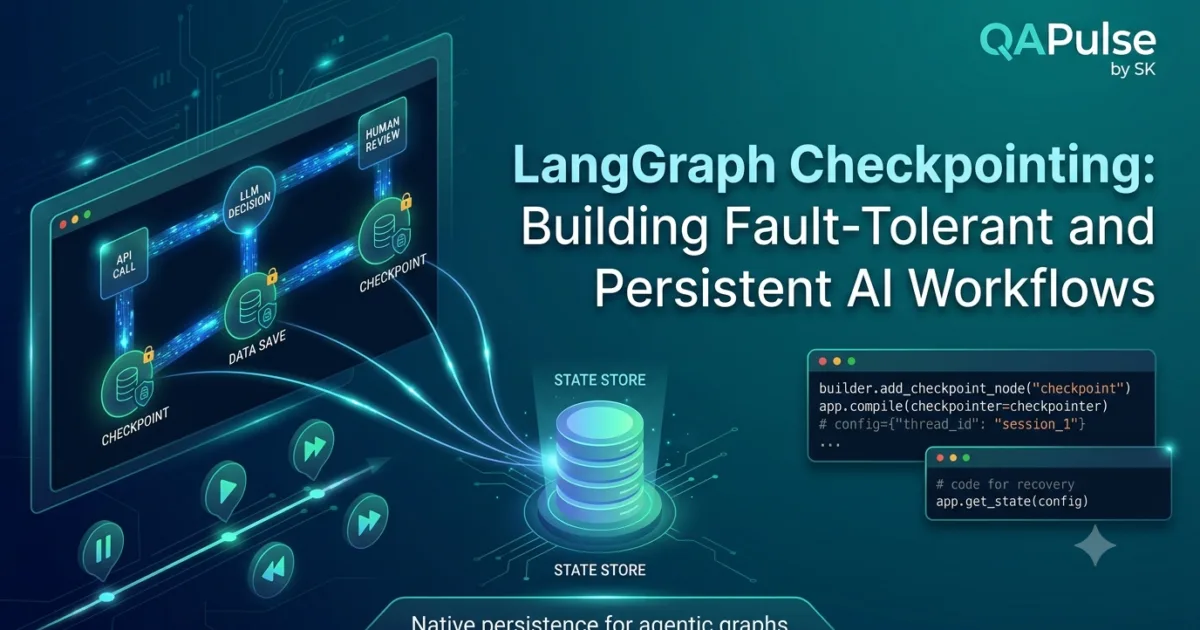
What is Checkpointing in LangGraph?
As AI applications become more sophisticated, workflows often execute for several minutes or even hours. They may interact with multiple APIs, retrieve information from databases, call external tools, involve human approval, or coordinate several AI agents. In these situations, restarting the entire workflow because of a temporary failure is inefficient and expensive.
LangGraph Checkpointing solves this problem by allowing workflows to save their execution state at different stages. If execution stops unexpectedly, the workflow can resume from the last saved checkpoint instead of starting again from the beginning.
Checkpointing is one of the most important features that distinguishes production-ready AI systems from simple demonstration projects.
Why Checkpointing is Important
Imagine an AI research assistant performing the following tasks:
- Analyze a user request.
- Search multiple knowledge sources.
- Retrieve dozens of documents.
- Generate summaries.
- Ask a human reviewer for approval.
- Produce the final report.
If the application crashes after completing the fourth step, repeating every operation wastes both time and computing resources.
Checkpointing prevents this by preserving workflow progress.
Its major advantages include:
- Faster workflow recovery
- Lower execution costs
- Better user experience
- Support for long-running processes
- Reliable enterprise automation
- Reduced API usage
- Improved workflow stability
These benefits become increasingly valuable as workflows grow larger.
How Checkpointing Works
Checkpointing saves the current workflow state after important execution stages.
When the workflow resumes, LangGraph restores the saved state and continues execution from that point.
A simplified execution flow looks like this:
Start Workflow

↓

Execute Node

↓

Save Checkpoint

↓

Execute Next Node

↓

Save Checkpoint

↓

Continue Workflow

↓

Final Response
Rather than restarting the workflow after every interruption, execution continues from the most recent checkpoint.
What Information Is Stored?
A checkpoint captures the information required to continue workflow execution.
Typical data includes:
- Shared workflow state
- Current node
- Execution history
- Conversation context
- User input
- Tool outputs
- Retrieved documents
- Agent decisions
- Workflow metadata
- Session identifiers
The exact information depends on the application’s requirements.
Workflow Without Checkpointing
Without checkpointing, failures require complete workflow execution.
Start

↓

Node A

↓

Node B

↓

Failure

↓

Restart From Beginning
Every completed task must be repeated.
This approach is inefficient for production systems.
Workflow With Checkpointing
Checkpointing minimizes unnecessary work.
Start

↓

Checkpoint

↓

Node A

↓

Checkpoint

↓

Node B

↓

Failure

↓

Restore Checkpoint

↓

Continue Execution
Only unfinished tasks need to be executed again.
Checkpointing and Shared State
Checkpointing works closely with the shared workflow state.
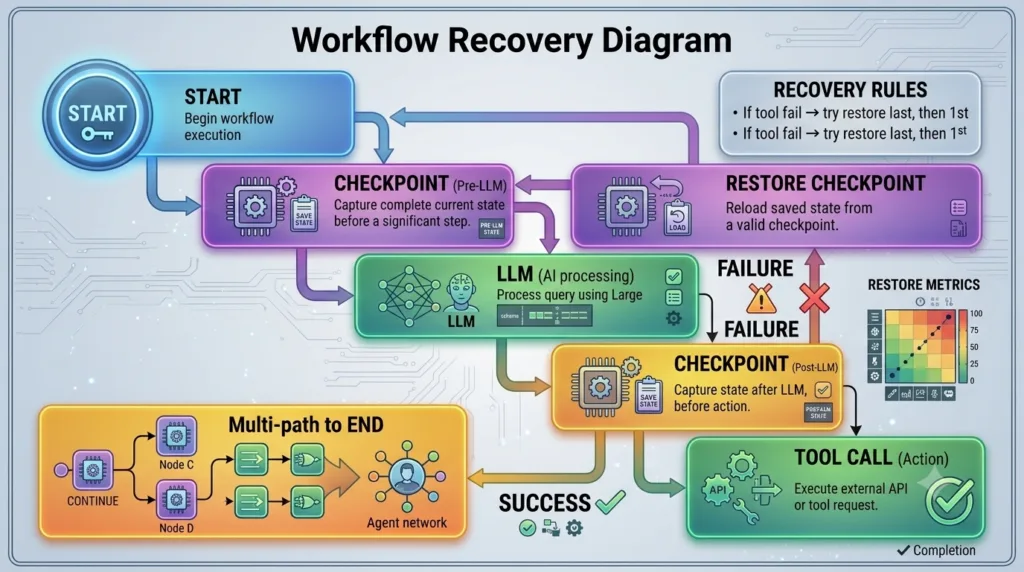
Whenever a checkpoint is created, LangGraph saves the current state along with execution information.
When execution resumes:
- State is restored.
- Current position is restored.
- Workflow continues.
- Previously completed work is preserved.
This close integration makes checkpointing highly reliable.
Common Checkpointing Scenarios
Checkpointing is valuable in many AI applications.
Human-in-the-Loop Workflows
The workflow pauses while waiting for user approval.
Execution resumes once approval is received.
Multi-Agent Systems
Different AI agents contribute to the workflow over time.
Checkpointing preserves each completed stage.
External API Integrations
Long-running API calls or temporary service interruptions do not require restarting the workflow.
Document Processing
Large document collections may take considerable time to process.
Checkpointing allows processing to continue after interruptions.
Enterprise Automation
Business workflows often span multiple systems and extended time periods.
Checkpointing ensures progress is never lost.
Benefits for Production Applications
Enterprise AI systems demand reliability.
Checkpointing helps organizations:
- Reduce operational costs
- Improve fault tolerance
- Increase workflow reliability
- Handle infrastructure failures
- Support scalable AI systems
- Simplify workflow recovery
- Improve user satisfaction
- Protect long-running operations
These capabilities are essential for production deployments.
Common Checkpointing Mistakes
Developers new to LangGraph frequently encounter several issues.
Saving Too Frequently
Creating checkpoints after every small operation increases storage requirements and may reduce performance.
Choose meaningful checkpoint locations.
Saving Too Infrequently
Long execution intervals without checkpoints increase the amount of work lost after failures.
Balance performance with recovery needs.
Ignoring State Consistency
Only consistent workflow states should be stored.
Saving incomplete or invalid data may cause unexpected behavior after restoration.
Forgetting External Dependencies
Some external systems may change while a workflow is paused.
Applications should verify external information before continuing execution.
Best Practices for Checkpointing
When implementing LangGraph Checkpointing:
- Save checkpoints after significant workflow stages.
- Preserve only necessary information.
- Validate restored state before continuing.
- Monitor checkpoint performance.
- Remove obsolete checkpoints when appropriate.
- Secure sensitive workflow data.
- Test recovery scenarios regularly.
- Design workflows for graceful recovery.
- Document checkpoint locations.
Following these practices improves workflow reliability and simplifies production maintenance.
Implementation Example
To activate checkpointing, pass your checkpointer instance into workflow.compile() and supply a unique thread_id inside the runtime config.
from typing import TypedDict
from langgraph.graph import StateGraph, START, END
from langgraph.checkpoint.memory import MemorySaver

# 1. Define graph state schema
class WorkflowState(TypedDict):
    input_text: str
    processed_steps: list[str]

# 2. Define node logic
def process_data(state: WorkflowState):
    return {"processed_steps": state["processed_steps"] + ["data_processed"]}

def execute_action(state: WorkflowState):
    return {"processed_steps": state["processed_steps"] + ["action_executed"]}

# 3. Build graph structure
builder = StateGraph(WorkflowState)
builder.add_node("process_data", process_data)
builder.add_node("execute_action", execute_action)

builder.add_edge(START, "process_data")
builder.add_edge("process_data", "execute_action")
builder.add_edge("execute_action", END)

# 4. Compile with checkpointer
checkpointer = MemorySaver() # Swap with PostgresSaver for production
app = builder.compile(checkpointer=checkpointer)

# 5. Run workflow using thread context
config = {"configurable": {"thread_id": "session_qa_pulse_001"}}

initial_input = {"input_text": "Start Task", "processed_steps": []}
for event in app.stream(initial_input, config):
    print(event)

# 6. Retrieve saved state at any point
saved_state = app.get_state(config)
print("Latest Checkpoint State:", saved_state.values)
Preparing for Persistent Memory
Checkpointing provides temporary persistence during workflow execution, but many AI applications also need long-term memory that survives across multiple conversations and sessions.
In the next lessons, you will explore how LangGraph supports persistent memory, enabling AI applications to remember previous interactions, personalize responses, and build continuous user experiences across multiple workflow executions.
Real-World Importance
LangGraph Checkpointing is a critical capability for building resilient AI applications that operate reliably in real-world environments. Whether developing enterprise automation platforms, multi-agent research systems, customer support assistants, or document intelligence solutions, checkpointing ensures that workflow progress is preserved despite interruptions, infrastructure failures, or human approval delays. By allowing workflows to resume from previously saved execution points, developers can create scalable, fault-tolerant AI systems that minimize wasted computation, reduce operational costs, and deliver a more dependable experience for users.
LangGraph Memory: Building AI Applications That Remember Across Conversations
Understanding Memory in LangGraph
One of the biggest limitations of traditional AI applications is that they often forget everything once a conversation ends. Every new request starts with little or no knowledge of previous interactions unless developers manually provide the earlier context. While this approach works for simple chatbots, it is insufficient for production AI systems that need to remember users, tasks, preferences, or long-running workflows.
LangGraph Memory addresses this challenge by enabling AI applications to retain information beyond a single execution. Instead of treating every interaction as independent, LangGraph allows workflows to access previously stored knowledge, making responses more consistent, personalized, and context-aware.
Memory transforms an AI assistant from a reactive tool into an intelligent system capable of learning from previous interactions.
Why Memory is Important
Imagine interacting with an AI coding assistant over several weeks.
Without memory, the assistant would repeatedly ask:
- Which programming language are you using?
- What framework is your project built with?
- Which coding standards do you follow?
- What was your previous task?
With memory enabled, the assistant already understands your project context and continues the conversation naturally.
Memory improves AI systems by providing:
- Better contextual understanding
- Personalized responses
- Reduced repetitive questions
- More efficient workflows
- Improved user experience
- Consistent decision-making
- Long-term task continuity
- Enhanced collaboration between AI agents
These capabilities are essential for modern enterprise AI applications.
How Memory Differs from State
Although both state and memory store information, they serve different purposes.
Workflow State
State exists only while a workflow is executing.
Characteristics include:
- Temporary
- Execution-specific
- Shared between workflow nodes
- Cleared after completion unless persisted
State answers the question:
“What information does this workflow currently need?”
Persistent Memory
Memory survives beyond a single execution.
Characteristics include:
- Long-term storage
- Available across multiple sessions
- User-specific or application-specific
- Continuously updated
Memory answers the question:
“What should the AI remember for future interactions?”
Understanding this distinction helps developers design more effective AI systems.
Memory Lifecycle
A simplified memory workflow appears as follows.
User Interaction

↓

Read Existing Memory

↓

Execute Workflow

↓

Generate Response

↓

Update Memory

↓

Future Conversation
Each interaction enriches the knowledge available for future workflows.
Types of Memory
Different AI applications require different memory strategies.
Conversation Memory
Stores previous messages exchanged with users.
Useful for:
- Chat assistants
- Customer support
- Virtual tutors
- Personal assistants
User Preference Memory
Stores personalized information such as:
- Preferred language
- Writing style
- Coding standards
- Notification settings
- Favorite tools
Personalization improves user satisfaction.
Task Memory
Stores information related to ongoing work.
Examples include:
- Active projects
- Pending tasks
- Workflow progress
- Previous decisions
- Open issues
Task memory supports long-running AI assistants.
Knowledge Memory
Stores information collected during workflow execution.
Typical examples include:
- Retrieved documents
- Research findings
- Generated summaries
- Business knowledge
- Domain-specific information
This memory helps AI systems build cumulative expertise.
Memory in Multi-Agent Systems
Multiple AI agents often collaborate within a single application.
Shared memory enables agents to exchange information without repeating work.
Example:
Planner Agent

↓

Shared Memory

↙        ↓        ↘

Research  Coding  Testing

↓

Reviewer

↓

Final Output
Every agent contributes new knowledge while benefiting from information generated by others.
Memory Storage Options
Memory can be stored using different technologies depending on application requirements.
Common storage solutions include:
- Relational databases
- NoSQL databases
- Vector databases
- Cloud storage
- Document databases
- Key-value stores
The storage mechanism depends on scalability, performance, and retrieval requirements.
Memory Management Best Practices
Well-managed memory improves both performance and reliability.
Recommended practices include:
- Store only meaningful information.
- Remove outdated records.
- Organize memory logically.
- Secure sensitive user data.
- Validate stored information.
- Monitor memory growth.
- Optimize retrieval performance.
These practices help maintain efficient AI systems as data volume increases.
Common Memory Design Mistakes
Developers frequently encounter several challenges.
Remembering Everything
Not all information deserves long-term storage.
Saving unnecessary data increases storage costs and retrieval complexity.
Forgetting Important Context
Critical project information should remain available for future workflows.
Removing useful context may reduce response quality.
Mixing Temporary and Permanent Information
Workflow state and persistent memory serve different purposes.
Keeping them separate results in cleaner architecture.
Ignoring Privacy Requirements
Applications should carefully manage user information according to organizational and legal requirements.
Responsible memory management builds user trust.
Memory and Personalized AI
Memory enables AI systems to deliver personalized experiences.
For example, an AI development assistant can remember:
- Preferred programming language
- Framework selection
- Coding conventions
- Testing strategy
- Project architecture
- Frequently used libraries
Future conversations become more efficient because this information does not need to be collected repeatedly.
Preparing for Advanced Memory Features
Basic persistent memory provides long-term context, but enterprise AI systems often require more advanced capabilities.
Later lessons will explore:
- Memory persistence strategies
- Conversation history management
- Semantic memory retrieval
- Vector database integration
- Memory optimization
- Cross-session continuity
- Enterprise-scale memory architecture
These features build upon the fundamental concepts introduced in this lesson.
Real-World Importance
LangGraph Memory enables AI applications to move beyond isolated conversations and become intelligent systems capable of retaining knowledge across multiple interactions. Whether developing coding assistants, customer support platforms, enterprise automation tools, research agents, or Retrieval-Augmented Generation systems, persistent memory provides the continuity needed to deliver personalized experiences, improve decision-making, and reduce repetitive work. By combining workflow state with long-term memory, developers can build AI solutions that become more useful, more efficient, and more valuable over time.
LangGraph Memory Persistence: Storing, Retrieving, and Managing Long-Term AI Knowledge
What Is Memory Persistence?
In the previous lesson, you learned that LangGraph Memory enables AI applications to remember information across multiple conversations and workflow executions. However, memory is only valuable if it survives application restarts, server failures, deployments, and user sessions.
This is where Memory Persistence becomes essential.
Memory persistence is the process of storing AI knowledge in durable storage so it can be retrieved whenever the application needs it. Instead of keeping information only in RAM, LangGraph integrates with persistent storage systems that allow AI applications to build long-term knowledge over days, months, or even years.
For production AI systems, memory persistence is not an optional feature—it is a fundamental architectural requirement.
Why Memory Persistence Matters
Imagine building an AI coding assistant used by hundreds of developers.
Each developer expects the assistant to remember:
- Preferred programming languages
- Project architecture
- Coding conventions
- Previous conversations
- Active development tasks
- Frequently used libraries
If all this information disappears every time the server restarts, the assistant loses its usefulness.
Memory persistence ensures that valuable information remains available regardless of infrastructure changes.
Its benefits include:
- Long-term personalization
- Cross-session continuity
- Reliable enterprise workflows
- Better user experience
- Reduced repetitive interactions
- Improved AI reasoning
- Lower operational overhead
- Consistent application behavior
How Memory Persistence Works
Persistent memory follows a continuous cycle.
User Interaction

↓

Read Stored Memory

↓

Execute Workflow

↓

Generate Response

↓

Update Memory

↓

Save to Storage

↓

Future Session
Instead of treating each session independently, the workflow continuously builds on previously stored knowledge.
What Information Should Be Persisted?
Not every piece of workflow data belongs in permanent storage.
Useful information includes:
- User preferences
- Conversation summaries
- Active projects
- Business rules
- Retrieved knowledge
- Completed tasks
- AI-generated insights
- Frequently accessed information
Persist only information that provides long-term value.
Information That Should Not Be Persisted
Some information is temporary and should remain only within the workflow state.
Examples include:
- Temporary calculations
- Intermediate processing results
- Current execution variables
- Retry counters
- Temporary API responses
Separating temporary state from persistent memory results in cleaner architecture and lower storage requirements.
Common Storage Technologies
LangGraph can work with multiple storage solutions depending on application requirements.
Relational Databases
Suitable for:
- Structured records
- Enterprise applications
- User profiles
- Workflow metadata
Examples include PostgreSQL and MySQL.
NoSQL Databases
Useful for flexible document storage.
Common use cases include:
- Chat history
- Session information
- Dynamic user data
Vector Databases
Designed for semantic search and AI knowledge retrieval.
Typical applications include:
- Retrieval-Augmented Generation (RAG)
- Document search
- Similarity matching
- Knowledge assistants
Cloud Storage
Useful for:
- Documents
- Images
- Reports
- Large datasets
- AI-generated assets
The appropriate storage solution depends on application size, scalability requirements, and retrieval patterns.
Memory Retrieval Workflow
Persistent memory is valuable only if it can be retrieved efficiently.
A typical retrieval process looks like this.
Receive User Request

↓

Search Memory

↓

Retrieve Relevant Information

↓

Combine with Current State

↓

Generate Response
Combining stored memory with the current workflow state enables highly contextual AI responses.
Memory Persistence in Multi-Agent Systems
Multi-agent applications benefit significantly from persistent memory.
Example:
Planner Agent

↓

Persistent Memory

↙        ↓        ↘

Research  Coding  Testing

↓

Reviewer

↓

Updated Memory
Every agent contributes knowledge while benefiting from information stored during previous workflow executions.
This collaborative memory model improves overall system intelligence.
Managing Memory Growth
Persistent storage naturally grows over time.
Without proper management, memory may become inefficient.
Recommended strategies include:
- Archive outdated records.
- Remove duplicate information.
- Summarize lengthy conversations.
- Compress historical data.
- Index frequently accessed content.
- Monitor storage utilization.
Regular maintenance improves retrieval performance.
Common Memory Persistence Mistakes
Developers frequently encounter several issues.
Persisting Everything
Saving every intermediate value wastes storage and slows retrieval.
Persist only meaningful information.
Poor Data Organization
Disorganized memory makes retrieval inefficient.
Use logical categories and indexing strategies.
Ignoring Security
Persistent memory often contains sensitive user information.
Applications should implement appropriate authentication, authorization, and encryption mechanisms.
Never Cleaning Old Data
Historical information that no longer provides value should be archived or removed according to application requirements.
Best Practices for Memory Persistence
When designing persistent memory:
- Store only valuable long-term knowledge.
- Separate workflow state from persistent memory.
- Select storage technology based on application needs.
- Organize memory for efficient retrieval.
- Protect sensitive information.
- Monitor storage growth.
- Regularly review stored content.
- Test memory restoration during development.
- Document persistence strategies.
These practices help developers build scalable and maintainable AI systems.
Preparing for Semantic Memory Retrieval
Persisting information is only the first step.
Modern AI applications also need intelligent retrieval mechanisms capable of identifying the most relevant information rather than searching through every stored record.
The next lessons will introduce semantic retrieval, embeddings, vector databases, and Retrieval-Augmented Generation (RAG), allowing LangGraph applications to locate relevant knowledge efficiently even when users express similar ideas using different words.
Real-World Importance
Memory persistence is a foundational capability for production-grade LangGraph applications. Whether developing enterprise AI assistants, intelligent customer support platforms, software engineering copilots, document analysis systems, or multi-agent automation solutions, persistent memory allows applications to accumulate knowledge over time instead of starting from scratch with every interaction. By storing meaningful information, organizing it efficiently, and retrieving it intelligently, developers can build AI systems that become increasingly knowledgeable, personalized, and effective throughout their lifecycle.
LangGraph Memory Architecture: Designing Scalable Long-Term Memory Systems for AI Agents
Understanding Memory Architecture in LangGraph
Building an AI application that remembers information across conversations is much more than simply saving data to a database. As applications grow, developers must decide what information should be remembered, where it should be stored, how it should be retrieved, and when it should be updated or removed.
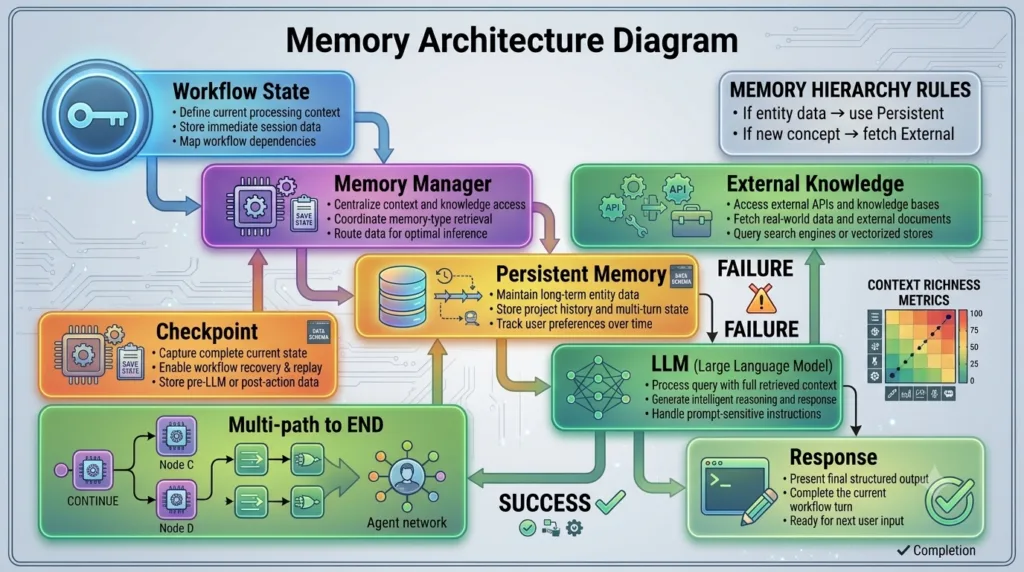
This overall design is known as the memory architecture.
A well-designed memory architecture allows AI agents to retrieve relevant information quickly, maintain accurate context, support multiple users, and scale from a few conversations to millions of interactions. Without proper architecture, memory becomes difficult to manage, retrieval becomes slower, and AI responses gradually lose relevance.
For production AI systems, memory architecture is just as important as workflow design.
Why Memory Architecture Matters
Consider an enterprise AI assistant used across multiple departments.
Different users expect the system to remember different types of information:
- Personal preferences
- Conversation history
- Active projects
- Company documentation
- Frequently accessed knowledge
- Previous workflow decisions
If all information is stored in one location without structure, retrieving the right context becomes inefficient.
A structured memory architecture ensures that every workflow accesses only the information it actually needs.
Its advantages include:
- Faster retrieval
- Better response quality
- Improved scalability
- Easier maintenance
- Lower storage costs
- Better personalization
- More accurate AI reasoning
- Simplified system expansion
Layers of Memory Architecture
A production LangGraph application often separates memory into multiple logical layers.
Short-Term Memory
Short-term memory contains information needed during the current workflow execution.
Typical examples include:
- Current user request
- Active workflow state
- Temporary tool outputs
- Intermediate reasoning
- Current execution context
This information is usually discarded after the workflow finishes unless selected for long-term storage.
Long-Term Memory
Long-term memory stores information that remains valuable across future interactions.
Examples include:
- User preferences
- Conversation summaries
- Business knowledge
- Project history
- AI-generated insights
Long-term memory enables continuous learning and personalization.
External Knowledge
Not all information belongs inside application memory.
Many workflows retrieve knowledge from external sources such as:
- Company documentation
- Knowledge bases
- APIs
- Databases
- File repositories
- Vector databases
External knowledge complements persistent memory by providing up-to-date information.
Memory Architecture Overview
A simplified architecture looks like this.
User Request

↓

Workflow State

↓

Memory Manager

↙          ↓          ↘

Short-Term   Long-Term   External Knowledge

↘          ↓          ↙

Combined Context

↓

LLM

↓

Response
The memory manager coordinates multiple sources before the language model generates a response.
Memory Retrieval Pipeline
Retrieving useful information is often more important than storing large amounts of data.
A typical retrieval pipeline follows these steps.
Receive Request

↓

Analyze Context

↓

Retrieve Relevant Memory

↓

Retrieve External Knowledge

↓

Combine Information

↓

Generate Response
Only relevant information should be passed to the language model.
This reduces unnecessary context while improving response quality.
Organizing Long-Term Memory
Long-term memory becomes easier to manage when organized into logical categories.
Common categories include:
User Profile
Stores:
- Name
- Preferences
- Settings
- Permissions
Conversation History
Stores:
- Previous discussions
- Summaries
- Important decisions
- Follow-up actions
Project Memory
Stores:
- Active tasks
- Architecture decisions
- Development progress
- Business objectives
Knowledge Repository
Stores:
- Frequently used documents
- Internal guidelines
- Research findings
- Technical documentation
Organizing memory improves retrieval speed and maintainability.
Supporting Multiple Users
Enterprise AI applications rarely serve a single individual.
Memory architecture should isolate user information while allowing shared organizational knowledge where appropriate.
Example:
Organization Memory

↓

Shared Knowledge

↓

User Memory

↓

Project Memory

↓

Current Workflow
This layered approach balances personalization with collaboration.
Memory Synchronization
As multiple workflows execute simultaneously, memory must remain consistent.
Synchronization ensures:
- Updates are not lost.
- Duplicate records are avoided.
- Conflicting information is resolved.
- Multiple AI agents share consistent knowledge.
Reliable synchronization is especially important in distributed AI systems.
Common Memory Architecture Mistakes
Developers frequently encounter architectural problems.
Mixing All Memory Together
Temporary workflow state, persistent memory, and external knowledge should remain separate.
Each serves a different purpose.
Storing Excessive Information
Large volumes of unnecessary memory reduce retrieval efficiency.
Store information based on long-term value rather than convenience.
Ignoring Scalability
Applications that work for hundreds of users may fail when supporting millions.
Design memory systems with future growth in mind.
No Retrieval Strategy
Simply storing information is not enough.
Applications must retrieve the most relevant knowledge efficiently.
Best Practices for Memory Architecture
When designing LangGraph memory architecture:
- Separate workflow state from persistent memory.
- Organize memory into logical categories.
- Store only meaningful long-term information.
- Retrieve only relevant context.
- Secure sensitive user data.
- Monitor memory growth.
- Review stored knowledge regularly.
- Design for scalability from the beginning.
- Test retrieval performance under realistic workloads.
Following these practices results in AI systems that remain reliable as both users and data volumes increase.
Preparing for Human-in-the-Loop Workflows
Checkpointing, persistent memory, and memory architecture provide the foundation for intelligent AI systems. The next stage of LangGraph development introduces Human-in-the-Loop (HITL) workflows, where AI agents collaborate with human reviewers before making critical decisions. You will learn how workflows pause safely, request approval, receive feedback, and continue execution while preserving both workflow state and long-term memory.
Real-World Importance
Memory architecture is a cornerstone of every production-ready LangGraph application. Whether building enterprise knowledge assistants, software engineering copilots, customer support platforms, research systems, or large-scale multi-agent applications, a well-designed memory architecture ensures that AI agents retrieve the right information at the right time while maintaining scalability, reliability, and personalization. By separating temporary workflow state, persistent memory, and external knowledge into a structured architecture, developers can create AI systems that continue learning, adapting, and delivering increasingly valuable assistance as their usage grows.
Internal Links:
- Learn MCP – Zero to Hero
- Learn AI Agents for QA – Zero to Hero
- Playwright Automation – Zero to Hero
- LangGraph: Complete Zero to Hero
- Learn Python – Zero to Hero
- OpenAI Codex: Complete Zero to Hero
- Cursor AI: Complete Zero to Hero
- Claude Code Tutorial: Complete Zero to Hero
- Free QA Resources Built From Real Experience
- QA Glossary: Test Automation Terms Every Engineer Should Know
External Resources:
- LangGraph Official Documentation
- LangChain Documentation
- Python Official Documentation
- OpenAI Platform Documentation
- Anthropic Documentation
- Google AI Documentation
- LangGraph GitHub Repository
People Also Ask
What is LangGraph Checkpointing?
LangGraph Checkpointing is a persistence mechanism that saves workflow execution state, allowing AI applications to resume from the last successful execution point instead of restarting after interruptions or failures.
Why is LangGraph Checkpointing important?
LangGraph Checkpointing improves reliability, reduces execution costs, supports long-running AI workflows, enables human-in-the-loop systems, and provides fault tolerance for enterprise applications.
What is the difference between LangGraph Checkpointing and memory?
LangGraph Checkpointing preserves workflow execution progress, while memory stores information that helps AI systems remember previous interactions across conversations and sessions.
Can LangGraph Checkpointing be used in multi-agent systems?
Yes. LangGraph Checkpointing enables multiple AI agents to pause, recover, and continue collaborative workflows without losing execution progress.
Does LangGraph Checkpointing work with persistent storage?
Yes. LangGraph Checkpointing integrates with persistent storage systems to support reliable workflow recovery in production environments.
Featured Snippet
What Is LangGraph Checkpointing?
LangGraph Checkpointing is a workflow persistence mechanism that periodically saves execution state, enabling AI applications to recover from failures, resume interrupted workflows, support long-running processes, and build reliable production-grade AI systems.
AI Overview Answer
LangGraph Checkpointing enables AI workflows to save execution progress and recover from interruptions without restarting from the beginning. Combined with memory, memory persistence, and scalable memory architecture, it provides the reliability required for enterprise AI assistants, multi-agent systems, Retrieval-Augmented Generation (RAG), and long-running workflow automation.
Enjoyed this article? Explore more in-depth guides on AI engineering, automation testing, Model Context Protocol, Playwright, and intelligent software quality at www.skakarh.com. Follow QAPulse by SK for practical, production-focused tutorials designed for QA engineers, SDETs, and AI developers.