 QA
QA
LangGraph Production Architecture:
LangGraph is becoming an important framework for developers building reliable, stateful, and production-oriented AI applications. Unlike a simple LLM call that receives a prompt and returns an answer, LangGraph allows developers to design AI workflows where agents, tools, decisions, state updates, and execution paths can work together as a structured graph.
This becomes especially valuable when an AI application needs more than basic question answering.
Consider an enterprise AI workflow that needs to:
- Understand a user request
- Decide which specialist agent should handle it
- Retrieve information
- Call external tools
- Validate results
- Retry failed operations
- Maintain workflow state
- Ask for human approval when necessary
- Produce a final response
A single prompt can attempt to perform these tasks, but the resulting application can quickly become difficult to control.
A graph-based architecture provides a different approach.
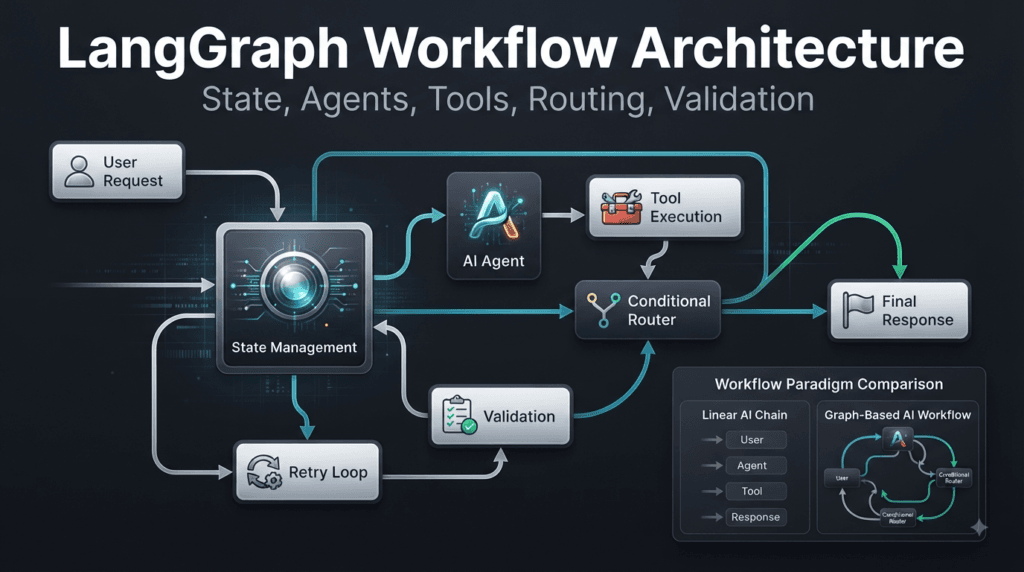
                         User Request
                              │
                              ▼
                       ┌─────────────┐
                       │   Analyze   │
                       │   Request   │
                       └──────┬──────┘
                              │
                 ┌────────────┼────────────┐
                 ▼            ▼            ▼
             Research       Tools       Analysis
              Agent         Agent         Agent
                 │            │            │
                 └────────────┼────────────┘
                              ▼
                         Validation
                              │
                              ▼
                         Final Answer
The important idea is that every component can have a clearly defined responsibility.
This makes LangGraph particularly useful for agentic AI, multi-agent systems, AI automation, LLM orchestration, and complex software engineering workflows.
Understanding LangGraph as a Workflow Engine
A useful way to understand LangGraph is to stop thinking of it as merely another framework for sending prompts to an LLM.
Instead, think of it as a workflow orchestration layer for AI applications.
A traditional application might follow:
Input
  ↓
Function A
  ↓
Function B
  ↓
Function C
  ↓
Output
An AI workflow often needs something more dynamic:
                         ┌──────────────┐
                         │ User Request │
                         └───────┬──────┘
                                 ▼
                           AI Decision
                          /     │      \
                         /      │       \
                        ▼       ▼        ▼
                   Research   Tool    Analysis
                      │        │         │
                      └────────┼─────────┘
                               ▼
                           Validation
                               │
                     ┌─────────┴─────────┐
                     ▼                   ▼
                  Retry                Finish
                     │
                     └───────► Agent
This difference is fundamental.
The workflow is no longer necessarily linear.
It can branch.
It can loop.
It can pause.
It can resume.
It can route work dynamically.
It can preserve state throughout execution.
That is where LangGraph becomes particularly powerful.
The Core Mental Model
Before writing code, it is important to understand the three fundamental ideas behind a graph-based workflow:
- State
- Nodes
- Edges
These concepts form the foundation of a LangGraph workflow.
State
State represents the information currently available to the workflow.
For example:
from typing import TypedDict


class WorkflowState(TypedDict):
    user_query: str
    research: str
    answer: str
The state can contain the user’s request, intermediate research, generated results, tool outputs, validation information, or other workflow data.
You can think of state as the shared memory of the graph execution.
┌─────────────────────────────┐
│       Workflow State        │
├─────────────────────────────┤
│ user_query                  │
│ research                    │
│ tool_results                │
│ validation_result           │
│ current_agent               │
│ final_answer                │
└─────────────────────────────┘
A node reads the state, performs some work, and returns updates.
Nodes
Nodes represent individual operations within the workflow.
A node might:
- Call an LLM
- Execute a tool
- Retrieve documents
- Validate information
- Transform data
- Ask for human input
- Route a request
- Generate a final response
A simple node can look like this:
def research_node(state: WorkflowState):
    research = "Research completed."

    return {
        "research": research
    }
The node receives the current state and returns a state update.
This simple pattern becomes extremely powerful when multiple nodes collaborate.
Edges
Edges determine what happens after a node finishes.
A simple workflow might look like:
START
  │
  ▼
Research
  │
  ▼
Generate Answer
  │
  ▼
END
But a more sophisticated workflow can contain conditional routing:
                  Analyze Request
                         │
              ┌──────────┼──────────┐
              ▼          ▼          ▼
           Research    Coding     Support
              │          │          │
              └──────────┼──────────┘
                         ▼
                      Review
                         │
                         ▼
                        END
This is one of the major advantages of LangGraph over a rigid sequential pipeline.
The next operation can depend on the current state.
Why Graph-Based AI Workflows Matter
AI applications frequently contain uncertainty.
A traditional deterministic application can often follow:
Input → Function → Function → Output
But an AI application may need to make decisions during execution.
For example:
User Request
     │
     ▼
What does the user need?
     │
 ┌───┼────┐
 ▼   ▼    ▼
FAQ API  Research
 │   │    │
 └───┼────┘
     ▼
Validation
     │
     ▼
Response
The workflow path is not necessarily known before execution.
An AI model may determine that the request requires research rather than a direct answer.
This is why LangGraph is useful for agentic applications.
It provides a structured environment where AI-driven decisions can influence workflow execution without turning the entire application into an uncontrolled chain of prompts.
LangGraph Compared With a Simple LLM Application
The difference becomes clearer when comparing two approaches.
| Capability | Simple LLM Application | LangGraph Workflow |
|---|---|---|
| Basic prompt execution | Yes | Yes |
| Structured state | Limited | Strong |
| Multiple workflow nodes | Limited | Yes |
| Conditional routing | Manual | Built into graph architecture |
| Loops | Difficult | Natural |
| Parallel execution | Requires custom implementation | Supported through graph design |
| Human-in-the-loop workflows | Custom logic | Designed for workflow interruption and resumption |
| Multi-agent orchestration | Difficult to manage | Strong use case |
| Persistence | Application-dependent | Designed around stateful workflows |
| Complex agent workflows | Difficult to maintain | Better suited |
| Debugging workflow paths | Often difficult | Graph structure improves visibility |
This does not mean every AI application needs LangGraph.
If the application only needs:
Question
   ↓
LLM
   ↓
Answer
introducing a graph may be unnecessary.
But when the application starts requiring multiple stages, decisions, tools, memory, retries, or agents, graph-based orchestration becomes much more valuable.
Understanding the Difference Between a Chain and a Graph
A chain generally follows a predictable sequence.
A → B → C → D
A graph can represent:
       ┌──→ B ──┐
A ─────┤         ├──→ E
       └──→ C ──┘
Or even:
          ┌───────┐
          │       ▼
A → B → C → D → E
    ▲       │
    └───────┘
That last example introduces a loop.
Loops are particularly useful for AI workflows.
For example:
Generate Code
     │
     ▼
Run Tests
     │
     ▼
Tests Passed?
   /      \
 No        Yes
 │          │
 ▼          ▼
Fix Code   Finish
 │
 └──────► Run Tests
This is much closer to how real software engineering works.
A developer writes code, runs tests, analyzes failures, modifies the implementation, and runs the tests again.
A graph can represent this iterative process.
A Practical LangGraph Example
Let’s build a simple workflow that processes a user request.
The first step is defining state.
from typing import TypedDict


class State(TypedDict):
    user_query: str
    response: str
Now create a node:
def answer_node(state: State):
    query = state["user_query"]

    response = f"Processing request: {query}"

    return {
        "response": response
    }
The node receives the state:
{
    "user_query": "Explain LangGraph"
}
and returns:
{
    "response": "Processing request: Explain LangGraph"
}
The important concept is that the node does not need to manage the entire application.
It performs one responsibility.
That separation is what allows larger workflows to remain understandable.
Building the Graph
A simplified graph can be constructed like this:
from langgraph.graph import StateGraph, START, END


builder = StateGraph(State)

builder.add_node("answer", answer_node)

builder.add_edge(START, "answer")
builder.add_edge("answer", END)

graph = builder.compile()
The workflow now has a clear structure:
START
  │
  ▼
answer
  │
  ▼
 END
It can be invoked with:
result = graph.invoke({
    "user_query": "What is LangGraph?"
})

print(result)
The output state contains the generated response.
The example is intentionally small.
The important lesson is the architecture.
Instead of embedding all logic into one giant function, the application can gradually evolve into specialized nodes and controlled transitions.
Turning a Simple Workflow Into an AI Workflow
Now imagine adding an LLM-powered node.
def answer_node(state: State):
    query = state["user_query"]

    response = model.invoke(
        f"Answer this question clearly: {query}"
    )

    return {
        "response": response.content
    }
The graph remains structurally similar:
START
  │
  ▼
LLM Node
  │
  ▼
END
But now additional nodes can be introduced.
For example:
START
  │
  ▼
Classify Request
  │
  ├─────────────┐
  ▼             ▼
Research       Coding
  │             │
  └──────┬──────┘
         ▼
       Review
         │
         ▼
        END
This is where the graph architecture starts becoming valuable.
Strategy: Design the Workflow Before Writing the Code
One of the strongest strategies for building LangGraph applications is to design the workflow on paper before implementing it.
Do not begin with:
builder = StateGraph(...)
and then randomly add nodes.
Start with the business problem.
Ask:
- What information enters the workflow?
- What information must be preserved?
- Which operations are independent?
- Which operations depend on previous results?
- Where does an AI decision need to occur?
- Where can execution fail?
- Where should the workflow retry?
- Where should human approval be possible?
- What determines the final response?
Then draw the workflow.
For example:
User Request
     │
     ▼
Intent Analysis
     │
     ├──────────────┐
     ▼              ▼
Research          Code Analysis
     │              │
     └──────┬───────┘
            ▼
       Quality Check
            │
       ┌────┴────┐
       ▼         ▼
     Retry      Finish
       │
       └──────► Research
Only after the architecture is clear should implementation begin.
This strategy prevents a common problem: building a complicated graph without understanding why each node exists.
Interactive Thinking: Follow the State
When learning LangGraph, one of the best exercises is to mentally execute the workflow.
Suppose the initial state is:
{
    "user_query": "Create a Python API",
    "research": "",
    "answer": ""
}
The research node executes:
{
    "research": "FastAPI is suitable for the API."
}
Now ask yourself:
What should the state look like?
It becomes:
{
    "user_query": "Create a Python API",
    "research": "FastAPI is suitable for the API.",
    "answer": ""
}
Then the answer node executes:
{
    "answer": "Use FastAPI to build the API."
}
The resulting state becomes:
{
    "user_query": "Create a Python API",
    "research": "FastAPI is suitable for the API.",
    "answer": "Use FastAPI to build the API."
}
This simple exercise is extremely useful.
When debugging a complex graph, do not only ask:
Which node failed?
Also ask:
What did the state look like before and after this node?
That question often reveals the real problem.
A Strategic Comparison: One Large Agent vs Specialized Nodes
Consider an AI system responsible for researching a technical topic, generating code, testing the code, and writing documentation.
A single-agent approach might use one enormous prompt:
You are an expert researcher, software engineer,
QA engineer, technical writer, and reviewer.

Research the topic.
Write the code.
Test it.
Fix errors.
Write documentation.
Review everything.
This may work for simple demonstrations.
But as complexity increases, the prompt becomes harder to maintain.
A graph-based approach can separate responsibilities:
              Supervisor
                  │
        ┌─────────┼─────────┐
        ▼         ▼         ▼
    Research    Coding     Testing
        │         │         │
        └─────────┼─────────┘
                  ▼
              Reviewer
                  │
                  ▼
               Output
Each component has a narrower responsibility.
This creates several advantages:
- Easier debugging
- Better testing
- More focused prompts
- Reusable agents
- Clearer execution paths
- Easier upgrades
- Better observability
The important principle is not simply “use more agents.”
It is:
Use the smallest number of specialized components required to make the workflow understandable and reliable.
When Not to Use LangGraph
A good engineering strategy also requires knowing when a technology is unnecessary.
If your application is simply:
User
 ↓
Prompt
 ↓
LLM
 ↓
Answer
a graph-based orchestration framework may add unnecessary complexity.
Similarly, if your application only requires one deterministic function after an LLM response, a simpler implementation may be better.
LangGraph becomes increasingly useful when you need:
- Stateful execution
- Conditional routing
- Multiple agents
- Tool calling
- Iterative workflows
- Human interaction
- Persistence
- Parallel branches
- Retry logic
- Complex orchestration
Choosing the simplest architecture that solves the actual problem is always a strong engineering strategy.
Building a Mental Model for Production LangGraph Applications
A production AI workflow can be viewed as several layers.
┌─────────────────────────────────────┐
│             User Layer              │
├─────────────────────────────────────┤
│       Agent / Decision Layer        │
├─────────────────────────────────────┤
│          Workflow Layer             │
├─────────────────────────────────────┤
│           State Layer               │
├─────────────────────────────────────┤
│       Tools / APIs / Data           │
├─────────────────────────────────────┤
│      Persistence / Monitoring       │
└─────────────────────────────────────┘
The graph sits in the middle of these components.
It coordinates the execution without requiring every individual node to understand the entire application.
This separation is one reason graph-based AI orchestration can scale more effectively than large collections of loosely connected prompts.
Practical Development Strategy
When creating a new LangGraph application, use a progressive development strategy.
Start with the smallest possible graph:
START → Agent → END
Verify that it works.
Then introduce state:
START → Agent → Update State → END
Then introduce routing:
START → Router
           ├── Agent A
           └── Agent B
Then introduce validation:
Router
  │
  ▼
Agent
  │
  ▼
Validator
  │
  ├── Retry
  └── Finish
Then introduce additional capabilities only when they are required.
This incremental strategy makes debugging much easier than attempting to create a complete enterprise workflow in one implementation.
A Developer’s Interactive Exercise
Before moving further, try designing a workflow for this requirement:
“Build an AI assistant that receives a software testing question, determines whether the question is about API testing, UI testing, performance testing, or automation frameworks, and then sends it to the appropriate specialist.”
Start with the state:
class TestingState(TypedDict):
    question: str
    category: str
    answer: str
Now identify the nodes:
START
  │
  ▼
Classifier
  │
  ├── API Testing
  ├── UI Testing
  ├── Performance Testing
  └── Automation Framework
       │
       ▼
    Response
       │
       ▼
      END
Now ask:
What should happen if the classifier is uncertain?
You might introduce:
Classifier
    │
    ├── Confident → Specialist
    │
    └── Uncertain → Clarification
That single question demonstrates the real value of graph thinking.
You are no longer just writing prompts.
You are designing an executable decision system.
Why This Architecture Matters for AI Engineers and SDETs
For AI engineers, LangGraph provides a structured way to build agentic workflows.
For QA engineers and SDETs, the architecture offers another important advantage: workflows can be designed around validation.
For example:
Requirement
    │
    ▼
Planning Agent
    │
    ▼
Implementation Agent
    │
    ▼
Test Generator
    │
    ▼
Test Executor
    │
    ▼
Failure Analyzer
    │
    ▼
Implementation Agent
This resembles an actual software engineering feedback loop.
The AI does not simply generate an answer and stop.
It can generate an artifact, evaluate it, identify problems, revise it, and validate the revised result.
That iterative pattern is one of the most interesting applications of graph-based AI orchestration.
Key Concept to Remember
The most important idea is simple:
LangGraph is not valuable merely because it can call an LLM.
Its real strength comes from giving developers a structured way to represent stateful AI workflows.
A workflow can contain:
State
  ↓
Nodes
  ↓
Decisions
  ↓
Tools
  ↓
Agents
  ↓
Validation
  ↓
Loops
  ↓
Final State
Once you begin thinking about AI applications in terms of state, nodes, and transitions, complex workflows become much easier to reason about.
Instead of asking:
“How can I write one huge prompt that does everything?”
you can ask:
“What responsibilities should exist in this workflow, what state should they share, and what conditions determine where execution goes?”
That shift in thinking is at the heart of effective LangGraph development.
Designing Stateful LangGraph Workflows
LangGraph becomes significantly more useful when developers move beyond simple LLM calls and begin designing workflows around persistent state, specialized nodes, controlled transitions, and reusable execution logic.
The state is the foundation of this architecture.
Instead of allowing every component to maintain its own disconnected information, a graph can use a shared state model that represents what the workflow currently knows.
Consider an AI research assistant.
A request might begin with:
{
    "question": "Compare Playwright and Selenium",
    "research": [],
    "sources": [],
    "analysis": "",
    "final_answer": ""
}
As the workflow executes, different nodes can contribute information.
User Request
     │
     ▼
Research
     │
     ▼
Analysis
     │
     ▼
Validation
     │
     ▼
Final Answer
The state evolves throughout execution.
Initial State
     │
     ▼
Research State
     │
     ▼
Analysis State
     │
     ▼
Validated State
     │
     ▼
Final State
This makes state one of the most important concepts to understand before building complex agentic workflows.
Understanding State in LangGraph
State is the information shared between nodes during graph execution.
A basic state definition can use Python’s TypedDict.
from typing import TypedDict


class ResearchState(TypedDict):
    question: str
    research: str
    analysis: str
    answer: str
Each node can read information from the state and return updates.
For example:
def research_node(state: ResearchState):
    question = state["question"]

    research = f"Researching: {question}"

    return {
        "research": research
    }
The node does not need to know how the entire application works.
It only needs to know what information it requires and what information it produces.
That separation is extremely valuable in larger applications.
State as the Shared Contract
A useful mental model is to treat state as a contract between workflow components.
Imagine three nodes:
Research Node
      │
      ▼
Analysis Node
      │
      ▼
Validation Node
The research node produces research information.
The analysis node consumes that information and produces analysis.
The validation node consumes the analysis and determines whether it is acceptable.
The state becomes the communication mechanism.
┌─────────────────────────────┐
│          State              │
├─────────────────────────────┤
│ question                    │
│ research                    │
│ analysis                    │
│ validation                  │
│ final_answer                │
└─────────────────────────────┘
This design prevents every node from becoming tightly coupled to every other node.
That is an important software engineering principle.
Nodes Should Have Clear Responsibilities
One of the strongest strategies for designing LangGraph applications is to give every node a focused responsibility.
Avoid creating a node such as:
def everything_node(state):
    # research
    # coding
    # testing
    # validation
    # documentation
    # response generation
    ...
This recreates the same problem as a massive application function.
Instead, separate responsibilities.
Research Node
     │
     ▼
Planning Node
     │
     ▼
Implementation Node
     │
     ▼
Testing Node
     │
     ▼
Review Node
Each node becomes easier to understand and test.
For example:
def testing_node(state):
    implementation = state["implementation"]

    test_result = run_tests(implementation)

    return {
        "test_result": test_result
    }
The testing node does not need to perform research.
It does not need to generate documentation.
It does not need to decide the entire workflow.
Its responsibility is testing.
This separation becomes especially useful when a workflow contains many AI agents.
Sequential Workflow Design
The simplest graph architecture is sequential execution.
START
  │
  ▼
Research
  │
  ▼
Analyze
  │
  ▼
Generate
  │
  ▼
Validate
  │
  ▼
END
A simplified implementation could look like:
from langgraph.graph import StateGraph, START, END


builder = StateGraph(ResearchState)

builder.add_node("research", research_node)
builder.add_node("analysis", analysis_node)
builder.add_node("validation", validation_node)

builder.add_edge(START, "research")
builder.add_edge("research", "analysis")
builder.add_edge("analysis", "validation")
builder.add_edge("validation", END)

graph = builder.compile()
This architecture is useful when every operation depends on the result of the previous operation.
For example:
Retrieve Information
       ↓
Analyze Information
       ↓
Generate Result
There is no reason to execute analysis before retrieval finishes.
Sequential execution makes the dependency explicit.
Conditional Routing
Real AI workflows frequently require decisions.
Suppose an AI assistant receives three types of requests:
Technical Question
Billing Question
General Question
Instead of sending every request to the same node, the workflow can route it based on classification.
                  User Request
                       │
                       ▼
                  Classifier
                  /    |    \
                 /     |     \
                ▼      ▼      ▼
          Technical  Billing  General
             │         │        │
             └─────────┼────────┘
                       ▼
                    Response
A routing function might look like:
def route_request(state):
    category = state["category"]

    if category == "technical":
        return "technical"

    if category == "billing":
        return "billing"

    return "general"
The workflow can then use the routing decision to select the appropriate node.
This is where graph-based orchestration starts becoming substantially more powerful than a simple sequential chain.
Why Conditional Routing Matters
Conditional routing allows an AI application to make decisions about execution rather than simply generating content.
Consider a software development assistant.
A request could be:
"Create unit tests for this Python function."
Another request could be:
"Explain why my API request is returning HTTP 401."
Another could be:
"Refactor this class to follow SOLID principles."
These requests require different workflows.
A router could identify the intent:
                   Request
                      │
                      ▼
                 Intent Router
              /       |        \
             ▼        ▼         ▼
          Testing   Debugging  Refactoring
             │        │          │
             └────────┼──────────┘
                      ▼
                   Reviewer
The architecture becomes easier to expand.
Adding a new workflow does not necessarily require rewriting every existing component.
Comparison: Sequential Chains vs Graph Workflows
| Characteristic | Sequential Chain | Graph Workflow |
|---|---|---|
| Execution | Mostly linear | Linear, branching, or looping |
| State | Often passed manually | Central workflow state |
| Routing | Usually custom | Natural graph capability |
| Retry loops | More difficult | Easy to model |
| Multiple agents | Can become complicated | Natural architectural fit |
| Human approval | Requires custom orchestration | Can be modeled as workflow interruption |
| Parallel branches | Requires additional design | Supported through graph architecture |
| Complex decisions | Harder to visualize | Explicit in graph structure |
| Debugging | Often code-path focused | Workflow-path focused |
The important distinction is not that one approach is universally better.
A simple workflow should remain simple.
A graph becomes valuable when the application’s execution model becomes complex.
Parallel Execution and State Aggregation
Some tasks do not depend on each other.
Suppose an AI system needs to research a topic from three different perspectives:
                  Research Request
                         │
             ┌───────────┼───────────┐
             ▼           ▼           ▼
          Technical   Business    Security
          Research    Research    Research
             │           │           │
             └───────────┼───────────┘
                         ▼
                     Aggregator
                         │
                         ▼
                    Final Report
These research operations can potentially execute independently.
This is called a fan-out and fan-in pattern.
                 Fan-Out
                    │
        ┌───────────┼───────────┐
        ▼           ▼           ▼
        A           B           C
        │           │           │
        └───────────┼───────────┘
                    │
                 Fan-In
The challenge is determining how the results should be combined.
This is where state aggregation and reducers become important.
A state field can be designed to collect multiple results.
from typing import Annotated
import operator


class ResearchState(TypedDict):
    question: str
    findings: Annotated[list[str], operator.add]
Now multiple branches can contribute findings.
For example:
Technical Agent
      │
      ├── "Finding A"
      │
Business Agent
      │
      ├── "Finding B"
      │
Security Agent
      │
      └── "Finding C"

              ↓

        Shared Findings

["Finding A", "Finding B", "Finding C"]
This architecture is particularly useful for multi-agent research workflows.
Understanding Reducers
When multiple nodes update the same state field, the application needs a clear rule for combining those updates.
That is the role of a reducer.
Without a defined aggregation strategy, parallel updates can become difficult to reason about.
For example, imagine three agents returning:
["API testing"]
["Playwright"]
["CI/CD"]
A reducer can combine them into:
[
    "API testing",
    "Playwright",
    "CI/CD"
]
A more sophisticated reducer could also remove duplicates.
For example:
def merge_unique(existing, incoming):
    return list(dict.fromkeys(existing + incoming))
The strategy depends on the application.
Possible aggregation behaviors include:
- Append values
- Merge dictionaries
- Remove duplicates
- Select the highest-priority value
- Combine structured results
- Preserve the latest value
- Aggregate errors
- Collect agent observations
This is why state design should happen before graph implementation.
Designing State for Multi-Agent Systems
Multi-agent systems often have several agents contributing information.
Consider an AI software engineering team:
                 Supervisor
                     │
        ┌────────────┼────────────┐
        ▼            ▼            ▼
     Research      Coding       Testing
        │            │            │
        └────────────┼────────────┘
                     ▼
                  Review
The shared state might contain:
class AgentState(TypedDict):
    task: str
    research: list[str]
    code: str
    tests: list[str]
    review: str
Each agent updates only the fields it owns.
Research Agent → research
Coding Agent   → code
Testing Agent  → tests
Review Agent   → review
This creates a clear ownership model.
That is a powerful strategy for avoiding chaotic state management.
Avoiding Overloaded State
A common mistake is putting everything into one enormous state object.
For example:
class State(TypedDict):
    user: dict
    messages: list
    documents: list
    tools: list
    code: str
    tests: list
    logs: list
    metrics: dict
    database_results: list
    intermediate_results: list
    ...
Although this may work initially, it can become difficult to understand.
A better approach is to ask:
Does this piece of information need to travel through the graph?
If the answer is no, it may not belong in the shared workflow state.
State should contain information that is relevant to workflow execution.
This keeps the architecture easier to maintain.
Interactive Exercise: Design the State
Consider this requirement:
Build an AI assistant that analyzes a software bug, researches possible causes, proposes a fix, generates a regression test, and validates the solution.
Before writing any graph code, design the state.
One possible solution is:
class BugState(TypedDict):
    bug_description: str
    possible_causes: list[str]
    proposed_fix: str
    regression_test: str
    validation_result: str
Now identify the nodes:
Bug Description
      │
      ▼
Cause Analysis
      │
      ▼
Fix Generation
      │
      ▼
Regression Test
      │
      ▼
Validation
Then ask an important engineering question:
What happens if validation fails?
A production-oriented workflow might become:
Cause Analysis
      │
      ▼
Fix Generation
      │
      ▼
Regression Test
      │
      ▼
Validation
      │
   ┌──┴───┐
   ▼      ▼
 Pass    Fail
   │      │
   ▼      └──────► Fix Generation
  END
This is the difference between simply generating an answer and designing an executable AI workflow.
Loops and Iterative Workflows
Loops are particularly valuable when an AI system must improve an output based on evaluation.
Consider code generation.
Generate Code
     │
     ▼
Run Tests
     │
     ▼
Tests Pass?
   /     \
 No       Yes
 │         │
 ▼         ▼
Analyze   Finish
Failure
 │
 ▼
Fix Code
 │
 └──────► Run Tests
A workflow like this can continue until:
- Tests pass
- A maximum retry count is reached
- A human approves the result
- An unrecoverable error occurs
The workflow state can track retries.
class CodeState(TypedDict):
    code: str
    test_result: str
    retry_count: int
A node can update the counter:
def retry_node(state: CodeState):
    return {
        "retry_count": state["retry_count"] + 1
    }
The routing logic can then make a decision:
def route_after_test(state: CodeState):
    if "passed" in state["test_result"].lower():
        return "finish"

    if state["retry_count"] >= 3:
        return "finish"

    return "fix"
This is a practical pattern for building controlled autonomous workflows.
Strategy: Always Define Failure Paths
One of the biggest differences between a prototype and a production workflow is how failures are handled.
A prototype often assumes:
Node A
 ↓
Node B
 ↓
Node C
 ↓
Success
A production workflow should consider:
Node A
 │
 ├── Success
 │
 ├── Failure
 │
 └── Timeout
And:
Node B
 │
 ├── Valid
 │
 ├── Invalid
 │
 └── Needs Review
And:
Tool Call
 │
 ├── Successful
 ├── Retryable Error
 └── Fatal Error
Thinking about failure paths early makes graph architecture considerably more robust.
Comparing Deterministic and AI-Driven Routing
Not every routing decision needs an LLM.
Suppose the application receives:
priority = "high"
A normal Python function may be perfectly sufficient:
def route_priority(state):
    if state["priority"] == "high":
        return "urgent"

    return "normal"
Using an LLM for this decision would introduce unnecessary cost and uncertainty.
On the other hand, if the request is:
"Something is wrong with my login after we changed
the authentication service."
Determining whether the issue is related to authentication, networking, permissions, deployment, or another area may require language understanding.
An AI classifier could be appropriate.
This leads to an important strategy:
Use deterministic logic for deterministic decisions and AI reasoning where language understanding or uncertain reasoning is actually required.
This makes workflows more predictable and can reduce unnecessary model usage.
Tools Inside LangGraph Workflows
AI agents often need tools.
A workflow might look like:
User
 │
 ▼
Agent
 │
 ├────► Search
 │
 ├────► Database
 │
 ├────► API
 │
 └────► Calculator
 │
 ▼
Response
The graph provides the orchestration layer around these operations.
A tool node can execute an external capability and return its result to state.
For example:
def database_node(state):
    query = state["query"]

    result = database.execute(query)

    return {
        "database_result": result
    }
The important architectural principle is to keep external operations isolated.
The node should have a clear contract:
Input State
    ↓
Tool Operation
    ↓
Validated Result
    ↓
State Update
This makes external integrations easier to test and replace.
Observability and Debugging Strategy
Complex AI workflows can become difficult to debug if developers only look at the final response.
Suppose the final answer is incorrect.
The problem might have occurred because:
Classifier
   ↓
Wrong Route
   ↓
Wrong Agent
   ↓
Wrong Tool
   ↓
Incorrect State
   ↓
Wrong Answer
Looking only at the final answer hides the actual failure.
A better debugging strategy is to inspect the workflow execution path.
Request
  ↓
Classifier
  ↓
Research
  ↓
Tool Call
  ↓
Validation
  ↓
Response
At each stage, ask:
- What was the input state?
- What did the node produce?
- Which route was selected?
- Which tool was called?
- Did the state contain the expected values?
- Was the validation result correct?
This graph-oriented debugging mindset is essential when building reliable AI applications.
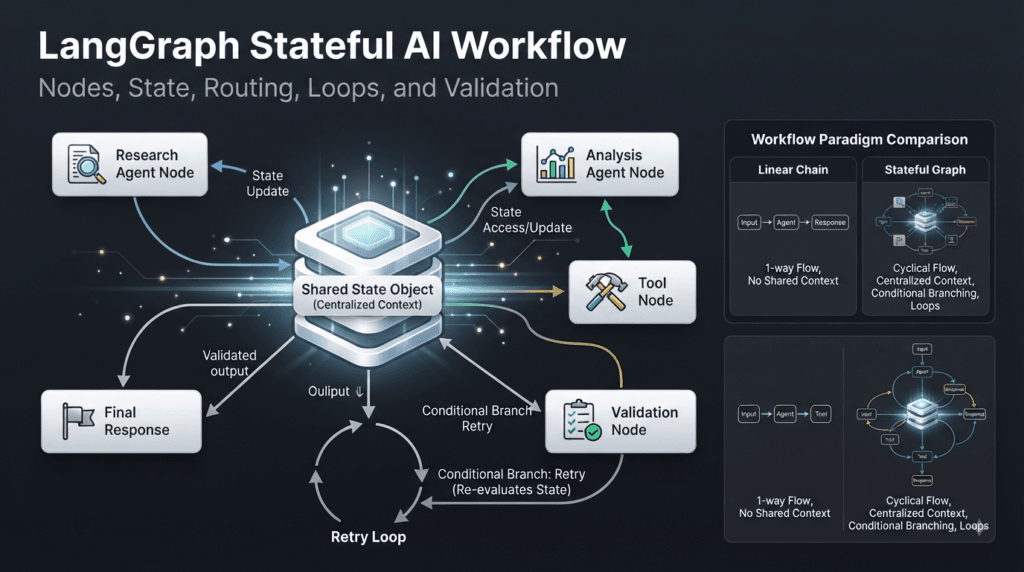
Practical Architecture: Research and Validation
Let’s combine several concepts into a realistic workflow.
Suppose an AI research assistant needs to:
- Receive a question
- Research multiple areas
- Combine findings
- Generate an answer
- Validate the answer
- Retry if necessary
The architecture could be:
                         User Question
                              │
                              ▼
                        Query Analysis
                              │
                    ┌─────────┼─────────┐
                    ▼         ▼         ▼
                Research A Research B Research C
                    │         │         │
                    └─────────┼─────────┘
                              ▼
                         Aggregation
                              │
                              ▼
                       Answer Generator
                              │
                              ▼
                          Validator
                         /        \
                        /          \
                       ▼            ▼
                    Retry          Finish
                      │
                      └──────────────► Research
This architecture combines:
- Shared state
- Parallel execution
- Aggregation
- Conditional routing
- Validation
- Loops
That combination is much closer to a real agentic AI application than a simple prompt-response system.
A Useful Rule for Graph Complexity
More nodes do not automatically mean a better AI system.
A graph with 30 poorly designed nodes can be worse than a graph with 8 well-defined nodes.
Use a new node when it provides a meaningful architectural boundary.
Good reasons include:
- A separate responsibility
- A reusable operation
- A separate tool integration
- A different agent specialization
- A meaningful validation stage
- A routing decision
- A retry boundary
- A human approval point
Avoid creating nodes simply to make the graph look sophisticated.
The goal is clarity.
LangGraph Workflow Design Checklist
Before implementing a workflow, ask:
□ What is the initial state?
□ What information must persist?
□ What are the individual responsibilities?
□ Which operations are sequential?
□ Which operations can run independently?
□ Where are decisions required?
□ Which decisions should be deterministic?
□ Which decisions require AI reasoning?
□ What happens when a node fails?
□ Which failures are retryable?
□ When should execution stop?
□ How will state updates be aggregated?
□ Where should validation occur?
□ What information should be observable?
This checklist can prevent many architectural problems before implementation begins.
From Prototype to Production
A useful progression for a real project is:
Prototype
   ↓
Single Agent
   ↓
Structured State
   ↓
Multiple Nodes
   ↓
Conditional Routing
   ↓
Tool Integration
   ↓
Validation
   ↓
Retry Logic
   ↓
Persistence
   ↓
Observability
   ↓
Production Workflow
Do not implement every capability immediately.
Start with the smallest architecture that proves the workflow.
Then introduce complexity when the application actually requires it.
This approach reduces development risk and makes the resulting graph easier to understand.
The Most Important Architectural Insight
The power of LangGraph comes from combining AI reasoning with explicit workflow control.
The AI can determine:
"What should I do?"
while the graph determines:
"How should the application execute that decision?"
That separation is extremely important.
An AI model may decide that additional research is required.
The graph can then route execution to a research node.
The research node can call tools.
The resulting information can be added to state.
A validator can evaluate the result.
A conditional edge can decide whether the workflow should finish or retry.
The AI provides intelligence.
The graph provides structure.
Together, they create a much more controllable foundation for agentic applications.
Making LangGraph Workflows More Reliable
A production AI workflow needs more than nodes and edges. It needs clear execution rules, predictable state transitions, validation, failure handling, and a strategy for dealing with uncertainty.
LangGraph is especially useful here because developers can make those execution rules explicit instead of hiding everything inside a single prompt.
Consider an AI coding workflow:
User Request
     │
     ▼
Requirement Analysis
     │
     ▼
Code Generation
     │
     ▼
Test Generation
     │
     ▼
Test Execution
     │
     ▼
Validation
     │
 ┌───┴────┐
 ▼        ▼
Pass     Fail
 │        │
 ▼        ▼
Finish   Debug
          │
          └──────► Code Generation
The important detail is the feedback loop.
An AI system should not automatically assume that generated output is correct.
It should be able to inspect the result, evaluate it, and decide what to do when the result does not meet expectations.
Understanding Validation in AI Workflows
Large language models can produce impressive results, but generated output still needs validation.
For example, an AI coding agent might generate:
def calculate_total(price, tax):
    return price + tax
At first glance, the code appears reasonable.
But suppose the application expects tax to be a percentage rather than an absolute value.
The implementation may technically execute while still being logically incorrect.
A validation node can catch this type of problem.
Generated Output
       │
       ▼
Validation
       │
   ┌───┴────┐
   ▼        ▼
Valid     Invalid
   │        │
   ▼        ▼
Finish    Revision
Validation can involve:
- Unit tests
- Schema validation
- Type checking
- Business rules
- LLM-based evaluation
- Static analysis
- API responses
- Security checks
- Human review
The best validation mechanism depends on the type of output being produced.
Deterministic Validation vs AI Evaluation
Not every validation problem requires another LLM call.
Suppose the workflow generates JSON.
A deterministic schema validator is usually preferable to asking an LLM:
"Does this JSON look valid?"
A schema validator can provide a predictable answer.
Similarly, if a generated Python function must pass automated tests, executing those tests provides stronger evidence than simply asking an AI model whether the code appears correct.
This leads to an important strategy:
Use deterministic validation wherever deterministic validation is possible.
AI evaluation becomes more useful when the quality requirement involves language, reasoning, relevance, style, or subjective judgment.
For example:
Generated Explanation
        │
        ▼
Quality Evaluator
        │
   ┌────┴─────┐
   ▼          ▼
Relevant    Needs Work
   │          │
   ▼          ▼
Finish      Improve
The combination of deterministic checks and AI evaluation can produce a much stronger workflow.
Designing Retry Logic
Retries are common in production software, but AI workflows need carefully designed retry behavior.
A naive implementation might create:
Agent
 ↓
Failure
 ↓
Agent
 ↓
Failure
 ↓
Agent
 ↓
Failure
 ↓
...
That can result in an endless loop.
A better design tracks retry information in state.
class WorkflowState(TypedDict):
    task: str
    result: str
    validation_result: str
    retry_count: int
The routing logic can enforce a limit:
def route_after_validation(state: WorkflowState):
    if state["validation_result"] == "passed":
        return "finish"

    if state["retry_count"] >= 3:
        return "human_review"

    return "retry"
Now the workflow has explicit boundaries.
                 Validation
                     │
             ┌───────┼────────┐
             ▼       ▼        ▼
           Pass    Retry    Limit
             │       │        │
             ▼       ▼        ▼
           Finish   Agent   Human Review
This is much safer than allowing an autonomous loop to continue indefinitely.
Why Retry Strategy Matters
An unsuccessful AI operation does not always mean the same thing.
There are several different failure categories.
Temporary Failure
Examples:
- Network timeout
- Rate limit
- Temporary API failure
- Service unavailable
These may be appropriate for automatic retry.
Recoverable Reasoning Failure
Examples:
- Poor generated code
- Incomplete research
- Incorrect tool selection
- Failed validation
These may require another agent attempt with additional context.
Permanent Failure
Examples:
- Invalid credentials
- Unsupported operation
- Missing required data
- Unauthorized action
Repeatedly retrying these operations usually does not help.
Human Review Required
Some situations should stop autonomous execution and request human intervention.
AI Workflow
     │
     ▼
Validation
     │
     ├── Success ─────► Finish
     │
     ├── Retryable ───► Retry
     │
     ├── Fatal ───────► Stop
     │
     └── Uncertain ───► Human Review
This classification makes an AI workflow significantly more predictable.
Comparing Retry Strategies
| Strategy | Advantage | Risk |
|---|---|---|
| Unlimited retry | Simple implementation | Infinite execution |
| Fixed retry count | Predictable | May stop too early |
| Exponential backoff | Useful for temporary failures | Not suitable for logical errors |
| Validation-driven retry | Uses output quality | Requires good validation |
| Human escalation | Handles uncertainty safely | Requires human availability |
| Hybrid strategy | Flexible and robust | More architectural complexity |
A strong production workflow often combines several of these approaches.
Building Human Review Into the Workflow
Not every AI decision should be fully autonomous.
For high-impact operations, a human may need to approve an action.
For example:
AI Generates Deployment Plan
             │
             ▼
        Validation
             │
             ▼
       Human Approval
          /       \
         /         \
      Approve     Reject
        │           │
        ▼           ▼
    Deployment    Revision
This pattern is particularly useful when an AI workflow can:
- Modify production systems
- Execute financial operations
- Change infrastructure
- Send important communications
- Modify sensitive data
- Approve business decisions
The graph should make the approval boundary explicit.
That is one of the strongest advantages of workflow orchestration.
Instead of hiding human interaction inside an application function, the workflow can clearly represent:
AI Decision
     ↓
Human Review
     ↓
Approved?
Interactive Exercise: Find the Human Approval Boundary
Imagine an AI assistant that automatically creates a pull request.
The workflow is:
Requirement
    ↓
Code Generation
    ↓
Unit Tests
    ↓
Static Analysis
    ↓
Code Review
    ↓
Pull Request
Ask yourself:
Should the AI automatically merge the pull request?
For many production environments, the answer should be no.
A safer architecture could be:
Requirement
    ↓
Code Generation
    ↓
Unit Tests
    ↓
Static Analysis
    ↓
AI Review
    ↓
Human Approval
    ↓
Merge
The human approval boundary is not a failure of automation.
It is a deliberate control mechanism.
Multi-Agent Collaboration
Another powerful use of LangGraph is coordinating specialized agents.
Suppose an organization wants an AI software engineering system.
Instead of one agent doing everything, responsibilities can be separated:
                       Supervisor
                           │
          ┌────────────────┼────────────────┐
          ▼                ▼                ▼
      Researcher        Developer        Tester
          │                │                │
          └────────────────┼────────────────┘
                           ▼
                        Reviewer
                           │
                           ▼
                         Output
Each agent can have a focused role.
The researcher investigates requirements.
The developer creates implementation.
The tester validates behavior.
The reviewer evaluates the overall result.
This is easier to reason about than one enormous prompt containing instructions for every role.
Supervisor-Based Routing
A supervisor can decide which specialist should work next.
Conceptually:
User Request
     │
     ▼
 Supervisor
     │
 ┌───┼────────┐
 ▼   ▼        ▼
Research Coding Testing
 │   │        │
 └───┼────────┘
     ▼
  Supervisor
     │
     ▼
 Reviewer
The supervisor can inspect workflow state and determine what work remains.
For example:
def supervisor(state):
    if not state["research_complete"]:
        return "research"

    if not state["code_complete"]:
        return "coding"

    if not state["tests_complete"]:
        return "testing"

    return "review"
The routing strategy can become much more sophisticated as the application grows.
The important idea is that the supervisor controls coordination rather than performing every specialized task itself.
Comparison: Single Agent vs Multi-Agent Architecture
| Area | Single Agent | Multi-Agent Workflow |
|---|---|---|
| Prompt complexity | Often high | Distributed |
| Specialization | Limited | Strong |
| Agent reuse | Lower | Higher |
| Debugging | Can be difficult | Responsibility is separated |
| Parallel work | Limited | Natural fit |
| Routing | Usually internal | Explicit |
| Scaling responsibilities | Can become unwieldy | Easier |
| Coordination complexity | Lower initially | Higher |
| Best for | Focused tasks | Complex workflows |
A multi-agent architecture is not automatically better.
If the task is simple, one agent may be the better engineering choice.
Use multiple agents when specialization and orchestration provide meaningful value.
Strategy: Keep Agent Responsibilities Narrow
An effective agent should have a clear purpose.
For example:
Research Agent
→ Find and organize information

Coding Agent
→ Implement the requested change

Testing Agent
→ Create and execute validation

Review Agent
→ Evaluate the result
Avoid vague responsibilities such as:
"Do everything necessary to solve the problem."
That instruction makes it difficult to determine:
- What the agent should do
- What the agent should not do
- What state it should modify
- When it should finish
- How its output should be validated
Clear responsibilities make the graph easier to control.
Parallel Agent Execution
Specialized agents can sometimes work independently.
Imagine a security assessment workflow:
                    Project
                       │
          ┌────────────┼────────────┐
          ▼            ▼            ▼
      Dependency     API          Code
       Analysis    Security      Security
          │            │            │
          └────────────┼────────────┘
                       ▼
                  Risk Aggregator
                       │
                       ▼
                    Report
These branches can potentially execute independently.
The final aggregator combines their findings.
This can reduce execution time and allows each specialist to focus on a specific dimension of the problem.
The state might contain:
class SecurityState(TypedDict):
    project: str
    dependency_findings: list[str]
    api_findings: list[str]
    code_findings: list[str]
    final_report: str
The final report node can consume the collected findings.
Aggregating Agent Results
Parallel execution introduces an important design question:
How should conflicting or duplicate findings be handled?
Suppose two agents report:
Agent A:
"Authentication endpoint lacks rate limiting."

Agent B:
"Login endpoint has no rate limiting."
These may describe the same issue.
A simple list aggregation produces:
[
    "Authentication endpoint lacks rate limiting.",
    "Login endpoint has no rate limiting."
]
A better workflow could normalize and deduplicate the findings before producing the final report.
This may involve:
Agent Findings
      ↓
Normalization
      ↓
Deduplication
      ↓
Prioritization
      ↓
Final Report
The aggregation stage should therefore be considered part of workflow design rather than an afterthought.
Handling Conflicting Agent Opinions
Multi-agent systems can produce conflicting results.
For example:
Research Agent → Library A is recommended
Research Agent → Library B is recommended
A final agent should not blindly select one.
The workflow can introduce an evidence evaluation step:
Agent Findings
      │
      ▼
Evidence Review
      │
      ├── Strong Evidence
      │
      ├── Conflicting Evidence
      │
      └── Insufficient Evidence
              │
              ▼
        Additional Research
This creates a controlled mechanism for resolving uncertainty.
The state can record the disagreement:
{
    "recommendations": [
        "Library A",
        "Library B"
    ],
    "confidence": "low",
    "needs_research": True
}
A router can then decide what happens.
This is far more reliable than assuming every AI-generated response is correct.
Structured Outputs Improve Workflow Reliability
When nodes communicate through structured state, downstream components have a clearer contract.
Instead of returning:
"The API seems to have an authentication problem."
a diagnostic node could return:
{
    "category": "authentication",
    "severity": "high",
    "confidence": 0.91,
    "recommended_action": "inspect token validation"
}
The next node can work with those fields directly.
Structured information is easier to:
- Validate
- Route
- Store
- Test
- Monitor
- Aggregate
This is especially important in complex LangGraph applications.
Strategy: Design State Around Decisions
A useful state-design question is:
What information will the graph need to make its next decision?
Suppose the workflow needs to decide whether to retry.
Then state may need:
{
    "validation_result": "failed",
    "retry_count": 2,
    "failure_type": "recoverable"
}
The router can use those values.
If the information is not needed by any downstream operation, it may not need to be part of the shared state.
This keeps the state focused on workflow execution.
State Ownership in Large Workflows
As a workflow becomes larger, state ownership becomes increasingly important.
Consider:
Research Agent
    ↓
research_findings

Coding Agent
    ↓
generated_code

Testing Agent
    ↓
test_results

Review Agent
    ↓
review_result
Each component has an obvious output.
This makes debugging easier.
If the final answer is incorrect, developers can inspect:
research_findings
generated_code
test_results
review_result
Instead of investigating an enormous unstructured object.
A clear state contract is therefore one of the most valuable design practices for scalable AI workflows.
Testing Individual Nodes
One of the biggest advantages of separating workflow responsibilities is that nodes can be tested independently.
Suppose:
def classify_node(state):
    ...
Instead of testing the entire graph every time, developers can test the classifier independently.
def test_classifier():
    state = {
        "question": "Why is my API returning 401?"
    }

    result = classify_node(state)

    assert result["category"] == "authentication"
Then test another node separately.
def test_validation():
    state = {
        "result": "expected output"
    }

    result = validation_node(state)

    assert result["valid"] is True
Finally, integration tests can verify the complete graph.
This gives a layered testing strategy:
Unit Tests
    ↓
Node Tests
    ↓
Routing Tests
    ↓
Integration Tests
    ↓
End-to-End Workflow Tests
This approach is especially valuable for AI applications because failures can originate from either deterministic logic or model behavior.
Testing Routing Logic
Routing deserves dedicated testing.
Suppose:
def route_request(state):
    if state["category"] == "technical":
        return "technical"

    if state["category"] == "billing":
        return "billing"

    return "general"
Test every expected branch:
def test_technical_route():
    assert route_request({
        "category": "technical"
    }) == "technical"


def test_billing_route():
    assert route_request({
        "category": "billing"
    }) == "billing"


def test_default_route():
    assert route_request({
        "category": "unknown"
    }) == "general"
This may look basic, but routing errors can completely change the behavior of an AI workflow.
Testing Failure Paths
Developers often test only successful execution.
For example:
Input
 ↓
Agent
 ↓
Success
Production testing should also cover:
Input
 ↓
Agent
 ↓
Failure
 ↓
Retry
and:
Input
 ↓
Agent
 ↓
Failure
 ↓
Retry Limit
 ↓
Human Review
and:
Input
 ↓
Tool
 ↓
Timeout
 ↓
Recovery
These scenarios are critical for autonomous systems.
A workflow is only as reliable as its least-tested failure path.
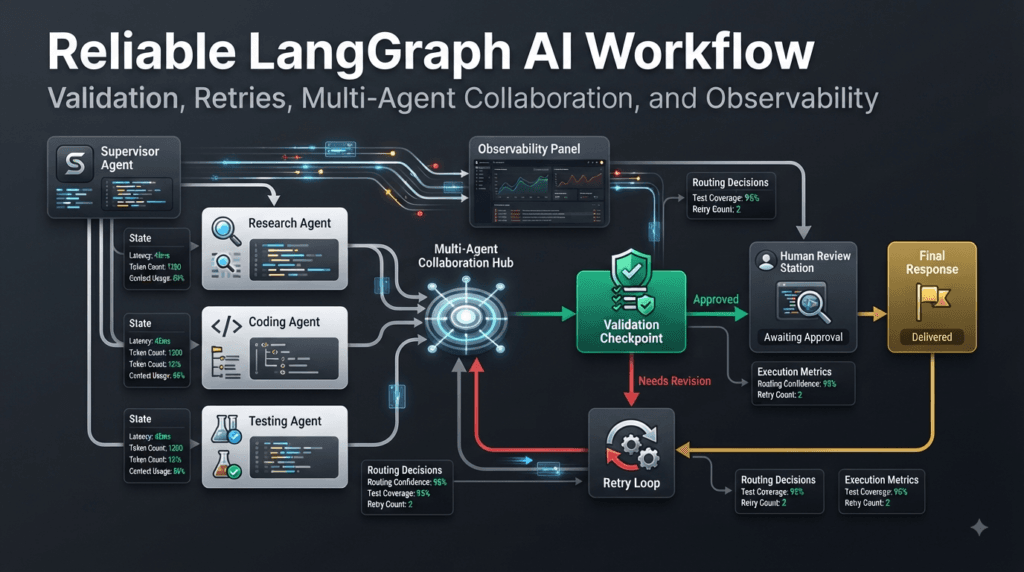
Observability Strategy
A production graph should make execution understandable.
Useful information can include:
Run ID
Node Name
Execution Time
Input State
Output State
Tool Calls
Model Calls
Errors
Retry Count
Routing Decision
Final Status
For example:
Run: 84A7
Node: research
Duration: 2.4s
Status: success

Run: 84A7
Node: validation
Duration: 0.8s
Status: failed

Run: 84A7
Route: retry
Reason: insufficient evidence
This type of information allows developers to understand what happened rather than simply seeing that the final workflow failed.
Building a Quality Gate
A useful pattern for production AI applications is the quality gate.
Generated Result
       │
       ▼
   Quality Gate
       │
 ┌─────┼─────┐
 ▼     ▼     ▼
Pass  Retry  Review
 │      │      │
 ▼      ▼      ▼
End   Agent   Human
The quality gate can evaluate several dimensions.
For generated code:
Syntax
Tests
Types
Security
Style
Requirements
For generated content:
Accuracy
Relevance
Completeness
Structure
Safety
For AI-powered business workflows:
Policy Compliance
Required Fields
Authorization
Risk Level
Confidence
The important idea is that generation and validation should be treated as separate responsibilities.
Strategy: Separate Generation From Verification
A useful architecture is:
Generator
    ↓
Verifier
    ↓
Decision
rather than:
Generator
    ↓
Assume Correct
    ↓
Output
This separation allows the verifier to challenge the generated result.
For example:
Coding Agent
     │
     ▼
Test Agent
     │
     ▼
Security Agent
     │
     ▼
Review Agent
Each stage provides another opportunity to catch problems.
This is particularly useful for high-value AI workflows where incorrect output can have operational consequences.
Managing Context Growth
Long-running AI workflows can accumulate a large amount of information.
For example:
User Messages
+
Tool Results
+
Research Documents
+
Agent Outputs
+
Validation Results
+
Execution Logs
If everything remains in the active state indefinitely, context and storage requirements can grow.
A better strategy is to distinguish between:
Operational state
Information required for the current workflow.
Historical information
Information that may be stored externally or summarized.
For example:
Large Research History
        │
        ▼
Summarization
        │
        ▼
Compact State
This keeps active workflow state manageable.
Interactive Architecture Challenge
Consider an AI assistant that performs code reviews.
It receives a pull request and needs to:
- Understand the changes
- Analyze code quality
- Check security
- Run tests
- Generate review comments
Design the graph.
One possible architecture is:
Pull Request
     │
     ▼
Change Analyzer
     │
 ┌───┼───────────┐
 ▼   ▼           ▼
Code Security   Test
Review Review   Execution
 │   │           │
 └───┼───────────┘
     ▼
Finding Aggregator
     │
     ▼
Priority Analysis
     │
     ▼
Review Generator
Now introduce a quality rule:
Critical security findings must prevent automatic approval.
The graph becomes:
Finding Aggregator
       │
       ▼
Priority Analysis
       │
   ┌───┴────┐
   ▼        ▼
Critical   Normal
   │         │
   ▼         ▼
Human      Review
Review       │
   │         ▼
   └────► Approval
This is the kind of thinking that transforms a collection of AI calls into a reliable workflow architecture.
A Practical Design Principle
When designing an AI workflow, separate three concerns:
Reasoning
   ↓
Execution
   ↓
Control
Reasoning determines what should happen.
Execution performs the required operation.
Control determines whether the workflow should continue, retry, branch, pause, or finish.
For example:
AI Agent
"What should we investigate?"
        │
        ▼
Research Tool
"Perform the investigation."
        │
        ▼
Validator
"Is the result sufficient?"
        │
        ▼
Router
"What should happen now?"
This separation provides a much stronger architectural foundation than putting all four responsibilities into a single prompt.
When a Workflow Should Stop
A graph should have explicit termination conditions.
Possible termination conditions include:
Successful validation
Maximum retries reached
Human rejection
Fatal error
Task completed
Required information unavailable
Confidence below threshold
For example:
def should_continue(state):
    if state["complete"]:
        return "finish"

    if state["retry_count"] >= 3:
        return "stop"

    if state["fatal_error"]:
        return "stop"

    return "continue"
The termination policy is just as important as the execution policy.
Without clear stopping conditions, autonomous workflows can consume unnecessary model calls, tools, time, and resources.
Designing for Predictability
AI is inherently probabilistic.
Workflow control does not have to be.
This is a powerful design principle.
For example, the LLM may decide:
"The user appears to need security analysis."
But the graph can deterministically enforce:
If category == security
→ Security Agent
Similarly, the AI may generate an uncertain answer, but the workflow can enforce:
If validation fails
→ Retry

If retry_count >= 3
→ Human Review
This creates a useful boundary between probabilistic intelligence and deterministic application control.
LangGraph is particularly well suited to this approach because graph structure can encode those deterministic boundaries around AI-powered components.
Production Architecture Mindset
A mature AI workflow should answer five questions clearly:
What does the system know?
Represented by state.
What can the system do?
Represented by nodes and tools.
How does the system decide?
Represented by model reasoning and routing logic.
What happens when something goes wrong?
Represented by validation, retry, recovery, and escalation paths.
When does execution stop?
Represented by explicit termination conditions.
If these questions cannot be answered clearly, the workflow probably needs architectural refinement.
A Complete Mental Model
Bring the concepts together:
                         User Request
                              │
                              ▼
                        Initial State
                              │
                              ▼
                       Decision Node
                              │
              ┌───────────────┼───────────────┐
              ▼               ▼               ▼
          Agent A          Agent B          Agent C
              │               │               │
              └───────────────┼───────────────┘
                              ▼
                         State Merge
                              │
                              ▼
                           Validator
                              │
                    ┌─────────┼─────────┐
                    ▼         ▼         ▼
                  Pass      Retry     Review
                    │         │         │
                    ▼         │         ▼
                  Finish      │       Human
                              │
                              └──────► Agent
This architecture demonstrates the central idea:
A reliable AI application is not merely a model call.
It is a controlled system surrounding model calls with state, execution, validation, routing, and recovery.
That distinction becomes increasingly important as AI applications move from demonstrations into real software products.
Building Production-Ready LangGraph Applications
LangGraph becomes most valuable when it is treated as an application architecture rather than simply a way to connect LLM calls. A production-grade AI workflow needs clear state management, reliable routing, validation, retry policies, observability, testing, and carefully defined boundaries between autonomous reasoning and deterministic application logic.
The difference between an impressive prototype and a dependable AI application is often not the quality of the model alone.
It is the quality of the workflow surrounding that model.
A useful production architecture can be represented as:
                         User Request
                              │
                              ▼
                       State Initialization
                              │
                              ▼
                       Decision / Router
                              │
             ┌────────────────┼────────────────┐
             ▼                ▼                ▼
        Research Agent    Coding Agent     Analysis Agent
             │                │                │
             └────────────────┼────────────────┘
                              ▼
                       State Aggregation
                              │
                              ▼
                          Validator
                              │
                 ┌────────────┼────────────┐
                 ▼            ▼            ▼
               Pass         Retry       Human Review
                 │            │            │
                 ▼            ▼            ▼
               Finish       Agent        Approval
                              │
                              └───────────►
This architecture gives developers something extremely important: control over how AI decisions become application behavior.
From AI Prototype to Production Workflow
A basic AI prototype may look like this:
response = llm.invoke(
    "Analyze this software requirement."
)
This can be perfectly reasonable for an initial experiment.
But production applications usually need much more.
Consider a software engineering assistant that receives a requirement and generates implementation code.
A production workflow might need to:
Receive Requirement
        ↓
Understand Intent
        ↓
Create Implementation Plan
        ↓
Research Dependencies
        ↓
Generate Code
        ↓
Run Tests
        ↓
Analyze Failures
        ↓
Revise Code
        ↓
Security Validation
        ↓
Human Approval
        ↓
Final Output
Each operation has a different responsibility.
This is where graph-based orchestration becomes valuable.
Instead of placing every instruction inside one enormous prompt, the application can explicitly represent the workflow.
The Three-Layer Architecture
A practical way to think about an AI workflow is to divide it into three layers.
Reasoning Layer
This is where AI models determine what should happen.
Examples include:
- Classifying a request
- Understanding requirements
- Creating a plan
- Analyzing documentation
- Reviewing generated code
- Evaluating ambiguous information
Execution Layer
This layer performs concrete operations.
Examples include:
- Calling APIs
- Searching databases
- Running tests
- Reading files
- Executing approved tools
- Retrieving documents
Control Layer
This layer determines how the workflow proceeds.
Examples include:
- Routing
- Retry decisions
- Validation
- Human approval
- Failure handling
- Termination
The architecture can therefore be visualized as:
             AI Reasoning
                  │
                  ▼
             Decision
                  │
                  ▼
          Workflow Control
                  │
          ┌───────┼───────┐
          ▼       ▼       ▼
        Tool    Agent   Validation
          │       │       │
          └───────┼───────┘
                  ▼
                State
This separation is extremely useful because AI reasoning is probabilistic while workflow control can remain deterministic.
Deterministic Control Around Probabilistic AI
Large language models can produce different outputs for similar requests.
That flexibility is useful for reasoning, but it can become dangerous when the model controls critical application behavior without boundaries.
Suppose an AI model decides:
"Deploy the application."
A production system should not necessarily execute that instruction immediately.
Instead:
AI Decision
    ↓
Policy Check
    ↓
Validation
    ↓
Authorization
    ↓
Human Approval
    ↓
Deployment
The AI can recommend an action.
The application decides whether that action is permitted.
This distinction is fundamental to reliable agentic systems.
Strategy: Make Important Decisions Explicit
Whenever a decision affects application behavior, make the decision visible in the workflow.
Instead of hiding logic inside a prompt:
"If appropriate, continue with the operation."
represent the decision explicitly:
def route_after_validation(state):
    if state["validation_status"] == "approved":
        return "continue"

    if state["validation_status"] == "needs_review":
        return "human_review"

    return "retry"
Now developers can inspect and test the decision.
This also makes the workflow easier to explain to engineering teams.
Building a Reliable State Contract
A strong state definition acts as the contract between nodes.
For example:
from typing import TypedDict


class SoftwareWorkflowState(TypedDict):
    requirement: str
    plan: str
    research: list[str]
    generated_code: str
    test_results: list[str]
    review_result: str
    retry_count: int
    status: str
Each field has a purpose.
The workflow can evolve from:
requirement
to:
plan
to:
research
to:
generated_code
and eventually:
review_result
status
This creates a traceable execution history.
State Should Represent Meaningful Workflow Information
A common mistake is treating state as a dumping ground for every piece of information generated during execution.
Instead, ask:
Will another node, routing decision, validation step, or persistence mechanism need this information?
If not, it may not belong in the shared state.
For example, temporary debugging information might be logged separately rather than continuously carried through the workflow.
A focused state might look like:
{
    "task": "...",
    "research": [...],
    "result": "...",
    "validation": "passed"
}
rather than an enormous object containing every intermediate value ever generated.
This keeps workflows easier to understand.
Designing Clear Node Boundaries
A node should have a reason to exist.
Good node boundaries often correspond to:
One responsibility
One integration
One validation stage
One agent specialization
One meaningful decision
For example:
def research_node(state):
    ...

def coding_node(state):
    ...

def testing_node(state):
    ...

def review_node(state):
    ...
This is preferable to:
def giant_ai_node(state):
    # research
    # coding
    # testing
    # review
    # deployment
    # documentation
    ...
The second design may initially appear faster to build.
But as requirements grow, the giant node becomes increasingly difficult to test and modify.
Comparison: Monolithic Agent vs Structured Workflow
| Area | Monolithic AI Agent | Structured Workflow |
|---|---|---|
| Initial implementation | Fast | Moderate |
| Prompt complexity | High | Distributed |
| Responsibility boundaries | Weak | Strong |
| Testing | Difficult | Easier |
| Routing | Often implicit | Explicit |
| Retry handling | Often custom | Workflow-level |
| Validation | Frequently embedded | Dedicated stages |
| Observability | Harder | More structured |
| Maintenance | Becomes difficult | More modular |
| Enterprise scaling | Limited | Stronger |
The structured approach introduces additional design work.
That trade-off is worthwhile when the application has complex behavior.
For a simple chatbot, a graph may be unnecessary.
For a multi-step autonomous system, explicit orchestration can dramatically improve maintainability.
Production Retry Architecture
Retries should be designed rather than added as an afterthought.
Consider a tool call.
Tool Call
   │
   ▼
Success?
 ┌─┴─────────────┐
 │               │
Yes              No
 │               │
 ▼               ▼
Continue      Error Type
                │
        ┌───────┼────────┐
        ▼       ▼        ▼
     Retryable Fatal   Review
        │       │        │
        ▼       ▼        ▼
      Retry    Stop     Human
This architecture prevents every failure from becoming an automatic retry.
A retry counter can be stored in state:
def increment_retry(state):
    return {
        "retry_count": state["retry_count"] + 1
    }
The router can then enforce a maximum:
def retry_router(state):
    if state["retry_count"] >= 3:
        return "human_review"

    if state["error_type"] == "fatal":
        return "stop"

    return "retry"
This simple pattern can prevent runaway execution.
Exponential Backoff for Temporary Failures
Not every retry should happen immediately.
For temporary infrastructure problems, exponential backoff can be useful.
Conceptually:
Attempt 1 → wait 1 second
Attempt 2 → wait 2 seconds
Attempt 3 → wait 4 seconds
Attempt 4 → wait 8 seconds
This is particularly relevant when interacting with:
- External APIs
- Rate-limited services
- Cloud services
- Search systems
- Temporary network dependencies
However, exponential backoff should not be used to repeatedly retry a logically invalid request.
If the input is invalid, waiting longer will not make it valid.
Validation as a First-Class Workflow Stage
One of the strongest strategies for reliable AI applications is to treat validation as an independent responsibility.
Consider code generation:
Requirement
     ↓
Code Generator
     ↓
Generated Code
     ↓
Validator
     ↓
Tests
     ↓
Security Scan
     ↓
Review
Validation can happen at multiple levels.
Syntax Validation
Does the output parse correctly?
Structural Validation
Does it follow the required schema?
Functional Validation
Does it perform the expected behavior?
Security Validation
Does it introduce unacceptable risks?
Business Validation
Does it follow the application’s rules?
Quality Validation
Does it meet the expected quality threshold?
Combining these checks produces much stronger systems than relying on a single model-generated response.
Interactive Exercise: Design a Quality Gate
Imagine an AI system generates an API endpoint.
The endpoint must satisfy five requirements:
1. Correct request schema
2. Correct response schema
3. Authentication
4. Automated tests
5. Security validation
Design a quality gate.
One possible architecture is:
Generated API
     │
     ▼
Schema Validation
     │
     ▼
Authentication Check
     │
     ▼
Test Execution
     │
     ▼
Security Scan
     │
     ▼
Quality Decision
Now introduce failure routing.
Quality Decision
       │
   ┌───┼────┐
   ▼   ▼    ▼
 Pass Fail Review
   │    │     │
   ▼    ▼     ▼
 Finish Fix  Human
This turns validation into an executable engineering process rather than a vague instruction.
Observability Is Part of Architecture
A workflow that cannot be inspected is difficult to operate.
For production systems, developers should be able to answer questions such as:
Which node executed?
How long did it take?
What state entered the node?
What state changed?
Which tool was called?
Did validation pass?
Why did the workflow retry?
Which route was selected?
Why did execution stop?
A useful execution record might look like:
Run ID: 72F9A
Node: code_generation
Duration: 4.8s
Status: success

Node: test_execution
Duration: 7.2s
Status: failed

Route: retry
Reason: 2 tests failed

Node: code_generation
Retry: 1
Status: success
This type of visibility is invaluable when diagnosing unexpected behavior.
Debugging AI Workflows
When a final answer is incorrect, avoid immediately blaming the LLM.
Trace the workflow.
User Input
    ↓
Classification
    ↓
Routing
    ↓
Agent
    ↓
Tool
    ↓
State Update
    ↓
Validation
    ↓
Final Response
At each stage, inspect what happened.
For example:
Classification → Correct
Routing        → Correct
Research       → Incomplete
State Update   → Correct
Validation     → Correctly detected problem
The root cause is now much clearer.
Without workflow-level observability, developers might simply see:
"AI produced a bad answer."
That is not enough information to fix the system.
Testing Strategy for Graph-Based Applications
Testing should happen at multiple levels.
Node-Level Testing
Test individual nodes independently.
def test_research_node():
    state = {
        "question": "What is API testing?"
    }

    result = research_node(state)

    assert "research" in result
Routing Testing
Verify that each condition leads to the correct destination.
def test_failed_validation_routes_to_retry():
    state = {
        "validation_status": "failed",
        "retry_count": 0
    }

    assert route_after_validation(state) == "retry"
Integration Testing
Verify that multiple nodes work together.
Input
 ↓
Node A
 ↓
Node B
 ↓
Node C
End-to-End Testing
Test the complete workflow from user request to final result.
User
 ↓
Complete Graph
 ↓
Final Output
Failure Testing
Deliberately simulate:
- Tool failure
- Invalid state
- Model failure
- Validation failure
- Timeout
- Maximum retries
- Human rejection
Failure testing is especially important for autonomous AI systems.
Why Failure Testing Matters
A workflow can appear perfect during successful execution.
But production environments are dominated by unexpected conditions.
Imagine:
Research API
     ↓
Timeout
What happens?
If the workflow has no recovery path, execution may simply fail.
With explicit recovery:
Research API
     ↓
Timeout
     ↓
Retry
     ↓
Success
Or:
Research API
     ↓
Timeout
     ↓
Retry Limit
     ↓
Fallback
The workflow becomes resilient instead of fragile.
Multi-Agent Workflow Strategy
When using multiple agents, resist the temptation to create an agent for every tiny operation.
A good multi-agent system has meaningful specialization.
For example:
Supervisor
    │
    ├── Research Agent
    ├── Coding Agent
    ├── Testing Agent
    └── Review Agent
Each agent should provide capabilities that justify its existence.
A poor architecture might look like:
Agent 1 → Reads input
Agent 2 → Extracts one field
Agent 3 → Renames field
Agent 4 → Generates one sentence
Agent 5 → Combines sentences
This adds orchestration overhead without providing meaningful specialization.
The goal is not to maximize the number of agents.
The goal is to create useful separation of responsibilities.
Supervisor Strategy
A supervisor can coordinate specialist agents.
For example:
def supervisor(state):
    if not state["research_complete"]:
        return "research"

    if not state["implementation_complete"]:
        return "coding"

    if not state["tests_complete"]:
        return "testing"

    if not state["review_complete"]:
        return "review"

    return "finish"
This creates a centralized decision point.
The supervisor does not necessarily perform the work itself.
It determines which specialized component should perform the work.
That distinction becomes particularly useful as workflows grow.
When to Use Parallel Execution
Parallel execution makes sense when tasks are independent.
For example:
                  Research Request
                        │
            ┌───────────┼───────────┐
            ▼           ▼           ▼
        Technical    Business    Security
         Research     Research    Research
            │           │           │
            └───────────┼───────────┘
                        ▼
                    Aggregator
These tasks do not necessarily need to wait for one another.
But parallel execution should not be forced when there are dependencies.
If:
Research
   ↓
Analysis
and analysis requires research results, parallel execution would be incorrect.
The key question is:
Can these tasks produce their outputs independently?
If yes, parallel execution may be appropriate.
If no, sequential execution is clearer.
State Aggregation Strategy
When several branches contribute to the same state field, define how their outputs should be combined.
For example:
from typing import Annotated
import operator


class ResearchState(TypedDict):
    findings: Annotated[list[str], operator.add]
Multiple branches can contribute findings.
Conceptually:
Research A → Finding A
Research B → Finding B
Research C → Finding C

                 ↓

        Shared Findings

[A, B, C]
This pattern is useful for:
- Research
- Security analysis
- Test results
- Agent observations
- Document retrieval
- Multi-source analysis
The aggregation strategy should be intentional.
Handling Conflicting Results
Suppose three agents provide:
Agent A → Recommendation X
Agent B → Recommendation X
Agent C → Recommendation Y
The workflow should not automatically assume that the majority is correct.
Instead, introduce an evaluation stage.
Agent Results
     ↓
Normalize
     ↓
Compare Evidence
     ↓
Assess Confidence
     ↓
Decision
The state could record:
{
    "recommendations": ["X", "Y"],
    "confidence": "medium",
    "conflict_detected": True
}
A router can then decide whether more research is required.
This creates an important pattern:
Uncertainty
    ↓
Additional Evidence
    ↓
Re-evaluation
That is often more reliable than forcing the system to make an immediate decision.
Managing Long-Running Workflows
Some workflows may execute for much longer than a simple request-response interaction.
Examples include:
- Large research tasks
- Software development workflows
- Document processing
- Data analysis
- Automated testing
- Approval-based business processes
These workflows benefit from persistence and resumability.
Instead of assuming:
Start → Finish
the architecture should support:
Start
 ↓
Research
 ↓
Pause
 ↓
Resume
 ↓
Validation
 ↓
Human Approval
 ↓
Finish
This is especially useful when a human must intervene or when an external operation takes significant time.
Human-in-the-Loop as a Control Boundary
Human interaction should be treated as an architectural boundary rather than an error condition.
For example:
AI Analysis
     ↓
Risk Assessment
     ↓
Risk High?
   /     \
 No       Yes
 │         │
 ▼         ▼
Continue  Human
          Review
The human can then:
Approve
Reject
Modify
Request More Information
The workflow continues based on that decision.
This pattern allows organizations to combine automation with human accountability.
Security Strategy for AI Workflows
AI workflows frequently interact with tools, APIs, files, databases, and external systems.
That means security must be considered at the workflow level.
Important controls include:
- Tool authorization
- Input validation
- Output validation
- Least-privilege access
- Secret management
- Sensitive data handling
- Audit logging
- Human approval for high-risk actions
For example:
AI Agent
    ↓
Requests Tool Access
    ↓
Permission Check
    ↓
Allowed?
  /     \
Yes      No
 |        |
 ▼        ▼
Tool     Reject
The AI should not automatically receive unrestricted access simply because it is part of the workflow.
Production Architecture Checklist
Before deploying a complex LangGraph application, review the following:
□ Is the state clearly defined?
□ Does every node have a focused responsibility?
□ Are routing decisions explicit?
□ Are deterministic decisions handled deterministically?
□ Are AI decisions validated?
□ Are retries bounded?
□ Are failure types classified?
□ Are critical operations protected?
□ Are human approval points defined?
□ Can independent work execute in parallel?
□ Are parallel results aggregated correctly?
□ Are conflicting results handled?
□ Are nodes individually testable?
□ Are routing paths tested?
□ Are failure paths tested?
□ Is workflow execution observable?
□ Can long-running workflows resume safely?
□ Are external tools properly authorized?
□ Are termination conditions explicit?
This checklist can serve as a practical architecture review before moving an AI workflow into production.
Interactive Design Challenge
Consider a customer-support AI application.
The user submits:
"My payment failed, I was charged twice,
and I need the issue resolved."
Design a workflow that can:
- Understand the request
- Retrieve account information
- Check payment status
- Detect duplicate charges
- Apply business rules
- Generate a response
- Escalate when necessary
One possible design is:
                         Customer Request
                                │
                                ▼
                         Intent Analysis
                                │
                                ▼
                       Account Verification
                                │
                                ▼
                         Payment Analysis
                                │
                    ┌───────────┼───────────┐
                    ▼           ▼           ▼
                 Failed      Duplicate    Normal
                 Payment      Charge      Payment
                    │           │           │
                    └───────────┼───────────┘
                                ▼
                          Policy Check
                                │
                         ┌──────┴──────┐
                         ▼             ▼
                      Allowed       Escalate
                         │             │
                         ▼             ▼
                    Resolution       Human
                         │             │
                         └──────┬──────┘
                                ▼
                         Response Generator
Now ask:
Which decisions should be handled by deterministic business rules, and which require AI reasoning?
For example:
Duplicate transaction detection
→ Deterministic

Refund eligibility
→ Business rules

Understanding user intent
→ AI

Response wording
→ AI

Authorization
→ Deterministic
This distinction can significantly improve reliability.
The Most Important Strategy for Scalable AI
Do not begin by asking:
“How many agents should I create?”
Instead ask:
“What responsibilities, decisions, dependencies, and failure paths exist in this application?”
Then design the graph around those requirements.
A good architecture might contain:
Few Agents
+
Clear State
+
Explicit Routing
+
Strong Validation
+
Bounded Retries
+
Observability
+
Human Control
That combination is much more valuable than simply increasing the number of LLM calls.
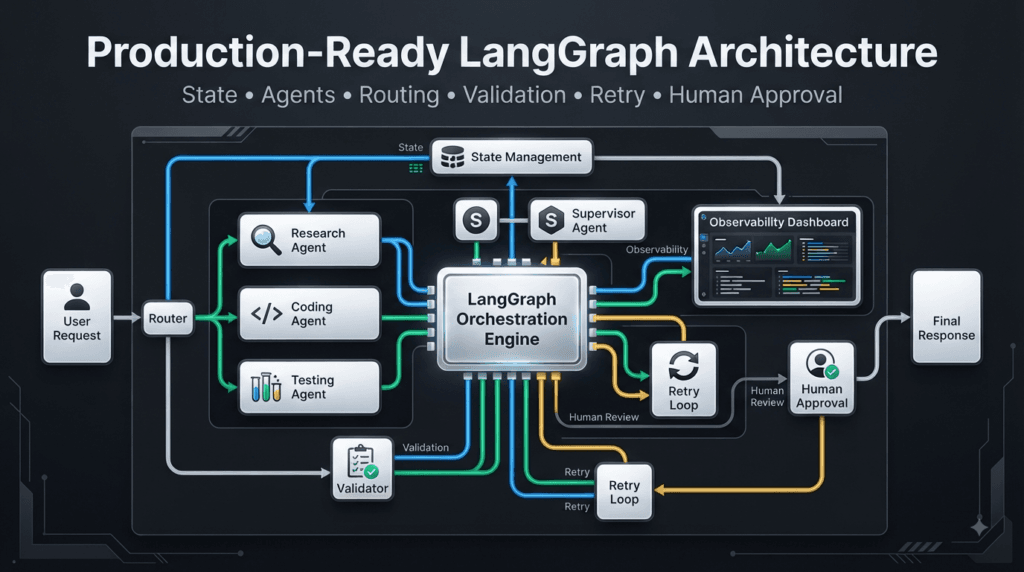
Featured Snippet
What Is LangGraph Production Architecture?
LangGraph Production Architecture is a structured approach to building reliable AI applications by combining graph-based workflow orchestration with state management, explicit routing, validation, retries, observability, testing, security controls, and human approval. It helps developers move from experimental AI agents to maintainable production workflows.
AI Overview Answer
LangGraph Production Architecture helps developers build scalable AI workflows by separating reasoning, execution, and workflow control. A production architecture can combine shared state, specialized agents, conditional routing, validation, bounded retries, parallel execution, observability, testing, and human-in-the-loop controls to make complex AI applications more reliable and maintainable.
People Asked Questions
What is LangGraph Production Architecture?
LangGraph Production Architecture refers to designing LangGraph-based AI applications with explicit state, workflow control, routing, validation, failure handling, observability, testing, security, and human oversight.
Why is production architecture important for LangGraph?
A prototype may work with a few model calls, but production applications need to handle failures, unexpected outputs, external tools, retries, state persistence, testing, monitoring, and operational controls.
How does LangGraph support production AI workflows?
LangGraph provides a graph-based structure for connecting nodes, managing workflow state, controlling transitions, creating conditional paths, coordinating agents, and implementing complex execution patterns.
Should every LangGraph application use multiple agents?
No. A simple application may require only one agent or model. Multi-agent architecture becomes useful when responsibilities can be meaningfully separated into specialized capabilities.
How can LangGraph workflows handle failures?
Workflows can classify failures and route execution to retry, fallback, correction, escalation, or termination paths. Retry limits should be defined to prevent uncontrolled execution loops.
How does validation improve LangGraph applications?
Validation creates a quality-control layer between AI-generated output and subsequent workflow actions. It can check schemas, functionality, security requirements, business rules, and other application-specific conditions.
Can LangGraph support human approval?
Yes. Human approval can be incorporated into workflows for sensitive, high-risk, or irreversible operations where autonomous execution should not be allowed.
How should LangGraph workflows be tested?
Test individual nodes, routing decisions, state transformations, integrations, complete workflows, and failure paths. Testing only successful execution is insufficient for production AI systems.
What makes a LangGraph workflow scalable?
Clear state contracts, modular nodes, explicit routing, appropriate parallelization, bounded retries, observability, reusable agents, and well-defined failure handling all contribute to scalability.
Is LangGraph suitable for enterprise AI?
LangGraph can be a strong choice for enterprise AI workflows that require complex orchestration, stateful execution, multiple agents, tool integration, validation, observability, and human oversight.
Internal Links:
- Learn MCP – Zero to Hero
- Learn AI Agents for QA – Zero to Hero
- Playwright Automation – Zero to Hero
- LangGraph: Complete Zero to Hero
- Learn Python – Zero to Hero
- OpenAI Codex: Complete Zero to Hero
- Cursor AI: Complete Zero to Hero
- Claude Code Tutorial: Complete Zero to Hero
- AutoGen: Complete Zero to Hero Guide
- Free QA Resources Built From Real Experience
- QA Glossary: Test Automation Terms Every Engineer Should Know
External Resources:
- Model Context Protocol documentation
- Playwright documentation
- GitHub documentation
- TypeScript documentation
- Prompt Engineering Overview
- Git Documentation
- Visual Studio Code
- Cursor AI
- Cursor Documentation
Conclusion
Building reliable AI applications requires more than connecting an LLM to a few tools.
The real engineering challenge is coordinating reasoning, state, execution, validation, routing, and recovery in a way that remains understandable as the application grows.
LangGraph provides a strong foundation for this style of architecture because workflows can explicitly represent nodes, state transitions, conditional paths, loops, parallel operations, validation stages, and human control points.
The most effective architecture is rarely the one with the most agents or the most complicated graph.
It is the one where every component has a clear purpose.
A reliable workflow should know:
What information it has
        ↓
What it needs to accomplish
        ↓
Which component should act
        ↓
How the result should be validated
        ↓
What happens when validation fails
        ↓
When human intervention is required
        ↓
When execution should stop
This mindset transforms AI development from prompt engineering alone into AI workflow engineering.
The model provides reasoning.
Tools provide capabilities.
State provides shared context.
Nodes provide specialized execution.
Edges provide control.
Validation provides quality assurance.
Observability provides visibility.
Human approval provides governance where automation should stop.
When these pieces are designed together, developers can build AI systems that are not only intelligent, but also testable, maintainable, observable, and suitable for increasingly demanding production environments.
Final Key Takeaways
- LangGraph can be used as a workflow orchestration layer around AI models, tools, agents, and deterministic application logic.
- Shared state should contain meaningful information required for workflow execution and decision-making.
- Nodes should have focused responsibilities instead of becoming large monolithic AI functions.
- Conditional routing allows workflows to respond dynamically to state and validation results.
- Deterministic application logic should handle deterministic decisions whenever possible.
- AI models are better suited to tasks involving language understanding, reasoning, classification, and ambiguous analysis.
- Validation should be treated as a first-class stage rather than assuming generated output is correct.
- Retry logic should always have clear boundaries and should distinguish retryable failures from permanent failures.
- Parallel execution is valuable when multiple operations are independent.
- State aggregation becomes important when several agents contribute information to a shared workflow.
- Conflicting agent outputs should be evaluated using evidence, confidence, or additional research rather than blindly accepted.
- Human approval can serve as an intentional control boundary for high-risk operations.
- Node-level, routing, integration, end-to-end, and failure-path testing all contribute to workflow reliability.
- Observability is essential for understanding why an AI workflow succeeded, failed, retried, or selected a particular route.
- Production AI systems should separate reasoning, execution, and control rather than placing everything inside a single prompt.
- The goal is not to build the most complicated graph. The goal is to build a graph that makes complex AI behavior clear, controlled, testable, and maintainable.
Continue Learning
Explore more expert articles on n8n, Autogen, Postman AI, Cursor AI, LangChain, CrewAI, MCP Servers, AI Agents, LlamaIndex, Docker, FastAPI, Playwright, Cypress, Test Automation, DevOps, and Software Engineering at www.skakarh.com.
QAPulse by SK delivers expert release analysis, AI engineering insights, enterprise automation strategies, migration guidance, DevOps best practices, and practical testing knowledge to help software professionals build scalable, intelligent, and production-ready software systems.


