QA
QA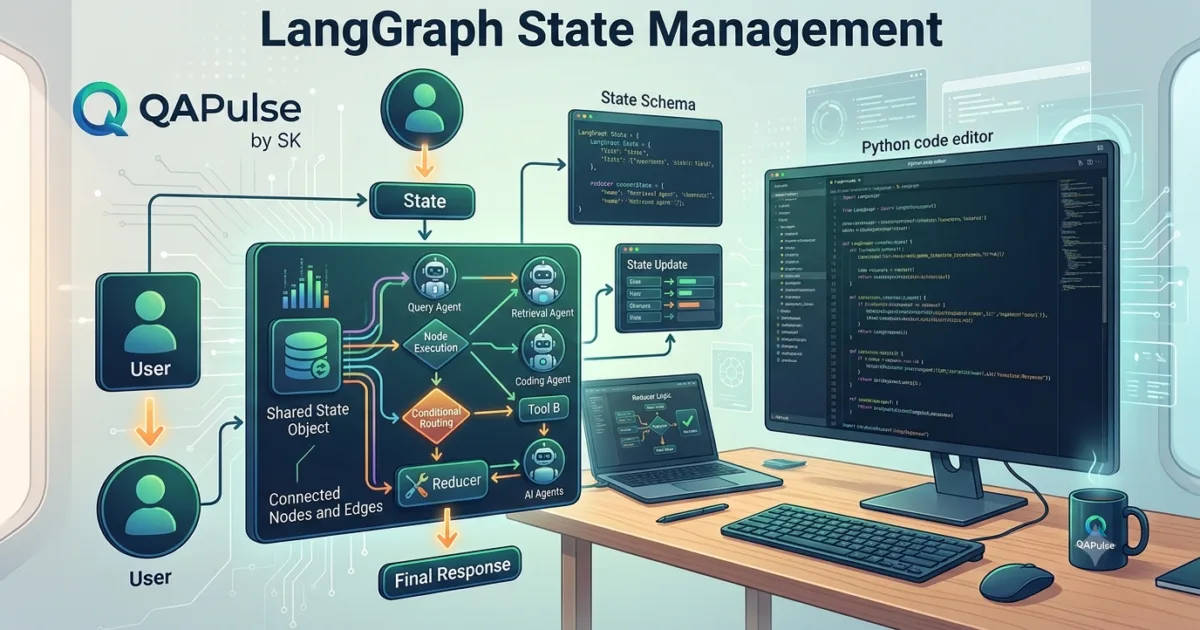
Why State Management Is Important in LangGraph
One of the biggest differences between traditional AI applications and modern AI agent systems is the ability to remember information throughout a workflow. A conventional Large Language Model processes each request independently unless developers manually provide previous context. This approach quickly becomes difficult as applications grow in complexity.
LangGraph State Management solves this problem by introducing a shared state that travels through every step of a graph. Instead of each node working in isolation, every node can access the current workflow state, update it, and pass it to the next node. This creates AI applications that can maintain context, coordinate multiple operations, and make intelligent decisions based on everything that has happened previously.
State management is one of the core reasons LangGraph is well suited for production AI systems.
What is State?
State is the collection of information that exists while a LangGraph workflow is running.
Rather than storing data inside individual functions, LangGraph keeps important information in a centralized state object. Every node receives this state, performs its task, and returns an updated version.
The state evolves continuously as the workflow progresses.
Think of the state as the application’s working memory that every part of the graph can access.
Information Stored in the State
Depending on the application, the state may contain many different types of information.
Common examples include:
- User requests
- Conversation history
- AI-generated responses
- Retrieved documents
- API responses
- Database query results
- Tool execution outputs
- Workflow status
- Decision variables
- Error information
- User preferences
- Session identifiers
The flexibility of the state allows developers to build workflows ranging from simple chatbots to sophisticated enterprise AI systems.
How State Flows Through a Workflow
Every LangGraph workflow follows a continuous state transition process.
Initial State

↓

Node 1

↓

Updated State

↓

Node 2

↓

Updated State

↓

Node 3

↓

Final State
Instead of creating new variables for every operation, the workflow continuously improves and enriches the shared state.
Stateless vs Stateful AI Applications
Understanding the difference between stateless and stateful execution is essential when learning LangGraph.
Stateless Applications
A stateless application treats every request independently.
Example characteristics include:
- No memory
- No previous conversation
- Independent requests
- Manual context management
- Limited workflow capabilities
Simple chatbots often operate this way.
Stateful Applications
Stateful applications remember previous information throughout execution.
Characteristics include:
- Persistent context
- Shared workflow memory
- Better decision-making
- Long-running conversations
- Multi-step reasoning
- Tool coordination
This is the execution model used by LangGraph.
Why Shared State Is Powerful
Without shared state, developers must manually pass information between every function.
As applications become larger, this approach becomes difficult to maintain.
Shared state provides several advantages:
- Centralized information
- Cleaner architecture
- Easier debugging
- Reduced duplicate code
- Better collaboration between nodes
- Improved scalability
Because every node works with the same state object, complex workflows become significantly easier to understand.
State Lifecycle
The state changes throughout the execution of a graph.
A simplified lifecycle looks like this:
User Input

↓

Create Initial State

↓

Execute Workflow

↓

Update State

↓

Decision

↓

More Updates

↓

Return Final State
Every execution step contributes additional information to the evolving workflow.
State in Multi-Agent Systems
One of LangGraph’s greatest strengths is supporting multiple AI agents.
Instead of each agent maintaining separate memory, they collaborate using the same shared state.
For example:
- Planner Agent adds execution goals.
- Research Agent stores retrieved information.
- Coding Agent records generated code.
- Review Agent saves validation results.
- Testing Agent records execution outcomes.
Each agent contributes to the same workflow state, enabling efficient collaboration.
Designing an Effective State
A well-designed state should contain only the information required by the workflow.
Good design principles include:
- Use meaningful field names.
- Avoid duplicate information.
- Keep related data together.
- Remove temporary values when no longer needed.
- Document important state fields.
- Separate user data from system data.
A clean state structure makes workflows easier to maintain as projects grow.
Common State Management Mistakes
Developers new to LangGraph often encounter similar problems.
Storing Too Much Data
Adding unnecessary information increases complexity and may reduce workflow performance.
Only keep information that contributes to future decisions.
Mixing Unrelated Information
Group similar information together instead of creating a disorganized state object.
Logical organization improves readability.
Frequently Changing State Structure
Changing the state definition during development without planning can introduce compatibility issues across multiple nodes.
Design the state carefully before building larger workflows.
Ignoring Error Information
Recording errors inside the state allows workflows to recover gracefully and supports debugging.
Benefits of Effective State Management
Proper state management enables:
- Context-aware AI applications
- Multi-step reasoning
- Long-running workflows
- Multi-agent collaboration
- Improved debugging
- Better workflow visibility
- Easier maintenance
- Production scalability
These capabilities distinguish LangGraph from traditional linear AI pipelines.
Real-World Importance
State management is the foundation upon which every LangGraph application is built. Whether developing an AI coding assistant, an enterprise support agent, a Retrieval-Augmented Generation system, or a multi-agent research platform, shared state allows every component of the workflow to access the information it needs at the right time. By treating state as the central source of truth, developers can create AI systems that remember context, coordinate complex tasks, adapt to changing conditions, and deliver intelligent behavior across long-running workflows.
I’ll continue following your established rules:
- H1 only for the title
- H2/H3 for all remaining headings
- No separators
- Day 2 split into 4 parts
- Primary focus keyword: LangGraph
LangGraph State Schema: Defining, Updating, and Managing Workflow Data
Understanding the Role of a State Schema
In the previous part, we learned that state is the central source of information shared throughout a LangGraph workflow. However, simply storing data is not enough. Developers also need a structured way to define what information the workflow can contain and how that information should be organized.
This is where a State Schema becomes essential.
A state schema acts as the blueprint for your workflow’s shared memory. It defines the fields available to every node, ensures consistency across the application, and helps developers build reliable AI systems that are easier to maintain and extend.
Without a well-designed schema, workflows can become difficult to debug, difficult to scale, and prone to unexpected errors.
What Is a State Schema?
A state schema is a formal definition of the data that exists within a LangGraph workflow.
Rather than allowing every node to create arbitrary variables, developers define the expected structure before building the graph.
A schema typically specifies:
- Available fields
- Data types
- Required information
- Optional values
- Workflow metadata
- Execution status
Every node works with the same schema, making communication between different parts of the graph predictable and reliable.
Why State Schemas Matter
As AI applications grow, multiple nodes—and often multiple developers—work on the same workflow.
A shared schema provides several important benefits:
- Consistent data structure
- Easier debugging
- Better code readability
- Reduced development errors
- Simplified maintenance
- Improved collaboration
- Better scalability
The schema becomes the contract that every node follows throughout execution.
Creating a Simple State Schema
One common way to define a state schema in Python is by using TypedDict.
Example:
from typing import TypedDict

class AgentState(TypedDict):
    user_input: str
    response: str
This simple schema defines two fields that every node in the workflow can access.
Expanding the Schema
Real-world applications usually require additional information.
A larger schema might include:
from typing import TypedDict

class AgentState(TypedDict):
    user_input: str
    response: str
    documents: list
    tool_result: str
    next_step: str
As workflows evolve, developers can extend the schema while maintaining a consistent structure.
How Nodes Use the Schema
Every node receives the current state, performs its assigned task, and returns an updated version.
The workflow follows a predictable pattern.
Current State

↓

Read Data

↓

Process Information

↓

Update State

↓

Next Node
Because every node follows the same schema, data flows smoothly through the graph.
Updating State During Execution
State is not static.
Each node contributes new information as the workflow progresses.
For example:
User Input

↓

Planner Adds Goal

↓

Retriever Adds Documents

↓

LLM Generates Answer

↓

Validator Adds Status

↓

Final Response
Each stage enriches the shared state rather than replacing it entirely.
Required and Optional Fields
Not every field must exist from the beginning of execution.
Required Fields
These fields are expected throughout the workflow.
Examples include:
- User input
- Session identifier
- Current task
Optional Fields
Some information becomes available only after specific nodes execute.
Examples include:
- Retrieved documents
- Tool outputs
- Validation results
- Generated summaries
- Error messages
Separating required and optional fields keeps the schema flexible while maintaining consistency.
Designing an Effective Schema
A well-designed schema should be simple enough to understand but comprehensive enough to support future expansion.
Recommended practices include:
- Use descriptive field names.
- Keep related information together.
- Avoid duplicated data.
- Document important fields.
- Design with future growth in mind.
- Remove obsolete values when appropriate.
A thoughtful schema simplifies both development and long-term maintenance.
Common Schema Design Mistakes
Developers often encounter similar challenges when defining workflow schemas.
Using Generic Field Names
Names such as data, value, or info provide little context.
Descriptive names improve readability.
Storing Unrelated Information Together
Avoid combining unrelated workflow data into a single field.
Organize information logically.
Creating an Overly Complex Schema
A schema should contain only the information needed by the workflow.
Unnecessary fields increase complexity and make maintenance more difficult.
Frequently Changing the Schema
Changing field names or data structures after multiple nodes have been implemented can introduce compatibility issues.
Plan the schema carefully before expanding the application.
Schema Evolution
As applications grow, the schema naturally evolves.
A typical progression looks like this:
Basic Messages

↓

Conversation History

↓

Tool Outputs

↓

External Data

↓

Workflow Metadata

↓

Multi-Agent Information
This gradual expansion allows developers to support increasingly sophisticated AI workflows without redesigning the entire application.
Best Practices for State Schema Design
When designing a LangGraph state schema:
- Define the schema before building nodes.
- Keep the structure simple and predictable.
- Use meaningful field names.
- Separate required and optional values.
- Avoid unnecessary duplication.
- Document every important field.
- Test schema changes carefully.
- Review the schema regularly as the application evolves.
Following these practices results in workflows that are easier to debug, extend, and maintain.
Real-World Importance
Every production LangGraph application relies on a well-designed state schema. Whether building an AI assistant, a document analysis platform, a Retrieval-Augmented Generation system, or a multi-agent automation solution, the schema provides the foundation for reliable communication between nodes. By defining a clear and consistent structure for workflow data, developers create AI systems that are easier to understand, easier to scale, and better prepared for real-world production environments.
LangGraph State Reducers: Managing Concurrent Updates and State Merging
Understanding Why State Reducers Are Needed
As LangGraph workflows become more advanced, multiple nodes may update the shared state during the same execution. In simple workflows, one node updates the state before the next node runs, making state management straightforward. However, modern AI applications often execute multiple branches, parallel operations, or multiple AI agents simultaneously.
When several nodes attempt to modify the same field, LangGraph needs a reliable way to determine how those updates should be combined. This is where State Reducers become essential.
A reducer defines how new values are merged into the existing state, ensuring that workflow data remains consistent regardless of how many nodes are executing.
State reducers are particularly important when building scalable, production-ready AI systems.
What Is a State Reducer?
A state reducer is a function or rule that determines how updates are applied to the current workflow state.
Instead of simply replacing existing values, a reducer decides how old and new data should be combined.
A reducer may:
- Replace existing values
- Append new information
- Merge collections
- Aggregate results
- Preserve previous history
- Resolve conflicting updates
This controlled approach helps maintain predictable workflow behavior.
Why Reducers Are Important
Without reducers, simultaneous state updates could overwrite valuable information.
Consider a workflow where:
- One node retrieves documents.
- Another node searches the web.
- A third node queries a database.
All three operations may finish at different times.
Without a merging strategy, later updates could accidentally replace earlier results.
Reducers prevent this problem by defining exactly how updates should be combined.
State Updates Without a Reducer
A simple workflow without reducers might behave like this.
Initial State

↓

Node A Updates Messages

↓

Node B Updates Messages

↓

Previous Messages Lost
The final update replaces earlier information.
This is rarely desirable in production applications.
State Updates With a Reducer
Using reducers allows every update to contribute to the shared state.
Initial State

↓

Node A

↓

Merge Updates

↓

Node B

↓

Merge Updates

↓

Combined State
Instead of replacing data, the workflow intelligently combines it.
Common Reducer Strategies
Different workflows require different approaches.
Replace Strategy
The newest value replaces the existing one.
Suitable for:
- Current workflow status
- Latest response
- Progress indicators
Append Strategy
New values are added to existing collections.
Common examples include:
- Conversation history
- Retrieved documents
- Execution logs
- Tool outputs
Merge Strategy
Existing and incoming data are combined.
Useful for:
- Configuration objects
- Metadata
- Structured information
- Agent outputs
Aggregate Strategy
Multiple values are summarized into a single result.
Examples include:
- Scores
- Statistics
- Confidence values
- Performance metrics
Choosing the appropriate strategy depends on the workflow requirements.
Reducers in Multi-Agent Systems
Reducers become especially valuable when several AI agents collaborate.
Example:
Planner Agent

↓

Research Agent

↓

Coding Agent

↓

Testing Agent

↓

Merge Results

↓

Final State
Each agent contributes new information while preserving updates from the others.
This enables smooth collaboration without data loss.
Parallel Workflow Execution
LangGraph supports workflows that perform multiple tasks simultaneously.
Example:
User Request

↓

Parallel Execution

↙      ↓      ↘

Search  API  Database

↘      ↓      ↙

Reducer

↓

Combined Results
Reducers ensure that results from parallel branches are combined correctly before the workflow continues.
Designing Reducer-Friendly State
A well-designed state makes reducer implementation much easier.
Recommended practices include:
- Keep fields independent whenever possible.
- Group related information together.
- Avoid storing duplicate values.
- Use collections for growing information.
- Separate temporary and permanent data.
A clean state structure reduces merge conflicts and improves workflow reliability.
Common Reducer Mistakes
Developers new to LangGraph frequently encounter similar issues.
Replacing Data Unnecessarily
Replacing values when information should be preserved can result in lost context.
Choose replacement only when previous data is no longer needed.
Mixing Multiple Responsibilities
Reducers should perform one merging task only.
Complex business logic belongs inside workflow nodes rather than reducer functions.
Ignoring Parallel Execution
Applications that use multiple branches should always consider how concurrent updates will be merged.
Planning reducer behavior early prevents unexpected workflow results.
Creating Inconsistent State
Reducers should always produce predictable output that matches the defined state schema.
Consistency simplifies debugging and future development.
Benefits of State Reducers
Well-designed reducers provide several advantages.
They help developers:
- Preserve workflow context
- Prevent data loss
- Support parallel execution
- Coordinate multiple AI agents
- Improve workflow reliability
- Simplify state management
- Build scalable AI applications
- Reduce synchronization problems
These benefits become increasingly valuable as workflows grow in complexity.
Best Practices for Reducer Design
When implementing state reducers:
- Define merge behavior before building workflows.
- Keep reducer logic simple and predictable.
- Preserve important information whenever appropriate.
- Match reducer behavior with the state schema.
- Test concurrent execution scenarios.
- Document how every shared field is updated.
- Avoid unnecessary data replacement.
- Monitor workflow behavior during production deployments.
Following these practices creates workflows that remain reliable even as multiple nodes and agents operate simultaneously.
Real-World Importance
State reducers are a critical component of advanced LangGraph applications. Modern AI systems rarely execute tasks in a perfectly linear sequence. They retrieve information from multiple sources, coordinate specialized agents, execute parallel operations, and continuously update shared workflow data. By defining clear rules for merging state changes, reducers ensure that every contribution is preserved correctly, enabling developers to build scalable, collaborative, and production-ready AI applications that remain consistent even under complex execution scenarios.
LangGraph State Best Practices: Designing Scalable, Reliable, and Production-Ready Workflows
Why State Design Determines the Success of a LangGraph Application
Every LangGraph application depends on one fundamental concept—the shared state. Nodes, edges, conditional routing, tool execution, and multi-agent collaboration all rely on the information stored within the workflow state. Even if a graph is architecturally sound, poor state design can lead to confusing workflows, inconsistent results, and difficult maintenance.
A well-designed state acts as the single source of truth for the entire application. It allows every node to access consistent information, reduces unnecessary complexity, and makes workflows easier to scale as new features are introduced.
For enterprise AI systems, investing time in state design early in the development process significantly reduces technical debt later.
Planning Your State Before Writing Code
One of the most common mistakes developers make is creating the state while building nodes. This often leads to duplicated fields, inconsistent naming, and unnecessary restructuring as the application grows.
Instead, begin by identifying:
- What information enters the workflow
- What information changes during execution
- What data must persist until completion
- What temporary data can be discarded
- Which nodes require access to each field
Planning the state first provides a stable foundation for the rest of the application.
Organizing State into Logical Sections
As workflows become larger, grouping related information improves readability and maintenance.
A production workflow commonly separates information into categories such as:
User Information
This section stores information directly related to the user.
Examples include:
- User input
- Session ID
- Conversation history
- User preferences
- Authentication details
Workflow Information
This section tracks the execution of the graph.
Typical fields include:
- Current step
- Workflow status
- Active node
- Execution path
- Completion state
Tool Results
External integrations often generate information that needs to be shared across multiple nodes.
Examples include:
- Search results
- API responses
- Database queries
- Retrieved documents
- Generated files
System Information
Applications may also maintain internal metadata such as:
- Processing timestamps
- Retry counters
- Error details
- Performance metrics
- Debugging information
Separating these categories creates a cleaner and more maintainable state structure.
Understanding the State Lifecycle
The state evolves throughout execution as every node contributes additional information.
A typical lifecycle appears as follows.
Create Initial State

↓

Receive User Input

↓

Execute Workflow

↓

Call External Tools

↓

Update Shared State

↓

Generate Response

↓

Return Final State
Each stage enriches the existing state rather than creating isolated pieces of information.
Keeping the State Small and Focused
Although it may be tempting to store every available value, excessive state size introduces unnecessary complexity.
A good state should contain only information that is:
- Required by future nodes
- Needed for decision-making
- Useful for debugging
- Important for workflow completion
Temporary variables that serve no future purpose should not remain in the shared state longer than necessary.
Supporting Long-Running Workflows
Many LangGraph applications execute over extended periods.
Examples include:
- Research assistants
- Customer support agents
- Multi-agent coding assistants
- Enterprise approval systems
- Document processing pipelines
Long-running workflows benefit from carefully managed state because every execution step depends on accurate and up-to-date information.
Well-designed state management helps ensure consistency regardless of workflow duration.
State Design for Multi-Agent Applications
When multiple AI agents collaborate, every participant relies on the shared workflow state.
A typical collaboration might include:
Planner Agent

↓

Research Agent

↓

Coding Agent

↓

Testing Agent

↓

Review Agent

↓

Final Response
Rather than maintaining separate memory for each agent, the workflow uses a unified state that every participant can access and update.
This approach simplifies coordination and improves collaboration.
Monitoring State During Execution
Observing how the state changes during execution is an effective way to understand workflow behavior.
Useful monitoring activities include:
- Tracking state updates
- Logging execution paths
- Recording node outputs
- Monitoring tool responses
- Reviewing workflow decisions
- Identifying unexpected changes
Monitoring provides valuable insights for debugging and optimization.
Common State Design Mistakes
Developers frequently encounter several avoidable issues.
Creating Duplicate Fields
Multiple fields representing the same information increase confusion and maintenance effort.
Each piece of information should have a single, clearly defined location.
Using Inconsistent Naming
Field names should follow a consistent naming convention throughout the application.
Predictable naming improves readability and reduces implementation errors.
Storing Unnecessary Data
Avoid retaining information that is never referenced again.
Removing obsolete values keeps the workflow efficient.
Ignoring Future Growth
Applications often expand over time.
Design the state with enough flexibility to support additional nodes, tools, and workflow stages without requiring major restructuring.
Best Practices for Production Applications
Successful LangGraph projects typically follow several proven practices.
- Design the state before implementing nodes.
- Use meaningful and consistent field names.
- Group related information together.
- Keep the state focused on workflow needs.
- Remove temporary information when appropriate.
- Document important state fields.
- Validate updates during development.
- Test state transitions thoroughly.
- Monitor workflow execution in production.
- Review the state regularly as the application evolves.
These practices create workflows that remain maintainable as applications become more sophisticated.
Preparing for Advanced LangGraph Features
A well-designed state forms the foundation for many advanced LangGraph capabilities introduced in later stages of development.
These include:
- Conditional routing
- Parallel execution
- Human-in-the-loop workflows
- Multi-agent collaboration
- Retrieval-Augmented Generation (RAG)
- Tool orchestration
- Memory persistence
- Enterprise AI automation
Each of these features depends on reliable state management to function effectively.
Real-World Importance
State design is one of the most important architectural decisions in any LangGraph application. Whether building an AI coding assistant, a document intelligence platform, a customer support system, or an enterprise automation solution, the quality of the workflow state directly influences reliability, scalability, and maintainability. By carefully planning the state structure, organizing information logically, monitoring state transitions, and following established best practices, developers can build production-ready AI systems that remain efficient, adaptable, and easy to extend as business requirements continue to evolve.
Internal Links:
- Learn MCP – Zero to Hero
- Learn AI Agents for QA – Zero to Hero
- Playwright Automation – Zero to Hero
- Learn Python – Zero to Hero
- OpenAI Codex: Complete Zero to Hero
- Cursor AI: Complete Zero to Hero
- Claude Code Tutorial: Complete Zero to Hero
- Free QA Resources Built From Real Experience
- QA Glossary: Test Automation Terms Every Engineer Should Know
External Resources:
- LangGraph Official Documentation
- LangChain Documentation
- Python Official Documentation
- OpenAI Platform Documentation
- Anthropic Documentation
- Google AI Documentation
- LangGraph GitHub Repository
People Also Ask
What is LangGraph State Management?
LangGraph State Management is the mechanism that enables AI workflows to maintain and update shared information as execution moves between nodes. It allows AI agents to preserve context, coordinate tasks, and make decisions based on accumulated workflow data.
Why is state important in LangGraph?
State provides a centralized source of truth for workflow execution. Every node can access and update shared information, enabling context-aware AI applications and multi-step reasoning.
What are reducers in LangGraph?
Reducers define how multiple updates to the same state field are merged, helping prevent data loss during concurrent or parallel workflow execution.
What is a state schema?
A state schema defines the structure of the workflow state, specifying the available fields, data types, and expected information shared between nodes.
Can multiple AI agents share the same state?
Yes. LangGraph allows multiple AI agents to collaborate using a common workflow state, making it easier to coordinate planning, research, coding, testing, and other specialized tasks.
Featured Snippet
What Is LangGraph State Management?
LangGraph State Management is the process of defining, maintaining, and updating a shared workflow state throughout graph execution. It enables AI applications to preserve context, coordinate multiple nodes, merge concurrent updates, and support intelligent decision-making across complex workflows.
AI Overview Answer
LangGraph State Management provides the foundation for stateful AI applications by maintaining a shared workflow state that every node can access and update. Combined with state schemas and reducers, it enables developers to build scalable AI systems that support long-running conversations, multi-agent collaboration, conditional routing, and production-ready workflow orchestration.
Enjoyed this article? Explore more in-depth guides on AI engineering, automation testing, Model Context Protocol, Playwright, and intelligent software quality at www.skakarh.com. Follow QAPulse by SK for practical, production-focused tutorials designed for QA engineers, SDETs, and AI developers.