QA
QA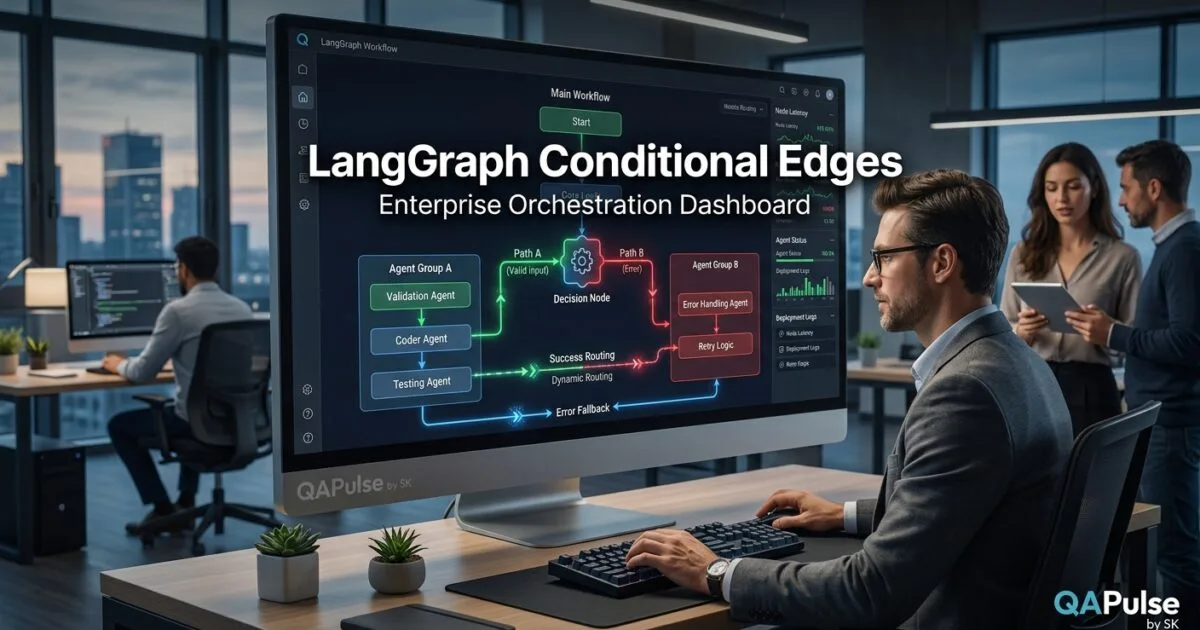
What are LangGraph Conditional Edges?
In previous lessons, you learned how to build sequential workflows where execution moves from one node to another in a predefined order. While this approach works well for simple applications, real-world AI agents rarely follow a single fixed path. Instead, they make decisions based on user input, intermediate results, tool responses, confidence scores, or business rules.
This is where LangGraph Conditional Edges become one of the framework’s most powerful capabilities.
LangGraph Conditional Edges allow developers to create dynamic execution paths where the next node is selected based on the current state of the graph. Instead of always following the same route, an AI workflow can branch into different processing paths, enabling intelligent decision-making, adaptive reasoning, and more sophisticated agent behaviour.
Conditional routing is one of the key features that distinguishes LangGraph from traditional linear AI pipelines.
Why Conditional Routing Matters
Imagine building an AI customer support agent.
A user’s request might require different processing depending on its intent.
For example:
- Product enquiry
- Technical support
- Billing issue
- Refund request
- Human escalation
- General information
Without conditional routing, developers would need to create multiple independent workflows.
With LangGraph Conditional Edges, a single graph can intelligently direct each request to the appropriate processing path.
Benefits include:
- Dynamic execution
- Smarter AI agents
- Reduced workflow duplication
- Easier maintenance
- Better scalability
- Flexible business logic
- Improved user experience
- More efficient resource utilisation
Understanding Conditional Edges
Unlike standard edges that always connect one node to another, conditional edges evaluate the graph’s current state before determining the next destination.
A simplified workflow looks like this.
User Request

↓

Intent Analysis

↓

Conditional Edge

↙        ↓         ↘

Billing   Support   Sales

↘        ↓         ↙

Final Response
Each execution path depends entirely on the information available at runtime.
How Conditional Edges Work
Every graph maintains a shared state.
After a node completes its work, a routing function examines that state and determines which node should execute next.
The routing decision may depend on:
- User intent
- LLM output
- Confidence score
- Tool result
- Database lookup
- API response
- Validation status
- Business rules
Instead of hardcoding multiple workflows, developers define routing logic that selects the appropriate branch automatically.
Creating a Conditional Edge
A routing function normally returns the name of the next node.
Example:
def route(state):
    if state["intent"] == "billing":
        return "billing_agent"

    if state["intent"] == "support":
        return "support_agent"

    return "general_agent"
The graph uses this function after a node finishes execution to determine the next destination.
This makes workflows adaptive rather than static.
Example: Customer Support Agent
Consider a virtual customer support assistant.
The graph may perform the following steps:
- Receive user request.
- Analyse customer intent.
- Evaluate routing conditions.
- Send the request to the correct specialist.
- Generate a response.
- End the workflow.
A simplified diagram:
User

↓

Intent Detection

↓

Conditional Routing

↙      ↓      ↘

Sales  Billing  Support

↓

Generate Response

↓

END
A single graph now supports multiple business scenarios.
Using Multiple Decision Criteria
Routing decisions are not limited to one variable.
Developers often combine several conditions.
Examples include:
- User role
- Subscription plan
- Language
- Location
- Confidence level
- Previous conversation history
- Tool availability
- Security permissions
Multiple conditions allow AI agents to behave intelligently across complex workflows.
Conditional Routing with Tool Calling
Many AI agents interact with external systems.
Examples include:
- Weather APIs
- Search engines
- Databases
- CRM platforms
- Payment gateways
- Internal enterprise systems
A graph may first determine whether a tool call is necessary.
If external information is required:
Question

↓

Reasoning

↓

Need Tool?

↙          ↘

Yes         No

↓

Tool

↓

Continue

↓

Answer
This avoids unnecessary API calls while improving response quality.
Error Handling with Conditional Edges
Conditional routing is also useful when failures occur.
For example:
API Request

↓

Success?

↙          ↘

Retry      Continue

↓

Fallback

↓

Human Review
Instead of terminating execution, the graph can automatically recover from temporary failures.
This greatly improves workflow reliability.
Enterprise Applications
Large organisations commonly use conditional routing for:
- Customer service automation
- Multi-agent orchestration
- Intelligent document processing
- IT support workflows
- Healthcare assistants
- Financial decision systems
- HR automation
- Compliance verification
- Insurance claim processing
- Technical troubleshooting
Conditional routing enables one workflow to support many business scenarios.
Best Practices
To build reliable conditional workflows:
- Keep routing functions simple.
- Base decisions on well-defined state values.
- Avoid deeply nested conditions.
- Handle unexpected cases gracefully.
- Include fallback routes.
- Log routing decisions for debugging.
- Test every execution path.
- Document routing logic clearly.
- Use meaningful node names.
- Keep business rules separate from node implementations.
These practices improve maintainability and simplify future enhancements.
Common Mistakes
Developers frequently encounter similar problems.
Missing Default Routes
Every routing function should include a fallback destination.
Without one, graph execution may fail unexpectedly.
Overly Complex Conditions
Large routing functions become difficult to maintain.
Consider splitting complex decisions into multiple smaller nodes.
Modifying State Incorrectly
Routing depends on accurate state information.
Incorrect updates may send execution down the wrong path.
Ignoring Testing
Every possible branch should be tested independently to ensure reliable behaviour.
Preparing for Multi-Agent Systems
Understanding LangGraph Conditional Edges is a major step toward building intelligent AI applications. Dynamic routing allows workflows to adapt to changing situations, but many enterprise systems require multiple specialised agents working together. In the next lesson, you will learn how LangGraph supports multi-agent architectures, enabling specialised AI agents to collaborate, share state, delegate responsibilities, and solve complex problems more effectively than a single model acting alone.
Summary
LangGraph Conditional Edges enable AI workflows to make intelligent decisions by selecting different execution paths based on the graph’s current state. By evaluating user intent, business rules, tool responses, validation results, and other contextual information, developers can build adaptive, scalable, and maintainable AI agents capable of handling complex real-world scenarios. Combined with LangGraph’s state management and graph-based architecture, conditional routing provides the flexibility needed to create sophisticated AI systems that respond intelligently to changing inputs while maintaining clear, organised workflow logic.
LangGraph Multi-Agent Systems: Building Collaborative AI Agents for Complex Workflows
What Are LangGraph Multi-Agent Systems?
As AI applications become more sophisticated, expecting a single large language model to perform every task efficiently is often unrealistic. Complex software engineering, research, customer support, healthcare, financial analysis, and enterprise automation frequently require specialised expertise that is difficult to encapsulate within one agent.
This is where LangGraph Multi-Agent Systems provide a powerful solution.
LangGraph Multi-Agent Systems allow developers to build AI applications in which multiple specialised agents collaborate to solve complex problems. Instead of relying on one general-purpose agent, developers create several focused agents—each responsible for a specific domain or capability—and coordinate their interactions through a graph-based workflow.
By combining specialised reasoning with structured communication, multi-agent systems can solve larger, more complicated tasks while remaining modular, maintainable, and scalable.
Why Multi-Agent Systems Matter
Consider building an AI software development assistant.
Rather than asking one AI model to perform every activity, responsibilities can be divided among specialised agents.
For example:
- Project planning
- Requirement analysis
- Code generation
- Code review
- Test generation
- Documentation
- Deployment planning
- Security review
Each agent concentrates on its own area of expertise before passing information to the next stage.
Benefits include:
- Better task specialisation
- Improved scalability
- Easier maintenance
- Higher reasoning quality
- Modular architecture
- Flexible workflows
- Improved collaboration
- Reduced system complexity
Understanding Multi-Agent Architecture
A LangGraph workflow coordinates interactions between independent AI agents.
A simplified architecture looks like this.
User Request

↓

Coordinator Agent

↓

Task Assignment

↙        ↓        ↘

Research   Coding   Testing

↘        ↓        ↙

Result Aggregation

↓

Final Response
Rather than solving everything simultaneously, work is distributed intelligently among specialised agents.
How LangGraph Coordinates Multiple Agents
Every agent operates using the same shared graph state.
The coordinator typically performs several responsibilities:
- Understand the user request
- Decide which agents should participate
- Share relevant context
- Collect intermediate outputs
- Resolve dependencies
- Produce the final response
This orchestration enables independent agents to collaborate without losing overall workflow consistency.
Designing Specialised Agents
Each agent should have a clearly defined responsibility.
Examples include:
Research Agent
Responsible for:
- Information gathering
- Knowledge retrieval
- External search
- Document analysis
Coding Agent
Responsible for:
- Writing code
- Refactoring
- Architecture suggestions
- Code optimisation
Testing Agent
Responsible for:
- Unit tests
- Integration tests
- Regression testing
- Test planning
Documentation Agent
Responsible for:
- README generation
- API documentation
- Technical explanations
- User guides
Specialisation improves both accuracy and maintainability.
Agent Communication
Agents rarely work in complete isolation.
Instead, they exchange information through the shared graph state.
A typical workflow may look like this.
Planner

↓

Research Agent

↓

Coding Agent

↓

Testing Agent

↓

Documentation Agent

↓

Final Response
Each agent receives the latest state, contributes new information, and passes the updated state to the next participant.
Using Conditional Routing with Multiple Agents
Not every request requires every available agent.
LangGraph can dynamically decide which agents should participate.
For example:
Incoming Request

↓

Classify Task

↙        ↓        ↘

Coding   Research   Documentation

↓

Selected Agent

↓

Return Result
Conditional routing reduces unnecessary processing and improves efficiency.
Parallel Agent Execution
Some tasks can be completed simultaneously.
Examples include:
- Security review
- Code generation
- Documentation creation
- Test generation
These activities may execute in parallel before their results are combined.
Project Request

↓

Parallel Execution

↙      ↓      ↘

Code   Tests   Docs

↘      ↓      ↙

Merge Results

↓

Response
Parallel execution reduces overall workflow time while maintaining separation of responsibilities.
Enterprise Applications
Many enterprise AI systems benefit from multi-agent collaboration.
Typical use cases include:
- Customer service automation
- Software engineering assistants
- Financial analysis platforms
- Healthcare decision support
- Legal document analysis
- Compliance verification
- Cybersecurity investigations
- IT operations
- Human resources automation
- Research assistants
Because each agent focuses on a specific role, organisations can scale systems more effectively as requirements evolve.
Advantages Over Single-Agent Systems
Compared with a single AI agent, a multi-agent architecture offers several advantages.
| Single-Agent Workflow | Multi-Agent Workflow |
|---|---|
| Handles every task | Delegates specialised tasks |
| Can become difficult to manage | Modular and easier to extend |
| Limited task separation | Clear role-based responsibilities |
| Less flexible scaling | Independent agent scaling |
| Harder to maintain | Easier long-term maintenance |
This modular design supports continuous improvement without redesigning the entire application.
Common Challenges
Developers should be aware of several challenges when building multi-agent systems.
Poor Responsibility Definition
If agents have overlapping responsibilities, workflows become confusing and inefficient.
Each agent should have a clearly defined purpose.
Excessive Communication
Too much information sharing can slow execution.
Exchange only the data required for downstream processing.
Inconsistent State Management
All participating agents depend on accurate shared state.
Improper updates can produce inconsistent or conflicting results.
Uncontrolled Workflow Growth
Adding too many agents without clear orchestration increases maintenance complexity.
Start with a small number of specialised agents and expand gradually.
Best Practices
To build effective LangGraph multi-agent systems:
- Give every agent a single responsibility.
- Use a coordinator for orchestration.
- Keep communication structured.
- Share only necessary state information.
- Use conditional routing where appropriate.
- Execute independent tasks in parallel.
- Test each agent individually.
- Validate complete end-to-end workflows.
- Document every agent’s role.
- Monitor workflow performance continuously.
These practices improve scalability, maintainability, and reliability.
Preparing for Hierarchical Agent Architectures
Understanding LangGraph Multi-Agent Systems provides the foundation for building collaborative AI applications, but many enterprise environments require more sophisticated coordination strategies. In the next lesson, you will explore hierarchical agent architectures in LangGraph, learning how supervisor agents, worker agents, and delegated reasoning can organise complex AI workflows while maintaining control, transparency, and efficient decision-making.
Summary
LangGraph Multi-Agent Systems enable developers to build collaborative AI applications in which multiple specialised agents work together to solve complex problems. By coordinating independent agents through shared state, conditional routing, and graph-based orchestration, LangGraph supports modular architectures that are easier to maintain, scale, and extend than traditional single-agent systems. Whether developing enterprise software assistants, research platforms, customer service solutions, or intelligent automation workflows, multi-agent architectures provide a flexible foundation for creating reliable and sophisticated AI applications.
LangGraph Supervisor Agent Pattern: Coordinating Intelligent Multi-Agent Workflows
What Is the LangGraph Supervisor Agent Pattern?
As AI applications become increasingly sophisticated, simply connecting multiple agents together is no longer enough. Large-scale systems require a mechanism to coordinate tasks, assign responsibilities, monitor progress, and combine outputs into a coherent final result. Without central coordination, multi-agent workflows can become difficult to manage, debug, and scale.
This is where the LangGraph Supervisor Agent Pattern becomes essential.
The LangGraph Supervisor Agent Pattern is an architectural approach in which a dedicated supervisor agent manages one or more specialised worker agents. Instead of every agent communicating directly with every other agent, the supervisor receives the user’s request, determines which agents should participate, delegates tasks, collects intermediate results, and decides how the workflow should continue.
This centralised orchestration makes complex AI systems more organised, maintainable, and predictable.
Why a Supervisor Agent Is Important
Imagine building an enterprise AI assistant capable of handling software development tasks.
The system may include specialised agents responsible for:
- Requirement analysis
- Research
- Code generation
- Testing
- Documentation
- Security review
- Deployment planning
Allowing every agent to communicate freely quickly becomes complicated.
A supervisor agent simplifies coordination by acting as the workflow manager.
Benefits include:
- Centralised decision-making
- Better workflow organisation
- Improved scalability
- Easier debugging
- Reduced communication complexity
- Better resource utilisation
- Consistent execution
- Simpler maintenance
Understanding the Supervisor Architecture
The supervisor controls how work flows through the graph.
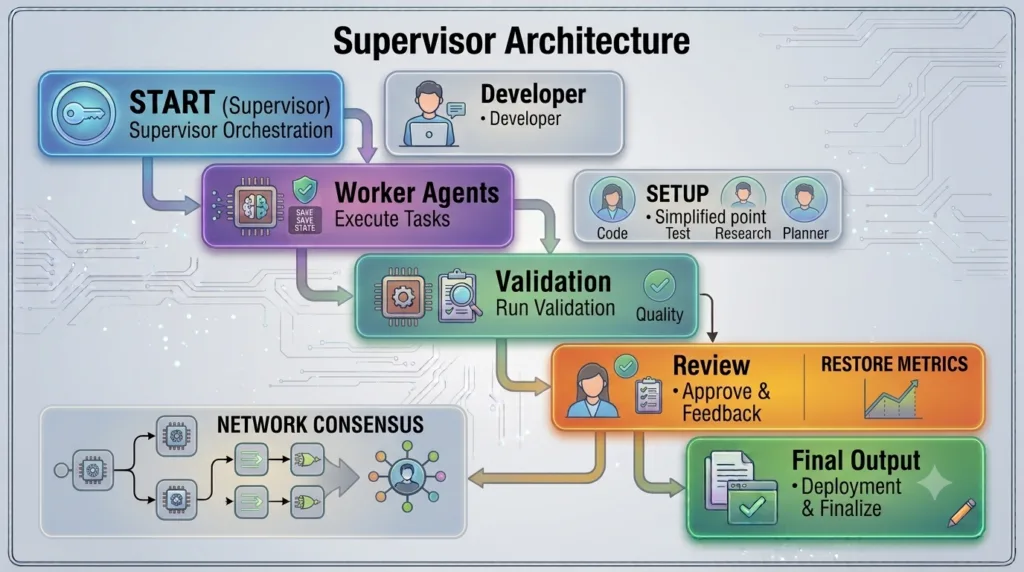
A simplified architecture looks like this.
User Request

↓

Supervisor Agent

↙       ↓        ↘

Research  Coding  Testing

↘       ↓        ↙

Supervisor Reviews Results

↓

Final Response
Worker agents focus only on their assigned responsibilities while the supervisor manages the overall process.
Responsibilities of the Supervisor Agent
The supervisor performs several important tasks during execution.
Typical responsibilities include:
- Understanding the user request
- Planning workflow execution
- Selecting appropriate agents
- Delegating tasks
- Sharing relevant context
- Monitoring progress
- Combining intermediate outputs
- Determining the next workflow step
- Returning the final response
Because orchestration is centralised, worker agents remain simpler and easier to maintain.
Designing Worker Agents
Each worker agent should perform one clearly defined function.
Examples include:
Research Agent
Responsible for:
- Knowledge retrieval
- Document analysis
- Information gathering
- External data lookup
Development Agent
Responsible for:
- Writing code
- Refactoring
- API implementation
- Feature development
Testing Agent
Responsible for:
- Unit test generation
- Integration testing
- Regression planning
- Quality validation
Documentation Agent
Responsible for:
- README generation
- API documentation
- Technical explanations
- User guides
Separating responsibilities reduces overlap and improves maintainability.
Workflow Delegation
Rather than assigning every task immediately, the supervisor determines what should happen first.
A typical workflow may resemble:
Receive Request

↓

Supervisor Planning

↓

Assign Research

↓

Assign Coding

↓

Assign Testing

↓

Combine Results

↓

Deliver Response
This structured delegation keeps execution organised.
Dynamic Task Assignment
Not every request requires every available agent.
The supervisor analyses the graph state before assigning work.
Examples include:
- Documentation requests
- Code reviews
- Architecture discussions
- Bug investigations
- Performance optimisation
- Security assessments
Only the required agents participate, improving efficiency and reducing unnecessary processing.
Combining Agent Outputs
Once worker agents complete their tasks, the supervisor evaluates their contributions.
Typical responsibilities include:
- Resolving conflicting information
- Removing duplicate results
- Ensuring response consistency
- Maintaining formatting
- Preserving business rules
- Producing a coherent final answer
Without this consolidation step, responses may become fragmented or inconsistent.
Error Recovery
The supervisor also manages unexpected situations.
A typical recovery workflow might look like this.
Worker Task

↓

Success?

↙         ↘

Retry     Continue

↓

Alternative Agent

↓

Supervisor Validation

↓

Final Output
This approach improves workflow reliability by allowing recovery from temporary failures without terminating the entire graph.
Enterprise Applications
Many enterprise AI systems use supervisor-based orchestration.
Common use cases include:
- Customer support platforms
- Software engineering assistants
- Financial advisory systems
- Healthcare decision support
- Legal document analysis
- Cybersecurity investigations
- Compliance verification
- IT operations automation
- Research assistants
- Enterprise knowledge management
A supervisor enables these applications to coordinate complex workflows while maintaining transparency and control.
Advantages Over Fully Connected Agents
The supervisor pattern offers several benefits compared with unrestricted agent-to-agent communication.
| Fully Connected Agents | Supervisor Agent Pattern |
|---|---|
| Complex communication paths | Centralised coordination |
| Difficult to debug | Easier workflow tracing |
| Higher maintenance effort | Cleaner architecture |
| Overlapping responsibilities | Clearly defined roles |
| Harder to scale | Modular expansion |
This architecture becomes increasingly valuable as the number of participating agents grows.
Common Challenges
Developers should consider several design challenges.
Overloading the Supervisor
Assigning too many responsibilities to the supervisor can create a bottleneck.
Keep orchestration separate from specialised task execution.
Poor Worker Definition
Worker agents should have clearly defined responsibilities with minimal overlap.
Excessive Delegation
Delegating trivial tasks may increase execution time unnecessarily.
The supervisor should balance efficiency with workflow complexity.
Weak State Management
Because every routing decision depends on shared state, incorrect updates may disrupt the entire workflow.
State should remain consistent throughout execution.
Best Practices
To build effective supervisor-based workflows:
- Give the supervisor orchestration responsibilities only.
- Keep worker agents highly specialised.
- Share structured state information.
- Use conditional routing for task assignment.
- Validate outputs before combining them.
- Handle failures gracefully.
- Log important workflow decisions.
- Test each worker independently.
- Perform end-to-end workflow testing.
- Document the responsibilities of every agent.
Following these practices produces scalable and maintainable AI systems.
Preparing for Advanced Orchestration Strategies
Understanding the LangGraph Supervisor Agent Pattern provides a strong foundation for coordinating multiple AI agents, but enterprise applications often require even more sophisticated execution models. In the next lesson, you will explore advanced orchestration strategies in LangGraph, including hierarchical workflows, nested graphs, iterative reasoning loops, and distributed agent coordination for building highly scalable AI systems capable of solving complex real-world problems.
Summary
The LangGraph Supervisor Agent Pattern provides a structured approach to coordinating multi-agent AI workflows by introducing a dedicated supervisor responsible for planning execution, assigning tasks, monitoring progress, combining results, and managing workflow decisions. By separating orchestration from specialised task execution, developers can build AI systems that are easier to understand, maintain, scale, and extend. Combined with LangGraph’s shared state management and graph-based execution model, the supervisor pattern enables the creation of reliable enterprise-grade AI applications that efficiently coordinate multiple specialised agents while maintaining clear architectural boundaries.
LangGraph Hierarchical Multi-Agent Architecture: Scaling Complex AI Systems with Intelligent Orchestration
What Is LangGraph Hierarchical Multi-Agent Architecture?
As AI systems continue to evolve, even a supervisor managing several worker agents may become insufficient for large enterprise applications. Modern AI platforms often involve dozens or even hundreds of specialised agents working across different domains, departments, and business processes. Coordinating these agents efficiently requires a structured architecture that supports delegation at multiple levels.
This is where LangGraph Hierarchical Multi-Agent Architecture becomes invaluable.
LangGraph Hierarchical Multi-Agent Architecture is an advanced design pattern in which AI agents are organised into multiple layers of responsibility. Instead of relying on a single supervisor, higher-level agents coordinate groups of specialised supervisors, each of which manages its own collection of worker agents. This layered structure enables large AI systems to remain organised, scalable, and easier to maintain while supporting increasingly complex workflows.
The architecture closely resembles the organisational structure found in many successful companies, where executives coordinate managers, managers supervise teams, and specialists focus on individual responsibilities.
Why Hierarchical Architectures Matter
As AI applications expand, several challenges emerge:
- Growing workflow complexity
- Increasing numbers of specialised agents
- Multiple business domains
- Distributed teams
- Independent services
- Large knowledge bases
- Complex decision-making
- Long-running workflows
Managing all these components through a single supervisor eventually creates bottlenecks.
A hierarchical architecture distributes responsibility across multiple coordination layers.
Benefits include:
- Better scalability
- Clear separation of responsibilities
- Improved maintainability
- Reduced coordination overhead
- Easier debugging
- Modular expansion
- Better workload distribution
- Enterprise-ready architecture
Understanding Hierarchical Coordination
Instead of assigning every task directly, responsibility flows through multiple management levels.
A simplified architecture looks like this.
User Request

↓

Executive Supervisor

↓

Department Supervisors

↙         ↓          ↘

Research  Engineering  Support

↓

Worker Agents

↓

Results

↓

Executive Review

↓

Final Response
Each layer focuses on decisions appropriate to its level of responsibility.
Levels Within the Architecture
A hierarchical LangGraph system generally contains several distinct layers.
Executive Supervisor
Responsible for:
- Understanding user objectives
- Overall workflow planning
- High-level task delegation
- Final response generation
- Quality validation
Department Supervisors
Responsible for:
- Managing specialised teams
- Assigning work
- Coordinating workers
- Monitoring execution
- Consolidating department results
Worker Agents
Responsible for:
- Executing specific tasks
- Producing specialised outputs
- Updating graph state
- Reporting results
This separation allows every component to remain focused and manageable.
How Shared State Supports Hierarchies
Although responsibilities are distributed, all participating agents continue working with a shared graph state.
The shared state typically contains:
- User request
- Workflow status
- Intermediate outputs
- Tool responses
- Validation results
- Execution history
- Business context
- Final decisions
Each level contributes only the information necessary for downstream processing.
Workflow Example
Consider an AI software engineering platform.
A typical execution may proceed as follows:
User Feature Request

↓

Executive Supervisor

↓

Engineering Supervisor

↓

Code Agent

↓

Testing Agent

↓

Documentation Agent

↓

Engineering Supervisor

↓

Executive Supervisor

↓

Final Response
This layered workflow separates planning, execution, validation, and reporting into independent responsibilities.
Supporting Multiple Departments
Enterprise organisations often require several independent business domains.
Examples include:
Engineering Department
Handles:
- Code generation
- Architecture
- Refactoring
- Testing
Customer Support Department
Handles:
- Ticket analysis
- FAQ responses
- Escalation
- Issue resolution
Finance Department
Handles:
- Reporting
- Risk analysis
- Invoice processing
- Budget calculations
Compliance Department
Handles:
- Regulatory validation
- Policy verification
- Audit preparation
- Documentation review
Each department operates independently while remaining coordinated through higher-level supervisors.
Parallel Department Execution
Independent departments can often execute simultaneously.
Executive Supervisor

↓

Parallel Departments

↙        ↓        ↘

Finance  Engineering  Support

↘        ↓        ↙

Executive Consolidation

↓

Final Response
Parallel execution improves efficiency without sacrificing organisational structure.
Conditional Routing Across Levels
Hierarchical systems also use conditional routing.
For example:
- Technical issue → Engineering Supervisor
- Billing enquiry → Finance Supervisor
- Product question → Sales Supervisor
- Security incident → Compliance Supervisor
Each supervisor determines how work should proceed within its own domain.
This creates intelligent delegation throughout the entire hierarchy.
Error Recovery
Failures occurring within one department should not interrupt unrelated workflows.
A recovery strategy may resemble:
Worker Failure

↓

Department Supervisor

↓

Retry?

↙         ↘

Yes       Alternative Worker

↓

Validation

↓

Executive Supervisor

↓

Continue Workflow
This layered recovery mechanism improves reliability and fault tolerance.
Enterprise Applications
Hierarchical architectures are increasingly common in enterprise AI systems.
Representative use cases include:
- Enterprise virtual assistants
- Healthcare decision platforms
- Banking automation
- Insurance claim processing
- Government service portals
- Software engineering assistants
- Cybersecurity operations
- Legal document analysis
- Manufacturing automation
- Large-scale research systems
The layered approach enables organisations to grow AI capabilities without continuously redesigning their workflows.
Advantages Over Flat Multi-Agent Systems
| Flat Multi-Agent System | Hierarchical Multi-Agent Architecture |
|---|---|
| Single coordination layer | Multiple coordination layers |
| Harder to scale | Designed for enterprise growth |
| Central supervisor bottleneck | Distributed management |
| Complex communication | Structured delegation |
| Difficult maintenance | Modular expansion |
| Limited organisational separation | Clear responsibility boundaries |
As the number of participating agents increases, hierarchical coordination becomes significantly easier to manage.
Common Challenges
Developers should be aware of several implementation challenges.
Too Many Management Layers
Adding unnecessary supervisory levels increases workflow complexity.
Design only the layers required by the application’s business requirements.
Poor Responsibility Separation
Every supervisor should manage a clearly defined business domain.
Avoid overlapping responsibilities between departments.
Excessive State Sharing
Passing unnecessary information between levels increases processing overhead.
Only share data required for downstream execution.
Inadequate Monitoring
Large hierarchies require comprehensive logging and observability to diagnose workflow issues effectively.
Best Practices
To build scalable hierarchical systems:
- Keep supervisory responsibilities focused on orchestration.
- Design specialised worker agents.
- Define clear ownership for every department.
- Use conditional routing for intelligent delegation.
- Execute independent departments in parallel where appropriate.
- Maintain structured shared state.
- Validate outputs at every supervisory level.
- Log execution history for debugging.
- Monitor workflow performance continuously.
- Test every layer independently before end-to-end validation.
Following these practices produces scalable and maintainable enterprise AI architectures.
Preparing for Advanced LangGraph Orchestration
Mastering LangGraph Hierarchical Multi-Agent Architecture equips developers to build enterprise-scale AI systems capable of coordinating many specialised agents efficiently. In the next lesson, you will explore advanced LangGraph orchestration patterns, including nested graphs, recursive workflows, iterative reasoning loops, human-in-the-loop approval processes, and distributed execution strategies that enable highly reliable, production-ready AI applications.
Summary
LangGraph Hierarchical Multi-Agent Architecture extends traditional multi-agent systems by organising AI agents into multiple levels of supervision, delegation, and specialised execution. Through layered coordination, shared state management, conditional routing, parallel processing, and structured responsibility boundaries, developers can build scalable AI applications capable of handling increasingly complex enterprise workflows. By combining hierarchical orchestration with LangGraph’s graph-based execution model, organisations can create intelligent systems that remain flexible, maintainable, and efficient as both business requirements and AI capabilities continue to grow.
Internal Links:
- Learn MCP – Zero to Hero
- Learn AI Agents for QA – Zero to Hero
- Playwright Automation – Zero to Hero
- LangGraph: Complete Zero to Hero
- Learn Python – Zero to Hero
- OpenAI Codex: Complete Zero to Hero
- Cursor AI: Complete Zero to Hero
- Claude Code Tutorial: Complete Zero to Hero
- Free QA Resources Built From Real Experience
- QA Glossary: Test Automation Terms Every Engineer Should Know
External Resources:
- LangGraph Official Documentation
- LangChain Documentation
- Python Official Documentation
- OpenAI Platform Documentation
- Anthropic Documentation
- Google AI Documentation
- LangGraph GitHub Repository
People Also Ask
What are LangGraph Conditional Edges?
LangGraph Conditional Edges allow AI workflows to dynamically determine the next node based on the current graph state, enabling intelligent routing instead of fixed execution paths.
Why are LangGraph Conditional Edges important?
They make AI agents adaptive by allowing workflows to branch according to user intent, tool responses, validation results, confidence scores, and business rules.
Can LangGraph Conditional Edges be used with multiple AI agents?
Yes. LangGraph Conditional Edges are commonly used to coordinate multi-agent systems where different specialised agents perform different tasks depending on workflow requirements.
What is a supervisor agent in LangGraph?
A supervisor agent coordinates specialised worker agents by assigning tasks, collecting results, monitoring execution, and determining the next workflow step.
Are LangGraph Conditional Edges suitable for enterprise AI systems?
Absolutely. Enterprise AI applications use LangGraph Conditional Edges to build scalable, intelligent workflows for customer support, automation, software engineering, finance, healthcare, cybersecurity, and many other domains.
Featured Snippet
What Are LangGraph Conditional Edges?
LangGraph Conditional Edges enable AI workflows to make dynamic routing decisions based on the current graph state. Instead of following a fixed sequence of nodes, workflows intelligently choose the next execution path according to user intent, business rules, tool outputs, or intermediate reasoning, making AI agents more flexible, scalable, and reliable.
AI Overview Answer
LangGraph Conditional Edges are a core feature of LangGraph that enables intelligent workflow orchestration through dynamic routing. Combined with multi-agent systems, supervisor agents, and hierarchical architectures, they help developers build adaptive AI applications capable of solving complex enterprise problems while maintaining modularity, scalability, and maintainability.
Enjoyed this article? Explore more in-depth guides on AI engineering, automation testing, Model Context Protocol, Playwright, and intelligent software quality at www.skakarh.com. Follow QAPulse by SK for practical, production-focused tutorials designed for QA engineers, SDETs, and AI developers.