QA
QA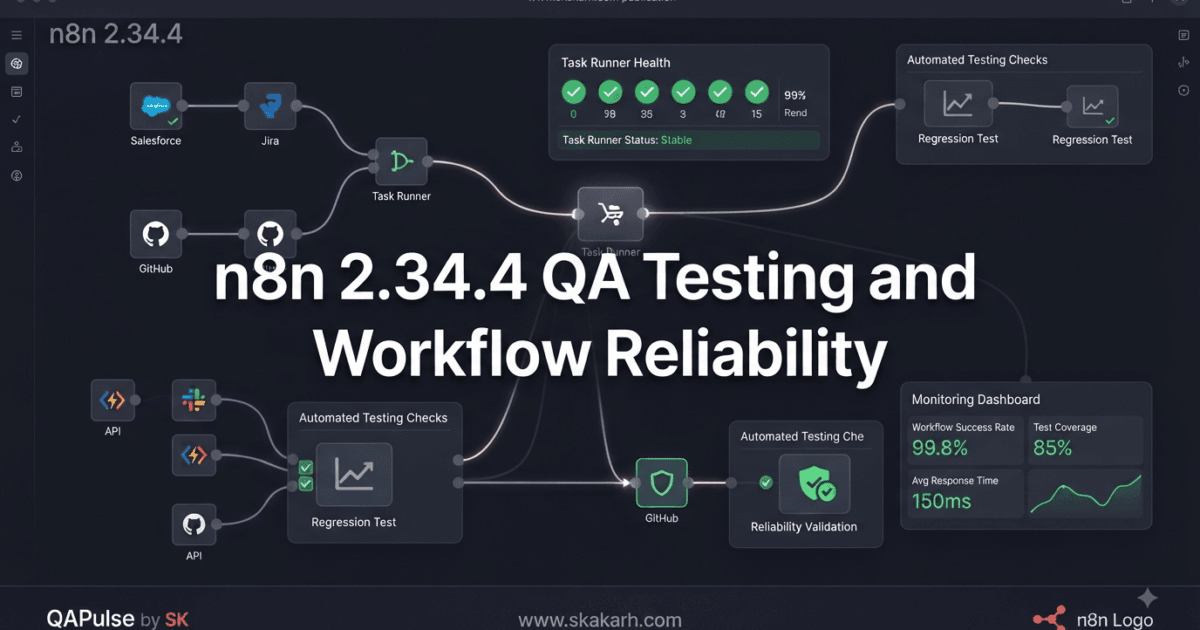
n8n 2.34.4 Released on August 7, 2026, with two targeted bug fixes that matter to teams running workflow automation in development, CI/CD, staging, and production environments. The official n8n release information
This is not a feature-heavy release, and that is precisely why QA engineers should pay attention to it differently.
A small maintenance release can fix failures in infrastructure-level behavior without changing the visible functionality of a workflow. If your automation platform is responsible for API calls, scheduled jobs, webhooks, AI agents, database operations, notifications, or business-critical integrations, reliability fixes can be more important than flashy new features.
The 2.34.4 release contains two bug fixes:
- A fix for task runner health checks failing
- A fix for out-of-scope display option dependencies
There are no new major features identified in the supplied release notes and no explicit breaking changes listed.
For QA engineers and SDETs, the important question therefore isn’t simply:
“Should I install 2.34.4?”
The better question is:
“Which reliability contracts should I verify after upgrading?”
What Changed in n8n 2.34.4?
The release is focused on two areas of the n8n runtime and user-interface dependency handling.
| Change | Area | QA Risk | Testing Priority |
|---|---|---|---|
| Task runner health check fix | Core/runtime | High | High |
| Display option dependency fix | Core/UI configuration | Medium | Medium |
| New major feature | None identified | Low | Low |
| Breaking change | None identified | Low | Baseline regression |
The first fix deserves particular attention because health checks are infrastructure signals.
A workflow can appear perfectly configured while the underlying task execution environment is unhealthy.
Think about the architecture:
n8n Workflow
     ↓
Trigger
     ↓
Workflow Execution
     ↓
Task Runner
     ↓
Node Execution
     ↓
External Service
If the task runner is unhealthy but the health check incorrectly reports its state, your monitoring system can make the wrong decision.
That creates a QA problem that goes beyond functional testing.
You are testing whether the platform can correctly report its own operational state.
Why the Task Runner Health Check Fix Matters
Health checks are often treated as infrastructure concerns rather than QA concerns.
That is a mistake.
Consider a Kubernetes-style environment:
Application
    ↓
Health Check
    ↓
Orchestrator
    ↓
Restart / Keep Running
Suppose the task runner is actually unhealthy:
Task Runner
     ↓
UNHEALTHY
but the health check incorrectly behaves as though everything is fine:
Health Check
     ↓
HEALTHY
The orchestrator may leave the broken component running.
Your workflow automation may then start producing failures.
The sequence becomes:
Incorrect Health Signal
        ↓
Broken Task Runner Remains Alive
        ↓
Workflow Execution Failures
        ↓
Delayed Detection
        ↓
Business Impact
This is why the health-check correction in n8n 2.34.4 Released deserves more attention than its short changelog entry might suggest.
QA Should Test Health Checks as Contracts
A health check should have an explicit contract.
For example:
Healthy runner
    → health endpoint reports healthy

Unhealthy runner
    → health endpoint reports unhealthy

Unavailable runner
    → health endpoint fails appropriately

Recovering runner
    → health status changes after recovery
A conceptual automated test could look like:
def test_task_runner_health():
    response = get_task_runner_health()

    assert response.status_code == 200
    assert response.status == "healthy"
Then test the negative case:
def test_unhealthy_task_runner_is_detected():
    simulate_runner_failure()

    response = get_task_runner_health()

    assert response.status != "healthy"
The exact endpoint and response structure depend on your n8n deployment architecture. The important point is that both healthy and unhealthy states need explicit validation.
Don’t Test Only the Happy Path
A weak health-check test looks like this:
Start n8n
   ↓
Health check
   ↓
PASS
A stronger test matrix looks like this:
| Scenario | Expected Result |
|---|---|
| Runner available | Healthy |
| Runner unavailable | Unhealthy/error |
| Runner restarting | Transitional/unhealthy state |
| Runner overloaded | Correct operational signal |
| Runner connection lost | Failure detected |
| Runner recovered | Healthy again |
This is the difference between checking an endpoint and testing an operational contract.
Think Like an SDET: What Happens After the Health Check?
A health check exists because another system consumes its result.
That system could be:
- Kubernetes
- Docker
- a load balancer
- an infrastructure monitor
- a deployment platform
- an internal watchdog
- an alerting system
Therefore, the test should eventually extend beyond the endpoint.
Consider:
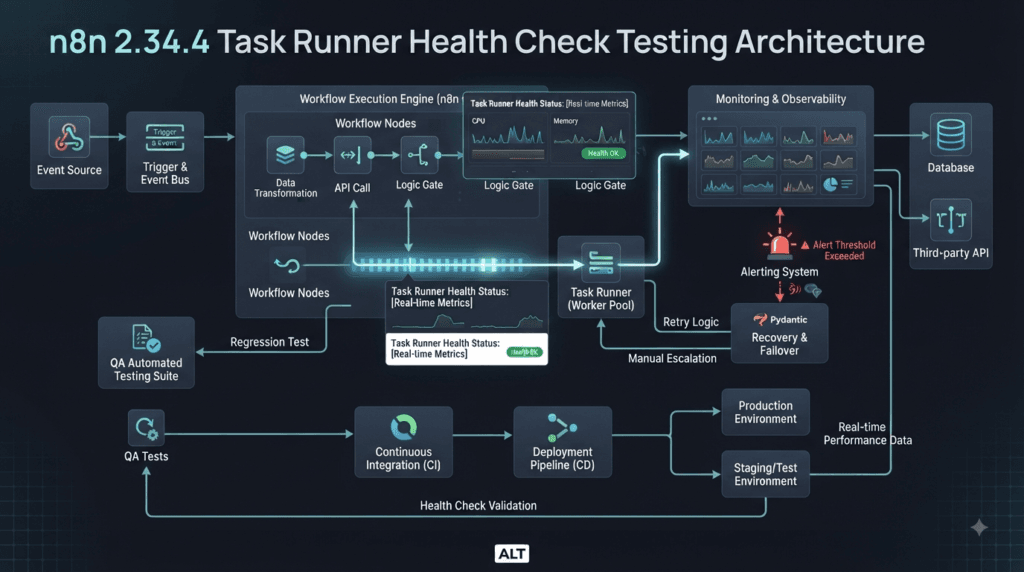
Task Runner Failure
       ↓
Health Check
       ↓
Monitoring
       ↓
Alert
       ↓
Recovery / Restart
       ↓
Workflow Validation
If you only test the first arrow, you are testing a small part of the actual reliability chain.
Why Small Bug-Fix Releases Deserve Regression Testing
A common misconception is:
“It’s only a patch release, so regression testing isn’t necessary.”
That approach is risky for infrastructure and automation platforms.
Compare two types of changes:
| Feature Release | Maintenance Release |
|---|---|
| New capability | Existing behavior corrected |
| New APIs | Existing APIs may behave differently |
| New configuration | Existing configuration paths may change internally |
| Feature-focused testing | Regression-focused testing |
| New workflows | Existing workflows |
A feature release tells you what is new.
A maintenance release tells you what was wrong.
For production automation, knowing what was previously wrong can be just as valuable.
The Second Fix: Display Option Dependencies
The second fix addresses out-of-scope display option dependencies.
At first glance, this may look less important than a task runner health check.
However, configuration and display dependencies can affect how users interact with workflow nodes and options.
Think about a simplified dependency:
Node Configuration
       ↓
Display Option
       ↓
Dependency
       ↓
Visible / Hidden Setting
If a dependency is evaluated outside its intended scope, users may encounter incorrect configuration behavior.
For QA engineers, this becomes a configuration-state testing problem.
Test Configuration Dependencies With State Combinations
Instead of testing one configuration, test combinations.
For example:
@pytest.mark.parametrize(
    "option_a, option_b",
    [
        (True, True),
        (True, False),
        (False, True),
        (False, False),
    ],
)
def test_display_dependency(option_a, option_b):
    result = evaluate_display_options(
        option_a=option_a,
        option_b=option_b,
    )

    assert result.is_valid
The exact implementation will depend on the node and configuration being tested.
The strategy is what matters.
You want to discover whether a display option incorrectly depends on something that is no longer within its valid scope.
Configuration Testing Is State-Space Testing
A workflow editor can have many possible states.
For example:
Option A
 ├── Enabled
 └── Disabled

Option B
 ├── Enabled
 └── Disabled

Option C
 ├── Available
 └── Hidden
The number of combinations grows quickly.
You therefore need risk-based selection rather than attempting every possible combination manually.
Prioritize:
Default state
Invalid state
Boundary state
Dependency state
Previously failing state
Saved configuration
Reloaded configuration
This is where automation provides substantial value.
Compare n8n With Traditional API Testing
n8n workflow testing is different from testing a conventional REST API.
| Traditional API | Workflow Automation |
|---|---|
| Request | Trigger |
| Endpoint | Workflow |
| JSON response | Workflow result |
| Authentication | Credentials/connections |
| API dependency | Multiple node dependencies |
| Error response | Node/execution failure |
| Health endpoint | Runtime/task health |
| Single request | Multi-step execution |
A simple API test might be:
response = client.get("/users")

assert response.status_code == 200
A workflow test may need to validate:
Trigger
 ↓
Node A
 ↓
Node B
 ↓
External API
 ↓
Node C
 ↓
Database
 ↓
Final result
That makes workflow automation testing inherently more integration-heavy.
Build a Critical Workflow Regression Suite
If your organization uses n8n for business-critical automation, identify the workflows that cannot fail silently.
For example:
Critical Workflows
├── Customer notifications
├── Payment integration
├── Database synchronization
├── Lead processing
├── Monitoring alerts
└── AI agent workflows
Give each workflow a minimal regression test.
def test_customer_notification_workflow():
    result = execute_workflow(
        "customer-notification"
    )

    assert result.success is True
    assert result.execution_time < 30
Then add business-specific assertions.
assert result.notification_sent is True
assert result.customer_id is not None
A workflow passing technically is not enough.
It must also produce the expected business outcome.
Test Workflow Recovery After Runtime Failure
The task runner fix also gives QA engineers an opportunity to test recovery.
A valuable scenario is:
Workflow starts
      ↓
Task runner failure
      ↓
Health check detects problem
      ↓
Recovery
      ↓
Task runner healthy
      ↓
Workflow executes successfully
Your test objective should be:
Failure detected?
Recovery successful?
No corrupted execution?
No duplicate business action?
Final workflow successful?
The duplicate-action question is particularly important.
Imagine a workflow sends an email or creates an order.
If recovery causes an execution to restart incorrectly, you could produce:
One event
   ↓
Two emails
or:
One transaction
   ↓
Two records
That is a business-critical regression.
Test Idempotency During Recovery
For workflows that perform side effects, design tests around idempotency.
def test_workflow_does_not_duplicate_side_effects():
    result = execute_workflow_with_retry(
        "customer-order"
    )

    records = find_created_records(
        result.customer_id
    )

    assert len(records) == 1
This type of test can uncover failures that a simple workflow-success assertion will never detect.
Test n8n Workflows Like Distributed Systems
An automation workflow is rarely isolated.
It may communicate with:
n8n
 ↓
REST API
 ↓
Database
 ↓
Queue
 ↓
Email provider
 ↓
Cloud service
Each dependency introduces failure possibilities.
Therefore, your test strategy should include:
Timeout
Retry
Connection failure
Authentication failure
Malformed response
Rate limiting
Partial failure
Duplicate execution
Recovery
This is where SDET thinking becomes particularly valuable.
Use Failure Injection Instead of Waiting for Production
You don’t need to wait for a production failure to learn how your workflow behaves.
Inject controlled failures.
For example:
def test_workflow_handles_api_timeout():
    mock_api_timeout()

    result = execute_workflow(
        "customer-sync"
    )

    assert result.success is False
    assert result.error_type == "timeout"
Then verify the recovery path.
def test_workflow_recovers_after_api_recovery():
    mock_api_timeout()

    execute_workflow("customer-sync")

    restore_api()

    result = execute_workflow(
        "customer-sync"
    )

    assert result.success is True
Controlled failure testing is one of the most effective ways to turn reliability assumptions into evidence.
Create a Before-and-After Baseline
Before upgrading to a maintenance release, capture a baseline.
Current Version
      ↓
Critical workflow suite
      ↓
Health checks
      ↓
Execution failures
      ↓
Average latency
      ↓
Error rate
After upgrading:
2.34.4
      ↓
Same tests
      ↓
Same workflows
      ↓
Compare results
For example:
| Metric | Previous Version | 2.34.4 |
|---|---|---|
| Critical workflows | 100% | 100% |
| Health checks | 100% | 100% |
| Workflow failures | 3 | 1 |
| Duplicate executions | 0 | 0 |
| Configuration errors | 2 | 0 |
This makes the upgrade decision evidence-based.
A Strategic Upgrade Decision
For most teams, a targeted patch release should not require an enormous testing campaign.
Instead, use a proportional strategy.
Small change
   ↓
Identify affected area
   ↓
Targeted regression
   ↓
Critical workflow smoke tests
   ↓
Production monitoring
For this release, the highest-priority area should be task runner health behavior.
The second priority should be configuration/display behavior where your workflows or custom nodes depend on the affected functionality.
Then run your normal critical workflow suite.
Should You Upgrade Immediately?
There is no universal answer.
A useful decision framework is:
| Situation | Recommendation |
|---|---|
| Development environment | Upgrade and test |
| Non-critical staging | Upgrade after targeted regression |
| Production, low workflow risk | Controlled upgrade |
| Production, critical workflows | Regression + staged rollout |
| Heavy task-runner usage | Prioritize health-check validation |
| Custom nodes/configuration | Test configuration dependencies carefully |
If your current environment is stable and you have no immediate reason to upgrade, you can still validate 2.34.4 in staging before production.
The important point is to avoid making the decision based only on the number of changes in the changelog.
A Practical QA Test Matrix
Before approving the release, use a compact matrix:
[ ] n8n starts successfully
[ ] Task runner starts
[ ] Task runner health check is correct
[ ] Unhealthy runner is detected
[ ] Runner recovery is detected
[ ] Critical workflows execute
[ ] Failed executions are handled correctly
[ ] Retries do not create duplicate side effects
[ ] Display options behave correctly
[ ] Configuration survives reload
[ ] Custom nodes remain functional
[ ] External integrations remain functional
[ ] Credentials remain accessible
[ ] Webhooks remain functional
[ ] Scheduled workflows execute
[ ] Monitoring receives expected health signals
This gives QA engineers a practical release gate without turning a small maintenance release into an unnecessarily large project.
Interactive Exercise: Find Your Highest-Risk Workflow
Choose one n8n workflow your organization cannot afford to break.
Write down:
Workflow:
________________________

Trigger:
________________________

Critical Nodes:
________________________

External Services:
________________________

Side Effects:
________________________

Failure Recovery:
________________________

Health Dependency:
________________________
Now ask five questions:
- What happens if the task runner becomes unhealthy?
- How does the system detect that condition?
- What happens when the runner recovers?
- Could recovery execute the workflow twice?
- What business impact would duplication create?
If you cannot answer these questions confidently, that workflow needs stronger reliability testing.
What QA Engineers Should Learn From This Release
The biggest lesson from n8n 2.34.4 Released is that release notes often describe only the visible change.
The QA engineer has to discover the system-level consequences.
A health-check fix can affect:
Monitoring
+
Orchestration
+
Recovery
+
Workflow reliability
A configuration dependency fix can affect:
UI state
+
Node configuration
+
Workflow editing
+
Saved workflow behavior
That is why experienced SDETs read release notes differently from ordinary users.
They translate:
Bug Fix
into:
What assumption was broken?
Where does our system depend on that assumption?
How do we prove the fix works?
What could regress around it?
That mindset produces stronger automation and better release decisions.
From Release Notes to a Real n8n QA Strategy
n8n 2.34.4 Released with only two listed bug fixes, but that does not mean your testing strategy should contain only two test cases. The right approach is to translate each fix into the systems, workflows, infrastructure signals, and user behaviors that could be affected.
For QA engineers, this is the difference between release-note testing and risk-based regression testing.
A useful model is:
Release Note
     ↓
Affected Component
     ↓
Application Dependency
     ↓
Failure Scenario
     ↓
Regression Test
     ↓
Production Signal
For the task runner fix, the affected component is infrastructure-related. For the display-option fix, the affected behavior is closer to configuration and workflow editing.
That means the two changes require different testing techniques.
Build a Risk Map Before Running Tests
Don’t immediately start executing your entire regression suite.
First map the changes.
| Release Change | Primary Layer | Secondary Layer | Suggested Testing |
|---|---|---|---|
| Task runner health check | Runtime | Monitoring/recovery | Health + failure injection |
| Display option dependency | Configuration/UI | Workflow persistence | State + configuration tests |
This approach helps you spend your testing effort where it provides the most value.
For example, if your deployment does not use the affected task-runner architecture, extensive task-runner-specific testing may have lower priority than your critical workflow regression suite.
But if your environment depends heavily on task runners, that fix becomes a release gate.
Test the Health Signal, Not Just the Health Endpoint
A health check has meaning only when another component uses its result.
Consider this architecture:
Task Runner
    ↓
Health Check
    ↓
Monitoring System
    ↓
Alert
    ↓
Recovery Mechanism
A QA engineer should therefore ask:
What happens if every component in this chain receives the expected signal?
A stronger test could look conceptually like:
def test_runner_failure_is_detected():
    stop_task_runner()

    health = get_health_status()

    assert health.is_healthy is False
Then test recovery:
def test_runner_recovery_is_detected():
    start_task_runner()

    wait_until_runner_is_ready()

    health = get_health_status()

    assert health.is_healthy is True
The important part is not the exact test implementation.
The important part is testing state transitions.
Test State Transitions Explicitly
Health-related systems rarely have only two meaningful moments.
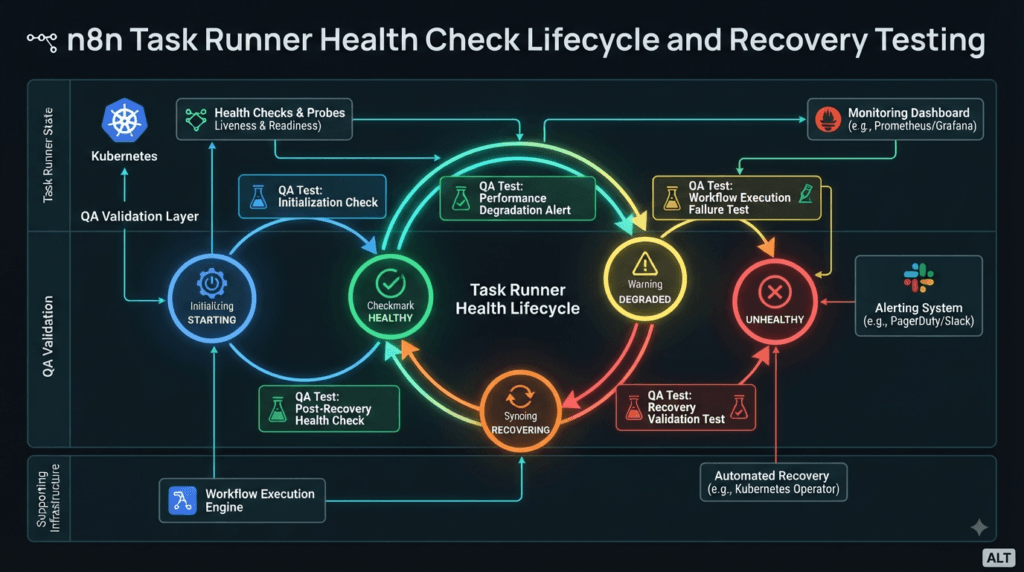
Think about the lifecycle:
STARTING
   ↓
HEALTHY
   ↓
DEGRADED
   ↓
UNHEALTHY
   ↓
RECOVERING
   ↓
HEALTHY
Your test strategy should reflect this lifecycle.
| State | Expected QA Observation |
|---|---|
| Starting | System should not be treated as fully ready prematurely |
| Healthy | Health signal should report readiness |
| Degraded | Monitoring should detect the relevant condition |
| Unhealthy | Failure should be visible |
| Recovering | Recovery should not create inconsistent state |
| Healthy again | Normal workflow execution should resume |
This is more valuable than repeatedly testing only the healthy state.
Test What Monitoring Actually Sees
Suppose the task runner fails.
Your QA test should not stop at:
Runner failed → health endpoint failed
Ask what the monitoring platform receives.
Runner Failure
      ↓
Health Check
      ↓
Monitoring
      ↓
Alert
Now create an assertion around the operational behavior.
def test_runner_failure_generates_expected_signal():
    stop_task_runner()

    wait_for_monitoring_signal()

    alert = get_latest_alert()

    assert alert.component == "task-runner"
    assert alert.status == "unhealthy"
This is especially important for production environments where engineers may rely on monitoring rather than manually checking workflow executions.
Health Checks and Smoke Tests Are Not the Same
A common testing mistake is treating a health check as a complete smoke test.
They answer different questions.
| Health Check | Smoke Test |
|---|---|
| Is the component operational? | Can the application perform a real workflow? |
| Fast | More comprehensive |
| Infrastructure-oriented | Business/application-oriented |
| Usually deterministic | May involve dependencies |
| Good for monitoring | Good for deployment validation |
For example:
Health Check
     ↓
Task runner is healthy
does not prove:
Trigger
 ↓
Node
 ↓
API
 ↓
Database
 ↓
Notification
will succeed.
Use both.
Build a Two-Level Deployment Gate
A practical deployment pipeline can use:
Deploy
 ↓
Health Checks
 ↓
Smoke Tests
 ↓
Critical Workflow Tests
 ↓
Monitoring Validation
 ↓
Release Decision
This creates a layered quality gate.
For a maintenance release, the first layer should execute quickly.
The deeper workflow suite can then validate the application behavior.
Test Display Dependencies as a Configuration Graph
The second bug fix is best understood by thinking about configuration dependencies.
Imagine:
Option A
   ↓
Option B
   ↓
Option C
If Option C is displayed only when Option B has a particular value, the UI must evaluate that relationship correctly.
A configuration test should therefore cover:
A = true
B = true
C = visible

A = true
B = false
C = hidden
And also invalid or boundary combinations.
@pytest.mark.parametrize(
    "parent_value, child_value",
    [
        (True, True),
        (True, False),
        (False, True),
        (False, False),
    ],
)
def test_configuration_dependency(parent_value, child_value):
    state = build_configuration(
        parent=parent_value,
        child=child_value,
    )

    assert validate_configuration(state)
Again, the exact implementation will depend on the specific n8n component under test.
The testing principle is broadly applicable.
Don’t Forget Saved Configuration
A UI test that passes immediately after changing an option is incomplete.
Test persistence.
Open Workflow
      ↓
Change Configuration
      ↓
Save
      ↓
Reload
      ↓
Inspect Configuration
Then test:
def test_configuration_survives_reload():
    update_workflow_option(
        "displayOption",
        True,
    )

    save_workflow()

    reload_workflow()

    assert get_workflow_option(
        "displayOption"
    ) is True
This matters because a configuration defect can occur at several layers:
UI
 ↓
Internal State
 ↓
Serialization
 ↓
Database
 ↓
Reload
 ↓
UI
Testing only the UI does not validate the entire path.
Compare UI Testing With Workflow Testing
n8n is unusual because the visual configuration is itself part of a larger executable workflow.
| UI Test | Workflow Test |
|---|---|
| Checks visibility | Checks execution |
| Checks configuration | Checks behavior |
| Usually fast | Usually slower |
| Component-focused | Integration-focused |
| Finds UI regressions | Finds business-flow regressions |
You need both.
A configuration option can display correctly but still produce an incorrect workflow execution.
Likewise, a workflow can execute successfully while its UI configuration becomes difficult or incorrect for users.
Test Custom Nodes Separately
If your organization uses custom nodes, don’t assume a core maintenance release cannot affect them.
Create a custom-node smoke suite:
Custom Node
    ↓
Load
    ↓
Configuration
    ↓
Save
    ↓
Execute
    ↓
Output
Example:
def test_custom_node_regression():
    node = load_custom_node("customer-sync")

    configure_node(node)

    result = execute_node(node)

    assert result.success is True
Then test the configuration states that your organization actually uses.
This is particularly important for teams that extend the platform beyond its built-in functionality.
Test Credentials and External Integrations
A workflow automation platform is valuable because it connects systems.
That also creates a large regression surface.
For representative workflows, validate:
Credential loading
      ↓
Authentication
      ↓
External request
      ↓
Response handling
      ↓
Workflow continuation
Test both success and failure.
def test_external_api_failure_is_handled():
    mock_external_api(status=500)

    result = execute_workflow(
        "customer-sync"
    )

    assert result.failed is True
    assert result.error_handled is True
Then restore the dependency and verify successful execution.
Test Webhooks and Scheduled Triggers
A release validation strategy should not focus only on manually executed workflows.
Identify trigger types used in production:
Webhook
Schedule
Manual
API
Event
Queue
For a webhook:
HTTP Request
    ↓
Webhook Trigger
    ↓
Workflow
    ↓
Result
For a schedule:
Scheduler
    ↓
Trigger
    ↓
Workflow
A basic smoke suite should verify that your most important trigger mechanisms still work.
Test Retry Behavior
Automation systems frequently encounter temporary failures.
For example:
API unavailable
     ↓
Retry
     ↓
API available
     ↓
Continue
Test that the retry mechanism does not create unintended side effects.
def test_retry_does_not_duplicate_record():
    configure_api_fail_once()

    execute_workflow("create-customer")

    records = find_customer_records(
        "CUST-100"
    )

    assert len(records) == 1
This is an excellent example of a test that combines reliability and business correctness.
Test Idempotency for Business-Critical Workflows
If a workflow creates, updates, sends, charges, or deletes something, ask:
What happens if execution occurs twice?
For example:
One event
   ↓
Workflow
   ↓
External API
A failure during the final step may cause a retry:
Retry
   ↓
External API
If the external operation is not idempotent, you may produce duplicate business actions.
Your regression suite should therefore include idempotency tests for high-risk workflows.
Introduce Failure Injection
The strongest reliability tests deliberately create failures.
Examples:
Task runner unavailable
API timeout
Database unavailable
Invalid credentials
Rate limit
Malformed response
Network interruption
Expired token
A conceptual test:
def test_workflow_recovers_from_timeout():
    inject_timeout("customer-api")

    first = execute_workflow(
        "customer-sync"
    )

    assert first.failed is True

    remove_fault("customer-api")

    second = execute_workflow(
        "customer-sync"
    )

    assert second.success is True
This approach teaches you what the system does under stress instead of assuming it behaves correctly.
Use a Risk-Based Regression Matrix
Not every workflow deserves the same testing depth.
Classify them.
| Workflow Type | Risk | Testing |
|---|---|---|
| Financial transaction | Critical | Full regression |
| Customer notification | High | Full smoke + failure tests |
| Database synchronization | High | Integration + recovery |
| Internal reporting | Medium | Smoke |
| Personal utility workflow | Low | Basic validation |
This prevents your QA team from spending hours on low-risk workflows while critical business automation receives only a superficial test.
Compare n8n With Traditional CI/CD Testing
Traditional application pipelines often look like:
Code
 ↓
Unit Tests
 ↓
Integration Tests
 ↓
E2E
 ↓
Deploy
Workflow automation needs an additional operational layer:
Configuration
 ↓
Workflow Validation
 ↓
Runtime Health
 ↓
Integration Tests
 ↓
Failure Recovery
 ↓
Business E2E
 ↓
Monitoring
That difference is important.
The workflow definition itself is part of the application.
The execution infrastructure is also part of the application.
Therefore, your QA strategy needs to cover both.
Build a Release Candidate Environment
Before changing production, create an environment that resembles it.
Production
   ↓
Same workflow definitions
   ↓
Same critical integrations
   ↓
Representative credentials
   ↓
Candidate n8n version
Then execute:
Smoke
 ↓
Regression
 ↓
Failure injection
 ↓
Performance checks
 ↓
Monitoring validation
The closer your staging environment is to production, the more meaningful the results become.
Measure More Than Pass or Fail
A release can technically pass while becoming slower or less reliable.
Capture:
Workflow success rate
Execution duration
Task runner health
Retry count
Error rate
Failed executions
Duplicate side effects
Recovery time
For example:
| Metric | Baseline | Candidate |
|---|---|---|
| Workflow success | 99.5% | 99.8% |
| p95 execution | 4.2s | 4.1s |
| Failed executions | 5 | 2 |
| Duplicate actions | 0 | 0 |
| Recovery time | 45s | 40s |
This gives engineering leadership something more useful than:
“The tests passed.”
It gives them evidence.
Create an Automated Release Gate
You can eventually turn the strategy into a CI/CD gate.
Candidate Build
      ↓
Startup Check
      ↓
Task Runner Health
      ↓
Configuration Tests
      ↓
Critical Workflows
      ↓
Failure Injection
      ↓
Monitoring
      ↓
PASS / BLOCK
A simplified command structure could be:
npm test
pytest tests/health
pytest tests/workflows
pytest tests/recovery
The actual commands will depend on your automation architecture.
The important concept is that the release gate should validate the areas affected by the release rather than blindly running unrelated checks.
Interactive QA Challenge
Choose three production workflows and classify them:
Workflow A: __________
Risk: Critical / High / Medium / Low

Workflow B: __________
Risk: Critical / High / Medium / Low

Workflow C: __________
Risk: Critical / High / Medium / Low
For each workflow, answer:
What triggers it?
What systems does it call?
What happens if the task runner fails?
What happens if an external API fails?
Can it safely retry?
Can it create duplicate side effects?
How do we know it recovered?
If your team cannot answer these questions, that is a valuable QA finding in itself.
The Strategic Lesson for SDETs
The real value of n8n 2.34.4 Released is not the size of its changelog.
It is the opportunity to practice a better release-engineering mindset.
A two-line changelog can represent multiple system-level questions:
Bug Fix
  ↓
What failed?
  ↓
Why did it fail?
  ↓
Where does our application depend on it?
  ↓
How can we reproduce the old failure?
  ↓
How do we prove the fix?
  ↓
What related behavior could regress?
That is how a QA engineer turns a maintenance release into meaningful engineering intelligence.
The best release testing is not about running the largest possible test suite.
It is about running the smallest set of high-value tests that gives you strong evidence about the risks introduced or corrected by the change.
Build a Production-Grade n8n Regression Strategy
n8n 2.34.4 Released is a useful reminder that workflow automation testing cannot stop at checking whether individual nodes work. A reliable QA strategy must verify the entire execution lifecycle: trigger, task runner, dependencies, retries, state, side effects, monitoring, and recovery.
For SDETs, this is where ordinary functional automation evolves into reliability engineering.
Test the Complete Execution Lifecycle
A production workflow can be represented as:
Trigger
   ↓
Workflow Loaded
   ↓
Task Runner
   ↓
Node Execution
   ↓
External Dependency
   ↓
Result
   ↓
Monitoring
A regression test that validates only the final result misses several failure points.
Instead, define checkpoints:
def test_critical_workflow():
    execution = trigger_workflow()

    assert execution.started is True
    assert execution.runner_available is True
    assert execution.completed is True
    assert execution.business_result_valid is True
In a real implementation, these assertions may be distributed across API checks, workflow assertions, logs, and observability data.
The important principle is:
Validate both what the workflow produces and how it reaches that result.
Test Startup and Readiness Separately
One subtle source of deployment failures is confusing “process started” with “application ready.”
Consider:
Process Started
      ↓
Dependencies Initialized
      ↓
Task Runner Ready
      ↓
Health Check Ready
      ↓
Workflow Ready
Your deployment smoke suite should verify these states independently.
def test_n8n_readiness():
    wait_for_application()

    assert application_is_ready()
    assert task_runner_is_ready()
A process returning an HTTP response does not necessarily prove that every execution component is ready.
This distinction becomes particularly important in containerized and orchestrated environments.
Test Deployment Restart Scenarios
A maintenance release should be tested through the same lifecycle that production uses.
For example:
Deploy
 ↓
Start
 ↓
Health Check
 ↓
Execute Workflow
 ↓
Restart
 ↓
Health Check
 ↓
Execute Workflow Again
Example:
def test_workflow_after_restart():
    restart_n8n()

    wait_until_ready()

    result = execute_workflow("critical-sync")

    assert result.success is True
Then test repeated restarts.
def test_repeated_restart_recovery():
    for _ in range(3):
        restart_n8n()
        wait_until_ready()

        assert health_check_passes()
This can reveal lifecycle problems that a single clean deployment never exposes.
Test Workflow Persistence
Workflow automation platforms depend heavily on persistent configuration.
A basic persistence test should verify:
Create
 ↓
Save
 ↓
Restart
 ↓
Reload
 ↓
Execute
def test_workflow_survives_restart():
    workflow = create_test_workflow()

    save_workflow(workflow)

    restart_n8n()
    wait_until_ready()

    loaded = load_workflow(workflow.id)

    assert loaded.definition == workflow.definition
This becomes particularly useful when validating configuration-related fixes.
Test Version Compatibility
Your regression environment should record more than the n8n version.
Capture the complete environment:
environment:
  n8n: "2.34.4"
  node: "<supported-version>"
  database: "<version>"
  operating_system: "<version>"
  custom_nodes: true
Why?
Because a workflow failure may not actually originate from n8n.
It could result from:
n8n
 +
Node.js
 +
Database
 +
Custom Node
 +
External API
A reproducible environment makes diagnosis significantly easier.
Don’t Upgrade Multiple Variables at Once
Suppose you perform this deployment:
n8n upgrade
+
Node.js upgrade
+
Database upgrade
+
Custom node upgrade
Your regression suite fails.
Which change caused it?
You have created an investigation problem.
A better strategy is:
Known Good
   ↓
n8n Candidate
   ↓
Test
   ↓
Approve
   ↓
Other Dependency
This is especially important for release-news validation because it lets you attribute observed behavior to the release being evaluated.
Test With Production-Like Data
A workflow can pass using simplistic test data and fail with realistic payloads.
Compare:
{
  "customer": "John"
}
with something closer to real production structure:
{
  "customer": {
    "id": "CUST-10045",
    "name": "John Khan",
    "email": "john@example.test",
    "preferences": {
      "notifications": true
    }
  },
  "metadata": {
    "source": "webhook",
    "timestamp": "2026-08-07T10:30:00Z"
  }
}
Production-like fixtures should contain:
- optional fields
- nested objects
- realistic strings
- boundary values
- missing values
- malformed values
- larger payloads
Do not use real customer data in test environments.
Add Boundary Testing
Workflow nodes often behave correctly for ordinary values but fail at boundaries.
Test:
Empty string
Null
Zero
Negative value
Very large value
Maximum length
Missing property
Unexpected property
Invalid type
For example:
@pytest.mark.parametrize(
    "value",
    [
        "",
        None,
        0,
        -1,
        "unexpected",
    ],
)
def test_customer_value_boundaries(value):
    result = execute_workflow_with_value(value)

    assert result.handled_safely is True
Boundary testing is particularly useful for workflows that transform external API payloads.
Test Contract Drift
External APIs change.
Your workflow may expect:
{
  "status": "success"
}
while an upstream service eventually returns:
{
  "state": "success"
}
Your workflow may technically execute but produce incorrect business behavior.
Create explicit contracts.
def test_external_api_contract():
    response = call_customer_api()

    assert "status" in response
    assert response["status"] in {
        "success",
        "failed",
    }
For critical integrations, contract testing can prevent external changes from silently breaking automation.
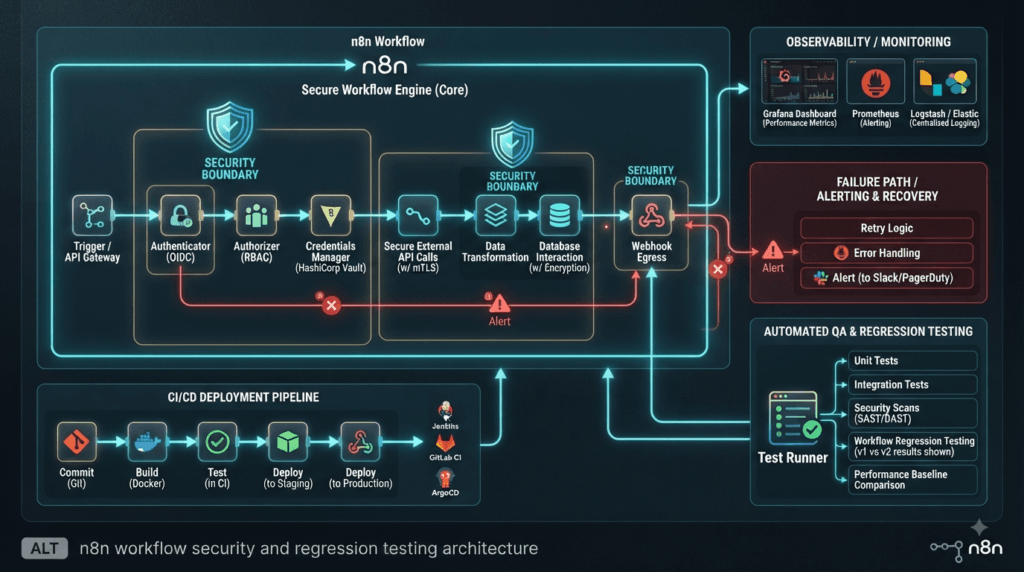
Test Authentication Failure
Credentials are one of the most important failure paths in automation.
Test:
Valid credentials
Expired credentials
Invalid credentials
Missing credentials
Insufficient permissions
Example:
def test_workflow_handles_expired_credentials():
    expire_test_credentials()

    result = execute_workflow(
        "customer-sync"
    )

    assert result.success is False
    assert result.error_type == "authentication"
Then verify that the failure is observable.
A failed authentication request that silently disappears is much more dangerous than an explicit failed execution.
Test Permission Boundaries
Authentication proves identity.
Authorization proves permission.
They are different.
For a workflow that accesses customer information:
User
 ↓
Credential
 ↓
Authorization
 ↓
Resource
Test unauthorized access explicitly.
def test_user_cannot_access_restricted_resource():
    result = execute_workflow_as(
        user="limited-user",
        workflow="restricted-customer-data",
    )

    assert result.authorized is False
This is especially important for workflows containing sensitive business operations.
Validate Sensitive Data Handling
Workflow automation frequently moves data between systems.
That creates another QA responsibility:
Does a failure expose information that should remain protected?
Test logs and error messages.
def test_error_does_not_expose_secret():
    result = execute_workflow_with_invalid_token()

    assert "SECRET_TOKEN" not in result.logs
    assert "Authorization:" not in result.logs
The exact secrets and logging architecture should be adapted to your environment.
The test should focus on preventing accidental exposure.
Test Observability During Failures
A workflow failure should leave enough evidence to diagnose it.
A useful observability contract might require:
Execution ID
Workflow ID
Timestamp
Failure status
Node information
Error classification
Correlation information
Example:
def test_failed_execution_is_observable():
    result = execute_failing_workflow()

    event = find_execution_event(
        result.execution_id
    )

    assert event is not None
    assert event.status == "failed"
This is where QA and observability engineering overlap.
A system that fails correctly but cannot explain why it failed is still operationally expensive.
Compare Functional Testing With Observability Testing
| Functional Testing | Observability Testing |
|---|---|
| Did workflow succeed? | Can we explain failure? |
| Correct output? | Correct telemetry? |
| Correct node behavior? | Correct execution trace? |
| Error handled? | Error visible? |
| Business result? | Operational evidence? |
A mature QA strategy includes both.
Test Retry Policies Carefully
Retries can improve reliability, but they can also multiply side effects.
Imagine:
API Call
 ↓
Timeout
 ↓
Retry
 ↓
Success
That sounds harmless.
Now imagine the first request actually reached the external service but the response was lost:
Request sent
 ↓
External action completed
 ↓
Response lost
 ↓
n8n retries
 ↓
Second action
You may now have duplicate business operations.
Therefore, test ambiguous failures.
def test_retry_after_lost_response():
    simulate_successful_request_with_lost_response()

    result = execute_workflow(
        "create-order"
    )

    orders = find_orders(
        customer_id="CUST-100"
    )

    assert len(orders) == 1
This is a high-value reliability test.
Test Timeouts at Every Important Boundary
A distributed workflow can encounter several timeout layers:
Webhook Timeout
 ↓
n8n Execution Timeout
 ↓
HTTP Client Timeout
 ↓
Database Timeout
 ↓
External API Timeout
Don’t assume one timeout setting controls everything.
Create targeted tests.
def test_external_timeout_is_handled():
    simulate_external_timeout()

    result = execute_workflow(
        "payment-status"
    )

    assert result.failed is True
    assert result.error_type == "timeout"
Then validate whether the workflow retries, stops, alerts, or compensates according to business requirements.
Test Long-Running Workflows
Short workflows are easier to validate.
Production workflows may run for minutes or longer.
Test:
Short execution
Medium execution
Long execution
Interrupted execution
Recovered execution
Measure:
Execution duration
Memory behavior
Task runner stability
Completion status
Side effects
A release that behaves correctly for a 2-second workflow may still behave differently during long-running execution.
Add Concurrency Testing
If several workflows can execute simultaneously, test concurrency.
import asyncio

async def execute_many():
    return await asyncio.gather(
        execute_workflow_async("workflow-a"),
        execute_workflow_async("workflow-b"),
        execute_workflow_async("workflow-c"),
    )
Then verify:
results = asyncio.run(execute_many())

assert all(
    result.success
    for result in results
)
But don’t stop there.
Check data isolation:
assert results[0].customer_id != results[1].customer_id
The goal is not simply proving that three workflows completed.
The goal is proving that they did not interfere with one another.
Test Queue and Backlog Behavior
If your deployment uses queue-based execution, introduce a controlled backlog.
100 jobs
   ↓
Task Runner
   ↓
Execution Queue
Measure:
Queue depth
Processing rate
Failed jobs
Retry count
Execution latency
Recovery behavior
A useful test scenario is:
Normal load
 ↓
Sudden traffic spike
 ↓
Queue grows
 ↓
Runner recovers
 ↓
Backlog drains
This gives you evidence about how the system behaves under operational pressure.
Performance Testing Should Be Relative
For a maintenance release, you do not necessarily need a full performance campaign.
Instead, compare against your baseline.
Previous Version
       ↓
Performance Baseline
       ↓
Candidate Version
       ↓
Same Workload
       ↓
Compare
For example:
| Metric | Baseline | Candidate |
|---|---|---|
| p50 | 1.4 s | 1.4 s |
| p95 | 3.2 s | 3.3 s |
| p99 | 5.8 s | 5.9 s |
| Error rate | 0.4% | 0.4% |
Small variations may be normal.
Large unexplained changes require investigation.
Don’t Confuse Load With Reliability
Load testing answers:
How does the system behave under volume?
Reliability testing asks:
Does the system continue behaving correctly when components fail?
You need both.
Load Testing
   ↓
Volume

Reliability Testing
   ↓
Failure + Recovery
For an automation platform, the combination is much more valuable than either one alone.
Build a Canary Strategy
If your n8n deployment is business-critical, consider a staged rollout.
Candidate
   ↓
Staging
   ↓
Canary
   ↓
Small Workflow Group
   ↓
Monitor
   ↓
Expand
   ↓
Full Production
Define rollback conditions before deployment.
For example:
Rollback if:

Critical workflow failures > threshold
Task runner health failures increase
Duplicate side effects detected
Error rate exceeds baseline
Recovery behavior fails
This changes deployment from a binary decision into a controlled experiment.
Automate the Release Decision
A release pipeline can produce a machine-readable report:
{
  "version": "2.34.4",
  "health_checks": "PASS",
  "critical_workflows": "PASS",
  "configuration_tests": "PASS",
  "security_tests": "PASS",
  "recovery_tests": "PASS",
  "performance": "PASS",
  "decision": "APPROVE"
}
This is much more useful than manually collecting screenshots from test runs.
The report can become part of your deployment evidence.
Create a Quality Scorecard
A practical scorecard might look like:
| Area | Status | Priority |
|---|---|---|
| Startup | PASS | High |
| Task runner health | PASS | Critical |
| Recovery | PASS | Critical |
| Configuration | PASS | Medium |
| Critical workflows | PASS | Critical |
| External APIs | PASS | High |
| Credentials | PASS | High |
| Security | PASS | High |
| Observability | PASS | Medium |
| Performance | PASS | Medium |
If a critical category fails, block the release even if every low-risk test passes.
That is what makes the strategy risk-based.
Think Beyond This Release
A good QA strategy should survive the current version.
Instead of creating tests named around the release:
test_n8n_2_34_4_health_check()
prefer behavior-oriented names:
test_unhealthy_task_runner_is_detected()
test_task_runner_recovers_after_failure()
test_workflow_survives_runner_restart()
test_configuration_dependency_is_respected()
Why?
Because the behavior should continue to matter after another n8n version is released.
This gives your regression suite a much longer useful life.
Build a Reusable Reliability Suite
Your long-term test architecture could look like:
n8n QA Suite
│
├── Health
│   ├── startup
│   ├── readiness
│   ├── runner
│   └── recovery
│
├── Workflow
│   ├── triggers
│   ├── nodes
│   ├── integrations
│   └── persistence
│
├── Security
│   ├── credentials
│   ├── authorization
│   └── sensitive data
│
├── Reliability
│   ├── retries
│   ├── timeouts
│   ├── failures
│   └── idempotency
│
└── Performance
    ├── latency
    ├── concurrency
    └── load
Now future maintenance releases become much easier to validate.
You are no longer starting from zero.
Interactive Exercise: Design One High-Value Test
Choose your most important workflow.
Now complete this:
Workflow:
____________________________

Critical dependency:
____________________________

Failure I want to simulate:
____________________________

Expected health signal:
____________________________

Expected workflow behavior:
____________________________

Expected recovery:
____________________________

Business side effect to protect:
____________________________
Then turn it into an automated test.
For example:
def test_customer_sync_recovers_after_runner_failure():
    stop_task_runner()

    failed = execute_workflow("customer-sync")

    assert failed.detected_failure is True

    start_task_runner()
    wait_until_runner_is_ready()

    recovered = execute_workflow("customer-sync")

    assert recovered.success is True
    assert no_duplicate_customers()
That single test can provide more meaningful release confidence than dozens of superficial UI checks.
The SDET Mindset
The most valuable skill demonstrated by n8n 2.34.4 Released is not knowing the version number.
It is knowing how to transform a tiny release note into a system-level testing strategy.
A bug fix becomes:
Change
 ↓
Risk
 ↓
Failure Scenario
 ↓
Test
 ↓
Evidence
 ↓
Release Decision
That is the mindset that separates simple test execution from quality engineering.
When you approach workflow automation this way, maintenance releases become opportunities to strengthen the reliability of the entire platform rather than merely occasions to run a regression suite.
Turn n8n 2.34.4 Released Into a Long-Term QA Engineering Strategy
n8n 2.34.4 Released with two bug fixes may look like a small maintenance update, but the real QA question is much bigger:
Can we prove that the corrected behavior works without introducing failures elsewhere in our automation platform?
That question changes how an SDET approaches a release.
Instead of thinking:
Release
 ↓
Run Regression
 ↓
Everything Passed
think:
Release Change
 ↓
Risk Identification
 ↓
Targeted Validation
 ↓
Failure Testing
 ↓
Observability
 ↓
Business Validation
 ↓
Release Decision
This approach produces stronger evidence with fewer unnecessary tests.
Create a Release Confidence Model
For production automation, I recommend evaluating release confidence across five dimensions:
              Release Confidence
                     │
     ┌───────────────┼───────────────┐
     ↓               ↓               ↓
 Functional      Reliability      Operations
     ↓               ↓               ↓
 Security       Recovery         Observability
You can turn this into a simple scorecard:
| Dimension | Question |
|---|---|
| Functional | Do critical workflows behave correctly? |
| Reliability | Does the platform survive expected failures? |
| Recovery | Can failed components return to service? |
| Security | Are credentials and permissions protected? |
| Operations | Can engineers detect and diagnose failures? |
A release should not be considered safe merely because functional tests pass.
Build a Release-Specific Test Pack
Don’t execute every test you have just because a new version is available.
Create a focused release pack:
release-smoke/
├── health/
├── task-runner/
├── configuration/
├── critical-workflows/
├── integrations/
├── recovery/
└── observability/
Example:
def test_release_health():
    assert application_is_ready()
    assert task_runner_is_ready()


def test_critical_workflow():
    result = execute_workflow("customer-sync")
    assert result.success is True


def test_recovery():
    stop_task_runner()

    assert runner_health() is False

    start_task_runner()
    wait_until_runner_is_ready()

    assert runner_health() is True
The advantage is speed.
Your release candidate can receive meaningful validation before the complete regression suite finishes.
Separate Smoke, Regression, and Reliability Testing
These three testing layers have different purposes.
| Testing Layer | Primary Question | Typical Speed |
|---|---|---|
| Smoke | Is the release fundamentally usable? | Fast |
| Regression | Did existing behavior remain correct? | Medium |
| Reliability | Does the system survive failures? | Slower |
A mature pipeline can execute them in sequence:
Candidate
   ↓
Smoke
   ↓
Regression
   ↓
Reliability
   ↓
Release Decision
If smoke testing fails, there is little value in immediately running thousands of downstream tests.
This is a simple optimization that can save substantial CI time.
Make Critical Workflows First-Class Test Assets
One of the biggest mistakes teams make is treating workflows as disposable configuration.
Critical workflows should be treated like application code.
For example:
Customer Synchronization
Payment Processing
Order Fulfillment
Notification Delivery
Database Backup
Reporting
Each should have:
Owner
Risk classification
Smoke test
Regression test
Failure test
Recovery test
Monitoring check
A simple metadata file could look like:
workflow:
  name: customer-sync
  owner: qa-platform
  risk: critical

tests:
  smoke: true
  regression: true
  recovery: true
  monitoring: true
This makes your automation inventory easier to manage.
Build Business-Critical Workflow Contracts
A workflow should have an expected contract.
For example:
Input
 ↓
Validation
 ↓
Transformation
 ↓
External API
 ↓
Database
 ↓
Notification
Define what must always be true.
def test_customer_sync_contract():
    result = execute_workflow(
        "customer-sync",
        customer_id="CUST-100"
    )

    assert result.success is True
    assert result.customer_id == "CUST-100"
    assert result.database_updated is True
    assert result.notification_sent is True
This is stronger than simply checking:
assert result.status == "success"
A workflow can technically report success while producing an incorrect business result.
Use Golden Workflows
For highly critical automation, maintain a small collection of “golden workflows.”
These represent the most important patterns your organization depends on.
For example:
Golden Workflow Suite

01 — Webhook → API → Database
02 — Schedule → API → Email
03 — Queue → Transformation → Database
04 — API → Validation → Notification
05 — Failure → Retry → Recovery
Every important platform upgrade should run these workflows.
This creates a consistent benchmark across versions.
Compare Golden Workflows With Full Regression
| Golden Workflow Suite | Full Regression |
|---|---|
| Small | Large |
| Fast | Slower |
| Critical scenarios | Broad coverage |
| Deployment gate | Release confidence |
| Runs frequently | Runs at defined stages |
The best strategy is not choosing one.
Use both.
Test Upgrade and Rollback
QA teams often test:
Old Version → New Version
but forget:
New Version → Old Version
Rollback testing matters because production incidents sometimes require immediate reversal.
A conceptual pipeline:
Known Good
   ↓
Upgrade
   ↓
Validate
   ↓
Failure?
   ├── No → Continue
   └── Yes
         ↓
       Rollback
         ↓
       Validate
Example:
def test_rollback_recovery():
    deploy_version("2.34.4")

    if critical_tests_fail():
        deploy_previous_version()

        assert critical_workflows_pass()
Your exact rollback mechanism depends on your infrastructure.
The principle is universal:
A deployment strategy is incomplete if rollback has never been tested.
Verify Data Integrity During Rollback
Rollback is not simply changing the application version.
State may have changed.
Test:
Version A
 ↓
Create Data
 ↓
Upgrade
 ↓
Workflow Execution
 ↓
Rollback
 ↓
Read Data
Then verify:
def test_data_survives_rollback():
    create_test_customer("CUST-500")

    deploy_version("2.34.4")
    execute_workflow("customer-sync")

    deploy_previous_version()

    customer = find_customer("CUST-500")

    assert customer.exists is True
This is especially important when workflows interact with persistent databases and external systems.
Test External Side Effects
A workflow can fail internally after successfully performing an external action.
Consider:
n8n
 ↓
Payment API
 ↓
Payment succeeds
 ↓
Response lost
 ↓
Workflow reports failure
If the workflow retries:
Retry
 ↓
Payment API
 ↓
Second payment
That can become a serious business incident.
Your test should therefore verify side-effect protection:
def test_payment_retry_is_idempotent():
    simulate_lost_response_after_payment()

    execute_workflow("payment")

    payments = find_payments(
        transaction_id="TX-100"
    )

    assert len(payments) == 1
This type of test provides significantly more business value than checking whether a button is visible.
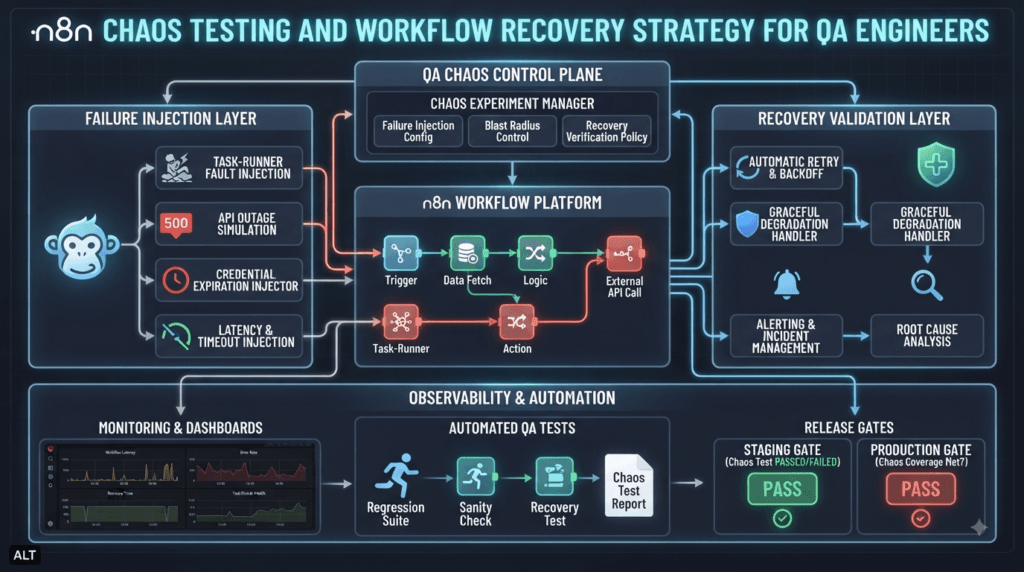
Add Chaos-Style Scenarios
You don’t need a massive chaos engineering platform to start testing resilience.
Begin with controlled failures.
Kill runner
 ↓
Restart runner
 ↓
Execute workflow
Then:
Block API
 ↓
Execute workflow
 ↓
Restore API
 ↓
Retry
And:
Expire credential
 ↓
Execute workflow
 ↓
Verify failure
 ↓
Restore credential
 ↓
Execute again
These scenarios teach your team how the platform behaves when reality stops being perfect.
Test Recovery Time
Recovery should be measurable.
Instead of:
“The runner recovered.”
measure:
Failure detected: 10:00:00
Recovery started: 10:00:15
Runner ready:     10:00:32
Workflow passed:  10:00:40
Then calculate:
Detection Time
Recovery Time
Validation Time
Total Recovery Time
A simple automated assertion:
def test_runner_recovers_within_threshold():
    start_failure()

    wait_for_recovery()

    recovery_time = measure_recovery_time()

    assert recovery_time < 60
The threshold should be based on your actual service requirements.
Turn Logs Into Test Assertions
Logs are often treated as debugging material.
They can also become test evidence.
For example:
def test_runner_failure_is_logged():
    stop_task_runner()

    wait_for_log("task runner unhealthy")

    logs = get_recent_logs()

    assert "task runner unhealthy" in logs
Don’t over-couple tests to exact log wording, though.
Prefer stable event identifiers or structured logging fields when available.
For example:
{
  "component": "task-runner",
  "event": "health_check_failed",
  "status": "unhealthy"
}
Structured observability is significantly easier to automate.
Compare Traditional Logs With Structured Events
| Traditional Logs | Structured Events |
|---|---|
| Human-readable | Machine-readable |
| String matching | Field assertions |
| Brittle automation | More stable automation |
| Harder to aggregate | Easy to query |
| Good for debugging | Good for automation + debugging |
For modern SDET platforms, structured telemetry is worth testing explicitly.
Create a Failure Taxonomy
Not every failure should be handled identically.
Create categories:
Infrastructure
├── Runner
├── Database
└── Network

Application
├── Workflow
├── Node
└── Configuration

External
├── API
├── Authentication
└── Rate Limit

Business
├── Invalid Data
├── Duplicate Action
└── Authorization
Then map expected behavior:
| Failure | Expected Behavior |
|---|---|
| Runner unavailable | Detect + recover |
| API timeout | Retry or fail safely |
| Invalid credential | Fail clearly |
| Rate limit | Backoff/retry |
| Invalid input | Reject safely |
| Duplicate request | Prevent duplicate side effect |
This becomes a reusable reliability specification.
Build a Failure Injection Library
Instead of manually creating failures, automate them.
For example:
class FailureInjector:

    def stop_runner(self):
        ...

    def timeout_api(self, service):
        ...

    def expire_credentials(self, credential):
        ...

    def return_http_500(self, service):
        ...

    def block_network(self, service):
        ...
Your tests then become expressive:
def test_workflow_recovers_from_api_timeout():
    injector.timeout_api("customer-api")

    result = execute_workflow("customer-sync")

    assert result.recovered is True
This is a major step toward a reusable SDET reliability framework.
Use Risk-Based Test Selection
Imagine you have 500 workflows.
Testing all 500 after every maintenance release may be expensive.
Instead:
500 workflows
      ↓
Risk classification
      ↓
20 critical
      ↓
50 high-risk
      ↓
430 lower-risk
Then:
Every deployment:
20 critical

Daily:
20 critical + 50 high-risk

Scheduled full regression:
All 500
This gives faster feedback without abandoning broad coverage.
Introduce Change-Aware Testing
The ideal strategy goes one step further.
Ask:
Which workflows could actually be affected by the changed component?
For example:
Changed Component
      ↓
Dependency Map
      ↓
Affected Workflows
      ↓
Targeted Tests
Maintain metadata:
workflow: customer-sync

dependencies:
  - task-runner
  - http-request
  - postgres
  - email
Then a task-runner change can automatically select workflows that depend on that infrastructure.
This is where AI-assisted test selection can eventually become useful.
Add AI Without Giving AI the Final Decision
An AI system could analyze:
Release notes
+
Code changes
+
Workflow metadata
+
Historical failures
and recommend:
High-risk tests:
- task runner recovery
- workflow restart
- critical API integration

Medium-risk:
- configuration persistence

Low-risk:
- unrelated UI workflows
But the release gate should still rely on deterministic automated evidence.
A strong architecture is:
AI
 ↓
Risk Recommendation
 ↓
Human / Rule Validation
 ↓
Deterministic Tests
 ↓
Release Decision
AI can help prioritize.
It should not invent production confidence.
Build a Release Evidence Package
Every production upgrade should leave behind evidence.
For example:
release-evidence/
├── version.txt
├── environment.json
├── smoke-results.json
├── regression-results.json
├── reliability-results.json
├── performance-results.json
├── monitoring-results.json
└── release-decision.json
A final report might contain:
{
  "version": "2.34.4",
  "critical_workflows": 20,
  "passed": 20,
  "failed": 0,
  "recovery_tests": 8,
  "recovery_passed": 8,
  "security_tests": 12,
  "security_passed": 12,
  "decision": "APPROVED"
}
This gives engineering, operations, and management a shared source of truth.
Measure Quality Trends Across Releases
Don’t throw away release evidence.
Track it.
Version
 ↓
Test Results
 ↓
Failure Rate
 ↓
Recovery Time
 ↓
Performance
 ↓
Production Incidents
Over time, you can discover patterns.
For example:
| Version | Test Failures | Recovery Time | Production Incidents |
|---|---|---|---|
| 2.33.x | 4 | 51s | 2 |
| 2.34.x | 2 | 43s | 1 |
| 2.34.4 | 0 | 38s | 0 |
This turns release testing into engineering intelligence.
A Practical Release Decision Matrix
Use explicit rules rather than intuition.
| Result | Decision |
|---|---|
| Critical tests pass | Continue |
| Critical test fails | Block |
| Security regression | Block |
| Data integrity issue | Block |
| Recovery exceeds SLA | Investigate |
| Minor UI regression | Assess impact |
| Performance degradation | Compare baseline |
This prevents teams from saying:
“Only one test failed, so let’s deploy.”
One failed test can be more important than 999 passing tests.
Interactive Exercise: Design Your Own Release Gate
Imagine your production workflow platform is being upgraded.
Define your gate:
Critical workflow pass rate:
__________ %

Maximum acceptable error rate:
__________ %

Maximum recovery time:
__________ seconds

Maximum performance regression:
__________ %

Security failures allowed:
__________

Data integrity failures allowed:
__________
Now ask:
If one of these conditions fails at 2 AM during a production deployment, would your team know automatically?
If the answer is no, the missing automation is itself a reliability improvement opportunity.
What Should QA Engineers Learn From This Release?
The deeper lesson from n8n 2.34.4 Released is that version numbers are only the beginning of release analysis.
A professional QA engineer should translate:
Release Note
     ↓
Technical Change
     ↓
System Dependency
     ↓
Failure Mode
     ↓
Business Risk
     ↓
Automated Test
     ↓
Operational Evidence
That approach works beyond n8n.
The same reasoning can be applied to:
- workflow automation platforms
- API gateways
- test automation frameworks
- CI/CD infrastructure
- AI agent platforms
- databases
- observability systems
- cloud services
The tool changes.
The engineering mindset does not.
People Asked Questions
1. What is n8n 2.34.4?
n8n 2.34.4 is a maintenance release that addresses two reported issues: task runner health-check failures and out-of-scope display option dependencies.
2. When was n8n 2.34.4 released?
n8n 2.34.4 was released on August 7, 2026.
3. What changed in n8n 2.34.4?
The release includes fixes for a task runner health-check failure and handling of out-of-scope display option dependencies.
4. Does n8n 2.34.4 contain breaking changes?
Based on the supplied release information, no breaking changes are listed for n8n 2.34.4.
5. Should QA engineers upgrade to n8n 2.34.4?
QA engineers should validate the release against critical workflows, task runner health, configuration behavior, integrations, recovery scenarios, and existing regression coverage before production deployment.
6. How should I test an n8n upgrade?
Start with smoke tests, then validate critical workflows, task runner readiness, integrations, persistence, error handling, recovery, observability, and performance against an established baseline.
7. What should I test after upgrading n8n?
Prioritize workflows that depend on task runners and configuration/display behavior. Also test critical integrations, authentication, retries, timeouts, persistence, and recovery.
8. Is n8n suitable for automated QA workflows?
Yes. n8n can be used to orchestrate API calls, notifications, data processing, integrations, CI/CD-related workflows, and other automation tasks. QA teams can also test n8n workflows as production-critical automation assets.
9. What is the difference between n8n regression testing and reliability testing?
Regression testing verifies that existing functionality continues to work, while reliability testing evaluates how workflows behave during failures, timeouts, dependency outages, retries, restarts, and recovery.
10. How can SDETs test n8n workflow reliability?
SDETs can combine API testing, workflow validation, failure injection, task runner health checks, recovery testing, observability assertions, performance testing, and business-side-effect validation.
AI Overview / Answer Engine Optimization
n8n 2.34.4 is a maintenance release released on August 7, 2026. It addresses a task runner health-check issue and an out-of-scope display option dependency issue. For QA engineers, the release should be validated through task runner health checks, critical workflow regression tests, configuration testing, and recovery scenarios.
Internal Links
- n8n 2.33.4 Released: Improved Task Runner Reliability & AI Fixes
- n8n 2.33.3 Released: Bug Fixes, MCP Improvements & Upgrade Guide
- n8n 2.32.7 Released: Security Audit Improvements Strengthen Enterprise Workflow Automation
- n8n 2.32.6 Released: Smarter Scheduling Improvements Every QA Engineer Should Know
- n8n 2.32.5 Released: Why This Security-Focused Update Matters for QA Engineers and Automation Teams
- n8n 2.31.4 Improves Workflow Stability and Editor Reliability for QA Engineers
- n8n 2.30.8 Strengthens AI Agent Reliability and Workflow Integrity for Enterprise Automation
- n8n 2.30.7 Strengthens Package Security and AWS SES Reliability for Enterprise Workflow Automation
- n8n 2.30.5 Release Brings Better AI Assistant Analytics, Node Alias Preservation, and Editor Improvements for Workflow Automation
- n8n 2.30.4 Improves Workflow Reliability, Webhook Stability, and Notion Integration for Enterprise Automation
- n8n 2.29.10 Released — What’s New for QA Engineers
- n8n 2.29.9 Released: Strengthening Enterprise AI Automation for Modern QA Teams
- n8n 2.29.8 Released: Enterprise Workflow Stability Gets Even Stronger for QA Engineers
- n8n 2.29.7 Released: AI Workflow Stability Improvements Every QA Engineer Should Know
- n8n 2.28.6 Released: Critical Stability Fixes Every QA Engineer Should Know
- n8n 2.28.7 Released: Critical Dependency Fix Every QA Engineer Should Know
- n8n 2.28.3 Released: Startup Reliability Improvements Every QA Engineer Should Know
- n8n 2.27.4 Released: Essential Workflow Improvements Every QA Engineer Should Know
Official Resources
- Official Documentation: https://docs.n8n.io
- Official Release Notes: https://github.com/n8n-io/n8n/compare/release/2.33.6…release/2.34.4
Conclusion
n8n 2.34.4 Released may be a small maintenance release, but it provides a useful example of how modern SDETs should think about software upgrades.
The strongest QA strategy is not simply:
Install
 ↓
Run tests
 ↓
Pass
It is:
Understand the change
        ↓
Map the risk
        ↓
Identify affected workflows
        ↓
Test normal behavior
        ↓
Inject realistic failures
        ↓
Validate recovery
        ↓
Check observability
        ↓
Measure against baseline
        ↓
Make an evidence-based release decision
For an automation platform, this approach is especially powerful because the platform itself becomes part of the application’s reliability chain.
A task runner, workflow configuration, external API, credential, database, trigger, retry mechanism, and monitoring system can all influence the final business result.
Your job as an SDET is to connect those pieces.
The best release testing therefore isn’t about asking:
“Did the new version pass our tests?”
It is about asking:
“Do we have enough evidence to trust this version under the conditions our users and production systems will actually experience?”
That is the difference between test execution and quality engineering.
Final Key Takeaways
- n8n 2.34.4 Released should be evaluated through risk, not changelog size.
- Test the affected behavior and the dependencies surrounding it.
- Treat critical workflows as first-class software assets.
- Separate smoke, regression, reliability, security, and performance testing.
- Test failure and recovery, not only successful execution.
- Validate external side effects and idempotency.
- Test upgrade and rollback paths.
- Use structured observability as part of your QA evidence.
- Prefer behavior-based test names that remain valuable across future releases.
- Use risk-based and change-aware test selection to reduce unnecessary regression time.
- Let AI recommend test priorities, but keep release decisions grounded in deterministic evidence.
- Preserve release evidence so quality can be measured across versions.
- A successful deployment is not merely one where tests pass; it is one where the team has sufficient evidence to trust the system in production.
Continue Learning
Explore more expert articles on n8n, LangChain, CrewAI, MCP Servers, AI Agents, LlamaIndex, Docker, FastAPI, Playwright, Cypress, Test Automation, DevOps, and Software Engineering at www.skakarh.com.
QAPulse by SK delivers expert release analysis, AI engineering insights, enterprise automation strategies, migration guidance, DevOps best practices, and practical testing knowledge to help software professionals build scalable, intelligent, and production-ready software systems.