QA
QA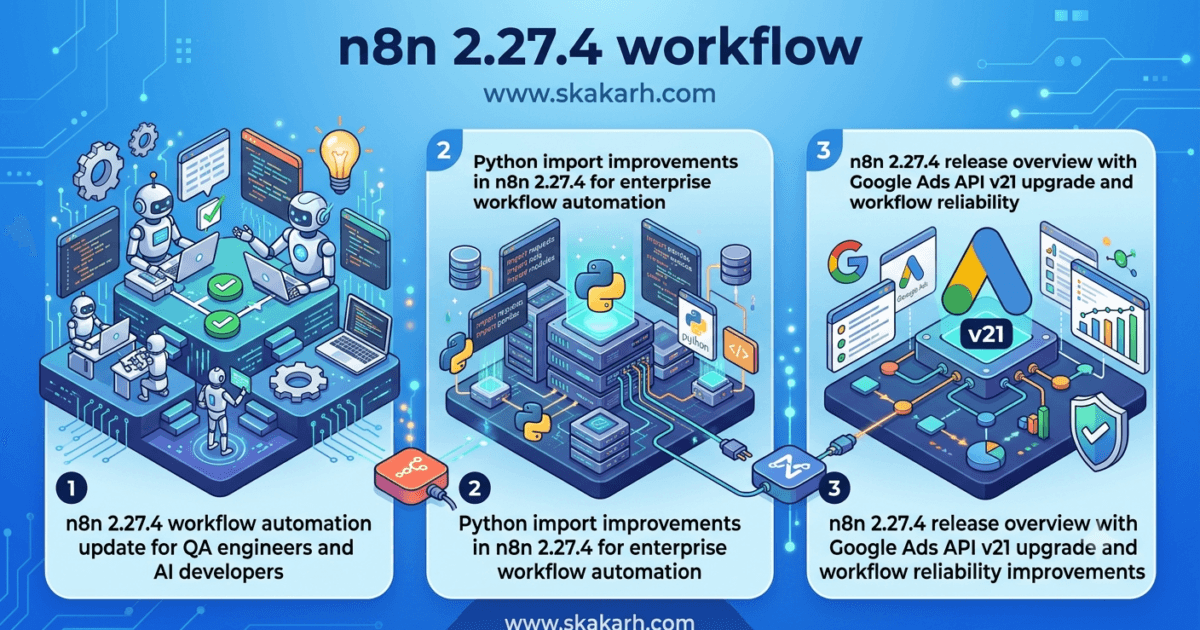
The n8n 2.27.4 Released update may appear to be another routine maintenance release, but beneath its short changelog are improvements that directly impact workflow reliability, Python-based automation, and enterprise integration testing.
Unlike feature-packed major releases, this version focuses on fixing workflow construction issues, improving Python execution capabilities, and keeping one of the platform’s most popular integrations—the Google Ads node—aligned with the latest Google API version.
For QA engineers, SDETs, automation architects, and AI workflow developers, these are exactly the types of releases that deserve attention. Small platform fixes often prevent large production incidents, especially in organizations running hundreds of automated workflows every day.
In this article, we’ll examine the official changes, explain their practical impact on software quality, discuss testing recommendations, and determine whether upgrading to n8n 2.27.4 should be part of your next maintenance cycle.
What’s New in n8n 2.27.4?
According to the official release notes, n8n 2.27.4 introduces three notable improvements:
- Python packages can now correctly import their own submodules using relative imports.
- The workflow engine fixes an issue where chained nodes could be constructed incorrectly.
- The Google Ads integration has been upgraded from API v20 to API v21.
Although the changelog is concise, each update targets a different area of the automation ecosystem:
- Python code execution
- Workflow reliability
- Third-party cloud integrations
Collectively, these improvements make workflow execution more predictable while ensuring continued compatibility with external services.
Why This Release Matters for QA Engineers
Modern QA is no longer limited to UI automation and API validation.
Automation engineers now build complete testing pipelines using workflow platforms such as n8n to:
- Execute automated regression suites
- Trigger Playwright and Selenium jobs
- Run AI-powered testing agents
- Generate synthetic test data
- Send Slack and Microsoft Teams notifications
- Integrate Jira, GitHub, Azure DevOps, and Jenkins
- Schedule nightly automation pipelines
When workflow orchestration becomes part of your quality engineering strategy, even minor platform updates deserve careful evaluation.
A workflow engine bug can interrupt an entire CI/CD pipeline even if every automated test remains technically correct.
That is why maintenance releases like n8n 2.27.4 have real operational value.
Better Python Support Makes AI Automation More Reliable
The most technically significant improvement in this release addresses Python package imports.
The update allows allowlisted Python packages to correctly import their own submodules using relative imports.
For traditional automation teams, this may seem like a niche enhancement.
For AI engineering teams, however, it is considerably more important.
Many organizations now execute Python code inside n8n workflows for:
- AI model inference
- Data preprocessing
- Machine learning pipelines
- Custom validation logic
- File transformation
- Report generation
- MCP server integrations
- Agentic AI orchestration
Relative imports are a standard practice in well-structured Python projects.
Without proper support, developers often resort to workarounds that increase technical debt and make workflows harder to maintain.
By resolving this limitation, n8n allows Python components to behave more like they would in native Python applications.
That leads to cleaner workflow code, easier maintenance, and fewer runtime surprises.
Why Workflow Builder Reliability Is Critical
Another important improvement fixes an issue where chained nodes could be built incorrectly.
At first glance, this sounds like a simple editor bug.
In reality, workflow construction is one of the most critical components of any automation platform.
Complex enterprise workflows often contain:
- Conditional branches
- Loops
- Parallel execution
- Retry logic
- Error handling
- AI decision nodes
- Human approval stages
- External API calls
If node relationships are generated incorrectly, downstream automation can execute in an unexpected order.
For QA teams, that could mean:
- Incorrect test execution
- Missing notifications
- Failed deployments
- Incomplete regression runs
- Corrupted workflow outputs
The fix in n8n 2.27.4 improves confidence that workflows are assembled exactly as intended before execution begins.
Google Ads API v21 Upgrade Protects Existing Integrations
Cloud services evolve rapidly.
Providers frequently retire older APIs while introducing new versions with enhanced functionality and improved security.
n8n 2.27.4 upgrades its Google Ads node from API v20 to API v21, ensuring continued compatibility with Google’s advertising platform.
Even if your QA team does not directly automate Google Ads, this update highlights an important engineering principle.
Third-party integrations require continuous maintenance.
Keeping connectors aligned with upstream API versions helps organizations avoid unexpected failures caused by deprecated endpoints or authentication changes.
For companies using n8n to automate digital marketing validation, reporting, campaign synchronization, or analytics workflows, this update is particularly valuable because it reduces future compatibility risks.
What n8n 2.27.4 Means for QA Engineers
For most QA teams, n8n 2.27.4 is a recommended maintenance upgrade rather than a feature-driven release. While it does not introduce a redesigned interface or new workflow concepts, it addresses issues that improve stability, compatibility, and developer productivity.
If your organization uses n8n to orchestrate automated testing, AI workflows, deployment pipelines, or business process automation, these improvements contribute to a more predictable and reliable execution environment.
From a software quality perspective, the release reduces the likelihood of subtle workflow failures that can be difficult to diagnose in production.
Real-World Impact on Enterprise Automation
Many enterprises use n8n as more than just a workflow automation tool. It increasingly serves as an orchestration layer connecting multiple systems across the software delivery lifecycle.
Typical enterprise workflows include:
- Triggering Playwright or Selenium regression suites
- Running PyTest automation after deployments
- Creating Jira defects automatically when tests fail
- Executing AI-based validation agents
- Generating daily QA reports
- Integrating GitHub, Azure DevOps, Jenkins, and Slack
- Processing test evidence and logs
- Coordinating Model Context Protocol (MCP) servers and AI agents
When workflows become this interconnected, even a small issue in node construction or Python execution can interrupt an entire delivery pipeline.
The fixes included in n8n 2.27.4 help improve confidence that complex workflow chains execute as designed.
Regression Testing Recommendations
Although this release introduces no known breaking changes, QA teams should still execute targeted regression testing before deploying into production.
Recommended validation areas include:
- Workflow creation and editing
- Chained node execution
- Python Code node functionality
- Relative imports in Python packages
- Error handling and retry logic
- Conditional routing
- Google Ads integrations
- API authentication
- Scheduled workflows
- Webhook execution
- Workflow version history
- Execution logs and monitoring
Organizations with automated regression pipelines can usually complete these checks during a normal maintenance window.
Migration Risk Assessment
One question engineering managers often ask is:
“Is this upgrade likely to break existing workflows?”
Based on the official release notes, the answer is unlikely.
The release contains:
- One Python compatibility fix
- One workflow builder fix
- One integration upgrade
- No deprecated APIs
- No removed features
- No workflow syntax changes
- No database migration requirements
That makes n8n 2.27.4 one of the lower-risk upgrades in recent months.
However, if your organization has developed custom nodes, Python extensions, or heavily customized automation pipelines, validating those components before production deployment remains best practice.
Should You Upgrade Immediately?
My recommendation depends on how your organization uses n8n.
Upgrade Immediately If:
- You rely on Python Code nodes.
- You build AI-powered workflows.
- You use Google Ads integrations.
- Your automation platform depends on chained workflow execution.
- You maintain an active CI/CD environment.
Schedule the Upgrade If:
- Your environment is highly regulated.
- You require formal regression approval.
- Production changes follow fixed maintenance windows.
- You operate custom n8n extensions that require additional validation.
For most organizations, this release fits naturally into a routine maintenance cycle with minimal operational risk.
How to Upgrade n8n
If you’re running n8n with npm:
npm install -g n8n@latest
If you’re using Docker:
docker pull n8nio/n8n:latest
docker compose up -d
After upgrading:
- Verify workflow execution history.
- Test Python Code nodes.
- Validate third-party integrations.
- Execute regression workflows.
- Review execution logs for unexpected warnings.
My Verdict
n8n 2.27.4 demonstrates why maintenance releases should never be ignored.
Rather than introducing flashy new capabilities, this version strengthens workflow reliability, improves Python compatibility, and keeps cloud integrations aligned with upstream API changes.
For QA engineers, these improvements directly support more stable automation pipelines, cleaner workflow implementations, and reduced maintenance overhead.
Recommendation: Upgrade during your next scheduled maintenance window after executing a focused regression suite.
Frequently Asked Questions
Does n8n 2.27.4 introduce breaking changes?
No. The release focuses on workflow fixes, Python compatibility improvements, and a Google Ads API update. No breaking workflow syntax or deprecated functionality has been announced.
Why is the Python import fix important?
Many AI and automation workflows execute structured Python code. Supporting relative imports allows reusable Python packages to function more naturally inside n8n, reducing custom workarounds.
Should QA engineers retest existing workflows?
Yes. While the release is low risk, regression testing should cover workflow execution, chained nodes, Python Code nodes, authentication, integrations, and scheduled jobs.
Is the Google Ads API update mandatory?
If your workflows use the Google Ads node, upgrading ensures continued compatibility with Google’s latest supported API version.
Helpful Resources
Official References
- n8n Official Website: https://n8n.io/
- Official Documentation: https://docs.n8n.io/
- n8n 2.27.4 Release Notes: https://github.com/n8n-io/n8n/releases/tag/n8n%402.27.4
- Google Ads API Documentation: https://developers.google.com/google-ads/api
Continue Learning on QAPulse by SK
If you’re interested in workflow automation, AI engineering, software testing, or modern DevOps practices, explore more articles on https://www.skakarh.com, including:
- n8n Release Updates
- MCP (Model Context Protocol) Tutorials
- Playwright Automation Guides
- PyTest Best Practices
- FastAPI Release Analysis
- CrewAI & LangChain Engineering Articles
- AI Testing Strategies for Enterprise Teams
Internal Links
- Locust 2.44.3 Released: Important Build Stability Fix Performance Testers Should Know
- FastAPI 0.137.2 Release: 5 Important Updates for QA Engineers
- CrewAI 1.14.7 Released: Powerful Agentic AI Improvements QA Engineers Must Know
- Locust 2.44.1 Released: Valuable Observability Improvements Performance Test Engineers Will Love
- PostgreSQL 19 Beta 1 Released: Powerful Database Updates QA Engineers Must Know
Conclusion
The n8n 2.27.4 Released update reinforces an important principle in software engineering: reliability is often built through incremental improvements rather than major feature launches. By fixing Python package imports, improving chained workflow construction, and updating the Google Ads integration to API v21, this release strengthens the foundation that enterprise automation teams depend on every day.
For QA engineers and SDETs, these changes translate into more dependable workflow execution, fewer integration issues, and greater confidence in automation pipelines. Organizations using n8n for CI/CD orchestration, AI-driven workflows, or large-scale business process automation should view this as a worthwhile maintenance upgrade.
At QAPulse by SK, we recommend validating the release through targeted regression testing and adopting it as part of your regular maintenance cycle. Keeping automation platforms current is one of the simplest ways to improve long-term software quality and operational stability.