QA
QA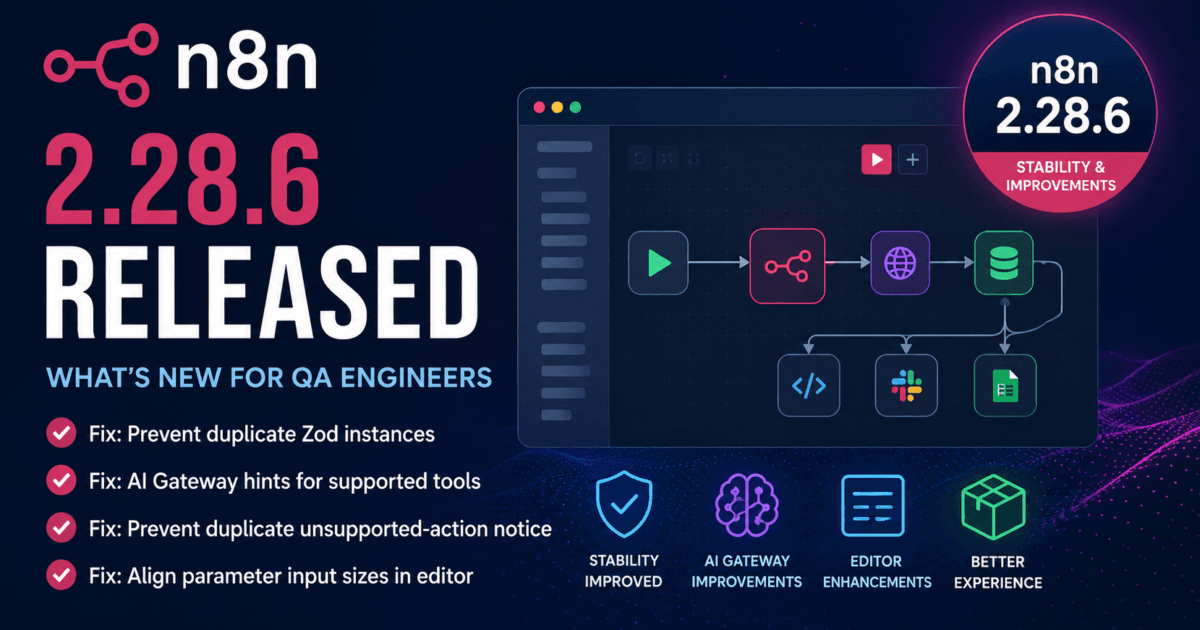
n8n 2.28.6 Released: A Small Maintenance Update with Big Reliability Benefits
Not every software release introduces flashy new capabilities. Some releases quietly eliminate the issues that interrupt developer productivity, destabilize CI/CD pipelines, or create unnecessary troubleshooting sessions.
n8n 2.28.6, released on July 3, 2026, falls into that category.
While this version contains only bug fixes, the improvements target areas that matter to automation engineers and enterprise teams: dependency management, AI workflow usability, and editor consistency. Most notably, it resolves duplicate Zod package instances that could break npm installations—a problem capable of disrupting development environments and automated deployments.
In addition, the release refines the editor interface and improves the AI Gateway experience by displaying smarter hints while removing duplicate notifications. These changes may appear minor individually, but together they improve workflow development, reduce confusion, and make AI-enabled automation projects easier to build and maintain.
For QA engineers, SDETs, and DevOps teams, this is the type of maintenance release worth installing because it increases platform reliability without introducing migration complexity or breaking existing workflows.
What’s New in n8n 2.28.6?
According to the official release notes, n8n 2.28.6 focuses entirely on bug fixes and usability improvements.
Bug Fixes
- Prevent duplicate Zod instances that could break npm installations.
- Align parameter input sizes throughout the editor.
- Prevent duplicate AI Gateway unsupported-action notifications.
- Display AI Gateway guidance for supported nodes used as AI tools.
Although no new nodes or workflow capabilities were introduced, these fixes improve the stability and usability of the platform for both developers and automation teams.
Release Highlights
| Component | Improvement | Why It Matters |
|---|---|---|
| Core | Prevent duplicate Zod instances | Improves npm installation reliability and dependency management |
| AI Gateway | Smarter tool hints | Simplifies AI workflow development |
| Editor | Consistent parameter input sizing | Improves workflow editing experience |
| Notifications | Remove duplicate AI warnings | Reduces unnecessary UI noise |
| Compatibility | No breaking changes reported | Safe maintenance upgrade for production users |
The Most Important Fix: Dependency Stability
The most significant change in n8n 2.28.6 is the resolution of duplicate Zod instances affecting npm installations.
Modern JavaScript applications rely heavily on package managers and dependency graphs. When multiple incompatible versions of a validation library such as Zod are loaded simultaneously, developers may encounter installation failures, runtime errors, inconsistent schema validation, or broken builds.
For organizations deploying n8n through CI/CD pipelines, Docker images, or automated infrastructure provisioning, dependency conflicts can quickly become expensive operational issues.
By preventing duplicate Zod instances, n8n 2.28.6 improves installation reliability while reducing the likelihood of package-related failures during deployment.
Although end users may never notice the fix directly, development teams responsible for maintaining automation platforms will appreciate the increased stability.
Better AI Workflow Development Experience
AI-powered workflow automation continues to be one of n8n’s fastest-growing capabilities.
Recent releases have steadily expanded support for AI agents, LLM integrations, tool execution, and AI Gateway functionality.
Version 2.28.6 continues that refinement by improving how the editor communicates with developers.
The update now:
- Displays AI Gateway hints for supported tool nodes.
- Removes duplicate unsupported-action notifications.
- Makes AI workflow configuration easier to understand.
- Reduces unnecessary interface distractions.
For QA engineers building AI-assisted automation, these usability improvements shorten development time while reducing configuration mistakes.
As AI workflows become increasingly common inside enterprise automation platforms, clear tooling guidance becomes just as valuable as new functionality.
Improved Workflow Editor Consistency
Another enhancement in this release standardizes parameter input sizing across the editor.
While this sounds like a cosmetic adjustment, interface consistency matters for teams managing large workflows containing dozens—or even hundreds—of interconnected nodes.
Consistent form layouts improve readability, reduce visual friction, and make workflow maintenance easier over time.
For organizations where multiple engineers collaborate on automation projects, these usability improvements contribute to a better overall development experience.
Small editor refinements often translate into measurable productivity gains when repeated across hundreds of workflow modifications every week.
What n8n 2.28.6 Means for QA Engineers
Although n8n 2.28.6 is classified as a maintenance release, the issues it addresses directly affect development stability, automation reliability, and the growing ecosystem around AI-powered workflows.
For QA engineers, the biggest takeaway is not the UI refinements—it’s the fix for duplicate Zod instances.
Dependency conflicts remain one of the most common causes of CI/CD failures in JavaScript projects. When packages are installed with multiple incompatible versions of validation libraries, teams may experience installation failures, schema mismatches, runtime exceptions, or inconsistent behavior across development and production environments.
By preventing duplicate Zod instances, n8n 2.28.6 improves installation consistency and reduces deployment risk.
If your organization provisions n8n automatically using Docker, npm, Kubernetes, GitHub Actions, Jenkins, GitLab CI, or Azure DevOps, this stability improvement alone makes the release worthwhile.
The remaining fixes focus on developer productivity by making AI workflow creation clearer and improving consistency throughout the workflow editor.
Enterprise Impact
Many organizations now use n8n as a central automation platform for:
- AI Agent orchestration
- API integration
- Business process automation
- DevOps automation
- Test environment provisioning
- Notification systems
- Data synchronization
- Enterprise workflow automation
These deployments often involve dozens—or even hundreds—of reusable workflows managed by multiple developers.
In these environments, platform stability matters more than new features.
The improvements in n8n 2.28.6 help reduce operational friction by ensuring:
- More reliable package installations.
- Fewer dependency-related deployment failures.
- Cleaner AI workflow configuration.
- Better editor consistency.
- Improved developer experience across large automation projects.
For enterprise QA teams maintaining automation infrastructure, these changes contribute to more predictable releases and lower maintenance overhead.
AI Gateway Improvements Matter More Than They Appear
Artificial intelligence is becoming a core capability within modern automation platforms.
Recent n8n releases have expanded support for AI agents, tool execution, Retrieval-Augmented Generation (RAG), LLM integrations, and conversational workflows.
Version 2.28.6 improves the AI development experience by:
- Displaying helpful AI Gateway guidance for supported tool nodes.
- Eliminating duplicate unsupported-action warnings.
- Making AI workflow configuration easier to understand.
Although these enhancements don’t add new AI functionality, they reduce confusion during workflow design and help developers build AI-powered automations more efficiently.
For SDETs experimenting with autonomous testing agents or AI-assisted workflow execution, these usability improvements simplify daily development.
Should You Upgrade?
Yes.
While n8n 2.28.6 doesn’t introduce new workflow capabilities, it provides meaningful reliability improvements with virtually no migration risk.
Reasons to upgrade include:
- Improved npm installation stability.
- Resolved duplicate Zod dependency issues.
- Better AI Gateway experience.
- Cleaner workflow editor.
- No reported breaking changes.
- Safe maintenance release for production systems.
If your organization depends on n8n for business-critical automation or AI workflows, this is a recommended maintenance upgrade.
Regression Testing Checklist
Before upgrading production environments, QA teams should validate:
- Existing automation workflows.
- Community node installations.
- npm package installation.
- AI Gateway functionality.
- AI tool nodes.
- Workflow execution history.
- Parameter editing.
- Credential management.
- Docker deployments.
- CI/CD automation pipelines.
Running these regression tests helps confirm platform stability while ensuring existing workflows continue to operate correctly.
How to Upgrade
Upgrade n8n
npm install -g n8n@latest
For Docker deployments:
docker pull n8nio/n8n:latest
docker compose up -d
After upgrading, execute representative workflows, validate AI-enabled automations, and verify community node installations before deploying to production.
Internal Links
- Day 7: Master the 4 MCP Transport Layer Options: STDIO vs HTTP vs SSE vs WebSockets
- n8n 2.28.3 Released: Startup Reliability Improvements Every QA Engineer Should Know
- k6 2.1.0 Released: Why QA Engineers Should Upgrade for Better Performance Testing
- Day 5: Playwright Locators: Stop Writing Fragile Selectors Forever
Official Resources
Official Release Notes: https://github.com/n8n-io/n8n/releases/tag/n8n%402.28.6
Official Documentation: https://docs.n8n.io
Final Verdict
n8n 2.28.6 demonstrates why maintenance releases should never be ignored. Although it introduces no headline features, it resolves issues that directly impact installation reliability, developer productivity, and AI workflow usability.
The duplicate Zod dependency fix strengthens package management, while improvements to AI Gateway messaging and editor consistency create a smoother experience for teams building increasingly complex automation workflows.
For QA engineers and SDETs responsible for automation infrastructure, these enhancements translate into fewer deployment issues, more predictable CI/CD pipelines, and a better day-to-day development experience.
Recommendation: Upgrade during your next scheduled maintenance window. The release is low risk, backward compatible, and delivers practical stability improvements for every n8n deployment.
Frequently Asked Questions
Does n8n 2.28.6 introduce breaking changes?
No. The official release notes contain only bug fixes and do not report any breaking changes.
What is the biggest improvement in n8n 2.28.6?
The most significant fix prevents duplicate Zod instances that could break npm installations and dependency resolution.
Should AI workflow developers upgrade?
Yes. The release improves AI Gateway guidance and removes duplicate notifications, making AI workflow development cleaner and easier.
Is this release suitable for production?
Yes. Since it focuses entirely on stability and bug fixes, n8n 2.28.6 is recommended for production environments after standard regression testing.
n8n 2.28.6 Released: Key Takeaways
n8n 2.28.6 Released focuses on strengthening platform reliability rather than introducing new functionality. By fixing duplicate dependency issues, refining AI Gateway behavior, and improving editor consistency, the release helps organizations build more stable automation platforms while reducing operational overhead. For teams running enterprise automation or AI-powered workflows, this maintenance update is a worthwhile and low-risk upgrade.
Continue Learning
Explore more expert articles on n8n, MCP, AI Agents, CrewAI, LangChain, FastAPI, Playwright, Docker, Test Automation, and Software Engineering at www.skakarh.com.
QAPulse by SK delivers expert release analysis, migration guidance, AI automation insights, enterprise testing strategies, and DevOps best practices to help software professionals stay ahead of the rapidly evolving technology landscape.