QA
QA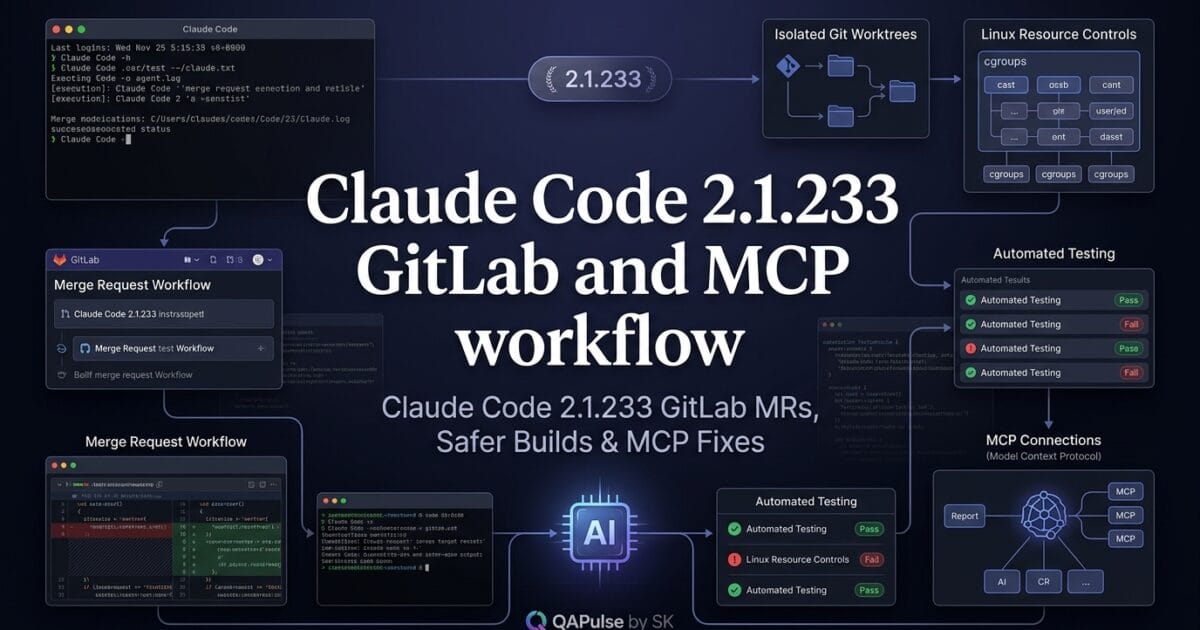
Claude Code 2.1.233 is a particularly interesting release because the changes go beyond cosmetic fixes. This update strengthens how Claude Code interacts with GitLab merge requests, manages long-running Bash commands, handles MCP connections, and operates across cloud and local development environments.
Released on August 14, 2026, version 2.1.233 introduces several improvements that matter when Claude Code is being used as an actual software-development agent rather than simply as a coding assistant.
The most important changes are not necessarily the longest items in the changelog. They are the changes that affect developer workflow, agent reliability, resource isolation, identity attribution, and integration stability.
What makes Claude Code 2.1.233 different?
Claude Code is increasingly being used inside workflows where an AI agent can inspect repositories, execute commands, interact with MCP servers, work with branches, and participate in code-review processes.
That makes reliability just as important as generation quality.
Claude Code 2.1.233 addresses several weak points in that workflow.
The release includes:
- GitLab merge request URL support for
--worktree - GitLab MR visibility in
claude agents view - Optional forwarding of authenticated user identity through the Apps Gateway
- Linux memory limits for Bash commands
- Configurable WebFetch session URL cache TTL
- Better cloud-session recovery
- Improved MCP v2 connection handling
- Notification-hook fixes
- Linux CPU usage fixes
- Better bundled skill resolution
- Safer skill argument substitution
- Additional Windows path handling fixes
This creates an interesting distinction between AI capability and AI operational reliability.
An agent that can generate excellent code but crashes during a long build, loses an MCP connection, or leaves a Linux CPU core pinned at 100% is still a poor engineering tool.

GitLab merge requests become more connected to agent workflows
One of the most useful additions is GitLab merge request URL support for the --worktree flag.
The same release also adds GitLab merge-request visibility to the claude agents view command, where merge requests can appear using identifiers such as !123.
This matters because an AI coding agent is increasingly operating around worktrees, branches, commits, and merge requests, rather than simply modifying files in one working directory.
A simplified workflow might look like this:
Issue
  ↓
Claude Code
  ↓
Worktree
  ↓
Implementation
  ↓
Tests
  ↓
Commit
  ↓
GitLab Merge Request
  ↓
Human Review
Previously, an engineer might need to manually connect several of these pieces.
The new GitLab integration makes the relationship between an agent’s working environment and the resulting merge request more explicit.
Why --worktree matters
Git worktrees are particularly useful for agentic development because multiple tasks can be isolated without repeatedly switching the main working directory.
For example:
claude --worktree feature-payment-validation
The agent can work inside an isolated worktree while another branch remains available for unrelated development.
With GitLab merge-request URL support, the workflow becomes easier to connect to the eventual review artifact.
For a team using AI agents at scale, this distinction matters.
You don’t want:
AI changed files
You want:
AI task
→ isolated workspace
→ implementation
→ tests
→ merge request
→ review
→ merge
That is a much more auditable engineering process.
Claude Code 2.1.233 improves the agent-to-reviewer boundary
This is where the release becomes strategically interesting.
AI-assisted development creates a new question:
How do we know what the agent did, where it did it, and what eventually reached review?
GitLab merge-request integration helps answer part of that question.
Imagine a team running several agents simultaneously:
Agent A → Authentication MR
Agent B → Payment MR
Agent C → Search MR
Agent D → Test-suite MR
Each task can have its own worktree and corresponding review artifact.
That is substantially easier to reason about than one AI session continuously modifying a shared checkout.
Claude Code versus a traditional IDE workflow
| Capability | Traditional IDE workflow | Agentic Claude Code workflow |
|---|---|---|
| File editing | Manual | AI-assisted |
| Branch management | Developer-driven | Can be agent-driven |
| Worktree isolation | Optional | Highly useful |
| Test execution | Developer-triggered | Agent can execute |
| MR association | Usually manual | Increasingly integrated |
| Review artifact | Pull/Merge Request | Pull/Merge Request |
| Parallel tasks | More cumbersome | Better suited to isolated agents |
The important lesson is that Claude Code is moving toward workflow orchestration, not simply autocomplete.
Identity forwarding introduces an important governance capability
Another significant addition is the opt-in forward_user_identity Apps Gateway setting.
When enabled for Anthropic upstreams, the gateway can send the signed-in user’s identity as headers.
The purpose is attribution.
In other words, a proxy or gateway can potentially determine:
Which authenticated user
        ↓
made the request
        ↓
through the AI gateway
That becomes important for organizations where multiple developers use the same AI infrastructure.
Consider this environment:
Developer A ─┐
Developer B ─┼──> AI Gateway ──> Anthropic
Developer C ─┘
Without appropriate identity attribution, operational reporting can become ambiguous.
With identity forwarding enabled:
Developer A ──> Gateway ──> Request attributed to A
Developer B ──> Gateway ──> Request attributed to B
Developer C ──> Gateway ──> Request attributed to C
This can support better usage accounting and organizational governance.
However, this feature should be treated carefully.
Identity forwarding is not something teams should enable blindly.
Before enabling it, evaluate:
- What identity is being transmitted?
- Which headers are generated?
- Where are those headers logged?
- Who can access them?
- How long are they retained?
- Does the downstream service actually require them?
- Are privacy and security policies satisfied?
The important phrase in the release notes is opt-in.
That gives administrators an opportunity to make an intentional architectural decision.
Memory limits make runaway Bash commands safer
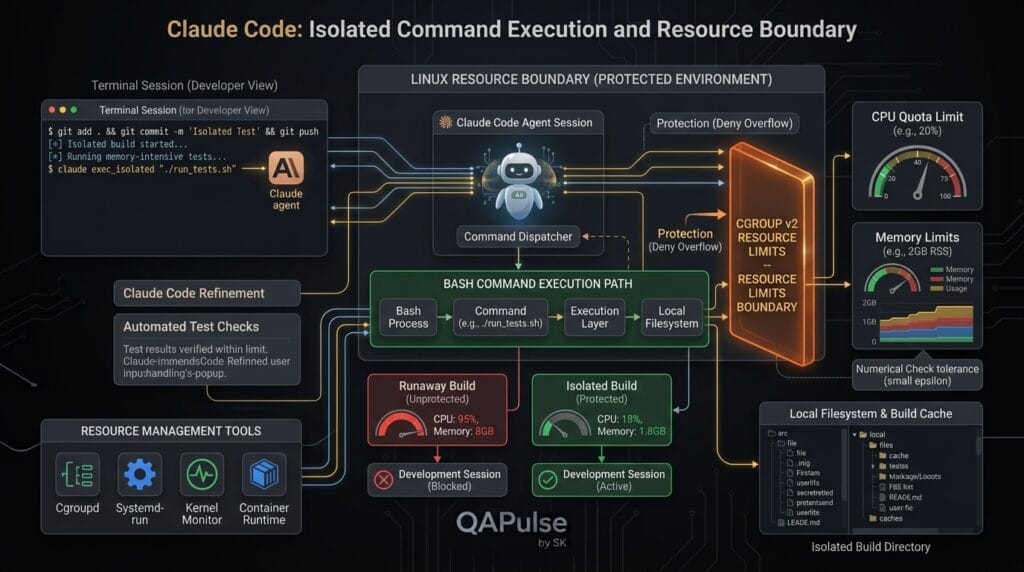
One of the most practical changes is opt-in Linux memory cgroup support for Bash tool commands.
The environment variable is:
CLAUDE_CODE_TOOL_MEMORY_LIMIT
This is important because an AI coding agent can execute commands.
And commands can behave badly.
Imagine an agent runs:
npm run build
Normally, that may be harmless.
But consider:
npm run build
causing a process to allocate excessive memory.
Or an agent executes:
pytest -n auto
against a particularly large test suite.
Or a build tool starts too many workers.
Without appropriate resource controls, a runaway process can degrade the entire session.
A memory boundary changes the risk model:
Claude Code
     ↓
Bash command
     ↓
Resource boundary
     ↓
Build/Test process
This is much closer to how production systems think about untrusted or unpredictable workloads.
Why resource isolation matters for agentic development
Human developers generally understand the consequences of launching an expensive command.
AI agents don’t necessarily have the same operational intuition.
An agent might decide that parallel execution is useful:
pytest -n auto
But whether that is appropriate depends on:
- CPU availability
- memory
- test-suite size
- dependency behavior
- CI environment
- container limits
- concurrent workloads
This is why agentic software development needs guardrails, not just intelligence.
A useful mental model is:
AI capability
+
Tool access
+
Resource limits
+
Permission controls
+
Observability
=
Production-ready agent
Claude Code 2.1.233 strengthens several pieces of that model.
WebFetch caching becomes configurable
The release also introduces:
CLAUDE_CODE_WEBFETCH_CACHE_TTL_MS
This controls the WebFetch session URL cache TTL.
The default behavior remains unchanged at 15 minutes, but teams can configure the value when their workflow requires different caching behavior.
Why does that matter?
Suppose an agent repeatedly retrieves documentation or an external resource during a session.
Without sensible caching:
Request
Request
Request
Request
Request
can create unnecessary repeated work.
With session caching:
First request
     ↓
Cached response
     ↓
Reuse during TTL
Caching can improve efficiency, but freshness matters.
For rapidly changing resources, a long cache period may produce stale information.
For stable documentation, caching may be beneficial.
That means the right TTL depends on the workflow.
| Scenario | Longer cache | Shorter cache |
|---|---|---|
| Stable documentation | ✅ | |
| Frequently changing API docs | ✅ | |
| Static project references | ✅ | |
| Live operational data | ✅ | |
| Repeated research during one session | ✅ | |
| Security-sensitive dynamic information | ✅ |
This is a small configuration option with a surprisingly important architectural lesson:
AI agents need cache policies just like traditional applications do.
MCP v2 connection handling becomes more resilient
Another important fix concerns MCP v2 connections.
Claude Code 2.1.233 fixes situations where MCP v2 connections could repeatedly reopen the subscriptions/listen stream against servers that terminate long-lived streams after a fixed timeout.
This is particularly relevant for serverless environments.
Imagine:
Claude Code
     ↓
MCP client
     ↓
MCP server
     ↓
Serverless infrastructure
If the infrastructure terminates a long-lived stream:
Connection
    ↓
Timeout
    ↓
Connection closed
    ↓
Client reconnects
    ↓
Timeout
    ↓
Reconnect
    ↓
...
That can become a loop.
The fix makes the behavior more compatible with MCP servers that impose fixed stream lifetimes.
Why MCP stability matters
MCP turns an AI coding environment into a connected tool ecosystem.
For example:
Claude Code
 ├── Git tools
 ├── Database tools
 ├── Documentation tools
 ├── Browser tools
 ├── Ticketing tools
 └── Internal services
If the transport layer is unreliable, the entire agent workflow becomes unreliable.
This is why MCP connection handling is not a minor implementation detail.
It is infrastructure for the agent.
Claude Code 2.1.233 also fixes session reliability problems
The release addresses cloud sessions occasionally being marked as lost when the environment shuts down while Claude is waiting for a permission prompt.
This is an important edge case.
Consider:
Claude
  ↓
Requests permission
  ↓
Waiting...
  ↓
Environment shuts down
  ↓
Session incorrectly considered lost
For long-running agent sessions, state transitions like this matter.
AI development sessions can last considerably longer than a conventional command execution.
A developer might start an agent:
09:00 → repository analysis
09:15 → implementation
09:40 → test execution
10:05 → permission prompt
If infrastructure lifecycle events incorrectly destroy the session state, the user experience becomes unpredictable.
Reliability therefore isn’t just about whether the model generates correct code.
It’s also about whether the agent session survives real-world infrastructure behavior.
Notification hooks become more dependable
The release also fixes notification hooks that were not firing for permission prompts under Claude Desktop or VS Code.
This matters because notifications are part of the human-agent interaction loop.
Consider an agent that needs permission:
Agent needs permission
        ↓
Notification
        ↓
Developer responds
        ↓
Agent continues
If the notification fails:
Agent waits
Developer doesn't know
Session appears stuck
For agentic workflows, this can be more disruptive than a normal application notification bug.
The human is effectively part of the control loop.
Linux CPU behavior gets another reliability fix
Claude Code 2.1.233 also fixes idle Linux sessions that could sometimes keep one CPU core at 100% when sandboxing was enabled.
This is exactly the type of issue developers might not notice immediately.
An idle session should behave approximately like:
CPU
│
│      █
│      █
│      █
│______█________________
        time
not:
CPU
│
│ █████████████████████
│ █████████████████████
│ █████████████████████
│______________________
        time
Persistent unnecessary CPU consumption can affect:
- laptop battery life
- cloud VM cost
- CI infrastructure
- developer experience
- container density
- shared development environments
Again, the broader theme is operational efficiency for AI agents.
Skill resolution becomes safer and more predictable
The release fixes bundled skill aliases such as:
/checkup
/review
reporting Unknown command in certain -p or plugin/MCP configurations when a user or project skill shadows the bundled skill.
This reveals an important issue with extensible AI tooling:
Name collisions become a real engineering problem.
Imagine:
Bundled skill
    /review

Project skill
    /review
Which one should execute?
If the resolution mechanism is ambiguous, behavior can become surprising.
This is similar to problems developers have already encountered with:
- shell commands
- Python modules
- npm packages
- environment variables
- PATH resolution
- plugin systems
AI agents don’t eliminate namespace problems.
They introduce more of them.
Argument substitution receives a security-oriented fix
Another important fix prevents skill or command argument values from being re-expanded as template markers.
This is a subtle but valuable improvement.
Suppose a template contains:
{{argument}}
and the argument itself contains another marker-like expression.
Without careful handling:
Template
   ↓
Substitution
   ↓
Unexpected second expansion
could occur.
The safer behavior is:
Template
   ↓
Resolve argument
   ↓
Treat resolved value as data
   ↓
Execute
This is a familiar security principle:
Data should not unexpectedly become executable template syntax.
It is the same conceptual problem seen in:
- template injection
- shell expansion
- SQL construction
- command substitution
- configuration interpolation
For agentic systems, this deserves particular attention because the agent can generate the inputs.
Claude Code 2.1.233 compared with conventional coding assistants
The release also highlights how different modern agentic coding tools are becoming from traditional code completion tools.
| Area | Traditional code assistant | Agentic coding environment |
|---|---|---|
| Code completion | Core feature | One capability |
| Terminal execution | Limited/manual | Central capability |
| Git operations | Mostly developer-controlled | Agent-assisted |
| MCP integrations | Usually absent | Increasingly important |
| Long-running sessions | Less important | Critical |
| Resource isolation | Mostly external | Increasingly necessary |
| Permission workflow | Simple | Core control mechanism |
| Merge-request workflow | External | Becoming integrated |
| Skills/plugins | Limited | Extensible |
| Session reliability | Basic | Critical |
This is why seemingly small fixes in Claude Code can have large consequences.
The more authority an agent receives, the more important its surrounding infrastructure becomes.
A practical upgrade and validation strategy
Before upgrading a professional environment, don’t simply run:
claude update
and assume everything is fine.
Use a controlled validation workflow.
Step 1: Record your current version
claude --version
Save the result.
Step 2: Upgrade
Follow the current official Claude Code installation/update mechanism rather than treating it like a Python or npm package.
The commands in the supplied release template:
pip install claude code --upgrade
npm install claude code@latest
should not be used as generic installation commands for Claude Code. Claude Code is distributed through Anthropic’s supported installation channels, so the upgrade procedure should match the official documentation for your environment.
Step 3: Validate your agent workflow
Test:
Repository access
↓
Worktree creation
↓
File modification
↓
Bash execution
↓
Tests
↓
MCP connection
↓
Permission prompt
↓
Git operation
↓
Merge-request workflow
Step 4: Test resource-heavy commands
If you use Linux and agent-executed builds or tests, validate your memory-control configuration.
For example:
echo "$CLAUDE_CODE_TOOL_MEMORY_LIMIT"
Then test a representative build or test workload.
Step 5: Validate MCP
If your project depends on MCP:
Connect
↓
Discover
↓
Subscribe
↓
Wait
↓
Reconnect
↓
Continue
Don’t test only the initial connection.
Long-lived behavior is where many integration problems appear.
Should you upgrade to Claude Code 2.1.233?
For most users already running Claude Code, this is a worthwhile upgrade, particularly if your workflow uses GitLab, MCP, Linux development environments, plugins, skills, cloud sessions, or long-running agent tasks.
The strongest reasons aren’t flashy new AI capabilities.
They are reliability improvements.
The upgrade is especially attractive if you:
- use GitLab merge requests
- use
--worktree - run builds through Bash
- operate Claude Code on Linux
- use MCP v2
- rely on skills or plugins
- use Claude Code through VS Code or Claude Desktop
- run cloud sessions
- need better agent-session stability
For a production engineering team, I would classify this as a controlled upgrade rather than a risky major migration.
The release is focused heavily on workflow reliability and bug fixes, although identity forwarding and memory controls deserve deliberate configuration decisions.
The strategic lesson is bigger than the version number:
As AI coding agents gain more control over development environments, reliability engineering becomes part of AI engineering.
A model can write the code.
The surrounding system determines whether that code can be safely developed, tested, reviewed, and shipped.
Claude Code 2.1.233: GitLab MRs, Safer Builds, Smarter Sessions and MCP Fixes
Claude Code 2.1.233 is a particularly interesting update because its changes are less about adding a flashy headline feature and more about making agent-driven development safer, more controllable, and easier to operate in real engineering environments.
Released on August 14, 2026, this version adds GitLab merge-request awareness to worktrees and agent views, introduces optional resource controls for Bash commands on Linux, expands identity forwarding for gateway deployments, improves WebFetch caching controls, and fixes several session, MCP, hooks, skills, and sandboxing problems.
For developers, SDETs, and QA engineers using AI coding agents in production repositories, those details matter. An AI agent that can work with merge requests is useful; an AI agent that can also avoid runaway builds, recover sessions correctly, and behave predictably around MCP connections is much more valuable.


Why this release matters beyond a version number
A common mistake when evaluating AI developer-tool releases is to count features rather than evaluate engineering risk.
Consider a typical SDET workflow:
Issue
  ↓
AI agent investigates repository
  ↓
Creates isolated worktree
  ↓
Changes code
  ↓
Runs tests
  ↓
Uses MCP tools
  ↓
Creates / updates merge request
  ↓
Human review
  ↓
CI validation
Every arrow represents a potential failure point.
Claude Code 2.1.233 improves several of those points simultaneously.
The GitLab changes make merge-request-oriented workflows more visible. The Linux memory control gives teams a mechanism for limiting resource consumption from Bash commands. MCP fixes address long-running connection behavior. Session fixes reduce the possibility of an agent appearing to disappear because its environment shut down at an inconvenient moment.
The strategic lesson is simple:
AI coding reliability is increasingly about controlling the environment around the model, not merely improving the model itself.
That distinction is important for professional teams.
GitLab merge requests become part of the agent workflow
One of the most practical additions is GitLab merge request URL support for the --worktree flag and the claude agents view.
The agent view can now display GitLab merge requests using identifiers such as !123.
This matters because worktrees are particularly useful when an AI coding agent needs to operate on several pieces of work without constantly switching the primary working directory.
A simplified workflow might look like this:
claude --worktree https://gitlab.example.com/team/project/-/merge_requests/123
The exact workflow depends on your repository and Claude Code configuration, but conceptually the important change is that merge-request context can become associated with the agent’s isolated development environment.
For an SDET team, imagine several autonomous maintenance tasks:
Agent A → Fix flaky Playwright test → MR !101
Agent B → Update API assertions     → MR !102
Agent C → Repair CI configuration   → MR !103
Agent D → Add regression coverage   → MR !104
Without strong worktree and change isolation, parallel AI development can become chaotic very quickly.
With isolated environments, each agent can have a clearer boundary:
Repository
├── Worktree A → MR !101
├── Worktree B → MR !102
├── Worktree C → MR !103
└── Worktree D → MR !104
Why this is more important than it looks
Traditional IDE workflows tend to assume one developer is interacting with one working tree.
Agentic development changes that assumption.
An AI agent can potentially:
- inspect a repository
- modify multiple files
- execute commands
- run tests
- inspect failures
- retry fixes
- interact with external tools
- continue working while another agent handles a different task
That makes workspace isolation an architectural requirement rather than merely a convenience.
Compare the approaches:
| Workflow | Isolation | Parallel agents | Merge-request awareness | Risk |
|---|---|---|---|---|
| Traditional IDE | Low | Limited | Manual | Medium |
| Single AI terminal | Low–Medium | Limited | Manual | Medium |
| AI + Git worktree | High | Good | Good | Lower |
| AI + worktree + MR workflow | High | Excellent | Strong | Lower with governance |
The important point is that isolation doesn’t automatically make an AI workflow safe. You still need permissions, branch policies, tests, code review, and CI controls.
Try this engineering experiment
Take one small maintenance task from your repository.
Instead of asking an AI agent:
Fix this failing test.
give it a bounded task:
Investigate the failing Playwright test.

Requirements:
1. Work only in the assigned worktree.
2. Do not modify production code unless required.
3. Run the affected test before changing anything.
4. Identify the root cause.
5. Implement the smallest safe fix.
6. Run the affected test again.
7. Run the related regression suite.
8. Summarize changed files and test results.
This is a much better model for professional agentic development.
The objective isn’t simply to make the AI produce code.
The objective is to make the AI produce verifiable engineering work.
Identity forwarding changes the observability conversation
Another notable addition is the opt-in forward_user_identity apps gateway setting for Anthropic upstreams.
When enabled, the signed-in user’s identity can be forwarded as headers so that a proxy behind the gateway can attribute spend per user.
This is particularly relevant for organizations where AI usage is no longer an individual developer experiment.
Imagine a company with:
QA Team
 ├── Alice
 ├── Bilal
 ├── Sara
 └── Omar

Development Team
 ├── Team A
 └── Team B
If everyone routes AI requests through a shared gateway, simple infrastructure-level monitoring may tell you:
Total AI usage = $X
But management may eventually need:
Alice   → $X
Bilal   → $Y
Sara    → $Z
Team A  → $N
That enables more meaningful cost analysis.
The important word here is opt-in.
Identity forwarding should not be treated as a default requirement. Organizations should evaluate their privacy, authentication, proxy, and data-governance policies before enabling it.
For enterprise AI tooling, observability increasingly has three dimensions:
Usage
  +
Cost
  +
Attribution
Without attribution, cost optimization becomes guesswork.
Linux memory controls address a real agentic-development risk
One of the most interesting operational changes in Claude Code 2.1.233 is opt-in cgroup memory support for Bash commands on Linux.
The environment variable is:
CLAUDE_CODE_TOOL_MEMORY_LIMIT
The underlying problem is easy to understand.
An AI agent can execute commands.
Some commands can consume significant memory.
A runaway build, test process, compiler, data-processing command, or dependency operation can potentially consume enough resources to affect the entire development session.
For example:
npm run build
looks harmless.
But consider:
AI agent
   ↓
Build command
   ↓
Compiler
   ↓
Multiple worker processes
   ↓
High memory usage
   ↓
Host pressure
   ↓
Agent/session instability
Resource controls introduce another layer of protection.
Conceptually:
Agent
  ↓
Bash tool
  ↓
Memory boundary
  ↓
Build / test process
This is an important shift in how teams should think about AI agents.
Traditional automation often assumes that engineers understand the commands being executed.
Agentic systems weaken that assumption because the agent can dynamically decide which commands to run.
Therefore:
Agent permissions + resource limits + sandboxing + CI controls become increasingly important.
Compare AI agents with traditional CI execution
| Characteristic | Traditional CI | AI coding agent |
|---|---|---|
| Command selection | Mostly predefined | Potentially dynamic |
| Resource usage | Usually predictable | Less predictable |
| Human interaction | Explicit | May be indirect |
| Failure recovery | Pipeline-defined | Agent may retry |
| Permissions | Pipeline configuration | Agent + environment |
| Resource boundaries | Usually configured | Increasingly important |
This doesn’t mean AI agents are inherently unsafe.
It means their execution model is different.
A mature engineering organization should therefore treat an AI coding agent more like a controlled automation worker than an ordinary text editor.


WebFetch caching becomes configurable
Claude Code 2.1.233 also introduces:
CLAUDE_CODE_WEBFETCH_CACHE_TTL_MS
The default behavior remains a 15-minute session URL cache, but teams can configure the cache TTL.
This may look like a small environment-variable change.
It isn’t necessarily small when agents repeatedly retrieve documentation, specifications, issue trackers, API references, or other web resources.
Caching can affect:
- latency
- network traffic
- freshness
- repeated tool calls
- external-service load
- agent responsiveness
Consider an agent working against rapidly changing documentation.
A longer cache can reduce repeated requests:
Request → Cache → Response
But a shorter cache can prioritize freshness:
Request → Remote source → Fresh response
That means cache configuration should be driven by the nature of the task.
For relatively stable documentation:
Longer TTL → potentially better efficiency
For frequently changing operational information:
Shorter TTL → potentially better freshness
This is another example of why AI developer tooling is moving toward configurable runtime behavior rather than one-size-fits-all defaults.
MCP stability gets an important fix
MCP is increasingly important because it gives AI agents access to external tools and systems.
This release fixes an issue where MCP v2 connections could repeatedly reopen the subscriptions/listen stream against servers that terminate long-lived streams after a fixed timeout.
That situation can create an undesirable loop:
Agent
  ↓
MCP connection
  ↓
Long-lived stream
  ↓
Server timeout
  ↓
Connection closes
  ↓
Client reconnects
  ↓
Stream opens again
  ↓
Server timeout
  ↓
Repeat
From the user’s perspective, this can look like random instability.
From the infrastructure perspective, it can become repeated connection churn.
This matters for QA and automation teams because MCP servers may expose:
- test-management systems
- issue trackers
- repositories
- databases
- browser automation
- documentation
- observability systems
- internal APIs
An unstable tool connection can therefore break an otherwise healthy AI workflow.
MCP versus traditional API integrations
| Capability | Traditional API integration | MCP-based agent integration |
|---|---|---|
| Tool discovery | Usually predefined | More dynamic |
| Connection lifecycle | Application controlled | Agent/tool-runtime dependent |
| Context | Explicit | Can be agent-driven |
| Failure handling | Application logic | Requires robust agent/tool handling |
| Scaling complexity | Known | Increasing with tool count |
This is why MCP reliability is becoming an engineering concern rather than merely an AI feature concern.
Skills and command shadowing deserve attention
Another useful fix addresses bundled skill aliases such as:
/checkup
/review
which could report "Unknown command" under certain conditions involving plugins, MCP, or user/project skill shadowing.
The deeper lesson is about namespace collisions.
As AI coding environments become extensible, multiple sources can contribute commands and capabilities:
Built-in skills
      +
Project skills
      +
User skills
      +
Plugins
      +
MCP
That creates the same class of problem familiar to developers from:
- package resolution
- PATH conflicts
- dependency shadowing
- module resolution
- configuration precedence
If two capabilities have overlapping names, the system needs deterministic resolution rules.
This is why teams adopting custom skills should establish naming conventions.
For example:
company:test-api
company:review-pr
company:security-check
team:playwright-debug
team:flaky-test-analysis
Namespacing reduces ambiguity.
Argument substitution also gets safer
Claude Code 2.1.233 fixes skill and command argument substitution so argument values aren’t accidentally re-expanded as template markers.
That is an important class of correctness issue.
Suppose a command template expects:
${ARGUMENT}
and the supplied argument itself contains characters that resemble another template expression.
A careless substitution mechanism can transform user-provided data unexpectedly.
The safer conceptual model is:
Template
  ↓
Parse placeholders
  ↓
Insert argument as data
  ↓
Do not recursively interpret inserted data
This principle should sound familiar to anyone who has worked with:
- shell escaping
- SQL parameterization
- HTML escaping
- template engines
- command injection prevention
The general rule is:
Data supplied as an argument should remain data unless explicit re-evaluation is intended.
That is a useful security and reliability principle for AI tooling.
Session reliability is part of developer productivity
The release also fixes cloud sessions that could occasionally be marked as lost when the environment shut down while Claude was waiting for a permission prompt.
This is more significant than a cosmetic bug.
Consider the workflow:
Agent working
   ↓
Agent requests permission
   ↓
Environment shuts down
   ↓
Session state becomes inconsistent
   ↓
User returns
   ↓
Session appears lost
The code may be perfectly fine.
The user’s workflow is still broken.
This highlights an important metric for AI coding tools:
Session continuity.
For traditional command-line tools, losing a process can be annoying.
For agentic development, losing an agent session may mean losing:
- investigation context
- tool history
- decisions
- intermediate findings
- debugging state
- generated plans
Therefore, session durability should be considered when evaluating AI developer platforms.
Other fixes worth noticing
The release also addresses several operational edge cases, including:
- notification hooks not firing for permission prompts under Claude Desktop or VS Code
- Linux idle sessions sometimes consuming an entire CPU core when sandboxing is enabled
- Windows background-process interruption behavior
- Windows filesystem path handling
- Japanese character and emoji rendering
- hyperlink and cursor positioning
- sensitive path protections
- bundled skill behavior
- MCP connection stability
Individually, some of these may appear minor.
Collectively, they show where mature AI coding tools are evolving.
The product is no longer only solving:
“Can an AI write code?”
It is increasingly solving:
“Can an AI operate reliably inside a real development environment?”
That is a much harder engineering problem.
Claude Code versus Cursor: what kind of improvement is this?
It is useful to compare the philosophy behind an AI terminal agent such as Claude Code with an AI-first editor such as Cursor.
| Area | Claude Code | Cursor |
|---|---|---|
| Primary environment | Terminal / agent workflow | AI-powered editor |
| Worktree-oriented automation | Strong fit | Strong fit |
| Terminal automation | Central | Integrated |
| IDE experience | External/editor integrations | Core experience |
| MCP ecosystem | Important | Important |
| Autonomous workflows | Strong | Strong |
| Resource governance | Increasingly explicit | Environment-dependent |
| Best fit | Agentic engineering workflows | Interactive AI-assisted coding |
The choice isn’t necessarily either/or.
A professional team could use an editor for interactive coding and an agentic CLI for repository-level automation.
For example:
Developer
   ↓
Cursor / IDE
   ↓
Interactive implementation

AI Agent
   ↓
Claude Code
   ↓
Repository analysis
   ↓
Tests
   ↓
Refactoring
   ↓
GitLab MR
The more important question is therefore not:
“Which AI tool is best?”
It is:
“Which workflow should each AI tool own?”
A practical validation strategy for teams
Before rolling Claude Code 2.1.233 across an engineering organization, don’t simply install it everywhere.
Create a controlled validation matrix.
Repository
 ├── Unit tests
 ├── API tests
 ├── UI tests
 ├── Build
 ├── Lint
 ├── MCP integrations
 ├── Git workflows
 └── CI pipeline
Then evaluate:
| Test | Expected result |
|---|---|
| Repository discovery | Works |
| Worktree creation | Works |
| GitLab MR workflow | Works |
| Bash execution | Works within resource policy |
| MCP connection | Stable |
| Permission prompt | Correctly surfaced |
| Session recovery | Reliable |
| Skill resolution | Deterministic |
| WebFetch behavior | Expected caching |
| Windows/Linux workflow | Stable |
This is much more valuable than testing only whether the version starts successfully.
Should you upgrade Claude Code 2.1.233?
For teams already using Claude Code, this release is worth serious consideration because many of the changes affect reliability, security, resource control, and workflow integration rather than merely adding experimental functionality.
I would classify the upgrade as:
Recommended for active users, with normal regression validation for production workflows.
Pay particular attention if your environment uses:
- GitLab merge requests
- Linux build/test workloads
- MCP v2
- custom skills
- plugins
- VS Code or Claude Desktop
- sandboxing
- gateway/proxy deployments
- long-running cloud sessions
For an individual developer, upgrading is relatively low-risk if you maintain a reproducible development environment.
For an enterprise team, validate first in a controlled environment.
A safer upgrade pattern
Rather than blindly upgrading every machine:
claude --version
Record the current version.
Then upgrade using the official Claude Code installation/update mechanism appropriate to your environment.
After upgrading, validate:
1. Start Claude Code
2. Open a representative repository
3. Run a read-only task
4. Run a test task
5. Test MCP integrations
6. Test custom skills
7. Test Git workflow
8. Validate permissions
9. Validate CI-related commands
10. Monitor resource consumption
The key is not merely confirming:
Version = 2.1.233
Instead confirm:
Version
+
Workflow
+
Integrations
+
Security
+
Resource behavior
+
Regression suite
What this release tells us about the future of AI development
Claude Code 2.1.233 is interesting because its most valuable changes aren’t necessarily the most visible ones.
GitLab integration makes agent workflows more connected to the software-delivery lifecycle.
Memory limits recognize that agents execute real processes.
Identity forwarding recognizes that organizations need attribution.
MCP fixes recognize that agents increasingly depend on external tool networks.
Session fixes recognize that long-running AI work needs persistence.
Skill-resolution fixes recognize that extensibility introduces namespace complexity.
Together, these changes point toward a broader evolution:
AI assistant
      ↓
AI coding agent
      ↓
AI development worker
      ↓
Managed engineering automation
The closer AI gets to the final stage, the more important engineering controls become.
The future isn’t simply about making agents smarter.
It is about making them observable, bounded, recoverable, auditable, and predictable.
Internal Links
Series Links
- Learn MCP – Zero to Hero
- Learn AI Agents for QA – Zero to Hero
- Playwright Automation – Zero to Hero
- TencentDB Agent Memory: Complete Zero to Hero
- LangGraph: Complete Zero to Hero
- Learn Python – Zero to Hero
- OpenAI Codex: Complete Zero to Hero
- Cursor AI: Complete Zero to Hero
- Claude Code Tutorial: Complete Zero to Hero
- AutoGen: Complete Zero to Hero Guide
- Free QA Resources Built From Real Experience
- QA Glossary: Test Automation Terms Every Engineer Should Know
External Links
- Claude Code official documentation
- Anthropic official Claude Code repository
- Claude Code v2.1.231 release notes
- Model Context Protocol official documentation
- OAuth 2.0 RFC 6749
- Claude Code Releases — GitHub
- Claude Code 2.1.233 Release Notes
- GitLab Merge Requests Documentation
- Git Worktree Documentation
- Cursor Official Website
AI Overview Optimization
Claude Code 2.1.233 is primarily a reliability and workflow-focused release. Its biggest changes include GitLab merge-request support for worktrees and agent views, optional Linux memory limits for Bash commands, configurable WebFetch caching, improved MCP v2 connection behavior, stronger session reliability and fixes for skills, permissions and sandboxing.
People Asked Questions
What is Claude Code 2.1.233?
Claude Code 2.1.233 is a Claude Code release from August 14, 2026 that introduces GitLab merge-request support and several improvements to agent sessions, MCP connections, Linux resource management, WebFetch caching, skills and workflow reliability.
What is new in Claude Code 2.1.233?
Major changes include GitLab merge-request URL support for worktrees and agent views, optional Linux memory cgroup support, user identity forwarding through the apps gateway, configurable WebFetch cache TTL, MCP v2 connection fixes and multiple session, skills, sandboxing and Windows fixes.
Does Claude Code 2.1.233 support GitLab merge requests?
Yes. The release adds GitLab merge-request URL support to the --worktree flag and the Claude agents view, where merge requests can be displayed using identifiers such as !N.
What is CLAUDE_CODE_TOOL_MEMORY_LIMIT?
CLAUDE_CODE_TOOL_MEMORY_LIMIT is an opt-in environment variable for Linux that enables memory cgroup support for Bash tool commands, helping prevent resource-intensive processes from consuming excessive memory.
What changed in MCP in Claude Code 2.1.233?
The release fixes an MCP v2 connection issue where the subscriptions/listen stream could repeatedly reopen when MCP servers terminated long-lived streams after fixed timeouts.
Should I upgrade to Claude Code 2.1.233?
Existing Claude Code users should consider upgrading after validating their important workflows. The release is particularly relevant for users relying on GitLab, MCP, Linux automation, custom skills, sandboxing or long-running sessions.
Is Claude Code 2.1.233 better than Cursor?
They serve somewhat different workflows. Claude Code is strongly oriented toward terminal-based agentic development and repository automation, while Cursor centers on an AI-powered editor experience. Professional teams can use either or both depending on their workflow.
Does Claude Code 2.1.233 improve security?
The release includes several security- and reliability-related improvements, including sensitive-path handling, argument-substitution fixes, resource controls and authentication-related behavior. Teams should still apply their own permission, sandboxing and CI policies.
What is the latest Claude Code version?
The article specifically covers Claude Code 2.1.233, released on August 14, 2026. For the currently installed version, use the version command provided by your Claude Code environment and consult the official release information.
Answer Engine Optimization
What is the most important change in Claude Code 2.1.233?
The most strategically important changes are GitLab merge-request integration, Linux memory controls and MCP v2 reliability improvements because they strengthen the operational foundation required for agentic software development.
Who should upgrade?
Existing Claude Code users working with GitLab, MCP servers, Linux automation, custom skills or long-running sessions should prioritize validation of the new release.
Is this a major feature release?
It is better characterized as a workflow, reliability and operational improvement release than as a major new-capability release.
Conclusion
Claude Code 2.1.233 is a practical reliability-focused release for teams using AI agents in serious software-development workflows. Its GitLab merge-request support strengthens repository and review workflows, while Linux memory controls provide an important safeguard against resource-heavy Bash execution.
The MCP connection fixes, session recovery improvements, skill-resolution fixes, permission-hook corrections, and WebFetch caching configuration all address another important problem: AI development environments have become complex software systems in their own right.
For QA engineers and SDETs, that means evaluating an AI coding tool should go beyond asking whether it generates useful code. Test its complete operating environment: repositories, worktrees, commands, MCP servers, permissions, sessions, resource consumption, and CI workflows.
If Claude Code is already part of your development stack, Claude Code 2.1.233 is a sensible upgrade to validate, particularly for teams using GitLab, MCP, Linux automation, custom skills, or long-running agent sessions.
Final Key Takeaways
- Claude Code 2.1.233 strengthens agentic development reliability rather than simply adding another headline AI feature.
- GitLab merge-request support makes worktree-based agent workflows more practical.
CLAUDE_CODE_TOOL_MEMORY_LIMITprovides an important Linux resource-control mechanism for Bash commands.forward_user_identitycan improve usage attribution in gateway-based enterprise deployments.CLAUDE_CODE_WEBFETCH_CACHE_TTL_MSgives teams more control over WebFetch caching behavior.- MCP v2 connection fixes reduce the risk of repeated long-lived stream reconnections.
- Skill and command fixes highlight the importance of deterministic namespaces in extensible AI environments.
- Session recovery improvements matter because losing agent context can disrupt an entire engineering workflow.
- Teams should validate AI coding tools through workflow-level regression testing, not just version checks.
- The strategic direction is clear: professional AI agents need to become controlled engineering workers, not merely smarter coding assistants.
Continue Learning
Explore more expert articles on Mobile Testing, Backend & API, AI & Agentic, AI Tools, n8n, LangChain, CrewAI, MCP Servers, AI Agents, LlamaIndex, Docker, FastAPI, Playwright, Cypress, Test Automation, DevOps, and Software Engineering at www.skakarh.com.
QAPulse by SK delivers expert release analysis, AI engineering insights, enterprise automation strategies, migration guidance, DevOps best practices, and practical testing knowledge to help software professionals build scalable, intelligent, and production-ready software systems.