QA
QA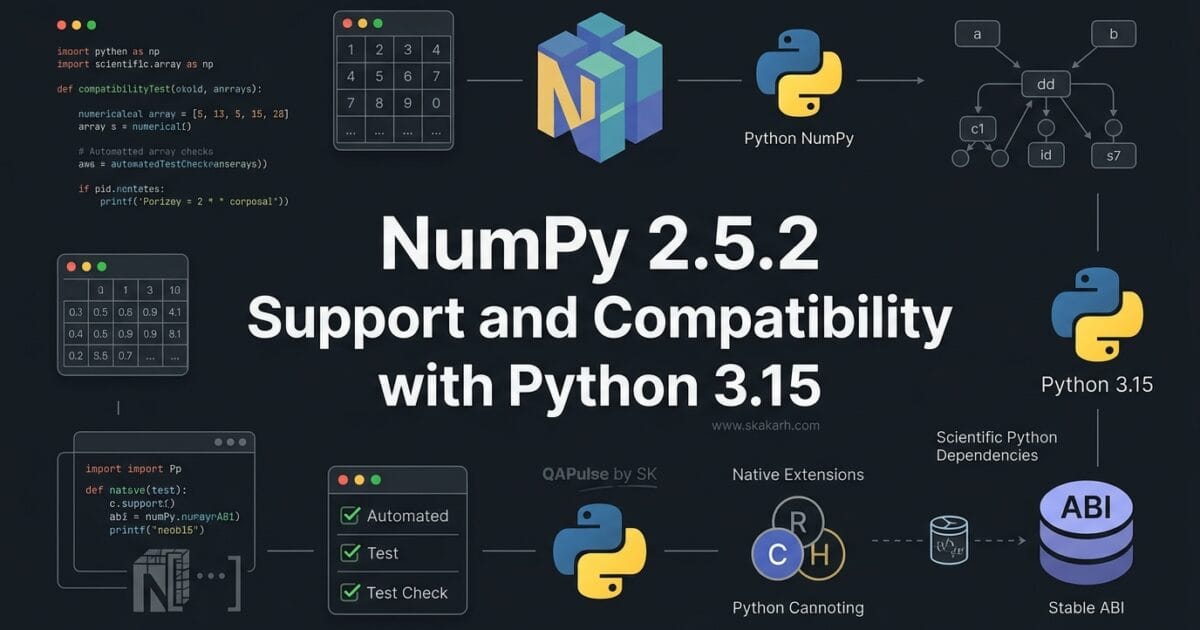
NumPy 2.5.2 looks like a routine patch release at first glance, but there is more to this update than a collection of bug fixes. The release adds wheels for the newly released Python 3.15.0rc1 and introduces an important C API change around PyArray_StringDTypeObject when using the abi3t stable ABI.
For developers, library maintainers, data scientists, and engineering teams running Python-based systems, that combination makes this release worth examining carefully.
The interesting question is not simply “What changed in NumPy 2.5.2?”
The better question is:
What does NumPy 2.5.2 change about Python compatibility, native extensions, and the risk profile of upgrading?
That distinction matters because a patch release can still affect the environments surrounding NumPy, particularly when Python versions and compiled extensions are involved.
Why NumPy 2.5.2 Is More Interesting Than a Typical Patch Release
NumPy 2.5.2 is a patch release in the NumPy 2.5 series. Its primary purpose is to fix issues discovered after NumPy 2.5.1.
However, one addition immediately stands out:
NumPy 2.5.2 provides wheels for Python 3.15.0rc1.
That means teams experimenting with Python 3.15 do not have to treat NumPy as an afterthought in their compatibility matrix.
For a normal Python application, this may appear straightforward:
python -m pip install --upgrade numpy
But professional engineering environments are rarely that simple.
A typical Python stack might look like this:
Application
    ↓
Pandas / SciPy / ML libraries
    ↓
NumPy
    ↓
Python runtime
    ↓
Native C/C++ extensions
    ↓
Operating system
Changing one layer can expose compatibility problems elsewhere.
This is why an upgrade should not be evaluated only by asking whether:
import numpy
still works.
A stronger validation asks whether the entire dependency chain continues to behave correctly.
A simple upgrade test
Start with the most basic verification:
import numpy as np

print("NumPy:", np.__version__)
print("Version:", np.__version__)
Then test an operation representative of your actual application:
import numpy as np

data = np.array([10, 20, 30, 40, 50])

print("Mean:", data.mean())
print("Standard deviation:", data.std())
print("Shape:", data.shape)
This confirms that the package imports and basic numerical operations work.
It does not prove that your production environment is compatible.
Python 3.15 Support Is the First Major Story
One of the most practical changes in NumPy 2.5.2 is support for Python versions 3.12 through 3.15, including wheels for Python 3.15.0rc1.
This matters because Python upgrades frequently create dependency bottlenecks.
Imagine an engineering team testing a new Python runtime:
Python 3.15
    │
    ├── NumPy
    ├── Pandas
    ├── SciPy
    ├── scikit-learn
    └── Internal C extensions
If one dependency cannot install cleanly, the migration can stall even when the application itself is compatible.
NumPy is particularly important because many Python scientific and machine-learning packages depend on it directly or indirectly.
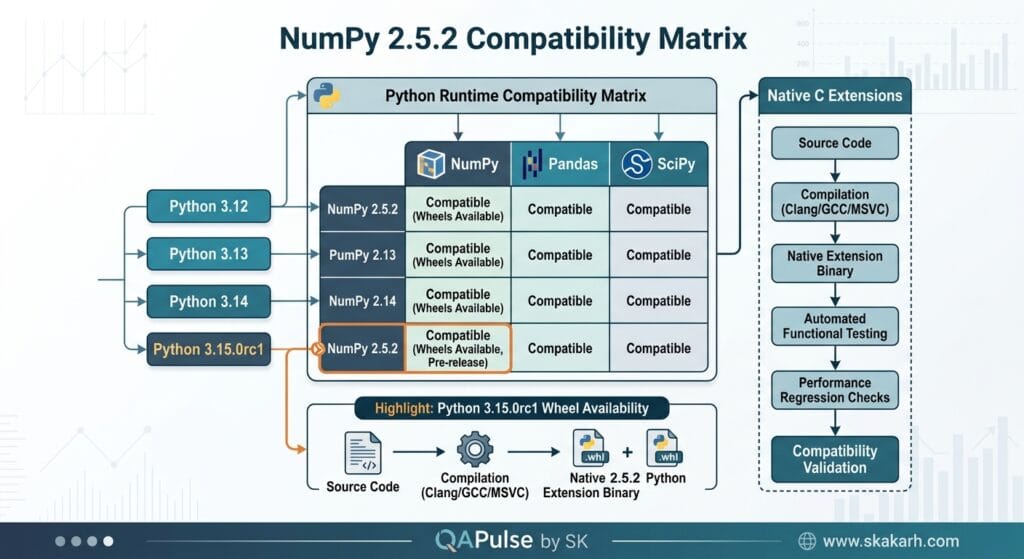
A practical compatibility matrix might therefore look like:
| Python | NumPy 2.5.2 | Test Priority |
|---|---|---|
| Python 3.12 | Supported | Normal regression |
| Python 3.13 | Supported | Normal regression |
| Python 3.14 | Supported | Normal regression |
| Python 3.15.0rc1 | Supported with wheels | High compatibility testing |
The last row deserves additional attention because a release candidate runtime is not the same thing as a mature production Python version.
Don’t confuse package support with application readiness
This distinction is extremely important.
If NumPy supports Python 3.15, that does not automatically mean your entire application supports Python 3.15.
For example:
NumPy       → compatible
Pandas      → compatible
SciPy       → compatible
Internal C extension → incompatible
The environment still fails.
This is why Python version upgrades should be treated as dependency ecosystem tests, not merely interpreter upgrades.
Test the Environment, Not Just NumPy
A useful strategy is to create a clean environment before upgrading.
python3.15 -m venv numpy251-test
source numpy251-test/bin/activate

python -m pip install --upgrade pip
python -m pip install numpy==2.5.2
Then verify:
python -c "import numpy; print(numpy.__version__)"
Expected output:
2.5.2
Next, install the application’s real dependencies.
python -m pip install pandas scipy scikit-learn
Then execute the project’s existing test suite:
pytest
This gives you a much stronger signal than checking the NumPy import alone.
Interactive checkpoint
Before upgrading your production environment, ask yourself:
Which of these would reveal a real compatibility problem?
import numpy- Running your numerical calculations
- Installing dependent packages
- Running native-extension tests
- Running the complete application test suite
The correct answer is all five.
The first test catches basic installation problems. The later tests catch ecosystem and application-level failures.
The C API Change Deserves Special Attention
The most technically significant change in this release involves:
PyArray_StringDTypeObject
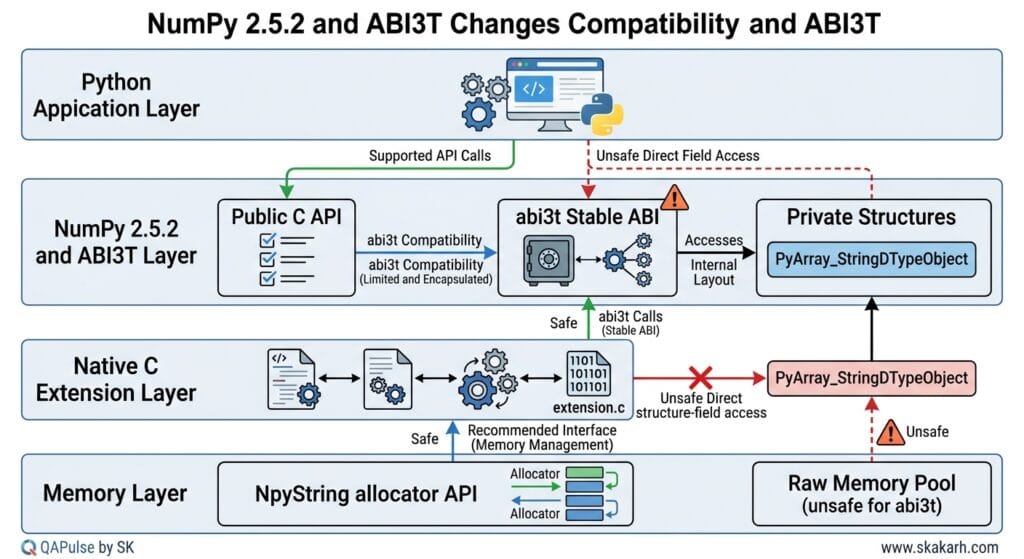
The object is now opaque when targeting the abi3t stable ABI.
This is not something most ordinary NumPy users will notice.
It is much more relevant to developers maintaining compiled Python extensions.
Consider a simplified native extension:
Python application
       ↓
NumPy
       ↓
C extension
       ↓
NumPy C API
If that C extension accesses internal fields of a NumPy structure directly, assumptions about the structure’s layout can become dangerous.
The NumPy release notes explain that PyArray_StringDTypeObject was accidentally exposed in NumPy 2.5 when targeting the free-threading-compatible stable ABI.
The problem is that the structure layout depends on the size of the object header.
That means direct field access could result in invalid behavior, including crashes.
The fix is therefore not simply cosmetic.
What Does “Opaque” Mean?
An opaque structure means external code should not depend on the internal layout of the structure.
Conceptually, compare these two approaches.
Direct internal access
object->internal_field
This assumes the caller knows how the structure is laid out.
API-based access
NpyString_acquire_allocator(descr)
This relies on the supported interface rather than reaching into internal structure fields.
That distinction is fundamental to stable APIs.
A good engineering principle is:
If an API promises compatibility, your code should depend on the API contract rather than undocumented internal structure layout.
Why ABI Compatibility Matters
ABI means Application Binary Interface.
While API compatibility concerns how source code interacts with a library, ABI compatibility concerns whether already-compiled binary components can continue working with a different library/runtime combination.
A simplified comparison:
| Concept | Question |
|---|---|
| API | Can my source code still call this interface? |
| ABI | Can my compiled binary still interact safely? |
| Dependency compatibility | Can the surrounding packages work together? |
| Application compatibility | Does my actual application still behave correctly? |
For pure Python users, API and dependency compatibility are usually more visible.
For teams maintaining native extensions, ABI compatibility can become critical.
The abi3t Scenario
The change specifically matters when targeting the free-threading-compatible stable ABI.
That means you should pay particular attention if your organization maintains:
- C extensions
- Cython-based extensions
- native NumPy integrations
- binary Python packages
- packages targeting stable ABI configurations
- libraries supporting multiple Python versions
- free-threaded Python experiments
A normal Python application that only uses NumPy through Python-level APIs may never encounter this issue directly.
But a package maintainer should investigate it.
Example investigation
Search your native extension code for references to the affected type:
grep -R "PyArray_StringDTypeObject" .
Then inspect whether your code accesses fields directly.
Conceptually, risky code would look like:
PyArray_StringDTypeObject *dtype = ...;

/* Direct structure-field access */
dtype->some_internal_field;
The safer approach is to use the supported NumPy API.
The release notes specifically indicate that the NpyString allocator API remains usable through the descriptor object pointer:
NpyString_acquire_allocator(
    (PyArray_StringDTypeObject *)descr
);
The important lesson is bigger than this one structure.
Do not build native extensions around assumptions about internal memory layout.
NumPy 2.5.2 vs a Typical Patch Release
It is useful to compare this release with what engineers normally expect from a patch release.
| Area | Typical patch release | NumPy 2.5.2 |
|---|---|---|
| Bug fixes | Yes | Yes |
| Regression fixes | Usually | Yes |
| New runtime wheels | Not always | Python 3.15.0rc1 |
| C API implications | Usually limited | Important for abi3t users |
| Application-level impact | Usually low | Depends on dependency stack |
| Native-extension testing | Sometimes | Recommended for affected extensions |
| Python compatibility testing | Recommended | Particularly relevant for Python 3.15 |
This is why describing NumPy 2.5.2 simply as “a small patch release” misses some of the engineering implications.
What Should You Test After the Upgrade?
A useful validation strategy has multiple layers.
Layer 1: Installation
python -m pip install numpy==2.5.2
Verify:
python -c "import numpy; print(numpy.__version__)"
Layer 2: Numerical behavior
import numpy as np

x = np.array([1, 2, 3, 4, 5])

assert np.mean(x) == 3.0
assert x.sum() == 15
assert x.shape == (5,)
Layer 3: Dependency compatibility
python -m pip check
This is a simple but useful check for inconsistent installed dependencies.
Layer 4: Application regression
pytest -q
Layer 5: Native extension validation
If your project contains compiled extensions:
python -m pytest tests/native/
The objective is not merely to prove that NumPy 2.5.2 installs.
The objective is to prove that the software ecosystem depending on NumPy continues to behave correctly.
A Better CI Matrix for NumPy Upgrades
If your project supports multiple Python versions, make the compatibility matrix explicit.
For example:
strategy:
  matrix:
    python-version:
      - "3.12"
      - "3.13"
      - "3.14"
      - "3.15"
Then install the exact NumPy version under test:
python -m pip install numpy==2.5.2
And execute:
pytest -q
For a library maintainer, this gives you a much more meaningful signal than testing only the developer’s local Python version.
NumPy 2.5.2 and Regression Testing
Patch releases are often where teams become overconfident.
The reasoning goes:
“It’s only a patch release, so there shouldn’t be anything to test.”
That is precisely when compatibility regressions can slip through unnoticed.
A better model is:
Patch release
      ↓
Install
      ↓
Import
      ↓
Dependency resolution
      ↓
Unit tests
      ↓
Integration tests
      ↓
Native extension tests
      ↓
Production-like workload
You do not necessarily need to execute every stage for every project.
But the higher your dependency on native extensions and numerical computing, the more valuable the deeper validation becomes.
A Practical Upgrade Decision Framework
Instead of asking:
“Should I install NumPy 2.5.2?”
ask:
“What does my environment depend on?”
If you are a normal Python application developer
Start with:
python -m pip install --upgrade numpy
python -m pip check
pytest -q
Then run representative application workflows.
If you are testing Python 3.15
Use an isolated environment:
python3.15 -m venv test-numpy
source test-numpy/bin/activate

python -m pip install numpy==2.5.2
python -m pip check
pytest -q
If you maintain a native extension
Go further.
Inspect your NumPy C API usage and specifically investigate whether your code accesses PyArray_StringDTypeObject internals when building against the relevant stable ABI.
If you publish binary packages
Test your build matrix rather than assuming that source-level compatibility means binary compatibility.
This is where release testing becomes an engineering discipline rather than a package-management task.
The Strategic Lesson Behind This Release
The most useful lesson from NumPy 2.5.2 is not simply that Python 3.15 wheels are available.
It is that runtime compatibility and binary compatibility are different problems.
You can have:
Python compatibility       ✓
NumPy installation         ✓
Application tests          ✓
Native ABI compatibility   ✗
and still ship a broken package.
That is why upgrade testing needs to match the architecture of the software being upgraded.
For a pure Python project, package installation and application regression testing may be enough.
For a scientific-computing platform containing compiled extensions, you need to test deeper.
The Upgrade Test I Would Actually Run
For a real project, I would turn the release into a repeatable validation workflow:
python -m venv .venv-numpy252
source .venv-numpy252/bin/activate

python -m pip install --upgrade pip
python -m pip install numpy==2.5.2

python -m pip check

pytest -q
Then execute a representative application workflow:
python scripts/smoke_test.py
For example:
import numpy as np

def smoke_test():
    values = np.array([10, 20, 30, 40])

    assert values.sum() == 100
    assert values.mean() == 25
    assert values.dtype is not None

    print("NumPy smoke test passed")


if __name__ == "__main__":
    smoke_test()
This tiny test is not a substitute for a real regression suite.
Its value is that it establishes a fast upgrade gate.
If that fails, there is no reason to proceed to expensive integration testing.
The strategic progression becomes:
Fast smoke test
      ↓
Dependency validation
      ↓
Unit tests
      ↓
Integration tests
      ↓
Native extension tests
      ↓
Production-like workload
That is a much safer way to evaluate NumPy 2.5.2 than blindly changing the dependency version and waiting for production to reveal the problem.
NumPy 2.5.2: The Python 3.15 Compatibility Release You Should Know About
NumPy 2.5.2 is more than a routine patch release if your Python stack is moving toward Python 3.15. Released on August 9, 2026, this version adds wheels for the newly released Python 3.15.0rc1 while also fixing an important C API issue involving PyArray_StringDTypeObject and the stable ABI.
For engineering teams, the interesting question is not simply, “What changed in NumPy 2.5.2?” The better question is:
Does NumPy 2.5.2 make your scientific Python stack safer to test against Python 3.15, and what should you validate before upgrading?
That distinction matters because NumPy often sits underneath larger ecosystems. A seemingly small numerical-library update can affect pandas, SciPy, scikit-learn, data-processing pipelines, machine-learning workloads, native extensions, and automated test environments.
Suggested focus keyword: NumPy 2.5.2
The focus keyword appears immediately because this article is specifically about the 2.5.2 release rather than generic NumPy installation or Python 3.15 compatibility.
What changed in NumPy 2.5.2?
The official release describes NumPy 2.5.2 as a patch release containing bug fixes discovered after 2.5.1.
The most visible compatibility improvement is support for Python 3.15 through newly provided wheels.
NumPy 2.5.2 supports:
| Component | Supported version |
|---|---|
| Python | 3.12–3.15 |
| NumPy | 2.5.2 |
| Python 3.15 | Wheels included |
| Release type | Patch release |
| Primary focus | Bug fixes and compatibility |
This is important for teams already experimenting with Python 3.15. Without compatible wheels, teams may have to build native components themselves or remain on an older NumPy release.
Why Python 3.15 wheels matter
Consider a typical CI matrix:
strategy:
  matrix:
    python-version:
      - "3.12"
      - "3.13"
      - "3.14"
      - "3.15"
If your project depends on NumPy, the Python 3.15 job needs a compatible NumPy distribution.
A successful installation is only the first checkpoint.
You still need to test:
python -c "import numpy; print(numpy.__version__)"
Then validate the actual application:
pytest -q
This distinction is important for engineering teams: package installation proves compatibility at the packaging level, not application-level compatibility.

The Python 3.15 upgrade is where the real testing starts
A common mistake is treating a new Python version as an installation problem.
It is actually a dependency compatibility problem.
Your environment might look like:
Python 3.15
    ↓
NumPy 2.5.2
    ↓
pandas
    ↓
SciPy
    ↓
scikit-learn
    ↓
Application
    ↓
Automated tests
NumPy is only one layer.
If your application performs numerical processing, image processing, data transformation, machine learning, or scientific calculations, you should test the complete dependency graph.
A practical smoke test could begin with:
import numpy as np

def test_numpy_environment():
    values = np.array([1, 2, 3, 4, 5])

    assert values.sum() == 15
    assert values.mean() == 3
    assert np.isfinite(values).all()
The test looks trivial, but it verifies that the fundamental numerical operations used by the application still behave as expected.
For a production system, however, you should go much further.
NumPy 2.5.2 and the C API change
One of the most technically significant changes in this release concerns:
PyArray_StringDTypeObject
The structure is now opaque under the abi3t stable ABI.
This matters primarily to developers maintaining native extensions rather than ordinary Python users.
The release explains that the structure had accidentally been exposed in NumPy 2.5 when targeting the free-threading-compatible stable ABI.
Code that accessed its fields directly could crash because the structure layout depends on the object header.
That makes this a particularly important testing scenario for projects containing C or Cython extensions.
Why QA teams should care about a C API change
Imagine your Python application contains:
Python application
       ↓
Python package
       ↓
C extension
       ↓
NumPy C API
       ↓
Native memory
A normal functional test may pass.
But the problem may appear only when the native extension is compiled against a particular ABI configuration.
Therefore, a serious compatibility pipeline should include:
python -m pip install --upgrade pip
python -m pip install numpy==2.5.2
python -m pip install -e .
pytest -q
For projects compiling native code, add a clean build rather than relying on previously generated artifacts.
For example:
rm -rf build dist *.egg-info
python -m pip install -e .
pytest -q
The principle is simple:
When a dependency changes its native API or ABI behavior, test the build process—not only the runtime.
Comparing NumPy 2.5.2 with a normal patch upgrade
Not every patch release deserves the same level of investigation.
| Upgrade scenario | Primary risk | Testing priority |
|---|---|---|
| NumPy 2.5.1 → 2.5.2 | Regression fixes | Medium |
| NumPy 2.x → newer 2.x | API/dependency changes | High |
| Python 3.14 → 3.15 + NumPy 2.5.2 | Ecosystem compatibility | Very High |
| Native extension + NumPy 2.5.2 | ABI/build behavior | Very High |
| Pure Python application | Lower native risk | Medium |
| ML/data platform | Dependency-chain risk | High |
This is why simply saying “2.5.2 is a patch release, so upgrading is safe” is too simplistic.
The version delta is small, but the environmental delta can be large.
How to test NumPy 2.5.2 in CI
A useful CI strategy is to test both your current production environment and your target environment.
For example:
name: Python Compatibility

on:
  push:
  pull_request:

jobs:
  test:
    runs-on: ubuntu-latest

    strategy:
      matrix:
        python-version: ["3.12", "3.13", "3.14", "3.15"]

    steps:
      - uses: actions/checkout@v4

      - uses: actions/setup-python@v5
        with:
          python-version: ${{ matrix.python-version }}

      - run: python -m pip install --upgrade pip
      - run: pip install numpy==2.5.2
      - run: pip install -r requirements.txt
      - run: pytest -q
The advantage of this approach is that Python 3.15 becomes another explicitly tested environment instead of an assumption.
You can also separate the upgrade experiment from your production dependency lockfile.
For example:
python -m pip install numpy==2.5.2
pip check
pytest -q
pip check helps identify incompatible installed dependencies:
pip check
This should become part of your upgrade checklist.
NumPy 2.5.2 versus upgrading NumPy and Python simultaneously
There are two different strategies.
Strategy A: Upgrade NumPy first
Python 3.14
    ↓
NumPy 2.5.2
Then later:
Python 3.15
    ↓
NumPy 2.5.2
This makes failures easier to attribute.
Strategy B: Upgrade everything together
Python 3.15
+
NumPy 2.5.2
+
pandas latest
+
SciPy latest
+
scikit-learn latest
This may be faster, but debugging becomes harder because several variables changed simultaneously.
For production systems, Strategy A is usually easier to diagnose.
If your organization has a mature dependency-management process, however, a coordinated upgrade can make sense when the ecosystem has already been validated together.
Build tests for native dependencies
If your project uses Cython, C extensions, or packages containing compiled native components, include a source-build scenario.
For example:
python -m pip install --no-binary=:all: numpy
This is not necessarily something you need in every pull request, but it can be valuable in a compatibility pipeline.
The goal is to discover problems such as:
Compiler incompatibility
        ↓
ABI mismatch
        ↓
Build failure
        ↓
Runtime failure
        ↓
Production incident
Testing earlier in that chain is significantly cheaper.
Validate numerical behavior, not just imports
This is where many dependency-upgrade tests are too shallow.
A test like this:
import numpy
only proves that Python successfully imported the package.
A stronger test validates actual behavior:
import numpy as np

def test_matrix_calculation():
    matrix = np.array([
        [1, 2],
        [3, 4]
    ])

    result = matrix @ matrix

    expected = np.array([
        [7, 10],
        [15, 22]
    ])

    np.testing.assert_array_equal(result, expected)
For production applications, identify calculations that matter to the business.
Examples include:
- statistical calculations
- transformations
- aggregations
- matrix operations
- image-processing calculations
- numerical simulations
- feature engineering
- machine-learning preprocessing
Then turn those operations into regression tests.
Test for silent numerical changes
One of the most dangerous upgrade failures is not an exception.
It is a result that changes silently.
For example:
result = calculate_features(input_data)

np.testing.assert_allclose(
    result,
    expected,
    rtol=1e-7,
    atol=1e-9
)
assert_allclose() is often more appropriate for floating-point calculations than exact equality.
This lets your test distinguish between:
Expected numerical tolerance
and:
Unexpected numerical regression
That distinction becomes especially important in scientific and machine-learning workloads.
A practical upgrade decision
Should you immediately upgrade?
For a normal Python application that already runs NumPy 2.x, NumPy 2.5.2 is a relatively focused patch release.
For teams adopting Python 3.15, the decision deserves more testing because the Python runtime itself introduces another compatibility variable.
For native-extension-heavy projects, the C API change deserves explicit validation.
A practical decision matrix looks like this:
| Environment | Recommendation |
|---|---|
| NumPy 2.5.x + Python 3.12–3.14 | Test and upgrade normally |
| Preparing for Python 3.15 | Upgrade in a dedicated compatibility branch |
| Heavy C/Cython extensions | Perform clean native rebuild |
| ML/data platform | Run end-to-end regression suite |
| Production numerical system | Validate numerical outputs |
| No automated regression tests | Do not upgrade blindly |
The key lesson is that a patch version does not automatically mean zero testing.
An interactive upgrade checklist
Before approving the upgrade, ask your team:
Question 1: Does our supported Python range include 3.15?
Question 2: Do all major dependencies support that Python version?
Question 3: Do we compile any native extensions?
Question 4: Are numerical outputs protected by regression tests?
Question 5: Have we tested from a clean environment?
Question 6: Does pip check report dependency conflicts?
Question 7: Does the complete application test suite pass?
A simple automated gate could be:
set -e

python --version
python -c "import numpy; print('NumPy:', numpy.__version__)"

pip check
pytest -q
If any step fails, the upgrade should not automatically proceed.
The bigger engineering lesson
NumPy 2.5.2 demonstrates why dependency upgrades should be treated as compatibility experiments rather than simple installation commands.
The interesting part of this release is not merely the version number.
It is the combination of:
NumPy 2.5.2
+
Python 3.15 support
+
Stable ABI correction
+
Native extension implications
+
Regression testing
For teams maintaining serious Python systems, that combination deserves deliberate validation.
And if Python 3.15 is on your roadmap, this release gives you a useful opportunity to establish that compatibility before the runtime becomes mandatory.
The best upgrade question is therefore not:
“Can we install NumPy 2.5.2?”
It is:
“Can our complete Python system produce the same trusted results after NumPy 2.5.2 becomes part of the environment?”
Internal Links
- Learn MCP – Zero to Hero
- Learn AI Agents for QA – Zero to Hero
- Playwright Automation – Zero to Hero
- TencentDB Agent Memory: Complete Zero to Hero
- LangGraph: Complete Zero to Hero
- Learn Python – Zero to Hero
- OpenAI Codex: Complete Zero to Hero
- Cursor AI: Complete Zero to Hero
- Claude Code Tutorial: Complete Zero to Hero
- AutoGen: Complete Zero to Hero Guide
- Free QA Resources Built From Real Experience
- QA Glossary: Test Automation Terms Every Engineer Should Know
External Links
- NumPy 2.5.2 Release Notes
- NumPy Documentation
- NumPy GitHub Repository
- NumPy Releases
- Python 3.15 Documentation
- Python Documentation
- Python Packaging User Guide
- pip Documentation
AI Overview Optimization
What is NumPy 2.5.2?
NumPy 2.5.2 is a patch release in the NumPy 2.5 series that fixes bugs and regressions and adds wheels for Python 3.15. It supports Python 3.12 through 3.15.
Does NumPy 2.5.2 support Python 3.15?
Yes. NumPy 2.5.2 includes wheels for Python 3.15. The release supports Python 3.12, 3.13, 3.14, and 3.15.
Should I upgrade to NumPy 2.5.2?
If you are already using NumPy 2.5.x, upgrading to 2.5.2 is generally a straightforward patch-level update. Teams adopting Python 3.15 or using native extensions should perform compatibility and regression testing before production rollout.
What changed in NumPy 2.5.2?
The release contains bug and regression fixes, adds Python 3.15 wheels, and changes PyArray_StringDTypeObject to an opaque structure under the abi3t stable ABI.
People Asked Questions
What is NumPy 2.5.2?
NumPy 2.5.2 is a patch release in the NumPy 2.5 series that contains bug fixes, regression fixes, Python 3.15 wheels, and a stable-ABI-related C API correction.
Does NumPy 2.5.2 support Python 3.15?
Yes. NumPy 2.5.2 supports Python 3.12 through Python 3.15 and includes wheels for Python 3.15.0rc1.
What is the biggest change in NumPy 2.5.2?
One of the most notable changes is the addition of Python 3.15 wheels. The release also makes PyArray_StringDTypeObject opaque under the abi3t stable ABI.
Is NumPy 2.5.2 a breaking release?
It is a patch release, but projects using the affected C API or native extensions should specifically validate their builds and runtime behavior.
How do I install NumPy 2.5.2?
Use:
python -m pip install --upgrade "numpy==2.5.2"How do I check my NumPy version?
python -c "import numpy; print(numpy.__version__)"How should I test NumPy 2.5.2?
Test installation, dependency compatibility, native extensions, numerical operations, regression scenarios, and the complete application test suite.
Should I use NumPy 2.5.2 with Python 3.15?
If Python 3.15 is part of your target environment, NumPy 2.5.2 is an appropriate version to evaluate because it provides Python 3.15 wheels. Production adoption should still go through your normal compatibility and regression pipeline.
Can NumPy upgrades change numerical results?
They can expose regressions or differences in specific workloads. Applications that depend on numerical precision should use regression tests and appropriate floating-point tolerances.
Conclusion
NumPy 2.5.2 looks like a focused patch release, but its Python 3.15 wheels and stable-ABI correction make it more relevant than a routine bug-fix update for teams modernizing their Python stack.
The safest upgrade strategy is to test the complete dependency environment rather than validating only that NumPy installs successfully. Python-version compatibility, native extensions, numerical correctness, dependency conflicts, and application-level regression tests all deserve attention.
If your team is moving toward Python 3.15, NumPy 2.5.2 provides a practical point at which to validate the compatibility of the broader scientific Python ecosystem. For native-extension projects, the C API change makes clean rebuilds and targeted regression testing particularly important.
The strategic lesson is simple: a dependency upgrade is successful only when the software depending on that dependency continues to behave correctly.
Final Key Takeaways
- NumPy 2.5.2 is a patch release focused on bug and regression fixes.
- It adds wheels for Python 3.15.0rc1, making it particularly relevant for Python 3.15 compatibility testing.
- NumPy 2.5.2 supports Python 3.12 through 3.15.
- The
PyArray_StringDTypeObjectchange matters to projects using the stable ABI and native extensions. - Native-extension projects should perform clean rebuilds, not rely only on existing compiled artifacts.
pip checkshould be part of dependency-upgrade validation.- Import tests alone are insufficient; validate real numerical behavior.
- Use
numpy.testing.assert_allclose()where floating-point tolerance matters. - Test NumPy 2.5.2 independently before combining it with multiple other dependency upgrades.
- Python 3.15 migration should be tested as an ecosystem compatibility exercise, not simply a Python-version change.
- CI should cover the Python versions your project officially supports.
- The strongest production gate is application-level regression testing, not successful package installation.
- Before upgrading, verify dependencies, native extensions, numerical outputs, and the complete test suite.
Core message:
Don’t test whether NumPy 2.5.2 installs successfully. Test whether everything depending on NumPy 2.5.2 still produces trusted results.
Continue Learning
Explore more expert articles on Mobile Testing, Backend & API, AI & Agentic, AI Tools, n8n, LangChain, CrewAI, MCP Servers, AI Agents, LlamaIndex, Docker, FastAPI, Playwright, Cypress, Test Automation, DevOps, and Software Engineering at www.skakarh.com.
QAPulse by SK delivers expert release analysis, AI engineering insights, enterprise automation strategies, migration guidance, DevOps best practices, and practical testing knowledge to help software professionals build scalable, intelligent, and production-ready software systems.