QA
QA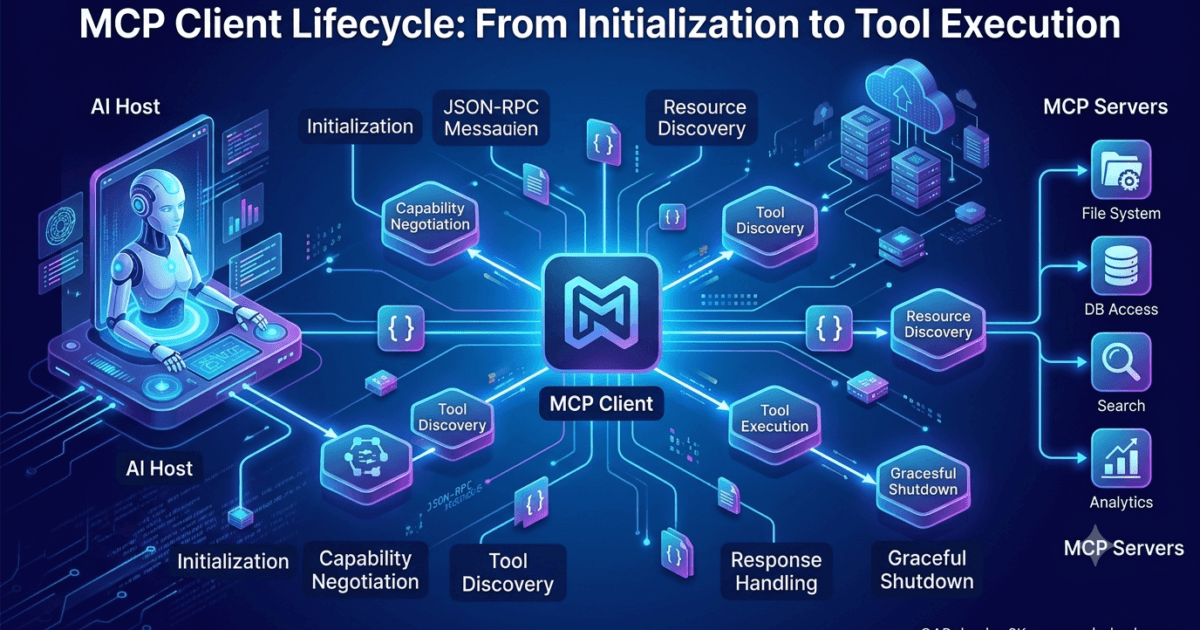
MCP Client Lifecycle Starts Before Any Tool is Executed
When people first learn Model Context Protocol (MCP), they often assume the interaction begins when an AI assistant calls a tool. In reality, tool execution is one of the final stages of a much larger process.
Before an AI model can access a filesystem, query a database, search documentation, or automate a browser, several protocol-level interactions occur behind the scenes. These interactions establish trust, exchange capabilities, discover available features, and prepare both the Host and the MCP Server for communication.
This sequence is known as the MCP Client Lifecycle.
Understanding this lifecycle is essential because nearly every production issue—failed initialization, missing tools, incompatible servers, unexpected errors, or capability mismatches—can be traced back to one of these early stages.
A simplified lifecycle looks like this:
User

↓

Host Application

↓

MCP Client Created

↓

Transport Established

↓

Server Initialized

↓

Capability Negotiation

↓

Tool Discovery

↓

Resource Discovery

↓

Prompt Discovery

↓

Tool Execution

↓

Response Returned
Each stage has a specific purpose, and skipping or misunderstanding one can prevent the entire session from functioning correctly.
What is an MCP Client?
The MCP Client is the protocol implementation running inside the Host application.
It acts as an intermediary between the Large Language Model (LLM) and one or more MCP Servers.
Instead of directly interacting with tools, the LLM communicates with the Host. The Host delegates all protocol responsibilities to the MCP Client.
Those responsibilities include:
- Establishing a transport connection
- Initializing communication
- Negotiating protocol capabilities
- Discovering available tools
- Discovering resources
- Discovering prompts
- Sending JSON-RPC requests
- Receiving responses
- Managing request identifiers
- Handling errors
- Managing the session lifecycle
Think of the MCP Client as a protocol engine rather than an AI component.
The LLM decides what should happen.
The MCP Client determines how that decision is communicated to the server.
MCP Client Responsibilities
An MCP Client performs much more than simply forwarding messages.
| Responsibility | Description |
|---|---|
| Connection Management | Creates and maintains communication with the server |
| Session Initialization | Starts the MCP session correctly |
| Capability Negotiation | Determines supported protocol features |
| Discovery | Retrieves tools, prompts, and resources |
| Request Management | Sends JSON-RPC requests with unique IDs |
| Response Handling | Matches responses to requests |
| Error Processing | Handles protocol and transport failures |
| Session Shutdown | Terminates communication gracefully |
In enterprise systems, these responsibilities become even more important because multiple servers may be active simultaneously.
MCP Client Architecture
A production MCP Client typically contains several internal components.
Host Application

│

├── AI Model

│

├── Conversation Manager

│

├── MCP Client

│     │
│     ├── Transport Manager
│     ├── Session Manager
│     ├── Capability Manager
│     ├── Request Manager
│     ├── Response Handler
│     ├── Error Handler
│     └── Discovery Manager

│

└── MCP Server
Each module focuses on one responsibility, making the client easier to maintain and extend.
Creating the MCP Client
The lifecycle begins when the Host decides that an MCP server is required.
For example, suppose a user asks:
Read the README file from my Git repository.
The Host first determines that this task requires the Git MCP Server.
Instead of immediately requesting the file, it creates an MCP Client instance associated with that server.
Conceptually:
User Request

↓

Host

↓

Identify Required MCP Server

↓

Create MCP Client

↓

Open Communication Channel
Only after the client exists can protocol communication begin.
One Host, Multiple MCP Clients
Modern AI applications rarely communicate with a single MCP Server.
Instead, one Host may manage several clients simultaneously.
Host

├── MCP Client (Filesystem)

├── MCP Client (Git)

├── MCP Client (PostgreSQL)

├── MCP Client (Playwright)

└── MCP Client (Slack)
Each client maintains its own:
- Session
- Request IDs
- Server capabilities
- Tool cache
- Resources
- Error state
This isolation prevents one server’s failure from affecting unrelated integrations.
The MCP Client Is Stateful
Unlike a traditional HTTP client that sends isolated requests, the MCP Client Lifecycle maintains session state throughout the interaction.
It remembers:
- Connected server
- Negotiated capabilities
- Supported protocol version
- Previously discovered tools
- Available prompts
- Available resources
- Pending requests
- Active subscriptions (where supported)
This allows subsequent requests to avoid repeating expensive discovery operations.
Establishing the Transport
Before protocol messages can be exchanged, the client establishes the transport selected by the Host.
Examples include:
Local Desktop

↓

STDIO

↓

Filesystem Server
Cloud Deployment

↓

HTTPS

↓

Remote MCP Server
Streaming Deployment

↓

WebSocket

↓

Enterprise MCP Server
Regardless of the transport, the protocol messages remain identical.
Transport simply determines how those messages are delivered.
Session Initialization
Once the transport is available, the client begins protocol initialization.
This is the first actual MCP communication.
The client sends an initialization request describing itself and the protocol version it supports.
Conceptually:
{
  "method": "initialize",
  "params": {
    "protocolVersion": "...",
    "clientInfo": {
      "name": "...",
      "version": "..."
    }
  }
}
The exact fields may evolve with future protocol revisions, but the purpose remains consistent: establish a mutually understood session before exchanging operational requests.
The server validates the request and returns its own capabilities.
Why Initialization Is Mandatory
Imagine two developers speaking different programming languages.
Without first agreeing on a common language, communication becomes unreliable.
Initialization serves the same purpose.
It allows both sides to agree on:
- Protocol version
- Supported features
- Optional capabilities
- Session parameters
Without successful initialization, no tool discovery or execution should occur.
Capability Negotiation
After initialization, the client and server negotiate their supported capabilities.
This is similar to feature negotiation in many network protocols.
The server may advertise support for:
- Tools
- Resources
- Prompts
- Logging
- Sampling
- Notifications
- Experimental extensions
The client records these capabilities for the remainder of the session.
Client

↓

Initialize

↓

Server

↓

Supported Features

↓

Client Stores Capabilities
This negotiation enables clients to adapt automatically to different server implementations.
Why Capability Negotiation Matters
Consider two servers.
Server A provides only tools.
Server B provides:
- Tools
- Resources
- Prompt templates
If the client assumes every server supports prompts, it will fail when connected to Server A.
Instead, the client first checks the negotiated capabilities.
This makes the MCP Client Lifecycle flexible and extensible without requiring every server to implement every protocol feature.
Internal Client State After Initialization
By the time initialization completes, the client has already accumulated significant information.
Session State

├── Connected Server ✓

├── Transport ✓

├── Protocol Version ✓

├── Server Information ✓

├── Capabilities ✓

├── Session Active ✓

└── Ready for Discovery ✓
Notice that no tools have been executed yet.
The session is simply prepared for the next phase.
Production Considerations
Large enterprise AI platforms often communicate with dozens of MCP servers during a single conversation.
Creating a new client for every request would introduce unnecessary overhead.
Instead, production systems commonly:
- Reuse existing client sessions where appropriate
- Cache negotiated capabilities
- Reconnect only when needed
- Monitor session health
- Apply connection timeouts
- Handle transient transport failures gracefully
These optimizations improve responsiveness while reducing initialization costs.
Common Initialization Mistakes
| Mistake | Impact | Recommendation |
|---|---|---|
| Skipping initialization | Requests fail because the session is not established | Always initialize before discovery or tool execution |
| Ignoring negotiated capabilities | Unsupported features may be requested | Check server capabilities before invoking optional features |
| Creating unnecessary client instances | Increased latency and resource usage | Reuse active sessions when practical |
| Mixing session state across servers | Incorrect routing and unpredictable behavior | Maintain isolated state for each MCP client |
| Assuming all servers expose identical functionality | Reduced compatibility | Design clients to adapt based on advertised capabilities |
MCP Client Lifecycle Architecture
User

↓

Host

↓

Create MCP Client

↓

Establish Transport

↓

Initialize Session

↓

Capability Negotiation

↓

Session Ready

↓

Discovery Phase

↓

Tool Execution
This architecture forms the foundation of every successful MCP interaction. Before a single tool is invoked, the client has already established communication, negotiated protocol features, and prepared the session for the discovery and execution phases that follow. In the next section, the lifecycle continues with resource, prompt, and tool discovery, where the client builds the knowledge required to execute AI requests efficiently and reliably.
MCP Client Lifecycle: Discovery Phase and Session Preparation
Discovery Is the Foundation of an Intelligent MCP Client
After the initialization phase completes, the client knows who it is connected to and what the server is capable of. However, it still doesn’t know what the server actually provides.
Knowing that a server supports tools is different from knowing which tools are available.
Knowing that a server supports resources doesn’t reveal which resources exist.
This is the purpose of the discovery phase in the MCP Client Lifecycle.
Instead of making assumptions, the client asks the server to describe everything it exposes. This allows Hosts to work with completely different MCP servers without requiring hardcoded knowledge.
The discovery phase transforms the client from a connected process into an informed process.
Initialize Session

↓

Capability Negotiation

↓

Tool Discovery

↓

Resource Discovery

↓

Prompt Discovery

↓

Cache Results

↓

Ready for User Requests
Why Discovery Exists
Imagine building an AI assistant that works with thousands of different MCP servers.
Some servers may expose:
- Filesystem tools
- Git repositories
- Databases
- Kubernetes clusters
- Browser automation
- Jira
- Slack
- Internal company APIs
Hardcoding every available tool inside the Host would be impossible.
Instead, every MCP server becomes self-describing.
The client simply asks,
“Tell me everything you provide.”
This makes the protocol extensible because new servers can be introduced without changing the Host application.
Tool Discovery
Tool discovery is usually the first operational step after initialization.
The client requests a list of executable tools from the server.
Conceptually:
Client

↓

tools/list

↓

Server

↓

Available Tools
The response contains metadata describing every available tool.
Rather than returning implementation details, the server returns information that helps the AI understand how each tool should be used.
A typical tool description includes:
- Tool name
- Description
- Input schema
- Parameter definitions
- Required fields
- Optional fields
This information enables the Host to expose tools to the language model in a structured and predictable format.
Why Tool Metadata Matters
Suppose two servers both expose a search capability.
Server A:
search_documents(query)
Server B:
semantic_search(text, limit)
Although both perform searching, they have different names and different input requirements.
Without discovery, the client would have no idea how to invoke either tool correctly.
Tool metadata removes ambiguity.
Instead of guessing, the client receives precise instructions from the server.
Tool Discovery Architecture
Host

↓

MCP Client

↓

tools/list

↓

MCP Server

↓

Tool Metadata

↓

Client Cache

↓

LLM
Notice that tools are not executed during discovery.
Only their definitions are retrieved.
Resource Discovery
Many MCP servers expose information that should be read rather than executed.
These are called resources.
Examples include:
- Documentation
- Configuration files
- Project structure
- API specifications
- Knowledge bases
- Markdown files
- SQL schemas
- Build logs
The client retrieves information about these resources before requesting their contents.
Conceptually:
Client

↓

resources/list

↓

Server

↓

Available Resources
The response contains metadata such as:
- Resource identifier
- Resource name
- URI
- MIME type
- Description
The actual content remains on the server until requested.
Why Resources Are Separate from Tools
This separation is intentional.
Tools perform actions.
Resources provide information.
Consider a filesystem server.
Possible tools:
- Create file
- Delete file
- Rename file
- Copy directory
Possible resources:
- README.md
- package.json
- Project documentation
- Folder hierarchy
One changes the environment.
The other describes it.
Keeping these concepts separate makes the protocol easier to reason about and allows Hosts to apply different security policies.
Prompt Discovery
Some MCP servers provide reusable prompt templates.
Instead of writing lengthy prompts repeatedly, the client can retrieve predefined prompts directly from the server.
Examples include:
- Code review prompts
- Documentation generation prompts
- Test case generation prompts
- Security audit prompts
- API explanation prompts
Discovery works similarly to tools and resources.
Client

↓

prompts/list

↓

Server

↓

Prompt Metadata
Each prompt contains descriptive information that allows the Host to present it as an available capability.
Why Prompt Discovery Improves AI Systems
Imagine an organization with hundreds of standardized workflows.
Rather than embedding every workflow inside the Host, administrators can publish prompt templates through an MCP server.
Examples:
- Release checklist
- Security assessment
- Code quality review
- Regression testing
- Incident analysis
Every connected client immediately gains access without requiring software updates.
This makes prompt management centralized and significantly easier to maintain.
Discovery is Dynamic
One of the biggest strengths of the MCP Client Lifecycle is that discovery happens at runtime.
This means the Host never assumes what the server provides.
Instead:
Connect

↓

Initialize

↓

Discover

↓

Adapt
Today the server may expose ten tools.
Tomorrow it may expose twenty.
The client automatically adapts without changing its implementation.
Client-Side Caching
Discovery requests can become expensive if repeated unnecessarily.
Imagine reconnecting to the same server every few seconds and requesting:
- tools/list
- resources/list
- prompts/list
Each request consumes:
- CPU
- Memory
- Network bandwidth
- Server processing time
Most production MCP clients cache discovery results for the duration of the active session.
Server

↓

Discovery

↓

Client Cache

↓

Future Requests

↓

Reuse Cached Metadata
Caching improves performance while reducing unnecessary communication.
When Should Discovery Run Again?
Caching does not mean discovery happens only once forever.
The client should refresh discovery information when:
- A new session begins
- The server restarts
- The server version changes
- Capabilities change
- Cache expiration policies require refresh
- The server explicitly notifies the client about available changes
A good client balances performance with freshness.
Internal Client State After Discovery
Once discovery completes, the client has built a comprehensive view of the connected server.
Session State

├── Connected ✓

├── Initialized ✓

├── Capabilities Cached ✓

├── Tools Cached ✓

├── Resources Cached ✓

├── Prompts Cached ✓

├── Ready for Execution ✓
At this stage, the client has everything required to begin servicing user requests efficiently.
Discovery Across Multiple Servers
Enterprise Hosts often communicate with multiple MCP servers simultaneously.
Each server maintains its own discovery cache.
Host

├── Filesystem Client
│      ├── Tools
│      ├── Resources
│      └── Prompts

├── Git Client
│      ├── Tools
│      ├── Resources
│      └── Prompts

├── PostgreSQL Client
│      ├── Tools
│      ├── Resources
│      └── Prompts

└── Playwright Client
       ├── Tools
       ├── Resources
       └── Prompts
Keeping discovery information isolated prevents conflicts between servers that expose similarly named capabilities.
Production Considerations
Large AI platforms typically optimize discovery using several strategies:
Lazy Discovery
Instead of discovering every capability immediately, the client retrieves metadata only when needed.
This reduces startup time for servers with extensive catalogs.
Parallel Discovery
If the server supports multiple discovery endpoints, requests can be issued concurrently to reduce initialization latency.
Background Refresh
Long-lived sessions may refresh discovery metadata periodically without interrupting active conversations.
Incremental Updates
Rather than downloading all metadata again, clients can request only changes when supported by future protocol extensions.
Common Discovery Mistakes
| Mistake | Impact | Best Practice |
|---|---|---|
| Hardcoding tool names | Breaks compatibility with new servers | Always use runtime discovery |
| Executing tools before discovery | Unknown parameters and failures | Complete discovery before execution |
| Ignoring cached metadata | Unnecessary server load | Reuse metadata within the active session |
| Sharing discovery caches between servers | Incorrect tool selection | Maintain separate caches per client |
| Assuming every server exposes prompts or resources | Reduced interoperability | Respect negotiated capabilities before discovery |
Discovery Phase Architecture
Create Client

↓

Initialize

↓

Capability Negotiation

↓

tools/list

↓

resources/list

↓

prompts/list

↓

Metadata Cache

↓

Ready for AI Requests
Discovery is what allows the MCP Client Lifecycle to remain flexible, extensible, and independent of specific server implementations. By retrieving structured metadata instead of relying on hardcoded assumptions, the client can communicate with entirely different MCP servers while following the same protocol, enabling scalable and future-proof AI applications.
MCP Client Lifecycle: From User Request to Tool Execution
Understanding Tool Execution in the MCP Client Lifecycle
The discovery phase gives the client complete knowledge of the connected server. It knows which tools exist, the parameters they require, available resources, supported prompts, and negotiated capabilities.
However, no work has been performed yet.
Actual execution begins only after the Large Language Model determines that a tool is required to answer the user’s request.
Consider the following request:
Read the latest Playwright configuration from my repository.
The language model recognizes that it cannot directly access the user’s files. Instead, it decides that an MCP tool must be invoked.
The MCP Client Lifecycle now moves from preparation into execution.
User

↓

LLM Decision

↓

Select Tool

↓

Validate Parameters

↓

Create JSON-RPC Request

↓

MCP Server

↓

Execute Tool

↓

Return Result

↓

LLM

↓

User
The client orchestrates every step of this process.
Selecting the Appropriate Tool
One server may expose dozens or even hundreds of tools.
For example, a Git server might provide:
| Tool | Purpose |
|---|---|
| clone_repository | Clone repositories |
| commit_changes | Create commits |
| create_branch | Create branches |
| search_repository | Search files |
| list_tags | Retrieve tags |
| merge_pull_request | Merge PRs |
The language model chooses the most appropriate tool based on:
- User intent
- Tool description
- Input schema
- Previous conversation
- Available server capabilities
The client itself does not decide which tool to call.
It only executes the decision made by the Host.
Parameter Validation
Before sending a request, the client validates the parameters against the tool’s input schema.
Suppose the discovered schema specifies:
{
  "repository": "string",
  "branch": "string",
  "path": "string"
}
The generated request might become:
{
  "repository": "playwright-demo",
  "branch": "main",
  "path": "playwright.config.ts"
}
Validation ensures that:
- Required parameters exist
- Data types are correct
- Unsupported fields are removed
- The request conforms to the discovered schema
This prevents many execution errors before the server even receives the request.
Constructing the JSON-RPC Request
After validation, the client creates a JSON-RPC request.
Conceptually:
{
  "jsonrpc": "2.0",
  "id": 17,
  "method": "tools/call",
  "params": {
    "name": "read_file",
    "arguments": {
      "path": "README.md"
    }
  }
}
Several fields deserve attention.
| Field | Purpose |
|---|---|
| jsonrpc | Protocol version |
| id | Unique request identifier |
| method | Operation being requested |
| params | Tool name and arguments |
Every request receives its own unique identifier so responses can be matched correctly.
Why Request IDs Matter
Imagine an AI assistant making multiple requests simultaneously.
Request 21 → Git Server

Request 22 → Filesystem Server

Request 23 → Database Server

Request 24 → Browser Server
The responses may arrive in any order.
For example:
Response 24

↓

Response 21

↓

Response 22

↓

Response 23
Without request IDs, the client would have no reliable way to determine which response belongs to which request.
The request identifier acts as the correlation key throughout the MCP Client Lifecycle.
Transport Takes Over
Once the request is complete, the Transport Manager becomes responsible for delivery.
The execution path depends on the configured transport.
Local execution:
Client

↓

STDIO

↓

Filesystem Server
Cloud deployment:
Client

↓

HTTPS

↓

Enterprise MCP Server
Streaming deployment:
Client

↓

WebSocket

↓

Remote MCP Server
The JSON-RPC message remains identical.
Only the delivery mechanism changes.
Server-Side Processing
After receiving the request, the server performs several internal operations.
Receive Request

↓

Validate JSON

↓

Validate Tool Name

↓

Validate Parameters

↓

Authorize Request

↓

Execute Tool

↓

Generate Response
If validation fails, execution stops immediately and an error response is returned.
Otherwise, the requested tool executes.
Tool Execution Example
Suppose the client invokes a filesystem tool.
Client

↓

read_file

↓

Filesystem Server

↓

Operating System

↓

README.md

↓

Content Returned
The client never accesses the file directly.
Only the MCP Server interacts with external systems.
This separation is one of MCP’s most important architectural principles.
Receiving the Response
After execution completes, the server returns a JSON-RPC response.
Conceptually:
{
  "jsonrpc": "2.0",
  "id": 17,
  "result": {
    "content": "..."
  }
}
The client immediately matches:
Response ID = Request ID
This allows multiple requests to execute concurrently without confusion.
Error Handling During Execution
Not every request succeeds.
Common failures include:
- Tool not found
- Invalid arguments
- Missing permissions
- Timeout
- Resource unavailable
- Internal server error
Instead of crashing the session, the server returns a structured error.
Conceptually:
{
  "jsonrpc": "2.0",
  "id": 17,
  "error": {
    "code": -32000,
    "message": "Requested tool not found."
  }
}
The client then decides how the Host should present or recover from the error.
Parallel Tool Execution
Enterprise AI assistants frequently execute multiple tools in parallel.
For example:
User

↓

Summarize Project

↓

Filesystem Tool

+

Git Tool

+

Issue Tracker Tool

+

Documentation Tool

↓

Collect Results

↓

LLM

↓

Final Response
Each tool execution maintains:
- Its own request ID
- Independent execution state
- Separate timeout
- Individual error handling
Parallel execution significantly reduces response time for complex workflows.
Timeout Management
A production-ready client should never wait indefinitely.
Typical timeout strategies include:
| Operation | Example Timeout |
|---|---|
| Initialization | 5–10 seconds |
| Tool Discovery | 10 seconds |
| Simple Tool Execution | 30 seconds |
| Long-running Operations | Configurable |
| Streaming Sessions | Connection-based |
Timeouts prevent stalled servers from blocking the entire conversation.
Client State During Execution
As requests are processed, the client continuously updates its internal state.
Connected

↓

Initialized

↓

Capabilities Cached

↓

Discovery Complete

↓

Pending Requests

↓

Executing Tool

↓

Waiting for Response

↓

Request Completed
Maintaining this state enables retries, cancellations, monitoring, and diagnostics without losing track of active operations.
Production Best Practices
Well-designed implementations of the MCP Client Lifecycle follow several important practices:
- Validate parameters before sending requests.
- Generate unique request IDs for every operation.
- Track pending requests independently.
- Apply configurable timeout policies.
- Avoid blocking unrelated requests during long-running operations.
- Log protocol events separately from application logs.
- Keep transport logic independent from business logic.
- Retry only transient transport failures, not application errors.
Enterprise Execution Architecture
User

↓

Host

↓

LLM

↓

MCP Client

├── Request Manager

├── Validation Engine

├── Transport Manager

├── Response Handler

└── Error Handler

↓

MCP Server

↓

Tool Executor

↓

External System

↓

Response

↓

Host

↓

LLM

↓

User
This execution phase is where preparation turns into action. Initialization, capability negotiation, and discovery provide the client with the information it needs, but successful tool execution depends on careful request construction, validation, transport management, response correlation, and robust error handling. Together, these stages make the MCP Client Lifecycle reliable enough to power production-grade AI assistants across local, cloud, and enterprise environments.
MCP Client Lifecycle: Session Management, Cancellation, Shutdown and Production Best Practices
Long-Lived Sessions in the MCP Client Lifecycle
The MCP Client Lifecycle does not end after a tool returns its result. In production systems, an MCP client may remain connected for minutes, hours, or even days while serving multiple user requests.
Consider an AI coding assistant running inside an IDE.
A developer may:
- Read project files
- Generate code
- Search Git history
- Execute Playwright tests
- Query a database
- Review documentation
All of these operations can occur during a single MCP session.
IDE

↓

MCP Client Session

↓

Request 1

↓

Request 2

↓

Request 3

↓

Request 4

↓

Request 5

↓

Shutdown
Instead of reconnecting before every request, the client maintains an active session, significantly reducing initialization overhead.
Session State Management
Throughout the MCP Client Lifecycle, the client continuously updates its internal state.
A simplified session object might contain:
Session

├── Session ID

├── Transport

├── Connected Server

├── Protocol Version

├── Negotiated Capabilities

├── Tool Cache

├── Resource Cache

├── Prompt Cache

├── Pending Requests

├── Active Requests

└── Session Status
Maintaining this information allows the client to process new requests without repeating initialization and discovery.
Managing Concurrent Requests
Modern AI applications rarely process one request at a time.
Imagine the following prompt:
Analyze this repository, summarize recent commits, identify failing tests, and explain the project architecture.
The Host may invoke several tools simultaneously.
User Request

↓

MCP Client

├── read_directory()

├── git_log()

├── search_documentation()

├── test_results()

└── read_readme()
Each request receives:
- A unique request ID
- Independent execution state
- Separate timeout
- Individual response handler
This architecture allows slow tools to execute without blocking faster operations.
Tracking Pending Requests
Before sending a request, the client records it internally.
Pending Requests

├── Request 101

├── Request 102

├── Request 103

└── Request 104
When a response arrives:
Response 103

↓

Find Matching Request

↓

Remove From Pending List

↓

Deliver Result
This matching process is entirely based on the JSON-RPC request identifier.
Without request tracking, concurrent execution would become unreliable.
Request Cancellation
Sometimes a running request is no longer needed.
Examples include:
- The user changes their question.
- The user stops generation.
- The Host selects a different tool.
- The server begins a newer operation.
- The client disconnects.
Instead of allowing unnecessary work to continue, the client can request cancellation.
User

↓

Cancel Request

↓

MCP Client

↓

Cancellation Message

↓

Server

↓

Stop Execution
Cancellation conserves CPU, memory, bandwidth, and external API usage.
Why Cancellation Matters
Imagine a repository analysis expected to take ten minutes.
After ten seconds, the user asks:
Never mind. Just show me the README.
Without cancellation:
- The repository scan continues.
- CPU remains busy.
- Memory stays allocated.
- Network traffic continues.
Meanwhile, the new request must compete for the same resources.
Proper cancellation allows the server to stop obsolete work and prioritize active requests.
Handling Timeouts
Some requests never complete.
Possible reasons include:
- Network interruption
- Database outage
- External API failure
- Infinite loops
- Deadlocks
- Server crashes
A production-ready client always applies timeout policies.
Request Sent

↓

Waiting

↓

Timeout Reached

↓

Mark Failed

↓

Notify Host
Timeout handling prevents one failed request from blocking the entire session.
Retry Strategies
Not every failure should trigger a retry.
Consider the following examples.
| Failure | Retry? | Reason |
|---|---|---|
| Temporary network interruption | Yes | Usually recoverable |
| Server restarting | Yes | Retry after reconnect |
| Invalid tool arguments | No | Client must fix the request |
| Tool does not exist | No | Discovery metadata is incorrect or outdated |
| Authentication failure | No | Credentials must be updated |
| Timeout caused by transient network issue | Sometimes | Depends on retry policy |
Blind retries can make failures worse by creating duplicate work or additional server load.
Reconnection
Transport connections may occasionally disappear.
Possible causes include:
- Laptop sleep
- VPN changes
- Container restart
- Kubernetes rescheduling
- Network interruption
- Server maintenance
A resilient MCP Client Lifecycle attempts recovery.
Connection Lost

↓

Detect Failure

↓

Reconnect

↓

Initialize

↓

Capability Negotiation

↓

Discovery Refresh

↓

Resume Requests
Recovery should rebuild the session rather than assuming the previous state is still valid.
Graceful Shutdown
Eventually every client session ends.
Shutdown may occur because:
- The application exits.
- The user closes the Host.
- The server shuts down.
- Configuration changes.
- The operating system terminates the process.
A graceful shutdown follows an orderly sequence.
Finish Active Requests

↓

Cancel Remaining Requests

↓

Release Resources

↓

Close Transport

↓

Destroy Session
Graceful shutdown prevents resource leaks and incomplete operations.
Avoiding Resource Leaks
Poor session management can gradually consume system resources.
Examples include:
- Forgotten network connections
- Unreleased memory
- Hanging child processes
- Active timers
- Open file handles
- Unclosed sockets
Production implementations regularly clean unused resources to keep long-running applications stable.
Logging Throughout the MCP Client Lifecycle
Logging is essential for diagnosing protocol issues.
Useful events include:
- Client creation
- Transport establishment
- Initialization
- Capability negotiation
- Discovery requests
- Tool execution
- Responses
- Errors
- Cancellations
- Shutdown
Example sequence:
Client Created

↓

Session Initialized

↓

Discovery Completed

↓

Tool Executed

↓

Response Received

↓

Session Closed
Structured logging makes troubleshooting significantly easier than relying on console output.
Monitoring Client Health
Large deployments continuously monitor client sessions.
Typical health metrics include:
| Metric | Why It Matters |
|---|---|
| Active sessions | Measures client utilization |
| Pending requests | Detects request backlogs |
| Average execution time | Identifies slow tools |
| Timeout rate | Detects infrastructure issues |
| Error rate | Highlights protocol or application problems |
| Reconnection count | Indicates unstable transports |
These metrics help operators identify issues before users notice them.
Enterprise MCP Client Lifecycle
Enterprise AI platforms often manage hundreds of concurrent client sessions.
AI Platform

│

├── Filesystem Client

├── Git Client

├── PostgreSQL Client

├── Kubernetes Client

├── Jira Client

├── Slack Client

├── Browser Client

└── Internal API Client
Each client independently manages:
- Initialization
- Discovery
- Request execution
- Timeouts
- Cancellation
- Reconnection
- Shutdown
This isolation improves scalability and fault tolerance.
Common Mistakes
| Mistake | Impact | Best Practice |
|---|---|---|
| Recreating the client for every request | Increased latency | Reuse active sessions |
| Ignoring pending requests | Lost responses | Track every request ID |
| Never cancelling obsolete requests | Wasted resources | Cancel unnecessary operations |
| No timeout policy | Hanging sessions | Apply configurable timeouts |
| Assuming reconnect preserves state | Invalid caches | Reinitialize and refresh discovery after reconnect |
| Forgetting graceful shutdown | Resource leaks | Close transports and release resources cleanly |
Complete MCP Client Lifecycle
User Request

↓

Create MCP Client

↓

Establish Transport

↓

Initialize Session

↓

Capability Negotiation

↓

Discover Tools

↓

Discover Resources

↓

Discover Prompts

↓

Cache Metadata

↓

Select Tool

↓

Validate Parameters

↓

Create JSON-RPC Request

↓

Execute Tool

↓

Receive Response

↓

Handle Errors or Cancellation

↓

Process Additional Requests

↓

Graceful Shutdown
Key Takeaways
The MCP Client Lifecycle is far more than a sequence of API calls. It manages every stage of communication between a Host and an MCP Server, from establishing a transport connection and negotiating capabilities to discovering server features, executing tools, tracking concurrent requests, handling failures, recovering from connection loss, and shutting down gracefully. A well-designed client treats these stages as a continuous session rather than isolated operations, resulting in better performance, improved reliability, and greater scalability for production AI applications.
What’s Next
The next lesson explores MCP Server Lifecycle, examining what happens inside an MCP server after it starts, how it processes requests, manages state, executes tools, handles concurrent operations, and terminates cleanly. Together, the client and server lifecycles provide a complete understanding of how Model Context Protocol applications operate in real-world environments.
Internal Links
- Day 1: What is MCP?
- Day 2: Why MCP Matters for AI Agents
- Day 3: MCP vs REST APIs vs Plugins
- Day 4: MCP Architecture Deep Dive
- Day 5: Build Your First Production-Ready MCP Development Environment (Python & VS Code)
- Day 6: Build Your First MCP Server in Python: A Production-Ready Guide for Beginners
- Day 7: Master the 4 MCP Transport Layer Options: STDIO vs HTTP vs SSE vs WebSockets
External Links
- Model Context Protocol: https://modelcontextprotocol.io
- JSON-RPC Specification: https://www.jsonrpc.org/specification
- Python asyncio: https://docs.python.org/3/library/asyncio.html
- Python subprocess: https://docs.python.org/3/library/subprocess.html
- WebSocket API: https://developer.mozilla.org/docs/Web/API/WebSockets_API
AI Search Optimized Snippets
What is MCP Client Lifecycle?
The MCP Client Lifecycle is the complete sequence of operations performed by an MCP client, including transport establishment, session initialization, capability negotiation, discovery of tools and resources, request execution, response handling, cancellation, reconnection, and graceful shutdown.
Why is the MCP Client Lifecycle Important?
The MCP Client Lifecycle ensures reliable communication between Hosts and MCP Servers. It allows AI applications to initialize sessions, discover available capabilities, execute tools safely, manage concurrent requests, recover from failures, and terminate sessions cleanly.
What are the stages of the MCP Client Lifecycle?
The major stages are:
- Client creation
- Transport establishment
- Session initialization
- Capability negotiation
- Tool discovery
- Resource discovery
- Prompt discovery
- Metadata caching
- Tool execution
- Response processing
- Error handling
- Cancellation
- Reconnection
- Graceful shutdown
Production Checklist
Before deploying an MCP Client, ensure it supports:
- ✅ Transport abstraction
- ✅ Session initialization
- ✅ Capability negotiation
- ✅ Tool discovery
- ✅ Resource discovery
- ✅ Prompt discovery
- ✅ Request validation
- ✅ Unique request IDs
- ✅ Response correlation
- ✅ Timeout handling
- ✅ Cancellation support
- ✅ Session reuse
- ✅ Graceful shutdown
- ✅ Structured logging
- ✅ Monitoring and metrics
Frequently Asked Questions
What is an MCP Client?
An MCP Client is the protocol component inside the Host application that communicates with one or more MCP Servers using JSON-RPC over a supported transport.
Why does an MCP Client perform discovery?
Discovery allows the client to retrieve available tools, resources, and prompts dynamically instead of relying on hardcoded implementations.
Can one Host have multiple MCP Clients?
Yes. Enterprise AI applications commonly manage multiple MCP clients simultaneously, with each client maintaining its own transport, session state, capability cache, and request lifecycle.
Why are request IDs important?
Request IDs allow the client to match responses with the corresponding requests, especially when multiple operations execute concurrently.
Why is graceful shutdown necessary?
Graceful shutdown prevents unfinished requests, resource leaks, orphaned processes, and incomplete transport sessions.
Conclusion
The MCP Client Lifecycle defines how an MCP client communicates with an MCP server throughout an entire session. It begins with transport establishment and initialization, continues through capability negotiation and discovery of tools, resources, and prompts, then manages request execution, response handling, cancellation, reconnection, and graceful shutdown. Understanding the MCP Client Lifecycle is essential for building reliable, scalable, and production-ready AI systems using the Model Context Protocol.
Continue Your MCP Zero to Hero Journey
From here onward, every lesson will build on this environment as we move from concepts to production-ready implementations.
Enjoyed this article? Explore more in-depth guides on AI engineering, automation testing, Model Context Protocol, Playwright, and intelligent software quality at www.skakarh.com. Follow QAPulse by SK for practical, production-focused tutorials designed for QA engineers, SDETs, and AI developers.