QA
QA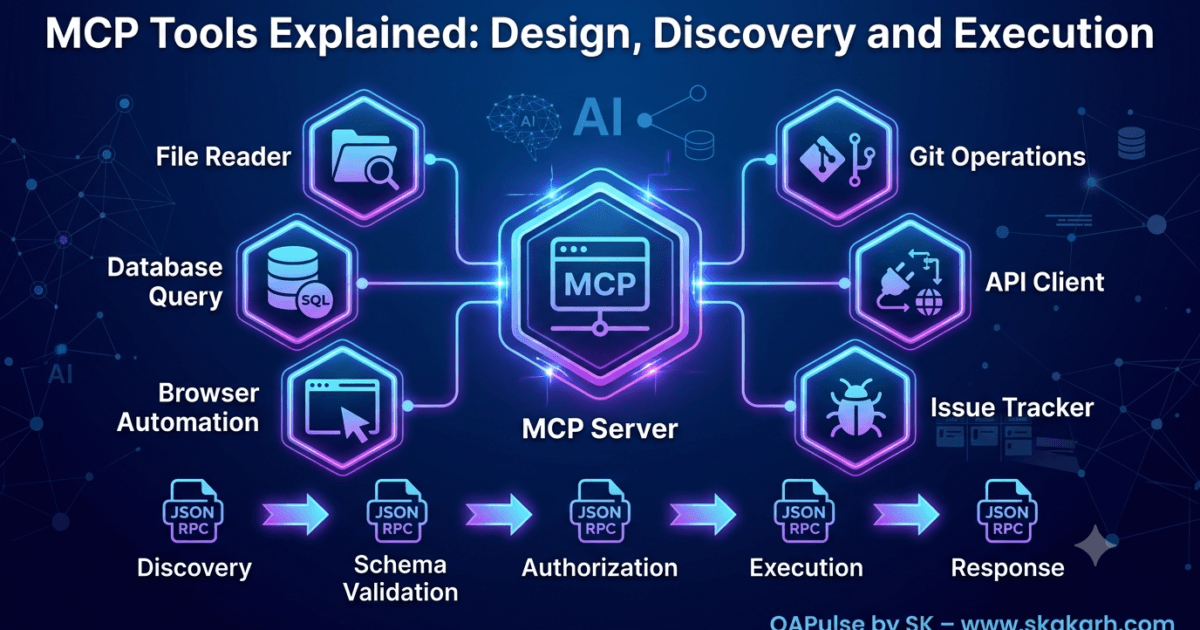
Why MCP Tools Are the Heart of Model Context Protocol
The primary purpose of an MCP server is to expose useful capabilities to AI applications. These capabilities are known as tools.
Without tools, an MCP server can establish connections, negotiate capabilities, and exchange protocol messages, but it cannot perform meaningful work.
Whether an AI assistant reads files, queries a database, automates a browser, creates Git commits, or sends Slack messages, every action is performed through an MCP tool.
A simplified interaction looks like this:
User

↓

Host

↓

LLM

↓

MCP Client

↓

tools/call

↓

MCP Server

↓

Tool

↓

External System

↓

Response
Understanding how tools are designed, registered, discovered, validated, and executed is one of the most important skills when building production-ready MCP servers.
What Is an MCP Tool?
An MCP tool is a callable capability exposed by an MCP server.
Unlike a traditional API endpoint, a tool represents a specific action that an AI model can invoke after understanding its purpose and required parameters.
Examples include:
- Reading a file
- Creating a Git branch
- Running Playwright tests
- Querying a database
- Sending an email
- Searching documentation
- Creating Jira issues
- Calling an internal REST API
Each tool is designed to perform one well-defined task.
Instead of exposing low-level implementation details, the server presents the tool as a structured capability that the client and language model can understand.
MCP Tools vs Traditional APIs
Although MCP tools often interact with existing APIs, they are fundamentally different.
| Traditional REST API | MCP Tool |
|---|---|
| Designed for applications | Designed for AI models |
| Fixed endpoints | Discoverable capabilities |
| Client must know endpoint | Client discovers tools dynamically |
| Documentation is external | Metadata travels with the tool |
| Parameters are manually implemented | Parameters are described through schemas |
| API documentation must be maintained separately | Tool descriptions become part of the protocol |
This self-describing nature is one of the biggest advantages of the Model Context Protocol.
Anatomy of an MCP Tool
Every tool contains several pieces of information that allow AI models to understand how it should be used.
A typical tool consists of:
- Tool name
- Human-readable description
- Input schema
- Parameter definitions
- Required fields
- Optional fields
- Execution handler
- Return structure
Conceptually:
Tool

├── Name

├── Description

├── Input Schema

├── Validation Rules

├── Execution Logic

└── Response
The metadata is just as important as the implementation because it guides the language model in selecting and invoking the tool correctly.
Naming MCP Tools
Tool names should be clear, descriptive, and action-oriented.
Good examples include:
- read_file
- write_file
- create_issue
- search_repository
- run_playwright_tests
- execute_sql
- send_email
Poor examples include:
- action1
- utility
- helper
- execute
- toolA
A language model relies heavily on names and descriptions when deciding which tool to call. Ambiguous names reduce accuracy and increase the likelihood of incorrect tool selection.
Writing Effective Tool Descriptions
The description tells the AI model when the tool should be used.
Compare the following descriptions.
Poor description:
Reads files.
Better description:
Reads the contents of a file from the local project workspace. Use this tool whenever the user asks to open, inspect, summarize, or analyze an existing file.
The second description provides:
- Purpose
- Scope
- Expected use cases
- Decision guidance
Well-written descriptions significantly improve tool selection quality.
Designing Single-Responsibility Tools
An MCP tool should perform one specific task.
Good examples:
- read_file
- delete_file
- copy_file
- rename_file
Poor example:
manage_file()
What does it do?
- Read?
- Write?
- Delete?
- Rename?
- Copy?
Combining multiple unrelated behaviors into a single tool makes parameter validation more complex and increases the chance of incorrect AI decisions.
Following the Single Responsibility Principle (SRP) results in simpler, more maintainable tools.
Organizing Tool Collections
As servers grow, the number of available tools can increase significantly.
A filesystem server might expose:
Filesystem Tools

├── read_file

├── write_file

├── delete_file

├── rename_file

├── create_directory

├── delete_directory

├── copy_file

└── move_file
A Git server could expose:
Git Tools

├── clone_repository

├── create_branch

├── commit_changes

├── checkout_branch

├── merge_branch

├── push_changes

└── pull_changes
Grouping related tools makes server implementation easier and improves maintainability.
How Clients Discover Tools
Clients never assume which tools a server provides.
Instead, they request tool metadata during the discovery phase.
Client

↓

tools/list

↓

Server

↓

Tool Registry

↓

Tool Metadata

↓

Client Cache
The response includes metadata for every registered tool.
This allows new tools to become immediately available without modifying the client.
Why Dynamic Discovery Matters
Suppose version 1 of a server exposes:
- read_file
- write_file
Version 2 introduces:
- summarize_directory
- search_files
- compare_files
Because discovery occurs dynamically, existing clients automatically learn about these new capabilities during initialization.
No client update is required.
This flexibility is one of the defining strengths of MCP.
Choosing the Right Tool
Language models often encounter multiple tools with similar purposes.
For example:
search_repository()

search_documentation()

search_database()

search_logs()
The model decides which tool to invoke based on:
- Tool name
- Description
- Input schema
- User intent
- Conversation context
The better these elements are designed, the more accurately the model can select the correct tool.
Production Considerations for MCP Tools
Production-ready tools should be designed with consistency in mind.
Recommended practices include:
- Use descriptive names.
- Keep each tool focused on one task.
- Write detailed descriptions.
- Maintain consistent parameter naming.
- Return predictable response structures.
- Avoid hidden side effects.
- Validate all inputs before execution.
- Keep tools independent whenever possible.
These practices improve maintainability and make tools easier for AI models to understand.
Common Tool Design Mistakes
| Mistake | Impact | Best Practice |
|---|---|---|
| Generic tool names | Poor tool selection | Use descriptive action-based names |
| Multiple responsibilities in one tool | Complex logic | One tool, one responsibility |
| Vague descriptions | AI confusion | Explain purpose and usage clearly |
| Inconsistent parameter names | Reduced usability | Use standardized naming conventions |
| Hidden side effects | Unexpected behavior | Clearly document all actions |
| Inconsistent responses | Difficult client handling | Return predictable response structures |
MCP Tool Architecture
User Request

↓

LLM

↓

Tool Selection

↓

tools/call

↓

MCP Server

↓

Tool Registry

↓

Execution Handler

↓

External System

↓

Structured Response
A well-designed MCP tool is more than a function—it is a self-describing capability that enables AI systems to interact safely and intelligently with external systems. Clear naming, focused responsibilities, rich descriptions, and predictable behavior make tools easier for language models to understand and significantly improve the reliability of AI-powered workflows. In the next part, you’ll learn how MCP tools are defined using input schemas, how parameter validation works, and why structured schemas are fundamental to safe and accurate tool execution.
MCP Tool Schemas: Input Validation and Parameter Design
Why Schemas Are Essential for MCP Tools
Every MCP tool accepts input from an AI model. Before the tool executes, the server must know:
- What parameters are required?
- Which parameters are optional?
- What data types are allowed?
- Which values are valid?
- Which values should be rejected?
The component responsible for answering these questions is the tool schema.
A schema acts as the contract between the MCP client and the MCP server.
User Request

↓

LLM

↓

Generate Parameters

↓

Tool Schema

↓

Validation

↓

Tool Execution
Without schemas, servers would receive unpredictable input, making reliable tool execution impossible.
What Is a Tool Schema?
A tool schema formally describes the input expected by an MCP tool.
It defines:
- Available parameters
- Required parameters
- Optional parameters
- Data types
- Validation rules
- Parameter descriptions
Instead of relying on documentation alone, the schema becomes machine-readable metadata that both clients and language models can understand.
Anatomy of a Tool Schema
Most tool schemas contain several common components.
Tool Schema

├── Tool Name

├── Description

├── Parameters

│      ├── Name

│      ├── Type

│      ├── Description

│      ├── Required

│      └── Constraints

└── Validation Rules
Every registered tool should expose a complete schema during discovery.
Parameter Types
Schemas define the expected type for every parameter.
Common parameter types include:
| Type | Example |
|---|---|
| String | File path |
| Integer | Retry count |
| Number | Temperature |
| Boolean | Read-only mode |
| Array | File list |
| Object | Database configuration |
For example, a file-reading tool might require:
| Parameter | Type | Required |
|---|---|---|
| path | String | Yes |
| encoding | String | No |
The client uses this information before sending requests.
Required vs Optional Parameters
A good schema clearly distinguishes required input from optional configuration.
Example:
read_file

Required

✔ path

Optional

• encoding

• line_limit
Required parameters must always be supplied.
Optional parameters allow the tool to provide additional flexibility without increasing complexity.
Parameter Descriptions
Parameter names alone are rarely sufficient.
Consider:
path
What kind of path?
A much better schema includes descriptions.
path

Absolute or relative path inside the allowed workspace.
Descriptions help language models generate correct values.
Every parameter should explain:
- Purpose
- Expected format
- Valid values
- Usage constraints
Validation Rules
Schemas define much more than data types.
Validation rules may include:
- Minimum length
- Maximum length
- Allowed values
- Numeric ranges
- Regular expressions
- Required formats
Example:
branch_name

Minimum Length: 3

Maximum Length: 50

Letters, numbers and hyphens only
The server validates these rules before tool execution begins.
Why Validation Happens Before Execution
Imagine a database tool expecting:
table_name

query
Instead, the client sends:
table_name = 12345
Without validation:
Receive Request

↓

Execute Query

↓

Database Error

↓

Failure
With validation:
Receive Request

↓

Validate Schema

↓

Reject Invalid Input

↓

Return Error
Early validation produces clearer error messages and protects downstream systems.
Schema-Driven Tool Selection
Schemas influence more than validation.
Language models also use them during tool selection.
Imagine two tools.
Tool A:
search()
Tool B:
search_repository

Parameters

repository

filename

keyword
The second tool provides much richer context.
As a result, the language model can make a more accurate decision.
Detailed schemas improve both correctness and usability.
Reusing Common Parameters
Large MCP servers often expose dozens of related tools.
Instead of designing parameters independently, use consistent naming.
Good examples:
| Operation | Parameter |
|---|---|
| read_file | path |
| write_file | path |
| delete_file | path |
| rename_file | path |
Avoid inconsistent alternatives such as:
- filename
- filepath
- file
- location
- source
Consistency reduces confusion for both developers and AI models.
Avoiding Overly Complex Schemas
A schema should describe exactly what the tool needs.
Poor example:
create_issue

↓

30 Parameters
Simple alternative:
create_issue

↓

title

description

priority

assignee
Additional fields can often use sensible defaults.
Smaller schemas generally improve tool selection and reduce generation errors.
Nested Objects
Some operations naturally require structured input.
Example:
Database Configuration

├── Host

├── Port

├── Username

├── Password

└── Database
Nested objects keep related information together instead of creating dozens of unrelated top-level parameters.
Enumerated Values
When only specific values are valid, define them explicitly.
Example:
| Parameter | Allowed Values |
|---|---|
| priority | low, medium, high |
| browser | chromium, firefox, webkit |
| environment | dev, staging, production |
Restricting allowed values prevents invalid requests from reaching execution.
Schema Evolution
As MCP servers evolve, schemas also change.
Version 1:
create_user

name

email
Version 2:
create_user

name

email

department
Because clients perform discovery dynamically, they automatically receive updated schemas during initialization.
This makes extending tools significantly easier than modifying traditional APIs.
Production Best Practices
When designing schemas for MCP tools, follow these practices:
- Keep parameter names consistent.
- Make required fields truly required.
- Use optional parameters sparingly.
- Add clear descriptions to every parameter.
- Validate before execution.
- Prefer simple schemas over deeply nested structures.
- Use enumerations where appropriate.
- Keep schemas backward compatible whenever possible.
Common Schema Design Mistakes
| Mistake | Impact | Best Practice |
|---|---|---|
| Missing parameter descriptions | Poor AI understanding | Describe every parameter clearly |
| Too many required fields | Difficult tool invocation | Require only essential inputs |
| Inconsistent parameter naming | Confusing APIs | Standardize naming across tools |
| Weak validation | Runtime failures | Validate before execution |
| Generic parameter names | Ambiguous requests | Use descriptive, domain-specific names |
| Breaking schema compatibility | Client failures | Evolve schemas carefully |
Schema Validation Flow
Client Request

↓

Generate Arguments

↓

Load Tool Schema

↓

Validate Parameters

├── Valid

│      ↓

│ Execute Tool

│

└── Invalid

       ↓

Return Validation Error
A well-designed MCP tool schema serves as the foundation for reliable tool execution. It enables language models to understand how a tool should be used, helps clients validate requests before transmission, and allows servers to reject invalid input before reaching business logic. By combining clear parameter definitions, strong validation rules, and consistent schema design, developers can build MCP tools that are easier to discover, safer to execute, and more dependable in production AI systems.
MCP Tool Registration, Discovery and Execution Workflow
Registering MCP Tools
Before an MCP tool can be used, it must be registered with the server during startup.
Registration makes the tool part of the server’s capability registry, allowing clients to discover it during initialization.
The registration process typically includes:
- Tool name
- Description
- Input schema
- Execution handler
- Optional metadata
A simplified registration flow is shown below.
Server Startup

↓

Create Tool

↓

Register Tool

↓

Store in Tool Registry

↓

Server Ready
Only registered tools become available to connected clients.
Internal Tool Registry
The server maintains a registry containing every available tool.
Tool Registry

├── read_file

├── write_file

├── search_files

├── execute_sql

├── create_issue

├── run_playwright_tests

└── generate_report
The registry acts as the central source of truth for:
- Discovery
- Validation
- Tool lookup
- Execution routing
Rather than scanning the application repeatedly, the server simply queries this registry whenever a request arrives.
Registering Execution Handlers
Each registered tool is associated with executable logic.
Conceptually:
Tool

↓

Execution Handler

↓

Business Logic

↓

External System
For example:
| Tool | Handler |
|---|---|
| read_file | Filesystem Reader |
| execute_sql | Database Engine |
| create_issue | Jira Client |
| run_playwright_tests | Playwright Runner |
The registry stores both metadata and the function responsible for executing the requested operation.
Discovery Begins
After client initialization, discovery starts.
Instead of assuming available capabilities, the client explicitly asks the server.
Client

↓

tools/list

↓

Server

↓

Tool Registry

↓

Tool Metadata

↓

Client Cache
The response contains every registered tool together with its schema and description.
Information Returned During Discovery
Discovery does not return executable code.
Instead, it returns metadata describing each tool.
Typical information includes:
- Tool name
- Description
- Input schema
- Required parameters
- Optional parameters
- Parameter descriptions
The language model later uses this information when deciding which tool to invoke.
Dynamic Discovery
One of MCP’s greatest strengths is dynamic discovery.
Imagine Version 1 of a server exposes:
Filesystem Server

├── read_file

└── write_file
Several months later, Version 2 adds:
Filesystem Server

├── read_file

├── write_file

├── compare_files

├── search_files

└── summarize_directory
Existing clients automatically discover these new capabilities during initialization.
No client update is required.
How the LLM Selects a Tool
After discovery, the language model has complete knowledge of the available tools.
Suppose the user asks:
Compare these two configuration files.
Available tools:
read_file

compare_files

search_files

delete_file
The model analyzes:
- User intent
- Tool names
- Descriptions
- Schemas
- Conversation context
It determines that compare_files is the most appropriate choice.
The client itself does not make this decision.
Constructing the Tool Request
Once the tool has been selected, the client creates a JSON-RPC request.
The request contains:
- Request identifier
- Tool name
- Tool arguments
Conceptually:
Tool Request

↓

Request ID

↓

Tool Name

↓

Arguments

↓

Server
The server then begins validation.
Server-Side Validation
Before execution, the server verifies:
- Tool exists
- Schema matches
- Required parameters supplied
- Data types correct
- Authorization successful
Receive Request

↓

Find Tool

↓

Validate Schema

↓

Authorize

↓

Ready to Execute
Every validation step protects the execution engine from invalid or malicious requests.
Executing the Tool
Once validation succeeds, execution begins.
Tool Request

↓

Execution Handler

↓

Business Logic

↓

External System

↓

Result
Depending on the tool, execution may involve:
- Reading files
- Querying databases
- Running browser automation
- Calling REST APIs
- Accessing cloud services
- Performing calculations
The protocol remains identical regardless of the underlying technology.
Returning the Result
After execution finishes, the handler returns structured data.
Execution Result

↓

Response Generator

↓

JSON-RPC Response

↓

Client
The response is matched to the original request using the request identifier.
This mechanism supports concurrent execution without ambiguity.
Handling Execution Errors
Tool execution may fail for several reasons.
Examples include:
- Invalid input
- File not found
- Database unavailable
- Authentication failure
- Permission denied
- Timeout
- Internal exception
Instead of terminating the session, the server generates a structured error.
Execute Tool

↓

Error

↓

Create JSON-RPC Error

↓

Return Response
The client remains connected and may continue issuing new requests.
Parallel Tool Execution
Modern AI assistants frequently execute several tools simultaneously.
Example:
User Request

↓

LLM

↓

Tool A

+

Tool B

+

Tool C

↓

Collect Results

↓

Generate Answer
Each tool executes independently while maintaining:
- Separate request ID
- Independent execution state
- Individual timeout
- Separate error handling
Parallel execution improves responsiveness for complex workflows.
Tool Execution Pipeline
The complete execution workflow is:
Register Tool

↓

Client Discovery

↓

LLM Chooses Tool

↓

Create Request

↓

Validate Parameters

↓

Execute Tool

↓

Generate Response

↓

Return Result
This pipeline remains consistent regardless of whether the tool accesses a filesystem, browser, database, cloud API, or another external service.
Designing High-Quality MCP Tools
Production-ready MCP tools should exhibit several characteristics.
| Characteristic | Benefit |
|---|---|
| Single responsibility | Easier maintenance |
| Clear descriptions | Better AI tool selection |
| Strong input validation | Fewer runtime errors |
| Consistent schemas | Improved usability |
| Predictable responses | Simpler client integration |
| Minimal side effects | Safer execution |
| Proper authorization | Better security |
| Structured error handling | Easier troubleshooting |
Common Registration and Execution Mistakes
| Mistake | Impact | Best Practice |
|---|---|---|
| Registering duplicate tool names | Discovery conflicts | Ensure every tool has a unique name |
| Executing before validation | Runtime failures | Validate every request first |
| Returning inconsistent responses | Difficult client processing | Standardize response structures |
| Poor tool descriptions | Incorrect tool selection | Write descriptive metadata |
| Combining unrelated operations | Complex execution logic | Follow the Single Responsibility Principle |
| Skipping authorization | Security vulnerabilities | Verify permissions before execution |
Complete MCP Tool Workflow
Server Startup

↓

Register Tool

↓

Client Initialization

↓

Tool Discovery

↓

LLM Selects Tool

↓

JSON-RPC Request

↓

Validation

↓

Authorization

↓

Execution

↓

Generate Response

↓

Client Receives Result
The complete MCP tool workflow transforms a simple function into a discoverable, AI-friendly capability. Registration makes the tool visible to clients, discovery provides rich metadata to language models, validation ensures safe execution, and structured responses allow clients to process results consistently. By following this lifecycle, developers can build MCP tools that are scalable, secure, and reliable for production-grade AI applications.
MCP Tool Security, Error Handling and Production Best Practices
Why Tool Security Is Critical
An MCP tool is capable of interacting with real systems such as files, databases, cloud platforms, browsers, payment services, and internal APIs.
Unlike traditional applications where users interact through carefully designed interfaces, MCP tools are invoked by AI models. Although the language model decides which tool to call, the server remains responsible for ensuring every execution is safe.
A secure execution pipeline looks like this:
User Request

↓

LLM

↓

Tool Selection

↓

Authorization

↓

Input Validation

↓

Execute Tool

↓

Audit Log

↓

Response
Security should never rely on the language model making the correct decision.
The server must enforce every security rule independently.
Principle of Least Privilege
Every tool should receive only the permissions required to perform its task.
Consider a file-reading tool.
Correct permissions:
Allowed

↓

Read Project Files
Incorrect permissions:
Read

Write

Delete

Rename

Execute Programs
Granting unnecessary privileges increases security risks and makes accidental misuse more damaging.
Authorization Before Execution
Authorization should occur before any business logic executes.
Typical authorization checks include:
- User identity
- Project membership
- Workspace restrictions
- Allowed directories
- Database permissions
- API scopes
- Organization policies
Receive Request

↓

Validate Schema

↓

Authorization

↓

Execute Tool
Execution should never begin before authorization succeeds.
Restricting Filesystem Access
Filesystem tools require special attention.
A secure server should restrict access to approved directories.
Workspace

├── src

├── tests

├── docs

└── config
Attempts to access locations outside the approved workspace should be rejected immediately.
This prevents tools from reading sensitive operating system files or unrelated user data.
Preventing Dangerous Operations
Not every technically possible action should be exposed as an MCP tool.
Examples of high-risk operations include:
- Deleting system files
- Executing arbitrary shell commands
- Modifying operating system settings
- Accessing unrestricted network resources
- Reading confidential credentials
Before creating a new tool, ask:
- Does this capability need to exist?
- Can permissions be reduced?
- Can the scope be restricted?
- Can the action be audited?
Removing unnecessary capabilities is often the strongest security control.
Sanitizing Tool Input
Even after schema validation, parameters should be treated as untrusted input.
Examples requiring additional validation include:
- File paths
- SQL statements
- URLs
- Search queries
- Command arguments
- User-generated text
Client Input

↓

Schema Validation

↓

Input Sanitization

↓

Business Logic
Sanitization protects downstream systems from malformed or unexpected input.
Handling Execution Errors
Every production server encounters execution failures.
Examples include:
- Missing files
- Invalid parameters
- Network failures
- API rate limits
- Database outages
- Permission denied
- Timeout
Instead of exposing internal implementation details, the server should return structured protocol errors.
Execution

↓

Failure

↓

Structured Error

↓

Client
Clear error reporting improves debugging while protecting sensitive implementation details.
Recoverable and Non-Recoverable Errors
Not every failure should be handled the same way.
| Error | Recovery Strategy |
|---|---|
| Temporary network failure | Retry |
| External API timeout | Retry with limits |
| Invalid parameters | Return validation error |
| Permission denied | Reject request |
| Tool not registered | Return protocol error |
| Internal programming bug | Log and isolate failure |
Understanding which failures are recoverable prevents unnecessary retries and reduces system load.
Logging Tool Execution
Every important event should be recorded.
Typical audit events include:
- Tool selected
- Parameters validated
- Authorization completed
- Execution started
- Execution completed
- Error generated
- Execution duration
Receive Request

↓

Authorize

↓

Execute

↓

Respond

↓

Log Event
Structured logs simplify troubleshooting and operational monitoring.
Monitoring Tool Performance
Production systems continuously measure tool performance.
Useful metrics include:
| Metric | Purpose |
|---|---|
| Total executions | Usage analysis |
| Success rate | Reliability |
| Failure rate | Error detection |
| Average execution time | Performance monitoring |
| Timeout count | Infrastructure health |
| Concurrent executions | Capacity planning |
Monitoring identifies slow or unreliable tools before users notice problems.
Tool Versioning
As applications evolve, tools may require new functionality.
Version 1:
create_issue

↓

title

description
Version 2:
create_issue

↓

title

description

priority

labels
Whenever possible:
- Add optional parameters instead of changing existing ones.
- Preserve backward compatibility.
- Avoid breaking existing clients.
- Deprecate features gradually.
Careful versioning reduces disruption while allowing tools to evolve.
Testing MCP Tools
Every tool should be tested independently before deployment.
Recommended testing includes:
- Unit testing
- Schema validation testing
- Authorization testing
- Integration testing
- Error handling testing
- Performance testing
- Concurrency testing
Tool

↓

Unit Tests

↓

Integration Tests

↓

Load Tests

↓

Production
Testing individual tools simplifies debugging and improves deployment confidence.
Production Deployment Checklist
Before deploying an MCP server, verify every tool satisfies the following requirements.
| Requirement | Status |
|---|---|
| Descriptive name | ✓ |
| Clear description | ✓ |
| Well-defined schema | ✓ |
| Strong validation | ✓ |
| Authorization checks | ✓ |
| Structured responses | ✓ |
| Standardized errors | ✓ |
| Logging enabled | ✓ |
| Monitoring configured | ✓ |
| Tested thoroughly | ✓ |
Common Production Mistakes
| Mistake | Impact | Best Practice |
|---|---|---|
| Overprivileged tools | Increased security risk | Apply least privilege |
| Trusting AI-generated input | Unexpected failures | Validate and sanitize every parameter |
| Returning raw exceptions | Information disclosure | Return structured protocol errors |
| Missing execution logs | Difficult troubleshooting | Log all significant events |
| Ignoring performance metrics | Undetected bottlenecks | Monitor continuously |
| Breaking existing schemas | Client incompatibility | Maintain backward compatibility |
Complete MCP Tool Lifecycle
Design Tool

↓

Define Schema

↓

Register Tool

↓

Client Discovery

↓

LLM Selects Tool

↓

Validate Input

↓

Authorize Request

↓

Execute Tool

↓

Generate Response

↓

Log Execution

↓

Monitor Performance

↓

Maintain and Evolve
Key Takeaways
An MCP tool is much more than executable code. It is a protocol-defined capability that must be carefully designed, securely exposed, accurately described, thoroughly validated, properly authorized, consistently monitored, and continuously maintained. Production-ready tools follow the principles of least privilege, structured schemas, predictable responses, robust error handling, and comprehensive observability. By treating each tool as a secure, discoverable, and maintainable service, developers can build MCP servers that remain reliable, scalable, and safe for enterprise AI applications.
What’s Next
The next lesson introduces MCP Resources, explaining how servers expose structured information to AI models without executing actions. You’ll learn how resources differ from tools, how they are registered and discovered, how clients access them efficiently, and the best practices for designing scalable resource catalogs in production MCP servers.
Internal Links
- Day 1: What is MCP?
- Day 2: Why MCP Matters for AI Agents
- Day 3: MCP vs REST APIs vs Plugins
- Day 4: MCP Architecture Deep Dive
- Day 5: Build Your First Production-Ready MCP Development Environment (Python & VS Code)
- Day 6: Build Your First MCP Server in Python: A Production-Ready Guide for Beginners
- Day 7: Master the 4 MCP Transport Layer Options: STDIO vs HTTP vs SSE vs WebSockets
- Day 8: MCP Client Lifecycle: From Initialization to Tool Execution
- Day 9: MCP Server Lifecycle: From Startup to Graceful Shutdown
External Links
- WebSocket API: https://developer.mozilla.org/docs/Web/API/WebSockets_API
- Model Context Protocol: https://modelcontextprotocol.io
- JSON-RPC Specification: https://www.jsonrpc.org/specification
- Python asyncio: https://docs.python.org/3/library/asyncio.html
- Python subprocess: https://docs.python.org/3/library/subprocess.html
- Python asyncio: https://docs.python.org/3/library/asyncio.html
- Python logging: https://docs.python.org/3/library/logging.html
- Python multiprocessing: https://docs.python.org/3/library/multiprocessing.html
What makes a good MCP Tool?
A high-quality MCP Tool should have:
- A descriptive name
- A clear purpose
- A well-defined schema
- Strong input validation
- Proper authorization
- Predictable responses
- Structured error handling
- Comprehensive logging
- Performance monitoring
MCP Tool Execution Flow
- Register the tool
- Advertise capabilities
- Client performs discovery
- LLM selects the appropriate tool
- Validate parameters
- Authorize execution
- Execute business logic
- Return structured response
- Log execution
- Monitor performance
Production Checklist
Before deploying MCP Tools, verify the following:
- ✅ Clear tool naming
- ✅ Detailed descriptions
- ✅ JSON Schema validation
- ✅ Consistent parameter naming
- ✅ Input sanitization
- ✅ Authorization checks
- ✅ Least privilege permissions
- ✅ Standardized responses
- ✅ Structured error handling
- ✅ Audit logging
- ✅ Performance metrics
- ✅ Backward compatibility
- ✅ Unit tests
- ✅ Integration tests
- ✅ Load testing
Frequently Asked Questions
What is an MCP Tool?
An MCP Tool is a discoverable and executable capability exposed by an MCP server that enables AI models to perform actions using structured JSON-RPC requests.
Why are tool schemas important?
Schemas define expected input parameters, validation rules, required fields, and descriptions, allowing both clients and language models to invoke tools safely and accurately.
How does an AI model choose an MCP Tool?
The language model evaluates tool names, descriptions, schemas, user intent, and conversation context before selecting the most appropriate tool to invoke.
Why should tools follow the Single Responsibility Principle?
Single-purpose tools are easier to discover, maintain, validate, test, and invoke correctly than tools performing multiple unrelated operations.
Why is authorization necessary if schemas already validate input?
Schemas verify data structure and types, while authorization determines whether the client is permitted to execute the requested operation. Both are required for secure execution.
Conclusion
MCP Tools are the executable capabilities of the Model Context Protocol. They enable AI applications to interact with external systems through structured, discoverable, and validated operations. A production-ready MCP Tool includes a descriptive name, detailed schema, robust validation, secure authorization, standardized responses, structured error handling, and comprehensive monitoring. Understanding MCP Tools is fundamental to building reliable AI agents and enterprise automation platforms.
Continue Your MCP Zero to Hero Journey
From here onward, every lesson will build on this environment as we move from concepts to production-ready implementations.
Enjoyed this article? Explore more in-depth guides on AI engineering, automation testing, Model Context Protocol, Playwright, and intelligent software quality at www.skakarh.com. Follow QAPulse by SK for practical, production-focused tutorials designed for QA engineers, SDETs, and AI developers.