QA
QA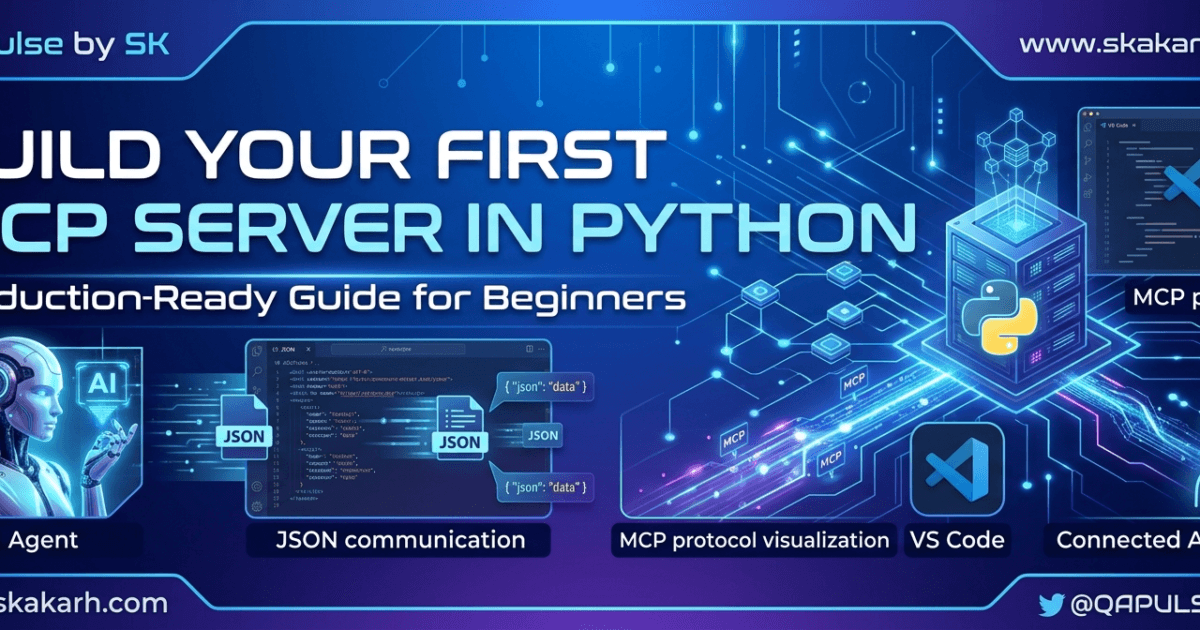
Build MCP Server in Python is one of the first practical skills every AI engineer should learn when working with the Model Context Protocol (MCP). During the first five days of this series, we explored what MCP is, why it matters, how it compares with REST APIs and plugins, how its architecture works, and how to prepare a professional MCP development environment. Today, we’ll take the next logical step—building your very first MCP server in Python.
Most tutorials stop after showing a few lines of code that print “Hello World.” While that may prove the SDK is installed correctly, it doesn’t teach you how an MCP server actually works or how professional engineers design one that can grow into a production-ready service.
This article follows a different philosophy.
Instead of simply copying code, you’ll understand why each component exists, how the MCP runtime communicates with AI clients, and why the architectural decisions you make today will affect every MCP application you build in the future.
By the end of this lesson, you won’t just have a running server—you’ll understand the engineering principles behind it.
What You’ll Build While You Build MCP Server in Python
Today’s goal is intentionally modest.
We’re not building a complex AI assistant yet.
Instead, we’re creating the smallest possible MCP server that still follows professional engineering practices.
By the end of Day 6, you’ll have:
- A working Python MCP server
- Your first registered MCP tool
- A clear understanding of the server lifecycle
- Knowledge of how AI clients discover MCP capabilities
- A reusable foundation for future projects
Everything we build during the remaining days of this series will extend this server.
Think of today’s project as laying the concrete foundation before constructing a skyscraper.
Before We Write Code
One of the biggest misconceptions about software engineering is that programming starts with typing.
Experienced engineers know it starts with design.
Before opening server.py, ask yourself a simple question:
What is the responsibility of an MCP server?
Many newcomers answer:
“It executes tools.”
That answer is only partially correct.
An MCP server is responsible for much more.
It must:
- Expose capabilities
- Register tools
- Describe resources
- Manage prompts
- Validate requests
- Return structured responses
- Handle errors gracefully
- Communicate using the MCP protocol
In other words, the server acts as a bridge between an AI model and external capabilities.
Understanding this responsibility is far more valuable than memorizing SDK functions.
Revisiting the MCP Architecture
Before writing our first server, let’s briefly revisit the architecture from Day 4.
                    User
                      │
                      ▼
             AI Client (Claude/Desktop)
                      │
        Model Context Protocol (MCP)
                      │
              -------------------
              │                 │
              ▼                 ▼
          MCP Server      MCP Server
              │                 │
      -----------        ---------------
      │    │    │        │     │      │
     Tool Resource Prompt Database API
Notice something important.
The AI model never calls your Python functions directly.
Instead, it communicates through the MCP protocol.
Your server listens for requests, interprets them, executes the appropriate functionality, and sends structured responses back to the client.
This separation is what makes MCP so powerful.
The AI doesn’t need to know how your application is implemented.
It only needs to understand the capabilities your server exposes.
Choosing the Right Starting Point
Professional software projects often fail because developers try to solve too many problems at once.
When learning MCP, resist the temptation to build:
- Database integrations
- Authentication systems
- AI workflows
- Multiple tools
- Cloud deployments
Start small.
Understand the lifecycle.
Master the fundamentals.
Then expand.
Today’s server contains only one tool.
That isn’t a limitation.
It’s intentional.
Learning one concept thoroughly is far more valuable than superficially understanding ten.
Creating the Project
If you completed Day 5, your project structure should already resemble this:
my-first-mcp/
│
├── .venv/
├── src/
│     └── server.py
├── tests/
├── docs/
├── README.md
├── requirements.txt
└── .env
If your structure differs slightly, that’s perfectly fine.
The important principle is keeping your project organized from the beginning.
As your server grows, good organization becomes increasingly valuable.
Installing the Required Package
Activate your virtual environment before installing dependencies.
pip install mcp
If you’ve already completed Day 5, this command should report that the package is already installed.
Verify the installation:
pip show mcp
Checking package versions may seem like a minor detail, but experienced engineers verify their environment before debugging application code.
Many “mysterious” bugs turn out to be version mismatches rather than programming mistakes.
Build MCP Server in Python: Writing Your First Server
Now comes the exciting part.
Create a file named:
src/server.py
We’ll begin with the simplest possible implementation.
from mcp.server.fastmcp import FastMCP

app = FastMCP("HelloMCP")
At first glance, this doesn’t seem very impressive.
In reality, something important has happened.
Let’s examine each line.
Importing FastMCP
from mcp.server.fastmcp import FastMCP
This imports the high-level server interface provided by the Python SDK.
Think of FastMCP as the framework responsible for handling much of the protocol complexity on your behalf.
Instead of manually implementing protocol messages, request parsing, capability negotiation, and communication handling, FastMCP provides sensible defaults that let you focus on building useful functionality.
That’s one reason it serves as an excellent starting point for beginners.
Creating the Server Instance
Next, instantiate the server.
app = FastMCP("HelloMCP")
This line creates your MCP server.
The name isn’t just cosmetic.
It identifies your server to MCP clients and provides context during debugging and inspection.
As your applications become more sophisticated, meaningful server names make troubleshooting considerably easier.
Imagine connecting five different MCP servers to the same AI assistant.
A descriptive server name suddenly becomes much more important.
What Happens Internally?
Although only two lines of code have been written, quite a bit happens behind the scenes.
The SDK begins preparing:
- Protocol handlers
- Capability registration
- Request routing
- Session management
- Tool discovery
- Resource registration
- Prompt management
You don’t need to understand every internal implementation today.
But it’s useful to appreciate that your server is already preparing to participate in the Model Context Protocol.
This illustrates an important engineering principle.
Good frameworks hide complexity without hiding architecture.
Understanding that distinction will help you become a stronger developer.
Why Frameworks Matter
Some developers believe using frameworks prevents learning.
In reality, frameworks free you from solving repetitive infrastructure problems so you can focus on business logic.
Imagine manually implementing:
- JSON-RPC communication
- Session handling
- Protocol validation
- Error serialization
- Capability negotiation
You could certainly do it.
But should you?
Probably not.
Professional engineering is about solving the right problems—not reinventing solved ones.
FastMCP allows us to concentrate on creating valuable tools rather than implementing protocol plumbing.
Understanding the MCP Server Lifecycle
Before we register our first tool in Part 1B, it’s important to understand the lifecycle every MCP server follows.
At a high level, the process looks like this:
- The server starts and initializes its runtime.
- It registers the capabilities it wants to expose.
- An MCP client connects and performs capability discovery.
- The client invokes a tool or requests a resource.
- The server executes the requested functionality.
- The server returns a structured response.
- The session remains available for additional interactions.
This lifecycle may appear simple, but it’s one of the defining characteristics of MCP.
Unlike traditional APIs, where clients call fixed endpoints, MCP enables AI systems to discover capabilities dynamically. That flexibility makes it much easier to extend your server over time without redesigning the client.
Build MCP Server in Python by Registering Your First Tool
One of the defining features of the Model Context Protocol is its ability to expose tools that AI clients can discover and invoke dynamically.
A tool represents a specific capability that your server offers.
Examples include:
- Performing calculations
- Querying a database
- Reading files
- Calling external APIs
- Running automation scripts
- Executing business logic
For our first example, we’ll keep things intentionally simple.
from mcp.server.fastmcp import FastMCP

app = FastMCP("HelloMCP")

@app.tool()
def greet(name: str) -> str:
    """
    Return a welcome message.
    """
    return f"Hello {name}! Welcome to the MCP Zero to Hero series."
At first glance, this resembles a normal Python function.
However, one line changes everything:
@app.tool()
This decorator tells the MCP runtime:
“Expose this function as a discoverable capability.”
From that moment onward, compatible MCP clients can discover and invoke the tool without knowing anything about your internal implementation.
Why Decorators Are Used
If you’re new to Python, decorators may appear confusing.
Think of a decorator as attaching additional behavior to an existing function.
Without changing the function itself, the decorator informs the MCP framework:
- Register this function.
- Generate its schema.
- Make it discoverable.
- Validate parameters.
- Handle invocation.
Instead of writing hundreds of lines of registration logic manually, the framework performs the work automatically.
That’s one of the reasons modern Python frameworks rely heavily on decorators.
Understanding Automatic Tool Discovery
One of the biggest differences between MCP and traditional REST APIs is how capabilities are exposed.
With REST APIs, clients must already know:
- Endpoint URLs
- HTTP methods
- Request formats
- Response structures
If documentation becomes outdated, integration becomes difficult.
MCP takes a different approach.
The server advertises its available tools.
Clients discover them dynamically.
Imagine connecting your server to an AI assistant.
Rather than asking:
“Which endpoints exist?”
The assistant asks:
“What can you do?”
Your server responds with a structured list of capabilities, including parameter information and descriptions.
This dynamic discovery model is one of MCP’s greatest strengths.
Tool Signatures Matter
Notice our function accepts:
name: str
This type annotation isn’t just for readability.
The MCP SDK uses Python type hints to help generate metadata about your tool.
As your applications grow, descriptive parameter names and accurate types improve:
- AI reasoning
- validation
- documentation
- maintainability
For example, compare these two functions.
Poor example:
def func(x):
Better example:
def calculate_discount(price: float, customer_type: str):
The second version communicates intent immediately.
AI systems benefit from descriptive interfaces just as human developers do.
Adding Documentation to Your Tools
Professional developers document their code because they expect it to be used by others.
The same principle applies to MCP tools.
Every tool should include a meaningful docstring.
@app.tool()
def greet(name: str) -> str:
    """
    Return a personalized welcome message.
    """
This description becomes valuable metadata for AI clients.
Rather than guessing the purpose of a tool, an AI model can understand its intended behavior directly from the description.
Clear documentation improves both developer experience and AI usability.
Build MCP Server in Python and Run It Successfully
With the server and tool defined, it’s time to run the application.
A typical entry point might look like this:
from mcp.server.fastmcp import FastMCP

app = FastMCP("HelloMCP")

@app.tool()
def greet(name: str) -> str:
    """Return a welcome message."""
    return f"Hello {name}"

if __name__ == "__main__":
    app.run()
Execute the server:
python src/server.py
If everything is configured correctly, your server will start and begin listening for MCP client connections.
Although you may not see dramatic output in the terminal, an important milestone has been reached.
You have built a functioning MCP server.
How an AI Client Uses Your Tool
Let’s follow a typical interaction.
- The AI client connects.
- The client discovers available tools.
- The
greettool appears. - The AI determines it should call the tool.
- The client’s request is sent to your server.
- Your Python function executes.
- The result is returned to the AI.
Notice something important.
The AI never imports your Python module.
It never calls your function directly.
Communication always occurs through the MCP protocol.
This separation makes MCP applications portable, scalable, and language-independent.
Common Mistakes New Developers Make
Every technology has patterns that beginners commonly struggle with.
Let’s address a few before they become habits.
Forgetting the Decorator
Without @app.tool(), the function exists only inside your Python program.
The MCP runtime won’t expose it.
Writing Generic Function Names
Names like:
run()test()execute()
provide little context.
Prefer descriptive names that explain the capability.
Returning Inconsistent Data
A tool should produce predictable outputs.
Avoid mixing strings, dictionaries, and custom objects without a clear design.
Consistency makes your server easier to consume.
Ignoring Error Handling
Even simple tools should anticipate invalid input.
A robust MCP server validates requests rather than assuming perfect data.
We’ll explore structured error handling in a future lesson.
Engineering Best Practices from Day One
Professional software engineering is built on habits, not heroics.
As you continue building MCP servers, adopt these principles early:
- Keep each tool focused on a single responsibility.
- Use descriptive names for tools and parameters.
- Write meaningful docstrings.
- Separate business logic from protocol logic.
- Avoid hardcoding configuration values.
- Organize tools into logical modules as the project grows.
- Write tests for every new capability.
These habits may seem excessive for a small project, but they become invaluable as complexity increases.
What QA Engineers Can Learn from This Lesson
If you’re a QA engineer or SDET, today’s lesson should feel surprisingly familiar.
An MCP tool resembles a reusable automation keyword or helper function.
Just as well-designed test frameworks expose clean, reusable actions, well-designed MCP servers expose clean, reusable AI capabilities.
Consider the similarities:
| Automation Framework | MCP Server |
|---|---|
| Test keyword | MCP Tool |
| Test data | Tool parameters |
| Test execution | Tool invocation |
| Framework library | MCP SDK |
| Test report | Structured response |
This perspective helps QA professionals transition naturally into AI engineering.
Rather than viewing MCP as an entirely new discipline, think of it as applying familiar software engineering principles to AI-powered systems.
What You’ve Learned Today
By completing Day 6, you’ve taken an important step beyond theory.
You now understand:
- How to initialize an MCP server.
- Why
FastMCPsimplifies protocol implementation. - How tool registration works.
- Why decorators are central to the Python SDK.
- How AI clients discover capabilities dynamically.
- The lifecycle of an MCP request.
- Professional practices for designing maintainable MCP servers.
Perhaps more importantly, you’ve learned that building an MCP server isn’t about writing large amounts of code.
It’s about exposing capabilities through a well-defined protocol that AI systems can understand and use safely.
Looking Ahead to Day 7
Today we focused on tools—the executable capabilities of an MCP server.
Tomorrow, we’ll explore another essential building block:
Understanding MCP Resources
You’ll learn:
- What resources are
- How they differ from tools
- Static versus dynamic resources
- URI-based resource access
- When to choose a resource instead of a tool
- Real-world enterprise use cases
By the end of Day 7, your MCP server will evolve from executing functions to providing structured knowledge that AI assistants can access intelligently.
As the series progresses, each lesson builds on the previous one, transforming the simple server you’ve created today into a production-ready MCP application capable of supporting real AI agents and enterprise workflows.
Internal Links
- How Postman’s AI Evolution Is Turning API Collections into Autonomous Testing Systems
- Pytest AI in 2026: The Rise of Autonomous, Self-Healing Test Runners
- How I Used GPT-5 to Auto-Generate Pytest API Tests from a Swagger File
External Authority Links
- Model Context Protocol: https://modelcontextprotocol.io
- Python SDK: https://github.com/modelcontextprotocol/python-sdk
- TypeScript SDK: https://github.com/modelcontextprotocol/typescript-sdk
- Python: https://www.python.org
- Visual Studio Code: https://code.visualstudio.com
- Git: https://git-scm.com
Frequently Asked Questions (FAQ)
How do I Build MCP Server in Python?
An MCP server in Python is an application built using the Model Context Protocol SDK that exposes tools, resources, and prompts to AI clients such as Claude Desktop and other MCP-compatible applications.
Why should I build an MCP server in Python?
Python offers excellent readability, a mature AI ecosystem, official MCP SDK support, and extensive automation libraries, making it one of the best languages for learning MCP.
What is FastMCP?
FastMCP is a high-level framework within the official Python SDK that simplifies building MCP servers by handling protocol communication, tool registration, and request processing.
How do AI clients discover MCP tools?
Instead of calling fixed REST endpoints, MCP clients connect to the server and dynamically discover available tools, resources, and prompts through the Model Context Protocol.
Can QA Engineers build MCP servers?
Yes. QA engineers and SDETs can use MCP servers to expose automation frameworks, API testing utilities, Playwright scripts, Selenium workflows, Jira integrations, and AI-assisted testing capabilities.
Is Python the only language supported?
No. The official MCP ecosystem supports multiple languages, including Python and TypeScript. Python is recommended for beginners because of its simplicity and extensive AI tooling ecosystem.
Key Takeaways
✔ You built your first MCP server in Python.
✔ You understand the role of FastMCP.
✔ You learned how tools are registered.
✔ You explored the MCP server lifecycle.
✔ You discovered how AI clients communicate with servers.
✔ You learned professional engineering practices instead of simply copying code.
Call To Action
Continue following the MCP Zero to Hero series on QAPulse by SK at www.skakarh.com, where every lesson builds toward designing, developing, testing, securing, and deploying production-ready MCP applications. Whether you’re a QA engineer, SDET, AI engineer, or software developer, this series will help you master MCP with practical, enterprise-focused guidance.