QA
QA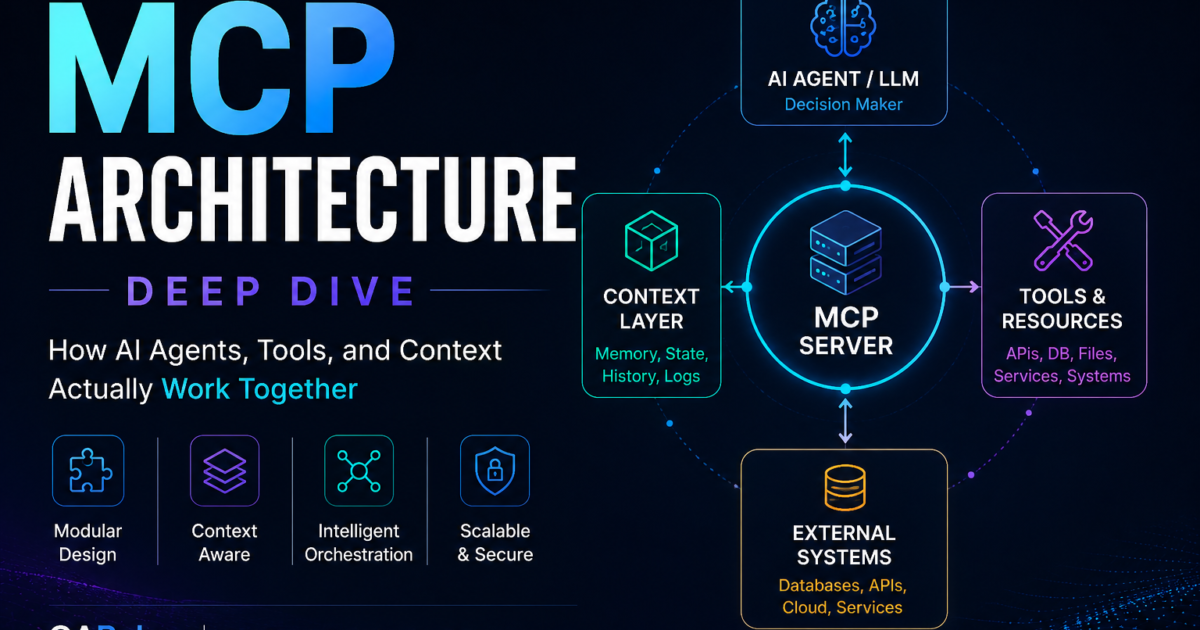
MCP architecture becomes much easier to understand when you stop thinking of Model Context Protocol as simply “a way to connect an AI to tools.” In a production system, MCP defines a layered interaction between an AI host, MCP clients, MCP servers, transports, protocol capabilities, tools, resources, prompts, authorization, and the underlying business systems that actually perform the work.
That distinction matters because many MCP tutorials jump directly to writing a server and registering a tool without explaining what happens around that tool.
If you understand the architecture, you can reason about much larger systems: multiple MCP servers, remote deployments, authentication, horizontal scaling, tool discovery, resource access, long-running tasks, AI-assisted testing, database integrations, CI/CD automation, and enterprise governance.
The official MCP TypeScript SDK describes MCP as an open standard connecting AI applications to systems where data and tools live. Its architecture separates the AI application from the capabilities exposed by servers, with servers exposing tools, resources, and prompts.
The current MCP specification also matters for anyone learning the architecture today. The July 28, 2026 specification moved the protocol core toward a stateless request/response model, added multi-round-trip requests, header-based routing, cacheable list results, authorization hardening, extensions, and a formal deprecation policy.
So this is not merely a beginner diagram.
It is an architectural deep dive into how MCP components fit together, why each component exists, how a request travels through the system, where security belongs, how local and remote deployments differ, and how you should design MCP systems that can survive beyond a demo.
What Is MCP Architecture?
At its simplest, MCP architecture defines how an AI application communicates with external capabilities through the Model Context Protocol.
A useful high-level model is:
                    USER
                      |
                      v
               +-------------+
               |  AI HOST    |
               |             |
               | Model + UI  |
               +------+------+
                      |
                 MCP Client
                      |
                      | MCP
                      v
               +-------------+
               | MCP SERVER  |
               +------+------+
                      |
          +-----------+-----------+
          |           |           |
          v           v           v
       Tools      Resources    Prompts
          |           |           |
          +-----------+-----------+
                      |
                      v
             External Systems
          /        |        \
       API       DB       Files
This diagram contains almost everything you need to understand the foundation.
But there is an important detail:
The MCP server is not the AI model.
The model typically lives inside the AI host or application.
The MCP server exposes capabilities that the host can use.
The client provides the connection between the host and a particular MCP server.
This separation creates a clean architecture.
The official SDK documentation similarly distinguishes servers, clients, tools, resources, prompts, and transports rather than treating MCP as one monolithic component.
Before writing code, remember this mental model:
Host
  |
  +-- Client A ---> MCP Server A ---> Database
  |
  +-- Client B ---> MCP Server B ---> GitHub
  |
  +-- Client C ---> MCP Server C ---> Testing Platform
An AI host can work with multiple MCP servers.
That is one of the reasons the architecture becomes powerful for agentic applications.
The Core Components of MCP Architecture
A production implementation can contain many details, but the conceptual foundation can be divided into these components:
| Component | Main responsibility |
|---|---|
| AI Host | Runs the AI application and coordinates interactions |
| MCP Client | Maintains the protocol connection to an MCP server |
| MCP Server | Exposes capabilities to the client |
| Transport | Carries protocol messages |
| Tools | Allow actions or computation |
| Resources | Expose data and content |
| Prompts | Provide reusable prompt templates |
| Authorization | Controls access to protected capabilities |
| External systems | Databases, APIs, files, services, infrastructure |
| Model | Reasons about user requests and available capabilities |
The most common architectural mistake is treating the server as the whole system.
It is not.
A better representation is:
                   MCP SYSTEM
                       |
       +---------------+---------------+
       |               |               |
      Host           Client          Server
       |                               |
      Model                            |
       |                    +----------+----------+
       |                    |          |          |
       |                  Tools    Resources   Prompts
       |                    |          |          |
       +--------------------+----------+----------+
                            |
                     External Systems
Once these boundaries are clear, the rest of the protocol becomes much easier to reason about.
Host: The Application That Owns the AI Experience
The host is the application in which the AI interaction occurs.
It might be:
- an AI assistant
- an IDE
- a coding agent
- an enterprise AI application
- a desktop AI application
- an internal developer platform
- a custom agent framework
The host typically owns the model interaction.
That means it can:
- receive the user’s request,
- determine what context is available,
- discover MCP capabilities,
- make relevant tools available to the model,
- execute MCP calls,
- return results to the model,
- continue the reasoning loop,
- present the final response to the user.
Conceptually:
User
 |
 | "Analyze today's failed tests."
 v
AI Host
 |
 +---- Model reasoning
 |
 +---- MCP client
 |
 +---- Tool execution
 |
 +---- Result handling
 |
 v
Final response
The host is therefore the orchestration boundary.
This is a critical architectural distinction because the MCP server should not be designed as if it controls the entire agent.
The server exposes capabilities.
The host decides how those capabilities participate in the AI interaction.
Client: The MCP Connection Boundary
The client is the component that communicates with an MCP server.
If an AI host connects to three servers, conceptually it may maintain three client connections:
AI Host
 |
 +---- MCP Client ---> Testing MCP Server
 |
 +---- MCP Client ---> GitHub MCP Server
 |
 +---- MCP Client ---> Database MCP Server
The client understands the MCP protocol.
It handles operations such as:
- initialization or protocol negotiation where applicable,
- capability discovery,
- listing tools,
- listing resources,
- listing prompts,
- invoking tools,
- reading resources,
- retrieving prompts,
- handling protocol messages,
- managing transport communication.
The current 2026 specification changes some of these lifecycle assumptions significantly because the core has moved toward stateless request/response behavior rather than relying on a continuously stateful session model.
That means developers learning older MCP tutorials should be careful.
A diagram written for an earlier protocol version may still explain the conceptual relationship between host, client, and server, but transport and lifecycle details can differ.
Server: The Capability Provider
The MCP server is where the capabilities are exposed.
A server might expose:
Tools
  run_test
  create_bug
  search_logs

Resources
  test://results/latest
  test://suite/checkout

Prompts
  analyze_failure
  generate_test_plan
The server can connect those capabilities to actual infrastructure.
For example:
MCP Server
 |
 +---- run_test
 |       |
 |       +---- Playwright
 |
 +---- create_bug
 |       |
 |       +---- Jira REST API
 |
 +---- search_logs
         |
         +---- Elasticsearch
The server therefore acts as an adapter between MCP and your existing systems.
The Python SDK documentation provides a concrete example of registering a tool, resource, and prompt in an MCP server, demonstrating exactly this separation of capabilities.
A useful design principle is:
Keep the MCP server responsible for exposing a clean capability contract, while keeping business logic in appropriately separated services where practical.
For a small application, everything may live in one process.
For an enterprise platform, you may have:
MCP Server
 |
 +---- Service Layer
 |       |
 |       +---- Domain Logic
 |
 +---- API Clients
 |
 +---- Database Layer
 |
 +---- Authorization Layer
That makes the architecture easier to test and maintain.
Tools: The Action Layer
Tools are usually the most visible part of MCP.
They allow a client or model-driven application to ask the server to perform an operation.
Examples include:
search_users
create_ticket
run_test
execute_query
send_notification
deploy_application
A tool normally has metadata describing what it does and what input it expects.
A simplified conceptual definition might look like:
{
  "name": "run_test",
  "description": "Run a named automated test suite",
  "inputSchema": {
    "type": "object",
    "properties": {
      "suite": {
        "type": "string"
      }
    },
    "required": ["suite"]
  }
}
The schema is important.
An AI model should not have to guess:
run_test("maybe checkout")
It should receive structured information about the expected input.
The current SDK examples also support output schemas and structured content, which can help consumers handle tool results more reliably than parsing arbitrary natural-language text.
A good tool therefore has:
Name
Description
Input schema
Output schema where useful
Authorization policy
Validation
Business logic
Error handling
Observability
Bad tool design
execute_everything
This is dangerous and difficult for a model to use reliably.
Better tool design
run_checkout_tests
get_test_results
get_test_logs
create_test_bug
Smaller, semantically meaningful tools are easier to reason about, authorize, observe, and test.
Resources: The Data Layer
Resources are different from tools.
A resource generally exposes data or content that the client can read.
The official MCP SDK documentation describes resources as data that servers make available to clients, including files, database records, API responses, and live system data.
Examples:
file:///workspace/config.yaml

customer://123

test://runs/2026-08-20

schema://orders

logs://checkout/latest
The architectural difference can be summarized as:
Tool
 |
 +---- "Do something"

Resource
 |
 +---- "Give me something"
For example:
Tool:
run_test("checkout")

Resource:
test://runs/latest
The first performs an action.
The second exposes information.
This distinction becomes extremely useful when designing permissions.
You might allow an AI agent to read:
test://runs/latest
without giving it permission to:
delete_test_run
That creates a more controlled security boundary.
Prompts: The Reusable Interaction Layer
Prompts are another MCP primitive.
They can represent reusable prompt templates.
For example:
analyze_test_failure
generate_api_test
review_pull_request
summarize_incident
A prompt might accept parameters:
Prompt:
analyze_test_failure

Inputs:
test_name
failure_log
environment
The server can provide a reusable interaction template rather than requiring every host or user to construct the same prompt manually.
The SDK documentation lists prompts alongside tools and resources as server-side MCP capabilities.
This gives us a useful three-layer mental model:
Tools
  = Actions

Resources
  = Data

Prompts
  = Reusable interaction templates
That distinction is one of the most important fundamentals in MCP architecture.
How an MCP Request Actually Flows
Now we can follow a realistic request.
Suppose a QA engineer asks:
“Run the checkout regression suite and summarize the failures.”
The flow may look like:
1. User
      |
      v
2. AI Host
      |
      v
3. Model determines required capability
      |
      v
4. MCP Client
      |
      v
5. MCP Server
      |
      v
6. run_checkout_tests
      |
      v
7. Test Automation Platform
      |
      v
8. Results
      |
      v
9. MCP Server
      |
      v
10. MCP Client
      |
      v
11. AI Host
      |
      v
12. Model analyzes results
      |
      v
13. User receives summary
The important thing is that the model is not necessarily directly connecting to the testing platform.
The MCP layer provides the controlled capability boundary.
Discovery Before Execution
A robust client may first discover what the server supports.
Conceptually:
Client
 |
 +---- What capabilities do you provide?
 |
 v
Server
 |
 +---- tools
 +---- resources
 +---- prompts
The client can then make appropriate capabilities available.
The current MCP specification also introduced cache hints for list responses, including tools/list, prompts/list, resources/list, and resources/read. This allows clients to make more intelligent caching decisions and reduces unnecessary repeated discovery work.
This becomes increasingly important when a server exposes hundreds or thousands of capabilities.
Imagine:
1 MCP Server
   |
   +---- 500 tools
   +---- 1,000 resources
   +---- 100 prompts
Repeatedly transferring every definition can become wasteful.
Caching and deterministic list results become architectural concerns rather than minor implementation details.
Transport: How Messages Travel
Another important layer is transport.
Conceptually:
MCP Client
     |
     | Transport
     v
MCP Server
The transport carries protocol messages between the two components.
Current SDK documentation identifies:
- stdio
- Streamable HTTP
- SSE for backwards compatibility
as transport options supported by the ecosystem.
Stdio
Stdio is particularly useful for local integrations.
AI Host
   |
   | spawn process
   v
MCP Server Process
The client and server communicate through standard input/output.
This is useful for:
- local developer tools,
- filesystem integrations,
- local scripts,
- desktop applications,
- development environments.
Streamable HTTP
Remote MCP servers can operate over HTTP.
AI Host
   |
   | HTTPS
   v
Load Balancer
   |
   +---- MCP Server A
   |
   +---- MCP Server B
   |
   +---- MCP Server C
The July 2026 specification’s stateless core is particularly significant here because it allows requests to land on different instances behind ordinary round-robin load balancing without requiring the same session state on every server instance.
That is a major production architecture consideration.
Local MCP Architecture vs Remote MCP Architecture
These two designs should not be confused.
Local
+-------------------------------+
| Developer Machine             |
|                               |
| AI Host                       |
|   |                           |
|   +-- MCP Client              |
|           |                   |
|           v                   |
|      MCP Server Process       |
|           |                   |
|           v                   |
|       Local Files             |
+-------------------------------+
This is simple.
It can be excellent for developer tooling.
Remote
AI Host
   |
   | HTTPS
   v
API Gateway / Load Balancer
   |
   +---------+---------+
   |         |         |
   v         v         v
MCP-1      MCP-2      MCP-3
   |         |         |
   +---------+---------+
             |
             v
       Enterprise APIs
The remote model introduces:
- authentication,
- authorization,
- TLS,
- scaling,
- observability,
- rate limiting,
- network policy,
- load balancing,
- secret management.
That is why production MCP architecture is significantly more than registering a Python function.
Stateless MCP Changes the Scaling Model
The 2026-07-28 specification is particularly important for architects.
Earlier MCP deployments often required developers to think about persistent session state and sticky routing.
The current specification describes a stateless protocol core in which requests can be self-describing, allowing them to reach different instances behind ordinary round-robin load balancing.
Conceptually:
                  Load Balancer
                       |
          +------------+------------+
          |            |            |
          v            v            v
      MCP-01        MCP-02        MCP-03
A request does not necessarily need to return to MCP-01 simply because the previous request reached MCP-01.
This matters for:
Horizontal scaling
Autoscaling
Container orchestration
Kubernetes
Cloud deployment
Failure recovery
Rolling upgrades
The architectural lesson is powerful:
AI integration infrastructure should be designed like production distributed infrastructure, not like a single developer script.
Header-Based Routing
The July 2026 specification also introduced Mcp-Method and Mcp-Name HTTP headers so gateways can route and authorize based on protocol information without needing to inspect JSON bodies.
Conceptually:
Request
 |
 +-- Mcp-Method: tools/call
 |
 +-- Mcp-Name: run_test
 |
 v
Gateway
 |
 +---- Authorization
 +---- Rate limit
 +---- Routing
 +---- Audit
 |
 v
MCP Server
This has practical implications for enterprise infrastructure.
A gateway can potentially apply policies such as:
run_test
    -> allowed

create_bug
    -> allowed

delete_production_data
    -> blocked
without requiring the gateway to understand every application’s internal business logic.
That is a useful separation of responsibilities.
MCP Architecture and Security Boundaries
Security should be designed into the architecture from the beginning.
A simplified remote deployment might look like:
User
 |
 v
AI Host
 |
 v
MCP Client
 |
 | HTTPS
 v
API Gateway
 |
 +---- Authentication
 +---- Authorization
 +---- Rate Limiting
 +---- Audit
 |
 v
MCP Server
 |
 +---- Tool Authorization
 +---- Input Validation
 +---- Business Rules
 |
 v
Backend System
Do not rely on the model to enforce security.
For example, never assume:
The model understands that this operation is dangerous.
Instead enforce:
User identity
       +
Application identity
       +
Tool permission
       +
Business authorization
       +
Resource-level authorization
The latest MCP specification includes authorization hardening such as issuer validation, credential isolation, and movement away from Dynamic Client Registration toward Client ID Metadata Documents.
These changes are particularly relevant for remote deployments.
Tool Authorization Should Be Granular
Suppose your server exposes:
search_logs
read_test_results
create_bug
deploy_application
delete_environment
Treating all five tools as one permission is poor security design.
Instead:
QA_READ
 |
 +---- search_logs
 +---- read_test_results

QA_WRITE
 |
 +---- create_bug

DEPLOY
 |
 +---- deploy_application

ADMIN
 |
 +---- delete_environment
Now your authorization model aligns with capability risk.
This is especially important for AI agents because a model may choose a tool based on reasoning.
The authorization layer should remain deterministic.
MCP Architecture and the AI Reasoning Loop
The model is where reasoning occurs.
The MCP server is where capabilities live.
The host is where these components are coordinated.
A simplified loop is:
User Request
     |
     v
   Model
     |
     | Need external information?
     v
 MCP Tool
     |
     v
Tool Result
     |
     v
   Model
     |
     | Need another operation?
     v
 MCP Tool
     |
     v
Final Answer
For example:
User:
"Why did checkout tests fail?"

Model:
"I need the latest test results."

       |
       v

get_test_results()

       |
       v

Model:
"I found three failures.
I need application logs."

       |
       v

get_application_logs()

       |
       v

Model:
"The failures correlate with a 500 response."

       |
       v

Final explanation
This is where MCP becomes useful for agentic workflows.
The protocol does not replace the reasoning engine.
It provides structured access to capabilities the reasoning engine can use.
Tools vs Resources: A Practical Design Test
When designing a capability, ask:
“Am I asking the system to do something, or am I asking it to provide something?”
If it performs an action:
run_test
create_bug
send_email
restart_service
consider a tool.
If it provides information:
test://latest
logs://service
schema://customer
consider a resource.
This distinction can simplify your system.
Example
Bad design:
get_and_modify_customer
Better:
customer://123
for customer information, and:
update_customer
for mutation.
That makes permissions and intent clearer.
A Complete Testing-Oriented MCP Architecture
For SDETs, imagine this production architecture:
                     QA ENGINEER
                          |
                          v
                    AI TEST AGENT
                          |
                    +-----+-----+
                    | MCP Client |
                    +-----+-----+
                          |
                       HTTPS
                          |
                    +-----v-----+
                    | MCP Server |
                    +-----+-----+
                          |
       +------------------+------------------+
       |                  |                  |
       v                  v                  v
   Test Tools         Log Tools         Defect Tools
       |                  |                  |
       v                  v                  v
   Playwright         ELK/Logs           Jira API
       |
       v
      CI/CD
The agent could have tools such as:
run_regression
get_test_results
get_browser_trace
search_application_logs
create_bug
attach_test_artifacts
The underlying systems remain independent.
This is a major architectural benefit.
You do not need to rewrite Playwright.
You do not need to rewrite Jira.
You do not need to rewrite your CI platform.
You expose carefully designed capabilities.
MCP Server Design: Thin Adapter or Business Layer?
There are two common approaches.
Approach A: Thin MCP adapter
MCP Tool
   |
   v
Existing REST API
   |
   v
Business Service
This is often the safest enterprise approach.
Your MCP server translates AI-friendly tool calls into existing service calls.
Approach B: MCP server contains business logic
MCP Tool
   |
   +---- Business Logic
   |
   +---- Database
This may be appropriate for smaller systems.
But as complexity grows, business logic can become tightly coupled to AI integration.
A useful strategy is:
MCP Layer
   |
   +---- Validation
   +---- Translation
   +---- Authorization
   |
   v
Domain Services
This keeps your AI interface separate from core business rules.
Error Handling Is Part of MCP Architecture
A production MCP server should never assume every tool succeeds.
Consider:
run_test
Possible outcomes:
SUCCESS
TEST_FAILURE
TIMEOUT
INVALID_INPUT
UNAUTHORIZED
SYSTEM_UNAVAILABLE
RATE_LIMITED
Do not return:
"Something went wrong."
Instead provide structured information where appropriate:
{
  "status": "TIMEOUT",
  "test_suite": "checkout",
  "duration_seconds": 300,
  "retryable": true
}
This gives the host and model useful information.
The model can then decide:
Retry?
Ask user?
Investigate?
Report failure?
But the server should still control retry safety.
Do not allow the model to blindly repeat destructive operations.
Observability in MCP Architecture
An MCP system should be observable like any other production service.
At minimum, capture:
Request ID
User identity
Client identity
Server identity
Tool name
Resource URI
Execution duration
Status
Error
Authorization decision
Backend dependency
A useful trace might look like:
trace_id=abc123

AI Host
  |
  +-- MCP tools/call
        |
        +-- run_test
              |
              +-- Playwright
              |
              +-- CI
              |
              +-- artifact storage
Now when someone reports:
“The AI said the checkout tests failed.”
you can investigate what actually happened.
This is essential for enterprise trust.
Caching and Capability Catalogs
Large MCP systems may expose many capabilities.
Suppose:
Tools:       300
Resources:   1,500
Prompts:     100
A client should not unnecessarily rediscover everything on every interaction.
The 2026 specification added cache hints such as ttlMs and cacheScope to list and resource responses.
A conceptual architecture becomes:
MCP Server
   |
   v
Capability Catalog
   |
   +---- tools
   +---- resources
   +---- prompts
   |
   v
Client Cache
This reduces repeated network work and can improve startup and interaction performance.
MCP Apps Add Another Architectural Layer
The MCP ecosystem is also expanding beyond purely textual tool interactions.
MCP Apps allow servers to associate tools with UI resources. The host can render those resources in a sandboxed iframe, while the UI can communicate with the host and server.
Conceptually:
                 MCP Server
                     |
              +------+------+
              |             |
            Tool        UI Resource
              |             |
              +------+------+
                     |
                     v
                    Host
                     |
                     v
                 User Interface
This matters because some tasks are difficult to understand from plain text.
Imagine a database-analysis tool returning:
10,000 rows
A model could summarize them.
But a user might want:
- filtering,
- sorting,
- charts,
- drill-down,
- pagination.
An MCP application can provide a richer interactive interface while still using MCP capabilities underneath. The MCP Apps documentation explicitly describes this separation between tool results intended for model context and structured content intended for UI rendering.
That means modern MCP architecture can evolve beyond:
AI -> Tool -> Text
toward:
AI
 |
 +---- Tool
 |
 +---- Resource
 |
 +---- Interactive UI
 |
 v
User
MCP Architecture Compared With Traditional API Architecture
The easiest way to understand the difference is to compare the request path.
Traditional API
User
 |
 v
Application
 |
 v
REST API
 |
 v
Database
The application determines the operation.
AI-enabled MCP
User
 |
 v
AI Host
 |
 v
Model
 |
 v
MCP Client
 |
 v
MCP Server
 |
 v
Business Service
 |
 v
Database
The model can reason about which capability to invoke, while the server remains responsible for actual execution and backend access.
That creates a new architectural boundary.
| Layer | Traditional application | AI-enabled system |
|---|---|---|
| User interface | App | AI host |
| Decision maker | Application code | Model + application |
| Capability interface | API | MCP |
| Business service | Backend | Backend |
| Data | Database | Database |
| Authorization | API/service | Host + MCP + service |
| Execution | Deterministic code | Tool invocation + deterministic server logic |
This is why developers should not think of MCP as merely another HTTP framework.
Common MCP Architecture Mistakes
Mistake 1: One giant MCP server
MCP Server
 |
 +---- 200 unrelated tools
This can become difficult to secure and operate.
Prefer logical boundaries:
Testing MCP
GitHub MCP
Database MCP
Cloud MCP
Observability MCP
Mistake 2: Exposing raw database access
Giving an AI agent unrestricted SQL execution is risky.
Instead consider:
get_customer
search_orders
get_test_results
with controlled query behavior.
Mistake 3: Putting secrets in tool arguments
Avoid:
{
  "api_key": "SECRET"
}
Use server-side secret management and authenticated connections.
Mistake 4: Treating every tool as low risk
get_status and delete_environment are not equivalent.
Their authorization models should differ.
Mistake 5: Ignoring observability
AI-driven failures can be difficult to reproduce.
Record enough metadata to reconstruct the request path.
Mistake 6: Designing for a tutorial instead of production
A five-line server is excellent for learning.
It is not automatically a production architecture.
Production systems require:
Auth
Validation
Logging
Monitoring
Retries
Timeouts
Rate limits
Secrets
Testing
Deployment
Scaling
Governance
A Production-Ready MCP Architecture Checklist
Before deploying an MCP server, ask:
- Does every tool have a clear purpose?
- Are tool names semantically meaningful?
- Are input schemas strict?
- Are output structures predictable?
- Are resources separated from actions?
- Are high-risk tools protected?
- Is authentication implemented correctly?
- Is authorization granular?
- Are secrets stored outside tool definitions?
- Are tool calls logged?
- Are request IDs propagated?
- Are timeouts configured?
- Are retries safe?
- Are destructive operations protected by approval?
- Can the server scale horizontally?
- Is the transport appropriate for local or remote deployment?
- Are capability lists cacheable?
- Are backend failures translated into useful errors?
- Are tests covering every tool?
- Is the MCP server independently observable?
If several answers are “no,” the implementation is probably still a prototype.
A Practical Mental Model for Developers
You can remember MCP architecture using one simple sentence:
The host owns the AI experience, the client speaks MCP, the server exposes capabilities, tools perform actions, resources provide data, prompts provide reusable interaction templates, and backend systems perform the actual business work.
From there, remember the flow:
HOST
 |
CLIENT
 |
TRANSPORT
 |
SERVER
 |
+---- TOOLS
+---- RESOURCES
+---- PROMPTS
 |
BACKEND SYSTEMS
And remember the security boundary:
Identity
   |
Authorization
   |
MCP Capability
   |
Business Authorization
   |
Backend
This mental model is enough to understand most MCP implementations without memorizing every protocol message.
Conclusion
A strong understanding of MCP architecture changes the way you design AI integrations.
Instead of viewing MCP as a small SDK that lets an LLM call a Python function, you can see the complete system:
                         USER
                           |
                           v
                      AI HOST
                           |
                           v
                      AI MODEL
                           |
                           v
                      MCP CLIENT
                           |
                    MCP TRANSPORT
                           |
                           v
                      MCP SERVER
                           |
          +----------------+----------------+
          |                |                |
          v                v                v
        TOOLS          RESOURCES         PROMPTS
          |                |                |
          +----------------+----------------+
                           |
                           v
                 BUSINESS SERVICES
                           |
            +--------------+--------------+
            |              |              |
            v              v              v
           API             DB          SaaS
Each component has a distinct responsibility.
The host manages the AI experience.
The client manages MCP communication.
The server exposes capabilities.
Tools perform operations.
Resources expose information.
Prompts provide reusable interaction templates.
Transports move protocol messages.
Authorization controls access.
Backend systems remain responsible for actual business operations.
The latest specification makes this architecture even more relevant for production systems. The July 28, 2026 release introduced a stateless protocol core, request routing metadata, cacheable capability discovery, multi-round-trip requests, authorization hardening, extensions, and a formal deprecation model.
That means developers building MCP systems today should think beyond the local demo.
A local:
AI -> Python process -> function
is useful for learning.
A production:
AI Host
   |
MCP Client
   |
HTTPS
   |
Gateway
   |
MCP Cluster
   |
Capability Layer
   |
Enterprise Services
requires architectural thinking.
The most important design principle is therefore simple:
Keep AI reasoning, protocol communication, capability execution, business logic, and infrastructure responsibilities separated.
When those boundaries are clear, MCP becomes much easier to scale, secure, test, debug, and evolve.
Final Key Takeaways
- MCP architecture is a layered system, not simply an MCP server.
- The host owns the AI application and user experience.
- The MCP client communicates with MCP servers.
- The MCP server exposes capabilities to the client.
- Tools perform actions or computation.
- Resources expose data and content.
- Prompts provide reusable interaction templates.
- Transports carry MCP protocol messages.
- Local integrations commonly use stdio.
- Remote deployments commonly use Streamable HTTP.
- The 2026-07-28 specification introduced a stateless protocol core designed to improve scalability and reliability.
- Stateless operation makes ordinary load balancing and horizontal scaling more practical.
Mcp-MethodandMcp-Namecan help gateways route and authorize requests using headers.- Capability discovery can include tools, resources, and prompts.
- Cache hints can reduce repeated capability discovery and resource retrieval.
- MCP should generally complement existing REST APIs rather than force their replacement.
- A well-designed MCP server can act as an AI-facing adapter over existing enterprise services.
- Tools should be small, semantic, testable, and authorization-aware.
- Resources should generally represent data rather than mutations.
- High-risk operations require stronger authorization than read-only operations.
- Authentication alone is not enough; authorization must control individual capabilities.
- MCP security should not depend on the model making the correct security decision.
- Observability is essential because AI-driven workflows can involve multiple tool calls.
- MCP Apps extend the architecture toward interactive user interfaces rather than purely textual tool results.
- Production MCP systems should be designed for authentication, authorization, validation, monitoring, scaling, failure handling, and governance.
- The most useful architectural model is:
Host
  |
Client
  |
Transport
  |
Server
  |
+---- Tools
+---- Resources
+---- Prompts
  |
Backend Systems
The ultimate lesson is that MCP architecture is an integration architecture for AI-era systems. Once you understand the boundaries between host, client, server, capabilities, transport, security, and backend services, you can move from building simple MCP demos to designing reliable AI agents that interact with real engineering systems.
That is the difference between “I know how to create an MCP tool” and “I understand how to architect an MCP-based system.”
More Relevant Articles
- Day 1: What is MCP?
- Day 2: Why MCP Matters for AI Agents
- Day 3: MCP vs REST APIs vs Plugins
- Day 5: Build Your First Production-Ready MCP Development Environment (Python & VS Code)
- Day 6: Build Your First MCP Server in Python: A Production-Ready Guide for Beginners
External References
- Model Context Protocol Specification
https://modelcontextprotocol.io - JSON-RPC 2.0 Specification
https://www.jsonrpc.org/specification - Python subprocess Documentation
https://docs.python.org/3/library/subprocess.html - Mozilla WebSocket API
https://developer.mozilla.org/docs/Web/API/WebSockets_API - MDN Server-Sent Events
https://developer.mozilla.org/docs/Web/API/Server-sent_events
Continue Learning
Explore more expert articles on Mobile Testing, Backend & API, AI & Agentic, AI Tools, n8n, LangChain, CrewAI, MCP Servers, AI Agents, LlamaIndex, Docker, FastAPI, Playwright, Cypress, Test Automation, DevOps, and Software Engineering at www.skakarh.com.
QAPulse by SK delivers expert release analysis, AI engineering insights, enterprise automation strategies, migration guidance, DevOps best practices, and practical testing knowledge to help software professionals build scalable, intelligent, and production-ready software systems.