QA
QA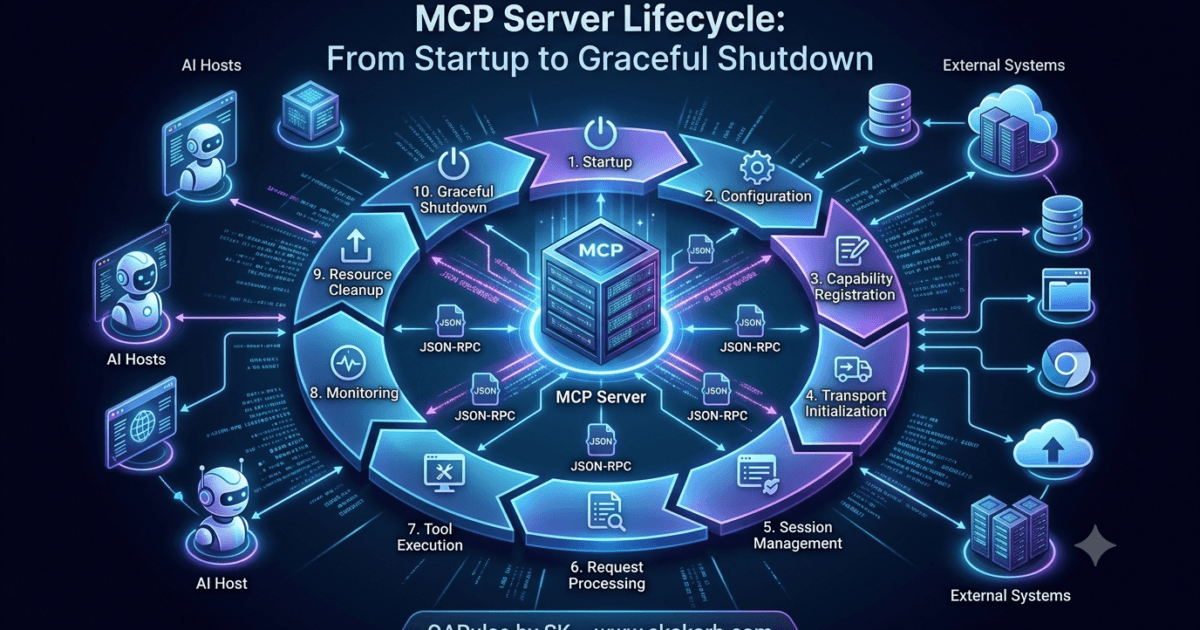
Why Understanding the MCP Server Lifecycle Matters
Every successful interaction in the Model Context Protocol depends on two participants: the MCP Client and the MCP Server. While the client initiates communication and manages requests, the server is responsible for exposing capabilities, executing tools, serving resources, and maintaining session state throughout its lifetime.
Understanding the MCP Server Lifecycle is essential because every MCP server follows a predictable sequence of stages—from process startup and initialization to request handling and graceful shutdown. Knowing what happens during each stage helps developers build reliable, scalable, and production-ready MCP servers.
A simplified lifecycle looks like this:
Host Starts Server

↓

Server Process Starts

↓

Configuration Loaded

↓

Tools Registered

↓

Resources Registered

↓

Prompts Registered

↓

Transport Ready

↓

Wait for Client

↓

Initialize Session

↓

Serve Requests

↓

Graceful Shutdown
Although different SDKs may implement these stages differently, the overall lifecycle remains consistent across MCP implementations.
What Is an MCP Server?
An MCP Server is an application that implements the Model Context Protocol and exposes capabilities to one or more MCP clients.
Unlike a traditional REST API that exposes HTTP endpoints, an MCP server exposes protocol capabilities such as:
- Tools
- Resources
- Prompt templates
- Sampling support
- Logging capabilities
- Protocol extensions
The server is responsible for receiving JSON-RPC requests, validating them, executing the requested operation, and returning structured responses.
Think of the MCP server as the execution engine of the protocol.
The client asks.
The server performs.
Responsibilities of an MCP Server
An MCP server performs much more than executing tools.
Its responsibilities typically include:
| Responsibility | Description |
|---|---|
| Server Startup | Initialize the application |
| Configuration Loading | Read environment variables and configuration files |
| Capability Registration | Register tools, resources, and prompts |
| Transport Management | Accept client connections |
| Request Processing | Receive and process JSON-RPC messages |
| Tool Execution | Execute business logic |
| Resource Management | Serve requested resources |
| Session Management | Track connected clients |
| Error Handling | Return structured protocol errors |
| Graceful Shutdown | Release resources safely |
Each responsibility contributes to the overall stability of the server.
Internal Architecture of an MCP Server
Most production-ready MCP servers separate responsibilities into dedicated components.
MCP Server

│

├── Configuration Manager

├── Transport Manager

├── Session Manager

├── Tool Registry

├── Resource Registry

├── Prompt Registry

├── Request Router

├── Tool Executor

├── Error Handler

└── Logger
This modular architecture makes servers easier to maintain, test, and extend.
Stage 1: Server Process Starts
The lifecycle begins when the Host launches the server process.
Depending on the deployment model, this may happen in different ways.
Local desktop applications often launch the server using STDIO.
Claude Desktop

↓

Launch MCP Server

↓

Python Process Starts
Cloud deployments may start the server inside a container.
Docker

↓

Start Container

↓

Launch MCP Server
In Kubernetes environments, orchestration platforms automatically create server instances when required.
Regardless of the deployment model, the first responsibility is starting the server process successfully.
Loading Configuration
Once the process starts, the server loads its configuration.
Typical configuration sources include:
- Environment variables
- Configuration files
- Secret managers
- Cloud configuration services
- Command-line arguments
For example, a database server may load:
- Database connection string
- Authentication credentials
- Connection pool size
- Logging configuration
- Timeout values
A filesystem server may load:
- Allowed directories
- Read/write permissions
- Maximum file size
- Access restrictions
Loading configuration early ensures every component starts with consistent settings.
Validating Configuration
Loading configuration is only the first step.
A production server should validate every required setting before accepting client connections.
Validation may include checking:
- Required environment variables
- File paths
- Network ports
- Database connectivity
- API credentials
- Directory permissions
Load Configuration

↓

Validate Settings

↓

Configuration Valid

↓

Continue Startup
If validation fails, the server should terminate immediately rather than entering a partially configured state.
Failing fast makes operational issues much easier to diagnose.
Initializing Internal Services
After configuration has been validated, the server initializes its internal components.
Typical startup tasks include:
- Creating database connections
- Initializing caches
- Starting worker pools
- Loading machine learning models
- Creating HTTP clients
- Initializing logging systems
These components remain available throughout the server’s lifetime.
Server Startup

↓

Initialize Logger

↓

Initialize Cache

↓

Initialize Database

↓

Initialize Workers

↓

Server Ready for Registration
Initialization should be completed before the server begins accepting protocol requests.
Dependency Initialization
Many MCP servers depend on external systems.
Examples include:
| Server Type | External Dependency |
|---|---|
| Filesystem Server | Operating System |
| Git Server | Git executable |
| PostgreSQL Server | Database |
| Playwright Server | Browser runtime |
| Slack Server | Slack API |
| Jira Server | Jira REST API |
A robust server verifies these dependencies during startup instead of discovering failures during the first client request.
For example, a Playwright server may confirm that the required browser binaries are installed before registering browser automation tools.
Startup Sequence
A complete startup sequence typically follows this order.
Start Process

↓

Load Configuration

↓

Validate Configuration

↓

Initialize Internal Services

↓

Verify External Dependencies

↓

Register Capabilities

↓

Start Transport

↓

Wait for Client Connections
Every subsequent phase of the MCP Server Lifecycle depends on this startup sequence completing successfully.
A well-designed startup process minimizes runtime failures by ensuring the server is fully initialized before it begins communicating with clients. In the next part, the lifecycle continues with capability registration, transport initialization, session establishment, and the process of making tools, resources, and prompts available to connected MCP clients.
MCP Server Lifecycle: Capability Registration and Session Initialization
Why Capability Registration Is Required
After the server has started successfully and initialized its internal components, it still cannot process client requests.
At this stage, the server knows how to run, but it has not yet informed the protocol about what it can provide.
The next stage of the MCP Server Lifecycle is capability registration.
Capability registration makes the server self-describing. Instead of clients relying on hardcoded knowledge, the server publishes everything it supports during the discovery phase.
A simplified flow looks like this:
Server Started

↓

Register Tools

↓

Register Resources

↓

Register Prompts

↓

Advertise Capabilities

↓

Transport Ready

↓

Wait for Client
Without capability registration, clients would successfully connect but discover nothing.
Tool Registration
Most MCP servers exist to expose executable tools.
Before any client connects, the server creates an internal registry containing every available tool.
For example, a filesystem server may register:
| Tool | Purpose |
|---|---|
| read_file | Read a file |
| write_file | Create or update a file |
| delete_file | Remove a file |
| create_directory | Create folders |
| rename_file | Rename files |
| list_directory | List directory contents |
The registration process associates each tool with:
- Unique tool name
- Description
- Input schema
- Output format
- Validation rules
- Execution handler
The registry becomes the authoritative source for all tool-related requests.
Internal Tool Registry
Internally, most servers maintain a structure similar to the following:
Tool Registry

├── read_file

├── write_file

├── delete_file

├── list_directory

├── create_directory

└── rename_file
When a client later calls tools/list, the server reads information from this registry instead of generating metadata dynamically.
This keeps discovery fast and consistent.
Resource Registration
Resources are registered separately from tools because they represent information rather than executable actions.
Examples include:
- Documentation
- Markdown files
- Configuration files
- API specifications
- SQL schemas
- Project structure
A resource registry might look like this:
Resource Registry

├── README.md

├── API Documentation

├── Build Configuration

├── Database Schema

└── User Guide
Unlike tools, resources are usually accessed through read operations rather than execution requests.
Keeping resources separate simplifies authorization and discovery.
Prompt Registration
Modern MCP servers may also expose reusable prompt templates.
Examples include:
- Code review
- Bug investigation
- Security audit
- Test generation
- Documentation generation
- Performance analysis
Internally:
Prompt Registry

├── Code Review

├── Generate Tests

├── Explain Architecture

├── Security Analysis

└── Performance Audit
These prompts become discoverable by clients through the standard protocol.
Capability Advertisement
Once all registries are populated, the server advertises its supported capabilities.
Instead of sending every tool immediately, it announces which protocol features it supports.
Examples include:
- Tools
- Resources
- Prompts
- Logging
- Sampling
- Notifications
- Experimental extensions
During client initialization, this information becomes part of capability negotiation.
Client

↓

Initialize

↓

Server

↓

Capabilities

↓

Client Stores Features
Capability advertisement allows different servers to expose different feature sets while remaining protocol compliant.
Why Registration Happens Before Client Connections
Imagine a client connecting before registration finishes.
The following sequence would occur:
Client Connects

↓

tools/list

↓

No Registered Tools

↓

Empty Response
A few seconds later:
Server Registers Tools

↓

Tools Become Available
The client has already cached an empty discovery result.
This inconsistency can lead to unexpected behavior.
For this reason, production servers complete registration before accepting requests.
Transport Initialization
Once capabilities have been registered, the transport layer becomes active.
Depending on deployment, this may involve:
STDIO
Host

↓

STDIN

↓

STDOUT

↓

MCP Server
HTTP
Client

↓

HTTPS

↓

MCP Server
WebSocket
Client

↓

Persistent Connection

↓

MCP Server
Regardless of the transport, the protocol remains JSON-RPC.
Waiting for Client Sessions
After transport initialization, the server enters an idle state.
Server Ready

↓

Waiting

↓

Waiting

↓

Client Connects

↓

Session Starts
Unlike startup, this stage consumes very little processing power because the server simply waits for incoming protocol messages.
Receiving the Initialize Request
The first meaningful protocol request from a client is initialization.
Conceptually:
Client

↓

initialize

↓

Server

↓

Validate Request

↓

Return Capabilities
During this phase, the server:
- Validates protocol version
- Reads client information
- Determines compatible features
- Creates session state
- Returns supported capabilities
Only after successful initialization can discovery begin.
Creating Session State
Every connected client receives its own session context.
A simplified session object may contain:
Session

├── Session ID

├── Client Information

├── Protocol Version

├── Negotiated Capabilities

├── Active Requests

├── Transport

└── Connection Status
Maintaining separate session objects prevents one client’s activity from interfering with another.
Multiple Concurrent Clients
Production servers frequently communicate with several clients at the same time.
MCP Server

├── Session A

├── Session B

├── Session C

├── Session D

└── Session E
Each session independently tracks:
- Request identifiers
- Pending operations
- Client capabilities
- Authentication context
- Connection status
This isolation enables scalable multi-user deployments.
Session Initialization Sequence
The complete initialization flow is:
Server Ready

↓

Client Connects

↓

Initialize Request

↓

Validate Client

↓

Negotiate Capabilities

↓

Create Session

↓

Session Active

↓

Discovery Begins
At this point, the MCP Server Lifecycle has completed startup, registered its capabilities, initialized transport, and established a protocol session with the client. The server is now fully prepared to process discovery requests, execute tools, serve resources, and manage concurrent client interactions efficiently.
MCP Server Lifecycle: Request Processing, Tool Execution and Response Management
Entering the Request Processing Phase
After the client has successfully initialized the session and completed capability discovery, the server enters its primary operational stage.
This is where the MCP Server Lifecycle spends most of its time.
The server continuously waits for incoming JSON-RPC messages, validates them, routes them to the correct handler, executes the requested operation, and returns structured responses.
A simplified request processing flow looks like this:
Session Active

↓

Receive Request

↓

Validate Request

↓

Route Request

↓

Execute Operation

↓

Generate Response

↓

Send Response

↓

Wait for Next Request
This loop continues until the client disconnects or the server shuts down.
Receiving JSON-RPC Requests
Every interaction with an MCP server begins as a JSON-RPC request.
Typical requests include:
- initialize
- tools/list
- resources/list
- prompts/list
- tools/call
- resources/read
Although these requests perform different operations, they all follow the same processing pipeline.
Transport

↓

Receive JSON

↓

Parse Message

↓

Validate Structure

↓

Forward to Router
Separating transport from request processing allows the same server implementation to support STDIO, HTTP, or WebSockets without changing its business logic.
Request Validation
Before executing any operation, the server validates the incoming request.
Typical validation checks include:
- JSON syntax
- JSON-RPC version
- Request identifier
- Method name
- Required parameters
- Parameter data types
- Session validity
If validation fails, processing stops immediately and an error response is generated.
Receive Request

↓

Validate

├── Valid ✓

└── Invalid ✗

        ↓

   Return Error
Early validation prevents invalid requests from reaching the execution layer.
Request Routing
Once validation succeeds, the request is forwarded to the request router.
The router determines which internal component should handle the operation.
Incoming Request

↓

Request Router

├── initialize

├── tools/list

├── resources/list

├── prompts/list

├── tools/call

└── resources/read
The router acts like an air traffic controller, directing every request to the correct destination.
Processing Discovery Requests
Discovery requests do not execute business logic.
Instead, they retrieve metadata from the server’s internal registries.
For example:
tools/list

↓

Tool Registry

↓

Tool Metadata

↓

Client
Similarly,
resources/list

↓

Resource Registry

↓

Resource Metadata

↓

Client
Because the metadata is already registered during startup, discovery requests are typically fast and lightweight.
Processing Tool Execution Requests
The most important operation in the MCP Server Lifecycle is tool execution.
When the server receives a tools/call request, several internal steps occur before the requested tool actually runs.
Receive Request

↓

Find Tool

↓

Validate Arguments

↓

Authorize Request

↓

Execute Tool

↓

Collect Result

↓

Return Response
Each stage contributes to reliability and security.
Locating the Requested Tool
The server first searches its internal registry.
Tool Registry

├── read_file

├── write_file

├── git_commit

├── browser_open

└── execute_query
If the requested tool does not exist, the server immediately returns an error instead of attempting execution.
Searching the registry is typically an efficient lookup operation, even when hundreds of tools are registered.
Validating Tool Arguments
Every registered tool defines an expected input schema.
Before execution, the server verifies that the supplied arguments satisfy this schema.
Validation commonly checks:
- Required fields
- Data types
- Missing values
- Invalid properties
- Numeric limits
- String formats
Example:
Tool

↓

Expected Schema

↓

Compare Arguments

↓

Valid ✓

or

Invalid ✗
Rejecting malformed requests protects the execution layer from unexpected input.
Authorization Before Execution
Many tools interact with sensitive systems.
Examples include:
- File deletion
- Database modification
- Browser automation
- Cloud infrastructure
- Source control
Before executing these operations, the server may perform authorization checks.
Possible checks include:
- User permissions
- Allowed directories
- Database roles
- API scopes
- Project ownership
- Organization policies
Only authorized requests continue to execution.
Executing the Tool
Once validation and authorization succeed, the execution engine invokes the requested tool.
For example, a filesystem request follows a sequence similar to:
Tool Request

↓

Execution Engine

↓

Filesystem API

↓

Operating System

↓

Result
A database server might instead execute:
Tool Request

↓

Execution Engine

↓

Database Driver

↓

PostgreSQL

↓

Query Result
The execution engine isolates protocol handling from business logic, making the server easier to extend and maintain.
Generating the Response
After execution completes, the server prepares a JSON-RPC response.
A response typically includes:
- Request ID
- Result data
- Execution status
- Structured content
Conceptually:
Execution Result

↓

Create Response

↓

Attach Request ID

↓

Serialize JSON

↓

Send to Client
Including the original request ID allows the client to correlate responses with pending requests.
Error Handling
Not every request completes successfully.
Common failures include:
- Tool not found
- Invalid parameters
- Permission denied
- File missing
- Network timeout
- Database unavailable
- Internal exception
Instead of terminating the session, the server returns a structured JSON-RPC error.
Request

↓

Execution

↓

Failure

↓

Create Error

↓

Return Error Response
The session remains active so the client can continue sending future requests.
Handling Multiple Requests
Production servers frequently process multiple requests simultaneously.
Client A

↓

Request 201

Client B

↓

Request 202

Client C

↓

Request 203

↓

Execution Queue

↓

Worker Pool

↓

Responses
Modern MCP servers commonly use asynchronous processing or worker pools to maximize throughput while keeping individual requests isolated.
Long-Running Operations
Some tools complete within milliseconds.
Others may require several minutes.
Examples include:
- Repository indexing
- Large file processing
- Browser automation
- AI inference
- Database migration
The server must continue processing other client requests while these operations are running.
A simplified model looks like:
Long Request

↓

Worker

↓

Running...

↓

Running...

↓

Completed
Separating execution from request acceptance prevents long-running operations from blocking the entire server.
Logging Request Execution
Every important stage should be recorded for diagnostics.
Useful events include:
- Request received
- Validation completed
- Tool selected
- Execution started
- Execution finished
- Response sent
- Error generated
A simplified logging flow:
Receive

↓

Validate

↓

Execute

↓

Respond

↓

Log
Structured logging greatly simplifies debugging in production environments.
Production Architecture
A production-ready MCP Server Lifecycle often follows this architecture.
Transport Manager

↓

Request Parser

↓

Request Validator

↓

Request Router

↓

Authorization Layer

↓

Execution Engine

↓

Worker Pool

↓

External Systems

↓

Response Generator

↓

Transport Manager
Each layer has a single responsibility, making the server easier to test, scale, and maintain.
Common Mistakes
| Mistake | Impact | Best Practice |
|---|---|---|
| Executing requests before validation | Unexpected failures | Validate every request first |
| Mixing transport and business logic | Difficult maintenance | Keep transport independent from execution |
| Skipping authorization checks | Security vulnerabilities | Authorize sensitive operations before execution |
| Blocking the main processing thread | Reduced scalability | Use asynchronous execution or worker pools |
| Returning unstructured errors | Poor client experience | Always return standard JSON-RPC error responses |
At this stage of the MCP Server Lifecycle, the server has transitioned from initialization into continuous operation. It receives requests, validates them, routes them to the appropriate handlers, executes tools or serves resources, generates structured responses, and manages concurrent workloads efficiently. The final phase of the lifecycle focuses on long-running session management, monitoring, graceful shutdown, and production best practices that keep MCP servers reliable over extended periods of operation.
MCP Server Lifecycle: Session Management, Monitoring, Graceful Shutdown and Production Best Practices
Managing Long-Lived Server Sessions
An MCP server is designed to remain operational long after the first client connects. In production environments, a single server may handle thousands of requests across multiple client sessions before it is restarted or shut down.
The MCP Server Lifecycle therefore focuses not only on processing requests but also on maintaining healthy sessions throughout the server’s lifetime.
Server Started

↓

Client Session A

↓

Client Session B

↓

Client Session C

↓

Multiple Requests

↓

Session Cleanup

↓

Graceful Shutdown
A well-managed server should continue serving new requests while existing sessions remain active.
Session Isolation
Every connected client should have an independent session.
A session typically stores:
- Session identifier
- Client information
- Negotiated capabilities
- Active requests
- Pending requests
- Authentication context
- Connection status
- Transport information
MCP Server

├── Session A

│     ├── Request Queue

│     ├── Active Requests

│     └── Client State

├── Session B

│     ├── Request Queue

│     ├── Active Requests

│     └── Client State

└── Session C

      ├── Request Queue

      ├── Active Requests

      └── Client State
Keeping sessions isolated prevents one client from affecting another client’s operations.
Managing Concurrent Tool Execution
Enterprise MCP servers rarely execute a single request at a time.
Instead, multiple requests arrive simultaneously.
Incoming Requests

↓

Request Router

↓

Worker Pool

├── Worker 1

├── Worker 2

├── Worker 3

├── Worker 4

└── Worker 5

↓

Responses
Each worker processes requests independently, allowing the server to handle many clients efficiently.
This architecture also prevents long-running operations from blocking lightweight requests.
Queue Management
When request volume exceeds processing capacity, incoming requests are typically placed into a queue.
Incoming Requests

↓

Execution Queue

↓

Available Worker

↓

Execute

↓

Response
A queue provides several advantages:
- Prevents dropped requests
- Smooths traffic spikes
- Improves resource utilization
- Supports priority scheduling
Large enterprise deployments often maintain separate queues for different types of operations.
Background Tasks
Not every operation is triggered directly by a client.
Many servers execute internal background tasks such as:
- Cache cleanup
- Temporary file removal
- Session expiration
- Health monitoring
- Metrics collection
- Token refresh
- Log rotation
Background Scheduler

├── Cache Cleanup

├── Session Cleanup

├── Metrics

├── Health Checks

└── Log Maintenance
Running these tasks independently keeps request processing responsive.
Monitoring Server Health
Monitoring is a critical part of operating a production MCP server.
Useful health indicators include:
| Metric | Purpose |
|---|---|
| Active sessions | Number of connected clients |
| Active requests | Current workload |
| Average response time | Detect performance degradation |
| Error rate | Identify application issues |
| Queue length | Detect bottlenecks |
| Memory usage | Prevent resource exhaustion |
| CPU utilization | Monitor processing capacity |
| Reconnection count | Detect unstable environments |
These metrics help operators detect problems before they affect users.
Logging Throughout the Server Lifecycle
Every important stage should generate structured log entries.
Typical events include:
- Server startup
- Configuration loaded
- Client connected
- Session created
- Request received
- Tool executed
- Error generated
- Session closed
- Server shutdown
Startup

↓

Initialization

↓

Client Connected

↓

Tool Executed

↓

Response Sent

↓

Shutdown
Structured logging allows engineers to reconstruct events during troubleshooting.
Detecting Idle Sessions
Clients do not always disconnect cleanly.
For example:
- Laptop loses power
- Network cable disconnects
- VPN reconnects
- Browser crashes
- Application terminates unexpectedly
The server should periodically identify inactive sessions.
Session Monitor

↓

Last Activity

↓

Timeout Reached

↓

Close Session

↓

Release Resources
Removing abandoned sessions prevents unnecessary resource consumption.
Resource Cleanup
Throughout its lifetime, the server allocates resources such as:
- Memory
- File handles
- Database connections
- Browser instances
- Network sockets
- Worker threads
These resources should be released as soon as they are no longer required.
Completed Request

↓

Release Resources

↓

Return Worker

↓

Ready for Next Request
Resource cleanup keeps long-running servers stable and efficient.
Handling Unexpected Failures
Production systems must assume failures will occur.
Examples include:
- Database outage
- External API failure
- Filesystem errors
- Network interruption
- Disk exhaustion
- Permission changes
Rather than terminating immediately, the server should:
- Record the error
- Return an appropriate protocol response
- Isolate the failure
- Continue serving unaffected requests
Only unrecoverable failures should stop the server.
Graceful Shutdown
Eventually, every server reaches the final stage of the MCP Server Lifecycle.
Shutdown may be triggered by:
- Application updates
- Container replacement
- Maintenance
- System restart
- Administrator request
A graceful shutdown follows a predictable sequence.
Stop Accepting Requests

↓

Finish Active Requests

↓

Cancel Remaining Tasks

↓

Close Client Sessions

↓

Release Resources

↓

Close Transport

↓

Terminate Process
Clients receive a clean termination instead of an unexpected connection loss.
Forced Shutdown
In rare situations, graceful shutdown is impossible.
Examples include:
- Power failure
- Operating system crash
- Hardware failure
- Forced process termination
Unexpected Failure

↓

Immediate Process Exit

↓

Client Detects Disconnect

↓

Reconnect Later
Although unavoidable, these events should be minimized through proper infrastructure design.
Enterprise Deployment Architecture
Large organizations typically deploy multiple MCP server instances.
Load Balancer

├── MCP Server 1

├── MCP Server 2

├── MCP Server 3

├── MCP Server 4

└── MCP Server 5
Each server independently manages:
- Startup
- Session management
- Request execution
- Monitoring
- Shutdown
This architecture improves scalability, fault tolerance, and high availability.
Production Best Practices
| Best Practice | Benefit |
|---|---|
| Validate configuration during startup | Detect issues early |
| Register all capabilities before accepting clients | Consistent discovery |
| Keep session state isolated | Prevent cross-client interference |
| Process requests asynchronously | Improve throughput |
| Apply request timeouts | Prevent stalled operations |
| Monitor server health continuously | Detect problems quickly |
| Clean idle sessions regularly | Reduce resource usage |
| Release resources immediately after use | Prevent memory leaks |
| Log protocol events with structured logging | Simplify troubleshooting |
| Perform graceful shutdown whenever possible | Protect active sessions |
Common Mistakes
| Mistake | Impact | Recommendation |
|---|---|---|
| Sharing session state between clients | Data corruption | Keep every session isolated |
| Ignoring idle sessions | Resource leaks | Implement automatic session cleanup |
| Blocking request processing | Poor scalability | Use asynchronous execution or worker pools |
| Missing health monitoring | Late detection of failures | Continuously collect operational metrics |
| Abrupt server termination | Interrupted client sessions | Always perform graceful shutdown when possible |
Complete MCP Server Lifecycle
Host Starts Server

↓

Load Configuration

↓

Validate Configuration

↓

Initialize Services

↓

Register Tools

↓

Register Resources

↓

Register Prompts

↓

Start Transport

↓

Wait for Client

↓

Initialize Session

↓

Capability Negotiation

↓

Process Discovery Requests

↓

Execute Tools

↓

Return Responses

↓

Manage Sessions

↓

Monitor Health

↓

Cleanup Resources

↓

Graceful Shutdown
Key Takeaways
The MCP Server Lifecycle encompasses every stage of an MCP server’s operation, from startup and configuration to capability registration, session initialization, request processing, tool execution, monitoring, and graceful shutdown. A production-ready server is designed to handle concurrent clients, maintain isolated session state, recover from operational failures, manage resources efficiently, and terminate cleanly without disrupting active workloads. Understanding this lifecycle enables developers to build scalable, secure, and resilient MCP servers capable of supporting modern AI applications in both local and enterprise environments.
Internal Links
- Day 1: What is MCP?
- Day 2: Why MCP Matters for AI Agents
- Day 3: MCP vs REST APIs vs Plugins
- Day 4: MCP Architecture Deep Dive
- Day 5: Build Your First Production-Ready MCP Development Environment (Python & VS Code)
- Day 6: Build Your First MCP Server in Python: A Production-Ready Guide for Beginners
- Day 7: Master the 4 MCP Transport Layer Options: STDIO vs HTTP vs SSE vs WebSockets
- Day 8: MCP Client Lifecycle: From Initialization to Tool Execution
External Links
- WebSocket API: https://developer.mozilla.org/docs/Web/API/WebSockets_API
- Model Context Protocol: https://modelcontextprotocol.io
- JSON-RPC Specification: https://www.jsonrpc.org/specification
- Python asyncio: https://docs.python.org/3/library/asyncio.html
- Python subprocess: https://docs.python.org/3/library/subprocess.html
- Python asyncio: https://docs.python.org/3/library/asyncio.html
- Python logging: https://docs.python.org/3/library/logging.html
- Python multiprocessing: https://docs.python.org/3/library/multiprocessing.html
AI Search Optimized Snippets
What is the MCP Server Lifecycle?
The MCP Server Lifecycle is the complete operational sequence followed by an MCP server, including startup, configuration loading, capability registration, transport initialization, session establishment, request processing, tool execution, monitoring, resource cleanup, and graceful shutdown.
Why is the MCP Server Lifecycle Important?
The MCP Server Lifecycle ensures that MCP servers initialize correctly, expose capabilities consistently, process requests efficiently, manage concurrent client sessions safely, and shut down without interrupting active operations.
What are the stages of the MCP Server Lifecycle?
The major stages include:
- Server startup
- Configuration loading
- Dependency initialization
- Tool registration
- Resource registration
- Prompt registration
- Transport initialization
- Session establishment
- Request processing
- Tool execution
- Response generation
- Session management
- Monitoring
- Resource cleanup
- Graceful shutdown
Production Checklist
Before deploying an MCP Server, verify the following:
- ✅ Configuration validation
- ✅ Dependency health checks
- ✅ Tool registration
- ✅ Resource registration
- ✅ Prompt registration
- ✅ Capability advertisement
- ✅ Transport initialization
- ✅ Request validation
- ✅ Authorization layer
- ✅ Asynchronous request processing
- ✅ Timeout handling
- ✅ Session isolation
- ✅ Structured logging
- ✅ Metrics collection
- ✅ Resource cleanup
- ✅ Graceful shutdown
Frequently Asked Questions
What is an MCP Server?
An MCP Server is a protocol-compliant application that exposes tools, resources, prompts, and other capabilities to MCP clients using JSON-RPC over supported transports such as STDIO, HTTP, or WebSockets.
Why are capabilities registered during startup?
Capability registration allows clients to discover available tools, resources, and prompts dynamically instead of relying on hardcoded implementations.
Why should every client have an independent session?
Independent sessions isolate request state, negotiated capabilities, authentication information, and active operations, preventing one client’s activity from affecting another.
Why is request validation important?
Request validation ensures incoming JSON-RPC messages conform to protocol requirements before reaching business logic, improving reliability and security.
Why is graceful shutdown recommended?
Graceful shutdown allows active requests to finish, releases allocated resources, closes client sessions cleanly, and avoids data corruption or interrupted operations.
Conclusion
The MCP Server Lifecycle defines how an MCP server operates from startup to shutdown. It includes loading configuration, initializing dependencies, registering tools and resources, establishing client sessions, processing JSON-RPC requests, executing tools, managing concurrent workloads, monitoring system health, cleaning up resources, and performing graceful shutdown. Understanding the MCP Server Lifecycle is essential for building scalable, secure, and production-ready AI infrastructure based on the Model Context Protocol.
Continue Your MCP Zero to Hero Journey
From here onward, every lesson will build on this environment as we move from concepts to production-ready implementations.
Enjoyed this article? Explore more in-depth guides on AI engineering, automation testing, Model Context Protocol, Playwright, and intelligent software quality at www.skakarh.com. Follow QAPulse by SK for practical, production-focused tutorials designed for QA engineers, SDETs, and AI developers.