QA
QA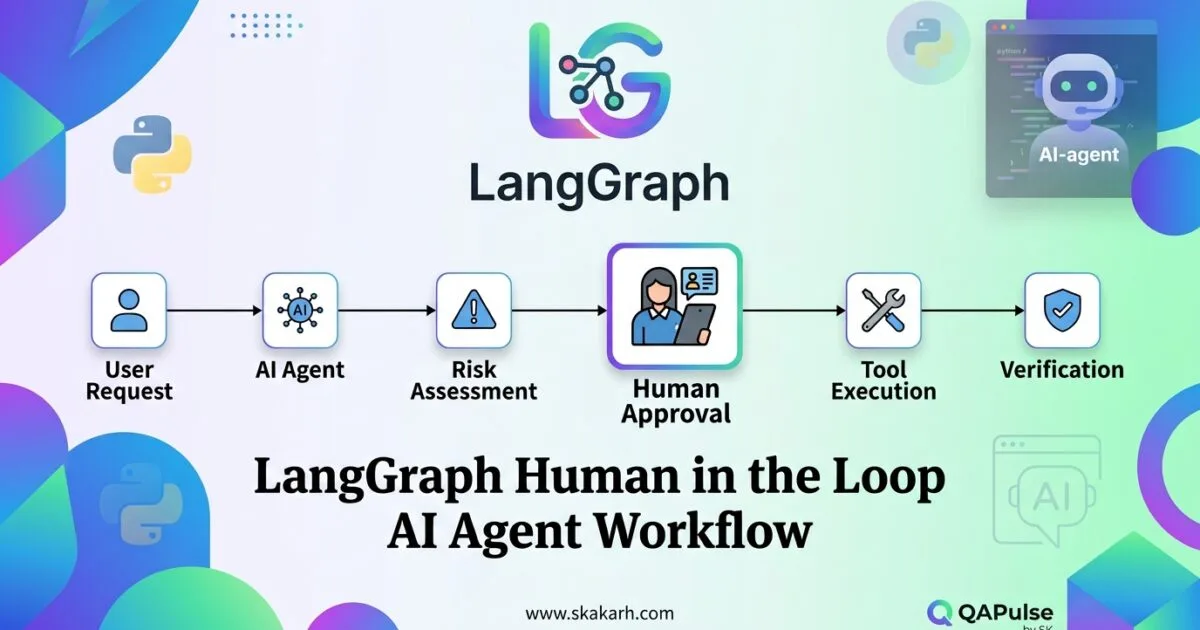
LangGraph Human in the Loop is one of the most important patterns for building AI agents that can pause, ask for a human decision, preserve their state, and continue execution without restarting the entire workflow.
That distinction matters because production agents should not always operate autonomously.
An agent approving a routine internal request may safely continue without intervention. An agent about to delete customer data, approve a financial transaction, publish content, or execute a production operation should often stop and request authorization.
LangGraph provides a graph-based runtime designed for long-running, stateful agent workflows, including persistence and human-in-the-loop execution. Its current reference documentation exposes interrupts and checkpoint-backed state management as first-class capabilities. (LangChain AI)
The engineering goal is therefore not simply:
LLM → Tool → Result
A production workflow is closer to:
User Request
     ↓
Agent Reasoning
     ↓
Risk / Policy Check
     ↓
Human Decision?
   ↙       ↘
 YES        NO
 ↓           ↓
Pause       Continue
 ↓           ↓
Human       Tool
Decision    Execution
 ↓           ↓
Resume  ←  Result
     ↓
Final Response
That architecture turns human approval from an external workaround into an explicit part of the agent workflow.
Why Human Oversight Changes Agent Architecture
Traditional automation assumes that once execution begins, the system should continue until completion.
Agentic systems introduce another possibility:
The system can determine that it needs a human decision before continuing.
This is fundamentally different from simply asking the user a question inside a chat interface.
Consider a deployment agent.
Without human intervention:
def deploy():
    build()
    run_tests()
    deploy_to_production()
The agent decides and executes.
With controlled human intervention:
Plan deployment
      ↓
Run validation
      ↓
Generate deployment plan
      ↓
Human approval
      ↓
Deploy
      ↓
Verify production
The human decision becomes a workflow state.
That is the core idea behind LangGraph Human in the Loop.
The graph should be capable of stopping at a meaningful boundary, preserving enough state to understand what happened, and continuing from that point after an authorized decision.
This is much safer than rebuilding the agent conversation from scratch after every approval.
What LangGraph Human in the Loop Actually Means
A useful mental model is:
Interrupt
   ↓
Persist State
   ↓
Wait
   ↓
Human Decision
   ↓
Resume
   ↓
Continue Graph
LangGraph’s runtime supports interrupt-based execution, while checkpointing provides persistence for graph state. The documentation notes that checkpointers save graph state and that checkpointing is important for human-in-the-loop workflows. (LangChain AI)
This creates a critical architectural separation:
| Responsibility | Purpose |
|---|---|
| Graph | Defines workflow |
| State | Carries execution context |
| Interrupt | Pauses execution |
| Checkpointer | Preserves state |
| Human | Makes an explicit decision |
| Resume command | Continues execution |
| Tool | Performs the approved action |
The human should not need to reconstruct what the agent was doing.
The workflow should already know.
The Simplest Human Approval Pattern
Imagine an agent that prepares a refund.
The agent can calculate the refund but should not automatically issue it when the amount exceeds a threshold.
from langgraph.types import interrupt

def review_refund(state):
    refund = state["refund"]

    if refund["amount"] > 500:
        decision = interrupt({
            "type": "refund_approval",
            "amount": refund["amount"],
            "customer": refund["customer"],
            "reason": refund["reason"]
        })

        return {
            "approval": decision
        }

    return {
        "approval": "auto-approved"
    }
Conceptually:
Calculate refund
      ↓
Amount <= $500?
   ↙        ↘
 YES        NO
 ↓           ↓
Continue   Interrupt
             ↓
        Human reviews
             ↓
          Approve?
         ↙       ↘
       YES        NO
        ↓          ↓
     Refund      Reject
The important design decision is where the interrupt occurs.
Do not interrupt randomly.
Interrupt at a business boundary where human judgment actually changes the outcome.
Human-in-the-Loop Is Not the Same as Human Chat
This distinction is often misunderstood.
A chatbot can ask:
“Would you like me to continue?”
That does not automatically mean the underlying workflow has implemented reliable human-in-the-loop control.
Consider:
Chatbot approach

LLM
 ↓
Question
 ↓
User response
 ↓
LLM tries to reconstruct context
 ↓
Continue
A stateful workflow looks different:
LangGraph workflow

Node A
 ↓
Node B
 ↓
INTERRUPT
 ↓
Checkpoint
 ↓
Human decision
 ↓
Resume same execution state
 ↓
Node C
The second model provides a much stronger foundation for production workflows because the approval point is part of the execution model.
That is where LangGraph Human in the Loop becomes strategically useful.
Why Checkpointing Matters
Imagine the graph reaches a human approval step.
The human does not respond for ten seconds.
Or ten minutes.
Or two days.
A production workflow should not depend on the original process remaining alive in memory for that entire period.
Checkpointing provides a persistent representation of graph state.
LangGraph’s checkpoint architecture associates state snapshots with threads, allowing separate runs to maintain their execution history. The documentation specifically describes threads as a mechanism for maintaining multiple runs and states. (LangChain AI)
Conceptually:
Before interrupt

State:
{
    request_id: "REQ-1042",
    amount: 850,
    risk: "high",
    recommendation: "approve"
}

             ↓

        CHECKPOINT

             ↓

        HUMAN REVIEW

             ↓

Resume using preserved state
Without persistence, the application may need to regenerate the reasoning context.
With persistence, the workflow can resume from a known execution state.
That difference becomes increasingly important as agents become longer-running.
Thread Identity Is Part of the Design
A human approval workflow should know which execution the human is approving.
Imagine two refund requests:
Thread A → refund #1001 → $750
Thread B → refund #1002 → $1,200
If both workflows use ambiguous state management, a human could accidentally approve the wrong request.
A better architecture associates the workflow with a stable thread or execution identity:
config = {
    "configurable": {
        "thread_id": "refund-1001"
    }
}
The exact configuration depends on your LangGraph runtime and application architecture, but the principle is important:
A human decision must be associated with the exact workflow execution that requested it.
This is especially important when many agent runs are waiting simultaneously.
Design the Interrupt Payload for Humans, Not Machines
A weak interrupt:
interrupt("approve?")
The human receives almost no context.
A better interrupt contains decision-relevant information:
interrupt({
    "action": "approve_refund",
    "customer": "Acme Corp",
    "amount": 850,
    "currency": "USD",
    "reason": "Duplicate charge",
    "risk": "medium",
    "recommended_action": "approve",
    "evidence": [
        "Transaction matched duplicate-payment rule",
        "Customer has not received refund previously"
    ]
})
Now the human can make an informed decision.
This is a major E-E-A-T consideration for technical agent design: don’t merely demonstrate that an interrupt exists. Explain what information a responsible operator needs before authorizing an action.
A useful approval payload should answer:
- What is the agent trying to do?
- Why does it want to do it?
- What evidence supports the action?
- What are the potential consequences?
- What exactly will happen if approved?
- What happens if rejected?
That transforms a button labeled “Approve” into an auditable engineering decision.
Approval Should Be Explicit
Avoid ambiguous values such as:
decision = "yes"
Prefer structured decisions:
decision = {
    "action": "approve",
    "reviewer": "user-123",
    "reason": "Validated against customer policy"
}
You can then route the workflow:
def route_after_review(state):
    decision = state["approval"]

    if decision["action"] == "approve":
        return "execute"

    if decision["action"] == "reject":
        return "reject"

    return "manual_review"
This is more extensible than treating human input as an arbitrary string.
It also gives you a better foundation for auditing.
Compare LangGraph Human-in-the-Loop With Other Approaches
Human oversight can be implemented in several ways.
| Approach | State persistence | Explicit pause/resume | Good for long-running agents | Workflow control |
|---|---|---|---|---|
| Chat confirmation | Limited | Usually no | Weak | Low |
| Application callback | Depends | Sometimes | Medium | Medium |
| Queue-based approval | Yes | Yes | Strong | Strong |
| Custom state machine | Yes | Yes | Strong | Strong |
| LangGraph interrupts | Yes with checkpointing | Yes | Strong | Strong |
The important point is not that one technology automatically wins every use case.
A small chatbot may only need conversational confirmation.
A multi-step agent that can call tools, persist state, and wait for human authorization has much stronger requirements.
LangGraph is specifically positioned for long-running, stateful workflows and exposes human-in-the-loop capabilities alongside persistence and durable execution. (LangChain AI)
Do Not Put Human Approval Everywhere
A common beginner mistake is to interrupt every significant node.
That produces:
Agent
 ↓
Human
 ↓
Agent
 ↓
Human
 ↓
Agent
 ↓
Human
 ↓
Agent
The workflow becomes slow and frustrating.
Instead, classify actions by risk.
| Action | Risk | Human approval |
|---|---|---|
| Search documentation | Low | No |
| Read database record | Low/medium | Usually no |
| Generate report | Low | Usually no |
| Send external email | Medium | Sometimes |
| Modify customer data | High | Often |
| Issue refund | High | Often |
| Delete production data | Critical | Strong approval |
| Deploy production change | Critical | Strong approval |
This creates a risk-based human-in-the-loop architecture.
The objective is not maximum human involvement.
The objective is the right human involvement at the right decision boundary.
Human Oversight Should Be Designed Around Tool Risk
The most dangerous point in many agents is not the LLM response.
It is the tool invocation.
Consider:
tools = [
    search_documents,
    read_customer,
    send_email,
    issue_refund,
    delete_record
]
These tools have very different consequences.
A strong architecture categorizes them:
Read-only
   ↓
Low-risk mutation
   ↓
External communication
   ↓
Financial operation
   ↓
Destructive operation
Then attach controls accordingly.
def should_require_approval(tool_name, args):
    high_risk = {
        "issue_refund",
        "delete_record",
        "deploy_production"
    }

    return tool_name in high_risk
This is much more strategic than simply adding a human checkpoint after every LLM response.
Human-in-the-Loop as a Guardrail
A human approval point can act as a policy boundary:
Agent reasoning
      ↓
Tool proposal
      ↓
Policy evaluation
      ↓
Risk threshold?
   ↙        ↘
 NO         YES
 ↓           ↓
Execute    Human review
             ↓
          Decision
          ↙     ↘
       Approve  Reject
          ↓       ↓
       Execute   Stop
Notice that the human does not replace the agent.
The agent still performs:
- reasoning
- retrieval
- planning
- evidence collection
- recommendation
The human controls the high-impact decision.
This creates a useful division of responsibility:
AI → Speed + Analysis + Recommendation

Human → Judgment + Authorization + Accountability
That is often a much better production model than trying to make an agent completely autonomous.
Testing LangGraph Human in the Loop Workflows
Human approval creates new testing requirements.
You need to test more than:
Agent → Output
You now need:
Agent
 ↓
Interrupt
 ↓
Checkpoint
 ↓
Approve
 ↓
Resume
 ↓
Tool execution
And:
Agent
 ↓
Interrupt
 ↓
Checkpoint
 ↓
Reject
 ↓
Safe termination
Also test:
Interrupt
 ↓
No response
 ↓
Resume later
and:
Interrupt
 ↓
Invalid human input
 ↓
Validation
 ↓
Retry / correction
And:
Interrupt
 ↓
Duplicate approval
 ↓
Idempotency protection
A production-quality test matrix should therefore include:
| Scenario | Expected behavior |
|---|---|
| Human approves | Action executes |
| Human rejects | Action does not execute |
| Invalid decision | Validation error |
| No response | Workflow remains recoverable |
| Resume later | State is preserved |
| Duplicate approval | No duplicate side effect |
| Tool failure after approval | Failure is observable and recoverable |
| Unauthorized reviewer | Approval rejected |
| Wrong thread | Decision rejected |
| Stale request | Approval requires revalidation |
This is where an SDET mindset becomes valuable.
Human-in-the-loop is not only an agent feature.
It is a new class of distributed workflow that needs deterministic testing.
Test the Dangerous Boundary, Not Just the Happy Path
Suppose the agent recommends:
{
  "action": "delete_user",
  "user_id": "123"
}
The test should not only verify that approval works.
It should verify that rejection prevents the destructive operation:
def test_rejected_delete_does_not_execute():
    result = run_agent()

    assert result["status"] == "waiting_for_approval"

    resume_agent({
        "action": "reject",
        "reason": "Insufficient evidence"
    })

    assert delete_user.called is False
Then test approval:
def test_approved_delete_executes():
    result = run_agent()

    assert result["status"] == "waiting_for_approval"

    resume_agent({
        "action": "approve",
        "reason": "Verified request"
    })

    assert delete_user.called is True
The critical assertion is not merely that the graph resumed.
It is that the correct side effect occurred only after the correct decision.
Build Observability Around Human Decisions
When something goes wrong, you need to answer:
Who approved this action?
What did the agent recommend?
What evidence did the human see?
What state existed when approval occurred?
Which tool executed afterward?
A useful audit record could look like:
{
  "thread_id": "refund-1001",
  "action": "issue_refund",
  "amount": 850,
  "recommendation": "approve",
  "decision": "approve",
  "reviewer": "user-123",
  "reason": "Duplicate transaction verified",
  "timestamp": "2026-08-16T18:30:00Z"
}
This makes the workflow observable rather than opaque.
It also gives QA and engineering teams evidence when investigating failures.
Use Human Review as a Learning Signal
Human intervention can provide more than approval.
It can generate valuable feedback.
Suppose an agent repeatedly proposes actions that humans reject.
You can measure:
Agent recommendations
        ↓
Human decisions
        ↓
Approve / Reject
        ↓
Reason
        ↓
Analyze patterns
        ↓
Improve policy / prompts / tools
For example:
1,000 proposed actions

Approved: 820
Rejected: 180

Rejection rate = 18%
Then classify rejection reasons:
Insufficient evidence       72
Incorrect policy             48
Wrong customer context       31
Risk underestimated          19
Other                        10
Now human oversight becomes an engineering feedback mechanism.
The objective is not to eliminate humans immediately.
The objective is to understand where autonomous behavior is trustworthy and where it still requires supervision.
E-E-A-T: Demonstrate Experience, Not Just API Knowledge
A strong technical article about LangGraph Human in the Loop should avoid becoming a documentation paraphrase.
Demonstrate practical engineering judgment.
For example, don’t simply say:
“Use interrupts to pause execution.”
Explain the production implication:
Interrupts should be placed at business decision boundaries, not arbitrary points in the graph. The interrupt payload should contain enough evidence for the reviewer to make a decision, while checkpointing should preserve the execution context needed to resume safely.
That demonstrates experience.
Then explain the engineering reason:
If the workflow can resume without reconstructing the original state, human approval becomes part of the execution model instead of an external conversational event.
That demonstrates expertise.
Then acknowledge operational constraints:
- persistence must be configured appropriately
- approval identity must be validated
- side effects should be idempotent
- stale approvals need handling
- authorization must be enforced
- rejection paths need testing
- audit information should be retained appropriately
That demonstrates trustworthiness.
These are stronger E-E-A-T signals than simply listing API parameters.
A Production Mental Model
The most useful way to think about LangGraph Human in the Loop is not:
“How do I make the LLM ask for permission?”
Instead ask:
“Where should autonomous execution stop because a human owns the decision?”
That question changes the architecture.
                AI AGENT
                   │
        ┌──────────┴──────────┐
        │                     │
   Low-risk action       High-risk action
        │                     │
        ↓                     ↓
    Execute              Gather evidence
                              │
                              ↓
                       Human approval
                         ↙       ↘
                    Approve      Reject
                       ↓            ↓
                   Execute        Stop
The agent remains productive.
The human remains accountable for decisions that deserve human judgment.
And the workflow remains resumable because execution state is explicitly managed.
Practical Design Rules
When implementing LangGraph Human in the Loop, use these principles:
- Interrupt at meaningful business boundaries.
- Persist the graph state before waiting for human input.
- Give every approval workflow a reliable execution identity.
- Send decision-relevant evidence to the reviewer.
- Use structured approval and rejection values.
- Validate who is allowed to approve.
- Protect side-effecting tools with appropriate controls.
- Make approved operations idempotent where possible.
- Test approval, rejection, timeout, invalid input, and duplicate decisions.
- Record sufficient audit information for investigation.
- Avoid human approval for trivial low-risk actions.
- Measure human decisions and use them to improve agent behavior.
LangGraph’s current APIs expose interrupts, checkpoint-backed state, state updates, and graph lifecycle concepts specifically relevant to these workflows. (LangChain AI)
The strongest implementation therefore treats human intervention as a first-class workflow state, rather than as a prompt trick.


The result is a system that is neither blindly autonomous nor unnecessarily manual.
It is controlled autonomy: the agent handles what it can, pauses where judgment matters, and resumes with the state and evidence needed to continue safely.
Why LangGraph Human in the Loop Matters for Production AI
LangGraph Human in the Loop is one of the most practical patterns for building AI workflows that should not make every decision autonomously.
A production agent may generate code, approve a refund, modify customer data, trigger an API, deploy infrastructure, or make a business recommendation. The problem is not whether an LLM can perform these actions. The problem is deciding which actions should happen automatically and which ones require human judgment.
That distinction is where LangGraph Human in the Loop becomes strategically important.
Instead of designing an agent as:
User → LLM → Tool → Result
you can design a controlled workflow:
User
  ↓
Agent
  ↓
Analyze
  ↓
Human approval required?
  ├── No  → Execute tool
  └── Yes → Pause
              ↓
          Human review
          ├── Approve → Execute
          ├── Reject  → Stop
          └── Edit    → Continue with changes
This changes the engineering question from:
“How autonomous can my AI agent become?”
to:
“Where should autonomy stop and human judgment begin?”
That is a much more useful question for QA engineers, SDETs, developers, and AI engineers building reliable systems.
What Human-in-the-Loop Actually Means
Human-in-the-loop, commonly abbreviated as HITL, means that an AI system can pause its automated execution and request a decision, confirmation, correction, or additional information from a person.
The human is not necessarily involved in every operation.
A well-designed workflow normally automates low-risk decisions while placing checkpoints around high-risk actions.
For example:
| Action | Automation | Human review |
|---|---|---|
| Search documentation | Yes | No |
| Retrieve database records | Yes | Usually no |
| Generate test cases | Yes | Optional |
| Modify production data | No | Yes |
| Approve financial transaction | No | Yes |
| Deploy production code | Conditional | Usually yes |
| Delete customer data | No | Yes |
The objective is not to make the agent less capable.
The objective is to make its authority proportional to the risk of the action.
This is particularly important when AI agents have access to tools.
An LLM generating text is relatively low-risk. An LLM deciding to call a destructive API is fundamentally different.
LangGraph Human in the Loop vs Traditional Approval Logic
Traditional applications often implement approval logic directly inside application code.
For example:
if amount > 10000:
    require_manager_approval()
else:
    process_payment()
This works well for deterministic business rules.
Agentic workflows are different because the path through the system may depend on model decisions, tool results, external state, and previous interactions.
A graph-based workflow provides a more explicit execution model:
START
  ↓
Analyze Request
  ↓
Select Tool
  ↓
Risk Check
  ↓
Human Approval
  ↓
Execute Tool
  ↓
Validate Result
  ↓
END
That makes the workflow easier to reason about, test, observe, and govern.
For an SDET, this is particularly valuable because every transition becomes a potential test boundary.
A Simple LangGraph Human in the Loop Pattern
A conceptual implementation can look like this:
from typing import TypedDict

from langgraph.graph import StateGraph, START, END


class AgentState(TypedDict):
    request: str
    decision: str
    approved: bool


def analyze_request(state: AgentState):
    return {
        "decision": "delete_customer_data"
    }


def execute_action(state: AgentState):
    if not state["approved"]:
        return {
            "decision": "action_rejected"
        }

    return {
        "decision": "action_executed"
    }


builder = StateGraph(AgentState)

builder.add_node("analyze", analyze_request)
builder.add_node("execute", execute_action)

builder.add_edge(START, "analyze")
builder.add_edge("analyze", "execute")
builder.add_edge("execute", END)

graph = builder.compile()
The important concept is not the exact code.
The important concept is that the workflow state is explicit.
A production implementation can introduce an interruption or approval mechanism between the decision and execution stages.
That gives the system a controlled checkpoint instead of allowing the model to move directly from reasoning to a consequential action.


Why Pausing an Agent Is Different From Asking a User a Question
One common misunderstanding is that human-in-the-loop simply means asking the user:
"Are you sure?"
That is only one possible interaction.
A real agent workflow may need to preserve its execution state while waiting for a human response.
Consider an agent that prepares a production deployment.
The workflow might reach:
Generate deployment plan
        ↓
Run validation
        ↓
Risk analysis
        ↓
WAIT FOR HUMAN
        ↓
Approve / Reject / Modify
        ↓
Continue execution
The critical engineering requirement is that the workflow should not lose its context while paused.
This is one reason stateful graph orchestration is valuable.
Designing the Approval State
A useful state model could contain:
class AgentState(TypedDict):
    request: str
    proposed_action: str
    risk_level: str
    approval_status: str
    reviewer: str
    reviewer_comment: str
Now the workflow can distinguish between:
approval_status = "pending"
approval_status = "approved"
approval_status = "rejected"
approval_status = "modified"
That is much better than using a simple Boolean such as:
approved = True
because production systems often need an audit trail.
For example:
{
  "approval_status": "approved",
  "reviewer": "qa-lead",
  "reviewer_comment": "Validated against staging results"
}
This information can later become part of observability, compliance, debugging, and test evidence.
A Practical QA Scenario
Imagine an AI-powered API testing agent.
The agent receives:
Investigate why checkout requests are returning HTTP 500.
It might perform:
1. Read API documentation
2. Inspect recent test failures
3. Query logs
4. Reproduce the request
5. Identify suspicious configuration
6. Propose a configuration change
Up to this point, autonomous execution may be reasonable.
But suppose the agent decides:
Change production payment configuration.
That should trigger a human checkpoint.
A safer architecture is:
Analyze
   ↓
Collect evidence
   ↓
Generate recommendation
   ↓
Risk classification
   ↓
Human approval
   ↓
Apply change
   ↓
Run verification tests
Notice what happened.
The human is not responsible for manually executing the entire investigation.
The AI performs the repetitive work.
The human controls the consequential decision.
That is the real value of HITL.
LangGraph Human in the Loop and Test Automation
For SDETs, this pattern introduces an interesting testing problem.
You are no longer testing only:
input → output
You may now need to test:
input
 ↓
agent decision
 ↓
tool selection
 ↓
risk detection
 ↓
interrupt
 ↓
human decision
 ↓
workflow resume
 ↓
tool execution
 ↓
verification
Every transition can fail independently.
For example:
| Test area | Example |
|---|---|
| Decision | Agent correctly identifies risky operation |
| Interruption | Workflow pauses before tool execution |
| State | State survives the approval boundary |
| Approval | Approved request resumes execution |
| Rejection | Rejected request does not execute tool |
| Modification | Edited request is processed correctly |
| Recovery | Interrupted workflow can resume safely |
| Audit | Reviewer decision is recorded |
| Idempotency | Resuming does not duplicate an action |
This is where AI-agent testing starts to resemble distributed-system testing.
Testing Approval and Rejection Paths
A basic automated test could validate the rejection path:
def test_rejected_action_does_not_execute():
    state = {
        "request": "delete customer",
        "proposed_action": "delete_customer",
        "approval_status": "rejected"
    }

    result = execute_action(state)

    assert result["decision"] == "action_rejected"
But a stronger test should verify the side effect.
For example:
def test_rejection_prevents_database_change():
    before = get_customer_count()

    run_agent(
        request="delete customer",
        approval="rejected"
    )

    after = get_customer_count()

    assert after == before
The second test is more valuable because it verifies the security boundary rather than merely checking an internal state value.
Comparison With Other Agent Approaches
LangGraph is not the only way to implement human approval.
| Approach | Strength | Limitation |
|---|---|---|
| Direct LLM + tools | Simple | Weak control boundaries |
| Custom Python state machine | Flexible | More orchestration code |
| LangChain agent | Convenient | Complex workflows can become harder to reason about |
| LangGraph | Explicit state and transitions | Requires graph-oriented design |
| Workflow engines | Strong operational controls | Can introduce infrastructure complexity |
| Manual approval service | Clear governance | Less natural for agent execution |
The important distinction is that LangGraph gives engineers an explicit graph representation of execution.
That representation can become part of the testing strategy.
You can ask:
Which node can perform a destructive operation?
Which transition reaches that node?
What state is required before the transition?
Can an unapproved workflow reach it?
Those are much stronger questions than simply asking whether the AI “works.”
The Security Boundary Is the Real Test Boundary
One of the most useful ways to think about HITL is as a security boundary.
Suppose an agent has a tool:
def delete_user(user_id: str):
    ...
The dangerous architecture is:
LLM
 ↓
delete_user()
A safer architecture is:
LLM
 ↓
Propose delete_user()
 ↓
Risk validation
 ↓
Human approval
 ↓
delete_user()
Now the test objective becomes clear:
Prove that no unapproved execution path can reach the destructive tool.
That is far more meaningful than testing whether the model produces the correct tool name.
A malicious or hallucinating model may produce:
delete_user("12345")
The system should still prevent execution if approval has not been granted.
This is an important principle for AI quality engineering:
Do not trust the model to enforce authorization. Enforce authorization outside the model.
Interactive Exercise: Find the Human Checkpoint
Consider this workflow:
User request
    ↓
LLM analysis
    ↓
Search customer record
    ↓
Generate refund recommendation
    ↓
Calculate refund
    ↓
Call payment API
    ↓
Send confirmation email
Ask yourself:
Where should the human checkpoint be?
A reasonable answer is between:
Calculate refund
       ↓
Human approval
       ↓
Call payment API
The email may also require consideration depending on the business context.
The important lesson is that the checkpoint should be placed before the irreversible or high-impact action, not after it.
Avoiding Overuse of Human Approval
There is another failure mode: adding humans everywhere.
Consider:
Search documentation → approval
Read database → approval
Generate test → approval
Calculate result → approval
Format report → approval
Call production API → approval
The system may technically be safe, but it is no longer efficient.
Users become approval bottlenecks.
A better model is risk-based autonomy:
Low risk
    ↓
Automate

Medium risk
    ↓
Automate + monitor

High risk
    ↓
Human approval

Critical/destructive
    ↓
Human approval + policy enforcement
This is where QA and SDET thinking becomes particularly useful.
Testing is not only about detecting defects.
It can help establish where automation is trustworthy and where controls are mandatory.
Building Evidence Around Human Decisions
A mature implementation should record enough information to answer:
What did the agent propose?
Why did it propose it?
What evidence did it use?
What risk was detected?
Who approved it?
When was it approved?
What changed after approval?
What was the final outcome?
For example:
{
  "request_id": "REQ-4821",
  "action": "update_payment_config",
  "risk": "high",
  "approval_status": "approved",
  "reviewer": "qa-lead",
  "reason": "Staging validation passed",
  "timestamp": "2026-08-16T10:30:00Z"
}
This creates an important connection between agent orchestration and enterprise testing.
The workflow becomes observable.
The approval becomes testable.
The decision becomes auditable.
E-E-A-T: What Makes a HITL Article Technically Trustworthy?
A strong technical explanation should not present human-in-the-loop as a magic safety feature.
There are limitations.
A human can approve the wrong action.
An approval interface can be misleading.
The model can provide incomplete evidence.
A workflow can contain authorization bugs.
A resume operation can accidentally execute a tool twice.
Therefore, a production-grade design should combine:
- Human approval
- Deterministic authorization
- Tool-level validation
- State management
- Audit logging
- Automated regression testing
- Observability
- Idempotency
- Failure recovery
This is the difference between demonstrating an AI workflow and engineering one.
Practical Checklist for SDETs
Before approving an AI workflow for production, ask:
[ ] Can the workflow pause safely?
[ ] Is state preserved during interruption?
[ ] Can rejection prevent execution?
[ ] Can approval accidentally execute twice?
[ ] Are destructive tools protected independently?
[ ] Is reviewer identity captured?
[ ] Is the decision auditable?
[ ] Can the workflow recover after failure?
[ ] Are approval paths automated in CI?
[ ] Are high-risk actions explicitly tested?
The most important question is:
Can I prove that the system behaves safely when the human says no?
Many teams test the happy path.
Mature AI testing validates the negative path just as aggressively.
The Strategic Shift for AI Engineers
LangGraph Human in the Loop is not simply a UI pattern where a person clicks Approve.
It represents a broader architecture for controlled autonomy.
The AI handles what machines are good at:
Search
Analyze
Summarize
Generate
Classify
Recommend
Execute low-risk operations
The human handles decisions where context, accountability, policy, or consequences matter:
Authorize
Approve
Reject
Override
Interpret exceptions
Accept risk
The engineering goal is not maximum autonomy.
It is appropriate autonomy.
That distinction becomes increasingly important as AI agents gain access to databases, APIs, CI/CD pipelines, cloud infrastructure, and business systems.
A useful production architecture therefore looks like:
             ┌───────────────┐
             │     User      │
             └───────┬───────┘
                     ↓
             ┌───────────────┐
             │  AI Agent     │
             └───────┬───────┘
                     ↓
             ┌───────────────┐
             │ Risk / Policy │
             └───────┬───────┘
                     ↓
             ┌───────────────┐
             │ Human Review  │
             └───────┬───────┘
                     ↓
             ┌───────────────┐
             │ Tool Execution│
             └───────┬───────┘
                     ↓
             ┌───────────────┐
             │ Verification  │
             └───────────────┘
This architecture gives QA engineers something extremely valuable: observable control points.
Those control points can become functional tests, security tests, integration tests, regression tests, and reliability tests.
And that is ultimately where LangGraph Human in the Loop becomes more than an AI feature.
It becomes an engineering strategy for building agents that can act autonomously without being given unlimited authority.
Internal Blog Links
- 50 Playwright Commands Every QA Engineer Should Know
- FastAPI iter_route_contexts(): The Safer Way to Inspect Routes After FastAPI 0.137
- LangGraph Subgraphs: Building Modular and Reusable AI Workflows
- LangGraph Human in the Loop: Building AI Workflows That Collaborate with People
- LangGraph Nodes: Understanding the Building Blocks of AI Workflows
- LangGraph State Management: Understanding the Foundation of Stateful AI Applications
- LangGraph Send API: Building Dynamic Parallel AI Workflows for Enterprise Applications
Internal Series Links
- Learn MCP – Zero to Hero
- Learn AI Agents for QA – Zero to Hero
- Playwright Automation – Zero to Hero
- TencentDB Agent Memory: Complete Zero to Hero
- LangGraph: Complete Zero to Hero
- Learn Python – Zero to Hero
- OpenAI Codex: Complete Zero to Hero
- Cursor AI: Complete Zero to Hero
- Claude Code Tutorial: Complete Zero to Hero
- AutoGen: Complete Zero to Hero Guide
- Free QA Resources Built From Real Experience
- QA Glossary: Test Automation Terms Every Engineer Should Know
External Links
- LangGraph Documentation
- LangGraph Human-in-the-Loop Documentation
- LangGraph GitHub Repository
- LangChain Documentation
People Asked Questions
What is LangGraph Human in the Loop?
LangGraph Human in the Loop is an architecture pattern that allows a LangGraph workflow to pause execution and obtain human input, approval, rejection, or modification before continuing.
How does human approval work in LangGraph?
A LangGraph workflow can pause at a defined checkpoint, preserve its state, wait for human input, and then resume according to the human decision.
Why use human-in-the-loop with AI agents?
Human-in-the-loop controls are useful when an AI agent can perform high-impact, irreversible, sensitive, or business-critical actions that should not happen without human oversight.
Is LangGraph good for human-in-the-loop workflows?
Yes. LangGraph’s stateful graph execution model is well suited to workflows where agents need explicit control points, pauses, state persistence, and conditional continuation.
How do you test a LangGraph human approval workflow?
Test approval, rejection, modification, interruption, state persistence, workflow resumption, authorization, duplicate execution, failure recovery, and side effects.
Should every LangGraph action require human approval?
No. A risk-based strategy is generally better. Automate low-risk actions while requiring approval for high-risk or irreversible operations.
Can LangGraph resume after human approval?
Yes. A properly designed workflow can preserve execution state while waiting for human input and resume from the appropriate checkpoint.
How do you secure AI agent tool execution?
Use deterministic authorization and policy controls outside the LLM, validate tool inputs, restrict permissions, and require human approval for high-risk operations where appropriate.
AEO Optimization
What is LangGraph Human in the Loop?
It is a LangGraph workflow pattern that pauses an AI agent for human input, approval, rejection, or modification before execution continues.
When should human approval be required?
Use approval checkpoints for high-risk, irreversible, security-sensitive, financial, or production-impacting actions.
How should it be tested?
Test approval, rejection, workflow resumption, state persistence, authorization, duplicate execution, failures, and unintended side effects.
AI Overview Optimization
LangGraph Human in the Loop lets AI workflows pause for human approval before continuing with sensitive, high-risk, or irreversible actions. For AI agents, this creates a practical control boundary between automated decisions and human judgment.
Conclusion
LangGraph Human in the Loop provides a practical architecture for controlled AI autonomy. Instead of forcing an agent to choose between complete independence and constant human intervention, you can define explicit decision boundaries where human judgment is required.
The strongest implementation is not the one with the most approval checkpoints. It is the one that places human oversight exactly where the business, security, financial, or operational risk justifies it.
For QA engineers and SDETs, this creates a new testing dimension. You must validate not only whether an agent reaches the correct answer, but also whether it pauses at the correct point, preserves state, waits for an authorized decision, rejects unsafe actions, resumes correctly, and prevents duplicate or unauthorized side effects.
A production-ready workflow should therefore combine state persistence, interrupts, authorization, tool-level safeguards, observability, auditability, idempotency, and automated testing.
The strategic goal is simple: let AI handle speed and analysis while keeping humans in control of consequential decisions.
Final Key Takeaways
- LangGraph Human in the Loop enables controlled pauses in stateful AI workflows.
- Human approval should happen before high-risk or irreversible actions, not after them.
- Low-risk operations should generally remain automated to avoid creating unnecessary approval bottlenecks.
- Checkpointed state is important when a workflow needs to pause and resume reliably.
- Human decisions should use structured approval, rejection, or modification states rather than arbitrary text.
- Never rely on the LLM itself to enforce authorization for sensitive operations.
- Destructive tools should have independent policy and authorization controls.
- QA teams should test both approval and rejection paths.
- Resume behavior, duplicate approvals, stale approvals, invalid input, and interrupted executions deserve dedicated tests.
- Human decisions should be observable and auditable where the application requires it.
- Approval payloads should provide enough evidence for a reviewer to make an informed decision.
- The best HITL architecture follows a risk-based autonomy model rather than putting humans into every workflow step.
- For SDETs, the interrupt boundary becomes a valuable functional, security, integration, and reliability test boundary.
- The ultimate goal is not maximum AI autonomy; it is safe and appropriate autonomy.
Continue Learning
Explore more expert articles on Mobile Testing, Backend & API, AI & Agentic, AI Tools, n8n, LangChain, CrewAI, MCP Servers, AI Agents, LlamaIndex, Docker, FastAPI, Playwright, Cypress, Test Automation, DevOps, and Software Engineering at www.skakarh.com.
QAPulse by SK delivers expert release analysis, AI engineering insights, enterprise automation strategies, migration guidance, DevOps best practices, and practical testing knowledge to help software professionals build scalable, intelligent, and production-ready software systems.