QA
QA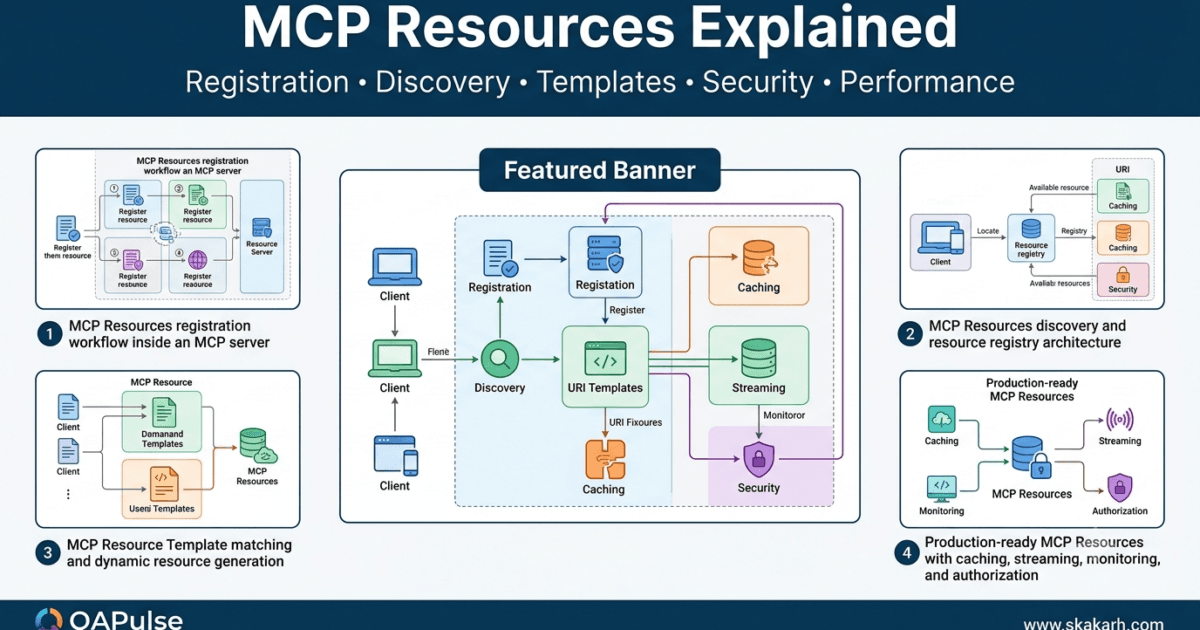
What Are MCP Resources?
After learning how MCP Tools execute actions, the next major capability in the Model Context Protocol is MCP Resources.
Unlike tools, resources do not perform operations. Instead, they expose structured information that AI applications can read whenever needed.
Think of resources as a read-only knowledge layer within an MCP server.
A resource may represent:
- Documentation
- Configuration files
- Source code
- API specifications
- SQL schemas
- Markdown documents
- Log files
- Project metadata
- CSV datasets
- JSON files
The client retrieves resources without triggering business logic or modifying external systems.
A simplified interaction looks like this:
User

↓

LLM

↓

MCP Client

↓

resources/read

↓

MCP Server

↓

Resource

↓

Content

↓

LLM
This distinction makes resources ideal for providing context to AI models.
Why MCP Resources Exist
Imagine asking an AI assistant:
Explain the architecture described in our README.
The assistant does not need to execute a tool.
It simply needs access to the document.
Without resources, developers might create unnecessary tools such as:
- get_readme()
- read_documentation()
- load_api_spec()
- open_configuration()
These are not actions.
They are requests for information.
Resources solve this problem by allowing servers to expose information directly through the protocol.
MCP Resources vs MCP Tools
Although both are discovered by the client, they serve completely different purposes.
| MCP Resources | MCP Tools |
|---|---|
| Provide information | Perform actions |
| Read-only | Can modify systems |
| No business logic | Execute business logic |
| Safe to retrieve repeatedly | May have side effects |
| Used as AI context | Used to accomplish tasks |
Retrieved using resources/read | Invoked using tools/call |
A useful rule is:
If the operation changes something, it is usually a tool.
If the operation simply returns information, it is usually a resource.
Real-World Examples of MCP Resources
Many enterprise systems expose valuable information that rarely changes during a conversation.
Examples include:
Software Projects
- README.md
- CONTRIBUTING.md
- CHANGELOG.md
- Architecture documentation
- Coding standards
Databases
- Table definitions
- Column descriptions
- Entity relationship diagrams
- Stored procedure documentation
APIs
- OpenAPI specifications
- Endpoint documentation
- Authentication guides
- Rate limit policies
DevOps
- Deployment guides
- Infrastructure documentation
- Kubernetes manifests
- Environment configurations
These are ideal candidates for MCP Resources because they provide knowledge rather than actions.
Characteristics of a Good Resource
A production-quality resource should have:
- Unique identifier
- Descriptive name
- Stable location
- Human-readable description
- Predictable content
- Consistent format
Conceptually:
Resource

├── URI

├── Name

├── Description

├── MIME Type

└── Content
Unlike tools, resources do not require execution handlers.
Resource URIs
Every resource is identified using a unique URI.
The URI tells the client exactly which resource should be retrieved.
Examples include:
file://README.md

docs://architecture

config://application

db://schema/users

logs://application

api://openapi
The URI is the primary identifier used throughout the protocol.
Clients request resources by URI rather than by filename or internal implementation details.
Resource Metadata
Before reading a resource, clients first discover its metadata.
Typical metadata includes:
- URI
- Name
- Description
- MIME type
- Size (optional)
Example:
| Property | Example |
|---|---|
| URI | docs://architecture |
| Name | System Architecture |
| MIME Type | text/markdown |
| Description | Overall project architecture documentation |
This metadata helps language models decide which resources are relevant.
Resource Types
Resources can represent many different kinds of information.
Text Resources
- Markdown
- Plain text
- HTML
- XML
Structured Resources
- JSON
- YAML
- CSV
- TOML
Code Resources
- Python
- JavaScript
- TypeScript
- Go
- Java
Documentation Resources
- User manuals
- API documentation
- Design documents
- Technical specifications
Because the protocol is content-agnostic, virtually any readable information can be exposed as a resource.
Resource Discovery
Just like tools, resources are discovered dynamically.
Client

↓

resources/list

↓

Server

↓

Resource Registry

↓

Metadata

↓

Client Cache
The client never assumes which resources exist.
Instead, it requests the complete list during discovery.
This allows new resources to become available without changing client code.
Reading a Resource
After discovery, the client can retrieve the content of a resource.
Client

↓

resources/read

↓

Resource URI

↓

Server

↓

Locate Resource

↓

Return Content
Unlike tools, reading a resource should not produce side effects.
The operation simply returns information.
Static and Dynamic Resources
Resources generally fall into two categories.
Static Resources
Examples include:
- Documentation
- README files
- API specifications
- Architecture diagrams
These rarely change.
Dynamic Resources
Examples include:
- Generated reports
- Current configuration
- Runtime metrics
- Live application status
Although dynamic resources change over time, they remain read-only from the client’s perspective.
The client retrieves updated information whenever it performs another read operation.
Resource Registry
The server stores all registered resources in a dedicated registry.
Resource Registry

├── README

├── API Documentation

├── Architecture Guide

├── Database Schema

├── Deployment Guide

└── Configuration
The registry enables efficient discovery and lookup without scanning the underlying storage repeatedly.
Benefits of MCP Resources
Using MCP Resources offers several advantages:
- Separates information from executable actions.
- Reduces unnecessary tool creation.
- Improves AI context retrieval.
- Simplifies server design.
- Makes documentation discoverable.
- Supports dynamic knowledge updates.
- Encourages reusable information sources.
- Reduces protocol complexity.
Common Mistakes
| Mistake | Impact | Best Practice |
|---|---|---|
| Using a tool to return static information | Unnecessary execution | Use a resource instead |
| Storing mutable operations as resources | Confusing behavior | Keep resources read-only |
| Generic resource names | Difficult discovery | Use descriptive names and URIs |
| Missing descriptions | Poor AI understanding | Provide meaningful metadata |
| Mixing documentation with executable logic | Reduced maintainability | Separate resources from tools |
MCP Resource Architecture
User Request

↓

LLM

↓

MCP Client

↓

resources/list

↓

Resource Registry

↓

Select Resource

↓

resources/read

↓

Content Returned

↓

LLM Response
MCP Resources provide the knowledge foundation for AI applications by exposing structured, discoverable, and read-only information through the Model Context Protocol. They complement MCP Tools by supplying context instead of executing actions, enabling AI assistants to understand projects, documentation, configurations, and datasets without invoking business logic. Properly designed resources make MCP servers more organized, efficient, and easier to extend for enterprise AI systems.
MCP Resource Registration, Discovery and URI Design
Registering MCP Resources
Before an MCP Resource can be accessed by a client, it must be registered with the MCP server during initialization.
Resource registration makes the resource discoverable through the protocol and stores its metadata in the server’s resource registry.
Unlike tools, resources do not register execution handlers because they are designed to expose information rather than perform actions.
The registration process typically includes:
- Resource URI
- Resource name
- Description
- MIME type
- Resource provider
- Optional metadata
A simplified registration workflow is shown below.
Server Startup

↓

Create Resource

↓

Register Resource

↓

Store in Resource Registry

↓

Server Ready
Once registration is complete, the resource becomes available to every connected MCP client.
The Resource Registry
The Resource Registry is the server’s catalog of every registered resource.
Resource Registry

├── docs://readme

├── docs://architecture

├── docs://deployment

├── config://application

├── db://schema

├── api://openapi

└── logs://latest
Instead of searching the filesystem or querying databases every time a client performs discovery, the server simply returns metadata stored in this registry.
This significantly improves discovery performance.
Why Resources Use URIs
Unlike traditional file paths, MCP identifies every resource using a Uniform Resource Identifier (URI).
The URI acts as a globally unique identifier for the resource.
URI

↓

Unique Resource

↓

Retrieve Content
Using URIs instead of filenames provides several advantages:
- Platform independent
- Human readable
- Easily categorized
- Stable identifiers
- Supports multiple storage systems
The client never needs to know where the underlying content is stored.
Designing Good Resource URIs
A well-designed URI should be:
- Descriptive
- Predictable
- Stable
- Unique
- Easy to understand
Good examples include:
docs://architecture

docs://api-guide

config://application

db://schema/orders

logs://server

repo://readme
Poor examples include:
resource1

abc123

document

test

temp
Meaningful URIs improve discoverability for both developers and AI models.
Organizing Resources by Category
Large enterprise servers may expose hundreds of resources.
Grouping them into logical namespaces improves organization.
Example:
docs://

├── architecture

├── deployment

└── api

config://

├── application

├── production

└── staging

db://

├── schema

├── users

└── reports
Namespaces make large resource collections much easier to navigate.
Resource Metadata
Every registered resource contains metadata describing the available content.
Typical metadata includes:
| Property | Purpose |
|---|---|
| URI | Unique identifier |
| Name | Human-readable title |
| Description | Explains the content |
| MIME Type | Content format |
| Size (optional) | Estimated content size |
| Last Modified (optional) | Version information |
The metadata itself is lightweight.
Actual content is retrieved only when requested.
Resource Discovery
Once the client finishes initialization, it requests the list of available resources.
Client

↓

resources/list

↓

Server

↓

Resource Registry

↓

Metadata

↓

Client Cache
The discovery response contains metadata for every registered resource.
No resource content is transferred during this phase.
This keeps initialization fast, even when resources are large.
Why Discovery Only Returns Metadata
Consider a documentation server exposing:
- README
- API Guide
- Architecture Manual
- Deployment Guide
If every document were transferred during initialization, client startup would become unnecessarily slow.
Instead:
Discovery

↓

Metadata Only
Later:
Read Request

↓

Requested Content Only
This lazy loading approach improves scalability.
Resource Selection by the Language Model
Once discovery is complete, the language model knows which resources are available.
Suppose the user asks:
Explain the deployment process.
Available resources:
docs://architecture

docs://deployment

config://application

db://schema
Based on:
- URI
- Name
- Description
- User intent
- Conversation context
the model selects:
docs://deployment
The MCP client then requests only that specific resource.
Reading a Resource
Reading follows a simple workflow.
Client

↓

resources/read

↓

URI

↓

Locate Resource

↓

Load Content

↓

Return Content
Unlike tool execution, no business logic is performed.
The server simply retrieves and returns the requested information.
Supporting Multiple Storage Backends
One advantage of using URIs is that the underlying storage implementation becomes invisible to clients.
Different resources may originate from:
Resource Layer

├── Local Files

├── Database

├── Git Repository

├── Cloud Storage

├── Documentation Server

└── Generated Content
Regardless of storage location, the protocol remains identical.
Clients always use the same resources/read request.
Dynamic Resource Providers
Not every resource corresponds to a physical file.
Some resources are generated dynamically.
Examples include:
- System status
- Current configuration
- Build information
- Runtime metrics
- Application version
- Active feature flags
Conceptually:
Read Request

↓

Resource Provider

↓

Generate Content

↓

Return Resource
Although generated dynamically, the resource remains read-only from the client’s perspective.
Resource Caching
Frequently accessed resources can be cached by both clients and servers.
Read Request

↓

Cache

├── Hit

│      ↓

│ Return Cached Content

│

└── Miss

       ↓

Load Resource

↓

Update Cache
Caching reduces latency and minimizes repeated access to underlying storage systems.
Resource Versioning
Enterprise documentation evolves continuously.
Versioning helps maintain compatibility.
Example:
docs://api/v1

docs://api/v2

docs://api/v3
Clients can request the version appropriate for their environment while allowing newer documentation to coexist.
Production Best Practices
When designing MCP Resources, follow these recommendations:
- Use meaningful URIs.
- Group related resources into namespaces.
- Keep metadata concise and informative.
- Return metadata during discovery, not content.
- Support lazy loading.
- Cache frequently accessed resources.
- Separate storage implementation from protocol design.
- Version resources when compatibility matters.
Common Design Mistakes
| Mistake | Impact | Best Practice |
|---|---|---|
| Using filenames as public identifiers | Poor flexibility | Use stable URIs |
| Returning full content during discovery | Slow initialization | Return metadata only |
| Flat resource organization | Difficult navigation | Organize with namespaces |
| Generic descriptions | Poor AI selection | Write descriptive metadata |
| Exposing storage implementation | Tight coupling | Keep storage abstracted |
| Ignoring versioning | Compatibility issues | Version long-lived resources |
MCP Resource Discovery Workflow
Server Startup

↓

Register Resources

↓

Store in Registry

↓

Client Initialization

↓

resources/list

↓

Metadata Returned

↓

LLM Selects Resource

↓

resources/read

↓

Content Returned
A well-designed MCP Resource is discoverable, organized, and independent of its underlying storage. By using stable URIs, structured metadata, lazy loading, and efficient resource registries, MCP servers can expose documentation, configuration, datasets, and other read-only information in a scalable and AI-friendly manner. These design principles improve discoverability, reduce initialization overhead, and create a clean separation between knowledge retrieval and executable actions.
MCP Resource Templates, Dynamic Resources and Best Practices
What Are MCP Resource Templates?
So far, every MCP Resource has represented a fixed piece of information.
Examples include:
docs://architectureconfig://applicationrepo://READMEapi://openapi
These resources always return the same content when requested.
However, many real-world applications require resources whose content depends on user input or runtime parameters.
Instead of registering thousands of individual resources, MCP introduces Resource Templates.
A Resource Template defines a reusable URI pattern that generates resources dynamically.
Resource Template

↓

URI Parameters

↓

Generate Resource

↓

Return Content
A single template can represent an unlimited number of resources.
Why Resource Templates Are Needed
Imagine an organization with 20,000 employees.
Without templates, the server would need to register:
employee://1

employee://2

employee://3

...

employee://20000
Managing thousands of individual resources is inefficient.
Instead, one template is sufficient.
employee://{employeeId}
The value inside {} is supplied when the resource is requested.
Fixed Resources vs Resource Templates
| Fixed Resource | Resource Template |
|---|---|
| Represents one resource | Represents many resources |
| Static URI | Parameterized URI |
| Registered individually | Registered once |
| Same content every request | Content depends on parameters |
| Best for documentation | Best for dynamic datasets |
Choose a fixed resource when the content is constant and a template when the content varies based on identifiers or filters.
Common Resource Template Examples
Many enterprise systems naturally fit template-based resources.
Examples include:
user://{id}

product://{sku}

order://{orderId}

invoice://{invoiceNumber}

ticket://{ticketId}

database://table/{tableName}

logs://{date}

repository://{branch}
Each URI follows the same structure while returning different content depending on the supplied parameter.
Template Resolution
When a client requests a resource, the server determines whether the URI matches a registered template.
Client Request

↓

user://145

↓

Match Template

↓

user://{id}

↓

Extract Parameter

↓

Generate Resource

↓

Return Content
The server does not register every possible resource individually.
Instead, it generates the appropriate resource on demand.
URI Parameter Extraction
Parameter extraction is one of the key responsibilities of a resource provider.
Example:
URI

order://98241

↓

Parameter

orderId = 98241
The extracted parameter is then used to retrieve the requested information from the underlying data source.
Dynamic Resource Providers
A Resource Provider is responsible for producing resource content.
Depending on the URI, it may retrieve information from:
- Local files
- SQL databases
- NoSQL databases
- Cloud storage
- REST APIs
- Git repositories
- Configuration services
Conceptually:
URI

↓

Resource Provider

↓

Data Source

↓

Generate Content

↓

Return Resource
The client remains unaware of where the information actually originates.
Dynamic Content Generation
Not every dynamic resource simply loads stored data.
Some resources are generated at request time.
Examples include:
- Current system status
- Build information
- Active deployments
- Runtime metrics
- Test execution summary
- Memory utilization
- CPU statistics
Example flow:
Read Request

↓

Collect Runtime Data

↓

Format Output

↓

Return Resource
Although the content changes over time, it remains read-only.
Resource Templates for Documentation
Templates are equally useful for documentation.
Instead of registering documentation for every service individually:
docs://auth

docs://billing

docs://orders

docs://payments

docs://inventory
A single template can support all services.
docs://{service}
As new services are introduced, no additional resource registration is required.
Resource Templates for Databases
Database servers commonly expose template-based resources.
Examples include:
db://table/{table}

db://view/{view}

db://schema/{schema}

db://procedure/{procedure}
This approach scales naturally regardless of database size.
Caching Dynamic Resources
Dynamic resources may require expensive operations.
Caching improves performance.
Read Request

↓

Cache Lookup

├── Cache Hit

│      ↓

│ Return Cached Resource

│

└── Cache Miss

       ↓

Generate Resource

↓

Store Cache

↓

Return Content
The cache duration depends on how frequently the underlying data changes.
Cache Invalidation
Caching introduces another challenge.
When should cached resources be refreshed?
Common strategies include:
- Time-based expiration
- Version changes
- Manual invalidation
- Event-driven updates
- File modification detection
Resource Updated

↓

Invalidate Cache

↓

Generate New Resource

↓

Update Cache
Correct cache invalidation ensures clients receive current information without unnecessary regeneration.
Resource Security
Even read-only resources may contain sensitive information.
Examples include:
- Customer records
- Internal documentation
- Deployment secrets
- Financial reports
- Private repositories
Before returning a resource, the server should verify:
- User identity
- Access permissions
- Organization policies
- Project membership
Read Request

↓

Authorization

↓

Retrieve Resource

↓

Return Content
Authorization remains essential even when no modifications occur.
Resource Size Considerations
Some resources are extremely large.
Examples include:
- Multi-gigabyte logs
- Large CSV exports
- Massive documentation
- Database dumps
Instead of loading everything into memory:
Large Resource

↓

Chunk Reading

↓

Streaming

↓

Client
Streaming improves scalability while reducing memory consumption.
Production Design Guidelines
When designing MCP Resource Templates, follow these recommendations:
- Keep URI patterns intuitive.
- Use meaningful parameter names.
- Avoid deeply nested URI structures.
- Validate URI parameters before retrieval.
- Apply authorization consistently.
- Cache expensive resources.
- Stream large content instead of loading everything into memory.
- Keep template behavior predictable.
Common Design Mistakes
| Mistake | Impact | Best Practice |
|---|---|---|
| Registering thousands of similar resources | Poor scalability | Use Resource Templates |
| Generic URI parameters | Difficult maintenance | Use descriptive parameter names |
| Returning unrestricted data | Security risks | Enforce authorization checks |
| Ignoring cache invalidation | Stale information | Refresh cached resources appropriately |
| Loading huge resources into memory | Performance degradation | Stream large resources |
| Exposing storage implementation | Tight coupling | Keep resource providers abstract |
Complete MCP Resource Workflow
Register Resource Template

↓

Client Discovery

↓

LLM Selects Resource

↓

resources/read

↓

Match URI Template

↓

Extract Parameters

↓

Authorization

↓

Resource Provider

↓

Generate Content

↓

Return Resource
MCP Resource Templates extend the flexibility of the Model Context Protocol by allowing a single registered template to represent thousands of related resources. Combined with dynamic resource providers, parameterized URIs, caching strategies, authorization, and efficient streaming, they enable MCP servers to expose scalable, secure, and high-performance knowledge sources without overwhelming the resource registry. Properly designed templates make enterprise MCP servers easier to maintain while supporting rapidly growing datasets and documentation repositories.
MCP Resources Security, Performance and Production Best Practices
Why Resource Security Matters
Although MCP Resources are read-only, they can expose highly sensitive information.
Examples include:
- Source code
- Internal documentation
- Infrastructure configuration
- Database schemas
- API credentials
- Business reports
- Customer information
- Deployment pipelines
A resource does not modify data, but exposing confidential information to unauthorized clients can be just as damaging.
Every resource request should therefore pass through a security layer before content is returned.
Resource Request

↓

Authentication

↓

Authorization

↓

Resource Provider

↓

Content Returned
Security must be enforced by the server rather than relying on the client or the AI model.
Authentication Before Resource Access
The server should first verify the identity of the requesting client.
Authentication methods may include:
- API keys
- OAuth tokens
- JWT tokens
- Enterprise Single Sign-On (SSO)
- Mutual TLS certificates
Client

↓

Authenticate

↓

Identity Verified

↓

Continue
Unauthenticated requests should never reach the resource provider.
Authorization for Resource Access
Authentication confirms who the client is.
Authorization determines what the client is allowed to access.
Example authorization rules:
| Resource | Authorized Users |
|---|---|
| docs://architecture | Development Team |
| config://production | DevOps Team |
| db://schema | Database Administrators |
| logs://application | Support Engineers |
| reports://finance | Finance Department |
Authorization should be evaluated for every resource request.
Authenticated Client

↓

Permission Check

├── Allowed

│      ↓

│ Return Resource

│

└── Denied

       ↓

Return Error
Protecting Sensitive Resources
Some resources require additional protection.
Examples include:
- Environment variables
- Security policies
- Private repositories
- Internal API documentation
- Encryption certificates
Instead of exposing entire resources, servers should publish only the information required by the client.
For example:
Configuration

↓

Filter Sensitive Data

↓

Safe Resource

↓

Client
Reducing unnecessary exposure minimizes security risks.
Resource Validation
Before retrieving a resource, the server should validate:
- URI format
- Namespace
- Parameter values
- Template variables
- Requested version
Example:
Incoming URI

↓

Validate URI

↓

Locate Resource

↓

Return Content
Early validation prevents invalid requests from reaching storage systems.
Preventing Path Traversal
Filesystem-backed resources require careful validation.
Unsafe requests such as:
../../../system/passwords
must never be accepted.
Instead:
Requested URI

↓

Workspace Validation

↓

Approved Directory

↓

Load Resource
Restricting access to approved locations protects the underlying operating system.
Optimizing Resource Retrieval
Production systems should retrieve resources efficiently.
Common optimization strategies include:
- In-memory caching
- Lazy loading
- Streaming
- Compression
- Background preloading
A simplified retrieval pipeline:
Resource Request

↓

Cache

├── Hit

│      ↓

│ Return Cached Content

│

└── Miss

       ↓

Load Resource

↓

Update Cache

↓

Return Content
Efficient caching significantly reduces latency for frequently requested resources.
Streaming Large Resources
Large documentation sets or datasets should not be loaded entirely into memory.
Instead, use streaming.
Large File

↓

Chunk Reader

↓

Stream Content

↓

Client
Streaming offers several advantages:
- Lower memory usage
- Faster response start
- Better scalability
- Improved support for large datasets
Monitoring Resource Performance
Resource access should be monitored continuously.
Useful metrics include:
| Metric | Purpose |
|---|---|
| Resource requests | Usage trends |
| Average response time | Performance analysis |
| Cache hit rate | Cache effectiveness |
| Cache miss rate | Storage optimization |
| Authorization failures | Security monitoring |
| Resource size | Capacity planning |
| Streaming duration | Large file optimization |
Monitoring helps identify slow or heavily used resources before they become bottlenecks.
Logging Resource Access
Every resource request should generate structured log entries.
Recommended events include:
- Resource requested
- Authentication completed
- Authorization result
- Cache hit or miss
- Resource loaded
- Streaming started
- Response completed
- Error generated
Request

↓

Authorize

↓

Retrieve

↓

Respond

↓

Audit Log
Audit logs improve troubleshooting and support compliance requirements.
Resource Version Management
Documentation and datasets evolve over time.
Versioning enables servers to maintain compatibility.
Example:
docs://api/v1

docs://api/v2

docs://api/v3
Benefits include:
- Backward compatibility
- Gradual migration
- Stable integrations
- Easier maintenance
Avoid replacing existing resources when compatibility is important.
Resource Lifecycle Management
Every resource follows a lifecycle.
Create Resource

↓

Register Resource

↓

Client Discovery

↓

Read Requests

↓

Update Resource

↓

Invalidate Cache

↓

Serve Updated Content

↓

Retire Resource
Managing the lifecycle carefully prevents broken references and stale information.
Production Deployment Checklist
Before deploying MCP Resources, verify the following:
| Requirement | Status |
|---|---|
| Stable URI design | ✓ |
| Descriptive metadata | ✓ |
| MIME types configured | ✓ |
| Authentication enabled | ✓ |
| Authorization enforced | ✓ |
| URI validation implemented | ✓ |
| Resource templates tested | ✓ |
| Cache configured | ✓ |
| Large resource streaming | ✓ |
| Audit logging enabled | ✓ |
| Performance monitoring active | ✓ |
| Versioning strategy defined | ✓ |
Common Production Mistakes
| Mistake | Impact | Best Practice |
|---|---|---|
| Treating all resources as public | Information leakage | Apply authorization to every request |
| Returning sensitive configuration | Security vulnerability | Filter confidential information |
| Ignoring cache invalidation | Outdated content | Refresh caches when resources change |
| Loading large files into memory | High resource consumption | Stream large resources |
| Exposing storage paths | Tight coupling | Use abstract URIs instead of physical locations |
| Skipping audit logs | Difficult investigations | Log every resource access event |
MCP Resources vs MCP Tools
| MCP Resources | MCP Tools |
|---|---|
| Read-only | Action-oriented |
| Return information | Execute business logic |
| No side effects | May modify external systems |
Accessed using resources/read | Invoked using tools/call |
| Ideal for context | Ideal for automation |
| Cache-friendly | Execution-dependent |
Understanding when to expose a capability as a resource rather than a tool is fundamental to designing clean and maintainable MCP servers.
Complete MCP Resource Lifecycle
Design Resource

↓

Assign URI

↓

Register Resource

↓

Advertise Metadata

↓

Client Discovery

↓

Resource Selection

↓

Authenticate

↓

Authorize

↓

Retrieve Resource

↓

Cache or Stream

↓

Return Content

↓

Monitor Usage

↓

Update Resource

↓

Invalidate Cache

↓

Version When Needed

↓

Retire Resource
Key Takeaways
Throughout this tutorial, you learned that MCP Resources provide structured, discoverable, and read-only information that AI applications use as contextual knowledge. Unlike tools, resources do not execute actions or modify external systems. A production-ready resource implementation includes well-designed URIs, descriptive metadata, resource registries, template-based resource generation, authentication, authorization, caching, streaming, monitoring, versioning, and lifecycle management. By separating information retrieval from executable operations, MCP Resources enable scalable, secure, and maintainable AI systems that can expose documentation, configurations, datasets, and enterprise knowledge efficiently.
What’s Next
In the next lesson, you’ll explore MCP Prompts, learning how servers provide reusable prompt templates to AI models. You’ll understand prompt registration, discovery, parameterization, prompt templates, prompt composition, security considerations, and production best practices for building reusable AI workflows using the Model Context Protocol.
Internal Links
- Day 1: What is MCP?
- Day 2: Why MCP Matters for AI Agents
- Day 3: MCP vs REST APIs vs Plugins
- Day 4: MCP Architecture Deep Dive
- Day 5: Build Your First Production-Ready MCP Development Environment (Python & VS Code)
- Day 6: Build Your First MCP Server in Python: A Production-Ready Guide for Beginners
- Day 7: Master the 4 MCP Transport Layer Options: STDIO vs HTTP vs SSE vs WebSockets
- Day 8: MCP Client Lifecycle: From Initialization to Tool Execution
- Day 9: MCP Server Lifecycle: From Startup to Graceful Shutdown
- Day 10: MCP Tools Explained: Building the Core Capabilities of an MCP Server
External Links
- WebSocket API: https://developer.mozilla.org/docs/Web/API/WebSockets_API
- Model Context Protocol: https://modelcontextprotocol.io
- JSON-RPC Specification: https://www.jsonrpc.org/specification
- Python asyncio: https://docs.python.org/3/library/asyncio.html
- Python subprocess: https://docs.python.org/3/library/subprocess.html
- Python asyncio: https://docs.python.org/3/library/asyncio.html
- Python logging: https://docs.python.org/3/library/logging.html
- Python multiprocessing: https://docs.python.org/3/library/multiprocessing.html
AI Search Optimized Snippets
What are MCP Resources?
MCP Resources are read-only data sources exposed by an MCP server that provide documentation, configuration, datasets, source code, or other structured information to AI applications without executing business logic or modifying external systems.
How do MCP Resources work?
MCP Resources are registered during server startup, discovered dynamically using the resources/list request, identified by unique URIs, and retrieved through the resources/read operation. They can represent static content or dynamically generated information using resource templates.
What is the difference between MCP Resources and MCP Tools?
| MCP Resources | MCP Tools |
|---|---|
| Read-only information | Executable actions |
| No side effects | May change external systems |
Accessed using resources/read | Invoked using tools/call |
| Provide AI context | Perform AI operations |
What are MCP Resource Templates?
Resource Templates define parameterized URI patterns that allow a single registered template to generate many related resources dynamically, improving scalability and reducing registry complexity.
Production Checklist
Before deploying MCP Resources, verify the following:
- ✅ Stable URI naming convention
- ✅ Descriptive metadata
- ✅ Resource registry configured
- ✅ Resource templates implemented where appropriate
- ✅ Authentication enabled
- ✅ Authorization enforced
- ✅ URI validation
- ✅ Cache strategy defined
- ✅ Streaming for large resources
- ✅ Structured logging
- ✅ Performance monitoring
- ✅ Versioning strategy
- ✅ Resource lifecycle management
Frequently Asked Questions
What is an MCP Resource?
An MCP Resource is a discoverable, read-only information source exposed by an MCP server that provides contextual data to AI models through standardized protocol operations.
Why do MCP Resources use URIs?
URIs provide stable, unique, and implementation-independent identifiers that allow clients to retrieve resources without knowing their physical storage location.
When should a developer use an MCP Resource instead of an MCP Tool?
Use an MCP Resource whenever the objective is to expose information without performing actions or changing external systems. Use an MCP Tool when execution or state modification is required.
What is the purpose of a Resource Registry?
The Resource Registry stores metadata for all registered resources, enabling efficient discovery, lookup, and management without repeatedly scanning underlying storage.
Why are Resource Templates important?
Resource Templates allow a single URI pattern to represent thousands of related resources dynamically, improving scalability and reducing maintenance effort.
Conclusion
MCP Resources are one of the core capabilities of the Model Context Protocol, enabling AI systems to access structured, read-only information such as documentation, source code, configuration files, datasets, and API specifications. Production-ready MCP Resources rely on stable URIs, rich metadata, efficient resource registries, template-based generation, authentication, authorization, caching, streaming, and lifecycle management to deliver secure and scalable contextual information to AI applications.
Continue Your MCP Zero to Hero Journey
From here onward, every lesson will build on this environment as we move from concepts to production-ready implementations.
Enjoyed this article? Explore more in-depth guides on AI engineering, automation testing, Model Context Protocol, Playwright, and intelligent software quality at www.skakarh.com. Follow QAPulse by SK for practical, production-focused tutorials designed for QA engineers, SDETs, and AI developers.