 QA
QA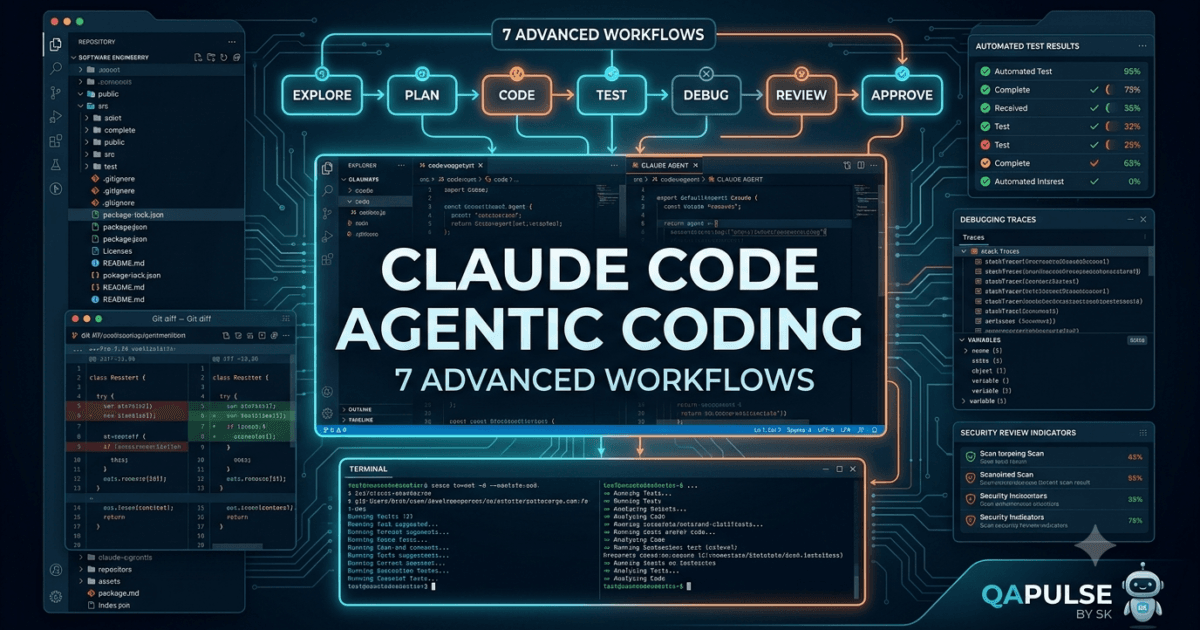
Introduction
Claude Code Agentic Coding: AI coding assistants are becoming much more than tools that generate individual functions or explain programming errors. The real transformation happens when an AI coding agent can understand a project, inspect multiple files, reason about dependencies, execute commands, modify code, run tests, analyze failures, and iterate toward a working solution.
This is where Claude Code becomes especially powerful.
In earlier lessons, we explored the fundamentals of Claude Code, including project interaction, code generation, debugging, context management, and practical development workflows. Day 16 moves into a more advanced area: agentic coding workflows.
The goal is no longer simply:
“Ask Claude Code to write some code.”
The goal becomes:
“Give Claude Code an engineering objective and let it investigate, plan, implement, validate, and refine the solution.”
That difference is significant.
A traditional AI coding assistant usually operates around a small interaction:
Developer
   ↓
Prompt
   ↓
AI
   ↓
Code Suggestion
   ↓
Developer
An agentic coding workflow looks more like:
Developer
   ↓
Engineering Objective
   ↓
Claude Code
   ↓
Repository Exploration
   ↓
Planning
   ↓
Implementation
   ↓
Testing
   ↓
Failure Analysis
   ↓
Iteration
   ↓
Code Review
   ↓
Final Change
The second workflow is much closer to how an experienced software engineer approaches a real development task.
What Makes an Agentic Coding Workflow Different?
The biggest difference is responsibility for the workflow.
A basic AI assistant waits for instructions such as:
Create a login function.
An agentic workflow can start with a higher-level objective:
Implement secure user authentication in this application.

First understand the existing architecture.

Identify the authentication flow.

Reuse existing patterns where possible.

Implement the required changes.

Run the relevant tests.

Fix failures.

Then summarize the changes.
The developer is no longer specifying every individual step.
Claude Code can determine the sequence of actions needed to reach the desired outcome.
This changes the role of the developer from simply writing instructions to defining objectives, constraints, acceptance criteria, and quality standards.
From Code Generation to Engineering Execution
Consider two approaches.
Traditional AI Coding
Developer:
"Write a function that validates email addresses."

AI:
Generates function.

Developer:
Copies function.

Developer:
Runs tests.

Developer:
Finds edge case.

Developer:
Asks AI for a fix.
Agentic Coding
Developer:
"Improve email validation across the application."

Claude Code:
1. Searches the repository.
2. Finds existing validation logic.
3. Identifies duplicated implementations.
4. Examines related tests.
5. Proposes a plan.
6. Updates the shared validation logic.
7. Updates affected tests.
8. Runs the test suite.
9. Investigates failures.
10. Fixes implementation issues.
11. Reports the final changes.
The second workflow reduces the amount of manual coordination required from the developer.
Repository Understanding Comes First
One of the most important principles for advanced Claude Code usage is:
Do not start changing code before understanding the repository.
A mature project contains context that may not be obvious from a single file.
For example:
project/
├── src/
│   ├── api/
│   ├── services/
│   ├── models/
│   └── utils/
├── tests/
├── scripts/
├── docs/
├── package.json
└── README.md
A seemingly simple change in utils/ might affect:
- API behavior
- Database operations
- Automated tests
- CLI scripts
- Documentation
- Deployment workflows
Before modifying the code, Claude Code should understand these relationships.
A useful instruction is:
Before making any changes, inspect the repository structure and identify the files, modules, tests, and configuration that are relevant to this task.

Do not modify anything yet.

Explain your understanding and proposed implementation plan first.
This creates an important separation between exploration and execution.
Planning Before Implementation
For complex tasks, planning is one of the most valuable capabilities of an AI coding agent.
Suppose the requirement is:
Add role-based access control to the application.
A weak workflow immediately starts editing files.
A stronger workflow asks Claude Code to investigate:
Analyze the repository and create an implementation plan for role-based access control.

Identify:

- Existing authentication flow
- User model
- Authorization logic
- API middleware
- Protected routes
- Existing tests
- Configuration changes
- Documentation that needs updating

Do not modify files yet.
Claude Code can then map the task to the existing architecture.
A potential plan might look like:
1. Extend User model with role information.
2. Add authorization policy layer.
3. Create reusable role-checking middleware.
4. Apply middleware to protected routes.
5. Add unit tests.
6. Add integration tests.
7. Update API documentation.
8. Run the complete test suite.
This approach reduces accidental architectural changes.
Why Planning Matters
Without planning, an AI agent may:
- Create duplicate utilities.
- Introduce unnecessary abstractions.
- Modify unrelated files.
- Ignore existing project conventions.
- Reimplement functionality that already exists.
- Miss dependent tests.
Planning creates a controlled path from requirement to implementation.
It also gives the developer an opportunity to correct the AI before code changes begin.
That is an important engineering safety mechanism.
The Three-Stage Agentic Workflow
A useful mental model for advanced Claude Code development is:
Understand
   ↓
Plan
   ↓
Execute
   ↓
Validate
For larger projects, expand it:
Understand
   ↓
Plan
   ↓
Implement
   ↓
Test
   ↓
Review
   ↓
Refine
Each stage has a different purpose.
Understand
Claude Code investigates:
- Repository structure
- Existing implementation
- Dependencies
- Configuration
- Tests
- Documentation
Plan
The agent determines:
- Files to change
- Architecture impact
- Implementation approach
- Testing strategy
- Potential risks
Implement
The agent:
- Modifies existing files
- Creates new files when necessary
- Reuses existing patterns
- Keeps changes focused
Test
The agent:
- Runs relevant tests
- Analyzes failures
- Fixes problems
- Re-runs tests
Review
The agent checks:
- Correctness
- Maintainability
- Security
- Performance
- Consistency
Refine
The agent addresses remaining issues before presenting the final result.
This workflow resembles professional software engineering more closely than simple code generation.
Giving Claude Code Better Objectives
The quality of an agentic workflow depends heavily on how the task is defined.
Compare:
Fix authentication.
with:
Improve authentication reliability.

Requirements:

- Preserve existing login behavior.
- Do not change the public API.
- Identify the current authentication flow first.
- Add coverage for failed authentication.
- Handle expired sessions.
- Avoid introducing new dependencies.
- Run authentication-related tests.
- Do not modify unrelated modules.

Before implementation, provide an implementation plan.
The second instruction gives Claude Code:
- Goal
- Constraints
- Scope
- Acceptance criteria
- Validation requirements
This dramatically reduces ambiguity.
Defining Acceptance Criteria
A powerful technique is to describe what success looks like before asking Claude Code to implement anything.
For example:
Task:
Add password reset functionality.

Acceptance criteria:

1. User can request a password reset.
2. Reset tokens expire.
3. Tokens cannot be reused.
4. Invalid tokens return an appropriate error.
5. Passwords are never logged.
6. Existing authentication behavior remains unchanged.
7. Unit tests cover success and failure cases.
8. Integration tests cover the complete reset workflow.
Now Claude Code has something concrete to validate against.
This is much stronger than simply saying:
Implement password reset.
Scope Control
One of the biggest challenges with agentic coding is preventing unnecessary changes.
An AI agent may identify several improvements while working on a feature.
Some may be valid but unrelated.
For example, while implementing authentication, Claude Code might discover:
Legacy logging utility
Old API naming
Outdated dependency
Unused helper
Poor documentation
These may all deserve attention, but changing them during an authentication task increases risk.
A good constraint is:
Keep the implementation focused on authentication.

Do not refactor unrelated code.

If you identify unrelated improvements, mention them separately instead of modifying them.
This creates a clear boundary around the agent’s autonomy.
Agentic Coding Does Not Mean Unlimited Autonomy
Giving an AI coding agent more autonomy does not mean removing developer control.
The strongest workflow is usually controlled autonomy.
High-Level Goal
      ↓
Repository Understanding
      ↓
Implementation Plan
      ↓
Developer Validation
      ↓
Agent Execution
      ↓
Automated Testing
      ↓
Human Review
The developer remains responsible for:
- Requirements
- Architecture
- Security decisions
- Business rules
- Production approval
Claude Code becomes the execution and reasoning assistant.
Claude Code as an Engineering Partner
The most useful mental model is not:
Claude Code writes my code.
Instead:
Claude Code helps me execute software engineering tasks across the repository.
That includes:
Explore
Analyze
Plan
Implement
Test
Debug
Refactor
Review
Document
This broader capability is what makes agentic coding workflows particularly powerful.
Comparison: Traditional AI Assistant vs Agentic Coding
| Capability | Traditional AI Assistant | Agentic Claude Code Workflow |
|---|---|---|
| Generate code | ✅ | ✅ |
| Explain code | ✅ | ✅ |
| Repository exploration | Limited | ✅ |
| Multi-file changes | Limited | ✅ |
| Execute commands | Limited/varies | ✅ |
| Run tests | Developer-driven | ✅ |
| Analyze test failures | Manual prompting | ✅ |
| Iterative debugging | Manual | ✅ |
| Architecture awareness | Limited | Stronger with repository context |
| Task planning | Basic | ✅ |
| Workflow execution | Limited | ✅ |
| Final human approval | ✅ | ✅ |
The important point is that agentic coding does not eliminate traditional development skills.
It amplifies them.
The Strategy for Day 16
The strategy we’ll develop throughout this lesson is simple:
1. Give Claude Code the objective.
2. Establish constraints.
3. Let it inspect the repository.
4. Ask for a plan.
5. Review the plan.
6. Allow implementation.
7. Run tests.
8. Analyze failures.
9. Iterate.
10. Review the final diff.
This approach balances productivity with engineering discipline.
The goal is not to make Claude Code do everything.
The goal is to make Claude Code do the right things in the right order.
Turning High-Level Requirements into Claude Code Workflows
Now we can make that process practical.
The biggest productivity improvement does not come from writing longer prompts. It comes from learning how to convert a vague engineering requirement into a sequence of clear instructions that Claude Code can execute safely.
Consider a typical requirement:
Add authentication to the application.
A developer understands that this potentially involves many components:
Authentication Requirement
        │
        ├── User model
        ├── Password handling
        ├── Login endpoint
        ├── Session/token management
        ├── Middleware
        ├── Authorization
        ├── Error handling
        ├── Tests
        └── Documentation
Claude Code can investigate these relationships, but the quality of the resulting implementation depends on how effectively the task is framed.
The Task Decomposition Strategy
A useful approach is to decompose large requirements into four layers:
Goal
 ↓
Constraints
 ↓
Implementation
 ↓
Validation
For example:
Goal:
Add JWT authentication.

Constraints:
Do not change existing API contracts.
Reuse existing user model.
Do not introduce unnecessary dependencies.

Implementation:
Add login endpoint.
Add token generation.
Add authentication middleware.

Validation:
Add unit tests.
Add integration tests.
Run the existing test suite.
This gives Claude Code a much clearer engineering contract.
A Practical Claude Code Prompt
Instead of:
Build authentication.
Use:
Implement JWT authentication for this application.

First inspect the repository and identify:

- Existing user model
- Current authentication logic
- API routes
- Middleware
- Existing security utilities
- Authentication-related tests

Do not modify files yet.

After understanding the repository, provide:

1. Current authentication architecture
2. Files that need modification
3. New files that are required
4. Implementation strategy
5. Testing strategy
6. Potential risks

Wait for approval before making changes.
This prompt creates an important boundary.
Claude Code first investigates and explains its understanding instead of immediately editing the project.
Why “Do Not Modify Yet” Matters
This simple instruction can significantly improve workflow control.
Without it:
Requirement
   ↓
Claude Code
   ↓
Immediate Changes
With it:
Requirement
   ↓
Repository Analysis
   ↓
Implementation Plan
   ↓
Developer Review
   ↓
Code Changes
The second approach is safer for complex projects because the developer can catch incorrect assumptions before implementation begins.
Using the Repository as Context
One of Claude Code’s biggest strengths is its ability to work with the project rather than treating every question as an isolated coding problem.
For example, suppose the repository already contains:
class UserService:
    def authenticate(self, username, password):
        ...
A generic AI response might create:
def login_user(username, password):
    ...
That could introduce duplicate authentication logic.
A repository-aware workflow should instead identify the existing service and extend it where appropriate.
This leads to an important principle:
Before creating new code, ask Claude Code to search for existing implementations.
A useful instruction is:
Before creating any new utility, service, helper, or abstraction, search the repository for existing implementations that can be reused or extended.
This reduces duplication and protects established architecture.
Searching Before Creating
Imagine you need password validation.
Instead of immediately creating:
def validate_password(password):
    ...
ask:
Search the repository for existing password validation,
credential validation, authentication utilities, and security helpers.

Identify anything that can be reused before proposing a new implementation.
Claude Code may discover:
src/security/password.py
src/auth/validators.py
tests/security/test_password.py
Now the implementation can follow existing project conventions.
This is one of the most important differences between code generation and repository-level engineering.
Multi-File Changes
Real engineering tasks rarely involve one file.
For example:
Authentication Feature

src/
├── models/user.py
├── services/auth.py
├── middleware/auth.py
├── api/auth.py
└── config/security.py

tests/
├── test_auth.py
└── test_security.py
A weak workflow might ask:
Update auth.py.
A better workflow describes the complete feature:
Implement authentication across the existing architecture.

Update only the modules necessary for the feature.

Maintain existing interfaces.

Add or update tests for every changed behavior.

Do not modify unrelated modules.
This gives Claude Code enough freedom to make coordinated changes without turning the task into an uncontrolled refactoring exercise.
Reviewing the Proposed Plan
Before implementation, ask Claude Code to present a plan.
Example:
Proposed implementation:

1. Extend User model.
2. Add password hashing utility.
3. Add token service.
4. Add authentication middleware.
5. Protect private endpoints.
6. Add authentication tests.
7. Update API documentation.
Now the developer can evaluate the plan.
For example:
Developer:
Why do we need a new token service?

Claude Code:
The repository currently has no reusable token abstraction.

Developer:
Check whether the existing security module can be extended instead.

Claude Code:
Found existing SecurityManager. I can extend it without introducing a new service.
This type of interaction prevents unnecessary architecture changes.
Using Existing Project Conventions
Every mature repository has conventions.
They may include:
Naming conventions
Folder structure
Error handling
Logging
Testing framework
API patterns
Dependency injection
Configuration management
Code formatting
Claude Code should follow these conventions rather than inventing new ones.
A useful prompt:
Follow the existing project's conventions.

Before implementing changes, inspect:

- Naming patterns
- Folder structure
- Error handling
- Logging
- Testing style
- Dependency management
- API patterns

Do not introduce a new architectural pattern unless the existing structure cannot support the requirement.
This is especially important when working with large teams.
Code Generation With Constraints
Once the plan is approved, implementation can begin.
Suppose the project uses Python and FastAPI.
A constrained request might look like:
Implement the approved authentication plan.

Requirements:

- Use the existing FastAPI architecture.
- Reuse the current User model.
- Use the project's existing configuration system.
- Do not introduce a new framework.
- Add type hints.
- Follow the existing error-handling pattern.
- Add tests for success and failure scenarios.
- Keep the changes limited to authentication.
This produces a much more controlled coding workflow than:
Write authentication in Python.
The Test-Driven Feedback Loop
Agentic coding becomes significantly more powerful when tests are treated as feedback rather than merely a final verification step.
The workflow becomes:
Implement
   ↓
Run Tests
   ↓
Failure?
 ┌─┴─┐
Yes  No
 │    │
 ▼    ▼
Analyze  Review
 │
 ▼
Fix
 │
 └──────► Run Tests Again
Claude Code can use test failures as evidence about what needs to change.
For example:
Run the authentication test suite.

If tests fail:

1. Analyze the failure.
2. Identify whether the problem is implementation or test setup.
3. Fix the smallest appropriate change.
4. Re-run the affected tests.
5. Continue until the relevant tests pass.
This transforms Claude Code from a code generator into an iterative development partner.
Example Test Feedback
Suppose Claude Code implements:
def authenticate(user, password):
    if user.password == password:
        return True

    return False
The test suite reports:
FAILED test_authentication.py

Expected hashed password verification.
Plain-text comparison detected.
Instead of simply asking:
Fix the test.
the agent can investigate the actual security requirement.
A better implementation might use the project’s existing password hashing mechanism:
def authenticate(user, password):
    return password_hasher.verify(
        password,
        user.password_hash
    )
The important part is not the exact code.
The important part is the feedback loop.
Tests as an Engineering Contract
Tests can provide Claude Code with objective success criteria.
For example:
The implementation is complete when:

- Existing tests remain passing.
- New authentication tests pass.
- Invalid credentials are rejected.
- Expired tokens are rejected.
- Protected endpoints require authentication.
- No passwords appear in logs.
This is significantly more precise than:
Make authentication work.
Comparison: Prompt-Driven vs Workflow-Driven Development
| Approach | Prompt-Driven Coding | Workflow-Driven Claude Code |
|---|---|---|
| Starting point | Small instruction | Engineering objective |
| Repository analysis | Often manual | Explicit step |
| Planning | Optional | Recommended |
| File selection | Developer decides | Agent investigates |
| Implementation | Immediate | After planning |
| Testing | Often separate | Integrated feedback loop |
| Failure analysis | Manual | Agent-assisted |
| Scope control | Informal | Explicit constraints |
| Architecture awareness | Limited | Repository-based |
| Iteration | Prompt by prompt | Continuous workflow |
The second approach doesn’t remove the developer.
It gives the developer a better control model.
Using Git Diff as a Safety Check
One of the simplest and most effective techniques is reviewing the final diff.
After Claude Code completes the task:
git diff
For a summary:
git diff --stat
To inspect staged changes:
git diff --cached
The developer should verify:
Changed files
       ↓
Expected?
       ↓
Yes → Review implementation
       ↓
Run tests
       ↓
Commit
If unexpected files appear, stop and investigate.
For example:
Expected:
src/auth.py
tests/test_auth.py

Unexpected:
package-lock.json
src/payment.py
docs/legacy.md
Those unexpected modifications should be investigated before merging.
Keeping Changes Small
Agentic coding works best when tasks have clear boundaries.
Instead of:
Improve the entire application.
break the objective into smaller units:
Task 1:
Refactor authentication.

Task 2:
Improve authentication tests.

Task 3:
Add authorization middleware.

Task 4:
Update documentation.
This creates smaller reviewable changes.
It also makes failures easier to diagnose.
Using Claude Code for Refactoring
Agentic workflows are particularly useful for controlled refactoring.
Suppose you have:
def calculate_total(order):
    # 100 lines
    ...
Instead of:
Refactor this.
provide measurable constraints:
Refactor calculate_total.

Requirements:

- Preserve current behavior.
- Do not change the public API.
- Identify duplicate logic.
- Extract only clearly reusable components.
- Add tests before changing behavior.
- Run the complete relevant test suite.
- Show the final diff and explain every extracted component.
Now Claude Code has a clear definition of success.
Safe Refactoring Workflow
A strong workflow is:
Existing Tests
      ↓
Repository Analysis
      ↓
Refactoring Plan
      ↓
Developer Review
      ↓
Small Refactor
      ↓
Run Tests
      ↓
Review Diff
      ↓
Next Refactor
This is much safer than asking an AI agent to rewrite an entire module at once.
Agentic Debugging
The same workflow applies to debugging.
Suppose production logs show:
KeyError: 'customer_id'
Instead of:
Fix this error.
give Claude Code the investigation objective:
Investigate this KeyError.

First:

1. Locate where customer_id is produced.
2. Trace where it is consumed.
3. Identify all code paths that can omit it.
4. Inspect related tests.
5. Determine the root cause.

Do not modify code until you identify the root cause.
This encourages root-cause analysis instead of symptom-based patching.
Root Cause vs Symptom Fixing
Consider:
customer_id = data["customer_id"]
A superficial fix might be:
customer_id = data.get("customer_id")
But that may simply hide the problem.
The real issue could be:
API Response
    ↓
Missing customer_id
    ↓
Incorrect transformation
    ↓
Service receives incomplete data
The correct fix might belong earlier in the pipeline.
This is why repository exploration and execution tracing are essential for agentic debugging.
Strategy: Ask for Evidence
A powerful technique is asking Claude Code to support its conclusions with evidence.
For example:
Do not assume the root cause.

Trace the execution path and identify the exact file, function, and condition responsible for the failure.

Explain the evidence before proposing a fix.
This reduces speculative changes.
Controlling Risk With Explicit Boundaries
For production repositories, add constraints such as:
Do not:

- Change database schema.
- Modify public API contracts.
- Update dependencies.
- Delete tests.
- Change configuration files.
- Refactor unrelated code.

If any of these changes appear necessary, stop and explain why.
This creates a safety boundary around the agent.
It also gives the developer an opportunity to make a deliberate decision before high-impact changes occur.
A Reusable Advanced Claude Code Workflow
For complex tasks, the following prompt pattern is highly reusable:
You are working as a senior software engineer in this repository.

Objective:
[Describe the engineering goal]

First:
1. Inspect the repository.
2. Identify relevant files and dependencies.
3. Understand existing implementation patterns.
4. Identify existing tests.

Then provide:
1. Current architecture understanding.
2. Proposed implementation plan.
3. Files that will change.
4. Risks and edge cases.
5. Testing strategy.

Do not modify files until the plan is clear.

After implementation:
1. Run relevant tests.
2. Analyze failures.
3. Fix implementation issues.
4. Re-run tests.
5. Review the final diff.
6. Summarize all changes.
7. Mention any remaining risks.

Constraints:
[Add project-specific restrictions]
This template can be adapted for:
- Feature development
- Bug fixing
- Refactoring
- Test automation
- API development
- Security improvements
- Documentation
- Migration work
The Core Understanding
The most important shift is this:
Old Mental Model

"Claude Code, write this function."

New Mental Model

"Claude Code, understand this engineering objective,
work within these constraints, execute the required changes,
validate the result, and report what happened."
The second model unlocks much more value from an AI coding agent.
However, it also requires better engineering judgment from the developer.
More autonomy means more responsibility to define:
- Scope
- Constraints
- Acceptance criteria
- Validation
- Review requirements
That is why advanced Claude Code usage is ultimately an engineering discipline, not simply a prompting technique.
Advanced Claude Code Workflows for Testing, Debugging, Refactoring, and Security
The previous sections established the foundation for controlled agentic development with Claude Code. You learned how to move from a high-level requirement to repository analysis, planning, implementation, testing, and review.
Now we can push the workflow further.
A production software task rarely ends when the code compiles. A feature is only valuable when it behaves correctly, survives edge cases, remains maintainable, and does not introduce security or performance problems.
This is where Claude Code can become particularly useful for software engineering teams.
Instead of using Claude Code only to generate implementation code, you can use it across the entire development lifecycle:
Requirement
    ↓
Repository Analysis
    ↓
Implementation
    ↓
Unit Tests
    ↓
Integration Tests
    ↓
Debugging
    ↓
Security Review
    ↓
Refactoring
    ↓
Final Diff Review
This turns AI assistance into a continuous engineering workflow.
Using Claude Code to Generate Tests Before Implementation
One powerful strategy is to define expected behavior through tests before changing the implementation.
Suppose an application contains:
def calculate_discount(price, customer_type):
    ...
Instead of immediately asking Claude Code to modify the function, define expected behavior:
Analyze calculate_discount().

Before changing the implementation:

1. Identify existing behavior.
2. Identify edge cases.
3. Create tests for the expected behavior.
4. Do not modify the production implementation yet.
Claude Code might identify scenarios such as:
def test_regular_customer_gets_no_discount():
    assert calculate_discount(100, "regular") == 100


def test_premium_customer_gets_discount():
    assert calculate_discount(100, "premium") == 90


def test_zero_price():
    assert calculate_discount(0, "premium") == 0
Now the tests provide an objective contract.
The implementation can be changed against that contract.
Why Tests Improve Agentic Coding
Tests give Claude Code feedback that natural-language instructions cannot always provide.
Consider:
"Make the function reliable."
This is ambiguous.
Compare it with:
The function must:

- Handle zero values.
- Reject negative prices.
- Support premium customers.
- Preserve existing behavior for regular customers.
- Pass all existing tests.
The second version is measurable.
The agent can implement, test, observe failures, and iterate.
Using Claude Code for Test Gap Analysis
Existing tests often cover only the happy path.
Ask Claude Code:
Analyze the existing tests for this module.

Identify:

- Missing edge cases
- Missing negative scenarios
- Missing boundary conditions
- Missing integration coverage
- Potentially weak assertions

Do not modify tests yet. Provide recommendations first.
For a login service, Claude Code might identify:
Existing:
✓ Successful login

Missing:
✗ Invalid password
✗ Unknown user
✗ Locked account
✗ Expired password
✗ Missing credentials
✗ Rate limiting
✗ Session expiration
This is particularly valuable for QA and SDET workflows.
Claude Code for Test Automation
Claude Code can also help improve automated testing frameworks.
Consider a Playwright test:
test("login works", async ({ page }) => {
    await page.goto("/login");
    await page.fill("#username", "admin");
    await page.fill("#password", "password");
    await page.click("#login");
});
The test does not verify the actual result.
A useful request is:
Review this Playwright test for reliability.

Identify:

- Missing assertions
- Fragile locators
- Hardcoded test data
- Synchronization problems
- Duplicate setup
- Opportunities for reusable fixtures

Suggest improvements without changing the application's behavior.
Claude Code may recommend stronger assertions:
await expect(page).toHaveURL(/dashboard/);
await expect(
    page.getByRole("heading", { name: "Dashboard" })
).toBeVisible();
The objective is not merely generating more tests.
The objective is creating reliable tests that provide meaningful feedback.
Debugging With Execution Evidence
Agentic debugging should be evidence-driven.
Suppose a test fails:
FAILED test_checkout.py

AssertionError:
Expected 100
Received 80
Instead of asking Claude Code to immediately change the expected value, provide the failure:
Investigate this test failure.

Do not modify the test expectation immediately.

Trace:

1. Input values.
2. Business logic.
3. Discount calculation.
4. Database values.
5. Expected behavior.

Determine whether the implementation or test is incorrect.
This prevents a dangerous pattern where the agent simply changes the test to match the current implementation.
Never Let the Test Suite Become the Victim
A common mistake with AI-assisted development is:
Test fails
   ↓
Change test
   ↓
Test passes
That is not necessarily a fix.
A better workflow is:
Test fails
   ↓
Understand failure
   ↓
Validate requirement
   ↓
Determine root cause
   ↓
Fix implementation OR test
   ↓
Run tests again
This distinction is critical in professional engineering environments.
Root-Cause Analysis Workflow
For complex failures, use a structured investigation.
Failure
  ↓
Reproduce
  ↓
Trace Execution
  ↓
Inspect Inputs
  ↓
Inspect State
  ↓
Identify Root Cause
  ↓
Propose Fix
  ↓
Implement
  ↓
Regression Test
A useful Claude Code instruction is:
Perform root-cause analysis before making changes.

Do not apply a workaround simply to make the failing test pass.

Explain:

- What failed
- Why it failed
- Where the failure originated
- Why the proposed fix addresses the root cause
- What regression test should prevent recurrence
This creates much stronger debugging workflows.
Using Claude Code for Refactoring Safely
Refactoring is another area where agentic workflows can save significant time.
Suppose a service has become difficult to maintain:
class OrderService:

    def create_order(self):
        ...

    def calculate_tax(self):
        ...

    def send_email(self):
        ...

    def generate_invoice(self):
        ...

    def process_payment(self):
        ...

    def export_report(self):
        ...
Claude Code can identify multiple responsibilities.
But asking:
Refactor this class.
is too broad.
Instead:
Analyze OrderService for architectural and maintainability problems.

Identify:

- Multiple responsibilities
- Duplicate logic
- Tight coupling
- Long methods
- Hidden dependencies

Do not refactor yet.

Provide a phased refactoring plan that preserves current behavior.
The agent may propose:
OrderService
    ↓
OrderManagementService

PaymentService

TaxService

NotificationService

InvoiceService

ReportingService
The important point is that the architecture is discussed before implementation.
Refactoring With Regression Protection
Before performing a large refactor, ask Claude Code to establish test coverage.
Before refactoring this module:

1. Identify current behavior.
2. Review existing tests.
3. Identify uncovered behavior.
4. Add characterization tests where appropriate.
5. Confirm the current test suite passes.

Only then begin the refactoring.
This protects existing behavior.
After each meaningful change:
pytest tests/orders/
Then run the broader suite:
pytest
The goal is to keep the system green throughout the transformation.
Claude Code for Security Reviews
Security should be integrated into the coding workflow rather than performed only before release.
Consider:
query = f"""
SELECT *
FROM users
WHERE email = '{email}'
"""
A security review prompt could be:
Perform a security review of this implementation.

Check for:

- Injection vulnerabilities
- Authentication weaknesses
- Authorization issues
- Secret exposure
- Unsafe input handling
- Sensitive information in logs
- Insecure dependencies

Classify findings by severity.

Do not change code yet.
The agent can identify SQL injection risk and recommend parameterized queries.
query = """
SELECT *
FROM users
WHERE email = ?
"""

cursor.execute(query, (email,))
The exact implementation should follow the project’s database framework and conventions.
Security Review Beyond SQL Injection
A mature security review should examine more than obvious vulnerabilities.
Ask Claude Code to inspect:
Authentication
Authorization
Input Validation
Session Management
Secrets
File Uploads
API Security
Logging
Dependencies
Error Handling
Configuration
For example:
Review this repository for security weaknesses.

Prioritize findings by:

Critical
High
Medium
Low

For every finding provide:

1. Location
2. Vulnerability
3. Impact
4. Evidence
5. Recommended remediation
6. Suggested regression test
This transforms a generic security review into an actionable engineering report.
Claude Code for Dependency Analysis
Dependencies can introduce security and maintenance risks.
Ask:
Analyze the project's dependencies.

Identify:

- Outdated packages
- Duplicate dependencies
- Unused dependencies
- Potential security concerns
- Breaking-change risks

Do not upgrade anything yet.
This is important because automatically upgrading dependencies can introduce unexpected behavior.
The safer workflow is:
Analyze
  ↓
Prioritize
  ↓
Review compatibility
  ↓
Upgrade one group
  ↓
Run tests
  ↓
Review changes
Comparing Manual and Agent-Assisted Testing
| Activity | Manual Workflow | Claude Code-Assisted Workflow |
|---|---|---|
| Identify test cases | Developer-driven | AI-assisted |
| Generate boilerplate | Manual | Automated |
| Test gap analysis | Time-consuming | Faster |
| Failure investigation | Manual | AI-assisted |
| Root-cause tracing | Developer-driven | AI-assisted |
| Regression coverage | Manual | AI-assisted |
| Final validation | Human | Human + automation |
Claude Code does not replace QA expertise.
Instead, it can reduce repetitive work so engineers can spend more time on exploratory testing, risk analysis, architecture, and product behavior.
Building a Quality Gate
A mature Claude Code workflow can establish quality gates before declaring a task complete.
For example:
Implementation Complete?
        ↓
Tests Pass?
        ↓
Lint Passes?
        ↓
Type Checks Pass?
        ↓
Security Review Complete?
        ↓
Diff Reviewed?
        ↓
Documentation Updated?
        ↓
Ready for Human Approval
Claude Code can help execute and evaluate these steps, but the organization should define which gates are mandatory.
Example Quality-Gate Prompt
Before declaring this task complete, verify:

- Relevant unit tests pass.
- Integration tests pass.
- Type checking passes.
- Linting passes.
- No unrelated files were changed.
- No secrets were introduced.
- Error handling follows project conventions.
- Documentation is updated where required.
- The final diff matches the approved plan.

If any requirement fails, report it clearly.
Do not claim the task is complete.
This final sentence is particularly important.
An AI agent should not equate “I finished editing files” with “the engineering task is complete.”
Using Claude Code for Documentation
Documentation is frequently forgotten after implementation.
Ask Claude Code:
Review the changes and determine whether documentation needs updating.

Check:

- README
- API documentation
- Configuration instructions
- Developer setup
- Usage examples
- Changelog

Only recommend updates that are actually affected by the implementation.
For API changes, Claude Code can help update examples such as:
response = client.post(
    "/api/orders",
    json={
        "product_id": 42,
        "quantity": 2
    }
)
Documentation should describe the behavior users actually need to understand—not simply reproduce implementation details.
Agentic Workflows for SDET Teams
This approach is especially powerful for software quality engineering.
Imagine a new feature:
New Checkout Feature
A Claude Code-assisted SDET workflow could be:
Requirement
    ↓
Code Analysis
    ↓
Risk Identification
    ↓
Test Scenario Generation
    ↓
Unit Tests
    ↓
API Tests
    ↓
UI Tests
    ↓
Negative Testing
    ↓
Regression Tests
    ↓
Failure Analysis
    ↓
Quality Report
For example:
Generate test scenarios for checkout.

Cover:

- Valid checkout
- Empty cart
- Invalid payment
- Expired card
- Duplicate submission
- Network failure
- Inventory changes
- Currency differences
- Authorization failures
- Boundary quantities
This encourages broader test coverage than simply testing the successful checkout path.
Strategy: Separate Generation From Judgment
One of the strongest principles for AI-assisted engineering is:
Let Claude Code generate possibilities, but let engineering rules determine what gets accepted.
For example:
Claude Code
   ↓
Possible Solutions
   ↓
Engineering Constraints
   ↓
Tests
   ↓
Security Requirements
   ↓
Human Review
   ↓
Accepted Solution
This prevents AI-generated output from automatically becoming production code.
A Practical Day 16 Workflow
At this stage, a mature Claude Code workflow looks like:
1. Define objective
2. Inspect repository
3. Identify dependencies
4. Create implementation plan
5. Define acceptance criteria
6. Review plan
7. Implement
8. Generate/update tests
9. Run tests
10. Investigate failures
11. Perform security review
12. Review final diff
13. Update documentation
14. Perform human approval
This is far more powerful than simply asking an AI assistant to “write the code.”
Understanding the Real Value of Agentic Coding
The biggest productivity gain does not necessarily come from generating code faster.
It comes from reducing the coordination overhead surrounding software development.
Developers spend significant time:
- Searching repositories
- Finding relevant files
- Understanding unfamiliar code
- Writing repetitive tests
- Investigating failures
- Updating documentation
- Performing repetitive refactoring
- Reviewing patterns across modules
Claude Code can assist with many of these activities.
That means engineers can spend more time on:
- Architecture
- Product decisions
- Risk assessment
- Complex debugging
- System design
- Quality strategy
The result is not simply faster coding.
It is potentially faster engineering.
Building a Complete Claude Code Engineering Strategy
Now we can bring everything together.
The real advantage of Claude Code is not that it can generate Python, JavaScript, TypeScript, Java, Go, or other programming languages.
The advantage is that Claude Code can participate across the entire engineering loop:
Understand
    ↓
Investigate
    ↓
Plan
    ↓
Implement
    ↓
Test
    ↓
Debug
    ↓
Review
    ↓
Secure
    ↓
Refine
    ↓
Document
    ↓
Approve
That is the difference between using an AI tool as a code generator and using it as an engineering agent.
The Complete Agentic Development Loop
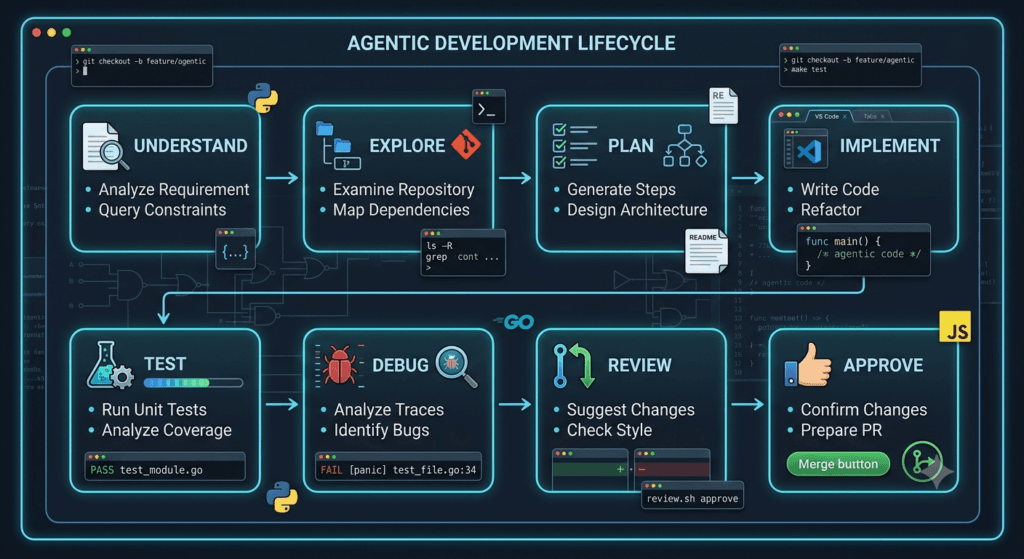
A practical Claude Code workflow can be divided into seven major stages.
Stage 1 → Understand
Stage 2 → Plan
Stage 3 → Implement
Stage 4 → Validate
Stage 5 → Debug
Stage 6 → Review
Stage 7 → Approve
Each stage has a different purpose.
Stage 1: Understand
Claude Code should first understand:
- Repository structure
- Application architecture
- Existing implementation
- Dependencies
- Tests
- Configuration
- Documentation
- Development conventions
Example:
Before making any changes, inspect the repository.

Identify:

- Application architecture
- Relevant modules
- Existing patterns
- Related tests
- Configuration
- External dependencies

Do not modify files yet.

Explain your understanding of the current implementation.
This prevents premature implementation.
Stage 2: Plan
Once the repository is understood, create an implementation plan.
Create an implementation plan for the requested feature.

Include:

1. Files that need modification
2. New files required
3. Existing components that can be reused
4. Architectural impact
5. Testing strategy
6. Security considerations
7. Potential risks
The developer can review the plan before execution begins.
Stage 3: Implement
After approval:
Implement the approved plan.

Follow existing repository conventions.

Keep the changes focused.

Do not modify unrelated modules.

Reuse existing abstractions where appropriate.
Claude Code now has a clear operating boundary.
Stage 4: Validate
The implementation is not complete until it is validated.
Run:

- Unit tests
- Integration tests
- Type checks
- Linting
- Relevant static analysis

Analyze failures rather than simply changing tests.
Stage 5: Debug
If something fails:
Investigate the failure.

Do not immediately modify the test.

Trace the execution path and identify the root cause.

Explain the cause before implementing the fix.
Stage 6: Review
Once tests pass:
Review the final implementation for:

- Correctness
- Maintainability
- Security
- Performance
- Error handling
- Unnecessary complexity
- Unrelated changes
Stage 7: Approve
The final decision remains with the developer or engineering team.
AI Analysis
     ↓
Automated Validation
     ↓
Diff Review
     ↓
Human Approval
     ↓
Merge / Deploy
This final gate is essential for production systems.
The “Plan → Execute → Verify” Pattern
A simple pattern that works across many Claude Code tasks is:
PLAN
 ↓
EXECUTE
 ↓
VERIFY
For example:
PLAN

Understand authentication architecture.

EXECUTE

Implement the approved authentication changes.

VERIFY

Run authentication tests,
security checks,
and review the final diff.
This pattern works for:
- New features
- Bug fixes
- Refactoring
- Test automation
- API development
- Security remediation
- Documentation
- Dependency migrations
The “Explore → Plan → Code → Test → Review” Pattern
For larger tasks, expand the workflow:
Explore
   ↓
Plan
   ↓
Code
   ↓
Test
   ↓
Review
This can become your default Claude Code workflow.
For example:
Explore:
Understand the existing payment system.

Plan:
Design the requested payment changes.

Code:
Implement the approved changes.

Test:
Run unit and integration tests.

Review:
Inspect security, architecture, and Git diff.
The simplicity of this pattern is one of its strengths.
When to Use Autonomous Execution
Not every task requires the same amount of autonomy.
A useful approach is to classify tasks by risk.
| Task Type | Recommended Autonomy |
|---|---|
| Explain a function | High |
| Generate unit-test boilerplate | High |
| Rename internal variables | High |
| Small refactoring | Medium |
| Add API endpoint | Medium |
| Modify authentication | Medium |
| Database migration | Low |
| Payment processing | Low |
| Production deployment | Very Low |
| Security-critical infrastructure | Very Low |
The higher the potential impact, the more human checkpoints should be introduced.
Low-Risk Tasks
For a low-risk task, you may allow Claude Code to work with minimal intervention.
Example:
Find duplicated helper functions in the test suite.

Consolidate them where behavior remains identical.

Run the tests afterward and summarize the changes.
This task is relatively contained.
Medium-Risk Tasks
For medium-risk work:
Analyze the authentication module.

Create an implementation plan first.

Do not modify files until the plan is reviewed.

After implementation, run all authentication and integration tests.
The developer retains a checkpoint before implementation.
High-Risk Tasks
For high-risk work:
Analyze the database migration requirement.

Do not modify:

- Production configuration
- Migration history
- Database schema
- Deployment scripts

First provide:

1. Impact analysis
2. Migration strategy
3. Rollback strategy
4. Data-loss risks
5. Validation plan

Wait for explicit approval before implementation.
The agent becomes an analyst and implementation assistant rather than an unrestricted executor.
Context Management
Large repositories create another challenge: context.
Claude Code may need to work with:
Thousands of files
Large test suites
Multiple services
Configuration files
Documentation
Generated artifacts
Dependencies
Dumping everything into one prompt is not an effective strategy.
Instead, work progressively.
Repository
   ↓
Relevant subsystem
   ↓
Relevant files
   ↓
Specific implementation
For example:
First understand the authentication subsystem.

Ignore unrelated payment and reporting modules unless
you discover a dependency that directly affects authentication.
This keeps the working context focused.
Context Is an Engineering Resource
Developers often think about CPU, memory, and database resources.
With AI coding agents, context is also a resource.
Too little context can produce incorrect assumptions.
Too much irrelevant context can make reasoning less focused.
The goal is:
Relevant Context
+
Clear Objective
+
Explicit Constraints
That combination produces stronger results.
Creating Reusable Project Instructions
If a repository repeatedly requires the same conventions, document them.
For example:
Engineering Rules

- Use TypeScript strict mode.
- Use Playwright for UI testing.
- Use existing API clients.
- Do not introduce duplicate utilities.
- Add tests for new behavior.
- Do not modify generated files manually.
- Run lint and type checks before completion.
- Never commit secrets.
This reduces the need to repeat instructions in every interaction.
The principle is simple:
Move stable engineering rules out of individual prompts and into reusable project guidance.
Claude Code and Git
Git provides an important safety layer around agentic development.
Before starting:
git status
Review the current branch:
git branch --show-current
After implementation:
git status
git diff --stat
git diff
This gives you a simple audit trail.
A practical workflow is:
Clean Working Tree
       ↓
Claude Code Task
       ↓
Changed Files
       ↓
Diff Review
       ↓
Tests
       ↓
Commit
Why Git Diff Is Critical
Suppose Claude Code was asked to modify:
src/auth/
tests/auth/
but the diff shows:
src/auth/
tests/auth/
src/payments/
package.json
README.md
docker-compose.yml
That is a signal to investigate.
The agent may have made legitimate changes, but they should not be accepted blindly.
A simple rule:
Every changed file should have a reason.
Code Review With Claude Code
Claude Code can also review its own work, but a second review perspective is valuable.
For example:
Review the current diff as a senior engineer.

Look specifically for:

- Bugs
- Security vulnerabilities
- Race conditions
- Error-handling problems
- Breaking API changes
- Missing tests
- Duplicate logic
- Performance regressions
- Unnecessary complexity

Do not modify the code.

Report findings with severity and file references.
This separates implementation from review.
That separation is important.
Self-Review vs Independent Review
| Review Type | Advantage | Limitation |
|---|---|---|
| Developer review | Strong project context | Time-consuming |
| Claude self-review | Fast | Same reasoning context |
| Separate Claude review | Different prompt perspective | Still AI-generated |
| Automated tests | Objective behavior validation | Cannot catch everything |
| Static analysis | Detects known patterns | Limited semantic understanding |
| Security tools | Specialized detection | May miss business logic flaws |
The strongest workflow combines several layers.
AI Review
+
Automated Tests
+
Static Analysis
+
Security Checks
+
Human Review
Claude Code for Documentation and Knowledge Transfer
Agentic coding can also improve documentation.
After completing a feature:
Review the implementation and update documentation where necessary.

Include:

- What changed
- Why it changed
- Configuration requirements
- Usage examples
- Testing instructions
- Important limitations
This is especially useful when working on unfamiliar repositories.
The AI can also explain the architecture:
Create a developer-oriented explanation of the authentication flow.

Include:

- Request entry point
- Authentication middleware
- Token validation
- User lookup
- Authorization
- Error handling
- Relevant files
The resulting documentation can help onboard future developers.
Claude Code as a Pair Programmer
Traditional pair programming involves:
Developer A
     ↕
Developer B
AI-assisted pair programming becomes:
Developer
    ↕
Claude Code
    ↕
Repository
The developer provides:
- Intent
- Architecture
- Business context
- Constraints
- Judgment
Claude Code provides:
- Repository exploration
- Implementation assistance
- Test generation
- Debugging support
- Refactoring assistance
- Documentation support
The best results come from collaboration rather than delegation.
What Claude Code Should Not Decide Alone
There are decisions that should remain under human ownership.
Examples include:
- Business-critical requirements
- Security policy
- Compliance decisions
- Production deployment approval
- Data deletion
- Financial logic
- Architectural trade-offs
- Legal requirements
- Irreversible infrastructure changes
Claude Code can analyze these areas, but the final decision should belong to the appropriate human authority.
The Human-in-the-Loop Model
A robust engineering workflow looks like:
Human
  ↓
Defines Objective
  ↓
Claude Code
  ↓
Investigates
  ↓
Claude Code
  ↓
Proposes Plan
  ↓
Human
  ↓
Approves / Rejects
  ↓
Claude Code
  ↓
Implements
  ↓
Automated Validation
  ↓
Human Review
  ↓
Merge / Deploy
This is controlled autonomy.
The AI gets enough freedom to be productive without becoming the final authority.
Measuring Claude Code Productivity
Do not measure success only by:
“How many lines of code did Claude Code generate?”
That can be misleading.
Better metrics include:
Time to understand unfamiliar code
Time to implement feature
Test coverage
Defect rate
Review time
Rework required
Regression rate
Time to resolve bugs
For example:
| Metric | Before AI Workflow | After AI Workflow |
|---|---|---|
| Repository exploration | 2 hours | 30 minutes |
| Test generation | 90 minutes | 20 minutes |
| Initial implementation | 4 hours | 1.5 hours |
| Debugging | 2 hours | 45 minutes |
| Documentation | 1 hour | 20 minutes |
The exact numbers will vary by team.
The point is to measure engineering throughput and quality, not raw generated code.
A Practical Team Strategy
For a development team adopting Claude Code, start small.
Phase 1: Assisted Development
Use Claude Code for:
Code explanation
Unit tests
Boilerplate
Documentation
Small refactoring
Bug investigation
Phase 2: Controlled Agentic Workflows
Introduce:
Repository exploration
Planning
Multi-file implementation
Automated validation
Debugging loops
Security reviews
Phase 3: Engineering Automation
Move toward:
Feature implementation workflows
Test generation
Regression analysis
Code review assistance
Documentation automation
CI/CD integration
Each phase should be measured before moving to the next.
The Biggest Mistakes to Avoid
Mistake 1: Giving Vague Objectives
Build the feature.
Better:
Implement the feature while preserving the existing API,
following current architecture, adding tests, and avoiding
unrelated changes.
Mistake 2: Skipping Repository Exploration
Never assume the AI understands the project before inspecting it.
Mistake 3: Allowing Unlimited Scope
Clearly define what Claude Code should not modify.
Mistake 4: Treating Passing Tests as the Only Success Metric
Tests are important, but also review:
- Security
- Architecture
- Maintainability
- Performance
- Business correctness
Mistake 5: Automatically Accepting Every Change
Review the diff.
Mistake 6: Asking AI to Hide Failures
Never optimize for a green test suite at the expense of correctness.
Mistake 7: Giving Production Access Without Controls
High-impact operations should have explicit approval gates.
The Advanced Claude Code Strategy
At the end of this lesson, the strategy can be summarized as:
DEFINE
  ↓
Understand the objective

DISCOVER
  ↓
Explore the repository

PLAN
  ↓
Create implementation strategy

CONTROL
  ↓
Define scope and constraints

IMPLEMENT
  ↓
Make focused changes

VALIDATE
  ↓
Run tests and quality checks

DEBUG
  ↓
Investigate failures

SECURE
  ↓
Perform security analysis

REVIEW
  ↓
Inspect the final diff

DOCUMENT
  ↓
Update project knowledge

APPROVE
  ↓
Human decision

DELIVER
This workflow gives Claude Code enough autonomy to provide substantial productivity gains while maintaining engineering discipline.
Understanding: AI Coding Is Becoming AI Engineering
The most important lesson from Day 16 is that the evolution is happening at the workflow level.
The progression looks like:
Code Completion
      ↓
Code Generation
      ↓
Code Explanation
      ↓
Repository Assistance
      ↓
Agentic Coding
      ↓
Agentic Software Engineering
At the beginning, AI helped developers write individual pieces of code.
Now AI can participate in larger engineering workflows.
That does not mean developers are becoming unnecessary.
It means the developer’s role is moving upward.
Instead of spending most of the day manually coordinating small implementation tasks, engineers can increasingly focus on:
Architecture
Requirements
Risk
Quality
Security
Product Decisions
System Design
Claude Code handles more of the execution layer.
Strategy: Treat Claude Code Like a Junior-to-Senior Engineering Multiplier
One useful mental model is to think of Claude Code as a highly capable engineering multiplier rather than an autonomous replacement for the development team.
Give it:
Context
+
Objective
+
Constraints
+
Acceptance Criteria
+
Validation Rules
Then demand:
Evidence
+
Tests
+
Diff
+
Explanation
This creates accountability around AI-generated work.
The strongest developers will not necessarily be those who write the longest prompts.
They will be the developers who know:
- What to delegate
- What to constrain
- What to verify
- What to reject
- What to automate
- What must remain human-controlled
Final Comparison: Traditional Development vs Agentic Engineering
| Area | Traditional Workflow | Agentic Claude Code Workflow |
|---|---|---|
| Requirement analysis | Human | Human + AI |
| Repository exploration | Manual | AI-assisted |
| Planning | Human | Human + AI |
| Code implementation | Human | Human + AI agent |
| Test generation | Mostly manual | AI-assisted |
| Debugging | Human-driven | AI-assisted |
| Refactoring | Human-driven | AI-assisted |
| Security analysis | Separate phase | Integrated workflow |
| Documentation | Often delayed | Can be part of workflow |
| Validation | Automation + human | Automation + AI + human |
| Final approval | Human | Human |
| Production responsibility | Human | Human |
The important conclusion is that agentic AI changes how work is performed, not who owns engineering responsibility.
Internal Links:
- Learn MCP – Zero to Hero
- Learn AI Agents for QA – Zero to Hero
- Playwright Automation – Zero to Hero
- LangGraph: Complete Zero to Hero
- Learn Python – Zero to Hero
- OpenAI Codex: Complete Zero to Hero
- Cursor AI: Complete Zero to Hero
- Claude Code Tutorial: Complete Zero to Hero
- Free QA Resources Built From Real Experience
- QA Glossary: Test Automation Terms Every Engineer Should Know
External Resources:
- Anthropic Claude documentation
- Anthropic API documentation
- Model Context Protocol documentation
- Playwright documentation
- GitHub documentation
- TypeScript documentation
- Prompt Engineering Overview
- Git Documentation
- Visual Studio Code
- Cursor Documentation
AI Overview / Answer Engine Optimization
Claude Code agentic coding is an AI-assisted software engineering approach in which Claude Code can analyze a repository, plan implementation, modify code, run tests, investigate failures, and help review the final changes within defined engineering constraints.
Direct Answer: What Is Agentic Coding?
Agentic coding is a development workflow where an AI coding agent performs multiple connected engineering tasks—such as repository exploration, planning, implementation, testing, debugging, and refinement—instead of only generating isolated code snippets.
Direct Answer: Is Claude Code Just a Code Generator?
No. Claude Code can operate at the repository level, allowing developers to use it for code exploration, multi-file implementation, testing, debugging, refactoring, documentation, and code review assistance.
Direct Answer: Should Developers Give Claude Code Full Autonomy?
Developers should use controlled autonomy. Low-risk tasks can receive more autonomy, while security-sensitive, production, database, financial, and irreversible operations should have explicit human approval.
People Asked Questions
What is Claude Code agentic coding?
Claude Code agentic coding is an AI-assisted software engineering workflow where Claude Code can explore repositories, plan changes, implement code, run tests, investigate failures, and assist with review.
Is Claude Code an AI coding agent?
Yes. Claude Code can work across a software repository and assist with multi-step engineering tasks rather than only generating isolated code snippets.
Can Claude Code run tests?
Claude Code can assist with running and analyzing project tests as part of an agentic development workflow, depending on the project’s available tools and environment.
Can Claude Code debug code?
Yes. Claude Code can investigate errors, trace relevant code paths, analyze test failures, identify likely root causes, and propose or implement fixes.
Can Claude Code refactor large projects?
Claude Code can assist with repository-level refactoring, but large or high-risk refactoring should use explicit planning, incremental changes, automated tests, Git review, and human approval.
Is Claude Code safe for production development?
Claude Code can be used in production development workflows, but sensitive operations should use appropriate permissions, constraints, testing, security checks, Git review, and human approval.
What is the best Claude Code workflow?
A strong workflow is Explore → Plan → Implement → Test → Debug → Review → Approve. The exact process should be adapted to task complexity and risk.
Conclusion
Claude Code becomes significantly more valuable when you stop treating it as a sophisticated autocomplete tool and start treating it as an agentic engineering partner.
The strongest workflow is not:
Prompt → Code → Done
It is:
Objective
   ↓
Repository Understanding
   ↓
Planning
   ↓
Controlled Implementation
   ↓
Testing
   ↓
Debugging
   ↓
Security
   ↓
Review
   ↓
Documentation
   ↓
Human Approval
This approach creates a balance between AI autonomy and engineering control.
Claude Code can explore unfamiliar repositories, generate implementation strategies, modify multiple files, create tests, investigate failures, assist with refactoring, identify security risks, and document changes. But none of those capabilities remove the need for engineering judgment.
The future developer workflow will increasingly be about orchestrating intelligent tools rather than manually performing every individual coding operation.
For SDETs, QA engineers, developers, and AI engineers, this creates an especially important opportunity. Testing can become part of the development loop, debugging can become evidence-driven, code reviews can become more comprehensive, and repetitive engineering work can increasingly be delegated to AI agents.
The winning strategy is therefore not “let AI write everything.”
It is:
Give AI enough autonomy to accelerate execution, enough context to make good decisions, enough constraints to control risk, and enough validation to prove that the work is correct.
That is the foundation of professional agentic software engineering with Claude Code.
Enjoyed this article? Explore more in-depth guides on AI engineering, automation testing, Model Context Protocol, Playwright, and intelligent software quality at www.skakarh.com. Follow QAPulse by SK for practical, production-focused tutorials designed for QA engineers, SDETs, and AI developers.


