QA
QA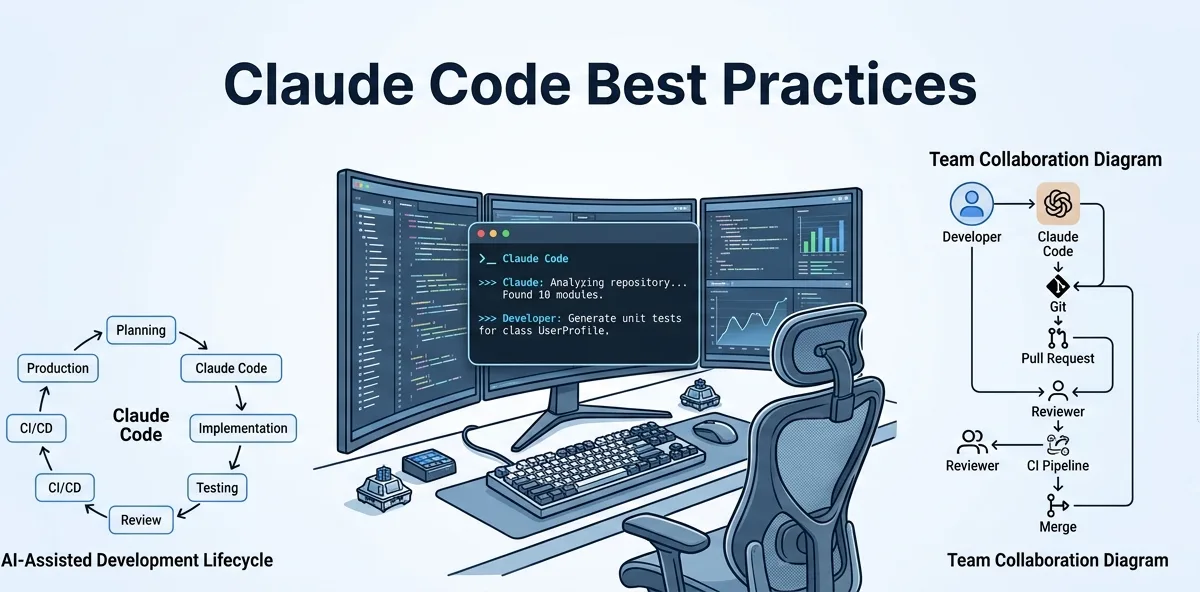
Using Claude Code effectively is not just about knowing commands or writing better prompts. Long-term productivity comes from following proven engineering practices that keep AI-generated code reliable, maintainable, and aligned with your team’s standards.
These Claude Code best practices are based on real software engineering workflows and are applicable whether you’re working on a startup project, an enterprise platform, or an open-source repository.
Why Claude Code Best Practices Matter
AI-assisted development can significantly improve productivity, but only when used with discipline. Claude Code generates recommendations based on repository context and user instructions. Poor workflows often lead to inconsistent implementations, unnecessary refactoring, and avoidable bugs.
Following established best practices helps you:
- Generate higher-quality code
- Reduce prompt revisions
- Improve repository consistency
- Minimize technical debt
- Increase developer productivity
- Produce more reliable automated tests
- Maintain documentation alongside development
Think of Claude Code as an experienced engineering teammate rather than an automated code generator.
Understand Before You Build
One of the biggest mistakes developers make is requesting code before understanding the existing application.
Before implementing a feature, ask questions such as:
- How is the project structured?
- Which modules are affected?
- Where is the business logic located?
- What design patterns are already used?
- Which testing framework is configured?
Understanding the repository first results in solutions that integrate naturally with the existing architecture.
Define One Engineering Goal per Session
Avoid mixing unrelated objectives into a single conversation.
Instead of asking Claude Code to:
- Fix authentication
- Refactor APIs
- Improve UI
- Generate documentation
- Write Playwright tests
Complete each task independently.
Focused sessions improve response quality and make generated changes easier to review.
Give Claude Code Complete Technical Context
Claude Code performs best when it understands the environment.
Useful information includes:
- Programming language
- Framework
- Repository structure
- Coding conventions
- Existing libraries
- Business requirements
- Performance expectations
- Testing framework
The less Claude Code has to assume, the better the recommendations become.
Follow Existing Project Standards
Every project has established patterns.
Generated code should respect:
- Folder structure
- Naming conventions
- Dependency injection strategy
- Logging approach
- Error handling
- API design
- Code formatting
- Testing standards
Consistency is often more valuable than introducing newer design patterns that don’t match the rest of the application.
Work in Small Iterations
Large implementation requests are difficult to review and validate.
A better workflow is:
| Step | Objective |
|---|---|
| 1 | Analyze the repository |
| 2 | Design the solution |
| 3 | Implement one component |
| 4 | Review generated code |
| 5 | Generate tests |
| 6 | Improve documentation |
| 7 | Merge after validation |
Incremental development reduces risk and simplifies code reviews.
Review Every Recommendation
Claude Code should accelerate engineering decisions—not replace them.
Before accepting generated code, review:
- Business logic
- Readability
- Maintainability
- Performance
- Security
- Accessibility
- Test coverage
- Edge cases
Treat AI-generated code with the same review standards as human-written code.
Validate Through Automated Testing
Every implementation should be verified.
A recommended validation sequence includes:
- Static analysis
- Unit tests
- Integration tests
- API tests
- Playwright end-to-end tests
- Manual verification (when appropriate)
Passing automated tests provides confidence that generated changes behave as expected.
Document Changes Immediately
Documentation should evolve with the codebase.
Whenever Claude Code helps implement a feature, also update:
- README
- API documentation
- Architecture diagrams
- Setup instructions
- Configuration guides
- Release notes
Keeping documentation synchronized reduces future maintenance effort.
Expert Tip
The most valuable Claude Code best practices focus on engineering discipline rather than AI itself. Clear objectives, repository awareness, incremental development, thorough testing, and consistent code reviews will improve the quality of every AI-assisted project regardless of programming language or framework.
Real-World Claude Code Best Practices for Professional Engineering Teams
Knowing the theory behind Claude Code best practices is valuable, but applying them consistently in real engineering environments is what separates experienced teams from occasional AI users. Whether you’re developing a SaaS platform, an enterprise application, or an open-source project, these practices help maintain software quality while maximizing the productivity benefits of Claude Code.
Treat Claude Code as an Engineering Partner
Claude Code should participate throughout the Software Development Life Cycle (SDLC), not just during implementation.
A mature workflow looks like this:
Requirements Analysis

↓

Repository Exploration

↓

Solution Design

↓

Implementation

↓

Code Review

↓

Test Generation

↓

Documentation

↓

Deployment
Using Claude Code across multiple stages improves consistency and reduces context switching.
Explore Before You Modify
Before changing existing code, invest time in understanding the repository.
Useful questions include:
- Which modules will this feature affect?
- Where is the business logic implemented?
- What design patterns are already used?
- How are errors handled?
- What testing strategy exists?
- Which coding conventions should be followed?
Developers who understand the repository first generally require fewer revisions later.
Plan Before Writing Code
Instead of immediately requesting an implementation, ask Claude Code to create a technical plan.
Example workflow:
| Phase | Objective |
|---|---|
| Analysis | Understand current implementation |
| Design | Recommend possible solutions |
| Evaluation | Compare architectural trade-offs |
| Implementation | Generate production-ready code |
| Validation | Generate automated tests |
| Documentation | Update technical documentation |
Planning before coding leads to more maintainable solutions.
Keep Prompts Focused
Each prompt should address a single engineering objective.
Good examples:
- Implement user profile editing.
- Review payment service security.
- Generate Playwright tests.
- Refactor the notification module.
- Explain repository architecture.
Avoid combining unrelated requests into one conversation.
Preserve Existing Architecture
One of the most important Claude Code best practices is respecting the current project design.
Generated code should follow:
- Existing folder structure
- Naming conventions
- Dependency injection
- Error handling
- Logging strategy
- Design patterns
- Code formatting
- Testing framework
Consistency improves maintainability and simplifies future development.
Build Incrementally
Large implementations are harder to review and more likely to introduce defects.
Instead, divide features into smaller milestones.
Example:
Understand Feature

↓

Design Solution

↓

Implement Backend

↓

Implement Frontend

↓

Generate Tests

↓

Review

↓

Deploy
Incremental delivery reduces risk and makes code reviews more manageable.
Request Complete Deliverables
Don’t stop at implementation.
Ask Claude Code to generate:
- Production-ready code
- Unit tests
- Playwright tests
- API documentation
- README updates
- Migration notes
- Release summaries
Treat documentation and testing as part of the feature, not optional extras.
Review AI-Generated Code Like Human Code
Every implementation should undergo the same engineering standards.
Review checklist:
| Area | Questions |
|---|---|
| Correctness | Does it solve the intended problem? |
| Readability | Is the code easy to understand? |
| Maintainability | Does it follow project standards? |
| Performance | Are unnecessary operations introduced? |
| Security | Are inputs validated properly? |
| Testing | Are critical scenarios covered? |
Maintaining consistent review practices ensures long-term software quality.
Integrate Claude Code with Git Workflows
Claude Code works best when combined with established version control practices.
Typical workflow:
Pull Latest Changes

↓

Create Feature Branch

↓

Launch Claude Code

↓

Implement Feature

↓

Run Tests

↓

Commit Changes

↓

Push Branch

↓

Open Pull Request
Version control remains the source of truth, while Claude Code accelerates development within that workflow.
Keep Automated Testing Mandatory
AI-generated code should never bypass testing.
Recommended testing sequence:
- Static code analysis
- Unit testing
- Integration testing
- API testing
- Playwright end-to-end testing
- Regression testing
Passing automated tests provides confidence that changes behave as intended.
Use Claude Code During Code Reviews
Claude Code can serve as an initial reviewer before submitting changes to teammates.
Useful review requests include:
- Identify duplicated logic.
- Recommend readability improvements.
- Review security considerations.
- Detect potential performance issues.
- Suggest better naming conventions.
This early feedback often improves pull request quality and reduces review cycles.
Keep Documentation Current
Documentation should evolve alongside implementation.
Whenever a feature changes, update:
- README files
- API documentation
- Architecture diagrams
- Deployment instructions
- Configuration guides
- Release notes
Accurate documentation supports onboarding and future maintenance.
Measure Engineering Outcomes
Evaluate Claude Code by measurable improvements rather than generated lines of code.
Useful metrics include:
| Metric | Why It Matters |
|---|---|
| Development time | Measures productivity |
| Review cycles | Indicates implementation quality |
| Bug rate | Reflects reliability |
| Test coverage | Demonstrates validation quality |
| Documentation completeness | Supports maintainability |
| Onboarding speed | Improves knowledge sharing |
These metrics provide a clearer picture of long-term value.
Common Team Mistakes
Treating Claude Code as a Shortcut
AI should strengthen engineering practices—not replace architecture reviews, testing, or peer feedback.
Skipping Repository Analysis
Understanding existing code before implementation reduces unnecessary redesigns.
Requesting Massive Features
Break large initiatives into smaller, independently testable tasks.
Ignoring Project Standards
Generated code should match the style and structure already used within the repository.
Neglecting Documentation
Every completed feature should include updated technical documentation.
Expert Tips
Standardize Team Workflows
Successful engineering teams define consistent processes for repository analysis, implementation, testing, documentation, and code review. Applying the same Claude Code best practices across every project improves collaboration and makes AI-assisted development more predictable.
Optimize for Long-Term Maintainability
The best implementation is not always the shortest or the fastest to generate. Prioritize clarity, consistency, comprehensive testing, and architectural alignment so future developers can understand and extend the codebase with confidence.
Claude Code Workflow: A Proven End-to-End Process for High-Quality Development
The most successful engineering teams don’t use Claude Code randomly—they follow a repeatable Claude Code workflow that integrates AI into every stage of software development. This structured approach improves consistency, reduces defects, and ensures AI-generated code meets production standards.
Rather than thinking of Claude Code as a coding assistant, treat it as an engineering collaborator that supports planning, implementation, testing, documentation, and code review.
Start with Requirements, Not Code
Every successful implementation begins with understanding the problem.
Before opening Claude Code, collect:
- Business requirements
- Acceptance criteria
- Technical constraints
- Existing documentation
- Related issues or tickets
- API specifications
- Design mockups (if applicable)
Clear requirements reduce ambiguity and lead to more accurate implementations.
Explore the Repository
Before requesting changes, allow Claude Code to understand the existing project.
Ask questions such as:
- Explain the repository architecture.
- Which modules will this feature affect?
- How are API requests processed?
- Where is authentication implemented?
- Which coding patterns are used?
- How is automated testing organized?
Repository exploration prevents unnecessary architectural conflicts.
Design Before Implementation
Instead of immediately generating code, design the solution first.
Recommended process:
Understand Requirements

↓

Analyze Existing Code

↓

Identify Affected Components

↓

Design Solution

↓

Compare Alternatives

↓

Choose Best Approach
This planning phase helps identify potential risks before implementation begins.
Implement One Component at a Time
Large feature requests often produce code that is difficult to review.
Instead, divide work into logical milestones.
Example:
| Milestone | Deliverable |
|---|---|
| Phase 1 | Backend service |
| Phase 2 | API endpoints |
| Phase 3 | Database integration |
| Phase 4 | Frontend components |
| Phase 5 | Unit tests |
| Phase 6 | Playwright tests |
| Phase 7 | Documentation |
Smaller changes are easier to validate and maintain.
Validate Every Implementation
Generating code is only one part of the workflow.
Each change should be validated through:
Static Analysis

↓

Unit Tests

↓

Integration Tests

↓

API Tests

↓

Playwright Tests

↓

Manual Verification

↓

Code Review
Validation ensures functionality while reducing regression risk.
Review Before Committing
Never commit AI-generated code without review.
Evaluate:
- Business logic
- Readability
- Error handling
- Performance
- Security
- Accessibility
- Naming conventions
- Coding standards
Human review remains essential regardless of how the code was created.
Update Documentation Immediately
Documentation should be treated as part of the implementation.
Whenever a feature changes, update:
- README
- API documentation
- Architecture diagrams
- Configuration guides
- Deployment instructions
- Changelog
- Release notes
Keeping documentation current reduces future maintenance costs.
Integrate with CI/CD
Claude Code fits naturally into modern development pipelines.
A common workflow looks like this:
Feature Branch

↓

Claude Code Development

↓

Local Testing

↓

Commit

↓

Pull Request

↓

CI Pipeline

↓

Code Review

↓

Merge

↓

Deployment
AI-assisted development should strengthen—not replace—existing CI/CD practices.
Collaborate with Your Team
Claude Code is most effective when used collaboratively.
Team members can use it to:
- Review pull requests
- Explain unfamiliar modules
- Generate test cases
- Improve documentation
- Investigate production bugs
- Suggest refactoring opportunities
Shared workflows encourage consistency across the engineering team.
Use Claude Code Throughout the SDLC
Claude Code provides value during every stage of software development.
| SDLC Stage | Claude Code Contribution |
|---|---|
| Requirements | Clarify technical scope |
| Design | Compare architectural options |
| Development | Generate production-ready code |
| Testing | Create unit, API, and Playwright tests |
| Review | Identify quality improvements |
| Documentation | Produce technical documentation |
| Maintenance | Explain legacy code and support refactoring |
Using Claude Code across the entire lifecycle increases long-term productivity.
Common Workflow Mistakes
Starting Without Understanding the Repository
Implementing changes before analyzing the existing architecture often results in inconsistent code.
Combining Multiple Features
Keep each workflow focused on a single engineering objective.
Skipping Testing
AI-generated code should pass the same validation process as manually written code.
Ignoring Existing Standards
Follow the project’s architecture, naming conventions, and testing strategy.
Delaying Documentation
Documentation should be updated as part of the implementation—not after release.
Daily Claude Code Workflow Checklist
Before completing any task, confirm that you have:
- Understood the business requirements.
- Explored the affected modules.
- Designed the implementation.
- Generated production-ready code.
- Reviewed the implementation.
- Executed automated tests.
- Updated documentation.
- Prepared the changes for code review.
Following this checklist promotes consistency across projects.
Expert Tips
Standardize Your Engineering Process
A consistent Claude Code workflow helps individuals and teams deliver reliable software more efficiently. By following the same sequence—understand, analyze, design, implement, validate, review, and document—you reduce unnecessary rework and improve collaboration.
Focus on Sustainable Productivity
The purpose of Claude Code is not simply to generate code faster. Its greatest value comes from improving engineering quality across the entire software development lifecycle. When combined with disciplined workflows, automated testing, code reviews, and comprehensive documentation, Claude Code becomes a powerful tool for building maintainable, production-ready software.
Claude Code Best Practices Checklist, Common Mistakes, and Professional Recommendations
Understanding individual techniques is valuable, but consistently applying them is what leads to successful AI-assisted software development. The following Claude Code best practices summarize everything covered throughout this guide and provide a practical framework that developers, QA engineers, and SDETs can use every day.
Whether you work independently or as part of a large engineering team, these recommendations help ensure that Claude Code improves software quality instead of introducing unnecessary complexity.
The Professional Claude Code Checklist
Before starting any development task, verify the following:
Planning
- Understand the business requirements.
- Review acceptance criteria.
- Identify affected modules.
- Understand existing architecture.
- Confirm technical constraints.
Repository Analysis
- Explore the project structure.
- Review related services.
- Understand coding conventions.
- Identify reusable components.
- Check existing automated tests.
Prompt Preparation
- Define one engineering objective.
- Provide complete technical context.
- Specify project constraints.
- Request production-ready deliverables.
- Include testing requirements.
Implementation
- Generate one feature at a time.
- Preserve existing architecture.
- Follow naming conventions.
- Reuse existing components.
- Avoid unnecessary dependencies.
Validation
- Review generated code.
- Run static analysis.
- Execute unit tests.
- Execute integration tests.
- Execute Playwright tests.
- Validate API functionality.
- Check accessibility where applicable.
Documentation
- Update README.
- Update API documentation.
- Update architecture documentation.
- Document configuration changes.
- Record migration notes.
- Update release notes.
Following this checklist consistently helps reduce defects and improves maintainability.
Build an AI-Assisted Development Standard
Instead of allowing every developer to use Claude Code differently, establish a common engineering workflow.
Example team standard:
Requirements

↓

Repository Analysis

↓

Architecture Review

↓

Prompt Creation

↓

Implementation

↓

Testing

↓

Documentation

↓

Peer Review

↓

Merge

↓

Deployment
Standardized workflows improve collaboration and produce more predictable outcomes.
Code Review Checklist
Every AI-generated implementation should be reviewed against the same standards as manually written code.
| Review Area | Verification |
|---|---|
| Functionality | Requirements fully implemented |
| Architecture | Consistent with repository |
| Readability | Clear and maintainable |
| Performance | No unnecessary overhead |
| Security | Inputs validated and sensitive data protected |
| Accessibility | Standards maintained where applicable |
| Testing | Adequate automated coverage |
| Documentation | Updated alongside implementation |
AI assistance should never reduce engineering quality expectations.
Long-Term Best Practices
Professional teams focus on sustainable improvements rather than short-term speed.
Recommended habits include:
- Keep prompts reusable.
- Build an internal prompt library.
- Standardize engineering workflows.
- Review every generated change.
- Maintain comprehensive test coverage.
- Keep documentation synchronized.
- Learn from previous implementations.
- Continuously refine prompting techniques.
These habits become increasingly valuable as projects grow.
Common Mistakes to Avoid
Treating Claude Code as an Automatic Developer
Claude Code accelerates development, but architectural decisions, validation, and final approval remain human responsibilities.
Requesting Complete Applications
Large requests often lead to inconsistent implementations.
Break work into smaller, reviewable features.
Ignoring Existing Project Standards
Generated code should extend the current architecture rather than introducing unrelated design patterns.
Skipping Testing
Passing automated tests is essential before merging AI-generated code.
Forgetting Documentation
Documentation should evolve with every implementation.
Security Best Practices
When working with Claude Code:
- Never expose production credentials.
- Remove API keys before sharing code.
- Replace confidential information with placeholders.
- Follow organizational security policies.
- Validate security-sensitive changes through manual review.
Security remains a shared responsibility regardless of AI involvement.
Measuring Success
Instead of focusing on the number of prompts written, evaluate measurable engineering outcomes.
Useful indicators include:
| Metric | Purpose |
|---|---|
| Development time | Productivity improvement |
| Bug rate | Implementation quality |
| Pull request revisions | Code review effectiveness |
| Test coverage | Validation quality |
| Documentation completeness | Maintainability |
| Deployment success | Release stability |
| Onboarding speed | Knowledge sharing |
These metrics provide a more accurate assessment of long-term value.
Team Adoption Strategy
Organizations introducing Claude Code should encourage gradual adoption.
Suggested progression:
Repository Exploration

↓

Documentation

↓

Code Reviews

↓

Bug Fixes

↓

Feature Development

↓

Architecture Discussions

↓

Organization-wide Adoption
Starting with lower-risk activities helps teams build confidence before relying on Claude Code for larger initiatives.
Future-Proof Your Workflow
AI tools evolve rapidly, but sound engineering principles remain consistent.
Focus on:
- Clean architecture.
- High-quality testing.
- Secure development.
- Comprehensive documentation.
- Continuous learning.
- Consistent review processes.
These practices will remain valuable regardless of future improvements to Claude Code or other AI development tools.
Final Recommendations
The most effective Claude Code best practices are rooted in strong software engineering fundamentals. AI can accelerate implementation, simplify debugging, improve documentation, and generate comprehensive tests, but lasting success depends on disciplined workflows, thoughtful code reviews, and continuous validation.
Developers who consistently understand requirements before coding, preserve repository conventions, validate every implementation, and document their work will gain the greatest long-term value from Claude Code.
As AI-assisted development becomes increasingly common, the engineers who combine technical expertise with structured prompting, rigorous testing, and collaborative review processes will be best positioned to build reliable, scalable, and maintainable software. Claude Code is most powerful when it enhances professional engineering practices—not when it replaces them.
Frequently Asked Questions
What are Claude Code Best Practices?
Claude Code Best Practices are proven engineering techniques that help developers use Claude Code effectively by combining repository analysis, structured prompting, automated testing, documentation, and code reviews to produce maintainable software.
How do professional developers use Claude Code?
Professional developers use Claude Code throughout the software development lifecycle for architecture analysis, implementation, debugging, testing, documentation, and code reviews while maintaining existing engineering standards.
Should AI-generated code always be reviewed?
Yes. AI-generated code should follow the same review process as human-written code, including validation for correctness, security, performance, maintainability, accessibility, and test coverage.
Does Claude Code replace software engineers?
No. Claude Code improves developer productivity by assisting with repetitive and analytical tasks, but engineers remain responsible for architecture, business decisions, testing, and final approval.
How can teams standardize Claude Code usage?
Teams should define reusable prompt templates, repository guidelines, testing requirements, documentation standards, and review checklists so everyone follows a consistent AI-assisted development workflow.
Featured Snippet
Claude Code Best Practices Checklist
To use Claude Code effectively:
- Understand the repository before coding.
- Define one engineering objective per session.
- Provide complete technical context.
- Follow existing project conventions.
- Generate production-ready code.
- Review every AI-generated change.
- Run automated tests.
- Update documentation.
- Validate security and performance.
- Merge only after peer review.
AI Overview Answer
Claude Code Best Practices help developers integrate AI into professional software engineering workflows. By combining structured prompting, repository awareness, incremental development, automated testing, code reviews, and documentation, teams can improve productivity while maintaining software quality and long-term maintainability.
Internal Links:
- Learn MCP – Zero to Hero
- Learn AI Agents for QA – Zero to Hero
- Playwright Automation – Zero to Hero
- Learn Python – Zero to Hero
- Claude Code Tutorial: Complete Zero to Hero
- Free QA Resources Built From Real Experience
- QA Glossary: Test Automation Terms Every Engineer Should Know
External Resources:
- Anthropic Claude documentation
- Anthropic API documentation
- Model Context Protocol documentation
- Playwright documentation
- GitHub documentation
- TypeScript documentation
- Prompt Engineering Overview
- Git Documentation
Enjoyed this article? Explore more in-depth guides on AI engineering, automation testing, Model Context Protocol, Playwright, and intelligent software quality at www.skakarh.com. Follow QAPulse by SK for practical, production-focused tutorials designed for QA engineers, SDETs, and AI developers.