 QA
QA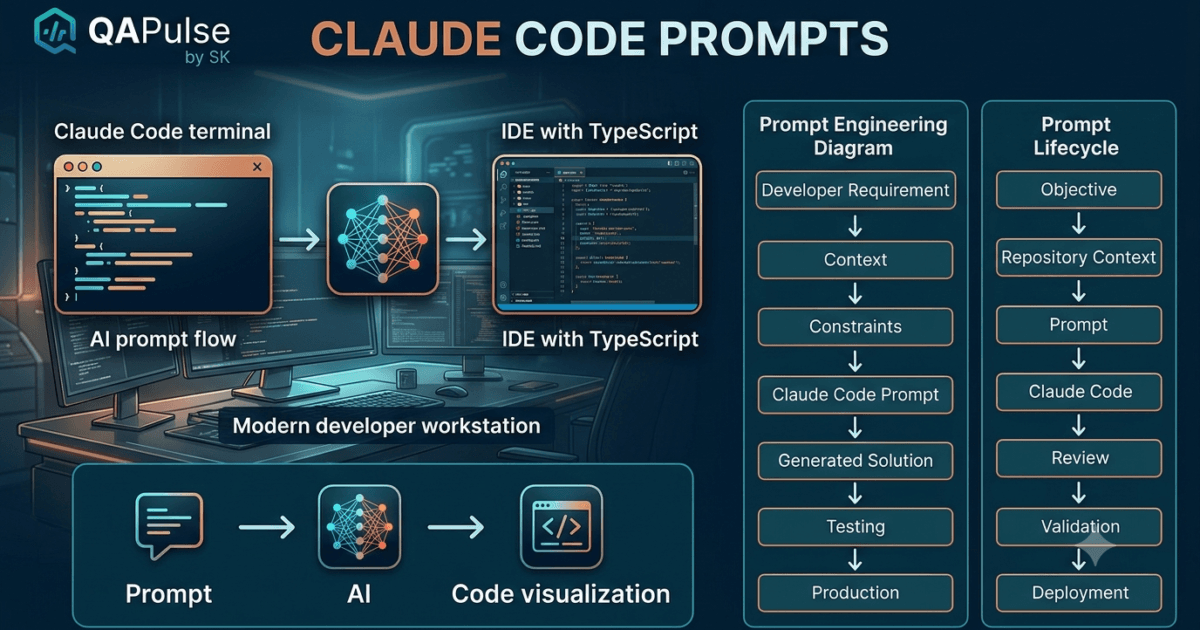
The quality of Claude Code Prompts output depends heavily on the quality of your prompt. Two developers can ask Claude Code to solve the same problem and receive completely different results simply because one provides clear engineering context while the other writes a vague request.
Learning to write effective Claude Code prompts is one of the highest-leverage skills for modern software engineers. Well-structured prompts reduce follow-up corrections, generate more maintainable code, improve test coverage, and produce solutions that align with your project’s architecture.
This guide explains the principles of writing high-quality prompts that consistently generate production-ready results.
What Are Claude Code Prompts?
A Claude Code prompt is the instruction you provide to Claude Code describing what you want it to accomplish. Unlike traditional command-line tools that expect predefined syntax, Claude Code accepts natural language, allowing you to describe engineering problems in detail.
A prompt can request:
- A new feature implementation
- Bug investigation
- Code review
- Refactoring
- Test generation
- Documentation
- Performance analysis
- Security review
- Architecture explanation
The more relevant context you provide, the more accurate and useful the response becomes.
Why Prompt Quality Matters
Claude Code generates responses based on the information available in your prompt and the repository it analyzes. If critical details are missing, it must make assumptions that may not match your project’s requirements.
Consider these two requests.
Poor prompt:
Write a login page.
Improved prompt:
Create a responsive React login page using TypeScript and the existing design system. Follow the project's component structure, implement accessible form validation, integrate the existing authentication API, preserve current routing, and generate Playwright end-to-end tests for successful and failed login scenarios.
The second prompt defines the framework, language, architecture, accessibility requirements, integration points, and testing expectations. That additional context usually leads to significantly better results.
The Five Components of an Effective Prompt
High-performing developers often include five key elements in every prompt.
| Component | Purpose |
|---|---|
| Objective | Clearly define the task to be completed. |
| Context | Explain the project, framework, and affected components. |
| Constraints | Specify rules, standards, and limitations. |
| Expected Output | Describe what Claude Code should generate. |
| Validation | Define how success should be verified. |
Including these elements minimizes ambiguity and reduces unnecessary revisions.
Define the Engineering Objective
Start every prompt with a precise objective.
Examples:
- Add user profile editing.
- Refactor the payment service.
- Review authentication security.
- Generate Playwright regression tests.
- Explain repository architecture.
Avoid broad requests such as:
- Improve my project.
- Fix everything.
- Make this code better.
Specific objectives produce focused responses.
Provide Technical Context
Context is what transforms a generic response into a repository-aware engineering recommendation.
Useful context includes:
- Programming language
- Framework
- Existing architecture
- Repository structure
- Coding standards
- Target module
- Related services
- Business rules
Example:
This project uses React 19, TypeScript, Node.js, and Playwright. Authentication is implemented with JWT, and all API requests use Axios. Follow the existing component structure and coding conventions.
This information helps Claude Code generate solutions that align with the rest of the application.
Specify Constraints
Every engineering project has constraints.
Examples include:
- Preserve existing APIs.
- Maintain backward compatibility.
- Avoid introducing new dependencies.
- Follow SOLID principles.
- Use dependency injection.
- Support dark mode.
- Maintain accessibility compliance.
- Do not modify database schemas.
Explicit constraints reduce the likelihood of inappropriate recommendations.
Describe the Expected Output
Instead of asking Claude Code to “write code,” explain what deliverables you expect.
Example:
Generate production-ready TypeScript code, unit tests, Playwright end-to-end tests, documentation updates, and a summary explaining the implementation decisions.
Clear expectations help ensure that important artifacts are not overlooked.
Include Success Criteria
Define how the solution should be evaluated.
Examples:
- All existing tests must pass.
- No breaking API changes.
- Accessibility score should remain compliant.
- Code should follow project linting rules.
- New feature must include automated tests.
Success criteria encourage Claude Code to consider software quality alongside implementation.
Weak vs Strong Prompt Comparison
| Weak Prompt | Improved Prompt |
|---|---|
| Fix this bug. | Investigate why the payment API returns HTTP 500 during checkout, identify the root cause, explain the issue, and implement the safest fix without changing existing business logic. |
| Write tests. | Generate comprehensive Playwright tests covering positive, negative, boundary, accessibility, and responsive scenarios for the checkout flow. |
| Refactor this. | Refactor the notification service to improve readability, reduce duplication, preserve public interfaces, and maintain existing functionality. |
The stronger prompts provide objective, context, constraints, and expected outcomes.
Expert Tip
Think of Claude Code prompts as engineering specifications rather than casual requests. The clearer your objective, technical context, constraints, and success criteria, the closer Claude Code’s response will be to production-ready software. Well-designed prompts reduce rework, improve consistency, and make AI-assisted development a reliable part of your engineering workflow.
Prompt Engineering Techniques for Claude Code
Writing good Claude Code prompts is more than asking clear questions. Professional developers use prompt engineering techniques that guide Claude Code toward accurate, maintainable, and production-ready solutions. The goal is not to make prompts longer—it is to make them more precise.
A well-engineered prompt reduces ambiguity, encourages better reasoning, and minimizes unnecessary revisions.
Start with the Problem, Not the Solution
Many developers tell Claude Code exactly how to solve a problem before fully understanding it.
Instead of:
Replace the authentication system with OAuth.
Start with:
Analyze the current authentication implementation, identify its limitations, and recommend the most appropriate approach for supporting OAuth while maintaining backward compatibility.
This allows Claude Code to evaluate the existing implementation before proposing changes.
Give Claude Code a Role
Assigning a role helps Claude Code tailor its response to a specific engineering perspective.
Examples:
Act as a senior backend engineer reviewing this API implementation.
Act as a Playwright automation architect and review this test suite.
Act as a security engineer performing a code review.
Act as a technical lead evaluating this pull request.
The assigned role influences the depth and focus of the response.
Define the Target Audience
Sometimes the same explanation needs different levels of technical detail.
Examples:
Explain this implementation for a junior developer.
Explain this architecture for experienced backend engineers.
Summarize this design for project stakeholders.
Matching the explanation to the audience improves clarity and usefulness.
Request Step-by-Step Reasoning
Large engineering tasks become easier to review when broken into logical stages.
Example:
Analyze the current implementation, identify potential problems, compare alternative solutions, recommend the best approach, implement the changes, and explain the reasoning behind each decision.
This structured approach produces responses that are easier to validate than requesting immediate code generation.
Compare Multiple Solutions
Rarely is there only one correct implementation.
Ask Claude Code to compare alternatives.
Example:
Provide three different implementation approaches for this caching strategy. Compare scalability, maintainability, complexity, and performance. Recommend the most suitable solution for an enterprise application.
Comparing options encourages architectural thinking rather than accepting the first idea.
Request Trade-Off Analysis
Every engineering decision involves compromises.
Useful prompts include:
What are the advantages and disadvantages of this implementation?
Compare this solution with the existing architecture.
Which design would be easier to maintain over the next five years?
Understanding trade-offs leads to better long-term decisions.
Encourage Repository-Aware Responses
Claude Code performs best when it builds on the existing project instead of introducing unrelated patterns.
Example:
Follow the project's current architecture, naming conventions, folder structure, dependency injection pattern, and testing standards. Do not introduce unnecessary libraries or architectural changes.
This keeps generated code consistent with the rest of the application.
Generate Production-Ready Deliverables
Clearly specify everything you expect Claude Code to produce.
Example:
Implement the feature using TypeScript, generate unit tests, create Playwright end-to-end tests, update the README, document any API changes, and explain the implementation decisions.
Requesting complete deliverables reduces follow-up work.
Break Complex Features into Phases
Instead of requesting an entire feature at once, divide the work into manageable stages.
Example workflow:
| Phase | Objective |
|---|---|
| Phase 1 | Analyze the existing implementation |
| Phase 2 | Design the solution |
| Phase 3 | Implement backend changes |
| Phase 4 | Implement frontend changes |
| Phase 5 | Generate automated tests |
| Phase 6 | Review and refactor |
| Phase 7 | Update documentation |
This incremental approach improves reviewability and reduces implementation errors.
Use Constraints to Guide Responses
Constraints tell Claude Code what it must avoid as well as what it should do.
Examples:
- Preserve existing APIs.
- Avoid breaking changes.
- Do not modify database schemas.
- Keep public interfaces unchanged.
- Follow SOLID principles.
- Maintain WCAG accessibility compliance.
- Use existing project dependencies only.
- Support current coding standards.
Constraints help produce solutions that fit real-world engineering environments.
Improve Existing Code Instead of Replacing It
Claude Code is particularly effective at incremental improvement.
Useful prompts include:
Simplify this implementation without changing business behavior.
Reduce duplicated logic while preserving readability.
Improve performance without altering the public API.
These prompts focus on maintainability rather than unnecessary rewrites.
Prompt Patterns for Common Engineering Tasks
| Engineering Task | Prompt Pattern |
|---|---|
| Bug investigation | Analyze → Identify root cause → Explain → Fix → Generate tests |
| Feature development | Understand → Design → Implement → Validate → Document |
| Refactoring | Review → Simplify → Preserve functionality → Improve readability |
| Code review | Evaluate → Identify issues → Recommend improvements → Explain reasoning |
| Test automation | Analyze requirements → Generate comprehensive positive, negative, boundary, accessibility, and regression tests |
Using consistent prompt patterns improves both productivity and response quality.
Common Prompt Engineering Mistakes
Jumping Directly to Code
Ask Claude Code to understand the problem before requesting implementation.
Omitting Technical Constraints
Without constraints, Claude Code may recommend solutions that conflict with your project’s architecture.
Asking Multiple Unrelated Questions
Keep each prompt focused on a single engineering objective.
Ignoring Existing Project Standards
Always instruct Claude Code to follow the repository’s current conventions.
Accepting the First Response
Review recommendations, ask follow-up questions, compare alternatives, and refine the solution before implementation.
Expert Tips
Think Like a Technical Specification Writer
The best Claude Code prompts resemble engineering specifications rather than casual chat messages. They clearly define the objective, provide technical context, describe constraints, specify expected deliverables, and include measurable success criteria.
Optimize for Collaboration
Claude Code is most valuable when treated as a collaborative engineering partner. Ask it to explain design decisions, compare implementation strategies, identify risks, and justify recommendations instead of simply generating code. This approach builds understanding while producing solutions that are easier to review, maintain, and scale.
Reusable Claude Code Prompt Templates for Real-World Development
One of the biggest productivity gains comes from building a library of reusable Claude Code prompts. Instead of writing every prompt from scratch, experienced developers create templates for recurring engineering tasks and customize them for each project.
These templates improve consistency, reduce prompt-writing time, and produce more predictable results across different repositories.
Feature Development Prompt
When implementing a new feature, provide enough information for Claude Code to understand the business objective and technical constraints.
You are a senior software engineer.

Project:
<Describe the project>

Task:
<Describe the feature>

Technology Stack:
<List frameworks and languages>

Requirements:
- Follow the existing architecture.
- Reuse existing components where possible.
- Do not introduce unnecessary dependencies.
- Maintain backward compatibility.
- Follow project coding standards.

Deliverables:
- Production-ready implementation
- Unit tests
- Playwright end-to-end tests
- Documentation updates

Validation:
- Existing tests must continue to pass.
- No breaking API changes.
This template ensures implementation quality while reducing ambiguity.
Bug Investigation Prompt
Avoid asking Claude Code to immediately fix a bug. Ask it to investigate first.
You are a senior debugging engineer.

Problem:
<Describe the issue>

Expected Behavior:
<Expected outcome>

Actual Behavior:
<Observed outcome>

Environment:
<List versions and operating system>

Steps to Reproduce:
1.
2.
3.

Tasks:
- Identify the root cause.
- Explain why the issue occurs.
- Recommend the safest solution.
- Implement the fix.
- Generate regression tests.
This structured approach encourages root-cause analysis rather than trial-and-error fixes.
Code Review Prompt
Claude Code can perform an initial review before opening a pull request.
Review this implementation as a senior software engineer.

Evaluate:

- Readability
- Maintainability
- Security
- Performance
- Error handling
- Input validation
- Code duplication
- Test coverage

Recommend improvements and explain the reasoning behind each suggestion.
Running an AI review before requesting feedback from teammates often catches obvious issues early.
Refactoring Prompt
Incremental refactoring is generally safer than large rewrites.
Refactor this implementation.

Goals:

- Improve readability.
- Reduce duplication.
- Simplify complex methods.
- Preserve public interfaces.
- Do not change business behavior.
- Follow existing project conventions.

Generate a summary of all improvements.
The emphasis on preserving behavior reduces the risk of introducing regressions.
Performance Optimization Prompt
Performance improvements should be evidence-based.
Analyze this implementation for performance bottlenecks.

Identify:

- Expensive operations
- Unnecessary database queries
- Repeated API calls
- Memory inefficiencies
- Rendering issues
- Scalability concerns

Recommend improvements ranked by expected impact.
Prioritizing recommendations helps teams focus on the changes that provide the greatest benefit.
Security Review Prompt
Security reviews should be part of regular development, not just release preparation.
Review this implementation from a security perspective.

Check for:

- Authentication issues
- Authorization problems
- Input validation
- SQL injection risks
- XSS vulnerabilities
- CSRF protection
- Sensitive data exposure
- Insecure configuration

Recommend improvements following current security best practices.
This template encourages proactive identification of common vulnerabilities.
Playwright Test Generation Prompt
Instead of requesting generic tests, specify the desired coverage.
Generate Playwright tests for this feature.

Include:

- Positive scenarios
- Negative scenarios
- Boundary conditions
- Form validation
- Accessibility verification
- Responsive layouts
- Cross-browser compatibility where applicable

Organize tests using Page Object Models and follow existing project conventions.
Well-defined expectations result in more comprehensive automation.
API Testing Prompt
Claude Code can help design robust API test suites.
Generate API tests for this endpoint.

Validate:

- Status codes
- Response schema
- Required headers
- Authentication
- Authorization
- Invalid input
- Boundary values
- Error responses
- Performance expectations

Use the existing testing framework.
Including negative and boundary scenarios improves API reliability.
Documentation Prompt
Documentation should evolve alongside the codebase.
Generate technical documentation for this feature.

Include:

- Overview
- Architecture
- Configuration
- Usage examples
- API changes
- Testing approach
- Limitations
- Troubleshooting
- Migration notes (if required)
Comprehensive documentation simplifies onboarding and long-term maintenance.
Architecture Analysis Prompt
When joining a new project, start by understanding the existing design.
Analyze this repository.

Explain:

- Overall architecture
- Folder structure
- Execution flow
- Core services
- External integrations
- Dependency relationships
- Design patterns
- Areas of technical debt

Recommend opportunities for future improvement.
This prompt accelerates repository onboarding and architectural understanding.
Release Readiness Prompt
Before merging major features, perform a final review.
Review this implementation for production readiness.

Evaluate:

- Functionality
- Code quality
- Test coverage
- Performance
- Security
- Logging
- Error handling
- Documentation
- Maintainability

Identify any issues that should be resolved before deployment.
This checklist-oriented review helps reduce release risk.
Build Your Own Prompt Library
Many engineering teams maintain an internal collection of frequently used prompts.
A practical organization might include:
| Category | Example Templates |
|---|---|
| Development | Feature implementation, enhancements |
| Debugging | Root-cause analysis, incident investigation |
| Testing | Playwright, API, unit testing |
| Review | Pull request review, architecture review |
| Refactoring | Cleanup, modernization, optimization |
| Documentation | README, API docs, release notes |
| Security | Code audit, vulnerability assessment |
| Performance | Profiling, scalability analysis |
Maintaining reusable templates saves time and promotes consistent engineering practices across projects.
Common Template Design Mistakes
Templates That Are Too Generic
A reusable template should still encourage developers to provide project-specific context rather than relying on vague instructions.
Missing Constraints
Templates should define architectural rules, coding standards, and compatibility requirements to reduce inappropriate recommendations.
Focusing Only on Code Generation
The best templates also request testing, documentation, explanations, and validation—not just implementation.
Ignoring Existing Project Standards
Reusable prompts should always remind Claude Code to follow the repository’s current conventions instead of introducing unrelated patterns.
Expert Tips
Standardize High-Frequency Work
Create reusable Claude Code prompts for tasks your team performs regularly, such as feature development, debugging, testing, code reviews, and documentation. Standardization improves consistency while reducing the effort required to write detailed prompts from scratch.
Treat Prompt Templates as Living Assets
Review and refine your prompt library over time. As your team discovers more effective ways to collaborate with Claude Code, update existing templates to reflect those lessons. A well-maintained prompt library becomes a valuable engineering resource that continuously improves development quality and productivity.
Claude Code Prompt Best Practices, Common Mistakes, and Expert Recommendations
Mastering Claude Code prompts is an ongoing process. The best prompts are not necessarily the longest—they are the clearest. They provide enough information for Claude Code to understand the engineering objective while leaving room for it to analyze the repository and recommend the most appropriate solution.
By following a consistent prompting strategy, developers can reduce rework, improve code quality, and make AI-assisted development a reliable part of everyday engineering.
Build Prompts Around Engineering Objectives
Every prompt should focus on a single objective.
Good examples include:
- Implement a new feature.
- Investigate a production bug.
- Review a pull request.
- Improve test coverage.
- Refactor a service.
- Analyze application architecture.
Trying to solve multiple unrelated problems within one prompt often produces fragmented responses that are difficult to review.
Always Provide Repository Context
Claude Code performs significantly better when it understands the project it is working with.
Useful context includes:
- Programming language
- Framework
- Application type
- Existing architecture
- Coding standards
- Testing framework
- Folder structure
- Related services
Providing this information helps Claude Code generate solutions that integrate naturally with the existing codebase.
Be Explicit About Quality Standards
Instead of assuming Claude Code knows your expectations, describe them directly.
For example, request:
- Production-ready code
- Meaningful variable names
- Comprehensive error handling
- Input validation
- Unit tests
- Playwright tests
- Documentation updates
- Accessibility compliance
- SOLID principles
- Clean architecture
Clear quality expectations lead to more maintainable implementations.
Request Explanations, Not Just Code
AI becomes much more valuable when it explains its reasoning.
Useful follow-up prompts include:
- Why is this implementation better?
- What alternatives did you consider?
- What trade-offs exist?
- How will this scale?
- What security concerns should I review?
- Which edge cases remain?
Understanding the reasoning behind a recommendation improves engineering knowledge over time.
Review Every Generated Response
Even high-quality prompts should be followed by careful review.
Before accepting a solution, verify:
| Review Area | Questions to Ask |
|---|---|
| Correctness | Does the implementation solve the actual problem? |
| Readability | Is the code easy to understand? |
| Maintainability | Does it follow project conventions? |
| Performance | Are unnecessary operations introduced? |
| Security | Are inputs validated and sensitive data protected? |
| Testing | Are important scenarios covered? |
Human review remains an essential part of the development process.
Combine Claude Code with Existing Engineering Practices
Claude Code should complement—not replace—your development workflow.
A balanced process looks like this:
Understand Requirements

↓

Analyze Repository

↓

Write High-Quality Prompt

↓

Review AI Response

↓

Implement Changes

↓

Run Automated Tests

↓

Perform Code Review

↓

Deploy
This workflow ensures AI assistance is supported by established engineering practices.
Common Prompting Mistakes
Being Too Vague
Avoid prompts such as:
Improve this code.
Instead, describe the exact improvement you expect.
Omitting Technical Constraints
If your project requires specific architectural patterns, coding standards, or compatibility requirements, include them in the prompt.
Asking for Entire Applications
Large requests usually produce inconsistent results.
Divide complex systems into smaller, independently reviewable tasks.
Ignoring Existing Code
Claude Code should extend or improve the current implementation whenever practical instead of replacing stable, well-tested components.
Forgetting Validation
Generated code should always be verified through automated tests, code reviews, and manual validation before reaching production.
Create a Team Prompt Library
Engineering teams benefit from maintaining a shared collection of proven prompts.
Categories might include:
| Category | Examples |
|---|---|
| Development | Feature implementation, enhancements |
| Debugging | Root-cause analysis, incident response |
| Testing | Playwright, API, unit testing |
| Reviews | Pull request review, architecture review |
| Documentation | README, API docs, release notes |
| Performance | Profiling and optimization |
| Security | Code audits, vulnerability reviews |
A shared library encourages consistent prompting across the team and reduces duplicated effort.
Continuously Improve Your Prompts
Prompt engineering is an iterative skill.
After completing a task, ask yourself:
- Which instructions produced the best results?
- What important details were missing?
- Which follow-up questions were required?
- How can this prompt be improved for future projects?
Refining prompts over time leads to more predictable and higher-quality outputs.
Prompt Writing Checklist
Before submitting a prompt, verify that it includes:
- A clear engineering objective
- Relevant repository context
- Technical constraints
- Expected deliverables
- Quality standards
- Validation requirements
- Testing expectations
- Documentation requirements (if applicable)
Using this checklist consistently improves prompt quality.
Where Claude Code Prompts Deliver the Greatest Value
Well-crafted prompts are particularly effective for:
- Repository exploration
- Feature development
- Legacy code modernization
- Bug investigation
- Performance optimization
- Security reviews
- Automated test generation
- Pull request reviews
- Technical documentation
- Developer onboarding
These activities benefit from detailed context and structured reasoning.
Expert Recommendations
Write Prompts Like Engineering Specifications
The highest-quality Claude Code prompts resemble technical specifications rather than casual chat messages. Clearly define the objective, provide repository context, describe constraints, specify expected deliverables, and explain how success should be measured.
Optimize for Collaboration, Not Automation
Treat Claude Code as an engineering collaborator rather than an automatic code generator. Ask it to analyze existing implementations, compare design options, explain trade-offs, identify potential risks, and justify recommendations. This collaborative approach produces solutions that are easier to understand, maintain, and review.
Conclusion
Strong Claude Code prompts are the foundation of successful AI-assisted software development. They enable Claude Code to understand your project, respect existing architecture, generate production-ready implementations, create comprehensive automated tests, and produce high-quality technical documentation.
Developers, QA engineers, and SDETs who invest time in improving their prompting skills consistently achieve better engineering outcomes with fewer revisions. By providing clear objectives, meaningful technical context, well-defined constraints, and measurable success criteria, teams can integrate Claude Code into their daily workflow while maintaining high standards for code quality, security, testing, and maintainability.
As AI tools continue to evolve, prompt engineering will remain an essential technical skill. Engineers who learn to communicate effectively with AI assistants will be better positioned to build reliable software faster, improve collaboration, and focus more of their time on solving complex engineering challenges rather than repetitive implementation tasks.
Frequently Asked Questions
What are Claude Code Prompts?
Claude Code Prompts are structured natural-language instructions that guide Claude Code to perform engineering tasks such as feature development, debugging, code reviews, refactoring, testing, documentation, and architecture analysis.
How do I write better Claude Code Prompts?
Include a clear objective, project context, technical constraints, expected deliverables, and success criteria. The more relevant engineering information provided, the better Claude Code can tailor its response.
Can Claude Code Prompts generate automated tests?
Yes. Claude Code can generate unit tests, integration tests, API tests, and Playwright end-to-end tests when the prompt clearly specifies the required coverage and project standards.
Should Claude Code Prompts include coding standards?
Yes. Mentioning architecture, naming conventions, testing frameworks, accessibility requirements, and coding guidelines helps Claude Code produce implementations that fit the existing repository.
Are reusable prompt templates useful?
Absolutely. Reusable prompt templates improve consistency, reduce prompt-writing time, and help engineering teams maintain high-quality AI-assisted workflows.
Featured Snippet
How to Write Effective Claude Code Prompts
Follow these five principles:
- Define a clear engineering objective.
- Provide repository and technical context.
- Specify constraints and coding standards.
- Describe expected deliverables.
- Include testing and validation requirements.
Using this structure consistently produces more accurate and maintainable AI-generated solutions.
AI Overview Answer
Claude Code Prompts help developers communicate engineering requirements clearly to Claude Code. Well-designed prompts include the task, project context, technical constraints, expected outputs, and validation criteria, enabling Claude Code to generate production-ready code, automated tests, technical documentation, and architecture-aware recommendations that align with existing software projects.
Internal Links:
- Learn MCP – Zero to Hero
- Learn AI Agents for QA – Zero to Hero
- Playwright Automation – Zero to Hero
- Learn Python – Zero to Hero
- Free QA Resources Built From Real Experience
- QA Glossary: Test Automation Terms Every Engineer Should Know
External Resources:
- Anthropic Claude documentation
- Anthropic API documentation
- Model Context Protocol documentation
- Playwright documentation
- GitHub documentation
- TypeScript documentation
- Prompt Engineering Overview
- Git Documentation
Enjoyed this article? Explore more in-depth guides on AI engineering, automation testing, Model Context Protocol, Playwright, and intelligent software quality at www.skakarh.com. Follow QAPulse by SK for practical, production-focused tutorials designed for QA engineers, SDETs, and AI developers.


