 QA
QA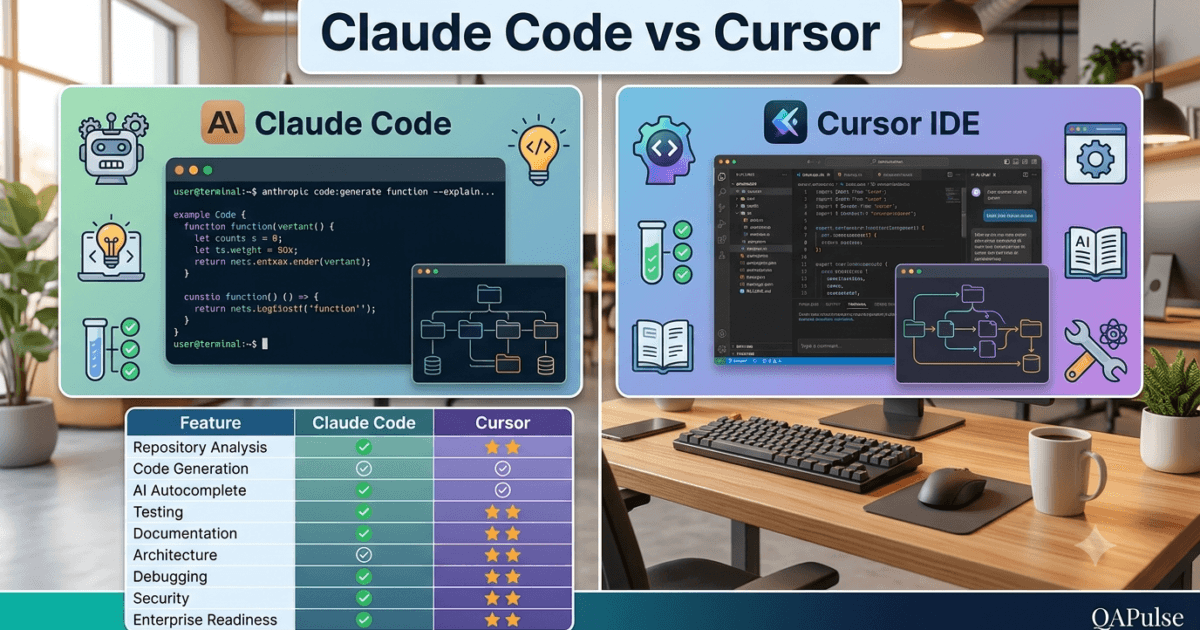
Choosing the right AI coding assistant has become an important decision for modern software teams. Two of the most discussed tools are Claude Code and Cursor. Both use advanced AI models to accelerate development, but they differ significantly in workflow, philosophy, repository awareness, and day-to-day developer experience.
This comparison explains where each tool excels, who should use it, and which one is the better choice for different engineering scenarios.
Why Compare Claude Code and Cursor?
Both tools promise faster software development, but they solve different problems.
Some developers primarily work inside a terminal and existing repositories. Others prefer an AI-powered IDE that provides inline suggestions while coding.
Understanding these differences helps teams invest in the right workflow instead of simply choosing the most popular tool.
What is Claude Code?
Claude Code is Anthropic’s AI coding assistant designed to work directly with your development environment and repository.
Rather than acting as a traditional autocomplete tool, Claude Code focuses on understanding the entire project before making recommendations.
Its strengths include:
- Repository analysis
- Architecture understanding
- Feature implementation
- Debugging assistance
- Test generation
- Documentation creation
- Code reviews
- Engineering workflows
Claude Code is particularly valuable when working with medium and large codebases where architectural consistency matters.
What is Cursor?
Cursor is an AI-powered code editor built on Visual Studio Code.
It combines a familiar IDE experience with integrated AI capabilities, allowing developers to interact with code without leaving the editor.
Common capabilities include:
- AI-powered autocomplete
- Inline code editing
- Chat interface
- Multi-file editing
- Code explanation
- Refactoring assistance
- Natural language editing
Cursor is designed to make everyday coding tasks faster while keeping developers inside the editor.
Philosophy Comparison
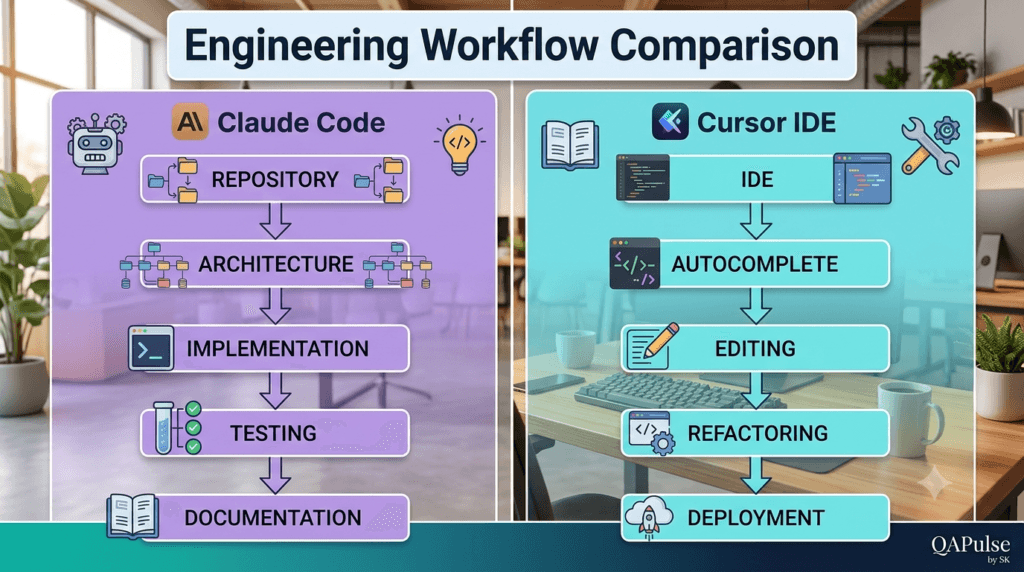
The biggest difference lies in how both tools approach software development.
| Area | Claude Code | Cursor |
|---|---|---|
| Primary focus | Repository understanding | AI-powered coding experience |
| Workflow | Engineering-first | Editor-first |
| Context | Entire repository | Active workspace and files |
| Best suited for | Large projects | Daily coding tasks |
| Interaction | Conversation-driven | IDE-integrated |
Neither philosophy is inherently better; the right choice depends on your workflow.
Repository Awareness
One of Claude Code’s strongest capabilities is understanding project structure before making changes.
It can analyze:
- Folder organization
- Service relationships
- Business logic
- Application architecture
- Dependencies
- Testing strategy
This broader understanding often produces recommendations that align more closely with existing project conventions.
Cursor also understands project context but emphasizes rapid editing within the IDE rather than comprehensive repository analysis.
Code Generation
Both tools generate high-quality code, but their workflows differ.
Claude Code generally encourages developers to:
- Understand the repository
- Design the solution
- Implement incrementally
- Generate tests
- Update documentation
- Review the implementation
Cursor emphasizes fast iteration directly within the editor through inline edits, code completion, and conversational commands.
Developers who prefer structured engineering processes may appreciate Claude Code’s workflow-oriented approach.
Automated Testing
Testing is a major differentiator for professional engineering teams.
Claude Code is commonly used for generating:
- Unit tests
- Integration tests
- API tests
- Playwright end-to-end tests
- Regression tests
Because it considers repository structure, generated tests often integrate well with existing testing frameworks.
Cursor can also assist with testing but is typically used for creating and refining tests during active development sessions.
Learning Curve
Both tools are approachable, but their learning experiences differ.
| Experience | Claude Code | Cursor |
|---|---|---|
| Installation | Simple | Simple |
| Initial setup | Low | Low |
| Repository analysis | Excellent | Good |
| Prompt learning | Moderate | Low |
| IDE familiarity | Not required | Recommended |
Developers already comfortable with Visual Studio Code often adapt quickly to Cursor, while Claude Code rewards users who invest time in learning structured prompting.
Ideal Use Cases
Choose Claude Code if you frequently:
- Work with large repositories
- Perform architecture reviews
- Build enterprise applications
- Generate automated tests
- Review pull requests
- Create technical documentation
- Modernize legacy systems
Choose Cursor if you primarily:
- Write code inside an IDE
- Want AI-powered autocomplete
- Refactor files interactively
- Edit multiple files quickly
- Prefer inline AI assistance
- Build small to medium-sized projects
Can You Use Both?
Yes.
Many experienced developers use Claude Code and Cursor together.
A practical workflow might look like this:
Analyze Repository with Claude Code

↓

Design Solution

↓

Implement Architecture

↓

Open Cursor

↓

Write Code Faster

↓

Generate Tests

↓

Review Changes

↓

Deploy
Rather than replacing one another, the two tools can complement different stages of software development.
Expert Tip
When evaluating Claude Code vs Cursor, focus on your engineering workflow instead of feature checklists. If your work involves understanding complex repositories, maintaining architectural consistency, generating comprehensive tests, and documenting software, Claude Code provides significant advantages. If your priority is rapid coding inside an AI-enhanced editor with intelligent autocomplete and inline assistance, Cursor offers an efficient development experience. Many professional teams combine both tools to benefit from repository-aware engineering and AI-powered coding within the same workflow.
Claude Code vs Cursor: Detailed Feature Comparison for Professional Developers
Both Claude Code and Cursor are excellent AI coding tools, but they are designed with different priorities. Understanding these differences helps developers, QA engineers, and engineering managers select the right tool for their workflow instead of comparing marketing features alone.
This section compares both tools across real-world software engineering scenarios.
Installation and Setup
Both tools are easy to start with, but the onboarding experience differs.
| Feature | Claude Code | Cursor |
|---|---|---|
| Installation | Command-line installation | Desktop application |
| Primary Interface | Terminal | Visual Studio Code-based IDE |
| Authentication | Anthropic account | Cursor account |
| Repository Support | Excellent | Excellent |
| Initial Configuration | Minimal | Minimal |
Developers comfortable with terminal-based workflows often adapt quickly to Claude Code, while those already using Visual Studio Code generally feel at home with Cursor.
User Experience
The interaction model significantly influences daily productivity.
Claude Code
Claude Code emphasizes conversation-driven software engineering.
Typical workflow:
Open Repository

↓

Analyze Project

↓

Discuss Solution

↓

Generate Code

↓

Generate Tests

↓

Review Implementation
This workflow encourages planning before implementation.
Cursor
Cursor focuses on continuous coding assistance inside the editor.
Typical workflow:
Open Project

↓

Write Code

↓

AI Autocomplete

↓

Inline Editing

↓

Refactor

↓

Continue Development
The experience feels similar to pair programming within an IDE.
Repository Understanding
Repository awareness is one of the strongest differentiators.
Claude Code
Claude Code excels at understanding:
- Project architecture
- Business logic
- Folder structure
- Service relationships
- Existing coding conventions
- Dependency graph
- Testing strategy
This broader context enables recommendations that align with the repository’s established design.
Cursor
Cursor maintains awareness of the active workspace and surrounding files while prioritizing fast code generation and editing.
For many everyday development tasks, this provides an efficient balance between context and responsiveness.
Feature Development
Both tools assist with implementation but follow different philosophies.
| Capability | Claude Code | Cursor |
|---|---|---|
| Architecture-first approach | Excellent | Good |
| Repository-wide reasoning | Excellent | Good |
| Multi-file implementation | Excellent | Excellent |
| Inline editing | Limited | Excellent |
| Feature planning | Excellent | Good |
| Interactive coding | Good | Excellent |
Claude Code generally encourages understanding the system before modifying it, while Cursor optimizes rapid implementation within the editor.
Debugging Experience
Debugging workflows differ considerably.
Claude Code
Effective for:
- Root cause analysis
- Explaining failures
- Repository-wide debugging
- Dependency investigation
- Regression prevention
- Generating regression tests
Cursor
Effective for:
- Fixing local code issues
- Editing affected files
- Rapid experimentation
- Iterative debugging
Both approaches are valuable depending on the complexity of the issue.
Code Reviews
Professional teams spend considerable time reviewing code.
Claude Code can assist with:
- Maintainability analysis
- Security observations
- Performance recommendations
- Architectural consistency
- Technical debt identification
- Documentation suggestions
Cursor also supports code review but primarily from the perspective of the currently edited code.
Large pull requests often benefit from Claude Code’s repository-wide reasoning.
Test Automation
Testing remains a critical part of modern software engineering.
Claude Code
Well suited for generating:
- Unit tests
- Integration tests
- API tests
- Playwright tests
- Regression tests
- Edge case scenarios
Because Claude Code understands broader repository context, generated tests often integrate smoothly with existing frameworks.
Cursor
Cursor assists with writing and refining tests during implementation, making it useful for developers who prefer test creation directly inside the editor.
Documentation
Documentation quality often determines long-term maintainability.
Claude Code can generate:
- README files
- API documentation
- Architecture explanations
- Migration guides
- Release notes
- Technical design summaries
Cursor also helps write documentation but primarily supports the editing process rather than repository-wide documentation planning.
Learning New Codebases
Understanding unfamiliar repositories is a common engineering challenge.
| Task | Claude Code | Cursor |
|---|---|---|
| Explain architecture | Excellent | |
| Describe module relationships | Excellent | |
| Summarize execution flow | Excellent | |
| Explain individual files | Excellent | Excellent |
| Explore unfamiliar repositories | Excellent | Good |
Developers joining enterprise projects often benefit from Claude Code’s ability to explain how components interact across the repository.
Collaboration
Engineering teams value tools that improve collaboration.
Claude Code supports:
- Repository onboarding
- Architecture discussions
- Design reviews
- Documentation generation
- Code review preparation
- Technical knowledge sharing
Cursor primarily enhances individual developer productivity during implementation.
Both contribute to collaboration in different ways.
Enterprise Development
Large organizations often evaluate AI tools using criteria beyond code generation.
Important considerations include:
| Enterprise Requirement | Claude Code | Cursor |
|---|---|---|
| Large repository analysis | Excellent | Good |
| Architecture understanding | Excellent | Good |
| Documentation generation | Excellent | Good |
| Engineering workflows | Excellent | Good |
| IDE productivity | Good | Excellent |
| Interactive coding | Good | Excellent |
For organizations maintaining complex software systems, repository awareness becomes increasingly valuable.
Can They Work Together?
Many experienced developers combine both tools.
A practical workflow is:
Repository Analysis

↓

Architecture Planning

↓

Claude Code

↓

Implementation

↓

Cursor

↓

Testing

↓

Documentation

↓

Code Review
Each tool contributes where it performs best, creating a balanced AI-assisted development workflow.
Expert Tips
Choose the Tool That Matches Your Workflow
The Claude Code vs Cursor decision should be based on how your team builds software. If your projects involve large repositories, architectural planning, documentation, and comprehensive testing, Claude Code provides stronger repository-level reasoning. If your priority is rapid implementation with AI assistance directly inside the editor, Cursor delivers an efficient coding experience.
Productivity Comes from Process, Not Features
No AI coding assistant replaces disciplined software engineering. The highest-performing teams combine repository analysis, structured planning, automated testing, peer reviews, and documentation with AI assistance. Whether you use Claude Code, Cursor, or both, following a consistent engineering workflow will have a greater impact on long-term productivity than any individual feature.
Claude Code vs Cursor Performance, Pricing, Security, and Enterprise Comparison
Choosing between Claude Code vs Cursor involves more than comparing AI-generated code. Professional developers and engineering teams should also evaluate performance, security, collaboration, enterprise readiness, extensibility, and long-term maintainability.
These factors become increasingly important as projects grow from personal applications to enterprise software.
AI Models and Intelligence
Both tools leverage state-of-the-art language models, but they approach AI-assisted development differently.
Claude Code
Claude Code is designed around deep reasoning and repository understanding.
It performs particularly well when working on:
- Large codebases
- Architecture discussions
- Complex debugging
- Technical documentation
- Code reviews
- Multi-step engineering tasks
Its conversational workflow encourages developers to analyze problems before implementation.
Cursor
Cursor combines AI assistance with an IDE-centric experience.
Its strengths include:
- Intelligent autocomplete
- Fast code editing
- Inline AI modifications
- Interactive programming
- Rapid iteration
Cursor keeps developers focused inside the editor while accelerating everyday coding tasks.
Performance During Development
Performance should be measured by engineering productivity rather than typing speed.
| Workflow | Claude Code | Cursor |
|---|---|---|
| Repository analysis | Excellent | Good |
| Architecture planning | Excellent | Good |
| Large refactoring | Excellent | Very Good |
| Inline editing | Good | Excellent |
| Autocomplete | Limited | Excellent |
| Code explanation | Excellent | Excellent |
| Documentation generation | Excellent | Good |
Both tools reduce development time but optimize different parts of the engineering process.
Context Awareness
Context quality often determines AI response quality.
Claude Code
Claude Code is particularly effective at understanding:
- Repository structure
- Multiple modules
- Service relationships
- Existing design patterns
- Coding standards
- Testing strategy
This broader understanding helps maintain architectural consistency.
Cursor
Cursor maintains awareness of:
- Active files
- Open editor tabs
- Current workspace
- Nearby project files
This makes it highly responsive during active implementation.
Security Considerations
Organizations evaluating AI tools should review security practices before adoption.
General recommendations for either tool include:
- Never expose production credentials.
- Remove API keys before sharing code.
- Avoid uploading confidential customer information.
- Follow organizational security policies.
- Review AI-generated code before deployment.
Regardless of the tool, developers remain responsible for protecting sensitive information.
Collaboration Features
Engineering is a team activity.
Claude Code contributes to collaboration by helping teams:
- Explain unfamiliar repositories
- Document architecture
- Review pull requests
- Generate technical documentation
- Investigate production incidents
- Standardize engineering workflows
Cursor contributes by enabling developers to collaborate more efficiently during implementation inside a shared development environment.
Enterprise Readiness
Enterprise software introduces additional requirements beyond code generation.
Important evaluation criteria include:
| Requirement | Claude Code | Cursor |
|---|---|---|
| Large repositories | Excellent | Very Good |
| Documentation | Excellent | Good |
| Architecture reviews | Excellent | Good |
| Debugging | Excellent | Very Good |
| Code editing | Good | Excellent |
| Team onboarding | Excellent | Good |
| Development speed | Excellent | Excellent |
Both tools are suitable for enterprise environments, but their strengths align with different engineering activities.
Learning Curve
Claude Code
Developers benefit most when they learn:
- Repository exploration
- Prompt engineering
- Architecture analysis
- Incremental implementation
- AI-assisted review workflows
The investment pays off as projects become larger and more complex.
Cursor
Developers generally learn Cursor quickly because it extends a familiar Visual Studio Code experience with integrated AI capabilities.
Most users become productive after only a short onboarding period.
Productivity Comparison
Instead of asking which tool generates code faster, consider where productivity improvements occur.
Claude Code improves productivity through:
- Better planning
- Faster repository understanding
- Improved documentation
- Comprehensive testing
- Architectural consistency
Cursor improves productivity through:
- Faster editing
- Intelligent autocomplete
- Interactive refactoring
- Immediate inline assistance
- Continuous coding support
These improvements are complementary rather than mutually exclusive.
Which Teams Benefit Most?
Claude Code
Ideal for:
- Backend engineers
- Full-stack developers
- QA engineers
- SDETs
- Technical architects
- Engineering managers
- Enterprise software teams
Cursor
Ideal for:
- Frontend developers
- Application developers
- Startup teams
- Independent developers
- Rapid prototyping
- Daily coding workflows
Many organizations successfully use both tools together.
Example Enterprise Workflow
Requirements Analysis

↓

Repository Exploration

↓

Claude Code

↓

Architecture Review

↓

Cursor

↓

Implementation

↓

Playwright Testing

↓

Documentation

↓

Pull Request

↓

CI/CD

↓

Production
This workflow combines repository-level reasoning with efficient code editing.
Decision Matrix
| Scenario | Recommended Tool |
|---|---|
| Understanding a new repository | Claude Code |
| Explaining architecture | Claude Code |
| Writing documentation | Claude Code |
| Large-scale refactoring | Claude Code |
| Code review | Claude Code |
| Debugging complex systems | Claude Code |
| Daily coding | Cursor |
| AI autocomplete | Cursor |
| Interactive editing | Cursor |
| Rapid prototyping | Cursor |
| Enterprise development | Claude Code + Cursor |
The most effective choice depends on your engineering workflow rather than a single feature comparison.
Common Buying Mistakes
Choosing Based on Social Media
Popularity does not determine suitability. Evaluate tools using your own repositories and engineering requirements.
Comparing Only AI Models
The surrounding workflow, developer experience, and repository awareness often have a greater impact than the underlying model.
Ignoring Team Processes
A tool that fits your organization’s coding standards, review process, testing strategy, and CI/CD pipeline will provide more long-term value.
Expecting Complete Automation
Neither Claude Code nor Cursor replaces engineering expertise. Developers remain responsible for architecture, testing, security, and final approval.
Expert Tips
Evaluate Using Real Projects
The best way to compare Claude Code vs Cursor is by testing both on an actual repository. Measure how effectively each tool supports architecture understanding, implementation, testing, documentation, debugging, and code reviews instead of relying on isolated benchmarks or marketing comparisons.
Prioritize Long-Term Engineering Value
Short-term coding speed is only one aspect of developer productivity. Teams that prioritize maintainability, comprehensive testing, documentation quality, and architectural consistency often achieve better long-term outcomes. Select the tool—or combination of tools—that strengthens your overall software engineering process rather than simply accelerating code generation.
Claude Code vs Cursor Final Verdict: Which AI Coding Assistant Is Right for You?
After comparing workflows, repository awareness, development experience, testing capabilities, documentation support, enterprise readiness, and collaboration features, one conclusion becomes clear: there is no universal winner in the Claude Code vs Cursor comparison. The best choice depends on how you build software and where you expect AI to provide the greatest value.
Instead of asking which tool is “better,” ask which tool fits your engineering workflow.
Quick Comparison
| Category | Claude Code | Cursor |
|---|---|---|
| Repository understanding | ⭐⭐⭐⭐⭐ | ⭐⭐⭐⭐☆ |
| Architecture analysis | ⭐⭐⭐⭐⭐ | ⭐⭐⭐⭐☆ |
| Feature planning | ⭐⭐⭐⭐⭐ | ⭐⭐⭐⭐☆ |
| Code generation | ⭐⭐⭐⭐⭐ | ⭐⭐⭐⭐⭐ |
| Inline editing | ⭐⭐⭐☆☆ | ⭐⭐⭐⭐⭐ |
| AI autocomplete | ⭐⭐⭐☆☆ | ⭐⭐⭐⭐⭐ |
| Refactoring | ⭐⭐⭐⭐⭐ | ⭐⭐⭐⭐⭐ |
| Debugging | ⭐⭐⭐⭐⭐ | ⭐⭐⭐⭐☆ |
| Documentation | ⭐⭐⭐⭐⭐ | ⭐⭐⭐⭐☆ |
| Test generation | ⭐⭐⭐⭐⭐ | ⭐⭐⭐⭐☆ |
| Learning new repositories | ⭐⭐⭐⭐⭐ | ⭐⭐⭐⭐☆ |
| Daily coding speed | ⭐⭐⭐⭐☆ | ⭐⭐⭐⭐⭐ |
| Enterprise projects | ⭐⭐⭐⭐⭐ | ⭐⭐⭐⭐☆ |
| Small personal projects | ⭐⭐⭐⭐☆ | ⭐⭐⭐⭐⭐ |
Each tool excels in different aspects of software development.
When Claude Code Is the Better Choice
Claude Code is an excellent fit when your work involves:
- Understanding large repositories
- Reviewing application architecture
- Building enterprise software
- Investigating complex production issues
- Generating comprehensive automated tests
- Writing technical documentation
- Explaining legacy code
- Performing code reviews
- Supporting long-term maintainability
Its greatest strength is helping developers understand and improve an entire codebase rather than only editing individual files.
When Cursor Is the Better Choice
Cursor is particularly effective when you need:
- AI-powered autocomplete
- Fast inline code edits
- Interactive refactoring
- Rapid prototyping
- Continuous coding assistance
- A familiar Visual Studio Code experience
- High coding velocity throughout the day
For developers who spend most of their time actively writing code, Cursor provides an efficient and seamless workflow.
When Using Both Makes Sense
Many professional teams use both tools because their strengths complement each other.
A practical engineering workflow looks like this:
Project Planning

↓

Claude Code

↓

Repository Analysis

↓

Architecture Design

↓

Cursor

↓

Feature Implementation

↓

Claude Code

↓

Test Generation

↓

Documentation

↓

Code Review

↓

Deployment
This approach combines deep repository reasoning with fast implementation inside the editor.
Decision Guide
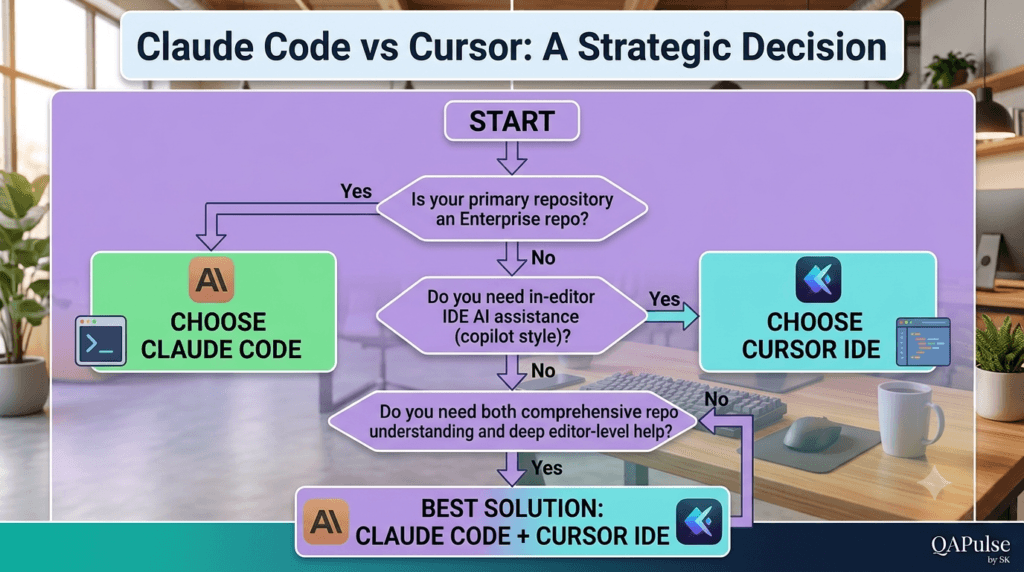
Choose Claude Code if you answer Yes to most of these questions:
- Do you work with enterprise repositories?
- Do you regularly review pull requests?
- Do you generate automated tests?
- Do you maintain legacy systems?
- Do you document software frequently?
- Do you analyze architecture before coding?
- Do you value repository-wide understanding?
Choose Cursor if you answer Yes to most of these questions:
- Do you primarily code inside an IDE?
- Do you rely heavily on autocomplete?
- Do you prefer inline AI assistance?
- Do you frequently prototype new features?
- Do you want AI integrated into every editing task?
- Do you spend most of your day writing application code?
Your answers provide a clearer decision than comparing feature lists alone.
Enterprise Recommendations
Organizations adopting AI coding assistants should evaluate tools using real engineering criteria rather than marketing claims.
Recommended evaluation process:
Select Representative Repository

↓

Define Engineering Tasks

↓

Evaluate Claude Code

↓

Evaluate Cursor

↓

Measure Productivity

↓

Collect Developer Feedback

↓

Standardize Team Workflow
Testing both tools against actual development scenarios provides far more useful insights than synthetic benchmarks.
Common Evaluation Mistakes
Comparing Only Code Generation
Modern AI coding assistants support planning, documentation, debugging, testing, and architecture analysis. Evaluate the complete workflow rather than code generation alone.
Ignoring Existing Engineering Processes
A tool should strengthen your current development practices instead of requiring major workflow changes.
Choosing Based on Popularity
Community discussions are valuable, but your own repositories, team structure, and development process should drive the final decision.
Overlooking Long-Term Maintainability
Fast implementation is useful only if the resulting code remains readable, testable, secure, and easy to maintain.
Key Takeaways
Remember these important points:
- Claude Code emphasizes repository understanding and engineering workflows.
- Cursor emphasizes editor productivity and interactive development.
- Both generate high-quality code when given appropriate context.
- Both require human review before production deployment.
- Both integrate well with modern software development practices.
- Many teams achieve the best results by combining both tools.
The objective is not to replace developers but to help them deliver better software more efficiently.
Future Outlook
AI-assisted development continues to evolve rapidly.
Future improvements are likely to include:
- Better repository-wide reasoning
- More intelligent multi-file editing
- Stronger architectural analysis
- Improved debugging assistance
- Smarter automated testing
- Enhanced documentation generation
- Deeper CI/CD integration
- More collaborative engineering workflows
Teams that build strong AI-assisted development practices today will be better prepared to adopt these future capabilities.
Final Recommendations
The Claude Code vs Cursor comparison is ultimately about workflow rather than competition. Claude Code excels at repository exploration, architectural reasoning, documentation, testing, and large-scale engineering tasks, making it particularly valuable for enterprise development and long-term software maintenance. Cursor, on the other hand, shines during day-to-day coding with its AI-powered editor experience, intelligent autocomplete, and rapid inline editing capabilities.
For individual developers, the right choice depends on personal preferences and project requirements. For engineering teams, the most productive strategy is often to combine both tools—using Claude Code for planning, analysis, testing, and documentation, while leveraging Cursor for fast implementation and interactive coding. By integrating AI thoughtfully into established software engineering practices, developers can improve productivity without compromising code quality, maintainability, or collaboration.
Interview Question Answers:
Which is better: Claude Code or Cursor?
Claude Code is better for repository analysis, architecture understanding, testing, documentation, and enterprise development. Cursor is stronger for AI-powered editing, autocomplete, and rapid coding inside an IDE.
Can developers use Claude Code and Cursor together?
Yes. Many engineering teams use Claude Code for planning, debugging, testing, documentation, and architecture while using Cursor for interactive coding and refactoring.
Is Cursor better for beginners?
Developers already familiar with Visual Studio Code often find Cursor easier to adopt because it integrates directly into a familiar editor.
Is Claude Code suitable for enterprise software?
Yes. Claude Code is particularly valuable for enterprise repositories due to its repository-wide reasoning, architectural analysis, documentation generation, and comprehensive testing capabilities.
Which AI coding assistant is best for QA engineers?
Claude Code is generally better suited for QA engineers because it can generate Playwright tests, API tests, regression suites, technical documentation, and repository-level testing strategies.
Featured Snippet
Claude Code vs Cursor: Quick Comparison
Choose Claude Code if you need:
- Repository analysis
- Architecture reviews
- Documentation
- Automated testing
- Enterprise software development
- Technical planning
Choose Cursor if you need:
- AI autocomplete
- Inline editing
- Rapid coding
- Interactive refactoring
- Visual Studio Code integration
- Faster implementation
Many professional developers combine both tools for maximum productivity.
AI Overview Answer
Claude Code vs Cursor compares two leading AI coding assistants with different strengths. Claude Code focuses on repository understanding, architecture analysis, testing, documentation, and engineering workflows, while Cursor emphasizes AI-assisted coding inside a Visual Studio Code-based editor with intelligent autocomplete and inline editing. The best choice depends on your development workflow, project size, and team requirements.
Internal Links:
- Learn MCP – Zero to Hero
- Learn AI Agents for QA – Zero to Hero
- Playwright Automation – Zero to Hero
- Learn Python – Zero to Hero
- Claude Code Tutorial: Complete Zero to Hero
- Free QA Resources Built From Real Experience
- QA Glossary: Test Automation Terms Every Engineer Should Know
External Resources:
- Anthropic Claude documentation
- Anthropic API documentation
- Model Context Protocol documentation
- Playwright documentation
- GitHub documentation
- TypeScript documentation
- Prompt Engineering Overview
- Git Documentation
- Visual Studio Code
- Cursor Documentation
Enjoyed this article? Explore more in-depth guides on AI engineering, automation testing, Model Context Protocol, Playwright, and intelligent software quality at www.skakarh.com. Follow QAPulse by SK for practical, production-focused tutorials designed for QA engineers, SDETs, and AI developers.


