 QA
QA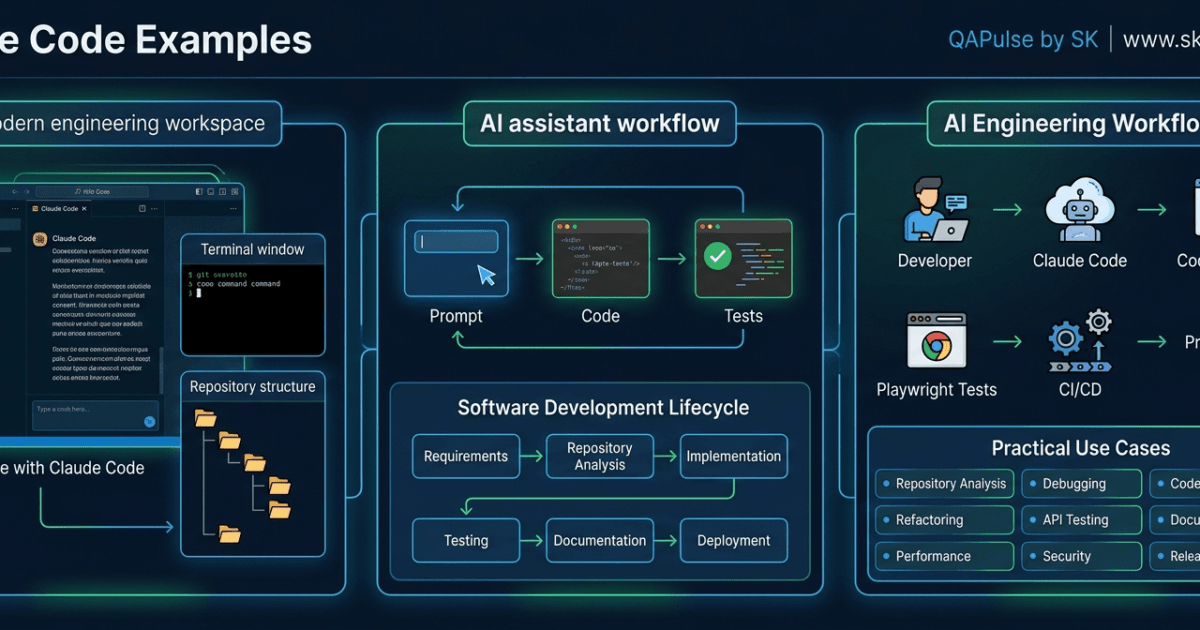
Reading documentation helps you understand what Claude Code can do, but practical examples show how it fits into everyday software engineering. The best way to master Claude Code examples is by seeing how experienced developers use it to solve real development challenges instead of treating it as a simple code generator.
This guide explores practical scenarios where Claude Code improves productivity across development, testing, debugging, documentation, and code reviews.
Why Real-World Examples Matter
Most developers don’t spend their day writing code from scratch. Instead, they work on existing repositories, investigate bugs, review pull requests, improve performance, and maintain legacy systems.
These Claude Code examples focus on those everyday engineering activities rather than isolated demonstrations.
Example 1: Understand an Unfamiliar Repository
One of the most valuable ways to use Claude Code is when joining a new project.
Instead of manually reading hundreds of files, ask Claude Code to explain the repository.
Example prompt:
Analyze this repository and explain the overall architecture, folder structure, application flow, major services, external integrations, and technologies used. Highlight any areas of technical debt or architectural risks.
Typical outcome:
- Repository overview
- Folder hierarchy explanation
- Execution flow
- Major components
- Service dependencies
- Third-party integrations
- Architectural observations
This significantly reduces onboarding time for new developers.
Example 2: Implement a New Feature
Suppose you need to add profile editing to an existing application.
Example prompt:
Implement a user profile editing feature using the existing architecture. Follow current coding conventions, reuse existing services, maintain backward compatibility, generate unit tests, create Playwright end-to-end tests, and update the technical documentation.
Expected deliverables include:
- Production-ready implementation
- Automated tests
- Documentation updates
- Explanation of implementation decisions
Providing repository context helps Claude Code generate solutions that fit naturally into the project.
Example 3: Investigate a Production Bug
Effective debugging starts with understanding the root cause rather than immediately applying fixes.
Example prompt:
Investigate why the checkout API returns HTTP 500 when processing discount coupons. Explain the root cause, identify affected modules, recommend the safest fix, implement the solution, and generate regression tests.
Claude Code can assist by:
- Analyzing related modules
- Identifying probable failure points
- Explaining the issue
- Suggesting corrective actions
- Producing regression tests to prevent recurrence
This structured approach supports reliable debugging.
Example 4: Refactor Legacy Code
Legacy systems often contain duplicated logic and complex methods that are difficult to maintain.
Example prompt:
Refactor this service to improve readability, reduce duplication, simplify complex methods, preserve existing business behavior, and follow the repository's coding standards. Explain every significant improvement.
Benefits include:
- Cleaner architecture
- Reduced technical debt
- Improved readability
- Easier future maintenance
- Better consistency with the rest of the codebase
Incremental refactoring is generally safer than large rewrites.
Example 5: Generate Comprehensive Automated Tests
Testing is one of the strongest use cases for Claude Code.
Example prompt:
Generate Playwright end-to-end tests covering positive scenarios, negative scenarios, boundary conditions, accessibility checks, responsive layouts, and regression cases for the user registration workflow.
A comprehensive response typically includes:
- Positive test scenarios
- Negative validation tests
- Boundary value tests
- Accessibility verification
- Responsive testing
- Regression coverage
Well-defined testing prompts improve software reliability while reducing manual effort.
Expert Tip
The most valuable Claude Code examples solve real engineering problems rather than showcasing isolated features. Focus on repository analysis, feature development, debugging, refactoring, testing, and documentation—the activities that developers perform every day. As you gain experience, build your own collection of successful prompts and workflows that match your team’s projects and engineering standards.
Practical Claude Code Examples for Everyday Software Engineering
The true value of Claude Code examples becomes clear when applied to real engineering work. Professional developers rarely ask Claude Code to simply “write code.” Instead, they use it to analyze systems, review implementations, generate tests, improve performance, and document software.
The following examples demonstrate practical workflows that can be adapted to almost any modern software project.
Example 6: Review a Pull Request Before Submission
Before opening a pull request, use Claude Code as an initial reviewer.
Example prompt:
Review the changes in this branch as a senior software engineer. Evaluate code quality, readability, maintainability, security, performance, test coverage, and adherence to the project's coding standards. Suggest improvements and explain your reasoning.
Benefits:
- Identifies duplicated logic
- Detects inconsistent naming
- Highlights missing validation
- Suggests cleaner implementations
- Improves pull request quality before peer review
This reduces review cycles and helps developers submit higher-quality code.
Example 7: Generate API Tests
Testing APIs manually is repetitive and prone to missing edge cases.
Example prompt:
Generate API tests for the order creation endpoint. Validate successful requests, invalid payloads, authentication failures, authorization rules, boundary values, response schemas, required headers, and error handling. Use the existing testing framework.
Expected coverage:
- HTTP status codes
- Request validation
- Response structure
- Authentication
- Authorization
- Invalid input handling
- Boundary testing
- Error scenarios
Comprehensive API tests improve reliability and confidence during deployments.
Example 8: Improve Application Performance
Claude Code can help identify optimization opportunities before they become production issues.
Example prompt:
Analyze this module for performance bottlenecks. Identify expensive operations, repeated database queries, inefficient loops, memory usage concerns, and unnecessary API calls. Rank recommendations by expected performance impact.
Potential recommendations include:
- Eliminating redundant queries
- Caching repeated operations
- Reducing unnecessary rendering
- Improving asynchronous processing
- Optimizing resource utilization
Prioritizing improvements by impact helps teams focus on changes that deliver measurable benefits.
Example 9: Perform a Security Review
Security should be integrated into everyday development rather than postponed until release.
Example prompt:
Review this authentication module from a security perspective. Identify vulnerabilities related to authentication, authorization, input validation, session management, sensitive data exposure, and secure configuration. Recommend improvements following current security best practices.
Claude Code may highlight:
- Missing input validation
- Weak authorization checks
- Sensitive data exposure
- Insecure error messages
- Configuration weaknesses
These reviews complement, but do not replace, dedicated security testing.
Example 10: Generate Technical Documentation
Documentation often becomes outdated because it is treated as a separate task.
Example prompt:
Generate technical documentation for this feature. Include an overview, architecture summary, configuration steps, API usage, implementation details, testing strategy, known limitations, troubleshooting guidance, and future enhancement opportunities.
Typical deliverables:
- README updates
- API documentation
- Configuration instructions
- Architecture explanations
- Troubleshooting guides
- Release notes
Maintaining documentation alongside development improves long-term maintainability.
Example 11: Explain Legacy Code
Understanding existing systems is often more difficult than building new features.
Example prompt:
Explain how this module works. Describe the execution flow, business logic, dependencies, design patterns, data flow, and interactions with other services. Highlight areas that may benefit from refactoring.
This is particularly useful when:
- Joining a new project
- Investigating production issues
- Reviewing unfamiliar services
- Preparing for system modernization
Repository understanding reduces implementation errors.
Example 12: Plan a Large Feature
Rather than requesting an entire implementation immediately, begin with design.
Example prompt:
Design a scalable notification system supporting email, SMS, and push notifications. Compare architectural approaches, discuss scalability, reliability, maintainability, and testing considerations. Recommend the most appropriate design before implementation.
This planning-first approach helps teams evaluate alternatives before writing code.
Example 13: Modernize Legacy Code
Migrating older applications often requires careful planning.
Example prompt:
Analyze this legacy service and recommend a modernization strategy. Preserve existing business functionality while improving readability, maintainability, testing, and long-term scalability. Divide the migration into manageable phases.
A phased approach reduces migration risk while maintaining application stability.
Example 14: Improve Test Coverage
Instead of generating isolated tests, ask Claude Code to evaluate existing coverage.
Example prompt:
Review the current automated test suite. Identify uncovered scenarios, missing edge cases, weak assertions, duplicated tests, and opportunities to improve reliability. Recommend additional Playwright and unit tests.
Improving coverage proactively helps prevent future regressions.
Example 15: Prepare a Release
Before deploying a major feature, perform a comprehensive review.
Example prompt:
Review this feature for production readiness. Evaluate functionality, security, performance, automated tests, documentation, configuration changes, logging, monitoring, and deployment risks. Identify any issues that should be addressed before release.
This creates a final quality gate before production deployment.
Common Patterns Across Successful Examples
The strongest Claude Code examples share several characteristics:
| Pattern | Why It Matters |
|---|---|
| Clear objective | Prevents ambiguity |
| Repository context | Produces project-aware recommendations |
| Technical constraints | Preserves architecture |
| Expected deliverables | Ensures complete outputs |
| Validation requirements | Maintains software quality |
Following these patterns consistently improves response quality.
Expert Tips
Focus on Engineering Problems
The most valuable Claude Code examples solve practical engineering challenges such as repository onboarding, debugging, testing, security reviews, refactoring, and release preparation. These tasks occur daily in professional software development and deliver the greatest long-term productivity gains.
Adapt Examples to Your Repository
Treat these examples as reusable templates rather than fixed instructions. Modify them to match your programming language, framework, architecture, coding standards, and testing strategy. Over time, maintaining a collection of project-specific examples will help your team achieve faster, more consistent AI-assisted development.
Advanced Claude Code Examples for Enterprise Development Teams
As projects become larger and more complex, developers use Claude Code for much more than writing features. These advanced Claude Code examples demonstrate how engineering teams can integrate AI into architecture reviews, large-scale refactoring, DevOps, testing, onboarding, and long-term maintenance.
These workflows are particularly useful for enterprise applications where software quality, consistency, and maintainability are critical.
Example 16: Analyze System Architecture
Understanding architecture is one of the most valuable applications of Claude Code.
Example prompt:
Analyze the architecture of this repository. Explain how the major modules communicate, identify architectural patterns, describe service dependencies, evaluate scalability, and recommend improvements without changing existing business functionality.
Expected outcome:
- High-level architecture overview
- Service relationships
- Layer responsibilities
- Dependency analysis
- Scalability observations
- Areas of technical debt
This helps new and existing team members understand complex systems more quickly.
Example 17: Prepare for a Framework Upgrade
Framework upgrades can introduce compatibility issues if not planned carefully.
Example prompt:
Review this project before upgrading to the latest framework version. Identify deprecated APIs, breaking changes, incompatible dependencies, migration risks, testing requirements, and recommended upgrade steps.
Claude Code can assist by:
- Highlighting outdated APIs
- Identifying dependency conflicts
- Recommending migration order
- Suggesting regression tests
- Preparing an upgrade checklist
A structured upgrade process reduces production risk.
Example 18: Improve CI/CD Pipelines
Claude Code can review automation pipelines and recommend improvements.
Example prompt:
Review the current CI/CD pipeline. Recommend improvements for build performance, automated testing, deployment safety, artifact management, caching, and pipeline maintainability.
Possible recommendations include:
- Faster dependency caching
- Parallel test execution
- Improved deployment validation
- Better failure reporting
- Optimized workflow sequencing
These improvements can reduce build times and increase deployment reliability.
Example 19: Optimize Test Automation
Large automation suites often become slow and difficult to maintain.
Example prompt:
Review the Playwright test suite. Identify duplicated tests, unstable scenarios, inefficient setup, opportunities for Page Object Model improvements, parallel execution optimizations, and strategies to reduce test execution time.
Typical improvements:
- Better test organization
- Reduced duplication
- Faster execution
- Improved maintainability
- Increased reliability
Optimized automation provides quicker feedback during development.
Example 20: Improve Developer Onboarding
Helping new developers understand a project is a recurring challenge.
Example prompt:
Create a developer onboarding guide for this repository. Explain the project structure, development workflow, coding standards, testing strategy, common commands, environment setup, and contribution guidelines.
Deliverables may include:
- Repository overview
- Setup instructions
- Folder explanations
- Development workflow
- Testing guidance
- Contribution process
Comprehensive onboarding documentation reduces ramp-up time.
Example 21: Generate Release Notes
Preparing release documentation is often repetitive.
Example prompt:
Generate release notes summarizing completed features, resolved defects, breaking changes, migration instructions, testing completed, and deployment considerations based on the recent code changes.
Well-structured release notes improve communication with stakeholders and simplify deployments.
Example 22: Review Technical Debt
Technical debt accumulates over time if left unmanaged.
Example prompt:
Analyze this repository for technical debt. Identify duplicated logic, outdated dependencies, architectural inconsistencies, overly complex modules, weak test coverage, and documentation gaps. Prioritize recommendations based on long-term impact.
Prioritized recommendations help teams address the most valuable improvements first.
Example 23: Plan Microservice Migration
Modernizing monolithic applications requires careful planning.
Example prompt:
Evaluate this monolithic application and recommend a phased migration strategy toward microservices. Identify service boundaries, shared dependencies, data ownership concerns, deployment considerations, and testing requirements.
Planning before implementation reduces migration complexity.
Example 24: Prepare for a Security Audit
Security reviews should be proactive.
Example prompt:
Review this repository for security readiness. Identify authentication and authorization weaknesses, insecure configurations, sensitive data handling, dependency vulnerabilities, logging concerns, and compliance risks. Recommend mitigation strategies.
This supports internal security reviews before external audits.
Example 25: Evaluate Repository Health
Engineering leaders often need an overall assessment of a project.
Example prompt:
Evaluate the overall health of this repository. Assess architecture, maintainability, documentation quality, testing strategy, dependency management, code consistency, security practices, and long-term scalability. Provide a prioritized action plan for improvement.
A comprehensive repository assessment helps teams plan future engineering investments.
Build an Internal Example Library
Successful engineering teams rarely rely on ad hoc prompts.
Organize reusable Claude Code examples into categories.
| Category | Example Use Cases |
|---|---|
| Development | Feature implementation, enhancements |
| Debugging | Root-cause analysis, incident investigation |
| Testing | Unit, API, Playwright, regression testing |
| Code Review | Pull request reviews, quality audits |
| Architecture | Repository analysis, scalability reviews |
| Performance | Optimization and profiling |
| Security | Code audits, compliance reviews |
| Documentation | README, API docs, release notes |
| DevOps | CI/CD optimization, deployment reviews |
| Maintenance | Technical debt analysis, modernization |
Maintaining an internal example library improves consistency and reduces prompt-writing effort across the team.
Common Mistakes When Using Examples
Copying Prompts Without Customization
Examples should be adapted to your repository, framework, and coding standards.
Skipping Repository Context
Project-aware responses require sufficient technical context.
Focusing Only on Code Generation
Claude Code also provides significant value for planning, reviewing, documenting, and maintaining software.
Ignoring Validation
Every recommendation should be verified through testing and code review before production use.
Expert Tips
Build Reusable Engineering Workflows
The most effective Claude Code examples evolve into reusable engineering workflows. As your team discovers prompts that consistently produce high-quality results, store them in a shared library so every developer benefits from proven practices.
Use Examples Across the Entire SDLC
Claude Code is valuable far beyond implementation. Apply these examples during architecture planning, onboarding, debugging, testing, documentation, release preparation, and long-term maintenance. Integrating AI throughout the software development lifecycle creates a more consistent, efficient, and maintainable engineering process.
Claude Code Examples Summary, Best Practices, and Real-World Recommendations
Learning individual prompts is useful, but experienced developers eventually develop repeatable workflows that combine multiple Claude Code examples into a complete engineering process. The goal is not to memorize prompts but to understand when and why to use them.
This article concludes with practical recommendations for building a sustainable AI-assisted development workflow that scales from individual projects to enterprise engineering teams.
A Complete Claude Code Workflow
Professional developers rarely interact with Claude Code only once during a task.
A typical workflow looks like this:
Understand Requirements

↓

Analyze Repository

↓

Design Solution

↓

Review Architecture

↓

Implement Feature

↓

Generate Tests

↓

Review Code

↓

Update Documentation

↓

Commit Changes

↓

Open Pull Request

↓

CI/CD Validation

↓

Production Deployment
Each stage has a clear objective, making development more structured and reducing the likelihood of missed steps.
Match the Right Prompt to the Right Task
Different engineering activities require different prompting strategies.
| Engineering Task | Recommended Claude Code Example |
|---|---|
| Repository onboarding | Repository analysis |
| New feature | Feature implementation |
| Production bug | Root cause investigation |
| Slow application | Performance analysis |
| Legacy project | Refactoring strategy |
| API development | API testing |
| UI changes | Playwright test generation |
| Release preparation | Production readiness review |
| Security review | Security audit |
| Documentation | Technical documentation generation |
Choosing the appropriate example for the task improves response quality and reduces unnecessary iterations.
Create a Personal Prompt Library
As you continue using Claude Code, save prompts that consistently produce useful results.
Suggested organization:
Development
- Feature implementation
- Bug fixes
- Refactoring
- Code modernization
Testing
- Unit tests
- API tests
- Playwright tests
- Regression testing
Reviews
- Code review
- Performance review
- Security review
- Architecture review
Documentation
- README generation
- API documentation
- Release notes
- Migration guides
Over time, this library becomes a valuable productivity asset.
Combine Examples Instead of Writing Huge Prompts
Large prompts covering multiple unrelated tasks often produce inconsistent results.
A better approach is to divide work into sequential requests.
Example workflow:
Repository Analysis

↓

Architecture Review

↓

Implementation

↓

Unit Tests

↓

Playwright Tests

↓

Documentation

↓

Code Review
Smaller, focused interactions are easier to validate and maintain.
Validate Everything Before Production
Claude Code accelerates engineering work, but validation remains essential.
Before merging any AI-assisted implementation, confirm:
- Business requirements are satisfied.
- Existing functionality still works.
- Coding standards are followed.
- Security considerations are addressed.
- Automated tests pass successfully.
- Documentation is updated.
- Code review feedback has been incorporated.
Validation protects software quality regardless of how the implementation was created.
Build Team Standards
Organizations gain the greatest value when everyone follows the same AI-assisted workflow.
A shared engineering standard may include:
- Repository analysis before implementation.
- Standard prompt templates.
- Consistent code review criteria.
- Mandatory automated testing.
- Documentation updates for every feature.
- Prompt library maintenance.
- Continuous improvement based on team feedback.
Consistency improves collaboration and reduces onboarding time.
Measure Real Productivity
Avoid measuring success by the number of prompts used.
Instead, monitor engineering outcomes.
| Metric | Why It Matters |
|---|---|
| Feature delivery time | Measures development efficiency |
| Pull request revisions | Reflects implementation quality |
| Production defects | Indicates software reliability |
| Test coverage | Demonstrates validation completeness |
| Documentation quality | Supports maintainability |
| Deployment success rate | Evaluates release stability |
| Developer onboarding time | Measures knowledge transfer |
These metrics provide a more meaningful assessment of AI-assisted development.
Common Misconceptions
More Prompts Mean Better Results
Quality is determined by clarity and context, not prompt length.
Claude Code Replaces Software Engineers
Claude Code enhances engineering productivity, but developers remain responsible for architecture, business decisions, validation, and final approval.
AI Eliminates Code Reviews
Peer reviews continue to provide valuable insights into design decisions, maintainability, and business logic that AI alone cannot guarantee.
Every Repository Should Use the Same Prompts
Projects differ in architecture, technology stack, coding standards, and business requirements. Adapt examples to fit your environment.
Future Applications
As Claude Code continues to evolve, developers can expect broader support for:
- Multi-repository analysis
- Large-scale architecture modernization
- AI-assisted debugging
- Test optimization
- CI/CD automation
- Documentation generation
- Security reviews
- Developer onboarding
- Engineering knowledge sharing
Teams that establish strong prompting practices today will be well prepared to take advantage of future capabilities.
Key Takeaways
Successful use of Claude Code examples depends on applying sound engineering principles rather than relying on AI alone.
Remember these core practices:
- Understand the repository before making changes.
- Define one clear engineering objective at a time.
- Provide sufficient technical context.
- Respect existing project architecture.
- Validate every implementation with automated testing.
- Review AI-generated code carefully.
- Keep documentation synchronized.
- Build reusable prompt templates for recurring tasks.
- Continuously improve your engineering workflow.
These habits produce more reliable software and help teams integrate AI into everyday development with confidence.
Conclusion
Real-world Claude Code examples demonstrate that AI is most effective when it complements established software engineering practices rather than replacing them. From repository exploration and feature development to testing, security reviews, documentation, and release preparation, Claude Code supports every stage of the software development lifecycle.
Developers, QA engineers, SDETs, and engineering teams that build reusable prompt libraries, standardize workflows, and maintain rigorous testing and review processes will achieve the greatest long-term benefits. By combining practical experience with disciplined engineering practices, Claude Code becomes a powerful collaborator for building scalable, maintainable, and production-ready software.
Interview Questions/Answers:
What are Claude Code Examples?
Claude Code Examples are practical, real-world scenarios that demonstrate how developers can use Claude Code for repository analysis, feature development, debugging, testing, documentation, architecture reviews, and software maintenance.
How can beginners learn Claude Code faster?
Start with simple examples such as exploring a repository, implementing a small feature, generating automated tests, and reviewing code. As confidence grows, move to architecture analysis, performance optimization, and CI/CD workflows.
Are Claude Code Examples suitable for enterprise projects?
Yes. Claude Code supports enterprise software development by assisting with code reviews, security assessments, testing strategies, documentation, technical debt analysis, and large-scale repository exploration.
Can Claude Code Examples generate Playwright tests?
Yes. Claude Code can generate Playwright end-to-end tests covering positive scenarios, negative scenarios, accessibility, responsive layouts, regression testing, and Page Object Model implementation.
Should developers customize Claude Code Examples?
Absolutely. The most effective results come from adapting examples to the project’s programming language, architecture, coding standards, testing framework, and business requirements.
Featured Snippet
Best Claude Code Examples for Developers
The most useful Claude Code Examples include:
- Repository analysis
- Feature implementation
- Bug investigation
- Legacy code refactoring
- API testing
- Playwright test generation
- Security reviews
- Performance optimization
- Technical documentation
- Release readiness reviews
These workflows demonstrate how Claude Code supports the complete software development lifecycle.
AI Overview Answer
Claude Code Examples help developers understand how to apply Claude Code in real software engineering projects. They cover practical workflows such as repository exploration, feature implementation, debugging, testing, documentation, security reviews, architecture analysis, and deployment preparation, enabling teams to integrate AI into everyday development while maintaining software quality.
Internal Links:
- Learn MCP – Zero to Hero
- Learn AI Agents for QA – Zero to Hero
- Playwright Automation – Zero to Hero
- Learn Python – Zero to Hero
- Claude Code Tutorial: Complete Zero to Hero
- Free QA Resources Built From Real Experience
- QA Glossary: Test Automation Terms Every Engineer Should Know
External Resources:
- Anthropic Claude documentation
- Anthropic API documentation
- Model Context Protocol documentation
- Playwright documentation
- GitHub documentation
- TypeScript documentation
- Prompt Engineering Overview
- Git Documentation
Enjoyed this article? Explore more in-depth guides on AI engineering, automation testing, Model Context Protocol, Playwright, and intelligent software quality at www.skakarh.com. Follow QAPulse by SK for practical, production-focused tutorials designed for QA engineers, SDETs, and AI developers.


