QA
QA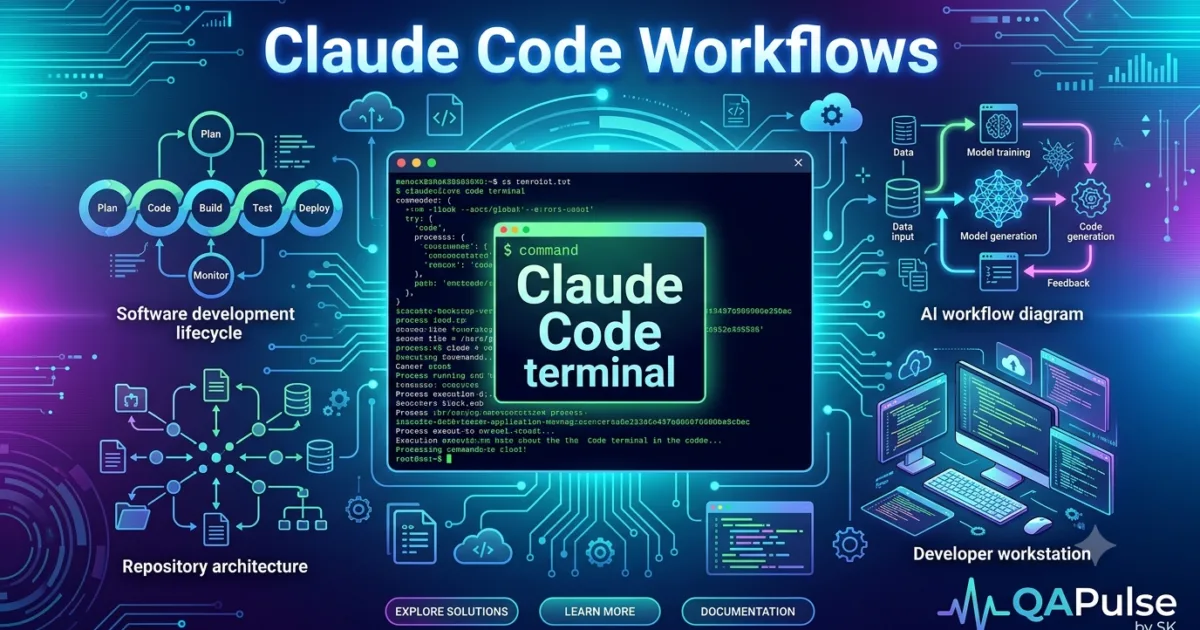
Claude Code Workflows: Knowing individual commands and prompts is useful, but professional developers gain the most value from repeatable workflows. Well-designed Claude Code workflows help teams build software consistently, reduce errors, improve collaboration, and integrate AI naturally into the software development lifecycle.
Instead of using Claude Code only when writing code, successful engineering teams apply it from planning through deployment.
What Are Claude Code Workflows?
A workflow is a sequence of engineering activities where Claude Code assists at specific stages instead of attempting to solve everything in one interaction.
Rather than asking:
Build an entire authentication system.
A workflow breaks the task into smaller, reviewable steps.
For example:
- Understand requirements
- Analyze the repository
- Design the solution
- Implement one component
- Generate tests
- Review the implementation
- Update documentation
- Prepare for deployment
This structured approach produces more predictable and maintainable software.
Why Workflows Matter
Software development is much more than writing code.
Developers spend time:
- Understanding requirements
- Reading existing code
- Investigating bugs
- Reviewing pull requests
- Writing tests
- Updating documentation
- Deploying software
Claude Code can improve every one of these activities when used within a defined workflow.
Benefits include:
- Better planning
- Fewer implementation errors
- Improved consistency
- Easier collaboration
- Higher software quality
- Faster onboarding
Workflow 1: New Feature Development
A disciplined implementation process reduces technical debt.
Recommended workflow:
Understand Business Requirements

↓

Analyze Repository

↓

Review Existing Architecture

↓

Identify Reusable Components

↓

Design Solution

↓

Implement Feature

↓

Generate Unit Tests

↓

Generate Playwright Tests

↓

Update Documentation

↓

Code Review

↓

Merge
Each stage has a clear objective and can be reviewed independently.
Example Prompt
Analyze the repository and recommend the best approach for implementing user profile management. Preserve the existing architecture, reuse current services, generate only the implementation, and explain the design decisions before creating automated tests.
This workflow minimizes unnecessary rewrites and keeps implementations aligned with project standards.
Workflow 2: Production Bug Investigation
Many production issues occur because teams rush directly to a fix.
Instead, follow a structured debugging workflow.
Reproduce Issue

↓

Identify Affected Module

↓

Analyze Root Cause

↓

Recommend Solution

↓

Implement Fix

↓

Generate Regression Tests

↓

Review Changes

↓

Deploy
Example Prompt
Investigate why the payment API returns HTTP 500 errors during coupon validation. Explain the root cause, identify affected services, recommend the safest fix, implement the correction, and generate regression tests.
Focusing on root-cause analysis reduces the chance of recurring defects.
Workflow 3: Repository Onboarding
Joining a large repository without guidance can take days.
Claude Code can accelerate onboarding.
Suggested workflow:
Repository Analysis

↓

Architecture Overview

↓

Folder Structure

↓

Business Logic

↓

Dependencies

↓

Testing Strategy

↓

Development Workflow
Example Prompt
Explain this repository as if onboarding a senior software engineer. Describe the architecture, execution flow, service interactions, coding conventions, testing framework, deployment process, and important business modules.
This helps new contributors become productive much faster.
Workflow 4: Pull Request Review
Claude Code can perform an initial quality review before human reviewers become involved.
Workflow:
Analyze Changes

↓

Check Coding Standards

↓

Review Security

↓

Evaluate Performance

↓

Review Tests

↓

Review Documentation

↓

Suggest Improvements
Example Prompt
Review this pull request as a senior engineering lead. Evaluate maintainability, readability, architectural consistency, security, performance, automated testing, and documentation. Recommend improvements before submission.
Higher-quality pull requests generally receive quicker approvals.
Workflow 5: Release Preparation
Before deploying software, perform one comprehensive review.
Suggested workflow:
Review Feature

↓

Verify Tests

↓

Review Documentation

↓

Check Configuration

↓

Evaluate Deployment Risks

↓

Confirm Rollback Strategy

↓

Approve Release
Example Prompt
Review this feature for production readiness. Validate functionality, security, scalability, logging, monitoring, documentation, automated testing, deployment risks, and rollback planning. Identify any remaining issues before release.
A structured release workflow helps teams deploy with greater confidence.
Expert Tip
The most effective Claude Code workflows mirror real software engineering processes rather than AI demonstrations. Break large tasks into smaller stages, validate each step before moving forward, and treat repository analysis, testing, documentation, and code reviews as essential parts of every workflow. Teams that standardize these workflows achieve more consistent results, faster onboarding, and higher software quality over the long term.
Advanced Claude Code Workflows for Enterprise Software Engineering
As projects grow, software engineering becomes less about writing code and more about coordinating architecture, quality, collaboration, and releases. These advanced Claude Code workflows demonstrate how experienced engineering teams integrate AI into complex development processes without sacrificing maintainability or code quality.
The objective is to create repeatable workflows that scale across teams and repositories.
Workflow 6: Legacy Code Modernization
Modernizing legacy applications is one of the most challenging engineering tasks. Instead of rewriting everything, use Claude Code to modernize incrementally.
Recommended workflow:
Analyze Legacy Module

↓

Identify Technical Debt

↓

Document Existing Behavior

↓

Recommend Modern Architecture

↓

Implement Small Refactor

↓

Generate Regression Tests

↓

Validate Functionality

↓

Repeat
Example Prompt
Analyze this legacy module. Identify technical debt, deprecated patterns, duplicated logic, and maintainability issues. Recommend an incremental modernization plan that preserves existing functionality and minimizes deployment risk.
Incremental modernization reduces risk while improving maintainability.
Workflow 7: API Development
Building APIs requires consistency across validation, documentation, testing, and error handling.
Recommended workflow:
Review API Requirements

↓

Analyze Existing Services

↓

Design API Contract

↓

Implement Endpoints

↓

Generate Unit Tests

↓

Generate API Tests

↓

Update Documentation

↓

Review Security
Example Prompt
Design and implement a REST API following the project's architecture and coding conventions. Generate request validation, error handling, automated API tests, OpenAPI documentation, and explain all implementation decisions.
This workflow produces APIs that are easier to maintain and integrate.
Workflow 8: Playwright Test Automation
Claude Code can accelerate test automation while maintaining consistency with the existing framework.
Recommended workflow:
Analyze Application

↓

Identify User Flows

↓

Design Test Strategy

↓

Generate Page Objects

↓

Create Test Cases

↓

Review Assertions

↓

Optimize Stability

↓

Document Test Coverage
Example Prompt
Review this application and generate Playwright tests using the existing framework. Follow the project's Page Object Model, reuse utilities, include meaningful assertions, cover edge cases, and explain the testing strategy.
Generating tests within an established framework improves long-term reliability.
Workflow 9: Security Review
Security should be evaluated before deployment rather than after an incident.
Recommended workflow:
Analyze Feature

↓

Review Authentication

↓

Validate Authorization

↓

Check Input Validation

↓

Review Dependencies

↓

Identify Vulnerabilities

↓

Recommend Improvements

↓

Generate Security Report
Example Prompt
Perform a security review of this feature. Evaluate authentication, authorization, input validation, sensitive data handling, dependency usage, logging practices, and common security risks. Recommend improvements with explanations.
Security reviews help identify weaknesses early in the development lifecycle.
Workflow 10: Performance Optimization
Performance improvements should be driven by evidence rather than assumptions.
Recommended workflow:
Profile Application

↓

Identify Bottlenecks

↓

Analyze Database Usage

↓

Review Algorithms

↓

Recommend Optimizations

↓

Implement Improvements

↓

Benchmark Results
Example Prompt
Analyze this service for performance issues. Identify slow operations, inefficient algorithms, database bottlenecks, unnecessary network requests, and memory concerns. Recommend optimizations and explain the expected impact.
Performance tuning becomes more effective when guided by structured analysis.
Workflow 11: Documentation Generation
Documentation should evolve alongside the codebase.
Recommended workflow:
Analyze Implementation

↓

Generate Technical Documentation

↓

Create API Documentation

↓

Update README

↓

Document Architecture

↓

Prepare Release Notes

↓

Review Accuracy
Example Prompt
Generate comprehensive documentation for this feature, including architecture overview, API usage, configuration, testing strategy, troubleshooting guidance, and deployment considerations.
Accurate documentation improves onboarding and long-term maintenance.
Workflow 12: Sprint Planning
Claude Code can assist engineering teams before development begins.
Recommended workflow:
Review Requirements

↓

Estimate Complexity

↓

Identify Dependencies

↓

Break Into Tasks

↓

Assess Risks

↓

Recommend Sprint Plan
Example Prompt
Analyze these product requirements and create an engineering implementation plan. Break the work into development tasks, identify dependencies, estimate technical complexity, highlight risks, and recommend an implementation sequence.
This workflow supports better planning and more predictable sprint execution.
Enterprise Workflow
Large engineering teams often combine several workflows into one standardized process.
Requirements

↓

Repository Analysis

↓

Architecture Review

↓

Sprint Planning

↓

Implementation

↓

Automated Testing

↓

Security Review

↓

Performance Review

↓

Documentation

↓

Pull Request

↓

CI/CD

↓

Production

↓

Post Release Validation
This end-to-end workflow ensures that AI contributes throughout the software development lifecycle rather than only during implementation.
Common Workflow Mistakes
Using the Same Prompt for Every Task
Different engineering activities require different prompts. Tailor prompts to planning, implementation, testing, reviews, and documentation.
Skipping Repository Analysis
Claude Code performs best when it understands the existing codebase before making recommendations.
Ignoring Team Standards
Ensure prompts reinforce the project’s architecture, coding conventions, testing strategy, and review process.
Treating AI as the Final Reviewer
Human engineers remain responsible for validating architecture, security, performance, and business requirements before deployment.
Expert Tips
Build Workflow Templates Instead of Prompt Collections
Individual prompts are useful, but standardized workflows provide greater long-term value. Create reusable workflows for feature development, debugging, testing, security reviews, documentation, and releases so every engineer follows the same proven process.
Measure Workflow Outcomes
Evaluate Claude Code workflows using engineering metrics such as deployment frequency, defect rates, pull request quality, code review turnaround, documentation completeness, and automated test coverage. Optimizing these outcomes delivers more sustainable productivity gains than simply measuring how quickly code is generated.
Claude Code Workflows for QA, DevOps, CI/CD, and Team Collaboration
The most successful engineering teams use Claude Code workflows beyond software development. QA engineers, SDETs, DevOps engineers, technical leads, and engineering managers can all integrate Claude Code into their daily responsibilities to improve software quality, collaboration, and delivery speed.
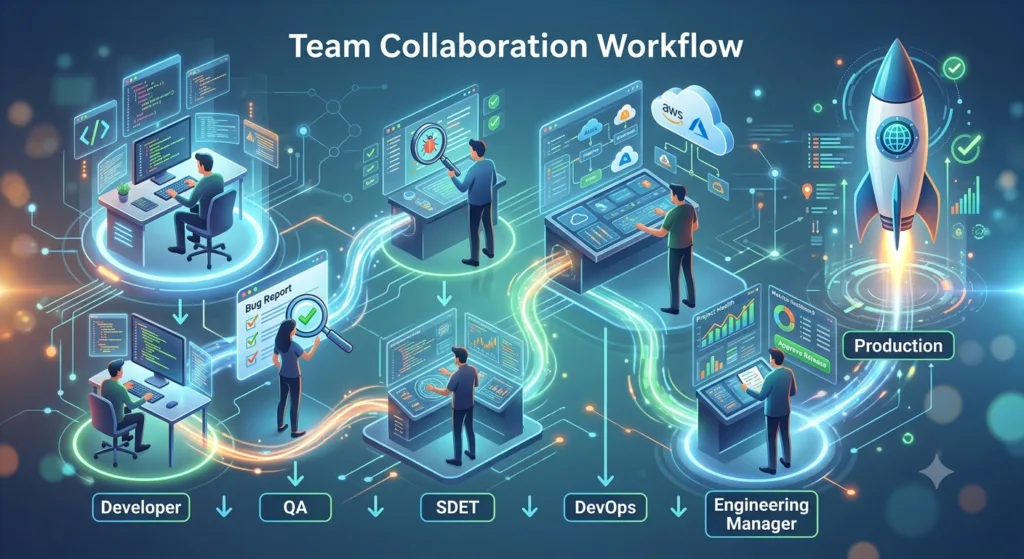
These workflows demonstrate how AI supports the entire engineering organization.
Workflow 13: QA Test Planning
Testing should begin during feature planning rather than after implementation.
Recommended workflow:
Review Requirements

↓

Identify Test Scenarios

↓

Define Test Strategy

↓

Generate Test Cases

↓

Prioritize Regression

↓

Review Coverage

↓

Approve Test Plan
Example Prompt
Analyze this feature specification and create a complete QA test plan. Include functional testing, negative scenarios, boundary conditions, accessibility checks, compatibility testing, security validation, and regression coverage.
Early test planning improves release quality.
Workflow 14: API Testing
Modern applications depend heavily on APIs.
Recommended workflow:
Analyze API Specification

↓

Review Endpoints

↓

Generate Test Data

↓

Create API Tests

↓

Validate Responses

↓

Review Error Handling

↓

Generate Test Report
Example Prompt
Review this REST API and generate comprehensive API test cases covering authentication, validation, business rules, negative scenarios, performance considerations, and edge cases.
Comprehensive API testing reduces integration failures.
Workflow 15: CI/CD Pipeline Review
Deployment pipelines should evolve alongside the application.
Recommended workflow:
Analyze Pipeline

↓

Review Build Steps

↓

Validate Testing

↓

Check Security

↓

Optimize Performance

↓

Review Deployment Strategy

↓

Generate Recommendations
Example Prompt
Review this CI/CD pipeline. Identify unnecessary steps, missing quality gates, deployment risks, testing gaps, security improvements, caching opportunities, and optimization recommendations.
Optimized pipelines reduce build times and deployment failures.
Workflow 16: Incident Investigation
Production incidents require a structured investigation process.
Recommended workflow:
Collect Evidence

↓

Analyze Logs

↓

Identify Root Cause

↓

Evaluate Impact

↓

Recommend Fix

↓

Generate Regression Tests

↓

Prepare Incident Report
Example Prompt
Investigate this production incident using the available logs and repository context. Explain the root cause, affected components, corrective actions, preventive measures, and required regression tests.
This workflow encourages thorough root-cause analysis instead of temporary fixes.
Workflow 17: Dependency Management
Healthy dependency management improves security and maintainability.
Recommended workflow:
Review Dependencies

↓

Identify Outdated Packages

↓

Assess Compatibility

↓

Evaluate Risks

↓

Recommend Upgrades

↓

Generate Migration Plan
Example Prompt
Analyze the project's dependencies. Identify outdated libraries, compatibility concerns, security issues, duplicate packages, and recommend a safe upgrade strategy.
Regular dependency reviews reduce technical debt.
Workflow 18: Knowledge Sharing
Engineering knowledge should be documented and shared consistently.
Recommended workflow:
Review Feature

↓

Generate Technical Summary

↓

Explain Architecture

↓

Document Decisions

↓

Prepare Team Guide

↓

Publish Knowledge Base
Example Prompt
Create technical documentation for this feature that explains its architecture, implementation, dependencies, testing strategy, deployment considerations, and future maintenance guidelines.
Well-documented projects reduce onboarding time and improve collaboration.
Workflow 19: Sprint Retrospective
Engineering teams should continuously improve their processes.
Recommended workflow:
Review Sprint

↓

Analyze Completed Work

↓

Identify Bottlenecks

↓

Evaluate Quality

↓

Recommend Improvements

↓

Document Action Items
Example Prompt
Analyze this sprint from an engineering perspective. Identify recurring technical issues, workflow bottlenecks, testing gaps, documentation improvements, and actionable recommendations for the next sprint.
Regular retrospectives strengthen long-term engineering practices.
Workflow 20: Engineering Manager Review
Technical leaders often need a high-level understanding of engineering progress.
Recommended workflow:
Review Repository

↓

Analyze Pull Requests

↓

Evaluate Technical Debt

↓

Assess Testing

↓

Review Documentation

↓

Summarize Engineering Health
Example Prompt
Review the current state of this repository and provide an engineering health report covering architecture, technical debt, testing maturity, documentation quality, deployment readiness, and recommended priorities.
This workflow helps engineering managers make informed technical decisions.
Cross-Functional Engineering Workflow
AI delivers the greatest value when every engineering discipline follows a coordinated process.
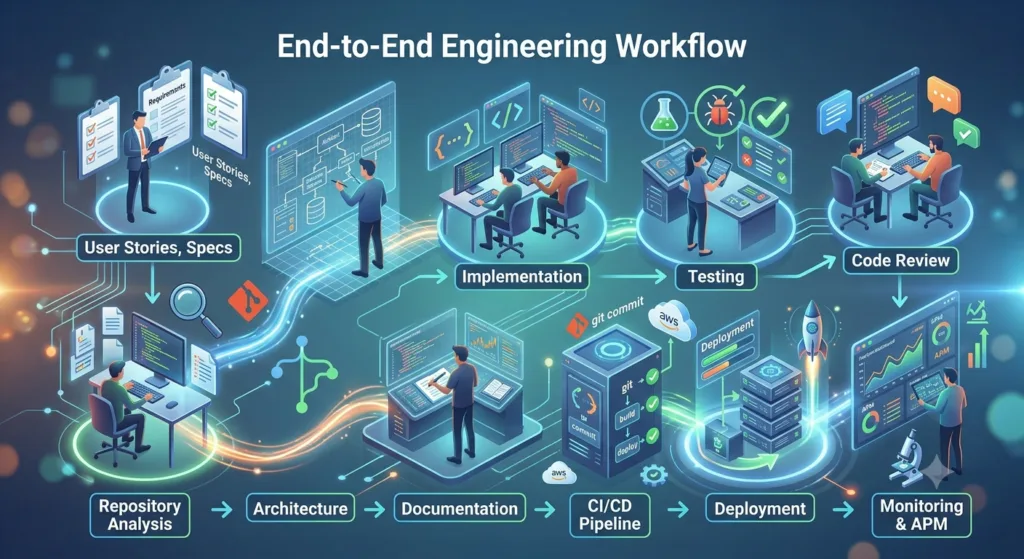
Product Requirements

↓

Architecture Review

↓

Development

↓

QA Planning

↓

Automated Testing

↓

Security Review

↓

CI/CD Validation

↓

Documentation

↓

Production Release

↓

Incident Monitoring

↓

Continuous Improvement
Each stage contributes to delivering reliable software while maintaining engineering quality.
Best Practices for Team Adoption
To standardize Claude Code workflows across an organization:
- Create shared prompt libraries.
- Define workflow templates for common engineering tasks.
- Document AI usage guidelines.
- Review AI-generated code through peer reviews.
- Integrate AI into existing development processes rather than replacing them.
- Continuously refine workflows based on project experience.
Consistency improves collaboration and software quality.
Common Team Mistakes
Every Engineer Uses Different Prompts
Standardized workflows produce more predictable and maintainable results.
AI Is Introduced Without Guidelines
Define when and how Claude Code should be used during planning, implementation, testing, documentation, and reviews.
Ignoring Documentation
AI-generated implementations should always include updated technical documentation.
Measuring Only Coding Speed
Evaluate productivity using software quality, defect rates, deployment success, and maintainability rather than lines of code.
Expert Tips
Make AI Part of the Engineering Process
The strongest Claude Code workflows extend across the entire software development lifecycle. Encourage developers, QA engineers, DevOps teams, and engineering managers to use standardized workflows so AI improves planning, implementation, testing, documentation, and operational excellence.
Improve Workflows Iteratively
Treat your workflows as living assets. Review project outcomes, gather feedback from engineering teams, and refine prompts, templates, and review processes after each release. Continuous improvement ensures Claude Code remains aligned with evolving engineering practices and business goals.
Claude Code Workflows: Building Repeatable AI Engineering Systems
Throughout this guide, we explored how Claude Code workflows support every stage of modern software engineering. From repository onboarding to production deployments, the greatest productivity gains come from following structured processes instead of relying on isolated prompts.
Organizations that treat AI as part of their engineering system consistently achieve better software quality, improved collaboration, and more predictable releases.
The Complete AI-Assisted Development Lifecycle
An effective engineering workflow connects planning, implementation, testing, documentation, and deployment into one continuous process.
Business Requirements

↓

Repository Analysis

↓

Architecture Design

↓

Task Planning

↓

Feature Development

↓

Code Review

↓

Unit Testing

↓

API Testing

↓

End-to-End Testing

↓

Security Review

↓

Performance Validation

↓

Documentation

↓

CI/CD

↓

Production Release

↓

Monitoring

↓

Continuous Improvement
Each stage builds on the previous one, creating a repeatable process that reduces defects and strengthens collaboration.
Workflow Selection Guide
Different engineering activities require different workflows.
| Engineering Activity | Recommended Workflow |
|---|---|
| New feature development | Feature Development Workflow |
| Bug investigation | Production Bug Workflow |
| Legacy modernization | Legacy Modernization Workflow |
| Repository onboarding | Repository Analysis Workflow |
| API development | API Development Workflow |
| Test automation | Playwright Testing Workflow |
| Security assessment | Security Review Workflow |
| Performance optimization | Performance Workflow |
| Documentation | Documentation Workflow |
| Release preparation | Release Workflow |
| Incident response | Incident Investigation Workflow |
| Sprint planning | Sprint Planning Workflow |
Selecting the right workflow improves consistency and reduces unnecessary iterations.
Building Your Engineering Playbook
Rather than creating prompts from scratch every day, build an internal engineering playbook.
Include templates for:
Development
- Feature implementation
- Refactoring
- Bug fixes
- Architecture reviews
Quality Assurance
- Test planning
- API validation
- Playwright automation
- Regression testing
DevOps
- CI/CD reviews
- Deployment readiness
- Infrastructure documentation
- Incident response
Engineering Management
- Repository health reviews
- Technical debt assessments
- Sprint planning
- Knowledge transfer
Over time, this playbook becomes a valuable organizational asset.
Measuring Workflow Effectiveness
Success should be measured using engineering outcomes rather than AI usage.
Track metrics such as:
| Metric | Business Value |
|---|---|
| Lead time for changes | Faster delivery |
| Deployment frequency | Continuous improvement |
| Change failure rate | Release quality |
| Mean time to recovery | Operational resilience |
| Pull request review time | Collaboration efficiency |
| Automated test coverage | Software reliability |
| Documentation completeness | Knowledge sharing |
| Technical debt reduction | Long-term maintainability |
These indicators provide a realistic view of engineering performance.
Scaling Across Teams
As organizations grow, standardized workflows become increasingly important.
Recommended adoption strategy:
Define Engineering Standards

↓

Create Workflow Templates

↓

Build Prompt Library

↓

Train Engineering Teams

↓

Review AI Usage

↓

Collect Feedback

↓

Refine Workflows

↓

Standardize Across Projects
A shared approach improves consistency between teams while reducing onboarding time.
Common Challenges
Treating AI as an Individual Tool
Organizations gain greater value when AI supports team-wide engineering practices rather than isolated personal workflows.
Skipping Human Review
AI recommendations should complement peer reviews, automated testing, and architectural validation.
Ignoring Existing Standards
Every workflow should reinforce established coding conventions, testing practices, security requirements, and documentation standards.
Failing to Evolve
Engineering workflows should be reviewed regularly to reflect new technologies, project requirements, and lessons learned.
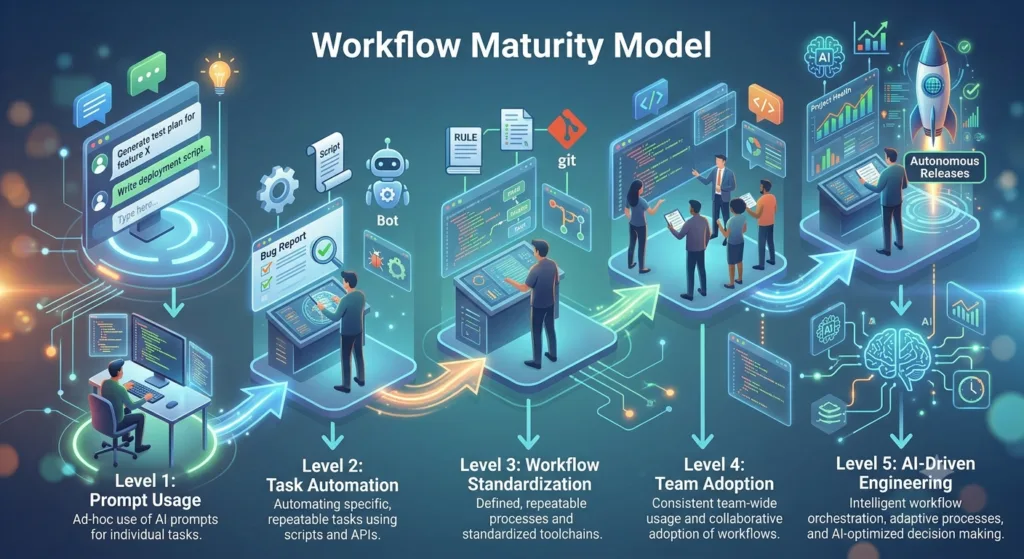
Workflow Maturity Model
Teams typically progress through several stages of AI adoption.
| Stage | Characteristics |
|---|---|
| Beginner | Occasional code generation |
| Developing | Regular prompt usage |
| Structured | Standardized prompt templates |
| Advanced | Repeatable engineering workflows |
| Optimized | AI integrated across the software development lifecycle |
The goal is to reach a stage where AI consistently enhances engineering quality rather than simply increasing coding speed.
Key Takeaways
To maximize the value of Claude Code workflows:
- Start with repository understanding.
- Plan before implementing.
- Break work into manageable phases.
- Generate automated tests alongside new features.
- Document technical decisions.
- Review AI-generated code thoroughly.
- Standardize workflows across engineering teams.
- Measure success using software quality and delivery metrics.
- Continuously improve workflows based on project experience.
- Keep human expertise at the center of every engineering decision.
These practices create reliable and scalable AI-assisted development processes.
Conclusion
Effective Claude Code workflows are built on sound software engineering principles rather than automation alone. By integrating Claude Code into planning, architecture, implementation, testing, documentation, security reviews, and deployment, teams can improve productivity while maintaining high standards of quality and maintainability.
As AI continues to reshape software development, organizations that establish repeatable workflows, shared engineering practices, and continuous improvement processes will be best positioned to deliver reliable software at scale. Claude Code becomes most valuable when it supports disciplined engineering, enabling developers to spend less time on repetitive tasks and more time solving meaningful technical challenges.
Internal Links:
- Learn MCP – Zero to Hero
- Learn AI Agents for QA – Zero to Hero
- Playwright Automation – Zero to Hero
- Learn Python – Zero to Hero
- Claude Code Tutorial: Complete Zero to Hero
- Free QA Resources Built From Real Experience
- QA Glossary: Test Automation Terms Every Engineer Should Know
External Resources:
- Anthropic Claude documentation
- Anthropic API documentation
- Model Context Protocol documentation
- Playwright documentation
- GitHub documentation
- TypeScript documentation
- Prompt Engineering Overview
- Git Documentation
- Visual Studio Code
- Cursor Documentation
People Also Ask
What are Claude Code Workflows?
Claude Code Workflows are structured engineering processes that integrate Claude Code into software development activities such as repository analysis, feature implementation, testing, documentation, code reviews, CI/CD, and production readiness.
How do Claude Code Workflows improve productivity?
They improve productivity by standardizing development processes, reducing repetitive work, increasing code quality, strengthening documentation, improving automated testing, and helping teams maintain architectural consistency.
Can engineering teams standardize Claude Code Workflows?
Yes. Teams can create shared workflow templates, prompt libraries, review checklists, and documentation standards so developers follow consistent AI-assisted engineering practices across projects.
Do Claude Code Workflows replace software engineers?
No. Claude Code supports developers by accelerating planning, implementation, testing, and documentation, but human engineers remain responsible for architecture, business decisions, security, and final code approval.
Which teams benefit most from Claude Code Workflows?
Software development, QA, SDET, DevOps, platform engineering, technical leadership, and enterprise engineering teams all benefit from standardized Claude Code Workflows.
Featured Snippet
Claude Code Workflows Explained
Effective Claude Code Workflows typically follow this sequence:
- Understand requirements
- Analyze the repository
- Review architecture
- Plan implementation
- Develop the feature
- Generate automated tests
- Review code quality
- Update documentation
- Validate CI/CD
- Deploy with confidence
Following a repeatable workflow improves software quality and engineering consistency.
AI Overview Answer
Claude Code Workflows help developers integrate AI into the complete software development lifecycle. Instead of using AI only for code generation, structured workflows support planning, architecture analysis, implementation, testing, documentation, code reviews, DevOps, CI/CD, and continuous improvement, leading to higher productivity and more maintainable software.
Enjoyed this article? Explore more in-depth guides on AI engineering, automation testing, Model Context Protocol, Playwright, and intelligent software quality at www.skakarh.com. Follow QAPulse by SK for practical, production-focused tutorials designed for QA engineers, SDETs, and AI developers.