 QA
QA
Claude Code Complete Guide: Everything Developers and QA Engineers Need to Know
What is Claude Code?
Artificial intelligence has transformed software development far beyond simple code completion. Modern AI coding assistants can understand large codebases, explain unfamiliar architecture, generate production-ready code, refactor legacy systems, write tests, debug complex issues, and even assist with architectural decisions. Among the newest generation of developer-focused tools, Claude Code has become one of the most capable assistants for professional software engineering.
Unlike traditional autocomplete tools, Claude Code is designed to function as an intelligent development partner. Instead of suggesting the next few lines of code, it understands the broader context of your project, reasons through complex programming tasks, and collaborates with developers to solve real engineering problems.
For software engineers, QA professionals, automation testers, DevOps engineers, and technical architects, Claude Code represents a shift from AI-assisted coding to AI-assisted software engineering.
This guide explains how Claude Code works, where it fits into a modern development workflow, its strengths and limitations, and why many engineering teams are adopting it alongside existing development tools.
Why AI Coding Has Changed
Only a few years ago, AI coding tools primarily focused on autocomplete. Developers still needed to search documentation, debug manually, and write most implementation details themselves.
Today’s AI development tools operate very differently.
They can:
- Understand entire repositories
- Explain unfamiliar code
- Generate new modules
- Create unit tests
- Produce API documentation
- Suggest architectural improvements
- Identify potential bugs
- Help with debugging
- Refactor legacy applications
- Accelerate onboarding into large codebases
The result is not simply faster coding—it is faster software delivery with reduced cognitive load.
For QA engineers, this evolution is equally significant. AI can generate Playwright tests, API validation scripts, regression suites, mock data, and automation utilities while helping engineers understand complex systems more quickly.
What Makes Claude Code Different?
Many AI coding assistants generate code. Claude Code aims to understand software.
That distinction matters.
Instead of focusing only on the current file, Claude Code can reason across project structure, dependencies, documentation, implementation patterns, and developer intent. This broader understanding allows it to provide recommendations that align more closely with existing architecture rather than producing isolated snippets.
Some of its distinguishing capabilities include:
Large Context Understanding
Modern enterprise applications often contain thousands of files spread across multiple services. Claude Code is designed to work effectively with large contexts, allowing developers to ask questions about relationships between components instead of manually tracing code paths.
Example questions include:
- How does authentication flow through this application?
- Which services call this API?
- Where is this database model used?
- Explain this microservice architecture.
- What happens if I modify this endpoint?
Rather than searching manually across dozens of files, developers can interact conversationally with the codebase.
Natural Language Development
Developers increasingly describe requirements in natural language instead of writing every implementation detail manually.
For example:
“Create a Playwright test suite covering login, password reset, session expiration, and role-based authorization.”
Instead of starting with an empty editor, Claude Code can help generate a structured implementation that developers review, refine, and integrate into their workflow.
This shifts engineering effort away from repetitive boilerplate toward design, validation, and problem-solving.
Repository-Wide Reasoning
Large software systems are rarely isolated.
A simple feature may affect:
- APIs
- Database models
- Frontend components
- Backend services
- Integration tests
- CI/CD pipelines
- Infrastructure configuration
Claude Code is designed to reason across these interconnected parts, helping engineers understand the broader impact of proposed changes before implementation.
Why QA Engineers Should Care
Many discussions about AI coding assistants focus exclusively on software developers.
That perspective overlooks one of the fastest-growing groups benefiting from AI: QA engineers and SDETs.
Modern testing involves much more than writing assertions. Engineers routinely work with:
- UI automation
- API automation
- Performance testing
- Test data generation
- CI/CD pipelines
- Infrastructure
- SQL
- Cloud services
- Mock servers
- Reporting
- Accessibility validation
Claude Code can assist across these activities by accelerating repetitive engineering work while allowing testers to focus on strategy, quality, and risk analysis.
For example, a QA engineer might ask Claude Code to:
- Generate Playwright page objects.
- Convert manual test cases into automated tests.
- Refactor brittle locators.
- Explain a failing test.
- Generate realistic test data.
- Analyze flaky tests.
- Improve assertion quality.
- Create API validation suites.
- Suggest regression coverage.
- Document automation frameworks.
Used thoughtfully, Claude Code becomes a productivity multiplier rather than simply a code generator.
Where Claude Code Fits in the Modern AI Development Stack
Few engineering teams rely on a single AI tool. Instead, they build complementary workflows where each tool serves a distinct purpose.
A common setup might include:
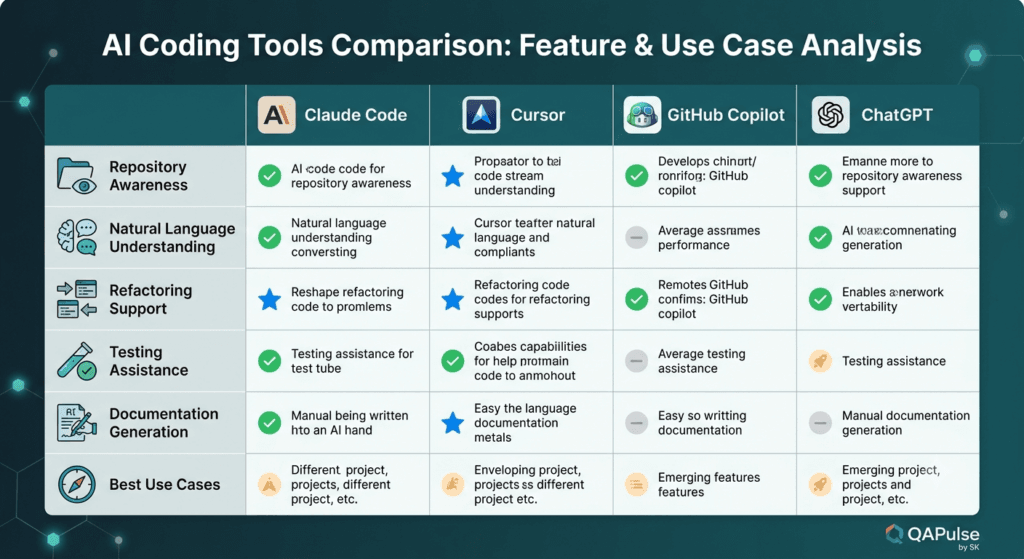
- ChatGPT for brainstorming, explanations, and rapid ideation.
- Claude Code for repository-aware development and implementation.
- GitHub Copilot for inline code completion.
- Perplexity for technical research.
- Playwright for browser automation.
- GitHub Actions for CI/CD.
- MCP servers for connecting AI assistants with external tools and systems.
In this ecosystem, Claude Code acts as the engineering collaborator that bridges planning and implementation, helping developers move from ideas to production-ready solutions with greater confidence.
Who Should Use Claude Code?
Claude Code is valuable for a wide range of technical professionals, including:
- Software developers building modern applications.
- QA engineers creating scalable automation frameworks.
- SDETs responsible for end-to-end testing strategies.
- DevOps engineers managing infrastructure and deployment pipelines.
- Technical leads reviewing architecture and implementation quality.
- Engineering managers seeking to improve developer productivity.
- Technical creators producing tutorials, documentation, and educational content.
The greatest benefits are realized when users treat Claude Code as a collaborative engineering assistant rather than an autonomous replacement for software development expertise.
How Claude Code Works Behind the Scenes
Understanding how Claude Code operates helps you use it more effectively. While many AI coding assistants appear similar on the surface, their real value lies in how they process context, reason about code, and collaborate throughout the software development lifecycle.
Claude Code is designed to work as an intelligent engineering assistant rather than a simple autocomplete engine. Instead of predicting the next few lines of code, it attempts to understand your project, your objective, and the relationships between different parts of your application before generating suggestions.
The High-Level Architecture of Claude Code
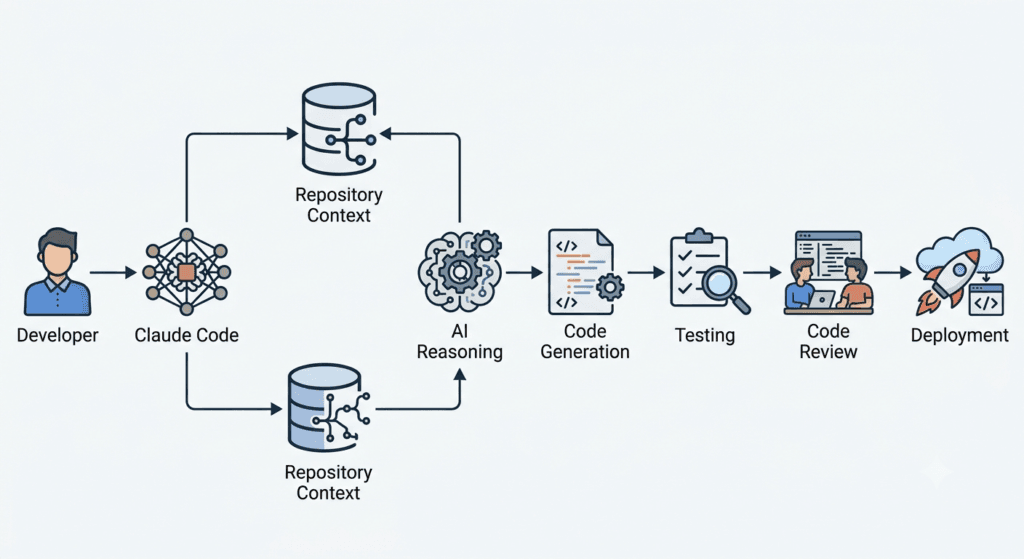
At a high level, a typical Claude Code workflow follows these stages:
- The developer provides a request using natural language.
- Claude Code gathers relevant project context.
- The AI model analyzes the request alongside the codebase.
- It reasons about dependencies, architecture, and implementation patterns.
- It generates or modifies code.
- The developer reviews, tests, and approves the changes.
Unlike traditional development tools, this process is iterative. Developers continuously refine requests, ask follow-up questions, request improvements, and validate outputs before integrating them into production.
Understanding Context: The Foundation of AI-Assisted Development
One of Claude Code’s biggest strengths is its ability to work with context.
Context refers to everything the AI needs to understand before generating an answer.
This may include:
- Project structure
- Existing source code
- Configuration files
- README documentation
- API contracts
- Coding standards
- Test suites
- Dependency relationships
- Build configuration
- Previous conversation history
Without context, an AI assistant behaves like a generic programming chatbot.
With sufficient context, it begins acting like a teammate who has already spent weeks learning the project.
Example
Instead of asking:
Create a login page.
A context-aware request becomes:
Create a login page using the existing React component library, reuse our authentication API, follow the project’s TypeScript conventions, and generate Playwright tests matching our current framework.
The second request produces significantly better results because the AI understands the surrounding engineering environment.
Repository Awareness
Modern applications rarely consist of a handful of files.
Enterprise projects may contain:
- Hundreds of folders
- Thousands of source files
- Multiple microservices
- Infrastructure code
- API specifications
- Test automation projects
- Deployment pipelines
Claude Code is designed to analyze relationships between these components instead of treating each file independently.
Repository awareness enables developers to ask questions such as:
- Which services call this API?
- Where is this class instantiated?
- What happens if this model changes?
- Which tests cover this endpoint?
- Which files depend on this utility?
This reduces time spent manually navigating unfamiliar codebases.
Natural Language Programming
Perhaps the biggest shift introduced by modern AI coding assistants is moving from programming syntax to programming intent.
Traditional development often begins with writing code manually.
AI-assisted development begins with describing the desired outcome.
For example:
Instead of immediately writing Java code, a developer might ask:
Build a REST endpoint that validates JWT authentication, logs failed attempts, stores audit records, and returns standardized error responses.
Claude Code interprets the request, identifies the required components, and proposes an implementation that aligns with the existing project where possible.
The developer remains responsible for reviewing, validating, and refining the solution.
Multi-Step Reasoning
Real engineering problems are rarely solved in a single step.
Consider a simple feature request:
Add two-factor authentication.
Completing this task may require changes across several areas:
- Database schema
- Backend APIs
- User interface
- Authentication middleware
- Email or SMS integration
- Security validation
- Logging
- Unit tests
- Integration tests
- Documentation
Claude Code attempts to reason across these interconnected tasks instead of treating them as isolated code snippets.
This broader reasoning helps identify dependencies that might otherwise be overlooked.
Understanding Existing Coding Patterns
Every engineering team has preferred coding conventions.
Examples include:
- Naming standards
- Folder structures
- Dependency injection patterns
- Error handling
- Logging approaches
- API response formats
- Testing frameworks
- Documentation styles
Rather than introducing completely different implementations, Claude Code attempts to recognize and follow existing project patterns.
This consistency reduces maintenance effort and improves code readability.
Working with Large Codebases
Large enterprise systems introduce unique challenges.
Developers often spend more time understanding existing code than writing new features.
Claude Code assists by answering questions such as:
- Explain this authentication flow.
- Summarize this service.
- Compare these two implementations.
- Describe how this API works.
- Identify duplicated logic.
- Find possible dead code.
- Explain this SQL query.
- Locate business rules for invoice generation.
These capabilities accelerate onboarding for new engineers and reduce the learning curve for complex systems.
Code Generation Is Only One Capability
Many people assume AI coding tools are primarily code generators.
In practice, experienced engineers often use Claude Code for analysis rather than generation.
Common use cases include:
Code Explanation
Understanding legacy applications.
Debugging Assistance
Investigating unexpected failures.
Architecture Review
Evaluating system design decisions.
Test Generation
Creating unit, integration, and end-to-end tests.
Documentation
Producing technical documentation from existing implementations.
Refactoring
Improving maintainability without changing functionality.
Code Reviews
Identifying readability issues and potential improvements before submitting pull requests.
This broader usage makes Claude Code valuable throughout the software development lifecycle.
Claude Code in a Modern Development Workflow
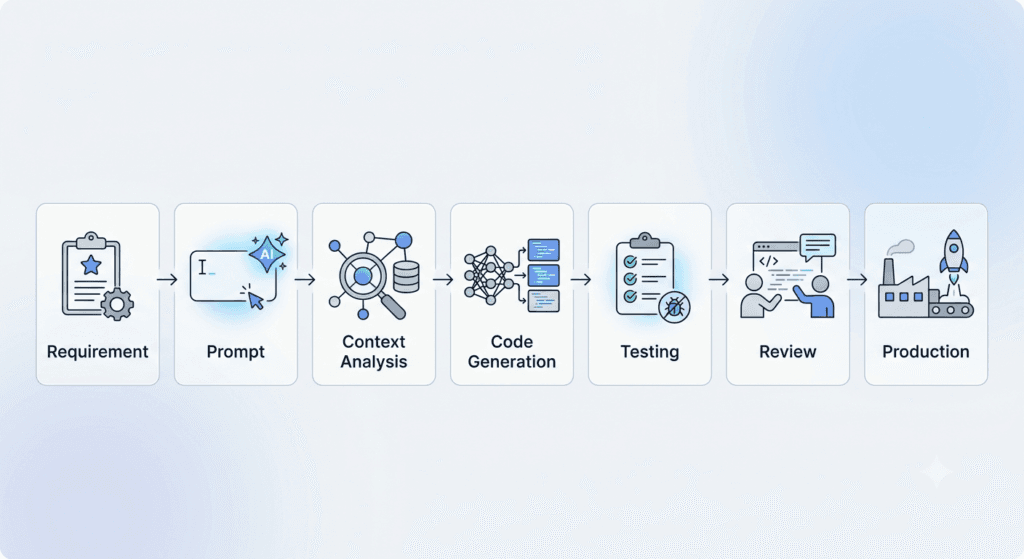
Rather than replacing existing tools, Claude Code complements them.
A typical engineering workflow might look like this:
Planning
The engineer defines requirements and acceptance criteria.
Research
Technical documentation, APIs, and implementation approaches are explored.
Development
Claude Code assists with implementation, explanations, and refactoring.
Testing
Automation scripts, unit tests, API validations, and Playwright scenarios are generated or improved.
Review
The generated code is validated, optimized, and aligned with engineering standards.
Deployment
CI/CD pipelines execute builds, automated tests, security checks, and deployment processes.
AI becomes one component of a disciplined engineering workflow—not a replacement for engineering practices.
Practical Example: QA Automation Workflow
Consider a QA engineer assigned to automate a new feature.
Without AI:
- Study requirements
- Understand the UI
- Inspect APIs
- Write page objects
- Build utilities
- Implement tests
- Debug failures
- Create documentation
With Claude Code:
- Explain the feature implementation.
- Identify relevant APIs.
- Generate Playwright page objects.
- Create reusable fixtures.
- Draft test scenarios.
- Suggest edge cases.
- Generate mock data.
- Improve assertions.
- Explain failures.
- Help document the automation framework.
The engineer still validates every output, but repetitive work is significantly reduced.
Responsible Use of Claude Code
AI-generated code should never bypass engineering review.
Professional teams should continue to follow established practices, including:
- Peer code reviews
- Static code analysis
- Security scanning
- Unit testing
- Integration testing
- End-to-end testing
- Performance testing
- Accessibility validation
- Manual verification for critical workflows
Claude Code accelerates development, but accountability for software quality remains with the engineering team.
Common Misconceptions
“Claude Code replaces developers.”
It doesn’t. It automates repetitive engineering tasks while allowing developers to focus on architecture, design, and problem-solving.
“AI-generated code is always correct.”
No AI model guarantees correctness. Every generated change should be reviewed, tested, and validated before production use.
“Junior engineers no longer need to learn programming.”
AI can accelerate learning, but understanding algorithms, software architecture, debugging, security, and testing remains essential for long-term success.
“Claude Code is only useful for writing code.”
Many experienced engineers spend more time using it to understand existing systems, review implementations, generate documentation, analyze bugs, and improve maintainability than to generate entirely new code.
Key Takeaways
Claude Code represents a shift from isolated code generation to collaborative software engineering. Its ability to understand project context, reason across repositories, follow existing coding patterns, and assist throughout the development lifecycle makes it a valuable tool for developers, QA engineers, and SDETs alike. When combined with disciplined engineering practices, it can improve productivity without compromising code quality, making it an important component of the modern AI-powered development workflow.
Core Features of Claude Code with Real-World Workflows
Understanding the theory behind Claude Code is only the first step. The real value comes from using it as part of your daily engineering workflow. Whether you’re building a new feature, debugging production issues, reviewing pull requests, or writing Playwright automation, Claude Code can significantly reduce repetitive work while helping you make better engineering decisions.
This section explores the most important capabilities of Claude Code through practical software engineering and QA scenarios rather than isolated feature descriptions.
Intelligent Codebase Exploration
One of the biggest challenges in enterprise software development is understanding an unfamiliar codebase. New team members often spend days—or even weeks—learning project architecture, naming conventions, business logic, and service relationships before they can contribute effectively.
Claude Code accelerates this onboarding process by acting as an interactive guide to your repository.
Instead of manually searching through dozens of files, you can ask questions like:
- Explain how user authentication works.
- Which services communicate with the payment API?
- Trace the complete checkout workflow.
- Where is JWT validation implemented?
- Which files are responsible for order processing?
- Show me where this environment variable is used.
This allows developers to understand systems much faster than relying solely on documentation or code navigation.
QA Perspective
For QA engineers, this capability is equally valuable.
Rather than spending hours identifying which API powers a specific UI feature, you can quickly locate:
- Backend endpoints
- Validation logic
- Database interactions
- Error handling
- Authorization rules
- Existing automated tests
This reduces the time required to design comprehensive test cases.
Code Generation Beyond Boilerplate
Most developers associate AI coding assistants with generating boilerplate code. While Claude Code certainly handles repetitive coding tasks well, its real strength lies in producing structured implementations that align with your existing project.
For example, instead of asking:
Create a login API.
A better prompt would be:
Create a secure login API using our existing Express architecture, reuse the authentication middleware, validate requests with Zod, return standardized error responses, and generate Jest unit tests.
Providing architectural context results in code that integrates naturally with the rest of the project rather than feeling isolated or inconsistent.
Best Practice
Always describe:
- Technology stack
- Existing project conventions
- Coding standards
- Expected output
- Constraints
- Testing requirements
The more context you provide, the more useful the generated solution becomes.
Refactoring Existing Code
Refactoring is often overlooked when discussing AI development tools, yet it is one of Claude Code’s strongest capabilities.
Legacy applications frequently contain:
- Duplicate logic
- Long methods
- Poor naming
- Deep nesting
- Tight coupling
- Outdated patterns
Instead of rewriting everything manually, developers can ask Claude Code to improve maintainability while preserving functionality.
Example requests include:
- Simplify this method without changing behavior.
- Replace nested conditionals using early returns.
- Convert callbacks into async/await.
- Apply the Repository pattern.
- Improve readability following SOLID principles.
- Reduce code duplication.
This makes large-scale maintenance projects significantly easier.
Generating High-Quality Unit Tests
Writing production code is only part of software development. Reliable unit tests remain essential for maintaining software quality.
Claude Code can assist by generating tests for:
- Utility functions
- Business logic
- API services
- React components
- Database repositories
- Validation rules
- Error scenarios
Instead of producing only happy-path tests, you should explicitly request coverage for edge cases.
For example:
Generate comprehensive Jest tests including success scenarios, validation failures, null values, authorization failures, exception handling, and boundary conditions.
The quality of AI-generated tests improves dramatically when expectations are clearly defined.
Accelerating Playwright Test Automation
For SDETs and QA engineers, Playwright automation is one of the most valuable use cases for Claude Code.
Instead of manually creating every file, Claude Code can help generate:
- Page Object Models
- Test fixtures
- API utilities
- Authentication helpers
- Reusable locators
- Test data factories
- Configuration updates
- Reporting utilities
- Custom assertions
Example Workflow
Suppose your team introduces a new user registration feature.
Rather than starting from scratch, you might ask Claude Code to:
- Analyze the feature requirements.
- Identify reusable page objects.
- Create missing page classes.
- Generate positive test scenarios.
- Generate negative validation scenarios.
- Suggest edge cases.
- Build reusable test data.
- Improve locator stability.
- Recommend assertion improvements.
The result is a faster, more structured automation workflow.
Debugging Complex Issues
Debugging is often more time-consuming than writing new features.
Claude Code can assist by helping engineers understand:
- Stack traces
- Runtime exceptions
- Failed API responses
- SQL query issues
- Performance bottlenecks
- Test failures
- Dependency conflicts
Instead of asking:
Fix this bug.
A better approach is:
Explain why this exception occurs, identify the root cause, describe possible solutions, and discuss the trade-offs of each approach.
This encourages reasoning rather than blind code generation.
Explaining Legacy Code
Many organizations maintain software that has evolved over several years.
Documentation is often incomplete, outdated, or missing entirely.
Claude Code can explain:
- Business logic
- Class responsibilities
- Service interactions
- Data flow
- Design patterns
- Architectural decisions
This capability is especially valuable during modernization projects or when onboarding new engineers.
Improving Pull Requests
Code reviews become more productive when developers perform an AI-assisted review before opening a pull request.
Claude Code can identify:
- Naming inconsistencies
- Potential bugs
- Duplicate logic
- Readability issues
- Missing validation
- Error handling improvements
- Performance concerns
- Security considerations
Human reviewers can then focus on architecture, business requirements, and long-term maintainability rather than obvious code quality issues.
Documentation Generation
Keeping technical documentation current is a common challenge.
Claude Code can generate or improve:
- README files
- Installation guides
- API documentation
- Architecture overviews
- Release notes
- Migration guides
- Inline code comments
- Developer onboarding documentation
However, documentation should always be reviewed by engineers to ensure technical accuracy and organizational consistency.
Working with Multiple Programming Languages
Modern engineering teams rarely use a single programming language.
A typical project may include:
- TypeScript
- JavaScript
- Python
- Java
- C#
- Go
- SQL
- YAML
- JSON
- Bash
Claude Code can assist across this diverse technology stack, making it useful for full-stack teams, DevOps engineers, and QA professionals working across multiple systems.
Effective Prompting Strategies
The quality of Claude Code’s responses depends heavily on how requests are written.
Weak Prompt
Write a login function.
This lacks context and usually results in generic code.
Better Prompt
Create a secure login endpoint using Node.js and Express. Reuse our JWT middleware, validate input with Zod, return standardized API responses, implement rate limiting, include structured logging, and generate Jest tests covering positive, negative, and authorization scenarios.
The second prompt provides sufficient context to produce a much more useful implementation.
Professional Prompt Checklist
Before submitting a request, include:
- Objective
- Technology stack
- Framework versions
- Existing architecture
- Coding standards
- Expected output
- Constraints
- Testing requirements
- Performance considerations
- Security expectations
This simple habit consistently improves AI-generated results.
Common Mistakes to Avoid
Even experienced developers can misuse AI coding assistants.
Avoid these common mistakes:
Accepting Generated Code Without Review
Every suggestion should undergo manual review, testing, and validation before being merged.
Providing Insufficient Context
Generic prompts produce generic solutions. Context is the foundation of high-quality AI assistance.
Ignoring Security
Authentication, authorization, encryption, secrets management, and input validation should always be reviewed by experienced engineers.
Treating AI as an Architect
Claude Code can recommend architectural approaches, but major design decisions should remain a collaborative engineering responsibility.
Expecting Perfection
AI accelerates development but does not eliminate the need for debugging, testing, or engineering judgment.
Building a Sustainable AI-Assisted Workflow
The most successful teams use Claude Code as a collaborative assistant throughout the software development lifecycle rather than as a one-time code generator.
A practical workflow looks like this:
- Understand the requirement.
- Explore the existing codebase with Claude Code.
- Design the solution.
- Generate an initial implementation.
- Refactor for readability and maintainability.
- Generate comprehensive unit and integration tests.
- Create or update Playwright automation.
- Perform AI-assisted code review.
- Run static analysis, security checks, and CI pipelines.
- Conduct human review before deployment.
This approach combines the speed of AI with the discipline of professional software engineering, resulting in faster delivery without compromising quality.
Advanced Claude Code Strategies for Professional Engineering Teams
Claude Code is most valuable when it becomes part of your engineering process rather than a shortcut for writing code. Teams that achieve the highest productivity gains use it to enhance planning, development, testing, documentation, and code reviews while maintaining strong engineering discipline.
In this final section, we’ll explore advanced workflows, enterprise best practices, limitations, and practical recommendations that help developers and QA engineers get the most from Claude Code.
Building an AI-First Development Workflow
Many developers initially use Claude Code only when they need help writing a function or fixing a bug. Over time, experienced teams expand its role across the entire software development lifecycle.
A mature AI-assisted workflow typically follows these stages:
Requirement Analysis
Before writing any code, engineers use Claude Code to analyze feature requirements, identify missing acceptance criteria, highlight ambiguous business rules, and suggest potential edge cases.
This early collaboration reduces misunderstandings and leads to clearer implementation plans.
Solution Design
Instead of immediately generating code, Claude Code can help evaluate different architectural approaches.
For example, you might ask:
- Should this feature use event-driven architecture or synchronous communication?
- Would the Repository pattern improve maintainability?
- Is caching appropriate for this service?
- What are the trade-offs between REST and GraphQL for this use case?
These discussions encourage better design decisions before implementation begins.
Development
During implementation, Claude Code assists with:
- Feature development
- Code refactoring
- API creation
- Database queries
- Configuration updates
- Infrastructure scripts
- Automation utilities
Developers remain responsible for validating the output and ensuring it aligns with business requirements.
Testing
Testing should never be treated as an afterthought.
Claude Code can generate:
- Unit tests
- Integration tests
- API validation
- Playwright automation
- Mock services
- Test fixtures
- Edge-case scenarios
However, engineers should always verify that generated tests provide meaningful coverage rather than simply increasing test counts.
Documentation
Technical documentation often falls behind product development.
Claude Code can help create:
- README files
- API documentation
- Architecture summaries
- Deployment guides
- Migration notes
- Release documentation
Maintaining accurate documentation becomes much easier when AI assists throughout development rather than only at release time.
Claude Code for Enterprise Teams
Enterprise software development introduces challenges that individual developers rarely encounter.
Projects often involve:
- Multiple repositories
- Large engineering teams
- Coding standards
- Security policies
- Compliance requirements
- Long-lived applications
- Complex deployment pipelines
Claude Code can support enterprise environments by helping engineers understand existing systems faster and reducing repetitive engineering work.
Common enterprise use cases include:
- Explaining unfamiliar services
- Modernizing legacy applications
- Assisting code reviews
- Improving documentation quality
- Accelerating onboarding
- Identifying technical debt
- Supporting migration projects
The larger the codebase becomes, the greater the productivity gains from repository-aware AI assistance.
Best Practices for QA Engineers
QA professionals can benefit from Claude Code far beyond generating automation scripts.
It can improve nearly every stage of the testing lifecycle.
Test Planning
Analyze feature requirements to identify:
- Functional scenarios
- Negative scenarios
- Boundary conditions
- Security risks
- Accessibility considerations
- Performance concerns
Test Design
Generate:
- Test case ideas
- Risk-based testing strategies
- Regression coverage suggestions
- Exploratory testing checklists
Automation Development
Accelerate creation of:
- Playwright Page Objects
- API testing utilities
- Authentication helpers
- Data factories
- Reporting modules
- Custom assertions
Failure Analysis
When tests fail unexpectedly, Claude Code can help explain:
- Possible root causes
- Dependency failures
- Locator issues
- Timing problems
- API inconsistencies
- Environment-related failures
This reduces investigation time and improves debugging efficiency.
Prompt Engineering for Better Results
The quality of Claude Code’s responses depends heavily on the quality of your prompts.
Professional engineers rarely submit one-line requests.
Instead, they provide sufficient context for the AI to reason effectively.
A structured prompt often includes:
Objective
Clearly describe the task.
Project Context
Explain the application, architecture, and existing implementation.
Technology Stack
Specify frameworks, programming languages, and libraries.
Coding Standards
Mention naming conventions, folder structure, design patterns, or style guides.
Expected Output
Describe exactly what should be generated.
Constraints
Include security, performance, compatibility, or business limitations.
Validation Requirements
Request unit tests, integration tests, or documentation where appropriate.
Well-structured prompts consistently produce more accurate and maintainable results.
Recognizing the Limitations of Claude Code
Despite its capabilities, Claude Code is not a replacement for engineering expertise.
Understanding its limitations helps teams use it responsibly.
Limited Business Context
AI understands the information provided to it, but it does not possess institutional knowledge about your organization, customers, or business priorities.
Engineers must ensure generated solutions align with business objectives.
Potential for Incorrect Assumptions
If project context is incomplete, Claude Code may infer details incorrectly.
Always review generated code carefully before adoption.
Security Considerations
Authentication, authorization, encryption, secret management, and compliance requirements should always undergo manual review.
Security remains a human responsibility.
Performance Optimization
Generated code may function correctly but still require optimization for scalability, latency, or resource usage.
Performance testing remains essential.
Common Mistakes Teams Should Avoid
Organizations often fail to realize the full value of AI because they misuse it.
Avoid these common pitfalls:
Treating AI as an Autopilot
Claude Code assists engineers; it does not replace engineering judgment.
Ignoring Code Reviews
AI-generated code should follow the same review process as manually written code.
Skipping Testing
Every generated feature should pass:
- Unit testing
- Integration testing
- End-to-end testing
- Security validation
- Performance testing where applicable
Using Generic Prompts
Vague requests lead to generic answers.
Specific, context-rich prompts consistently produce higher-quality outcomes.
Over-Reliance
Engineers should continue developing their own problem-solving, debugging, and architectural skills rather than depending entirely on AI.
Practical Productivity Tips
Small workflow improvements can significantly increase the value you receive from Claude Code.
Consider these habits:
- Ask Claude Code to explain unfamiliar code before modifying it.
- Generate multiple implementation options and compare trade-offs.
- Request edge cases before writing automated tests.
- Use AI to review your own code before opening a pull request.
- Refactor small sections incrementally instead of attempting large rewrites.
- Generate documentation alongside development to keep it current.
- Combine AI suggestions with static analysis tools and automated testing.
These practices help maintain code quality while increasing development speed.
Claude Code and the Future of Software Engineering
The role of AI in software engineering continues to evolve rapidly.
Rather than replacing developers, tools like Claude Code are changing how engineers work.
Future engineering teams are likely to spend less time on repetitive implementation tasks and more time on:
- System design
- Business problem-solving
- Architecture
- Security
- Performance optimization
- Quality engineering
- Innovation
Developers who learn to collaborate effectively with AI will be better positioned to build reliable, maintainable, and scalable software.
For QA engineers and SDETs, this evolution also presents new opportunities. AI can automate repetitive testing activities, assist with framework development, improve defect analysis, and accelerate regression coverage, allowing testers to focus more on quality strategy and risk management.
Final Thoughts
Claude Code is more than an AI coding assistant—it is a collaborative engineering tool that supports developers and QA professionals throughout the software development lifecycle. Its strengths lie in understanding project context, accelerating routine tasks, assisting with debugging, improving documentation, and enhancing testing workflows.
The greatest productivity gains come not from accepting every AI-generated suggestion but from combining Claude Code with sound engineering principles, rigorous testing, thoughtful code reviews, and continuous learning. Teams that adopt this balanced approach can deliver software more efficiently while maintaining the high standards expected in modern software engineering.
Famous AI Coding Tools Comparison with Claude Code
Featured Snippet Target
What is Claude Code?
Claude Code is an AI-powered coding assistant designed to help developers and QA engineers understand codebases, generate production-ready code, refactor applications, write tests, debug issues, and improve developer productivity using natural language and repository-aware context.
AI Overview Answer
Claude Code is an AI coding assistant that helps software engineers and QA professionals develop, understand, test, and maintain software more efficiently. Unlike traditional autocomplete tools, it analyzes project context, explains existing code, generates implementations, assists with testing, and supports developers throughout the entire software development lifecycle.
Frequently Asked Questions
What is Claude Code?
Claude Code is an AI-powered coding assistant that helps developers understand codebases, generate code, debug applications, create tests, and improve productivity throughout the software development lifecycle.
Is Claude Code suitable for beginners?
Yes. Beginners can use Claude Code to learn programming concepts, understand existing code, and receive explanations while building projects. However, it should complement—not replace—learning core programming fundamentals.
Can QA engineers use Claude Code?
Absolutely. QA engineers can use Claude Code to generate Playwright automation, API tests, unit tests, mock data, test documentation, Page Object Models, and regression test scenarios.
Does Claude Code replace software developers?
No. Claude Code enhances developer productivity by automating repetitive tasks and providing intelligent assistance. Human engineers remain responsible for architecture, business logic, security, testing, and code reviews.
What programming languages does Claude Code support?
Claude Code can assist with many popular languages, including JavaScript, TypeScript, Python, Java, C#, Go, SQL, Bash, HTML, CSS, and more, depending on your project and workflow.
Can Claude Code generate automated tests?
Yes. It can help create unit tests, integration tests, API tests, Playwright end-to-end tests, and reusable testing utilities. Engineers should always review and validate generated tests before using them in production.
Is Claude Code good for enterprise projects?
Yes. Claude Code is particularly valuable for large codebases because it can explain project architecture, identify dependencies, assist with refactoring, and accelerate onboarding for engineering teams.
How can I improve Claude Code responses?
Provide detailed prompts that include project context, technology stack, coding standards, expected output, constraints, and testing requirements. Better context generally leads to higher-quality responses.
Internal Links:
- Learn MCP – Zero to Hero
- Learn AI Agents for QA – Zero to Hero
- Playwright Automation – Zero to Hero
- Learn Python – Zero to Hero
- Free QA Resources Built From Real Experience
- QA Glossary: Test Automation Terms Every Engineer Should Know
External Resources:
- Anthropic Claude documentation
- Anthropic API documentation
- Model Context Protocol documentation
- Playwright documentation
- GitHub documentation
- TypeScript documentation
Enjoyed this article? Explore more in-depth guides on AI engineering, automation testing, Model Context Protocol, Playwright, and intelligent software quality at www.skakarh.com. Follow QAPulse by SK for practical, production-focused tutorials designed for QA engineers, SDETs, and AI developers.


