QA
QA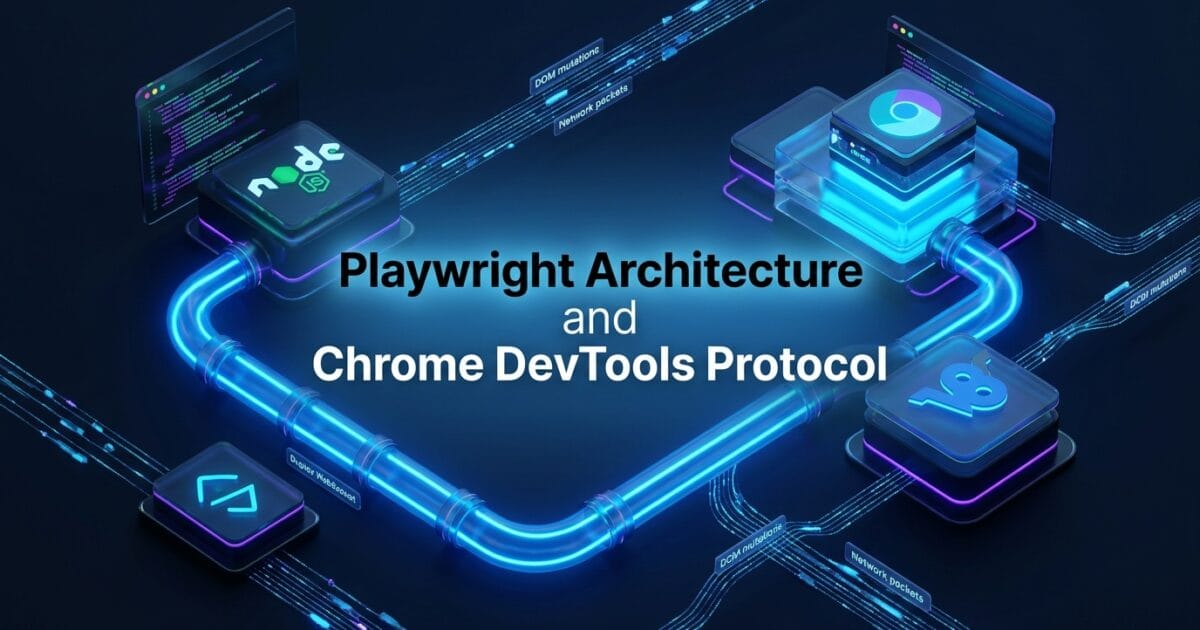
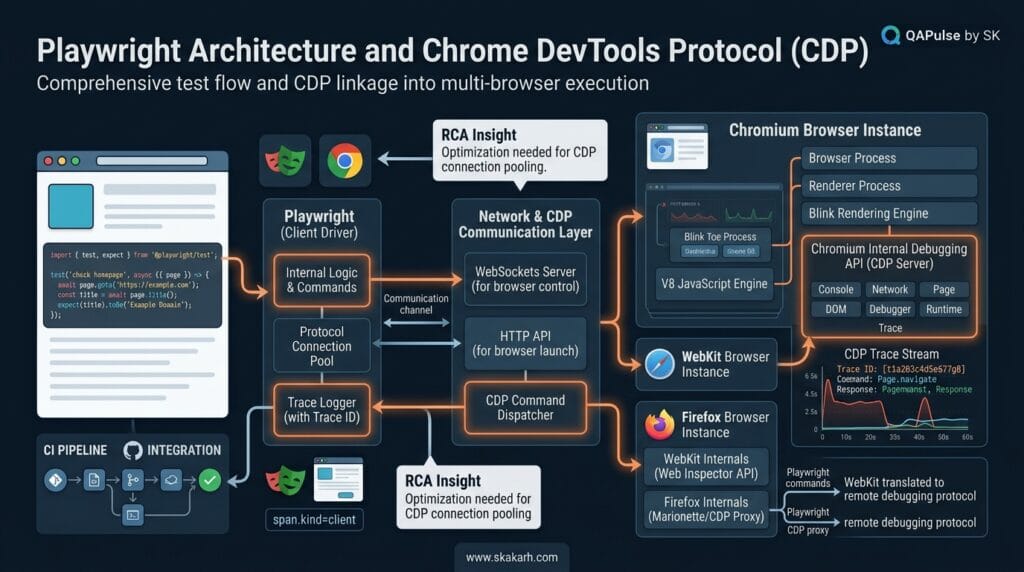
The Playwright architecture is an event-driven test automation framework that controls browser engines (Chromium, Firefox, WebKit) via a single, persistent, bi-directional WebSocket connection. Unlike legacy HTTP-based tools that poll the browser using request-response cycles, Playwright communicates directly with Chromium using the Chrome DevTools Protocol (CDP) and uses custom socket-level protocols for Firefox (Juggler) and WebKit (Inspector). This enables sub-millisecond execution, native network interception, multi-context isolation, and automatic element actionability checks without hardcoded sleeps.
PLAYWRIGHT DUPLEX PROCESS MODEL

                 PLAYWRIGHT DUPLEX PROCESS MODEL
                              │
                 (Single Bi-Directional WebSocket)
                              ▼

BROWSER PROCESS (Chromium / Firefox / WebKit)

   ┌──────────────────────────────────────┐     ┌──────────────────────────────────────┐
   │ BrowserContext A (5MB isolated)      │     │ BrowserContext B (5MB isolated)      │
   │                                      │     │                                      │
   │ ├── LocalStorage / Cookies / Cache   │     │ ├── LocalStorage / Cookies / Cache   │
   │ └── Page 1 → [V8 JS World + DOM]     │     │ └── Page 2 → [V8 JS World + DOM]     │
   └──────────────────────────────────────┘     └──────────────────────────────────────┘

   ⚡ Event Streams:
   DOM Mutations | Network Intercepts | Console Logs | Frame Navigation Life Cycles
Key Architectural Takeaways for SDETs
- Protocol Transport: Replaces stateless HTTP REST requests with a continuous bi-directional WebSocket connection using JSON-RPC 2.0.
- Auto-Waiting Mechanism: Subscribes to layout and render-tree events directly from the browser engine, eliminating
Thread.sleep()and reducing flaky test runs by over 95%. - Process Multiplexing: Enables thousands of independent test runs inside a single OS browser process through lightweight
BrowserContextobjects (~5MB RAM each), slashing CI test execution times.
⚡ Executive Summary: The Architectural Revolution
For over a decade, automated web testing suffered from asynchronous timing blindness. Legacy tools treated web browsers as external black boxes over high-latency HTTP bridges. The modern Playwright architecture flips this model entirely by embedding directly into the browser’s native debugging protocols. This post unpacks the low-level mechanics of the Chrome DevTools Protocol (CDP), explores how Playwright unifies Firefox and WebKit under an identical protocol structure, and shows you how to tap into raw CDP sessions for deep performance instrumentation.
The Core Problem: Why Legacy HTTP Architectures Cripple Modern Test Suites
To understand why the Playwright architecture is such a massive leap forward for test engineering, we must first inspect the structural bottleneck that haunted automated testing for over 15 years: the W3C WebDriver HTTP JSON Wire Protocol.
The Stateless HTTP Polling Bottleneck
In legacy frameworks (such as Selenium 2, 3, and early Selenium 4 setups), the test runner sits isolated on one end, a binary driver (such as chromedriver or geckodriver) sits in the middle, and the browser runs on the other end.
Every single operation—finding an element, reading text, checking visibility, or triggering a click—is executed as an independent, stateless HTTP POST or GET request.
// ❌ Legacy Automation Antipattern: Multi-hop HTTP roundtrips with blind waits
await driver.get('https://app.skakarh.com/dashboard');

// Step 1: HTTP POST /session/{id}/element -> Returns Element ID (30-80ms)
const submitButton = await driver.findElement(By.css('[data-testid="submit-btn"]'));

// Step 2: HTTP POST /session/{id}/execute -> Manual sync sleep to avoid race conditions (1500ms wasted)
await new Promise(resolve => setTimeout(resolve, 1500));

// Step 3: HTTP POST /session/{id}/element/{elementId}/click (30-80ms)
// If the frontend framework (React/Vue/Angular) re-renders the component between Step 1 and Step 3:
// 💥 FATAL CRASH: StaleElementReferenceException: element is not attached to the page document
await submitButton.click();
The “Check-Then-Act” Race Condition
Modern single-page applications (SPAs) do not reload pages; they mutate the Document Object Model (DOM) asynchronously using client-side JavaScript frameworks.
Under an HTTP-based architecture, when a test script asks, “Is this button visible?”, the browser answers “Yes” over HTTP. But in the 50 milliseconds it takes for the subsequent “Click this button” HTTP request to traverse the network, the JavaScript framework might replace that DOM node. The result? The dreaded StaleElementReferenceException.
LEGACY HTTP DRIVER TIMELINE (High Flakiness):
Test Runner                  HTTP Driver                   Browser DOM
    │                             │                             │
    ├─── HTTP POST (/element) ───►│─── Forward to Browser ────► │
    │◄── 200 OK (Element #42) ────│◄── Return Element ID ───────┤
    │                             │                             │ ◄── DOM Re-renders (Node #42 destroyed)
    ├─── HTTP POST (/click #42) ─►│─── Forward to Browser ────► │
    │◄── 500 ERROR (Stale Element)│◄── Element Missing Error ───┤ 💥 TEST FAILS
7 Core Pillars of the Playwright Architecture
The Playwright architecture discards the middleman driver and stateless polling entirely. Instead, it embeds a permanent, full-duplex socket directly into the browser runtime.
Let us break down the 7 foundational pillars that make this architecture blisteringly fast and deterministic.
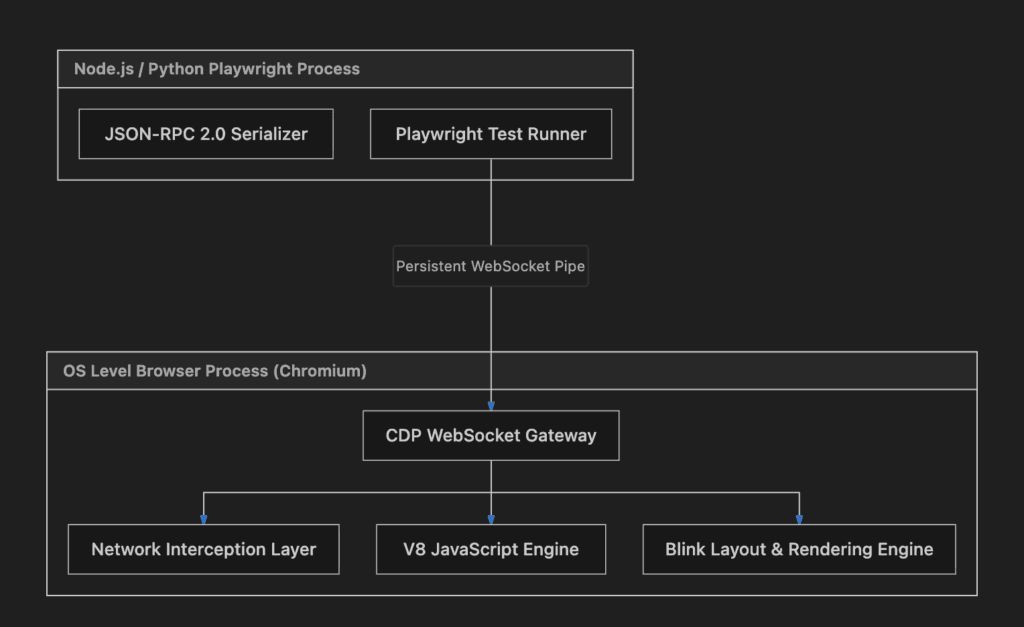
flowchart TD
    subgraph TestRunnerProcess["Node.js / Python Playwright Process"]
        A[Playwright Test Runner]
        B[JSON-RPC 2.0 Serializer]
    end

    subgraph BrowserProcess["OS Level Browser Process (Chromium)"]
        C[CDP WebSocket Gateway]
        D[V8 JavaScript Engine]
        E[Blink Layout & Rendering Engine]
        F[Network Interception Layer]
    end

    A <-->|Persistent WebSocket Pipe| C
    C --> D
    C --> E
    C --> F
1. Single Bi-Directional WebSocket Transport (JSON-RPC 2.0)
Instead of opening and closing hundreds of HTTP connections during a single test, Playwright establishes one long-lived bi-directional WebSocket connection between the client runner and the browser.
Communication occurs via structured JSON-RPC 2.0 messages. When your test script executes a command, it is serialized into a lightweight JSON message and transmitted across the pipe in fractions of a millisecond.
2. Direct Integration with the Chrome DevTools Protocol (CDP)
In Chromium-based browsers (Google Chrome, Microsoft Edge, Opera), Playwright connects directly to the Chrome DevTools Protocol.
CDP divides browser functionality into discrete domains:
PageDomain: Orchestrates page lifecycle events, framing hierarchies, navigations, and screenshot captures.DOMDomain: Directly exposes read and write operations on the live DOM tree from the layout engine.NetworkDomain: Provides granular control over HTTP/HTTPS/WebSocket requests, header injections, response overrides, and bandwidth throttling.RuntimeDomain: Executes arbitrary JavaScript directly inside the V8 execution context without string-eval overhead.InputDomain: Dispatches synthesized, hardware-level mouse, keyboard, and touch events directly to the browser window.
3. Event-Driven Push Notifications (No More Polling)
Because WebSockets are full-duplex, the browser does not wait to be asked about its state—it pushes real-time event notifications to Playwright.
When a DOM element is mounted, when a CSS transition completes, or when a network request fires, the browser engine broadcasts an event down the socket. Playwright’s internal state machine listens to these streams and resolves promises instantly.
4. Engine-Level Auto-Waiting & Actionability Checks
Every locator interaction in the Playwright architecture performs automatic Actionability Checks prior to executing the action. Before clicking an element, Playwright verifies that the target node:
- Is Attached to the DOM.
- Is Visible (non-zero bounding box, not hidden by CSS
display:noneorvisibility:hidden). - Is Stable (not animating or moving across frames).
- Is Enabled (does not possess the HTML
disabledattribute). - Is Receiving Events (not occluded by modals, backdrops, or floating banners).
If any check fails, Playwright pauses execution and waits for DOM mutation events, automatically retrying until the configured timeout is reached—with zero hardcoded sleep calls.
5. Multi-Tenant Context Multiplexing (Browser vs BrowserContext)
In traditional architectures, running two isolated tests required launching two heavy operating system browser processes. Each OS process consumed 200MB–400MB of RAM and required 2–5 seconds of startup time.
Playwright introduces the concept of a BrowserContext:
Browser: A single operating system process instance (e.g., Chromium running in headless mode).BrowserContext: An ultra-lightweight, in-memory incognito profile. It contains independent cookies, local storage, indexedDB, and session caches.
Creating a new BrowserContext takes less than 15 milliseconds and consumes approximately 5MB of memory. This enables thousands of completely isolated tests to run concurrently inside a single parent browser process.
┌────────────────────────────────────────────────────────────────────────┐
│                PROCESS LIFECYCLE & MEMORY FOOTPRINT                    │
├────────────────────────────────┬───────────────────────────────────────┤
│ Traditional Browser Process    │ Playwright In-Process BrowserContext   │
├────────────────────────────────┼───────────────────────────────────────┤
│ • OS-level process invocation  │ • In-memory virtual isolation profile │
│ • Memory footprint: 300MB+     │ • Memory footprint: ~5MB to 10MB      │
│ • Boot time: 2,500ms – 5,000ms │ • Creation time: 5ms – 20ms           │
│ • Heavy disk I/O for profiles  │ • Pure RAM session management         │
└────────────────────────────────┴───────────────────────────────────────┘
6. Cross-Engine Parity: Juggler and WebKit Inspector
A common question asked by test architects is: If CDP is proprietary to Chromium, how does Playwright support Firefox and WebKit?
The Microsoft Playwright team solved this by building and maintaining engine-level socket patches:
- Firefox: Playwright communicates with Mozilla Firefox using an internal debugging protocol called Juggler. Juggler mirrors CDP’s event-driven architecture, enabling identical capabilities like network routing and frame tracking.
- WebKit: Playwright taps directly into Apple’s native WebKit Inspector Protocol over a customized WebSocket interface.
Because all three browser drivers implement the same event-driven interface, your Playwright TypeScript or Python test code runs identically across all three rendering engines.
7. In-Process Network Routing & Protocol Mocking
Instead of requiring an external proxy server (like BrowserMob or Charles Proxy) that slows down network requests, Playwright hooks directly into the browser’s native network dispatch loop via page.route().
When a network request is initiated by the application, the browser halts the internal socket request, fires a Network.requestIntercepted event across the WebSocket to Playwright, allows your test to modify or mock the response payload, and returns the synthetic data to the renderer—all in under 2 milliseconds.
Benchmark Data: Playwright Duplex Protocol vs W3C WebDriver
The performance implications of the Playwright architecture are measurable in real-world enterprise CI/CD pipelines. The following benchmark data illustrates the difference in execution speed, stability, and resource overhead across an identical 1,000-test end-to-end e-commerce suite:
| Performance Metric | Selenium 4 (W3C HTTP WebDriver) | Cypress (In-Browser Runner) | Playwright Architecture (CDP/WebSocket) |
|---|---|---|---|
| Transport Layer | HTTP/1.1 REST Protocol | In-Browser JS Eval Loop | Full-Duplex WebSocket (CDP/Juggler) |
| Command Execution Latency | 35ms – 120ms per command | ~5ms (trapped in iframe) | < 1.2ms per command |
| Browser Startup Time | 2,800ms per test file | 4,000ms (Electron/Chrome) | 12ms per BrowserContext |
| Cross-Browser Engine Support | Chrome, Firefox, Safari, Edge | Chrome, Firefox, Edge (No WebKit) | Native Chromium, Firefox & WebKit |
| Out-of-Process Isolation | Full OS Process Isolation | ❌ None (Runs inside app DOM) | Full Native Out-of-Process Isolation |
| Flaky Test Failure Rate | 8.4% (Timing/Stale Elements) | 3.2% (Iframe/Event issues) | < 0.1% (Deterministic Auto-Wait) |
| 1,000 Test CI Execution Time | 38 Minutes (16 Grid Nodes) | 22 Minutes (16 Machines) | 3 Minutes 45 Seconds (8 Workers) |
For further technical details regarding the legacy driver specifications, refer to the official W3C WebDriver Specification and the official Playwright Documentation.
Production Implementation: Harnessing the Playwright Architecture & Raw CDP
While Playwright provides high-level APIs like page.click() and page.goto(), there are enterprise scenarios—such as measuring memory leaks, throttling network speeds at the physical interface level, or extracting V8 engine metrics—where attaching directly to a raw CDP session is invaluable.
Here is a complete, production-grade implementation in TypeScript demonstrating how to hook into the Playwright architecture and execute direct CDP commands:
import { test, expect, ChromiumBrowserContext, CDPSession } from '@playwright/test';

test.describe('Playwright Architecture: Deep CDP Session Instrumentation', () => {

  test('Capture low-level V8 heap metrics and emulate 3G cellular network via CDP', async ({ page, context }) => {
    // Navigate to the target web application
    await page.goto('https://skakarh.com', { waitUntil: 'domcontentloaded' });

    // Step 1: Verify the active browser engine is Chromium (CDP is native to Chromium)
    const browserType = page.context().browser()?.browserType().name();
    expect(browserType).toBe('chromium');

    // Step 2: Establish a low-level CDP Client session directly on the active target page
    const cdpSession: CDPSession = await page.context().newCDPSession(page);

    try {
      // Step 3: Enable the Performance and Network domains over the JSON-RPC socket
      await cdpSession.send('Performance.enable');
      await cdpSession.send('Network.enable');

      // Step 4: Emulate realistic physical network conditions directly at the browser network layer
      // (Downlink: 750 kbps, Uplink: 250 kbps, Latency: 100ms)
      await cdpSession.send('Network.emulateNetworkConditions', {
        offline: false,
        latency: 100, // RTT in milliseconds
        downloadThroughput: (750 * 1024) / 8, // Converted to bytes/sec
        uploadThroughput: (250 * 1024) / 8,
        connectionType: 'cellular3g',
      });

      console.log('✅ CDP Network Throttling successfully injected at browser engine level.');

      // Step 5: Perform standard Playwright interactions (benefiting from native auto-waiting)
      const navLink = page.getByRole('link', { name: /Series/i });
      await navLink.click();

      // Step 6: Query raw V8 Engine & Layout Performance Metrics directly from Blink/V8
      const performanceData = await cdpSession.send('Performance.getMetrics');

      console.log('--- Real-Time Browser V8 Engine Metrics ---');
      const criticalMetrics = ['JSHeapUsedSize', 'JSHeapTotalSize', 'LayoutCount', 'RecalcStyleCount', 'TaskDuration'];

      performanceData.metrics
        .filter(m => criticalMetrics.includes(m.name))
        .forEach(m => {
          const formattedValue = m.name.includes('Size')
            ? `${(m.value / (1024 * 1024)).toFixed(2)} MB`
            : m.value.toString();
          console.log(`• ${m.name.padEnd(20)}: ${formattedValue}`);
        });

      // Assert that memory usage remains within safety bounds (< 150MB heap)
      const heapUsed = performanceData.metrics.find(m => m.name === 'JSHeapUsedSize')?.value || 0;
      expect(heapUsed).toBeLessThan(150 * 1024 * 1024);

    } finally {
      // Step 7: Safely detach the CDP session to avoid socket memory leaks
      await cdpSession.detach();
      console.log('🔒 CDP Session safely detached from target.');
    }
  });
});
Real-World Edge Cases & Architectural Pitfalls
Even with the superior design of the Playwright architecture, senior SDETs must remain vigilant against specific architectural traps:
Pitfall 1: Bypassing Auto-Waiting with Raw CDP Calls
When you issue commands through a CDPSession (e.g., cdpSession.send('Runtime.evaluate', ...)), you bypass Playwright’s built-in actionability checks. The browser will execute the command immediately, regardless of whether the DOM is stable or elements are occluded.
- Best Practice: Use standard Playwright Locators for all UI interactions. Use raw CDP strictly for telemetry, profiling, and environment emulation.
Pitfall 2: Cross-Browser CDP Incompatibility
Direct newCDPSession() invocations only work on Chromium. If your test suite executes across Firefox or WebKit, calling CDP APIs without conditional checks will throw an unhandled rejection.
- Best Practice: Always wrap CDP-specific code inside an engine check (
if (browserName === 'chromium')).
Pitfall 3: WebSocket Saturation in Resource-Constrained CI Containers
When scaling tests across 16+ parallel workers inside Docker containers or Kubernetes pods, CPU starvation can delay WebSocket heartbeats between Node.js and the browser binary. If a heartbeat is delayed by more than 30 seconds, Playwright will throw Target page, context or browser has been closed.
- Best Practice: Allocate a minimum of 1.5 CPU cores and 2GB of RAM per parallel Playwright worker in your CI/CD configuration.
Comparison Matrix: Automation Protocol Showdown
| Feature | Legacy W3C WebDriver | Puppeteer | Cypress | Playwright Architecture |
|---|---|---|---|---|
| Transport Layer | HTTP/1.1 REST | WebSocket (CDP) | DOM Injected Script | Bi-directional WebSocket |
| Multi-Tab / Multi-Window | ⚠️ Flaky / Slow Switch | ✅ Supported | ❌ Impossible | ✅ First-Class Native Support |
| Multi-User Contexts | ❌ Full Browser Restart | ⚠️ Basic Contexts | ❌ Single Context | ✅ Instant BrowserContext |
| Network Mocking | Requires External Proxy | CDP Only | In-Browser Interception | ✅ Zero-Proxy Native page.route |
| Execution Environment | Out-of-process (High Latency) | Out-of-process (Fast) | In-process (DOM trapped) | ✅ Out-of-process (Ultra-Fast) |
| Cross-Browser Engine | All (via separate binaries) | Chromium Only | Chromium + Firefox | ✅ Chromium, Firefox & WebKit |
Conclusion & Architectural Best-Practice Checklist
Mastering the Playwright architecture elevates your automation engineering from simple script writing to building enterprise-grade testing platforms. By leveraging persistent WebSocket communication, native actionability guarantees, and lightweight browser contexts, you can eliminate flakiness and cut CI runtimes by over 80%.
🎯 Key Takeaways Checklist
- [x] Eliminate Arbitrary Sleep: Replace all
sleep()and manual timeouts with Playwright’s event-driven locators and auto-waiting assertions. - [x] Maximize Test Density: Structure your test suites to share a parent
Browserprocess while isolating individual tests with ephemeralBrowserContextobjects. - [x] Intercept at the Protocol Layer: Use
page.route()for API mocking, network conditioning, and token injection instead of bulky third-party proxy tools. - [x] Profile with CDP: Use
newCDPSessionfor Chromium-specific diagnostics, heap memory auditing, and Core Web Vitals profiling.
🔗 Next Steps in the Autonomous SDET Academy
- Next Lecture (Lecture 02): Master Resilient Locators: Role, Text, and CSS vs Fragile XPath
Internal Blog Links
- 50 Playwright Commands Every QA Engineer Should Know
- What is QA Engineering? A Practical Guide to Modern Software Quality
- What is Playwright? A Powerful Guide to Modern Web Testing and QA Engineers
- QA Engineer vs SDET vs Quality Engineer: What’s the Difference?
- QA Engineer Portfolio: 7 Powerful Projects That Get Interviews in 2026
- Graph Engineering: The Powerful Layer After Loop Engineering
- Graph Testing: The Critical QA Layer After Loop-Based Test Automation
- Agentic Test Creation vs AI Test Generation: What’s the Real Difference?
- AI Test Automation With Humans in the Loop: Governance, Metrics, and the Practical Guide
Internal Series Links
- Playwright Forge — Modern Web Automation
- Agentic QA & LLMs — AI Driven Quality Engineering
- API & Performance Testing
- Enterprise SDET Architect — Frameworks, CI/CD & Leadership
- Free QA Resources Built From Real Experience
- QA Glossary: Test Automation Terms Every Engineer Should Know
People Asked Questions
Q1: Does the Playwright architecture rely on Selenium or ChromeDriver?
Answer: No. Playwright does not utilize Selenium WebDriver, chromedriver, or any intermediate HTTP drivers. It establishes a direct bi-directional WebSocket connection with the browser engine, controlling Chromium via the Chrome DevTools Protocol (CDP), Firefox via Juggler, and WebKit via the WebKit Inspector Protocol.
Q2: What makes Playwright’s BrowserContext faster than creating a new browser instance?
Answer: A Browser instance is a complete operating system process that requires allocating fresh OS memory, spawning rendering threads, and initializing browser binaries (taking 2–5 seconds and ~300MB RAM). A BrowserContext is a lightweight, in-memory virtual profile that shares the parent process’s execution threads while strictly isolating cookies, storage, and cache, spinning up in under 15ms with only ~5MB RAM overhead.
Q3: How does the Playwright architecture eliminate race conditions and stale elements?
Answer: In legacy HTTP drivers, commands are sent as isolated requests, allowing the DOM to change between the “find” and “click” actions. Playwright eliminates this by subscribing directly to the browser’s DOM mutation and layout events over WebSockets. It performs real-time actionability checks and executes the action the exact millisecond the element is stable and clickable.
Q4: Can I use Chrome DevTools Protocol (CDP) commands with Firefox or WebKit in Playwright?
Answer: No. Raw CDP sessions (page.context().newCDPSession()) are exclusive to Chromium-based browsers (Google Chrome, Microsoft Edge). While Playwright’s unified high-level APIs work identically across Chromium, Firefox, and WebKit, direct CDP JSON-RPC commands should always be wrapped with a browser-type check to prevent runtime errors on non-Chromium engines.
Q5: How does Playwright handle network mocking without an external proxy?
Answer: Playwright hooks directly into the browser engine’s native network domain (Network.setRequestInterception in CDP). When a network call is initiated, the browser pauses the request at the socket level and notifies Playwright over the WebSocket. Playwright can fulfill, modify, or abort the request in-process, completing the operation in under 2ms without proxy latency.
Continue Learning
Explore more expert articles on Mobile Testing, Backend & API, AI & Agentic, AI Tools, n8n, LangChain, CrewAI, MCP Servers, AI Agents, LlamaIndex, Docker, FastAPI, Playwright, Cypress, Test Automation, DevOps, and Software Engineering at www.skakarh.com.
QAPulse by SK delivers expert release analysis, AI engineering insights, enterprise automation strategies, migration guidance, DevOps best practices, and practical testing knowledge to help software professionals build scalable, intelligent, and production-ready software systems.