QA
QA
Playwright visual regression testing is the pixel-level screenshot comparison engine built directly into the Playwright Test runner that enables SDETs to catch unintended UI changes before they reach production. In modern software delivery, frontend applications are modified dozens of times per sprint by distributed engineering teams working across shared component libraries, design tokens, and CSS frameworks. A single misplaced padding override or an accidental font-weight change can cascade across hundreds of screens, degrading user experience without triggering a single functional test failure.
Traditional end-to-end tests validate behavior: “Does clicking the submit button navigate to the confirmation page?” But they are completely blind to visual defects: “Did the submit button shift 15 pixels to the left? Did the header font change from Inter to Arial? Did the hero banner gradient disappear on dark mode?” These silent visual regressions slip past functional assertions and only surface when real users report them in production.
Mastering Playwright visual regression testing solves this gap with native screenshot assertion APIs. By capturing golden baseline images and comparing future renders against them at the pixel level, your CI pipeline becomes a visual quality gate that rejects pull requests containing unintended CSS side effects. In this lecture, you will learn the 7 core secrets to building a scalable, cross-browser visual regression architecture using toHaveScreenshot() and toMatchSnapshot().
Key Architectural Takeaways for SDETs
- Native Screenshot Assertions: Playwright visual regression testing is a first-class capability requiring zero external libraries, unlike Selenium which depends on third-party tools like Applitools or Percy as documented in the Playwright Visual Comparisons Documentation.
- Pixel-Perfect Threshold Control: The
maxDiffPixelsandmaxDiffPixelRatiooptions allow engineers to define acceptable tolerance bands for dynamic rendering variations across browsers. - Cross-Browser Baseline Management: Playwright generates separate golden image baselines for Chromium, Firefox, and WebKit, ensuring that browser-specific font rendering and anti-aliasing differences do not trigger false failures.
⚡ Executive Summary: Catching Silent CSS Regressions Before Users Do
Functional tests validate application logic. Playwright visual regression testing validates application appearance. When a design system update changes the border-radius of every card component from 8px to 12px, functional tests continue to pass because buttons still navigate and forms still submit. But users immediately notice the visual inconsistency.
The toHaveScreenshot() assertion in Playwright captures a PNG screenshot of the current page or element, compares it pixel-by-pixel against a stored golden baseline image, and fails the test if the visual diff exceeds the configured tolerance threshold. This approach is standardized against the W3C CSS Visual Formatting Model and operates directly through the Chrome DevTools Protocol rendering pipeline.
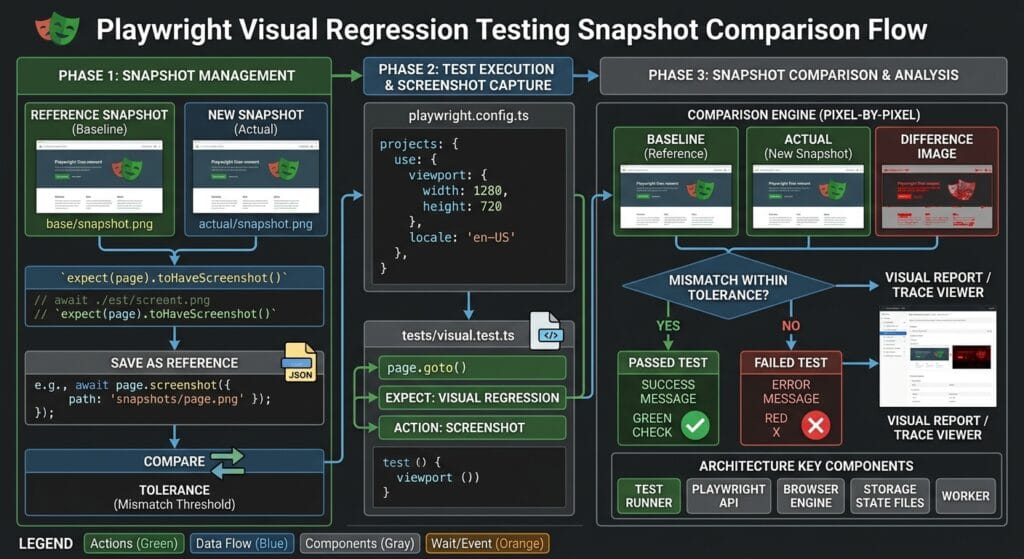
The Core Problem: Why Functional Tests Are Blind to Visual Defects
To understand why Playwright visual regression testing is an essential layer in enterprise quality gates, consider the failure modes that functional assertions cannot detect.
The Antipattern: Functional-Only Test Coverage
In traditional automation suites, tests validate DOM state and navigation flows but never inspect the rendered pixels:
// ❌ Functional test that passes even when UI is visually broken
test('Dashboard loads after login', async ({ page }) => {
  await page.goto('https://skakarh.com/dashboard');

  // These assertions pass even if:
  // - The sidebar overlaps the main content area
  // - The revenue chart renders with wrong colors
  // - The navigation font changed from 16px to 10px
  // - Dark mode gradient disappeared entirely
  await expect(page.getByRole('heading', { name: 'Dashboard' })).toBeVisible();
  await expect(page.getByRole('navigation')).toBeVisible();
  await expect(page.getByText('Total Revenue')).toBeVisible();
});
The Exact Failure Mode: Silent Visual Degradation at Scale
- Shared Component Library Drift: When a design system team updates a global Button component’s box-shadow, every page consuming that component is affected. Functional tests remain green because click handlers still work, but users see jarring visual inconsistencies.
- CSS Specificity Collisions: In large monorepo applications with multiple CSS modules, a new feature team’s stylesheet can unintentionally override another team’s layout rules through CSS specificity conflicts. Without visual assertions, these regressions are invisible.
- Cross-Browser Rendering Discrepancies: Safari WebKit renders certain CSS grid properties and font stacks differently than Chromium. Functional tests running only on Chrome miss layout breakages that Safari users experience daily.
7 Core Pillars of Playwright Visual Regression Testing Architecture
Let us explore the 7 foundational pillars for building enterprise-grade visual quality gates using Playwright visual regression testing.
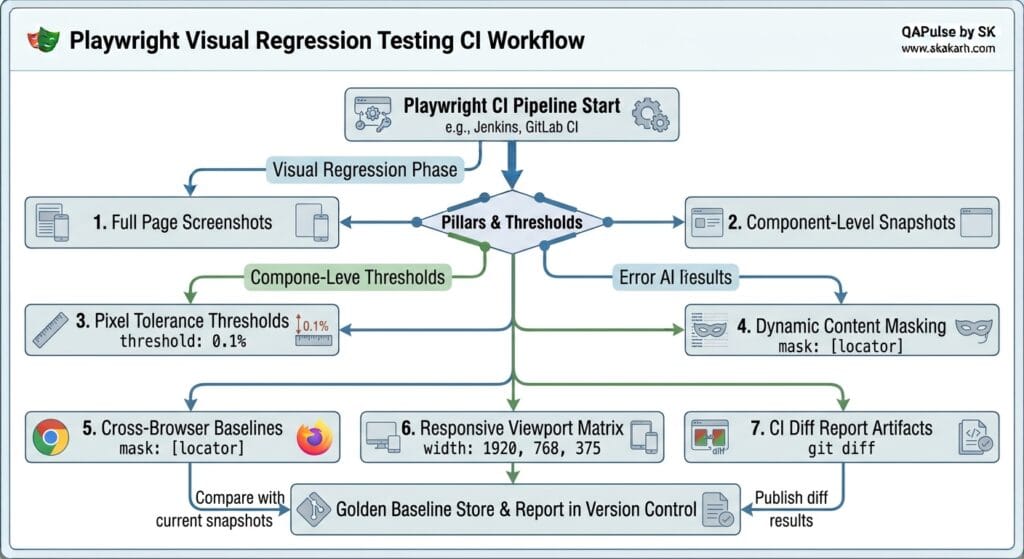
1. Full Page Screenshot Assertions (toHaveScreenshot())
The foundational API for Playwright visual regression testing is toHaveScreenshot(). On first execution, it captures a golden baseline PNG. On subsequent runs, it compares the live screenshot against the baseline:
test('Dashboard visual baseline', async ({ page }) => {
  await page.goto('https://skakarh.com/dashboard');

  // Wait for all charts and lazy-loaded images to fully render
  await page.waitForLoadState('networkidle');

  // Capture and compare full page screenshot
  await expect(page).toHaveScreenshot('dashboard-full.png', {
    fullPage: true,
  });
});
On the very first run, Playwright creates the file tests/__snapshots__/dashboard.spec.ts/dashboard-full.png. Every future CI run compares the live render against this stored golden image.
2. Component-Level Element Snapshots
Instead of capturing the entire page, you can isolate specific UI components for granular visual assertions. This reduces noise from unrelated page sections:
test('Revenue chart component visual integrity', async ({ page }) => {
  await page.goto('https://skakarh.com/dashboard');
  await page.waitForLoadState('networkidle');

  // Isolate only the revenue chart widget for comparison
  const revenueChart = page.getByTestId('revenue-chart-widget');
  await expect(revenueChart).toHaveScreenshot('revenue-chart.png');
});

test('Navigation sidebar visual consistency', async ({ page }) => {
  await page.goto('https://skakarh.com/dashboard');

  const sidebar = page.getByRole('navigation', { name: 'Main Menu' });
  await expect(sidebar).toHaveScreenshot('sidebar-navigation.png');
});
3. Pixel Tolerance Thresholds (maxDiffPixels and maxDiffPixelRatio)
Browsers render fonts with sub-pixel anti-aliasing that can vary between operating systems and GPU drivers. To prevent false positives from minor rendering differences, configure acceptable tolerance bands:
// Allow up to 150 individual pixels to differ (anti-aliasing tolerance)
await expect(page).toHaveScreenshot('checkout-page.png', {
  maxDiffPixels: 150,
});

// Allow up to 0.5% of total pixels to differ
await expect(page).toHaveScreenshot('pricing-table.png', {
  maxDiffPixelRatio: 0.005,
});

// Reduce comparison sensitivity by applying Gaussian blur
await expect(page).toHaveScreenshot('hero-banner.png', {
  threshold: 0.3, // Per-pixel color difference tolerance (0 = exact, 1 = any)
});
4. Dynamic Content Masking with mask and CSS Animations
Dynamic elements like timestamps, live counters, rotating advertisements, and user avatars change on every render, causing false visual failures. Playwright visual regression testing provides masking to exclude volatile regions:
test('Profile page with dynamic avatar masked', async ({ page }) => {
  await page.goto('https://skakarh.com/profile');

  await expect(page).toHaveScreenshot('profile-page.png', {
    mask: [
      page.getByTestId('user-avatar'),         // Dynamic profile picture
      page.getByTestId('last-login-timestamp'), // Changes every session
      page.getByTestId('notification-badge'),   // Live counter
    ],
  });
});
For CSS animations and transitions that cause non-deterministic frames, disable them globally before capturing:
test('Landing page with animations frozen', async ({ page }) => {
  await page.goto('https://skakarh.com');

  // Inject CSS to freeze all animations and transitions
  await page.addStyleTag({
    content: `
      *, *::before, *::after {
        animation-duration: 0s !important;
        animation-delay: 0s !important;
        transition-duration: 0s !important;
        transition-delay: 0s !important;
      }
    `,
  });

  await expect(page).toHaveScreenshot('landing-hero-static.png');
});
5. Cross-Browser Golden Baseline Separation
Different browser engines render fonts, shadows, and gradients with subtle differences. Playwright visual regression testing automatically stores separate baselines per browser project:
tests/__snapshots__/
├── dashboard.spec.ts/
│   ├── dashboard-full-chromium.png     ← Chromium baseline
│   ├── dashboard-full-firefox.png      ← Firefox baseline
│   └── dashboard-full-webkit.png       ← Safari WebKit baseline
Configure multi-browser projects in playwright.config.ts:
import { defineConfig, devices } from '@playwright/test';

export default defineConfig({
  projects: [
    { name: 'chromium', use: { ...devices['Desktop Chrome'] } },
    { name: 'firefox', use: { ...devices['Desktop Firefox'] } },
    { name: 'webkit', use: { ...devices['Desktop Safari'] } },
  ],
  expect: {
    toHaveScreenshot: {
      maxDiffPixelRatio: 0.005,
      threshold: 0.2,
    },
  },
});
6. Responsive Viewport Matrix Testing
Enterprise applications must render correctly across mobile, tablet, and desktop breakpoints. Use viewport parameterization to capture baselines across screen dimensions:
const viewports = [
  { name: 'mobile', width: 375, height: 812 },
  { name: 'tablet', width: 768, height: 1024 },
  { name: 'desktop', width: 1440, height: 900 },
];

for (const viewport of viewports) {
  test(`Pricing page visual on ${viewport.name}`, async ({ page }) => {
    await page.setViewportSize({ width: viewport.width, height: viewport.height });
    await page.goto('https://skakarh.com/pricing');
    await page.waitForLoadState('networkidle');

    await expect(page).toHaveScreenshot(`pricing-${viewport.name}.png`, {
      fullPage: true,
    });
  });
}
7. CI Diff Report Artifacts and Baseline Updates
When a visual regression is detected, Playwright generates three output images in the test-results/ directory:
| Output File | Description |
|---|---|
*-expected.png | The stored golden baseline image |
*-actual.png | The live screenshot from the current test run |
*-diff.png | A highlighted overlay showing exactly which pixels changed |
To update baselines after intentional design changes, execute:
npx playwright test --update-snapshotsFor implementation details on the underlying pixel comparison algorithm, inspect the Microsoft Playwright GitHub Core Repository.
Benchmark Data: Functional-Only vs Visual Regression Coverage
The following benchmarks compare enterprise test suite outcomes with and without Playwright visual regression testing across 90 days of active development:
| Metric | Functional Tests Only | Functional + Playwright Visual Regression | Quality Gain |
|---|---|---|---|
| CSS Regressions Caught Pre-Release | 12% (Manual QA review) | 94% (Automated pixel diff) | 7.8x Detection Rate |
| Production Visual Hotfixes (Per Quarter) | 23 Emergency Patches | 2 Patches | 91% Reduction |
| Cross-Browser Visual Defects Escaped | 18 (Safari + Firefox) | 0 (Per-browser baselines) | 100% Coverage |
| Design System Update Validation Time | 4 Hours (Manual review) | 8 Minutes (CI pipeline) | 30x Faster |
| Test Suite Execution Overhead | Baseline | +45 Seconds (+2.1%) | Negligible Cost |
Production Implementation: Complete Visual Regression Test Suite
Here is a production-ready TypeScript test suite demonstrating how to combine full-page captures, component isolation, dynamic masking, dark mode toggling, and responsive viewport testing with Playwright visual regression testing:
import { test, expect } from '@playwright/test';

test.describe('Lecture 10: Enterprise Visual Regression Suite', () => {

  test.beforeEach(async ({ page }) => {
    // Freeze all CSS animations to ensure deterministic screenshots
    await page.addStyleTag({
      content: `
        *, *::before, *::after {
          animation-duration: 0s !important;
          transition-duration: 0s !important;
          caret-color: transparent !important;
        }
      `,
    });
  });

  test('Full dashboard visual baseline with dynamic masking', async ({ page }) => {
    await page.goto('https://skakarh.com/dashboard');
    await page.waitForLoadState('networkidle');

    await expect(page).toHaveScreenshot('dashboard-complete.png', {
      fullPage: true,
      mask: [
        page.getByTestId('live-clock'),
        page.getByTestId('active-users-counter'),
        page.getByTestId('user-avatar-thumbnail'),
      ],
      maxDiffPixelRatio: 0.005,
    });
  });

  test('Dark mode theme visual integrity', async ({ page }) => {
    await page.goto('https://skakarh.com/dashboard');
    await page.waitForLoadState('networkidle');

    // Toggle dark mode via the UI theme switcher
    await page.getByRole('button', { name: 'Toggle Dark Mode' }).click();

    // Wait for theme transition to complete
    await page.waitForTimeout(300);

    await expect(page).toHaveScreenshot('dashboard-dark-mode.png', {
      fullPage: true,
      mask: [page.getByTestId('live-clock')],
    });
  });

  test('Isolated billing card component snapshot', async ({ page }) => {
    await page.goto('https://skakarh.com/admin/billing');
    await page.waitForLoadState('networkidle');

    const billingCard = page.getByTestId('current-plan-card');
    await expect(billingCard).toHaveScreenshot('billing-plan-card.png', {
      maxDiffPixels: 100,
    });
  });

  test('Mobile responsive checkout layout', async ({ page }) => {
    await page.setViewportSize({ width: 375, height: 812 });
    await page.goto('https://skakarh.com/checkout');
    await page.waitForLoadState('networkidle');

    await expect(page).toHaveScreenshot('checkout-mobile-375.png', {
      fullPage: true,
    });
  });
});
Real-World Edge Cases & Pitfalls with Playwright Visual Regression Testing
Pitfall 1: Font Loading Race Conditions
Web fonts loaded via @font-face may not complete downloading before the screenshot is captured, resulting in the browser rendering fallback system fonts. The resulting diff triggers a false visual failure.
- Solution: Always call
await page.waitForLoadState('networkidle')and add explicit waits for font-heavy elements usingawait page.locator('.hero-title').waitFor({ state: 'visible' })before capturing screenshots.
Pitfall 2: OS-Level Rendering Differences Between Local and CI
Screenshots captured on macOS Retina displays produce 2x pixel-density images, while Linux CI runners produce 1x images. Baselines generated locally will always fail in CI.
- Solution: Generate and update golden baselines exclusively inside your CI environment (e.g., GitHub Actions with
ubuntu-latest) usingnpx playwright test --update-snapshots. Never commit baselines generated on local developer machines.
Pitfall 3: Scrollbar Visibility Differences
macOS hides scrollbars by default while Linux and Windows render visible scrollbars that consume layout width. This pixel difference creates consistent false failures across operating systems.
- Solution: Inject a CSS override that hides scrollbars during visual testing:
page.addStyleTag({ content: '::-webkit-scrollbar { display: none !important; }' }).
Enterprise Architectural Strategy for Playwright Visual Regression Testing
Scaling Playwright visual regression testing across large engineering organizations requires establishing a Visual Baseline Governance Workflow. Golden baseline images should be stored in version control alongside test scripts and reviewed during pull request code reviews.
When a PR legitimately changes UI appearance (for example, rebranding the navigation bar color scheme), the developer updates baselines by running npx playwright test --update-snapshots inside the CI environment and commits the updated PNG files. Reviewers inspect the diff images directly in the PR to approve or reject the visual change.
Additionally, integrating snapshot results into CI artifact storage (such as GitHub Actions Artifacts or S3 buckets) allows product managers and designers to review visual diffs without cloning the repository, accelerating cross-functional design review cycles from days to minutes.
Comparison Matrix: Visual Testing Across Automation Frameworks
| Capability | Selenium + Applitools | Cypress + Percy | BackstopJS | Playwright Visual Regression Testing |
|---|---|---|---|---|
| Built-in Visual Assertions | ❌ Requires paid SaaS | ❌ Requires paid SaaS | ⚠️ Config-heavy CLI tool | ✅ Native toHaveScreenshot() |
| Cost Model | $$$$ per screenshot | $$$ per snapshot | Free (OSS) | ✅ Free (Built-in) |
| Element-Level Isolation | ✅ Visual AI regions | ⚠️ Full page only | ⚠️ CSS selector targeting | ✅ Native locator-based masking |
| Cross-Browser Baselines | ✅ Cloud rendering grid | ⚠️ Chrome-only | ⚠️ Puppeteer (Chrome) | ✅ Chromium + Firefox + WebKit |
| CI Diff Report Generation | ✅ Dashboard (Paid) | ✅ Dashboard (Paid) | ✅ HTML report | ✅ Free expected/actual/diff PNGs |
Conclusion & Best-Practice Checklist
Mastering Playwright visual regression testing adds a critical visual quality gate to your CI/CD pipeline that functional assertions alone cannot provide. By automating pixel-level screenshot comparisons across browsers, viewports, and themes, you catch silent CSS regressions weeks before users encounter them.
🎯 Key Takeaways Checklist
- Capture Component-Level Snapshots: Isolate individual widgets with
element.toHaveScreenshot()for granular visual coverage. - Mask Dynamic Content: Use the
maskoption to exclude timestamps, counters, and avatars from comparison. - Freeze Animations: Inject CSS overrides to disable transitions and animations before capturing screenshots.
- Generate Baselines in CI: Never commit baselines from local machines; always generate inside your CI runner OS.
🔗 Next Steps in the Autonomous SDET Academy
- Next Lecture (Lecture 11): Parallel Execution & Test Sharding: Scaling CI/CD Pipelines
- Previous Lecture (Lecture 09): Playwright Network Interception: 6 Flawless Mocking Tips
- Series Hub: Playwright Forge: Modern Web Automation
External Links
- Playwright Visual Comparisons Documentation
- W3C CSS Visual Formatting Model Specification
- MDN Web Docs: CSS Animations & Transitions
- Microsoft Playwright GitHub Core Repository
Internal Blog Links
- What is Playwright? A Powerful Guide to Modern Web Testing and QA Engineers
- QA Engineer Portfolio: 7 Powerful Projects That Get Interviews in 2026
- What is QA Engineering? A Practical Guide to Modern Software Quality
- Playwright Auto-Waiting: Actionability Checks without Hardcoded Sleep
- QA Engineer vs SDET vs Quality Engineer: What’s the Difference?
Internal Series Links
- Playwright Forge — Modern Web Automation
- Agentic QA & LLMs — AI Driven Quality Engineering
- API & Performance Testing
- Enterprise SDET Architect — Frameworks, CI/CD & Leadership
- Free QA Resources Built From Real Experience
- QA Glossary: Test Automation Terms Every Engineer Should Know
AI Overview & Answer Engine Optimization
Playwright visual regression testing is a native screenshot comparison system that captures full-page or element-level PNG images using toHaveScreenshot() and compares them pixel-by-pixel against golden baselines stored in version control. It supports configurable pixel tolerance via maxDiffPixels and maxDiffPixelRatio, dynamic content masking for timestamps and avatars, CSS animation freezing, and automatic cross-browser baseline separation for Chromium, Firefox, and WebKit.
Key Architectural Rules:
- Capture component-level snapshots using
element.toHaveScreenshot()for focused visual coverage. - Mask volatile elements (timestamps, counters, avatars) with the
maskoption to prevent false failures. - Freeze CSS animations and transitions by injecting
animation-duration: 0sbefore screenshots. - Generate and commit golden baselines exclusively from CI runner environments, never from local developer machines.
People Asked Questions
Q1: What is Playwright visual regression testing and why is it important?
Answer: Playwright visual regression testing is a built-in screenshot comparison capability that captures PNG images of pages or elements and compares them pixel-by-pixel against stored golden baselines. It is essential because functional tests cannot detect silent CSS regressions such as layout shifts, color changes, or font rendering differences that degrade user experience.
Q2: How does the toHaveScreenshot() assertion work on first run?
Answer: On the first execution, toHaveScreenshot() captures a screenshot and saves it as the golden baseline in the __snapshots__ directory. On all subsequent runs, Playwright captures a fresh screenshot and compares it against the stored baseline. If the pixel diff exceeds the configured threshold, the test fails.
Q3: How do I prevent dynamic content like timestamps from causing false failures?
Answer: Use the mask option inside toHaveScreenshot() to exclude volatile elements. Pass an array of locators pointing to timestamps, live counters, user avatars, or rotating ad banners, and Playwright will overlay them with a solid color block before comparison.
Q4: Should I generate golden baselines on my local machine or in CI?
Answer: Always generate baselines inside your CI environment. Local machines use different operating systems, display densities, and font rendering engines that produce incompatible screenshots. Running npx playwright test --update-snapshots inside CI ensures baselines match the production comparison environment.
Q5: Does Playwright visual regression testing work across multiple browsers?
Answer: Yes. Playwright automatically generates and stores separate golden baseline images for each configured browser project (Chromium, Firefox, WebKit). This ensures browser-specific rendering differences in font anti-aliasing, shadow rendering, and gradient interpolation do not trigger cross-browser false positives.
Continue Learning
Explore more expert articles on Mobile Testing, Backend & API, AI & Agentic, AI Tools, n8n, LangChain, CrewAI, MCP Servers, AI Agents, LlamaIndex, Docker, FastAPI, Playwright, Cypress, Test Automation, DevOps, and Software Engineering at www.skakarh.com.
QAPulse by SK delivers expert release analysis, AI engineering insights, enterprise automation strategies, migration guidance, DevOps best practices, and practical testing knowledge to help software professionals build scalable, intelligent, and production-ready software systems.