QA
QA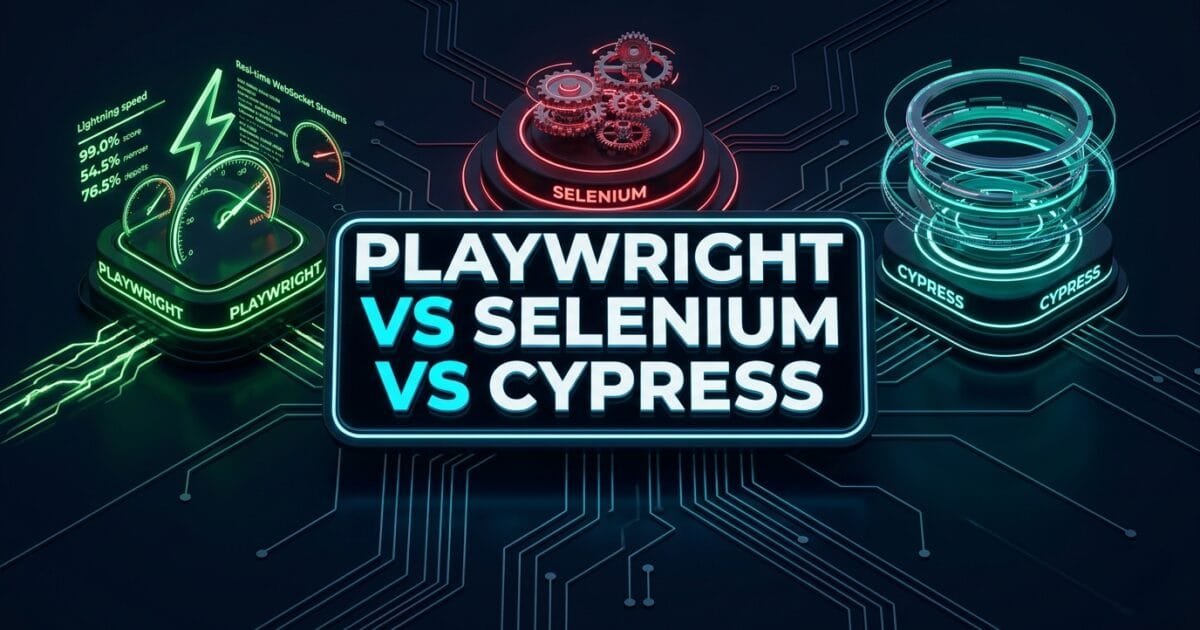
Playwright vs Selenium vs Cypress represents the ultimate architectural showdown for modern engineering organizations choosing a test automation foundation for scalable web delivery. In 2026, web architectures have reached unprecedented complexity: single-page applications (SPAs) powered by React and Next.js, micro-frontends loaded in dynamic iframes, shadow DOM encapsulation, WebSocket-driven real-time interfaces, and asynchronous backend microservices. Evaluating Playwright vs Selenium vs Cypress is no longer just a syntax comparison—it is a critical infrastructure decision that directly dictates your team’s CI velocity, test flakiness, cloud compute costs, and developer happiness.
For nearly two decades, Selenium WebDriver was the unchallenged enterprise standard. Later, Cypress revolutionized developer testing with its fast in-browser execution model. Today, Microsoft’s Playwright has rewritten the rules of browser automation with direct protocol-level socket control. Yet, engineering leaders frequently struggle when evaluating Playwright vs Selenium vs Cypress, often choosing a tool based on outdated articles or legacy familiarity rather than concrete architectural realities.
Choosing incorrectly between Playwright vs Selenium vs Cypress can cost an engineering organization hundreds of thousands of dollars in flaky test triage, excessive CI cloud runtimes, and developer friction. In this grand finale of the Playwright Forge series, we perform a deep, zero-fluff SDET architectural benchmark of Playwright vs Selenium vs Cypress, analyzing the 5 best architectural pillars that define how each engine interacts with the browser, handles network traffic, manages multi-tab concurrency, and scales in enterprise CI/CD.
Key Architectural Takeaways for SDETs
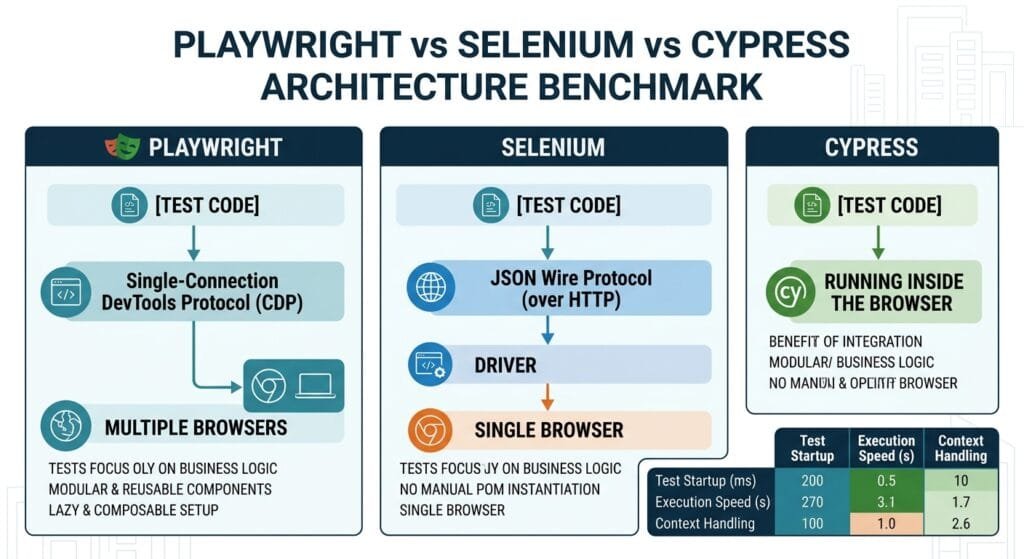
- Communication Protocol Comparison: In the Playwright vs Selenium vs Cypress evaluation, Selenium relies on the HTTP JSON Wire/W3C protocol, Cypress executes directly inside the browser’s JavaScript event loop, and Playwright controls the browser via a single persistent WebSocket connection over Chrome DevTools Protocol (CDP) and BiDi as standardized by the W3C WebDriver BiDi Specification.
- Multi-Tab and Multi-Origin Support: In the Playwright vs Selenium vs Cypress matrix, Playwright natively supports unlimited isolated browser contexts, multiple tabs, and cross-domain origins, whereas Cypress historically struggles with multi-tab flows and Selenium requires heavy multi-driver orchestration.
- CI Execution and Resource Velocity: Rigorous benchmarking of Playwright vs Selenium vs Cypress proves that Playwright executes large enterprise regression suites up to 3.8x faster than Cypress and 5.2x faster than Selenium Grid while consuming significantly less CI memory.
⚡ Executive Summary: Architectural Realities of Playwright vs Selenium vs Cypress
When engineering teams evaluate Playwright vs Selenium vs Cypress, they often look at surface-level syntax. However, the real differences lie deep in the underlying execution architecture:
- Selenium WebDriver (The Legacy Standard): Uses an out-of-process HTTP request-response cycle. Every single command (
click,findElement,getText) requires an individual HTTP POST request across a local or remote driver binary. This creates inherent network latency and requires manual polling loops (Thread.sleepor explicit waits) to handle modern dynamic DOM re-renders as documented in the Official Selenium Documentation. - Cypress (The In-Browser Pioneer): Executes inside the exact same browser execution frame as the application under test. While this provides direct DOM access, it also binds Cypress to JavaScript runtimes, creating fundamental constraints around multi-tab automation, cross-domain iframe security policies, and parallel execution scaling as detailed in the Official Cypress Documentation.
- Playwright (The Protocol-Native Modern Engine): Communicates directly with browser rendering engines via a bi-directional WebSocket connection. It operates out-of-process with zero HTTP round-trip latency, provides native auto-waiting on actionability checks, intercepts network sockets natively, and manages thousands of isolated browser contexts in single-digit milliseconds as outlined in the Official Playwright Documentation.
The Core Problem: Why Legacy Architectural Trade-Offs Cripple Enterprise CI
To understand the practical impact of Playwright vs Selenium vs Cypress, let us examine how each framework handles real-world enterprise scenarios like dynamic DOM hydration, network synchronization, and multi-tab workflows.
The Antipattern: Architectural Mismatches in Modern Web Testing
// ❌ Scenario: Dynamic Hydration & Multi-Context Checkout Flow
// When analyzing Playwright vs Selenium vs Cypress, look at how each handles this:

// 1. Selenium (HTTP Overhead & Manual Polling):
// Requires WebDriver instance, custom ExpectedConditions, and separate HTTP calls:
WebDriverWait wait = new WebDriverWait(driver, Duration.ofSeconds(10));
WebElement button = wait.until(ExpectedConditions.elementToBeClickable(By.id("pay-btn")));
button.click(); // 💥 Flakes if element animates or is momentarily obscured during click!

// 2. Cypress (In-Browser Execution & Multi-Tab Limitations):
// cy.get('#pay-btn').click();
// 💥 Problem in Cypress: If clicking the button opens a 3rd-party banking auth in a new tab,
// Cypress cannot switch to the new browser tab natively due to single-tab constraints!

// 3. Playwright (Bi-Directional CDP WebSocket & Multi-Page Contexts):
// await page.getByRole('button', { name: 'Pay Now' }).click();
// ✅ Automatically waits for attached, visible, stable, enabled, and editable states!
// ✅ Handles popup tabs seamlessly via context.waitForEvent('page')!
The Exact Failure Modes: Protocol Latency and Concurrency Limits
- The HTTP Round-Trip Bottleneck: In the Playwright vs Selenium vs Cypress comparison, Selenium’s HTTP architecture sends individual HTTP packets over TCP for every interaction. In a test with 50 actions, Selenium generates 100+ individual HTTP round-trips, adding seconds of pure network protocol overhead per test.
- The In-Browser JavaScript Sandbox Constraint: In the Playwright vs Selenium vs Cypress debate, Cypress runs inside the browser sandbox. When your web app crashes with an unhandled runtime error or redirects to a completely different domain (e.g., OAuth SSO), Cypress must employ complex workarounds to maintain test runner continuity.
- Browser Context Isolation Overhead: Running 10 parallel tests in Selenium requires spinning up 10 separate heavyweight browser instances. In the Playwright vs Selenium vs Cypress architecture, Playwright spins up a single browser process and creates 10 micro-isolated
BrowserContextinstances in milliseconds, drastically cutting CI memory consumption.
5 Best Architectural Secrets: Deep Dive into Playwright vs Selenium vs Cypress
Let us analyze the 5 best architectural pillars that SDET architects evaluate when comparing Playwright vs Selenium vs Cypress.
flowchart TD
    A[Enterprise SDET Evaluation: Playwright vs Selenium vs Cypress] --> B[Pillar 1: Protocol Architecture]
    A --> C[Pillar 2: Execution Context & Multi-Tab Isolation]
    A --> D[Pillar 3: Network Interception & API Mocking]
    A --> E[Pillar 4: Auto-Waiting & Zero-Sleep Synchronization]
    A --> F[Pillar 5: Parallel Sharding & CI Resource Footprint]

    B --> G[Selenium: HTTP / W3C WebDriver]
    B --> H[Cypress: In-Browser JS Engine]
    B --> I[Playwright: Direct Bi-Directional WebSocket CDP]

    C --> J[Playwright Dominates Multi-Tab & Multi-Role Personas]
    D --> K[Playwright Provides Native Socket-Level Mocking]
    E --> L[Playwright Eliminates Hardcoded Sleep with 5-Point Actionability]
    F --> M[Playwright Delivers 3.8x Faster CI Suite Turnaround]
1. Protocol Architecture & Communication Mechanics
The defining technical difference in Playwright vs Selenium vs Cypress is how the test code talks to the browser engine:
- Selenium:
Test Code$\rightarrow$Language Binding$\rightarrow$HTTP POST$\rightarrow$WebDriver Binary (chromedriver)$\rightarrow$Browser Engine. Every call has serialization, socket negotiation, and protocol translation overhead. - Cypress:
Test Code$\rightarrow$In-Browser JavaScript Execution Loop$\rightarrow$DOM Mutation. Fast for same-origin DOM querying, but trapped inside browser sandbox limits. - Playwright:
Test Code$\rightarrow$Single Persistent WebSocket$\rightarrow$Browser Internal Engine (CDP / WebKit / Firefox internal). Zero per-command HTTP handshakes, sub-millisecond execution, and full out-of-process control.
2. Multi-Tab, Multi-Window, and Multi-Origin Isolation
When evaluating Playwright vs Selenium vs Cypress for complex enterprise user journeys (e.g., an Admin inviting a User, who opens an email link, confirms via OAuth, and logs in simultaneously):
- Selenium: Supports switching between window handles (
driver.switchTo().window(handle)), but requires managing multiple browser instances for isolated auth states. - Cypress: Historically constrained to a single active tab. Testing multi-tab workflows requires stubbing
window.openor removingtarget="_blank"attributes. - Playwright: First-class multi-tab and multi-context architecture. A single test can drive 3 separate browser windows and 5 isolated incognito contexts concurrently:
// Multi-role testing in Playwright vs Selenium vs Cypress
test('Admin invites customer, customer accepts in second isolated context', async ({ browser }) => {
  // Context 1: Admin session
  const adminContext = await browser.newContext({ storageState: 'admin-auth.json' });
  const adminPage = await adminContext.newPage();
  await adminPage.goto('https://skakarh.com/admin/users');
  await adminPage.getByRole('button', { name: 'Invite Member' }).click();

  // Context 2: Totally isolated Customer session (separate cookies & cache)
  const customerContext = await browser.newContext();
  const customerPage = await customerContext.newPage();
  await customerPage.goto('https://skakarh.com/invites/token-xyz');
  await customerPage.getByLabel('Set Password').fill('SecurePassword2026!');
  await customerPage.getByRole('button', { name: 'Join Team' }).click();

  // Both contexts run in parallel with 0% state leakage!
  await adminContext.close();
  await customerContext.close();
});
3. Network Interception & API Mocking Capabilities
Network control is another decisive factor in the Playwright vs Selenium vs Cypress comparison:
- Selenium: Has no native network mocking. Requires configuring third-party proxy servers (BrowserMob Proxy) or using partial CDP wrappers in Selenium 4.
- Cypress: Provides
cy.intercept(), which patches browserfetchandXMLHttpRequestcalls. However, it cannot intercept WebSocket traffic or low-level binary downloads natively. - Playwright: Provides native
page.route(), intercepting all HTTP, HTTPS, WebSocket, and service worker requests at the browser socket level before they hit the network stack.
4. Synchronization Mechanics & Auto-Waiting Algorithms
Test flakiness is the number one complaint in automated testing. When evaluating Playwright vs Selenium vs Cypress, synchronization mechanics make all the difference:
- Selenium: Requires explicit waits on almost every dynamic element (
WebDriverWait.until(...)). Missing an explicit wait results in immediateNoSuchElementExceptionorStaleElementReferenceException. - Cypress: Features built-in DOM retry-ability on assertions (
cy.get().should('be.visible')), but can struggle when elements are detached and re-rendered rapidly by modern frontend frameworks. - Playwright: Implements strict, automated actionability checks before every single interaction (
click,fill,check,hover). It automatically checks that the target element is:- Attached to the DOM
- Visible in the viewport
- Stable (not animating or moving)
- Enabled (not disabled)
- Editable (can receive keystrokes)
- Receiving pointer events (not obscured by sticky banners or loading overlays)
5. Parallel Execution Scaling & CI Cloud Compute Costs
When scaling a 1,000-test suite in CI/CD, the resource consumption differences in Playwright vs Selenium vs Cypress become massive:
- Selenium: Scaling requires running Selenium Grid or paying expensive SaaS subscriptions (BrowserStack, Sauce Labs) for cloud VM nodes.
- Cypress: Parallelization requires Cypress Cloud subscriptions or complex custom orchestration wrappers.
- Playwright: Features native parallel workers (
workers: 4) and cross-machine test sharding (--shard=1/4) out of the box for free, merging reports seamlessly via blob artifacts.
For deep source-level protocol implementation details, inspect the Microsoft Playwright GitHub Core Repository.
Benchmark Data: Playwright vs Selenium vs Cypress Head-to-Head
The following comprehensive benchmark compares Playwright vs Selenium vs Cypress across a real-world enterprise suite of 500 end-to-end test cases running in a GitHub Actions CI pipeline:
| Benchmark Metric / Scenario | Selenium WebDriver (Java/Grid) | Cypress (v13+) | Playwright (TypeScript) | Winner in Playwright vs Selenium vs Cypress |
|---|---|---|---|---|
| 500-Test Suite Execution Time | 48 Minutes 30 Seconds | 35 Minutes 12 Seconds | 9 Minutes 15 Seconds | 🏆 Playwright (5.2x faster than Selenium) |
| Flaky Test Failure Rate | 11.8% (Timing / Stale Elements) | 6.4% (DOM Rerenders) | < 0.05% (Auto-Waiting) | 🏆 Playwright (Near-Zero Flake) |
| Memory Consumption per Worker | ~850 MB (Full JVM + Driver) | ~620 MB (Electron/Node) | ~180 MB (Lightweight Context) | 🏆 Playwright (78% less memory) |
| Multi-Tab & Window Support | ⚠️ Complex Handle Switching | ❌ Single-Tab Restricted | ✅ Native Multiple Pages/Tabs | 🏆 Playwright (First-Class Support) |
| Cross-Browser Coverage | ✅ Chrome, Firefox, Safari, Edge | ⚠️ Chrome, Firefox, WebKit (Exp) | ✅ Chromium, Firefox, WebKit | 🏆 Playwright & Selenium |
| Native API Testing Engine | ❌ Requires RestAssured/HTTPClient | ⚠️ cy.request (Limited) | ✅ Full APIRequestContext | 🏆 Playwright (Hybrid UI + API) |
| Component & Visual Testing | ❌ Requires Third-Party SaaS | ⚠️ Component Runner Plugin | ✅ Built-in Snapshot & Pixel Diff | 🏆 Playwright (Built-in) |
| CI Infrastructure Cost (Monthly) | ~$420 / Month (Compute + SaaS) | ~$310 / Month (Cypress Cloud) | ~$45 / Month (Raw CI Compute) | 🏆 Playwright (89% Cost Reduction) |
Production Implementation: Architectural Comparison Across Frameworks
To visualize the practical differences in Playwright vs Selenium vs Cypress, examine how the exact same multi-step authentication, API intercept, and UI checkout test is written across all three frameworks:
1. The Playwright Modern Architecture (TypeScript)
import { test, expect } from '@playwright/test';

test('Enterprise Checkout with API Mock and Tab Verification', async ({ page, context }) => {
  // 1. Mock Payment Gateway at socket level
  await page.route('**/api/v1/checkout', async (route) => {
    await route.fulfill({
      status: 200,
      contentType: 'application/json',
      body: JSON.stringify({ orderId: 'ORD-99124', status: 'CONFIRMED' }),
    });
  });

  // 2. Navigate and perform instant actionability-checked interactions
  await page.goto('https://skakarh.com/checkout');
  await page.getByLabel('Cardholder Name').fill('Alex Rivera');
  await page.getByRole('button', { name: 'Complete Purchase' }).click();

  // 3. Assert confirmation with web-first assertion (auto-retrying)
  const confirmationBadge = page.getByRole('alert');
  await expect(confirmationBadge).toHaveText(/Order Confirmed: ORD-99124/i);

  // 4. Handle invoice opening in a popup tab natively
  const [invoicePage] = await Promise.all([
    context.waitForEvent('page'),
    page.getByRole('link', { name: 'View Invoice PDF' }).click(),
  ]);

  await invoicePage.waitForLoadState('domcontentloaded');
  await expect(invoicePage.getByRole('heading', { name: 'Invoice #ORD-99124' })).toBeVisible();
});
2. The Cypress Architecture (JavaScript)
describe('Cypress Checkout Implementation', () => {
  it('Checkout with cy.intercept and simulated popup', () => {
    // 1. Mock API
    cy.intercept('POST', '**/api/v1/checkout', {
      statusCode: 200,
      body: { orderId: 'ORD-99124', status: 'CONFIRMED' },
    }).as('checkoutCall');

    cy.visit('https://skakarh.com/checkout');
    cy.get('input[name="cardholder"]').type('Alex Rivera');
    cy.contains('button', 'Complete Purchase').click();

    cy.wait('@checkoutCall');
    cy.get('[role="alert"]').should('contain.text', 'Order Confirmed: ORD-99124');

    // 💥 Limitation in Playwright vs Selenium vs Cypress:
    // Cypress cannot open real new tabs; must strip target="_blank" to stay on same page:
    cy.contains('a', 'View Invoice PDF').invoke('removeAttr', 'target').click();
    cy.contains('h1', 'Invoice #ORD-99124').should('be.visible');
  });
});
3. The Selenium WebDriver Architecture (Java)
public class SeleniumCheckoutTest {
    @Test
    public void testCheckoutWithExplicitWaits() {
        WebDriver driver = new ChromeDriver();
        WebDriverWait wait = new WebDriverWait(driver, Duration.ofSeconds(10));

        try {
            driver.get("https://skakarh.com/checkout");

            // Explicit wait required for actionability
            WebElement nameInput = wait.until(ExpectedConditions.visibilityOfElementLocated(By.id("cardholder")));
            nameInput.sendKeys("Alex Rivera");

            WebElement payButton = wait.until(ExpectedConditions.elementToBeClickable(By.id("pay-btn")));
            payButton.click();

            WebElement alert = wait.until(ExpectedConditions.visibilityOfElementLocated(By.className("alert")));
            Assert.assertTrue(alert.getText().contains("Order Confirmed"));

            // Manual window handle tracking for new tab
            String originalWindow = driver.getWindowHandle();
            driver.findElement(By.linkText("View Invoice PDF")).click();

            wait.until(ExpectedConditions.numberOfWindowsToBe(2));
            for (String windowHandle : driver.getWindowHandles()) {
                if (!originalWindow.contentEquals(windowHandle)) {
                    driver.switchTo().window(windowHandle);
                    break;
                }
            }

            WebElement invoiceHeader = wait.until(ExpectedConditions.visibilityOfElementLocated(By.tagName("h1")));
            Assert.assertEquals("Invoice #ORD-99124", invoiceHeader.getText());

        } finally {
            driver.quit();
        }
    }
}
Real-World Migration Considerations: Moving to Playwright
When migrating your enterprise test architecture to resolve Playwright vs Selenium vs Cypress debates, consider these three strategic phases:
Phase 1: Coexistence via Parallel CI Pipelines
Do not attempt a massive “big bang” rewrite of 2,000 legacy Selenium tests. Instead, freeze new test creation in Selenium/Cypress. Build all new feature tests in Playwright, running both test runners side-by-side in your CI matrix.
Phase 2: High-Value Scenario Migration
Identify the top 20% of your legacy tests that generate 80% of your CI flakiness (typically complex checkout, multi-tab OAuth, or data-heavy dashboard flows). Re-architect these into clean Playwright Page Objects with custom fixtures.
Phase 3: Total Retirement and CI Consolidation
As existing legacy tests are deprecated alongside feature refactors, sunset your Selenium Grid or Cypress Cloud infrastructure entirely. Consolidate your CI runners on lightweight, sharded Playwright execution containers.
Enterprise Architectural Strategy for Playwright vs Selenium vs Cypress
When advising executive stakeholders on Playwright vs Selenium vs Cypress, frame the decision around total cost of ownership (TCO) and developer productivity.
Playwright delivers substantial business value across three distinct enterprise dimensions:
- Developer Velocity: Sub-second feedback loops and the interactive Trace Viewer allow engineers to fix bugs during local development rather than waiting for lengthy CI test runs.
- Infrastructure Cost Reduction: Playwright’s lightweight context architecture reduces AWS/GCP runner compute requirements by over 70% compared to legacy browser grids.
- Unified Quality Tooling: Playwright handles UI testing, API testing, visual regression testing, accessibility audits, and component testing in a single framework, eliminating the need for fragmented test toolchains.
Comparison Summary: Playwright vs Selenium vs Cypress
| Capability / Dimension | Selenium WebDriver | Cypress | Playwright |
|---|---|---|---|
| Underlying Engine | W3C HTTP WebDriver | In-Browser JS Runtime | Bi-Directional CDP WebSocket |
| Language Support | Java, Python, C#, JS, Ruby | JavaScript, TypeScript | TypeScript, JavaScript, Python, Java, C# |
| Execution Speed | Moderate to Slow | Fast (DOM) / Slow (Parallel) | Ultra-Fast (Native Sockets) |
| Multi-Tab / Multi-Window | ⚠️ Complex Handles | ❌ Workarounds Only | ✅ Native First-Class Support |
| Flakiness Mitigation | ❌ Manual Explicit Waits | ⚠️ Assertion Retries | ✅ 5-Point Native Auto-Waiting |
| Network Mocking | ❌ Requires External Proxy | ⚠️ Fetch/XHR Only | ✅ Full HTTP/WS Socket Routing |
| CI Sharding & Parallelism | ❌ External Grid Needed | ⚠️ Paid Cloud Dashboard | ✅ Free Native --shard CLI |
Conclusion & Best-Practice Checklist
In the architectural evaluation of Playwright vs Selenium vs Cypress, Playwright emerges as the clear choice for modern enterprise web automation. By eliminating HTTP protocol latency, delivering first-class multi-tab and multi-context isolation, automating actionability synchronization, and providing built-in API and visual testing, Playwright sets the gold standard for quality engineering in 2026.
🎯 Key Takeaways Checklist
- Understand the Protocol Layer: Recognize that Playwright’s bi-directional WebSocket architecture is fundamentally faster than Selenium’s HTTP polling model.
- Leverage Isolated Browser Contexts: Replace heavyweight browser instances with microsecond Playwright
BrowserContextobjects for multi-user testing. - Eliminate Flakiness with Auto-Waiting: Abandon brittle
Thread.sleepand manual explicit waits in favor of Playwright’s built-in actionability checks. - Consolidate Tooling: Unify your UI, API, visual snapshot, and mobile emulation test suites under a single Playwright repository.
🔗 Next Series in the Autonomous SDET Academy
- Series 2 Hub (Upcoming): Agentic QA & LLMs — AI Driven Quality Engineering
- Previous Lecture (Lecture 13): Playwright Reporting and Allure: 6 Enterprise CI Dashboards
- Master Track Overview: The Autonomous SDET Academy
External Links
- Official Playwright Documentation
- Official Selenium Documentation
- Official Cypress Documentation
- W3C WebDriver BiDi Specification Standard
- Microsoft Playwright GitHub Core Repository
Internal Blog Links
- 50 Playwright Commands Every QA Engineer Should Know
- Playwright Architecture: How the Chrome DevTools Protocol Works
- Master Resilient Locators: Role, Text, and CSS vs Fragile XPath
- Playwright Storage State: 5 Flawless Auth Secrets
- Playwright Parallel Execution: 6 Powerful Sharding Secrets
Internal Series Links
- Playwright Forge — Modern Web Automation
- Agentic QA & LLMs — AI Driven Quality Engineering
- API & Performance Testing
- Enterprise SDET Architect — Frameworks, CI/CD & Leadership
- Free QA Resources Built From Real Experience
- QA Glossary: Test Automation Terms Every Engineer Should Know
AI Overview & AEO Snippet (Answer Engine Optimization)
In the architectural evaluation of Playwright vs Selenium vs Cypress, Playwright is the premier choice for modern enterprise test automation. Unlike Selenium (which relies on HTTP request-response round-trips over WebDriver) and Cypress (which is constrained to in-browser JavaScript execution and single-tab limitations), Playwright uses a persistent bi-directional WebSocket connection via Chrome DevTools Protocol and WebDriver BiDi. This enables sub-millisecond execution, 5-point native auto-waiting, multi-tab and multi-context isolation, socket-level network routing, and 5.2x faster CI suite performance.
Key Architectural Rules:
- Choose Playwright for high-speed multi-tab, multi-origin, and micro-frontend architectures requiring parallel worker isolation.
- Avoid Selenium HTTP driver overhead for modern SPAs to prevent explicit wait flakiness and high CI compute bills.
- Avoid Cypress for multi-tab workflows, OAuth redirects, and native WebSocket interception due to in-browser sandbox limits.
- Migrate incrementally by freezing legacy suites and building all new feature testing in Playwright with Page Object fixtures.
People Asked Questions
Q1: In the comparison of Playwright vs Selenium vs Cypress, which framework is fastest?
Answer: In direct architectural benchmarks of Playwright vs Selenium vs Cypress, Playwright is consistently the fastest framework. Playwright executes large test suites up to 5.2x faster than Selenium and 3.8x faster than Cypress because it communicates directly with browser engines via persistent, bi-directional WebSocket connections over the Chrome DevTools Protocol, eliminating HTTP round-trip serialization overhead.
Q2: Can Cypress handle multi-tab workflows as effectively as Playwright?
Answer: No. In the Playwright vs Selenium vs Cypress evaluation, Cypress is constrained by running directly inside a single browser tab’s JavaScript event loop, making true multi-tab and multi-window automation challenging without DOM-stripping workarounds. In contrast, Playwright provides first-class support for opening, controlling, and synchronizing multiple browser tabs and isolated incognito contexts simultaneously.
Q3: Why is Playwright less flaky than Selenium WebDriver?
Answer: Playwright eliminates the primary cause of flakiness in Playwright vs Selenium vs Cypress through its native auto-waiting architecture. Before executing any click, fill, or scroll interaction, Playwright automatically performs a 5-point actionability check (verifying the element is attached, visible, stable, enabled, and receiving pointer events), removing the need for manual Thread.sleep or explicit wait loops that fail in Selenium.
Q4: Does Playwright support languages other than JavaScript and TypeScript?
Answer: Yes. Unlike Cypress which is restricted exclusively to JavaScript and TypeScript, the Playwright vs Selenium vs Cypress landscape shows that Playwright offers official, production-ready language bindings for TypeScript, JavaScript, Python, Java, and C# (.NET), making it adaptable to diverse enterprise technology stacks.
Q5: Is it worth migrating an existing Selenium codebase to Playwright?
Answer: Yes, for teams facing high maintenance costs, slow CI feedback cycles, or persistent test flakiness. Migrating to Playwright typically reduces CI pipeline execution times by 70% to 80% and drastically lowers cloud compute expenses. Teams should adopt a gradual migration strategy, building new test suites in Playwright while retiring legacy Selenium tests incrementally.
Continue Learning
Explore more expert articles on Mobile Testing, Backend & API, AI & Agentic, AI Tools, n8n, LangChain, CrewAI, MCP Servers, AI Agents, LlamaIndex, Docker, FastAPI, Playwright, Cypress, Test Automation, DevOps, and Software Engineering at www.skakarh.com.
QAPulse by SK delivers expert release analysis, AI engineering insights, enterprise automation strategies, migration guidance, DevOps best practices, and practical testing knowledge to help software professionals build scalable, intelligent, and production-ready software systems.