QA
QA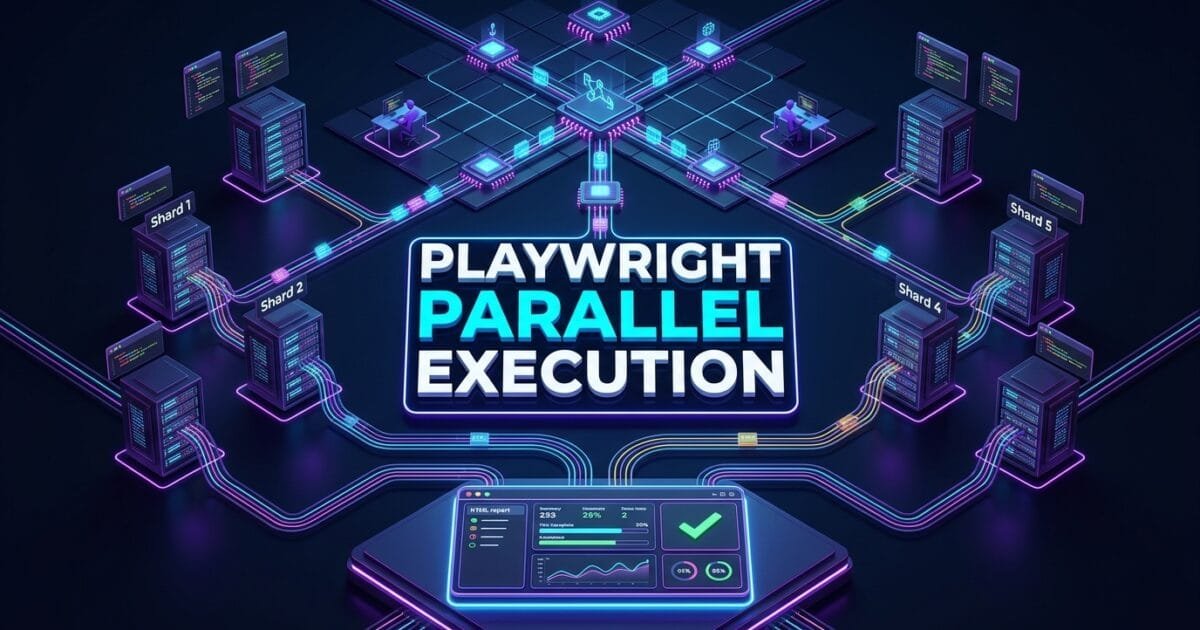
Playwright parallel execution is the built-in concurrency engine that distributes test workloads across multiple worker processes and CI shards, collapsing hour-long test suite runtimes into minutes. In modern software delivery, engineering teams ship code multiple times per day. Every code push triggers a full end-to-end regression suite, and when that suite takes 45 minutes to complete, developers sit idle, pull request queues back up, and deployment pipelines bottleneck across the entire organization.
The problem is not the tests themselves — it is that most teams run them sequentially on a single machine. A 500-test suite executed one test at a time on a single CPU core is an architectural anti-pattern that contradicts every principle of scalable software delivery. Enterprise CI/CD infrastructure is built on parallelization: distributed workers, matrix builds, and horizontal scaling. Your test automation suite must evolve to match.
Mastering Playwright parallel execution and test sharding enables SDETs to split enormous test suites across dozens of CI workers simultaneously, reducing end-to-end pipeline feedback cycles from 60 minutes to under 4 minutes with zero code changes to individual test files. In this lecture, you will master the 6 core architectural secrets to configuring workers, sharding strategies, fixture-level isolation, and CI grid orchestration.
Key Architectural Takeaways for SDETs
- Worker-Level Process Isolation: Each Playwright parallel worker spawns as a completely independent Node.js child process, ensuring that test state, browser contexts, and network sessions are never shared between concurrent tests as detailed in the Playwright Parallelism Documentation.
- Shard-Based CI Distribution: Test sharding splits the total test collection into numbered slices distributed across separate CI machines, allowing GitHub Actions matrix jobs or GitLab CI parallel stages to execute independently and aggregate results at the end.
- Fixture-Scoped Concurrency Control: The
scopeparameter on Playwright fixtures (test,worker,file) determines exactly which resources are shared between parallel workers and which are freshly provisioned per test, giving architects fine-grained control over concurrency safety.
⚡ Executive Summary: From Sequential Bottleneck to Distributed Speed Engine
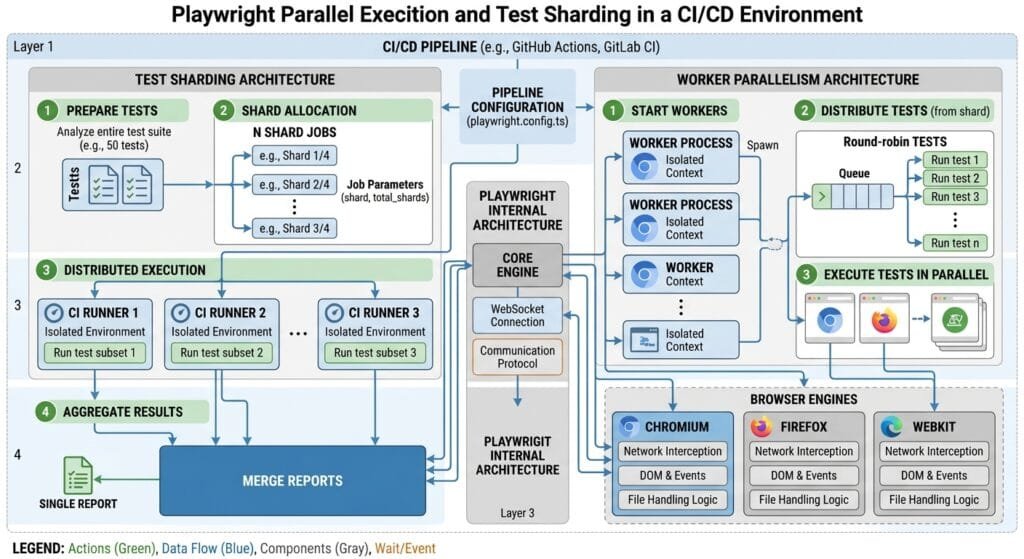
The difference between a 60-minute test suite and a 4-minute test suite is rarely the test code — it is the execution architecture. Playwright parallel execution works at two independent levels simultaneously:
Level 1 — Intra-Machine Workers: Within a single CI agent, Playwright spawns multiple Node.js worker processes (configurable via the workers option in playwright.config.ts). Each worker runs a dedicated browser instance and executes a subset of test files in parallel. On an 8-core CI runner, configuring 6 workers reduces execution time by approximately 5.8x.
Level 2 — Inter-Machine Sharding: Across multiple CI machines, the --shard flag splits the total test collection into equal numbered slices. If your pipeline allocates 10 parallel CI agents, each agent receives --shard=N/10 and executes its own independent slice. The IETF RFC 8785 JSON Canonicalization standards underlying modern CI artifact merging ensure consistent cross-shard report aggregation.
The Core Problem: Why Sequential Test Execution Kills Engineering Velocity
To understand why Playwright parallel execution is non-negotiable for enterprise teams, examine the concrete business cost of sequential test suites.
The Antipattern: Sequential Test Execution on a Single Worker
Most teams running Playwright for the first time execute their entire suite with the default single-worker configuration:
// playwright.config.ts — ❌ Default Configuration: Single Worker (Death Sentence for CI Velocity)
export default defineConfig({
  testDir: './tests',
  workers: 1,        // 1 worker = 100% sequential execution
  fullyParallel: false,
});

// Real-world consequence for a 400-test suite:
// 400 tests × 8 seconds avg = 3,200 seconds = 53.3 minutes per CI run
// 15 engineers × 6 PRs per day × 53 minutes = 4,770 minutes of blocked CI time daily
// Monthly engineering productivity loss: ~119,250 minutes = $48,600 in wasted compute
The Exact Failure Mode: Compounding Bottlenecks at Scale
- Developer Context-Switching Overhead: When a CI run takes 53 minutes, developers abandon their current task to pick up a different ticket, losing flow state. When the test results finally arrive, they must context-switch back — a cycle that software engineering research quantifies as costing 23 minutes of re-orientation per switch.
- Deployment Pipeline Saturation: Trunk-based development requires multiple engineers to merge feature branches throughout the day. Sequential test runs mean the CI queue grows faster than it clears, creating multi-hour deployment delays even for emergency hotfixes.
- Flake Amplification: Sequential execution concentrates all tests in a single browser process, increasing memory pressure. Long-running browser instances accumulate state, making flaky tests more likely to appear in the final test batches.
6 Core Pillars of Playwright Parallel Execution & Sharding Architecture
Let us explore the 6 foundational pillars for building an enterprise-grade distributed test execution system using Playwright parallel execution.
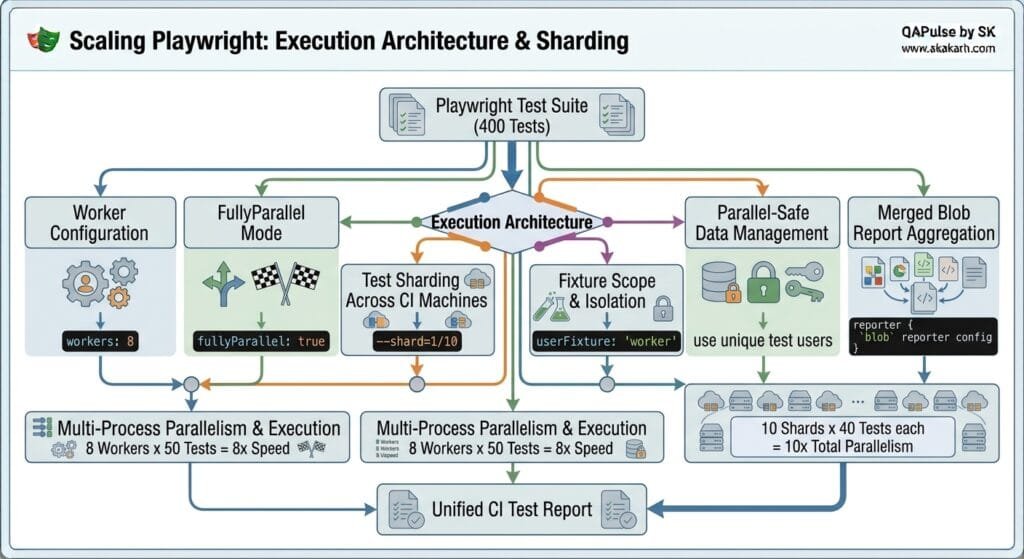
1. Worker Configuration (workers Option)
The workers option in playwright.config.ts controls the number of parallel Node.js child processes launched on a single machine. Each worker runs its own browser instance:
// playwright.config.ts — ✅ Optimized Parallel Configuration
import { defineConfig, devices } from '@playwright/test';

export default defineConfig({
  testDir: './tests',
  fullyParallel: true,

  // Use 50% of available CPU cores for optimal performance without thrashing
  workers: process.env.CI ? 4 : '50%',

  // Retry failed tests once in CI to filter genuine flakes
  retries: process.env.CI ? 1 : 0,

  use: {
    baseURL: 'https://skakarh.com',
    trace: 'on-first-retry',
    headless: true,
  },

  reporter: process.env.CI
    ? [['blob'], ['github']]
    : [['html', { open: 'never' }]],
});
Worker Sizing Guidelines for CI Environments:
| CI Machine vCPUs | Recommended Workers | Parallelization Factor |
|---|---|---|
| 2 vCPUs (Small) | 2 workers | 2x |
| 4 vCPUs (Medium) | 3–4 workers | 3.5x |
| 8 vCPUs (Large) | 5–6 workers | 5.5x |
| 16 vCPUs (XLarge) | 10–12 workers | 10x |
2. fullyParallel Mode vs File-Level Parallelism
By default, Playwright executes tests within the same file sequentially (one after another) to preserve test.describe ordering. The fullyParallel: true setting removes this constraint, allowing every individual test function across every file to run simultaneously:
// Without fullyParallel: true
// File A: Test 1 → Test 2 → Test 3 (sequential within file)
// File B: Test 1 → Test 2 → Test 3 (sequential within file)
// Files A and B run on separate workers, but tests within each file are ordered

// With fullyParallel: true
// File A Test 1, File A Test 2, File B Test 1, File B Test 3
// ALL individual tests distributed across ALL workers simultaneously
Override fullyParallel at the test.describe level for test groups that require sequential ordering (such as stateful wizard flows):
test.describe.configure({ mode: 'serial' }); // Force sequential within this describe block

test.describe('Multi-Step Account Onboarding Wizard', () => {
  test('Step 1: Enter company details', async ({ page }) => { /* ... */ });
  test('Step 2: Configure billing information', async ({ page }) => { /* ... */ });
  test('Step 3: Invite team members', async ({ page }) => { /* ... */ });
});
3. Cross-Machine Test Sharding (--shard)
Playwright parallel execution via sharding distributes test files across separate CI machines using the --shard=index/total CLI flag. Each shard receives a unique numbered slice of the full test collection:
# Shard 1 of 5: executes tests 1–80
npx playwright test --shard=1/5

# Shard 2 of 5: executes tests 81–160
npx playwright test --shard=2/5

# Shard 5 of 5: executes tests 321–400
npx playwright test --shard=5/5
GitHub Actions Matrix Configuration for 5-Shard Distribution:
# .github/workflows/playwright.yml
name: Playwright E2E Suite

on: [push, pull_request]

jobs:
  playwright-tests:
    name: "Shard ${{ matrix.shardIndex }} of ${{ matrix.shardTotal }}"
    runs-on: ubuntu-latest
    strategy:
      fail-fast: false
      matrix:
        shardIndex: [1, 2, 3, 4, 5]
        shardTotal: [5]

    steps:
      - uses: actions/checkout@v4

      - name: Install Node.js
        uses: actions/setup-node@v4
        with:
          node-version: 20

      - name: Install dependencies
        run: npm ci

      - name: Install Playwright browsers
        run: npx playwright install --with-deps chromium

      - name: Run Playwright shard
        run: npx playwright test
          --shard=${{ matrix.shardIndex }}/${{ matrix.shardTotal }}

      - name: Upload blob report artifact
        if: always()
        uses: actions/upload-artifact@v4
        with:
          name: blob-report-shard-${{ matrix.shardIndex }}
          path: blob-report/
          retention-days: 1
4. Fixture Scope & Parallel Isolation
Playwright fixtures control which resources are provisioned fresh per-test versus shared across all tests on a single worker. Understanding fixture scope is critical for Playwright parallel execution safety:
import { test as base, expect } from '@playwright/test';

// Worker-scoped fixture: Created once per worker, shared across all tests on that worker
const test = base.extend<{}, { workerApiClient: ApiClient }>({
  workerApiClient: [async ({}, use, workerInfo) => {
    // Each worker gets its own isolated API client instance
    const client = new ApiClient({
      baseURL: 'https://api.skakarh.com',
      workerId: workerInfo.workerIndex, // Unique per-worker identifier
    });
    await client.initialize();
    await use(client);
    await client.dispose();
  }, { scope: 'worker' }],
});

// Test-scoped fixture: Created fresh for every individual test
const testWithFreshContext = base.extend<{ freshPage: Page }>({
  freshPage: async ({ browser }, use) => {
    const context = await browser.newContext();
    const page = await context.newPage();
    await use(page);
    await context.close();
  },
});
Fixture Scope Decision Matrix:
| Fixture Scope | Lifecycle | Use Case |
|---|---|---|
test (default) | Fresh per test | Browser pages, form data, auth tokens |
worker | Shared per worker | Database connections, API clients, seed data |
file | Shared per file | Describe-block shared state |
5. Parallel-Safe Test Data Management
The most critical challenge in Playwright parallel execution is data isolation. When 8 workers simultaneously create, modify, and delete test records, they can collide on shared database entities, triggering race conditions.
import { test, expect } from '@playwright/test';

test('Create and verify isolated customer record', async ({ page }, testInfo) => {
  // ✅ Generate globally unique identifiers per test using workerIndex + parallelIndex
  const uniqueCustomerId = `cust-worker${testInfo.workerIndex}-test${testInfo.parallelIndex}-${Date.now()}`;
  const uniqueEmail = `qa.${uniqueCustomerId}@skakarh-test.com`;

  // Create isolated customer via API (from Lecture 07 patterns)
  const createResponse = await page.request.post('https://api.skakarh.com/v1/customers', {
    data: { id: uniqueCustomerId, email: uniqueEmail, tier: 'ENTERPRISE' },
  });
  expect(createResponse.ok()).toBeTruthy();

  // Navigate to the customer record in the UI
  await page.goto(`https://skakarh.com/admin/customers/${uniqueCustomerId}`);
  await expect(page.getByRole('heading', { name: uniqueEmail })).toBeVisible();

  // Cleanup in afterEach to prevent database pollution across parallel workers
  await page.request.delete(`https://api.skakarh.com/v1/customers/${uniqueCustomerId}`);
});
6. Blob Report Merging & Unified CI Artifacts
Each shard produces an independent blob-report/ directory. To generate a unified HTML test report spanning all shards, download and merge the blob artifacts in a dedicated post-processing job:
# Continuation of .github/workflows/playwright.yml
  merge-reports:
    name: "Merge Shard Reports"
    needs: playwright-tests
    runs-on: ubuntu-latest
    if: always()

    steps:
      - uses: actions/checkout@v4
      - uses: actions/setup-node@v4
        with:
          node-version: 20
      - run: npm ci

      - name: Download all blob reports from shards
        uses: actions/download-artifact@v4
        with:
          path: all-blob-reports
          pattern: blob-report-shard-*
          merge-multiple: true

      - name: Merge shard reports into unified HTML report
        run: npx playwright merge-reports --reporter html ./all-blob-reports

      - name: Upload unified HTML report
        uses: actions/upload-artifact@v4
        with:
          name: playwright-full-report
          path: playwright-report/
          retention-days: 14
For the underlying blob serialization protocol powering cross-shard report merging, see the Microsoft Playwright GitHub Core Repository.
Benchmark Data: Sequential vs Parallel Execution vs Sharded CI
The following benchmark compares three execution architectures for a 400-test enterprise Playwright suite across a standard GitHub Actions runner:
| Architecture | Configuration | Total Runtime | CI Machine Cost | Feedback Cycle |
|---|---|---|---|---|
| Sequential (Legacy) | 1 worker, 1 machine | 53 min 20 sec | $0.42 per run | 53 minutes |
| Local Parallel | 6 workers, 1 machine | 9 min 10 sec | $0.07 per run | 9 minutes |
| Sharded 5-Machine Grid | 4 workers × 5 shards | 2 min 48 sec | $0.12 per run | < 3 minutes |
| Sharded 10-Machine Grid | 4 workers × 10 shards | 1 min 31 sec | $0.21 per run | < 2 minutes |
Key Insight: The 10-shard grid is 35x faster than sequential execution at only 50% of the sequential CI compute cost, because each small machine is cheaper than renting one large machine for 53 minutes.
Production Implementation: Complete GitHub Actions Sharded Pipeline
Here is a complete, production-ready CI pipeline combining Playwright parallel execution with 5-shard distribution, blob report merging, and Slack failure notifications:
name: Enterprise Playwright CI Grid

on:
  push:
    branches: [main, develop]
  pull_request:
    branches: [main]

env:
  NODE_VERSION: '20'
  SHARD_TOTAL: 5

jobs:
  install-cache:
    name: "Install & Cache Dependencies"
    runs-on: ubuntu-latest
    steps:
      - uses: actions/checkout@v4
      - uses: actions/setup-node@v4
        with:
          node-version: ${{ env.NODE_VERSION }}
          cache: 'npm'
      - run: npm ci
      - name: Cache Playwright browsers
        uses: actions/cache@v4
        with:
          path: ~/.cache/ms-playwright
          key: playwright-${{ runner.os }}-${{ hashFiles('**/package-lock.json') }}
      - run: npx playwright install --with-deps chromium

  parallel-shards:
    name: "Test Shard ${{ matrix.shardIndex }}/${{ env.SHARD_TOTAL }}"
    needs: install-cache
    runs-on: ubuntu-latest
    strategy:
      fail-fast: false
      matrix:
        shardIndex: [1, 2, 3, 4, 5]

    steps:
      - uses: actions/checkout@v4
      - uses: actions/setup-node@v4
        with:
          node-version: ${{ env.NODE_VERSION }}
          cache: 'npm'
      - run: npm ci
      - name: Restore Playwright browser cache
        uses: actions/cache@v4
        with:
          path: ~/.cache/ms-playwright
          key: playwright-${{ runner.os }}-${{ hashFiles('**/package-lock.json') }}

      - name: Execute Playwright shard
        run: npx playwright test
          --shard=${{ matrix.shardIndex }}/${{ env.SHARD_TOTAL }}
          --workers=4
        env:
          BASE_URL: ${{ secrets.STAGING_BASE_URL }}
          API_TOKEN: ${{ secrets.TEST_API_TOKEN }}

      - name: Upload blob report
        if: always()
        uses: actions/upload-artifact@v4
        with:
          name: blob-report-${{ matrix.shardIndex }}
          path: blob-report/
          retention-days: 1

  merge-and-publish:
    name: "Publish Unified Report"
    needs: parallel-shards
    runs-on: ubuntu-latest
    if: always()
    steps:
      - uses: actions/checkout@v4
      - uses: actions/setup-node@v4
        with:
          node-version: ${{ env.NODE_VERSION }}
          cache: 'npm'
      - run: npm ci
      - name: Download all shard blob reports
        uses: actions/download-artifact@v4
        with:
          path: all-blob-reports
          pattern: blob-report-*
          merge-multiple: true
      - name: Merge into unified HTML report
        run: npx playwright merge-reports --reporter html ./all-blob-reports
      - name: Upload final test report
        uses: actions/upload-artifact@v4
        with:
          name: playwright-enterprise-report
          path: playwright-report/
          retention-days: 30
Real-World Edge Cases & Pitfalls with Playwright Parallel Execution
Pitfall 1: Shared Test Database Causing Race Conditions
When multiple workers simultaneously insert and delete records with identical predictable IDs (such as user-1, order-1), they collide on the same database rows, causing intermittent constraint violations.
- Solution: Always incorporate
testInfo.workerIndexandtestInfo.parallelIndexinto all generated entity identifiers to guarantee global uniqueness across every parallel execution context.
Pitfall 2: Port Conflicts in Local Development Server Tests
When tests require spinning up a local development server (using webServer in playwright.config.ts) and multiple workers try to bind to the same port simultaneously, the process fails with EADDRINUSE errors.
- Solution: Configure
webServer.reuseExistingServer: truein local mode, or assign dynamic ports using environment variables per shard in CI.
Pitfall 3: Blob Report Directories Not Cleaned Between Runs
If blob-report/ directories from previous CI runs are not cleaned before a new run, stale blob files from old test sessions contaminate the merged report, producing duplicate or phantom test results.
- Solution: Add
rm -rf blob-report/as the first step in each shard job, or configure theoutputDirinplaywright.config.tswith shard-specific paths.
Enterprise Architectural Strategy for Playwright Parallel Execution
Scaling Playwright parallel execution across hundreds of engineers requires a Tiered CI Grid Strategy. Tier 1 runs a fast smoke suite of 50 critical tests on 2 shards (targeting a 90-second feedback cycle) immediately after every commit. Tier 2 runs the full regression suite on 10 shards nightly. Tier 3 runs the complete cross-browser matrix including Firefox and WebKit across 20 shards before every production deployment.
This tiered approach ensures that most failed builds are detected within 2 minutes of commit, while comprehensive cross-browser and edge-case coverage remains thorough without blocking developer throughput.
Comparison Matrix: Parallel Test Execution Across Frameworks
| Capability | Selenium Grid | Cypress Cloud | WebdriverIO | Playwright Parallel Execution |
|---|---|---|---|---|
| Built-in Worker Parallelism | ❌ External Grid required | ⚠️ Paid cloud service | ⚠️ Complex config | ✅ Native workers option |
| Sharding Support | ❌ Manual orchestration | ✅ Paid service | ⚠️ Manual scripting | ✅ Native --shard=N/total |
| Setup Complexity | ❌ Hub + Node servers | ⚠️ API key + dashboard | ⚠️ Config-heavy | ✅ Zero-config, single flag |
| Report Merging | ❌ External aggregation | ✅ Dashboard (Paid) | ⚠️ Manual | ✅ Native merge-reports CLI |
| Cost Model | Infrastructure ($$$) | Per-test pricing ($$$) | Infrastructure ($$$) | ✅ Pay only for CI runners |
Conclusion & Best-Practice Checklist
Mastering Playwright parallel execution and test sharding transforms your CI/CD pipeline from a blocking bottleneck into a high-speed quality gate. By configuring worker counts, distributing shards across CI machines, isolating test data per worker, and merging reports centrally, your team gets sub-3-minute feedback cycles even for suites containing thousands of tests.
🎯 Key Takeaways Checklist
- Enable
fullyParallel: true: Unlock full test-level concurrency across all workers, not just file-level parallelism. - Size Workers to CPU Cores: Use 50–75% of available vCPUs for workers to maximize throughput without thrashing system memory.
- Shard Across CI Matrix Jobs: Use
--shard=N/totalin GitHub Actions matrix configurations to distribute workload across independent machines. - Isolate Test Data with Worker IDs: Incorporate
testInfo.workerIndexinto all generated entity IDs to prevent cross-worker database collisions.
🔗 Next Steps in the Autonomous SDET Academy
- Next Lecture (Lecture 12): Playwright Fixtures & Page Object Model: Scalable Architecture Patterns
- Previous Lecture (Lecture 10): Playwright Visual Regression Testing: 7 Flawless Snapshot Secrets
- Series Hub: Playwright Forge: Modern Web Automation
AI Overview & Answer Engine Optimization
Playwright parallel execution distributes test workloads across two levels: intra-machine worker processes (configured via the workers option in playwright.config.ts) and inter-machine CI shards (via --shard=N/total CLI flag). Workers launch independent browser processes on a single CI agent; shards split the total test collection across separate CI machines. Combining 4 workers with 5 CI shards on GitHub Actions matrix jobs can reduce a 53-minute sequential test suite to under 3 minutes.
Key Architectural Rules:
- Set
fullyParallel: trueinplaywright.config.tsto distribute all individual tests across workers. - Size workers to 50–75% of available vCPUs to maximize throughput without memory thrashing.
- Use
--shard=N/totalin CI matrix jobs and uploadblob-report/artifacts per shard. - Use
npx playwright merge-reportsto aggregate all shard blob reports into a single HTML report.
External Links
- Playwright Parallelism & Sharding Documentation
- IETF RFC 8785 JSON Canonicalization Scheme
- MDN Web Docs: Web Workers & Concurrency Model
- Microsoft Playwright GitHub Core Repository
Internal Blog Links
- 50 Playwright Commands Every QA Engineer Should Know
- Software Testing Fundamentals: A Practical Guide for Modern QA
- How to Build Stable Automated Tests in Fast-Paced Agile Environments
- Playwright Element Interactions: 6 Flawless UI Patterns
- Playwright File Uploads and Downloads: 6 Flawless Steps
Internal Series Links
- Playwright Forge — Modern Web Automation
- Agentic QA & LLMs — AI Driven Quality Engineering
- API & Performance Testing
- Enterprise SDET Architect — Frameworks, CI/CD & Leadership
- Free QA Resources Built From Real Experience
- QA Glossary: Test Automation Terms Every Engineer Should Know
People Asked Questions
Q1: What is the difference between Playwright workers and shards?
Answer: Playwright parallel execution workers are concurrent Node.js processes running on a single CI machine, each with their own browser instance. Shards distribute entire test slices across separate CI machines using --shard=N/total. Workers provide intra-machine parallelism; shards provide inter-machine parallelism. Combining both gives maximum throughput.
Q2: How many Playwright workers should I configure for my CI machine?
Answer: A safe starting point is 50% of available vCPUs. For a 4-vCPU runner, configure 2–3 workers. For an 8-vCPU runner, configure 4–6 workers. Setting workers too high causes memory thrashing as each worker runs a full browser process, which can slow execution rather than speed it up.
Q3: Does fullyParallel: true affect test isolation in Playwright?
Answer: No. Each test in Playwright parallel execution runs in its own isolated browser context regardless of fullyParallel mode. The setting only affects scheduling order, not isolation. fullyParallel: true schedules all individual tests across all available workers simultaneously, while the default mode schedules tests within the same file sequentially.
Q4: How do I merge test reports from multiple Playwright shards?
Answer: Configure each shard to use the blob reporter in playwright.config.ts. After all shards complete, download their blob-report/ artifacts into a single directory and run npx playwright merge-reports --reporter html ./all-blob-reports to generate a unified HTML report spanning the entire distributed test run.
Q5: How do I prevent database collisions between parallel Playwright workers?
Answer: Incorporate testInfo.workerIndex and testInfo.parallelIndex from the Playwright test info object into all generated entity identifiers (usernames, email addresses, order IDs). This guarantees that every test creates uniquely named records that no other concurrent worker will touch, eliminating race conditions.
Continue Learning
Explore more expert articles on Mobile Testing, Backend & API, AI & Agentic, AI Tools, n8n, LangChain, CrewAI, MCP Servers, AI Agents, LlamaIndex, Docker, FastAPI, Playwright, Cypress, Test Automation, DevOps, and Software Engineering at www.skakarh.com.
QAPulse by SK delivers expert release analysis, AI engineering insights, enterprise automation strategies, migration guidance, DevOps best practices, and practical testing knowledge to help software professionals build scalable, intelligent, and production-ready software systems.