 QA
QA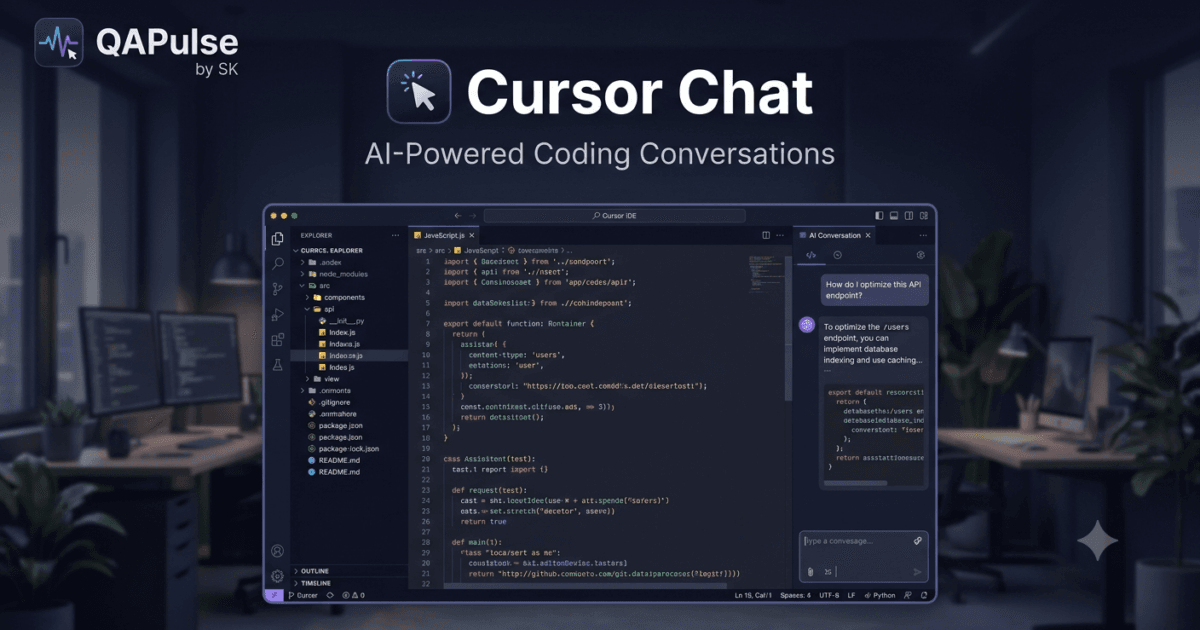
Why Cursor Chat Is Transforming Software Development
Modern software development is no longer limited to writing code manually. Developers now collaborate with AI to understand complex codebases, generate implementations, review pull requests, debug production issues, and learn unfamiliar technologies. Instead of constantly switching between documentation websites, search engines, and multiple AI tools, developers increasingly prefer having AI integrated directly into their development environment.
This is exactly what Cursor Chat provides.
Rather than acting as a standalone chatbot, Cursor Chat functions as an intelligent development companion embedded inside the Cursor IDE. It understands your project, remembers conversation context, analyzes source files, and assists with coding tasks without requiring you to leave your editor.
For developers building modern applications, mastering Cursor Chat can significantly improve productivity while reducing context switching.
What Is Cursor Chat?
Cursor Chat is the built-in conversational AI interface available inside Cursor IDE that enables developers to interact with AI using natural language while working on their software projects.
Unlike traditional AI chat applications that operate independently of your codebase, Cursor Chat has awareness of your development environment and can use repository context to generate more accurate and relevant responses.
Developers can use Cursor Chat to:
- Explain existing code
- Generate new features
- Review implementations
- Fix bugs
- Refactor applications
- Create documentation
- Generate automated tests
- Learn new frameworks
- Improve code quality
This project-aware interaction makes Cursor Chat a practical tool throughout the software development lifecycle.
Why Developers Prefer Cursor Chat
The biggest advantage of Cursor Chat is that it keeps developers inside their coding environment.
Instead of copying code into an external AI platform, developers can ask questions directly within the IDE while the AI understands the surrounding project context.
Key benefits include:
- Reduced context switching
- Faster feature development
- Repository-aware responses
- Better code explanations
- Improved debugging
- Easier code reviews
- Faster onboarding
- More efficient learning
These advantages help developers stay focused on solving engineering problems rather than managing multiple tools.
How Cursor Chat Works
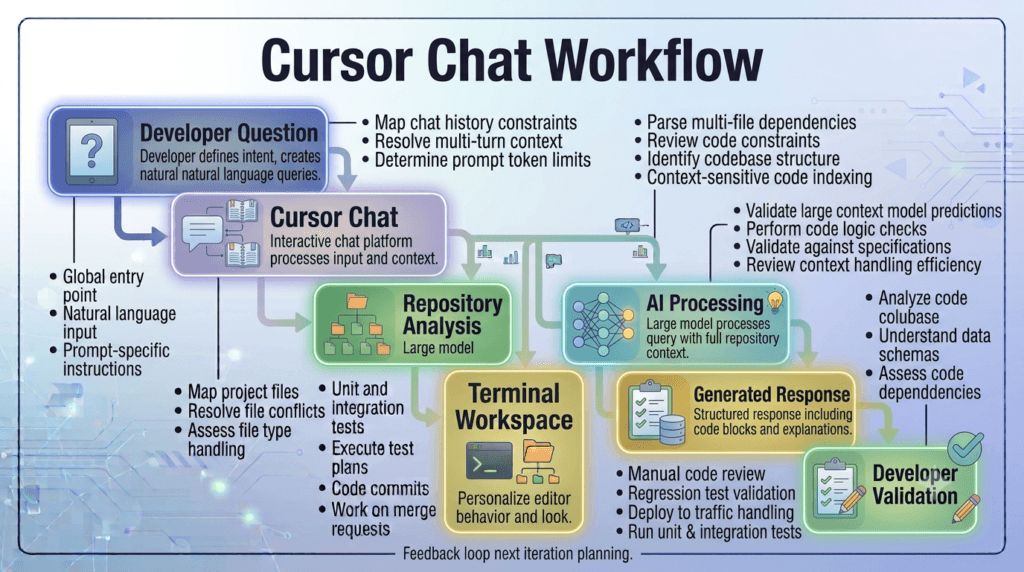
Every interaction inside Cursor Chat follows a structured workflow.
Developer Question

↓

Cursor Chat

↓

Repository Analysis

↓

Context Understanding

↓

AI Processing

↓

Generated Response

↓

Developer Validation
Rather than relying only on the current prompt, Cursor Chat combines repository information with conversational context to produce more accurate responses.
Core Components of Cursor Chat
The Cursor Chat workspace consists of several components that work together during development.
Conversation Panel
The Conversation Panel displays the ongoing discussion between the developer and the AI.
Previous prompts remain available throughout the session, allowing developers to build upon earlier questions without repeatedly explaining the same project details.
Repository Context
One of the most powerful capabilities of Cursor Chat is its ability to understand the repository.
It can analyze:
- Project structure
- Source code
- Configuration files
- Documentation
- Existing coding patterns
- Dependencies
This repository awareness allows Cursor Chat to provide responses that fit naturally into the existing application.
Code Generation
Developers frequently use Cursor Chat to generate:
- API endpoints
- Service classes
- Utility functions
- Database queries
- Test cases
- Documentation
- Configuration files
Generated code should always be reviewed before integration into production systems.
Common Use Cases
Software engineers use Cursor Chat across many different development activities.
Typical examples include:
- Explaining unfamiliar code
- Building new features
- Debugging runtime issues
- Refactoring legacy applications
- Writing automated tests
- Reviewing pull requests
- Improving documentation
- Learning new programming frameworks
- Optimizing application performance
These capabilities make Cursor Chat valuable for developers at every experience level.
Who Should Use Cursor Chat?
The Cursor Chat feature is suitable for professionals across the software engineering industry.
Examples include:
- Backend Developers
- Frontend Developers
- Full-Stack Engineers
- QA Automation Engineers
- SDETs
- DevOps Engineers
- Cloud Engineers
- AI Engineers
- Platform Engineers
- Computer Science Students
Regardless of experience level, Cursor Chat helps developers solve problems faster while maintaining control over implementation decisions.
Real-World Benefits
Organizations are increasingly adopting Cursor Chat because it improves collaboration between developers and AI throughout the software development process.
Common benefits include:
- Faster code generation
- Improved developer productivity
- Reduced onboarding time
- Better documentation
- More effective debugging
- Consistent engineering workflows
- Higher software quality
- Enhanced learning for junior developers
As AI-assisted development becomes a standard engineering practice, understanding Cursor Chat provides developers with a practical advantage for building, maintaining, and improving modern software applications.
Cursor Chat: Navigating the Interface, Starting Conversations, and Writing Effective Prompts
Getting Started with Cursor Chat
After understanding what Cursor Chat is and why it has become an essential development tool, the next step is learning how to use it efficiently. Simply opening the chat window and asking random questions rarely produces the best results. Professional developers follow a structured workflow that provides the AI with enough context to generate accurate, maintainable, and project-specific solutions.
The quality of the output depends not only on the AI model but also on how developers organize their conversations, provide repository context, and structure their prompts.
Opening the Cursor Chat Panel
The Cursor Chat panel is integrated directly into the Cursor IDE, allowing developers to communicate with AI without leaving their coding environment.
A typical workflow begins by:
- Opening the project repository.
- Reviewing the current task.
- Navigating to the relevant source files.
- Opening the Cursor Chat panel.
- Starting a new conversation related to the feature or issue.
Keeping one conversation focused on a single task helps maintain context throughout the development session.
Understanding Project Context
Unlike standalone AI chat applications, Cursor Chat can understand the repository you are working on.
Before generating a response, it can analyze:
- Project structure
- Source files
- Configuration files
- Documentation
- Existing coding patterns
- Dependencies
- Related modules
This repository awareness allows the AI to generate suggestions that align with your application’s architecture instead of producing isolated code snippets.
Starting Productive Conversations
The first message in a conversation often determines the quality of the entire session.
Instead of writing a vague request such as:
Build this feature.
Provide useful project context.
Include information such as:
- Programming language
- Framework
- Current implementation
- Desired outcome
- Constraints
- Performance requirements
- Existing architecture
The more relevant context you provide, the more accurate the generated response becomes.
Writing Effective Prompts
Developers who achieve the best results with Cursor Chat usually write prompts that are clear, specific, and focused.
A strong prompt should describe:
- The problem
- The expected behavior
- Existing code
- Business requirements
- Preferred coding standards
- Testing expectations
Avoid combining multiple unrelated requests into a single prompt.
Instead, solve one problem at a time.
Structuring Development Sessions
A practical workflow for using Cursor Chat looks like this:
Understand Requirement

↓

Review Existing Code

↓

Open Cursor Chat

↓

Write Detailed Prompt

↓

Analyze AI Response

↓

Implement Changes

↓

Run Tests
Following the same workflow throughout the project improves consistency and reduces unnecessary context switching.
Asking Repository-Specific Questions
One of the strengths of Cursor Chat is its ability to explain existing implementations.
Useful questions include:
- How does authentication work?
- Which service processes payments?
- Where is API validation implemented?
- Explain this database model.
- How does this middleware function operate?
Understanding existing code before requesting changes leads to better software design decisions.
Building Features Incrementally
Professional developers rarely ask AI to generate an entire application in one request.
Instead, they divide large features into smaller components.
Example:
Notification System
Break into:
- Database schema
- API endpoint
- Business logic
- Email service
- Unit tests
- Documentation
This incremental approach produces more reliable results and simplifies code reviews.
Maintaining Conversation Context
Long development sessions often involve multiple prompts.
To keep responses relevant:
- Stay focused on one feature.
- Avoid mixing unrelated topics.
- Reference previous responses when needed.
- Clarify changes before requesting new implementations.
Maintaining a consistent conversation allows Cursor Chat to provide more coherent assistance throughout the session.
Common Prompting Mistakes
Developers frequently reduce response quality by making avoidable mistakes.
Providing Too Little Context
Short prompts without repository information force the AI to make assumptions.
Always include enough information for the AI to understand the problem.
Asking Multiple Questions at Once
Large prompts covering unrelated features often produce inconsistent answers.
Complete one task before moving to the next.
Ignoring Existing Architecture
Generated code should follow the project’s current design patterns rather than introducing unnecessary architectural changes.
Accepting Responses Without Review
Every AI-generated implementation should be evaluated for:
- Correctness
- Readability
- Security
- Performance
- Maintainability
- Coding standards
Human review remains an essential part of software engineering.
Practical Recommendations
Developers who consistently achieve the best results with Cursor Chat treat it as a collaborative engineering partner rather than a simple question-and-answer tool. They begin each session with a clear understanding of the project, provide detailed repository context, write focused prompts, work on one feature at a time, review every generated response, and validate changes through automated testing. These practices enable Cursor Chat to deliver accurate, context-aware assistance that integrates naturally into modern software development workflows.
Cursor Chat: Real-World Development Workflows, Practical Examples, and Daily Productivity
Using Cursor Chat Throughout the Software Development Lifecycle
Understanding the interface and learning how to write effective prompts are only the beginning. The real strength of Cursor Chat becomes apparent when it is integrated into everyday software development. Professional developers use it continuously throughout the day—not only for generating code, but also for understanding existing systems, reviewing implementations, writing tests, documenting features, and solving complex engineering problems.
Rather than replacing traditional development practices, Cursor Chat enhances them by providing intelligent assistance exactly where developers need it.
Beginning the Day with Repository Analysis
Many developers start their workday by reviewing the latest changes in the repository before making modifications.
A productive workflow typically includes:
- Pulling the latest code from version control.
- Reading recent pull requests.
- Reviewing assigned tasks.
- Understanding related modules.
- Opening the relevant project in Cursor.
- Launching Cursor Chat for repository analysis.
This preparation helps developers understand the current state of the application before writing new code.
Understanding Existing Features
Before implementing a new feature, developers often use Cursor Chat to learn how similar functionality already exists within the project.
Typical questions include:
- How is authentication implemented?
- Which service manages notifications?
- Where is input validation handled?
- Explain the database relationships.
- Which files are responsible for user permissions?
Understanding the current implementation reduces duplicate logic and keeps new features consistent with the existing architecture.
Developing Features Incrementally
Large software features should be divided into manageable development tasks.
For example, creating an inventory management module may involve:
- Database design
- API endpoints
- Business logic
- Validation rules
- User interface
- Automated tests
- Documentation
Instead of requesting the complete implementation at once, developers can use Cursor Chat to work through each stage independently, making review and testing much easier.
Daily Development Workflow
A practical workflow using Cursor Chat looks like this:
Review Task

↓

Analyze Repository

↓

Open Cursor Chat

↓

Understand Existing Code

↓

Generate Solution

↓

Review Implementation

↓

Run Automated Tests

↓

Commit Changes
This structured approach encourages consistent engineering practices while taking advantage of AI-assisted development.
Accelerating Code Reviews
Code review is one of the most valuable use cases for Cursor Chat.
Developers can request assistance with:
- Explaining complex functions
- Identifying potential bugs
- Suggesting refactoring opportunities
- Improving readability
- Detecting duplicated logic
- Reviewing error handling
- Evaluating performance considerations
Using AI as an additional reviewer often highlights issues before formal peer review begins.
Writing Better Documentation
Documentation frequently receives less attention than implementation, especially during busy development cycles.
Cursor Chat can assist by generating:
- API documentation
- Function descriptions
- Configuration guides
- README updates
- Setup instructions
- Architecture summaries
- Code comments where appropriate
Developers should review and refine generated documentation to ensure technical accuracy and clarity.
Improving Test Automation
Testing is another area where Cursor Chat provides significant value.
Developers commonly use it to generate:
- Unit tests
- Integration tests
- API tests
- Regression tests
- Mock data
- Test fixtures
- Edge-case scenarios
Combining AI-generated tests with manual validation helps improve software reliability while reducing repetitive work.
Supporting Developer Learning
Cursor Chat is also an effective learning companion for developers exploring new technologies.
Examples include:
- Understanding unfamiliar frameworks
- Learning new programming languages
- Exploring software design patterns
- Explaining algorithms
- Understanding architectural concepts
- Reviewing best practices
Instead of searching through multiple resources, developers can ask project-specific questions while remaining inside the IDE.
Common Workflow Mistakes
Although Cursor Chat can significantly improve productivity, several common habits reduce its effectiveness.
Treating Every Conversation as Independent
Maintaining a focused conversation around one feature allows the AI to retain valuable context throughout the session.
Requesting Large Features in One Prompt
Breaking work into smaller components produces more accurate responses and simplifies testing and review.
Ignoring Existing Project Standards
Generated code should follow the repository’s architecture, naming conventions, and coding practices rather than introducing unnecessary changes.
Skipping Validation
Every AI-generated implementation should be reviewed for:
- Functional correctness
- Business logic
- Security
- Performance
- Maintainability
- Test coverage
Human oversight remains essential regardless of AI assistance.
Practical Recommendations
Developers who maximize the value of Cursor Chat integrate it into every stage of their workflow instead of using it only for code generation. They begin by understanding the existing codebase, work incrementally on individual features, use AI to support reviews and documentation, generate meaningful automated tests, and validate every implementation before merging changes. By combining disciplined engineering practices with context-aware AI assistance, Cursor Chat becomes a reliable partner for building scalable, maintainable, and production-ready software.
Cursor Chat: Best Practices, Common Mistakes, Security Considerations, and Enterprise Adoption
Building a Professional Workflow with Cursor Chat
As AI-assisted software development becomes a standard practice across the industry, developers are discovering that productivity depends less on simply having AI available and more on how effectively it is integrated into daily engineering workflows. Cursor Chat is most valuable when it complements established development practices rather than replacing them.
Professional engineering teams use Cursor Chat as a collaborative assistant for understanding codebases, generating implementations, reviewing changes, improving documentation, and accelerating debugging while maintaining complete ownership of architectural decisions and software quality.
Best Practices for Using Cursor Chat
Begin with Context
The quality of every response generated by Cursor Chat depends on the information available to the AI.
Before requesting assistance:
- Open the correct repository.
- Review the relevant source files.
- Understand the current implementation.
- Identify the exact development objective.
- Gather any related documentation.
Providing sufficient context enables Cursor Chat to produce responses that align with the existing application.
Keep Conversations Focused
Each conversation should revolve around a single feature, bug, or engineering task.
Examples include:
- Implement user authentication.
- Refactor the payment service.
- Improve API validation.
- Generate unit tests.
- Review database queries.
Changing topics frequently within the same conversation can reduce response consistency.
Work Incrementally
Professional developers rarely request complete applications in one interaction.
Instead, they follow an iterative workflow.
Understand Feature

↓

Review Existing Code

↓

Discuss with Cursor Chat

↓

Generate Implementation

↓

Review Output

↓

Run Tests

↓

Merge Changes
Small development iterations make debugging, testing, and code review significantly easier.
Validate Every AI Response
Although Cursor Chat can generate production-quality code, developers remain responsible for reviewing every suggestion before integrating it into the repository.
Evaluate generated code for:
- Functional correctness
- Business requirements
- Security
- Error handling
- Performance
- Scalability
- Coding standards
- Readability
AI should accelerate engineering—not replace engineering judgment.
Security Best Practices
AI-assisted development should always follow established security policies.
When using Cursor Chat:
- Avoid exposing sensitive credentials.
- Never include API keys in prompts.
- Remove confidential customer information before sharing code.
- Follow secure coding practices.
- Validate authentication and authorization logic.
- Review generated code for security vulnerabilities.
Organizations handling regulated or sensitive data should ensure that developers follow internal governance policies when interacting with AI tools.
Supporting Team Collaboration
Development teams often use Cursor Chat collaboratively throughout the software lifecycle.
Typical activities include:
- Reviewing pull requests.
- Explaining legacy modules.
- Documenting architectural decisions.
- Assisting junior developers.
- Exploring refactoring opportunities.
- Improving automated testing.
Shared engineering standards help teams obtain consistent AI-generated results across multiple repositories.
Common Mistakes
Expecting AI to Understand Business Requirements Automatically
Cursor Chat understands repository context, but it cannot infer undocumented business rules.
Clearly explain functional requirements before requesting implementations.
Accepting Generated Code Without Testing
Every modification should pass the project’s testing process.
Recommended validation includes:
- Unit tests
- Integration tests
- End-to-end tests
- Static analysis
- Code review
Testing remains essential regardless of how the code was created.
Ignoring Existing Architecture
Generated implementations should extend the current architecture instead of introducing unnecessary design changes.
Always review how new code fits into the overall application.
Asking Overly Broad Questions
Questions such as:
Build an enterprise application.
provide little useful guidance.
Instead, request specific tasks with sufficient technical context.
Enterprise Adoption
Many organizations are incorporating Cursor Chat into their engineering workflows to improve productivity while maintaining software quality.
Common enterprise use cases include:
- Accelerating feature development.
- Supporting code reviews.
- Assisting developer onboarding.
- Modernizing legacy applications.
- Improving technical documentation.
- Generating automated tests.
- Enhancing engineering knowledge sharing.
Successful adoption depends on combining AI assistance with established development standards and governance processes.
Measuring Productivity Improvements
Engineering teams often evaluate the impact of Cursor Chat using measurable metrics.
Examples include:
| Metric | Purpose |
|---|---|
| Feature Delivery Time | Measure development speed |
| Code Review Feedback | Assess code quality and consistency |
| Test Coverage | Evaluate testing completeness |
| Defect Rate | Monitor software reliability |
| Documentation Quality | Measure technical documentation improvements |
| Developer Productivity | Track workflow efficiency |
| AI Adoption Rate | Understand team usage patterns |
Regularly reviewing these metrics helps organizations refine how AI is integrated into software engineering.
Long-Term Success with Cursor Chat
Teams that achieve the greatest success with Cursor Chat establish repeatable engineering practices rather than relying on ad hoc interactions.
A sustainable strategy includes:
- Understanding repository context before requesting assistance.
- Writing precise and well-scoped prompts.
- Working in small, reviewable iterations.
- Following existing coding standards.
- Validating every AI-generated response.
- Running automated tests after implementation.
- Keeping documentation synchronized with code changes.
- Continuously improving workflows based on team feedback.
These habits allow developers to benefit from AI while preserving maintainability, consistency, and software quality.
Key Takeaways
Cursor Chat is a powerful AI collaboration tool that enhances every stage of software development, from understanding existing code and generating new features to reviewing implementations and improving documentation. Developers who provide sufficient context, work incrementally, validate every response, and follow disciplined engineering practices consistently achieve better results than those who rely on AI without structured workflows.
When integrated responsibly into professional development processes, Cursor Chat becomes an effective engineering partner that helps teams deliver reliable, maintainable, and scalable software more efficiently.
Internal Links:
- Learn MCP – Zero to Hero
- Learn AI Agents for QA – Zero to Hero
- Playwright Automation – Zero to Hero
- Learn Python – Zero to Hero
- OpenAI Codex: Complete Zero to Hero
- Cursor AI: Complete Zero to Hero
- Claude Code Tutorial: Complete Zero to Hero
- Free QA Resources Built From Real Experience
- QA Glossary: Test Automation Terms Every Engineer Should Know
External Resources:
- Model Context Protocol documentation
- Playwright documentation
- GitHub documentation
- TypeScript documentation
- Prompt Engineering Overview
- Git Documentation
- Visual Studio Code
- Cursor AI
- Cursor Documentation
People Also Ask
What is Cursor Chat?
Cursor Chat is the built-in AI conversation interface inside Cursor IDE. It enables developers to interact with AI using natural language while working directly within their projects, providing repository-aware coding assistance, debugging help, documentation support, and code explanations.
Is Cursor Chat different from ChatGPT?
Yes. Cursor Chat is integrated into Cursor IDE and can use repository context to provide project-specific responses, while general AI chat tools typically operate without direct awareness of your codebase.
Can Cursor Chat generate production-ready code?
Cursor Chat can generate high-quality implementations, but developers should always review, test, and validate AI-generated code before deploying it to production.
Does Cursor Chat understand existing repositories?
Yes. One of the major strengths of Cursor Chat is its ability to analyze project structure, source files, configuration, and documentation to provide context-aware recommendations.
Who should use Cursor Chat?
Cursor Chat is valuable for software developers, QA automation engineers, DevOps professionals, AI engineers, students, and engineering teams looking to improve productivity while maintaining software quality.
Featured Snippet
What Is Cursor Chat?
Cursor Chat is an AI-powered conversation interface built into Cursor IDE that helps developers understand code, generate implementations, debug applications, write tests, and improve documentation using repository-aware natural language interactions.
AI Overview Answer
Cursor Chat brings conversational AI directly into the development environment. Instead of switching between coding tools and external chat applications, developers can collaborate with AI inside Cursor IDE to understand repositories, generate code, refactor applications, create documentation, review implementations, and accelerate software development while maintaining full control over engineering decisions.
Enjoyed this article? Explore more in-depth guides on AI engineering, automation testing, Model Context Protocol, Playwright, and intelligent software quality at www.skakarh.com. Follow QAPulse by SK for practical, production-focused tutorials designed for QA engineers, SDETs, and AI developers.


