QA
QA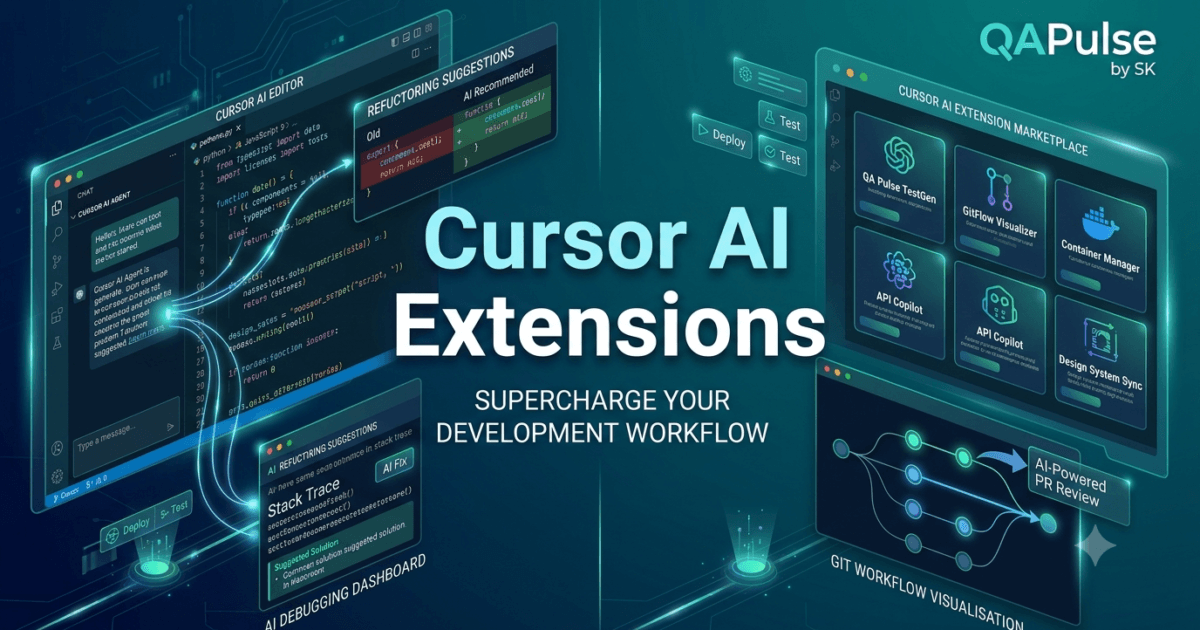
What Are Cursor AI Extensions?
As developers become more productive with Cursor AI, they often look for ways to customise their development environment further. While Cursor includes powerful AI capabilities out of the box, its functionality can be significantly expanded through extensions that enhance coding, testing, debugging, formatting, cloud development, version control, and language support.
This is where Cursor AI Extensions become essential.
Cursor AI Extensions allow developers to personalise their editor by adding specialised tools that integrate seamlessly with Cursor’s AI-powered workflow. These extensions improve productivity by automating repetitive tasks, supporting additional programming languages, enhancing collaboration, and streamlining modern software engineering practices.
Instead of relying solely on built-in features, developers can create an environment tailored to their projects and preferred technologies.
Why Cursor AI Extensions Matter
Modern software development involves far more than writing source code.
A typical project may require:
- Source control
- Docker containers
- Cloud deployment
- API testing
- Database management
- Code formatting
- Security scanning
- Test automation
- Documentation
- CI/CD pipelines
Installing the right extensions allows Cursor to become a complete software engineering workspace.
The benefits include:
- Increased productivity
- Faster development
- Better code quality
- Improved debugging
- Consistent formatting
- Simplified collaboration
- Enhanced automation
- Support for multiple programming languages
How Cursor AI Extensions Work
Extensions integrate directly into the Cursor editor and provide additional capabilities without disrupting your workflow.
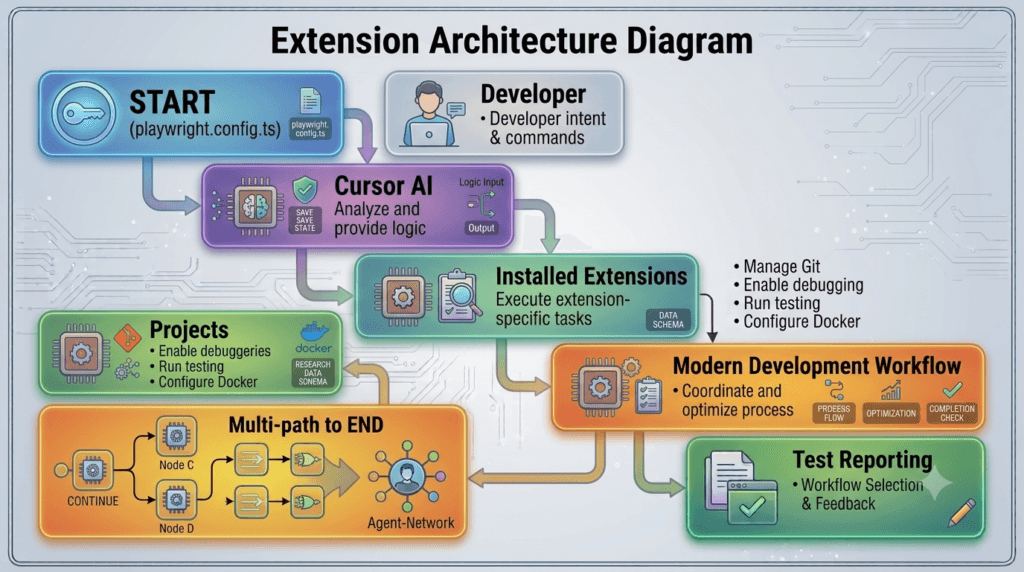
A simplified architecture looks like this.
Developer

↓

Cursor AI

↓

Installed Extensions

↓

Enhanced Development Features

↓

Higher Productivity
The AI engine and extensions work together to create a more intelligent development experience.
Types of Cursor AI Extensions
Cursor supports many categories of extensions depending on your development needs.
Programming Language Extensions
Language extensions provide syntax highlighting, code completion, linting, debugging, and language-specific tooling.
Popular languages include:
- Python
- JavaScript
- TypeScript
- Java
- Go
- Rust
- C#
- PHP
- Kotlin
These extensions improve the overall development experience for each language.
Git and Version Control Extensions
Version control is essential for every software project.
Useful Git-related extensions provide:
- Commit history
- Branch management
- Merge conflict resolution
- Repository insights
- Pull request integration
- Visual Git workflows
Combined with Cursor AI, these tools simplify collaborative software development.
Code Formatting Extensions
Maintaining a consistent coding style improves readability and maintainability.
Formatting extensions automate:
- Code indentation
- Spacing
- Import ordering
- Style enforcement
- Automatic formatting on save
This reduces manual effort and helps teams follow shared coding standards.
Testing Extensions
Testing extensions integrate seamlessly with modern testing frameworks.
Examples include support for:
- Playwright
- Cypress
- Pytest
- Jest
- JUnit
- Vitest
These extensions help developers execute tests, inspect failures, and improve software quality directly from the editor.
Docker Extensions
Containerised development is common in modern software engineering.
Docker extensions simplify:
- Container management
- Image inspection
- Docker Compose
- Container logs
- Container debugging
Developers can work with containers without constantly switching to the terminal.
Cloud Extensions
Cloud providers offer extensions that integrate directly into the development environment.
Examples include:
- Microsoft Azure
- Amazon Web Services
- Google Cloud Platform
These extensions support deployment, monitoring, storage, and cloud resource management.
Database Extensions
Database extensions help developers interact with various databases.
Common capabilities include:
- SQL execution
- Schema browsing
- Table management
- Query analysis
- Database connections
This makes backend development more efficient.
API Development Extensions
API-focused extensions assist with:
- REST APIs
- GraphQL
- Request testing
- Endpoint exploration
- Response inspection
Backend developers can validate APIs without leaving Cursor.
Productivity Extensions
Many extensions focus on improving everyday development tasks.
Examples include:
- Markdown editing
- TODO management
- Project navigation
- Code snippets
- File search
- Workspace organisation
Small productivity improvements often save significant time over long projects.
Extension Management
A well-managed extension environment improves stability.
Recommended practices include:
- Install only necessary extensions.
- Remove unused extensions.
- Keep extensions updated.
- Review extension permissions.
- Organise extensions by project needs.
A lightweight environment generally performs better than one overloaded with unnecessary plugins.
Common Mistakes
Developers often encounter similar problems.
Installing Too Many Extensions
Large numbers of extensions can:
- Increase startup time
- Consume memory
- Cause conflicts
- Reduce performance
Install only extensions that provide clear value.
Ignoring Updates
Outdated extensions may introduce:
- Security vulnerabilities
- Compatibility issues
- Bugs
- Performance problems
Regular updates improve reliability.
Duplicate Functionality
Multiple extensions performing similar tasks may conflict with each other.
Choose the extension that best fits your workflow instead of installing several alternatives.
Overlooking Security
Only install extensions from trusted publishers.
Review permissions before installation, especially when extensions request access to project files or external services.
Best Practices for Using Cursor AI Extensions
To build an efficient development environment:
- Keep your extension list organised.
- Install trusted extensions only.
- Update extensions regularly.
- Remove redundant tools.
- Match extensions to project requirements.
- Test compatibility after updates.
- Back up important editor settings.
- Combine AI features with specialised development tools.
Following these practices ensures that Cursor remains fast, stable, and productive.
Preparing for AI-Powered Workflows
Installing the right extensions transforms Cursor into a highly capable development platform, but the real productivity gains come from combining those extensions with intelligent AI workflows. In the next lesson, you will explore how Cursor AI integrates with Git, testing frameworks, debugging tools, cloud services, and collaborative development processes to create an end-to-end AI-assisted software engineering environment.
Summary
Cursor AI Extensions allow developers to customise their development environment by adding specialised capabilities for programming languages, testing, version control, cloud development, databases, APIs, Docker, and productivity. By carefully selecting trusted extensions and keeping the development environment organised, software engineers can create a personalised workspace that complements Cursor’s built-in AI features while improving efficiency, collaboration, and overall code quality across projects of every size.
Cursor AI Git Integration: Building an AI-Powered Version Control Workflow
What Is Cursor AI Git Integration?
Version control is one of the most important foundations of modern software development. Whether you’re working on a personal project or collaborating with hundreds of engineers, Git allows teams to track changes, manage branches, review code, and safely deliver software.
Cursor takes this experience a step further through Cursor AI Git Integration.
Cursor AI Git Integration combines the intelligence of AI with Git-based development workflows. Instead of manually analysing code changes, writing commit messages, reviewing pull requests, or understanding complex diffs, developers can use Cursor AI to automate repetitive Git tasks while maintaining full control over the development process.
This creates a faster, more productive workflow without changing the way developers already use Git.
Why Git Integration Matters
A typical software engineering project involves continuous code changes.
Developers regularly:
- Create feature branches
- Review pull requests
- Resolve merge conflicts
- Write commit messages
- Analyse code history
- Fix regressions
- Restore previous versions
- Collaborate with teammates
Many of these activities consume valuable time that could instead be spent solving business problems.
By combining AI with Git, Cursor helps developers perform these tasks more efficiently.
Benefits include:
- Faster code reviews
- Better commit messages
- Easier change analysis
- Improved collaboration
- Reduced manual effort
- Better understanding of project history
- Higher code quality
- Increased developer productivity
How Cursor AI Git Integration Works
Cursor continuously understands both your current code and your Git repository.
A simplified workflow looks like this.
Developer

↓

Git Repository

↓

Cursor AI

↓

Analyse Code Changes

↓

Generate Insights

↓

Developer Review

↓

Commit Changes
Instead of replacing Git, Cursor enhances the information available during development.
Understanding Git Context
One major advantage of AI-powered Git workflows is contextual understanding.
Cursor can analyse:
- Changed files
- Modified functions
- Added features
- Removed code
- Refactored components
- Documentation updates
- Test changes
- Configuration modifications
This enables the AI to provide recommendations that are relevant to the actual work being performed.
AI-Assisted Commit Messages
Writing clear commit messages is often overlooked.
Instead of generic messages such as:
- Update files
- Bug fixes
- Changes
Cursor AI can generate meaningful summaries based on the actual modifications.
Well-written commit messages improve:
- Project history
- Team communication
- Release tracking
- Future debugging
Developers can review and edit the suggested message before committing.
Understanding Code Differences
Git displays differences between file versions.
Cursor AI helps developers interpret these differences by explaining:
- Why changes occurred
- Possible impacts
- Architectural implications
- Potential risks
- Related files
- Suggested improvements
This is especially useful in large codebases.
AI-Assisted Code Reviews
Code reviews are essential for maintaining software quality.
Cursor can assist reviewers by identifying:
- Code duplication
- Naming inconsistencies
- Unused variables
- Potential bugs
- Missing tests
- Security concerns
- Performance opportunities
AI acts as an additional reviewer rather than replacing human judgement.
Pull Request Assistance
Before submitting a pull request, developers often need to prepare documentation.
Cursor AI can help generate:
- Pull request summaries
- Feature descriptions
- Testing notes
- Deployment considerations
- Breaking change explanations
- Reviewer guidance
This improves communication between development teams.
Merge Conflict Assistance
Merge conflicts occur when multiple developers modify the same code.
Cursor AI can help developers understand:
- Which sections conflict
- Why the conflict occurred
- Possible resolution strategies
- Side effects of each approach
Although developers make the final decision, AI speeds up the resolution process.
Repository Exploration
Large repositories often contain thousands of files.
Cursor AI helps developers understand:
- Project structure
- Module relationships
- Dependency usage
- Folder organisation
- Architectural patterns
- Frequently modified components
This significantly reduces onboarding time for new team members.
Git History Analysis
Historical project information provides valuable context.
Cursor AI can help interpret:
- Previous implementations
- Feature evolution
- Bug history
- Refactoring efforts
- Architectural decisions
Understanding historical changes helps developers avoid repeating past mistakes.
Combining Git with AI Workflows
A modern development workflow might look like this.
Receive Feature

↓

Create Branch

↓

Develop Code

↓

Cursor AI Review

↓

Run Tests

↓

Generate Commit Message

↓

Open Pull Request

↓

Merge
AI supports multiple stages without changing the underlying Git process.
Common Mistakes
Developers frequently make similar mistakes.
Trusting AI Without Verification
AI-generated suggestions should always be reviewed.
Developers remain responsible for:
- Correctness
- Security
- Business logic
- Code quality
Poor Branch Management
Even with AI assistance, teams should continue following well-defined branching strategies.
Ignoring Test Results
Git integration does not replace automated testing.
Always validate changes before committing.
Writing Large Commits
Smaller commits remain easier to review, understand, and maintain.
AI works best when changes are focused and well-organised.
Best Practices for Cursor AI Git Integration
When combining Cursor AI with Git:
- Create focused feature branches.
- Commit frequently.
- Review AI-generated commit messages.
- Verify AI code review suggestions.
- Execute automated tests before merging.
- Keep pull requests manageable.
- Maintain clear repository structure.
- Follow your team’s Git workflow.
- Continue performing human code reviews.
These practices improve collaboration while preserving software quality.
Enterprise Applications
Large engineering teams increasingly combine AI with version control.
Typical use cases include:
- Pull request preparation
- Automated documentation
- Code review assistance
- Legacy project analysis
- Feature development
- Regression investigation
- Team onboarding
- Repository navigation
AI enhances productivity while fitting naturally into existing Git workflows.
Preparing for Advanced Collaboration
Git integration enables Cursor AI to understand project history and ongoing development, but modern software engineering also depends on continuous collaboration across testing, issue tracking, automation, and deployment pipelines. In the next lesson, you will explore how Cursor AI integrates with collaborative development workflows, helping teams coordinate tasks, improve code quality, and accelerate software delivery using AI-assisted engineering practices.
Summary
Cursor AI Git Integration combines the intelligence of AI with the reliability of Git, enabling developers to analyse code changes, generate meaningful commit messages, understand repository history, assist with pull requests, resolve merge conflicts, and improve code reviews. By integrating seamlessly into established version control workflows, Cursor AI enhances developer productivity while preserving best practices such as testing, human review, and structured collaboration, making it an invaluable companion for modern software engineering teams.
Cursor AI Debugging: Finding and Fixing Software Bugs Faster with AI
What Is Cursor AI Debugging?
Debugging is one of the most important skills in software engineering. Whether you are building a web application, mobile app, API, AI system, or enterprise platform, bugs are inevitable. The ability to identify problems quickly and implement reliable fixes directly impacts software quality and development speed.
This is where Cursor AI Debugging becomes a powerful capability.
Cursor AI Debugging combines Cursor’s AI-powered code understanding with modern debugging workflows to help developers identify errors, analyse stack traces, explain unexpected behaviour, suggest fixes, and improve overall code quality. Rather than replacing traditional debugging tools, Cursor AI acts as an intelligent assistant that accelerates the investigation process.
By understanding project context, dependencies, and source code relationships, Cursor AI helps developers spend less time searching for problems and more time building reliable software.
Why AI-Assisted Debugging Matters
Software bugs can originate from many sources.
Common causes include:
- Logic errors
- Syntax mistakes
- Null reference exceptions
- Incorrect API usage
- Database connection failures
- Race conditions
- Memory leaks
- Configuration errors
- Authentication problems
- Performance bottlenecks
Finding the root cause often takes much longer than fixing the issue itself.
Cursor AI reduces investigation time by analysing code context and providing intelligent suggestions based on the surrounding project.
Benefits include:
- Faster root cause analysis
- Better understanding of complex code
- Improved debugging productivity
- Reduced troubleshooting time
- Better learning for junior developers
- Faster onboarding to unfamiliar projects
- Higher software quality
- Increased developer confidence
How Cursor AI Debugging Works
Cursor analyses your project together with the reported issue.
A simplified workflow looks like this.
Application Error

↓

Cursor AI

↓

Analyse Code Context

↓

Identify Possible Causes

↓

Suggest Solutions

↓

Developer Verification

↓

Apply Fix
Instead of analysing isolated files, Cursor considers the broader project context to generate more relevant debugging recommendations.
Understanding Error Messages
One of the first steps in debugging is understanding the reported error.
Cursor AI can help explain:
- Compiler errors
- Runtime exceptions
- Stack traces
- Dependency failures
- Configuration issues
- Build errors
- API failures
- Database errors
Rather than simply displaying technical messages, the AI translates them into more understandable explanations.
Analysing Stack Traces
Large applications often generate lengthy stack traces.
Cursor AI assists by:
- Identifying the most likely failure point
- Explaining the execution path
- Highlighting related files
- Suggesting where to begin investigation
- Describing possible causes
This allows developers to focus on the most relevant parts of the application.
Debugging Application Logic
Not every bug produces an error message.
Sometimes the application runs successfully but produces incorrect results.
Examples include:
- Incorrect calculations
- Missing business rules
- Invalid data processing
- Unexpected UI behaviour
- Incorrect API responses
Cursor AI can analyse surrounding code and help identify logical inconsistencies that may be responsible.
Working with Large Codebases
Enterprise applications may contain thousands of files.
Instead of manually searching through the repository, Cursor AI can analyse:
- Related classes
- Function calls
- Dependency chains
- Shared components
- Configuration files
- Project architecture
This significantly reduces investigation time.
Debugging APIs
Backend developers frequently debug APIs.
Typical issues include:
- Invalid requests
- Authentication failures
- Response validation
- Missing parameters
- Incorrect status codes
- Database integration problems
Cursor AI helps trace how requests move through the application while identifying possible failure points.
Debugging Test Failures
Automated tests occasionally fail after new features are introduced.
Cursor AI assists developers by analysing:
- Unit test failures
- Integration test failures
- End-to-end testing issues
- Mock configuration
- Assertion errors
- Test dependencies
Understanding why tests fail becomes much easier with AI-assisted analysis.
Debugging Performance Problems
Some bugs involve performance rather than correctness.
Examples include:
- Slow database queries
- Inefficient loops
- Excessive API requests
- Memory consumption
- CPU-intensive operations
- Large object allocations
Cursor AI can identify code patterns that may contribute to reduced performance and suggest optimisation opportunities.
Combining Traditional Debugging with AI
Cursor AI complements existing debugging tools rather than replacing them.
A typical workflow may look like this.
Run Application

↓

Error Occurs

↓

Debugger

↓

Cursor AI Analysis

↓

Implement Fix

↓

Run Tests

↓

Deploy
Developers continue using breakpoints, logging, profilers, and debuggers while benefiting from AI-generated insights.
Common Debugging Mistakes
Developers often make similar mistakes during investigation.
Fixing Symptoms Instead of Causes
Temporary fixes may hide the real issue.
Always identify the underlying root cause before implementing changes.
Ignoring Error Context
Error messages usually contain valuable information.
Review the complete stack trace before making assumptions.
Skipping Automated Tests
Every bug fix should be validated through testing.
Regression testing helps ensure new issues are not introduced.
Blindly Accepting AI Suggestions
AI recommendations should always be verified.
Developers remain responsible for confirming correctness, security, and business requirements.
Best Practices for Cursor AI Debugging
To maximise the benefits of AI-assisted debugging:
- Reproduce the issue consistently.
- Gather complete error information.
- Analyse related project files.
- Review AI suggestions critically.
- Test every proposed fix.
- Document important debugging discoveries.
- Perform regression testing.
- Use version control before major fixes.
- Continue improving your understanding of the underlying technology.
These practices improve both debugging efficiency and long-term software quality.
Enterprise Applications
Cursor AI Debugging is valuable across many software engineering environments.
Typical use cases include:
- Web application debugging
- Backend API troubleshooting
- Microservices analysis
- Cloud-native applications
- AI and machine learning systems
- Test automation frameworks
- Enterprise software maintenance
- Legacy application modernisation
Because Cursor understands project context, it scales effectively from small personal projects to large enterprise codebases.
Preparing for AI-Powered Refactoring
Finding and fixing bugs is only one aspect of maintaining healthy software. Once applications become stable, developers often focus on improving readability, reducing technical debt, and modernising existing implementations. In the next lesson, you will explore Cursor AI Refactoring, learning how AI helps restructure code safely, simplify complex functions, remove duplication, and improve maintainability without changing application behaviour.
Summary
Cursor AI Debugging combines intelligent code analysis with traditional debugging techniques to help developers investigate errors, understand stack traces, analyse project context, identify root causes, and implement reliable fixes more efficiently. By integrating AI into existing debugging workflows, developers can reduce troubleshooting time while maintaining best practices such as automated testing, human verification, and regression analysis. Whether working on APIs, enterprise platforms, AI applications, or legacy systems, Cursor AI provides valuable assistance that improves both productivity and software quality.
Cursor AI Refactoring: Modernising Code Safely with AI-Assisted Development
What Is Cursor AI Refactoring?
Writing working code is only one part of software engineering. As applications evolve, new features, bug fixes, and changing business requirements often make the codebase larger and more complex. Over time, duplicated logic, long methods, inconsistent naming, and outdated patterns can make software difficult to maintain.
This is where Cursor AI Refactoring becomes an invaluable capability.
Cursor AI Refactoring uses artificial intelligence to help developers improve the internal structure of existing code without changing its external behaviour. By analysing project context, dependencies, coding patterns, and architecture, Cursor AI can recommend cleaner implementations, simplify complex logic, eliminate duplication, and improve maintainability while preserving application functionality.
Instead of rewriting code manually, developers can use AI to accelerate refactoring while remaining responsible for reviewing and validating every change.
Why Refactoring Is Important
Software rarely remains unchanged after its first release.
Applications continuously evolve through:
- New features
- Bug fixes
- Performance improvements
- Security updates
- Framework upgrades
- Team collaboration
- Changing business requirements
- Technical debt reduction
Without regular refactoring, the codebase gradually becomes harder to understand and maintain.
Effective refactoring provides several benefits:
- Improved readability
- Better maintainability
- Reduced technical debt
- Easier debugging
- Higher code quality
- Improved developer productivity
- Better scalability
- Lower long-term maintenance costs
Refactoring is an investment that helps keep software healthy throughout its lifecycle.
How Cursor AI Refactoring Works
Cursor analyses your existing project before recommending improvements.
A simplified workflow looks like this.
Existing Code

↓

Cursor AI Analysis

↓

Identify Improvement Opportunities

↓

Suggest Refactored Code

↓

Developer Review

↓

Testing

↓

Production
The AI evaluates surrounding files, project conventions, and dependencies to provide recommendations that align with the existing architecture.
Identifying Code Smells
One of the first stages of refactoring is recognising areas that need improvement.
Cursor AI can help identify common code smells such as:
- Duplicate code
- Long functions
- Large classes
- Deep nesting
- Unused variables
- Dead code
- Excessive complexity
- Poor naming conventions
- Repeated business logic
- Tight coupling
Early identification prevents these issues from becoming larger maintenance problems.
Simplifying Complex Functions
Functions often grow over time as new features are added.
Cursor AI can recommend improvements such as:
- Splitting large functions
- Creating helper methods
- Improving variable names
- Reducing nesting
- Extracting reusable logic
- Improving readability
Smaller, focused functions are easier to understand, test, and maintain.
Removing Duplicate Code
Code duplication increases maintenance effort because the same logic exists in multiple places.
Cursor AI helps developers identify repeated patterns and recommends reusable alternatives through:
- Shared utility functions
- Common services
- Reusable components
- Helper classes
- Generic methods
Reducing duplication improves consistency across the project.
Improving Naming Conventions
Clear naming makes software easier to understand.
Cursor AI can suggest improvements for:
- Variables
- Functions
- Classes
- Interfaces
- Files
- Modules
Meaningful names improve collaboration and reduce onboarding time for new developers.
Modernising Legacy Code
Many organisations continue to maintain applications built using older technologies.
Cursor AI assists with modernisation by suggesting:
- Updated language syntax
- Current framework practices
- Improved design patterns
- Modern APIs
- Cleaner project structure
- Removal of deprecated features
Developers can gradually modernise legacy systems without introducing unnecessary risk.
Refactoring for Performance
Not every refactoring focuses solely on readability.
Cursor AI can identify opportunities to improve performance, including:
- Reducing redundant computations
- Optimising loops
- Improving memory usage
- Simplifying algorithms
- Eliminating unnecessary object creation
- Reducing repeated API calls
Performance improvements should always be validated using profiling and benchmarking.
Working with Large Codebases
Enterprise projects often contain thousands of source files.
Cursor AI helps developers understand:
- Component relationships
- Shared dependencies
- Architecture boundaries
- Module interactions
- Frequently modified files
- Refactoring impact
This broader understanding allows developers to make informed improvements across large applications.
Refactoring and Automated Testing
Refactoring should never change application behaviour.
Before accepting AI-generated changes, developers should execute:
- Unit tests
- Integration tests
- End-to-end tests
- Regression tests
- Performance tests where applicable
Testing provides confidence that structural improvements have not introduced functional defects.
Combining Refactoring with AI Workflows
A typical AI-assisted refactoring workflow may look like this.
Identify Technical Debt

↓

Cursor AI Analysis

↓

Generate Refactoring Suggestions

↓

Developer Review

↓

Execute Tests

↓

Commit Changes

↓

Deploy
AI accelerates the process while developers maintain full control over implementation decisions.
Common Refactoring Mistakes
Developers should avoid several common pitfalls.
Refactoring Without Tests
Changing code without adequate test coverage increases the risk of introducing regressions.
Refactoring Everything at Once
Large-scale changes are more difficult to review and validate.
Smaller, incremental improvements are generally safer.
Ignoring Project Standards
Refactored code should continue following the project’s architecture, naming conventions, coding guidelines, and design principles.
Accepting Every AI Suggestion
AI-generated recommendations should always be reviewed carefully before implementation.
Engineering judgement remains essential.
Best Practices for Cursor AI Refactoring
To achieve successful results:
- Refactor incrementally.
- Maintain comprehensive automated tests.
- Review every AI recommendation.
- Preserve existing behaviour.
- Remove duplication where appropriate.
- Improve naming consistently.
- Follow project architecture.
- Measure performance before and after optimisation.
- Use version control to track structural changes.
- Document significant refactoring decisions.
These practices help maintain long-term code quality.
Enterprise Applications
Cursor AI Refactoring is valuable across many development environments.
Typical use cases include:
- Legacy system modernisation
- Large-scale code cleanup
- Framework migration
- Performance optimisation
- Technical debt reduction
- Team-wide code quality initiatives
- Enterprise application maintenance
- Continuous improvement programmes
Because Cursor understands project context, it can recommend refactoring opportunities that fit naturally within existing architectures.
Preparing for Advanced Cursor AI Development
Refactoring improves the quality of existing software, but modern engineering teams also need to automate repetitive development activities across testing, documentation, deployments, and collaborative workflows. In the next lesson, you will explore advanced Cursor AI automation techniques, learning how to combine AI with modern development pipelines to accelerate software delivery while maintaining quality, consistency, and security.
Summary
Cursor AI Refactoring helps developers improve the internal structure of software by analysing project context, identifying technical debt, recommending cleaner implementations, and simplifying complex code without changing application behaviour. By combining AI-assisted recommendations with automated testing, human review, and established engineering best practices, development teams can reduce maintenance costs, modernise legacy applications, improve readability, and build software that remains scalable and maintainable as projects continue to grow.
Internal Links:
- Learn MCP – Zero to Hero
- Learn AI Agents for QA – Zero to Hero
- Playwright Automation – Zero to Hero
- LangGraph: Complete Zero to Hero
- Learn Python – Zero to Hero
- OpenAI Codex: Complete Zero to Hero
- Cursor AI: Complete Zero to Hero
- Claude Code Tutorial: Complete Zero to Hero
- Free QA Resources Built From Real Experience
- QA Glossary: Test Automation Terms Every Engineer Should Know
External Resources:
- Model Context Protocol documentation
- Playwright documentation
- GitHub documentation
- TypeScript documentation
- Prompt Engineering Overview
- Git Documentation
- Visual Studio Code
- Cursor AI
- Cursor Documentation
People Also Ask
What are Cursor AI Extensions?
Cursor AI Extensions are add-ons that expand Cursor’s capabilities by integrating tools for version control, debugging, testing, cloud development, databases, APIs, formatting, and developer productivity.
Which Cursor AI Extensions are most useful?
Popular categories include Git integration, language support, code formatting, Docker, testing frameworks, cloud services, database management, API development, and AI-powered productivity tools.
Can Cursor AI Extensions improve debugging?
Yes. Cursor AI Extensions work alongside Cursor’s AI features to help developers analyse stack traces, investigate runtime errors, understand complex code, and identify potential fixes more efficiently.
Do Cursor AI Extensions support Git workflows?
Absolutely. Developers can combine Cursor AI Extensions with Git to improve commit messages, understand code changes, review pull requests, analyse repository history, and resolve merge conflicts.
Are Cursor AI Extensions suitable for enterprise development?
Yes. Enterprise teams use Cursor AI Extensions to improve collaboration, maintain coding standards, streamline debugging, modernise legacy code, and increase overall developer productivity.
Featured Snippet
What Are Cursor AI Extensions?
Cursor AI Extensions are specialised add-ons that enhance the Cursor editor by integrating tools for version control, debugging, testing, cloud development, databases, APIs, and productivity. Combined with Cursor’s built-in AI capabilities, they help developers build faster, debug smarter, and maintain higher-quality software.
AI Overview Answer
Cursor AI Extensions transform Cursor into a comprehensive AI-powered software development environment by adding specialised capabilities for Git integration, debugging, refactoring, cloud services, testing frameworks, database management, and productivity tools. When combined with Cursor’s contextual AI assistance, these extensions help developers build, maintain, and modernise software more efficiently while following professional engineering best practices.
Enjoyed this article? Explore more in-depth guides on AI engineering, automation testing, Model Context Protocol, Playwright, and intelligent software quality at www.skakarh.com. Follow QAPulse by SK for practical, production-focused tutorials designed for QA engineers, SDETs, and AI developers.