QA
QA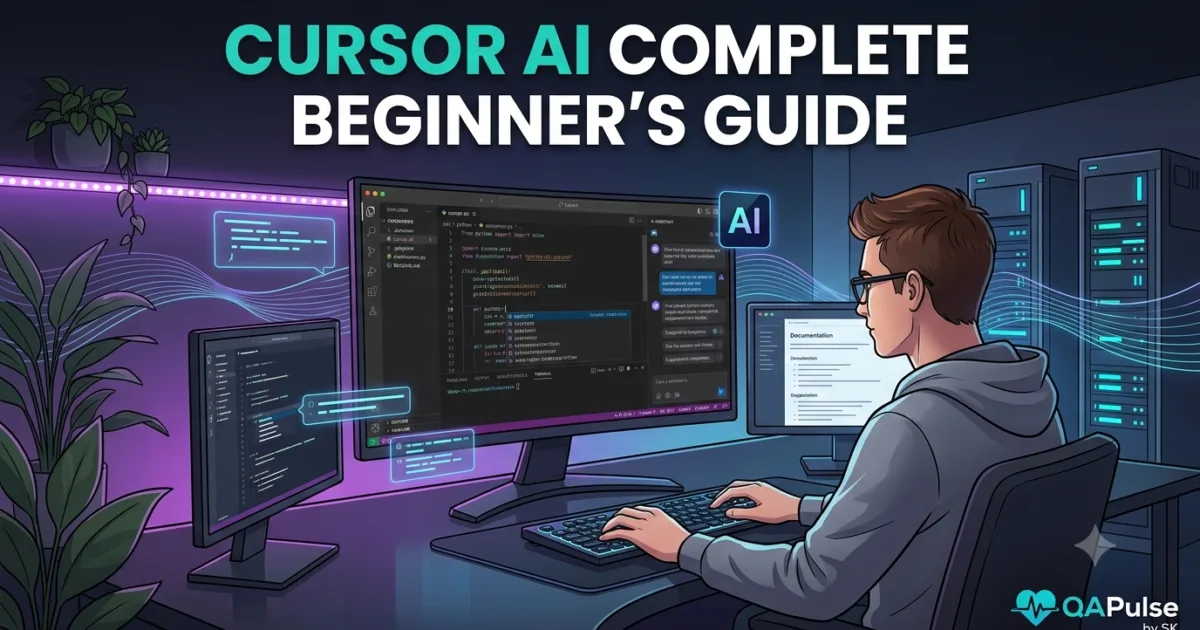
Artificial intelligence is transforming software development at an unprecedented pace. While AI coding assistants have become common, a new generation of AI-native development environments is redefining how developers write, debug, test, and maintain software. Cursor AI is one of the leading tools driving this shift.
Unlike traditional code editors that rely on plugins or extensions for AI features, Cursor AI is designed from the ground up to make artificial intelligence an integral part of the development experience. It understands your codebase, assists with implementation, explains unfamiliar code, performs intelligent refactoring, and helps developers complete complex engineering tasks with significantly less manual effort.
Whether you are a beginner writing your first application or an experienced software engineer working on enterprise-scale systems, Cursor AI provides capabilities that go far beyond simple code completion.
What is Cursor AI?
Cursor AI is an AI-powered code editor built specifically for modern software development. It combines the familiar experience of Visual Studio Code with advanced artificial intelligence that understands projects, repositories, and engineering workflows.
Instead of acting like an autocomplete tool, Cursor AI functions as an intelligent development partner capable of:
- Understanding project architecture
- Explaining unfamiliar code
- Writing new features
- Refactoring existing implementations
- Fixing bugs
- Generating tests
- Updating documentation
- Assisting with debugging
Because it analyzes the broader context of your project, Cursor AI produces recommendations that are more relevant than isolated code suggestions.
Why Cursor AI is Different
Many developers compare Cursor AI with traditional AI coding assistants, but its approach is fundamentally different.
Rather than answering isolated questions, Cursor AI works with your entire development environment.
Its design emphasizes:
- Repository awareness
- Long-context understanding
- AI-first development
- Natural language interaction
- Multi-file editing
- Intelligent code navigation
This enables developers to solve larger engineering problems with fewer manual steps.
How Cursor AI Works
At a high level, Cursor AI combines your project context with advanced language models to understand both your request and the surrounding codebase.
A simplified workflow looks like this:
Developer Request

↓

Repository Analysis

↓

Context Collection

↓

AI Understanding

↓

Code Generation

↓

Review

↓

Testing

↓

Implementation
Instead of generating isolated snippets, Cursor AI attempts to produce solutions that fit naturally within the existing project architecture.
Key Features of Cursor AI
Cursor AI includes a broad range of capabilities designed to improve developer productivity.
AI-Powered Code Generation
Developers can describe features in natural language, and Cursor AI generates implementation code that follows the existing structure of the project.
Repository Understanding
Cursor AI analyzes multiple files simultaneously, making it easier to understand relationships between modules, services, and components.
Intelligent Refactoring
Rather than rewriting entire applications, Cursor AI helps improve readability, simplify complex logic, and modernize existing implementations.
Code Explanation
Developers joining new projects can ask Cursor AI to explain architecture, business logic, or unfamiliar modules without manually exploring every file.
Automated Test Generation
Cursor AI assists with creating:
- Unit tests
- Integration tests
- API tests
- End-to-end tests
- Edge-case validation
This helps improve software quality while reducing repetitive work.
Documentation Assistance
Maintaining technical documentation is often overlooked. Cursor AI can help generate:
- README files
- API documentation
- Architecture summaries
- Setup instructions
- Troubleshooting guides
Keeping documentation synchronized with implementation improves collaboration across engineering teams.
Who Should Use Cursor AI?
Cursor AI benefits professionals across multiple engineering disciplines.
Software Developers
Develop features faster while maintaining coding standards and architectural consistency.
QA Engineers
Generate automated tests, review application behavior, and understand implementation details more efficiently.
SDETs
Accelerate framework development, improve automation coverage, and reduce repetitive scripting tasks.
DevOps Engineers
Review infrastructure code, deployment configurations, and CI/CD workflows using AI-assisted analysis.
Technical Leads
Understand large repositories quickly, evaluate architectural decisions, and support code reviews with contextual insights.
Students and Beginners
Learn programming concepts, understand project structures, and explore modern software engineering workflows through interactive AI assistance.
Real-World Applications
Organizations are adopting Cursor AI for a variety of practical engineering tasks, including:
- Feature development
- Bug investigation
- Code refactoring
- Repository onboarding
- Technical documentation
- Pull request reviews
- Test automation
- Performance analysis
- Security reviews
- Engineering knowledge sharing
These use cases demonstrate that Cursor AI is not simply a coding assistant—it is a comprehensive development environment designed to support the entire software development lifecycle.
Common Misconceptions
Some developers assume Cursor AI replaces software engineers. In reality, it enhances engineering productivity by automating repetitive tasks while leaving architectural decisions, business logic, security reviews, and final approvals in human hands.
Another misconception is that Cursor AI only benefits experienced developers. Beginners can also use it to understand unfamiliar code, learn programming concepts, and explore professional development practices more effectively.
Expert Tip
The most successful developers treat Cursor AI as an engineering partner rather than an automatic code generator. Begin every task by providing repository context, clear requirements, and project constraints. The more context Cursor AI understands, the more accurate, maintainable, and production-ready its recommendations become.
Understanding Cursor AI Architecture and Core Capabilities
To use Cursor AI effectively, it is important to understand how it thinks before learning its features. Many developers treat it like a chatbot inside a code editor, but Cursor AI is designed to function as an AI-native development environment that continuously understands your project, remembers context, and assists throughout the software development lifecycle.
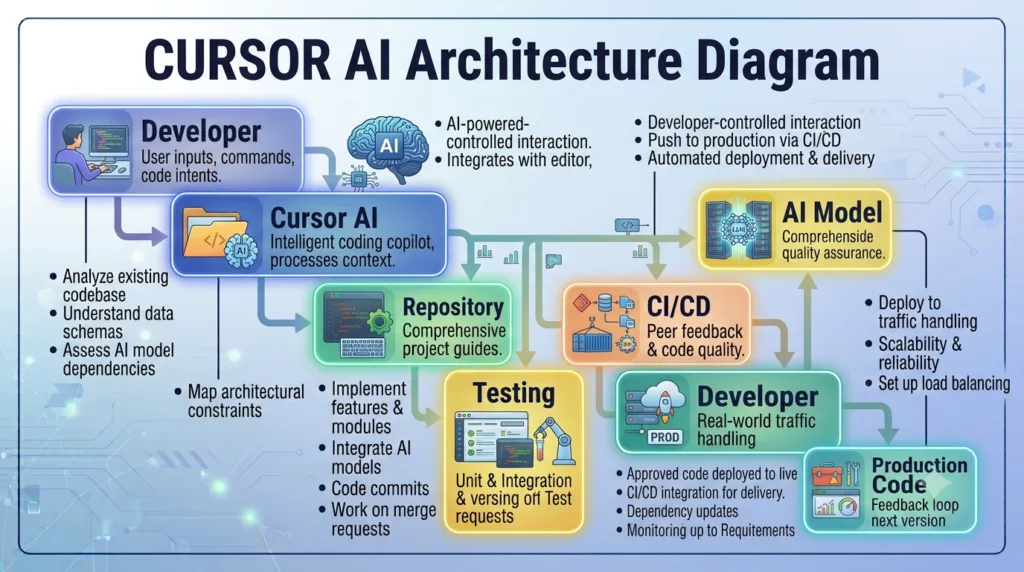
This architectural approach allows Cursor AI to solve engineering problems that would otherwise require switching between documentation, browser tabs, code search tools, and multiple AI conversations.
The Evolution of AI Code Editors
Development tools have evolved through several stages.
Traditional Code Editors

↓

IDEs

↓

Code Completion

↓

AI Coding Assistants

↓

AI-Native Code Editors

↓

Autonomous Software Engineering
Traditional editors focused on syntax highlighting and code editing.
Modern AI-native editors like Cursor AI focus on understanding the intent behind development tasks and helping developers complete them more efficiently.
High-Level Cursor AI Architecture
A simplified architecture looks like this.
Developer

↓

Cursor AI Editor

↓

Project Context Engine

↓

Repository Understanding

↓

AI Language Model

↓

Code Generation

↓

Review & Refinement

↓

Updated Codebase
Each layer contributes to producing context-aware engineering recommendations instead of isolated code snippets.
How Cursor AI Understands Your Project
One of Cursor AI’s biggest strengths is its ability to analyze an entire repository rather than only the currently open file.
Instead of answering questions based on a few lines of code, it evaluates:
- Project structure
- Folder hierarchy
- Existing coding conventions
- Function relationships
- Shared components
- Dependencies
- Configuration files
- Documentation
- Git history (where available)
This broader understanding enables suggestions that better match the project’s architecture.
Context-Aware Development
Context is one of the most valuable aspects of Cursor AI.
For example, imagine adding a new authentication feature.
Instead of simply generating a login function, Cursor AI can identify:
- Existing authentication services
- User models
- Database access patterns
- API routes
- Middleware
- Validation utilities
- Environment configuration
- Testing framework
- Documentation structure
The generated implementation is therefore more consistent with the existing application.
Multi-File Intelligence
Real software development rarely involves changing only one file.
A single feature might require updates to:
- API endpoints
- Database models
- Business logic
- Frontend components
- Unit tests
- Integration tests
- Configuration
- Documentation
Cursor AI is capable of identifying these relationships and recommending coordinated updates across multiple files, reducing the likelihood of incomplete implementations.
Natural Language Engineering
Developers interact with Cursor AI using natural language rather than complex commands.
Examples include:
- Explain this repository.
- Add authentication to this application.
- Refactor this service for better readability.
- Generate Playwright tests for this feature.
- Improve performance in this module.
- Find possible security issues.
- Create technical documentation.
- Explain why this test is failing.
Natural language allows developers to focus on engineering objectives instead of memorizing tool-specific syntax.
Intelligent Code Navigation
Large repositories often contain thousands of files.
Cursor AI assists developers by locating:
- Class definitions
- Function implementations
- API endpoints
- Database models
- Configuration files
- Related business logic
- Shared utilities
- Testing code
This reduces the time spent manually searching through unfamiliar projects.
AI-Assisted Refactoring
Maintaining software is often more challenging than creating it.
Cursor AI helps identify opportunities to improve existing code by:
- Simplifying complex logic
- Eliminating duplicate implementations
- Improving readability
- Modernizing outdated patterns
- Recommending modular designs
- Improving naming consistency
- Suggesting cleaner architecture
Refactoring recommendations should always be reviewed before production deployment, but they can significantly reduce maintenance effort.
Documentation Awareness
Documentation is frequently neglected during development.
Cursor AI helps keep documentation aligned with implementation by generating and updating:
- README files
- Installation guides
- API references
- Architecture summaries
- Configuration instructions
- Troubleshooting documentation
- Contribution guides
- Release notes
Accurate documentation improves onboarding and collaboration across engineering teams.
Cursor AI Throughout the Software Development Lifecycle
Cursor AI supports developers at every major stage of software engineering.
Requirements

↓

Architecture

↓

Development

↓

Testing

↓

Code Review

↓

Documentation

↓

CI/CD

↓

Deployment

↓

Maintenance
Rather than acting as a tool for only one phase, Cursor AI provides assistance across the complete development lifecycle.
Practical Example
Imagine joining a large enterprise project for the first time.
Without AI, you might spend several days:
- Reading documentation
- Exploring repositories
- Understanding architecture
- Finding dependencies
- Learning coding standards
With Cursor AI, you can ask targeted questions about the repository, request architecture explanations, locate relevant modules, and generate documentation summaries. This accelerates onboarding while helping you understand how different parts of the application work together.
Best Practices for Better Results
To maximize the value of Cursor AI, follow these practices:
- Open the complete project instead of isolated files.
- Provide clear engineering objectives.
- Include architectural constraints in your prompts.
- Review generated code before merging changes.
- Generate tests alongside new features.
- Keep documentation synchronized with implementation.
- Use AI suggestions as a starting point, not as unquestioned production code.
Expert Insight
The true strength of Cursor AI lies in its ability to understand engineering context rather than simply generating code. Developers who provide complete project information, clear requirements, and existing architectural patterns consistently receive more accurate, maintainable, and production-ready results than those who rely on short, isolated prompts.
Getting Started with Cursor AI: Installation, Interface, and Your First AI-Assisted Project
After understanding how Cursor AI works internally, the next step is learning how to use it effectively. A successful onboarding experience involves more than simply installing the editor. You should understand its interface, configure it properly, connect AI models, and learn how to collaborate with the AI while writing production-quality software.
Many developers make the mistake of installing Cursor AI and immediately asking it to generate code. Instead, begin by understanding your workspace and allowing the AI to gather enough context to provide meaningful assistance.
Installing Cursor AI
The installation process is straightforward.
Step 1: Download Cursor AI
Download the latest version of Cursor AI for your operating system from the official Cursor website.
Supported platforms include:
- Windows
- macOS
- Linux
Choose the version that matches your operating system and complete the installation using the default settings.
Step 2: Import Your Existing Configuration
If you currently use Visual Studio Code, Cursor AI allows you to import:
- Extensions
- Keyboard shortcuts
- Themes
- Settings
- Snippets
This makes the transition smoother and reduces the need to reconfigure your development environment.
Step 3: Sign In
Create or sign in to your Cursor account to access AI-powered features. Depending on your subscription, you may have access to different AI models and usage limits.
Step 4: Open a Project
Rather than opening a single file, open the entire project folder. This gives Cursor AI access to the repository structure, enabling it to understand relationships between files and provide context-aware recommendations.
Exploring the Cursor AI Interface
Although Cursor AI resembles Visual Studio Code, several features are specifically designed for AI-assisted development.
File Explorer
Browse project files, folders, and repository structure just as you would in a traditional code editor.
Editor Window
Write, modify, and review code while interacting with AI suggestions directly within the editor.
AI Chat Panel
The AI chat panel is where you communicate with Cursor AI using natural language.
You can ask it to:
- Explain code
- Generate features
- Review implementations
- Refactor logic
- Fix errors
- Suggest improvements
- Create tests
- Produce documentation
Integrated Terminal
Use the built-in terminal for:
- Running applications
- Installing dependencies
- Executing build commands
- Running automated tests
- Managing version control
Keeping terminal operations inside Cursor AI minimizes context switching.
Your First AI Conversation
Instead of asking the AI to generate an entire application, start with repository-focused questions.
Examples include:
- Explain this project structure.
- Summarize the architecture.
- Describe how authentication works.
- Identify the main entry point.
- Explain this service class.
- Show me where API requests are handled.
- List all database models.
These prompts help you understand the existing codebase before making changes.
Building Your First AI-Assisted Feature
Suppose you want to add a user profile page to an existing application.
A productive workflow looks like this:
Understand Existing Architecture

↓

Locate Related Components

↓

Analyze Dependencies

↓

Plan the Feature

↓

Generate Initial Code

↓

Review Implementation

↓

Write Automated Tests

↓

Update Documentation

↓

Run the Application

↓

Refine the Solution
This approach ensures the generated code aligns with the application’s architecture instead of introducing isolated functionality.
Working with Existing Code
One of the biggest advantages of Cursor AI is its ability to explain unfamiliar implementations.
For example, if you encounter a complex function, ask:
- What does this function do?
- Why was this pattern used?
- Can this logic be simplified?
- Are there any performance concerns?
- Does this implementation follow best practices?
Understanding existing code before modifying it reduces the risk of introducing regressions.
Generating Better AI Responses
The quality of AI-generated output depends heavily on the quality of your instructions.
Instead of writing:
Create authentication.
Provide additional context:
- Authentication method
- Framework
- Existing architecture
- Coding standards
- Required security considerations
- Testing expectations
Well-defined requirements produce more accurate and maintainable implementations.
Reviewing AI-Generated Code
Never assume AI-generated code is production-ready.
Before accepting changes:
- Verify business logic.
- Check naming conventions.
- Confirm architectural consistency.
- Review security considerations.
- Validate error handling.
- Execute automated tests.
- Inspect performance implications.
- Update documentation if necessary.
Human review remains essential for high-quality software.
Common Beginner Mistakes
Asking Vague Questions
Broad prompts often produce generic answers. Be specific about your objectives and project context.
Ignoring Repository Context
Opening only a single file limits the AI’s understanding of your application.
Accepting Every Suggestion
AI accelerates development, but every recommendation should be reviewed before integration.
Skipping Testing
Generated features should always be accompanied by appropriate unit, integration, or end-to-end tests.
Forgetting Documentation
Whenever functionality changes, documentation should be updated to reflect the latest implementation.
Best Practices for New Users
As you begin using Cursor AI, follow these habits:
- Open complete repositories instead of individual files.
- Explore the project before implementing new features.
- Ask questions to understand existing architecture.
- Make incremental changes rather than large rewrites.
- Generate tests alongside new functionality.
- Review all AI-generated code before merging.
- Keep documentation synchronized with development.
These practices help you build confidence while maintaining code quality.
Expert Tip
The most effective developers use Cursor AI to understand, improve, and extend existing software—not simply to generate new code. By combining repository awareness, clear communication, and careful code review, you can transform Cursor AI into a reliable engineering partner that supports every stage of the software development lifecycle while preserving maintainability, consistency, and long-term project quality.
Mastering Cursor AI: Best Practices, Common Mistakes, and the Road to AI-Assisted Development
Learning the features of Cursor AI is only the beginning. Becoming proficient requires developing workflows that combine AI capabilities with sound software engineering practices. Developers who achieve the best results do not rely on AI to replace their thinking; instead, they use it to eliminate repetitive work, accelerate understanding, and improve the quality of their code.
As projects become larger and more complex, disciplined collaboration with AI becomes increasingly important. The goal is not to write more code but to build better software more efficiently.
The Cursor AI Learning Journey
Most developers progress through several stages before using Cursor AI effectively in professional environments.
Beginner

↓

Learning the Interface

↓

AI-Assisted Coding

↓

Repository Understanding

↓

Workflow Automation

↓

Team Collaboration

↓

Enterprise Development
Each stage introduces new opportunities to improve productivity while reinforcing engineering best practices.
Characteristics of Successful Cursor AI Users
Experienced developers tend to follow similar habits regardless of the programming language or technology stack.
Start with Understanding
Before implementing new functionality, spend time understanding the existing repository.
Identify:
- Project architecture
- Coding standards
- Folder structure
- Shared utilities
- Testing strategy
- Documentation
This context enables Cursor AI to generate recommendations that align with the existing application.
Work Incrementally
Large AI-generated changes are difficult to review and validate.
Instead:
- Break features into smaller tasks.
- Review each implementation.
- Test continuously.
- Commit changes frequently.
Incremental development reduces risk and simplifies debugging.
Use AI for Repetitive Engineering Tasks
Cursor AI delivers the greatest value when automating repetitive activities, such as:
- Writing boilerplate code
- Generating tests
- Updating documentation
- Explaining unfamiliar modules
- Suggesting refactoring opportunities
- Creating helper functions
Reserve architectural decisions and business logic validation for human review.
Measuring Success with Cursor AI
Rather than measuring the amount of code generated, evaluate engineering outcomes.
Useful indicators include:
| Metric | Why It Matters |
|---|---|
| Development time | Measures productivity improvements |
| Bug reduction | Indicates implementation quality |
| Test coverage | Reflects software reliability |
| Documentation quality | Improves collaboration |
| Code review feedback | Highlights maintainability |
| Developer onboarding time | Shows repository accessibility |
| Team adoption | Demonstrates long-term value |
These metrics provide a clearer picture of how Cursor AI contributes to engineering success.
Common Mistakes
Expecting AI to Replace Engineering Judgment
Cursor AI assists developers, but it cannot replace critical thinking, domain knowledge, or architectural decision-making.
Ignoring Existing Project Standards
Generated code should follow the repository’s naming conventions, design patterns, and coding guidelines.
Accepting Code Without Verification
Always:
- Review implementation details.
- Run automated tests.
- Validate business requirements.
- Check security implications.
- Confirm performance expectations.
Using Generic Prompts
Detailed prompts with repository context consistently produce better results than vague requests.
Neglecting Documentation
Code evolves rapidly. Documentation should evolve alongside it to prevent knowledge gaps within the team.
Building a Sustainable AI Workflow
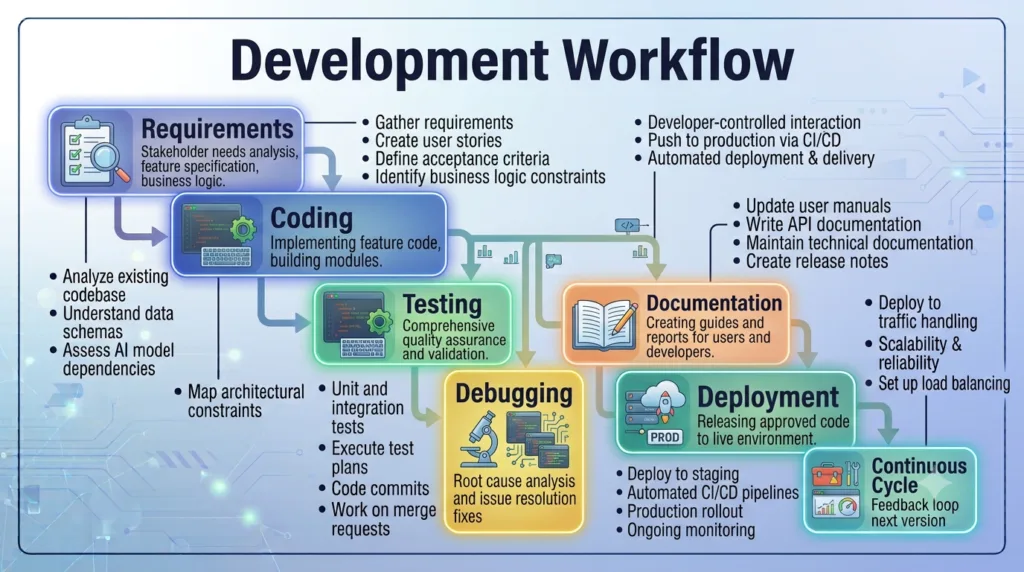
As your experience grows, integrate Cursor AI into every stage of development.
Requirements

↓

Architecture Review

↓

Implementation

↓

Testing

↓

Code Review

↓

Documentation

↓

Deployment

↓

Monitoring

↓

Continuous Improvement
This repeatable workflow encourages consistent engineering practices while taking advantage of AI-assisted development.
Cursor AI in Team Environments
Organizations adopting Cursor AI should establish shared guidelines to ensure consistent usage.
Recommended practices include:
- Define coding standards.
- Create reusable prompt libraries.
- Review AI-generated code through normal pull request processes.
- Maintain automated testing pipelines.
- Document AI-assisted workflows.
- Monitor productivity and quality metrics.
Standardization helps teams benefit from AI without sacrificing maintainability or collaboration.
Preparing for Advanced Topics
Understanding the fundamentals of Cursor AI prepares you for more advanced capabilities, including:
- AI-powered code editing
- Multi-file refactoring
- Intelligent debugging
- Prompt engineering
- AI rules and customization
- Model selection
- Agentic development workflows
- Enterprise collaboration
- Performance optimization
- AI-assisted software architecture
Each of these topics builds upon the concepts introduced in this first day of the series.
Key Takeaways
The most effective use of Cursor AI combines artificial intelligence with disciplined software engineering.
Remember these principles:
- Understand the repository before making changes.
- Provide clear, context-rich instructions.
- Review every AI-generated implementation.
- Test all new functionality.
- Keep documentation synchronized with code.
- Break large tasks into manageable steps.
- Follow existing coding standards.
- Measure success using engineering outcomes.
- Continuously refine your workflow.
- Treat AI as a collaborative engineering partner.
Conclusion
Cursor AI represents a significant shift in how modern software is developed. By combining repository awareness, natural language interaction, and intelligent code assistance, it enables developers to spend less time on repetitive tasks and more time solving meaningful engineering problems.
However, the true value of Cursor AI comes from how it is used. Developers who approach it with clear objectives, strong engineering discipline, and a commitment to code quality consistently achieve better results than those who rely on AI without oversight. As you continue through this series, you will learn how to unlock Cursor AI’s advanced capabilities, optimize your development workflow, and apply AI effectively across real-world software engineering projects, from individual applications to enterprise-scale systems.
Internal Links:
- Learn MCP – Zero to Hero
- Learn AI Agents for QA – Zero to Hero
- Playwright Automation – Zero to Hero
- Learn Python – Zero to Hero
- Cursor AI: Complete Zero to Hero
- Claude Code Tutorial: Complete Zero to Hero
- Free QA Resources Built From Real Experience
- QA Glossary: Test Automation Terms Every Engineer Should Know
External Resources:
- Model Context Protocol documentation
- Playwright documentation
- GitHub documentation
- TypeScript documentation
- Prompt Engineering Overview
- Git Documentation
- Visual Studio Code
- Cursor AI
- Cursor Documentation
People Also Ask
What is Cursor AI?
Cursor AI is an AI-native code editor that helps developers write, understand, debug, refactor, and maintain software using artificial intelligence and repository-aware context.
Is Cursor AI free?
Cursor AI offers a free plan with usage limits, along with paid plans that provide higher limits and additional AI capabilities.
Is Cursor AI better than Visual Studio Code?
Cursor AI is built on Visual Studio Code but adds deeply integrated AI features, making it ideal for developers who want AI-assisted software development.
Can beginners use Cursor AI?
Yes. Cursor AI is beginner-friendly and helps users understand unfamiliar code, learn programming concepts, and accelerate software development.
Which programming languages does Cursor AI support?
Cursor AI supports most popular programming languages, including JavaScript, TypeScript, Python, Java, C#, Go, PHP, Rust, C++, and many others through its VS Code foundation.
Featured Snippet
What is Cursor AI?
Cursor AI is an AI-powered code editor built on Visual Studio Code that helps developers write, refactor, debug, document, and test software using natural language. It understands repository context, making it more effective than traditional autocomplete tools for modern software engineering.
AI Overview Answer
Cursor AI is an AI-native development environment designed to improve developer productivity through intelligent code generation, repository understanding, debugging, documentation, refactoring, and test creation. It combines the familiar VS Code experience with advanced AI capabilities to support the complete software development lifecycle.
Enjoyed this article? Explore more in-depth guides on AI engineering, automation testing, Model Context Protocol, Playwright, and intelligent software quality at www.skakarh.com. Follow QAPulse by SK for practical, production-focused tutorials designed for QA engineers, SDETs, and AI developers.