 QA
QA
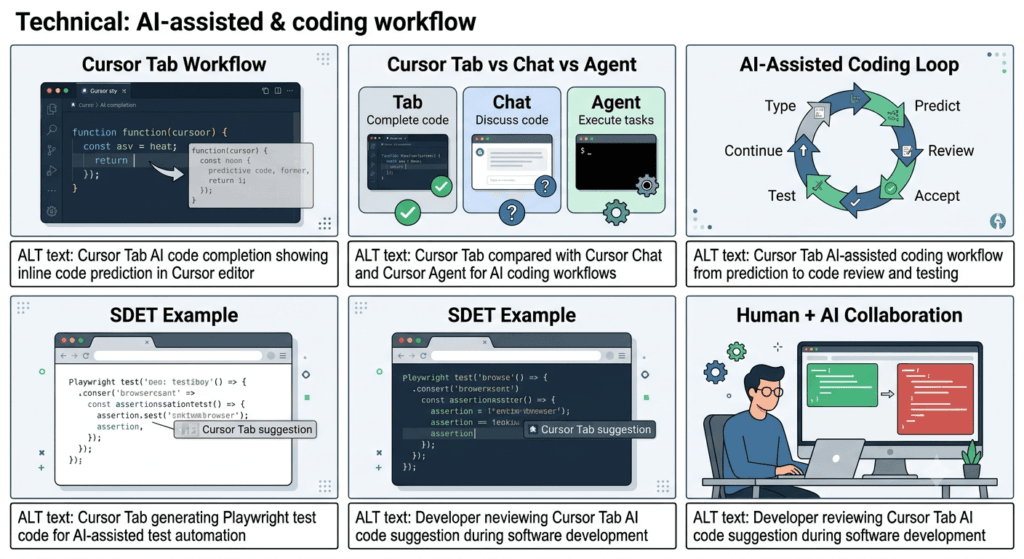
Cursor Tab is one of the most useful features for developers who want AI assistance without constantly opening a chat window or writing detailed prompts. Instead of asking an AI assistant to generate an entire function, Cursor Tab predicts what you are likely to write next and provides inline code suggestions that can help you move through repetitive coding tasks faster.
For developers learning Cursor AI, understanding Tab is important because it represents a different style of AI-assisted programming. Chat and Agent workflows are generally conversational and task-oriented, while Tab focuses on continuous coding assistance directly inside the editor.
Imagine writing this:
def calculate_total(items):
Instead of manually typing the entire implementation, Cursor Tab may suggest the next logical code based on the surrounding code, project context, and your current editing position.
You can then accept, reject, or modify the suggestion.
The interaction becomes:
Developer types
      ↓
Cursor predicts
      ↓
Suggestion appears
      ↓
Developer reviews
      ↓
Accept / Reject / Modify
      ↓
Continue coding
That sounds simple, but the underlying idea is powerful.
Cursor Tab turns AI into an inline pair programmer rather than a separate conversational interface.
What Is Cursor Tab?
Cursor Tab is Cursor’s AI-powered code completion experience designed to predict and suggest code while you work.
Traditional autocomplete generally relies on programming-language syntax, symbols, APIs, and static analysis.
AI-powered completion can go further by considering broader coding context.
For example, traditional autocomplete might suggest:
user.
with available properties and methods.
An AI-powered completion system may infer that you are about to write an entire statement or block:
const user = await getUserById(userId);

if (!user) {
    throw new Error("User not found");
}
The distinction is important.
Traditional autocomplete often predicts symbols.
AI-assisted completion can predict intent and code structure.
Why Cursor Tab Matters
Many developers think AI coding means opening a chat and writing prompts such as:
Create a function that validates an email address.
That is useful, but it introduces friction.
You must:
- stop coding,
- formulate a prompt,
- wait for a response,
- inspect the generated code,
- copy or apply it,
- return to your original workflow.
Cursor Tab attempts to reduce that interruption.
The AI suggestion appears while you are already coding.
Traditional AI workflow:

Code → Stop → Prompt → AI → Review → Apply → Code

Cursor Tab workflow:

Code → Suggestion → Review → Continue
For small changes, the second workflow can feel significantly more natural.
Cursor Tab vs Traditional Autocomplete
Understanding this difference is essential.
| Capability | Traditional Autocomplete | Cursor Tab |
|---|---|---|
| Keyword completion | Yes | Yes |
| API suggestions | Yes | Yes |
| Variable suggestions | Yes | Yes |
| Predict next code | Limited | Yes |
| Multi-line suggestions | Limited | Yes |
| Context-aware suggestions | Limited | Stronger |
| Natural-language intent | Limited | Better |
| Requires prompt | No | No |
| Works inline | Yes | Yes |
| Conversational interaction | No | No |
| Large task execution | No | Not its primary purpose |
| Full feature implementation | No | Better handled by Agent/Composer |
The key distinction is that Cursor Tab is optimized for flow.
It is not intended to replace every other Cursor AI capability.
How Cursor Tab Changes the Coding Experience
Consider a developer implementing a REST API.
Without AI completion:
@app.get("/users/{user_id}")
def get_user(user_id):
    user = database.find_user(user_id)

    if user is None:
        raise HTTPException(
            status_code=404,
            detail="User not found"
        )

    return user
The developer writes most of this manually.
With Cursor Tab, after writing:
@app.get("/users/{user_id}")
def get_user(user_id):
the editor may predict a meaningful continuation based on the surrounding codebase.
The developer can then evaluate the suggestion rather than constructing every line from scratch.
This creates a subtle but important shift:
You remain responsible for the code, while AI reduces the amount of typing required.
Cursor Tab Is Not the Same as Chat
Cursor Chat and Cursor Tab solve different problems.
| Task | Better Cursor Capability |
|---|---|
| Explain this function | Chat |
| Debug a complex error | Chat / Agent |
| Build a complete feature | Agent / Composer |
| Refactor multiple files | Agent / Composer |
| Generate a small code block | Tab / Chat |
| Complete the current statement | Tab |
| Predict repetitive code | Tab |
| Understand the repository | Chat / Agent |
| Perform autonomous changes | Agent |
| Quickly continue coding | Tab |
This gives us a useful mental model:
TAB
↓
"What am I likely to type next?"

CHAT
↓
"What should I do?"

AGENT
↓
"Execute this engineering task."

COMPOSER
↓
"Build/change this larger piece of software."
These capabilities complement each other rather than competing with each other.
The Real Strength of Cursor Tab: Maintaining Flow
One of the biggest productivity problems in software engineering is context switching.
A developer starts writing code.
Then they need documentation.
Then they open a browser.
Then they search Stack Overflow.
Then they ask an AI assistant.
Then they copy an answer.
Then they return to the IDE.
Then they discover that the answer does not quite match their project.
Cursor Tab attempts to keep more of that interaction inside the editor.
Developer
   │
   ├── Write
   ├── Predict
   ├── Review
   ├── Accept
   ├── Modify
   └── Continue
The fewer interruptions you have, the easier it becomes to maintain mental context.
This is particularly useful for repetitive implementation patterns.
Example: Cursor Tab for Python
Suppose you are building a service and start writing:
class UserService:

    def __init__(self, repository):
        self.repository = repository

    def get_user(self, user_id):
Based on the surrounding project, naming conventions, and existing patterns, an AI completion system may suggest a likely implementation.
You might receive something conceptually similar to:
        user = self.repository.find_by_id(user_id)

        if user is None:
            raise ValueError("User not found")

        return user
The important point is not whether the prediction is always correct.
It won’t be.
The important point is that the developer can evaluate the suggestion instantly.
AI therefore becomes a proposal mechanism rather than an authority.
Example: Cursor Tab for JavaScript
Consider a React component:
function UserProfile({ user }) {
You might begin typing:
if (!user) {
and Cursor could suggest the rest of a familiar conditional structure.
For example:
        return <div>User not found</div>;
    }

    return (
        <section>
            <h2>{user.name}</h2>
            <p>{user.email}</p>
        </section>
    );
}
Instead of generating the entire component through a chat prompt, the developer incrementally accepts useful suggestions.
This creates a much more interactive development loop.
Example: Cursor Tab for Test Automation
Cursor Tab is also interesting for QA engineers and SDETs.
Suppose you are writing a Playwright test:
test("user can log in", async ({ page }) => {
You might begin:
await page.goto("/login");
Then:
await page.getByLabel("Email").fill(email);
Then:
await page.getByLabel("Password").fill(password);
Cursor can help predict repetitive test patterns.
A possible continuation might look like:
    await page.getByRole("button", { name: "Login" }).click();

    await expect(
        page.getByRole("heading", { name: "Dashboard" })
    ).toBeVisible();
For SDETs, this can reduce boilerplate while keeping the test structure visible and reviewable.
Cursor Tab and Code Context
AI completion becomes much more useful when it understands the context around your code.
Consider:
const response = await api.getUser(userId);
What should happen next?
The answer depends on the project.
Maybe the codebase expects:
if (!response.ok) {
    throw new Error("Unable to retrieve user");
}
Maybe it uses:
if (response.status === 404) {
    return null;
}
Or perhaps the application uses a centralized error handler.
The surrounding repository patterns matter.
This is why project consistency and context are critical when working with AI-generated suggestions.
Cursor Tab and Project Conventions
Suppose your project follows this convention:
src/
├── controllers/
├── services/
├── repositories/
├── models/
└── utils/
and every service uses dependency injection.
An AI completion that follows your repository’s existing patterns is more valuable than generic code that simply works.
For example:
class OrderService {
    constructor(
        private readonly orderRepository: OrderRepository,
        private readonly paymentService: PaymentService
    ) {}
}
A developer working in such a project wants future suggestions to follow the same architecture.
This is where Cursor Rules become important.
Rules can establish project-specific instructions that influence how Cursor works with the codebase.
That creates a relationship between two concepts:
Cursor Rules
      ↓
Project Expectations
      ↓
Cursor Context
      ↓
Cursor Tab
      ↓
More Relevant Suggestions
AI completion quality is therefore not only about the underlying model.
It is also about the quality of the engineering context you provide.
Cursor Tab and Repetitive Code
Cursor Tab is particularly valuable when code follows predictable patterns.
Examples include:
API handlers
@app.get("/products/{product_id}")
def get_product(product_id):
Test cases
test("user can update profile", async ({ page }) => {
Data models
class Product(BaseModel):
React components
export function ProductCard({ product }: Props) {
Error handling
try {
    // operation
} catch (error) {
Mapping functions
return users.map((user) => ({
The more predictable the pattern, the more useful inline prediction can become.
When Cursor Tab Is Better Than Prompting
Consider a small task:
Add a null check before returning the user.
Opening a full AI conversation for this may be unnecessary.
Tab-based assistance can be faster because you remain in the code.
For example:
function getUser(user) {
    if (!user) {
        // Cursor suggestion
    }
}
You evaluate the suggestion and continue.
But if the task becomes:
Refactor the user service, update all dependent controllers, modify the tests, and preserve backward compatibility.
That is no longer a simple completion problem.
A larger Agent or Composer workflow becomes more appropriate.
Cursor Tab Strategy: Use AI at the Right Granularity
A useful strategy is to match the Cursor feature to the size of the problem.
Tiny change
    ↓
Cursor Tab

Small question
    ↓
Cursor Chat

Medium implementation
    ↓
Composer / Agent

Large autonomous workflow
    ↓
Agent + Tools + Rules + MCP
This prevents a common mistake:
using the most powerful AI feature for every task.
More autonomy does not automatically mean more productivity.
For a five-line implementation, an inline completion can be better than launching an autonomous agent.
Interactive Exercise: Predict Before You Accept
Try this technique when using Cursor Tab.
Start writing a function without accepting the suggestion immediately.
For example:
def calculate_discount(price, percentage):
Before looking at the AI suggestion, predict what you would write.
Maybe:
    discount = price * percentage / 100
    return price - discount
Then compare your mental solution with the AI suggestion.
Ask:
- Did the AI understand the intended behavior?
- Did it use the correct data types?
- Did it follow project conventions?
- Did it introduce unnecessary complexity?
- Would the generated code pass the existing tests?
- Is there an edge case missing?
This transforms AI completion from passive code generation into an engineering review exercise.
The 5-Second Rule
A useful productivity strategy is to avoid blindly accepting suggestions.
Before accepting a meaningful block of generated code, spend a few seconds checking:
1. What is this code doing?
2. Is it what I intended?
3. Does it match the project?
4. Could it introduce a bug?
5. Do I actually need it?
For trivial boilerplate, the review can be almost instantaneous.
For business logic, security-sensitive code, authentication, payments, data processing, or concurrency, review should be much more deliberate.
Cursor Tab for Developers vs Cursor Tab for SDETs
The same feature can produce different benefits depending on the role.
| Role | Cursor Tab Use Case |
|---|---|
| Frontend Developer | Components, handlers, UI logic |
| Backend Developer | APIs, services, models |
| Full-Stack Developer | Frontend + backend boilerplate |
| SDET | Test cases, assertions, fixtures |
| QA Engineer | Automation scripts and test utilities |
| DevOps Engineer | Configuration and scripts |
| Data Engineer | Transformation and pipeline code |
| Student | Learning syntax and implementation patterns |
| Tech Lead | Prototyping repetitive patterns |
For SDETs specifically, the biggest opportunity is often test boilerplate reduction.
For example:
test.describe("Authentication", () => {

    test("valid login", async ({ page }) => {
        // ...
    });

    test("invalid login", async ({ page }) => {
        // ...
    });

    test("locked user", async ({ page }) => {
        // ...
    });
});
Once a testing pattern is established, AI completion can help reproduce the structure quickly.
However, the test engineer still needs to determine whether the test actually provides meaningful coverage.
Generating more tests is not automatically equivalent to better testing.
Cursor Tab and the Quality Problem
AI completion creates an interesting engineering paradox.
It can make developers faster at producing code.
But faster code production can also produce more code that nobody fully understands.
Consider:
Without AI

100 lines/hour
     ↓
Developer understands most of them
versus:
With AI

300 lines/hour
     ↓
Developer reviews only 100
     ↓
200 lines may receive insufficient scrutiny
The exact numbers are irrelevant.
The principle is what matters.
AI-assisted development increases the importance of code review.
The goal should not be:
Generate as much code as possible.
The goal should be:
Produce correct, maintainable software with less unnecessary effort.
Cursor Tab and Technical Debt
Another important consideration is technical debt.
Suppose Cursor repeatedly predicts a quick workaround:
if (!data) {
    return;
}
It may make the immediate problem disappear.
But perhaps the architecture requires a proper error boundary or domain-level exception.
The AI suggestion may be locally reasonable while being globally poor.
This is why developers should evaluate suggestions at two levels:
Local correctness
Does this code work here?
Architectural correctness
Does this code belong here?
Both questions matter.
A Practical Cursor Tab Workflow
A disciplined workflow can look like this:
Understand Requirement
        ↓
Start Coding
        ↓
Observe Tab Suggestion
        ↓
Check Intent
        ↓
Accept / Reject / Modify
        ↓
Run Tests
        ↓
Review Diff
        ↓
Commit
The AI should accelerate the implementation loop.
It should not eliminate the engineering loop.
Cursor Tab: Accept, Reject, or Rewrite?
There are three useful responses to an AI suggestion.
Accept
Use this when the suggestion is:
- correct
- obvious
- consistent
- low-risk
- aligned with your intention
Reject
Reject it when:
- the assumption is wrong
- the code is unnecessary
- the implementation violates project conventions
- the suggestion introduces complexity
Modify
Often the best option is to accept only part of the idea and adapt it.
For example:
// AI suggestion
const result = await fetchData();
return result.data;
You may change it to:
const result = await fetchData();

if (!result?.data) {
    return [];
}

return result.data;
The AI provides acceleration.
The developer provides judgment.
Cursor Tab Is a Copilot, Not an Autopilot
The distinction can be summarized simply:
Autopilot:
AI decides → AI executes → Human observes

Copilot:
Human decides → AI suggests → Human approves
Cursor Tab is most naturally used as the second model.
That makes it particularly useful for developers who want AI assistance while maintaining tight control over implementation.
For critical software, that distinction matters.
Authentication logic, financial transactions, security controls, personal data processing, authorization, and infrastructure code should never be accepted simply because an AI suggestion looks plausible.
Strategy: Build Your Personal Cursor Tab Workflow
To get more value from Cursor Tab, identify three categories of work.
Category 1: Safe to Accelerate
Examples:
Boilerplate
Simple mappings
Test scaffolding
Repeated patterns
Imports
Basic transformations
Documentation comments
Use aggressive AI assistance here.
Category 2: Review Carefully
Examples:
Business logic
API handling
Database operations
Error handling
Performance-sensitive code
Complex algorithms
Use AI, but review the generated code carefully.
Category 3: High Risk
Examples:
Authentication
Authorization
Payments
Secrets
Cryptography
Security controls
Production infrastructure
Data deletion
AI can assist, but human engineering judgment must remain dominant.
How Cursor Tab Understands What You Are Trying to Write
Cursor Tab becomes more useful when you stop thinking of it as simple autocomplete.
A traditional autocomplete system can often determine that after:
const user =
you may want a variable or expression.
An AI coding assistant can potentially infer a much larger intention from the surrounding code.
For example:
async function createUser(userData: CreateUserRequest) {
The surrounding project may contain:
controllers/
services/
repositories/
models/
validators/
tests/
If existing services consistently validate input, call repositories, and return domain objects, an AI completion may be more likely to suggest code that follows those patterns.
The important concept is contextual prediction.
Current Code
     +
Nearby Code
     +
Project Patterns
     +
Developer Intent
     ↓
AI Prediction
This is why the same line can produce different useful suggestions in different projects.
Cursor Tab and Multi-Line Predictions
One of the biggest differences between basic autocomplete and modern AI-assisted completion is the ability to suggest more than one token or one line.
Suppose you write:
def validate_user(user):
A useful completion might conceptually include:
    if not user.email:
        return False

    if not user.email.endswith("@example.com"):
        return False

    return True
The value is not simply that the AI wrote several lines.
The value is that the developer can evaluate a complete logical unit instead of accepting tiny fragments repeatedly.
This can make repetitive implementation considerably faster.
Cursor Tab for Boilerplate Reduction
Every programming language has repetitive patterns.
Consider a TypeScript interface:
interface User {
    id: string;
    name: string;
    email: string;
    createdAt: Date;
}
A developer may then need:
function createUser(data: CreateUserInput): User {
and continue implementing validation, object construction, and persistence.
If the project already has similar functions, Cursor Tab can help reproduce the established pattern.
This is where AI completion can provide practical productivity gains without requiring the developer to delegate an entire task.
The developer remains in the implementation loop.
Cursor Tab for Repetitive Transformations
Another strong use case is repetitive transformation.
Suppose you have:
const users = response.users;
and want to transform the data:
const activeUsers = users
    .filter(user => user.active)
    .map(user => ({
        id: user.id,
        name: user.name
    }));
Once the intended pattern becomes obvious, AI completion can reduce the amount of typing.
The same applies to:
- object mapping
- DTO conversion
- API response formatting
- validation
- logging
- error handling
- test setup
- fixture creation
- configuration
- repetitive documentation
The strategy is simple:
Use AI heavily where the pattern is predictable and the risk is low.
Cursor Tab for Code Patterns
AI completion becomes particularly interesting when your project has strong conventions.
Imagine every repository class follows:
class UserRepository {
    async findById(id: string) {
        // ...
    }

    async findAll() {
        // ...
    }

    async create(data: CreateUserInput) {
        // ...
    }
}
After implementing several repository methods, you may notice that future code follows similar patterns.
That consistency provides useful context for AI-assisted completion.
Instead of repeatedly explaining:
Use async methods.
Use this repository structure.
Use this error-handling pattern.
Return these types.
Follow this naming convention.
the existing code itself becomes part of the context.
This leads to an important principle:
Your codebase is one of the most valuable sources of context for AI coding assistance.
Cursor Tab and Existing Code
AI completion should not be used only for new code.
It can also help developers continue existing implementations.
Consider:
async updateProfile(userId: string, data: UpdateProfileRequest) {
The implementation may need to:
validate input
     ↓
find user
     ↓
handle missing user
     ↓
update fields
     ↓
save user
     ↓
return updated user
If the repository contains similar methods, Cursor Tab can help predict the repetitive structure.
However, developers should not assume that an existing pattern is automatically correct.
AI can reproduce bad patterns just as efficiently as good ones.
The “Good Code In, Good Suggestions Out” Principle
AI completion is heavily influenced by context.
Consider two repositories.
Repository A
Clear architecture
Consistent naming
Good tests
Strong types
Reusable services
Clean error handling
Repository B
Duplicated logic
Inconsistent naming
Weak tests
Mixed responsibilities
Temporary hacks
Unclear architecture
If AI assistance is exposed to these patterns, the surrounding context can influence what it proposes.
This creates a practical strategy:
Improve Codebase Quality
        ↓
Improve Project Context
        ↓
Improve AI Suggestions
        ↓
Improve Development Velocity
AI productivity is therefore partly a codebase-quality problem.
Cursor Tab and Comments
Natural-language comments can also provide useful intent.
For example:
# Return only active customers who have completed email verification
Then:
active_verified_customers = ...
The developer has communicated intent directly in the source code.
The AI may use that intent when suggesting the implementation.
A similar approach works in TypeScript:
// Retry the request twice before returning the API error
async function fetchOrders() {
Then continue coding.
The comment establishes the desired behavior.
But comments should describe genuine requirements, not manipulate the AI unnecessarily.
Cursor Tab for Learning Programming
Cursor Tab can also be useful for developers learning a programming language.
Suppose a beginner writes:
numbers = [1, 2, 3, 4, 5]

squares =
The AI may suggest a list comprehension.
Instead of blindly accepting it, the learner can stop and ask:
Why is this syntax correct?
What does each part do?
Would a loop produce the same result?
For learning, the best workflow is:
Predict
 ↓
Observe AI suggestion
 ↓
Compare
 ↓
Understand
 ↓
Accept or rewrite
 ↓
Test
This is much more educational than simply generating an entire solution.
Cursor Tab Should Not Replace Understanding
There is a dangerous learning pattern:
Problem
 ↓
AI completion
 ↓
Copy
 ↓
Run
 ↓
Done
The developer may achieve a working result without understanding the implementation.
A better workflow is:
Problem
 ↓
Think
 ↓
Attempt
 ↓
AI suggestion
 ↓
Compare
 ↓
Understand
 ↓
Test
The difference is enormous.
AI should shorten the path to understanding, not eliminate understanding.
Cursor Tab for Debugging
Cursor Tab is not primarily a debugging system, but it can still help while fixing code.
Suppose you identify a bug:
def calculate_total(items):
    return sum(item.price for item in items)
You realize some items may have a missing price.
You begin changing the function:
def calculate_total(items):
    return sum(
The AI may suggest a continuation.
But debugging requires more than producing syntactically valid code.
You need to understand:
What failed?
Why did it fail?
What behavior is expected?
What edge case caused the issue?
Could the fix break another scenario?
Therefore, use Cursor Tab for implementation assistance while using Chat or Agent-style workflows for deeper investigation when necessary.
Cursor Tab for Refactoring
Suppose you have:
function processUser(user) {
    if (user) {
        if (user.active) {
            return user.name;
        }
    }

    return null;
}
You may decide to simplify the implementation:
function processUser(user) {
    return user?.active ? user.name : null;
}
AI completion can help suggest repetitive transformations.
But refactoring has a larger concern:
Does behavior remain unchanged?
A clean-looking implementation is not necessarily equivalent.
Therefore:
AI Suggestion
     ↓
Review
     ↓
Run Tests
     ↓
Review Diff
     ↓
Accept Refactor
is safer than:
AI Suggestion
     ↓
Accept
Cursor Tab and Test-Driven Development
Cursor Tab can fit naturally into a test-driven workflow.
Suppose you first write:
test("rejects an invalid email", async () => {
Then describe the expected behavior through the test structure.
The completion system can help fill repetitive implementation details.
A practical workflow becomes:
Requirement
   ↓
Write Test
   ↓
Use Cursor Tab for Boilerplate
   ↓
Implement Code
   ↓
Run Test
   ↓
Fix Failure
   ↓
Refactor
This is particularly useful because the tests become a concrete specification for the AI-assisted implementation.
Cursor Tab for Playwright
For SDETs, Playwright provides many repetitive structures.
For example:
test.describe("Login", () => {

    test("valid user can login", async ({ page }) => {
        await page.goto("/login");

        // implementation
    });
});
After establishing selectors and project conventions, Cursor Tab can help complete repetitive interactions.
For example:
await page.getByLabel("Email").fill(email);
await page.getByLabel("Password").fill(password);
await page.getByRole("button", { name: "Login" }).click();
Then assertions:
await expect(
    page.getByRole("heading", { name: "Dashboard" })
).toBeVisible();
The SDET still needs to validate:
- selector quality
- test intent
- assertion strength
- synchronization
- test isolation
- data setup
- failure behavior
AI-generated test code can be syntactically correct while being a poor automated test.
Cursor Tab for API Testing
The same principle applies to API automation.
For example:
test("creates a new user", async ({ request }) => {
Cursor Tab may help complete repetitive request and assertion patterns.
const response = await request.post("/api/users", {
    data: {
        name: "Test User",
        email: "test@example.com"
    }
});

expect(response.status()).toBe(201);
But strong API testing requires more than checking status 201.
You might also validate:
Response schema
Required fields
Headers
Authentication
Business rules
Error handling
Database state
Idempotency
Boundary conditions
AI accelerates test construction.
It does not automatically create a comprehensive test strategy.
Cursor Tab and Code Review
One of the best habits is to review AI-assisted changes exactly as you would review another developer’s code.
Use Git diff:
git diff
Then inspect:
What changed?
Why did it change?
Is every change necessary?
Are there hidden assumptions?
Did unrelated files change?
Are tests included?
Could this introduce a regression?
A small AI-generated suggestion can sometimes produce surprisingly broad changes depending on the workflow.
The smaller and more controlled the change, the easier it is to review.
Cursor Tab and Git
A disciplined Git workflow remains important:
git status
git diff
git add .
git commit -m "Add user validation"
Do not treat AI-assisted code as inherently trustworthy simply because it came from your editor.
The Git diff remains one of your strongest controls.
A useful workflow is:
Cursor Tab
    ↓
Implementation
    ↓
Tests
    ↓
Git Diff
    ↓
Review
    ↓
Commit
Cursor Tab Productivity: Speed Is Not the Only Metric
A common mistake is measuring AI productivity only through lines of code.
For example:
Developer A:
Writes 500 lines quickly.
That does not necessarily mean Developer A is more productive.
A better measurement model considers:
Correctness
+
Maintainability
+
Development Time
+
Review Time
+
Testing Time
+
Defect Rate
A developer who generates code twice as quickly but creates twice as many defects has not achieved a meaningful productivity improvement.
Therefore, Cursor Tab should be measured by software delivery outcomes, not typing speed alone.
A Better Cursor Tab Productivity Formula
Think about productivity like this:
Effective Productivity
=
Useful Output
÷
Total Engineering Effort
Total effort includes:
Coding
+
Review
+
Debugging
+
Testing
+
Rework
+
Maintenance
If Cursor Tab reduces coding time but increases debugging and rework, the overall benefit may disappear.
If it reduces boilerplate while preserving quality, the benefit becomes much more meaningful.
Cursor Tab and Developer Experience
Good AI completion should feel almost invisible.
You should not have to constantly stop and think:
“How do I prompt the AI?”
Instead:
Think
 ↓
Type
 ↓
Observe suggestion
 ↓
Evaluate
 ↓
Continue
That low-friction interaction is one of the most attractive aspects of inline AI assistance.
The best result is not that AI becomes the center of your development process.
The best result is that AI becomes a quiet productivity layer inside your existing process.
Practical Exercise: Build a Small Function with Cursor Tab
Try this exercise in a small project.
Create:
type Product = {
    id: string;
    name: string;
    price: number;
    active: boolean;
};
Then begin:
function getActiveProducts(products: Product[]) {
Before accepting anything, predict your implementation:
return products.filter(product => product.active);
Now compare your solution with Cursor’s suggestion.
Then create a second function:
function getProductNames(products: Product[]) {
Try predicting:
return products.map(product => product.name);
Finally:
function getExpensiveProducts(
    products: Product[],
    minimumPrice: number
) {
Predict the implementation before observing the AI suggestion.
This exercise teaches an important skill:
You should be able to think independently from the AI.
Practical Exercise: AI-Assisted Playwright
Create a simple test:
test("user can search for a product", async ({ page }) => {
    await page.goto("/products");
Now type:
await page.getByPlaceholder(
Pause.
Predict what selector you want.
Then evaluate the AI suggestion.
Continue with:
await page.getByPlaceholder("Search products").fill("Laptop");
Then:
await expect(
    page.getByText("Laptop")
).toBeVisible();
Now ask yourself:
- Is the selector resilient?
- Is the assertion meaningful?
- Does the test isolate data correctly?
- Would the test fail for the right reason?
This is the difference between AI-assisted test generation and AI-assisted test engineering.
When to Stop Using Cursor Tab
There are situations where continuing with inline completion is inefficient.
Move to a conversational or agentic workflow when:
The task spans many files
        ↓
Architecture needs investigation
        ↓
Requirements are ambiguous
        ↓
Debugging requires root-cause analysis
        ↓
External tools are needed
        ↓
Large refactoring is required
For example, if you say:
Update authentication to support OAuth,
change the API layer, update the frontend,
modify tests, and preserve backward compatibility.
this is no longer a simple completion task.
A larger AI workflow is more appropriate.
Cursor Tab Decision Matrix
| Situation | Use Tab? | Why |
|---|---|---|
| Complete a line | ✅ | Excellent fit |
| Complete boilerplate | ✅ | High productivity |
| Repeat existing pattern | ✅ | Strong use case |
| Small test implementation | ✅ | Useful |
| Simple refactoring | ✅ | Good with review |
| Explain architecture | ❌ | Use Chat |
| Debug complex failure | ⚠️ | Chat/Agent may be better |
| Modify many files | ❌ | Agent/Composer |
| Build full feature | ❌ | Agent/Composer |
| Security architecture | ⚠️ | Human-led + AI assistance |
| Production incident | ⚠️ | Controlled workflow required |
| Large migration | ❌ | Agentic workflow preferred |
Strategy: Combine Cursor Features Instead of Choosing Only One
The strongest Cursor workflow does not depend on Tab alone.
A practical development loop can combine several capabilities:
Requirement
     ↓
Cursor Chat
     ↓
Plan
     ↓
Cursor Composer / Agent
     ↓
Implementation
     ↓
Cursor Tab
     ↓
Fine-Grained Completion
     ↓
Tests
     ↓
Review
     ↓
Git
Each capability has a different responsibility.
Chat helps you understand.
Composer/Agent helps execute larger changes.
Tab helps you stay in flow while writing.
Tests validate behavior.
Git gives you change visibility and control.
This layered approach is far more powerful than expecting one AI feature to solve everything.
Cursor Tab and the Human-in-the-Loop Model
A strong AI-assisted development process should preserve human control.
Think of the developer as the decision-maker:
Developer
   │
   ├── Defines intent
   │
   ├── Evaluates suggestions
   │
   ├── Accepts or rejects code
   │
   ├── Runs tests
   │
   └── Reviews final changes
          ↑
          │
      Cursor Tab
This is particularly important for production engineering.
AI suggestions should be treated as candidate implementations.
Not verified truth.
Advanced Strategy: Use Cursor Tab as a Prediction Engine
There is another way to think about the feature.
Instead of asking:
“What code can AI generate?”
ask:
“Can AI predict the implementation I already understand?”
That is a much better use case for inline completion.
For example:
Developer understands solution
        ↓
Developer starts implementation
        ↓
Cursor predicts continuation
        ↓
Developer validates prediction
        ↓
Implementation becomes faster
The developer’s engineering reasoning remains primary.
The AI simply reduces mechanical effort.
Cursor Tab and Software Engineering Maturity
The value of AI completion changes as your engineering skills improve.
A beginner may use it for:
Syntax
Examples
Basic patterns
An intermediate developer may use it for:
Boilerplate
Tests
Refactoring
API implementation
An experienced engineer may use it for:
Pattern reproduction
Large repetitive transformations
Domain-specific boilerplate
Test scaffolding
Implementation acceleration
The more experienced the developer, the more effectively they can judge whether a suggestion is correct.
That leads to an important lesson:
AI coding tools do not eliminate engineering fundamentals. They make those fundamentals more valuable.
Cursor Tab and the Future of AI-Assisted Coding
Inline AI completion is likely to remain an important part of AI-powered development because not every engineering task requires an autonomous agent.
There will always be a spectrum:
Human Typing
     ↓
AI Completion
     ↓
AI Conversation
     ↓
AI-Assisted Planning
     ↓
AI Agent
     ↓
Automated Agent Workflow
Cursor Tab occupies the lower-friction portion of that spectrum.
It helps when the human already knows what they want and simply wants to reach the implementation faster.
That makes it especially valuable for experienced developers who want less typing without surrendering control.
Interactive Challenge: Design Your Own Cursor Tab Rules
Take three tasks from your daily development workflow.
For each one, classify it:
TASK:
________________________

Is it repetitive?
YES / NO

Is the expected output predictable?
YES / NO

Is the risk low?
YES / NO

Can I review the suggestion quickly?
YES / NO

Best Cursor workflow:
TAB / CHAT / AGENT / COMPOSER
For example:
TASK:
Create Playwright assertions for an existing test.

Repetitive?
YES

Predictable?
YES

Risk?
LOW

Review quickly?
YES

Best workflow:
TAB
Now compare that with:
TASK:
Redesign authentication architecture.

Repetitive?
NO

Predictable?
NO

Risk?
HIGH

Review quickly?
NO

Best workflow:
CHAT + AGENT + HUMAN REVIEW
This simple classification exercise can prevent overusing autonomous AI.
Advanced Cursor Tab Patterns for Real-World Development
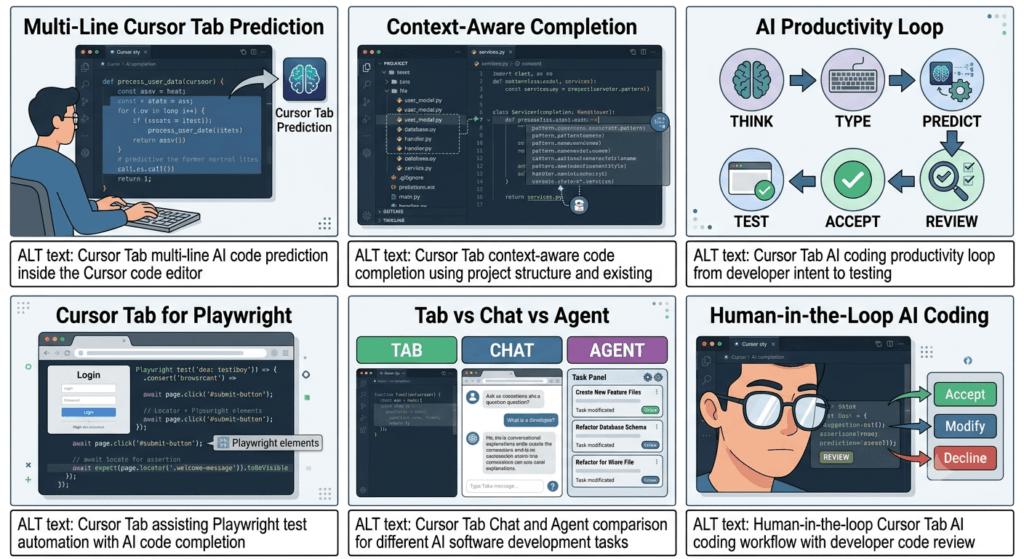
Cursor Tab becomes significantly more valuable when developers stop using it only for obvious autocomplete and start using it as a pattern prediction layer across an entire development workflow.
The difference can be seen in how a developer approaches repetitive work.
Instead of:
Write every line manually
        ↓
Search documentation
        ↓
Copy example
        ↓
Adapt example
        ↓
Fix syntax
        ↓
Run tests
a more efficient workflow can be:
Understand requirement
        ↓
Start implementation
        ↓
Cursor Tab predicts pattern
        ↓
Developer evaluates suggestion
        ↓
Accept / modify / reject
        ↓
Run tests
The developer still controls the result, but the mechanical portion of implementation becomes smaller.
Cursor Tab for Pattern-Based Development
Most mature software projects contain repeated patterns.
A backend application might repeatedly use:
Controller
   ↓
Service
   ↓
Repository
   ↓
Database
A frontend application might repeatedly use:
Component
   ↓
Hook
   ↓
API Client
   ↓
State
A test automation framework might use:
Test
   ↓
Fixture
   ↓
Page Object
   ↓
API / UI Action
   ↓
Assertion
Once these patterns exist, developers spend considerable time reproducing them.
Cursor Tab can help reduce that repetitive effort.
For example:
export class OrderService {

    constructor(
        private readonly repository: OrderRepository
    ) {}

    async getOrder(orderId: string) {
If the surrounding code consistently handles missing entities in a specific way, the completion system may help reproduce that pattern.
The important strategy is not:
Let AI invent architecture.
It is:
Let AI accelerate an architecture that the engineering team has already established.
Cursor Tab and Domain-Specific Patterns
AI completion becomes more valuable when the codebase contains domain-specific conventions.
Imagine an e-commerce application where every service method follows:
async findOrder(orderId: string): Promise<Order> {
    const order = await this.orderRepository.findById(orderId);

    if (!order) {
        throw new OrderNotFoundError(orderId);
    }

    return order;
}
A developer starts another method:
async findCustomer(customerId: string): Promise<Customer> {
The surrounding implementation can provide useful context.
Instead of generating generic code, the AI may be able to suggest a pattern closer to the application’s conventions.
This is one reason mature repositories can benefit from AI assistance more than isolated code snippets.
Cursor Tab and Consistency
Consistency is one of the hidden benefits of AI-assisted completion.
Suppose a project consistently uses:
async/await
instead of:
.then()
.catch()
and consistently uses:
const
instead of:
var
If those patterns dominate the codebase, they can become contextual signals.
However, consistency is only useful when the existing pattern is actually good.
If your repository contains technical debt, AI can make that technical debt easier to reproduce.
That creates an important rule:
AI consistency should never replace architectural review.
Cursor Tab for New Files
Cursor Tab can also help when starting a new file.
Suppose you create:
src/services/payment.service.ts
and begin:
import { PaymentRepository } from "../repositories/payment.repository";
Then:
export class PaymentService {
If the project has established service conventions, completion may help construct the basic structure.
For example:
export class PaymentService {

    constructor(
        private readonly paymentRepository: PaymentRepository
    ) {}

    async processPayment(orderId: string) {
        // ...
    }
}
This is a good example of using AI for structural acceleration.
The developer still determines what the service actually needs to do.
Cursor Tab for Configuration Files
AI completion is not limited to application code.
It can also help with repetitive configuration.
For example, a Docker Compose file:
services:
  api:
    build: .
    ports:
      - "3000:3000"
The developer may continue with:
    environment:
      NODE_ENV: development
or additional service configuration.
Similarly, Cursor Tab can assist with patterns in:
Dockerfile
docker-compose.yml
GitHub Actions
package.json
tsconfig.json
ESLint
Prettier
Terraform
Kubernetes YAML
CI configuration
Configuration files can be particularly repetitive, making them a reasonable target for AI completion.
But configuration mistakes can have significant consequences.
A syntactically valid Kubernetes configuration can still deploy the wrong workload.
A valid GitHub Actions file can still expose credentials or run an unsafe command.
Therefore, configuration requires the same review discipline as application code.
Cursor Tab for GitHub Actions
Consider:
name: CI

on:
  push:
    branches:
      - main
You might begin:
jobs:
  test:
Cursor can help complete repetitive workflow structure.
A typical workflow might eventually contain:
jobs:
  test:
    runs-on: ubuntu-latest

    steps:
      - uses: actions/checkout@v4

      - uses: actions/setup-node@v4
        with:
          node-version: 22

      - run: npm ci
      - run: npm test
The AI can reduce typing, but the engineer still needs to verify:
- permissions
- secrets
- action versions
- caching
- branch conditions
- environment variables
- deployment behavior
Cursor Tab for SQL
SQL is another area where repetitive patterns appear frequently.
For example:
SELECT
    id,
    name,
    email
FROM users
WHERE
The AI may suggest:
active = true
ORDER BY created_at DESC;
But SQL requires special caution.
The query might be syntactically correct while still being inefficient.
For a production database, you should consider:
Indexes
Query plans
Join cardinality
Filtering
Pagination
Locks
Transactions
Data volume
Therefore, Cursor Tab can accelerate SQL writing, but database engineering remains a human responsibility.
Cursor Tab and Security-Sensitive Code
AI completion requires additional caution when dealing with security.
Suppose you start:
function verifyToken(token: string) {
An AI-generated implementation might look plausible.
But authentication and cryptographic code should not be accepted simply because it compiles.
Security-sensitive code should be evaluated against:
Security standards
Library documentation
Threat model
Input validation
Secret management
Cryptographic requirements
Error handling
Logging
Access control
A good rule is:
Low Risk
→ More AI autonomy

High Risk
→ More human verification
This principle should guide all AI-assisted development.
Cursor Tab for Code Migration
Suppose a project is migrating from:
CommonJS
to:
ES Modules
There may be hundreds of repetitive changes.
Cursor Tab can help with individual transformations.
For example:
const express = require("express");
becomes:
import express from "express";
However, large migrations should not be treated as a collection of independent completions.
You need a migration strategy:
Inventory
 ↓
Define Rules
 ↓
Transform
 ↓
Compile
 ↓
Run Tests
 ↓
Review
 ↓
Repeat
Cursor can accelerate transformations, but the migration architecture must be designed separately.
Cursor Tab and Monorepos
Large monorepos introduce another challenge.
Consider:
apps/
├── web/
├── admin/
├── api/
└── mobile/

packages/
├── ui/
├── auth/
├── database/
└── utilities/
A completion suggestion for:
import { User } from
depends on the repository’s architecture.
There may be several possible packages.
The correct choice requires understanding:
- package boundaries
- dependency direction
- workspace configuration
- public APIs
- ownership
- shared modules
AI completion can help, but developers working in large repositories need strong architectural awareness.
Cursor Tab and Code Ownership
AI-generated suggestions can unintentionally cross ownership boundaries.
Imagine:
Team A
  └── payments/

Team B
  └── authentication/

Team C
  └── notifications/
A developer working on payments may receive a suggestion that modifies authentication logic because that pattern exists nearby.
That does not necessarily mean the change is appropriate.
Therefore, code ownership remains important.
AI can understand code relationships.
It does not automatically understand organizational responsibility.
Cursor Tab for Documentation
Documentation is another area where inline completion can reduce repetitive work.
For example:
/**
 *
 */
export async function createOrder(
Cursor can help generate a descriptive comment.
But documentation generated from code should still be checked for correctness.
A dangerous documentation pattern is:
Code does X
AI assumes Y
Documentation says Y
Now the repository contains misinformation.
Good documentation should describe verified behavior, not inferred behavior.
Cursor Tab for Comments and TODOs
Developers frequently leave:
// TODO: handle retries
AI completion may help implement the TODO.
But not every TODO should become code immediately.
Before accepting a generated implementation, ask:
Why does this TODO exist?
Was it intentionally deferred?
Is there a design decision behind it?
What constraints apply?
This is another example where context matters more than generation speed.
Cursor Tab and Pair Programming
Traditional pair programming involves:
Developer A
    ↓
Writes code
    ↓
Developer B
    ↓
Reviews and suggests
Cursor Tab creates a different model:
Developer
    ↓
Writes code
    ↓
AI predicts
    ↓
Developer reviews
This can feel like a lightweight form of AI-assisted pair programming.
But there is a major difference.
A human pair programmer can challenge assumptions.
An AI completion system primarily proposes implementation.
Therefore, experienced developers still need to provide the critical thinking layer.
AI Pair Programming vs AI Autonomy
The distinction can be visualized like this:
| Model | Human Role | AI Role |
|---|---|---|
| Traditional Coding | Writes everything | None |
| AI Completion | Directs and reviews | Predicts code |
| AI Chat | Defines task | Explains/generates |
| AI Agent | Defines objective | Executes task |
| Automated Agent | Defines workflow | Runs repeatedly |
Cursor Tab sits close to the human-controlled end of this spectrum.
That can be an advantage.
More AI autonomy is not always better.
Cursor Tab for Code Generation vs Code Understanding
There are two very different ways developers use AI.
Generation
"Write this function."
Understanding
"What is this function doing?"
Cursor Tab primarily helps with generation and continuation.
Chat and agentic workflows are usually more appropriate for deeper understanding.
This distinction matters because developers should not use code generation as a substitute for comprehension.
Cursor Tab and Technical Interviews
Cursor Tab also raises an interesting question for coding interviews.
If AI assistance is allowed, the candidate’s role changes.
Instead of measuring:
Can the candidate remember syntax?
the evaluation may increasingly focus on:
Can the candidate define the problem?
Can they reason about edge cases?
Can they evaluate AI-generated code?
Can they identify bugs?
Can they design tests?
Can they explain trade-offs?
This is a broader shift in software engineering.
The ability to judge code becomes increasingly important when the ability to produce code becomes cheaper.
Cursor Tab and Engineering Judgment
Consider this generated function:
def calculate_average(values):
    return sum(values) / len(values)
It looks perfectly reasonable.
But what happens with:
[]
You get a division-by-zero error.
A developer who understands the requirement might instead write:
def calculate_average(values):
    if not values:
        return None

    return sum(values) / len(values)
The AI did not necessarily fail.
The problem is that the requirement was incomplete.
This demonstrates a core principle:
AI completion can predict implementation, but humans must define acceptable behavior.
Interactive Exercise: Find the Hidden Bug
Consider:
function getFirstUser(users: User[]) {
    return users[0];
}
At first glance, it looks correct.
Now ask:
What happens when users = []?
A better implementation might be:
function getFirstUser(users: User[]) {
    return users.length > 0 ? users[0] : undefined;
}
Now ask another question:
Should the function return undefined,
null, or throw an error?
There is no universally correct answer.
That is a business and API design decision.
Cursor Tab can help implement the decision.
It cannot determine the requirement reliably unless the requirement is explicitly established.
Interactive Exercise: Review an AI Suggestion
Imagine Cursor suggests:
function isValidPassword(password: string) {
    return password.length >= 8;
}
Ask yourself:
Does this satisfy the application's security requirements?
Maybe the system requires:
Minimum length
Uppercase
Lowercase
Number
Special character
Password history
Compromised-password detection
The AI suggestion may be valid JavaScript or TypeScript.
It may still be inadequate software.
This is why syntactic correctness and engineering correctness are different concepts.
Cursor Tab Strategy for SDETs
For QA and SDET teams, one of the strongest approaches is to use Cursor Tab for test implementation while humans own test strategy.
Human decides:
What should be tested?
Why should it be tested?
What are the risks?
What data is required?
What are the expected outcomes?
Cursor can help:
Write fixtures
Create test structure
Generate selectors
Create assertions
Repeat patterns
Refactor boilerplate
This separation is powerful.
Human
= Test Strategy

AI
= Test Implementation Assistance
The same model applies to API, mobile, performance, and integration testing.
Cursor Tab for Test Data
Suppose you need:
const users = [
The AI may help construct realistic test data.
For example:
const users = [
    {
        id: "user-001",
        name: "Alice",
        email: "alice@example.com"
    },
    {
        id: "user-002",
        name: "Bob",
        email: "bob@example.com"
    }
];
But test data should be designed according to coverage requirements.
You may need:
Valid data
Boundary values
Missing values
Invalid values
Duplicate values
Unicode
Long strings
Special characters
Null values
AI can generate examples.
The test engineer determines whether those examples provide meaningful coverage.
Cursor Tab and Edge Cases
A useful technique is to ask:
What is the happy path?
What can go wrong?
What happens at the boundary?
What happens with empty input?
What happens with invalid input?
What happens under unexpected state?
Then use Cursor Tab to help implement the resulting cases.
For example:
function divide(a: number, b: number) {
    return a / b;
}
A strong test strategy considers:
b = 0
a = 0
negative numbers
floating-point values
very large values
The AI can help write tests.
The engineer identifies the scenarios.
Cursor Tab and Maintainability
Fast code is not necessarily maintainable code.
Suppose Cursor suggests:
const result = data.filter(x => x.active).map(x => x.name).sort();
This is concise.
But if the project prioritizes readability, a more explicit approach may be preferable.
const activeUsers = data.filter(user => user.active);

const userNames = activeUsers.map(user => user.name);

return userNames.sort();
There is no universal answer.
The right choice depends on:
- team conventions
- complexity
- readability
- performance
- maintainability
- domain context
Cursor Tab can suggest code.
The engineering team defines what “good code” means.
Cursor Tab and Performance
AI-generated code should also be evaluated for performance when necessary.
Consider:
users.filter(user => user.active).find(user => user.id === id);
It may be perfectly acceptable for a small collection.
For millions of records, however, the real problem may belong in the database rather than memory.
Similarly:
for user in users:
    for order in orders:
        if order.user_id == user.id:
            ...
could introduce unnecessary computational complexity.
A useful review question is:
Does this solution scale with the expected data size?
This question should remain human-driven.
Cursor Tab and Observability
AI completion can also help add logging:
logger.info("Creating order", {
    orderId,
    userId
});
But logging itself requires strategy.
Do not accidentally log:
Passwords
Tokens
API keys
Credit card data
Personal secrets
Sensitive payloads
An AI suggestion can be syntactically valid while violating security or privacy requirements.
Therefore:
AI Suggestion
      ↓
Security Review
      ↓
Privacy Review
      ↓
Accept
is essential for sensitive systems.
Cursor Tab: A Practical Decision Framework
Before accepting a meaningful AI completion, classify the change.
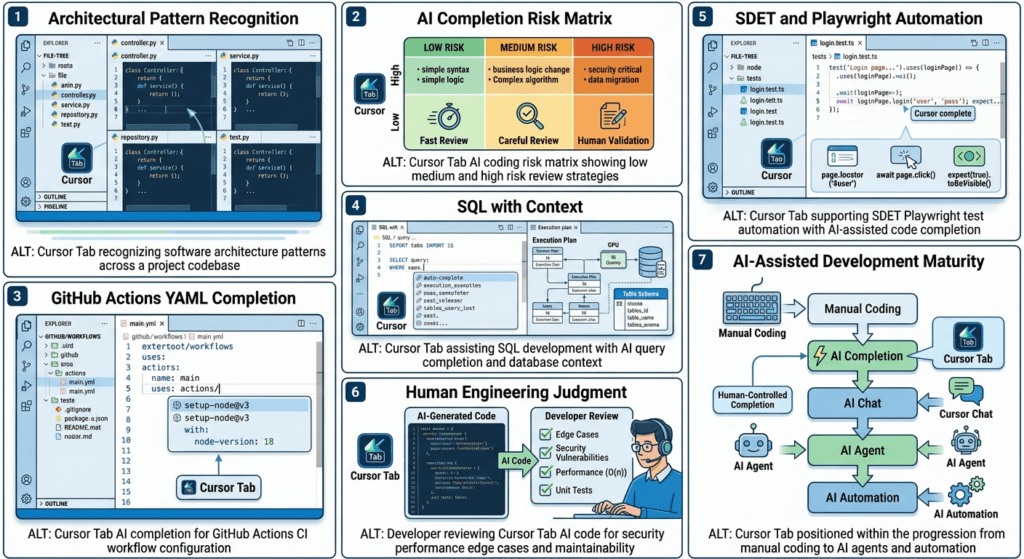
Low-risk
Formatting
Imports
Simple mapping
Boilerplate
Test scaffolding
Basic documentation
Accept quickly after a visual check.
Medium-risk
Business logic
API behavior
Error handling
Database queries
Refactoring
Review carefully and test.
High-risk
Authentication
Authorization
Payments
Cryptography
Secrets
Infrastructure
Data deletion
Security controls
Use AI cautiously and require stronger human validation.
This framework helps prevent the most common AI-assisted development mistake:
treating every generated suggestion as equally trustworthy.
Building a High-Performance Cursor Tab Workflow
Cursor Tab becomes most valuable when it is integrated into a disciplined engineering workflow rather than treated as a replacement for programming.
The strongest approach is not:
AI writes code
↓
Developer accepts everything
↓
Ship
A better workflow is:
Understand
↓
Design
↓
Type
↓
Cursor Tab suggests
↓
Review
↓
Test
↓
Refine
↓
Commit
This creates a human-controlled AI development loop.
The developer owns the requirements, architecture, quality, and final decision.
Cursor Tab reduces the mechanical effort required to reach that result.
Cursor Tab as a Developer Productivity Layer
Think of Cursor Tab as a layer sitting between your intention and your source code.
Developer Intent
       ↓
Implementation Decision
       ↓
Cursor Tab
       ↓
Code Suggestion
       ↓
Developer Review
       ↓
Production Code
This is fundamentally different from asking an autonomous AI agent to independently decide what should happen.
The developer already knows the destination.
Cursor Tab helps shorten the path.
That makes it particularly effective for:
- repetitive implementation
- boilerplate
- predictable transformations
- test scaffolding
- common programming patterns
- configuration
- documentation
- small refactoring tasks
- repetitive API code
- routine data transformations
Cursor Tab vs Manual Coding vs AI Agent
A useful comparison is to examine three different approaches.
| Factor | Manual Coding | Cursor Tab | AI Agent |
|---|---|---|---|
| Developer control | Very high | Very high | Medium |
| Typing effort | High | Lower | Very low |
| Prompting required | None | Minimal | Usually required |
| Inline workflow | Yes | Yes | Usually no |
| Multi-file changes | Manual | Limited | Strong |
| Autonomous execution | No | No | Yes |
| Best for small changes | Good | Excellent | Often excessive |
| Best for repetitive code | Good | Excellent | Good |
| Best for complex tasks | Good | Limited | Excellent |
| Review requirement | High | High | Very high |
| Context switching | Higher | Low | Potentially higher |
| Learning value | High | High if reviewed | Variable |
The important insight is that more autonomous does not always mean more productive.
If you need to add one repetitive condition to a function, launching an agent may be unnecessary.
If you need to migrate 50 files, inline completion may be insufficient.
Choosing the correct level of AI assistance is itself an engineering skill.
The Cursor Tab Sweet Spot
There is a useful middle ground between manually writing everything and delegating everything.
Manual Coding
      │
      │ Maximum control
      ↓
Cursor Tab
      │
      │ Human-controlled acceleration
      ↓
Chat
      │
      │ Conversational assistance
      ↓
Agent
      │
      │ Increasing autonomy
      ↓
Automated AI Workflow
Cursor Tab sits in a particularly interesting position because it provides AI assistance without forcing developers to leave their coding flow.
That makes it ideal for developers who already know what they want to build.
A 10-Second Cursor Tab Review Method
For small suggestions, a fast review process can be useful.
Before accepting a meaningful suggestion, ask:
1. Is this what I intended?
2. Is it consistent with this project?
3. Is there an obvious edge case?
4. Could it introduce a security or performance problem?
5. Can I explain what this code does?
If the answer is yes to all five, accept or adapt the suggestion.
If not, stop and investigate.
This prevents the dangerous habit of accepting code simply because it looks professional.
Cursor Tab and the “Looks Correct” Problem
AI-generated code often has a dangerous characteristic:
It can look correct before you understand it.
Consider:
def get_average(values):
    return sum(values) / len(values)
The function is short.
The syntax is valid.
The implementation looks reasonable.
But:
get_average([])
creates a problem.
A developer needs to understand the expected behavior.
Should it:
return 0
or:
return None
or:
raise ValueError("values cannot be empty")
There is no universal answer.
The correct behavior comes from the requirement.
This illustrates one of the most important Cursor Tab principles:
AI can suggest implementation, but the developer defines correctness.
Interactive Challenge: Accept or Reject?
Imagine Cursor suggests:
function getDiscount(price: number) {
    return price * 0.1;
}
Should you accept it?
Not immediately.
Ask:
Is 10% always the discount?
Does the customer type matter?
Is price before or after tax?
Can price be negative?
Should currency precision be handled?
Does the business rule change by product?
The suggestion may be perfectly valid code.
It may still be incorrect for the application.
Now consider:
const fullName = `${firstName} ${lastName}`;
This is probably a low-risk suggestion if the application has already established those assumptions.
The level of review should therefore depend on business risk, not simply code complexity.
Cursor Tab Risk-Based Strategy
A practical strategy is to classify AI-assisted work.
Green: Low Risk
Examples:
Imports
Formatting
Simple mappings
Test boilerplate
Simple loops
Basic object construction
Documentation scaffolding
Workflow:
Suggest → Quick Review → Accept
Yellow: Medium Risk
Examples:
Business logic
API handlers
Database operations
Error handling
Refactoring
CI/CD configuration
Workflow:
Suggest → Careful Review → Test → Accept
Red: High Risk
Examples:
Authentication
Authorization
Payments
Secrets
Cryptography
Infrastructure
Data deletion
Security controls
Workflow:
Suggest → Deep Review → Security Validation → Tests → Accept
This approach lets teams benefit from AI without treating every suggestion equally.
Cursor Tab for the Modern SDET
For SDETs, Cursor Tab can become a practical productivity accelerator.
Consider a Playwright test:
test("user can update profile", async ({ page }) => {
    await page.goto("/profile");

    await page.getByLabel("Name").fill("Test User");
    await page.getByRole("button", { name: "Save" }).click();

    await expect(
        page.getByText("Profile updated")
    ).toBeVisible();
});
A large portion of test automation consists of predictable patterns.
Cursor Tab can assist with:
Locators
Actions
Assertions
Fixtures
Test structure
API setup
Mock data
Helper methods
Page Object methods
But the SDET should remain responsible for:
Coverage
Risk analysis
Test design
Boundary cases
Negative scenarios
Flakiness prevention
Data isolation
Assertions
The distinction is critical.
AI can help you write more tests.
Only test engineering can determine whether they are better tests.
Cursor Tab for Page Objects
Suppose your Playwright framework uses Page Object Model.
You start:
export class LoginPage {
    constructor(private page: Page) {}

    async login(email: string, password: string) {
A predictable implementation could be:
await this.page.getByLabel("Email").fill(email);
await this.page.getByLabel("Password").fill(password);
await this.page.getByRole("button", {
    name: "Login"
}).click();
This is exactly the type of repetitive implementation where Cursor Tab can provide value.
The architecture remains human-designed.
The implementation becomes faster.
Cursor Tab for API Automation
Consider an API test:
test("creates a user", async ({ request }) => {
    const response = await request.post("/api/users", {
        data: {
            name: "Test User",
            email: "test@example.com"
        }
    });

    expect(response.status()).toBe(201);
});
Cursor Tab can help expand repetitive patterns.
For example:
const body = await response.json();

expect(body).toMatchObject({
    name: "Test User",
    email: "test@example.com"
});
But API testing should go further.
A mature test might consider:
201 response
Response schema
Headers
Authentication
Validation
Duplicate requests
Invalid data
Missing fields
Boundary values
Server errors
The AI can help construct those tests.
The engineer decides which scenarios matter.
Cursor Tab for Negative Testing
Negative testing is another useful area.
Suppose you have:
test("rejects invalid email", async ({ request }) => {
Cursor Tab may help produce repetitive request and assertion code.
But the SDET should define the invalid conditions:
Missing email
Invalid email
Empty email
Extremely long email
Duplicate email
Unsupported characters
Null email
Malformed request
Unauthorized request
The AI becomes the implementation assistant.
The tester remains the quality strategist.
Cursor Tab and Code Review Culture
Teams adopting AI coding tools should strengthen code review rather than weaken it.
A healthy review process can include:
AI-assisted change
       ↓
Developer self-review
       ↓
Automated tests
       ↓
Git diff
       ↓
Peer review
       ↓
Merge
A useful Git command remains:
git diff --stat
git diff
The goal is to understand the complete change.
AI assistance should never become an excuse for:
“The AI generated it, so I don’t know why this code exists.”
The person submitting the change owns it.
Cursor Tab and Small Commits
AI can make it tempting to generate large amounts of code.
Counter that tendency with small commits.
Instead of:
Add authentication
with hundreds of unrelated changes, prefer focused commits such as:
git commit -m "Add login validation"
git commit -m "Add authentication service"
git commit -m "Add login API tests"
git commit -m "Add Playwright login coverage"
Smaller changes are easier to:
- review
- test
- debug
- revert
- understand
Cursor Tab becomes safer when the surrounding development process remains controlled.
Cursor Tab and the Principle of Reversible Changes
A strong AI-assisted workflow should favor reversible changes.
For example:
Small change
↓
Run tests
↓
Review
↓
Commit
is safer than:
Generate 30 files
↓
Discover problem
↓
Try to determine what changed
The more autonomous the AI workflow becomes, the more important reversibility becomes.
For inline completion, this is naturally easier because the developer usually controls the exact code being added.
Cursor Tab and Developer Flow
There is another productivity benefit that is difficult to measure.
Momentum.
When developers repeatedly leave the editor to search for examples, their mental model can break.
Cursor Tab keeps the interaction closer to the code.
Idea
 ↓
Implementation
 ↓
Suggestion
 ↓
Decision
 ↓
Implementation
The developer can remain focused on the problem.
This does not eliminate the need for documentation or external research.
It simply reduces unnecessary interruptions for routine work.
When Cursor Tab Should Not Be Your First Tool
Do not automatically start with Cursor Tab when the real problem is uncertainty.
If you don’t know:
- what architecture to use
- what API should exist
- what the business rule means
- what database structure is appropriate
- what security model is required
- why a production failure is occurring
then generating code immediately may be premature.
First clarify the problem.
A useful decision tree is:
Do I know what I want to implement?
        │
       No
        ↓
   Understand / Plan
        │
       Yes
        ↓
Is the implementation small and predictable?
        │
       Yes
        ↓
    Cursor Tab
        │
       No
        ↓
Chat / Agent / Composer
This simple framework can prevent a lot of wasted AI-generated code.
Cursor Tab and Specification-Driven Development
AI completion works particularly well when the desired behavior is already specified.
For example:
Function:
calculate_shipping()

Rules:
- Orders over $100 receive free shipping.
- Orders between $50 and $99 cost $5.
- Orders below $50 cost $10.
- International orders use a separate calculation.
Now implementation becomes much clearer.
You might write:
function calculateShipping(
    total: number,
    international: boolean
) {
Cursor Tab can assist with the implementation.
The specification defines the behavior.
The AI assists with the code.
This separation produces better results than asking AI to guess the business rules.
Cursor Tab and “Intent Before Implementation”
A useful habit is:
Intent
↓
Specification
↓
Implementation
↓
AI Assistance
↓
Validation
rather than:
AI
↓
Code
↓
Try to understand what it did
The first workflow preserves engineering control.
The second reverses the responsibility.
Advanced Interactive Exercise: Build a Function Without AI First
Try this experiment.
Create:
type Order = {
    id: string;
    total: number;
    status: "pending" | "paid" | "cancelled";
};
Your requirement:
Return all paid orders above $100.
First implement it manually:
function getPremiumPaidOrders(orders: Order[]) {
    return orders.filter(
        order => order.status === "paid" && order.total > 100
    );
}
Now delete the implementation.
Type only:
function getPremiumPaidOrders(orders: Order[]) {
Observe Cursor Tab.
Compare:
Your implementation
        vs
AI implementation
Then review:
Does it correctly check status?
Does it correctly handle $100?
Does it mutate the original array?
Is the naming clear?
Is the return type obvious?
This exercise demonstrates the right relationship with AI:
AI is a second implementation opinion, not your first source of reasoning.
Cursor Tab and Boundary Conditions
Pay special attention to operators.
For example:
order.total > 100
is different from:
order.total >= 100
That one character can change business behavior.
An AI suggestion may choose either one.
Only the requirement determines which is correct.
This is why developers should review:
- comparison operators
- null handling
- default values
- array boundaries
- date ranges
- permissions
- error conditions
- concurrency behavior
These are small implementation details with potentially large consequences.
Cursor Tab and Dates
Dates are another common source of subtle errors.
Suppose AI suggests:
const tomorrow = new Date();
tomorrow.setDate(tomorrow.getDate() + 1);
This may be perfectly reasonable in one context.
But production systems may need to consider:
Time zones
Daylight saving changes
UTC
Locale
Date-only values
Business calendars
Server timezone
Database timezone
The lesson is broader than dates:
Simple-looking code can hide complex domain assumptions.
Cursor Tab can write the syntax.
The developer must validate the domain.
Cursor Tab and Performance Review
Suppose AI generates:
const result = users
    .filter(user => user.active)
    .map(user => user.orders)
    .flat();
This might be fine.
But if users contains millions of records, performance becomes a different question.
Ask:
How much data?
Where is filtering performed?
Can the database do it?
Is pagination needed?
Is memory usage acceptable?
AI completion should therefore be combined with normal engineering practices:
Profiling
Testing
Benchmarking
Query analysis
Monitoring
Cursor Tab and Production Readiness
Before AI-assisted code reaches production, evaluate:
Correctness
Security
Performance
Observability
Maintainability
Test coverage
Failure behavior
Rollback strategy
This is not unique to AI-generated code.
It is simply good software engineering.
AI makes the generation stage faster.
It does not remove the production-readiness stage.
Cursor Tab and Team Standards
Teams can increase the usefulness of AI completion by maintaining consistent standards.
For example:
Naming conventions
Folder structure
Testing conventions
Error handling
API patterns
Logging
Security requirements
Formatting
Linting
TypeScript rules
Cursor Rules can help communicate project-specific expectations.
A project might define:
Use TypeScript strict mode.
Prefer async/await.
Use Page Object Model for UI tests.
Use API fixtures for setup.
Never hard-code credentials.
Use accessible Playwright locators.
The stronger the engineering conventions, the easier it becomes for AI-assisted workflows to operate within those boundaries.
Cursor Tab and AI Governance
Organizations adopting AI coding tools should think beyond individual productivity.
Questions include:
What code can AI access?
Can sensitive repositories use AI assistance?
How should generated code be reviewed?
What security policies apply?
How should secrets be protected?
What licenses or dependencies are introduced?
How is AI usage documented?
AI-assisted development is ultimately an engineering governance problem as well as a productivity problem.
Cursor Tab: What Developers Should Measure
If a team adopts Cursor Tab, don’t measure success using only:
Lines of code generated
Better metrics include:
Cycle time
Lead time
Defect rate
Review time
Test stability
Deployment frequency
Rework
Developer satisfaction
For an SDET team, additional metrics might include:
Automation development time
Test maintenance time
Flaky test rate
Regression coverage
Failure diagnosis time
The goal is not more generated code.
The goal is better software delivery.
A Practical Cursor Tab Daily Workflow
A developer can structure a normal workday like this:
Start task
   ↓
Read requirement
   ↓
Inspect existing code
   ↓
Define implementation
   ↓
Use Cursor Tab for repetitive coding
   ↓
Run tests
   ↓
Inspect Git diff
   ↓
Refine
   ↓
Commit
For larger tasks:
Requirement
   ↓
Plan with Chat
   ↓
Implement with Agent/Composer
   ↓
Use Cursor Tab for local completion
   ↓
Test
   ↓
Review
   ↓
Commit
This creates a layered AI workflow rather than a one-tool workflow.
Cursor Tab: The Best Use Cases
The strongest use cases can be summarized as:
| Use Case | Value |
|---|---|
| Boilerplate | ⭐⭐⭐⭐⭐ |
| Repetitive patterns | ⭐⭐⭐⭐⭐ |
| Inline completion | ⭐⭐⭐⭐⭐ |
| Test scaffolding | ⭐⭐⭐⭐⭐ |
| Object transformations | ⭐⭐⭐⭐⭐ |
| Configuration | ⭐⭐⭐⭐ |
| Refactoring | ⭐⭐⭐⭐ |
| Documentation | ⭐⭐⭐⭐ |
| Complex debugging | ⭐⭐ |
| Architecture design | ⭐ |
| Security design | ⭐ |
| Large autonomous changes | ⭐ |
This does not mean Cursor Tab is weak.
It means the feature is optimized for a particular layer of development.
Its strength is fast, contextual, human-controlled code completion.
Cursor Tab: Common Mistakes to Avoid
Blindly accepting suggestions
AI wrote it
↓
It looks correct
↓
Accept
Avoid this.
Using Tab for architecture
Large design problem
↓
Start typing
↓
Hope AI figures it out
Plan first.
Measuring productivity by code volume
More code does not necessarily mean more value.
Ignoring tests
AI-generated code still needs validation.
Trusting generated security code
Security-sensitive implementation requires stronger review.
Allowing AI to reproduce bad patterns
Existing code can contain technical debt.
Forgetting business rules
AI may understand syntax better than organizational requirements.
The Cursor Tab Mindset
The most productive mindset can be summarized in one sentence:
Think like an engineer, type like a developer, review like a tester, and use AI to remove unnecessary mechanical effort.
That mindset prevents both extremes.
One extreme is:
AI is useless.
I must write everything manually.
The other is:
AI can write everything.
I don't need to understand the code.
The better approach is:
Human reasoning
+
AI acceleration
+
Automated validation
+
Human accountability
Conclusion: Cursor Tab Is About Flow, Not Replacement
Cursor Tab represents an important direction in AI-assisted software development.
Its greatest value is not that it can generate code.
Modern AI tools can generate enormous amounts of code.
The more interesting capability is that Cursor Tab can integrate AI assistance directly into the developer’s normal coding flow.
Instead of stopping to formulate a prompt for every small task, developers can receive contextual suggestions while they work.
That makes the interaction lightweight:
Think
↓
Type
↓
Predict
↓
Review
↓
Accept
↓
Test
↓
Continue
The developer remains in control.
For repetitive implementation, boilerplate, test scaffolding, transformations, configuration, and established project patterns, this can significantly reduce mechanical effort.
But Cursor Tab should never be confused with engineering judgment.
A suggestion can compile and still be wrong.
It can pass a basic test and still violate architecture.
It can solve the immediate problem and still create technical debt.
It can look elegant and still fail an edge case.
It can generate a secure-looking implementation and still contain a security vulnerability.
The responsibility therefore remains with the developer.
The strongest Cursor users are not the people who accept the most suggestions.
They are the people who know when a suggestion is useful, when it needs modification, and when it should be rejected entirely.
For SDETs and QA engineers, the same principle applies even more strongly.
Cursor Tab can accelerate Playwright tests, API automation, fixtures, assertions, helper functions, and repetitive framework code.
But it cannot decide which risks matter most.
That remains the responsibility of the test engineer.
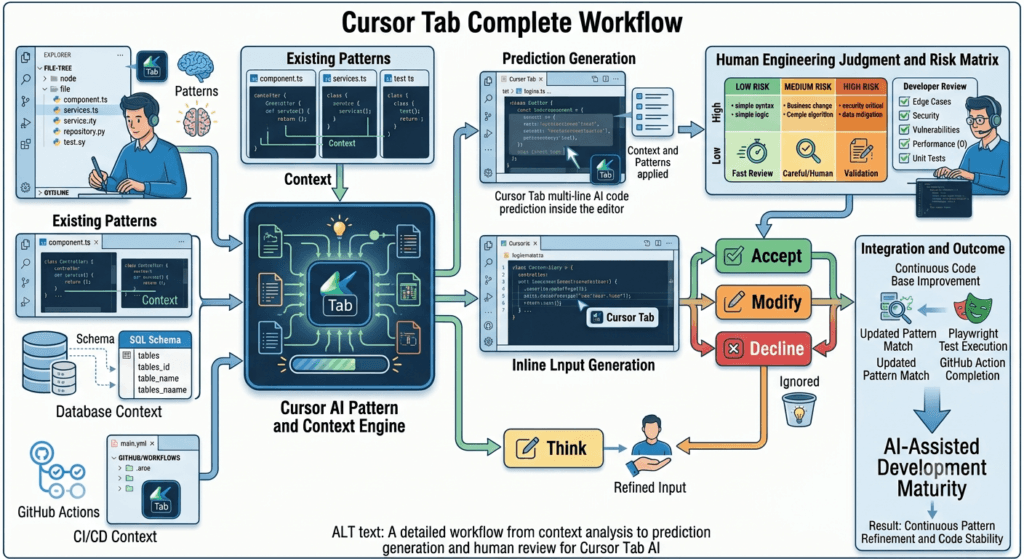
People Asked Questions
What is Cursor Tab?
Cursor Tab is an AI-powered inline code completion capability that suggests code as developers type inside Cursor.
How does Cursor Tab work?
Cursor Tab analyzes the available coding context and provides predicted code suggestions that developers can accept, modify, or reject.
Is Cursor Tab better than autocomplete?
Traditional autocomplete primarily focuses on syntax, symbols, and known completions. Cursor Tab provides more contextual AI-assisted code suggestions.
Is Cursor Tab free?
Cursor’s available features and usage limits can change over time, so users should check the current official Cursor pricing and documentation before making purchasing decisions.
Can Cursor Tab write complete functions?
Yes. Depending on the available context, Cursor Tab can suggest substantial portions of a function, although developers should review the implementation before accepting it.
Can SDETs use Cursor Tab?
Yes. SDETs can use it for repetitive Playwright, API testing, fixtures, assertions, Page Object methods, test data, and automation utilities.
Is Cursor Tab safe for production code?
Cursor Tab can be used while developing production software, but generated suggestions should be reviewed for security, correctness, performance, privacy, maintainability, and project-specific requirements.
What is the difference between Cursor Tab and Cursor Agent?
Cursor Tab focuses on inline code completion and developer-controlled suggestions, while Agent workflows are designed for larger and more autonomous software-development tasks.
Does Cursor Tab replace developers?
No. It reduces repetitive coding effort but does not replace software engineering judgment, architecture, testing strategy, security analysis, or business understanding.
Can Cursor Tab generate test automation code?
Yes. It can assist with repetitive test implementation, including test structures, fixtures, assertions, API calls, Page Object methods, and test data.
Cursor Tab vs Cursor Chat vs Cursor Agent
| Feature | Cursor Tab | Cursor Chat | Cursor Agent |
|---|---|---|---|
| Inline completion | Yes | No | No |
| Conversational interaction | Limited | Yes | Yes |
| Repetitive coding | Excellent | Good | Good |
| Code explanation | Limited | Excellent | Excellent |
| Multi-file work | Limited | Good | Excellent |
| Autonomy | Low | Medium | High |
| Developer control | Very high | High | Medium |
| Best use case | Inline coding | Reasoning & assistance | Larger implementation tasks |
AI Overview Optimization
What is Cursor Tab?
Cursor Tab is an AI-powered inline code completion feature in Cursor that predicts and suggests code as developers type, helping them write repetitive and contextual code faster while keeping the developer in control.
What is Cursor Tab used for?
Cursor Tab is useful for:
- Writing repetitive code
- Completing functions
- Generating boilerplate
- Repeating project patterns
- Creating test scaffolding
- Writing configuration
- Refactoring predictable code
- Supporting API and automation development
Is Cursor Tab the same as Cursor Chat?
No. Cursor Tab provides inline code suggestions while you type, whereas Cursor Chat provides conversational AI assistance for explaining, generating, modifying, and reasoning about code.
Is Cursor Tab useful for SDETs?
Yes. SDETs can use Cursor Tab to accelerate repetitive Playwright, API automation, fixtures, assertions, Page Object methods, test data, and helper implementations while retaining human ownership of test strategy and coverage.
Should developers trust Cursor Tab suggestions?
Developers should treat Cursor Tab suggestions as recommendations rather than verified code. AI-generated code should be reviewed for correctness, security, performance, maintainability, business rules, and edge cases.
Internal Links:
- Learn MCP – Zero to Hero
- Learn AI Agents for QA – Zero to Hero
- Playwright Automation – Zero to Hero
- LangGraph: Complete Zero to Hero
- Learn Python – Zero to Hero
- OpenAI Codex: Complete Zero to Hero
- Cursor AI: Complete Zero to Hero
- Claude Code Tutorial: Complete Zero to Hero
- AutoGen: Complete Zero to Hero Guide
- Free QA Resources Built From Real Experience
- QA Glossary: Test Automation Terms Every Engineer Should Know
External Resources:
- Model Context Protocol documentation
- Playwright documentation
- GitHub documentation
- TypeScript documentation
- Prompt Engineering Overview
- Git Documentation
- Visual Studio Code
- Cursor AI
- Cursor Documentation
Final Key Takeaways
- Cursor Tab is AI-powered inline code completion designed to keep developers in their coding flow.
- Its strongest use cases are repetitive code, boilerplate, predictable patterns, transformations, and test scaffolding.
- Cursor Tab is different from Cursor Chat and Agent workflows. Tab focuses on immediate code completion, while Chat supports conversation and Agent workflows handle larger tasks.
- Project context matters. Consistent architecture, naming, testing patterns, and coding standards can make AI suggestions more useful.
- AI-generated code is a suggestion, not verified truth.
- Human judgment remains essential for business logic, architecture, security, performance, and edge cases.
- SDETs can use Cursor Tab effectively for Playwright, API automation, fixtures, selectors, assertions, and repetitive test implementation.
- AI can generate more tests, but it cannot automatically determine whether those tests provide meaningful coverage.
- Risk-based review is essential. Low-risk suggestions can be reviewed quickly, while security-sensitive and production-critical code requires deeper validation.
- Git diff, automated tests, code review, and small commits remain important even when AI writes part of the code.
- The best AI workflow combines human reasoning with AI acceleration rather than replacing human reasoning.
- The real productivity metric is better software delivered with less total engineering effort—not simply more lines of generated code.
- Cursor Tab works best when the developer already understands the intended outcome and wants to reduce mechanical implementation effort.
- The future of AI-assisted development is not necessarily “AI writes everything.” It is increasingly about choosing the right level of AI assistance for each engineering task.
- The most valuable Cursor skill is not accepting AI suggestions faster. It is learning to judge them better.
Final Practical Checklist
Before accepting a meaningful Cursor Tab suggestion, ask:
□ Does this implement my actual intention?
□ Does it follow the project architecture?
□ Does it match existing coding conventions?
□ Have I considered edge cases?
□ Could it introduce a security issue?
□ Could it create a performance problem?
□ Does it need a test?
□ Did I review the resulting diff?
□ Can I explain what the code does?
□ Would I approve this code in a peer review?
If the answer is yes, Cursor Tab has done exactly what an effective AI coding assistant should do:
reduce the mechanical work while leaving the engineering decisions with you.
Continue Learning
Explore more expert articles on n8n, Autogen, Postman AI, LangChain, CrewAI, MCP Servers, AI Agents, LlamaIndex, Docker, FastAPI, Playwright, Cypress, Test Automation, DevOps, and Software Engineering at www.skakarh.com.
QAPulse by SK delivers expert release analysis, AI engineering insights, enterprise automation strategies, migration guidance, DevOps best practices, and practical testing knowledge to help software professionals build scalable, intelligent, and production-ready software systems.


