 QA
QA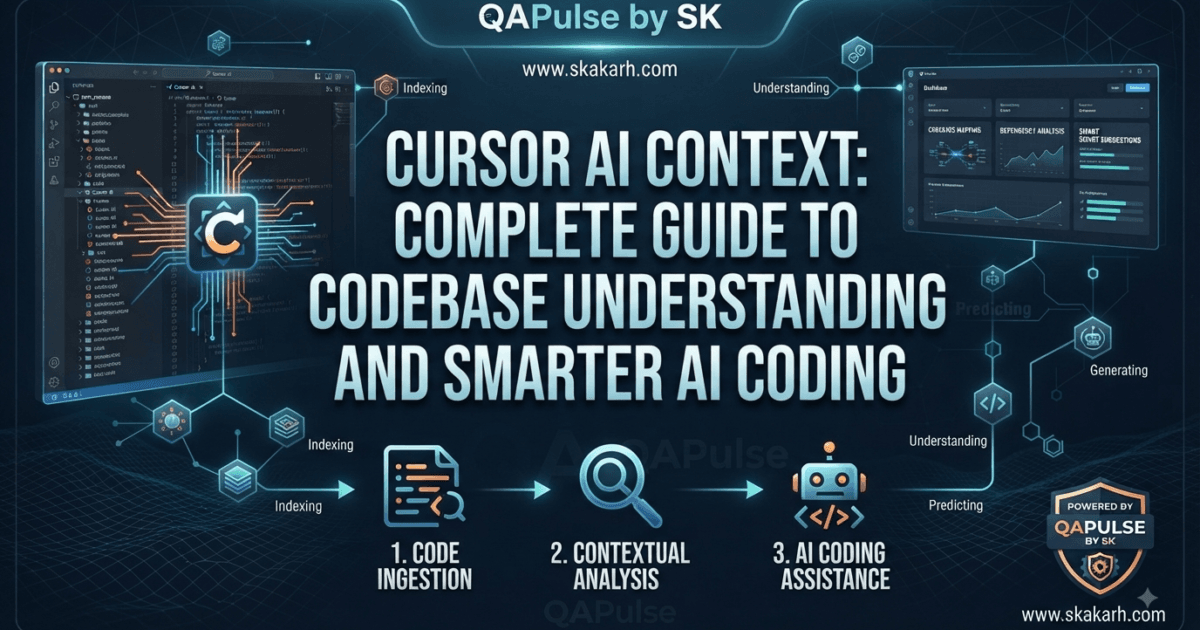
Lets discuss about Cursor AI Context. As we know Cursor AI becomes significantly more powerful when it understands the right context.
Many developers focus on prompts, models, and AI-generated code, but overlook one of the most important factors behind good results: what information the AI can actually see and understand when it works on a task.
A simple request such as:
Fix the login bug.
may sound clear to a human developer who already knows the project.
For an AI coding assistant, however, important questions immediately appear:
Which login flow?

Which frontend?

Which API?

Which authentication service?

Which database model?

Which files are relevant?

Which project rules apply?

Which tests define the expected behavior?

What security constraints exist?
The quality of AI-assisted coding therefore depends heavily on the quality of the context surrounding the request.
A useful way to think about the relationship is:
Better Context
      ↓
Better Understanding
      ↓
Better Reasoning
      ↓
Better Code Suggestions
      ↓
Better Validation
This is why understanding Cursor AI context is an important skill for developers who want more reliable results from AI-assisted development.
What Is Cursor AI Context?
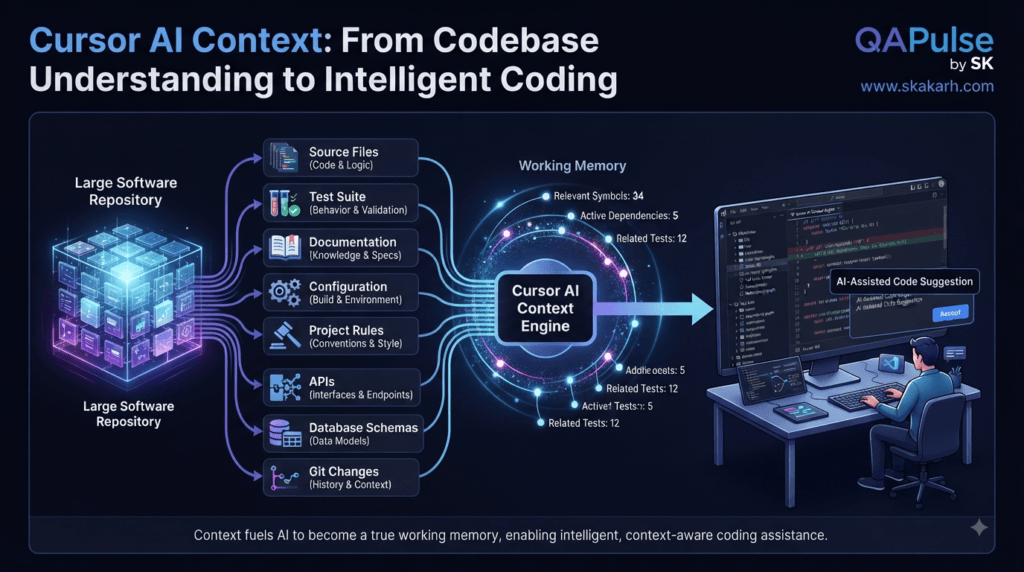
Cursor AI context is the information made available to the AI so it can understand a coding task within the surrounding project.
That context can include things such as:
- source code
- open files
- related files
- functions and classes
- project structure
- documentation
- configuration
- project instructions
- rules
- tests
- error messages
- terminal output
- selected code
- Git changes
- API definitions
- schemas
- dependencies
Consider a simple request:
Refactor the UserService.
Without context, the AI has little information about what the service should preserve.
With relevant context, it may understand:
UserService
   ↓
UserRepository
   ↓
PostgreSQL

UserService
   ↓
AuthController

UserService
   ↓
UserController

UserService
   ↓
Unit Tests

UserService
   ↓
Integration Tests
Now the task becomes much more meaningful.
The agent is not merely editing one file.
It can reason about the relationships surrounding that file.
Why Context Matters More Than a Longer Prompt
A common misconception is that better AI results simply require longer prompts.
That is not always true.
Compare these two requests.
Prompt A
Improve this authentication code.
Make it secure and clean.
Prompt B
Review the authentication implementation.

Relevant architecture:
- Authentication is handled by AuthService.
- JWT creation occurs in TokenService.
- Protected routes use AuthMiddleware.
- API tests are under tests/api/auth.
- Playwright tests cover browser login.

Constraints:
- Do not replace the authentication library.
- Preserve the existing token format.
- Do not change public API behavior.

Focus on:
- security issues
- duplicated logic
- error handling
- test coverage
- maintainability

Do not modify files yet.
Prompt B is not necessarily dramatically longer.
It is simply better contextualized.
The goal is not to provide the AI with everything.
The goal is to provide the right information.
Understanding the Context Hierarchy
Not all context has the same importance.
A useful mental model is:
Project
  ↓
Architecture
  ↓
Rules
  ↓
Relevant Files
  ↓
Specific Symbols
  ↓
Current Task
  ↓
Expected Behavior
  ↓
Validation
For example, if you ask an AI agent to modify a payment service, the relevant context may include:
PaymentService
├── PaymentRepository
├── PaymentProvider
├── OrderService
├── TransactionManager
├── Payment Tests
├── Database Schema
└── Security Rules
Providing unrelated UI components would add noise without improving the task.
This leads to an important principle:
More context does not automatically mean better context.
Context Quality vs Context Quantity
Imagine an AI receives 500 files.
Only 12 are relevant to the requested change.
The agent technically has access to a huge amount of information, but the useful context is buried inside a much larger repository.
Compare that with:
Task
 ↓
Relevant service
 ↓
Related repository
 ↓
Relevant API
 ↓
Existing tests
 ↓
Project rules
The second situation is often easier to reason about.
Think about context like a searchlight.
You do not want the light illuminating the entire universe.
You want it focused on the part of the system that matters.
Strategy: Start With the Repository Structure
Before asking Cursor AI to modify an unfamiliar project, understand its structure.
For example:
my-app/
├── src/
│   ├── components/
│   ├── services/
│   ├── controllers/
│   ├── repositories/
│   └── utils/
├── tests/
│   ├── unit/
│   ├── api/
│   └── e2e/
├── docs/
├── scripts/
├── package.json
└── README.md
A simple contextual request can be:
Analyze this repository structure.

Identify:
- application entry points
- business logic
- API layer
- data-access layer
- test architecture
- configuration
- documentation

Do not modify files.

Return a concise architectural map.
This is useful when entering an unfamiliar codebase.
Strategy: Understand Before Editing
One of the strongest Cursor AI practices is to separate understanding from modification.
Instead of:
Fix UserService.
use:
Analyze UserService.

Explain:
- its responsibilities
- dependencies
- consumers
- important business rules
- associated tests
- possible risks

Do not modify files.
Then, after understanding the system:
Based on the analysis, propose the smallest
safe change needed to solve the problem.

Do not implement it yet.
Only then:
Implement the approved change.
This three-step model is extremely useful:
Understand
    ↓
Plan
    ↓
Implement
It reduces the likelihood of the AI making assumptions before it understands the repository.
Strategy: Give Cursor AI the Relevant Code, Not Everything
Suppose you are debugging:
POST /api/users
The useful context might be:
UserController
UserService
UserRepository
UserSchema
Authentication Middleware
API Test
You probably do not need:
Dashboard.tsx
Navbar.tsx
Footer.tsx
LandingPage.tsx
MarketingBanner.tsx
unless they are involved in the problem.
This is especially important in large repositories.
Comparison: Poor Context vs Focused Context
| Poor Context Strategy | Focused Context Strategy |
|---|---|
| Give the AI everything | Give relevant information |
| Include unrelated files | Select related files |
| Huge generic prompt | Specific task |
| No architecture | Architecture included |
| No constraints | Explicit constraints |
| No expected behavior | Acceptance criteria |
| No test information | Relevant tests included |
| AI guesses relationships | AI reasons from evidence |
Focused context generally produces more predictable AI-assisted work.
Strategy: Use Tests as Context
Tests are often one of the most valuable sources of project knowledge.
Consider:
test('admin can update organization settings', async ({
  adminUser,
  settingsPage
}) => {
  await settingsPage.updateName('Engineering');

  await expect(
    settingsPage.successMessage
  ).toBeVisible();
});
This tells the AI more than the implementation alone.
It communicates an expected behavior:
Admin
  ↓
Organization Settings
  ↓
Update Name
  ↓
Success Confirmation
Now imagine another test:
test('regular user cannot update organization settings', async ({
  regularUser,
  settingsPage
}) => {
  await settingsPage.updateName('Unauthorized');

  await expect(
    settingsPage.permissionError
  ).toBeVisible();
});
The tests reveal an important security rule:
Admin → Allowed
Regular User → Denied
This is why tests should be considered part of the AI context.
They encode behavior.
Strategy: Use Documentation as Context
Documentation can communicate information that source code cannot easily express.
For example:
# Authentication Architecture

The application uses JWT authentication.

Authentication responsibilities:

AuthService
- validates credentials

TokenService
- creates tokens

AuthMiddleware
- validates incoming requests

Important rule:
Do not introduce a second authentication mechanism.
When an AI agent works on authentication, this documentation can prevent architectural mistakes.
The repository becomes easier for both humans and AI to understand.
Strategy: Use Project Rules as Context
Project rules should capture stable engineering decisions.
For example:
Testing:
Use Playwright fixtures for authenticated browser tests.

API:
Use the shared API client.

Dependencies:
Do not introduce new packages without justification.

Architecture:
Business logic belongs in services.

Security:
Never log access tokens.

Automation:
Do not use fixed waits.
These rules are different from a one-time task prompt.
A task prompt says:
What should happen now?
A project rule says:
How should this repository generally be modified?
That distinction is important.
Context Should Include Constraints
Suppose the task is:
Improve API performance.
That is broad.
Add constraints:
Improve API performance.

Constraints:
- preserve response schema
- preserve authorization behavior
- do not introduce Redis
- do not change database schema
- maintain existing API compatibility
- preserve current error responses
Now the agent has a defined solution space.
Constraints prevent an AI system from solving the problem in ways that technically work but violate project requirements.
Strategy: Use Negative Instructions Carefully
Negative instructions can be useful when a project has known failure patterns.
For example:
Do not:
- add arbitrary dependencies
- modify unrelated files
- use fixed waits
- remove existing tests
- weaken assertions
- change API contracts
- expose sensitive data
However, negative instructions should not become an enormous list.
Too many restrictions can make a task difficult to interpret.
A better pattern is:
Required behavior
+
Important constraints
+
Validation criteria
Understanding Context Pollution
Context can also become a problem.
Imagine asking:
Fix the checkout API.
and giving the agent:
50 frontend files
20 unrelated components
15 old migration files
10 documentation files
5 backend services
The relevant checkout service may be buried inside hundreds of unrelated files.
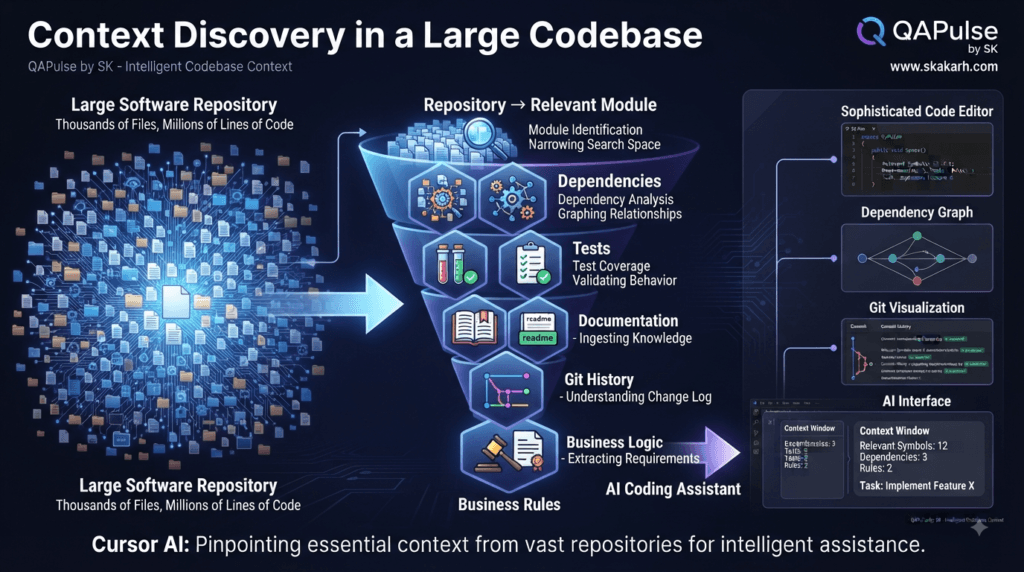
This can create context pollution.
Context pollution occurs when irrelevant information makes it harder to identify the information that actually matters.
A useful strategy is:
Repository
    ↓
Identify relevant subsystem
    ↓
Identify relevant files
    ↓
Identify relevant symbols
    ↓
Provide task
The objective is not minimum context.
It is high-signal context.
Interactive Exercise: Identify the Right Context
Imagine this task:
Fix a bug where an authenticated user
can see another user's order.
Which files would you investigate first?
A. Navbar.tsx
B. OrderController.ts
C. OrderService.ts
D. OrderRepository.ts
E. UserRepository.ts
F. CheckoutPage.tsx
G. AuthorizationMiddleware.ts
H. Order API tests
The strongest initial context is likely:
B + C + D + G + H
Depending on the architecture, E may also matter.
The lesson is important:
Context selection itself is an engineering skill.
Strategy: Context for Debugging
Debugging is one of the best examples of why context matters.
A poor debugging prompt:
Fix this error:

TypeError: Cannot read properties of undefined
A better request includes:
Error:
TypeError: Cannot read properties of undefined

Occurs in:
UserService.ts:87

Triggered by:
POST /api/users

Expected:
User profile should be created.

Actual:
Request returns HTTP 500.

Relevant files:
- UserController
- UserService
- UserRepository
- User model
- failing API test

Recent change:
UserService was modified yesterday.

Investigate the root cause.
Do not modify files yet.
Now the AI has:
Error
+
Location
+
Trigger
+
Expected behavior
+
Actual behavior
+
Relevant files
+
Recent change
That is much stronger debugging context.
Strategy: Context for Refactoring
Refactoring is another area where context is essential.
Consider:
Refactor this function.
What does “better” mean?
It could mean:
- shorter
- faster
- easier to test
- more maintainable
- more readable
- less duplicated
- architecturally cleaner
A stronger request:
Refactor UserService.

Goals:
- remove duplicated validation
- preserve public behavior
- maintain existing error types
- preserve API compatibility
- improve testability

Context:
- UserController
- UserRepository
- UserService tests
- API tests

Constraints:
- no new dependencies
- no database schema changes

First explain the proposed refactoring.
The AI can now evaluate the refactoring against actual project requirements.
Strategy: Context for Test Automation
For SDETs and QA engineers, context becomes even more important.
Suppose you ask:
Create a Playwright test for login.
Without project context, the AI may create:
await page.goto('/login');

await page.fill('#username', 'user@test.com');
await page.fill('#password', 'Password123');
await page.click('#login');

await expect(page).toHaveURL('/dashboard');
But the project may already use:
fixtures
page objects
API authentication
environment variables
test data factories
custom assertions
A better request is:
Create a Playwright login test.

Use:
- existing authentication fixture
- existing LoginPage page object
- existing test-user factory
- existing assertion helpers

Do not create duplicate utilities.

Follow the project's locator strategy.

Review existing authentication tests before implementation.
Now the AI is working within the test architecture.
Strategy: Context for API Testing
For API testing, useful context might include:
API specification
Endpoint implementation
Authentication middleware
Request schema
Response schema
Existing API client
Existing tests
Test data
Environment configuration
For example:
Create tests for POST /api/orders.

Use the existing API test client.

Review:
- order schema
- authentication middleware
- OrderController
- OrderService
- existing order tests

Cover:
- valid request
- missing required fields
- invalid values
- unauthorized request
- forbidden request
- duplicate order
- invalid product
This produces a much stronger testing strategy than asking for generic API tests.
Strategy: Context for Large Repositories
Large repositories require even more deliberate context management.
Consider:
monorepo/
├── apps/
│   ├── web/
│   ├── admin/
│   └── mobile/
├── services/
│   ├── users/
│   ├── payments/
│   └── orders/
├── packages/
├── infrastructure/
└── tests/
If the task concerns the order API, start with:
services/orders/
Then identify:
Controller
Service
Repository
Schema
Tests
Dependencies
Do not immediately treat the entire monorepo as equally relevant.
Start narrow.
Expand context when evidence shows that additional components matter.
This creates a useful debugging strategy:
Narrow Context
     ↓
Investigate
     ↓
Discover Dependency
     ↓
Expand Context
     ↓
Investigate Again
This is often better than starting with everything.
Strategy: Use Dependency Relationships as Context
Consider:
class OrderService {
  constructor(
    private orderRepository: OrderRepository,
    private paymentService: PaymentService
  ) {}
}
The service depends on:
OrderRepository
PaymentService
If you modify payment behavior, you should understand those dependencies.
A useful request is:
Map the dependency relationships around OrderService.

Identify:
- direct dependencies
- callers
- data flow
- external integrations
- related tests

Focus only on dependencies relevant to order creation.
This creates a dependency map before implementation.
Understanding Code Context vs Business Context
AI needs both.
Code context
Classes
Functions
Files
Dependencies
APIs
Schemas
Tests
Business context
Why does this feature exist?

Who can use it?

What rules apply?

What happens when it fails?

What must never happen?

What does success mean?
For example:
Code context:
PaymentService calls PaymentProvider.
Business context:
A payment must never be charged twice.
The second statement can be more important than the first.
It defines the invariant the implementation must preserve.
Comparison: Code Context vs Business Context
| Code Context | Business Context |
|---|---|
| Function | Business rule |
| Class | Responsibility |
| API | User behavior |
| Database schema | Data integrity |
| Test | Expected behavior |
| Dependency | Business dependency |
| Error | Business consequence |
| Implementation | System requirement |
The best AI-assisted development combines both.
Strategy: Turn Context Into a Repeatable Template
A reusable context template can look like this:
Task:
[What needs to change]

Goal:
[Why it needs to change]

Relevant files:
- [file]
- [file]
- [file]

Architecture:
[Important architectural information]

Existing behavior:
[Current behavior]

Expected behavior:
[Required behavior]

Constraints:
- [constraint]
- [constraint]

Business rules:
- [rule]
- [rule]

Testing:
[Relevant test strategy]

Validation:
[Commands/checks]

Do not modify:
[Protected areas]
This gives Cursor AI a structured operating environment.
Interactive Exercise: Build Better Context
Take this request:
Improve the checkout process.
Turn it into:
Task:
Improve checkout reliability.

Goal:
Prevent duplicate order creation during repeated requests.

Relevant files:
- CheckoutController
- CheckoutService
- OrderRepository
- PaymentService
- checkout API tests

Current behavior:
Repeated requests can create duplicate orders.

Expected behavior:
Repeated requests for the same checkout operation
must not create duplicate orders.

Constraints:
- preserve existing API response format
- do not change payment provider
- preserve existing authentication

Business rule:
A checkout operation must produce at most one order.

Testing:
- normal checkout
- duplicate request
- concurrent request
- failed payment
- retry behavior
Now the AI has a much clearer model of the problem.
That is the real value of context engineering.
Strategy: Context Is a Developer Skill
As AI coding becomes more capable, developers will spend less time manually writing every line.
But they will spend more time deciding:
What should the AI know?

What should it not know?

What files matter?

What constraints apply?

What behavior must remain unchanged?

What risks exist?

What evidence proves the solution is correct?
This makes context management an increasingly important engineering skill.
The strongest developers will not necessarily be the people who write the longest prompts.
They will be the people who can provide precise, relevant, structured context and evaluate the resulting implementation critically.
Building High-Quality Context for Cursor AI
Cursor AI context becomes especially important when a project grows beyond a few files. A small application can sometimes be understood from a handful of source files, but a production repository may contain thousands of files, multiple applications, shared packages, test suites, infrastructure, documentation, and generated artifacts.
The challenge is no longer simply giving the AI access to the repository.
The challenge is helping it identify what actually matters.
A useful principle is:
Repository access ≠ Complete understanding
Cursor AI can work with a large amount of project information, but developers still need to guide the reasoning process toward the relevant part of the system.
How Context Changes AI Coding Results
Consider a simple task:
Fix the checkout bug.
There are many possible interpretations.
The problem could be in:
CheckoutPage
CheckoutController
CheckoutService
PaymentService
OrderRepository
Database
Authentication
API contract
Test fixture
If the AI starts modifying code immediately, it may choose the wrong layer.
A stronger workflow starts with discovery:
Investigate the checkout failure.

Identify:
- where checkout begins
- where the order is created
- where payment is processed
- where transaction state is stored
- which tests cover checkout
- where the failure originates

Do not modify files yet.
Now the AI has a specific investigation objective.
This is one of the most important principles of context-aware AI development:
Let evidence determine context instead of guessing context from the task description.
Strategy: Use a Context Expansion Model
For unfamiliar codebases, avoid starting with maximum context.
Start with a small set of likely relevant files.
Then expand when the evidence requires it.
Task
 ↓
Likely relevant component
 ↓
Direct dependencies
 ↓
Related tests
 ↓
Business rules
 ↓
External dependencies
For example:
UserController
     ↓
UserService
     ↓
UserRepository
     ↓
User model
     ↓
User API tests
If the investigation reveals authorization problems, expand:
AuthorizationMiddleware
PermissionService
OrganizationRepository
Security tests
This approach keeps the investigation focused.
Context Discovery With a Practical Prompt
A reusable investigation prompt can be:
Analyze the implementation of [FEATURE].

First identify:
1. Entry point
2. Main business logic
3. Data-access layer
4. External dependencies
5. Authentication/authorization
6. Existing tests
7. Relevant documentation
8. Configuration affecting this behavior

Create a concise dependency map.

Do not modify files.
This is particularly useful before asking Cursor AI to make changes to an unfamiliar subsystem.
Understanding Symbols Instead of Entire Files
Developers often think in terms of files.
AI-assisted development benefits from thinking in terms of symbols and relationships.
A file might contain:
export class UserService {
  createUser() {}
  updateUser() {}
  deleteUser() {}
  resetPassword() {}
  deactivateUser() {}
}
If your task is password reset, the entire file may not be equally relevant.
The useful context could be:
UserService.resetPassword()
        ↓
PasswordService
        ↓
TokenRepository
        ↓
EmailService
        ↓
Password reset tests
This is more precise than simply saying:
Use UserService.ts.
The important question becomes:
Which symbol participates in the behavior being changed?
Strategy: Trace the Behavior, Not Just the File
Suppose a user reports:
Clicking "Save Profile" returns HTTP 500.
Instead of looking only at the frontend component, trace the complete behavior:
Save Button
     ↓
ProfilePage
     ↓
API Client
     ↓
PUT /api/profile
     ↓
ProfileController
     ↓
ProfileService
     ↓
UserRepository
     ↓
Database
Then inspect the reverse path when necessary:
Database
   ↓
Repository
   ↓
Service
   ↓
Controller
   ↓
API Response
   ↓
Frontend
This gives the AI a behavioral context rather than a file-centric context.
Comparison: File-Centric vs Behavior-Centric Context
| File-Centric Approach | Behavior-Centric Approach |
|---|---|
| Find the failing file | Trace the failing behavior |
| Modify the obvious component | Identify the actual failure layer |
| Focus on one file | Follow dependencies |
| Assume root cause | Investigate root cause |
| Local reasoning | System reasoning |
| Higher risk of incorrect fixes | Better evidence-based changes |
For debugging, the behavior-centric approach is usually much stronger.
Strategy: Give Cursor AI the Failure Evidence
When debugging, context should include evidence rather than conclusions.
Avoid:
The database code is broken. Fix it.
Prefer:
The request POST /api/orders returns HTTP 500.

Observed:
- frontend receives 500
- API log shows "unique constraint violation"
- failure occurs only when retrying the request
- first request creates the order successfully
- second request fails

Relevant files:
- OrderController
- OrderService
- OrderRepository
- order API tests

Investigate why the retry creates a duplicate record.
Do not modify files yet.
Notice the difference.
The first prompt tells the AI what to believe.
The second gives it evidence to investigate.
That distinction can significantly improve debugging quality.
Strategy: Separate Facts, Assumptions, and Questions
A useful context structure is:
Facts:
- POST /api/orders returns 500.
- First request succeeds.
- Retry fails.
- Database reports duplicate key.

Assumptions:
- The retry may be creating a second order.

Questions:
- Should the endpoint be idempotent?
- Is there an idempotency key?
- Where is transaction state stored?
This prevents assumptions from being accidentally treated as established facts.
It also gives the AI a clearer investigation target.
Context for Refactoring Legacy Code
Legacy code is one of the situations where context quality becomes critical.
Imagine:
function processOrder(order) {
  // 300 lines of legacy logic
}
A developer may know that some strange-looking code exists because of an old production issue.
An AI may see it as unnecessary complexity.
If you ask:
Simplify this function.
the AI might remove something that appears redundant but protects an important business case.
Instead, provide historical and behavioral context:
This function contains legacy order-processing logic.

Requirements:
- preserve current order behavior
- preserve retry behavior
- preserve payment handling
- preserve tax calculations
- preserve error semantics

Before refactoring:
- identify duplicated logic
- identify implicit business rules
- identify risky sections
- identify existing test coverage

Do not remove behavior merely because it appears unused.
Now the AI has a much safer operating boundary.
Strategy: Use Git History as Context
Code does not exist only in the present state.
Sometimes Git history explains why something looks unusual.
For example:
git log --oneline -- src/services/PaymentService.ts
and:
git blame src/services/PaymentService.ts
can reveal when a particular piece of logic was introduced.
You can then ask:
Review the recent Git history for PaymentService.

Identify:
- why the current logic was introduced
- related bug fixes
- previous regressions
- changes that should not be accidentally reverted

Use the history as context for the proposed refactoring.
This can be extremely valuable for legacy systems.
The AI should not treat every unusual implementation as accidental complexity.
Strategy: Use Recent Changes as Context
A current bug may have been introduced by a recent change.
Start with:
git diff
or:
git diff HEAD~1
Then provide the relevant change context:
The regression appeared after the latest commit.

Review the current diff and determine:
- which behavior changed
- which dependent behavior could be affected
- whether the failing test corresponds to the change
- the most likely regression path

Do not modify files yet.
This narrows the investigation dramatically.
Understanding Context Windows and Relevance
An AI system cannot treat every piece of repository information as equally useful.
Imagine this simplified repository:
project/
├── frontend/
│   ├── dashboard/
│   ├── checkout/
│   └── profile/
├── backend/
│   ├── users/
│   ├── orders/
│   └── payments/
├── mobile/
├── infrastructure/
├── documentation/
└── tests/
A payment API task might primarily involve:
backend/payments/
backend/orders/
tests/api/payments/
documentation/payments/
The mobile dashboard code is probably irrelevant unless the investigation shows otherwise.
This is why context management should be treated as signal optimization.
Useful context
────────────────────
Relevant information
Unnecessary information
The objective is to maximize the useful signal.
Strategy: Use Context Layers
A practical context architecture can use five layers.
Layer 1: Project Context
This establishes the overall environment.
Language
Framework
Architecture
Package manager
Testing framework
Deployment model
Layer 2: Repository Rules
These define how the project should be modified.
Coding conventions
Testing conventions
Security rules
Dependency rules
Architecture rules
Layer 3: Feature Context
This describes the subsystem being changed.
Relevant files
Dependencies
API contracts
Business rules
Existing tests
Layer 4: Task Context
This defines the current request.
Problem
Expected behavior
Constraints
Acceptance criteria
Layer 5: Validation Context
This explains how success will be verified.
Unit tests
API tests
E2E tests
Lint
Type checking
Security checks
Build
Together:
Project
  ↓
Rules
  ↓
Feature
  ↓
Task
  ↓
Validation
This structure can make AI-assisted coding much more predictable.
Interactive Exercise: Build Five Context Layers
Imagine you are adding a password-reset feature.
Complete:
Project:
____________________________

Rules:
____________________________

Feature:
____________________________

Task:
____________________________

Validation:
____________________________
A possible answer:
Project:
Node.js + TypeScript REST API

Rules:
Use existing AuthService.
Do not introduce another authentication library.

Feature:
AuthController
AuthService
TokenRepository
EmailService

Task:
Allow users to reset forgotten passwords.

Validation:
Unit tests
API tests
Token expiry tests
Invalid-token tests
Security checks
This is much stronger than:
Build password reset.
Strategy: Context for Security-Sensitive Code
Security-related work requires particularly careful context.
Suppose:
const user = await userRepository.findById(userId);
The AI may understand the syntax perfectly.
But the security question is:
Can this caller access this user?
That requires context about:
Authentication
Authorization
Ownership
Roles
Organizations
Permissions
Data sensitivity
A useful security-review prompt is:
Review this endpoint using the application's authorization model.

Check:
- authentication
- authorization
- resource ownership
- tenant isolation
- sensitive fields
- privilege escalation
- ID manipulation
- error information disclosure

Compare the implementation against existing security patterns.
Do not modify files yet.
The phrase “existing security patterns” is important.
Security cannot be evaluated purely from one isolated function.
Strategy: Context for Multi-Tenant Applications
Multi-tenant systems are an excellent example of business context influencing technical correctness.
Suppose:
GET /api/orders/123
returns an order.
The code may correctly retrieve order 123.
But the business requirement may be:
A user can only retrieve orders belonging
to their organization.
Therefore the real context is:
User
 ↓
Organization
 ↓
Order
A correct query might need:
const order = await orderRepository.findOne({
  id: orderId,
  organizationId: currentUser.organizationId
});
The important insight is that business context changes what technically correct code means.
Strategy: Context for Performance Problems
Performance issues also require system context.
Suppose the task is:
Make the API faster.
That is not enough.
A better request:
Investigate performance of GET /api/orders.

Context:
- PostgreSQL database
- approximately 2 million orders
- endpoint returns paginated results
- average response time is 1.8 seconds
- target is below 500ms

Investigate:
- database queries
- indexes
- N+1 behavior
- serialization
- external API calls
- pagination strategy

Measure before recommending changes.
Do not modify files yet.
Now the AI can reason against measurable requirements.
Without measurements, “optimization” can easily become unnecessary refactoring.
Comparison: Generic vs Evidence-Based Context
| Generic Request | Evidence-Based Request |
|---|---|
| Make it faster | Response averages 1.8s |
| Fix checkout | Retry creates duplicate order |
| Improve security | Check tenant isolation |
| Refactor service | Preserve documented business rules |
| Fix test | Failure occurs after authentication |
| Improve API | Target response time is <500ms |
Evidence gives the AI something concrete to reason about.
Strategy: Use Acceptance Criteria as Context Anchors
Acceptance criteria can act as a bridge between business requirements and implementation.
For example:
Feature:
Bulk user import

Acceptance criteria:
- CSV supports up to 10,000 users
- duplicate emails are rejected
- invalid rows are reported
- valid rows continue processing
- partial failures are summarized
- imported passwords are never accepted
- import progress is visible
Now the AI can map requirements to implementation:
Requirement
    ↓
Implementation
    ↓
Test
For example:
10,000 users
    ↓
Load/performance test

Duplicate emails
    ↓
Validation test

Invalid rows
    ↓
Negative test

Partial failures
    ↓
Recovery test
This creates traceability.
Strategy: Build Context From the Test Pyramid
For software testing, context can be organized according to validation levels.
          E2E
         /   \
      API     UI
       /       \
 Integration   Component
       \       /
          Unit
If a task modifies a business service, provide its unit tests.
If it changes an API contract, provide API tests.
If it changes user behavior, include the relevant E2E tests.
This helps Cursor AI understand how the project validates behavior.
Strategy: Don’t Let AI Rewrite Tests to Hide Problems
One dangerous pattern is:
Test fails
   ↓
AI modifies assertion
   ↓
Test passes
For example:
await expect(page.locator('.success')).toBeVisible();
becoming:
await expect(page.locator('.success')).toBeAttached();
The test now passes under weaker conditions.
A better instruction is:
The test is failing.

Do not weaken the assertion.

Determine whether:
1. production behavior is incorrect
2. test setup is incorrect
3. locator is incorrect
4. expected behavior has changed

Preserve the intended strength of the test.
This is context-driven testing rather than test-driven code generation.
Interactive Challenge: What Context Is Missing?
Consider:
Create a test for the payment flow.
Before allowing implementation, ask:
Which payment provider?

Which authentication state?

Which test environment?

What is the successful payment behavior?

What happens when payment fails?

What happens when payment times out?

How are test cards/data provided?

What existing payment fixtures exist?

What should never happen?

Which API and UI tests already exist?
The questions themselves reveal the missing context.
This is an important developer skill:
Before asking AI to solve a problem, identify what it does not yet know.
Strategy: Expand Context Based on Unknowns
Sometimes the first investigation reveals uncertainty.
For example:
The OrderService calls PaymentService,
but it is unclear whether PaymentService
guarantees idempotency.
Instead of guessing, expand context:
Investigate PaymentService idempotency behavior.

Check:
- implementation
- tests
- database constraints
- provider integration
- recent Git history
- documentation

Report evidence.
This produces a disciplined loop:
Context
 ↓
Investigation
 ↓
Unknown discovered
 ↓
Context expansion
 ↓
Evidence
 ↓
Decision
That is much safer than assuming the missing information.
Strategy: Context Should Evolve During a Task
Context is not necessarily static.
At the beginning:
Repository
Task
Architecture
Rules
During investigation:
Relevant service
Dependencies
Tests
Git history
During implementation:
Exact files
Acceptance criteria
Constraints
During validation:
Test failures
Logs
Diff
CI results
So the effective context changes as the engineering process progresses.
Discovery Context
      ↓
Implementation Context
      ↓
Validation Context
This is why context management should be considered an ongoing engineering activity rather than a one-time prompt-writing trick.
A Practical Context Checklist
Before asking Cursor AI to make a significant change, check:
[ ] Do I understand the task?

[ ] Have I identified the relevant subsystem?

[ ] Do I know the existing architecture?

[ ] Have I identified important dependencies?

[ ] Have I checked existing tests?

[ ] Are business rules documented?

[ ] Are security constraints clear?

[ ] Are there protected areas that must not change?

[ ] Are acceptance criteria explicit?

[ ] Do I know how success will be validated?
If several answers are “no,” the AI probably needs more investigation before implementation.
The Core Principle
The future of AI-assisted development is not simply about giving AI more access to code.
It is about giving AI better information at the right moment.
A useful formula is:
High-Quality AI Coding
=
Relevant Context
+
Clear Requirements
+
Explicit Constraints
+
Repository Knowledge
+
Behavioral Evidence
+
Strong Validation
Cursor AI can generate impressive code with a short prompt.
But professional software engineering requires more than impressive generation.
It requires understanding the system that the code is entering.
When developers learn to manage context deliberately, AI becomes much better at working with existing architectures, tests, business rules, dependencies, and engineering constraints.
Making Cursor AI Context Reliable for Real-World Engineering
Cursor AI context becomes even more valuable when the goal shifts from simple code generation to reliable engineering decisions.
A developer can give an AI agent access to a repository and still receive an incorrect implementation if the important relationships, constraints, and expected behaviors are unclear.
The difference is often not the coding ability of the model.
It is the quality of the engineering context.
Understanding the Difference Between Access and Understanding
Having a repository available does not mean the AI automatically understands every architectural decision inside it.
Consider a typical application:
project/
├── frontend/
├── backend/
├── workers/
├── shared/
├── database/
├── infrastructure/
├── tests/
└── docs/
A request such as:
Improve user authentication.
is dramatically underspecified.
Authentication could involve:
Login UI
   ↓
Authentication API
   ↓
AuthService
   ↓
UserRepository
   ↓
Database

              ↓
       Token Service
              ↓
       Authentication
        Middleware
              ↓
       Protected APIs
Changing one component may affect several others.
A better approach is to establish the behavioral boundary before changing implementation.
What enters the system?
        ↓
What processing occurs?
        ↓
What state changes?
        ↓
What leaves the system?
        ↓
How is the behavior validated?
That gives Cursor AI a much stronger mental model of the task.
Strategy: Build a Context Map Before Coding
For complex changes, ask Cursor AI to construct a small context map first.
Analyze the authentication flow.

Map:

1. User entry point
2. Authentication endpoint
3. Authentication service
4. Token generation
5. Token validation
6. Authorization middleware
7. User persistence
8. Existing unit tests
9. Existing API tests
10. Security-related documentation

For each component, explain its responsibility
and relationship to the authentication flow.

Do not modify files.
The resulting map can look like:
LoginPage
    ↓
POST /auth/login
    ↓
AuthController
    ↓
AuthService
   ├── UserRepository
   └── PasswordService
    ↓
TokenService
    ↓
JWT
    ↓
AuthMiddleware
    ↓
Protected API
This is much more useful than immediately asking the AI to rewrite authentication code.
Understanding Context as a Dependency Graph
A useful way to think about a codebase is as a graph rather than a collection of files.
               ┌── Tests
               │
Controller ─── Service ─── Repository
     │             │            │
     │             │            └── Database
     │             │
     │             └── External API
     │
     └── Middleware
When one node changes, connected nodes may become relevant.
For example:
PaymentService
      ↓
PaymentProvider
      ↓
Transaction
      ↓
Order
      ↓
OrderRepository
      ↓
Database
If the task is to change payment retry behavior, only opening PaymentService.ts may not be enough.
The transaction model and order persistence behavior could determine whether a retry is safe.
Comparison: Files vs Relationships
| File-Based Thinking | Relationship-Based Thinking |
|---|---|
| What file should I edit? | What behavior should change? |
| Open one source file | Trace connected components |
| Modify local implementation | Understand system impact |
| Assume dependencies | Investigate dependencies |
| Focus on syntax | Focus on behavior |
| Easier to start | Safer for complex changes |
For small changes, file-based thinking can be sufficient.
For architectural or behavioral changes, relationship-based reasoning is much safer.
Strategy: Use “Why” Alongside “What”
Technical context tells Cursor AI what exists.
Business context tells it why it exists.
Suppose the code contains:
if (order.status === 'PAID') {
  return existingOrder;
}
An AI might consider this an opportunity for simplification.
But the business rule might be:
A paid order must never be charged again.
Now the strange-looking condition has a clear purpose.
A useful prompt is:
Before refactoring this logic, identify:

- What business rule does it implement?
- Which behavior depends on it?
- Which tests prove that behavior?
- What would break if this condition were removed?

Do not simplify code merely because it appears redundant.
This is especially useful in legacy systems.
Strategy: Identify Invariants
An invariant is a condition that must remain true.
Examples:
A payment must never be processed twice.

A user cannot access another organization's data.

An order cannot be modified after shipment.

A deleted account cannot authenticate.

A failed transaction must not create a completed order.
These statements are powerful context.
For example:
Task:
Improve order retry handling.

Invariant:
A single checkout operation must create
at most one order.

Preserve:
- payment state
- transaction state
- API compatibility
- existing authorization
Now Cursor AI has a correctness boundary.
The implementation can change.
The invariant cannot.
Strategy: Give Cursor AI Acceptance Criteria
Acceptance criteria transform vague requests into testable outcomes.
Instead of:
Make checkout more reliable.
use:
Checkout reliability requirements:

- repeated requests must not create duplicate orders
- successful payment must create exactly one order
- failed payment must not create a completed order
- retry after timeout must be safe
- existing API response format must remain unchanged
- existing authentication behavior must remain unchanged
Now the AI can reason about implementation against explicit requirements.
The development loop becomes:
Requirement
    ↓
Implementation
    ↓
Test
    ↓
Evidence
Interactive Exercise: Find the Missing Context
Imagine you receive this task:
Fix the profile update bug.
Before giving it to Cursor AI, ask:
Which user experiences the bug?

What operation fails?

What is the expected result?

What is the actual result?

Is the failure UI, API, database, or authorization?

Which endpoint is involved?

Which user role is affected?

When did the bug begin?

Which tests currently cover this behavior?
These questions expose missing context.
For example:
Expected:
User changes their display name.

Actual:
UI reports success but refresh restores old value.

Additional evidence:
API returns 200.
Database still contains old value.
Now the investigation becomes much more focused.
Possible context:
ProfilePage
    ↓
Profile API Client
    ↓
PUT /api/profile
    ↓
ProfileService
    ↓
UserRepository
    ↓
Database
The problem is probably somewhere in persistence rather than authentication or frontend rendering.
Strategy: Use Logs as First-Class Context
Logs can dramatically improve debugging.
Instead of:
The API is broken.
provide:
Request:
PUT /api/profile

Response:
200 OK

Server log:
ProfileService.updateProfile()
completed successfully

Database log:
UPDATE statement affected 0 rows

Expected:
User display name changes permanently.

Actual:
API reports success but database value remains unchanged.
Now Cursor AI has evidence across multiple layers.
It can reason:
Request succeeds
       ↓
Service executes
       ↓
Database update affects 0 rows
       ↓
Success incorrectly returned
This is much stronger than guessing from the frontend.
Strategy: Use Runtime Evidence With Source Context
Source code explains intended implementation.
Runtime evidence explains actual behavior.
Combine both.
Source code
+
Logs
+
Stack trace
+
Request/response
+
Database result
+
Test failure
For example:
Investigate this failure.

Stack trace:
[stack trace]
Request: POST /api/orders Response: 500 Relevant logs:
[logs]
Relevant source: OrderController OrderService OrderRepository Failing test: tests/api/orders.spec.ts Determine the root cause from the evidence. Do not change tests to hide the failure. Do not modify files yet.
This gives Cursor AI a much stronger debugging environment.
Understanding Context From Tests
Tests can reveal rules that documentation does not mention.
Consider:
test('cannot cancel shipped order', async () => {
  const order = await createOrder({
    status: 'SHIPPED'
  });

  const response = await cancelOrder(order.id);

  expect(response.status()).toBe(409);
});
This communicates:
SHIPPED
   ↓
Cancellation prohibited
   ↓
HTTP 409
That is a business rule encoded in executable form.
If you ask Cursor AI to modify cancellation behavior, this test should be part of the context.
Strategy: Search for Behavioral Evidence
Instead of only searching for a class name, search for behavior.
For example:
cancelOrder
might reveal:
OrderService.ts
OrderController.ts
orders.spec.ts
order-cancellation.spec.ts
OrderStatus.ts
documentation/orders.md
Now the context becomes richer:
Implementation
+
API
+
Tests
+
State model
+
Documentation
This is more useful than looking only at OrderService.ts.
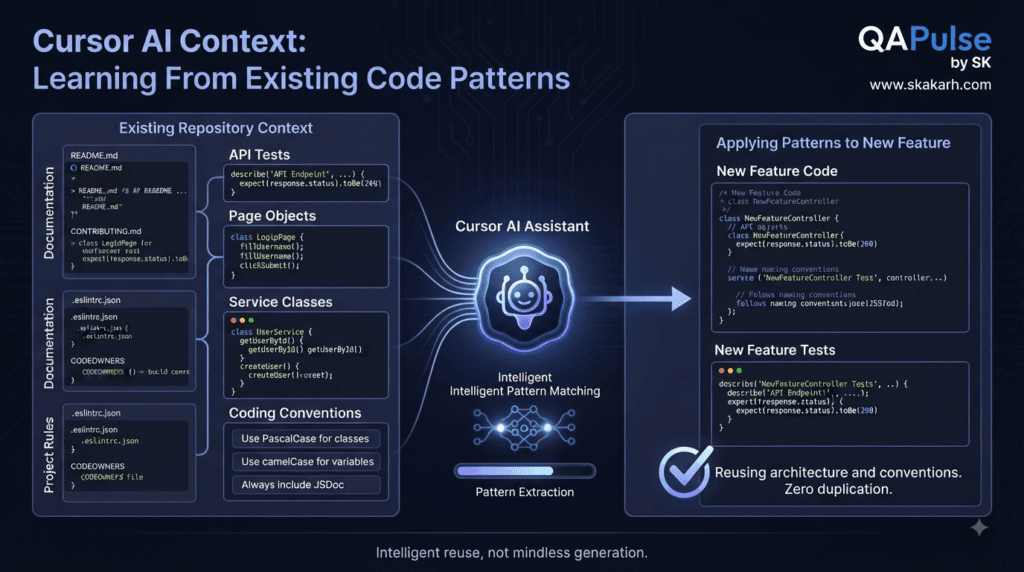
Strategy: Use Existing Patterns Instead of Inventing New Ones
AI-generated code can become inconsistent when the developer does not provide examples from the existing project.
Suppose your repository already uses:
await expectApiError(response, 401);
but Cursor AI generates:
expect(response.status()).toBe(401);
Both may work.
But the second ignores the project’s existing abstraction.
Give the AI a pattern:
Review existing API tests.

Follow the established:
- API client
- authentication fixture
- assertion helper
- test data factory
- naming convention

Do not create duplicate helpers.
This encourages consistency over invention.
Comparison: Pattern Reuse vs Fresh Generation
| Without Existing Patterns | With Existing Patterns |
|---|---|
| AI invents implementation | AI follows repository conventions |
| Duplicate helpers possible | Existing utilities reused |
| Inconsistent naming | Consistent naming |
| More review required | Easier review |
| Higher maintenance cost | Better maintainability |
The repository itself should be treated as a source of engineering knowledge.
Strategy: Give Examples When Conventions Are Difficult to Explain
Sometimes a rule is easier to demonstrate than describe.
Instead of:
Follow our API test architecture.
provide:
Use this existing test as the architectural reference:

tests/api/orders/create-order.spec.ts

Follow its:
- fixture structure
- authentication setup
- request creation
- assertions
- cleanup
- naming style

Apply the same approach to the new endpoint.
Examples can act as highly effective context.
Understanding Context for Code Reviews
Context is not only useful when generating code.
It is equally useful when reviewing code.
Suppose Cursor AI receives:
Review this pull request.
That may produce a generic review.
A stronger review context includes:
Review this change against:

- project architecture
- existing authentication model
- API compatibility requirements
- security rules
- existing test patterns
- performance requirements
- business invariants

Focus on:
1. correctness
2. regressions
3. security
4. maintainability
5. test coverage
6. unintended behavior changes
Now the AI is reviewing the change against project-specific expectations.
Strategy: Review the Diff, Not the Entire Project
For code reviews, the changed surface is usually the best starting point.
git diff main...feature-branch
Then investigate dependencies only when necessary.
A practical review flow:
Changed files
      ↓
Changed behavior
      ↓
Affected dependencies
      ↓
Existing tests
      ↓
Business rules
      ↓
Potential regressions
This avoids drowning the review in unrelated repository information.
Strategy: Ask for Risk Mapping
A useful Cursor AI review prompt is:
Analyze this change and create a risk map.

For each changed area identify:
- what behavior changed
- what depends on it
- what could regress
- which tests protect it
- what additional tests may be needed

Prioritize risks as:
Critical
High
Medium
Low

Do not modify files.
This turns AI from a simple code reviewer into a reasoning assistant.
Understanding Context for Database Changes
Database work is another area where isolated context is dangerous.
Suppose the task is:
Add a column called organization_id.
The relevant context could include:
Database schema
Migration system
ORM models
Repositories
Queries
API contracts
Factories
Fixtures
Tests
Indexes
Constraints
A safe request:
Analyze the impact of adding organization_id
to the users table.

Check:
- ORM model
- migrations
- repositories
- existing queries
- factories
- fixtures
- tests
- indexes
- uniqueness constraints
- API serialization

Identify required changes before implementation.
Do not modify files.
This prevents the classic mistake of changing a schema while overlooking consumers.
Strategy: Think in Change Impact, Not Just Task Scope
A task may be small:
Add organization_id.
But its impact may be large:
Database
   ↓
ORM
   ↓
Repository
   ↓
Service
   ↓
API
   ↓
Frontend
   ↓
Tests
Therefore:
Task size ≠ Change impact
This is one of the most important concepts for AI-assisted development.
Interactive Exercise: Map the Impact
Task:
Add soft deletion to users.
What could be affected?
User model
User repository
Authentication
User search
Admin UI
API responses
Database queries
Unique constraints
Background jobs
Tests
Reports
A useful Cursor AI request:
Analyze the impact of introducing soft deletion
for users.

Identify every subsystem that assumes a deleted
user is physically absent.

Do not implement anything.

Return:
- affected components
- affected queries
- affected tests
- security implications
- migration concerns
- recommended implementation boundaries
This is a high-value use of AI before code generation.
Strategy: Context for Architectural Decisions
Sometimes the AI should not immediately choose an implementation.
Suppose you need caching.
Do not simply ask:
Add Redis caching.
Instead:
Analyze caching options for this service.

Current:
- Node.js API
- PostgreSQL
- horizontally scaled application
- average endpoint latency: 800ms

Requirements:
- reduce repeated database reads
- preserve data consistency
- support multiple application instances

Compare:
- in-memory cache
- Redis
- database caching
- application-level memoization

Consider:
- invalidation
- scalability
- failure behavior
- operational complexity
- consistency

Recommend an approach before implementation.
Now Cursor AI is solving an engineering decision rather than blindly implementing a predefined solution.
Comparison: Solution-First vs Decision-First
| Solution-First | Decision-First |
|---|---|
| “Use Redis” | “Evaluate caching strategies” |
| Assumes solution | Investigates requirements |
| Limited alternatives | Compares alternatives |
| May over-engineer | Better proportionality |
| Implementation immediately | Decision before implementation |
This is particularly useful for architecture work.
Strategy: Context Should Include Non-Goals
Developers often describe what should happen but forget to explain what should not happen.
For example:
Goal:
Improve authentication performance.

Non-goals:
- do not change authentication protocol
- do not replace JWT
- do not change API contracts
- do not introduce a new identity provider
- do not modify user schema
This creates a clearer solution boundary.
A practical structure is:
Goal
+
Requirements
+
Constraints
+
Non-goals
+
Validation
Strategy: Build a Context Contract
For important AI-assisted tasks, create a small context contract:
Task:
Improve order retry behavior.

Goal:
Prevent duplicate orders.

Relevant components:
OrderController
OrderService
OrderRepository
PaymentService

Business invariant:
One checkout operation = one order.

Constraints:
Preserve API contract.
Preserve payment provider.
No schema changes.

Non-goals:
Do not redesign checkout.
Do not replace the database layer.

Validation:
Unit tests
API tests
Concurrency tests
Regression tests
This can be reused during planning, implementation, review, and testing.
Context for SDET and QA Workflows
For QA engineers, context can connect requirements to automation.
Suppose:
Requirement:
Users cannot access another organization's orders.
Provide:
Authentication model
Authorization middleware
Organization model
Order API
Existing permission fixtures
API tests
E2E tests
Then ask:
Create a test strategy for organization-level
order isolation.

Cover:
- authorized access
- unauthorized access
- cross-organization access
- missing organization
- manipulated order IDs
- admin behavior
- regression scenarios

Follow existing API and Playwright test architecture.
This produces much more valuable output than:
Create security tests.
Strategy: Connect Context to Validation
Context should eventually lead to measurable validation.
Requirement
     ↓
Relevant context
     ↓
Implementation
     ↓
Tests
     ↓
Runtime evidence
     ↓
Review
For example:
Requirement:
Users cannot access another organization's data.

Context:
Authorization middleware
Organization model
Order API

Implementation:
Tenant-aware query

Validation:
Cross-tenant API test
This gives AI-assisted development a traceable engineering path.
A Reusable Cursor AI Context Prompt
For complex tasks, this structure is useful:
Task:
[Describe the change]

Goal:
[Describe the desired outcome]

Current behavior:
[Explain what happens now]

Expected behavior:
[Explain what should happen]

Relevant components:
- [component]
- [component]
- [component]

Dependencies:
- [dependency]
- [dependency]

Business rules:
- [rule]
- [rule]

Invariants:
- [invariant]
- [invariant]

Constraints:
- [constraint]
- [constraint]

Non-goals:
- [non-goal]
- [non-goal]

Existing patterns:
[Reference existing implementation]

Tests:
[Relevant tests]

Validation:
[Commands/checks]

First:
Analyze the problem and identify risks.

Then:
Propose the smallest safe solution.

Do not modify files until the solution is clearly understood.
This template is particularly useful for large or high-risk changes.
Interactive Challenge: Improve the Prompt
Weak request:
Fix our login system.
Improve it by adding:
Current behavior
Expected behavior
Relevant components
Authentication architecture
Security rules
Existing tests
Constraints
Non-goals
Validation
For example:
Task:
Investigate intermittent login failures.

Current behavior:
Approximately 2% of login requests return HTTP 401
even when valid credentials are supplied.

Expected behavior:
Valid credentials should consistently authenticate.

Relevant components:
AuthController
AuthService
UserRepository
TokenService
AuthMiddleware

Evidence:
Failures occur mainly after token refresh.

Constraints:
Do not change the authentication protocol.

Validation:
Existing authentication API tests
Token refresh tests
Concurrent login tests

First identify the root cause.
Do not modify files.
This is an engineering-quality AI request.
The Context Engineering Mindset
The biggest shift is mental.
Instead of thinking:
I need AI to write this code.
think:
I need AI to understand this engineering problem.
That changes how you work.
You start collecting:
Evidence
Architecture
Dependencies
Business rules
Constraints
Tests
Patterns
Runtime behavior
Then you ask the AI to reason over that information.
The workflow becomes:
Observe
   ↓
Contextualize
   ↓
Investigate
   ↓
Reason
   ↓
Implement
   ↓
Validate
This is far more reliable than:
Prompt
   ↓
Generate
   ↓
Hope
The Practical Rule for Cursor AI
When a Cursor AI task becomes complex, ask yourself five questions:
1. What does the AI need to know?

2. What evidence proves the current behavior?

3. What rules must remain true?

4. What must not change?

5. How will I prove the implementation is correct?
If you can answer these five questions, you can usually construct a much stronger context package.
And when the context package is strong, AI-generated implementation becomes easier to review, easier to test, and much less likely to violate hidden project assumptions.
Cursor AI Context Engineering in Practice
Cursor AI becomes significantly more useful when context is treated as an engineering resource rather than simply information supplied to an AI coding assistant.
The goal is not to provide every file, every log, and every document.
The goal is to provide the right context for the decision being made.
A practical context strategy can be summarized as:
Relevant Context
      +
Clear Intent
      +
Project Rules
      +
Business Constraints
      +
Evidence
      +
Validation
      =
Reliable AI-Assisted Development
This approach changes how developers use Cursor AI for debugging, implementation, refactoring, testing, and architectural decisions.
Strategy: Start With Investigation, Not Modification
One of the safest patterns for complex work is to separate investigation from implementation.
Instead of:
Fix the payment bug.
use:
Investigate the payment failure.

Identify:
- failure location
- affected components
- relevant dependencies
- existing tests
- business rules
- possible root causes

Do not modify files.
The first objective is understanding.
Only after the evidence is clear should implementation begin.
A useful workflow is:
Task
 ↓
Explore
 ↓
Map dependencies
 ↓
Collect evidence
 ↓
Identify root cause
 ↓
Propose solution
 ↓
Implement
 ↓
Validate
This reduces the chance of making a technically valid change that solves the wrong problem.
Understanding the Smallest Safe Change
A powerful principle for AI-assisted development is:
Prefer the smallest change that satisfies the requirement without violating existing behavior.
Suppose a bug exists in:
OrderService
Cursor AI might discover that fixing it could involve:
OrderController
OrderService
PaymentService
OrderRepository
Database
That does not mean all five components should be redesigned.
Ask:
Identify the smallest safe implementation
that resolves the reported behavior.

Preserve:
- existing API contracts
- authentication
- business invariants
- database behavior
- existing test architecture

Explain why the proposed change is sufficient.
This encourages controlled engineering instead of unnecessary code generation.
Comparison: Minimal Fix vs Broad Rewrite
| Minimal Change | Broad Rewrite |
|---|---|
| Smaller diff | Larger diff |
| Easier review | Harder review |
| Lower regression risk | Higher regression surface |
| Easier rollback | More difficult rollback |
| Preserves existing architecture | May introduce architectural changes |
| Faster validation | Requires broader testing |
A rewrite may occasionally be justified.
But it should be the result of architectural evidence, not the default behavior of an AI assistant.
Strategy: Make AI Explain Before It Changes
For high-impact tasks, ask Cursor AI to produce a reasoning summary before editing:
Before modifying files, provide:

1. Current architecture
2. Root cause
3. Relevant files
4. Proposed changes
5. Unchanged areas
6. Risks
7. Required tests
8. Validation commands

Wait until the implementation plan is clear.
This creates a checkpoint.
The developer can then evaluate whether the AI understood the system correctly.
The important idea is not to make AI produce excessive documentation.
It is to create a decision checkpoint before code changes.
Strategy: Use a Change Boundary
A change boundary tells Cursor AI where the task should stop.
Example:
Allowed:
- OrderService
- OrderService tests
- existing test fixtures

Do not change:
- database schema
- payment provider
- public API contract
- authentication
- frontend
This is especially useful in mature repositories.
Without boundaries, an AI may discover an architectural improvement and decide to implement it even though the task did not require it.
A change boundary keeps the work focused.
Understanding Why “Don’t Touch” Rules Matter
Consider:
Task:
Fix a validation error.
During investigation, Cursor AI discovers that the validation system is old.
It may suggest:
Replace validation library
Refactor schemas
Rewrite middleware
Update API contracts
Those changes may technically improve the architecture.
But they also increase:
Change surface
+
Regression risk
+
Review complexity
+
Testing requirements
The better approach is:
Fix validation error
        ↓
Preserve current architecture
        ↓
Document architectural improvement separately
This separates immediate delivery from future engineering work.
Strategy: Ask Cursor AI to Identify Uncertainty
AI should not be forced to pretend that every answer is known.
A powerful prompt is:
Identify any assumptions or unknowns
that could affect the implementation.

For each unknown:
- explain why it matters
- identify where evidence can be found
- state what decision depends on it
The output might identify:
Unknown:
Whether PaymentService guarantees idempotency.

Why it matters:
Retry handling depends on it.

Evidence:
PaymentService implementation
Provider documentation
Existing retry tests
Database constraints
Now the developer knows exactly what needs investigation.
Strategy: Distinguish Facts From Assumptions
A high-quality context package can explicitly separate:
Facts:
- API returns 500.
- Database reports duplicate key.
- First request succeeds.

Assumptions:
- Retry may be generating a second transaction.

Unknown:
- Whether the payment provider guarantees idempotency.
This is extremely useful during debugging.
It prevents the AI from treating the developer’s hypothesis as the established root cause.
Interactive Exercise: Diagnose the Context
Consider this issue:
The checkout sometimes charges users twice.
Before asking Cursor AI for a fix, identify:
Current behavior:
_________________________

Expected behavior:
_________________________

Evidence:
_________________________

Relevant components:
_________________________

Business invariant:
_________________________

Unknowns:
_________________________

Validation:
_________________________
A stronger context package could become:
Current behavior:
Some checkout retries result in duplicate charges.

Expected behavior:
One checkout operation must produce one successful charge.

Evidence:
Duplicate payment IDs appear in production logs.

Relevant components:
CheckoutService
PaymentService
OrderService
PaymentRepository

Business invariant:
A retry must not create another charge.

Unknown:
Whether the provider request is idempotent.

Validation:
Payment integration tests
Retry tests
Concurrency tests
That is a dramatically better starting point.
Strategy: Use Context to Control Refactoring
Refactoring is one of the areas where AI can make surprisingly large changes.
Instead of:
Refactor this class.
define the objective:
Refactor OrderService to reduce duplication.

Preserve:
- public methods
- return types
- error behavior
- transaction semantics
- authorization
- existing test behavior

Do not:
- change the database schema
- introduce a new framework
- change API contracts

First identify safe extraction opportunities.
Now the AI has a defined optimization target.
Strategy: Preserve Behavior With Tests
Before refactoring, ask Cursor AI to identify existing behavioral coverage.
Before refactoring OrderService:

- identify important existing tests
- identify uncovered behaviors
- identify business invariants
- identify regression risks

Do not modify implementation yet.
If critical behavior is untested, add protection first.
For example:
Existing code
      ↓
Identify behavior
      ↓
Add missing regression test
      ↓
Refactor
      ↓
Run tests
This is often safer than refactoring first and discovering behavioral assumptions afterward.
Comparison: Refactor First vs Protect First
| Refactor First | Protect First |
|---|---|
| Changes behavior surface immediately | Establishes safety net |
| Unknown assumptions remain | Important behavior becomes explicit |
| Failures may be difficult to interpret | Failures are easier to diagnose |
| Higher risk | Lower risk |
| Faster initially | More controlled |
For critical legacy code, protecting behavior first is usually the better strategy.
Strategy: Use AI for Impact Analysis
Cursor AI can be valuable before implementation even when you already know what needs changing.
Ask:
Analyze the impact of changing User.status
from a boolean to an enum.

Find:
- direct references
- conditional logic
- database queries
- API serialization
- frontend assumptions
- test fixtures
- factories
- documentation
- background jobs

Return a dependency and risk map.
Do not modify files.
This converts AI into an impact-analysis assistant.
The result might look like:
User.status
   ├── UserRepository
   ├── Authentication
   ├── Admin API
   ├── Dashboard
   ├── User fixtures
   ├── Reporting
   └── Background cleanup job
The task suddenly becomes much clearer.
Strategy: Use “Blast Radius” Thinking
Every change has a potential blast radius.
A simple model is:
Local change
    ↓
Module impact
    ↓
Feature impact
    ↓
System impact
    ↓
External impact
For example:
Rename private helper
→ local

Change service return type
→ module + consumers

Change API response
→ frontend + external clients

Change authentication behavior
→ potentially system-wide
Ask Cursor AI:
Estimate the likely blast radius of this change.

Classify affected areas as:
- direct
- indirect
- external

Identify the highest-risk dependencies.
This is especially valuable for production repositories.
Strategy: Context for Production Incidents
When debugging production incidents, provide operational context.
Incident:
API latency increased after deployment.

Timeline:
10:15 deployment
10:22 latency begins increasing
10:30 error rate increases

Metrics:
P95: 420ms → 2.1s
P99: 900ms → 5.4s

Affected endpoint:
GET /api/orders

Recent changes:
Order query optimization

Logs:
[relevant logs]
Database:
[relevant query metrics]
Then ask:
Correlate the deployment,
runtime metrics, logs, and source changes.

Identify likely regression paths.

Do not modify files.
This gives Cursor AI operational context rather than only source code.
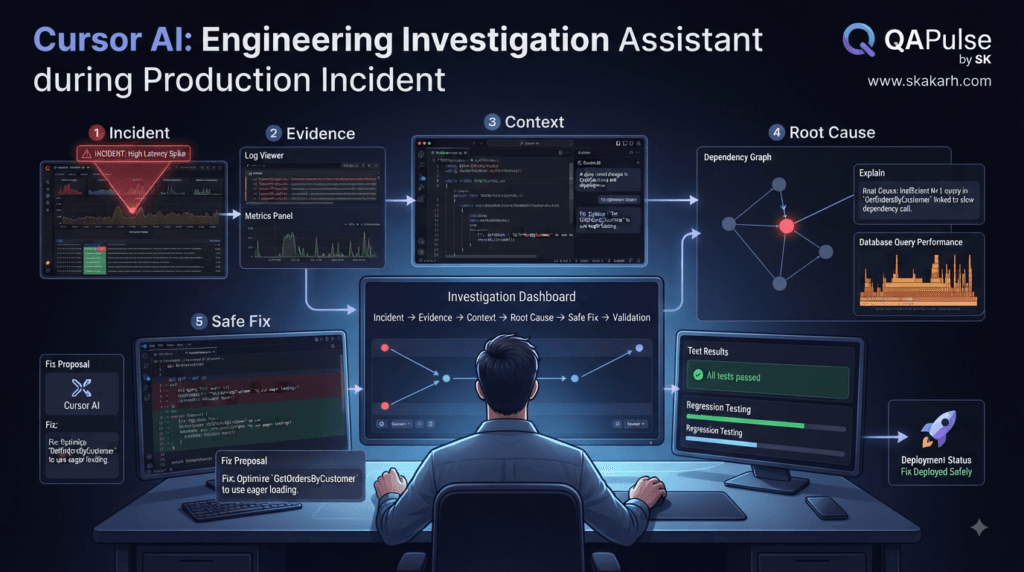
Understanding Validation as Part of Context
A common mistake is treating validation as something that happens after AI-generated code.
Validation should be part of the original task context.
Instead of:
Implement the feature.
include:
Success criteria:
- unit tests pass
- API tests pass
- TypeScript compilation passes
- lint passes
- existing E2E tests remain stable
Now Cursor AI knows what “done” means.
A useful model is:
Implementation
      ↓
Expected behavior
      ↓
Validation method
For example:
Requirement:
Prevent duplicate checkout.

Implementation:
Idempotency handling.

Validation:
Concurrent checkout test.
Strategy: Ask for Negative Testing
AI-generated implementations often focus on the happy path.
Add explicit negative scenarios:
Validate:
- missing input
- invalid input
- unauthorized access
- duplicate requests
- timeout
- network failure
- database failure
- malformed external response
- concurrent requests
This is especially important for AI-generated backend and API code.
For example:
test('rejects duplicate checkout requests', async () => {
  const [first, second] = await Promise.all([
    checkout(request),
    checkout(request)
  ]);

  expect([first.status, second.status]).toContain(409);
});
The exact assertion depends on the application’s contract, but the principle is important:
Test the failure modes implied by the business rules.
Strategy: Make the AI Compare Against Existing Behavior
When modifying an existing feature:
Compare:
- current behavior
- proposed behavior
- expected behavior
A useful request:
Create a behavior comparison.

Current:
[behavior]
Required:
[behavior]
Identify: – what must change – what must remain unchanged – possible regressions – tests proving both
This is particularly useful when changing APIs or business workflows.
Strategy: Review the Final Diff With Context
After implementation, do not simply ask:
Does this code look good?
Use the original requirements:
Review the final diff against:

Goal:
[...]

Business invariants:
[...]

Constraints:
[...]

Non-goals:
[...]

Acceptance criteria:
[...]

Identify:
- unmet requirements
- unnecessary changes
- regressions
- security issues
- missing tests
- architectural inconsistencies
This closes the loop.
The same context used for implementation becomes the context used for validation.
A Complete Context Engineering Workflow
A practical Cursor AI workflow can look like this:
1. Define the task
        ↓
2. Establish current behavior
        ↓
3. Identify relevant components
        ↓
4. Collect repository patterns
        ↓
5. Identify business rules
        ↓
6. Define constraints and non-goals
        ↓
7. Investigate unknowns
        ↓
8. Map impact
        ↓
9. Propose smallest safe solution
        ↓
10. Implement
        ↓
11. Review diff
        ↓
12. Run validation
        ↓
13. Check requirements again
This transforms AI coding from a generation-centric workflow into an engineering-centric workflow.
The Context Quality Formula
You can think about context quality using a simple conceptual model:
Context Quality
=
Relevance
×
Accuracy
×
Completeness
×
Clarity
If one factor is extremely weak, the overall result suffers.
For example:
Excellent code
+
Wrong business assumption
=
Wrong solution
Or:
Correct requirement
+
Missing dependency context
=
Potential regression
Or:
Complete repository context
+
Unclear objective
=
Unfocused implementation
Good AI-assisted engineering requires all four dimensions.
A Practical Cursor AI Context Checklist
Before a significant AI-assisted change, ask:
[ ] Is the task clearly defined?

[ ] Is the current behavior known?

[ ] Is the expected behavior explicit?

[ ] Are relevant components identified?

[ ] Are important dependencies understood?

[ ] Are business rules documented?

[ ] Are invariants identified?

[ ] Are constraints explicit?

[ ] Are non-goals defined?

[ ] Are existing project patterns available?

[ ] Are relevant tests identified?

[ ] Are unknowns documented?

[ ] Is the blast radius understood?

[ ] Is validation defined?

[ ] Is the final diff reviewed against the requirements?
The more important the change, the more valuable this checklist becomes.
People Asked Questions
What is Cursor AI context engineering?
Cursor AI context engineering is the practice of providing an AI coding assistant with the relevant repository information, requirements, constraints, business rules, dependencies, and validation evidence needed to make reliable coding decisions.
Why is context important in Cursor AI?
Context helps Cursor AI understand the relationships between files, dependencies, tests, business rules, and architectural constraints instead of generating code based only on a short task description.
How do I give Cursor AI better context?
Give Cursor AI the relevant files, project rules, existing implementation patterns, tests, requirements, constraints, runtime evidence, and acceptance criteria instead of unnecessarily providing the entire repository.
Can Cursor AI understand a large codebase?
Cursor AI can work with large repositories, but developers should still guide it toward relevant files, symbols, dependencies, documentation, tests, and project rules for complex tasks.
How can Cursor AI help with debugging?
Cursor AI can analyze source code together with logs, stack traces, Git changes, tests, API responses, and runtime evidence to investigate possible root causes.
How do I prevent Cursor AI from making unnecessary changes?
Define explicit constraints, non-goals, allowed files, protected areas, and acceptance criteria. Asking the AI to investigate before modifying files can also reduce unnecessary changes.
Is Cursor AI useful for refactoring legacy code?
Yes. Cursor AI can help analyze dependencies, identify duplicated logic, discover tests, map business rules, and propose controlled refactoring while preserving existing behavior.
What is the difference between context and code generation?
Code generation produces implementation. Context provides the information needed to determine what implementation is appropriate, safe, and consistent with the existing system.
AI Overview Optimization
Question: What is Cursor AI context engineering?
Cursor AI context engineering is the practice of giving Cursor AI the relevant codebase information, requirements, dependencies, business rules, constraints, and validation evidence required to make reliable software engineering decisions.
Internal Links:
- Learn MCP – Zero to Hero
- Learn AI Agents for QA – Zero to Hero
- Playwright Automation – Zero to Hero
- TencentDB Agent Memory: Complete Zero to Hero
- LangGraph: Complete Zero to Hero
- Learn Python – Zero to Hero
- OpenAI Codex: Complete Zero to Hero
- Cursor AI: Complete Zero to Hero
- Claude Code Tutorial: Complete Zero to Hero
- AutoGen: Complete Zero to Hero Guide
- Free QA Resources Built From Real Experience
- QA Glossary: Test Automation Terms Every Engineer Should Know
External Resources:
- Model Context Protocol documentation
- Playwright documentation
- GitHub documentation
- TypeScript documentation
- Prompt Engineering Overview
- Git Documentation
- Visual Studio Code
- Cursor AI
- Cursor Documentation
Conclusion
Cursor AI is most powerful when it is used as more than a code generator.
The real advantage comes from combining AI coding capability with disciplined context engineering.
A strong workflow does not simply tell Cursor AI what code to write.
It explains:
What is happening
Why it matters
Where it happens
What must remain true
What cannot change
What evidence exists
How success will be measured
That information allows the AI to reason about the system instead of merely producing plausible code.
The strongest developers using AI will not necessarily be those who write the longest prompts.
They will be the developers who can identify the right context, remove irrelevant noise, expose hidden constraints, and validate the resulting decisions.
Final Key Takeaways
- Cursor AI works best with relevant context, not maximum context.
- Repository access does not automatically equal architectural understanding.
- Trace behavior and dependencies instead of focusing only on files.
- Separate facts, assumptions, and unknowns during investigation.
- Give AI business rules and invariants, not only technical requirements.
- Use existing project patterns instead of allowing unnecessary reinvention.
- Define constraints and non-goals to control the change boundary.
- Use tests, logs, Git history, metrics, and documentation as engineering evidence.
- Analyze impact and blast radius before making high-risk changes.
- Protect important behavior with tests before major refactoring.
- Include validation criteria in the task from the beginning.
- Ask Cursor AI to investigate before modifying complex systems.
- Review the final diff against the original requirements, invariants, and constraints.
- The goal is not more AI-generated code; the goal is more reliable engineering decisions.
The Core Strategy
Better Context
      ↓
Better Reasoning
      ↓
Better Implementation
      ↓
Better Validation
      ↓
More Reliable AI-Assisted Software
That is the foundation for using Cursor AI effectively in serious software engineering workflows.
Continue Learning
Explore more expert articles on n8n, Autogen, Postman AI, Cursor AI, LangChain, CrewAI, MCP Servers, AI Agents, LlamaIndex, Docker, FastAPI, Playwright, Cypress, Test Automation, DevOps, and Software Engineering at www.skakarh.com.
QAPulse by SK delivers expert release analysis, AI engineering insights, enterprise automation strategies, migration guidance, DevOps best practices, and practical testing knowledge to help software professionals build scalable, intelligent, and production-ready software systems.


